


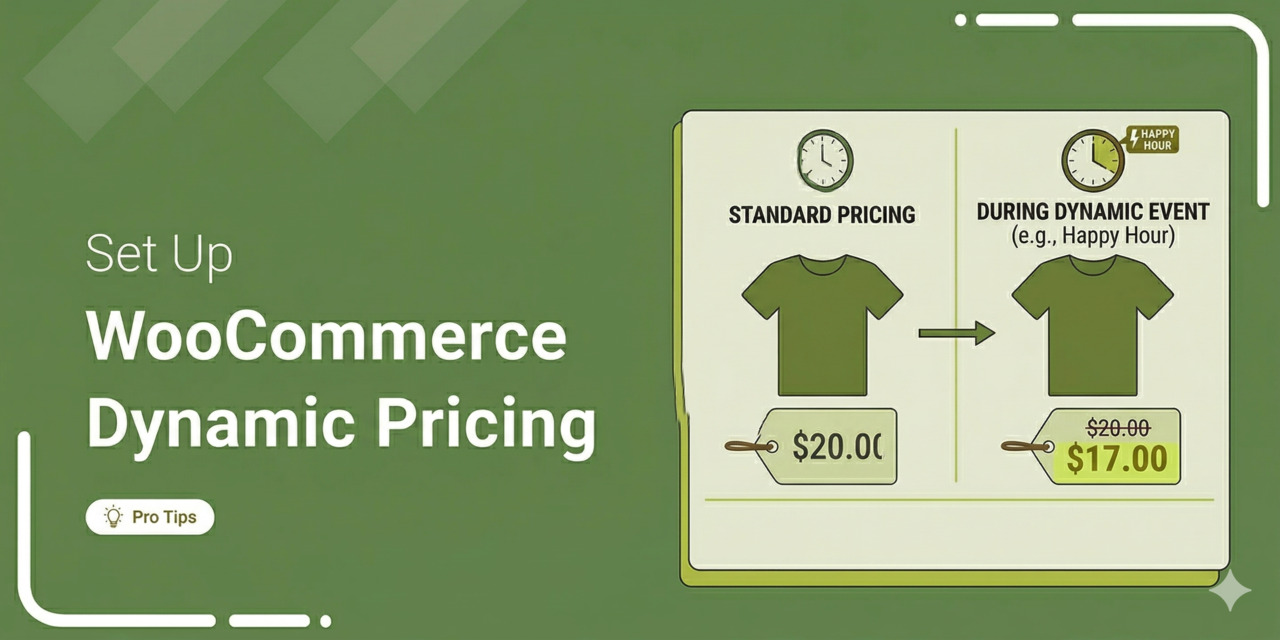
If you're running a WooCommerce store, you already know that a single, static price tag doesn't always cut it.
A first-time browser needs a different nudge than a wholesale buyer loading up 500 units. A loyalty member expects perks a guest shopper doesn't. And during Black Friday or Cyber Monday, shoppers hunt for discounts.
That's where WooCommerce dynamic pricing comes in.
Dynamic pricing lets you automatically adjust product prices based on rules you define, such as quantity tiers, user roles, cart totals, purchase history, or even time-based promotions.
Instead of manually editing prices every time you want to run a deal, you set the logic once and let your store handle the heavy lifting.
In this guide, we'll walk through exactly how dynamic pricing works in WooCommerce, the best plugins to set it up, and practical pricing strategies that actually move the needle on conversions and average order value.
Whether you're selling physical products, digital downloads, or subscriptions, this guide is for you.
Table of Contents
- 1 What Is WooCommerce Dynamic Pricing (And Why It Matters)?
- 2 Types of WooCommerce Dynamic Pricing Rules
- 3 How to Set Up Dynamic Pricing in WooCommerce?
- 4 Go Beyond Cart-Based Dynamic Pricing in WooCommerce
- 5 Real-World Dynamic Pricing Scenarios for WooCommerce
- 6 7 Best WooCommerce Dynamic Pricing Plugins Compared
- 7 Proven Best Practices to Get More Revenue From Your Pricing Rules
- 8 Frequently Asked Questions
- 9 Start Selling Smarter With WooCommerce Dynamic Pricing!
What Is WooCommerce Dynamic Pricing (And Why It Matters)?
WooCommerce dynamic pricing is a strategy in which product prices adjust automatically based on predefined rules and conditions, such as user roles, past purchases, or the specific items they just added to their cart.
They log in and they see their specific price. If a wholesale customer adds 50 units, the unit cost drops instantly.
Cart abandonment decreases because shoppers see the savings immediately, rather than hoping a promo code will work at checkout.
Why Dynamic Pricing Matters for Your WooCommerce Store
Most store owners type in a price and never touch it again. This is a huge mistake. A static approach treats a VIP exactly the same as a bot crawling your site.
Here is why we recommend dynamic pricing for your store:
- Increase average order value with quantity incentives: Paperstone ran a split test offering bulk discounts and saw an 18.94% jump in average order value. If they buy two, give them 5% off. Four? 10% off. Volume moves.
- Move slow-selling inventory faster: You have SKUs that aren't moving. A rule targeting specific dead categories gets them out the door fast. Cash flow improves. Warehouse fees drop.
- Reward loyal, high-value customers: Wholesale buyers require different margins. Logged-in returning shoppers deserve a break. Set a rule that triggers a permanent 10% discount the moment a customer hits their fifth order.
- Stay competitive: Don't slash prices for everyone. Dynamic pricing protects your margins on standard orders while still winning price-sensitive buyers with conditional offers.
- Automate your promotional strategy: VIP launches. Flash sales. Holiday blowouts. You do not need to stay up until midnight changing 400 product prices.
Around 30% of ecommerce companies already use some form of dynamic pricing strategy. If your WooCommerce store is still using flat pricing for every customer, you are likely leaving revenue on the table.
Types of WooCommerce Dynamic Pricing Rules
Before we dive deep into the setup, understand the different types of pricing rules you can create.
Most WooCommerce dynamic pricing plugins support some or all of the following rule types. It becomes quite crucial to choose the right one based on your products, your customers, and what you are trying to achieve.
1. Bulk or quantity-based pricing
The unit price decreases as the customer orders a higher quantity of the same product.
For example, charge $10 per unit for 1-5 items, $9 per unit for 6-10 items, and $8 per unit for 11 or more items.
It's best for consumable products, office supplies, health supplements, or anything customers buy repeatedly in larger quantities.
2. Tiered pricing
Tiered pricing is similar to bulk pricing but applies differently. Here, each pricing tier applies only to the units within that range.
For example, the first 5 units cost $10 each, units 6 through 10 cost $9 each, and units 11 and above cost $8 each.
This pricing model is common in B2B stores, wholesale operations, and any high-volume store.
3. Cart-based discounts
These rules are triggered by the total value or quantity of items in the cart, regardless of which specific products are included.
For example, you might offer 10% off orders above $100. You can even apply tiered discounts, such as a 15% discount, if the cart total reaches $150.
Cart-based discounts are effective at increasing average order value across your entire product catalog.
4. Role-based pricing
WooCommerce assigns a role to every user, and dynamic pricing plugins can leverage this for targeted pricing.
Create rules that offer wholesale customers 20% off all products, give members a special rate, or reward VIP customers with exclusive discounts.
This is especially useful for stores that serve both retail and wholesale buyers from the same product catalog. Many plugins also support pricing by individual user ID or email domain, which is useful for corporate or B2B accounts.
5. BOGO (and buy x get y deals)
Buy One Get One (BOGO) deals and their variations are powerful promotional tools.
Offer "buy 2 get 1 free", "buy 3 get the cheapest item free", or "buy product A and get product B at 50% off".
These deals are effective for clearing inventory, launching new products, or running seasonal promotions.
6. Category-based and product-specific rules
You can target pricing rules at specific products, product categories, product tags, or even individual product variations.
For example, run a 15% discount on your entire "Summer Collection" category, or offer special pricing on a specific product variation, such as the XL size of a t-shirt.
Combining category rules with other conditions, like a minimum quantity or user role, gives you layered flexibility for complex promotional strategies.
7. Purchase history-based pricing
Some plugins let you create pricing rules based on a customer's past order data.
You can offer a discount to customers who have placed more than 5 orders, spent over $500 in total, or previously purchased a specific product.
This way, you can reward repeat buyers and increase customer lifetime value without offering blanket discounts to first-time visitors.
8. Scheduled and seasonal pricing
Time-based pricing rules let you create promotions that automatically activate and deactivate based on a date range, specific days of the week, or even the time of day.
Set up Black Friday pricing weeks in advance, run weekend-only flash sales, or create early-bird discounts that expire after a set period.
Scheduling removes the manual work of enabling and disabling promotions and prevents the common mistake of forgetting to turn off a sale.
How to Set Up Dynamic Pricing in WooCommerce?
To set up dynamic pricing in WooCommerce without writing any code, we will use FunnelKit Cart.
This is one of the most popular WooCommerce cart plugins, supporting dynamic pricing with milestone-based rewards such as discounts, free shipping, and gifts.
Follow the step-by-step instructions below to set up dynamic pricing rules in your store right inside their shopping cart.
Step 1: Enable FunnelKit Cart in your WooCommerce store
Navigate to FunnelKit ⇨ Cart and turn on the toggle to 'Enable Cart' option.
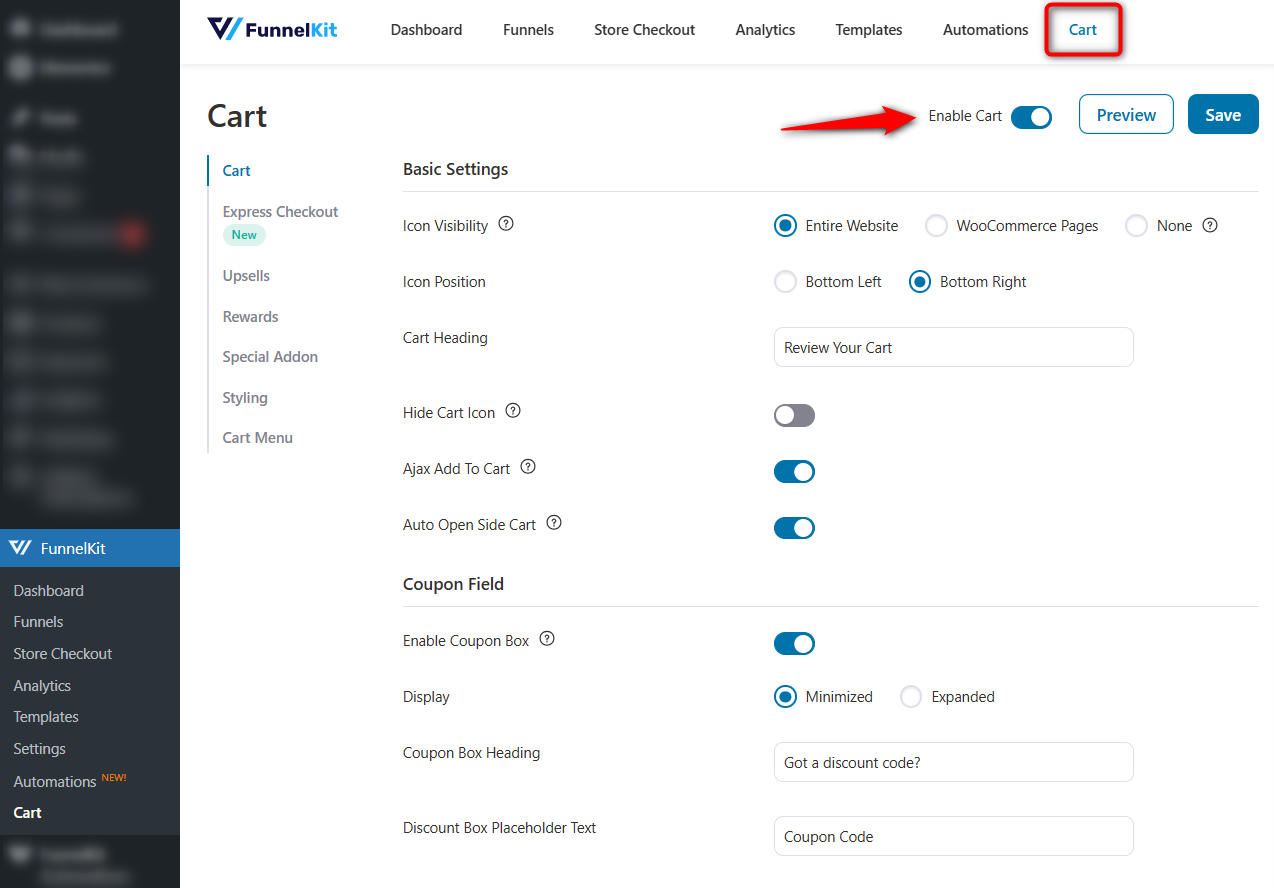
This will activate the side cart in WooCommerce.
Shoppers can now directly access their cart items and modify them from here. It also takes them straight to checkout, bypassing the redundant cart page.
Step 2: Set up threshold-based rewards
To offer dynamic pricing for products based on cart value, set up threshold-based rewards.
To do this, go to the Rewards tab and click 'Create Reward'.
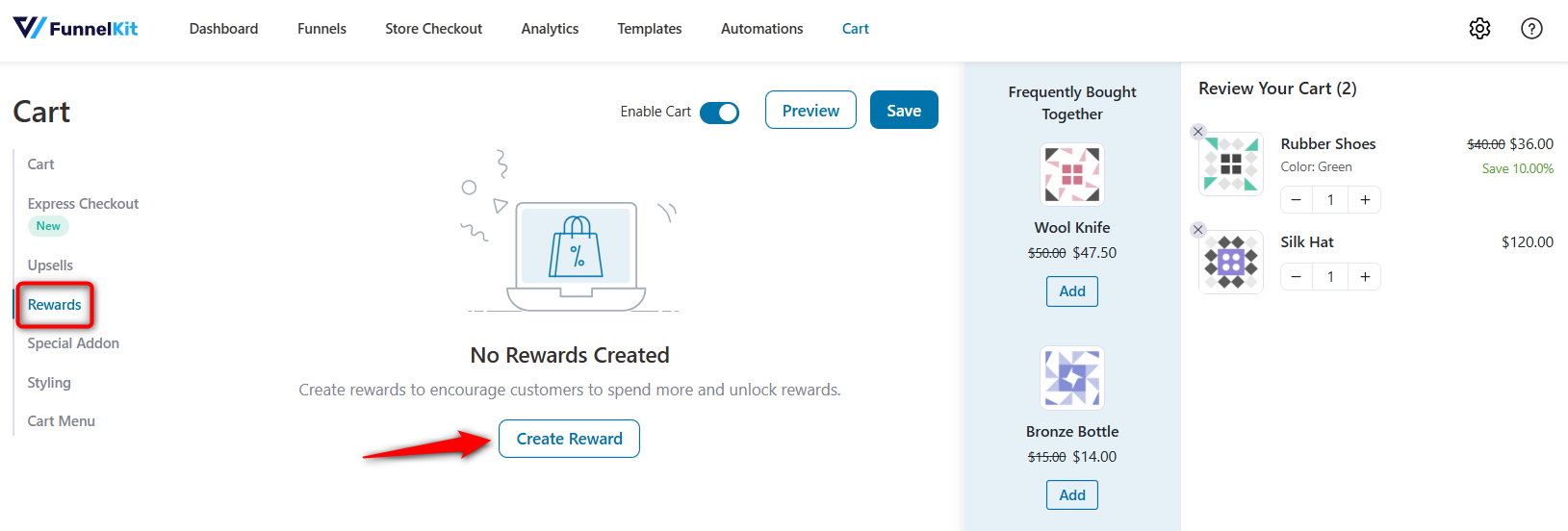
Here, you can offer three types of rewards:
- Free shipping
- Discount
- Free gift
Let's create a tiered pricing discount here.
A 10% discount will be applied when the cart total reaches $100, and a 20% discount when it reaches $175.
Select 'Discount', enter the amount to get the reward, and the 10% off coupon.
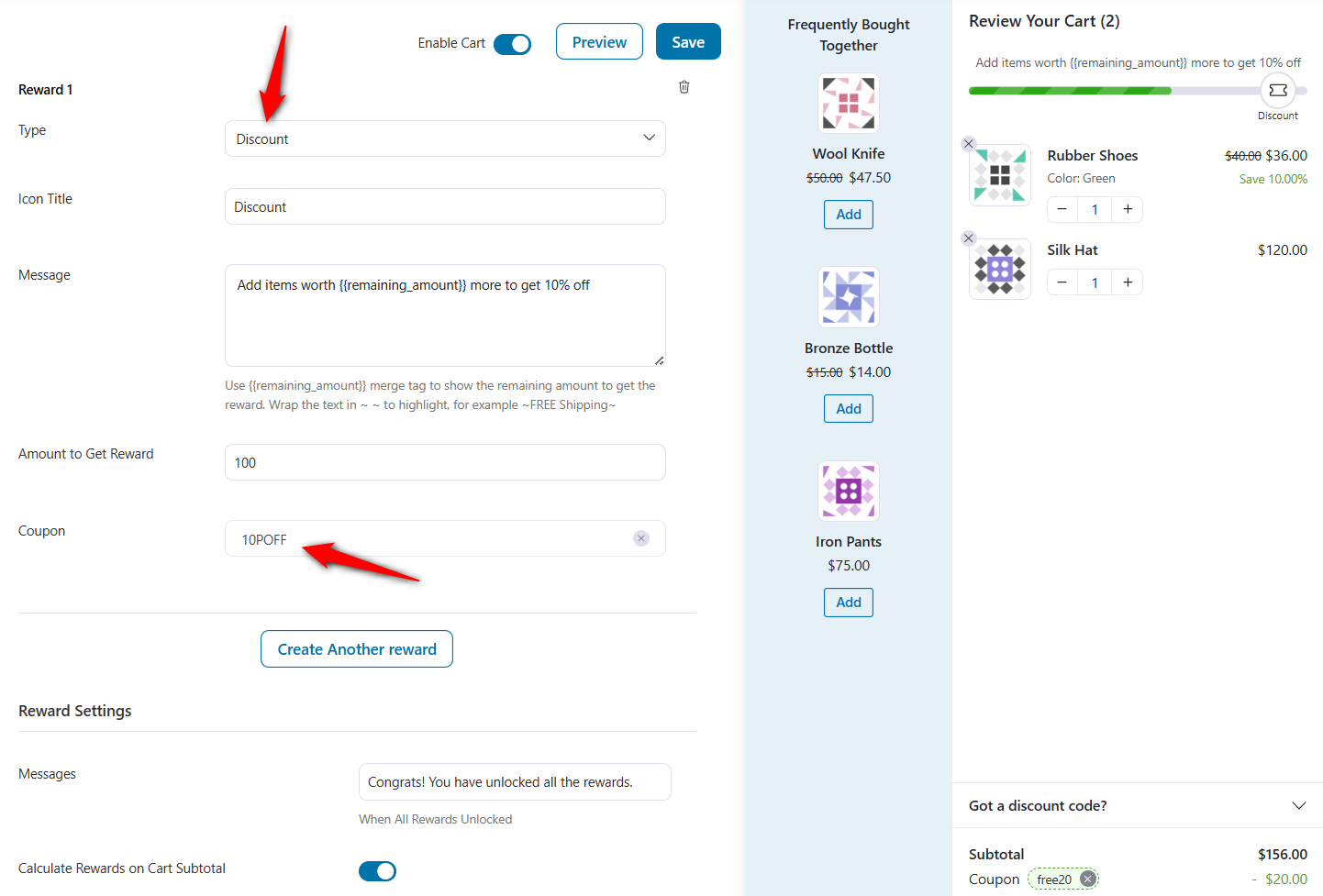
Repeat the process to create another reward: 20% off when the cart total reaches $175.
Once done, hit 'Save'.
You can even set up smart cart upsells to boost average order value, helping you hit those dynamic pricing thresholds faster.
Step 3: Test and verify your dynamic pricing in WooCommerce
Add a product to the cart, adjust the quantity to trigger your pricing tiers, and verify that the correct discounts appear in the cart and at checkout.
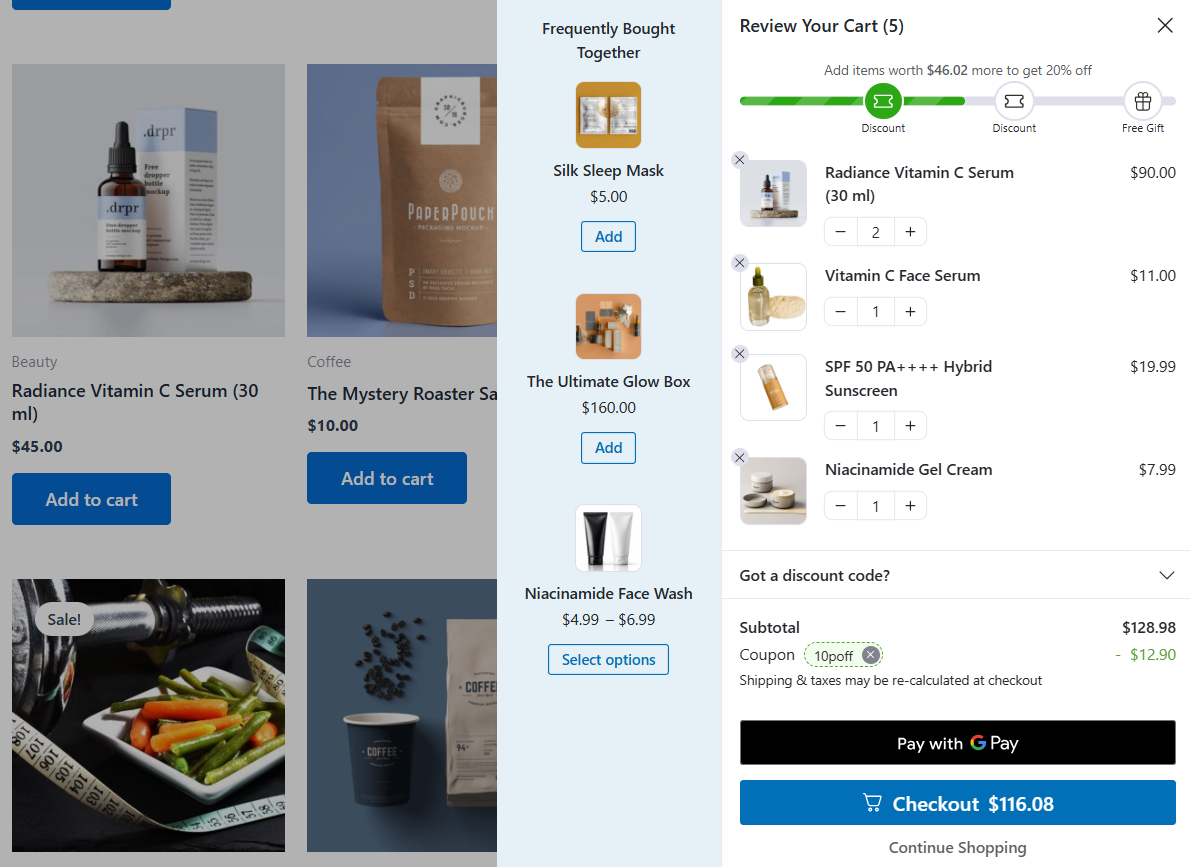
Place a test order to confirm the final order total is accurate.
Test on both desktop and mobile devices to ensure the pricing table displays correctly on smaller screens and the cart updates smoothly when quantities change.
Go Beyond Cart-Based Dynamic Pricing in WooCommerce
If you want to go beyond cart discounts, consider using the Dynamic Discount Rules for WooCommerce plugin by Acowebs.
It supports percentage discounts, quantity-based rules, cart-based discounts, and BOGO deals.
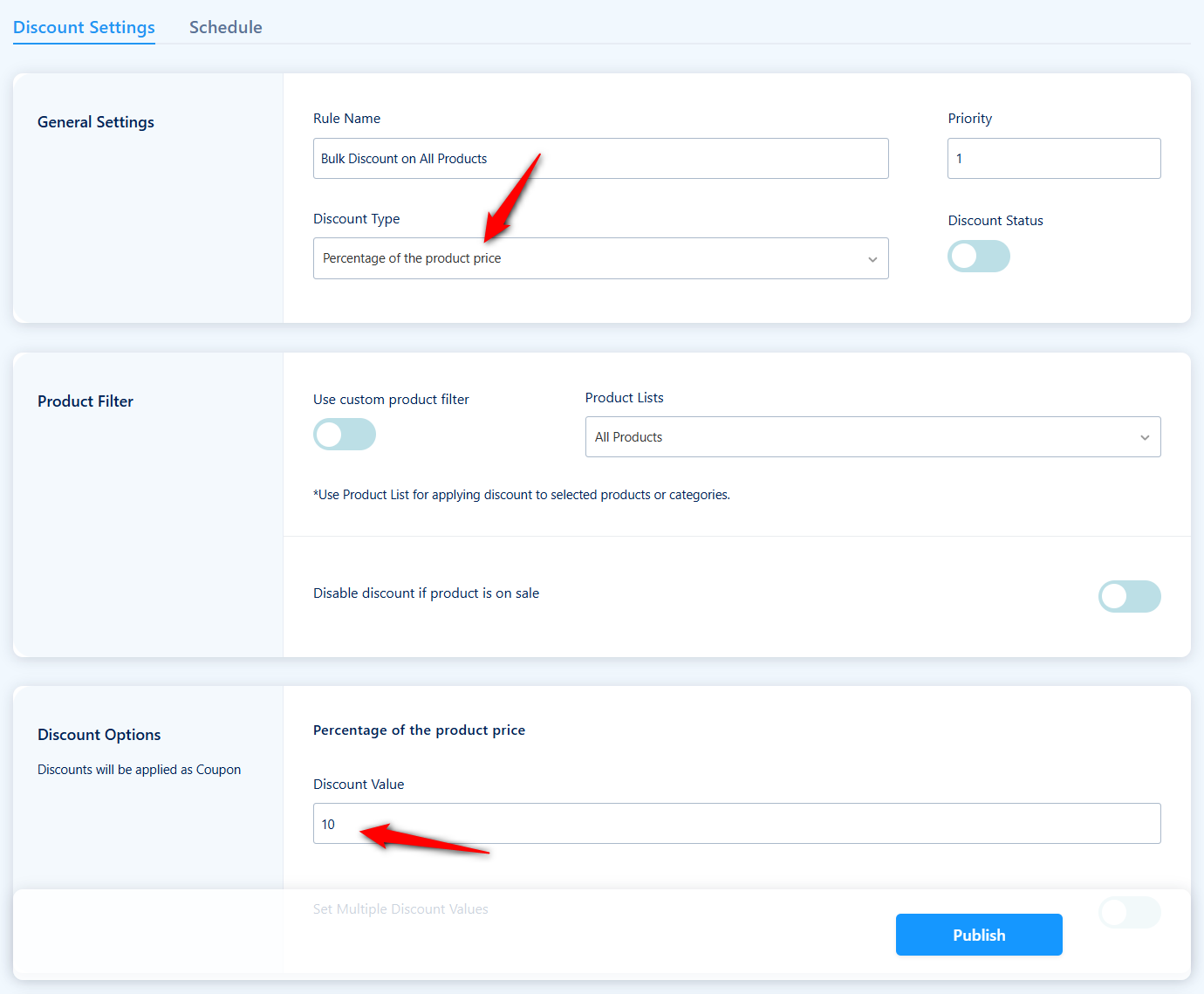
- Offer 10% on all products with prices above $50
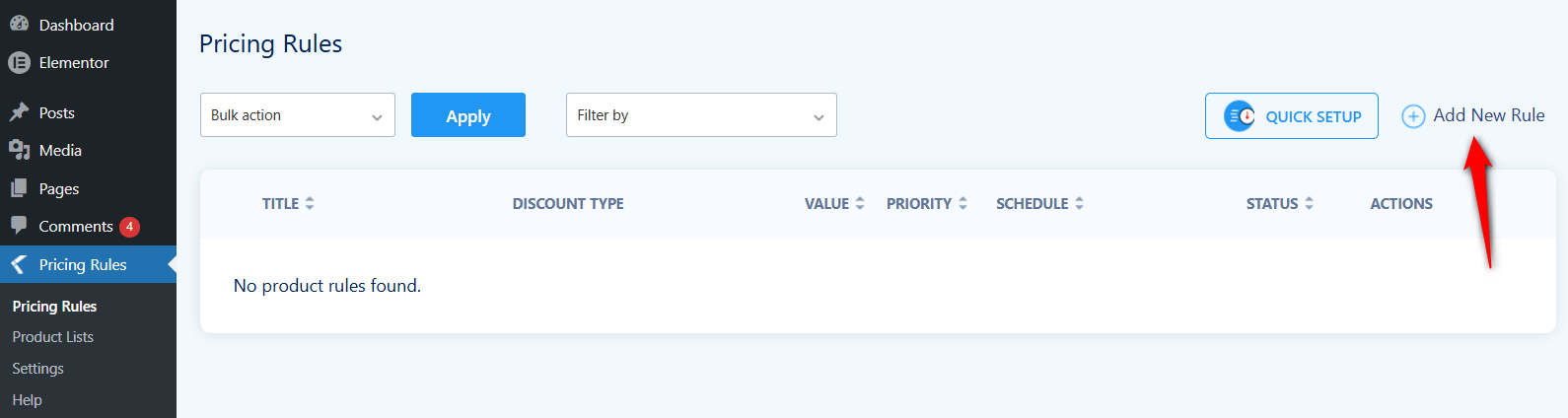
Once you've activated the plugin, click on 'Add New Rule' to start building your first pricing rule.
Give your rule a descriptive name, such as "Bulk Discount on All Products" and offer 10% off.
A clear name makes it easy to manage multiple rules later, especially when you have several active at the same time.
For the rules, set up a product price above $50.
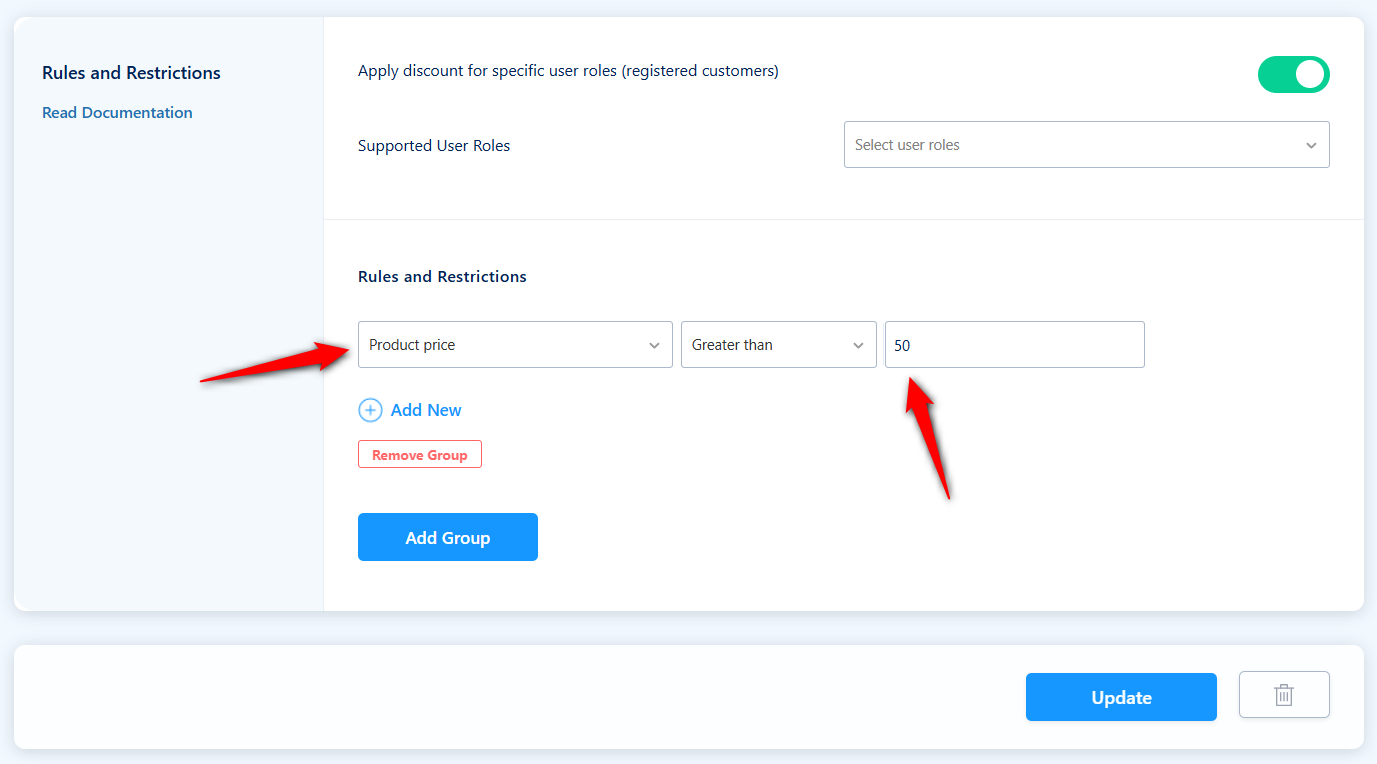
Click on 'Update' to save your changes.
Next, schedule the dynamic discounts for specific dates.
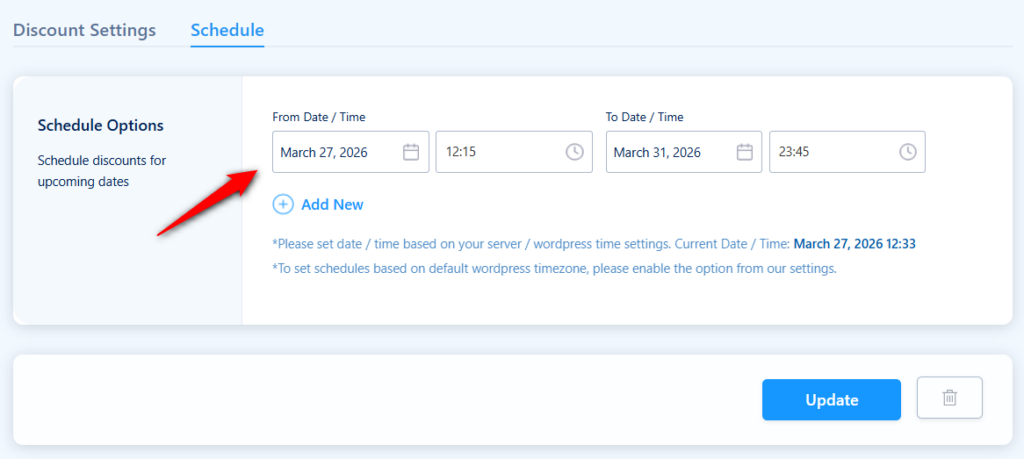
- Quantity discounts
For a quantity-based bulk discount, select “Quantity Discounts” and then choose your discount options.
Set 1 to 4 units at full price, 5 to 9 units at 10% off, and 10 or more units at 20% off.
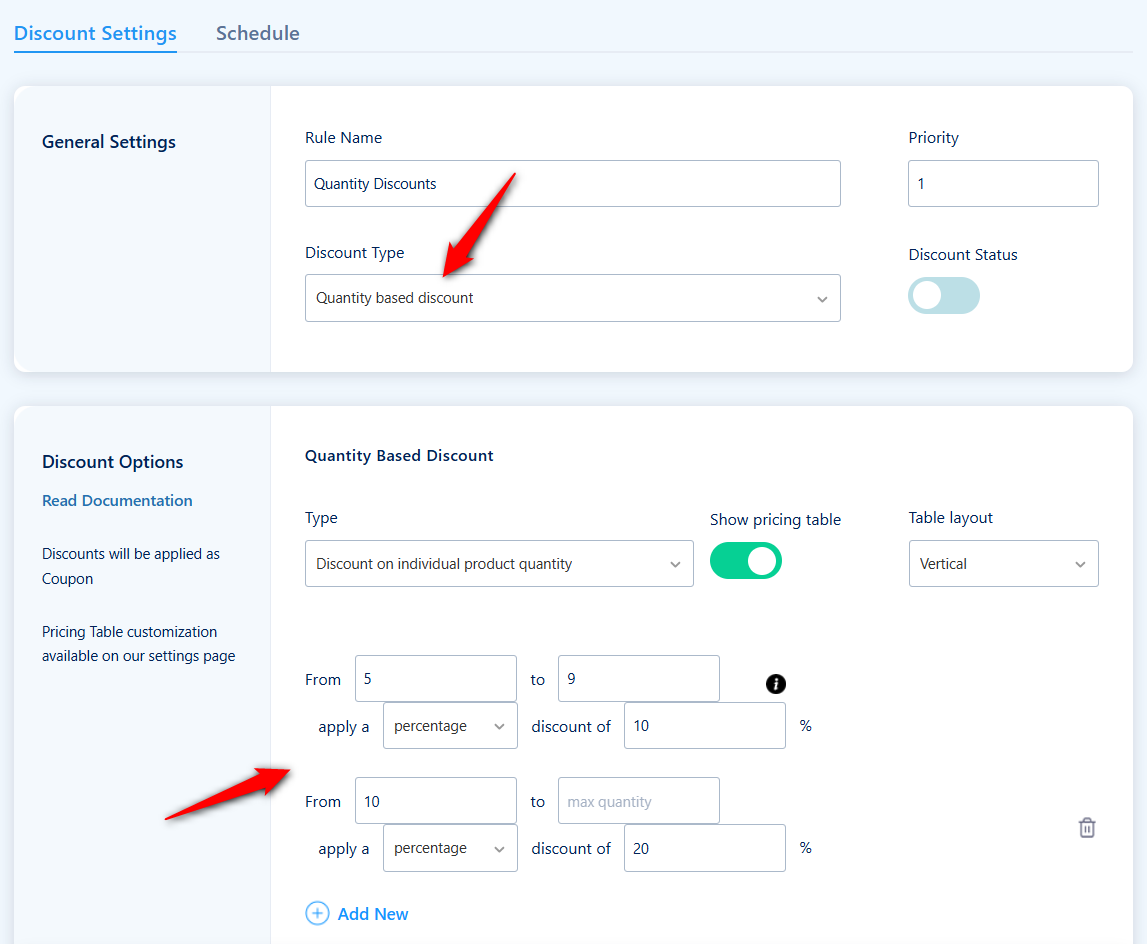
The plugin will display these tiers as a pricing table on the product page, so customers can see exactly how much they save by ordering more.
Well done! This is how you can set up dynamic pricing for products in WooCommerce.
Real-World Dynamic Pricing Scenarios for WooCommerce
Understanding rule types is one thing. Seeing how they apply to real store situations makes the strategy concrete.
Here are six common pricing scenarios WooCommerce store owners implement with dynamic pricing plugins.
1. Wholesale tiered pricing for B2B customers
Let's say you sell roasted coffee at a retail price of $14 per bag.
But when a local cafe owner logs in to their wholesale account, the prices automatically adjust based on volume. The wholesale price goes to maybe $12 for 10 bags and $9 for 50.
Regular retail visitors never see these margins. While wholesale users just log in and see their pricing automatically.
2. Buy 3, get the cheapest free across a category
Imagine a boutique pushing accessories with a basic "3 for 2" offer. A shopper adds three rings and the lowest-priced item drops to zero. No manual math required.
The plugin automatically configures the discount directly in the cart.
3. Spend $75 and get free shipping plus 5% off
An online supplement store wants to increase average order value. A cart-based rule applies a 5% discount and free shipping when the cart total crosses $75.
Using a tool like FunnelKit Cart, customers see a visual progress bar inside the cart that says "Add $18 more for FREE shipping + 5% off".
Shoppers can easily see the progress reward bar update in real time whenever a product is added. This encourages them to add one more item just to reach the threshold for the discount.
4. Loyalty discount after 5 orders
A pet food store wants to reward returning customers. So they applied a rule for customers who have placed 5 or more purchases in the past, get 10% off.
No need to apply any discount at checkout. The system handles the loyalty game completely hands-off.
5. Seasonal sale on one product category
A home decor store schedules a 20% discount on all items in the “Outdoor Furniture” category from May 1 to May 31.
The sale activates and deactivates automatically. Products in the category display strikethrough pricing with the discounted price throughout the sale period.
7 Best WooCommerce Dynamic Pricing Plugins Compared
The plugin landscape for WooCommerce pricing rules is crowded. After reviewing the major options, here's a comprehensive breakdown organized by what kind of store each suits best.
| Plugin | Best For | Price |
|---|---|---|
| Dynamic Pricing With Discount Rules for WooCommerce (Acowebs) | Lightweight pricing rules at a lower cost, with a powerful free version | Free version available. Pro starts at $49/year |
| FunnelKit Cart for WooCommerce | Dynamic sliding cart with threshold-based discounts based on cart value | Free version. Pro is included with Funnel Builder ($179.50/year) |
| Discount Rules for WooCommerce (Flycart) | All-round pricing rules with strong BOGO and cart discount support | Free plan. Premium starts at $85/year |
| YITH Dynamic Pricing & Discounts | Stores needing advanced BOGO logic, gift products, and extensive rule conditions | Starts at $144.99/year |
| Advanced Dynamic Pricing For Woocommerce (AlgolPlus) | Stores wanting a powerful free option with bulk, role, BOGO, and gift rules | Free version. Premium plan starts at $60/year |
| YayPricing - WooCommerce Dynamic Pricing & Discounts | Stores that prefer a one-time payment over annual renewals | Free version available. Pro starts at $99/year |
| ELEX WooCommerce Dynamic Pricing and Discounts | Product-specific and combination rule setups | Free plan. Premium plan starts at $99/year |
The feature list matters, but so does how the plugin handles a few critical details.
First, check how it manages rule conflicts. If a customer qualifies for multiple discounts at the same time, the plugin should let you set priority levels and choose whether to stack discounts or apply only the best one.
Second, look at frontend display options. Customers should see the discount clearly on the product page and in the cart, not just at checkout.
Third, check performance. Plugins that run complex pricing calculations on every page load can slow down your store, especially if you have hundreds of products and dozens of active rules.
Acoweb's Discount Rules plugin stands out for its generous free version and an interface that makes complex rules easy to build.
YITH is a strong alternative for stores that need extensive BOGO logic and gift product features, though it comes at a higher price point and has no free tier plugin.
For stores looking for a powerful free option, Advanced Dynamic Pricing by AlgolPlus offers bulk, role, BOGO, and gift rules without requiring a paid upgrade.
Complement your pricing rules with in-cart rewards and checkout optimization
Dynamic pricing plugins handle the rule logic, but the cart and checkout experience is where you turn those rules into higher revenue.
FunnelKit Cart adds milestone-based rewards directly inside the cart, such as free shipping thresholds, percentage discounts at certain cart values, and free gifts with purchase, all with a visual progress bar that motivates customers to add more.
It also displays product recommendations inside the cart, so customers discover complementary items without leaving the page.
On the checkout side, FunnelKit Funnel Builder lets you add order bumps, one-click post-purchase upsells, and optimized checkout layouts.
For example, after a customer adds 5 items to unlock a bulk discount, you can present a related product as a one-click order bump on the checkout page.
This way, you can increase your store's average order value beyond what the pricing rules generate.
Proven Best Practices to Get More Revenue From Your Pricing Rules
Let's look at some key tips to take the most advantage of dynamic pricing for your WooCommerce store.
- Show savings clearly on the product page
Display a bulk pricing table or a "You Save X%" badge directly on the product page.
People buy more when they see the exact savings at each tier before adding items to their carts.
- Keep your pricing rules simple
Avoid stacking too many overlapping discount rules. Stacking a BOGO deal on top of a role-based discount and a weekend flash sale just confuses people, and confused shoppers abandon their carts.
Cap it at two or three active rule types at a time and communicate clearly about what the deal is.
- Use time-limited pricing rules to create urgency
Set start and end dates on your dynamic pricing rules for seasonal sales, flash promotions, or product launches.
Putting an "ends in 1 hour" notice next to a pricing tier is usually enough to get fence-sitters to finally pull the trigger.
- Test different discount thresholds before committing
Stop guessing your thresholds. Don't just assume a "buy 3" discount will always work in your favor.
A/B test different pricing tier structures to see what actually boosts your average order value, conversion rate, and profit margin over a period of time.
- Avoid discounting below your profit floor
Volume discounts mean nothing if you lose money on the shipping.
Figure out the absolute lowest price for each product before creating your dynamic pricing, and set that hard floor directly into the plugin settings.
- Segment your customers with role-based pricing
Lock specific deals behind user roles. A distributor ordering two pallets should not see the same frontend prices as a guy buying one t-shirt.
By linking discounts to specific accounts, your retail margins stay brilliant while B2B buyers get their volume rates automatically applied the second they log in.
- Monitor rule performance and adjust regularly
Regularly review which pricing rules drive the most revenue and which are being ignored.
If a bulk discount tier is rarely triggered, the quantity threshold might be too high. If a BOGO deal is cutting into margins, tighten the conditions or add a minimum cart value requirement.
Treat your pricing rules like living campaigns, not permanent settings.
Frequently Asked Questions
The WooCommerce dynamic pricing works by creating one or more pricing rules with conditions (such as quantity, user role, or cart total) using a plugin. Based on those conditions, the product prices are automatically adjusted. The pricing change is visible on the product page, in the cart, and at checkout. No code is required for most setups.
It depends on the plugin. Some dynamic pricing plugins support conditional discounts on subscription-based products, such as offering a discount on the first subscription order or giving active members a percentage off all purchases.
For membership-based pricing, you can assign a custom user role to members and create role-based pricing rules. Check your specific plugin's documentation for compatibility with subscriptions and memberships.
This depends on your plugin and how you configure rule priorities. Most plugins let you choose whether to apply only the highest-priority rule, stack multiple discounts, or apply the best discount for the customer.
We recommend setting clear priorities and testing edge cases in which a product or cart qualifies for multiple rules to avoid unintended discount stacking.
You can use WooCommerce hooks like woocommerce_product_get_price and woocommerce_cart_calculate_fees to create basic pricing rules with PHP.
However, this approach requires ongoing maintenance, lacks a user interface for managing rules, does not automatically display pricing tables or strikethrough pricing, and quickly becomes complex as you add conditions. For most stores, a dedicated plugin is the faster, safer, and more reliable option.
No, WooCommerce dynamic pricing is not the same as tiered pricing. Dynamic pricing is the broader category that includes tiered pricing, bulk pricing, cart-based discounts, role-based pricing, BOGO deals, and more. Tiered pricing is a specific type in which different price rates apply to different quantity ranges within a single order.
The main limitations include potential page speed impact from many active rules, rule-conflict complexity when multiple discounts overlap, limited customization of multi-currency discounts, possible structured data mismatches for SEO, and compatibility concerns with WooCommerce’s newer block-based cart and checkout. Some plugins also modify stored prices rather than filtering them, which can cause issues if the plugin is deactivated.
Start Selling Smarter With WooCommerce Dynamic Pricing!
Customers expect personalized, context-aware pricing. They expect bulk savings to appear automatically. They expect member benefits to kick in without entering codes.
That's why dynamic pricing is one of the most effective ways to increase average order value, serve different customer segments with the right price, and run promotions that actually protect your margins.
We recommend starting with WooCommerce Dynamic Pricing with Discount Rules by Acowebs for your pricing rules, pairing it with FunnelKit Cart for in-cart milestone rewards and product recommendations, and adding FunnelKit Funnel Builder for order bumps and one-click upsells at checkout.
Together, they give you a complete revenue optimization stack, with pricing rules that encourage larger orders, cart rewards that push customers past spending thresholds, and checkout offers that maximize the final order value.
Measure AOV and conversion rate before and after. Then layer on advanced strategies as you learn what your specific customers respond to.

Editorial Team
March 30, 2026Discover how to boost sales and customer loyalty with three smart ways to offer free gifts in your WooCommerce store. Want to boost WooCommerce sales and delight your customers? Offer...

Editorial Team
March 27, 2026Want to turn one-time buyers into customers who keep coming back using WooCommerce? Then you need to find a WooCommerce subscription plugin. These plugins will help you automate billing, manage...
Editorial Team
March 25, 2026Forcing buyers to retype their credit card numbers is killing your conversion rate. A WooCommerce one click checkout fixes this. It strips out the forms. Baymard Institute's analysis of 50...






