The right WooCommerce landing page plugin can help you build pages that convert better. According to Call Digital Fire’s 2026 analysis, optimized landing pages can achieve conversion rates of 6–11%, compared with 2–3% for less effective pages.
Even a small increase in conversion rate can mean significantly more customers from the same amount of traffic.
Same budget. Same traffic. A completely different outcome can come down to how well your landing page turns clicks into customers.
Plenty of tools claim to solve this, and picking the wrong one costs you. Maybe the design ends up clunky, maybe conversions just never show up, but either way the gap is bigger than it looks on paper.
In this blog, we will share the 7 best WooCommerce landing page plugins, shortlisted after testing 15+ options against criteria that actually move the needle on conversions.
Table of Contents
- 1 Quick Comparison Of Best WooCommerce Landing Page Plugins
- 2 How We Evaluated The Landing Page Plugins For WooCommerce.
- 3 7 Best WooCommerce Landing Page Plugins
- 4 Best Practices for WooCommerce Landing Pages
- 5 Frequently Asked Questions About WooCommerce Landing Page
- 6 Choose the Best WooCommerce Landing Page Plugin for Your Store
Quick Comparison Of Best WooCommerce Landing Page Plugins
| Plugin | Best For | Free Version | Starting Price |
|---|---|---|---|
| FunnelKit Funnel Builder | Landing pages that flow straight into checkout and upsells to boost AOV | ✅ Yes | $99.50/year |
| Elementor | Landing pages plus full site and product page design | ✅ Yes | $59/year |
| Divi | Unlimited sites with built-in WooCommerce modules | ❌ No | $89/year |
| SeedProd | Beginners who want dedicated landing page templates | ✅ Yes | $39.50/year |
| Beaver Builder | Developers who want stable, lightweight pages | ✅ Yes | $89/year |
| Bricks Builder | Developers who want every feature on every plan, no feature gating | ❌ No | $79/year |
| Oxygen Builder | Developers who want deep, code-light checkout control | ❌ No | $129 lifetime |
How We Evaluated The Landing Page Plugins For WooCommerce.
- Landing page templates. How many are actually built for sales pages, opt-ins, and product launches, rather than a homepage kit relabeled as a landing page.
- WooCommerce product elements. Can a product, its price, an add-to-cart button, and a live discount sit right on the page, or does the visitor get sent off to the shop to see any of that?
- Mobile-responsive editing. Device previews and per-breakpoint control, since most landing page traffic arrives on a phone these days.
- Path to checkout. When someone clicks "buy," do they stay inside WooCommerce's own checkout, or get handed off to something else entirely?
- Builder type and learning curve. Drag-and-drop or block-based, and whether it's a genuine no-code tool or one built with developers in mind.
- Page weight. How much CSS and JavaScript the builder actually adds. We ran GTmetrix comparisons across the builders here, since that weight feeds directly into Core Web Vitals and search rankings.
7 Best WooCommerce Landing Page Plugins
We tested each of these against real conversion criteria, not just feature lists. Here's what actually held up.
1. FunnelKit Funnel Builder
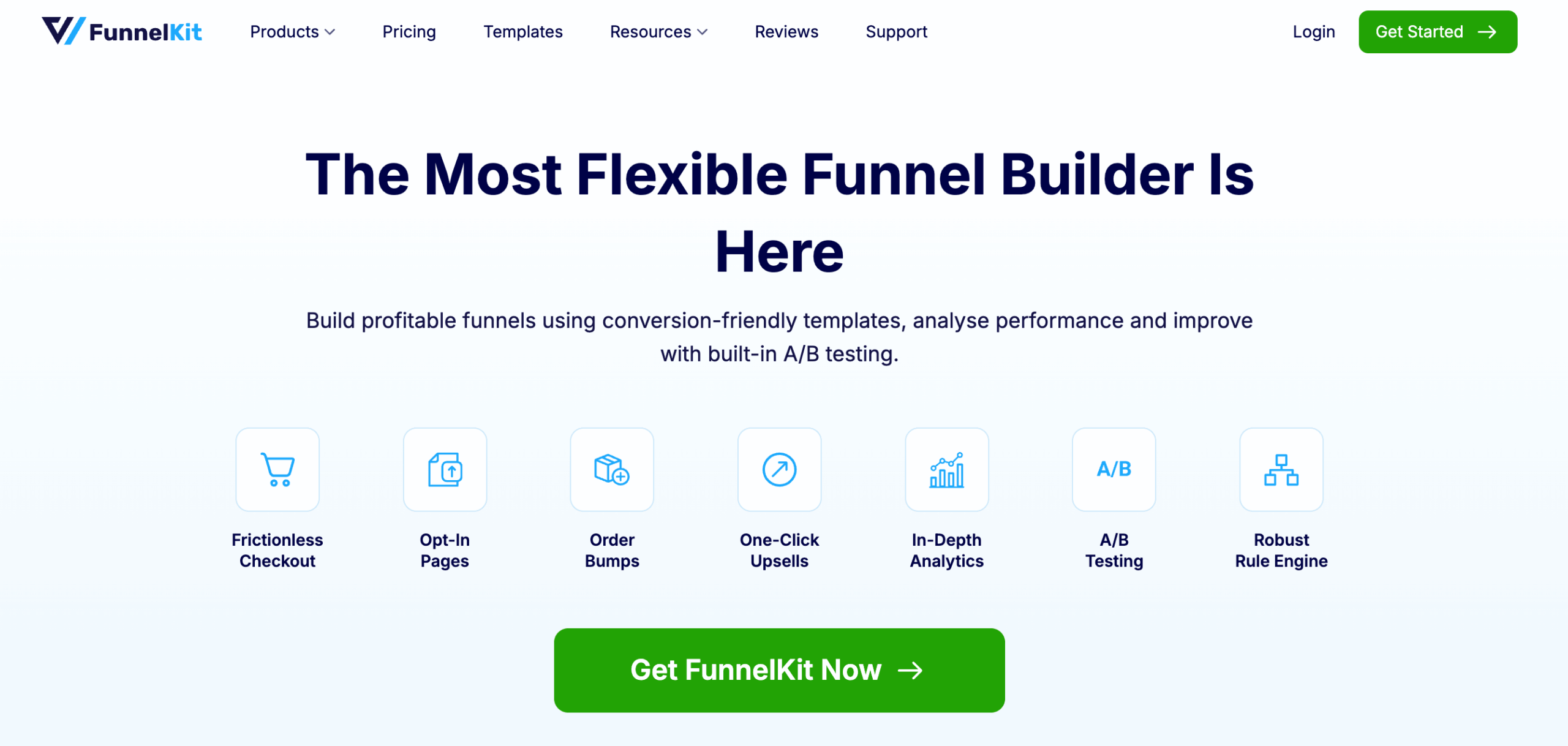
FunnelKit Funnel Builder builds landing, opt-in, and sales pages using many conversion-focused templates, then feeds every one of them straight into an optimized WooCommerce checkout, order bump, and one-click upsell without the visitor ever leaving the site.
You can use the landing pages with a prebuilt template or build from scratch. Along with FunnelKit Funnel Builder, you can use any of the popular page builders like Elementor, Divi, Oxygen, Gutenberg, or Bricks to build and customize the landing pages.
| Best For | Landing pages wired directly into WooCommerce checkout, order bumps, and upsells |
| Active Installs | 40,000+ |
| WordPress.org Rating | 5.0/5 (998 reviews) |
| Free Version | ✅ Yes |
| Starting Price | $99.50/year (Basic) |
Key features:
- Prebuilt templates for opt-in, sales, checkout, upsell, and thank-you pages: 32+ ready-made templates, mobile-responsive by default, no extra setup needed.
- Works with any page builder: Elementor, Divi, Oxygen, Gutenberg, or Bricks, so you're never locked in.
- AOV boosting offers: Add order bumps and one-click upsells to increase average order value.
- No limit on the number of funnels or landing pages you can create.
- Intuitive interface, simple enough for anyone to build a landing page without a learning curve.
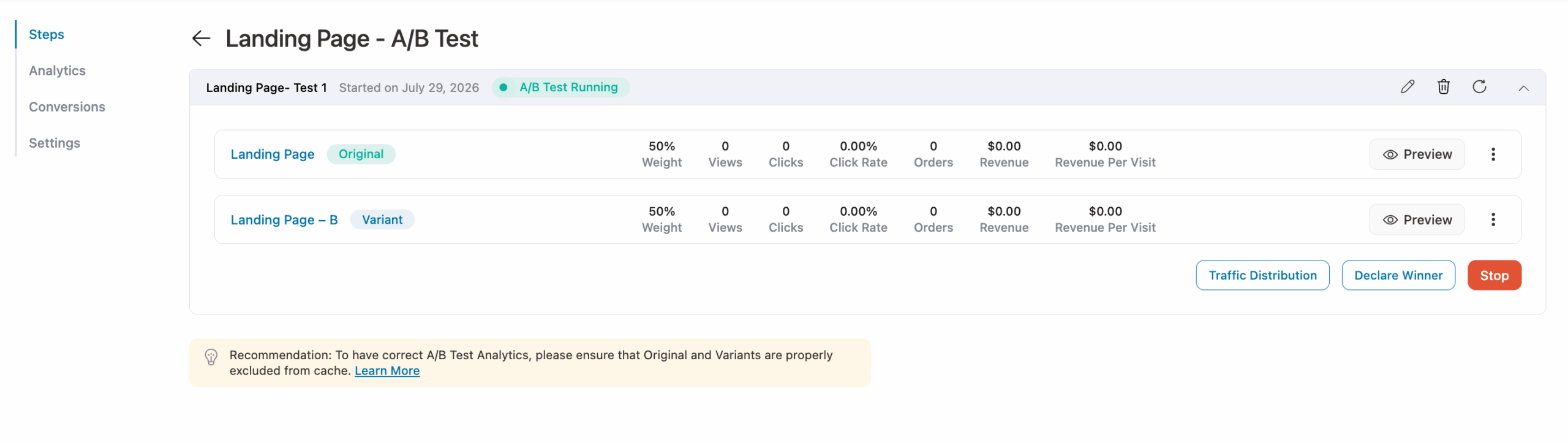
- Built-in A/B testing on any funnel page to see which design converts better.
- Built-in analytics per page: views, conversions, and revenue, so you can see how each page is performing.
- Faster checkout with Apple Pay and Google Pay buttons for a quicker buying experience.
Our experience:
We created a landing page using a FunnelKit Funnel Builder prebuilt template with Gutenberg. The part that stood out was the A/B testing built right into the funnel canvas. We duplicated a sales page, changed the headline, and split traffic 50/50 without leaving the builder or touching a separate testing plugin.
Watching conversion and revenue per variant update in real time made the decision to declare a winner easy instead of a guess. The tradeoff showed up fast too: FunnelKit isn't its own page builder, so you need to rely on another one to actually design the page.
✅ Pros
- Connects directly into a real, customizable WooCommerce checkout, not a linked storefront in disguise
- Works with any popular page builders
- Prebuilt templates cut design time down significantly
❌ Cons
- Full A/B testing and premium templates require Plus ($179.50/year intro)
Pricing: Free on WordPress.org. Basic starts at $99.50/year (1 site) for optimized checkout and thank-you pages.
2. Elementor

| Best For | Landing pages that match the rest of your website, including WooCommerce product pages |
| Active Installs | 10+ million (free version) |
| WordPress.org Rating | 4.5/5 |
| Free Version | ✅ Yes |
| Starting Price | $59/year (Essential) |
Elementor builds landing pages with a live, drag-and-drop canvas, so changes show up on the actual page as you make them rather than in a separate preview. The catch for a WooCommerce landing page specifically: the entry-level Essential plan skips every product element entirely- no title, price, or add-to-cart block until you upgrade.
Key features:
- Big library of single-page templates and full website kits.
- 40+ free widgets including headings, images, text editor, videos, buttons, testimonials, and more.
- 25+ WooCommerce elements (product title, price, add to cart, rating, stock, related products, upsells, cart, checkout, my account)
- Device preview with custom breakpoints for desktop, tablet, mobile
- True drag-and-drop, no code required, with a third-party add-on ecosystem big enough to cover almost anything the core plugin misses
Our experience:
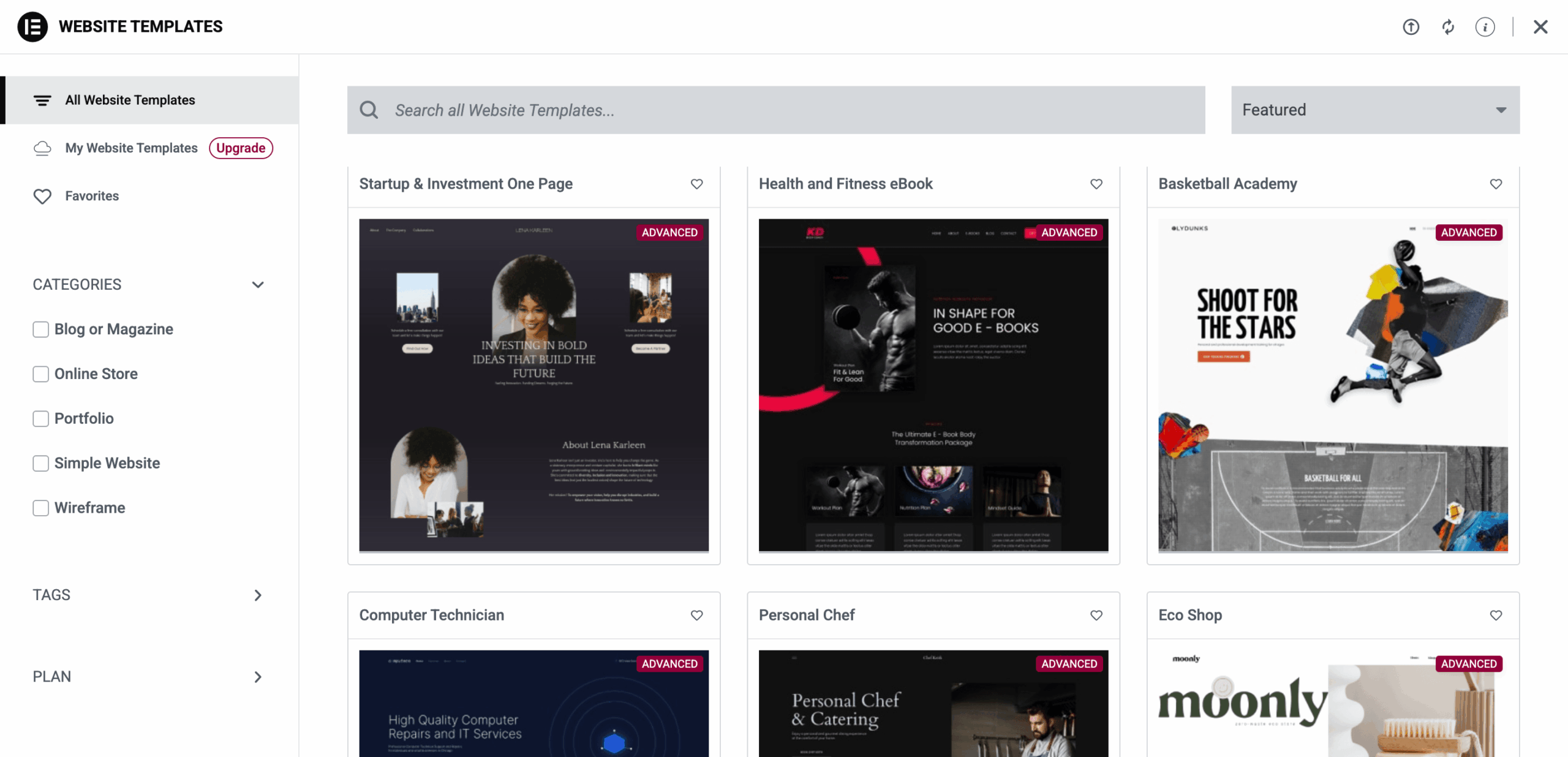
We built the landing page in Elementor using a prebuilt template. Import was one click, and editing happened live on the page itself, no separate preview. Dragging sections around felt smooth too. The catch was WooCommerce elements: product title, price, add to cart didn't show up until we upgraded past Essential to Advanced Solo. Once unlocked, adding a product grid or checkout worked like everything else, drop it in, style it, done.
✅ Pros
- One tool, landing page through single product pages
- WooCommerce Builder covers cart, checkout, and archive pages
- Large community, deep addon ecosystem
- Regular updates, active dev team
❌ Cons
- No WooCommerce on Essential ($59/year), need Advanced Solo ($99/year) or higher
- Steep learning curve for first-timers, lots of settings and panels
Pricing: Free version available. Essential is $59/year (1 site, no WooCommerce). Advanced Solo starts at $99/year (1 site) and includes the WooCommerce Builder, custom code, and the Popup Builder.
3. Divi
| Best For | Landing pages with native WooCommerce modules across unlimited websites |
| Rating | 4.9/5 (Trustpilot) |
| Free Version | ❌ No |
| Starting Price | $89/year or $249 lifetime |
Divi builds landing pages with a visual drag-and-drop editor bundled into the same license as the theme itself, with product galleries and pricing tables included natively; no separate WooCommerce add-on needed. The pricing model is what actually sets it apart: one membership covers unlimited websites, which matters if you're building landing pages across more than one WooCommerce store or for multiple clients.
Key features:
- Visual page builder that shows results instantly as you edit, true drag-and-drop with no code required
- Many premade website layouts, including landing pages and sales pages, ready to import and customize
- Native WooCommerce modules built into the core builder: product galleries, add-to-cart buttons, pricing tables, no separate add-on required
- Built-in contact form builder to collect user information on any landing page
- Built-in split testing to show different page variations to visitors and identify what converts best
- Per-device responsive editing built into every module
- Adopting Divi generally means rebuilding around it as a full theme, rather than dropping it into an existing one
Our experience:
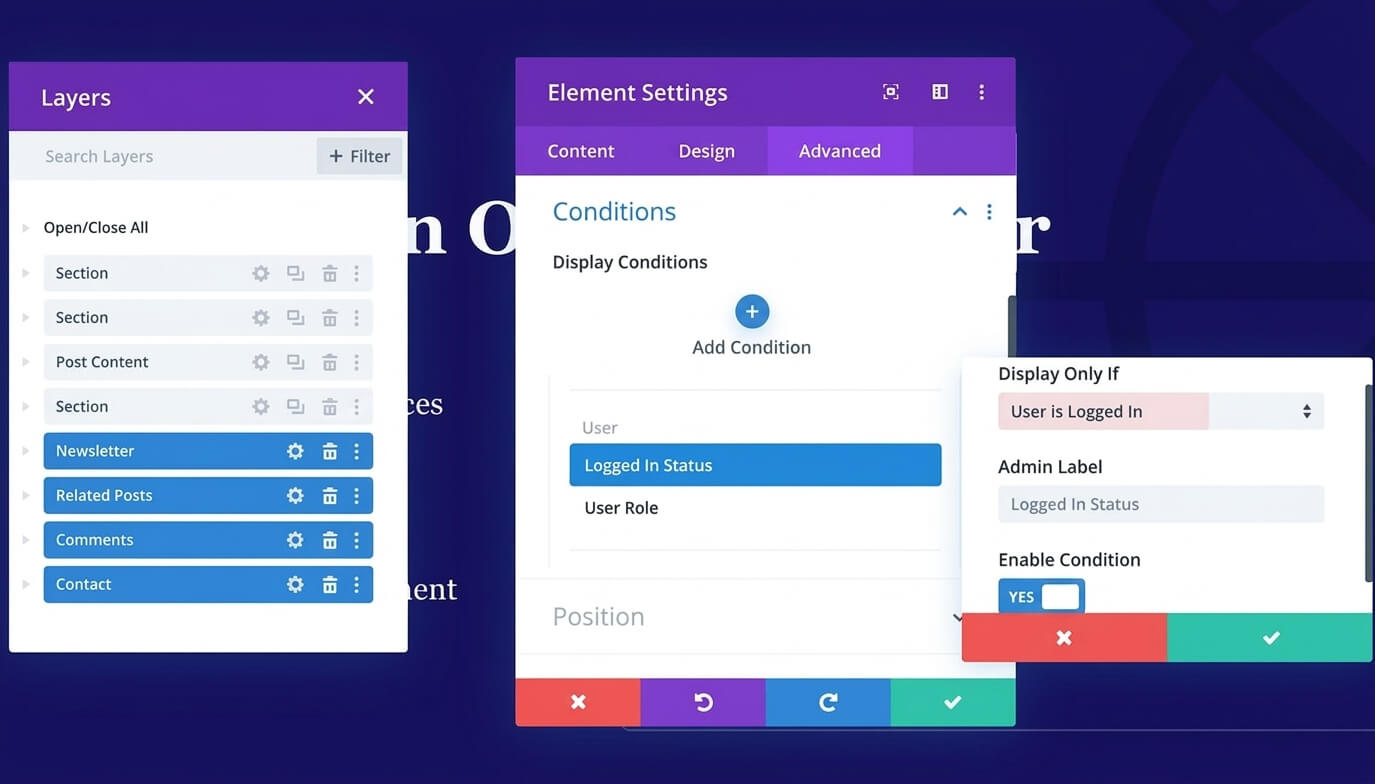
While building in Divi, we loved the Display Conditions feature, tucked inside the Advanced tab on any section or module. We set a section to only show for logged-in users, right there in the builder, no plugin, no code. The Layers panel made it easy to spot which elements had conditions applied.
The tradeoff still stands: Divi is a full theme, not a plugin you layer on top, so adopting it usually means rebuilding your site's design from scratch.
✅ Pros
- Unlimited websites on one license, rare among page builders
- WooCommerce modules ship natively, no separate addon needed
- Lifetime licensing kills the recurring cost after one payment
- Bundled opt-in and social sharing tools cut plugin count
❌ Cons
- Full theme replacement, more disruptive than adding a plugin
- No free version to test before buying
Pricing:
No free version. $89/year is the starting price, covering unlimited websites.
4. SeedProd
| Best For | Beginners who want a large library of dedicated landing page templates |
| Active Installs | 700,000+ |
| WordPress.org Rating | 4.9/5 |
| Free Version | ✅ Yes |
| Starting Price | $39.50/year (Basic) |
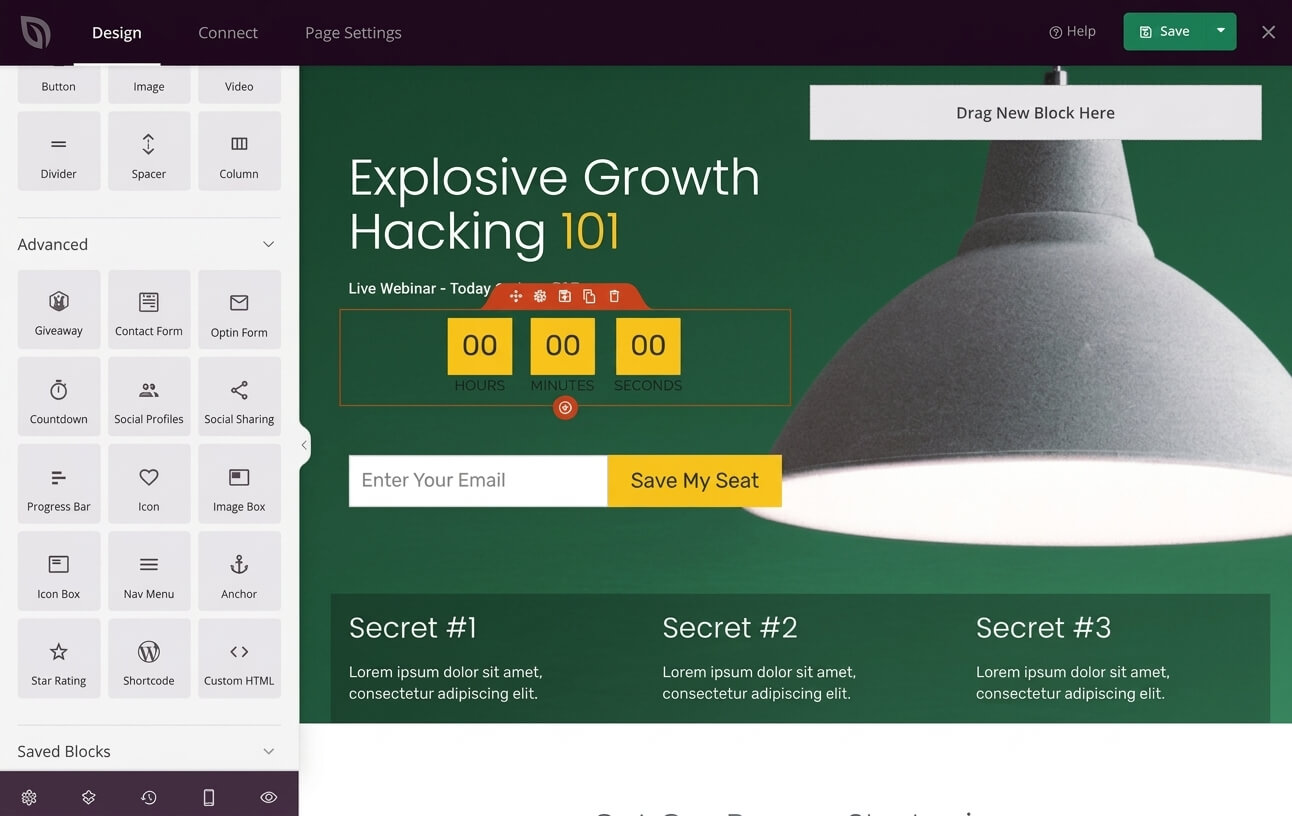
SeedProd builds the page inside its own drag-and-drop interface, not as an add-on to something else, with an editor built around templates rather than a blank canvas. WooCommerce elements exist too, but only once you're on the right plan.
Key features:
- 50 templates on Basic, climbing to 300+ on Pro and Elite, split into dedicated categories: sales pages, squeeze pages, webinar registration
- Dedicated WooCommerce blocks (Add to Cart, Product Grid, Product Price, Featured Products, Menu Cart, more), unlocked on Elite and nowhere else
- Desktop, tablet, and mobile previews built right into the canvas
- No path from the landing page into a customized checkout below Elite. The checkout page itself doesn't become editable until the top tier
- Pure drag-and-drop, no-code, aimed squarely at beginners, with a genuine free version to start on
Our experience:
Fast editor, genuinely beginner-friendly. The sales page and webinar templates that built SeedProd's reputation are still some of the best out there for exactly that use case. We also tried the SeedProd AI assistant while testing, and it's a real time-saver for the blank-page problem, generating headlines and starter copy you can then edit rather than write from scratch.
✅ Pros
- Massive template library covering nearly every landing page type, not just generic homepages dressed up
- Fast, lightweight pages, minimal frontend bloat
- Millions of stock photos built in, no separate subscription required
- Works alongside any theme, since SeedProd pages don't depend on it
❌ Cons
- WooCommerce and checkout customization locked to Elite ($239.60/year)
- Lower tiers cap at 1 to 5 sites with zero WooCommerce elements
- Free version's template selection called too thin by some WordPress.org reviewers
Pricing:
Free version available. Basic is $39.50/year (1 site, no WooCommerce). WooCommerce blocks require Elite at $239.60/year (100 sites).
5. Beaver Builder
| Best For | Developers who want lightweight landing pages without WooCommerce features gated behind a top-tier plan |
| Active Installs | 100,000+ (Beaver Builder Lite) |
| WordPress.org Rating | 4.7/5 |
| Free Version | ✅ Yes (Lite) |
| Starting Price | $89/year |
Beaver Builder builds landing pages with a front-end, drag-and-drop editor, so every change you make shows up live on the actual page rather than in a separate backend preview. Every paid tier, even the $89/year Starter plan, ships with WooCommerce Support built in, unlike competitors that reserve it for a top tier.
Key features:
- Smaller template library than SeedProd or Elementor, but building and saving your own for reuse is straightforward
- WooCommerce Support at every tier. Beaver Themer, included across all plans, handles the full product archive and cart/checkout templates that Beaver Builder alone can't touch
- Responsive editing mode, custom breakpoints for desktop, tablet, mobile
- Checkout customization available from the entry Starter plan. Not reserved for an agency tier
- Front-end drag-and-drop, clean output, minimal bloat
Our experience:
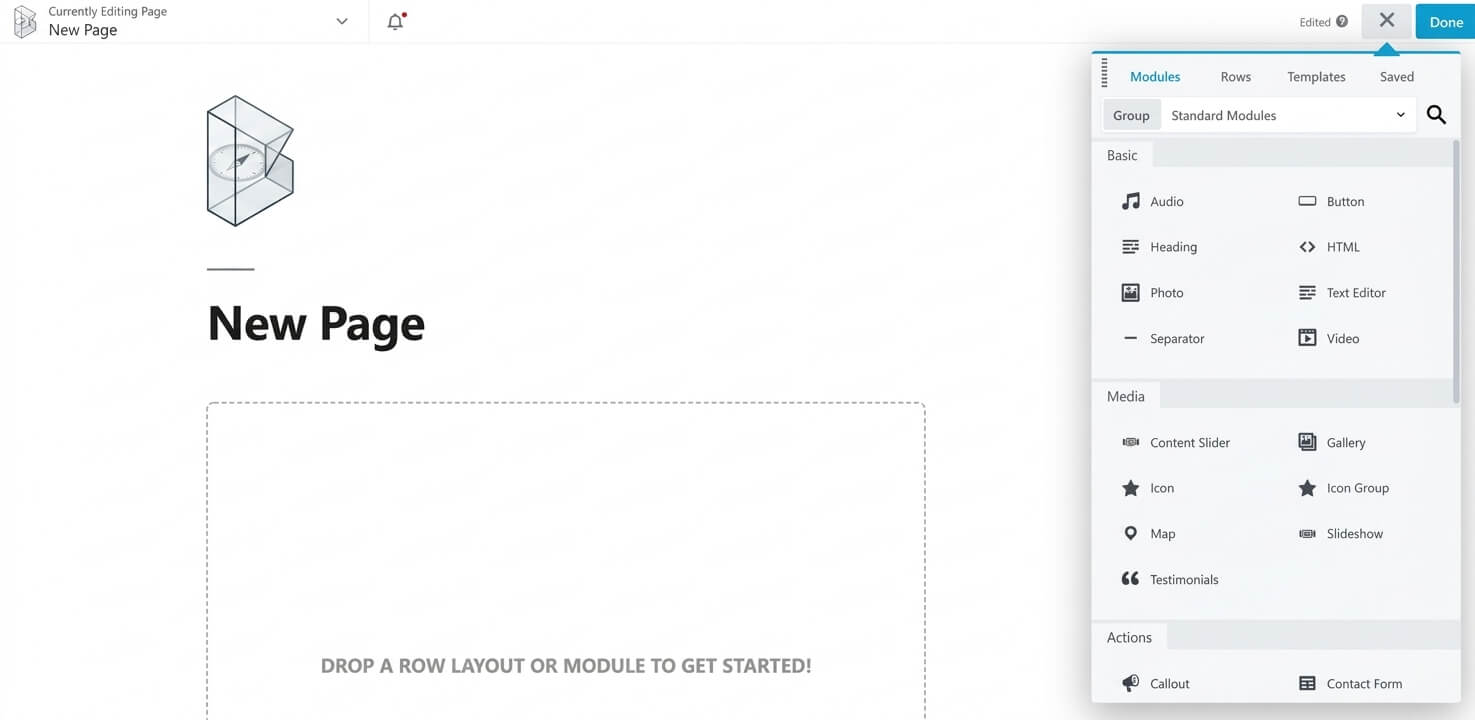
While building in Beaver Builder, the module panel made the gap obvious. Heading, Photo, Gallery, Testimonials, Callout, nothing WooCommerce-specific in sight. We had to add Beaver Themer before product page and shop archive design opened up.
✅ Pros
- WooCommerce Support included from the entry-level Starter plan, unlike most competitors here
- Lightweight, developer-friendly code that doesn't drag pages down
- Beaver Themer unlocks genuine WooCommerce archive and product template control
- Unlimited-site licensing at $546/year for agencies, well under many per-site competitors once you scale
❌ Cons
- Can't edit WooCommerce archive pages or product tabs without Beaver Themer
- Fewer built-in templates than SeedProd or Elementor
- White labeling and multisite management reserved for Professional and Unlimited tiers
Pricing:
Free Lite version available on WordPress.org. Starter is $89/year (1 site) for the paid tier.
6. Bricks Builder
| Best For | Developers who want the full WooCommerce feature set on the lowest-priced plan, with no feature upsells |
| Active Installs | N/A (no free version or WordPress.org listing) |
| Rating | 4.0/5 (Trustpilot) |
| Free Version | ❌ No |
| Starting Price | $79/year |
Bricks Builder builds landing pages with a drag-and-drop canvas, and every plan gets the exact same feature set, no functionality held back for a higher tier. There's no free version to try it on first, though, and no downloadable trial beyond an online playground.
Key features:
- Community and official templates available, though the library leans developer-oriented rather than a dedicated landing page catalog
- 30+ WooCommerce-specific elements covering shop, single product, archive, cart, checkout, and account pages, all included on every plan
- Unlimited custom breakpoints, with a desktop-first or mobile-first approach available directly in the builder
- Full checkout page customization ships on the Starter plan. Nothing waits for Agency
- Bricks is a theme, not a plugin layered on top of one. Class-based styling under the hood, custom CSS and PHP available if you want them, though none of that is required to build a page
Our experience:
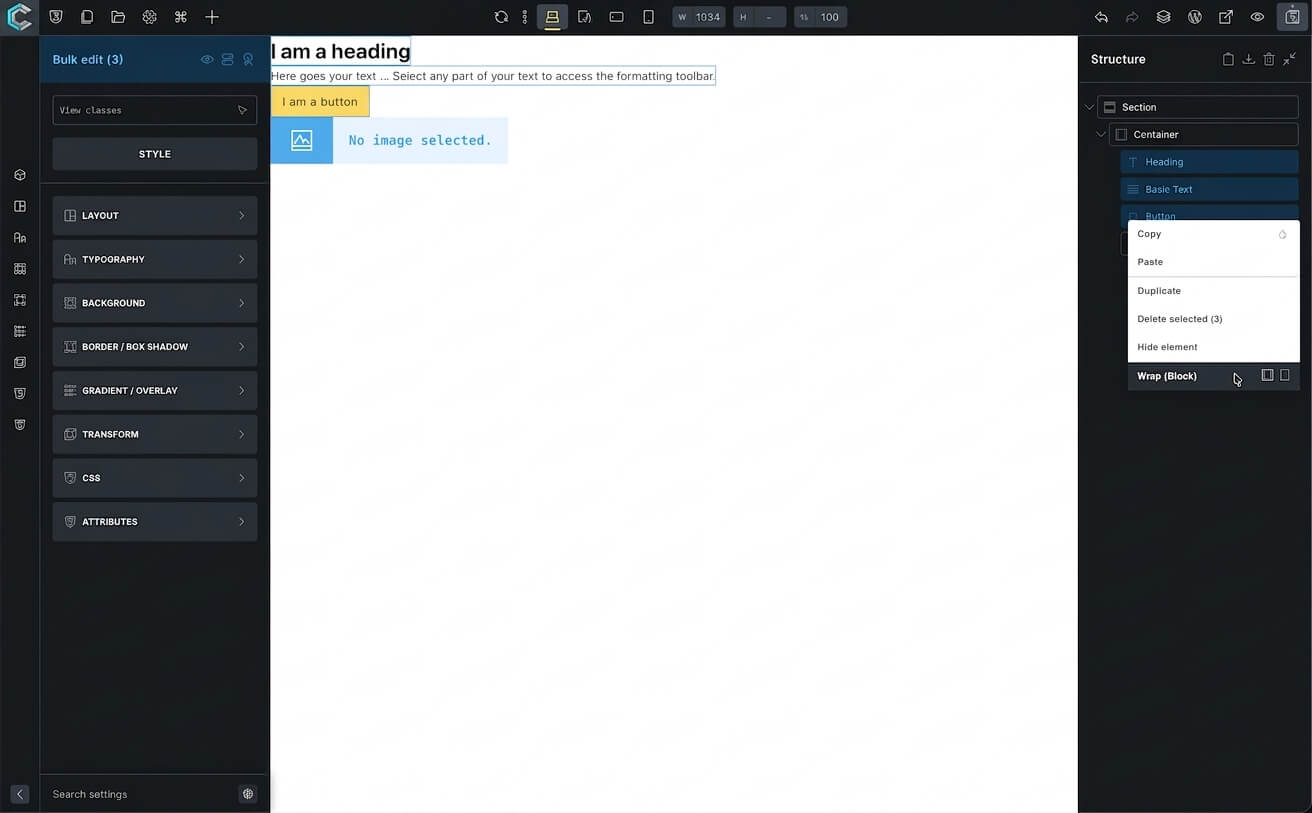
While building in Bricks, the output stayed clean, no bloated markup piling up. We didn't run our own DOM audit, but independent comparisons back it up, less DOM weight, fewer HTTP requests, easier Core Web Vitals scores.
The friction came before we opened the builder. No free version to test, and the template library leans developer-oriented rather than landing-page-specific.
✅ Pros
- Full feature set on every plan, including WooCommerce Builder, starting at $79/year
- Lightweight output, real Core Web Vitals gains over Elementor and Divi
- 30+ WooCommerce elements, including dynamic tags for price, stock, sale badges
- Lifetime license at $599 for unlimited sites, an alternative to paying annually
❌ Cons
- No free trial, only an online playground
- Templates skew developer-first, more building from scratch
- Full theme, not a plugin, less flexible with existing themes
Pricing: No free version, and no downloadable trial. Starter is $79/year (1 site), the entry price.
7. Oxygen Builder
| Best For | Developers who want element-level control over the page-to-checkout journey |
| Customers | 57,000+ (according to the official website) |
| Rating | 3.9/5 (Trustpilot) |
| Free Version | ❌ No |
| Starting Price | $129 lifetime (Basic, unlimited sites) |
Oxygen builds landing pages from close to a blank canvas rather than a template library, which suits developers more than marketers hunting a quick layout. Every license tier gets the same WooCommerce depth, nothing gated to a top plan, and the whole thing is a one-time lifetime purchase rather than a subscription.
Key features:
- Barely any pre-built landing page templates. Custom design from near-zero, not importing a finished layout
- 20+ WooCommerce elements at every tier, right down to restyling account, checkout, and cart pages button by button
- Responsive design controls exist, but the editor itself isn't built for beginners
- Full checkout and account customization ships at every license tier. Nothing gated to a top plan
- Developer-oriented visual builder with a real learning curve. Not a no-code tool the way SeedProd or Divi are
- Frontend output stays lightweight since there's no conventional theme underneath, though the admin-side editor itself can slow down once several WooCommerce elements go live on one page
Our experience:
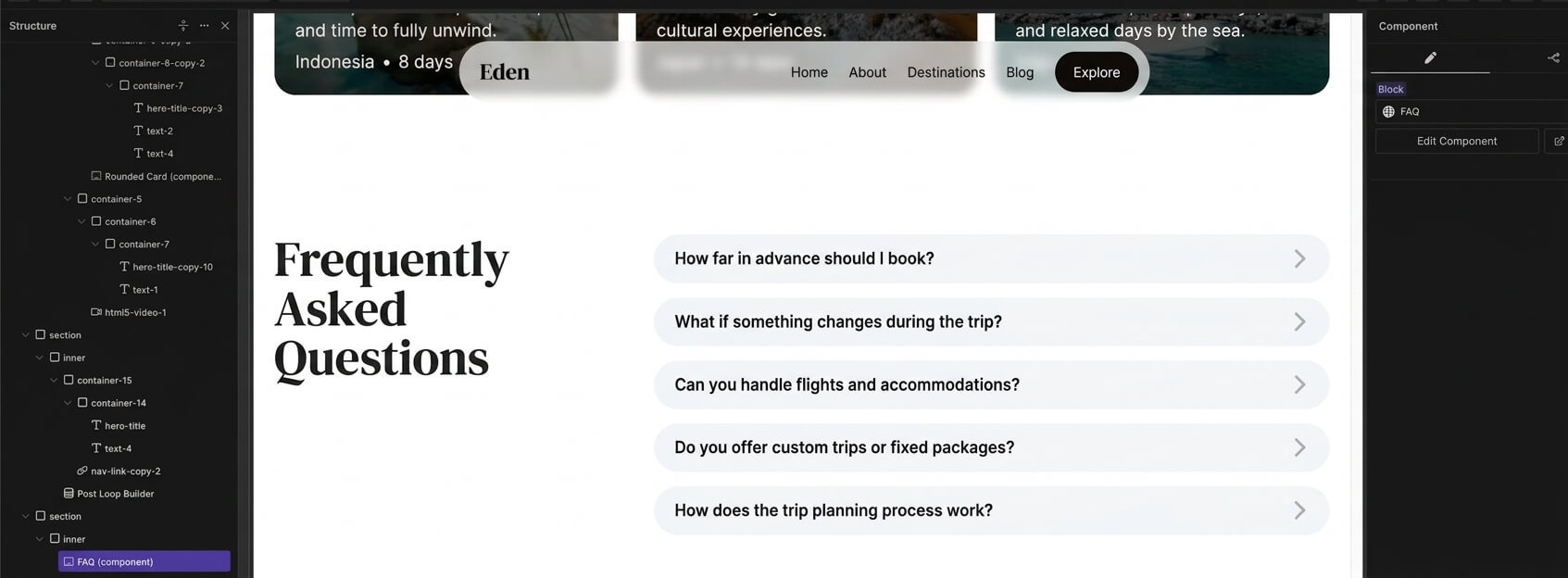
Oxygen's Structure panel gets deep fast, containers nested inside containers inside sections, so finding one element means scrolling through a long layer tree. The component system made up for it though. We built an FAQ block once, saved it as a reusable Component, and could drop it into any landing page, editing it once updates every copy.
✅ Pros
- One-time payment, unlimited sites, a genuinely different cost structure than every subscription-based competitor here
- WooCommerce elements run deep: account, checkout, cart pages, down to individual field styling
- Frontend code stays lightweight since Oxygen skips the conventional theme layer entirely
- Client sites don't need their own license, useful if you're billing per project
❌ Cons
- Very few pre-built landing page templates.
- Steep learning curve, no training wheels
- Not on WordPress.org, so installation and updates route through the vendor's own portal
Pricing: No free version, and no yearly plan at all, every tier is a one-time lifetime payment. Basic starts at $129 lifetime (WooCommerce integration included, unlimited sites).
Best Practices for WooCommerce Landing Pages
1. Match your headline to the ad or email that brought the visitor there
Simpler, more direct copy converts nearly double the rate of dense, formal writing, based on data compiled in GenesysGrowth's 2026 landing page benchmarks report.
2. Keep checkout forms short.
Every extra field adds friction. If your builder lets you rearrange or hide fields, use that to strip anything WooCommerce doesn't strictly require for the sale.
3. Test one variable at a time
FunnelKit Funnel Builder's built-in split testing or a separate tool, doesn't matter which. Isolate the headline, the hero image, or the CTA button one at a time, and you'll actually know which change moved the needle.
4. Watch your page load time
A 1-second delay can cost roughly 4.42% of conversions within the first five seconds, according to a Portent page speed study cited in SHNO's 2026 compilation of landing page statistics. That delay works against Core Web Vitals too. Google's 2026 thresholds call for a sub-2.5-second LCP, a sub-200ms INP, and a CLS under 0.1. A heavy builder stacked with widgets erodes both conversions and search visibility at the same time.
5. Show the product, the price, and the discount on the same page
Send visitors clicking through to the shop just to see pricing, and you lose them at the exact moment they're ready to buy. Whichever plugin you pick, use its WooCommerce elements to keep product, price, and any active discount visible without a page reload.
Frequently Asked Questions About WooCommerce Landing Page
Not a dedicated one. WooCommerce ships its own set of blocks for the native WordPress editor, product grids, cart, checkout, but none of it is built around landing page conversion the way a plugin like Elementor, Divi, FunnelKit Funnel Builder.
For a genuinely simple page, yes. WooCommerce Blocks give you a native product grid, cart block, and checkout block at zero cost, and you're building inside the same screen you already use for posts- no separate plugin, no new interface to learn.
What you don't get is any landing-page-specific template, a countdown timer, order bumps, or split testing. So it holds up fine for a clean, simple sales page, but the moment you want real conversion features, one of the dedicated plugins above is the better call.
Drag-and-drop builders hand you a separate visual canvas, usually outside the normal WordPress editing screen, where elements go wherever you place them. Block-based tools work inside the standard WordPress block editor instead, adding enhanced blocks rather than a new interface entirely. Block-based tools generally load lighter and track WordPress core updates more closely. Drag-and-drop builders usually win on layout freedom and bigger landing page template libraries.
You can build the layout with the free version. Product-specific widgets, the WooCommerce Builder, and checkout customization all require Elementor Pro at the Advanced Solo tier or above.
Depends what you're optimizing for. FunnelKit is purpose-built around the page-to-checkout path itself, order bumps, upsells, A/B testing, all baked in, though it isn't a standalone visual builder. Elementor wins if you want one drag-and-drop tool designing your entire site, not just the funnel pages, and don't mind paying for the tier that unlocks WooCommerce elements.
Not necessarily. FunnelKit Funnel Builder and Divi both include split testing in their paid plans. A standalone testing tool only becomes necessary with a builder like SeedProd or Beaver Builder, neither of which offer it natively.
SeedProd and Elementor both treat WooCommerce elements as a premium add-on rather than a core feature. Business decision, not a technical limitation. Worth checking the specific tier before assuming a builder's advertised starting price includes product, cart, or checkout elements.
Yes, if the builder redesigns the checkout page itself. Extra CSS, JavaScript, and widget markup all add page weight, and checkout is exactly where load-time drop-off costs the most in abandoned carts.
For a genuinely simple page, yes. No countdown timers, no order bumps, no split testing, so it works best for a store that just needs a clean product showcase without much conversion engineering layered on top.
Oxygen is a one-time lifetime purchase for developers comfortable with a steeper learning curve and a near-blank canvas. Breakdance is an annual subscription with a gentler interface, a bigger built-in template library, and a genuine free version to try first. Both go deep on WooCommerce customization once you're on a paid tier.
Choose the Best WooCommerce Landing Page Plugin for Your Store
Want the landing page flowing directly into checkout, order bumps, upsells?
FunnelKit Funnel Builder's tight integration with WooCommerce's own cart and checkout makes it the strongest starting point for most stores, especially since it works alongside whatever page builder you're already running.
Need a full drag-and-drop canvas with WooCommerce elements built into every tier? Divi is the straightforward pick, while Elementor and SeedProd work fine once you budget for the right plan.
Developers chasing deep checkout control with no feature gating should look at Oxygen, as the easier-to-learn, subscription-based alternative.
And if the whole point is spending nothing at all, the native block editor with WooCommerce Blocks gets a basic page live without adding a single plugin to maintain.
Pair whichever one you pick with a fast host, and keep an eye on page weight. The best template in the world won't convert if it loads too slowly for the visitor to stick around.
Editorial Team
September 2, 2026The WooCommerce checkout block editor lets you build and customize your checkout page using Gutenberg, WordPress's native block editor. It comes built into WooCommerce by default. But it’s more of...
Editorial Team
July 7, 2026Are shoppers adding products to their cart and leaving before they buy? According to Baymard Institute research on checkout usability, 18% of shoppers who abandon their cart do so because...
Editorial Team
April 28, 2026The WooCommerce My Account page is the central hub for your customers. It’s where they go to track orders, change shipping details, or reset a forgotten password. Beyond just account...