Not sure what to ask first? FunnelKit includes a library of ready-made prompts right inside your WordPress dashboard.
Go to FunnelKit → AI & MCP (or FunnelKit Automations → AI & MCP) and scroll down to Ready-Made Prompts.
Click Copy on any card, paste the prompt into your AI client, and swap the [brackets] for your own details, such as a product, funnel or list name.
Funnel Builder Prompts
In Funnel Builder, the prompts are grouped into four categories: Create, Convert, Analyze, and Grow. Click All to see every prompt at once.
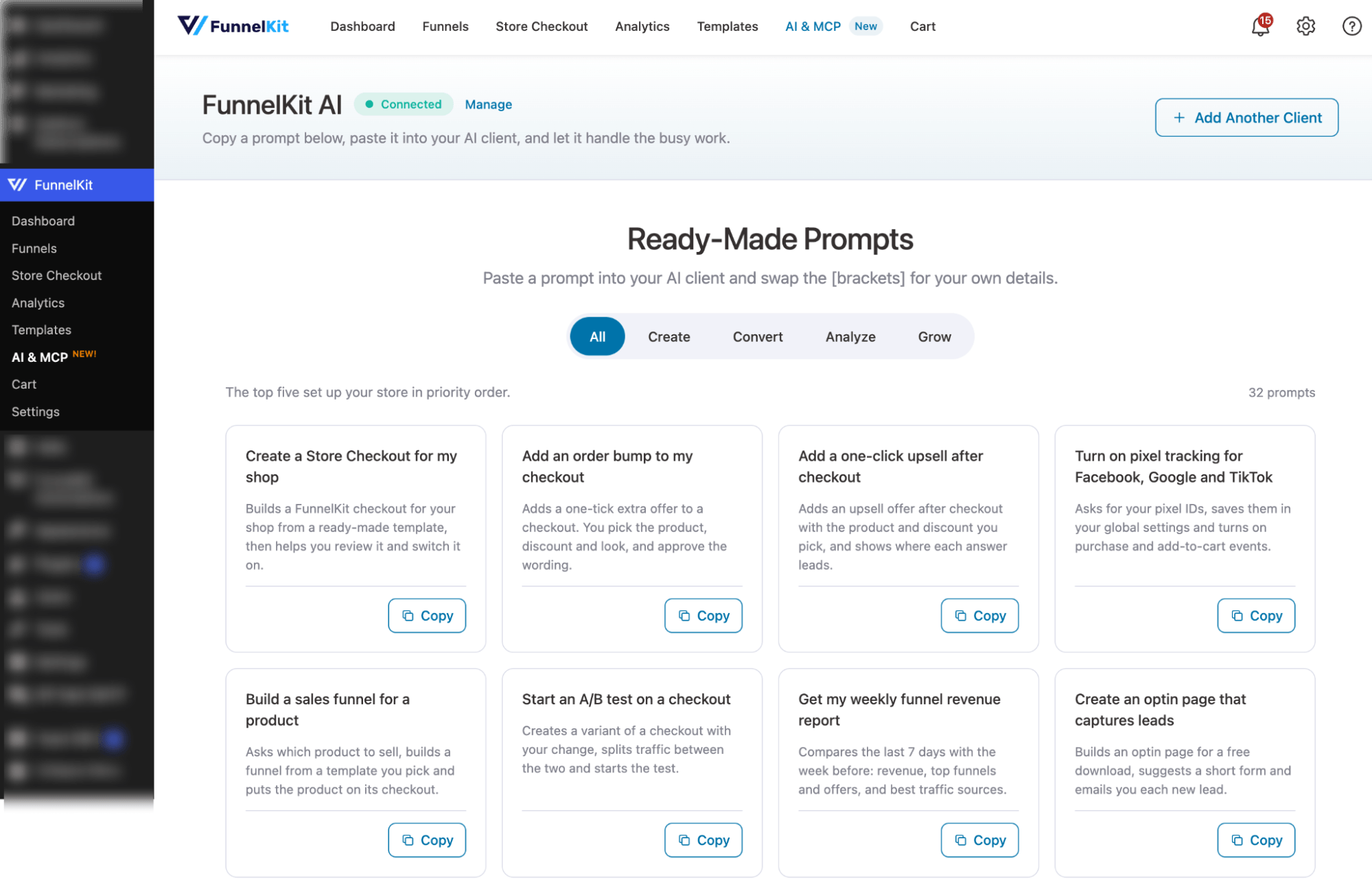
Create
Build funnels, pages, and lead magnets from a short brief.
| Prompt | What it does |
| Create a Store Checkout for my shop | Builds a FunnelKit checkout for your shop from a ready-made template, then helps you review it and switch it on. |
| Build a sales funnel for a product | Asks which product to sell, builds a funnel from a template you pick and puts the product on its checkout. |
| Add a sales page before a funnel's checkout | Adds a landing page from a template you pick and places it before the checkout, so visitors see your pitch. |
| Send buyers to a different thank-you page by product | Adds a thank-you page for the product you choose and sets rules so only its buyers land there. |
| Copy a funnel for a new product or campaign | Duplicates a funnel with all its steps and swaps in a new product. Copied bumps and upsells are listed. |
| Build a funnel with a multi-page checkout | Builds a sales funnel whose checkout splits contact, shipping and payment across 2 or 3 pages. |
| Add a thank-you page to a funnel | Adds a thank-you page from a template you pick, placed after the checkout and any upsells. |
| Redesign a funnel page with a new template | Swaps a funnel page's design for a template you pick. Warns you first, as your edits to it are replaced. |
Convert
Set up order bumps, upsells, downsells, express pay and auto-applied coupons.
| Prompt | What it does |
| Add an order bump to my checkout | Adds a one-tick extra offer to a checkout. You pick the product, discount and look, and approve the wording. |
| Add a one-click upsell after checkout | Adds an upsell offer after checkout with the product and discount you pick, and shows where each answer leads. |
| Turn on express pay and live field validation | Turns on express checkout buttons and live field checks, and tells you which gateway the buttons need. |
| Let buyers choose a product on my checkout | Puts the products you pick on a checkout and lets buyers choose one or several, with any discount you set. |
| Show an order bump only when it fits the cart | Sets rules for when a bump appears, such as only when a product is in the cart or the total is over an amount. |
| Show an upsell only to the buyers it fits | Sets rules for who sees an upsell, such as only orders with a certain product or over an amount. |
| Apply a coupon automatically at checkout | Applies a WooCommerce coupon you pick as soon as buyers reach a checkout, so they never have to type it. |
| Offer a cheaper product when an upsell is declined | Offers a cheaper product to buyers who decline the main upsell, and shows where each answer leads. |
Analyze
Get revenue, drop-off and tracking reports without opening a dashboard.
| Prompt | What it does |
| Get my weekly funnel revenue report | Compares the last 7 days with the week before: revenue, top funnels and offers, and best traffic sources. |
| Review my store and plan my FunnelKit setup | Reads your Store Checkout, funnels and tracking, then lists what to set up next, in order. Changes nothing. |
| Show me my latest leads | Lists the newest optin sign-ups with their email and what they filled in, for all funnels or one you pick. |
| Check which payment methods my checkout offers | Lists the payment methods buyers can use at checkout and what is still needed for express pay buttons to show. |
| Find funnels that are not tracking sales | Shows which ad pixels each funnel reports sales to, and flags funnels with none or with different pixel IDs. |
| Find the step where a funnel loses buyers | Shows views and conversions per step, finds the biggest drop-off, and suggests three fixes. |
| See how much bumps and upsells add to revenue | Shows revenue from bumps and upsells, their share of sales, and order value with and without them. |
| See which traffic sources bring buyers | Ranks traffic sources by orders, revenue and optins, and warns if many orders lack UTM tags. |
Grow
Track ad sales, test what converts, capture leads and check a funnel before launch.
| Prompt | What it does |
| Turn on pixel tracking for Facebook, Google and TikTok | Asks for your pixel IDs, saves them in your global settings and turns on purchase and add-to-cart events. |
| Start an A/B test on a checkout | Creates a variant of a checkout with your change, splits traffic between the two and starts the test. |
| Create an optin page that captures leads | Builds an optin page for a free download, suggests a short form and emails you each new lead. |
| Copy a funnel to another FunnelKit site | Exports a funnel with all its steps and settings so you can import the same funnel on another FunnelKit site. |
| Check how my A/B tests are doing | Shows conversions and revenue per variant for each running test, and whether a winner is clear. Read-only. |
| Pick the winner of an A/B test | Recommends a winner and, once you type confirm, makes it the live page and ends the test. Can't be undone. |
| Email me whenever someone opts in | Turns on an email to you for each optin, with a clear subject and every field the visitor filled in. |
| Check a funnel is ready before I send traffic | Checks steps, products, prices, express pay, tracking and offers before launch, with a fix for each issue. |
FunnelKit Automations Prompts
FunnelKit Automations has its own library of ready-made prompts.
Go to FunnelKit Automations → AI & MCP and scroll down to Ready-Made Prompts.
The prompts are grouped into four categories: Automate, Email, Contacts, and Analyze. Click All to see every prompt at once.
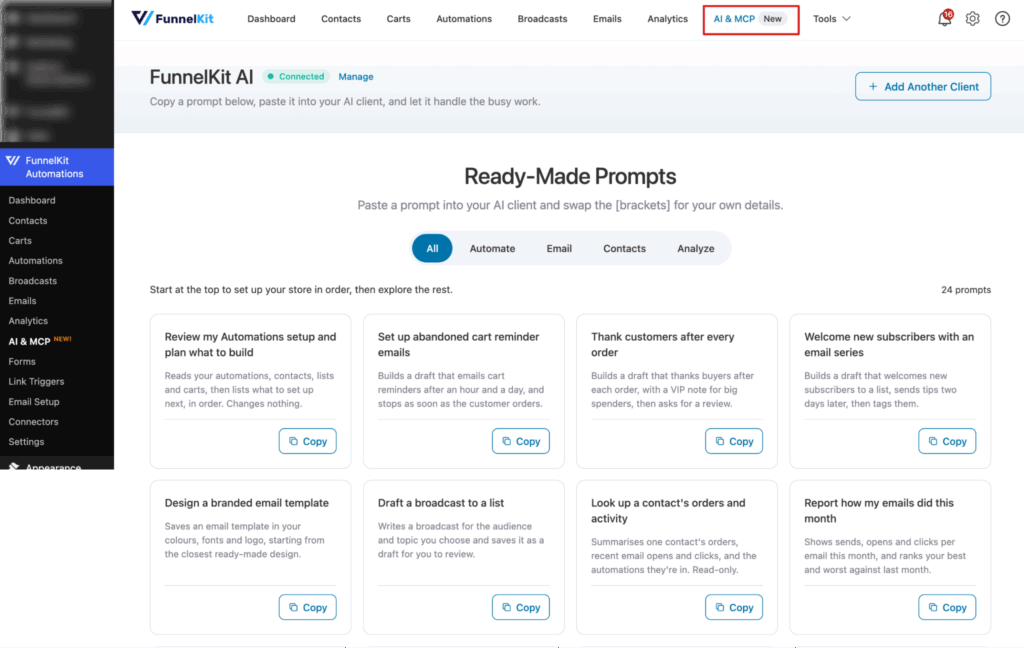
Automate
Explain, copy and build automations, always as drafts you review first.
| Prompt | What it does |
| Set up abandoned cart reminder emails | Builds a draft that emails cart reminders after an hour and a day, and stops as soon as the customer orders. |
| Thank customers after every order | Builds a draft that thanks buyers after each order, with a VIP note for big spenders, then asks for a review. |
| Welcome new subscribers with an email series | Builds a draft that welcomes new subscribers to a list, sends tips two days later, then tags them. |
| Explain how one of my automations works | Explains an automation's trigger, waits, emails and actions in plain words, and flags anything unfinished. |
| See who is in an automation and who failed | Counts an automation's contacts by state: active, paused, delayed, completed and failed. Read-only. |
| Copy an automation to try a variation | Copies every step of an automation into a new draft for you to change, while the original keeps running. |
Design, audit and reuse email templates, and draft broadcasts.
| Prompt | What it does |
| Design a branded email template | Saves an email template in your colours, fonts and logo, starting from the closest ready-made design. |
| Draft a broadcast to a list | Writes a broadcast for the audience and topic you choose and saves it as a draft for you to review. |
| Check my email templates for problems | Checks every template for missing or broken links, shortened links, a missing unsubscribe link and emails too large to show in full. Read-only. |
| Change the look or copy of an email template | Changes the colours, text or buttons of a template you name, and shows a preview before saving. |
| Copy an email template for a new campaign | Clones a template and makes your changes to the copy, so the original stays untouched. |
| List the merge tags I can use in an email | Lists the merge tags you can use in the email you're writing, what each fills in, and a name fallback. |
Contacts
Look up, segment, tag and add contacts.
| Prompt | What it does |
| Look up a contact's orders and activity | Summarises one contact's orders, recent email opens and clicks, and the automations they're in. Read-only. |
| List my tags and lists | Shows every tag and list, flags ones that look duplicated, and with Pro counts the contacts in each. Read-only. |
| Tag every contact who matches a condition | Finds contacts matching a condition you describe, tells you how many, and tags up to 50 of them once you confirm. For more, shows how to tag them in bulk. |
| Add a contact to a list and tag them | Creates a contact from a name and email, then adds them to the list and tag you choose. |
| Add a note to a contact's profile | Finds a contact by email and saves the note you write on their profile. |
| Find contacts who match a condition | Counts contacts matching a condition and lists the first 20 with their name, email and the date they were added. Read-only. |
Analyze
Get automation, cart, email and broadcast numbers without opening a report.
| Prompt | What it does |
| Review my Automations setup and plan what to build | Reads your automations, contacts, lists and carts, then lists what to set up next, in order. Changes nothing. |
| Report how my emails did this month | Shows sends, opens and clicks per email this month, and ranks your best and worst against last month. |
| Give me a store rundown for a day or week | New contacts, emails sent, revenue and cart recovery for a period you pick, with anything unusual flagged. |
| Report this week's abandoned carts | Shows how many carts were abandoned in the last 7 days, their value and how many were recovered. |
| See how each of my automations is doing | Counts active, completed, failed and paused contacts in each automation, and flags failures or empty ones. |
| Report how my last broadcast did | Shows opens, clicks, unsubscribes and revenue for your latest broadcast, compared with the one before. |