


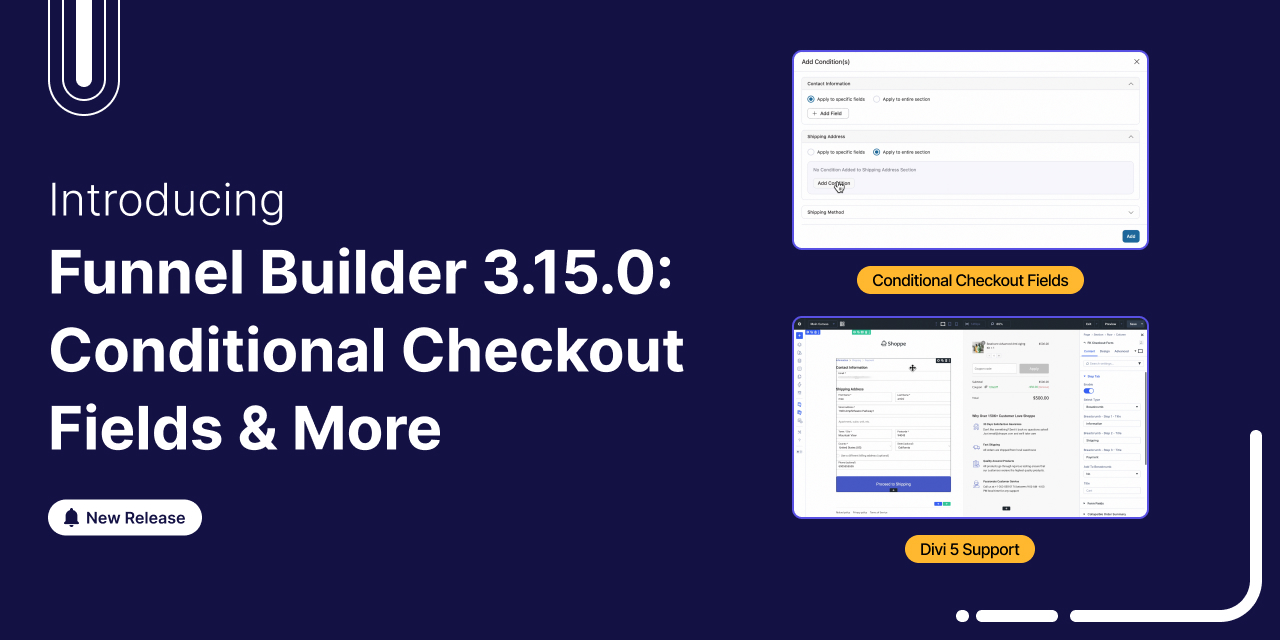
FunnelKit Funnel Builder 3.15.0 is finally here! Yes, we've kept our word and featured two highly requested features that give you unprecedented control over your checkout experience in this release.
The 3.15.0 version introduces full Divi 5 compatibility across every funnel step. Pair that with powerful new conditional checkout logic, smart product-level redirects, and a handful of other high-impact upgrades, and you have one of our biggest releases yet.
Take a quick peek at what's all new in the latest FunnelKit Funnel Builder version:
- Full Divi 5 page builder compatibility for all funnel steps
- Conditional fields and sections on your WooCommerce checkout
- Product checkout redirect
- New file upload field type for checkout forms
- Order bumps with stock status
- Inline product switcher at checkout
- Performance optimizations and stability improvements
All of these features are designed to help you create personalized, conversion-optimized checkout experiences without writing a single line of code.
We've explored all these features in detail below.
Table of Contents
- 1 1. Full Divi 5 Page Builder Compatibility
- 2 2. Conditional Fields for WooCommerce Checkout
- 3 3. Product Checkout Redirect
- 4 4. New File Upload Field at Checkout
- 5 5. Order Bumps with Stock Status Conditions
- 6 6. Inline Product Switcher at Checkout
- 7 7. Additional Improvements, Compatibility Updates & Bug Fixes
- 8 Ready to Try FunnelKit Funnel Builder 3.15.0?
1. Full Divi 5 Page Builder Compatibility
Divi users, we have exciting news for you! FunnelKit Funnel Builder 3.15.0 fully supports the all-new Divi 5 page builder.
If you're using Divi 5 as your WordPress theme and page builder, you can now design and customize your FunnelKit checkout pages, opt-ins, one-click upsells, and thank you pages directly inside the Divi 5 Visual Builder.
Watch it in action here:
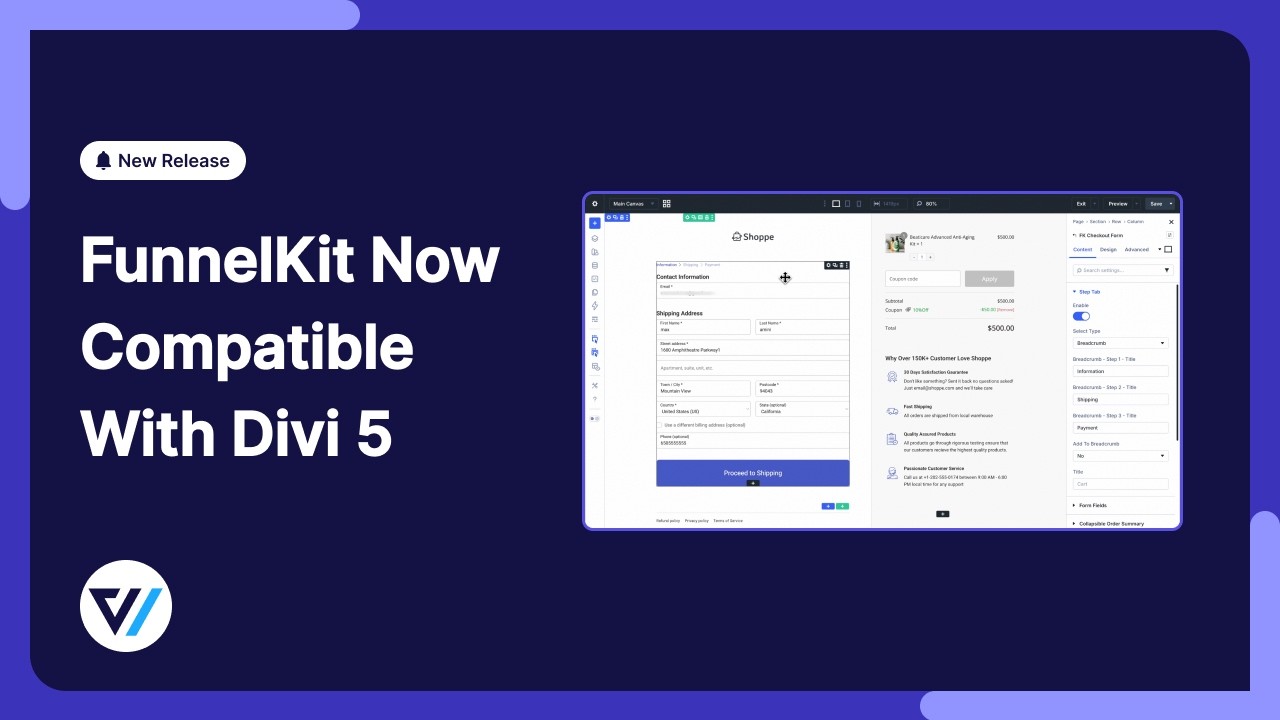
Edit funnels in Divi 5
When you create or edit a store checkout in FunnelKit, you can now open it in the Divi 5 Visual Builder.
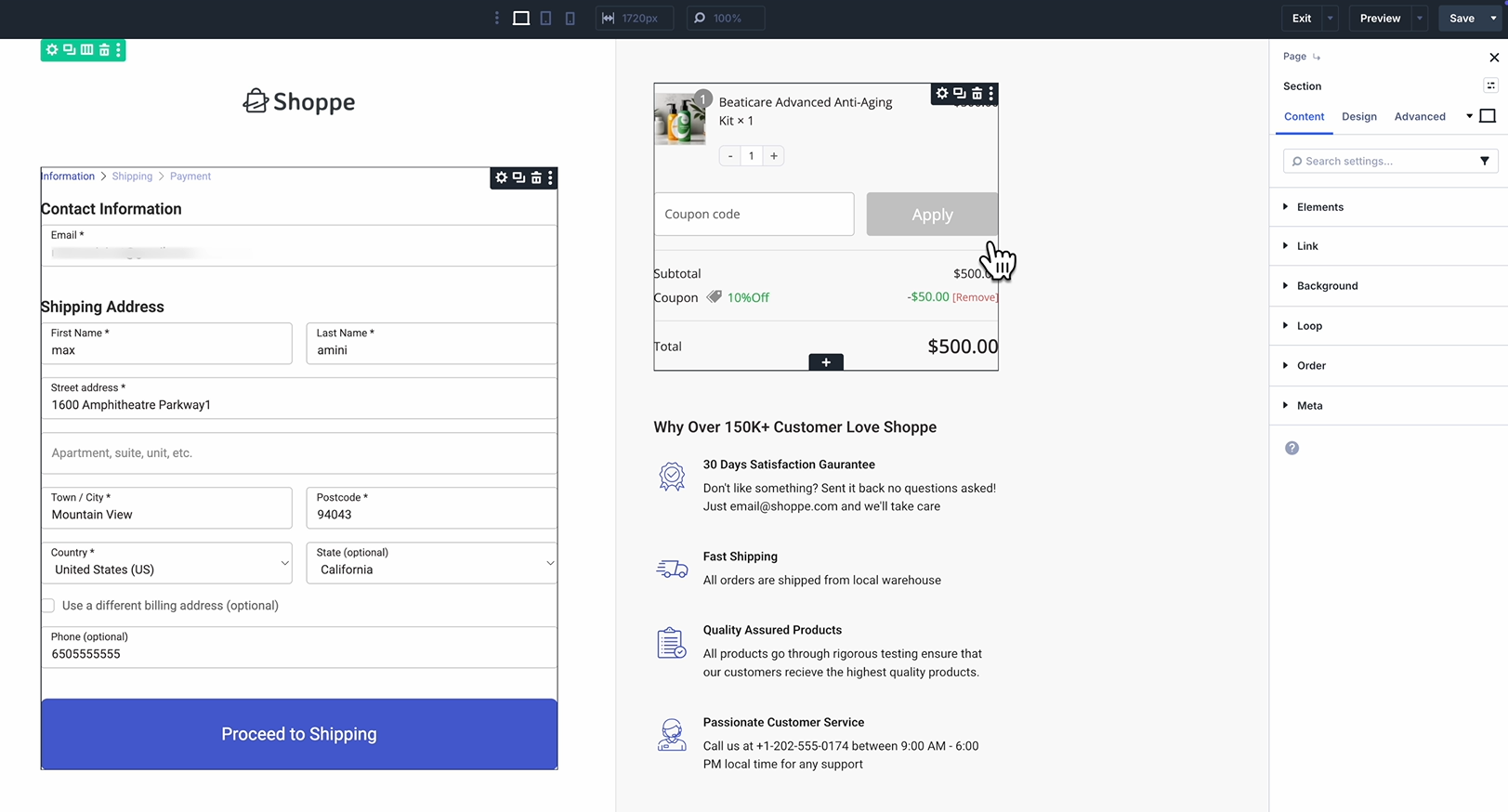
Not only that, but you can also design opt-ins, one-click upsells, and thank-you pages.
Each FunnelKit module renders perfectly inside Divi's canvas, giving you full visual editing capabilities.
This means your entire funnel from checkout through upsells to the final thank-you page can be built and styled with Divi 5, ensuring a consistent design language across every step.
New checkout page templates
We've revamped checkout page templates like "Shoppe" and "Minimalist" for Divi 5 to enhance your shoppers' buying journey.
FunnelKit's existing template library loads cleanly and works well in Divi 5.
Import an existing template. Drop it onto the canvas. From there, you can drag elements around or apply brand colors, just like on a standard page.
Whether you're using one of FunnelKit’s ready-made templates or building from scratch, Divi 5 gives you complete visual control over every aspect of your funnel pages.
2. Conditional Fields for WooCommerce Checkout
Stop showing the exact same checkout form to every buyer because it hurts conversions.
FunnelKit Funnel Builder 3.15.0 introduces conditional checkout fields, letting you hide specific fields or drop entire sections based on cart rules.
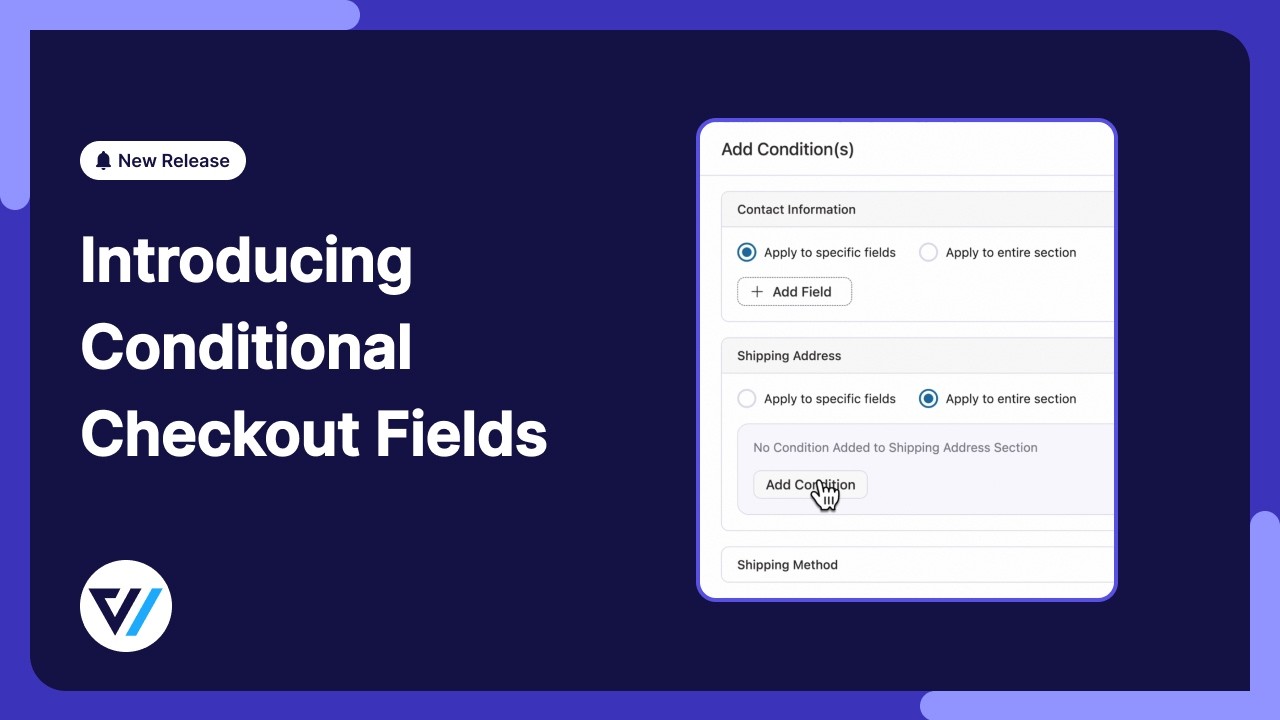
The math here is simple: fewer irrelevant fields to fill out means a faster checkout process for the user. No more massive, cluttered forms.
Apply conditions to specific fields or entire sections
Navigate to FunnelKit ⇨ Store Checkout and click on the checkout page to start editing fields.
Next, hit 'Add Condition(s)' under the Design tab.
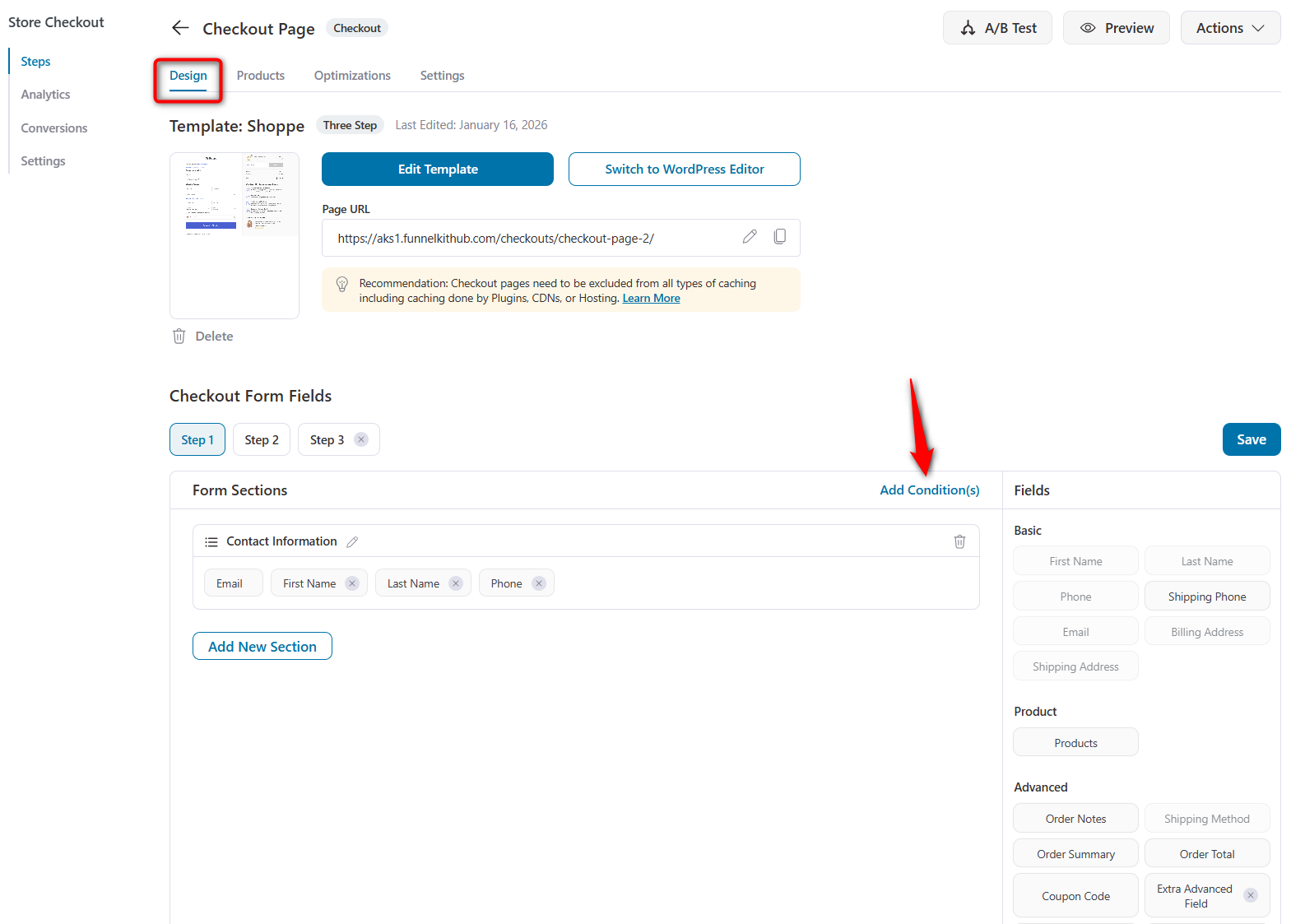
You'll see a modal that contains the active sections of your checkout form, such as Contact Information, Shipping Method, and any custom sections you've added.
For each section, you have two options:
- Apply to specific fields
Select this option to control the visibility of individual fields within a section.
Click '+ Add Field' to select exactly which fields should be shown or hidden based on conditions.
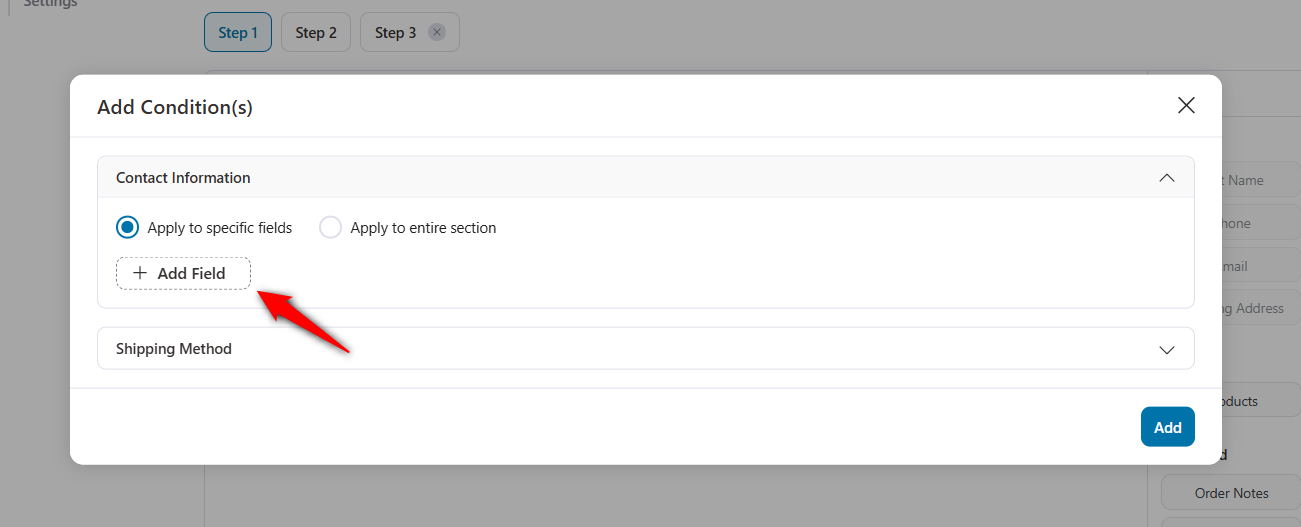
For example, show the VAT Number and PO Number fields inside the Company Details section only when certain conditions are met.
- Apply to the entire section
Choose this option when you want the entire section to appear or disappear.
Perfect for B2B blocks like Company Details. Most standard retail buyers never need to see them.
Available condition types
When you set up a condition, you'll see a dropdown with three powerful condition groups:
- User: Target conditions based on the logged-in user, such as user role. Show a Company Details section only for wholesale customers, or hide certain fields for guest shoppers.
- Cart: Set rules based on cart data, like Cart Total. Have an order cross the $1,000 threshold? Trigger a Special Instructions box for high-value handling.
- Fields: Read the value of one field to control another. If a shopper selects an EU country, force the VAT Number box to render. Or load secondary address lines strictly when a specific shipping tier gets selected.
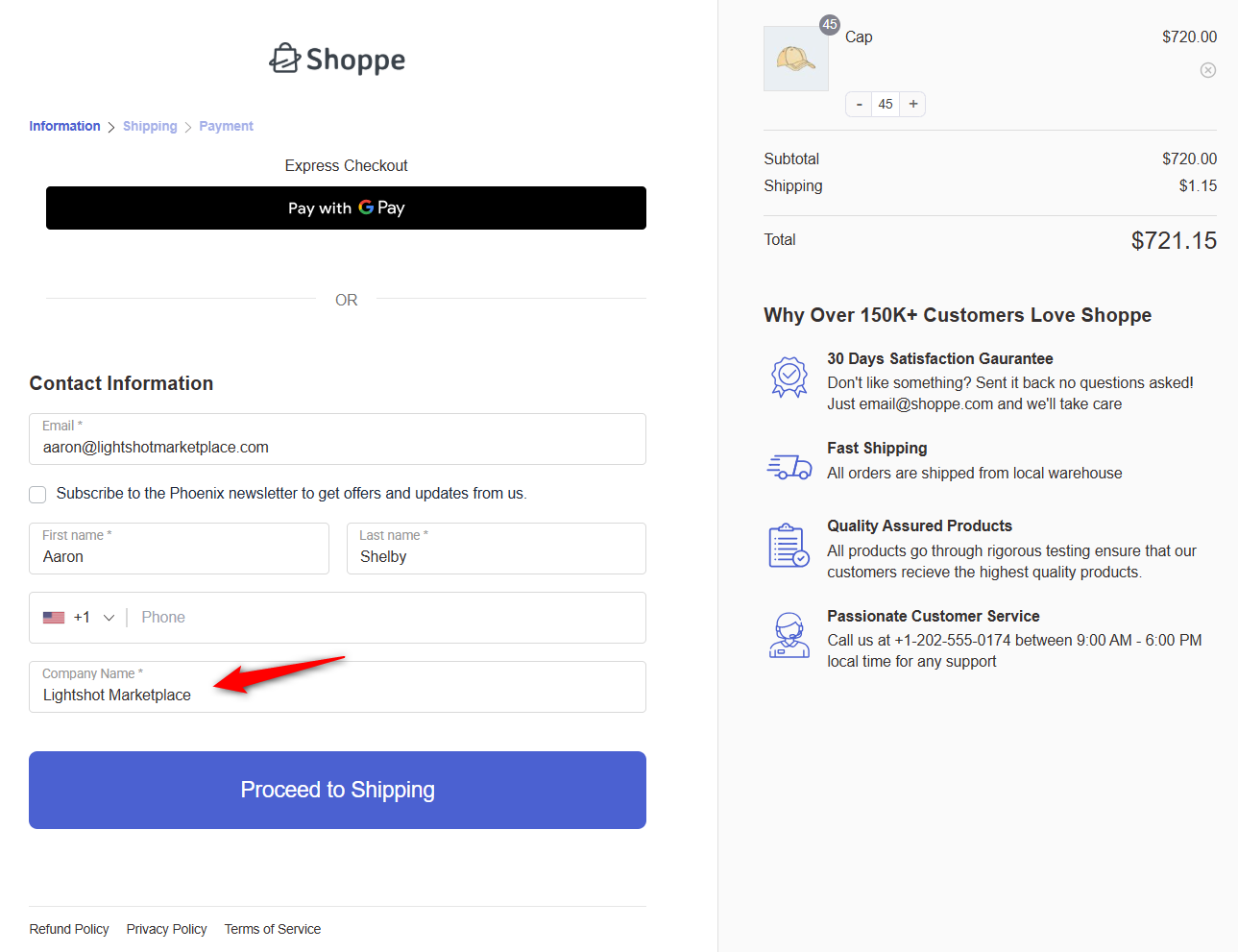
For example, the company name field will appear when the logged-in user role is Business.
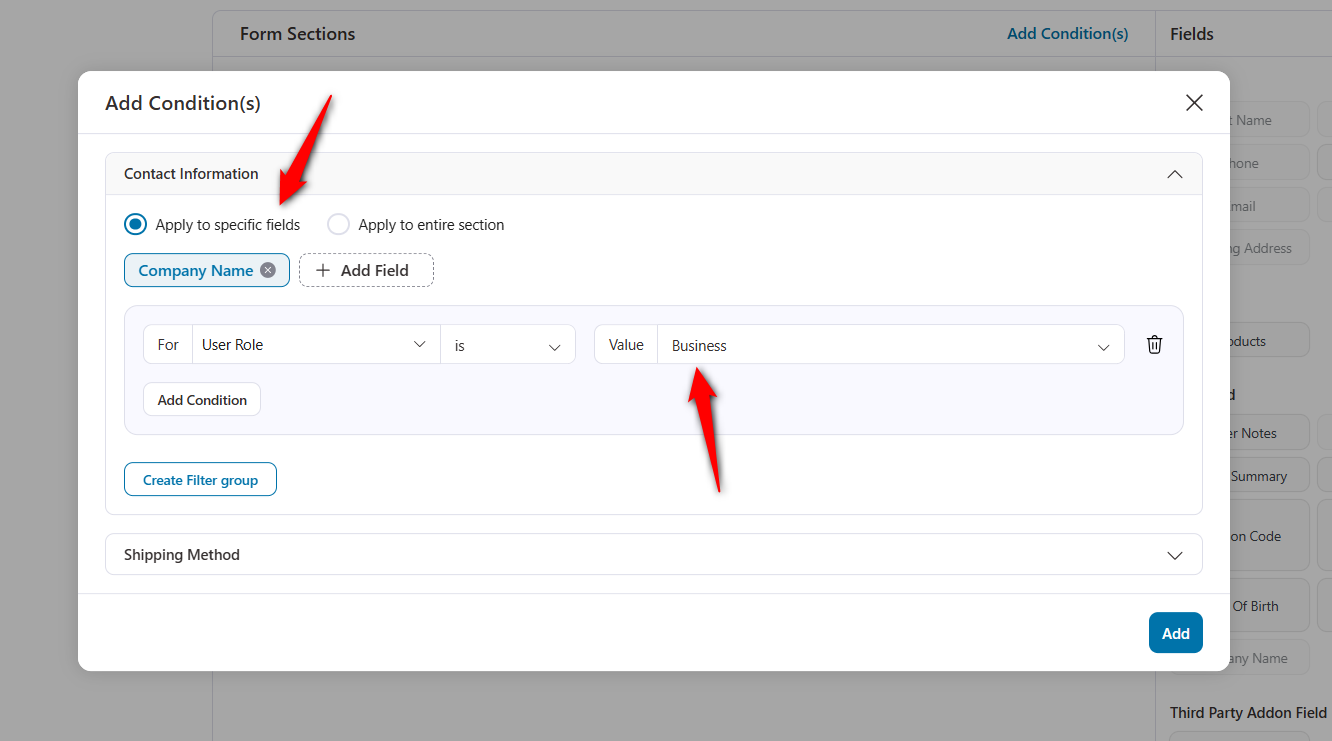
Combine conditions with filter groups
Single rules rarely cover edge cases. That's why we built rule stacking so you can get incredibly specific.
- AND logic (all rules must be true): Require multiple matches. Display the PO Number field strictly when the cart total reaches more than $500 AND the active user holds a Wholesale role.
- OR logic (any rule can be true): Click Create Filter Group. Now you can trigger the Company Details block if the user has Wholesale status OR their cart simply exceeds that $1,000 mark.
You handle massive routing complexity on a single page without creating multiple checkout pages or funnels.
For example, you can even add a condition that a cart item count of more than 20 is considered a wholesale business order.
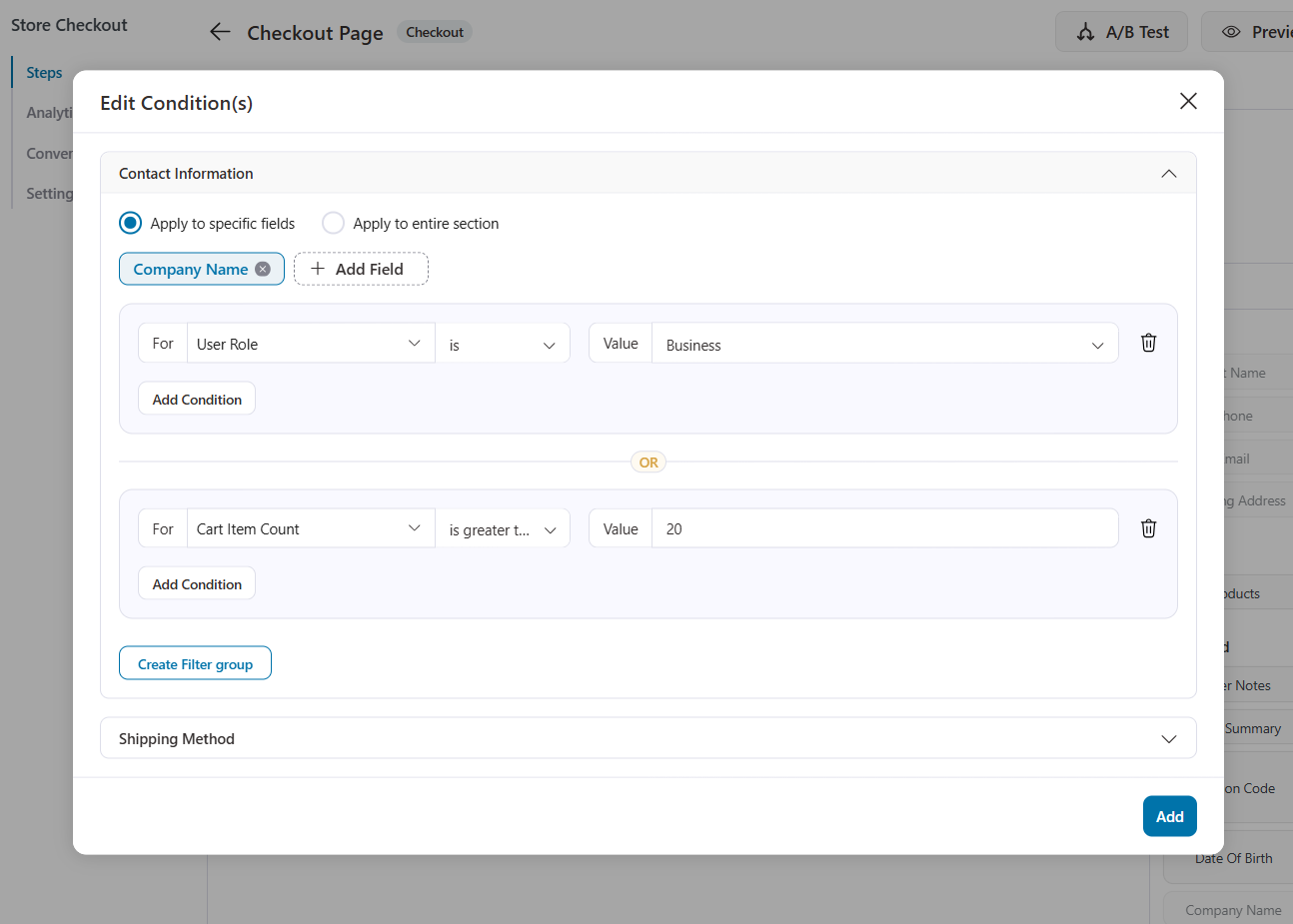
Here's how the conditional field appears automatically on the checkout page when the rules are met:
Real-world use cases
How stores are actually using this right now:
- B2B vs. B2C checkouts: Standard consumers get a basic, low-friction form. Business buyers see the full array of VAT and PO requirements.
- High-value order handling: Orders that exceed specific dollar amounts trigger custom delivery-preference boxes.
- Country-specific fields: Only render tax ID fields for jurisdictions that legally mandate them. Your international checkout stays clean.
- Product-based customization: Selling custom items? Display a documentation or file upload field only if that specific SKU is in the cart.
The result? A checkout form that adapts to each customer, reducing friction and abandoned carts while collecting exactly the information you need.
3. Product Checkout Redirect
Consider this scenario.
You've built a beautiful, dedicated checkout funnel for your best-selling product with tailored testimonials, product-specific trust badges, and carefully chosen order bumps. It converts brilliantly when customers land directly on that funnel URL.
But then a customer finds the same product on your regular shop page, adds it to the cart, and proceeds to checkout. What happens? Your generic store checkout opens.
All that conversion-optimized work is bypassed entirely.
FunnelKit Funnel Builder 3.15.0 solves this problem with the Product Checkout Redirect feature.
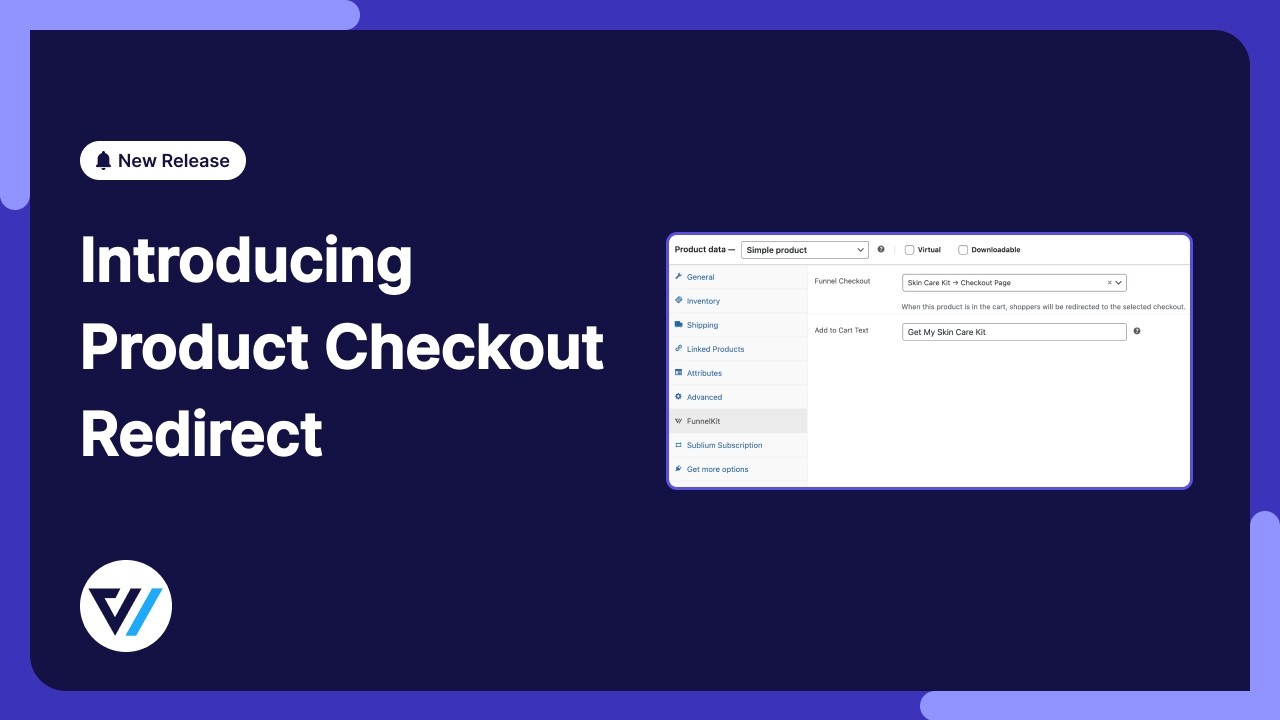
It's a new product-level and category-level setting that lets you assign a dedicated checkout page to specific products or product categories.
When that product is added to the cart, regardless of how the customer got there, your chosen checkout page takes over automatically.
In short: your funnels now start from the product page, not just from a custom URL.
Setting up checkout redirect at the product level
To configure this, navigate to Products in your WordPress admin and edit the product you want to assign a checkout to.
You'll find a new Product Checkout Redirect section in the product settings. Here, simply search for and select the dedicated checkout page you've built for this product.
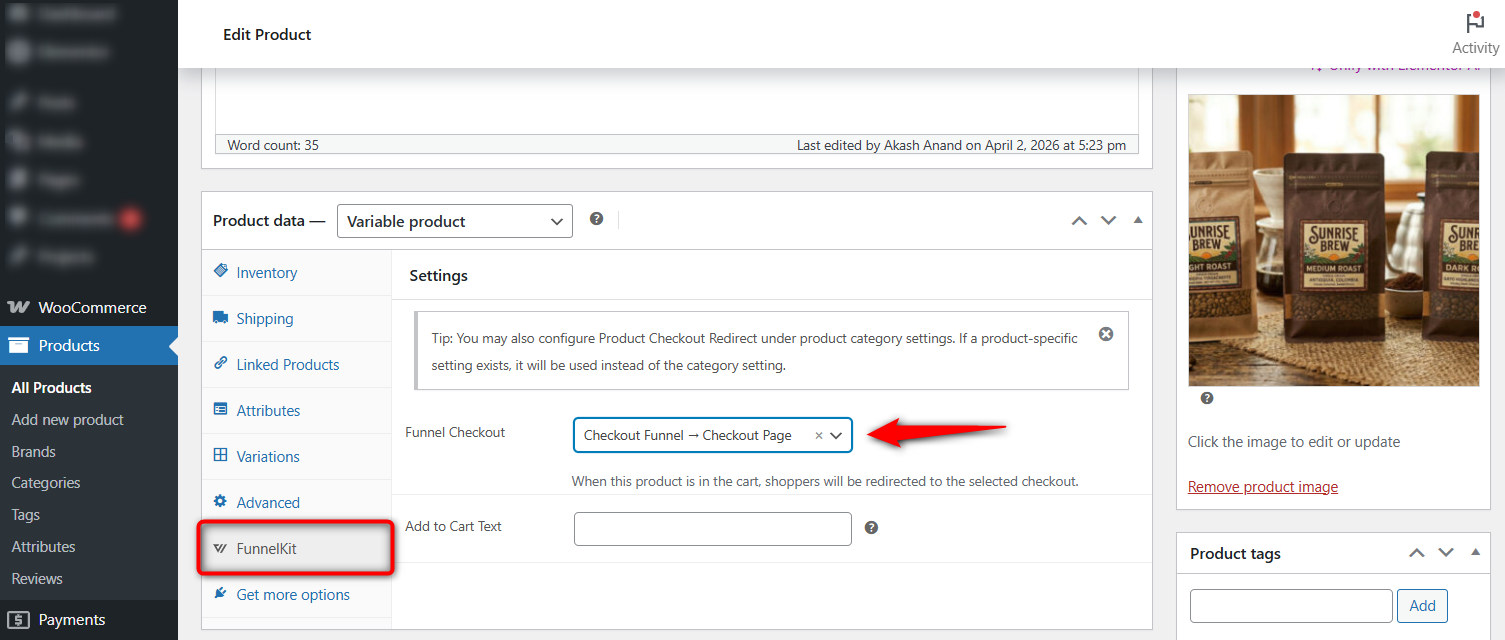
Click Update, and you're done.
Now, when a customer visits your shop, browses to this product, adds it to their cart, and proceeds to checkout, they'll land on your dedicated checkout page instead of the default store checkout.
The customer doesn't need to follow a special link. They don't need to land on a specific landing page first. The redirect activates the moment the product is added to the cart.
Setting up product checkout redirect at the category level
Don't want to configure every product individually? You can set checkout redirects at the product category level too.
Go to Products ⇨ Categories, edit any category, and you'll find the same Product Checkout Redirect setting. Assign a checkout page, and every product in that category will use it automatically.
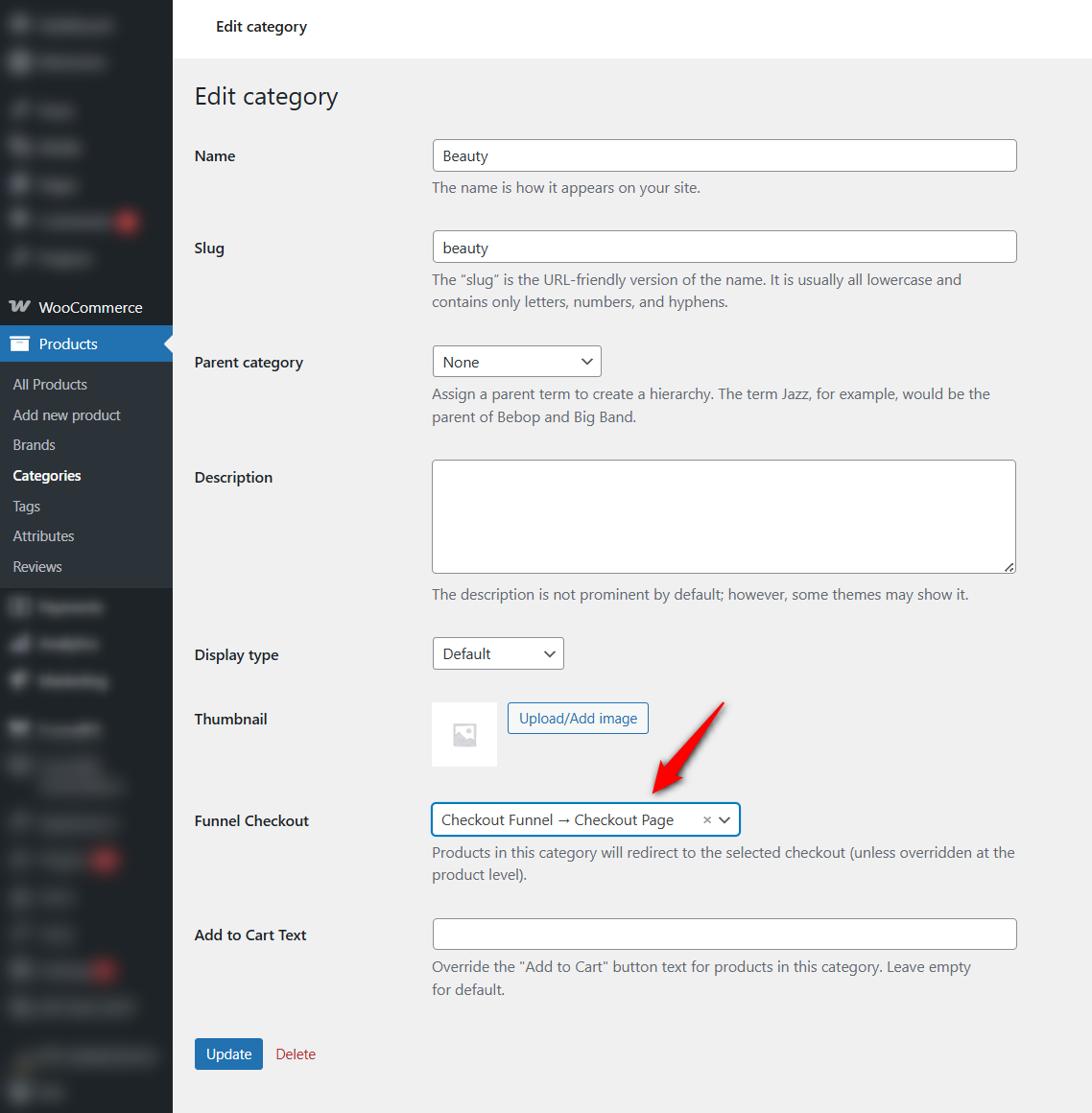
This is perfect for a product line or collection that shares the same checkout experience.
For example, all products in your "Premium Collection" category route to a high-end checkout with luxury branding and premium trust signals.
Priority logic: product overrides category
If you've configured a checkout redirect at both the product and category levels, the product-level setting always takes precedence.
For example, if your "Accessories" category is assigned to Checkout A, but one specific product within Accessories has Checkout B configured at the product level, that product will use Checkout B.
Everything else in the category still uses Checkout A.
This gives you the flexibility to set broad category-level defaults while making exceptions for individual products that need their own dedicated experience.
Handling of mixed carts
If a shopper has multiple products in their cart, each pointing to a different checkout page. Let's say one is assigned to Checkout A and another to Checkout B.
FunnelKit recognizes the conflict and falls back to your default store checkout.
This prevents confusing checkout experiences. The dedicated redirect activates only when the cart contents resolve cleanly to a single checkout page.
4. New File Upload Field at Checkout
FunnelKit Funnel Builder 3.15.0 introduces a brand-new File Upload field type that you can add to your checkout form.
This opens up entirely new use cases for your WooCommerce store. Customers can now upload documents, images, or files directly during checkout, without needing follow-up emails or separate upload pages.
Setting up a file upload field
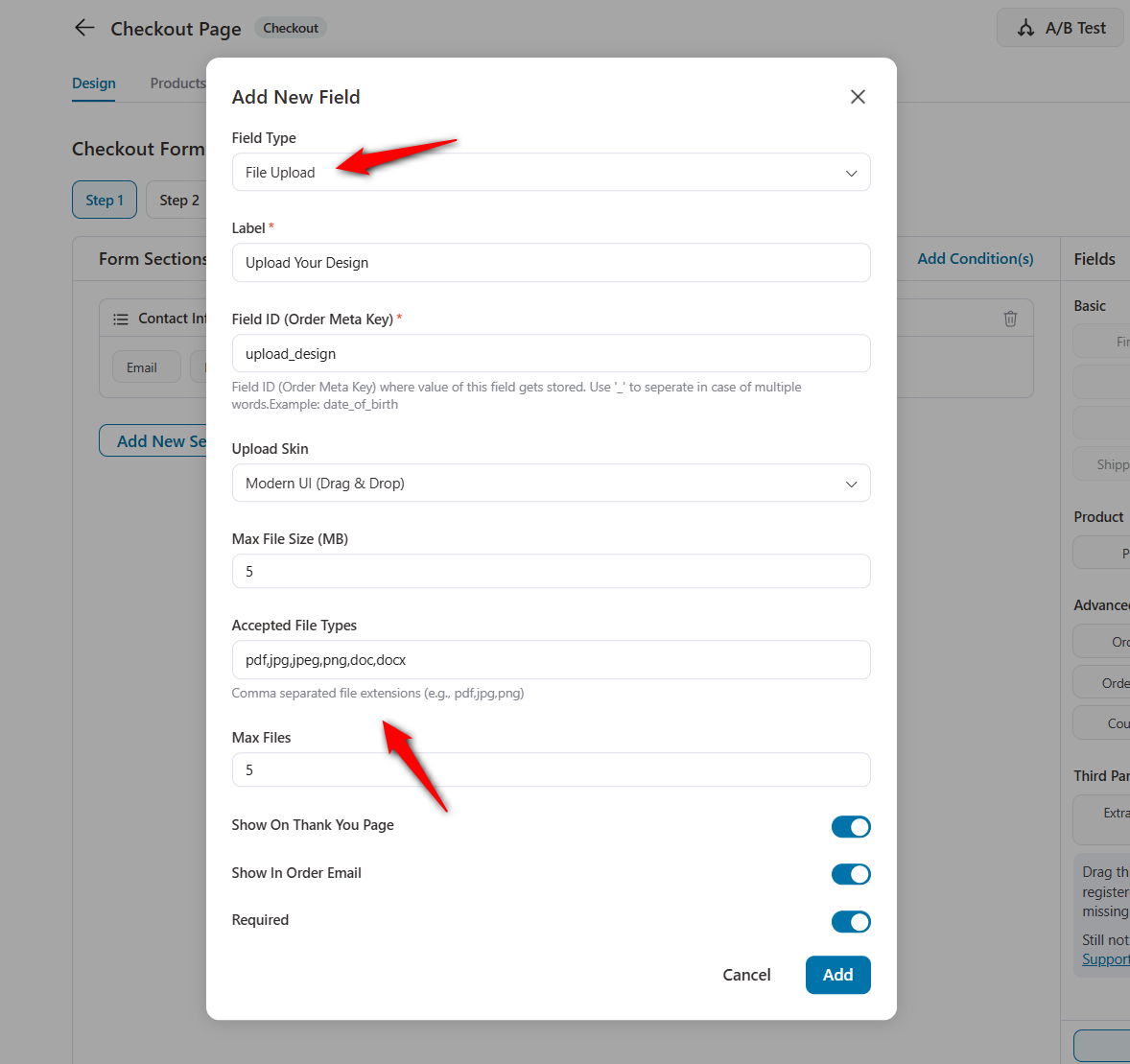
To add a file upload field, go to your Store Checkout Design tab, click 'Add New Field'.
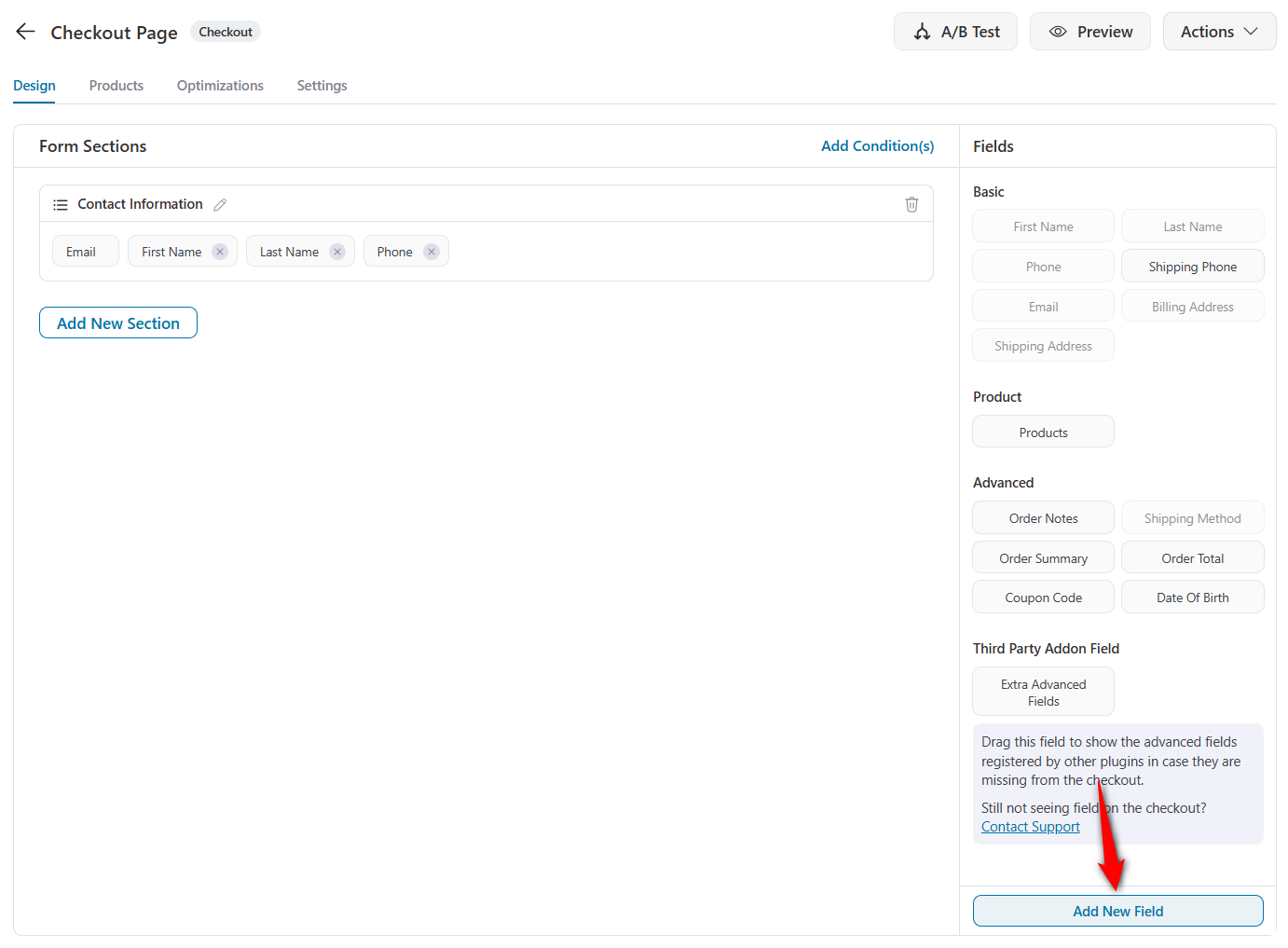
Select 'File Upload' from the Field Type dropdown.
You can configure the field with:
- A custom label (e.g., "Upload Documents", "Attach Design File")
- Field ID
- File upload skin
- Maximum file size
- Supported file formats
- Maximum number of files
- Options to show the uploaded file on the Thank You Page and in the Order Email
- Whether the field is required or optional
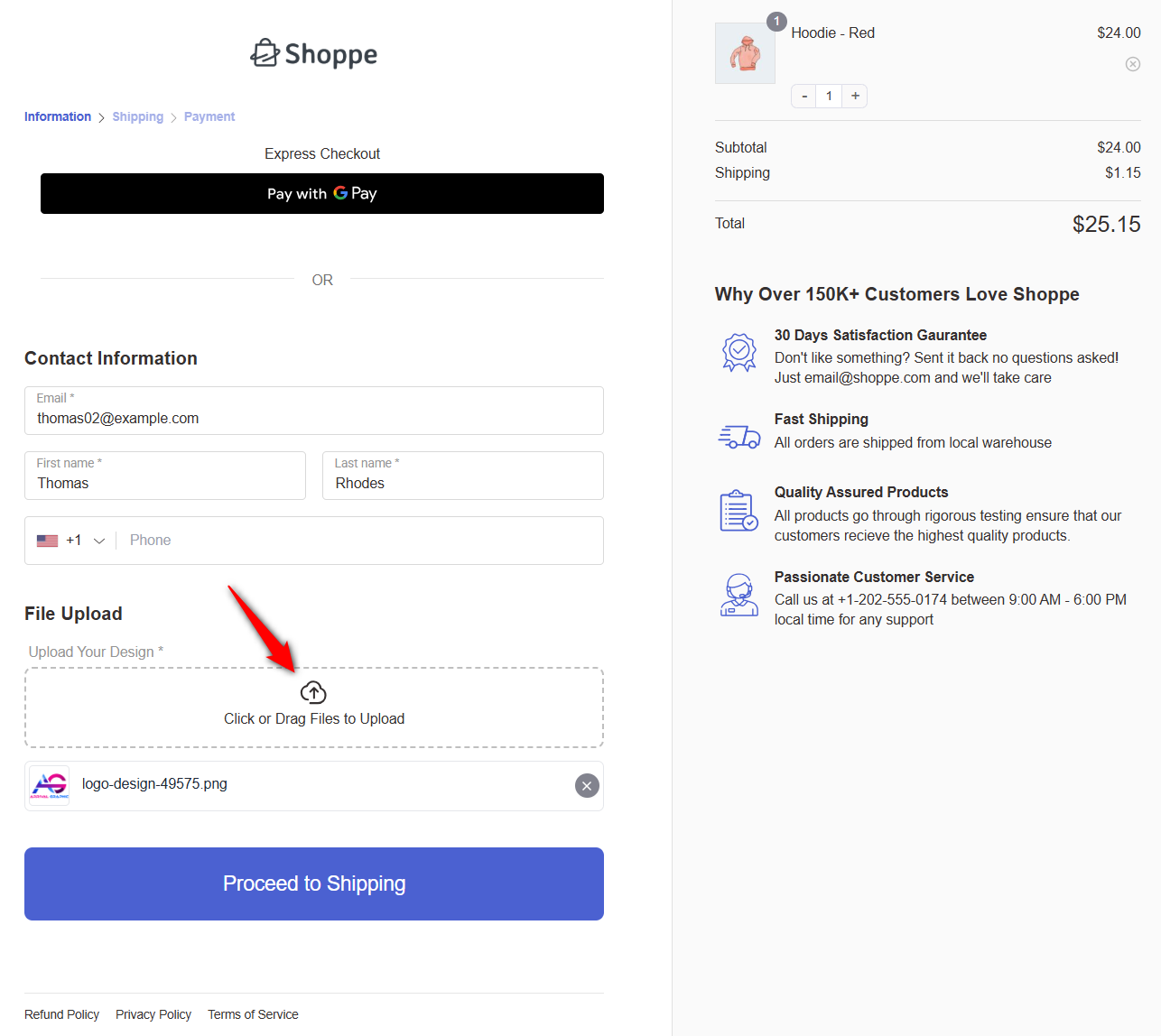
On the frontend, customers see a clean drag-and-drop upload area with a progress indicator.
They can click or drag files to upload, and uploaded files display with a filename and a remove option.
Use cases for the file upload field
- Custom product orders requiring design files or specifications
- B2B orders that need purchase orders or signed agreements
- Tax-exempt purchases requiring documentation
- Personalized products needing reference images
- Insurance or warranty claims requiring proof of purchase
Please note that the file upload also works seamlessly with conditional logic.
You can show the file upload field only when specific conditions are met, such as a particular product being in the cart or the order total exceeding a specific threshold.
5. Order Bumps with Stock Status Conditions
Nothing damages customer trust faster than offering them a product you can't actually deliver.
Running out-of-stock order bumps quietly kill conversions and create support headaches when customers accept an offer only to find out later that the product isn't available.
With FunnelKit Funnel Builder 3.15.0, you have a new Product Stock Status display condition for order bumps.
When editing any order bump, you'll find a new condition option under the display rules. You can now show or hide order bumps based on whether the offered product is:
- In Stock: Display the bump only when the product is actively available
- Out of Stock: Useful for edge cases like pre-orders or waitlist signups
- On Backorder: Control visibility when stock is low, but orders are still accepted
Combined with FunnelKit's existing order-bump rules (cart contents, order total, user role, etc.), stock-status conditions let you build truly intelligent upsell logic.
Your order bumps now automatically stay in sync with your inventory.
6. Inline Product Switcher at Checkout
One of the quieter conversion killers on most checkouts? Forcing customers to go back to the product page to change their variation.
A customer adds a Medium shirt to their cart, heads to checkout, then realizes they actually want a Large.
What happens? They leave checkout, navigate back to the product page, re-select the variation, add to cart again, and hope they end up in the right place. Most don't. They abandon.
FunnelKit Funnel Builder 3.15.0 introduces a new Inline Product Switcher template that solves this entirely.
The product switcher lets customers change variations such as size, color, style, and any variable product attribute directly on the checkout page. No back-and-forth, no re-navigation, no lost carts.
The cart updates instantly, pricing recalculates, and the customer continues through checkout without interruption.
This is a Pro feature and available as a template option when configuring your checkout design.
7. Additional Improvements, Compatibility Updates & Bug Fixes
FunnelKit Funnel Builder 3.15.0 ships with dozens of smaller improvements, expanded support for plugins and themes, and meaningful bug fixes.
New theme and plugin compatibilities
- Etch theme: Full support for landing pages, thank you pages, and opt-in pages built with the Etch theme.
- Oxygen Builder: Improved checkout compatibility with Oxygen's custom rendering engine.
- Enfold, Woostify, Spectra: Refined checkout integration for stores running these popular themes and builders.
Expanded plugin integrations
Checkout and funnel compatibility has been improved across a wide range of popular plugins:
- WooPayments: Smoother payment processing on FunnelKit checkouts
- WooCommerce Subscriptions: Enhanced handling of subscription products at checkout
- Germanized for WooCommerce: Improved compatibility for German compliance requirements
- hCaptcha: Seamless spam protection integration
- CookieYes & Complianz: Better cooperation with cookie consent plugins
- PS Delivery Module: Improved shipping module compatibility
- Elementor: Smoother funnel integration with Elementor-built pages
- Authorize.net CIM (Pro): Improved compatibility for one-click upsells
Along with the major features above, FunnelKit Funnel Builder 3.15.0 includes several smaller but important improvements:
- Performance optimizations for faster checkout loading
- Database query optimizations and conflict resolutions
- 12+ bug fixes across checkout rendering, multilingual support, and subscription product handling
- Compatibility with the latest versions of WordPress and WooCommerce
Ready to Try FunnelKit Funnel Builder 3.15.0?
FunnelKit Funnel Builder 3.15.0 is a significant step forward in making your WooCommerce checkout smarter and more flexible.
Full Divi 5 support means you can now design every step of your funnel visually inside the Divi 5 Builder. No more switching tools or compromising on design consistency.
Conditional checkout fields let you create dynamic forms that adapt to each customer, cutting out unnecessary friction and collecting exactly the right information.
The new file upload field unlocks entirely new order workflows.
If you're already using FunnelKit, update to version 3.15.0 and start using these improvements right away.
Not using FunnelKit yet? Take a look at our latest offers and see how FunnelKit can transform your WooCommerce store into a conversion machine.
Damanjeet Singh
August 3, 2026Editing a live automation shouldn’t feel like a game of Jenga with your revenue, where pulling the wrong piece brings the whole thing down. That’s the problem we set out...
Damanjeet Singh
June 6, 2026For fifteen years, I’ve built and sold software in the WordPress and WooCommerce ecosystem. In that time, one category has remained broken longer than any other: subscriptions. The base WooCommerce...
Editorial Team
May 21, 2026We're excited to announce that FunnelKit Automations 3.8.1 is now live! 🎉 This release is packed with upgrades that quietly transform how your store and courses run, putting them on...






