


Sometimes, the difference between a visitor leaving and placing an order comes down to something surprisingly small, like a better headline, a cleaner checkout, or a more compelling offer.
That's where WooCommerce A/B testing plugins come in.
Instead of guessing what works, you can test different versions of your checkout, product pages, landing pages, popups, and even abandoned cart emails to see what actually drives more conversions, all without touching a line of code.
The stakes are real. The average store loses 70.19% of carts before checkout is completed, according to the Baymard Institute.
Fixing the checkout issues that are actually solvable can increase conversions by 35.26% on a typical large ecommerce site.
The challenge is that no single plugin can test every part of your store. That's why we picked five tools that, together, cover the entire customer journey:
- Checkout and funnel testing
- Product and landing page testing
- Popup and lead capture testing
- Page builder layout testing
- and marketing email testing
Table of Contents
- 1 Quick comparison of Best WooCommerce A/B Testing Plugins
- 2 How We Tested These WooCommerce A/B Testing Plugins
- 3 5 Best WooCommerce A/B Testing Plugins
- 3.1 1. FunnelKit Funnel Builder - Best For A/B Testing Checkout Flow And Optin Flow To Boost Conversions
- 3.2 2. Nelio A/B Testing - Best For Testing Product Pages, Shop Pages, And Site-Wide Elements
- 3.3 3. OptinMonster - Best For Testing Popups And Cart-Abandonment Campaigns
- 3.4 4. Divi Builder (Divi Leads) - Best For Module-Level Testing On Divi-Built Pages
- 3.5 5. FunnelKit Automations - Best For A/B Testing WooCommerce Marketing Emails And Broadcasts
- 4 6 Best Practices for WooCommerce A/B testing
- 5 Frequently Asked Questions WooCommerce A/B Testing Plugins
- 6 Can I A/B test WooCommerce product prices?
- 7 Is Google Optimize still available for WooCommerce testing?
- 8 Do I need multiple plugins to test everything on my WooCommerce store?
- 9 Is FunnelKit Funnel Builder or Nelio better for WooCommerce?
- 10 How long should a WooCommerce A/B test run?
- 11 Is there a truly free WooCommerce A/B testing plugin?
- 12 Can A/B testing hurt my WooCommerce SEO?
- 13 Choose The Best WooCommerce A/B Testing Plugin for Your Store
Quick comparison of Best WooCommerce A/B Testing Plugins
| Plugin | Best For | Free Version Available | Starting Price (Yearly) |
|---|---|---|---|
| FunnelKit Funnel Builder | Checkout pages, one-page checkout, order bumps, upsells, and sales funnel steps | Yes (A/B testing requires Plus plan) | $179.50/year (2 sites) |
| Nelio A/B Testing | Product pages, shop pages, landing pages, themes, widgets, and menus | Yes | $495/year (1 site) |
| OptinMonster | Popups, floating bars, lead capture, product recommendations, and cart abandonment campaigns | Yes (A/B testing requires Plus plan) | $228/year (2 sites) |
| Divi Builder (Divi Leads) | Landing pages, WooCommerce pages built with Divi, layouts, CTAs, and modules | No | $89/year (Unlimited sites) |
| FunnelKit Automations | Marketing emails, broadcast emails, subject lines, email content, SMS campaigns, and automated WooCommerce email campaigns | Yes (A/B testing requires pro plan) | $99.50/year (1 site) |
Note: Pricing may change, so check the official websites for the latest plans. Also, FunnelKit Funnel Builder and FunnelKit Automations are separate plugins with different features and require separate licenses.
How We Tested These WooCommerce A/B Testing Plugins
We didn't waste time on generic "what is A/B testing" explainers here. Instead, we checked what each tool actually does, not just what its marketing page claims:
- Real testing scope: Does it run tests on your existing site content, or only inside its own funnel, builder, or platform?
- Verified track record: Wherever a tool is listed on WordPress.org, we pulled the actual install count and star rating directly from the listing. For others, we checked trusted sources like G2 and Trustpilot instead. We also confirmed each plugin is actively maintained and compatible with the latest version of WooCommerce.
- Setup friction: Does it work from inside wp-admin, or does it require an external dashboard or account? Also, some important use cases WooCommerce stores will actually use.
- WooCommerce depth: Can it tie results to real orders and revenue, or only to clicks and impressions?
- Genuine limitations: We wrote cons based on our experience and other verified reviews, rather than filler complaints.
5 Best WooCommerce A/B Testing Plugins
In this section, we share the key features, pros, and cons along with our experience and prices so you can get a better idea about these WooCommerce A/B testing plugins:
1. FunnelKit Funnel Builder - Best For A/B Testing Checkout Flow And Optin Flow To Boost Conversions
| Primary Use Case | Store checkout, sales funnels, order bumps, upsells, and opt-in funnels. |
| Starting Price | A/B testing included from the Plus plan, $179.50/year for (2 sites) |
| Track Record | WordPress.org: 40,000+ active installs. 5.0 across 998 reviews, updated within the past month |
| Testing Scope | Pages built using FunnelKit Funnel Builder. |
FunnelKit Funnel Builder is a complete sales funnel builder for WooCommerce, with A/B testing built directly into the workflow.
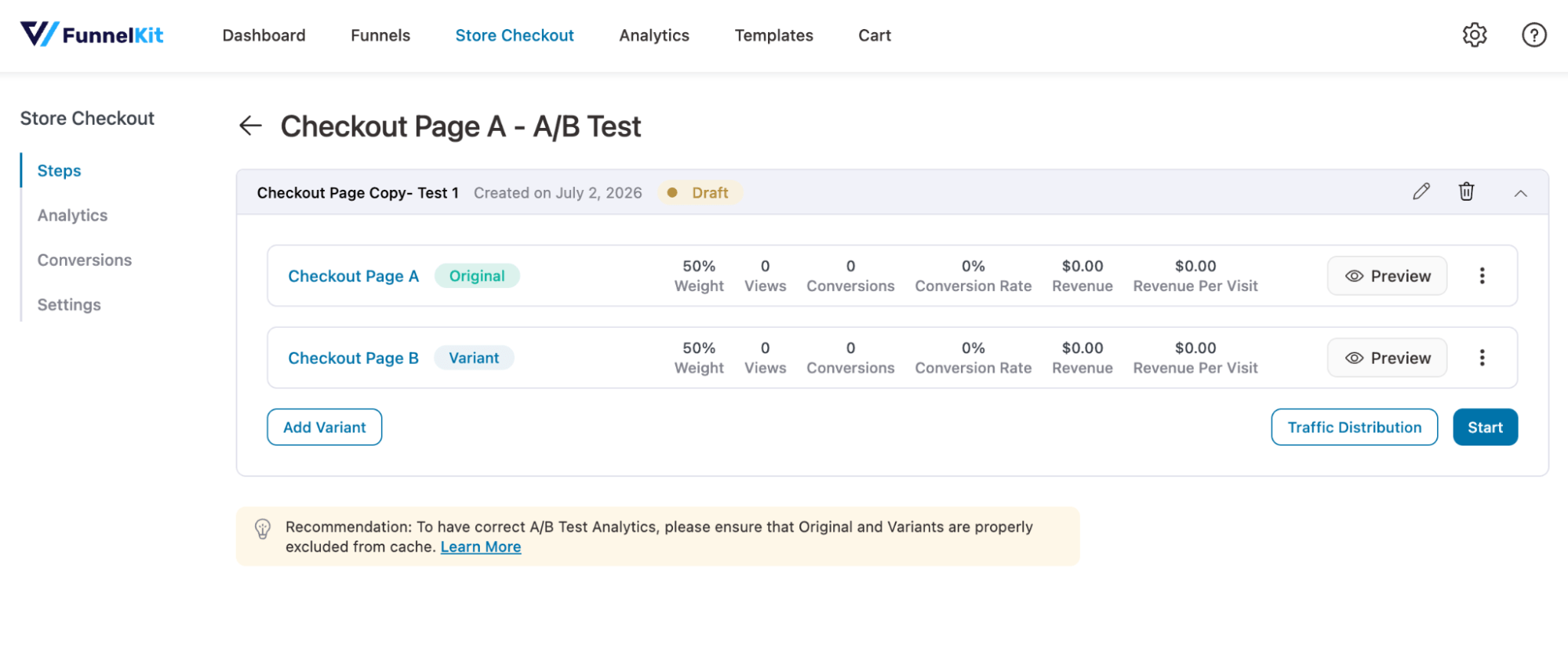
You can create multiple variations of any page built with this plugin, either by duplicating it or by importing a saved template to run an A/B test.
You can make any changes from design to content to offers (for order bumps and upsells) to test which works better.
You can distribute traffic among the variants and make decisions based on key metrics like Views, Conversions, Conversion Rate, Revenue, Revenue Per Visit, and more. And everything can be done from the WordPress dashboard.
Here are the key features:
- Compare one-step, two-step, and three-step checkout designs to see which converts more of your actual traffic.
- A/B test different offers and discounts as order bumps and upsells
- Use different offers or copy for your optin funnels to get more leads.
- Detailed analytics including tracking visits, revenue, revenue per visit, and revenue per step for each variant, not just click counts.
- Set the traffic split between variants and adjust it mid-test without restarting.
- Declare a winner based on accurate data
- Restart the A/B test at any time if needed.
Our experience:
This WooCommerce A/B testing plugin is extremely easy to run an A/B test and declare a winner at every step. The option to import any existing template as multiple variants is especially great. We created up to 5 variants for the checkout page.
The best part is you can A/B test pre and post purchase upsell offers with different placement, discount etc. Plus, being able to change traffic distribution midway through a test is highly effective. But it’s important to note that pages under test need to be excluded from your caching plugin
✅ Pros
- A/B testing is native to the checkout and all funnel builder steps
- Revenue and revenue-per-step reporting ties results directly to money, not just clicks
- Works across Elementor, Divi, Gutenberg, Bricks, and Oxygen page builders
- You can A/B test not just content and design, but pricing too, which is great.
- Comes with a risk-free 14-day money-back guarantee
❌ Cons
- Need to upgrade to the pro version to enjoy all the features
- Can't A/B test pages like product pages, shop pages, etc.
Pricing: The pricing starts at $99.5/year. A/B testing is included starting on the Plus plan, listed at $179.50/year introductory pricing for 2 sites .
2. Nelio A/B Testing - Best For Testing Product Pages, Shop Pages, And Site-Wide Elements
| Primary Use Case | Product pages, shop pages, landing pages, themes, widgets, and menus |
| Starting Price | Free (500 tested page views/month); paid plans from approximately $29/month |
| Track Record | WordPress.org: 5,000+ active installs, 4.8 rating (96 reviews) |
| Testing Scope | Any existing page, post, WooCommerce product, theme, or widget on your site |
Nelio A/B Testing is a conversion optimization plugin that runs entirely inside your WordPress dashboard; no external tools or data exports needed.
You can create test variants of any existing page, post, WooCommerce product, theme, widget, or menu directly from your site's content, no separate builder required.
You can change product titles, images, descriptions, and prices, or test entirely different themes and layouts, to see which version performs better.
You can track results with built-in heatmaps and scrollmaps for every variant, and let the plugin automatically deploy the winner once a test reaches significance.
Here are the key features:
- Split-test pages, posts, WooCommerce products, themes, widgets, menus, and custom post types from one dashboard.
- Directly test product titles, descriptions, images, and prices, plus run bulk-sale tests for discount strategies.
- Built-in heatmaps and scrollmaps show where visitors click and how far they scroll on each variant. No separate analytics plugin needed.
- Automatic winner deployment applies the best-performing variant once a test reaches significance.
Our experience:
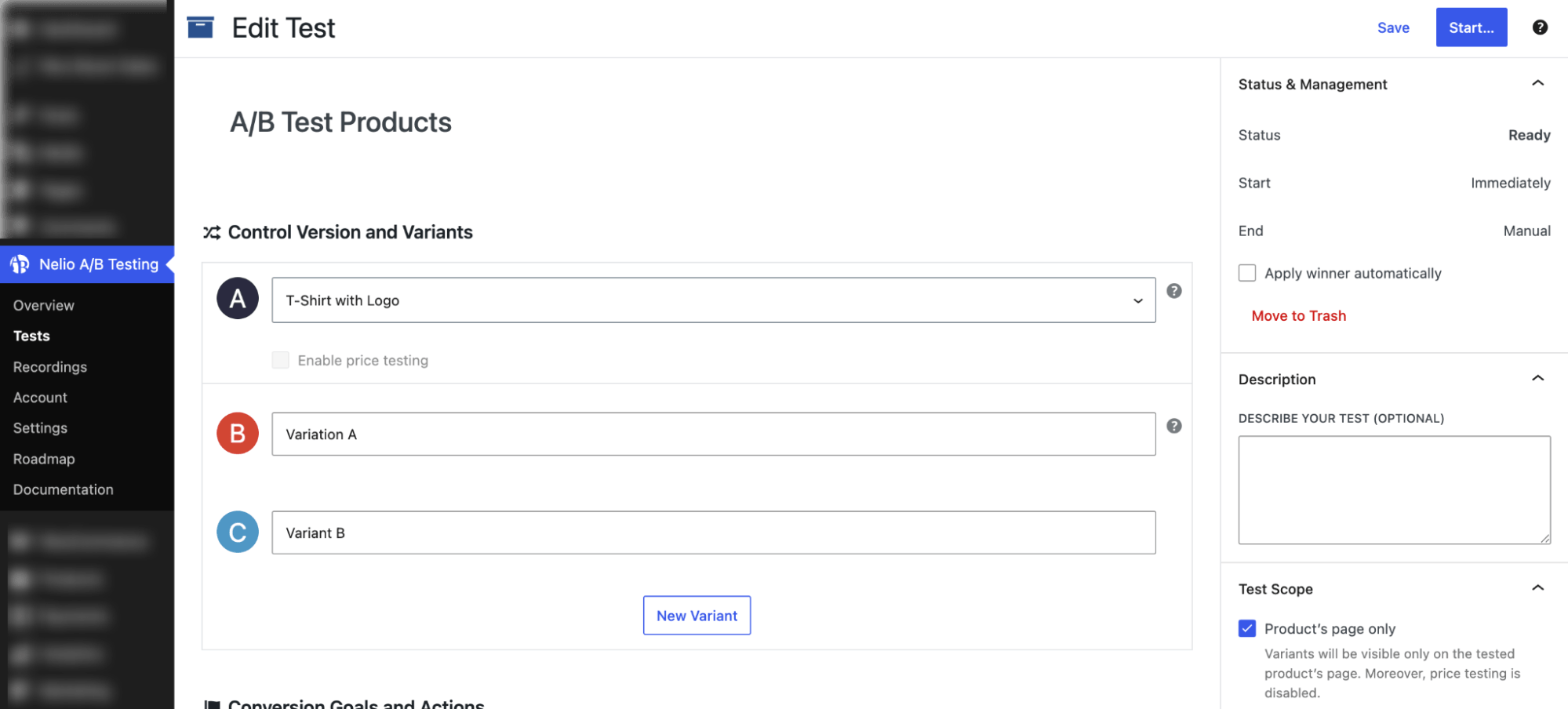
We created a product page test for one of our WooCommerce products and found the process straightforward. You can create multiple variations of the page, edit each one individually, and preview them before the test goes live. We tested different product images and pricing on the same product page and were able to compare results directly from the test dashboard.
✅ Pros
- Tests different pages, themes, widgets, and menus using a single plugin.
- Heatmaps and scrollmaps are included on every plan
- Custom traffic allocation across variants was added in a recent update
❌ Cons
- Test scheduling, quota control, and email notifications require the Professional plan or higher
- Session recordings are reserved for Enterprise, so smaller stores don't get full behavioral context
- No revenue-per-visit or revenue-per-step analytics.
Pricing: Free plan available directly from WordPress.org. Paid plans start at $495/year with a monthly view limit of 5,000.
3. OptinMonster - Best For Testing Popups And Cart-Abandonment Campaigns
| Primary Use Case | Popups, floating bars, slide-ins, and cart abandonment campaigns |
| Starting Price | A/B testing included from the Plus plan, starting at $84/year ($7/month) |
| Track Record | WordPress.org: 1,000,000+ active installs, 4.3, 649 five-star reviews |
| Testing Scope | Popup and campaign variants layered on top of your pages, rather than testing the pages themselves |
OptinMonster is a popup and on-site campaign builder that layers A/B testing on top of your existing pages rather than replacing them.
You can create multiple variants of a campaign, whether that's a popup, floating bar, slide-in, or fullscreen welcome mat, and test different headlines, images, copy, and layouts against each other. Campaigns can be triggered by exit intent, scroll position, time on site, or specific pages.
Most of the actual building, test setup, and analytics happen through your OptinMonster account on their website rather than the WordPress dashboard. The plugin's role is mainly to connect your site to that account and display whatever you've built there.
Here are the key features:
- Split-test headlines, images, copy, and layouts across popups, floating bars, slide-ins, and welcome mats.
- Trigger campaigns using scroll position, time on site, page-level targeting, or on-site behavior.
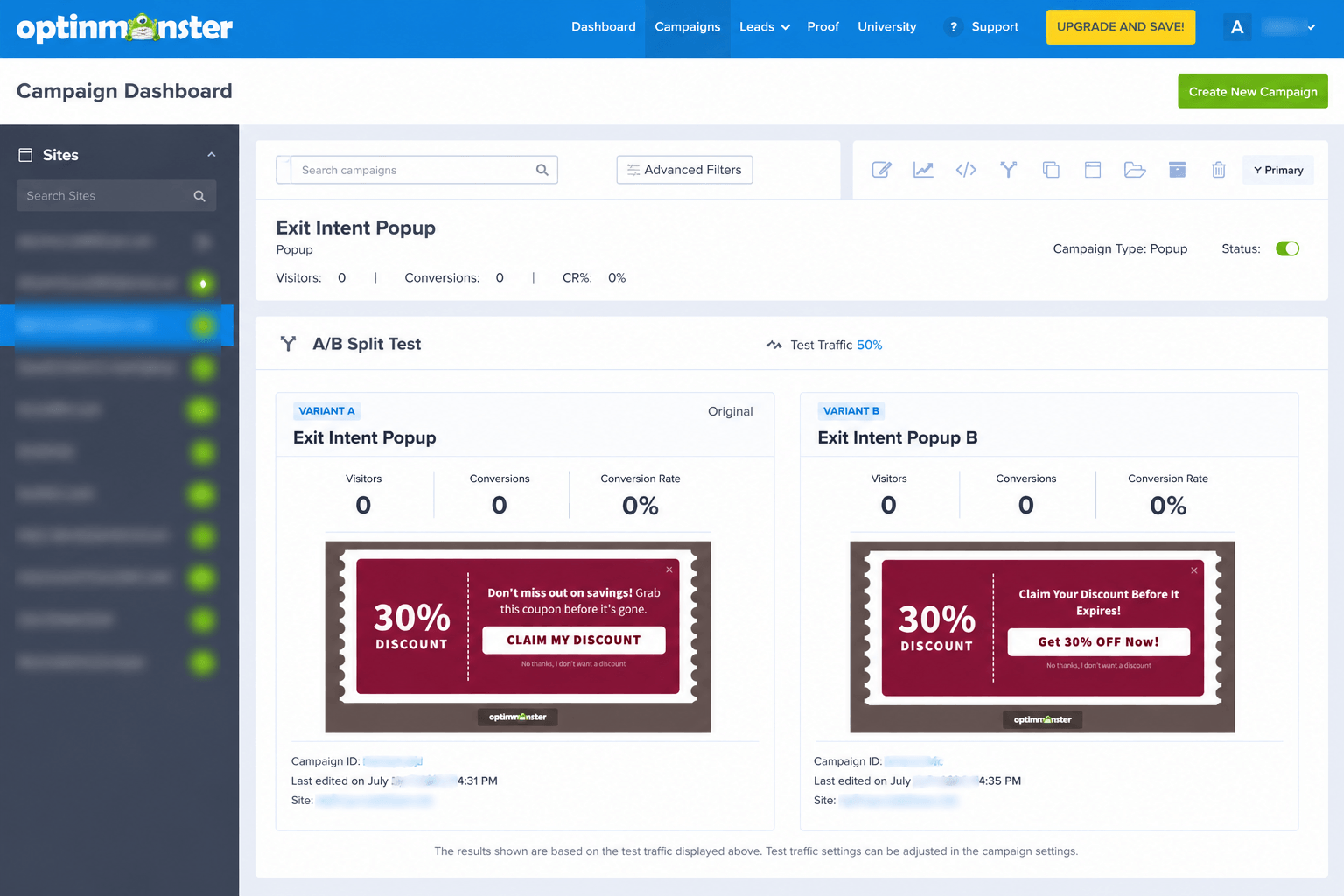
- Track conversion rate, visitors, and conversions for each split test directly in the campaign analytics.
- Target and trigger campaigns based on WooCommerce cart contents.
Our experience:
We built a two-variant popup test: different headlines and CTA Text but the same offer. The builder itself is genuinely easy to pick up, but you can’t control it from the WordPress dashboard, so it takes some time.
But the drag-and-drop builder is very smooth to use. Plus, you get control for different devices, which is very important for a pop-up plugin.
✅ Pros
- Large install base, 1,000,000+ active sites
- Works on Shopify, Squarespace, and beyond WordPress
- Exit-intent triggers built for cart abandonment
- Free account to test the builder first
❌ Cons
- A/B testing needs Plus plan or higher
- WooCommerce integration locked to Growth tier
- Managed from OptinMonster's account, not WordPress dashboard
- Free plan needs a card upfront, auto-charges past the limit
Pricing
Free account available (includes up to 3 campaigns and 500 monthly campaign impressions). Paid plans start at Basic for $7/month ($84/year), but A/B testing requires the Plus plan at $19/month ($228/year introductory), which includes 10,000 monthly campaign impressions.
4. Divi Builder (Divi Leads) - Best For Module-Level Testing On Divi-Built Pages

| Primary Use Case | Landing pages, WooCommerce pages, layouts, CTAs, and modules built with Divi Builder |
| Starting Price | No free version. A/B testing is included with all paid Divi plans, starting at $89/year or $249 one-time for lifetime access. |
| Track Record | 4.9/5 on Trustpilot (Elegant Themes) |
| Testing Scope | Any section, row, or module on a page built with Divi Builder |
Divi Leads is Divi's built-in split-testing system, working at a more granular level than most tools on this list. Instead of testing an entire page or funnel step, you pick a subject inside the page itself, a single module, a row, or a full section, then set a goal for it.
Goals range from clicks and WooCommerce sales through the Shop module to form conversions, bounce rate, and how many visitors actually read down to a given section.
A separate goal engagement stat isolates how well the goal itself is performing, independent of whichever variation is being tested. Everything runs inside the Divi Builder interface, with stats refreshing on a schedule you control.
Here are the key features:
- Test individual modules, rows, or full sections without leaving the page editor.
- Set WooCommerce sales as a goal directly through the Shop module, tracking real purchases rather than clicks.
- Run unlimited variations of a subject within a single test.
- Track click-through rate, sales rate, conversion rate, bounce rate, and read rate in real time.
- Measure conversions that happen on a different page than the one being tested, using shortcode-based goal tracking.
Our experience:
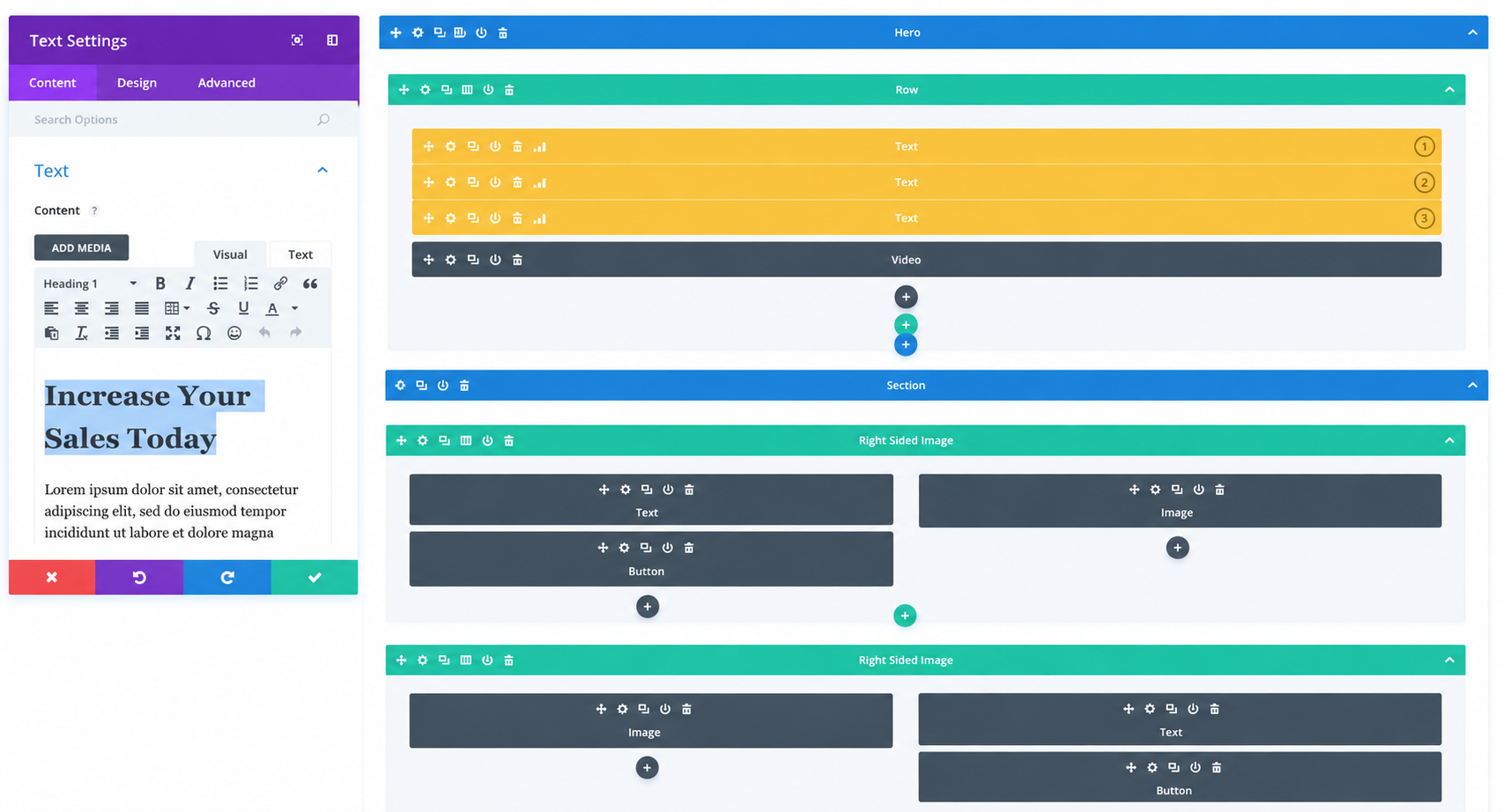
What stood out most was how little setup was required. We didn't have to switch to another interface or configure a separate experiment. We simply selected the module we wanted to test, created a variation, made our changes, and Divi handled the traffic split.
Seeing both variants directly in the page builder made it easier to review changes than tools that hide experiments behind a separate analytics dashboard.
✅ Pros
- Tests at the module, row, or section level, offering more granular control than whole-page testing tools.
- Tracks clicks, conversions, WooCommerce sales, and bounce rate depending on the goal you choose.
- Supports unlimited variations within a single split test.
- Included with every paid Divi membership at no additional cost.
❌ Cons
- No free version is available
- Only works with pages built using Divi Builder.
- Best suited for Divi users. Switching from another page builder can require rebuilding existing pages.
Pricing: No free version. Divi memberships start at $89/year and include Divi Builder with Divi Leads (A/B testing).
5. FunnelKit Automations - Best For A/B Testing WooCommerce Marketing Emails And Broadcasts
| Primary Use Case | Automated WooCommerce marketing emails, email broadcasts, and SMS marketing campaigns |
| Starting Price | A/B testing is available in the Pro version, starting at $99.50/year |
| Track Record | WordPress.org: 20,000+ active installs, 5.0 rating (333 of 340 reviews are 5-star) |
| Testing Scope | A/B testing for automated email sequences, broadcast email campaigns, and SMS campaigns. |
FunnelKit Automations is a complete email and SMS marketing CRM solution for WooCommerce with solid A/B testing features. This plugin offers A/B testing for both automated marketing emails and broadcast campaigns.
It lets you create up to three versions of a marketing email by changing elements like the subject line, preview text, email copy, or even the discount code. Contacts are automatically divided between the variations.
For Broadcast campaigns, you can test two or three variations, then use Smart Sending for A/B testing. The Smart Sending features first send each version to a small sample of your WooCommerce audience, wait for the performance window you've defined, and then automatically send the winning version to everyone else, helping you maximize opens, clicks, or conversions with minimal effort.
Here are the key features:
- Build up to three variants inside an automation, testing subject lines, preview text, body content, or discount codes.
- Run two or three variant A/B tests on broadcast email and SMS campaigns.
- Smart Sending tests a defined sample size for a set wait time, then automatically sends the winning variant to the rest of your list.
- Track contacts, sends, opens, clicks, click-to-opens, revenue, revenue per contact, and unsubscribes for every automation variant.
- Track open rate, click rate, click-to-open rate, and revenue for every broadcast variant running with smart sending.
Our experience:
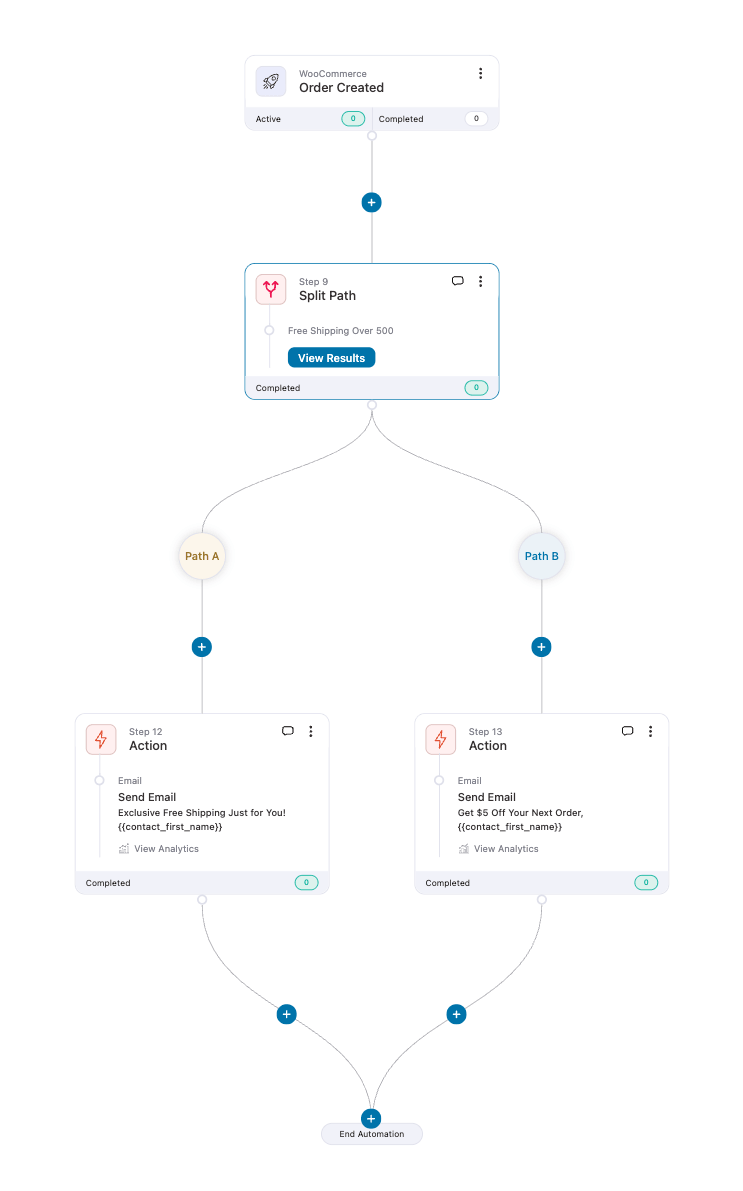
Among the many use cases we tried, we set up an automation with a WooCommerce Order Created trigger, followed by a Split Path with two offers. One said "Exclusive Free Shipping Just for You!" The other, "Get $5 Off Your Next Order." Names got pulled into both emails automatically.
What stood out was how naturally A/B testing fits into the automation builder. No switching to a separate tool. We just added a Split Path, created the email variations, and turned the automation on. It felt like building any other workflow.
Broadcast testing is just as easy. Setting up variations takes minutes, and once your campaign is live, FunnelKit Automations' detailed analytics make it simple to see which version resonates most with your audience.
✅ Pros
- Tests marketing automations and broadcasts using one tool.
- Smart Sending picks and sends the winner automatically for broadcasts
- Revenue and revenue per contact tracked, not just opens and clicks
- No cap on contacts or emails sent
❌ Cons
- Transactional emails can't be split tested, only marketing sends
- Requires your own SMTP provider for delivery at scale
Pricing: A free version is available. A/B testing is included on the Pro plan, starting at $99.50/year for one WooCommerce site.
6 Best Practices for WooCommerce A/B testing
1. Match the tool to what you're actually testing
An email subject-line test won't reveal why people bail on your product pages either, because you're measuring a completely different part of the funnel. Figure out where visitors are actually dropping off first, then pick the plugin built for that exact spot.
Testing the wrong layer is just a fast way to burn traffic without learning anything.
2. There's no magic number of visitors you need
Ignore any blanket rule about sample size. What you actually need depends on your baseline conversion rate and how big a shift you're hoping to detect, which is why a checkout test and a homepage banner test can require wildly different traffic volumes to mean anything at all.
Low-traffic pages simply take longer, sometimes too long to be worth the wait. Start with your best-performing product or category pages. Save the long shots for later.
3. Resist calling it early
A variant pulls ahead after three days, and it's tempting to declare a winner right then. Don't. That instinct is one of the most common mistakes store owners make, and results called early rarely hold up once the change actually ships to everyone.
Pick a duration before you launch. Then stick to it, no matter how good week one looks.
4. Checkout beats cosmetic tweaks, every time
If you can only run one test this quarter, run it on checkout. A meta-analysis of 6,700 online experiments, independently assured by PwC, found checkout and product-page changes consistently outperformed cosmetic tests like color swaps or copy tweaks when it came to actual revenue.
Field count. Layout. Step order. These move the needle more than a headline or a button color ever will.
5. Caching will quietly wreck your results
Almost everyone gets bitten by this eventually. A caching plugin can serve the same cached variant to every visitor regardless of which group they're supposed to be in, and it won't throw an error or warn you when it happens. Your test just silently stops meaning anything.
Whether you're on Nelio, FunnelKit plugins, or Divi Leads, exclude any page under test from your caching rules before launch, not after.
6. One variable per test, no exceptions
Change the headline, the image, and the price all in the same test, and you'll have a result with no explanation attached to it. Which one actually moved the needle? No way to know. Isolate a single major element per test instead.
It takes longer to get through your whole backlog this way, but it's the only version of the result you can actually trust.
Frequently Asked Questions WooCommerce A/B Testing Plugins
Can I A/B test WooCommerce product prices?
Yes, but carefully. Showing two customers different live prices for the same product at the same time can create fairness complaints if discovered. A safer approach is testing one price for a set period, then switching to a second price for an equal period and comparing results, rather than running a true simultaneous split.
Is Google Optimize still available for WooCommerce testing?
No. Google Optimize was discontinued on September 30, 2023, with no direct replacement from Google. Most store owners who used it have moved to native WordPress tools like Nelio or funnel-builder plugins like FunnelKit depending on what they need to test.
Do I need multiple plugins to test everything on my WooCommerce store?
Realistically, yes, if you want full coverage. No single tool on this list tests checkout, product pages, popups, page-builder layouts, and emails all at once. Most stores start with FunnelKit for checkout and Nelio for product pages, then add OptinMonster or FunnelKit Automations once popup or email testing becomes a priority.
Is FunnelKit Funnel Builder or Nelio better for WooCommerce?
They're complementary rather than competing. FunnelKit Funnel Builder is the stronger pick for checkout, order bumps, and upsells, since testing is built directly into the funnel builder. Nelio is the stronger pick for product pages, shop pages, and general site content, since it tests anything without requiring a funnel rebuild.
How long should a WooCommerce A/B test run?
Most tests need 2 to 4 weeks to reach statistical significance, though this depends heavily on your traffic volume and current conversion rate. Low-traffic pages need longer test windows or bigger, more impactful changes to produce a readable result
Is there a truly free WooCommerce A/B testing plugin?
Nelio offers a free plan, though it's capped at 500 tested page views per month and one active test at a time. FunnelKit Funnel Builder and FunnelKit Automations both have free versions, but A/B testing itself requires their paid Plus and Pro plans, respectively.
Can A/B testing hurt my WooCommerce SEO?
Not if it's set up correctly. Tools that use canonical URLs and avoid cloaking (showing search engines a different page than visitors see) are safe.
Choose The Best WooCommerce A/B Testing Plugin for Your Store
There's no single right answer here, only the right answer for where your store actually loses money.
Go for FunnelKit Funnel Builder if checkout is the leak. Cart abandonment averages north of 70% industry-wide, and if your own numbers look anywhere close to that, testing one-step versus two-step checkout, or tweaking your order bump offer, is going to move more revenue than almost anything else on this list. It's the pick for stores that already know their funnel is the problem.
Go for Nelio A/B Testing if the problem lives earlier, on product pages, category pages, or your shop's general layout. It's the only tool here that tests anything on your site without locking you into a specific builder or funnel structure, which matters if your theme or page builder changes down the line. Start with the free plan if you just want to see how it feels before committing.
Go for OptinMonster if lead capture or cart-abandonment popups are your priority, especially if you're running campaigns beyond just your WooCommerce store. It has the largest install base of anything on this list by a wide margin, and its exit-intent and cart-targeting triggers are built specifically for catching visitors before they leave.
Go for Divi Leads only if you're already building your store in Divi. It tests at a level none of the whole-page tools reach. Individual modules and rows, and setting WooCommerce sales as a goal directly through the Shop module. Outside of Divi, though, it's not worth adopting just for this.
Go for FunnelKit Automations once your on-page testing is solid and you're ready to test what happens after someone leaves your site. Subject lines, email copy, discount codes. It's the only tool here that follows the customer past the browser, and Smart Sending handles the winner selection for you once a broadcast test has enough data.
Most stores don't start with all five. Start with the one you need most.

Editorial Team
August 27, 2026Have you ever noticed the cart icon at the top of many online stores? It’s more than just a design choice. It can greatly improve your customers' experience. A cart...
Editorial Team
August 27, 2026WooCommerce frequently bought together offers are one of the easiest ways to increase revenue on a product page. Think about the counter at a kitchen appliance store. Let's say someone...

Editorial Team
August 24, 2026WooCommerce discount setups make the customer do the work, i.e., create a code, put it in an email, and hope enough people paste it at checkout to justify the margin...






