


The PayPal gateway supports two different subscription modes: PayPal Subscriptions and Payment Vaulting.
These modes work differently and require different configurations.
Before setting up subscriptions, choose the mode that best fits your store’s needs.
| When to use PayPal Subscriptions | When to use Payment Vaulting |
| PayPal handles renewals automatically | Store handles renewals using saved payment method |
| PayPal retry logic for failed payments | Merchant manages retry logic |
| Minimal configuration | Full control over subscription changes |
| PayPal manages subscription lifecycle | WooCommerce/Sublium manages subscription lifecycle |
How To Select Subscription Mode
You can select your mode at:
WooCommerce → Settings → Payments → PayPal, and under “Express Checkout Settings” choose Subscription mode.

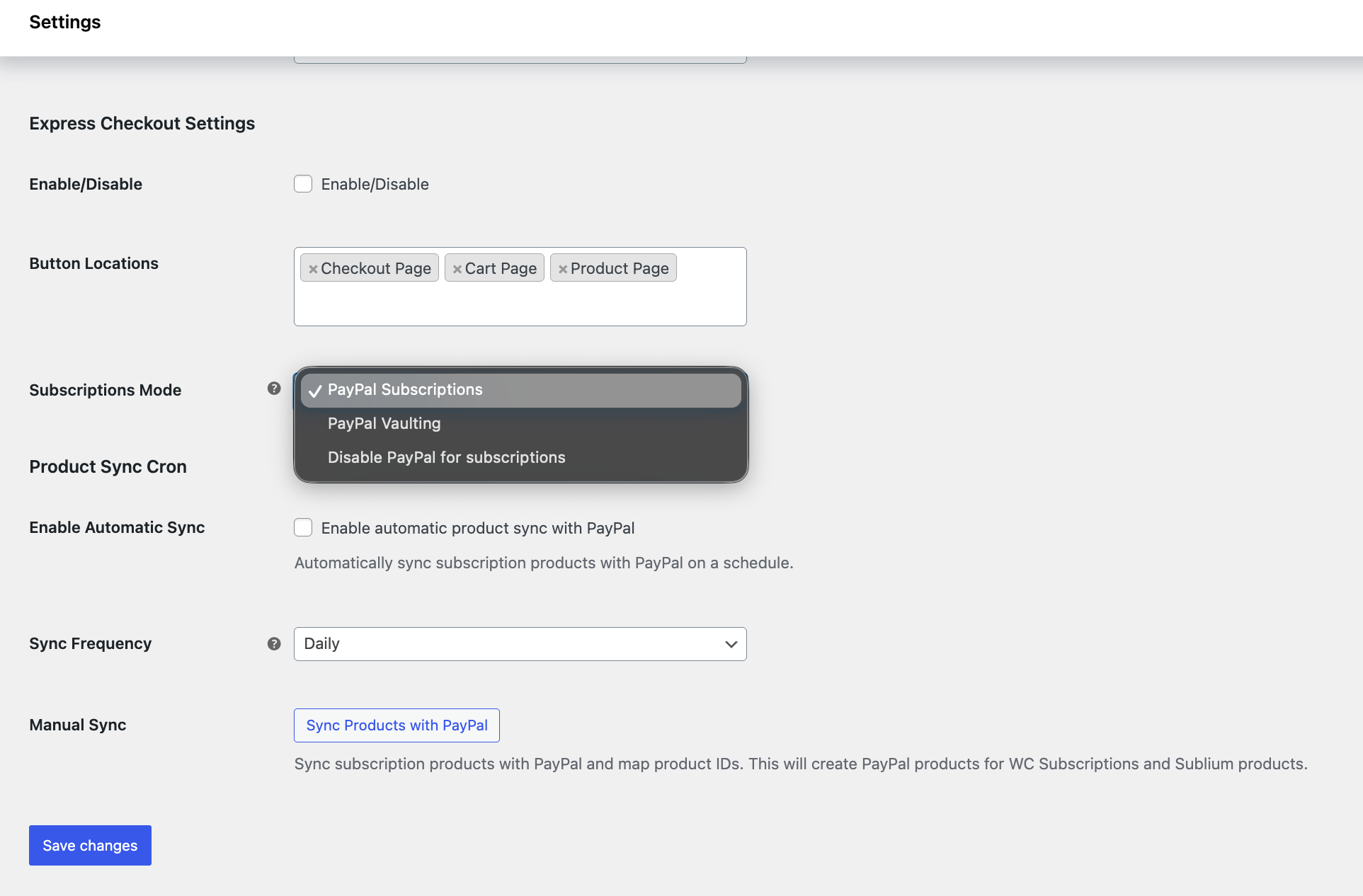
Mode 1: PayPal Subscriptions
PayPal manages the subscription and automatically charges the customer on renewal. Your store does not handle renewal payments.
Flow at Checkout and Renewal:
| Step | What Happens |
| Customer checkout | Customer selects a subscription product. |
| Plugin action | Creates PayPal Billing Plan (P-XXXXX) and PayPal Subscription (I-XXXXX) via PayPal API. |
| Customer approval | Customer approves subscription in PayPal popup. |
| Payment storage | PayPal stores payment method as part of the subscription agreement (Vault not required). |
| Renewal | PayPal automatically charges the customer. |
| Store notifications | Webhooks notify your store: PAYMENT.SALE.COMPLETED, BILLING.SUBSCRIPTION.ACTIVATED. |
What Gets Created:
- PayPal Subscription ID (I-XXXXX)
- PayPal Plan ID (P-XXXXX)
- WooCommerce/Sublium subscription linked to PayPal subscription
Requirements:
- PayPal Business account
- PayPal connected via OAuth or API credentials
- Webhooks configured
Troubleshooting:
- Subscription not created → Check API credentials and webhook configuration
- Renewals not showing → Verify webhook delivery
Mode 2: Payment Vaulting
Your store saves the customer’s PayPal payment method and triggers renewal payments using that saved method.
Flow at Checkout and Renewal:
| Step | What Happens |
| Customer checkout | Customer selects a subscription product. |
| Plugin action | Creates a regular PayPal order (not a PayPal subscription). |
| Payment storage | Stores payment method via Vault or Billing Agreement for future use. |
| Renewal | WooCommerce/Sublium triggers renewal payment using the saved token. |
| Store notifications | Webhooks notify your store about successful or failed renewals. |
What Gets Created:
- Regular PayPal order
- Payment Token / Billing Agreement ID (BA-XXXXX)
- WooCommerce/Sublium subscription with saved payment method
Requirements:
- PayPal Business account
- Vault enabled (or Billing Agreements for legacy setups)
How to enable Vault in a PayPal account.
If you used the PayPal automatic connection method, Vault is enabled automatically.
If you used Manual API credentials, log in to the PayPal Developer Dashboard.
Open your REST API app. Ensure Accept payments and Vault are enabled.
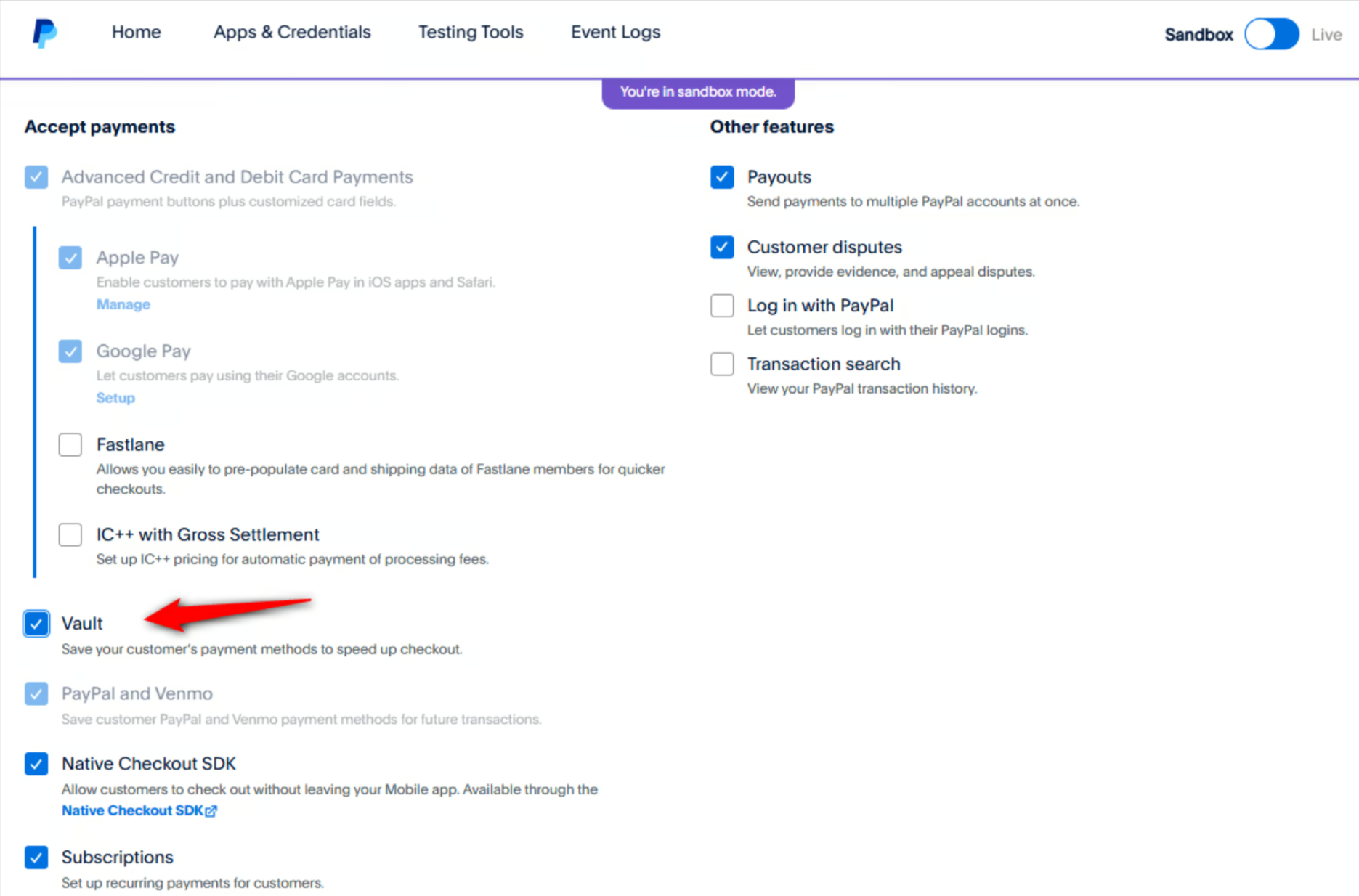
If Vault is missing, request access from your PayPal business account under Save PayPal and Venmo payment methods > Get Started.
Troubleshooting:
- Renewals failing → Check Vault or Billing Agreement status
- Vault not enabled → Verify API permissions in PayPal Developer Dashboard


