


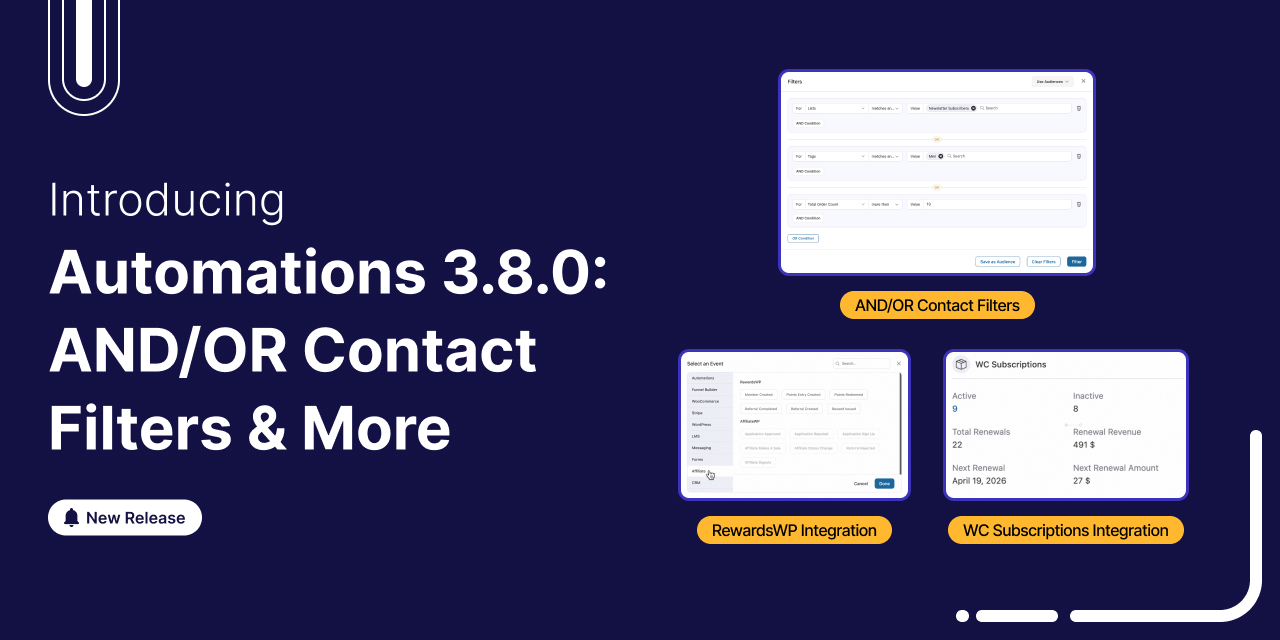
We're thrilled to announce that FunnelKit Automations 3.8.0 is now live! And this one packs some serious firepower.
This release turns FunnelKit Automations into a full-fledged CRM-grade targeting engine.
You get advanced AND/OR segmentation, behavioral email filters, and deep subscription lifecycle automation, features you'd normally find in platforms charging $300+/month.
This release gives you all the tools you need to do it faster, smarter, and without leaving WordPress.
Let's take an in-depth look at everything that's new in our video:
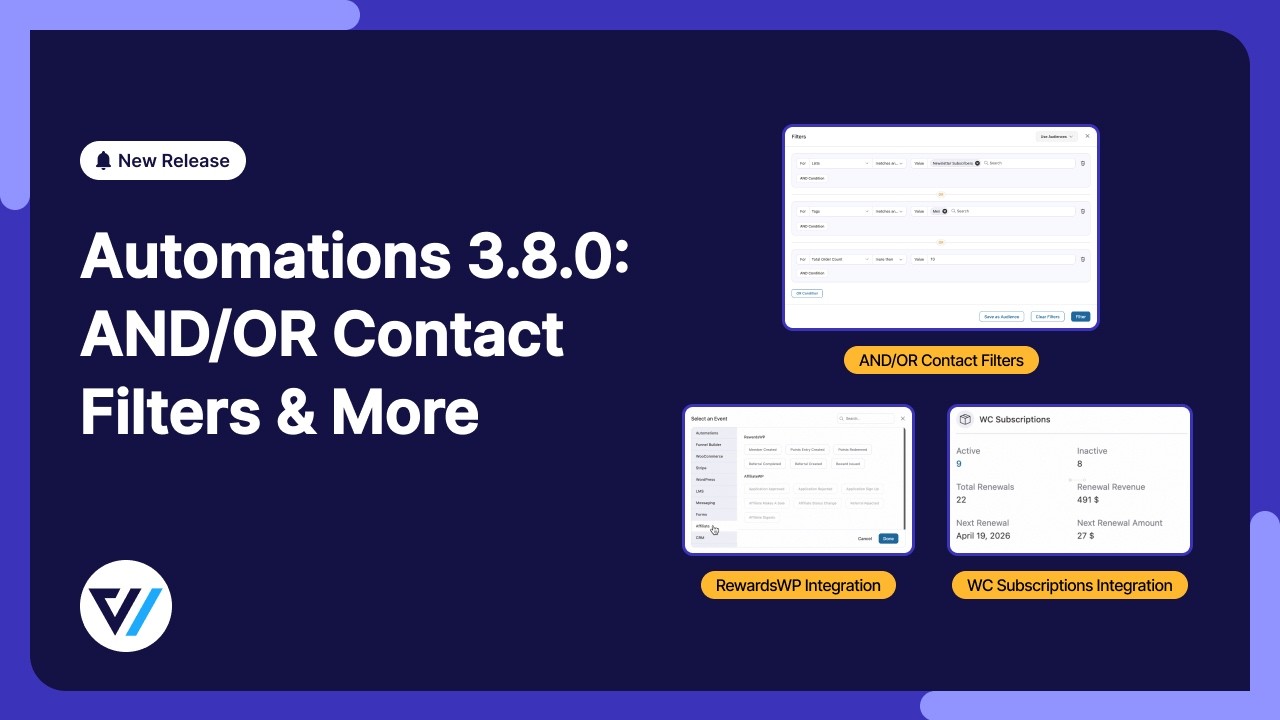
Table of Contents
- 1 1. Redesigned Contact Filters with AND/OR Logic
- 2 2. Behavioral Email Engagement Filters
- 3 3. Sublium Subscription for WooCommerce Integration
- 4 4. WooCommerce Subscriptions Integration
- 5 5. Broadcast Public REST API
- 6 6. RewardsWP Loyalty Integration
- 7 7. Custom Coupon Expiry Time
- 8 8. RTL Language Support in Email Editor
- 9 9. Bug Fixes and Performance Improvements
- 10 Ready to Upgrade to FunnelKit Automations 3.8.0?
1. Redesigned Contact Filters with AND/OR Logic
Until now, contact filters worked as flat, single-level queries. You could filter by tag, order value, or by country. But combining them with any real logic quickly ran into limitations.
For example, "VIP customers who’ve spent over $500" OR "newsletter subscribers based in the US".
That cannot be done in a single filter operation. But yes, it's now possible with 3.8.0!
Introducing hierarchical AND/OR grouping, a brand-new React-based interface, and over 50 filter types.
We've rebuilt the entire filter system from the ground up. This is the kind of segmentation capability that platforms like ActiveCampaign and Klaviyo charge hundreds of dollars a month for.
And now it runs right inside your WordPress dashboard.
The all-new filter interface
The first thing you'll notice is a completely redesigned filter experience.
To access the new filters, go to FunnelKit Automations ⇨ Contacts and click the 'Advanced Filters' button. A clean modal opens, ready for you to build your segment.
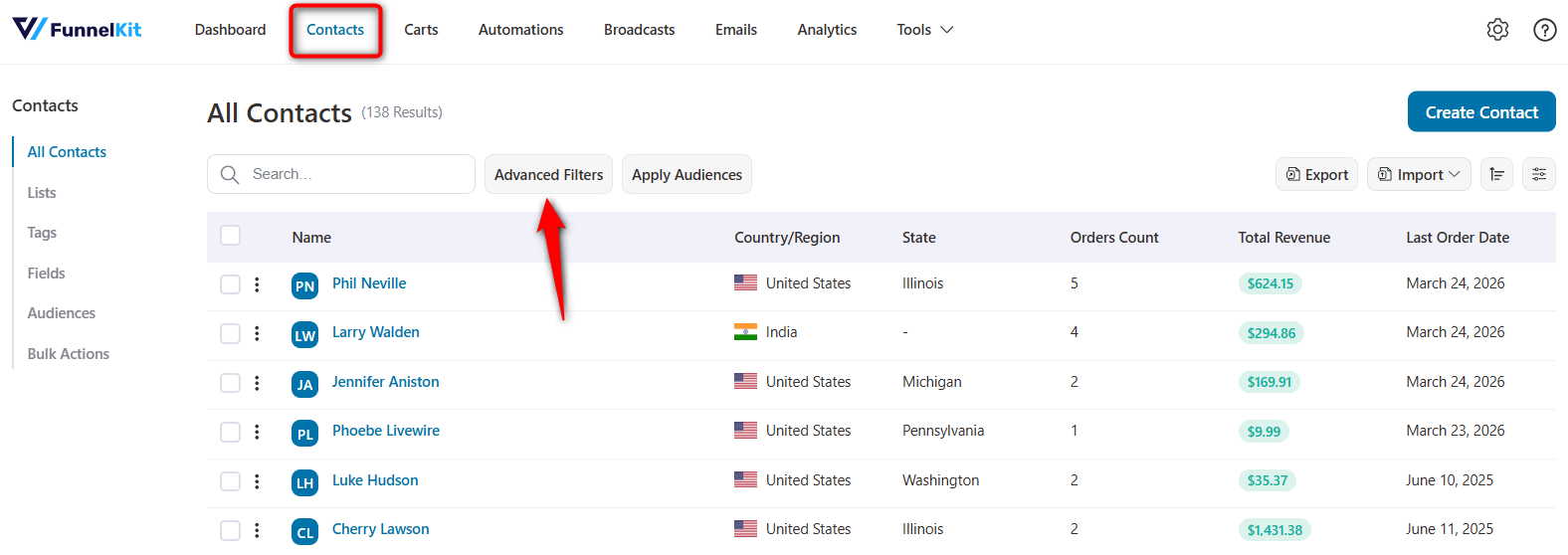
Here's what makes the new interface special:
Visual AND/OR grouping conditions within a group sit together in a visual block, connected by AND.
Separate groups are divided by a prominent OR separator. You can see your entire logic structure at a glance.
Once you apply a set of filters, a compact summary line appears above your contact table. Something like "Tag is VIP AND Total Order Count > 5" no more guessing what filters are active.
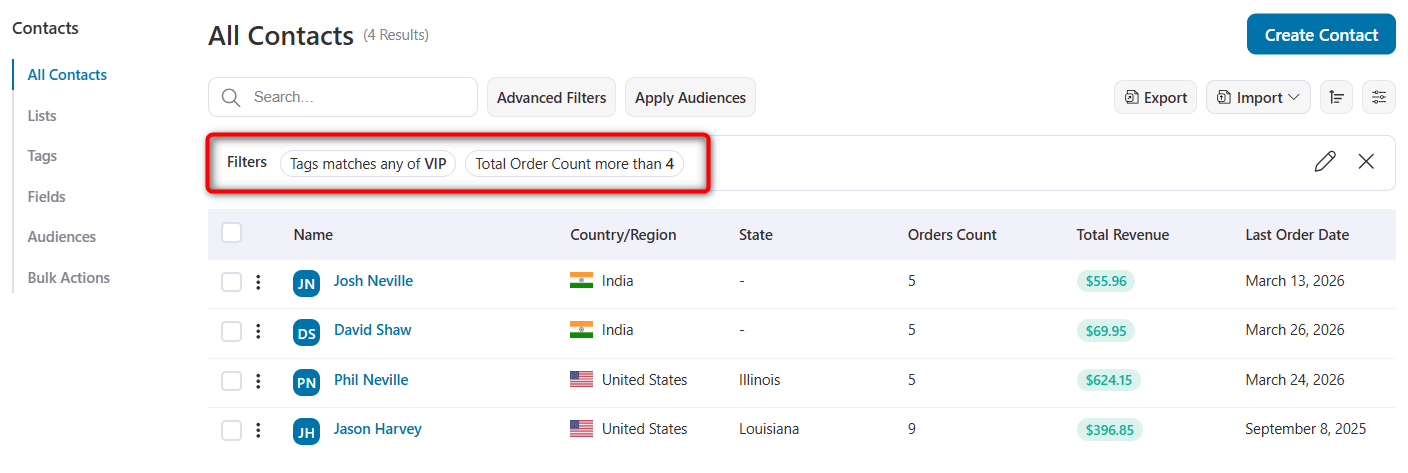
The dynamic input adapts to the UI automatically based on what you're filtering.
Select a date-based filter (like first order date or last order date), and a date picker appears. Choose a product filter, and a searchable product dropdown loads. Pick a numeric filter and a number input; the comparison operators appear.
The interface molds itself to the filter type.
Please note that incomplete or misconfigured filters are flagged immediately. You’ll see clear visual feedback before you ever hit the 'Filter' button, preventing empty or broken queries.
AND/OR grouping
The logic follows a clean, two-level hierarchy that covers the vast majority of real-world segmentation needs.
Within a group, all conditions are connected by AND. Every condition in the group must match for a contact to qualify.
Between groups, use OR. A contact qualifies if they match the conditions in any one group.
Example: Targeting high-value customers or engaged subscribers
Group 1: Tag = VIP AND Total Revenue > $500 OR Group 2: List = Newsletter AND Country = United States
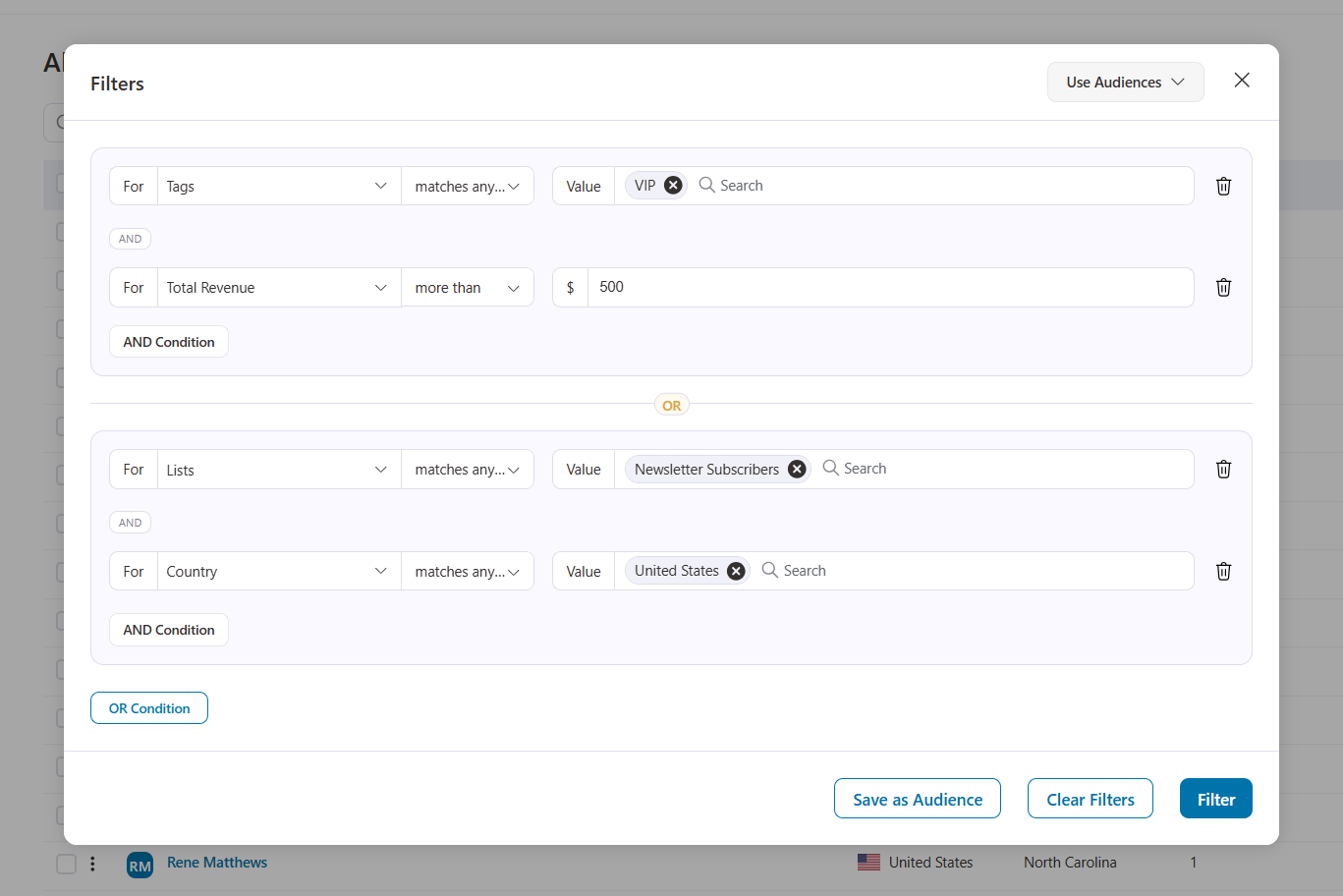
This finds contacts who are either VIP customers with over $500 in purchases or US-based newsletter subscribers.
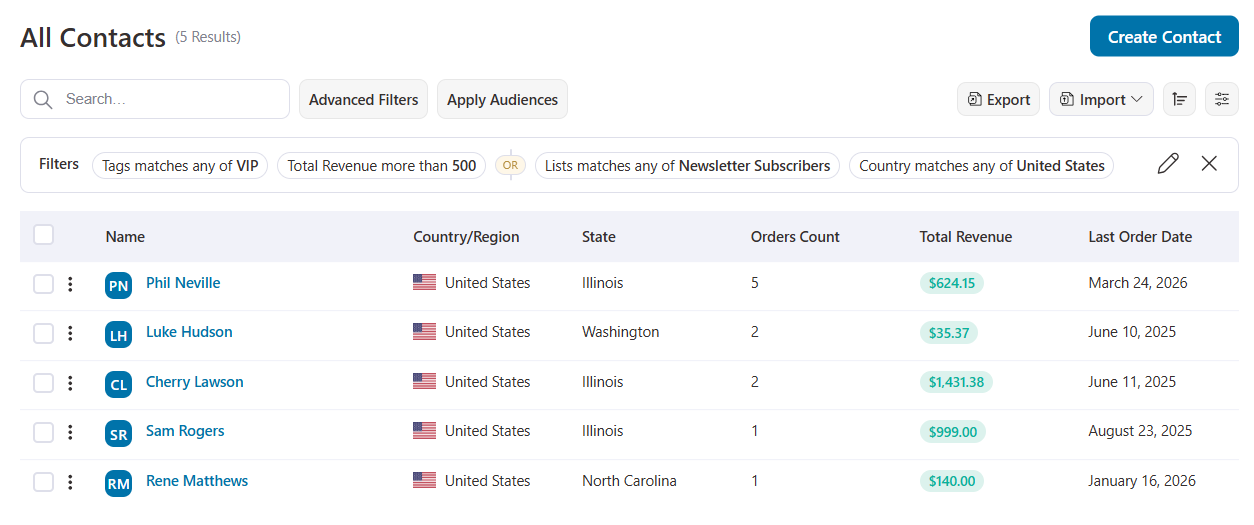
Two entirely different audience profiles, one unified segment.
Expansive filter library
The filter library in 3.8.0 is extensive. You have access to 50+ filter types organized across over 10 categories, including Contact Details, WooCommerce, Engagement, Segments, Automation history, Geography, and more.
Every custom field you've created in the CRM is also available as a filter. These load dynamically, so there's nothing extra to configure.
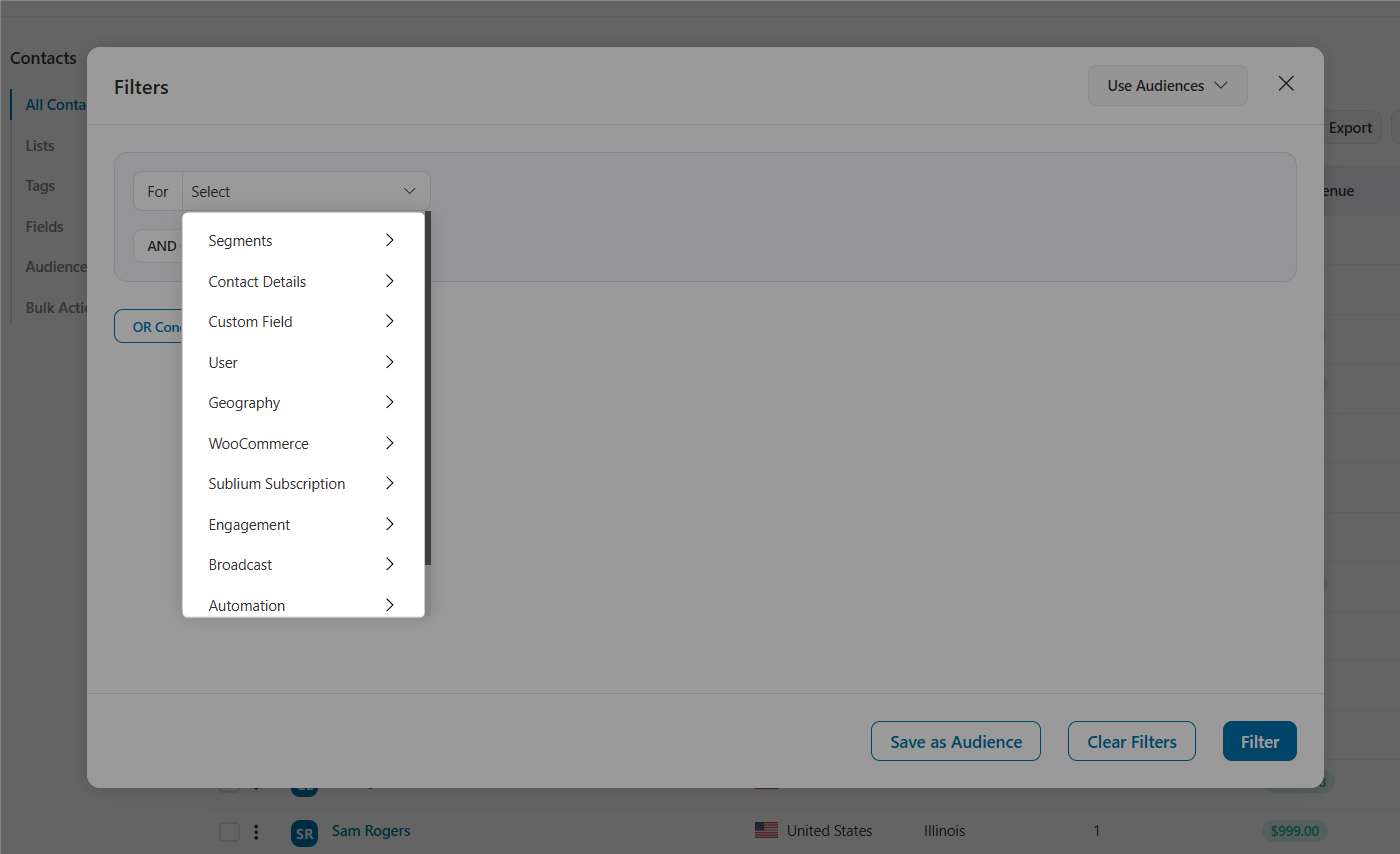
If you have other active plugins, you'll see filters to Subscriptions, Affiliate, Wishlists, and many more.
This breadth means you can segment by virtually any data point you collect from purchase behavior and engagement history to geographic location and membership status.
Consistent filter experience across the platform
One of the most important decisions we made with this feature was to roll out the new filter UI everywhere, not just on the Contacts page.
The redesigned AND/OR filter interface appears across six key areas:
- Contacts CRM page: The primary place to build and apply advanced segments.
- Audience editing: When you edit a saved audience, the filter modal opens with the same modern interface. Building and refining audiences now feels identical to ad-hoc filtering.
- Bulk actions: Need to run a bulk action on a specific segment? The Create Bulk Action flow now uses the exact same filter modal. Define your conditions, apply, and execute.
- Broadcast segmentation: When selecting recipients for a broadcast campaign, you’ll see the new filter UI for precise audience targeting with full AND/OR capabilities.
- Automation contact rules: The rules interface within automation workflows has been updated to align with the new contact filter design. If you’ve set up contact rules on an automation, you’ll see them displayed in the same readable, grouped format.
- Contact export: Exporting a specific segment of contacts? The export interface uses the same filter system. Apply your AND/OR conditions, then export only the contacts that match.
This means you learn a single interface and use it consistently across all features involving contact targeting. No more context-switching between different filter designs.
2. Behavioral Email Engagement Filters
Here's a feature that puts FunnelKit Automations on par with premium platforms like ActiveCampaign and Klaviyo without the premium price tag.
You can now filter contacts based on whether they opened or clicked emails from your automations and broadcasts.
Navigate to the contact filters and you’ll find four new options under the engagement category:
- Automation email open: Filter contacts who opened (or didn't open) an email from a specific automation
- Automation email click: Filter contacts who clicked (or didn't click) a link in an automation email
- Broadcast email open: Same capability for broadcast campaigns
- Broadcast email click: Filter by broadcast link click activity
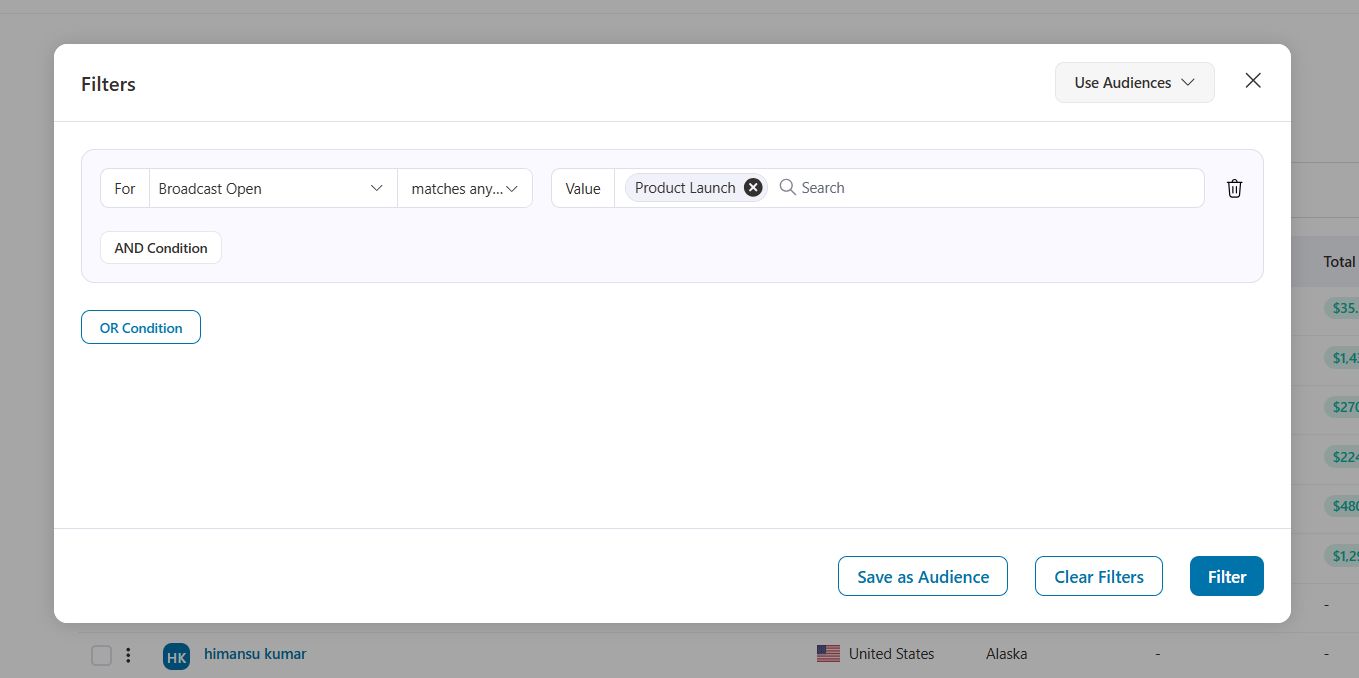
Because now you can build segments and automations based on actual behavior, not just attributes.
Re-engage with your cold subscribers by finding contacts who haven't opened your last 5 broadcasts and sending them a win-back sequence with a different subject line or offer.
Reward engaged readers by identifying contacts who clicked your product announcement email and following up with an exclusive discount.
Segment by interest if someone clicked a link about Product A in your broadcast, add them to a targeted automation for that product category.
Clean your list by identifying contacts who haven’t opened any automated or broadcast emails in the past 90 days, then move them to a re-engagement campaign or remove them to protect your sender reputation.
This is behavioral automation at its core. And it’s now available right inside your WordPress dashboard!
3. Sublium Subscription for WooCommerce Integration
If you’re running a recurring-based business with Sublium Subscriptions, this integration connects every part of the subscription lifecycle to your automation engine.
FunnelKit Automations 3.8.0 ships with a comprehensive Sublium integration module that includes automation events, actions, merge tags, condition rules, CRM filters, and full contact profile enrichment.
Please note that the Sublium Subscriptions plugin needs to be installed and active. Plus, these integration modules are included with FunnelKit Automations Pro.
New automation event triggers
The integration covers the entire subscription journey, including both instant and scheduled events.
Instant events fire the moment something happens: Subscription Created, Status Changed, Renewal Payment Complete, Renewal Payment Failed, Trial End, Note Added, and Installments Completed.
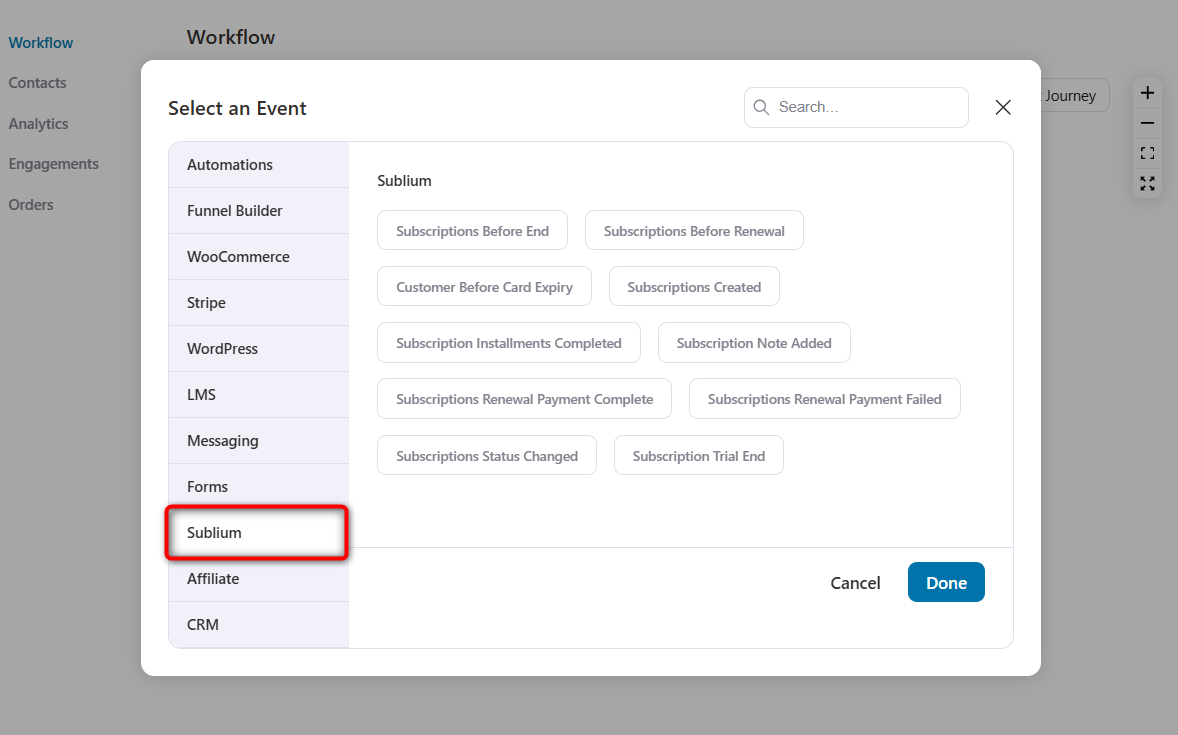
Scheduled events run daily and let you act proactively, such as Before Renewal (send reminders X days before the next payment), Before Card Expiry (notify customers to update their payment method), and Before End (trigger win-back campaigns before a subscription expires).
Each trigger supports product-based filtering, so you can build automations that only fire for specific subscription products.
Subscription actions
Once an automation is triggered, you can take direct action on the subscription itself:
Change subscription status, add or remove products from an active subscription, apply or remove coupons, cancel specific product subscriptions or all subscriptions tied to an order, add internal notes, and even initiate an immediate payment charge outside the normal renewal cycle.
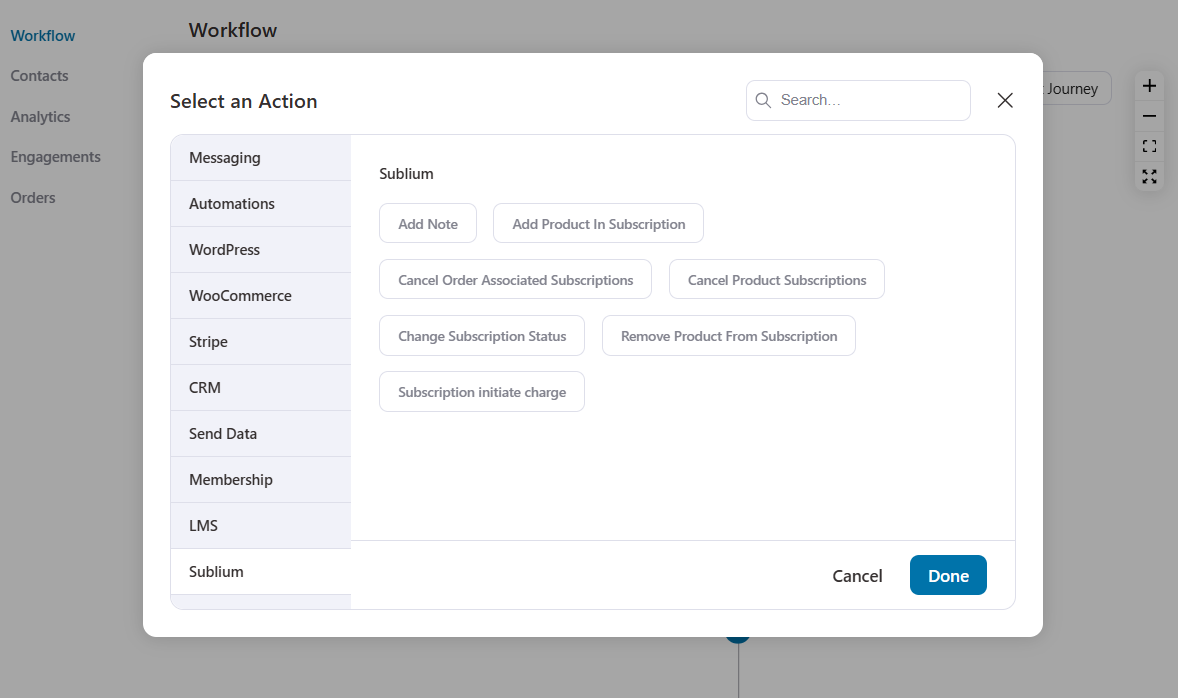
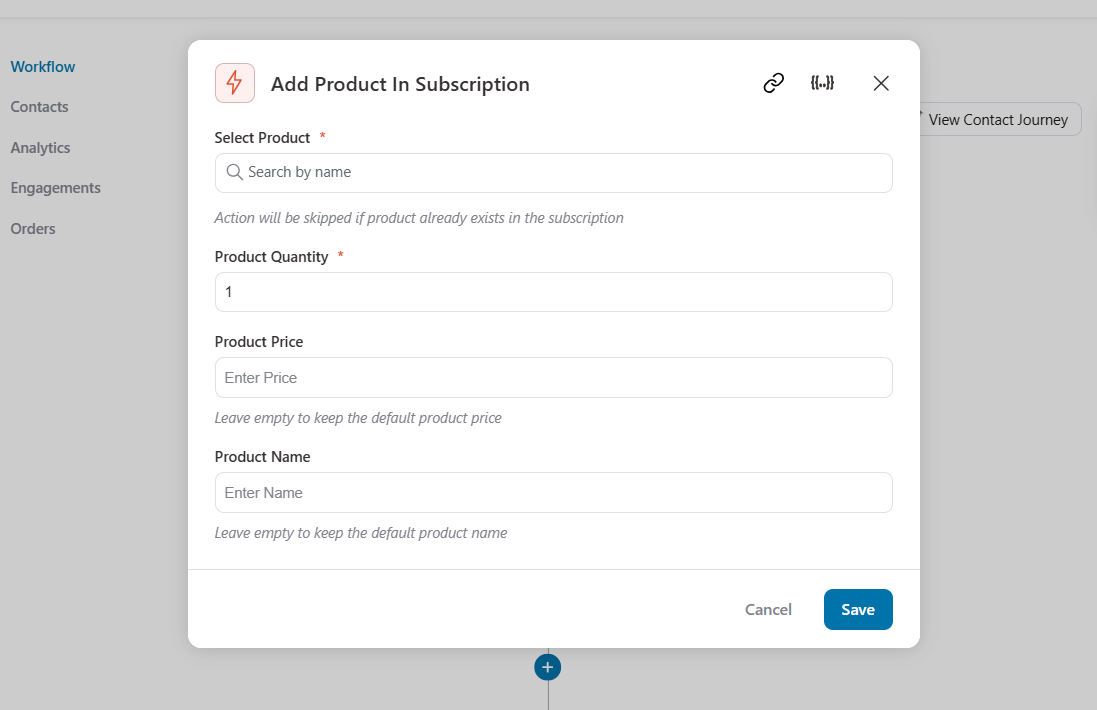
The 'Add Product In Subscription' action is particularly powerful.
It supports custom quantity and price overrides, name overrides, and intelligently skips duplicates.
Merge tags for personalization
Every subscription-related email you send can be deeply personalized with 23 dedicated merge tags.
You can find subscription IDs, statuses, dates (start, end, trial end, next payment, last payment), financials (total, payment method, billing/shipping addresses), and even payment card details (card type, last 4 digits, expiry month/year, days until expiry).
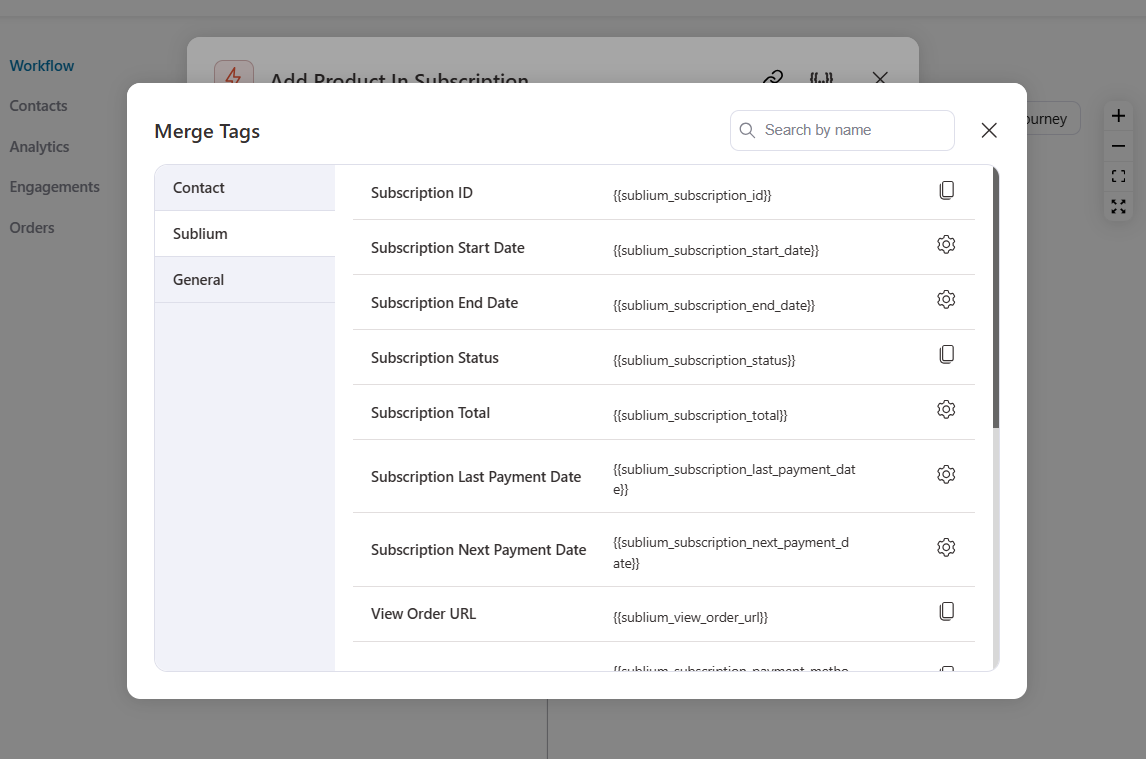
A flexible {{sublium_subscription_data key="your_meta_key"}} merge tag also lets you pull any custom metadata stored on the subscription orders.
Detailed subscription contact profile enrichment
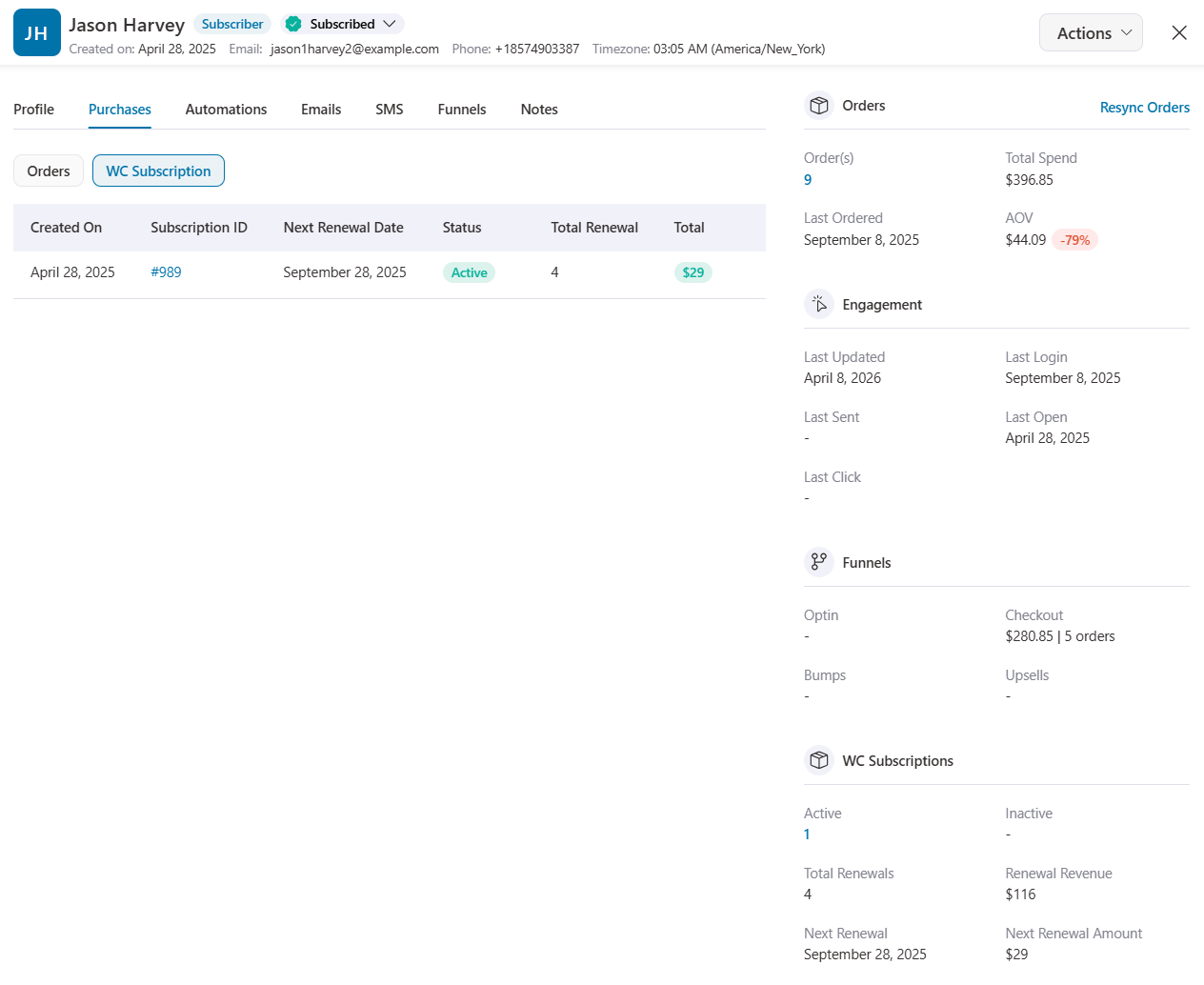
When you open a contact's profile in FunnelKit Automations, a dedicated Sublium section now appears in the sidebar.
It displays the current subscription count, total renewals, renewal revenue, tax on renewals, next renewal amount, and a full list of the contact’s subscriptions in the Purchase section.
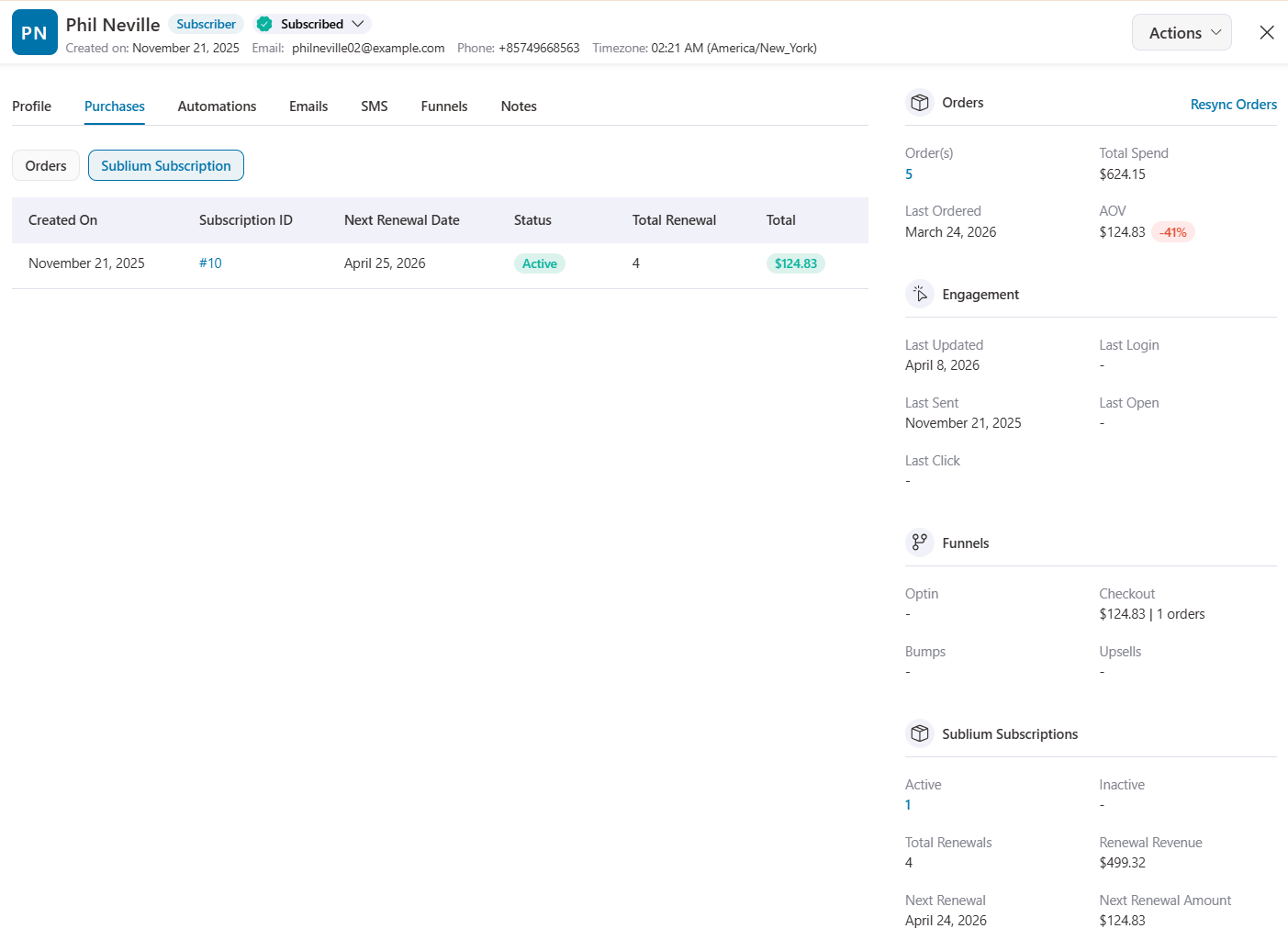
This gives your support and marketing teams instant visibility into each customer’s subscription status without leaving the CRM.
4. WooCommerce Subscriptions Integration
For stores using the official WooCommerce Subscriptions plugin by Automattic, this release delivers an equally deep integration plus 22 customizable transactional email templates.
For this, you need WooCommerce Subscriptions activated on your site.
You get instant triggers for subscription creation, status transitions, renewal success and failure, trial expiration, and note additions.
Three scheduled triggers handle pre-renewal reminders, card expiry alerts, and end-of-subscription notifications.
You already had all the actions to run smart subscription workflows inside your WordPress dashboard.
Let's look into the new features.
New transactional emails for WooCommerce Subscriptions
While Sublium Subscriptions has its own built-in templates, we've ensured that WooCommerce Subscriptions users do not fall behind.
This is why you get 17 fully customizable email templates across four categories:
- Order-based emails (7): New renewal orders, processing and completed renewal orders, renewal invoices, switch orders, and customer-facing renewal invoices.
- Status notification emails (4): Subscription canceled, expired, suspended/on-hold, and reactivated notifications.
- Customer reminder emails (5): Auto-renewal reminders, manual renewal reminders, trial end notices, subscription expiration notices, and payment retry notices.
- Payment failure emails (2): Admin and customer notifications when a payment attempt fails.
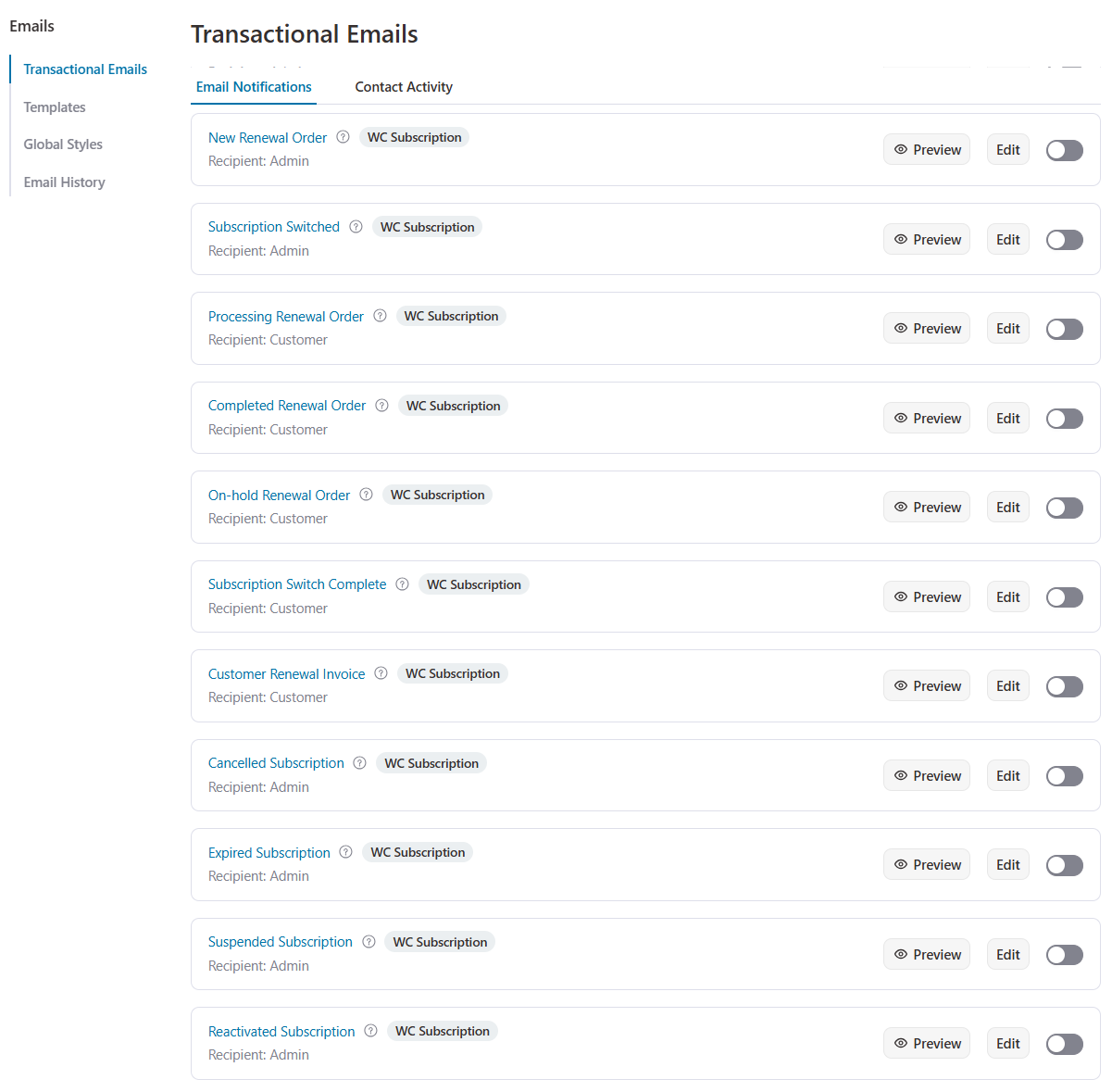
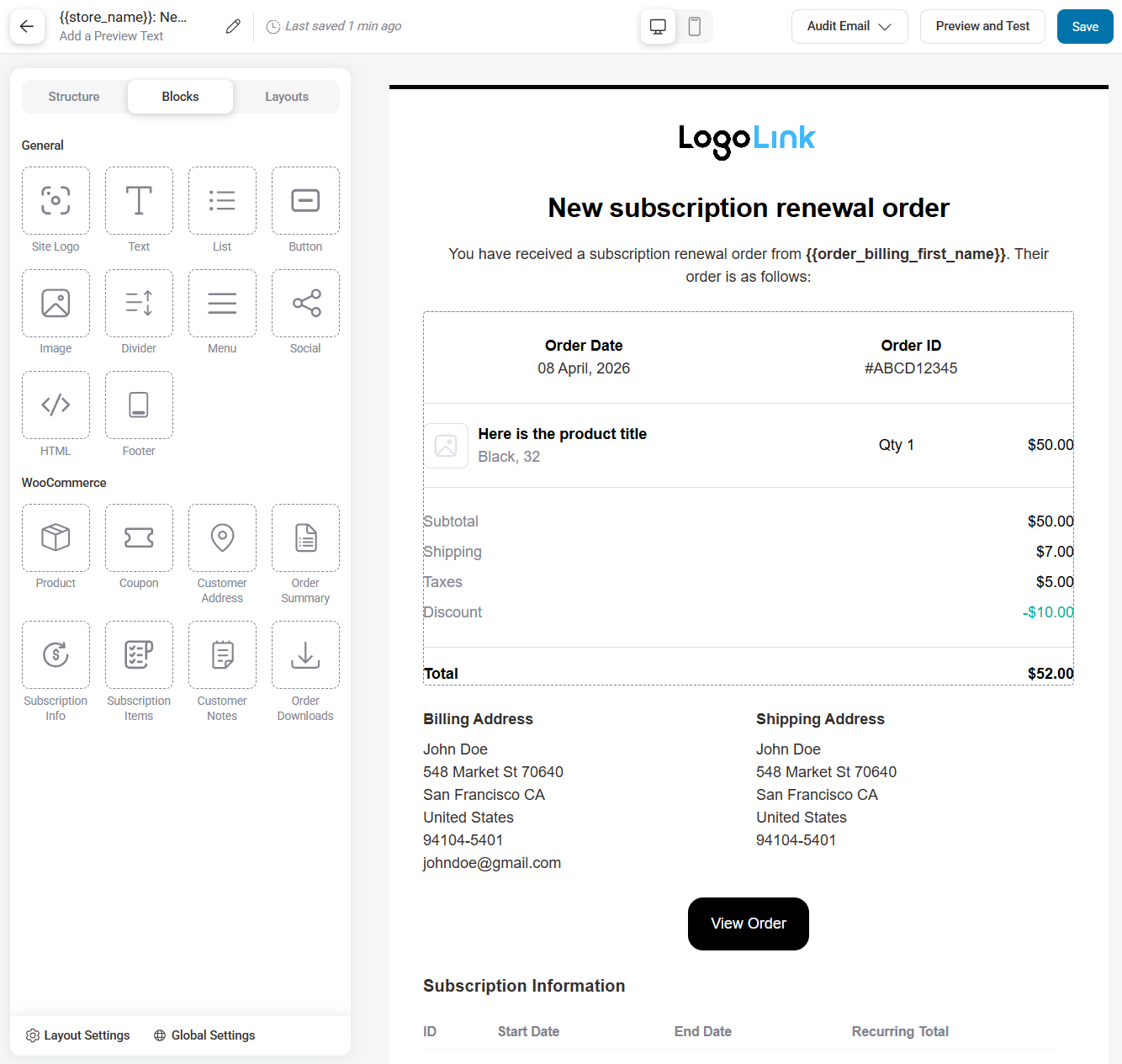
Every template supports the visual block editor, merge tag personalization, open and click tracking, and conditional sending based on subscription rules.
Contact import from WooCommerce Subscriptions
You also get a dedicated import option under Contacts.
This helps you create FunnelKit contacts from existing WooCommerce subscriptions, making migration seamless.
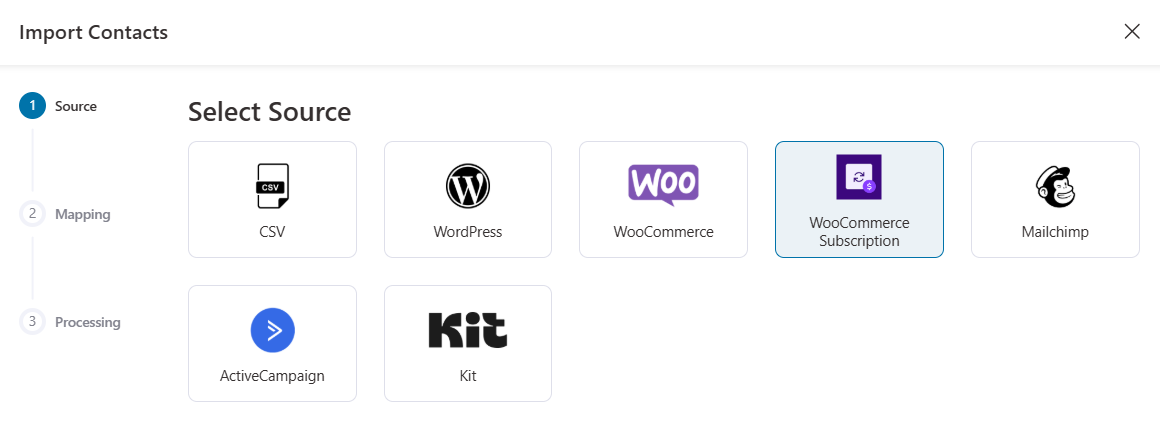
Once you've mapped the fields and successfully imported the contacts, you'll be able to see their subscription stats inside their detailed profiles.
5. Broadcast Public REST API
Developers and agencies now have programmatic access to broadcast performance data through three new public REST API endpoints:
- List broadcasts: Retrieve a paginated list of all broadcasts with summary data.
- Get single broadcast: Fetch complete details for a specific broadcast campaign.
- Get broadcast stats: Pull detailed performance metrics for any broadcast.
This opens the door for custom dashboards, external reporting tools, agency management platforms, and automated performance monitoring.
If you're building on top of FunnelKit Automations at scale, these endpoints signal that the platform is ready for it.
6. RewardsWP Loyalty Integration
Loyalty programs and marketing automation are a natural pairing. But now they work together natively!
FunnelKit Automations 3.8.0 integrates with RewardsWP (by AwesomeMotive) to bring the entire loyalty lifecycle into your automation workflows.
You need to activate the RewardsWP plugin (Lite or Pro) in your WordPress website.
Automation triggers
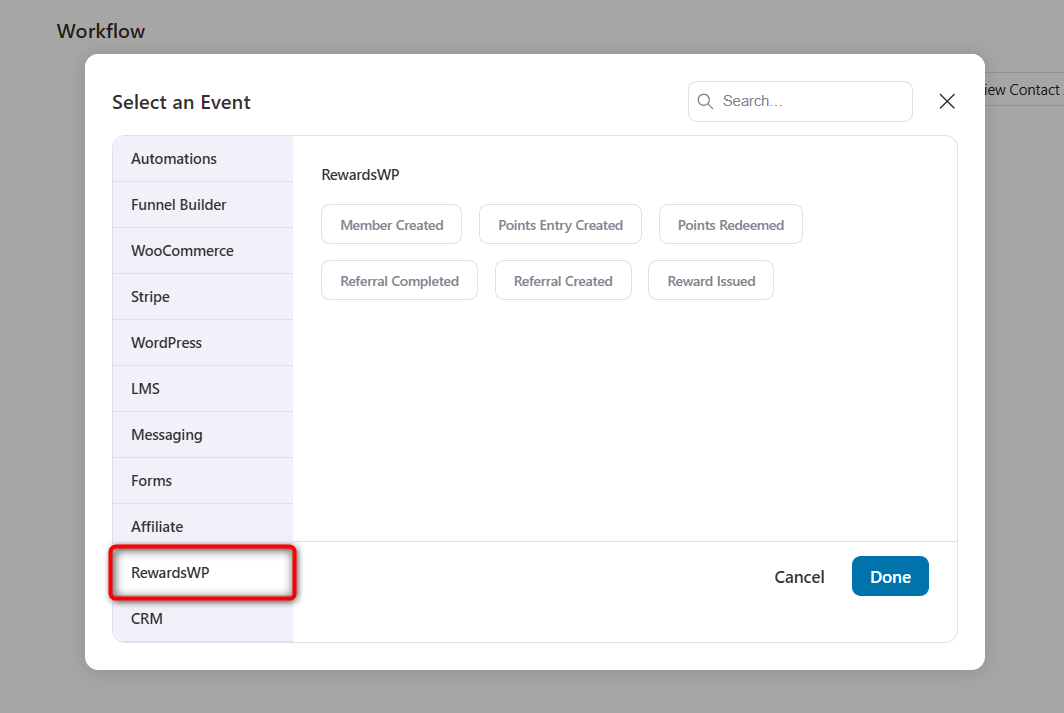
Every meaningful event in the loyalty lifecycle has 6 corresponding event triggers:
- Member Created: Fires when a new member joins the rewards program.
- Points Entry Created: Triggers when points are earned, spent, or manually adjusted.
- Points Redeemed: Fires when a member exchanges points for a coupon or reward.
- Referral Created: Triggers when a new referral is generated (before it converts).
- Referral Completed: Fires when a referral successfully converts into a purchase.
- Member Status Changed: Triggers when a member’s status transitions between active, blocked, excluded, or inactive.
- Reward Issued: Fires when a reward is issued to an advocate or friend from a referral.
Each event carries rich contextual data, such as member ID, user ID, email, referral code, etc., all available as merge tags for personalization.
Loyalty actions
Take direct action on the rewards program from within your automation workflows:
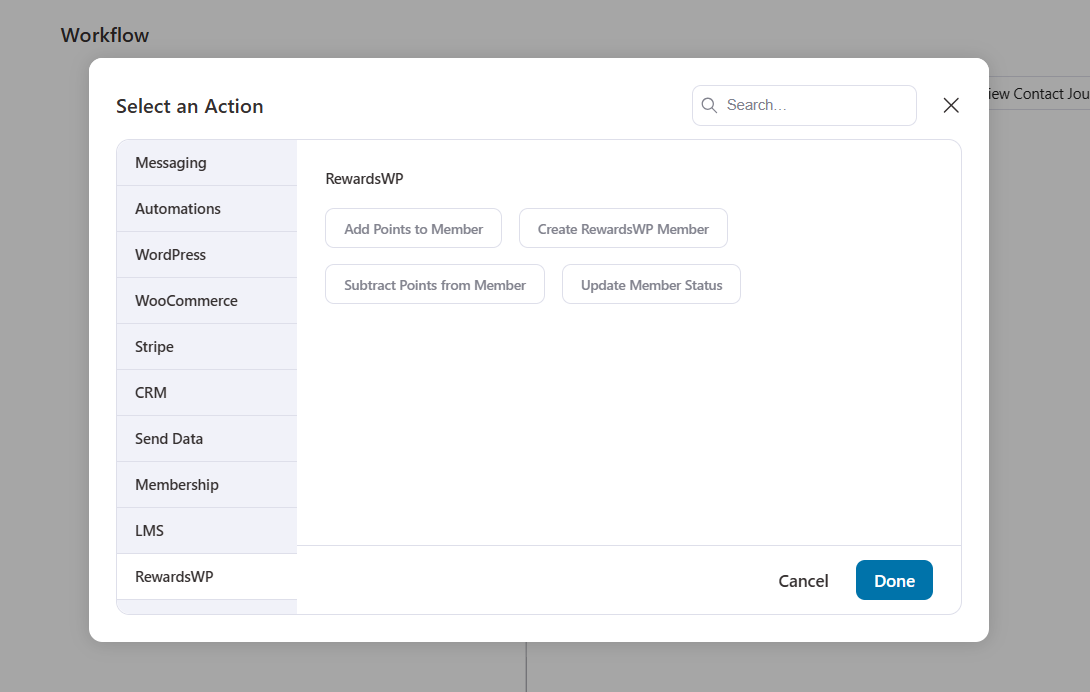
- Add Points to Member: Award points with configurable source type (automation, manual adjustment, referral, or purchase) and custom reason text. Both the amount and reason fields support merge tags, so you can dynamically calculate point awards.
- Subtract Points from Member: Deduct points with automatic balance validation (the action won’t execute if the member has insufficient balance).
- Create RewardsWP Member: Automatically enroll a contact into the loyalty program. Creates a member with active status, pulls first and last name from the WordPress profile, and skips silently if the member already exists.
- Update Member Status: Change a member's status to active, blocked, excluded, or inactive. Use this in fraud prevention workflows, tiered loyalty programs, or seasonal program management.
Conditional rules
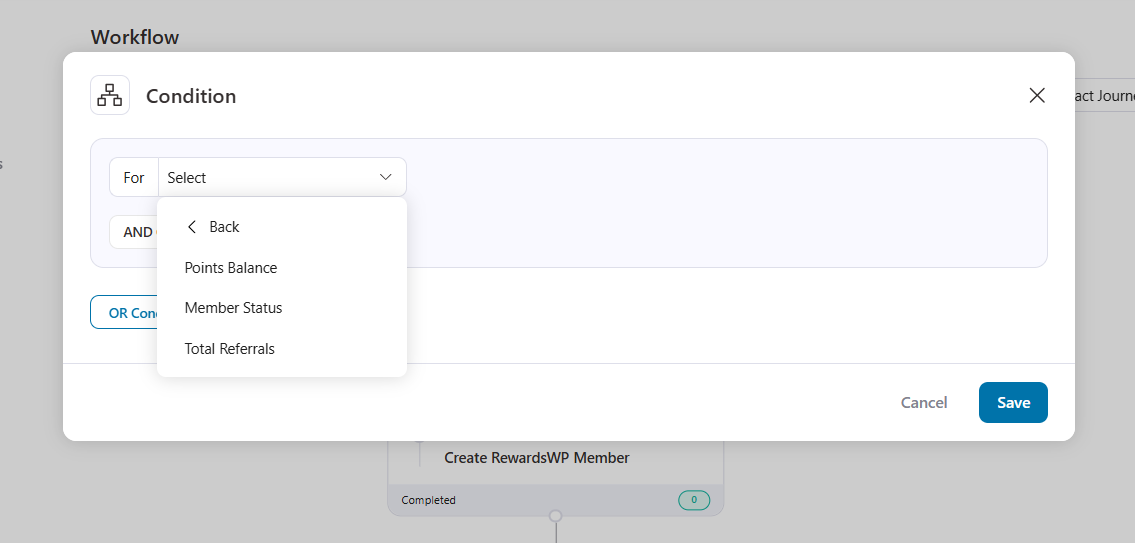
3 condition rules let you build branching logic based on loyalty data:
- Points Balance: Compare the current balance against a value (=, !=, >, <, >=, <=). Branch automations based on how many points a customer has accumulated.
- Member Status: Check against active, blocked, excluded, inactive, or guest. Route contacts differently based on their loyalty program standing.
- Total Referrals: Compare the total number of referrals the member has created. Identify and reward your top advocates.
Contact profile
When viewing any contact in the CRM, a RewardsWP section automatically populates with 13 data points, including Member ID, Status, Referral Code, Referral URL, Points Balance, Points Earned (all time), and more.
For contacts who are not RewardsWP members, all fields display a clean dash (-).
A dedicated REST API endpoint at GET /wp-json/bwfcrm/v1/contact/{contact_id}/rewardswp provides access to member data, points history, referral lists, and reward details with optional includes and pagination.
7. Custom Coupon Expiry Time
Previously, when creating coupons through automation actions, the minimum expiry window was one full day. That works for most scenarios, but not when you want to create genuine urgency.
FunnelKit Automations 3.8.0 adds granular time-based expiry options to the coupon creation action.
You can now set dynamic coupons to expire after a specific number of hours, days, weeks, or months.
This unlocks tactics like:
- Hours: Create a 2-hour, 4-hour, or 12-hour flash coupon
- Days: The familiar daily expiry window
- Weeks: Set weekly promotional windows
- Months: Longer promotional periods for seasonal campaigns
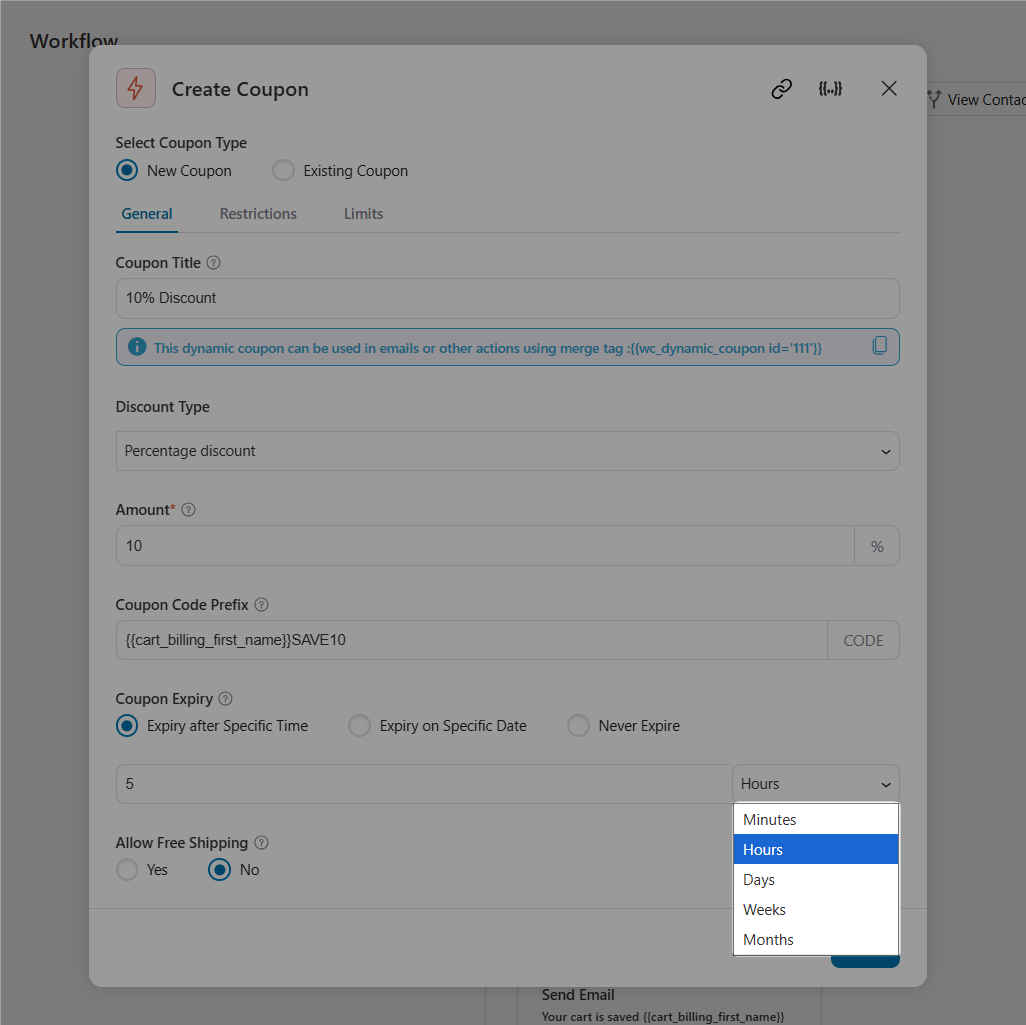
Such countdowns create real urgency for increasing conversion rates.
8. RTL Language Support in Email Editor
FunnelKit Automations is now fully equipped for right-to-left language markets.
When you have a multilingual plugin active (such as TranslatePress, Linguise, or similar) with RTL languages like Arabic, Hebrew, or Farsi enabled, the Visual Email Editor automatically adjusts its layout direction.
Editing an English email template? The editor opens in standard left-to-right mode.
Switch to an Arabic version of the same template? The editor flips to right-to-left with text alignment, content flow, and template structure all adapting automatically.
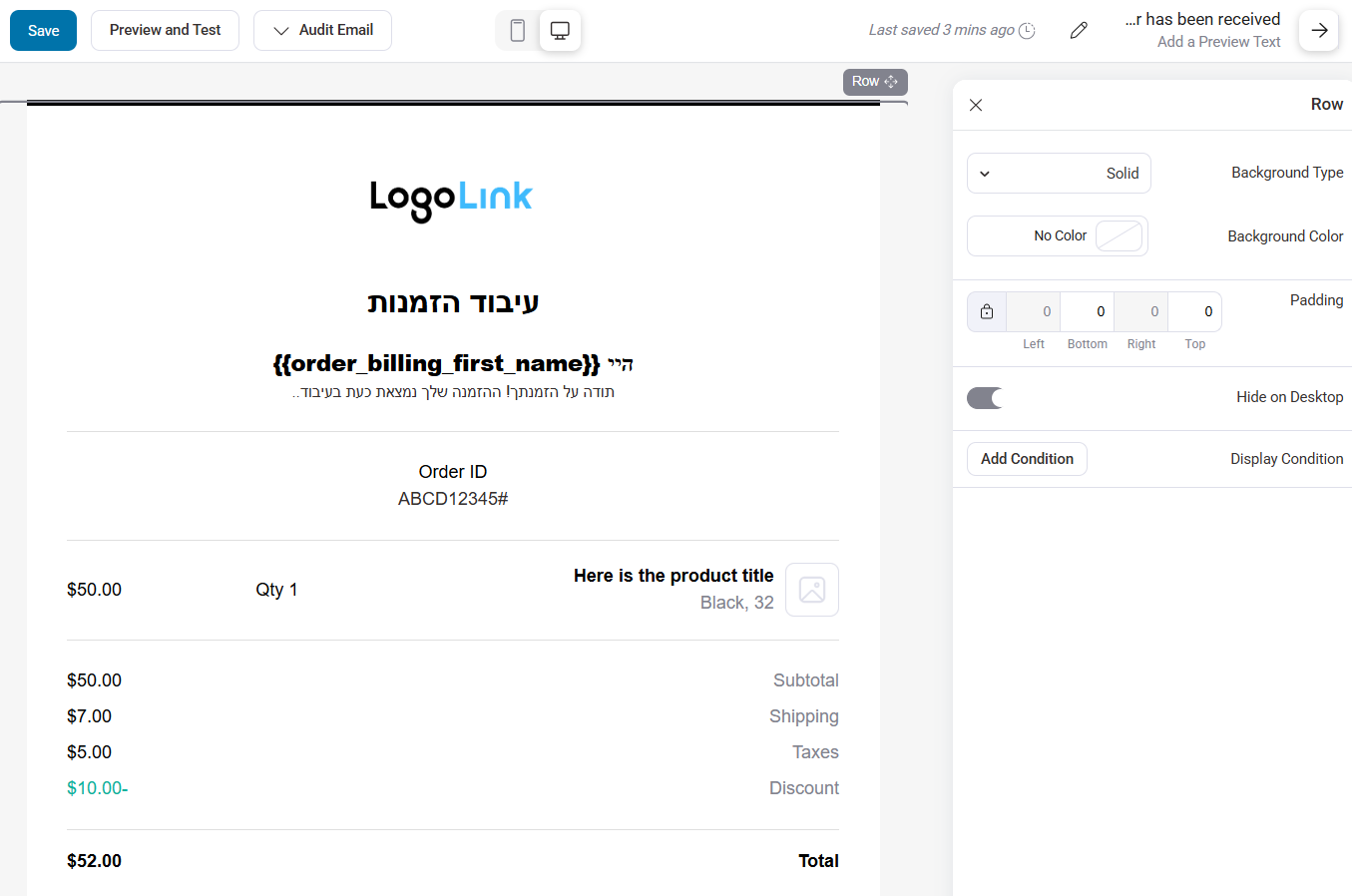
No manual toggle or configuration needed.
The editor detects the language and responds accordingly, ensuring your transactional and marketing emails look professional in every language you support.
9. Bug Fixes and Performance Improvements
Beyond the headline features, version 3.8.0 includes meaningful work under the hood.
14+ bug fixes address issues in cart tracking, database deadlock handling, and PHP 8.0+ compatibility, ensuring smoother operation across different server environments.
Database performance improvements include new indexes on the automation contact trail table and optimized queries that reduce load on high-traffic stores.
6 new plugin compatibilities have been added for Shield Security, Oxygen Builder, All In One Security (AIOS), Perfmatters, Linguise, and TranslatePress.
These help resolve potential conflicts and ensure FunnelKit Automations plays nicely in diverse WordPress stacks.
Ready to Upgrade to FunnelKit Automations 3.8.0?
FunnelKit Automations 3.8.0 is a landmark release.
The AND/OR contact filters transform how you segment and target your audience, no more flat, single-condition queries holding you back.
Behavioral email filters bring engagement-based targeting to your WordPress dashboard at a fraction of the cost of premium SaaS platforms.
And with deep integrations for both Sublium and WooCommerce Subscriptions, you can now automate the entire subscription lifecycle from first signup to final renewal.
Add in the loyalty program integration, developer-ready broadcast APIs, granular coupon controls, and RTL support, and this release touches nearly every corner of the platform.
Already running FunnelKit Automations? Update to 3.8.0 today and put these capabilities to work.
New to FunnelKit? There's never been a better time to make the switch from overpriced SaaS automation tools.
Editorial Team
April 17, 2026FunnelKit Funnel Builder 3.15.0 is finally here! Yes, we've kept our word and featured two highly requested features that give you unprecedented control over your checkout experience in this release....
Editorial Team
January 22, 2026FunnelKit Automations 3.7.0 is here! 🎉 And it brings meaningful improvements that make building and managing your marketing automation easier than ever. This release is all about giving you more...
Editorial Team
June 9, 2025FunnelKit Automations 3.6 is here, and it’s packed with powerful features to help you grow smarter and faster. With this release, you can: Export abandoned cart data with a click...






