


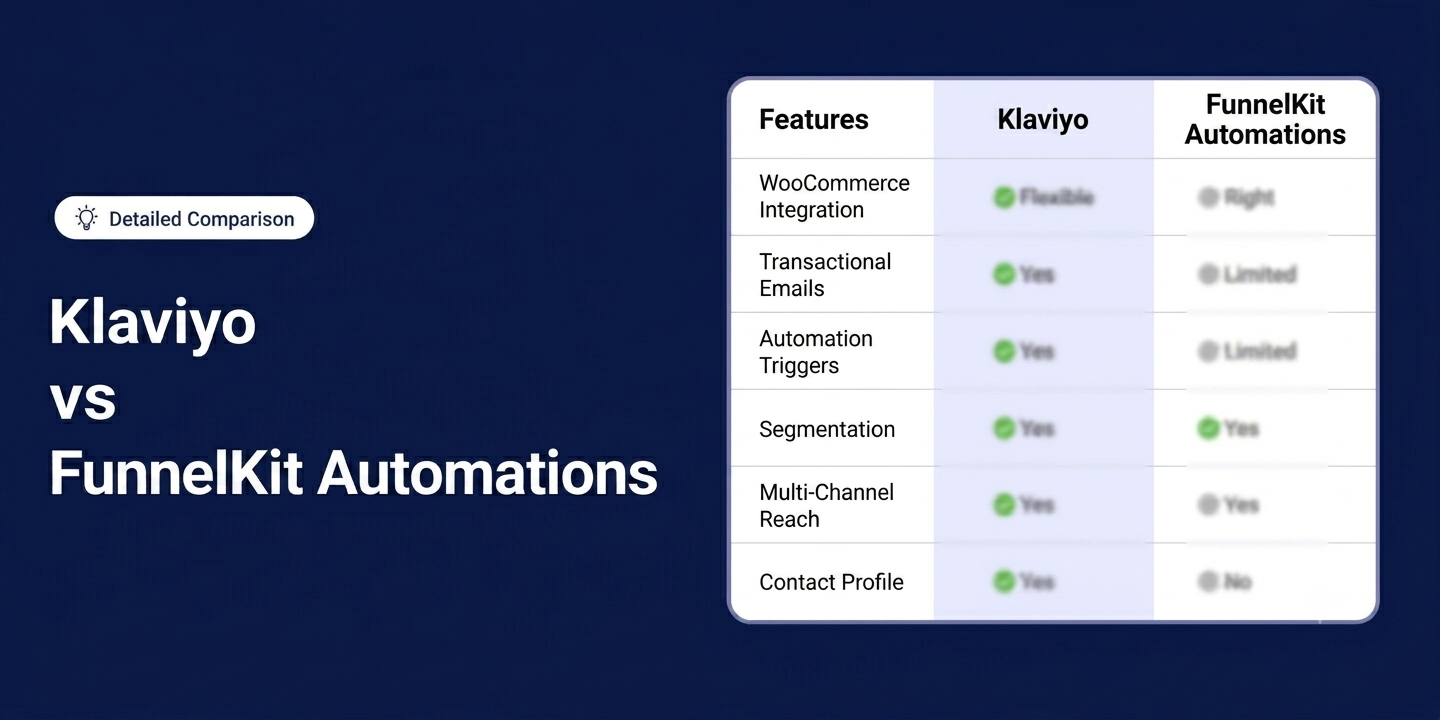
If you run a WooCommerce store and you're serious about email marketing and automation, chances are FunnelKit Automations and Klaviyo are both on your short list.
Klaviyo is a cloud-based marketing platform with powerful analytics, managed deliverability, and a mature omnichannel system. It's built for scale and comes with the infrastructure to match.
FunnelKit Automations runs natively inside WordPress, works directly with your WooCommerce data, and keeps everything, your contacts, your automations, your revenue data, inside your own WordPress database.
Both are capable tools. But they're built on completely different philosophies, and for a WooCommerce store, that difference matters more than most people realize.
In this blog, we will compare Klaviyo and FunnelKit Automations across WooCommerce integration depth, automation flexibility, segmentation, transactional emails, multi-channel reach, contact management, analytics, pricing, and support.
No fluff, just what you need to make the right call about which is better for your WooCommerce store in 2026.
Table of Contents
- 1 How We Compared FunnelKit Automations and Klaviyo
- 2 Quick Comparison: Klaviyo vs FunnelKit Automations
- 3 WooCommerce Integration, Data Ownership, and Control: Klaviyo vs FunnelKit Automations
- 4 Klaviyo vs FunnelKit Automations: Which Is Easier To Use?
- 5 Klaviyo vs FunnelKit Automations: Which Handles WooCommerce Transactional Emails Better?
- 6 Klaviyo vs FunnelKit Automations: Which Has Better Automation Capabilities?
- 7 Klaviyo vs FunnelKit Automations: Which Has Better Abandoned Cart Recovery Feature?
- 8 Klaviyo vs FunnelKit Automations: Which Has Better Customer Segmentation?
- 9 Klaviyo vs FunnelKit Automations: Which Offers Email Builder & Design Flexibility
- 10 Klaviyo vs FunnelKit Automations: Which Offers Better Broadcast Campaigns?
- 11 Klaviyo vs. FunnelKit Automations: Which Wins for Multi-Channel Reach (Email, SMS, WhatsApp, Push)?
- 12 Klaviyo Vs FunnelKit Automations: Which Offers Better Contact Profile Management?
- 13 Klaviyo vs FunnelKit Automations: Which Offers Better Analytics and Reporting?
- 14 Customer Support & Documentation: Klaviyo vs FunnelKit Automations
- 15 Pricing & Value Comparison: Klaviyo Vs FunnelKit Automations
- 16 Finally, Which is the Better CRM For WooCommerce: Klaviyo vs FunnelKit Automations
How We Compared FunnelKit Automations and Klaviyo
We didn’t just rely on documentation. Both platforms were installed on a live WooCommerce store and tested in real conditions.
From automations and transactional emails to abandoned cart recovery, segmentation, contact profiles, broadcasts, and analytics, every feature covered in this article was set up, used, and evaluated before writing a single word.
Versions we used for testing:
- Klaviyo for WooCommerce: Version 3.8.0
- FunnelKit Automations: Version 3.8.1.1
- WooCommerce: Version 10.8.1
Note: Pricing and feature accuracy as of June 2026. Always verify current details before purchasing.
Quick Comparison: Klaviyo vs FunnelKit Automations
| Feature | Klaviyo | FunnelKit Automations |
| WooCommerce Integration | Uses a plugin to sync to an external SaaS dashboard | Runs natively inside WordPress |
| Data Ownership | Data stored on Klaviyo’s servers | Data stays in your own WordPress database |
| Custom Transactional Emails | Handles 4 of 11 default WooCommerce emails natively. Password reset and new account require custom API setup | Covers all 11 default WooCommerce emails out of the box. Auto-disables duplicates |
| Automation Triggers | Marketing-focused triggers (orders, checkout, browsing etc) | Deeper store triggers, including order status changes, stock updates, order notes, and inactivity |
| Automation Conditions | Basic trigger and profile filters, supports and/or to apply multiple conditions. | Full AND/OR logic across orders, geography, user roles, and custom fields to apply multiple conditions. |
| Abandoned Cart Recovery | Supports “Added to Cart” and “Started Checkout” triggers. Coupon support via pre-created WooCommerce coupons | Cart-level control with custom wait times, dynamic coupons based on cart value, and auto-applied recovery links |
| Segmentation | Event-based (user activity, engagement, etc) | Native WooCommerce data (lifecycle stage, orders data, geography, user roles, custom fields, etc.) |
| Email Builder | Drag-and-drop, custom HTML, text-only editors | Visual, HTML, rich text. Provides WooCommerce-specific blocks + built-in email audit |
| Broadcast Campaigns | Unified email, SMS, WhatsApp, push in one campaign | Email and SMS are supported. Separate campaigns per channel |
| Multi-Channel Reach | Native email, SMS, WhatsApp (international only). Push via integrations. Fully managed deliverability | Email and SMS via Twilio or BulkGate. Push via PushEngage. SMTP-based deliverability |
| Contact Profile | Raw order event logs with strong attribution and list management | Clean unified view of orders, AOV, engagement, tags, lists, custom fields, funnel activity, subscriptions, etc. |
| Analytics | Strong reporting. Advanced RFM, CLV, and cohort analysis as paid add-ons ($100+/month extra) | Revenue attribution, cart stats, engagement heatmap, and automated performance digests included |
| Ease of Use | Polished but split across Klaviyo + WooCommerce | Everything in one WordPress dashboard, no platform switching |
| Support & Trust | Trustpilot 1.8/5 (359 reviews) | Trustpilot 4.8/5 (155 reviews), 5/5 WordPress.org, 327 YouTube tutorials |
| Pricing | Free: 250 contacts + 500 emails/month. Paid ~$20/month (~$240/year), scaling to ~$1,000+/month (~$12,000+/year) | Free: unlimited contacts + automations. Paid from $99.50/year (1 site) to $399.50/year (30 sites) |
| Best For | Businesses looking for SaaS based enterprise-grade omnichannel marketing and advanced analytics | WooCommerce-first stores want native integration, full data ownership, and predictable pricing |
Now let's have a look at each feature comparison in depth:
WooCommerce Integration, Data Ownership, and Control: Klaviyo vs FunnelKit Automations
This is the most fundamental difference between Klaviyo and FunnelKit Automations, and it shapes everything else in this comparison.
Klaviyo connects to WooCommerce through a plugin that syncs your store data to its external servers. Your automations run from there.
FunnelKit Automations lives inside WordPress and reads your WooCommerce data directly, no sync, no third-party servers, no dependency.
Here is a quick comparison of WooCommerce integration, data ownership, and control:
| Feature | Klaviyo | FunnelKit Automations |
| How it connects to WooCommerce | Via a plugin that syncs store data to Klaviyo’s external platform | Installed directly inside WordPress, no external sync needed |
| Order tracking | Tracks orders through synced event data | Reads native WooCommerce order statuses directly |
| Coupon handling | Coupons created in WooCommerce and used inside flows | Coupons can be dynamically generated and assigned inside automations |
| Data storage | Customer and marketing data stored on Klaviyo’s servers | Data stays inside your WordPress database |
| Data ownership | Within Klaviyo’s ecosystem | You retain full ownership and control of all customer data |
🏆 Winner: FunnelKit Automations
If you care about data ownership, deeper store access, and not being dependent on an external sync staying accurate, FunnelKit wins this one clearly.
Klaviyo vs FunnelKit Automations: Which Is Easier To Use?
For a WooCommerce store, ease of use isn't just about how pretty the interface is. It's about how quickly you can get up and running, and how much platform switching you have to do every day.
| Ease Factor | Klaviyo | FunnelKit Automations |
| Setup approach | Install the WooCommerce plugin, sync data, then work inside Klaviyo’s external dashboard | Install inside WordPress and start building right away |
| Onboarding | Guided setup inside Klaviyo after store integration | Set up the wizard inside WordPress |
| Time to first automation | 30 to 60 minutes (plugin install + data sync required) | 15 to 30 minutes (native WordPress setup) |
| Platform switching | Required. Store managed in WooCommerce, marketing handled in the Klaviyo dashboard | Not required. Everything runs inside one WordPress dashboard |
Klaviyo
To get started with Klaviyo, you first install the Klaviyo WooCommerce plugin, connect your store, and wait for your data to sync. Once that's done, all your marketing work happens inside Klaviyo's external dashboard, completely separate from WordPress.
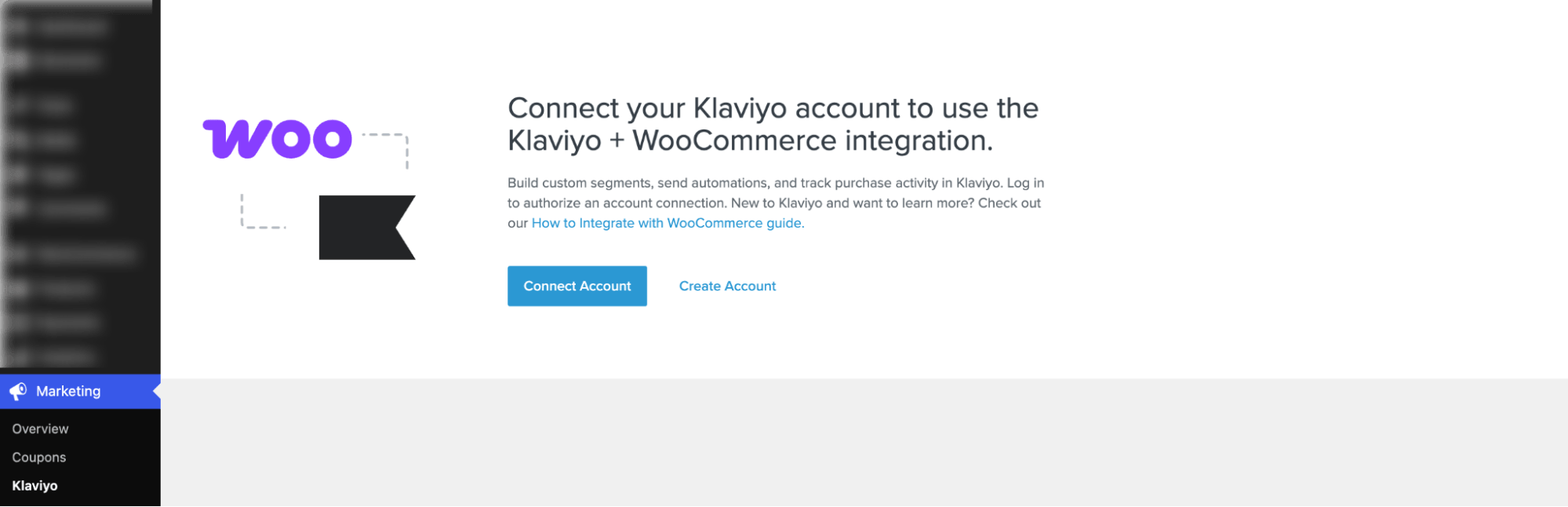
Klaviyo has a clean and intuitive interface, and once the store is connected, building flows, campaigns, and segments is relatively straightforward.
However, the onboarding process includes an extra integration layer. This creates a split workflow between store management and marketing execution.
So while the interface is easy to use, the system is not fully centralized for WooCommerce users.
FunnelKit Automations
With FunnelKit Automations, there is no external platform to connect to. You install it like any WordPress plugin, run through the setup wizard, and you're ready to start building automations right away.

FunnelKit Automations runs directly inside WordPress, making it feel like a native part of WooCommerce rather than a separate marketing tool.
It also has a guided onboarding process that helps you to create automation, segment audience, create broadcast, email settings, etc.
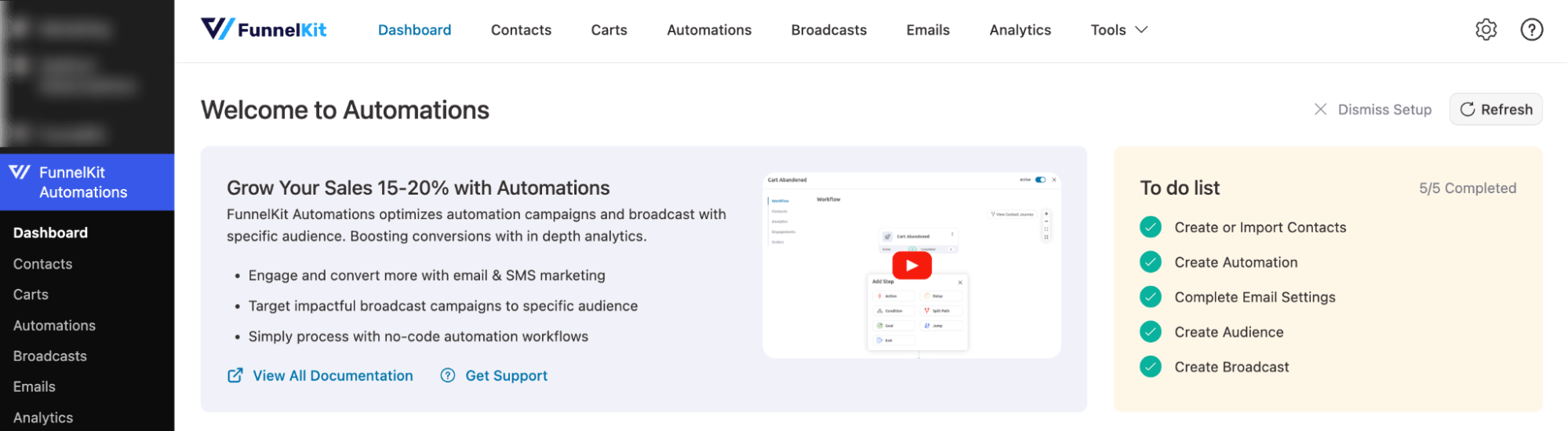
Automations, coupons, funnels, and reporting are all managed from one dashboard, reducing the need to switch between platforms. The initial setup takes some configuration effort, but once done, the workflow remains unified and consistent.
🏆 Winner: FunnelKit Automations
FunnelKit Automations wins this one because everything lives inside WordPress. Your store and your marketing run from the same dashboard with no platform switching, no sync delays, and no extra login.
Klaviyo has a clean and polished interface, but for WooCommerce store owners managing everything daily, working across two separate platforms adds friction that adds up fast.
Klaviyo vs FunnelKit Automations: Which Handles WooCommerce Transactional Emails Better?
WooCommerce sends transactional emails for every order, but the default emails are plain, unbranded, and generic. That's a missed opportunity for trust and branding.
The real question is which automation tool gives you full control over them.
Klaviyo
Klaviyo is a powerful marketing automation platform with a visual email builder and advanced segmentation. However, when it comes to WooCommerce transactional emails, it has real architectural limitations.
Because Klaviyo relies on data synced from its plugin rather than literal WooCommerce status changes, you cannot natively send custom emails for every default system alert.
Here is exactly what you can handle natively in Klaviyo and the exact triggers to use:
| Default WooCommerce Email | Can Send via Klaviyo? | Notes |
| Processing order (Main Receipt) | ✅ Yes | Triggered via “Placed Order” event |
| Completed order (Shipping) | ✅ Yes | Triggered via “Fulfilled Order” |
| Refunded order | ✅ Yes | Direct refund event support |
| Order on hold | ✅ Yes | Requires filter: Order status = on-hold |
| Order updated | ⚠️ Partial | Possible via status-change filtering |
| New order (Admin alert) | ❌ No | Admin-only notification, not customer marketing email |
| Canceled order | ❌ No | Not natively available as customer email trigger |
| Failed order | ❌ No | Not supported as customer communication event |
| Customer note | ❌ No | No native trigger for WooCommerce customer notes |
| Customer invoice / order details | ❌ No | Not supported as dedicated email flow |
| Reset password | ⚠️ Advanced setup | Possible via custom API event, needs developer setup |
| New account | ⚠️ Advanced setup | Requires custom API metric + configuration |
Note: When using Klaviyo for custom transactional emails, manually turn OFF Processing, Completed, Refunded, and On-Hold emails in WooCommerce to prevent duplicate receipts. Leave all other admin, password reset, and account creation emails ON in WooCommerce unless you have a developer to handle the custom API setup.
FunnelKit Automations
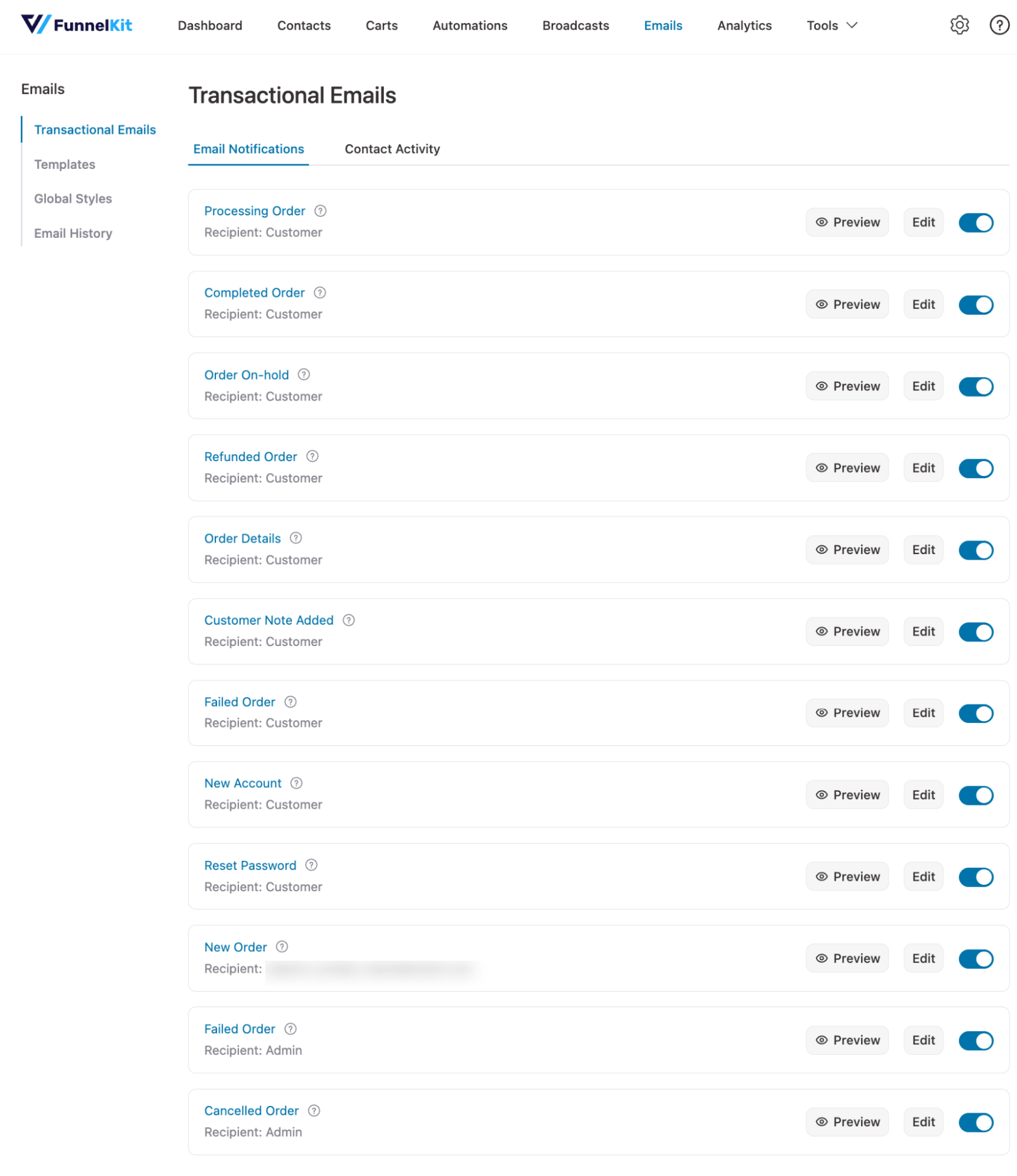
FunnelKit Automations runs natively on your WordPress server, giving it direct access to your store's database and security keys.
Because it is self-hosted, FunnelKit can trigger custom, beautifully designed templates for every single default WooCommerce email with zero security risks or API sync delays.
| Default WooCommerce Email | Can Send via FunnelKit Automations Custom Builder? |
| Processing order (Main Receipt) | ✅ Yes |
| Completed order (Shipping) | ✅ Yes |
| Refunded order | ✅ Yes |
| Order on hold | ✅ Yes |
| New order (Admin Alert) | ✅ Yes |
| Cancelled order | ✅ Yes |
| Failed order | ✅ Yes |
| Customer note | ✅ Yes |
| Customer invoice / Order details | ✅ Yes |
| Reset password | ✅ Yes( completely safe, no API needed) |
| New account | ✅ Yes (completely safe, no API needed) |
FunnelKit Automations comes with custom prebuilt templates for all basic transactional emails.
And when you activate an email workflow inside FunnelKit, it automatically intercepts and turns off the matching WooCommerce default alert, so you never have to worry about sending duplicates.
🏆 Winner: FunnelKit Automations
FunnelKit Automations wins this one clearly. It gives you full control over every WooCommerce email right out of the box, with no API configuration, no risk of duplication, and no extra plugins required.
Klaviyo covers the core order emails well, but for password resets and new account emails, you're either leaving WooCommerce defaults in place or asking a developer to wire up a custom API solution.
Klaviyo vs FunnelKit Automations: Which Has Better Automation Capabilities?
It’s worth noting that both platforms offer prebuilt automation flows for various scenarios, as well as a visual workflow builder to design automations.
Plus, both offer triggers, delay, split path/trigger split, and condition options.
However, in this section, we focus on the effectiveness of triggers and the flexibility in configuring them to maximize results for targeted automation.
Klaviyo
Klaviyo Automations (Flows) lets you run automations triggered by different events to communicate with customers on autopilot.
- Website Browsing Activity: when a visitor is browsing your website, including viewing product pages, category pages, or actively engaging on-site
- Cart & Checkout Activity: when a customer adds items to the cart, starts checkout, or leaves without completing a purchase, including abandoned cart and abandoned checkout reminders.
- Purchase Activity & Order Updates: when a customer places an order, makes their first or repeat purchase, or when an order status changes, such as fulfilled, canceled, or refunded
- Customer Account & Signup Activity: when a new customer profile is created, customer details are updated, or someone subscribes to email/SMS marketing and gives consent
- Customer Segmentation & Data Changes: when a customer is added to a segment or when their properties or profile data (like tags or attributes) are updated
- Review Activity (Klaviyo Reviews): when a customer becomes eligible to leave a review, receives a review request, or submits a product review
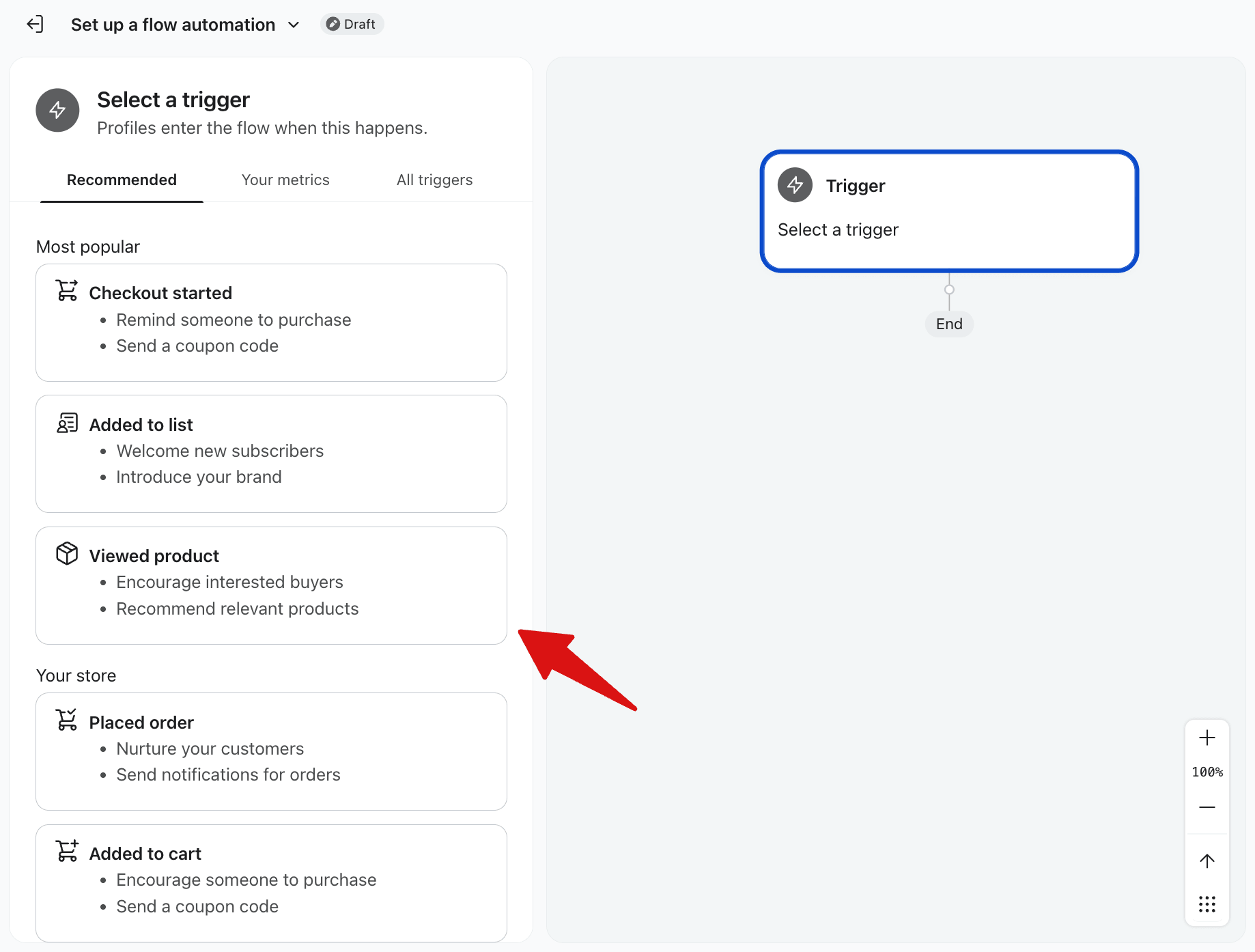
To make triggers and automations more effective, Klaviyo offers two options: the Trigger filter and the Profiler filter.
| Trigger filter | Profile Filter |
| Cancelled Order | ItemCategories |
| Fulfilled Order | ItemNames |
| Ordered Product | ProductNames |
| Placed Order | ShippingMethods |
| Refunded Order | UsedCoupon |
| Started Checkout | IsDiscounted |
| Revenue | Coupons |
| Canceled Order Value | $value |
| Fulfilled Order Value | |
| Ordered Product Value | |
| Refunded Order Value | |
| Started Checkout Value |
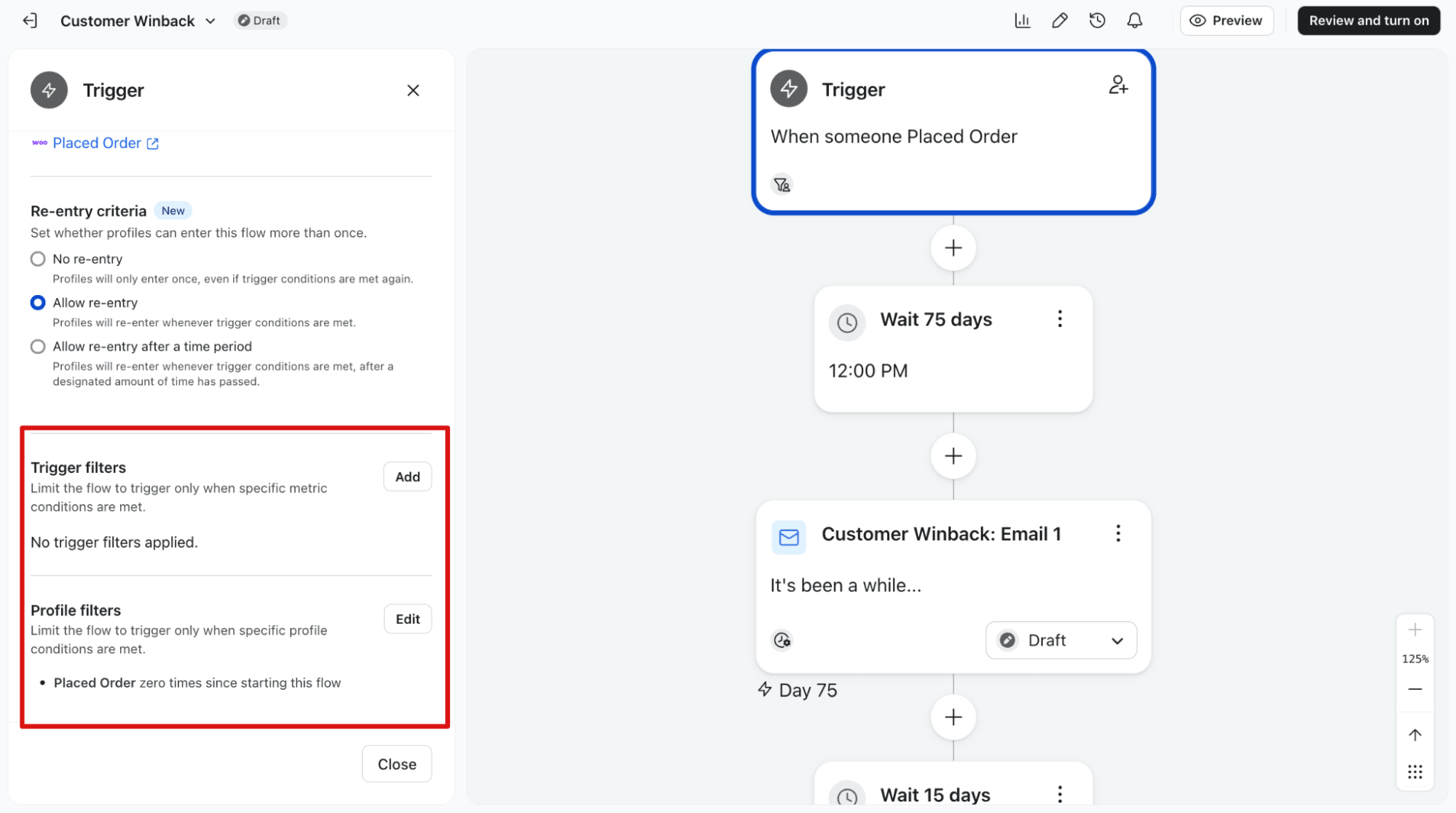
While there are options to configure the triggers to make them more targeted, they seem very limited.
FunnelKit Automations
Since FunnelKit Automations has native integrations with WooCommerce, you have more flexibility in event triggers to run automations for your customers.
- Cart & Checkout Activity: when a customer creates a cart, starts checkout, and recovers a cart after leaving without purchase
- Order Activity: when a WooCommerce order is created, updated per product, changes status (pending, processing, completed, canceled), is refunded, has stock reduced, or receives order notes
- Customer Lifecycle Activity: when a customer becomes inactive and is targeted for winback campaigns based on purchase or engagement inactivity
- Review Activity: When a customer submits a product review
- Contact & List Management Activity: when a contact is added or removed from lists, subscribes or unsubscribes, or is tagged for segmentation
- Engagement Activity: when a contact clicks links, bounces, or interacts with campaigns
- Personal Events: when time-based events like birthdays or anniversaries are reached, send automated messages
- Automation & Integration Events: when external systems send data into FunnelKit through webhooks to trigger workflows
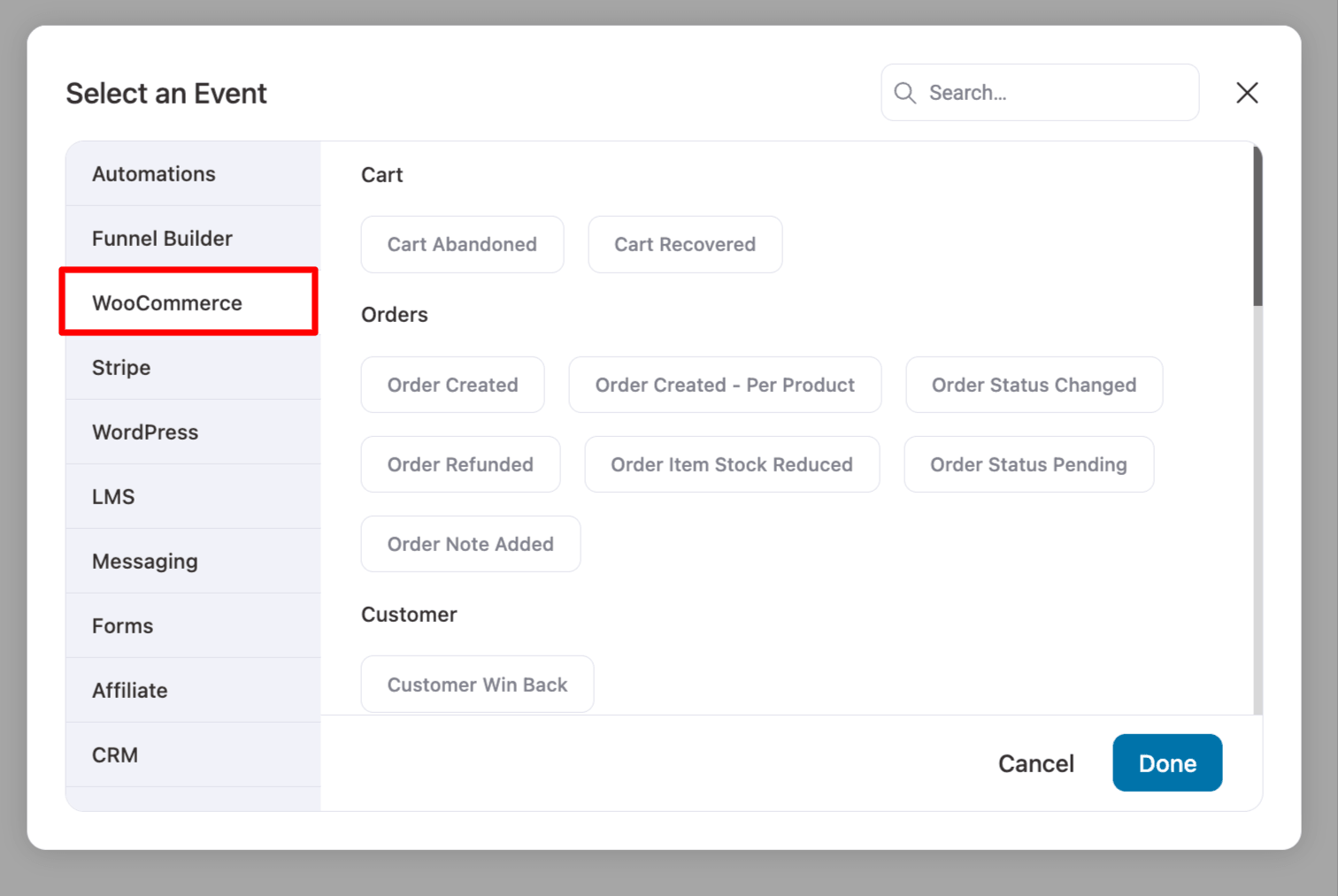
To make automations more effective, you can configure them based on the event trigger.
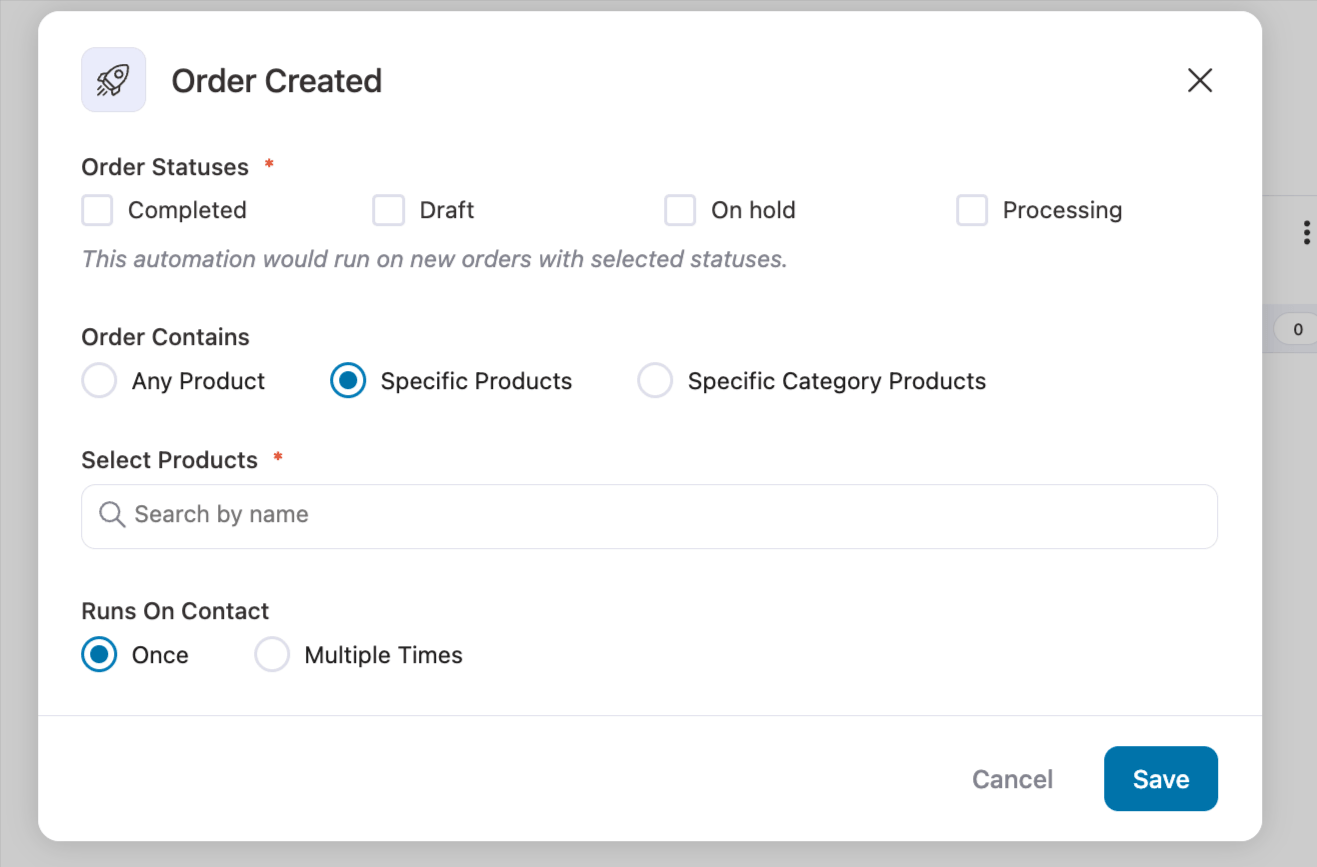
On top of that, you can set up different conditions.
For conditions, you get a wide range of data available in different categories, including:
- Current Woo Order
- Funnels
- Segments
- Contact Details
- Contact Field
- User
- WooCommerce
- Geography
- Engagement
- Broadcast
- Automation
- DateTime
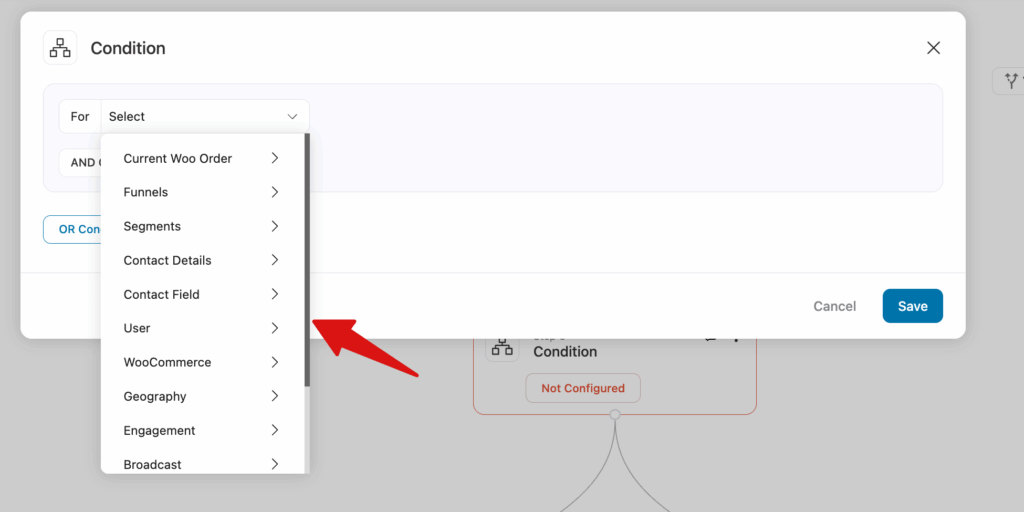
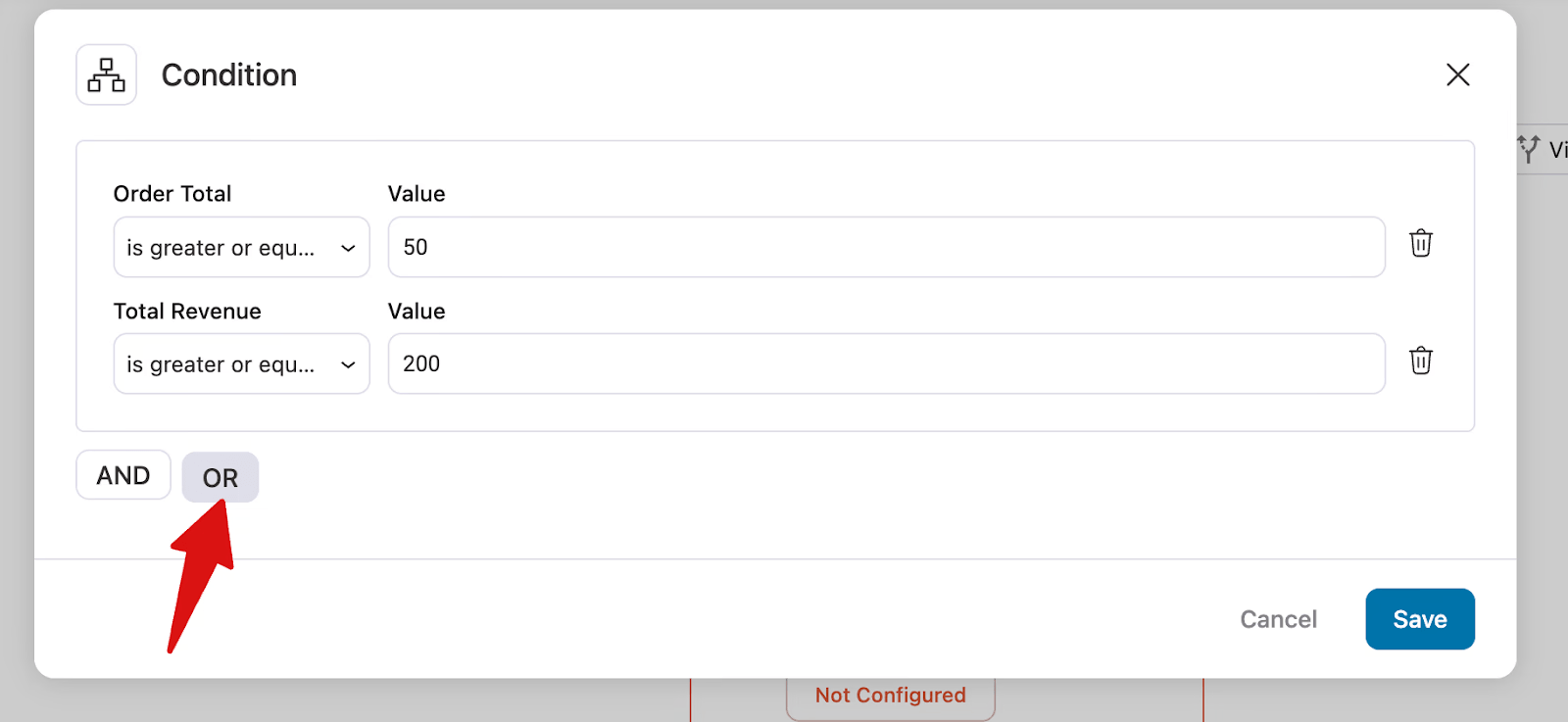
You can create simple to complex conditions with AND/OR rules.
🏆 Winner: FunnelKit Automations
FunnelKit automations win because they offer far more WooCommerce-native triggers and much deeper control over conditions, especially for order-related events like status changes, refunds, stock updates, and order notes, along with granular AND/OR rule-based logic across the full WooCommerce data.
Klaviyo is still strong in marketing automation, but it doesn’t match FunnelKit’s depth of store-level event triggers and flexibility in conditions.
Klaviyo vs FunnelKit Automations: Which Has Better Abandoned Cart Recovery Feature?
Abandoned cart recovery is one of the most important revenue drivers for any WooCommerce store. Both Klaviyo and FunnelKit Automations handle it well, but they approach it in very different ways.
Klaviyo
Klaviyo actually gives you two separate recovery touchpoints. The "Added to Cart" trigger captures shoppers who added items but never reached checkout. The "Started Checkout" trigger captures those who got further and entered their email, but didn't complete the purchase. Having both means you can send different messages at different stages of the buying journey, which is a genuine strength.
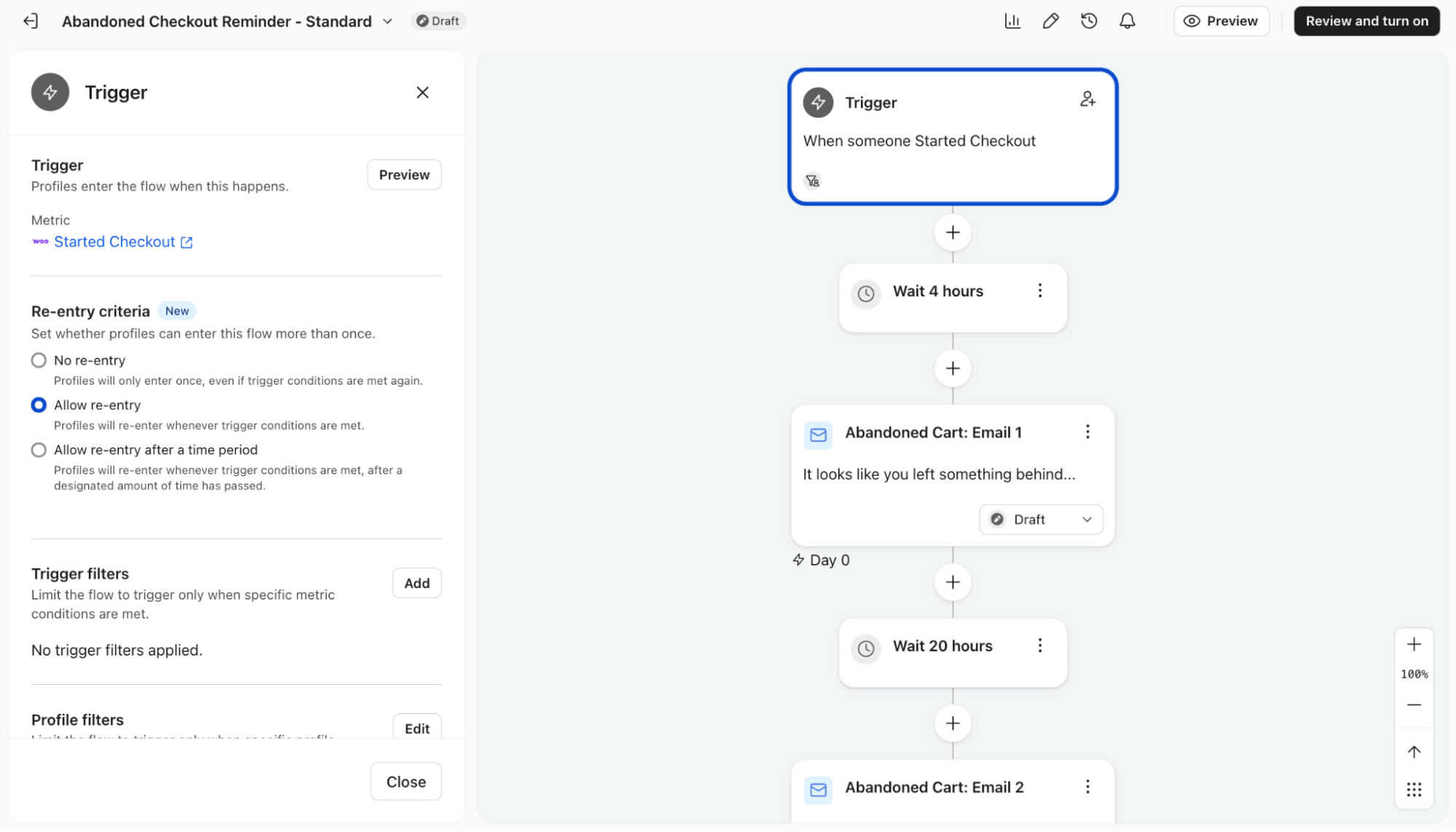
Where Klaviyo is more limited is in the mechanics of cart-level control. Coupon handling relies on pre-created WooCommerce coupons that are then used inside flows, so discount logic is less flexible and can't respond dynamically to what's actually in the cart at that moment.
FunnelKit Automations
FunnelKit Automations provides detailed control over cart abandonment rules, including custom wait times before marking a cart as abandoned, cool-off periods, and criteria for when a cart becomes “lost.” It also includes operational controls like GDPR consent, IP/device capture, tagging, list assignment, and user-role exclusions.
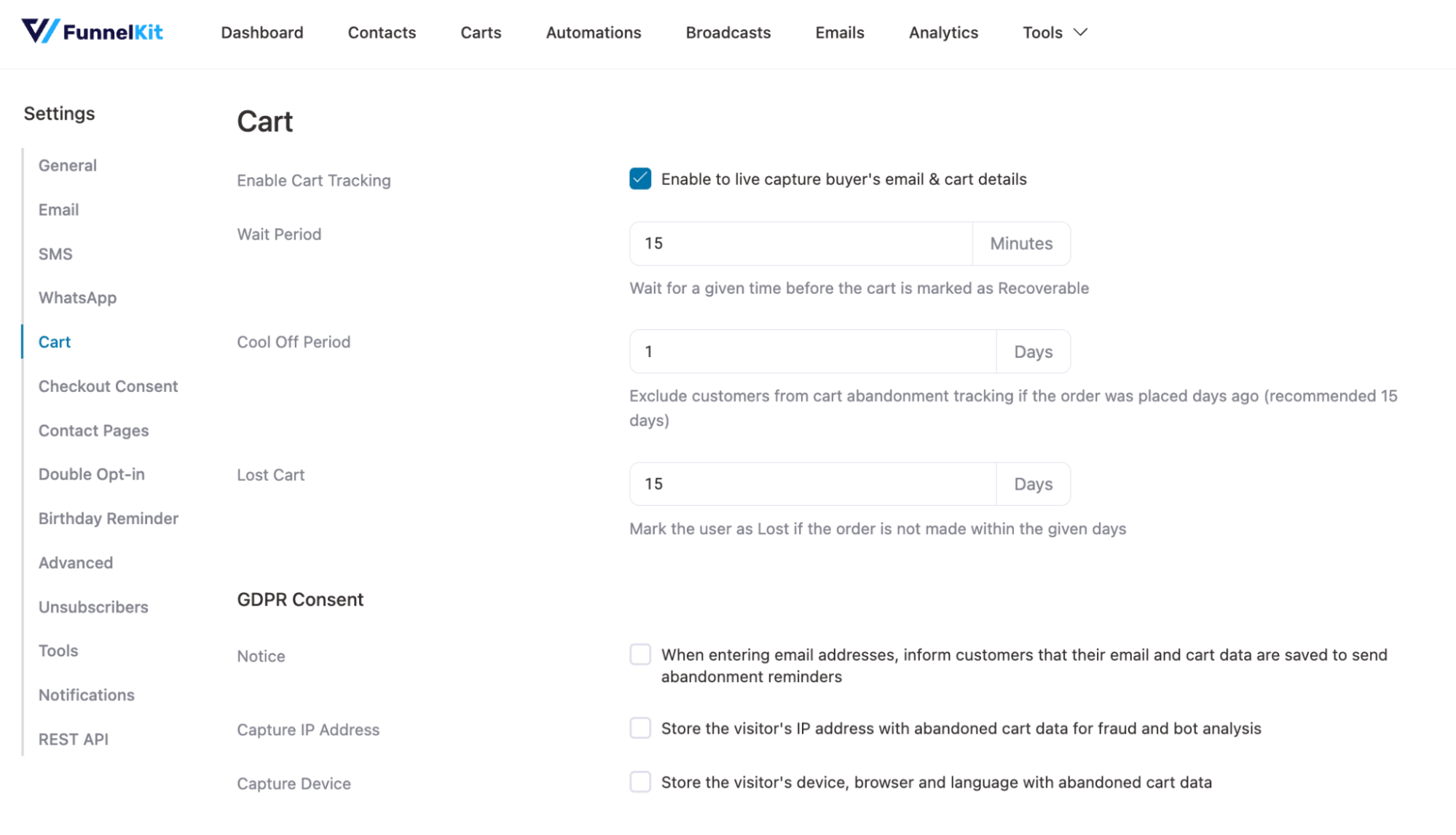
As mentioned earlier, it comes with its own trigger for “Cart Abandoned”.
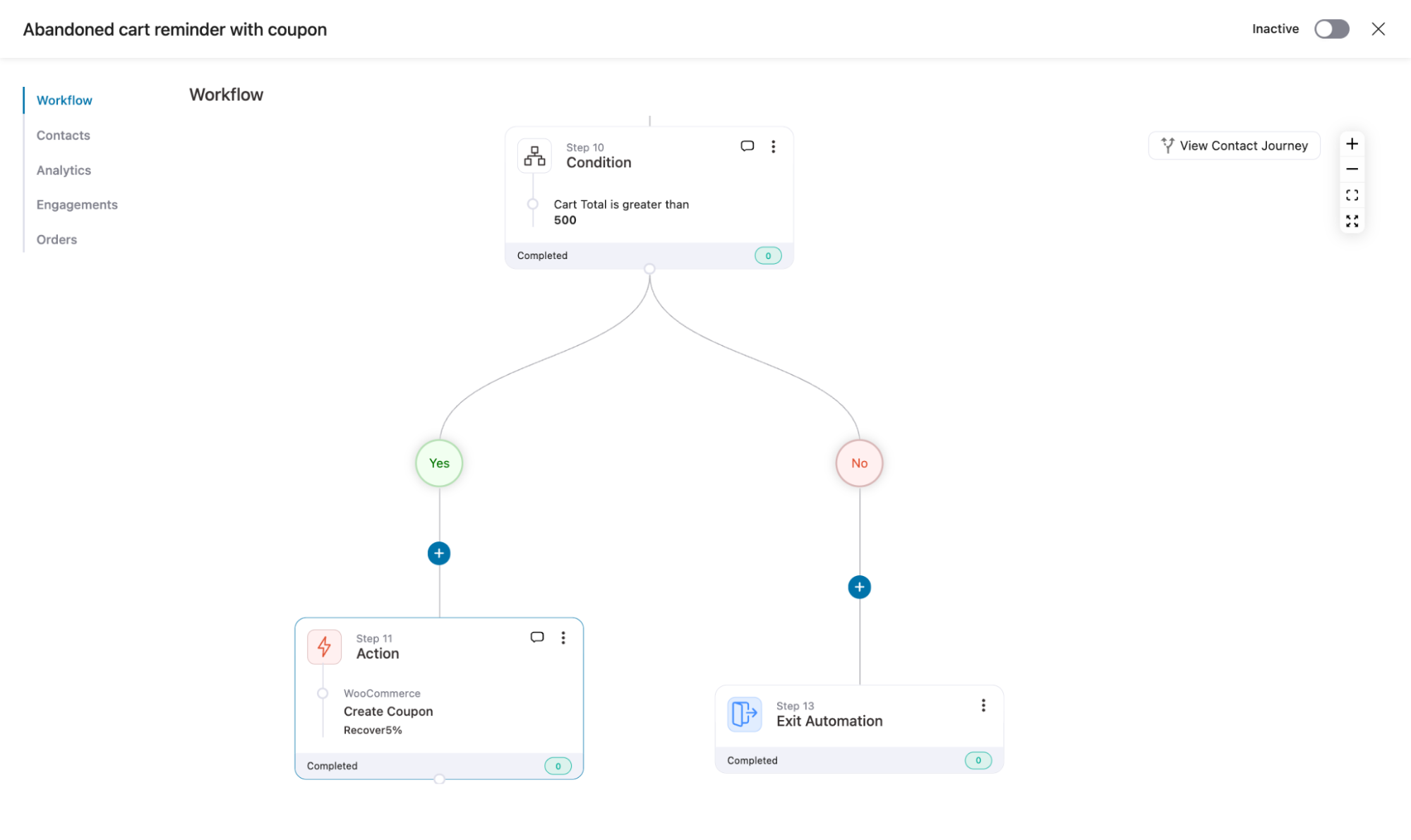
Here, you can also set a delay to send both email and SMS. But where FunnelKit Automations has an edge is that it can offer a conditional, dynamic coupon on the fly.
So, if the cart value is over $500, you can offer a 5% discount. The coupon can be automatically applied when users return to checkout via the email or SMS recovery link.
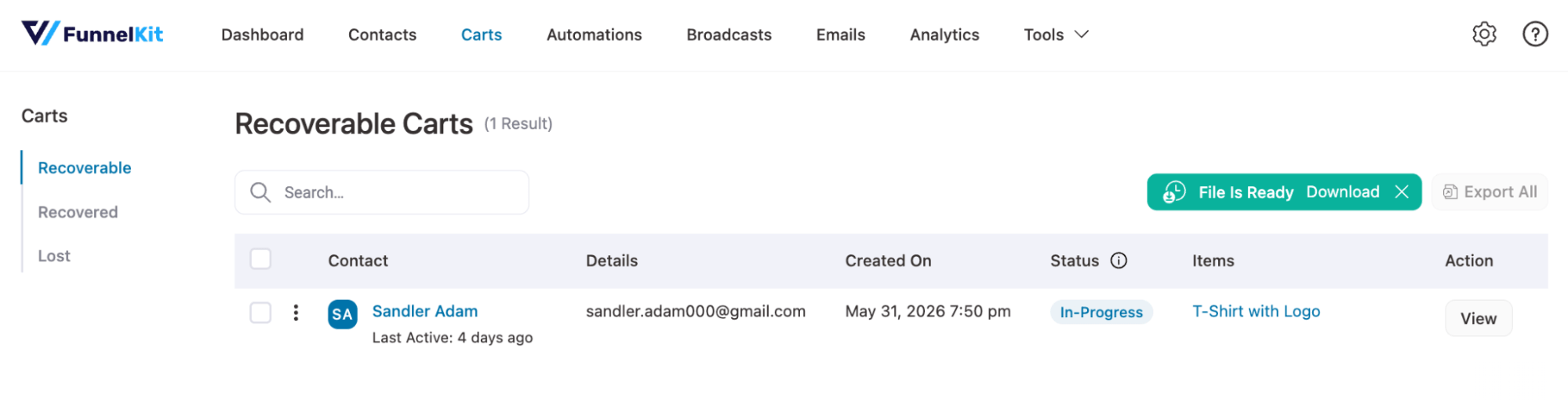
On top of this, it provides clear analytics for Recoverable carts, Recovered carts, and Lost carts, helping store owners track recovery performance more precisely.
🏆 Winner: FunnelKit Automations
FunnelKit Automation’s cart-level control, dynamic discount logic based on actual cart value, and auto-applied recovery links give it a clear edge for WooCommerce stores that want to maximize recovery revenue without manual coupon management.
That said, Klaviyo's two-trigger approach, capturing both cart adds and checkout starts as separate recovery touchpoints, is genuinely useful and more capable than most people realize. It's just less flexible at the mechanics level in terms of real-time cart conditions.
Klaviyo vs FunnelKit Automations: Which Has Better Customer Segmentation?
Customer segmentation is one of the most important parts of any eCommerce marketing CRM because it directly impacts targeting accuracy, conversion rates, and repeat purchases.
It’s worth mentioning that both platforms support segmentation using tags and lists, which are commonly used to group customers into audiences.
Both also support AND / OR conditions, so rule-based segmentation is possible in both systems.
However, the real difference lies in the depth and structure of customer data available for building those segments.
Let’s compare:
Klaviyo
| Order Events | Value Metrics |
| Cancelled Order | Canceled Order Value |
| Fulfilled Order | Fulfilled Order Value |
| Placed Order | Revenue |
| Refunded Order | Refunded Order Value |
| Ordered Product | Ordered Product Value |
Klaviyo segmentation is built on event-based WooCommerce tracking, covering orders, revenue, product activity, and checkout behavior.
This enables strong behavioral segmentation around purchase activity and intent, especially for marketing automation use cases.
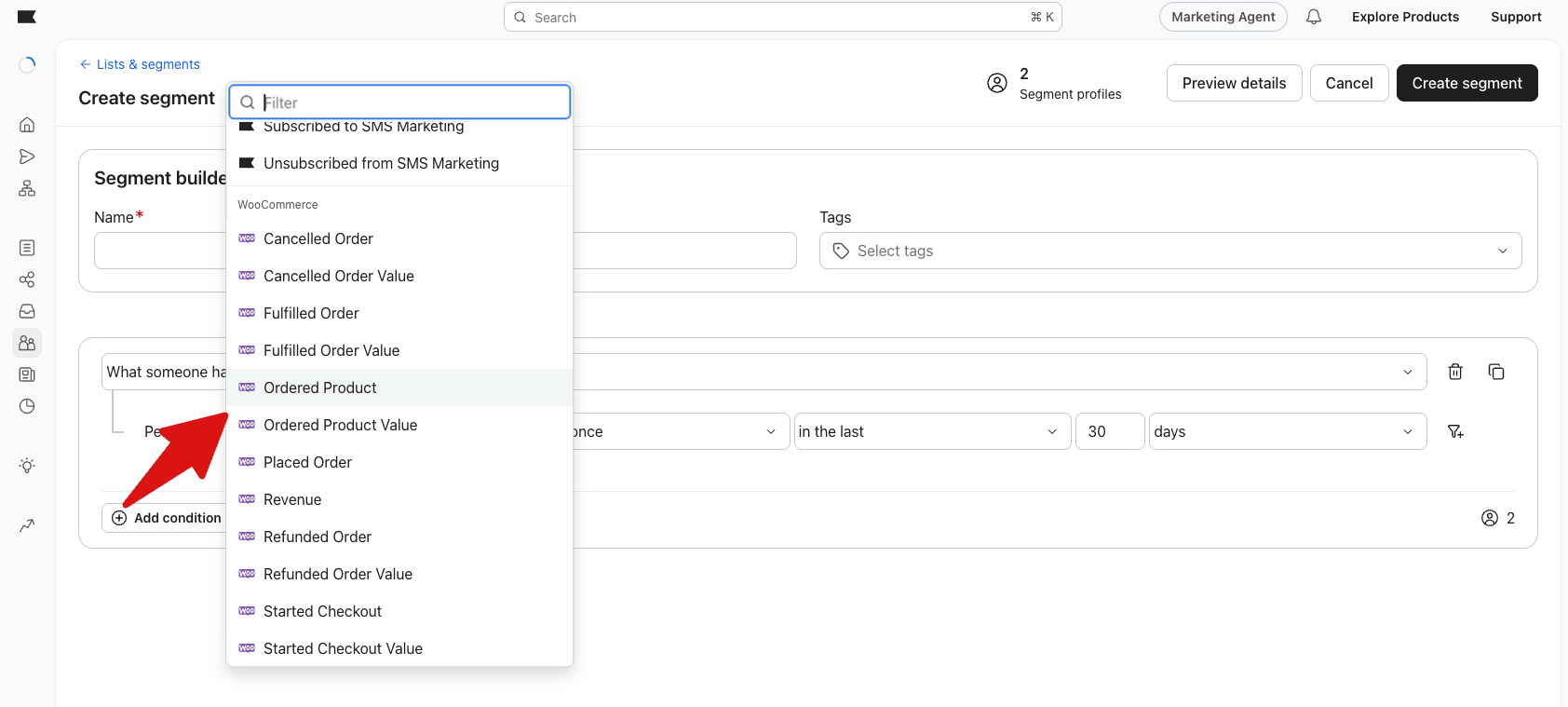
Klaviyo segmentation is built on event-based WooCommerce tracking, covering orders, revenue, product interactions, and checkout behavior.
This makes it strong for behavior-driven marketing segmentation, but it depends heavily on proper event tracking and integration setup.
FunnelKit Automations
| Has made a purchase | Total Order Count |
| Has used coupons | Total Revenue |
| First order date | Average Order Value is |
| Last order date | Last order days |
| First order days | Purchased Products Value |
| Purchased Products Categories | Purchased Products |
| Purchased Products Tags | Used Coupons |
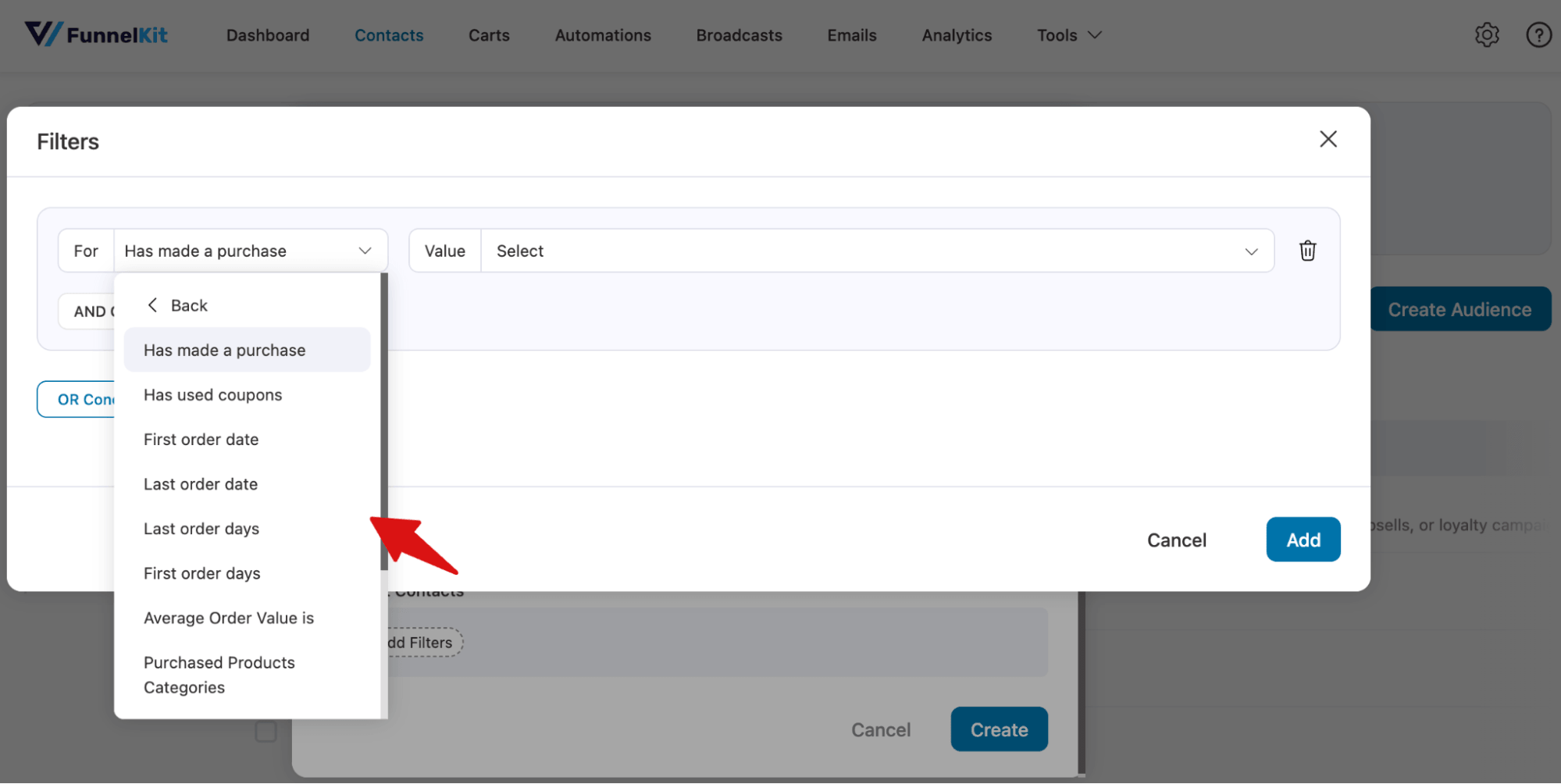
FunnelKit Automations uses native WooCommerce customer and order data, enabling segmentation directly from store-level information instead of relying on external event tracking.
It also expands segmentation beyond purchase behavior into:
- Contact information (name, email, phone, etc.)
- User roles (customer, subscriber, admin, wholesale, etc.)
- Geographical data (billing and shipping location)
- WooCommerce order and user metadata
- Custom contact and user fields
This allows FunnelKit to build multi-layered segmentation combining behavior, identity, and store context in one system.
🏆 Winner: FunnelKit Automations
FunnelKit Automations wins this comparison because it offers deeper WooCommerce-native segmentation based on purchase history, lifecycle data, coupons, and customer attributes such as roles and geography.
It enables more flexible targeting by combining behavioral and customer identity data in one system.
Klaviyo is strong for event-based marketing, but FunnelKit offers a more complete and structured WooCommerce segmentation system.
Klaviyo vs FunnelKit Automations: Which Offers Email Builder & Design Flexibility
Both platforms give you multiple ways to build emails, pre-built templates, and responsive previews.
The differences are in the details.
| Feature | Klaviyo | FunnelKit Automations |
| Builder types | Drag-and-drop, custom HTML, and text-only | Visual, HTML, and rich text |
| Email blocks | Strong marketing-focused blocks | Marketing blocks + WooCommerce-specific blocks |
| Prebuilt templates | ✅ Yes | ✅ Yes |
| Preview and testing | ✅ Yes | ✅ Yes |
| Email audit system | ❌ No | ✅ (URL, image, and link validation) |
| WooCommerce blocks | Limited | Strong (product, cart, coupon, and more) |
Klaviyo
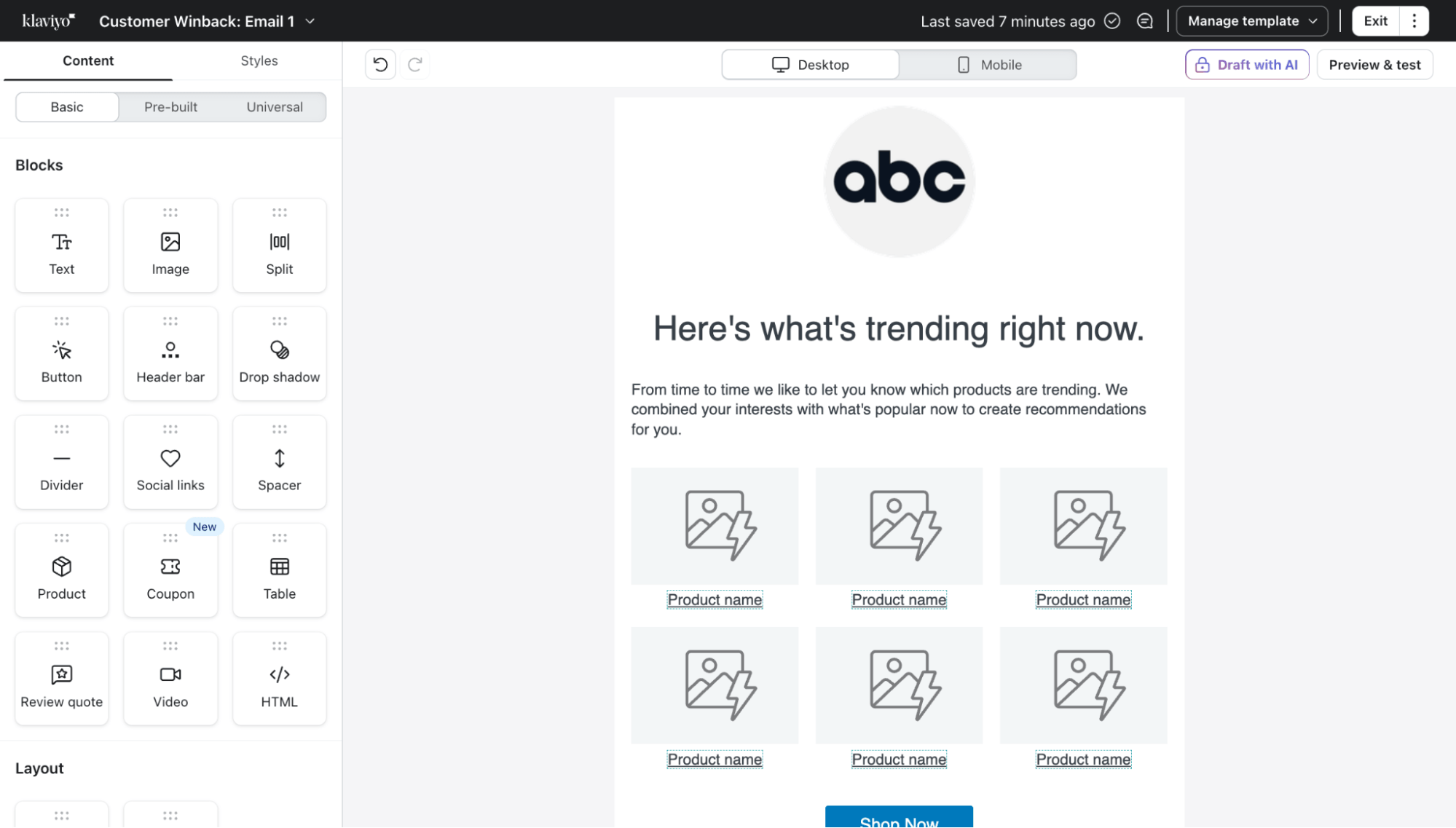
Three editor types cover most needs. The drag-and-drop builder has a wide block library including text, image, button, video, product, coupon, and split layouts.
The HTML editor gives developers full code control. The text-only editor is great for emails that feel personal rather than promotional.
FunnelKit Automations
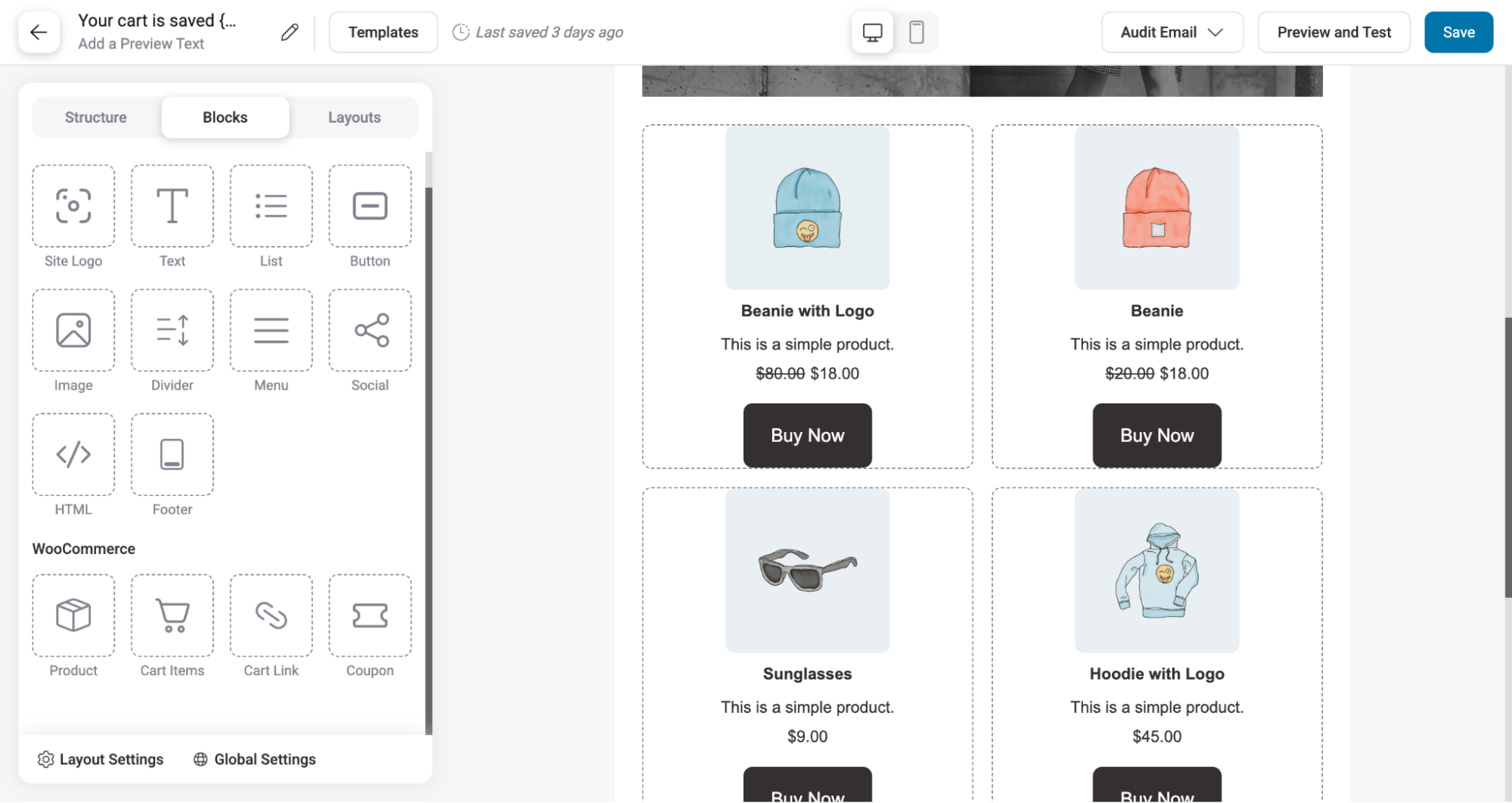
FunnelKit also gives you three builder types. The visual drag-and-drop builder includes standard marketing blocks plus WooCommerce-specific ones like product, cart items, cart link, and coupon blocks that Klaviyo doesn't have natively.
With the visual builder, you also get Pre-built templates.
The HTML builder gives you full code control, and the rich text editor is there for quick, simple emails.
With all the email designers, you can check responsive previews, and test sending is all included, too.
Note: FunnelKit Automations also includes an email audit system that helps detect issues like broken URLs, missing URLs, shortened URLs, and image size problems before sending emails.
🏆 Winner: Tie
Both platforms deliver strong email-building capabilities. Klaviyo offers a more polished design experience with three flexible editor types. FunnelKit counters with WooCommerce-specific blocks and a built-in pre-send audit system. In real-world use, both get the job done well, which makes this an honest tie.
Klaviyo vs FunnelKit Automations: Which Offers Better Broadcast Campaigns?
Broadcasts are one-time campaigns used for promotions, announcements, and product updates. Their effectiveness depends on segmentation, scheduling control, testing options, and multi-channel reach.
Here is a quick comparison:
| Topic | Klaviyo | FunnelKit Automations |
| Audience segmentation | ✅ Yes | ✅ Yes |
| Scheduling and delivery control | ✅ Yes (smart scheduling and optimization) | ✅ Yes |
| A/B testing | ✅ Yes | ✅ Yes |
| Email performance tracking | ✅ Yes | ✅ Yes |
| Email quality checks or validation | ✅ Yes | ✅ Yes |
| Multi-channel broadcast (Email, SMS, others) | Strong native omnichannel support (Email, SMS, and more) | Limited, mostly integration-based, and not fully unified |
Klaviyo
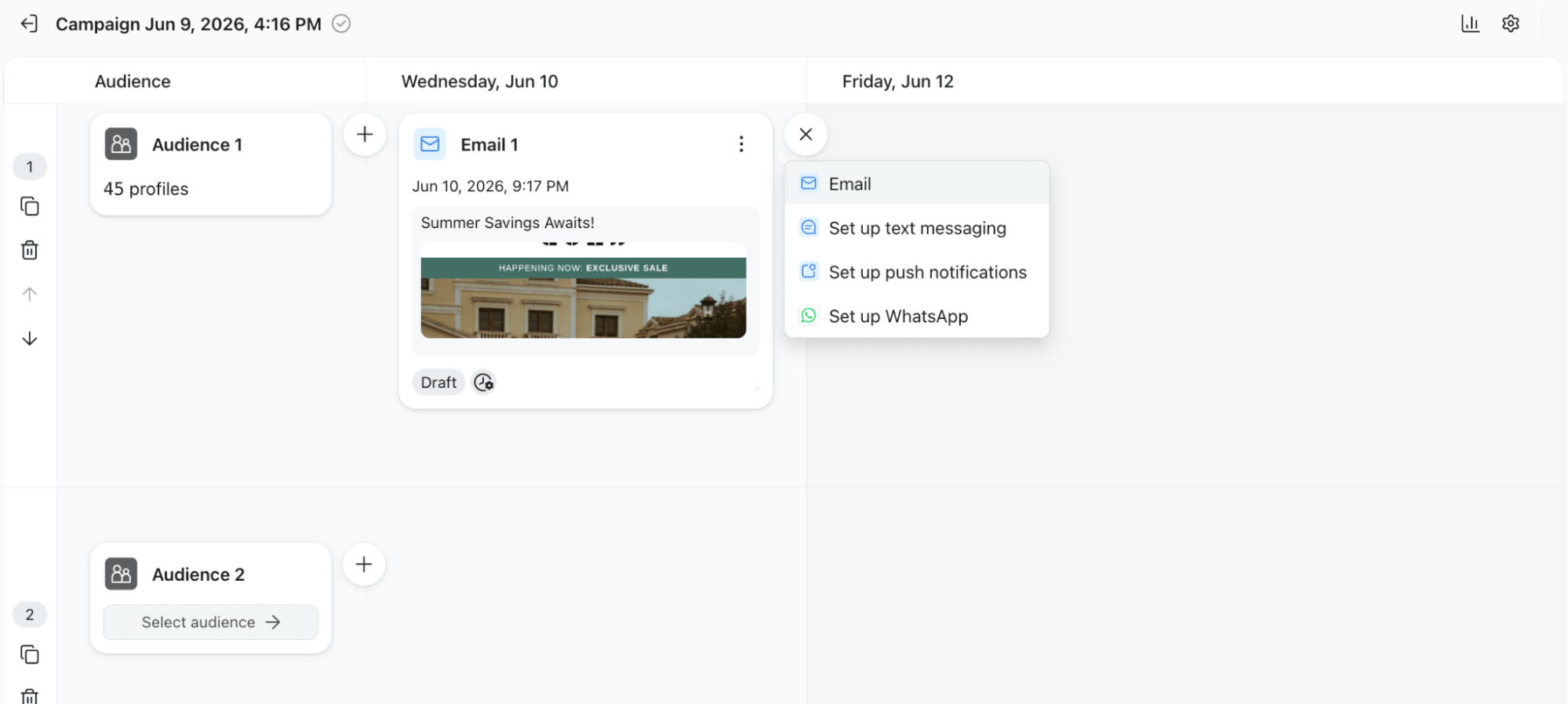
Klaviyo offers a mature campaign system designed for large-scale marketing execution. It provides strong segmentation, advanced A/B testing, smart sending, and optimized scheduling across email, SMS, WhatsApp, and push notification channels. Its strength lies in unified omnichannel campaign management and performance optimization.
FunnelKit Automations
FunnelKit Automations provides broadcast capabilities inside WooCommerce, enabling highly targeted campaigns based on store activity and customer behavior. It supports email and SMS messaging through workflows and integrations, along with segmentation, A/B testing, and scheduling controls inside WordPress.
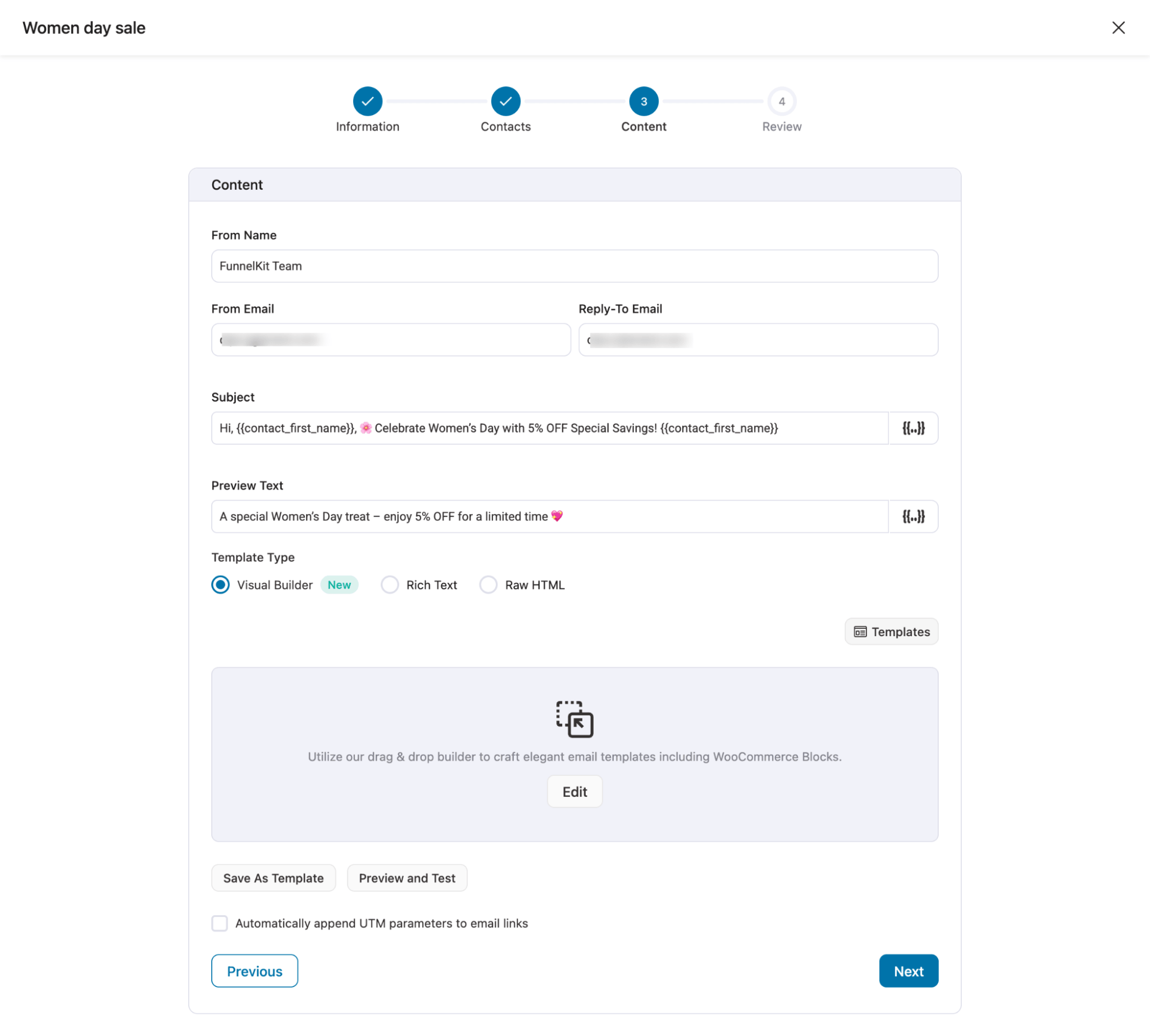
But you need to create separate campaigns for email and SMS.
🏆 Winner: Klaviyo
Klaviyo wins due to its stronger native omnichannel broadcast system, more advanced A/B testing, and better optimization tools for large-scale campaign execution.
FunnelKit Automations performs well for WooCommerce-native targeted broadcasts, but Klaviyo offers a more complete and scalable marketing campaign experience.
Klaviyo vs. FunnelKit Automations: Which Wins for Multi-Channel Reach (Email, SMS, WhatsApp, Push)?
Multi-channel marketing determines how effectively a platform can reach customers across email, SMS, WhatsApp, and push notifications.
The key difference is whether these channels are fully native or rely on integrations, and how email deliverability is handled across the system.
Here is a quick comparison between Klaviyo and FunnelKit Automations
| Channel / Capability | Klaviyo | FunnelKit Automations |
| Fully native with managed deliverability | Fully native inside WordPress with SMTP-based deliverability | |
| SMS | Native Klaviyo SMS (region-limited) | Via Twilio, BulkGate |
| Native since Sept 2025 (international markets only, not available for US numbers) | Supported via integrations | |
| Push notifications | Limited support | Via PushEngage integration |
| Cross-channel automation | Strong native email, SMS, WhatsApp flows in one ecosystem | Modular workflows using external tools |
Klaviyo
Klaviyo offers a tightly integrated system where email, SMS, and WhatsApp work natively inside automation flows like abandoned cart recovery and post-purchase sequences, with centralized reporting across all channels.
A key strength is its managed email deliverability, where Klaviyo handles infrastructure, ISP relationships, spam compliance, bounce management, and sender reputation. This removes the need for SMTP setup and ensures stable inbox performance.
WhatsApp became a native channel in September 2025, though it is currently only available for international markets. US-based store owners cannot use WhatsApp through Klaviyo at this time. Push notifications still require third-party integrations.
FunnelKit Automations
FunnelKit Automations supports SMS via Twilio and BulkGate, WhatsApp through integrations, and push notifications via PushEngage, making it a flexible, modular system that covers all major channels.
For email deliverability, FunnelKit relies on external SMTP providers like Amazon SES, SendGrid, or Postmark. This gives you full control over infrastructure and cost, but does require initial setup and ongoing maintenance.
🏆 Winner: Tie
This is a tie depending on your market and use case. Klaviyo wins for a fully native system with managed deliverability and seamless email, SMS, and WhatsApp integration, especially for international stores.
FunnelKit wins for flexibility, full control over the infrastructure, and cost efficiency. For US-based stores where Klaviyo's WhatsApp is unavailable, FunnelKit's modular setup covers everything you need.
Klaviyo Vs FunnelKit Automations: Which Offers Better Contact Profile Management?
A good CRM contact profile does two things well: shows you the full picture of who this customer is, and lets you take action without leaving the screen.
For WooCommerce stores, that means order history and revenue data sitting right next to contact details, not buried in a separate report.
| Contact Profile Capability | Klaviyo | FunnelKit Automations |
| Contact basics (name, email, phone, location) | ✅ Yes | ✅ Yes |
| Tags | ✅ Yes | ✅ Yes |
| Lists and segments | ✅ Yes | ✅ Yes |
| Custom fields and properties | ✅ Yes | ✅ Yes |
| Channel subscription status (email, SMS) | ✅ Yes | ✅ Yes |
| Total orders and AOV | ✅ Yes | ✅ Yes |
| Last order date | ✅ Yes | ✅ Yes |
| Email engagement (last sent, open, click) | ✅ Yes | ✅ Yes |
| Funnel activity (checkout, upsells, order bumps) | ❌ No | ✅ Yes |
| Order activity timeline | ✅ (event timeline) | ✅ (summary view) |
| First-touch and recent attribution (source, UTM, referrer) | ✅ Yes | ❌ No |
| GDPR compliance tools | ✅ Yes | ✅ Yes |
| Send message from profile | ✅ Yes | ✅ Yes |
| Add to automation | ✅ Yes | ✅ Yes |
| Merge duplicate profiles | ✅ Yes | ✅ Yes |
| Suppress / block contact | ✅ Yes | ❌ No |
| Export profile | ✅ Yes | ❌ No |
| Delete contact | ❌ No | ✅ Yes |
| Accessible from | Cloud (SaaS) | WordPress dashboard |
Klaviyo
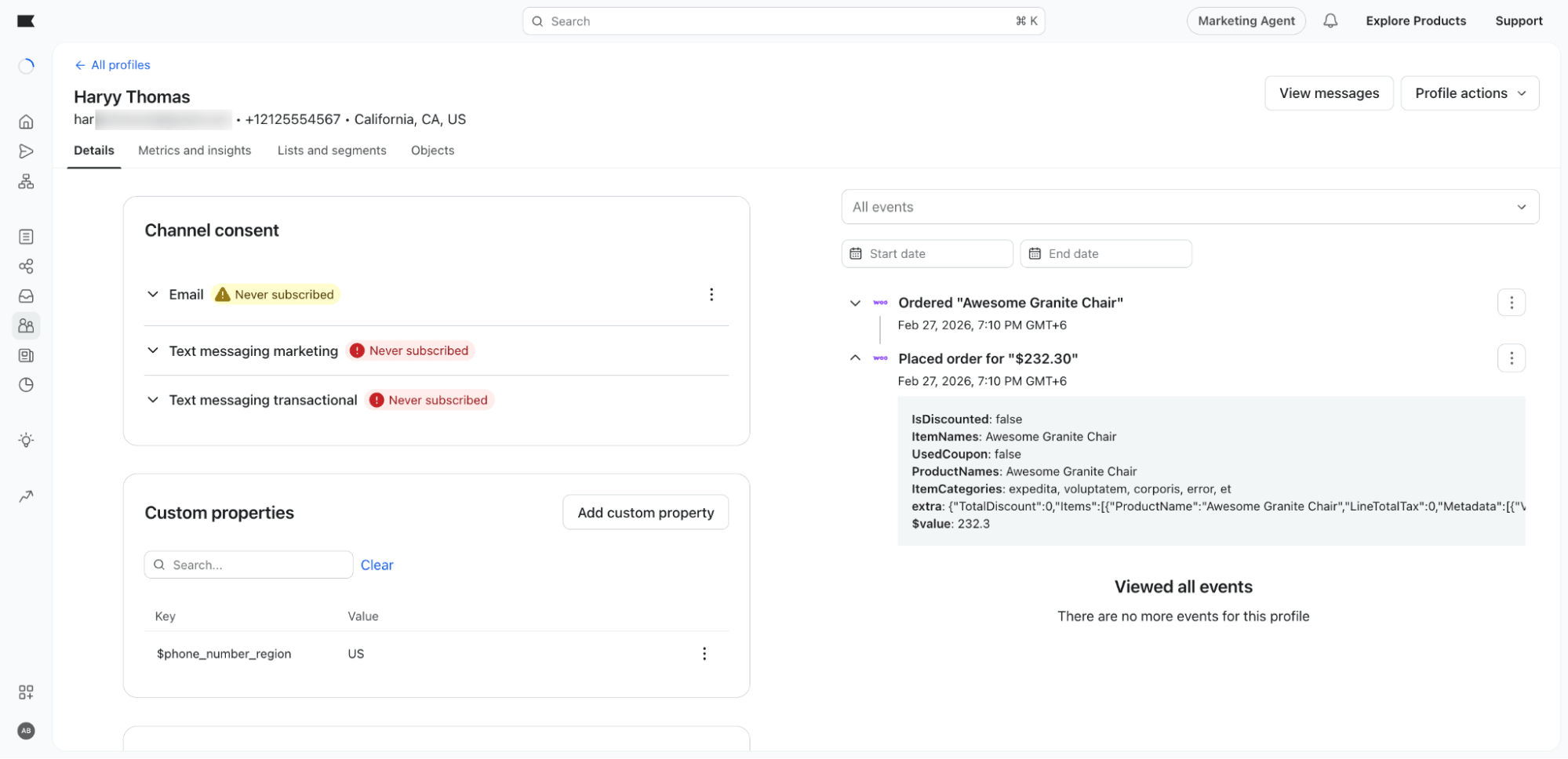
Klaviyo's contact profile is well-rounded with order data, engagement stats, UTM attribution, list management, and compliance tools all in one place.
The activity timeline is filterable by event type, which is handy. The one catch is that order data shows up as raw event logs rather than a clean summary, so understanding a customer's purchase history takes a bit of digging.
Profile actions are comprehensive, covering merge, suppress, export, and delete.
FunnelKit Automations
FunnelKit gives you a clean commercial snapshot of a contact profile right away. Orders, AOV, last order date, engagement, and funnel touchpoints are all in a readable summary view, no digging needed.
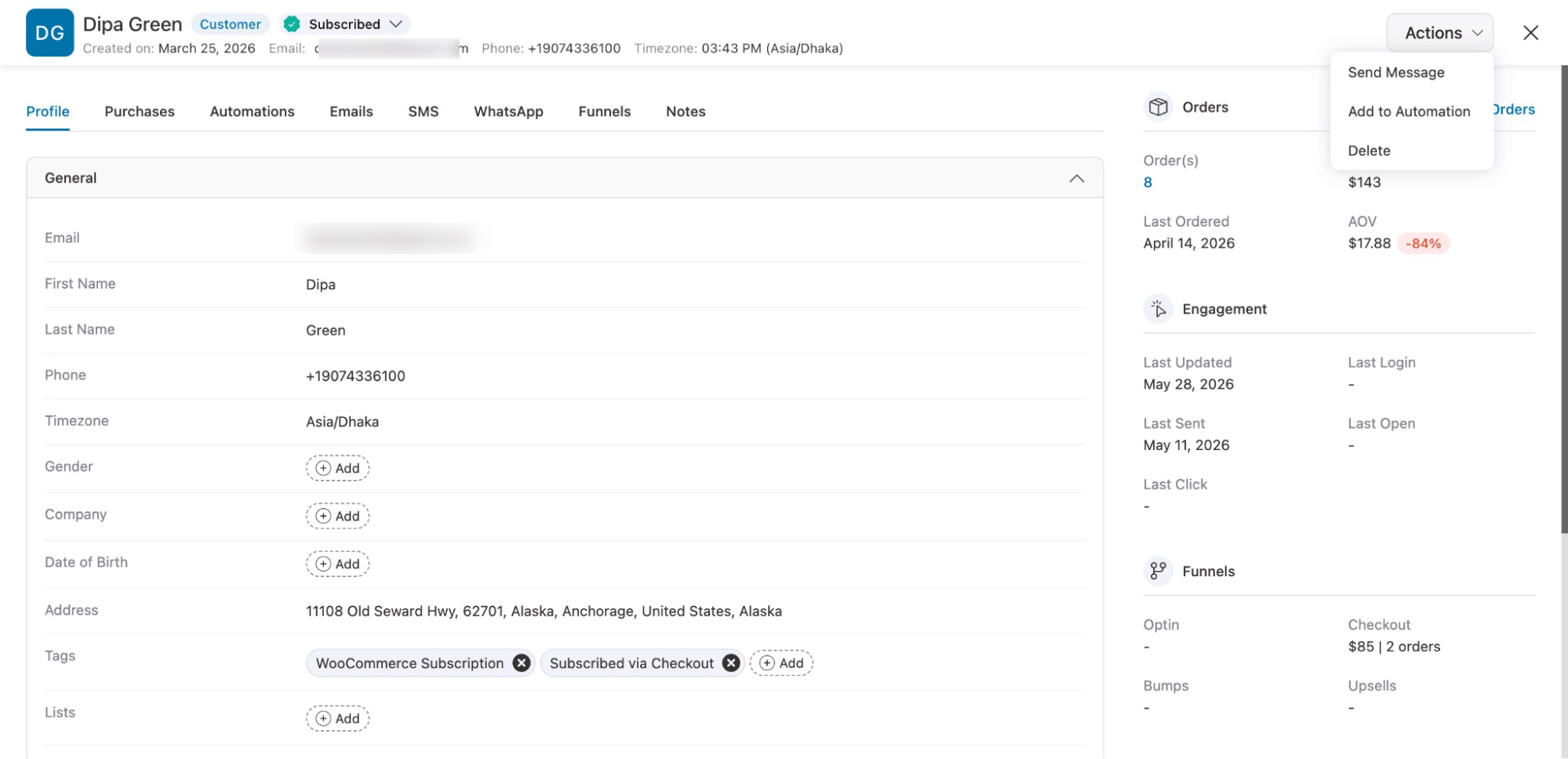
The only gaps are the lack of UTM attribution and the lack of suppression or export at the profile level, but for most store owners, those are rarely the priority.
On compliance, FunnelKit captures GDPR consent at cart abandonment, handles unsubscribes natively, and keeps all data inside your own WordPress database.
🏆 Winner: FunnelKit Automations
FunnelKit Automations wins on how it presents commercial data. The clean summary view, subscription widget, and funnel activity snapshot give you a more complete and instantly readable picture of each customer.
Klaviyo is stronger on attribution and profile-level actions, but for day-to-day WooCommerce store management, FunnelKit shows you more of what actually matters.
Klaviyo vs FunnelKit Automations: Which Offers Better Analytics and Reporting?
Good analytics tells you what's working, what's not, and where your revenue is actually coming from. For a WooCommerce store, that means campaign performance, store revenue metrics, and enough customer insight to make smarter decisions without opening five different tabs.
| Analytics Capability | Klaviyo | FunnelKit Automations |
| Campaign stats (opens, clicks, conversions) | ✅ Yes | ✅ Yes |
| Revenue attributed per campaign / automation | ✅ Yes | ✅ Yes |
| Per-email stats inside automations | ✅ Yes | ✅ Yes |
| SMS performance reporting | ✅ Yes | ✅ Yes |
| Orders, revenue, AOV on dashboard | ✅ Yes | ✅ Yes |
| Abandoned cart recovery stats | ✅ Yes | ✅ Yes |
| Contact journey tracking | ✅ Yes | ✅ Yes |
| Engagement heatmap (day and hour) | ✅ Yes | ❌ No |
| Automated performance summary emails | ✅ Yes | ✅ Yes |
| Top automations / broadcasts ranking | ❌ No | ✅ Yes |
| Export reports | ✅ Yes | ✅ Yes, Abandoned cart data |
| Industry benchmarks | ✅ Yes | ❌ No |
| Accessible from | Cloud (SaaS) | WordPress dashboard |
Klaviyo
Klaviyo's standard reporting covers campaigns, flows, and revenue attribution well. Send time optimization goes further than most tools, using AI to find the ideal send time per individual recipient.
You can also set up custom scheduled reports to land in your inbox weekly or monthly, though this requires manual configuration inside the analytics dashboard.
For larger stores, advanced paid add-ons like predictive CLV, RFM segmentation, and multi-touch attribution are available for $100/month extra on top of your existing plan.
FunnelKit Automations
For a typical WooCommerce store, FunnelKit Automations gives you everything you actually use day to day. Revenue attribution, cart recovery stats, engagement heatmap, automated performance digests, and abandoned cart exports are all included, all inside WordPress, at no extra cost.
Klaviyo's analytics ceiling is higher, and the advanced add-ons are genuinely powerful, but most store owners will never need enterprise-level predictive modeling. And with FunnelKit, they don't pay for it either.
🏆 Winner: FunnelKit Automations
For a typical WooCommerce store, FunnelKit gives you everything you actually need, all included, all inside WordPress, at no extra cost.
Klaviyo's analytics ceiling is higher, and the advanced add-ons are genuinely powerful, but most store owners will never need enterprise-level predictive modeling. And with FunnelKit, they are not paying for it either.
Customer Support & Documentation: Klaviyo vs FunnelKit Automations
Customer support and documentation play an important role in setup, troubleshooting, and long-term platform usage. Beyond written guides, video tutorials, and community resources also influence how easily users can learn and resolve issues.
Here is a quick comparison:
| Topic | Klaviyo | FunnelKit Automations |
| Trustpilot rating | 1.8 / 5 (359 reviews) | 4.8 / 5 (155 reviews) |
| Documentation | Extensive help center and guides | Strong WordPress-based documentation and tutorials |
| YouTube resources | 277 videos | 327 videos |
Klaviyo
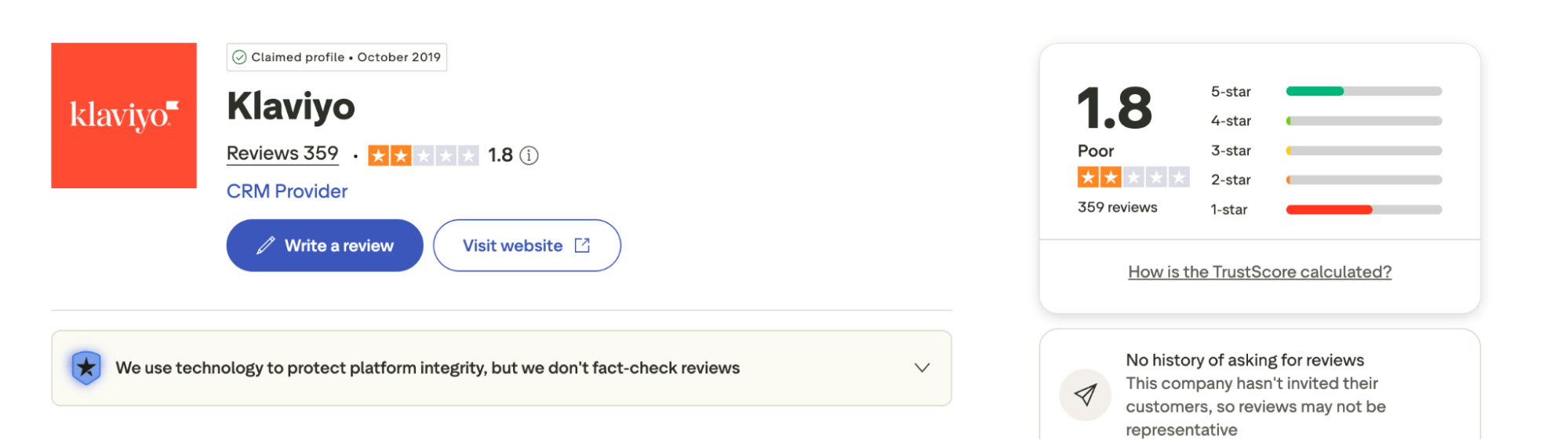
Klaviyo provides a large help center with detailed articles, setup guides, and video resources. It is structured for self-service learning, although user reviews suggest mixed experiences with support responsiveness.
Compared to the features and integrations, the number of available videos is not enough to find all the solutions.
FunnelKit Automations
FunnelKit Automations offers structured, WordPress-focused documentation, step-by-step tutorials, and learning resources.
It also has a stronger YouTube presence with 327 videos compared to Klaviyo’s 277, indicating a larger volume of accessible learning content.
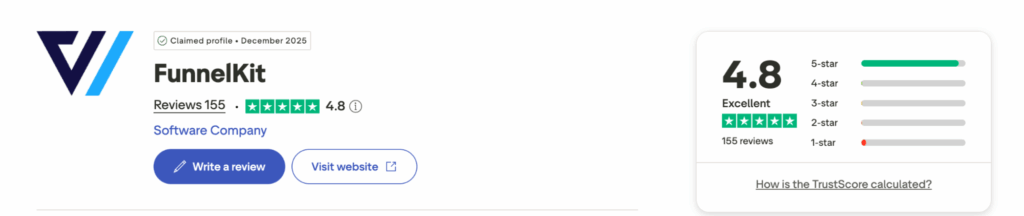
Along with a 4.8 rating on Trustpilot, it also has a 5/5 rating on WordPress.org, reflecting positive user satisfaction.
🏆 Winner: FunnelKit Automations
FunnelKit Automations wins due to stronger community ratings, higher volume of video learning resources, and consistently positive feedback in the WordPress ecosystem.
While Klaviyo provides extensive documentation, FunnelKit offers more accessible, widely available learning resources overall, along with a better support team.
Pricing & Value Comparison: Klaviyo Vs FunnelKit Automations
Pricing is one of the biggest deciding factors when choosing an email and automation platform for ecommerce.
The key difference between Klaviyo and FunnelKit Automations is simple. With Klaviyo, the bigger your list gets, the more you pay. With FunnelKit, you pay once a year, and your costs never change, no matter how much your store grows.
Here is a quick comparison between Klaviyo and FunnelKit Automations.
| Feature | Klaviyo | FunnelKit Automations |
| Pricing model | SaaS, contact-based billing | Fixed WordPress plugin licensing |
| Free plan | Limited to 250 contacts and 500 emails/month, not workable for a real store | Available with unlimited contacts and automations |
| Starting price | ~$20/month (~$240/year) for small lists | $99.50/year for 1 site, full automations included |
| Mid plan | ~$150 to $500/month (~$1,800 to $6,000/year), grows with contacts | $249.50/year for 2 sites, including Automations, Funnel Builder, Sliding Cart, Checkout, and Upsells |
| Top plan | ~$1,000 to $2,000+/month (~$12,000 to $24,000+/year) for large lists | $399.50/year for 30 sites with a full suite including Automations, Funnel Builder, Sliding Cart, Checkout, and Upsells |
| Contact limit | ❌ Paid per active contact | ✅ Unlimited contacts on all plans |
| Scaling behavior | Cost increases as your list grows | Cost stays fixed regardless of growth |
| Cost structure | Usage-based SaaS scaling | Fixed annual licensing |
Klaviyo
Klaviyo is a powerful platform, and you can start small. But as your list grows, so does your bill, whether you're using every feature or not. And if you want the advanced analytics like RFM segmentation or predictive CLV, that's another $100/month minimum on top of what you're already paying.
FunnelKit Automations
FunnelKit's free plan is genuinely usable with unlimited contacts and automations, something you rarely see. Upgrade to Pro at $249.50/year, and you get the full suite: Automations, Funnel Builder, Sliding Cart, Checkout optimization, and Upsells all in one. Your costs don't move as your store grows.
🏆 Winner: FunnelKit Automations
For most WooCommerce store owners, FunnelKit Automations' pricing is genuinely hard to argue with. At $249.50/year, you're not just getting automations; you get a full sales funnel builder, a sliding cart, one-click upsells, order bumps, checkout optimization, and analytics all in one. That's an entire WooCommerce growth stack for less than what most stores pay Klaviyo in a single month once their list starts growing.
Klaviyo is a strong platform, and the investment can make sense for larger brands that need enterprise-grade analytics and a fully managed system. But as your list scales, so does the bill, and the gap between what you pay and what FunnelKit offers at a fixed price becomes harder to justify.
Finally, Which is the Better CRM For WooCommerce: Klaviyo vs FunnelKit Automations
Both tools are genuinely capable. It comes down to what kind of store you're running.
If you're a larger brand with a dedicated marketing team and the budget for predictive analytics and managed infrastructure, Klaviyo is worth the investment. It's built for that scale.
But if you want everything to work inside WordPress, without syncing data externally, without costs that grow with your list, and without extra plugins just to handle basic transactional emails, FunnelKit Automations is the clearer choice.
Your automations, cart recovery, transactional emails, and contact management all run from the same dashboard where you already manage your store. Your data stays yours, and your costs stay flat.
Choose Klaviyo if you want a fully managed SaaS system with enterprise-grade analytics and native omnichannel marketing.
Choose FunnelKit Automations if you want a WooCommerce-native CRM with deep store integration, full data ownership, and a complete marketing stack at a price that never changes.
So, the clear conclusion is that FunnelKit Automations is the better CRM solution for WooCommerce businesses
Editorial Team
October 7, 2026WooCommerce upsells are products you recommend in place of the one a shopper is viewing, usually a better or higher-priced version of it. WooCommerce has a built-in upsell field for...
Editorial Team
October 6, 2026WooCommerce taxes start with a rate table you set up yourself. If you leave a state out of that table, orders going there can pass through with no tax. Say...
Editorial Team
October 5, 2026A WooCommerce Shopify checkout recreates the parts of Shopify’s checkout that shoppers already know. It includes a logo-only header, email first, express payment options at the top, address autocomplete, a...






