


If you run a WooCommerce store, you've almost certainly come across FunnelKit.
FunnelKit is a suite of three separate products, each with its own Lite (free) and Pro versions:
- FunnelKit Funnel Builder: Sales funnels, checkout customization, order bumps, upsells, A/B testing, and analytics.
- FunnelKit Automations: Email/SMS marketing automation and CRM with abandoned cart recovery, broadcasts, contacts, and segmentation.
- FunnelKit Cart: A WooCommerce side cart with upsells and milestone rewards.
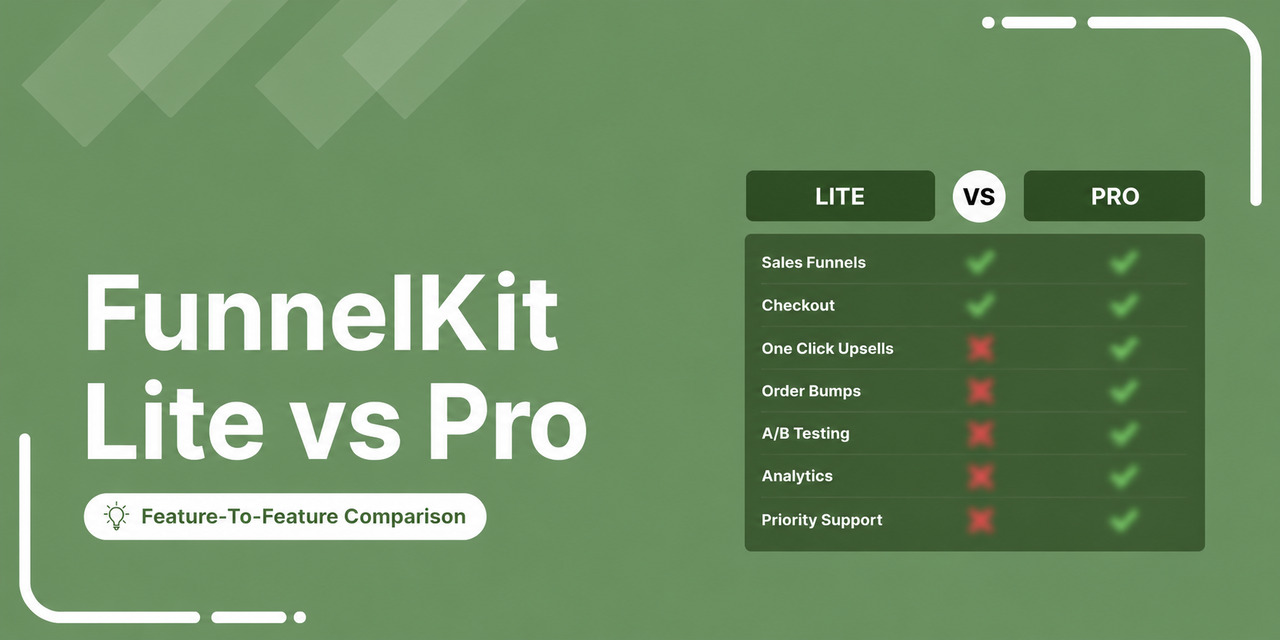
So "FunnelKit Lite vs Pro" really means three Lite-vs-Pro plugin comparisons. Below you'll find a quick pricing table, followed by a side-by-side Lite vs. Pro table for each of the three products so you get the full answer with no scrolling.
Further down, we explain why and when upgrading to Pro is worth it, followed by a detailed feature-by-feature breakdown.

Table of Contents
- 1 The Quick Answer: Lite vs Pro for Each Product
- 2 FunnelKit Pricing at a Glance
- 3 Why Upgrade to Pro
- 4 Part 1: FunnelKit Funnel Builder (Feature-by-Feature Breakdown)
- 5 Part 2: FunnelKit Cart (Feature-by-Feature Breakdown)
- 6 Part 3: FunnelKit Automations
- 7 Support and Documentation (All Products)
- 8 FunnelKit Lite vs Pro: Which Plan Should You Choose?
The Quick Answer: Lite vs Pro for Each Product
Here are the three products side by side. Browse through the product you're interested in.
1. FunnelKit Funnel Builder: Lite vs Pro
The core funnel, checkout, and upsell plugin.
| Feature | FunnelKit Lite (Free) | FunnelKit Pro |
|---|---|---|
| No-code drag-and-drop funnel builder (List mode) | ✅ Yes | ✅ Yes |
| Conversion-optimized funnel and opt-in templates | ✅ Yes | ✅ Yes |
| Custom checkout with drag-and-drop field editor | ✅ Yes | ✅ Yes |
| Page builder support (Elementor, Divi, Oxygen, Bricks, Gutenberg) | ✅ Yes | ✅ Yes |
| Inline validation, enhanced phone field, smart login | ✅ Yes | ✅ Yes |
| Express checkout (Apple Pay / Google Pay) | ✅ Yes | ✅ Yes |
| Trust badges, testimonials and native payment gateways on checkout | ✅ Yes | ✅ Yes |
| Basic analytics dashboard and leaderboards | ✅ Yes | ✅ Yes |
| Pixel tracking (Meta, Google Ads, TikTok, etc.) | ✅ Yes | ✅ Yes |
| Canvas (visual) builder | ❌ No | ✅ Yes |
| Global (store-wide) checkout | ❌ No | ✅ Yes |
| Custom fields, conditional checkout fields, and mini-cart editing | ❌ No | ✅ Yes |
| Multi-step, one-page checkout and order forms | ❌ No | ✅ Yes |
| Checkout optimizations (address autocomplete, auto-apply coupons, etc.) | ❌ No | ✅ Yes |
| Order bumps (rule-based, swap/free-gift, 8 skins) | ❌ No | ✅ Yes |
| One-click upsells & downsells | ❌ No | ✅ Yes |
| A/B testing every step | ❌ No | ✅ Yes |
| Step-level analytics and UTM/referrer attribution | ❌ No | ✅ Yes |
2. FunnelKit Automations: Lite vs Pro
The email/SMS marketing automation and CRM plugin.
| Feature | FunnelKit Lite (Free) | FunnelKit Pro |
|---|---|---|
| Abandoned cart tracking and recovery | ✅ Yes (basic workflow) | ✅ Yes (smart conditional automations with coupons) |
| Pre-built automation recipes | ✅ Yes (free recipes) | ✅ Yes (unlocks free and premium recipes) |
| Visual workflow builder | ✅ Yes | ✅ Yes |
| Unlimited contacts and rich CRM profiles | ✅ Yes | ✅ Yes |
| Triggered emails (welcome, post-purchase) and delays | ✅ Yes | ✅ Yes |
| Transactional emails (rich text editor) | ✅ Yes | ✅ Yes |
| Drag-and-drop visual email builder, templates and global styles | ❌ No | ✅ Yes |
| Broadcast email campaigns (standard + A/B test) | ❌ No | ✅ Yes |
| SMS marketing (Twilio and BulkGate) | ❌ No | ✅ Yes |
| Smart segmentation (RFM, tags, geography, and engagement) | ❌ No | ✅ Yes |
| Audiences and bulk contact action | ❌ No | ✅ Yes |
| Smart automation logic (conditions, goals, jumps, exits, split paths, and timezone delays) | ❌ No | ✅ Yes |
| Dynamic personalized coupons | ❌ No | ✅ Yes |
| Form integrations (FunnelKit Optin, WPForms, Elementor, etc.) | ❌ No | ✅ Yes |
| Link Triggers | ❌ No | ✅ Yes |
| Plugin/app integrations (LearnDash, Slack, Zapier, etc.) | ❌ No | ✅ Yes |
3. FunnelKit Cart: Lite vs Pro
The WooCommerce side cart plugin.
| Feature | FunnelKit Lite (Free) | FunnelKit Pro |
|---|---|---|
| Slide-out side cart replacing the cart page | ✅ Yes | ✅ Yes |
| Sticky cart icon with item count | ✅ Yes | ✅ Yes |
| AJAX add-to-cart (with toggle) | ✅ Yes | ✅ Yes |
| Direct-to-checkout button | ✅ Yes | ✅ Yes |
| Express Apple Pay / Google Pay inside the cart | ✅ Yes | ✅ Yes |
| In-cart coupon box and auto-open | ✅ Yes | ✅ Yes |
| Styling or on-brand cart customization | ✅ Yes | ✅ Yes |
| In-cart upsells and cross-sells (one-click) | ❌ No | ✅ Yes |
| Reward milestones (free shipping, discounts and gifts) | ❌ No | ✅ Yes |
| Special addons (shipping protection, limited-time deals) | ❌ No | ✅ Yes |
| Cart analytics | ❌ No | ✅ Yes |
FunnelKit Pricing at a Glance
As of 2026, FunnelKit offers a free version plus four paid plans.
Prices are introductory annual rates (standard across the WordPress plugin market) and remain among the more affordable in the funnel-builder space for what you get.
| Plan | Price/Year | Sites | Best Suited To |
|---|---|---|---|
| Free (Lite) | $0 | Unlimited | Testing funnels, basic checkout improvements |
| Basic | $99.50 | 1 | WooCommerce stores want a better checkout and optimized buying flow |
| Plus | $179.50 | 2 | Stores ready for full funnels, upsells, bumps, A/B testing, and detailed analytics |
| Professional | $249.50 | 3 | Stores that also want built-in marketing automation/CRM |
| Elite | $399.50 | 30 | Agencies and multi-site portfolios |
A few things worth knowing up front:
- Pricing is introductory. The first-year price is lower than the renewal price, and great offers run year-round, keeping renewals budget-friendly.
- No lifetime deal. FunnelKit is actively developed with regular updates, new features, and ongoing support. An annual model is what funds that continuous improvement, so you’re paying for a product that keeps getting better, a big part of its long-term value for money.
- Automations has a standalone plan ($99.50/year, one site) if you only want the email/CRM side without the funnel builder.
Plans and prices change, so always confirm against the official FunnelKit pricing page before buying.
Why Upgrade to Pro
The Lite versions are genuinely capable. They're more than enough to build a real funnel, optimize your WooCommerce checkout, run a modern side cart, and recover abandoned carts, all for free.
For many stores, that alone is a meaningful upgrade over the default WooCommerce.
Where Pro comes in is growth. Once you're ready to actively increase revenue per visitor rather than just run a cleaner checkout, Pro is worth considering.
Here's what that looks like, product by product.
- FunnelKit Funnel Builder Pro
Funnel Builder Pro pays for itself through average order value. Order bumps and one-click upsells are the two features most directly tied to revenue, and both are Pro-only.
A single rule-based order bump or post-purchase upsell often covers the license cost on its own, because the customer is already in buying mode and accepting takes one click.
Add A/B testing and step-level analytics, and you stop guessing what converts.
- FunnelKit Automations Pro
Automations Pro replaces a separate email tool. Lite already recovers abandoned carts (often the highest-ROI automation a store can run).
Pro adds broadcasts, SMS, and smart segmentation. This means you can cancel standalone Mailchimp or Klaviyo subscriptions and run everything within WordPress, usually at a lower combined cost.
- FunnelKit Cart Pro
Cart Pro turns a convenience feature into a revenue feature. The free cart improves the buying experience.
The Pro plugin adds in-cart upsells and gamified reward milestones (e.g., "spend $20 more for free shipping") that measurably lift order value.
In short, the free plugins are excellent for getting your funnel and checkout right. When growing revenue becomes the priority, usually through order bumps and upsells, Pro is the natural next step.
That low-risk path is a big part of why FunnelKit is such an easy, affordable tool to adopt.
Not sure which plan to pick? Jump to the plan-picker section below.
Part 1: FunnelKit Funnel Builder (Feature-by-Feature Breakdown)
The core plugin for sales funnels, checkout, order bumps, upsells, A/B testing, analytics, pixel tracking, and templates. This is where most of FunnelKit’s revenue features live, so it has the most to cover.
Funnel Building
Sales funnels take users through a journey from learning about your business to becoming a paying customer, either by purchasing an item or by filling out a form to generate a lead.
| Capability | FunnelKit Lite (Free) | FunnelKit Pro |
|---|---|---|
| No-code drag-and-drop builder (List mode) | ✅ Yes | ✅ Yes |
| Complete funnel & opt-in templates | ✅ Yes | ✅ Yes |
| Canvas / visual flowchart builder | ❌ No | ✅ Yes |
| Branching paths visualization | ❌ No | ✅ Yes |
| Number of funnels | Unlimited | Unlimited |
FunnelKit Lite (free version)
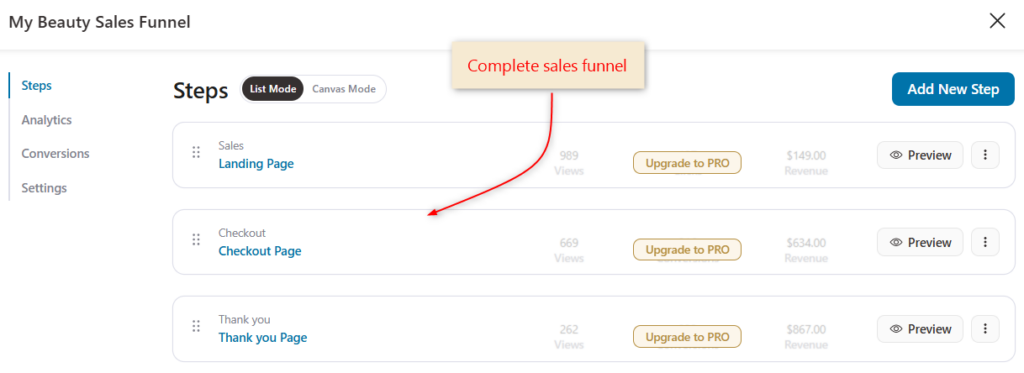
FunnelKit Lite gives you a complete, no-code, drag-and-drop funnel builder in what's called List mode.
This is a clean, step-by-step view where each stage of your funnel is laid out in a vertical sequence. You add steps, drag to reorder them, rename them, and edit each one with your page builder of choice.
You don't start from a blank slate. The lite version includes complete (free) funnel templates, covering opt-in, sales, checkout, and thank you pages that import with one click and are arranged in the optimal order for conversion.
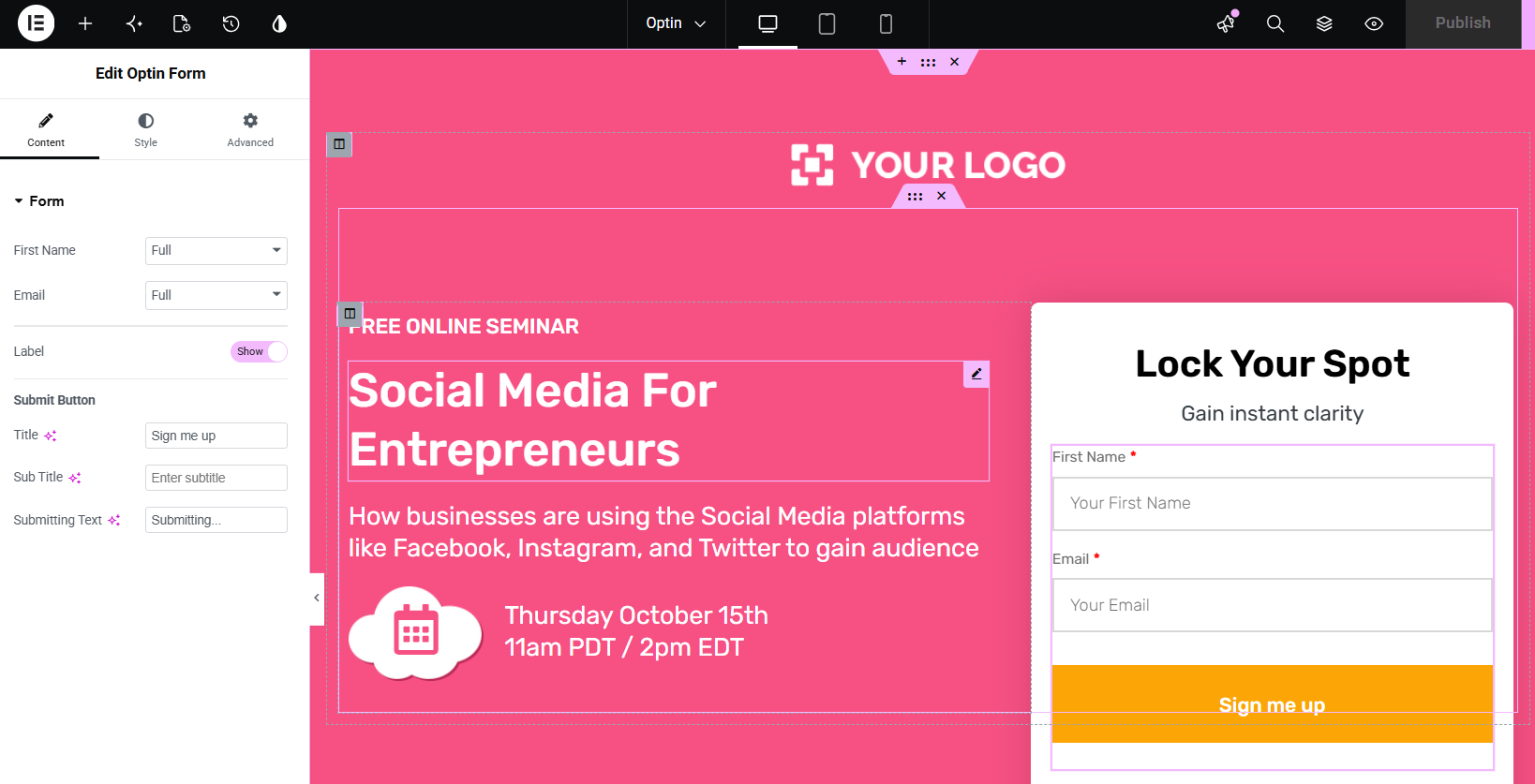
You also get lead-generation funnel templates included, so you can build an email-capture funnel without paying.
Each step is fully editable. Once imported, every page can be customized with your page builder, including text, images, colors, sections, and widgets.
For a standard linear funnel (landing → checkout → thank you), List mode is completely sufficient, and you can build and launch a fully working funnel without spending anything.
FunnelKit Pro
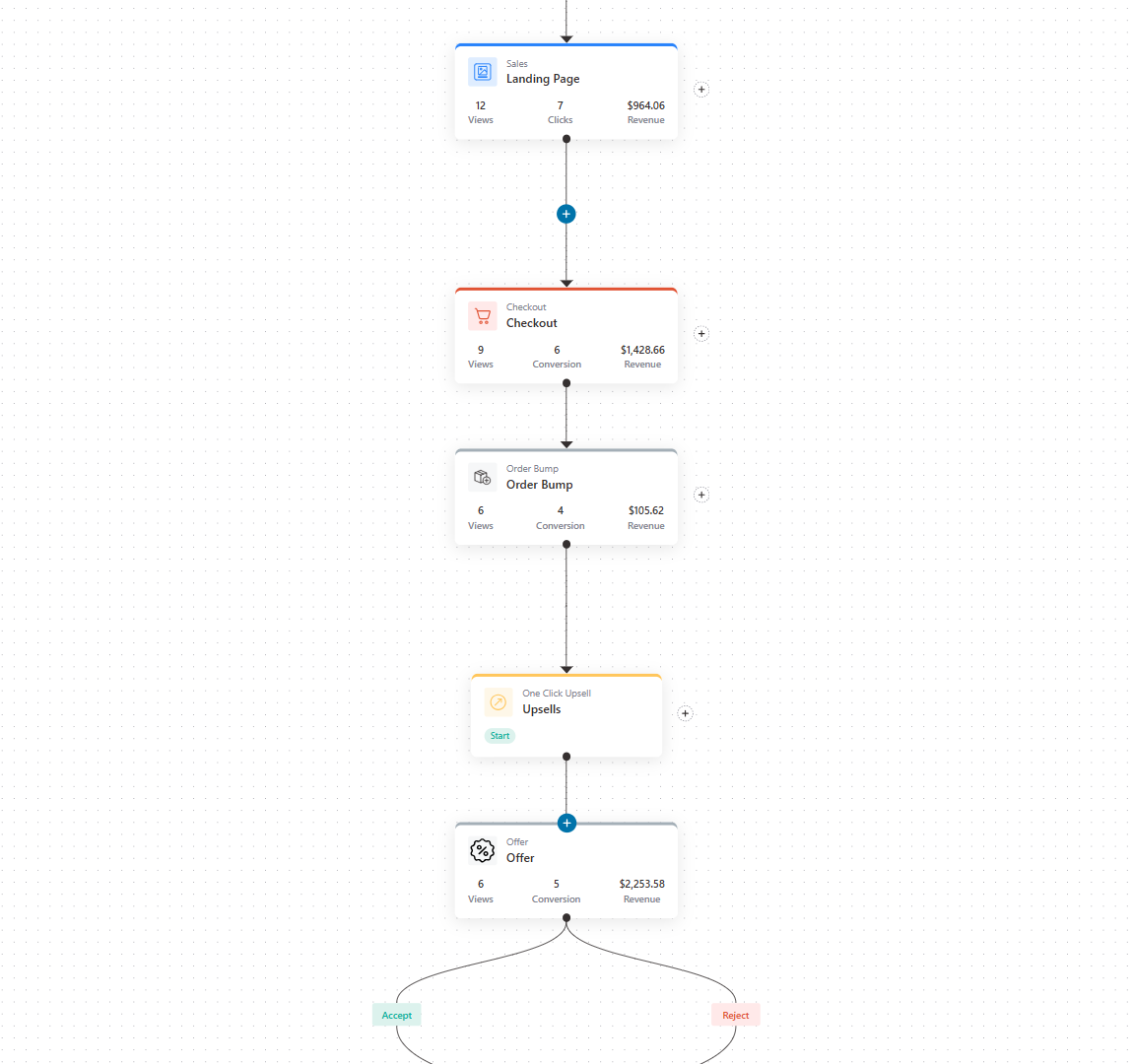
The paid version unlocks Canvas mode, a visual, flowchart-style builder where your funnel is laid out as a diagram rather than a list.
This gives you:
- Birds-eye view: You see the entire flow as connected nodes, which makes complex funnels far easier to reason about.
- Branching paths: Your funnels no longer remain strictly linear. You can map different routes when setting up conditions inside funnels.
- Dynamic offer linking: Canvas mode is where the "if accepted → show offer B, if declined → show downsell" logic becomes visual and manageable.
The pro version unlocks premium templates for serious or multi-product stores.
Plus, unlimited order bumps and upsells with A/B testing and detailed analytics (which we've covered below).
Summary
Free is perfectly fine for simple, linear funnels and is a legitimate way to build and ship a real funnel at zero cost. You can build basic funnels with opt-ins, landing pages, checkouts, and thank you pages.
Canvas mode and unlimited funnels matter once your funnels grow non-linear (multiple upsell paths) or once you're operating several funnels at once and need a visual overview.
Everything from designing a simple funnel to a non-linear funnel is pretty straightforward, simple, and beginner-friendly.
Checkout Customization and Optimization
This is the area where the free version genuinely punches above its weight.
The default WooCommerce checkout is rigid, single-page, and not built for conversion. A large part of FunnelKit's value is free, and the paid part comes from fixing that.
This section is worth reading closely because it's where the most "is free enough?" questions actually get decided.
| Feature | FunnelKit Lite (Free) | FunnelKit Premium |
|---|---|---|
| Sales funnel | ✅ Yes | ✅ Yes |
| Drag-and-drop checkout form field editor | ✅ Yes | ✅ Yes |
| Edit checkout with page builders | ✅ Yes | ✅ Yes |
| Inline field validation | ✅ Yes | ✅ Yes |
| Enhanced phone field and smart login | ✅ Yes | ✅ Yes |
| Express checkout (Apple Pay / Google Pay) | ✅ Yes | ✅ Yes |
| Trust badges, testimonials, security seals | ✅ Yes | ✅ Yes |
| All native payment gateways (Stripe, PayPal, etc.) | ✅ Yes | ✅ Yes |
| Global (store-wide) checkout | ❌ No | ✅ Yes |
| Add custom fields to checkout | ❌ No | ✅ Yes |
| Conditional checkout fields | ❌ No | ✅ Yes |
| Mini cart editing | ❌ No | ✅ Yes |
| Multi-step or “Shopify-style” checkout | ❌ No | ✅ Yes |
| One-page checkout & order forms | ❌ No | ✅ Yes |
| Google Address Autocomplete | ❌ No | ✅ Yes |
| Auto-apply coupons | ❌ No | ✅ Yes |
| Prefill checkout for abandoned users, collapsible fields & other optimizations | ❌ No | ✅ Yes |
FunnelKit Free Version
You can import 10 sales funnel templates with landing page, checkout, and thank-you page steps. These can be customized with your favorite page builders, such as Elementor, Divi, Gutenberg, Oxygen, and Bricks.
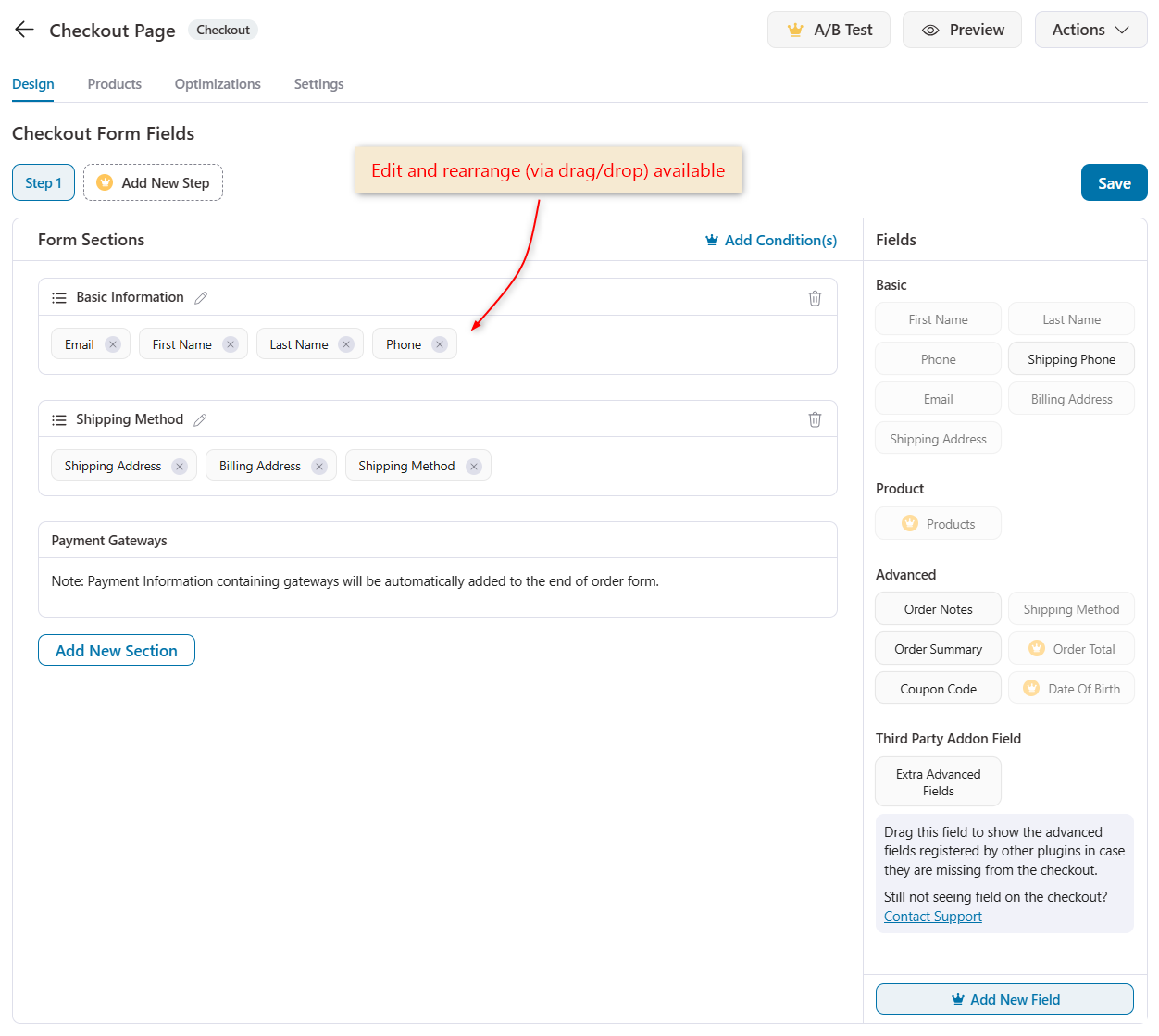
With the drag-and-drop checkout field editor, you can edit, reorder, and rearrange the existing checkout fields and sections, and reposition the fields like email and phone, which WooCommerce places poorly by default, so you capture them earlier and higher in the form.
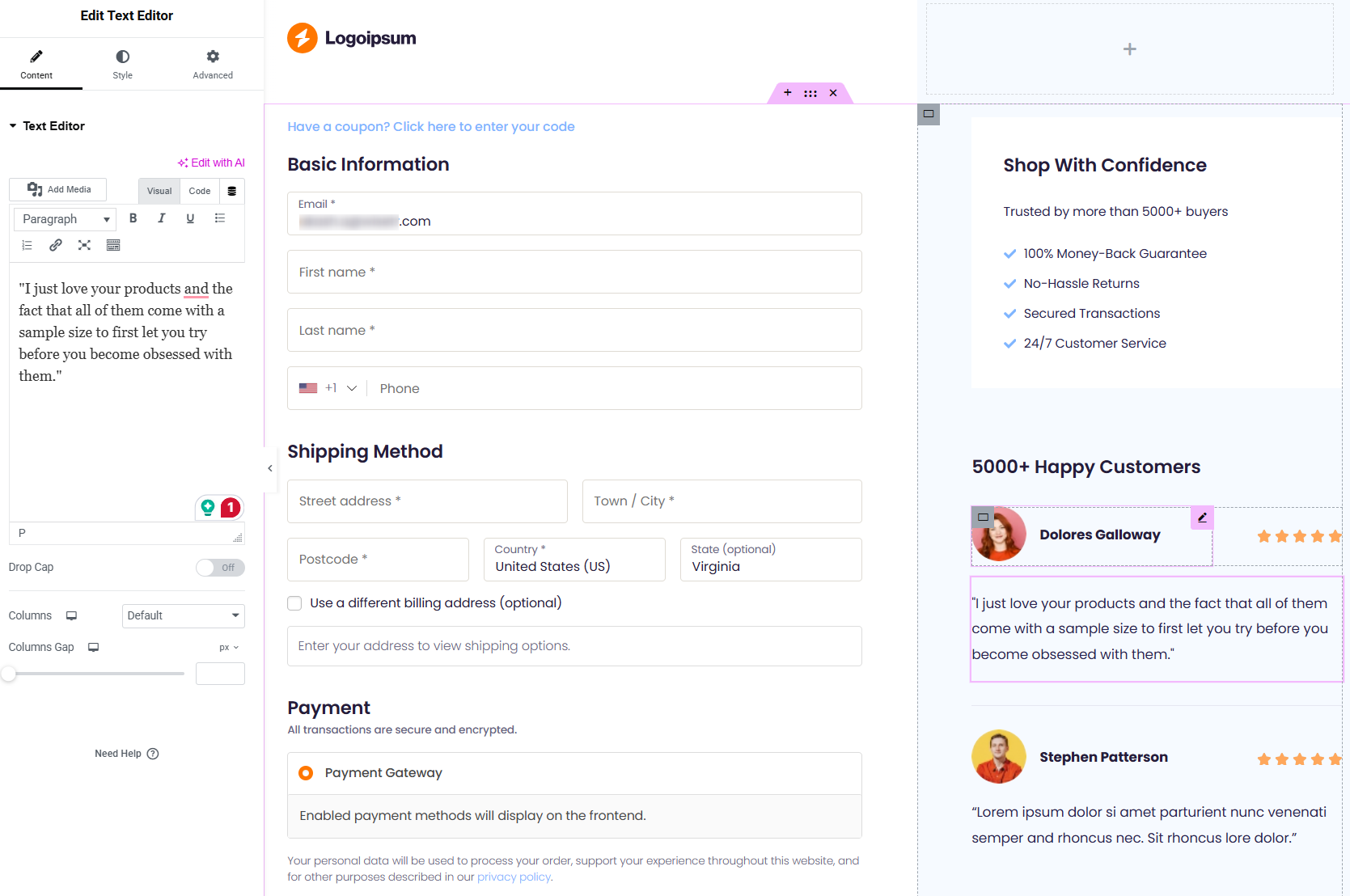
Edit the checkout visually with your page builders, such as Elementor, Divi, Oxygen, or Gutenberg, with no coding. If you want to customize it with another page builder, use shortcodes.
Display testimonials and reviews, money-back guarantee badges, 100% secure payment seals, and social media handles to reassure first-time buyers at checkout.
FunnelKit checkout works with all native WooCommerce gateways, including Stripe, PayPal, Authorize.net, Braintree, Square, Mollie, WooCommerce Payments, and more, so it integrates seamlessly with your existing payment setup.
Here are some common optimizations you can implement on the checkout page:
- Express checkout buttons: Apple Pay and Google Pay buttons let mobile shoppers pay with a tap, without typing card details.
- Inline field validation: Errors appear in real time as the customer types, a red message the moment a required field is blank or invalid, rather than only after they hit place order.
- Enhanced phone field: A smarter international phone input with country flags.
- Smart login: Streamlined login for returning customers right at checkout.
For many small stores, this free checkout editor alone is the single biggest reason to install FunnelKit.
FunnelKit Pro Plan
The paid checkout adds the layout, field, and optimization features most associated with high-converting stores.
FunnelKit's global (store-wide) checkout replaces the default WooCommerce checkout across the entire store, not just within a single funnel.
It includes 3 steps: the checkout page, one-click upsell, and thank-you page.
This is significant because it means every customer benefits from your optimized checkout, and enables store-wide order bumps (next section) to appear for any product.
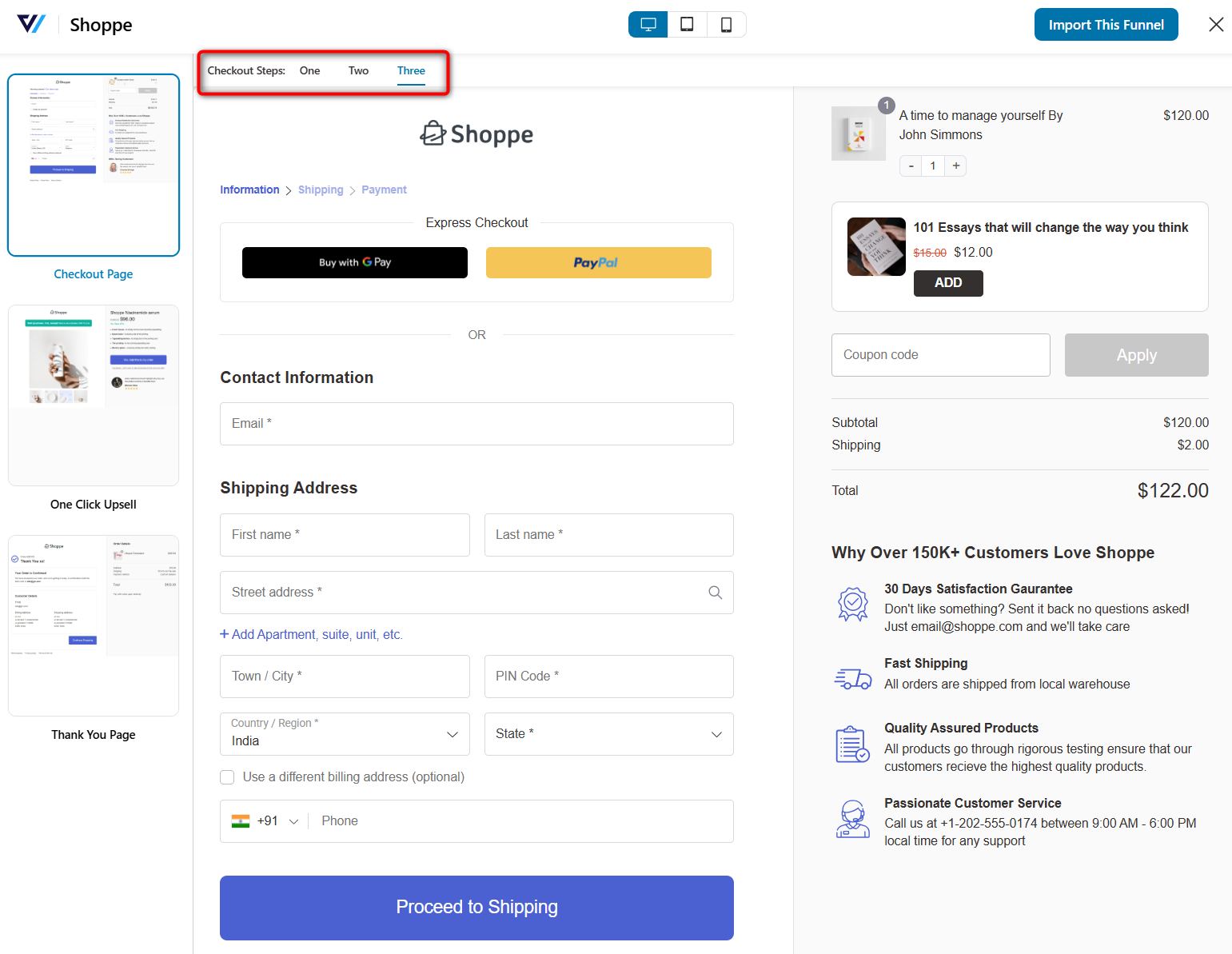
Create multi-step or Shopify-style checkout pages to split the long checkout form into clean steps. This is a proven conversion lifter for stores with longer forms, because each step feels small and achievable.
Build streamlined one-page checkouts or dedicated order forms to sell one or multiple products.
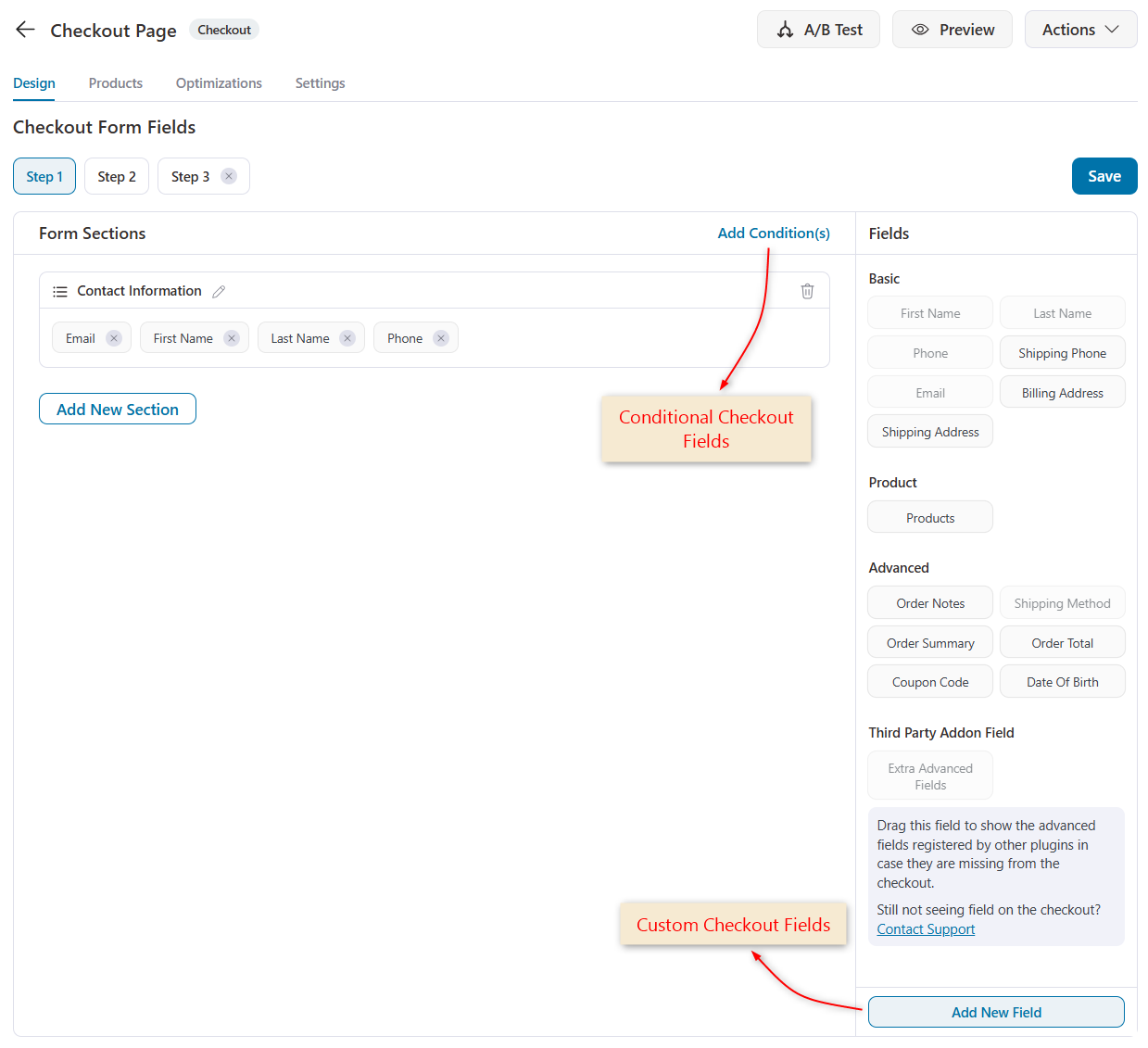
Add new custom fields (including 14 types such as text, checkbox, radio, and file upload) to the checkout.
Make the checkout fields conditional so they appear or hide based on what the customer selects (for example, showing a “Company Name” field only for business buyers, or a gift message field only when a gift option is chosen).
Customize and edit the order summary or mini cart shown at checkout so it presents exactly how you want.
Here's the list of checkout optimizations that unlock with FunnelKit Pro:
- Google Address Autocomplete: Shoppers start typing and select an address from a dropdown; city, state, and postcode auto-fill. Fewer keystrokes, fewer errors. (Requires a Google Maps API key.)
- Auto-apply coupons: Automatically apply a discount code at checkout, removing the friction of manual entry.
- Prefill the checkout form for abandoned users: Returning abandoners see their details prefilled.
- Collapsible coupon and optional fields: Keep the form clean by tucking optional or coupon fields away until needed.
- Other optimizations include multi-step field preview, preferred countries at the top, autofill state from ZIP/postcode, time-based checkout expiry, order limits, and populating checkout via URL.
A/B testing is also available (if you're on FunnelKit Plus plan and above), discussed later.
Summary
The free drag-and-drop checkout editor is legitimately strong, with inline validation, enhanced phone field, smart login, and express checkout, all included, which may be enough for a simple store.
The paid multi-step and one-page layouts, global checkout, custom/conditional fields, mini cart editing, and optimizations like address autocomplete and auto-apply coupons are where measurable, compounding conversion gains tend to come from.
If checkout abandonment is your bottleneck, this is the section that justifies paying.
Order Bumps
Order bumps are low-price offers shown right on the checkout page, accepted with a single checkbox without any redirects or extra pages.
They're one of the highest-ROI features in any funnel tool precisely because they require zero extra effort from the customer; the offer sits inches from the “Place Order” button.
| Capability | FunnelKit Lite (Free) | FunnelKit Premium |
|---|---|---|
| One-click order bumps at checkout | ❌ No | ✅ Yes |
| Bump types: extra item/swap/free gift | ❌ No | ✅ Yes |
| Order bump skins | ❌ No | ✅ Yes |
| Merge tags, customization style and clone setups | ❌ No | ✅ Yes |
| Conditional rule engine (cart, category, total, etc.) | ❌ No | ✅ Yes |
| Works with simple, variable & subscription products | ❌ No | ✅ Yes |
FunnelKit Free Plugin
Not available. Order bumps are a paid feature.
FunnelKit Pro
FunnelKit's order bumps are beginner-friendly and can be set up with one click. You just pick the product you want to offer, set a price or discount, and publish. No complex configuration.
You get 8 different high-converting skins that you can import.
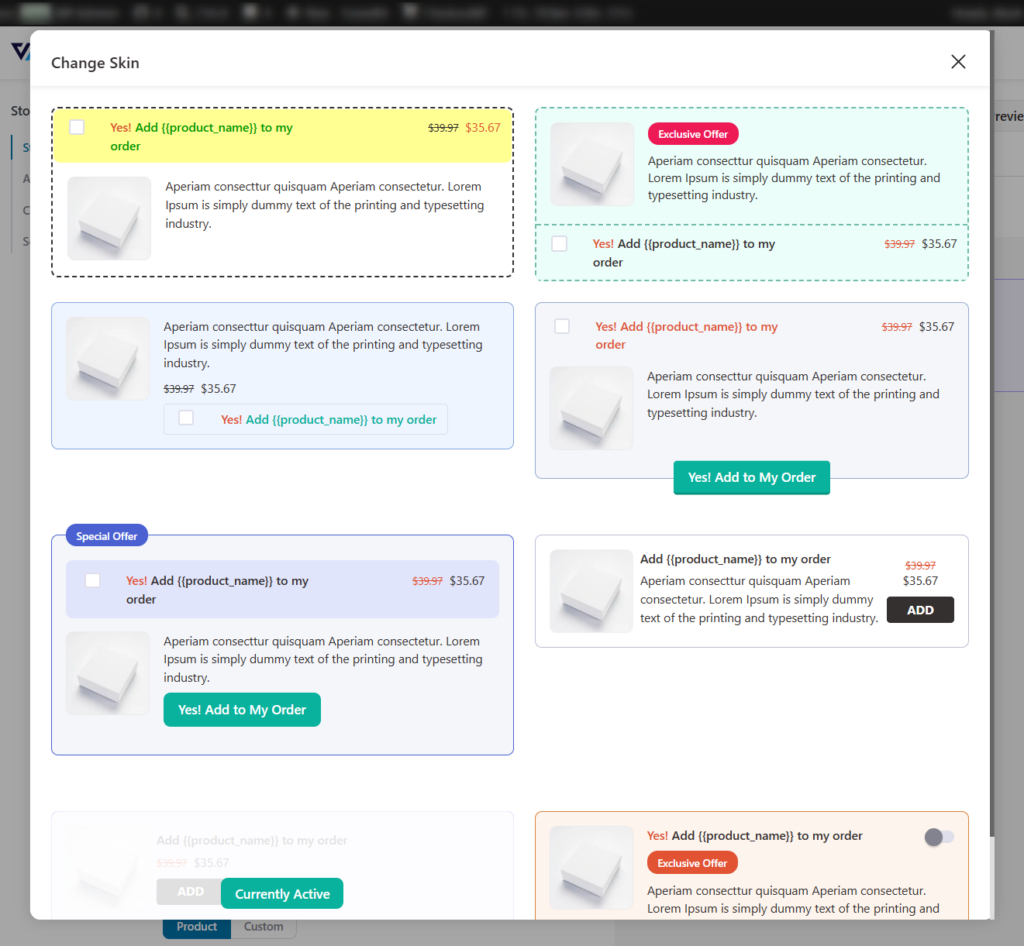
Order bumps have three offer behaviors. You can add them as an extra item, swap them for an item already in the cart (for example, upgrade the 3-pack to the 6-pack), or offer them as a free gift once the cart hits a target total.
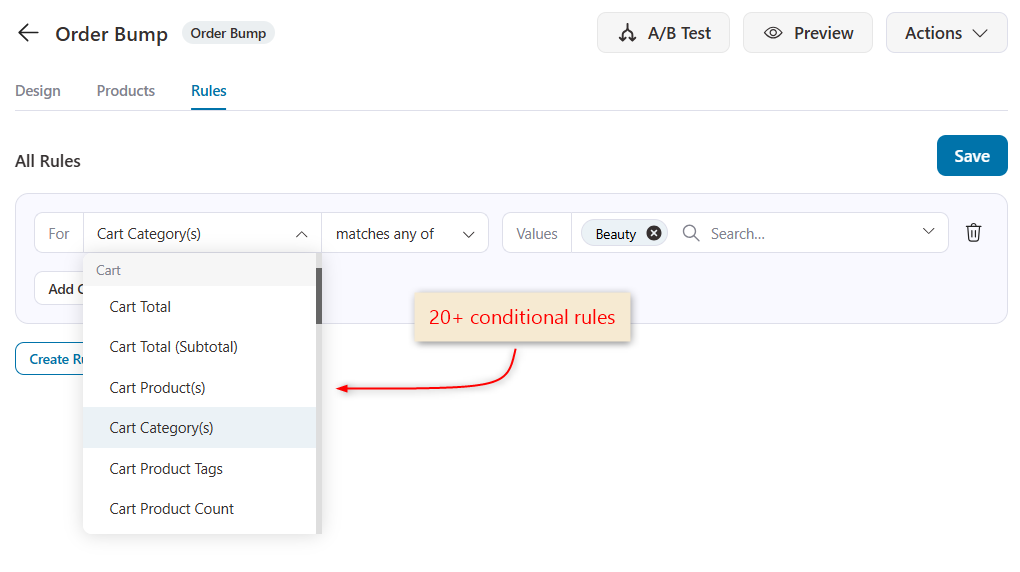
Show different bumps based on conditional rules, such as cart contents, cart total, number of items, product category, coupons used, customer purchase history, shipping location, and time of purchase, combined with AND/OR logic.
So a lip balm bump only shows to people buying skincare, while a different bump shows to everyone else.
You can match your order bumps with your brand using style options, button colors, backgrounds, and borders.
Use merge tags to auto-fill the savings amount, product description, and price directly into your bump headline.
Here are some other features that make FunnelKit order bumps smart:
- Product flexibility: Works with simple, variable, and subscription products.
- Bump positioning on checkout: Shows on 8 different positions, including inside the mini cart, above/below the payment gateway, and more.
- Clone setups: Reuse layouts, styles, and rules across multiple funnels with a single click, so you’re not rebuilding bumps from scratch each time.
- Works store-wide: Combined with global checkout, a single rule-based bump can run across your entire store, showing dynamically relevant offers to every customer.
Summary
This is a core paid feature, and for many stores, it covers the license cost on its own.
Because the customer is already in buying mode and accepting takes one checkbox, order bumps convert well and add pure-margin revenue.
If raising average order value is a priority, this is one of the strongest reasons to upgrade.
One-Click Upsells and Downsells
After a customer completes their purchase, you can present a post-purchase offer they accept with a single click without re-entering payment or shipping details, because the card is already on file.
If they decline, you can show a downsell (a cheaper or alternative offer).
Because there's zero payment friction at this stage, conversion on these offers is typically much higher than on a normal product page, since the hardest part (getting the card) is already done.
| Capability | FunnelKit Free (Lite) | FunnelKit Premium |
|---|---|---|
| One-click post-purchase upsells (no card re-entry) | ❌ No | ✅ Yes |
| Page builder supported customization | ❌ No | ✅ Yes |
| Downsells on declined offers | ❌ No | ✅ Yes |
| Multiple stacked offers per funnel | ❌ No | ✅ Yes |
| Rule-based & dynamically linked offers | ❌ No | ✅ Yes |
| 15+ payment gateways supported | ❌ No | ✅ Yes |
FunnelKit Free Version
Post-purchase upsells are a paid feature.
FunnelKit Pro
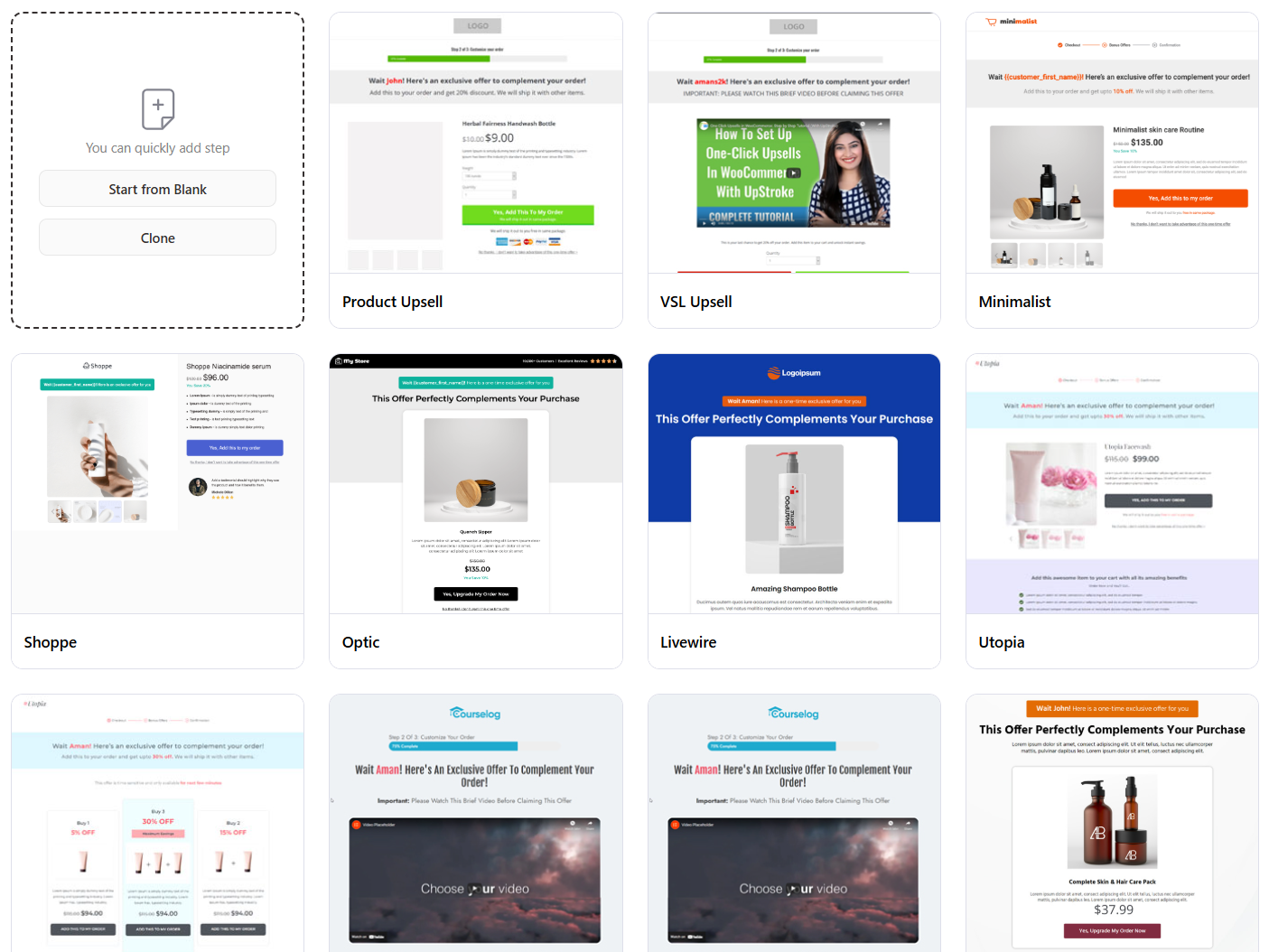
In the paid version, you can create multiple upsell offers within a single funnel, each containing one or more products, each with optional discounts and custom quantities.
Plus, all the upsell page templates can be customized with your favorite page builders.
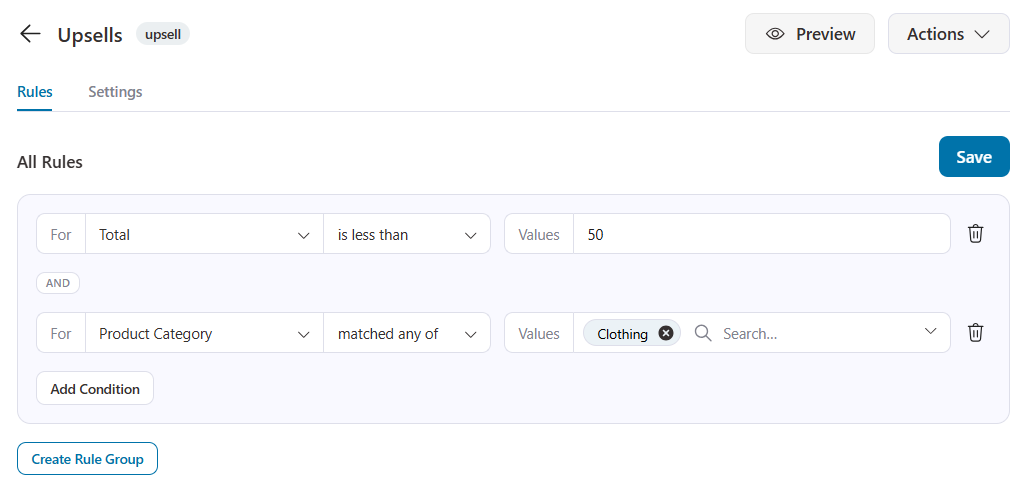
Set rule-based upsells that trigger specific offers based on order total, product category, customer type, geographic location, time of purchase, and 20+ rules.
This allows a customer who bought beauty products to see a relevant beauty upsell rather than a generic one.
You can chain offers with dynamic offer path linking. Build sequences, such as accept offer A → show offer B; decline → show a downsell.
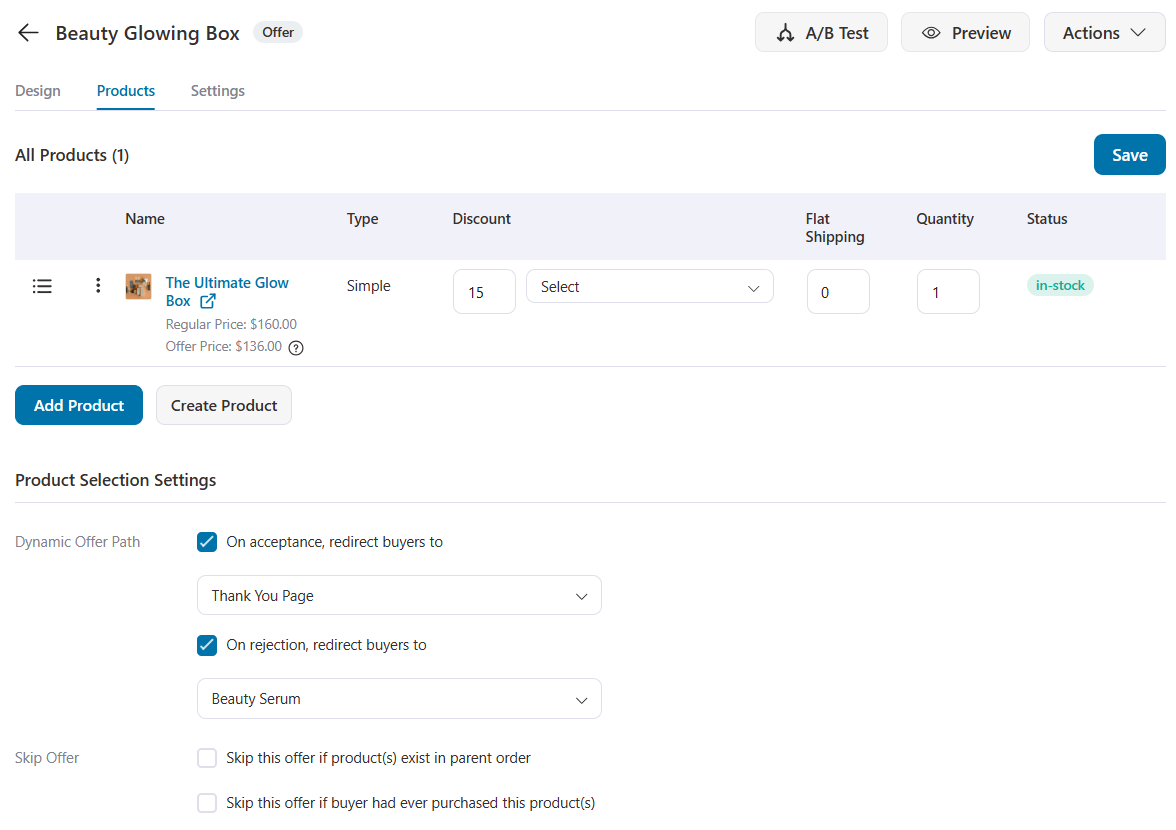
FunnelKit one-click upsells are supported across 15+ payment gateways, so the “no re-entry” magic works with most common setups.
A practical pricing tip that we recommend is to keep checkout-stage order bumps low-priced and impulse-friendly.
And post-purchase upsells can be product upgrades priced 10-30% above the original item, or curated bundles.
Summary
Alongside order bumps, this is the flagship money-making reason people buy FunnelKit rather than just using the free checkout.
Bumps capture revenue before payment, whereas one-click upsells and downsells capture it after. Together, they're the core average-order-value engine, and they're the features most directly tied to ROI on the license.
A/B Testing
A/B testing (split testing) lets you run two or more versions of a funnel step against each other and let real traffic decide the winner.
| Capability | FunnelKit Lite (Free) | FunnelKit Pro |
|---|---|---|
| Split-test any funnel step (pages, offers, layouts) | ❌ No | ✅ Yes |
| Automatic traffic splitting | ❌ No | ✅ Yes |
| Conversion & revenue tracked per variation | ❌ No | ✅ Yes |
| Declare the winner & route all traffic to it | ❌ No | ✅ Yes |
FunnelKit Free
Not available.
FunnelKit Pro
With FunnelKit's A/B testing, you can:
- Test any step of the funnel, such as checkout layout, sales/landing pages, order bumps, thank-you pages, opt-in pages, headlines, offers, button styles, or even the upsell offers themselves.
- Split traffic automatically between the variations, so each version gets a fair share of visitors.
- Track conversion and revenue per variation, then declare a winner and route all future traffic to the better performer.
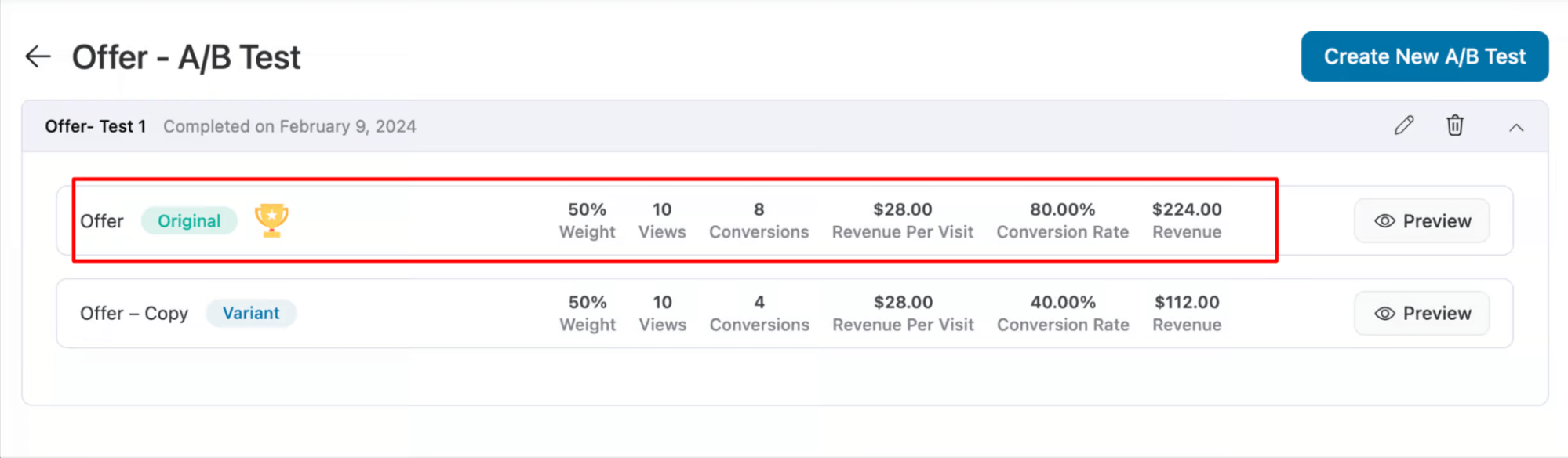
The point is to replace gut feeling with evidence. Most funnel optimization is guesswork without testing, and A/B testing tells you which version actually earns more.
Summary
A/B testing is a paid-only feature and is worth it once you have enough traffic for tests to reach statistically meaningful results.
A low-traffic store won't accumulate enough conversions for a test to be conclusive. Once you're at a consistent daily order volume, though, testing becomes one of the most valuable features of the paid version.
Analytics and Insights
| Capability | FunnelKit Free (Lite) | FunnelKit Pro |
|---|---|---|
| Dashboard: revenue, orders, AOV, revenue per contact | ✅ Yes | ✅ Yes |
| Leaderboards (top funnels and opt-ins) | ✅ Yes | ✅ Yes |
| Basic conversion tracking | ✅ Yes | ✅ Yes |
| Step-level funnel analytics (per-step drop-off) | ❌ No | ✅ Yes |
| UTM and referrer attribution | ❌ No | ✅ Yes |
| Visual canvas metrics | ❌ No | ✅ Yes |
FunnelKit Free Plugin
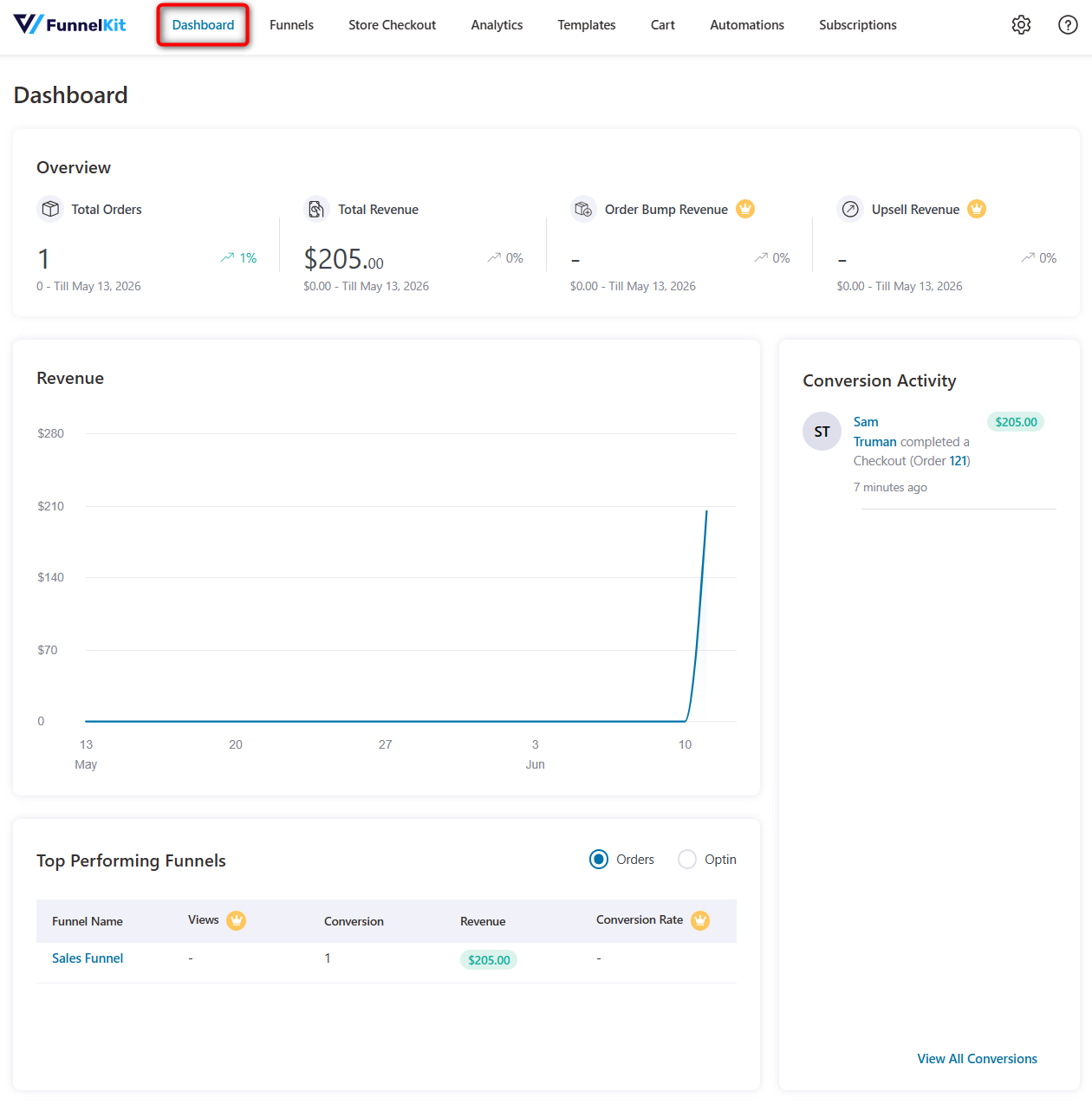
More generous than you'd expect from a free plugin. The free dashboard gives you a real overview of store performance.
Starting with headline metrics such as total orders and revenue, along with basic conversion tracking activity.
Additionally, you can view leaderboards, including your top-performing funnels and top opt-ins. This is genuinely useful for identifying your winners and replicating their structure in future funnels.
For conversions, you can view your customer's complete profile, such as name, total spent, orders placed, billing details, order ID, order date, and more.
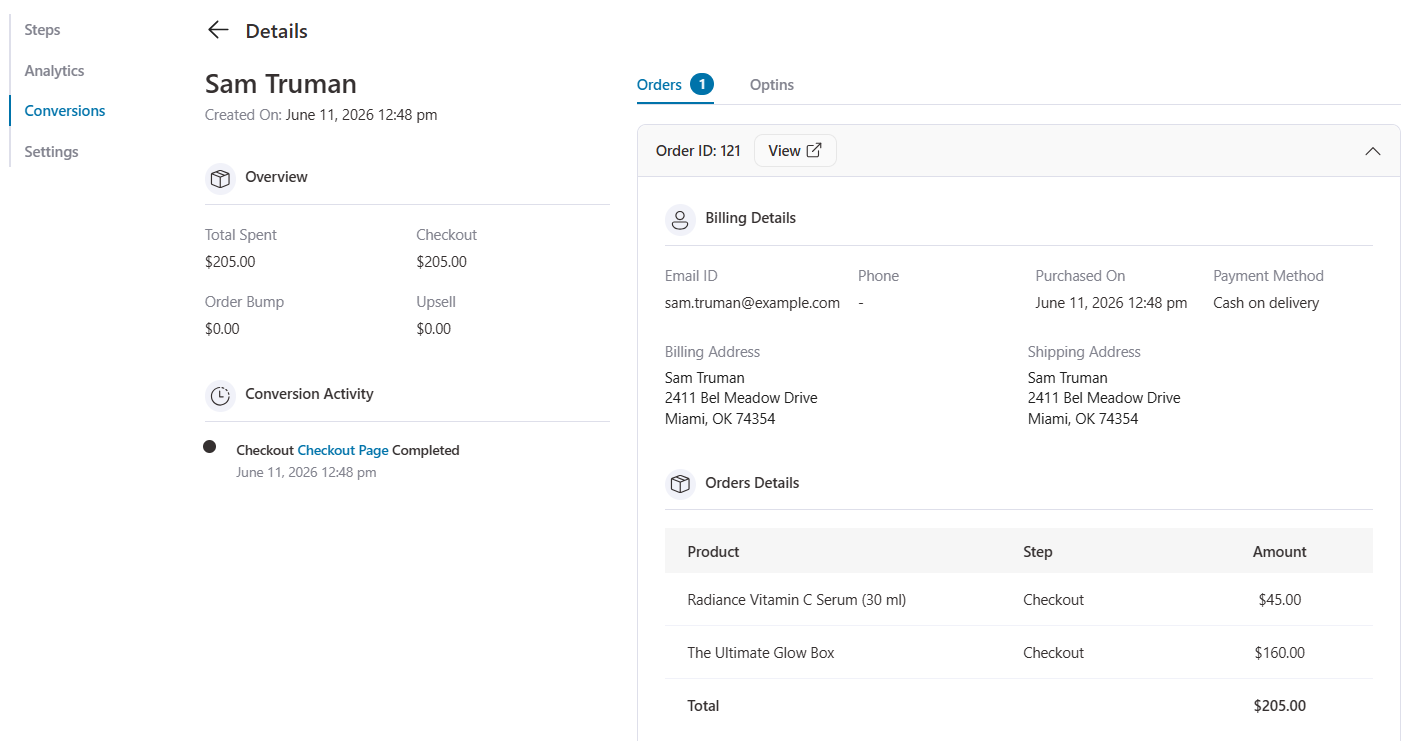
This is enough to understand your store's overall health at a glance and spot which funnels are worth doubling down on.
FunnelKit Pro
Paid analytics are much more granular and provide deeper insights into your store's performance.
You get total contacts, orders, revenue, along with bump revenue, upsell revenue, and average order value.
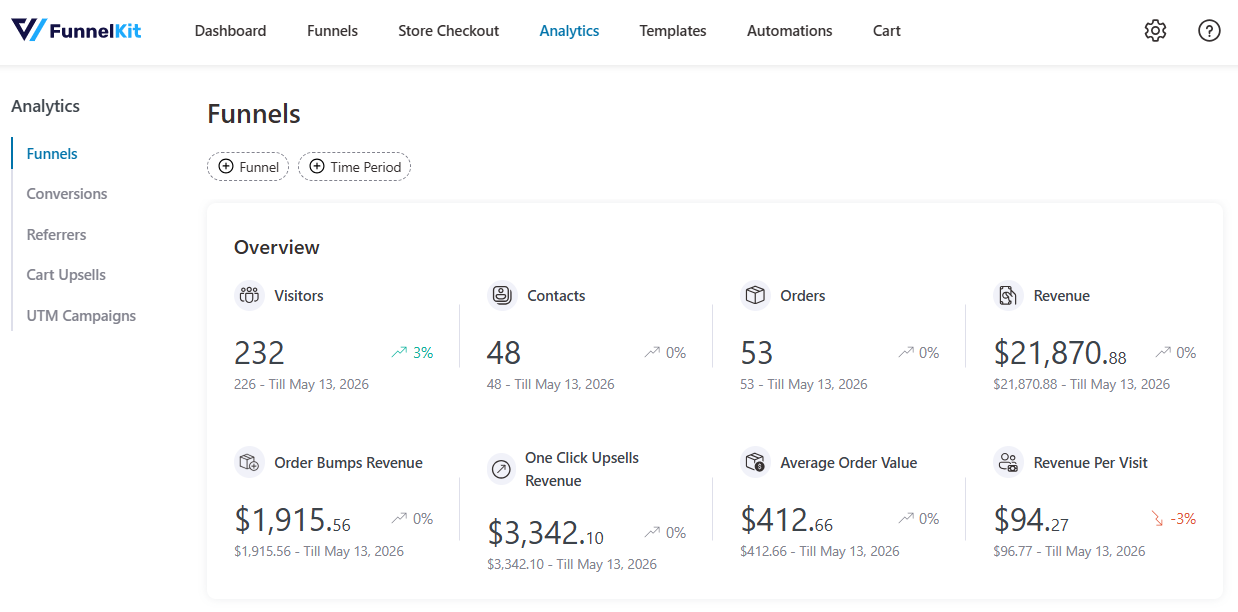
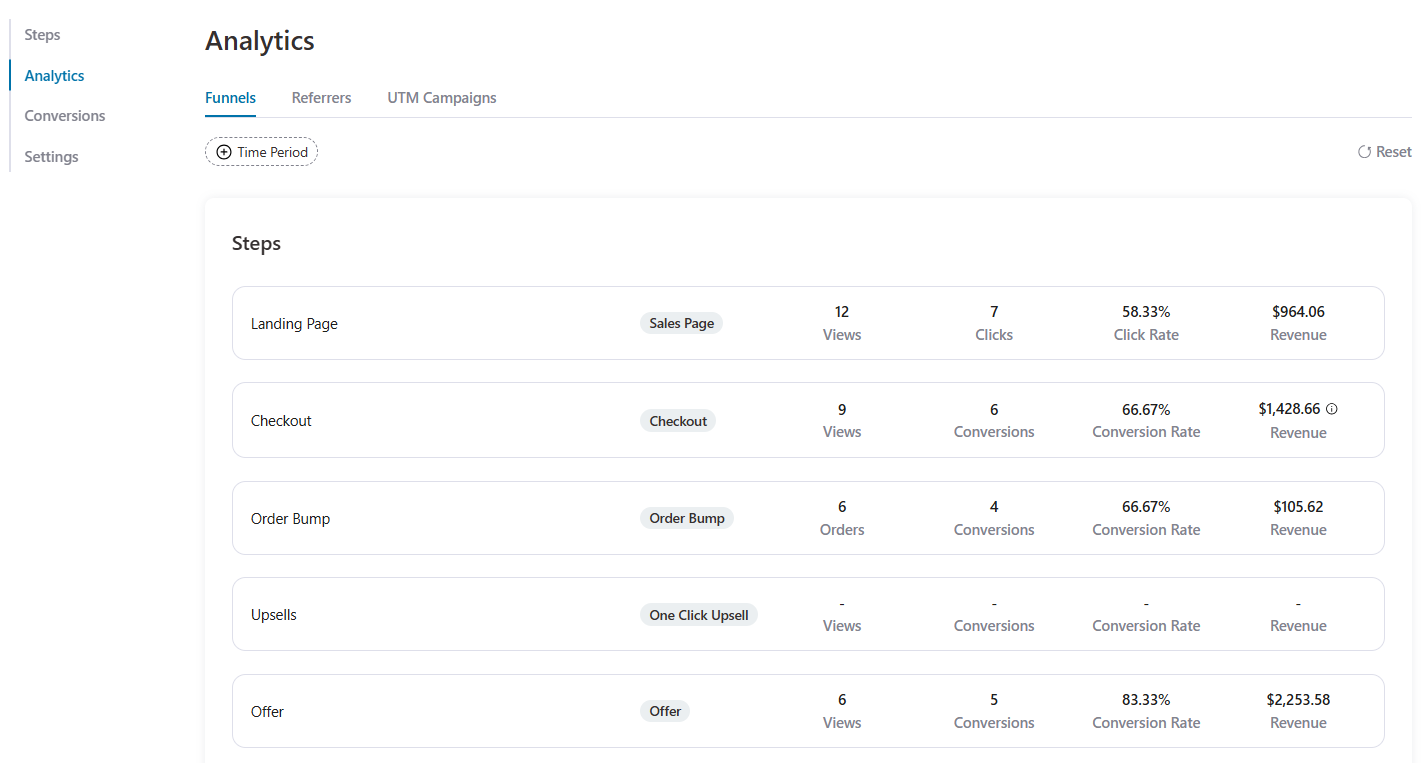
It also unlocks step-level funnel analytics, allowing you to view conversion and revenue at each step, so you can pinpoint exactly where customers drop off.
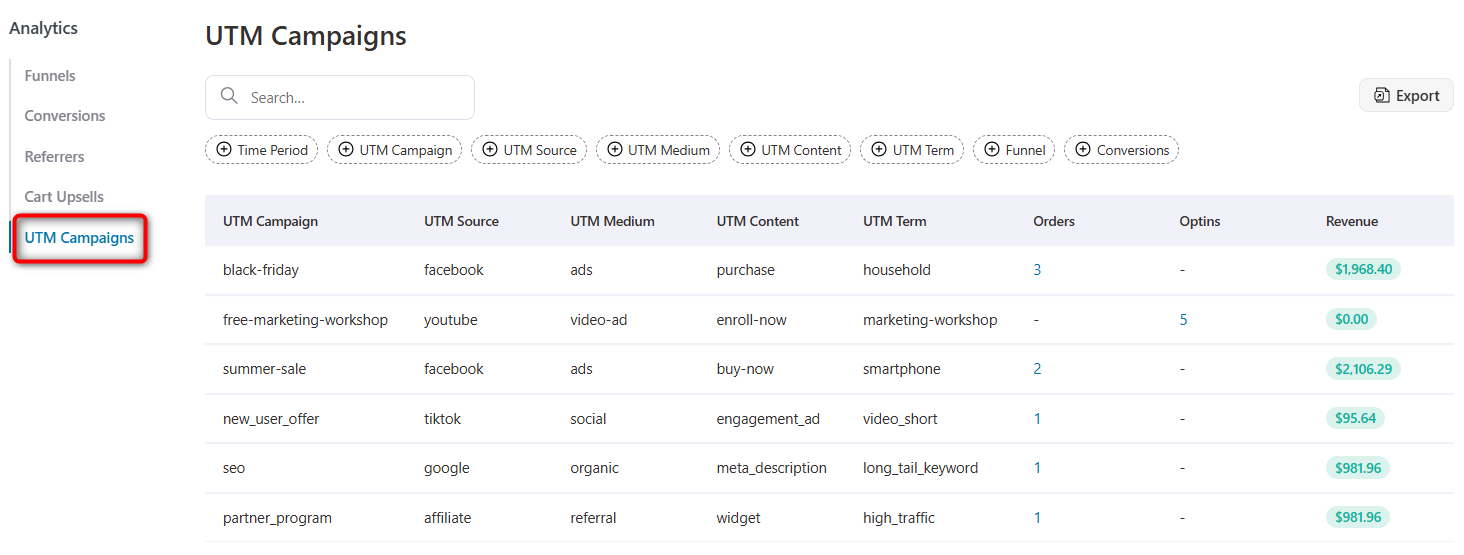
With Referrers and UTM tracking, see which campaigns, ads, and sources actually drive conversions.
These can be downloaded as a CSV file, which you can send to your marketing team for analysis and budgeting.
Summary
Free analytics tell you how you're doing overall and which funnels win.
Paid analytics tell you where in the funnel you're losing people and which campaigns drive results, which is what you need for serious, ongoing optimization (and what makes A/B testing actionable).
Pixel & Conversion Tracking
| Capability | FunnelKit Lite (Free) | FunnelKit Pro |
|---|---|---|
| Pixels: Meta, TikTok, Google Ads, Snapchat, or Pinterest | ✅ Yes | ✅ Yes |
| Google Analytics integration | ✅ Yes | ✅ Yes |
| Site-wide event tracking (purchases, views, signups) | ✅ Yes | ✅ Yes |
| UTM campaign and referrer attribution | ❌ No | ✅ Yes |
FunnelKit Free Plugin
With the free tier, you can integrate tracking pixels from Facebook/Meta, Google Ads, TikTok, Snapchat, Pinterest, and Google Analytics.
This lets you track key events, such as completed purchases, abandoned carts, product page visits, new signups, and more across your store for free.
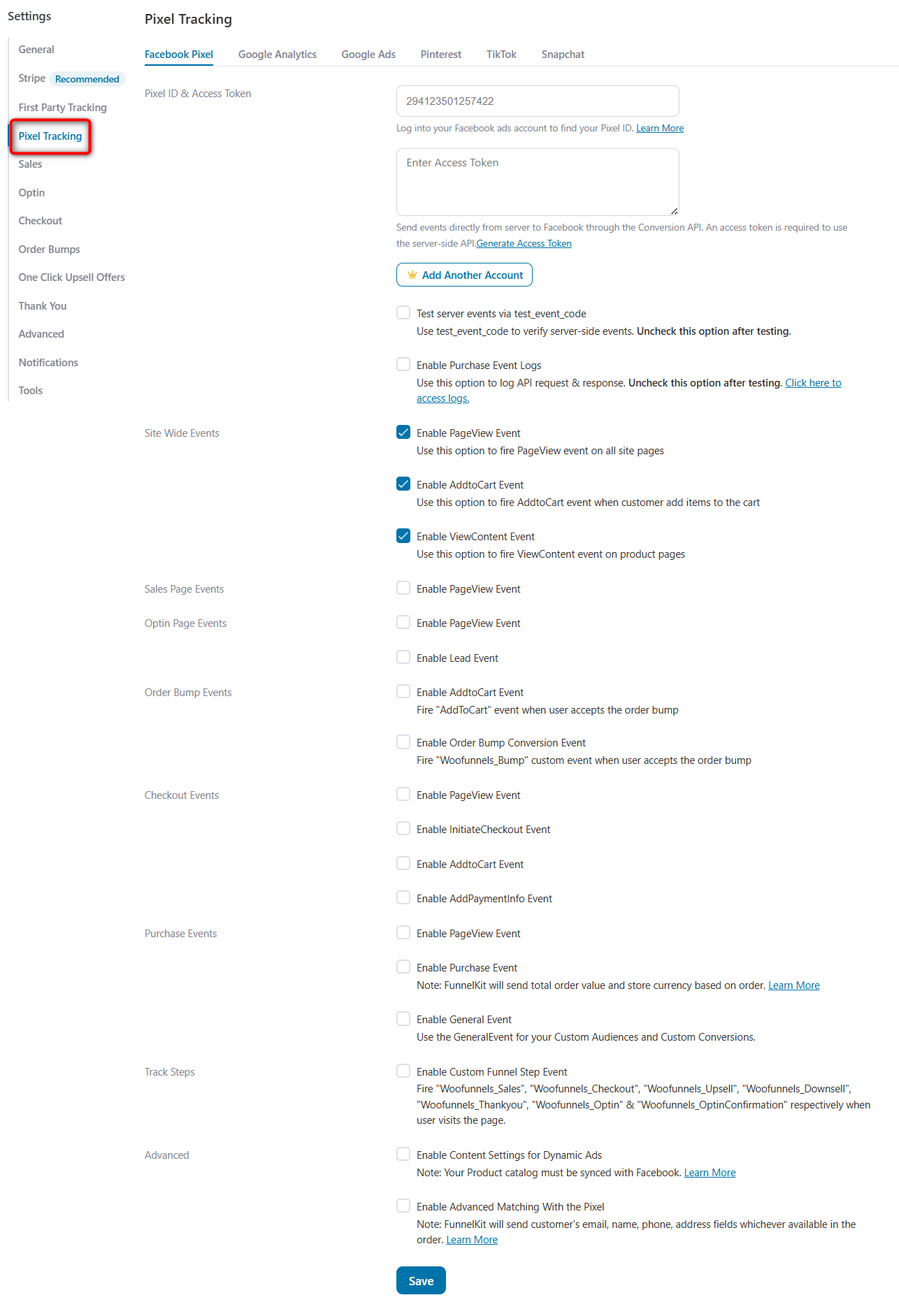
The site-wide event tracking allows FunnelKit to track these events across your entire site, so you don't need a separate, often bloated pixel-management plugin that takes up space and adds scripts.
Additionally, Google Analytics integration lets you see your funnel's performance inside your GA dashboard alongside the rest of your site data.
For running and measuring social ads, the free setup covers the essentials most small to mid-sized stores need.
FunnelKit Premium Version
The paid layer adds UTM campaign tracking and referrer attribution to the deeper analytics.
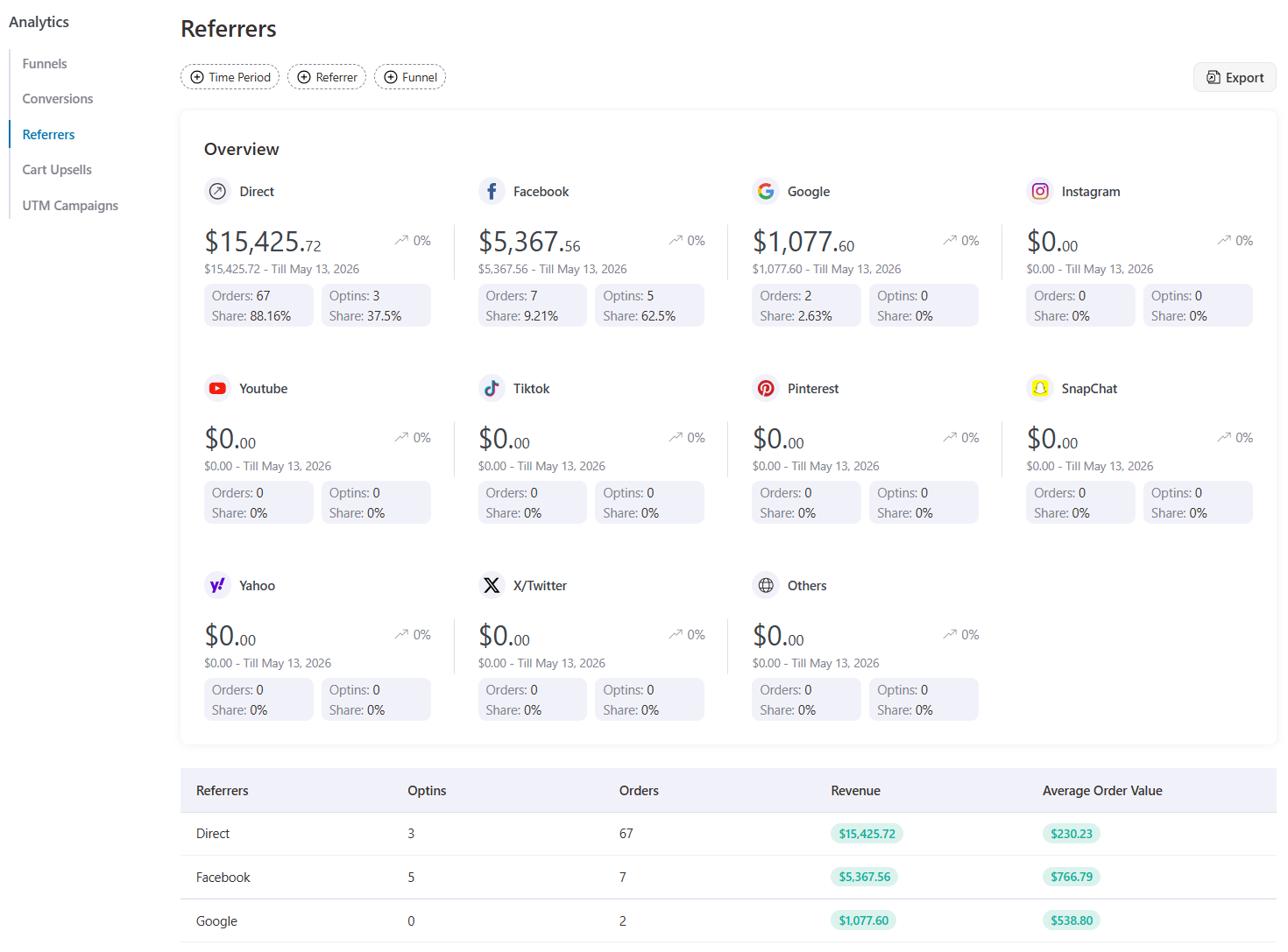
This tells you not just that a conversion happened, but which campaign, source, or ad produced it, which is essential once you’re spending real money on paid acquisition and need to know which campaigns are profitable.
Summary
Free pixel tracking is enough to install your ad pixels and fire the right events without extra plugins.
Paid adds the attribution layer that connects spend to revenue, which matters once paid traffic becomes a meaningful channel.
Templates and Page Builder Integration
| Capability | FunnelKit Free (Lite) | FunnelKit Pro |
|---|---|---|
| Conversion-optimized templates (all funnel page types) | ✅ Yes | ✅ Yes |
| Elementor, Divi, Oxygen, Bricks and Gutenberg support | ✅ Yes | ✅ Yes |
| Dedicated widgets for opt-in, checkout, one-click upsells, and thank you page | ✅ Yes | ✅ Yes |
| Shortcode support (Beaver, Brizy, etc.) for funnel customization | ✅ Yes | ✅ Yes |
| Premium template library (for funnels) | ❌ No | ✅ Yes |
FunnelKit Free
A genuinely strong free offering, and one of the reasons FunnelKit is so beginner-friendly:
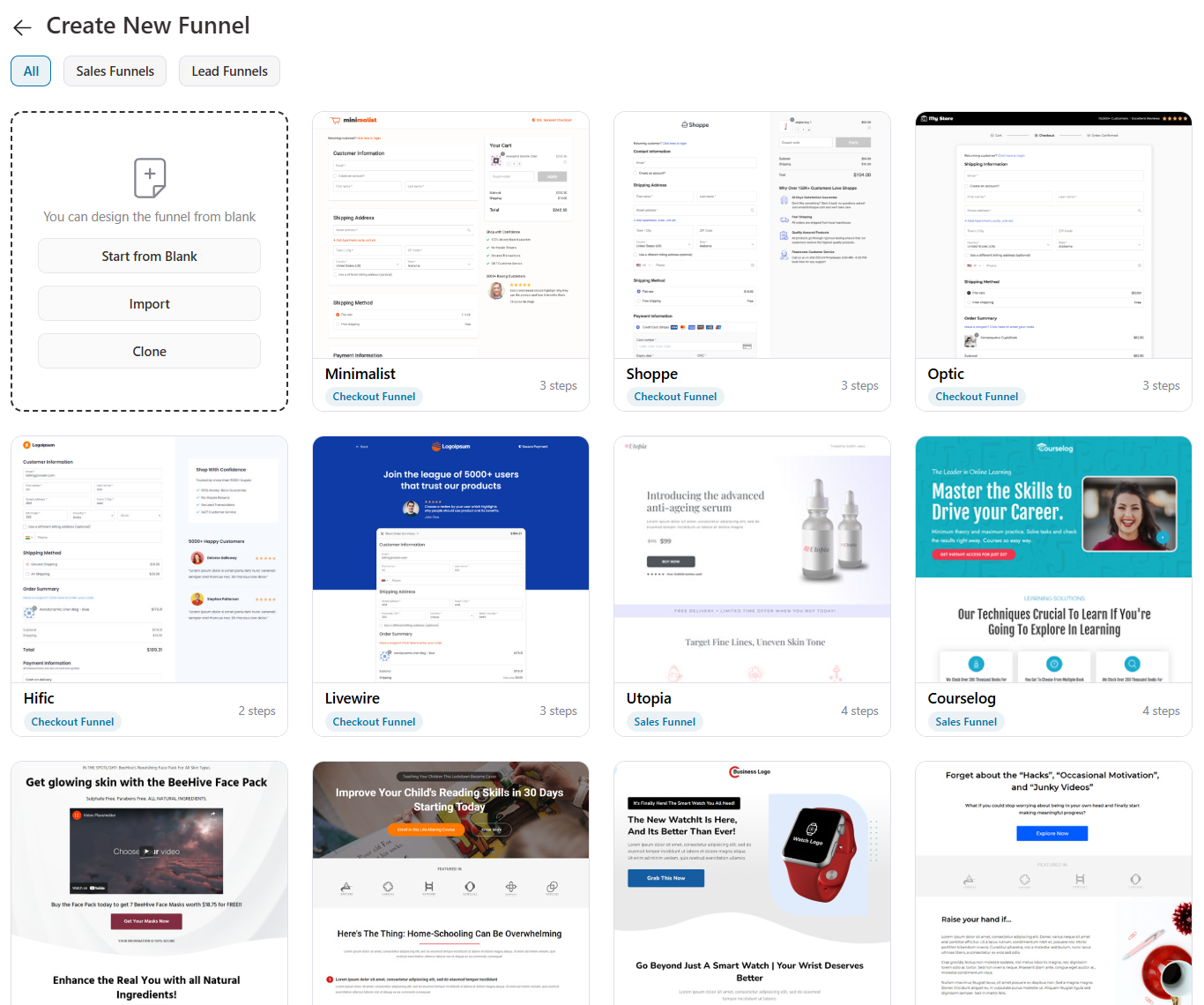
- A library of conversion-optimized templates covering opt-in pages, landing/sales pages, checkout pages, and thank-you pages, across many niches (skincare, fitness, pet, academic, digital products, and more). Every template is one-click import and built around tested conversion structures, so you’re not designing from scratch.
- Deep page builder integration with Elementor, Divi, Oxygen, Bricks and Gutenberg. You get dedicated widgets/modules, including an Optin Form widget for capturing leads, a Checkout Form widget to fully control the checkout layout, and Order Details + Customer Details widgets for reassuring thank-you pages.
- Shortcode compatibility with Beaver Builder, Brizy, Thrive Architect, Bricks, Spectra, and others, so even if your builder isn’t natively integrated, you can still drop FunnelKit elements in.
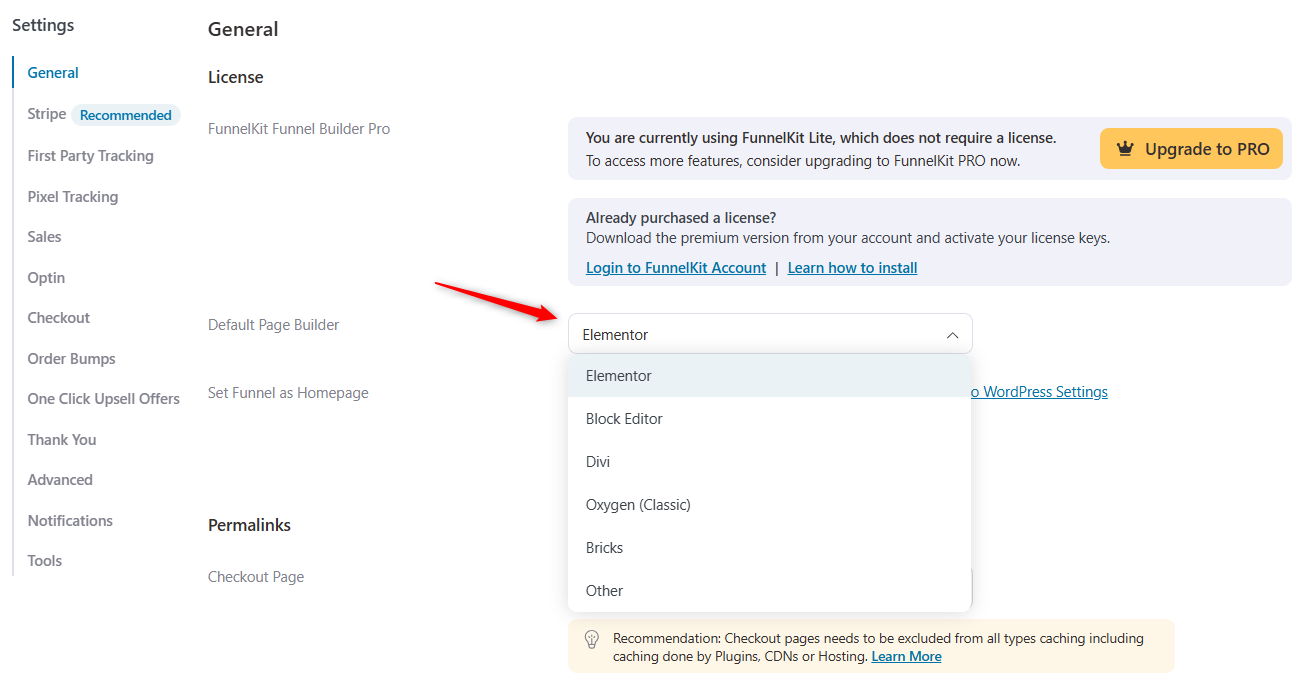
This helps you to fully design every funnel page with your preferred builder, no coding, on the free version.
FunnelKit Pro
You get access to premium templates layered on top of the free library with more designs, more niches, and more variety.
Summary
The free template and page builder integration is excellent and is rarely the reason to upgrade on its own.
You’re paying for the functionality behind the pages (bumps, upsells, A/B testing), not the design tools themselves, which is a point in FunnelKit's favor, since the design layer is fully usable for free.
Part 2: FunnelKit Cart (Feature-by-Feature Breakdown)
The WooCommerce side cart product. The free plugin gives you a genuinely good slide-out cart that streamlines the buying flow.
Pro turns that same cart into a revenue tool with in-cart upsells, reward milestones, and special add-ons.
We’ll break it down feature by feature below.
The Side Cart Experience
The free cart is a great example of where a free version really undersells what you actually get.
| Capability | FunnelKit Lite (Free) | FunnelKit Pro |
|---|---|---|
| Slide-out side cart replacing cart page | ✅ Yes | ✅ Yes |
| Sticky cart icon with item count | ✅ Yes | ✅ Yes |
| AJAX add-to-cart (with toggle) | ✅ Yes | ✅ Yes |
| Direct-to-checkout button | ✅ Yes | ✅ Yes |
| Styling / on-brand customization | ✅ Yes | ✅ Yes |
FunnelKit Cart Free Plugin
The free Sliding Cart replaces the static cart page. When shoppers click the cart icon or add a product, a smooth cart panel slides in from the side of the screen, where they can review and adjust their order.
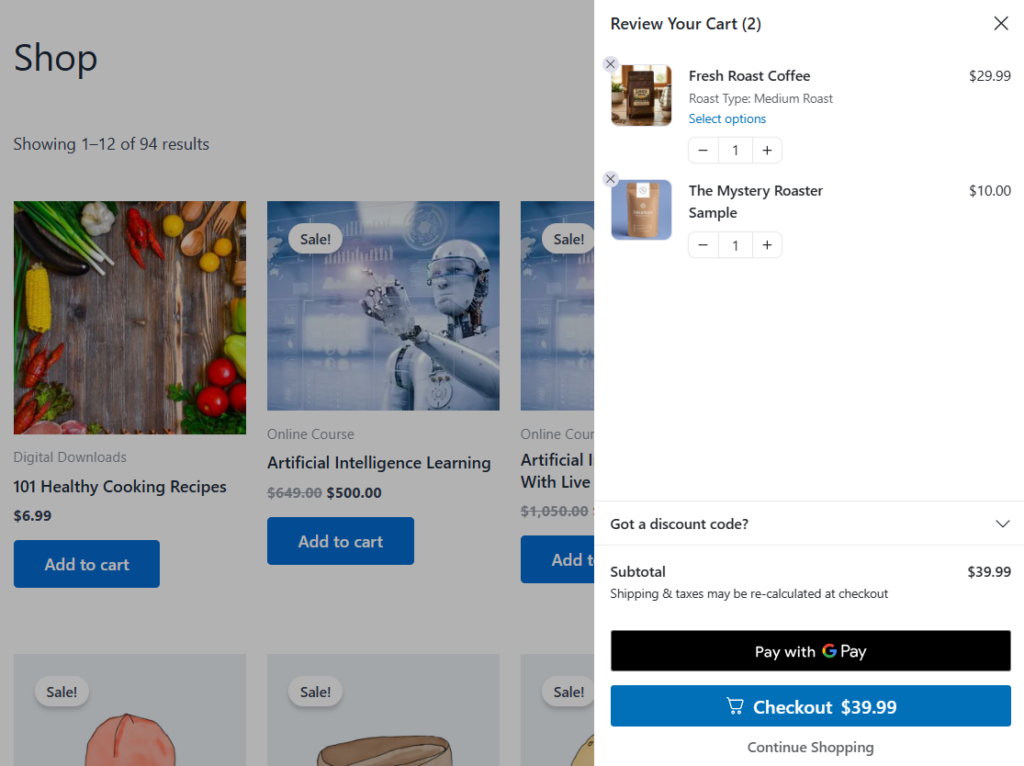
See a floating, sticky cart icon that sits at the bottom of your store, with a count badge showing how many items are in the cart, so shoppers always know what they've got and can reopen the cart from any page.
Customers can add items, edit quantities, or remove items directly in the slide-out panel without page reloads using AJAX.
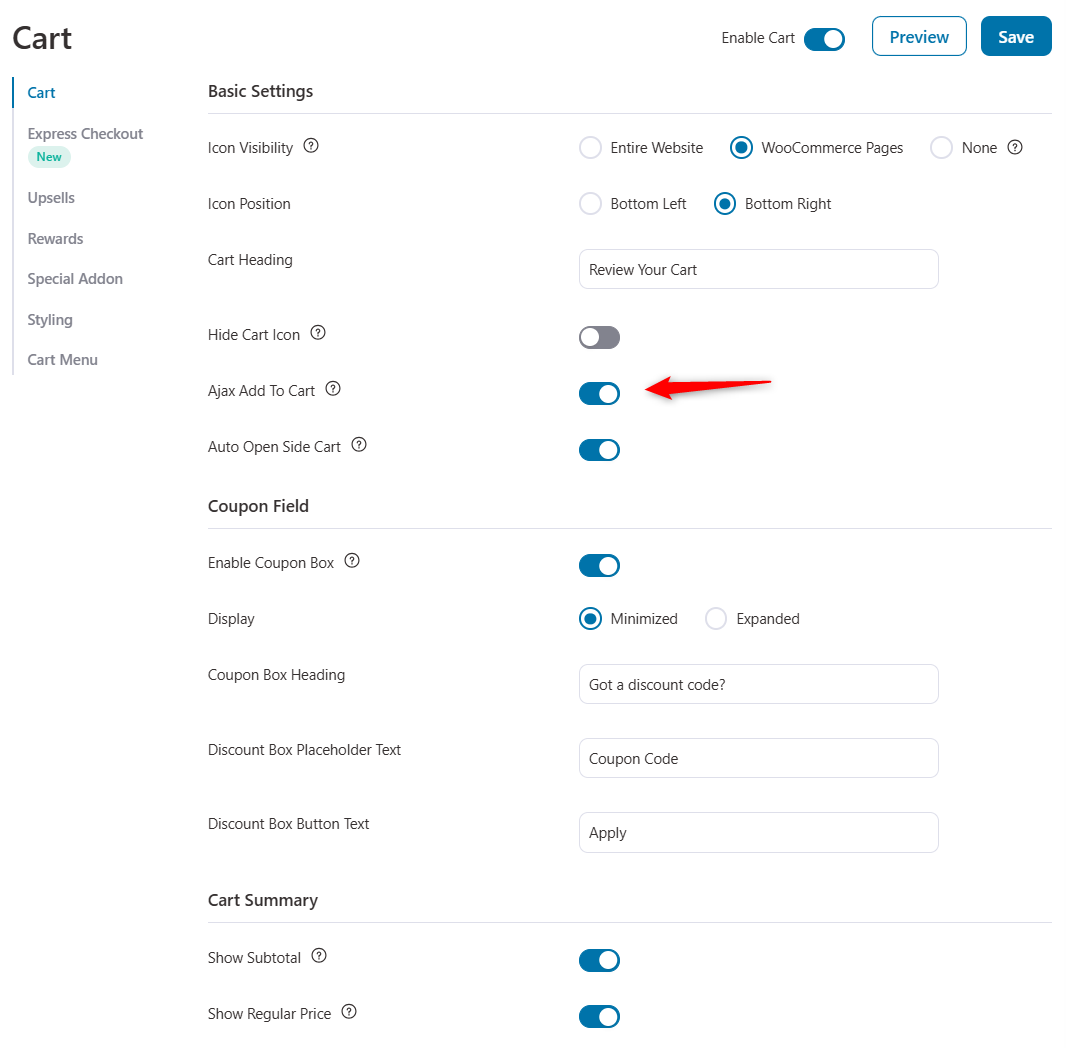
It has a direct checkout button inside the slide cart that sends shoppers straight to checkout, completely bypassing the redundant WooCommerce cart page. Removing that extra step is one of the single biggest friction reducers in the buying flow.
You can also adjust the cart's appearance in the Styling section to keep it on-brand and ensure it renders cleanly across devices, themes, and page builders, so you don't have to worry about it breaking in a particular setup.
For many stores, the free cart alone is a real upgrade to the shopping flow, and it's frequently rated among the best free WooCommerce cart experiences on WordPress.
FunnelKit Cart Pro
The core slide-out experience is the same in Pro. The paid features build on top of it (covered in the sub-sections below). Pro also adds average order value boosters.
Summary
The free side cart is genuinely good with a slide-out panel, sticky icon with count badge, AJAX add-to-cart, direct-to-checkout, and full styling control, all included. It’s a complete shopping-flow upgrade on its own.
Express Pay & In-Cart Coupons
| Capability | FunnelKit Lite (Free) | FunnelKit Pro |
|---|---|---|
| Express Apple Pay / Google Pay inside the cart | ✅ Yes | ✅ Yes |
| In-cart coupon box (open or collapsible) | ✅ Yes | ✅ Yes |
| Auto-open cart after add-to-cart | ✅ Yes | ✅ Yes |
FunnelKit Cart Lite
The free cart includes express pay options right inside the cart, such as Apple Pay and Google Pay, so shoppers can pay for their items without even going to the checkout page.
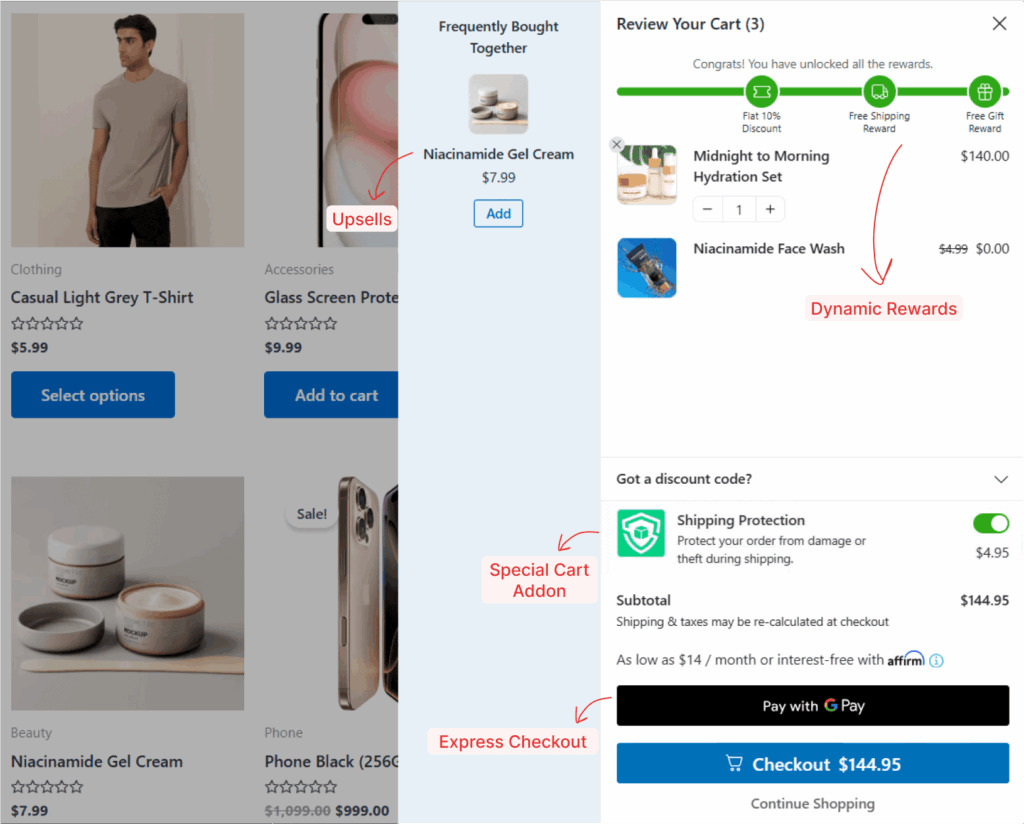
Shoppers can also apply their own discount codes right inside the cart.
You can display the coupon box open or as a space-saving collapsible box, and optionally auto-open the side cart right after a product is added, putting the next step (checkout) immediately in view.
FunnelKit Cart Pro
These conversion conveniences are available in the free version because there is no paid gate on express pay, the in-cart coupon box, or auto-open.
Pro's additions are about revenue (in the next subsections) rather than this core convenience layer.
Summary
Express pay and in-cart coupons are both free, which is unusually generous. Many cart plugins reserve express checkout for paid tiers. This alone removes meaningful friction for mobile and returning shoppers.
In-Cart Upsells and Cross-Sells
| Capability | FunnelKit Lite (Free) | FunnelKit Pro |
|---|---|---|
| In-cart upsells & cross-sells (one-click) | ❌ No | ✅ Yes |
| Manage recommendations from a single screen | ❌ No | ✅ Yes |
| Number of upsells to display | ❌ No | ✅ Yes |
| Show default upsells | ❌ No | ✅ Yes |
| In-cart variation selection | ❌ No | ✅ Yes |
FunnelKit Cart Free Plugin
Not available. In-cart product recommendations are a Pro feature.
FunnelKit Cart Pro
You can pitch complementary products directly in the cart, adding them with one click without interrupting the buyer's journey with a separate pre-purchase upsell page.
You add upsells and cross-sells to your product catalog from a single screen, rather than editing each product individually.
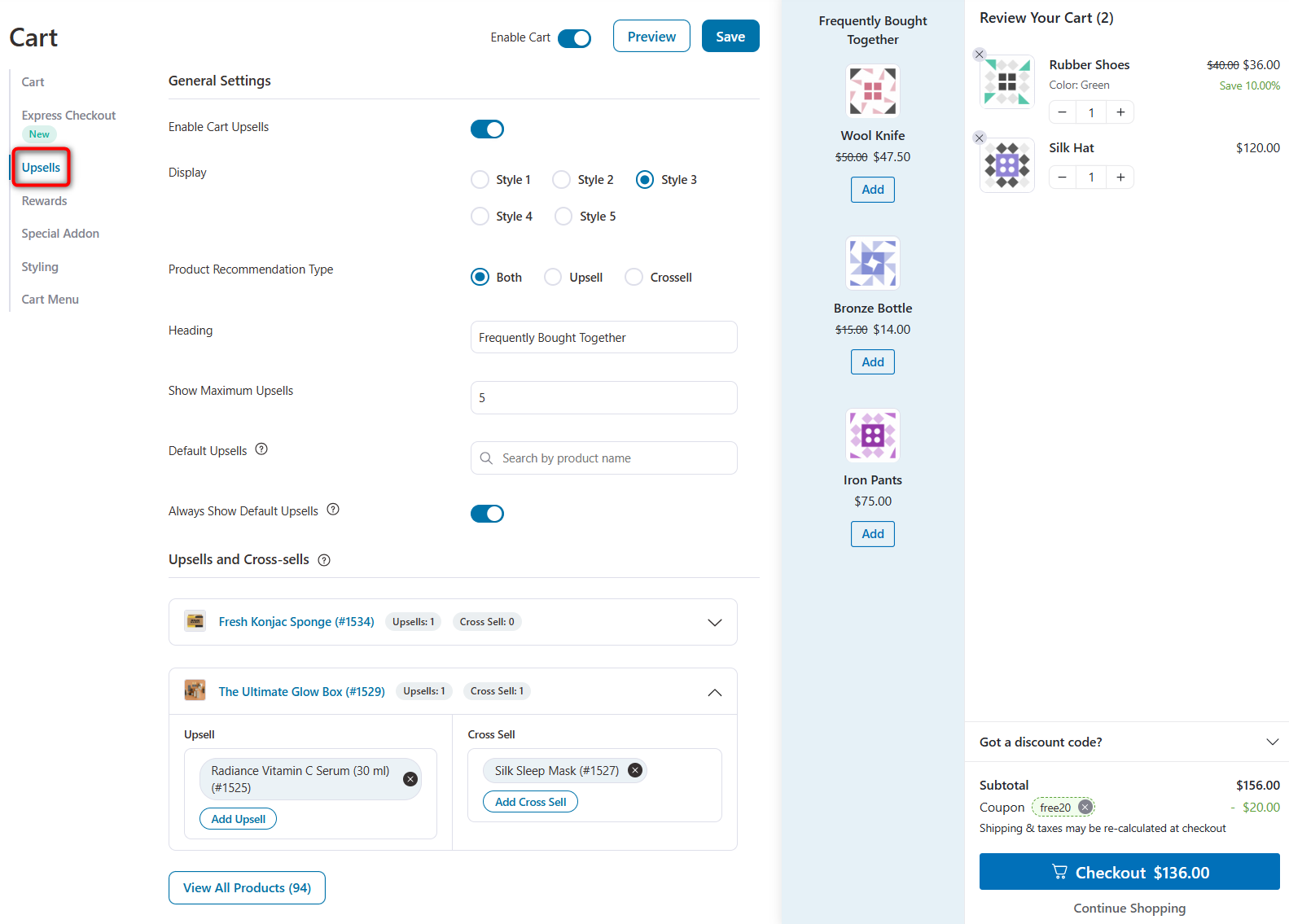
From there, you control the upsell display style, recommendation type, the maximum number of upsells to show, and your default upsells.
If an upsell is a variable product, the shopper can pick the variation (size, color, etc.) right inside the side cart, without bouncing to the product page.
The reason this matters is that the cart is the highest-intent moment in the entire shopping journey.
A shopper viewing their cart has already decided to buy, so an in-cart upsell catches them at peak willingness, and because it doesn't interrupt their momentum toward checkout, it tends to lift average order value without hurting conversion.
Summary
In-cart upsells are one of Cart Pro’s two headline revenue features. Managing recommendations from one screen and supporting in-cart variation selection makes them genuinely practical, not just a checkbox feature.
Milestone Rewards & Special Add-ons
| Capability | FunnelKit Lite (Free) | FunnelKit Pro |
|---|---|---|
| Reward milestones (free shipping, discounts, gifts) | ❌ No | ✅ Yes |
| Reward notice / progress bar | ❌ No | ✅ Yes |
| Special add-ons (shipping protection, limited-time deals) | ❌ No | ✅ Yes |
| Cart analytics & performance graph | ❌ No | ✅ Yes |
FunnelKit Cart Free Plugin
Not available. Gamified rewards and add-ons are Pro features.
FunnelKit Cart Pro
Pro unlocks gamified, milestone-based rewards, such as free shipping, discounts, and free gifts. When the shopper hits a threshold you set, the reward is added automatically.
A reward notice bar keeps them informed of how close they are to a reward (for example, "You're $12 away from free shipping"), a proven psychological nudge that increases cart value.
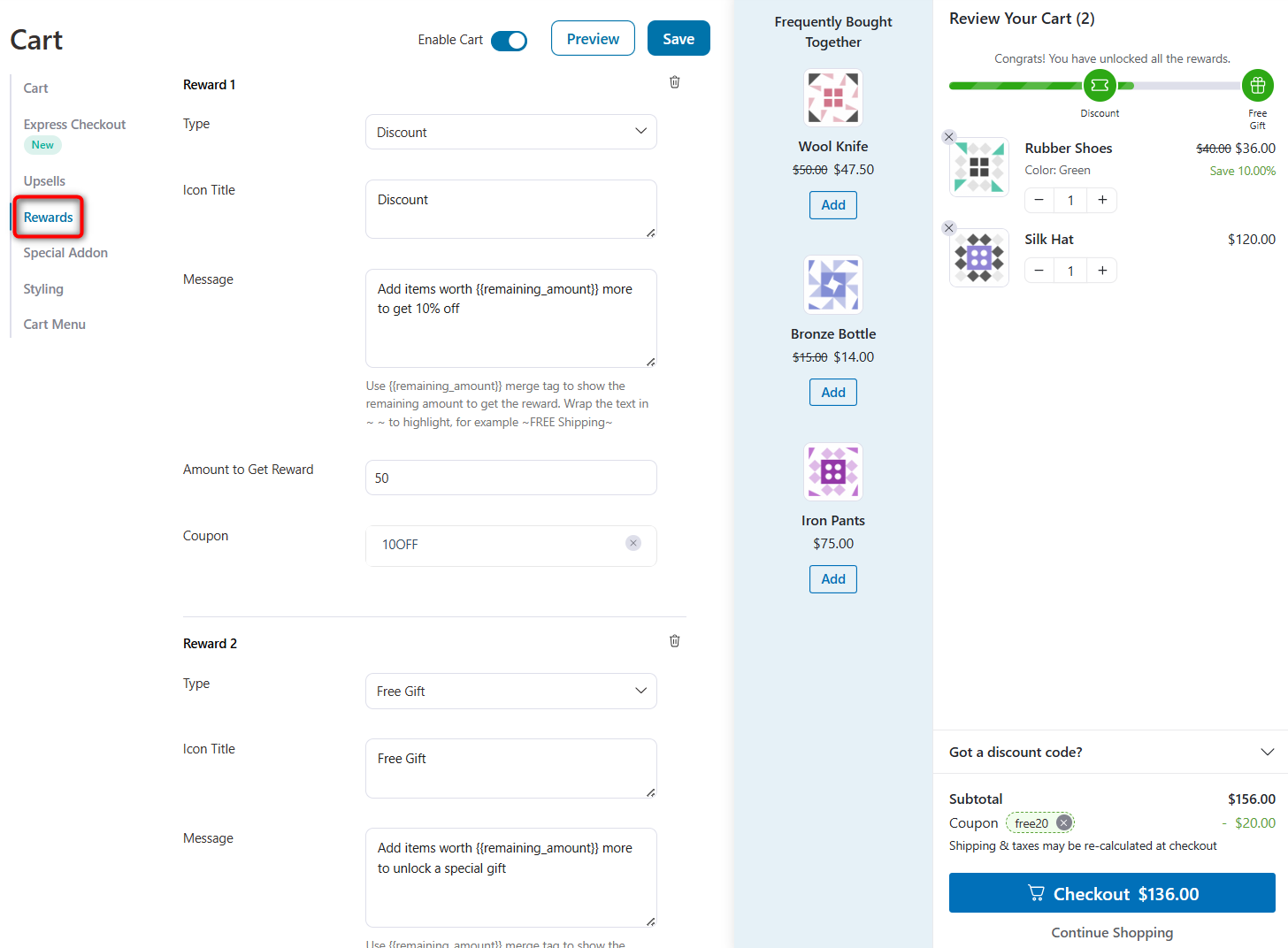
It also includes special add-ons that help you set up one-click offers, such as shipping protection fees, limited-time deals, or recommendations.
Finally, you get cart analytics, including which upsells, rewards, and add-ons were selected, showing your most popular cart upsells and rewards, so you can double down on what works.
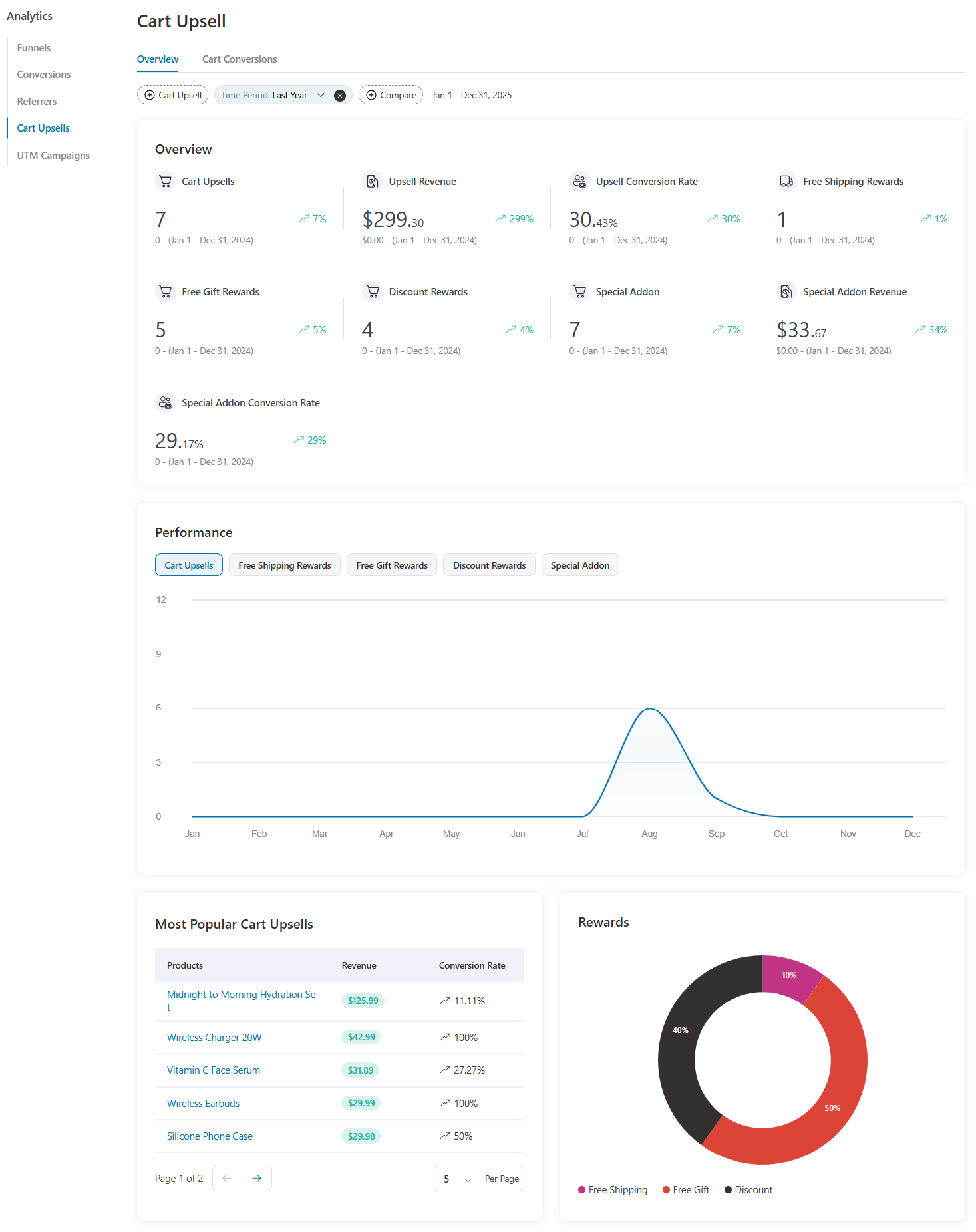
You can see a performance graph along with your popular cart upsells and rewards.
Summary
Reward milestones are the second headline revenue feature: they give shoppers a concrete, self-interested reason to increase their order. Paired with cart analytics, you can measure exactly how much extra revenue the Pro cart is generating.
Part 3: FunnelKit Automations
The email/SMS marketing automation and CRM plugin. Think of it as a self-hosted alternative to tools like Mailchimp, Klaviyo, or ActiveCampaign, living inside your WordPress dashboard with direct access to your WooCommerce data.
Every automation follows the same logic. A trigger starts it, an optional condition filters who continues, and one or more actions then run.
The clearest way to see the free vs. Pro line is to walk through it feature by feature, just like the products above.
Abandoned Cart Recovery
| Capability | FunnelKit Free (Lite) | FunnelKit Pro |
|---|---|---|
| Live cart tracking (recoverable/recovered/lost) | ✅ Yes | ✅ Yes |
| Timed recovery email sequences | ✅ Yes | ✅ Yes |
| Conditional/branching recovery logic | ❌ No | ✅ Yes |
| Dynamic personalized expiring coupons | ❌ No | ✅ Yes |
| Abandoned cart recovery SMS | ❌ No | ✅ Yes |
FunnelKit Automations Free Plugin
Abandoned cart tracking and recovery is included free and it’s the standout.
Automations live-captures carts the moment a shopper enters their email at checkout, then shows you which carts are recoverable, recovered, or lost, with the revenue attached to each, in real time.
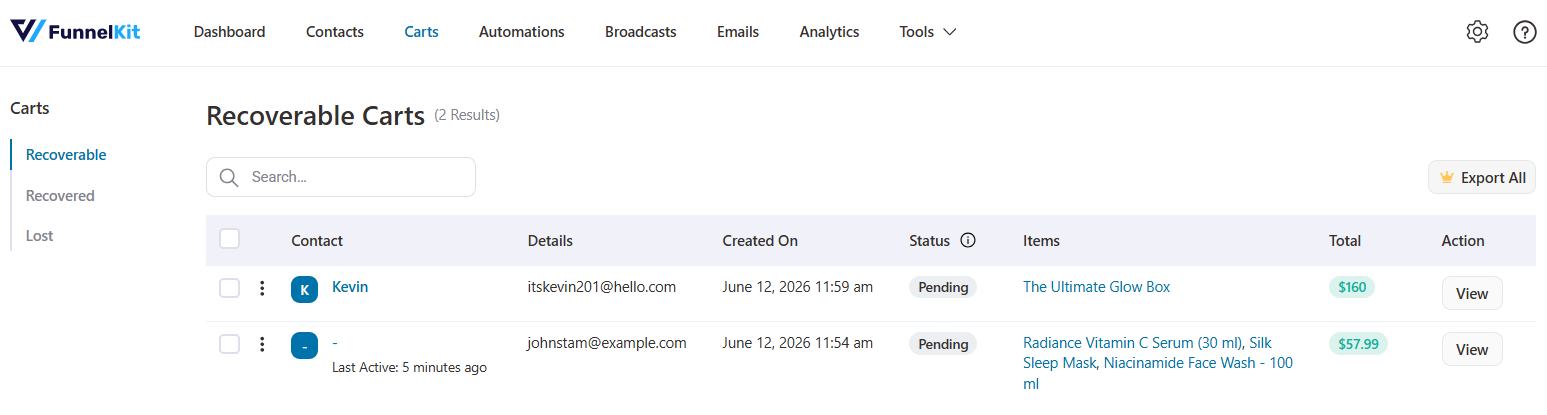
You build timed recovery email sequences (using automation delays) to win back shoppers who didn't complete checkout.
Free abandoned cart recovery is genuinely uncommon among email tools, and it’s often the single highest-ROI automation a store can run.
FunnelKit Automations Pro
Pro layers smarter logic on top of recovery, such as conditional automations that branch on cart value, products, or customer history.
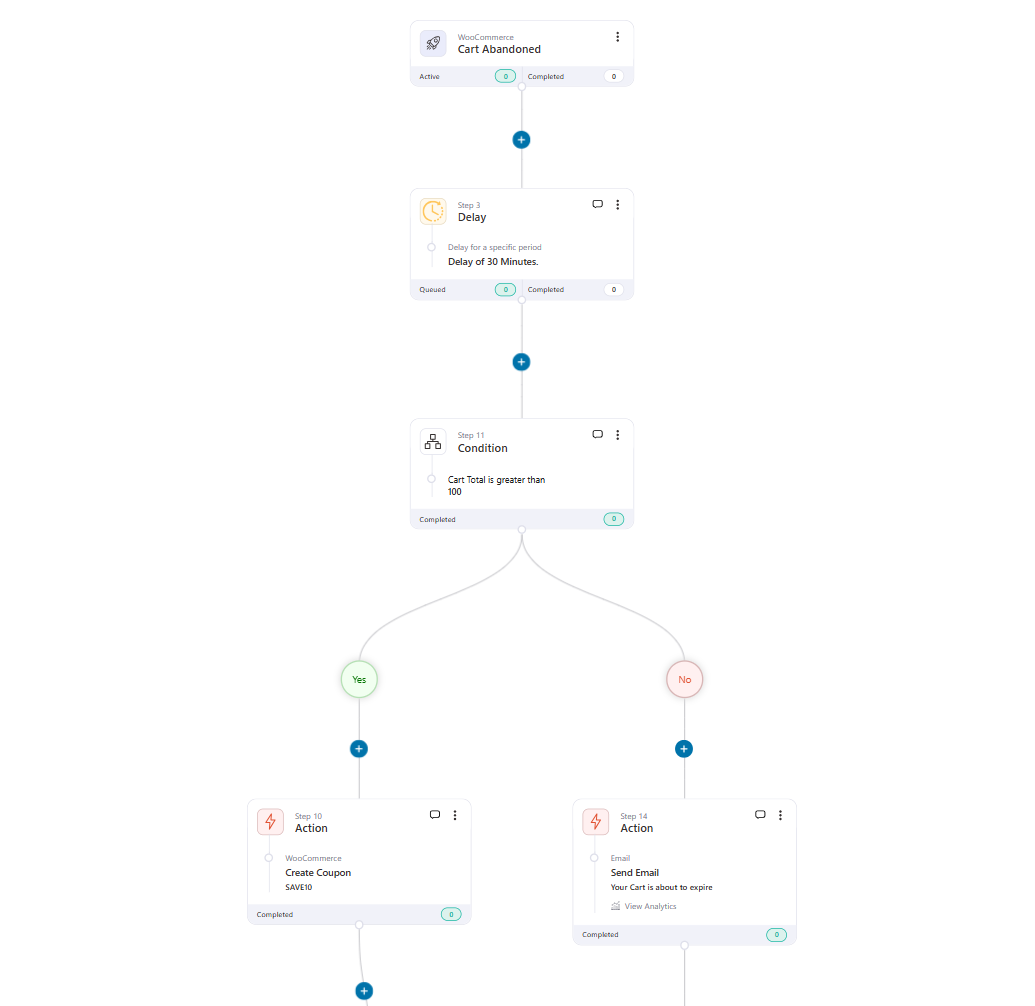
You can even offer dynamic personalized coupons with an expiry to add urgency to the win-back sequence.
Summary
Free abandoned cart recovery alone can cover a store's entire marketing setup, which is why it is the most generous free feature in the suite. Pro makes the sequences smarter and adds urgency-driving coupons.
Automation Recipes & Workflow Builder
| Capability | FunnelKit Lite (Free) | FunnelKit Pro |
|---|---|---|
| Pre-built automation recipes | ✅ Yes (free recipes) | ✅ Yes (both free and premium recipes) |
| Visual workflow canvas | ✅ Yes | ✅ Yes |
| Core actions (emails, tags, lists, coupons) | ⚠️ Limited (only emails) | ✅ Yes |
| Contact journeys | ❌ No | ✅ Yes |
| Smart logic (conditions, goals, jumps, split paths, and exits) | ❌ No | ✅ Yes |
| Timed delays (timezone, specific date/time) | ❌ No | ✅ Yes |
| Link triggers | ❌ No | ✅ Yes |
| Plugin / CRM / Zapier / Slack integrations | ❌ No | ✅ Yes |
FunnelKit Automations Free Plugin
With pre-built automation recipes, you import ready-made workflows such as abandoned cart recovery, post-purchase follow-up, welcome emails, first-purchase anniversary, and review collection in one click, then customize and switch them on.
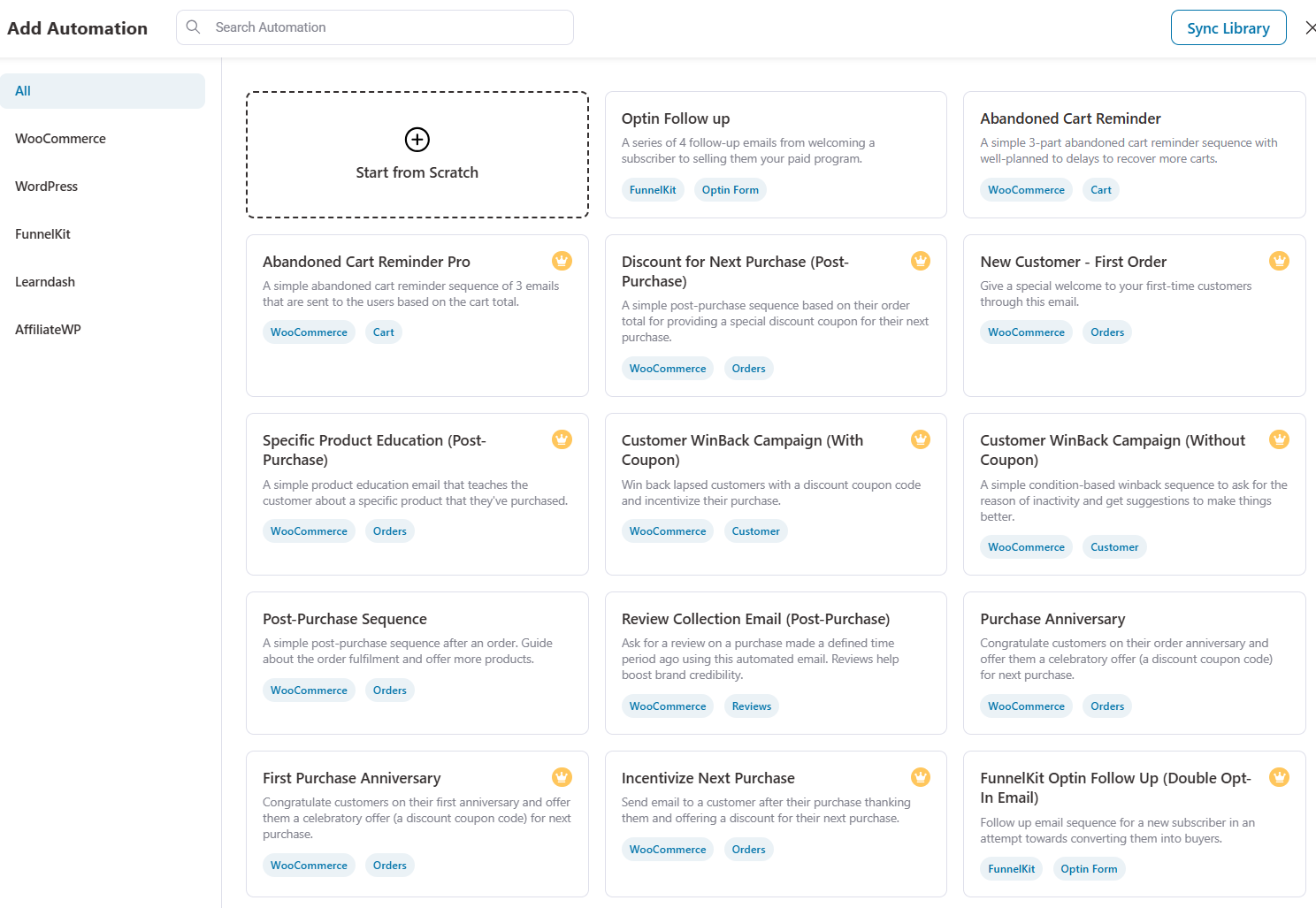
Beyond recipes, you can build your own automation by choosing a trigger and selecting actions.
You design these visually on a workflow canvas with in-line analytics, and can view individual contact journeys to see exactly what each person received.
Free actions include only 'Send Email', which can be customized using a rich text editor in the free version.
FunnelKit Automations Pro Plugin
Pro unlocks effective workflow logic, such as Conditions, Goals, Jumps, Split Paths, and Exits.
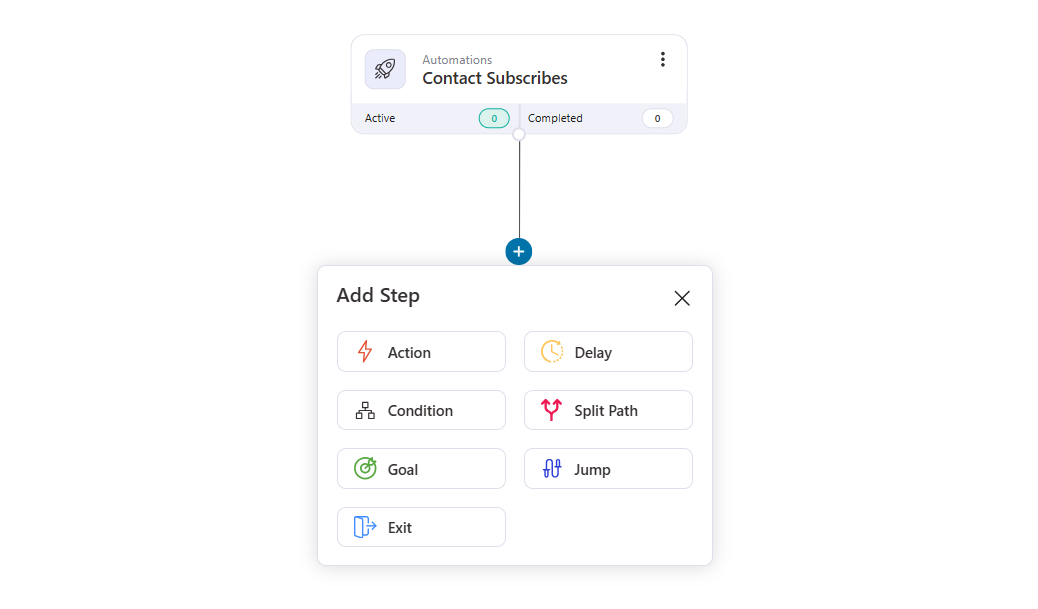
You can set timed delays (send in the contact’s own timezone, at a specific time on a specific day, or until a custom date the contact picks).
This is what turns simple linear sequences into sophisticated, branching customer journeys.
You also unlock highly-efficient action sets and integrations with other WordPress plugins (LearnDash, WishList Member, and more), CRMs, and third-party apps like Slack, plus data export to Zapier, so automations can do far more than just send email.
Summary
The free canvas and recipes are enough to run the essential triggered automations. Pro's goals, jumps, split paths, and integrations are for stores building genuinely complex, multi-branch journeys.
Email Campaigns & Broadcasts
| Capability | FunnelKit Lite (Free) | FunnelKit Pro |
|---|---|---|
| Triggered emails (welcome, post-purchase, recovery) | ✅ Yes (basic workflows) | ✅ Yes (all conditional and advanced sequences) |
| Transactional emails (rich text editor) | ✅ Yes | ✅ Yes |
| Drag-and-drop visual email builder | ❌ No | ✅ Yes |
| Broadcast email and SMS campaigns | ❌ No | ✅ Yes |
| Broadcast A/B testing | ❌ No | ✅ Yes |
FunnelKit Automations Lite
The free version focuses on automated, triggered emails, including welcome, post-purchase, and recovery, and lets you customize transactional emails with a rich text editor.
FunnelKit Automations Pro Plugin
Pro adds broadcast emails: one-off newsletters and promotions sent to a segment of your list, built with a drag-and-drop visual email builder and templates (which also applies to your transactional emails).
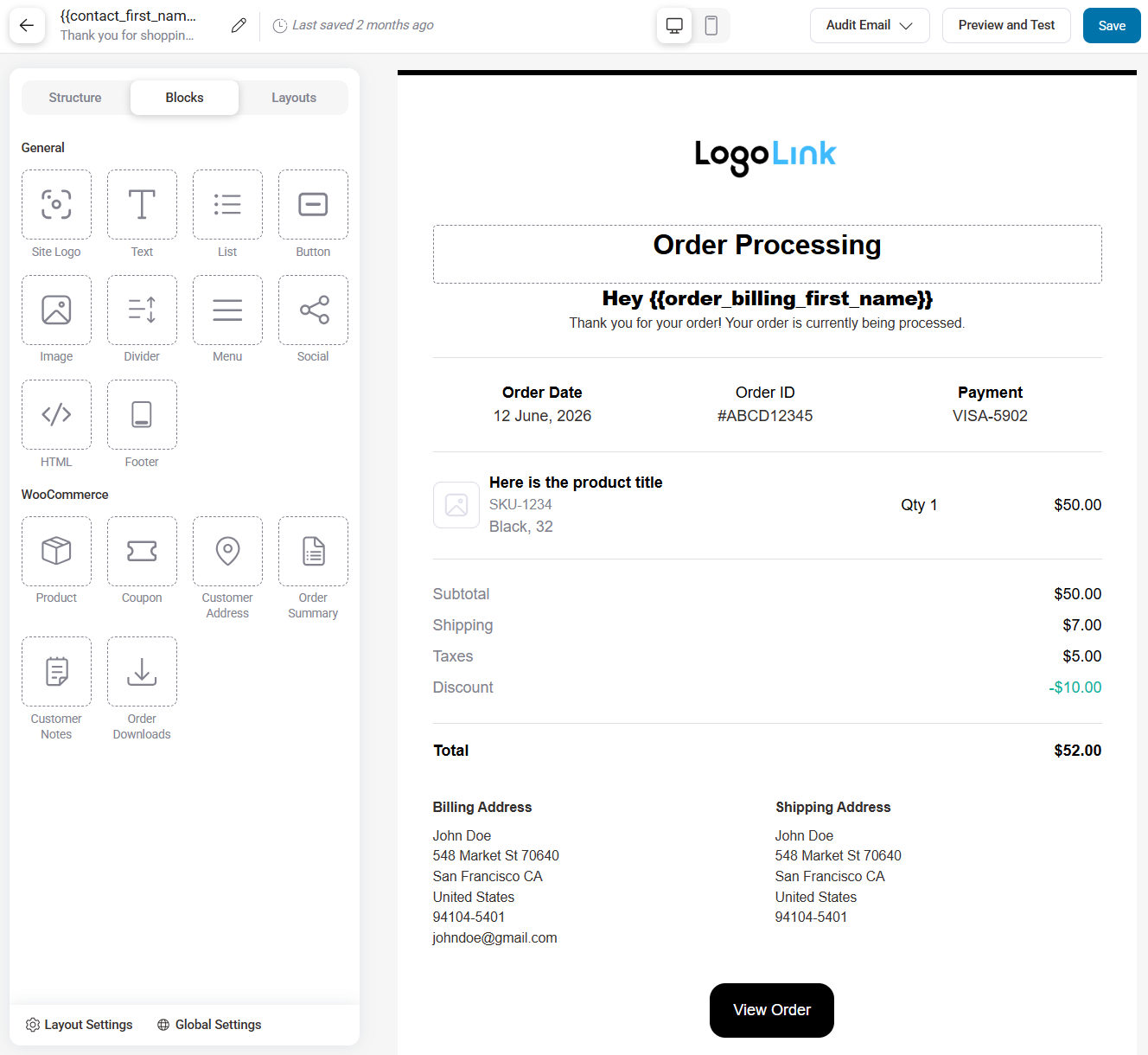
You can even A/B test broadcasts to see which subject line or offer performs better.
Summary
Triggered emails are free. Broadcasting to a segment, the core of newsletter and marketing, is a Pro feature, along with the visual builder and broadcast A/B testing.
CRM, Contacts & Segmentation
| Capability | FunnelKit Free (Lite) | FunnelKit Pro |
|---|---|---|
| Unlimited contacts & rich CRM profiles | ✅ Yes | ✅ Yes |
| Spend / AOV vs store-average insights | ✅ Yes | ✅ Yes |
| Smart segmentation (RFM, tags, geography, engagement) | ❌ No | ✅ Yes |
| Audience targeting for broadcasts | ❌ No | ✅ Yes |
| Bulk contact actions | ❌ No | ✅ Yes |
FunnelKit Automations Free Plugin
You get a real CRM for free, with unlimited contacts and no cap.
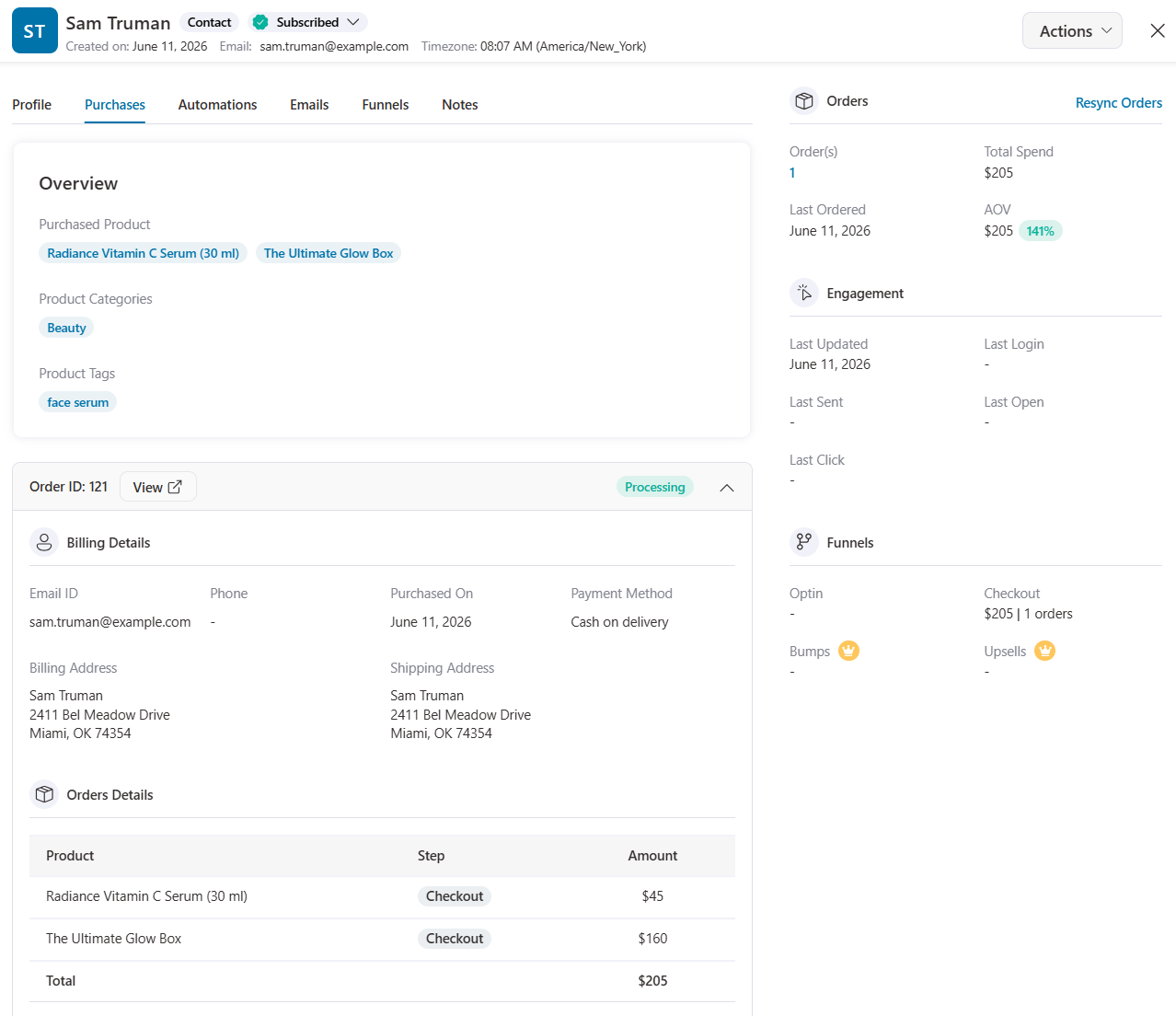
Each contact profile shows the latest interactions, total spend, and AOV compared to your store average, so you can see who your best customers are.
FunnelKit Automations Pro Plugin
Pro adds smart segmentation, including target campaigns by tags, lists, audiences, RFM, order value, products purchased, total revenue, order counts, engagement (opens/clicks), geography, contact fields, user role, and more.
This is what makes broadcasts precise instead of blasting your whole list.
The pro plan unlocks audiences, which you can apply multiple contact filters and use in automations and broadcasts with one click.
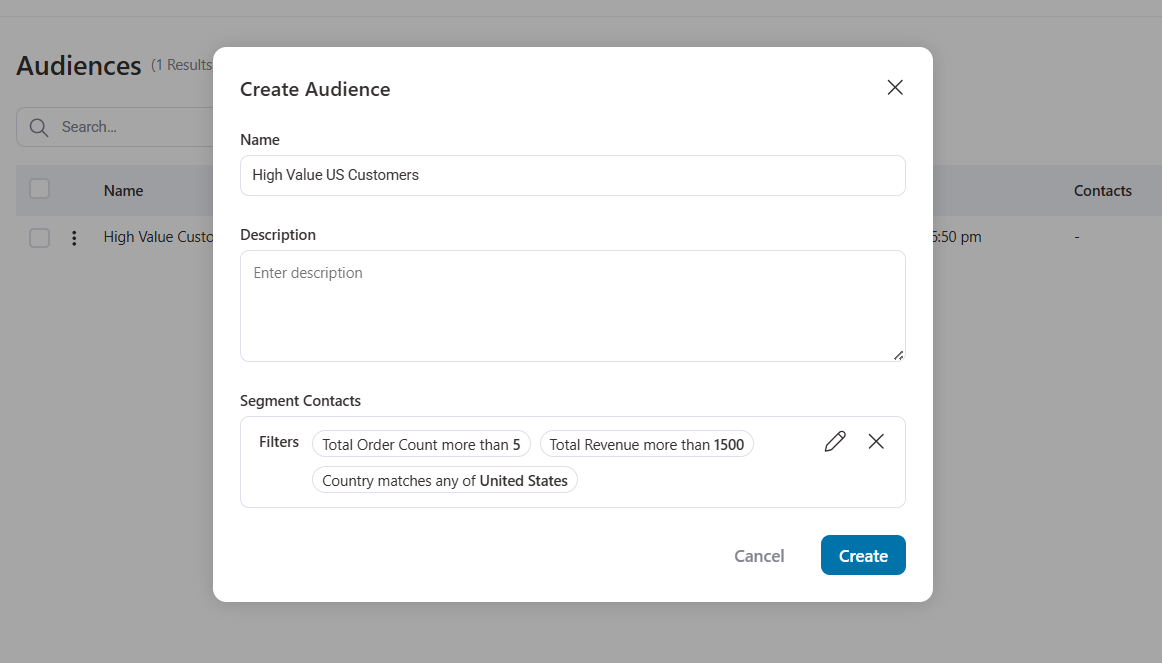
With bulk contact actions, you can update many contacts at once, such as add or remove tags and lists, subscribe or unsubscribe, update fields, or end automations, instead of editing each profile one by one.
Summary
The free CRM with unlimited contacts is genuinely generous.
Pro's smart segmentation unlocks targeted, profitable campaigns, and the flat, unlimited-contact pricing is the core reason stores switch from Mailchimp or Klaviyo to FunnelKit Automations.
Support and Documentation (All Products)
FunnelKit Free
Standard ticket support is available even with the free plugin, which is more than most freemium plugins offer.
You also get an extensive documentation library (hundreds of clear, illustrated articles covering all three plugins) and a YouTube channel with hundreds of tutorial videos.
So even free users have a real path to solving problems, whether through support or self-serve resources.
FunnelKit Pro
- Priority support with the Plus plan.
- Premium support with Professional and Elite.
- A documented response window of under 24 hours.
Support is consistently the most praised aspect of FunnelKit across user reviews (it holds a very high Trustpilot rating), with reviewers frequently noting that the team will engineer fixes for specific setups rather than just pointing to docs.
Summary
Even free users aren’t left stranded, which is genuinely uncommon in the freemium plugin world.
Paid plans move you up the priority queue and unlock premium support, which is especially valuable when downtime or a checkout bug is directly costing you sales.
FunnelKit Lite vs Pro: Which Plan Should You Choose?
Rather than a blanket “upgrade now,” here’s how the decision actually breaks down in practice.
Stick with the free version if:
- You’re new to funnels and want to prove the concept before spending money.
- Your main goal is simply a cleaner, custom checkout and a modern slide-out cart.
- You want free abandoned cart tracking and recovery, basic conversion data, and pixel tracking.
- You have low traffic, so A/B testing and detailed analytics wouldn’t yet produce meaningful results.
The lite version is a legitimate long-term tool for a simple store, not just a crippled trial.
Consider the Basic plan ($99.50, 1 site) if:
- You want a polished store checkout with the optimization toolkit on a single site, and you don’t need full upsells yet. (Basic also includes free Automations on top, covering abandoned cart recovery, which makes it a strong entry point.)
Consider the Plus plan ($179.50, 2 sites) if:
- You’re ready to increase revenue per customer with order bumps and one-click upsells.
- You want A/B testing, step-level analytics, and the Pro Sliding Cart with in-cart upsells and reward milestones.
- You’re not running broadcast email marketing yet (so you don’t need the CRM tier).
This is the plan most growth-focused single-store owners land on.
Consider the Professional plan ($249.50, 3 sites) if:
- You want to consolidate your email/SMS marketing into FunnelKit and stop paying separately for Klaviyo or Mailchimp.
- You want broadcasts, segmentation, dynamic workflow logic, and the full automation/CRM engine alongside your funnels.
Consider the Elite plan ($399.50, 30 sites) if:
- You’re an agency or run multiple stores. It covers up to 30 sites, which makes the per-site cost very low.
The smartest path for most people is to start for free, prove that funnels work for your store, and upgrade only after you can point to a specific paid feature that will earn back its cost.
Buy the capability you’ll actually use, not the biggest plan you can afford.
Editorial Team
October 11, 2026You can customize the WooCommerce cart page with the Cart block, a page builder like Elementor, or CSS and PHP snippets. Which method works for you depends on the cart...
Editorial Team
October 9, 2026A WooCommerce discount lowers what a shopper pays, either through a reduced product price or a code entered at checkout. Out of the box, WooCommerce gives you two ways to...
Editorial Team
October 9, 2026A downsell gives customers a cheaper option after they turn down your main offer. If you show it too soon, you might convince them to skip the original offer and...






