WooCommerce Klaviyo integration is one of the most popular ways to add email and SMS marketing to a WordPress store.
Klaviyo is an email and SMS marketing platform built for ecommerce. It helps WooCommerce store owners connect and engage with customers through automated flows, campaigns, and personalized messages.
By connecting Klaviyo with your WooCommerce store, you can sync every order, cart, and product view in real time and use that data to drive repeat sales.
But setting up the Klaviyo WooCommerce integration isn’t always straightforward.
Store owners often struggle with failed connections, missing events, consent settings, and making sure the data actually syncs between both platforms.
That’s where this guide will help.
In this post, we’ll show how you can integrate Klaviyo with your WooCommerce store in a few simple steps. Plus, cover some helpful automation use cases that are a must for your eCommerce business.
Table of Contents
- 1 WooCommerce Klaviyo Integration: Possible Solutions
- 2 How to Set Up WooCommerce Klaviyo Integration in Your Store?
- 3 8 Must-Have WooCommerce Automation Use Cases for Klaviyo Integration
- 3.1 1. Sync every new WooCommerce customer to a Klaviyo list
- 3.2 2. Feed Klaviyo’s cart recovery with live cart capture
- 3.3 3. Move leads to a customer list the moment they buy
- 3.4 4. Separate first-time buyers from repeat customers
- 3.5 5. Build product-interest lists for replenishment and launches
- 3.6 6. Flag VIP customers the moment they qualify
- 3.7 7. Turn any WordPress form into a Klaviyo signup source
- 3.8 8. Remind users about product subscription renewals
- 4 8 Best Practices to Get the Most Out of Your WooCommerce Klaviyo Integration
- 5 Frequently Asked Questions (FAQs)
- 6 Start Running Smarter WooCommerce Email Campaigns Today!
WooCommerce Klaviyo Integration: Possible Solutions
With a Klaviyo WooCommerce deep integration in place, you can set up all sorts of marketing and sales campaigns for your online store.
There are two plugins that help you connect WooCommerce and Klaviyo and perform some remarkable automations for your business:
- Klaviyo for WooCommerce
- FunnelKit Automations
If you’re wondering how Klaviyo stacks up against Mailchimp, Omnisend, or MailerLite for WooCommerce, we’ll answer this quickly.
Klaviyo syncs deeper behavioral events and adds predictive analytics.
Omnisend bundles email and SMS at a lower price for smaller lists.
Mailchimp’s WooCommerce sync is shallower and counts unsubscribed contacts toward billing.
MailerLite wins on budget but offers lighter eCommerce automation.
For stores serious about WooCommerce email marketing, the real decision usually comes down to the two options below.
Let’s review both and find the best solution for your online store.
Klaviyo for WooCommerce
Klaviyo for WooCommerce is the official plugin that syncs your WooCommerce store data to your Klaviyo account.
It handles customer sync, order sync, and catalog sync in real time, sending both historical and new data, so every email, flow, and segment in Klaviyo reflects what’s actually happening in your store.
Pros
- Deep real-time data sync: Syncs data related to customers, orders, coupons, sales reports, and creates webhooks.
- Powerful segmentation: Build real-time segments using event data, behavior data, and predictive data such as expected next order date.
- Free to start: Klaviyo’s free plan covers up to 250 active profiles and 500 email sends per month. It’s also compatible with HPOS and WooCommerce checkout blocks.
Cons
- Contact-based pricing scales steeply: Since early 2025, Klaviyo bills on every active profile in your account, not just the contacts you email. Paid plans start at $20/month for up to 500 active profiles and climb to around $400/month at 25,000 profiles.
- No subscription renewal data: The integration doesn’t sync WooCommerce Subscriptions renewal events or next payment dates, so you can’t build pre-renewal reminder flows natively.
- Tracks only identified visitors: Onsite events like Viewed Product and Added to Cart only record visitors who have subscribed or clicked a Klaviyo email before.
- Setup conflicts and external data: Caching plugins, missing permalinks, and firewalls are common causes of failed connections. And all your customer data lives outside WordPress, on Klaviyo’s platform.
FunnelKit Automations
FunnelKit Automations is a powerful automation builder and marketing broadcast CRM for WordPress and WooCommerce.
It runs on the same WordPress installation as your store, so carts, orders, and customer records are captured natively with no API sync in between.
It also connects directly with Klaviyo, so you can push WooCommerce data into your Klaviyo account from your automations.
Pros
- Central hub: FunnelKit Automations integrates with various WordPress plugins, SaaS CRMs (including Klaviyo), third-party tools, and applications. You don’t need any other plugin.
- Smart automations: Set up all types of automations, such as post-purchase workflows, cart abandonment, winback campaigns, review requests, and welcome sequences in your store.
- Personalized discount coupons: Create dynamic, personalized coupons for your shoppers to boost sales. Set up percentage or fixed-fee discounts and configure usage and expiration limits.
- Detailed analytics: Go beyond the usual open and click-through rates! Get detailed insights about the orders placed, revenue generated, conversions, and more with each automated campaign.
- Beautiful emails: Design beautiful emails with FunnelKit Automations’ built-in visual builder. You get drag-and-drop content blocks to help you customize your emails the way you want.
- Flat pricing with unlimited contacts: Your costs stay the same as your list grows, since there are no per-contact fees.
Cons
- Premium plugin: Pricing starts at $99.50 annually. But it lets you go beyond and automate all of your processes alongside your Klaviyo integration.
How to Set Up WooCommerce Klaviyo Integration in Your Store?
Here, we’ll show you how you can connect Klaviyo to WooCommerce using the FunnelKit Automations plugin.
You’ll need a Klaviyo account (free for up to 250 contacts) and admin access to your WordPress site.
Follow the detailed step-by-step process:
Step 1: Log in to your Klaviyo account
Go to your Klaviyo account and sign in with your login credentials.
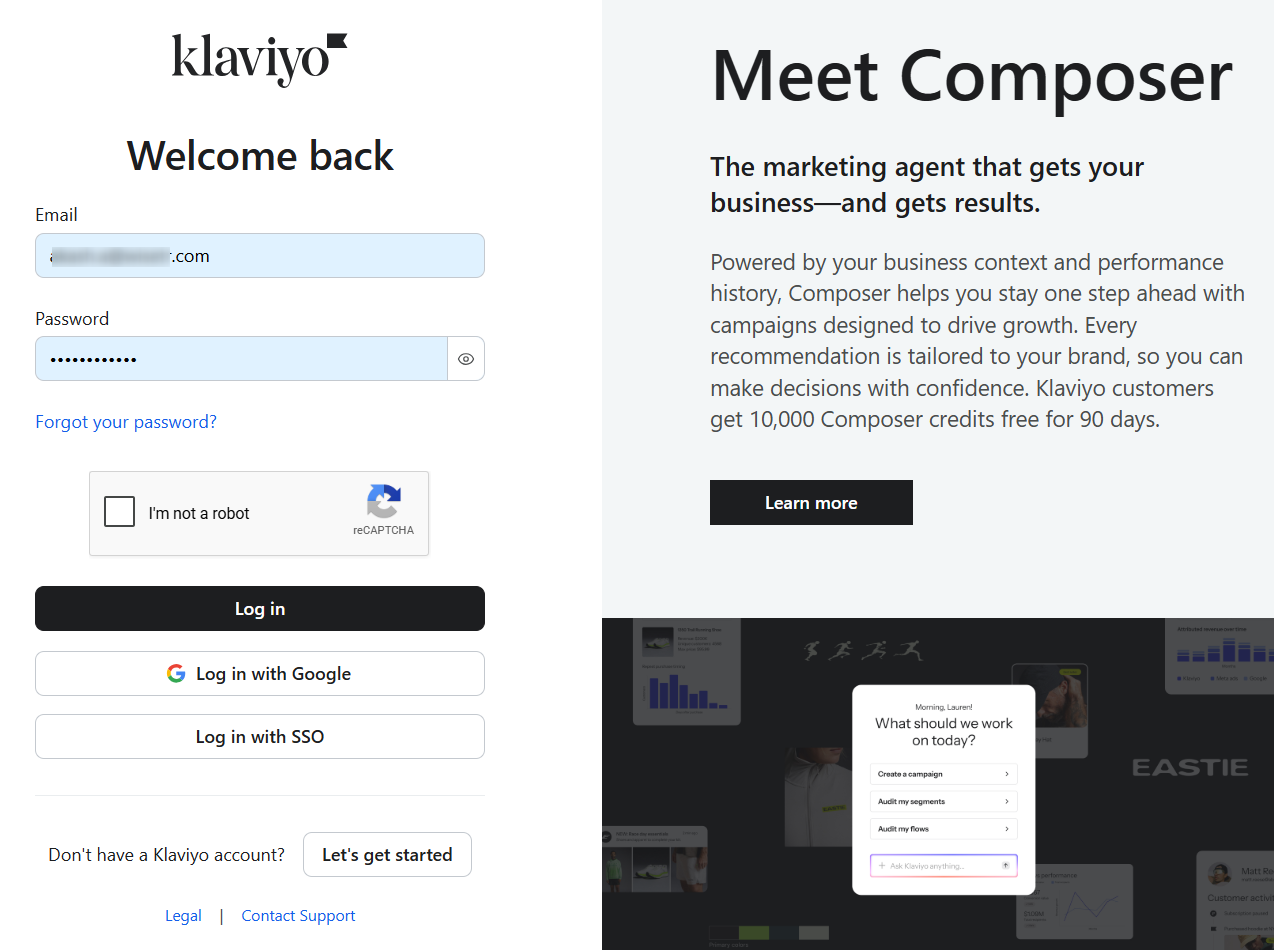
You’ll get directed to your Klaviyo dashboard.
Step 2: Create a private API key and copy it
From your account and click on ‘Settings’.
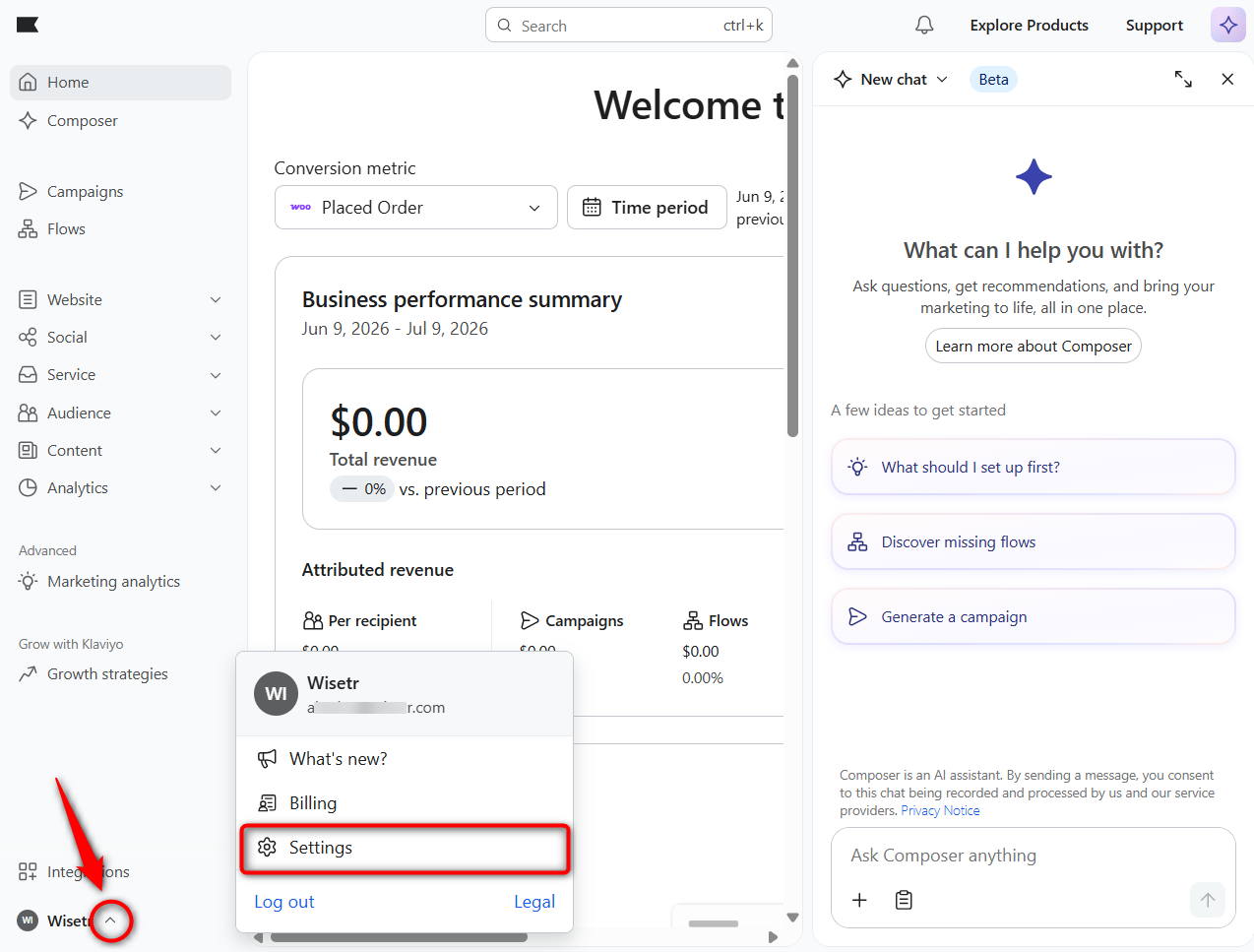
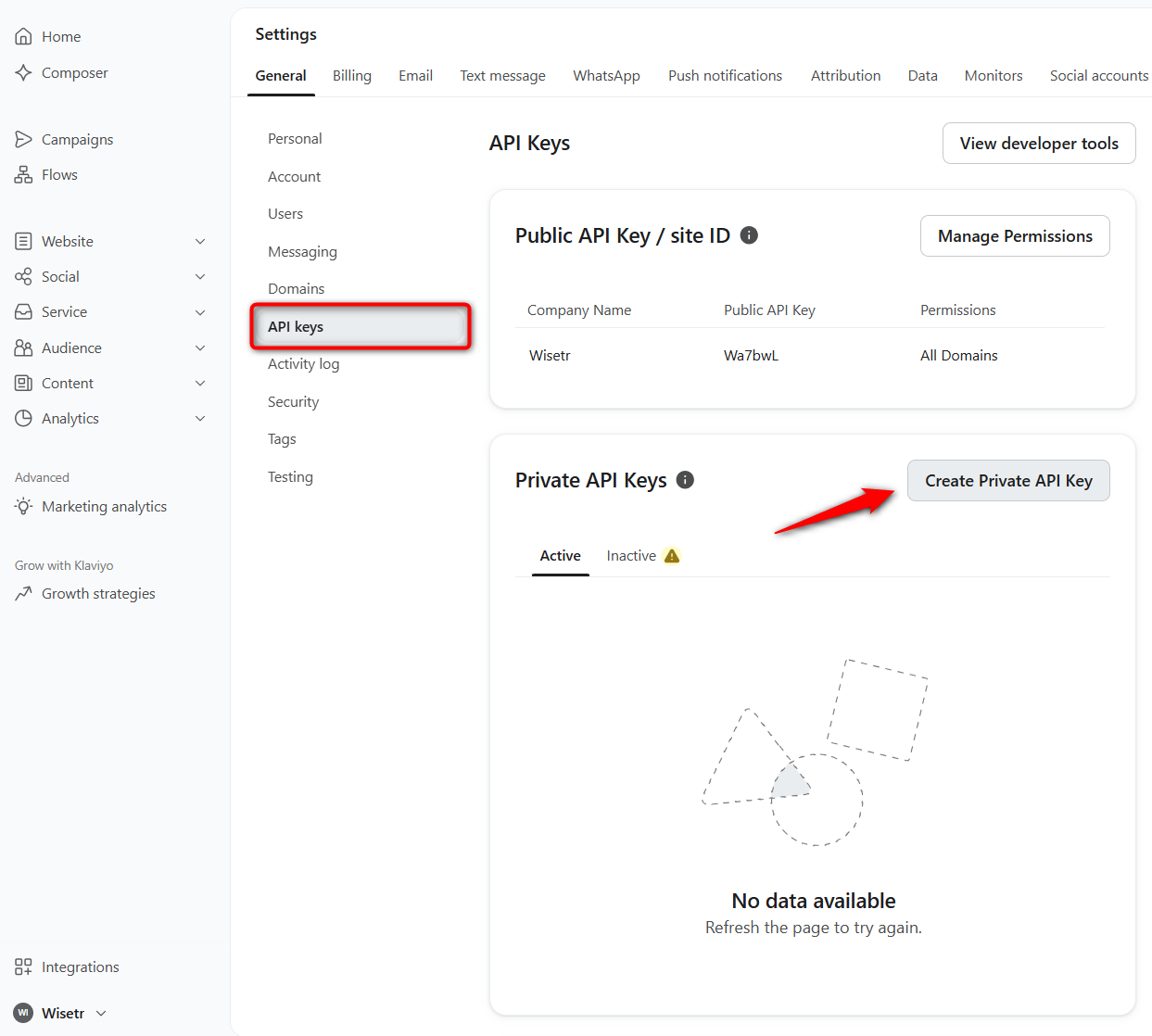
Under General settings, click on the API Keys tab.
Then, click on the ‘Create Private API Key’ button.
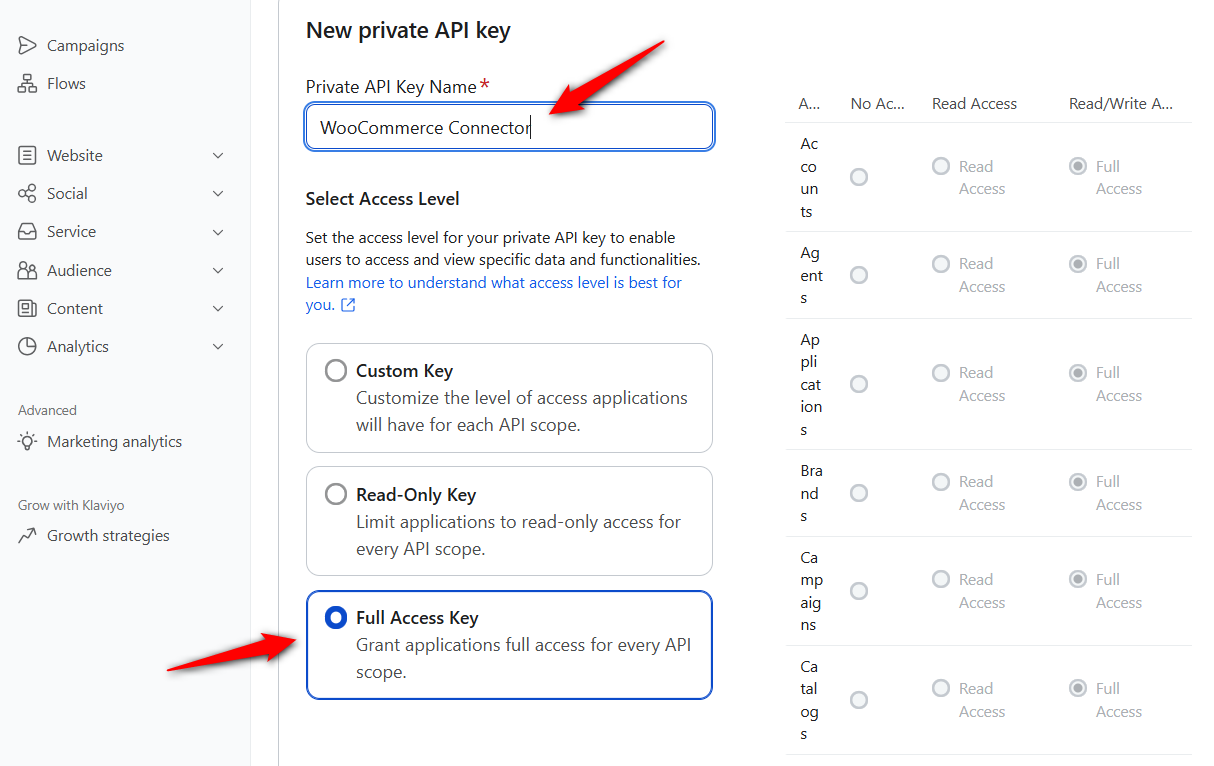
Make sure to enter the name of your API key and select the access level.
For this time, we’ve provided full access to the API key.
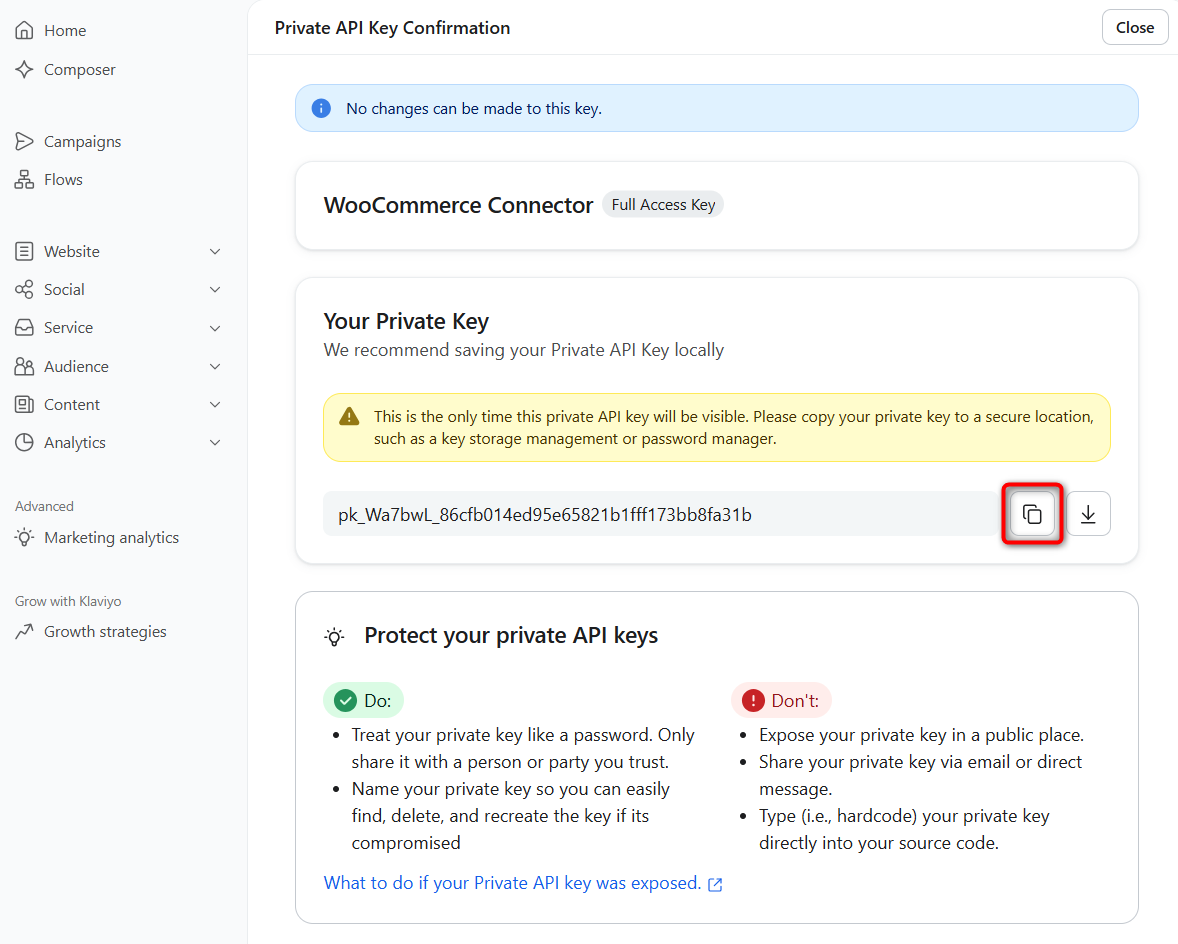
Click on ‘Create’ when done.
Copy your private API key from here.
Step 3: Paste the API key into FunnelKit Automations
Go to the Connectors tab within FunnelKit Automations and click ‘Connect’ under Klaviyo.
Next, paste your copied API Key here.
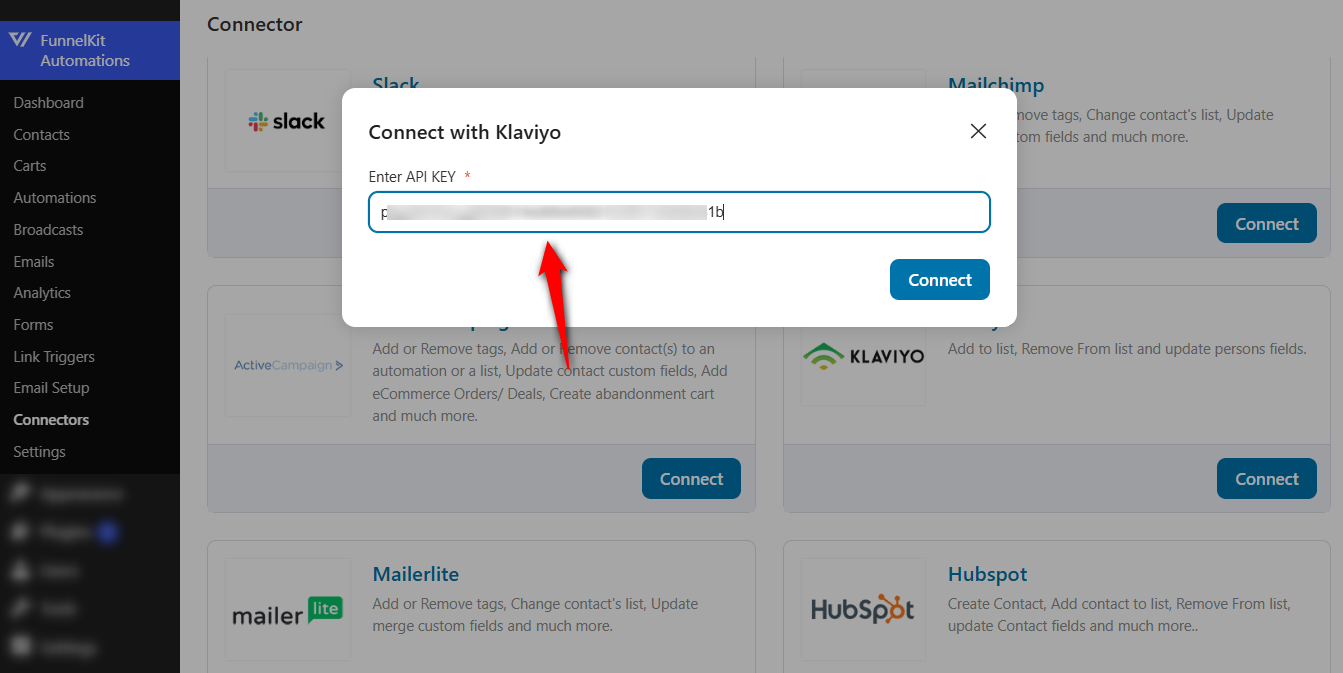
This will successfully connect Klaviyo to your WooCommerce store via FunnelKit Automations.
8 Must-Have WooCommerce Automation Use Cases for Klaviyo Integration
There are some automations that every business should have in place to ensure smoother operations and a better customer experience.
These are the best Klaviyo flows for WooCommerce stores, and you can start setting them up now that you've successfully integrated Klaviyo and WooCommerce.
1. Sync every new WooCommerce customer to a Klaviyo list
Let’s start with the automation every store needs. Each paying customer joins your main Klaviyo list automatically.
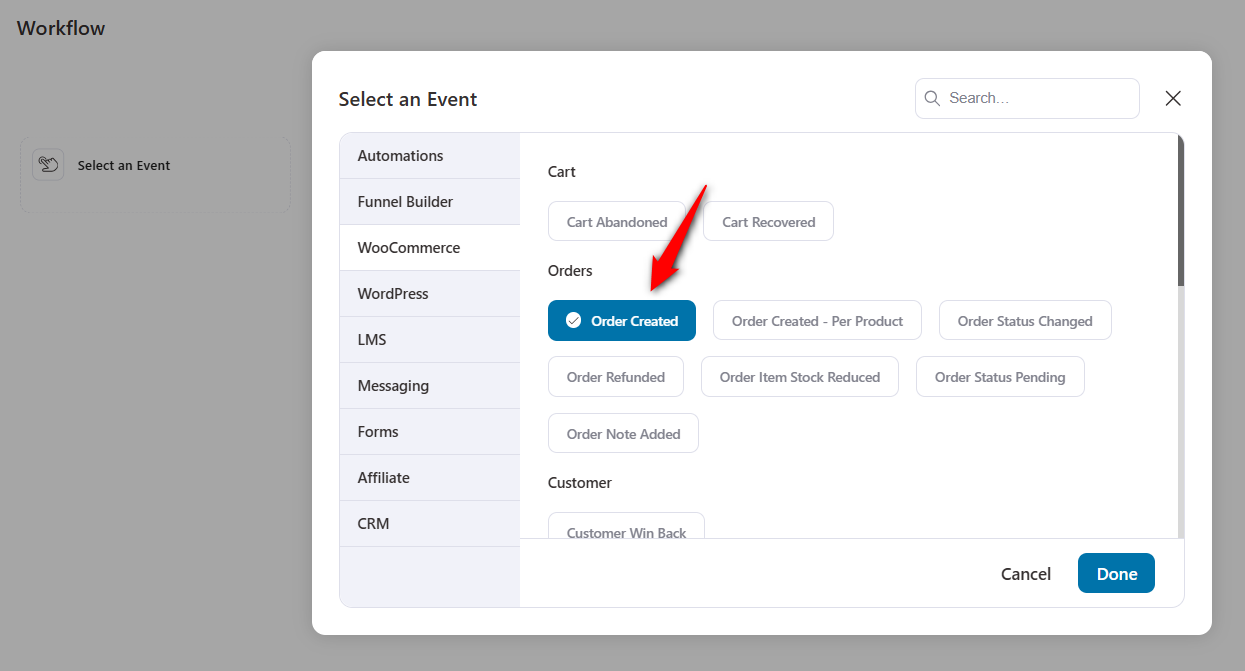
In FunnelKit Automations, create a new automation with the WooCommerce Order Created trigger.
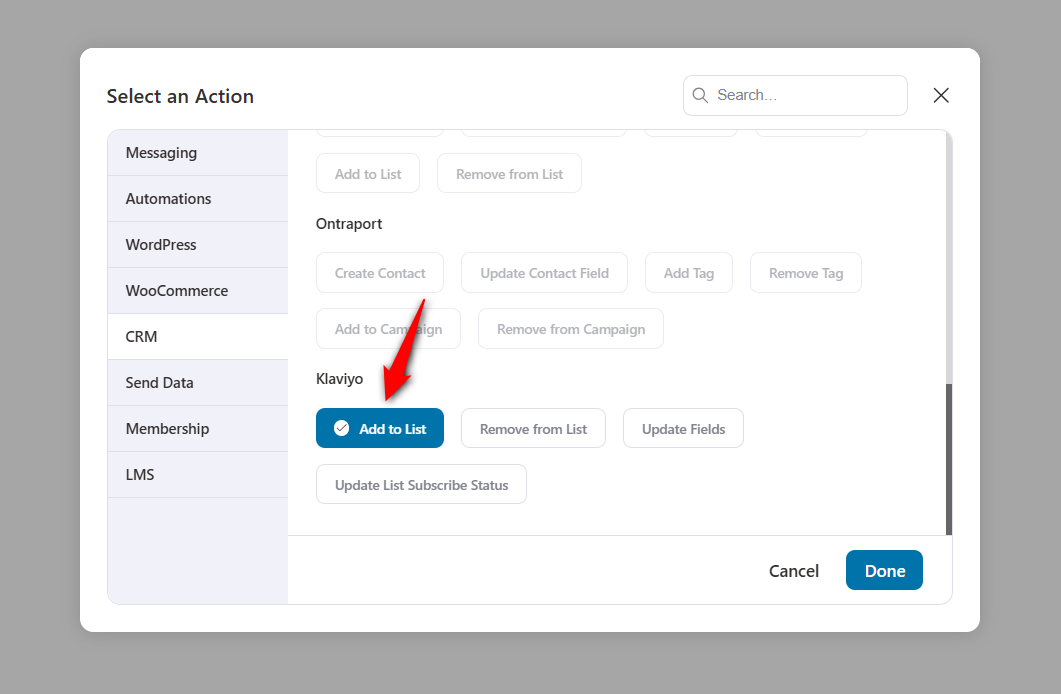
Select the ‘Add to List’ action under Klaviyo.
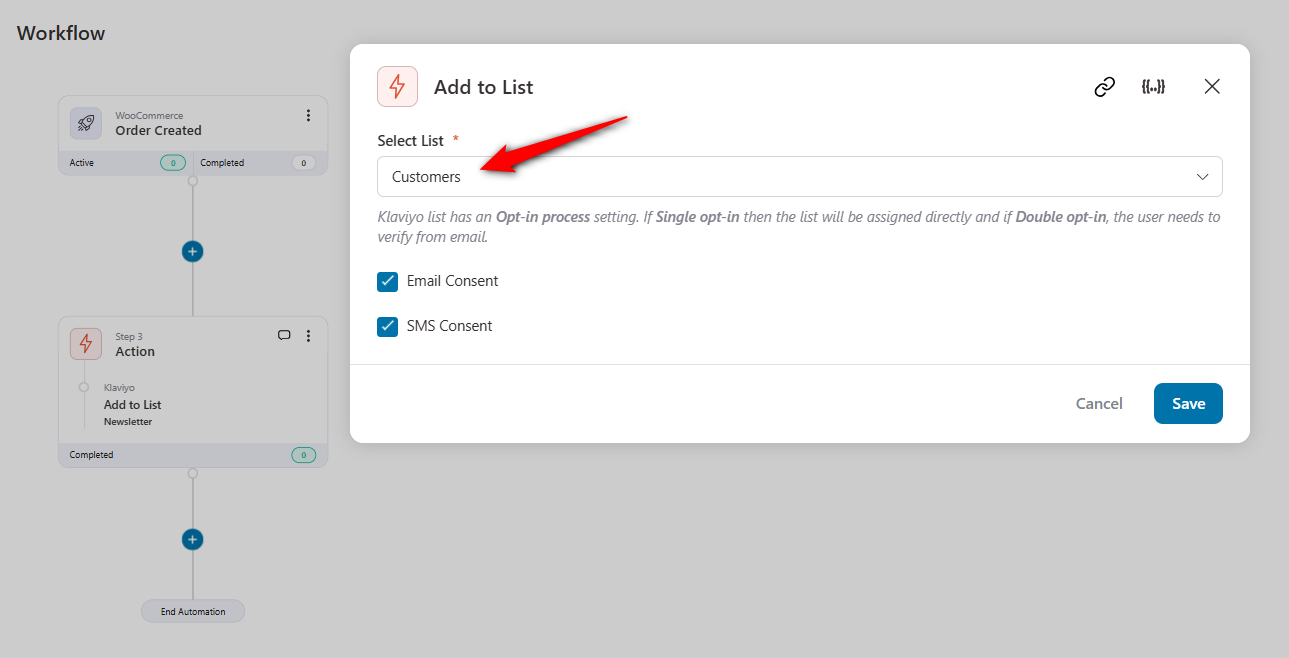
Name the destination list, and pass consent along if the list will feed SMS campaigns later.
Switch the automation on.
From now on, every order in your store quietly grows your Klaviyo list, with no exports or CSV files required.
2. Feed Klaviyo’s cart recovery with live cart capture
Most of your potential revenue walks away before paying. That’s why the abandoned checkout flow should be the first automation you build.
Klaviyo’s tracking only sees identified visitors, so plenty of abandoned guest carts slip past it entirely.
FunnelKit Automations captures a cart the instant a shopper types their email at checkout, whether they're logged in or not.
Build an automation with the Cart Abandoned trigger, then point Klaviyo’s ‘Add to List’ action at a dedicated “Cart Abandoners” list.
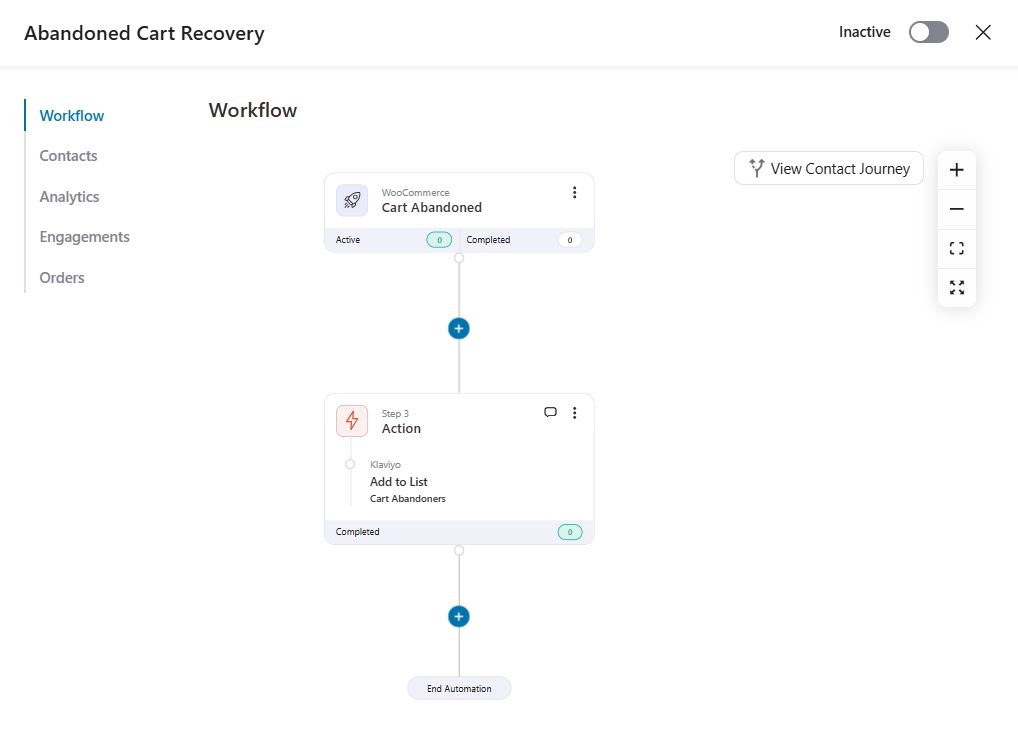
Over in Klaviyo, a list-triggered flow takes it from there and sends your recovery sequence.
Keep one housekeeping step in mind. Create a second automation with the Order Created trigger and the ‘Remove from List’ action, so buyers exit the abandoners list the moment they pay.
You can also skip the round trip and let FunnelKit Automations send the recovery emails itself. Either way, those invisible guest carts finally get chased.
3. Move leads to a customer list the moment they buy
Few things annoy a new customer like a “Still thinking it over?” email arriving the day after they bought.
This automation makes that impossible.
Trigger on Order Created, then stack two Klaviyo actions: ‘Remove from List’ to pull the contact off your prospects list, and ‘Add to List’ to place them on your customers list.
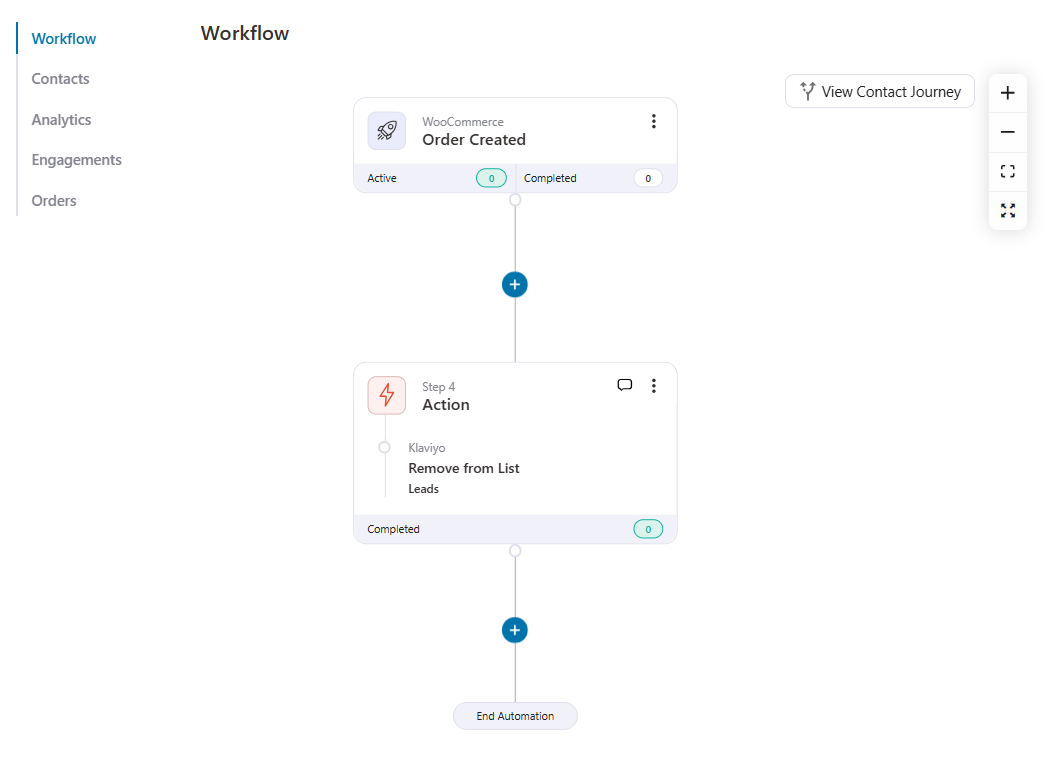
One automation, two actions, and your Klaviyo nurture campaigns stop chasing people who already said yes.
4. Separate first-time buyers from repeat customers
A first purchase and a fifth purchase deserve very different follow-ups.
Start with the ‘Order Created’ trigger and add a conditional split on the customer’s order count.
First-timers flow into a “First-time Buyers” list through ‘Add to List’, while anyone with previous orders lands on “Repeat Customers”.
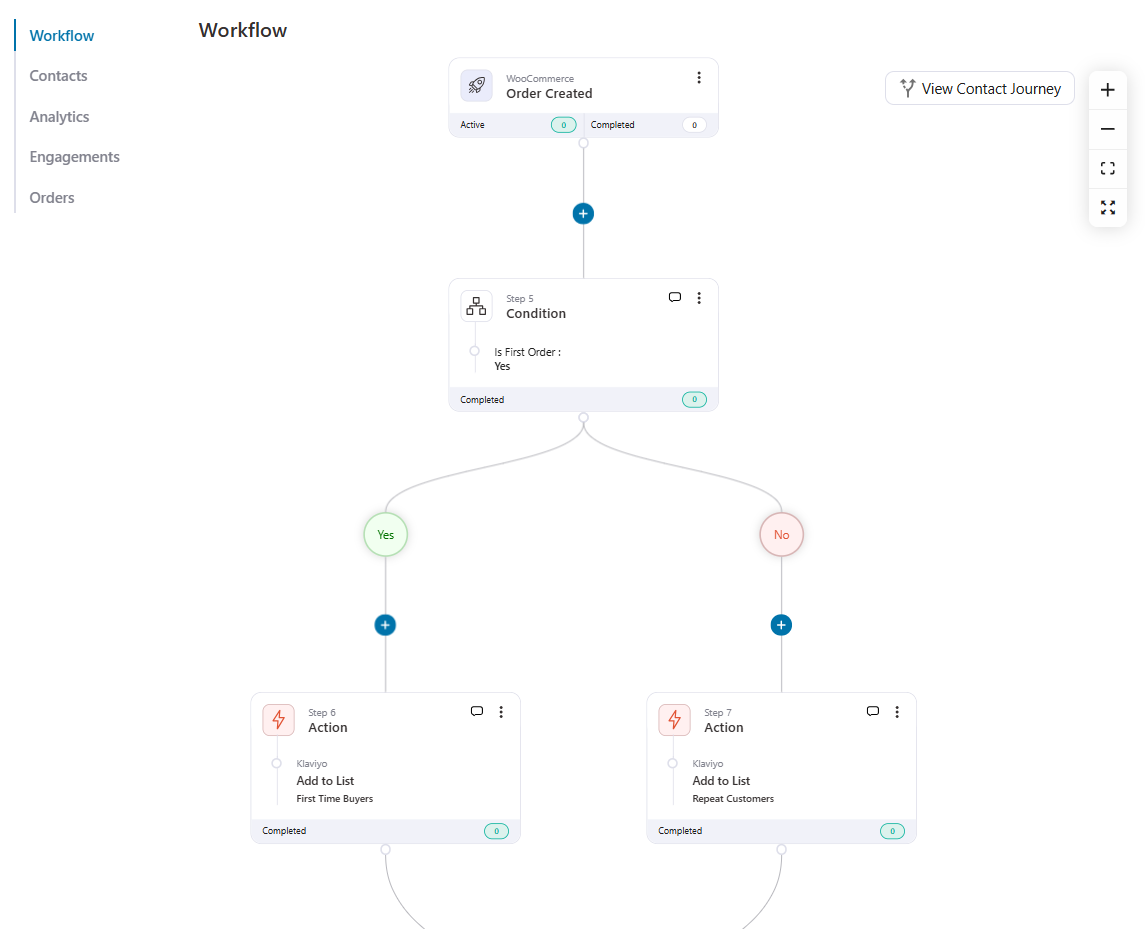
In Klaviyo, the first group gets an onboarding-style nurture while the second gets loyalty rewards and launch announcements.
The payoff is measurable because segmented campaigns pull in 760% more revenue than one-size-fits-all blasts.
5. Build product-interest lists for replenishment and launches
Someone who bought your coffee beans is the ideal audience for a restock reminder and your next roast announcement.
Trigger on Order Created and add a condition checking that the order contains your target product or category.
Then use ‘Add to List’ to grow a product-interest list in Klaviyo.
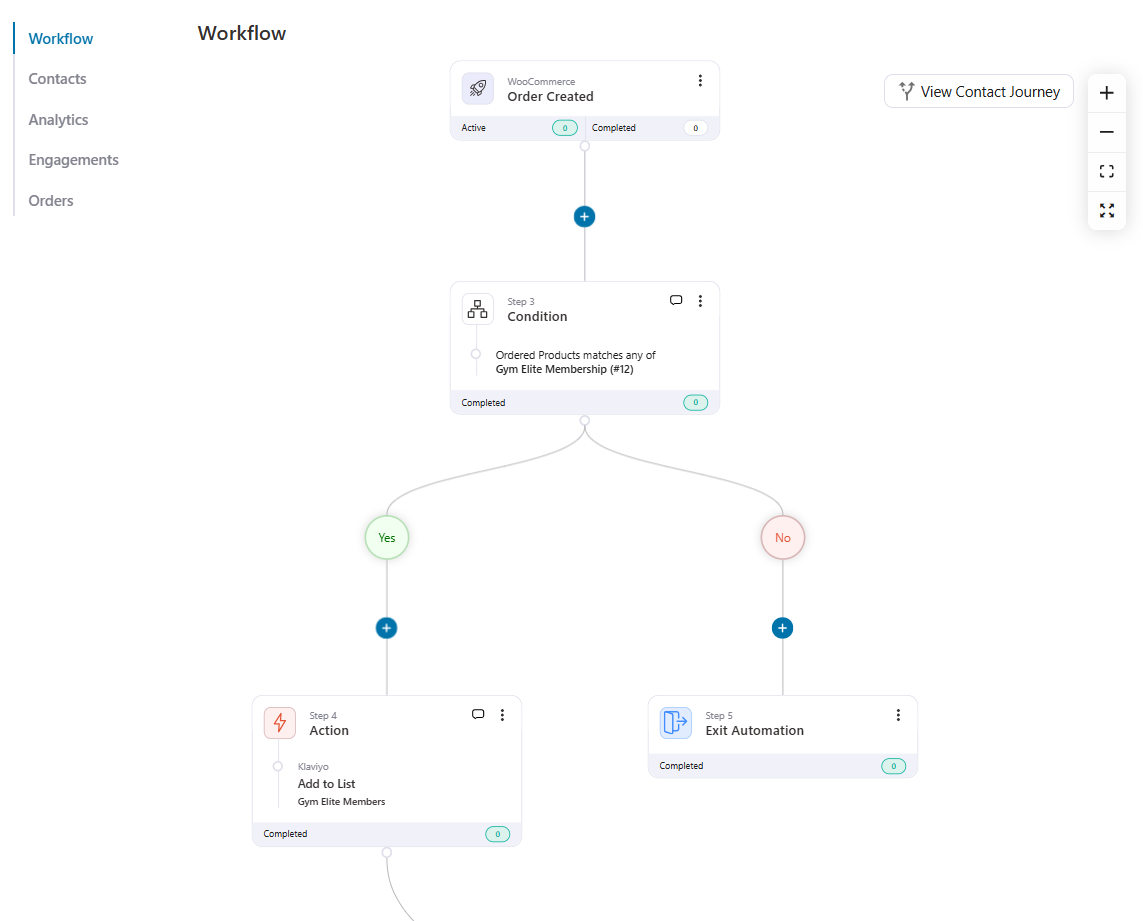
This kind of product-based segmentation runs itself. Every relevant order expands the audience, and the Klaviyo campaigns you send to that list stay perfectly targeted.
6. Flag VIP customers the moment they qualify
Your top spenders shouldn’t wait for a quarterly export to get VIP treatment.
Add a condition on order value or lifetime spend to an Order Created automation, and route qualifiers to a Klaviyo VIP list with ‘Add to List’.
Want richer targeting? Stamp a loyalty tier onto their profile with the ‘Update Fields’ action at the same time.
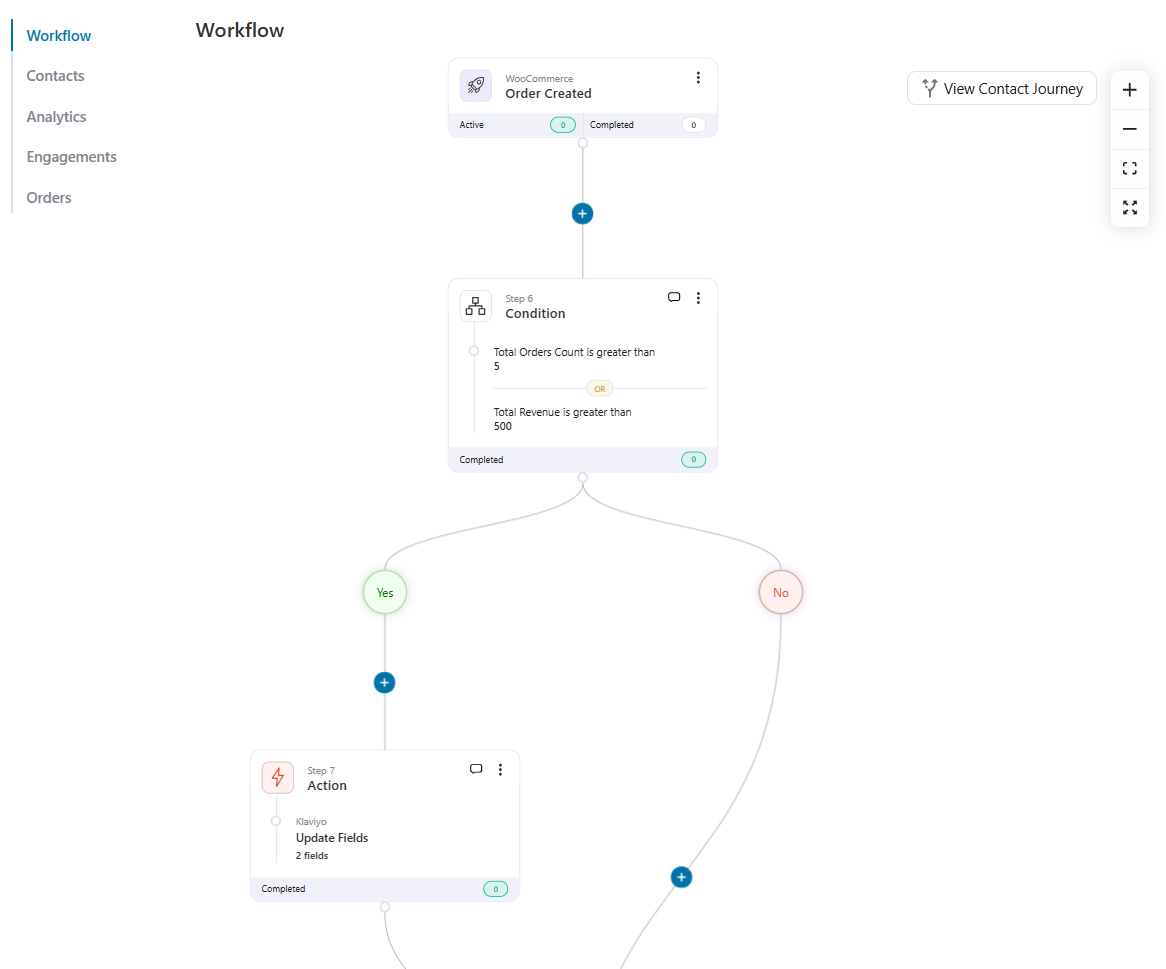
Early access, exclusive drops, and thank-you perks in Klaviyo now reach the right people from day one.
7. Turn any WordPress form into a Klaviyo signup source
Klaviyo’s built-in forms are fine, but your lead magnets may already run on WPForms, Gravity Forms, or Elementor.
FunnelKit Automations listens to those form plugins natively.
Create an automation using your form plugin’s submission trigger. Then chain ‘Add to List’ with ‘Update List Subscribe Status’ so each contact lands in Klaviyo with the correct consent state.
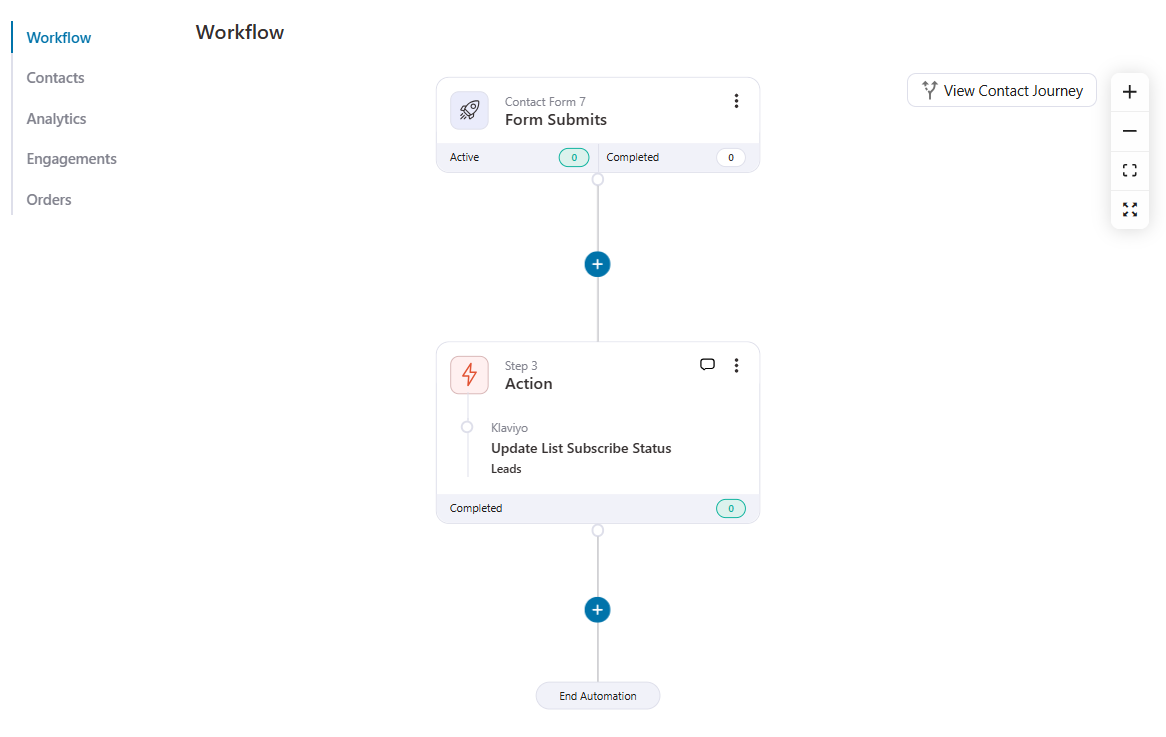
A list-triggered welcome flow in Klaviyo picks things up from there, and every form on your site quietly feeds your list.
8. Remind users about product subscription renewals
WooCommerce Subscriptions renewal data never reaches Klaviyo, so renewal reminders are off the table with the official plugin alone.
FunnelKit Automations closes that gap. It plugs into WooCommerce Subscriptions and Sublium directly, unlocking automations for:
- New subscription orders
- Renewal reminders before the charge date
- Failed renewal payment recovery
- Trial-ending notifications
- Expiring card alerts
- Subscription status change updates
To build a subscription reminder email, pick the ‘Subscription Before Renewal’ trigger.
Set how many days before renewal it should fire, write your reminder, and activate.
Our full guide to WooCommerce subscription emails covers every variation.
Would you rather keep sending from Klaviyo? Use the same trigger with the Update Fields action to push the renewal date into a Klaviyo profile property, then let a date-based Klaviyo flow handle the reminder.
Either way, the renewal data Klaviyo’s own plugin misses finally reaches your emails.
8 Best Practices to Get the Most Out of Your WooCommerce Klaviyo Integration
Setup is done and your first flows are live. These habits keep the whole system profitable.
- Get consent before you market
Only sync shoppers who ticked the checkout checkbox, and keep your opt-in wording plain. GDPR and TCPA penalties cost far more than a slightly shorter list.
- Ask for SMS permission too
The same checkout flow can capture text-message consent. A phone number gives you a second shot at recovering carts and announcing flash sales.
- Prune your profiles quarterly
Every active profile counts toward your Klaviyo bill, engaged or not. Suppressing dead contacts cuts costs and lifts deliverability in one move.
- Never blast your whole list
You’re syncing rich purchase data now, so use it. First-timers, regulars, and category buyers each deserve their own message.
- Make every email feel personal
Merge tags can pull in first names, cart contents, and product images. A generic “You left something behind” converts far worse than “Your [product] is waiting!”.
- Put limits on every coupon
Single-use codes with expiry dates stop leaks to coupon aggregator sites and create honest urgency.
- Re-test after every site change
A new caching plugin or firewall rule can silently sever the connection. One test order after major changes catches it early.
- Judge flows by revenue, not opens
Apple’s privacy features inflate open rates. Attributed orders and revenue tell the real story, so optimize toward those.
Frequently Asked Questions (FAQs)
Still have questions about connecting Klaviyo and WooCommerce? These are the ones we hear most.
Yes, you can integrate Klaviyo with WooCommerce for free. The official plugin is a free download from both the WordPress plugin directory and the WooCommerce Marketplace.
On Klaviyo’s side, the free plan includes 250 active profiles and 500 email sends a month, which is plenty for testing the full setup before spending anything.
Paid plans open at $20 per month for up to 500 active profiles, climbing to roughly $100 at 5,000 profiles and $400 at 25,000.
And since early 2025, billing counts every active profile in your account, not just the ones you email, so a clean list literally saves you money.
Start with the five that pay fastest.
- An abandoned checkout flow triggered by Started Checkout
- Welcome series for new subscribers
- Post-purchase flow with a review request timed after delivery
- Browse abandonment flow that doubles as a product recommendation email
- 90-day winback campaign
Klaviyo ships pre-built templates for each, so these best Klaviyo flows for WooCommerce stores take minutes to launch.
You can even route transactional emails like order confirmations through Klaviyo for consistent branding.
Check these three things if your WooCommerce Klaviyo integration is not working:
- Permalinks are enabled in WordPress (authentication fails without them)
- Caching and redirect plugins are temporarily off
- Your SSL certificate is valid, since Klaviyo only talks to HTTPS sites
If onsite events like Added to Cart are missing, remember they only record identified visitors, so subscribe through one of your own forms before testing.
This same rule explains most abandoned cart flows not triggering.
If orders or customers aren’t syncing at all, a firewall or Cloudflare’s Bot Fight Mode is usually blocking Klaviyo’s requests, so allowlist Klaviyo's integration IPs and test again.
Give the first historical sync a few hours on stores with large order archives.
No, Klaviyo doesn’t sync WooCommerce Subscriptions data out of the box.
Renewal events and next payment dates never reach Klaviyo, and Klaviyo itself points users to Tribe’s third-party plugin for basic subscription events like purchases and cancellations.
For proper renewal reminders, FunnelKit Automations connects to WooCommerce Subscriptions and Sublium directly, as Use Case #8 shows.
Yes, Klaviyo is still very much relevant for WooCommerce stores.
Woo named Klaviyo its preferred marketing automation partner in 2025, over 15,000 Woo brands run the integration, and the extension keeps pace with modern WooCommerce features like HPOS and checkout blocks.
The same plugin works. You'll miss the ecommerce events, naturally, but sign-up forms, identified visitor tracking, and list syncing all function on any WordPress site.
Start Running Smarter WooCommerce Email Campaigns Today!
A working WooCommerce Klaviyo integration means every email you send is backed by real purchase behavior instead of guesswork.
Connect the plugin, wire up FunnelKit Automations, and launch the list-building, cart recovery, and renewal automations above, and your WooCommerce email marketing compounds quietly in the background.
For everything Klaviyo can’t reach natively. Think subscription renewal reminders, personalized expiring coupons, and workflows that never leave WordPress; FunnelKit Automations fills in the missing pieces.
The two platforms work as a team, as all eight use cases above showed.
Grab FunnelKit Automations and build the automation stack your store deserves.
Editorial Team
September 30, 2026Quick answer: A quiz funnel is a multi-step interactive path that replaces a static lead form where visitors answer 5-8 questions, opt in with their email, and receive a personalized...
Editorial Team
September 30, 2026A WooCommerce HubSpot integration takes about 15 minutes to set up, but getting the sync right can take much longer. In April 2026, a store owner posted in the HubSpot...
Editorial Team
September 29, 2026WooCommerce cart abandonment is easy to miss because it doesn’t show up clearly in your dashboard. A shopper adds products to their cart, enters their email at checkout, and closes...