


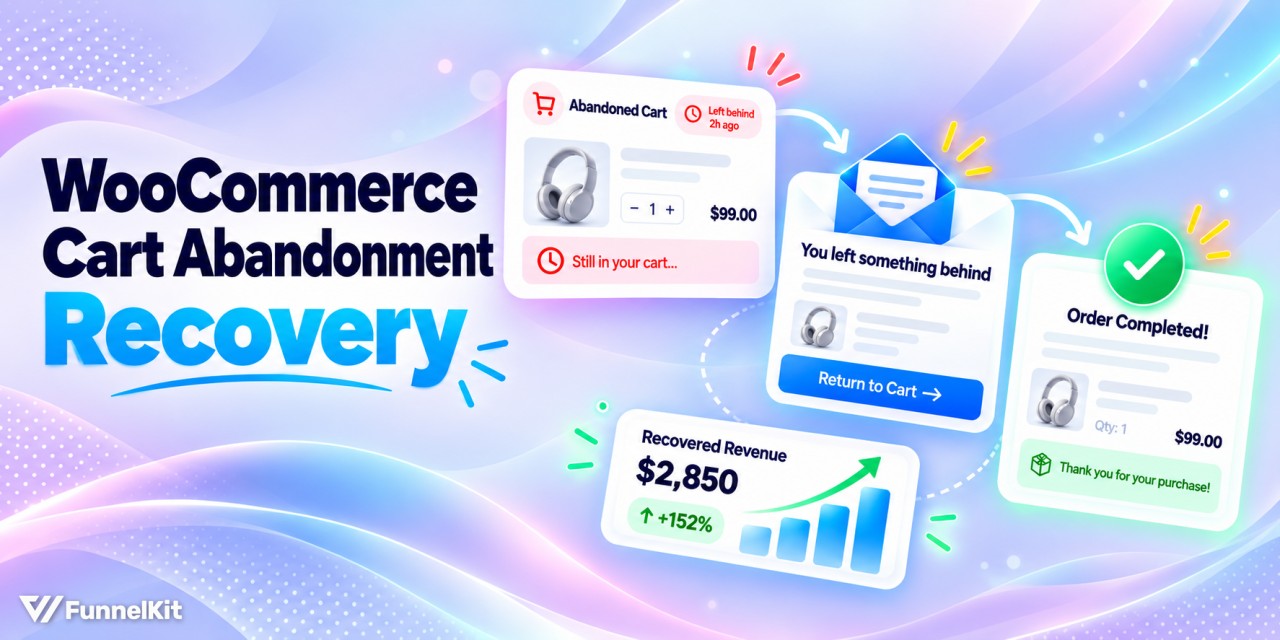
WooCommerce cart abandonment is easy to miss because it doesn’t show up clearly in your dashboard.
A shopper adds products to their cart, enters their email at checkout, and closes the tab right before paying.
Without the right setup, you may never know they were there.
Seven in ten carts never become orders. The precise figure is 70.22%, drawn from a meta-analysis of 50 separate studies (Baymard Institute).
The two jobs that matter here are to shrink the leak first, then catch what still gets through.
This guide covers which plugin fits your store, a 10-minute setup, the three emails to send, and how to capture more addresses before shoppers leave.
After that, we'll cover the checkout fixes that stop carts from leaking in the first place.
We will also cover plugin options and why recovery emails so often fail to send at all.
Click here to jump straight to the step-by-step process
Quick answer: WooCommerce doesn’t track or recover abandoned carts on its own. You need a plugin that saves the cart and the shopper’s email as they enter it at checkout, then sends reminders at set times.
Free options include FunnelKit Automations and Abandoned Cart Lite. Use a simple three-email sequence that works well here.
Send a plain reminder about an hour after they leave, follow up after 24 hours with reviews, delivery, and return information, then send a final email at 72 hours with an expiring offer for first-time buyers.
Watch this quick tutorial to recover lost sales and boost revenue with a highly profitable abandoned cart recovery system:
Table of Contents
- 1 Does WooCommerce Track Abandoned Carts? No, Here’s Where They Go
- 2 How to Set Up Abandonment Recovery in WooCommerce
- 3 Which Abandoned Cart Plugin Fits Your WooCommerce Store?
- 4 Components to Include in Your Smart Revenue Recovery System
- 5 How to Track and Measure Abandoned Carts and Recovery in WooCommerce?
- 6 How to Capture More Emails Before Shoppers Leave
- 7 What Causes Cart Abandonment in WooCommerce? 7 Reasons and the Fix for Each
- 8 Recovery Emails Not Sending? 4 Fixes
- 9 Frequently Asked Questions
- 10 Final Thoughts: Turn WooCommerce Abandoned Carts into Recovered Revenue
Does WooCommerce Track Abandoned Carts? No, Here’s Where They Go
WooCommerce doesn’t have an abandoned cart screen.
The closest thing you’ll find in the dashboard is the order list, but that tracks completed and incomplete orders, not carts that shoppers left behind.
Abandoned cart vs. abandoned checkout vs. failed order
| Type | What happened | How you reach the shopper |
|---|---|---|
| Abandoned cart | Added items, left before checkout. No order record. | Only if you captured an email earlier: a logged-in account or a popup |
| Abandoned checkout | Started the checkout form, left partway. No order record. | A recovery plugin, if it saved the email as it was typed |
| Failed or pending order | Clicked Place order, but payment didn’t complete. The order shows under WooCommerce ⇨ Orders. | Follow up directly from the order |
For shoppers who started checkout but left midway, there's a chance to recover the sale (second category)
But that only works if something captured her email while she was filling out the form.
A failed order is different because the shopper reached the payment step. If you’re seeing those, check your payment gateway logs before sending an abandoned cart email.
Why GA4 won’t show abandoned carts either
GA4 doesn’t have an abandoned cart report either. You can estimate abandonment by comparing sessions that triggered begin_checkout with those that triggered purchase.
Google lists begin_checkout as a recommended event, so it isn’t sent automatically.
WooCommerce needs a GA4 integration for WooCommerce that sends the event.
Even then, GA4 can show you the drop-off rate, but it won’t tell you what was in the cart or give you an email address to contact.
That’s where a recovery plugin comes in. It creates the record WooCommerce doesn’t have by saving the cart and capturing the shopper’s email while they’re still on the checkout page.
What abandoned carts are costing your store
Below 70% puts you ahead of the average, and a well-optimized checkout can realistically reach 55% to 60%.
Vertical matters more than the global figure, since grocery sits near 61% while finance and travel run above 80%.
Here is the same problem in revenue terms, at a 70% abandonment rate:
| Monthly checkout sessions | AOV | Carts abandoned | Recovered at 5% | Recovered at 15% |
|---|---|---|---|---|
| 1,000 | $50 | 700 | $1,750 | $5,250 |
| 5,000 | $50 | 3,500 | $8,750 | $26,500 |
| 10,000 | $100 | 7,000 | $35,000 | $105,000 |
A well-tuned three-email sequence lands most stores in the 5% to 15% band. Anyone quoting 30% is quoting a best case, usually from a high-AOV store with a warm list.
Run the middle column against your own numbers before you spend another dollar on traffic.
For most stores, the recovery sequence pays for the plugin in the first month, and the checkout fixes below pay for themselves permanently.
How to Set Up Abandonment Recovery in WooCommerce
To capture abandoned carts and send recovery emails without touching code, we will use FunnelKit Automations.
It captures the shopper’s email as they type it at checkout, records the cart contents and value, and runs a timed sequence if the order is never placed.
FunnelKit Automations has a free version on WordPress.org that includes cart tracking and a working email sequence, which is enough for everything below.
The Pro plan starts at $99.50 per year and adds SMS, conditional rules, dynamic coupons, and split-path testing.
We will build this around one running example: a store selling a makeup value set, where the shopper reaches checkout, types their email, and closes the tab.
Step 1: Enable cart tracking and set the abandonment window
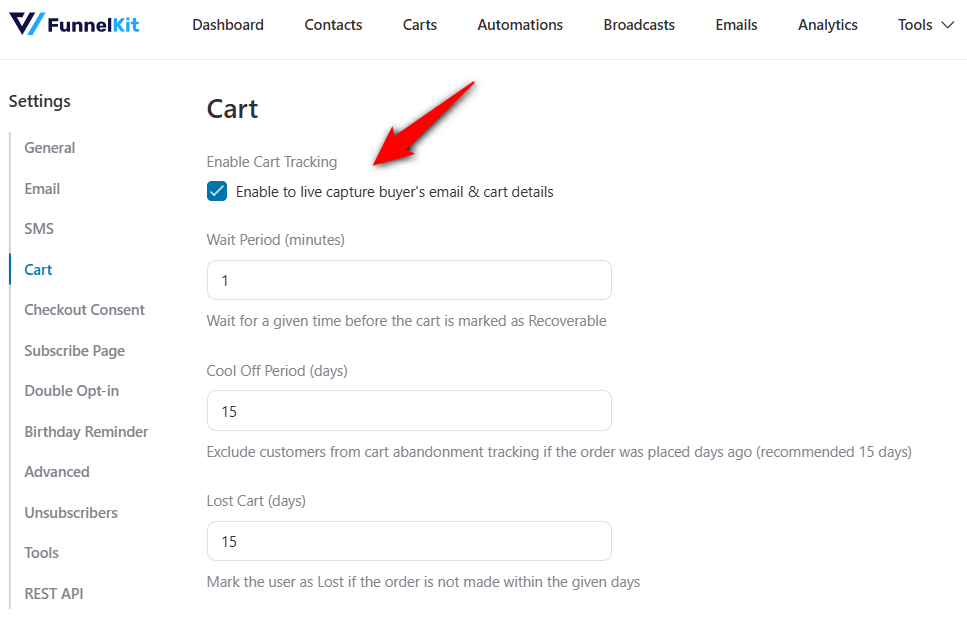
Go to FunnelKit Automations ⇨ Settings ⇨ Carts and switch on cart tracking. Nothing is recorded until this is on, so check it before building anything else.
Cart tracking captures the email address on keystroke rather than on submit, along with the shopper’s name, the products in the cart, and the cart total.
That distinction is what makes our makeup value set shopper recoverable at all. They never placed an order, so WooCommerce has no record of them.
Step 2: Create the cart abandoned automation
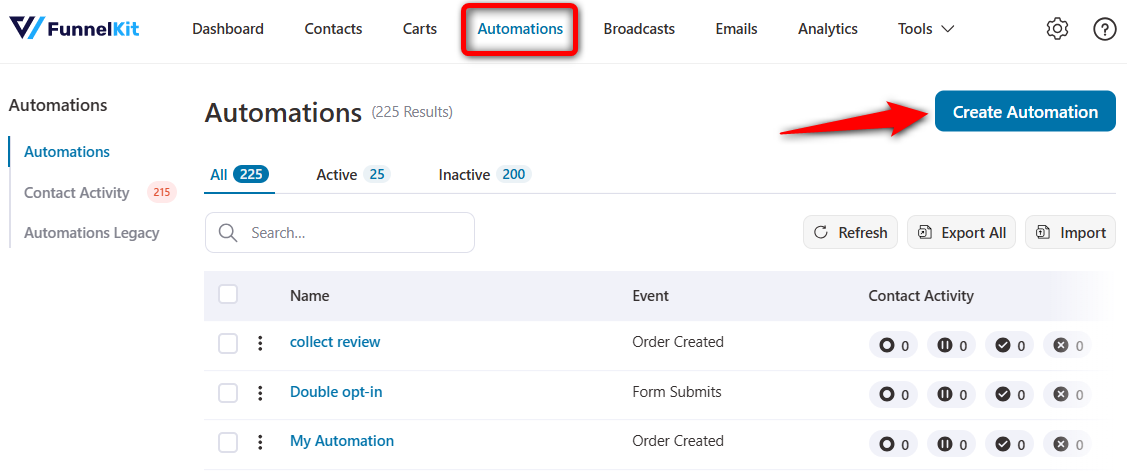
Go to the ‘Automations’ section in FunnelKit Automations and hit the ‘Create Automation’ button.
Click on ‘Start from scratch’ rather than importing a recipe, so you can see how each piece connects.

Name your automated campaign: ‘WooCommerce cart abandonment recovery’.
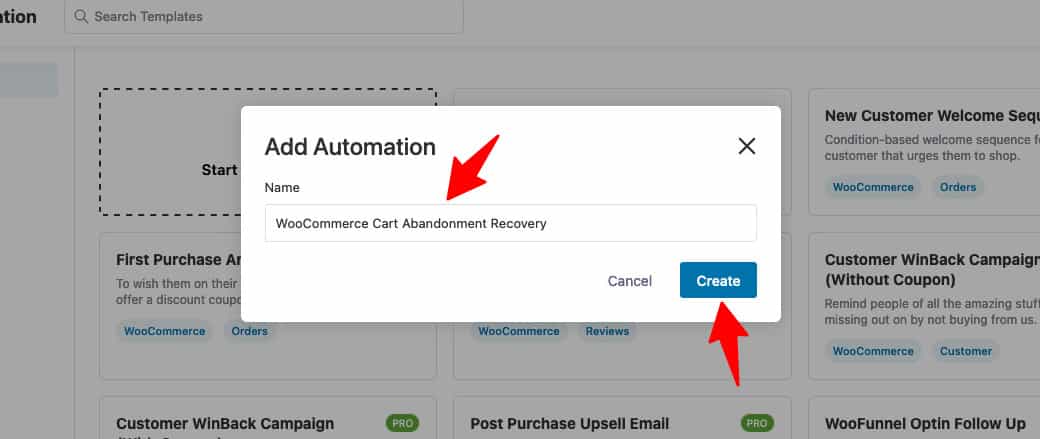
Clicking on ‘Create’ will set up a new automation campaign and redirect you to the workflow window.
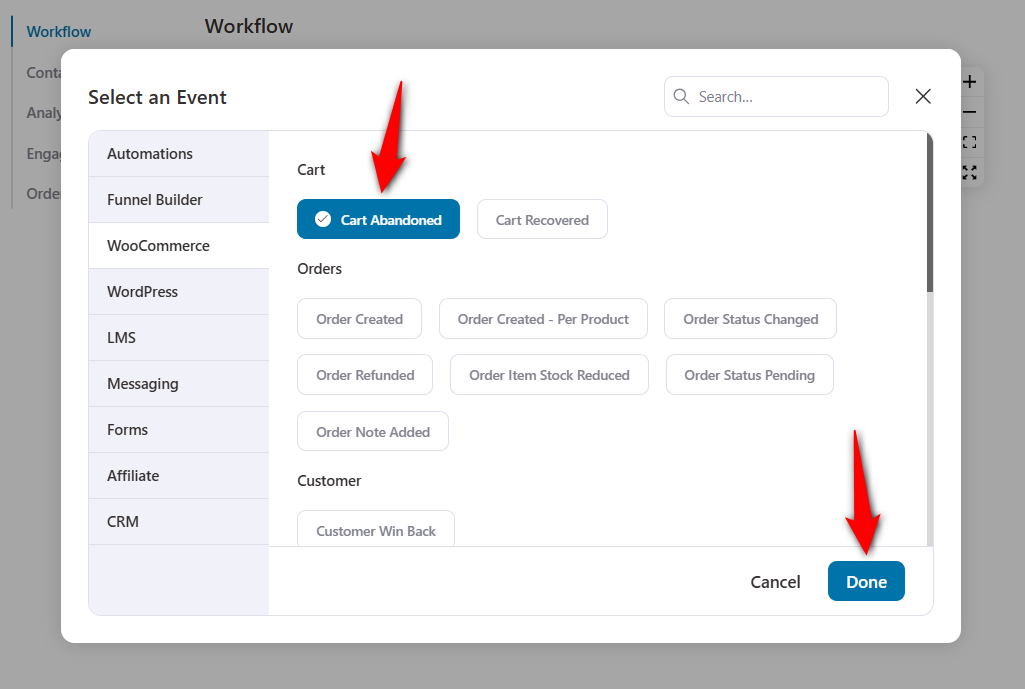
Hit 'Select an Event' and select the 'Cart Abandoned' trigger from the WooCommerce tab.
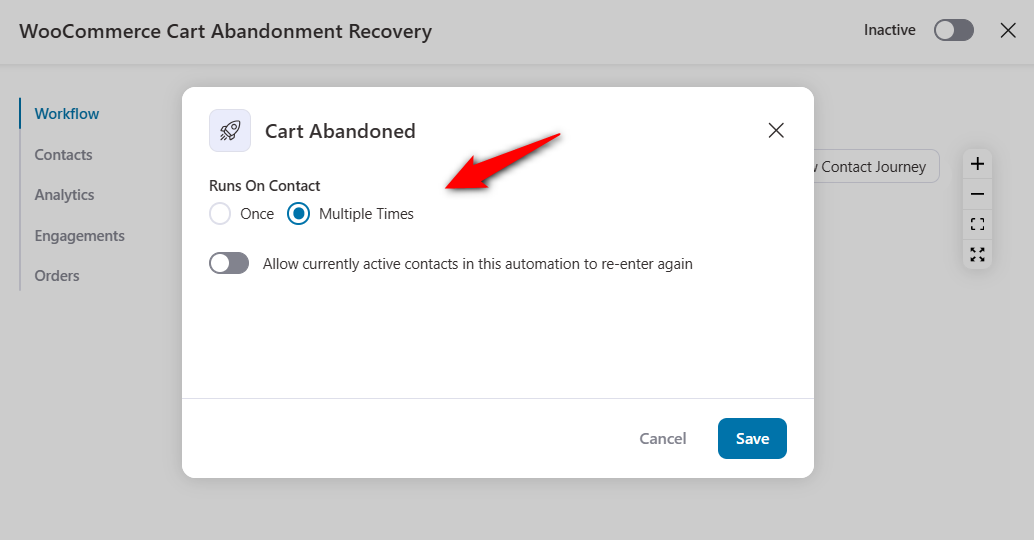
Configure this event by clicking on it and selecting ‘Multiple Times’ under the number of runs.
Leave the default toggle so that a repeat shopper who abandons a second bag never enters the sequence again.
Step 3: Add a delay before the first email
Click on the plus (+) icon and add a ‘Delay’ step.
This is the gap between the cart being marked abandoned and the first reminder arriving.
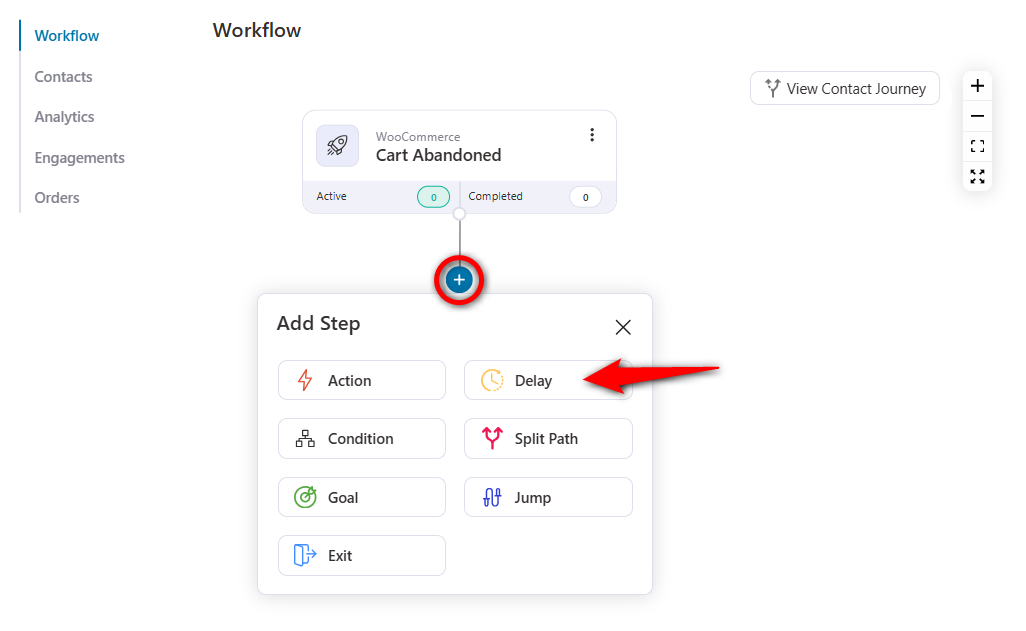
Set it to 30 minutes for most stores.
If you set it up shorter, you'll email someone who is still deciding in another tab. If you put it much longer, you'll miss the window where the bag is still on their mind.
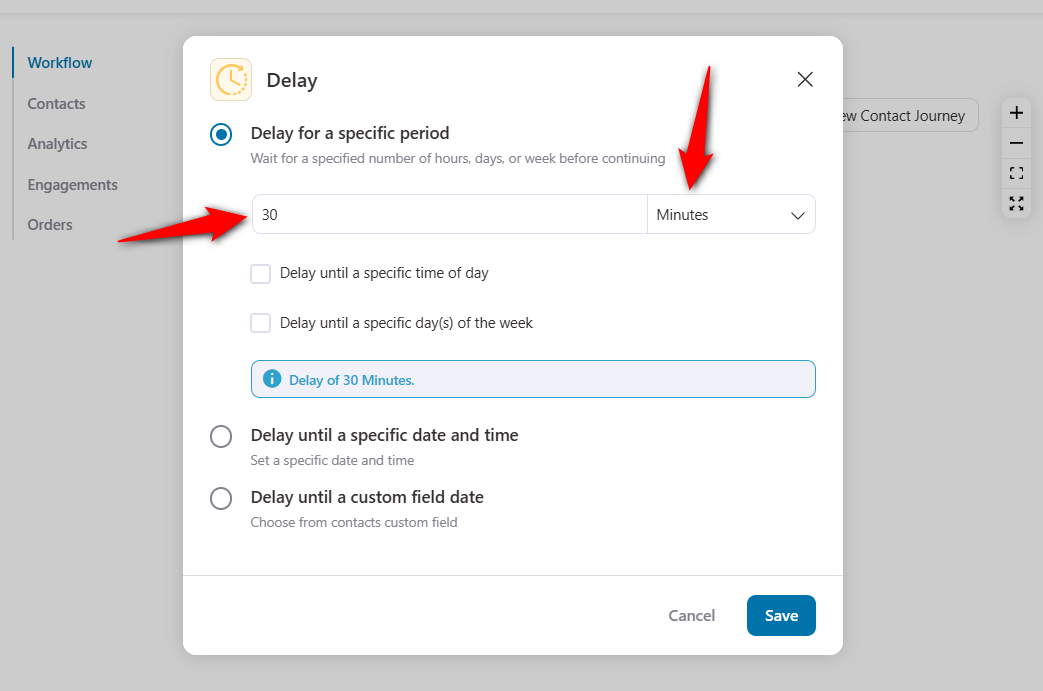
Note that this delay stacks on top of the abandonment threshold in your cart settings, so a 15-minute threshold plus a 30-minute delay puts the email in the inbox about 45 minutes after they left.
Step 4: Write the recovery email
To specify the send email action, click on the (+) icon and hit ‘Action’.
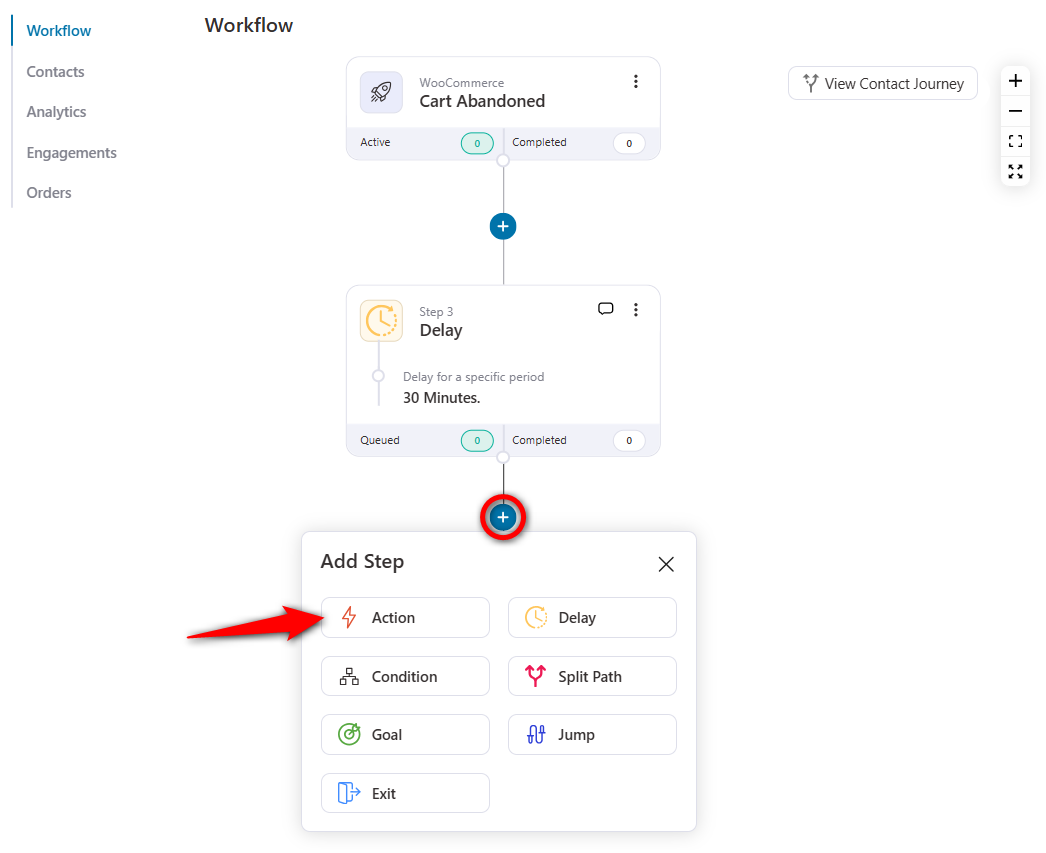
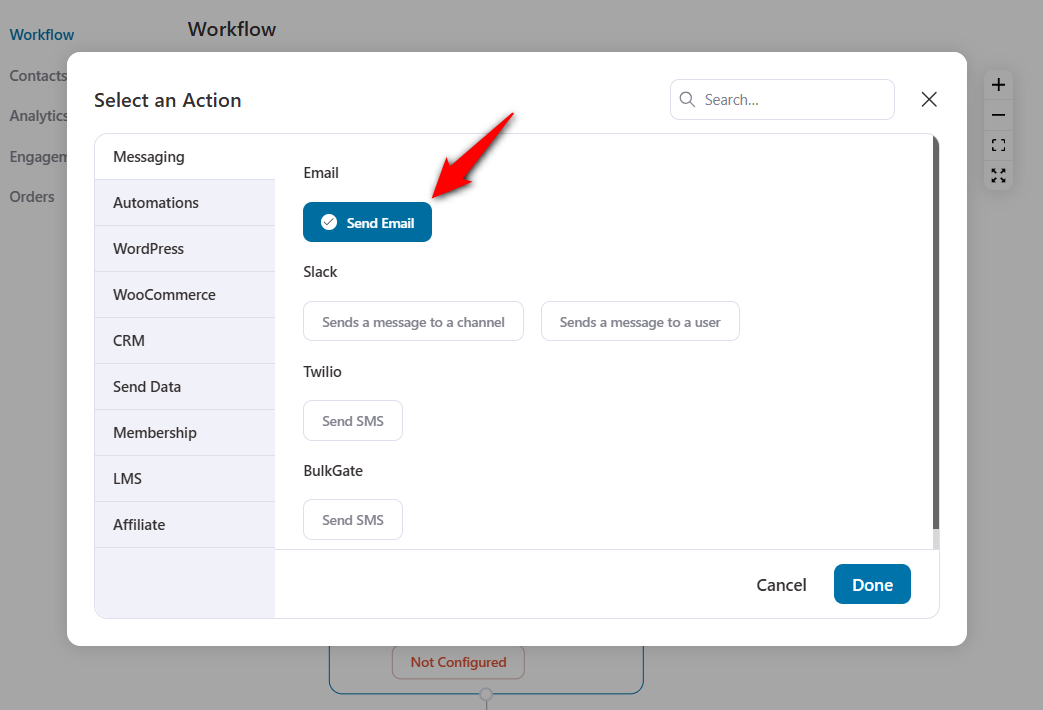
Select the ‘Send email’ action under Messaging and click on ‘Done’.
The email creation window will appear.
Shopper’s email address
Use the same email address the user entered on the checkout page here.
To do that, go to 'Merge Tags'.
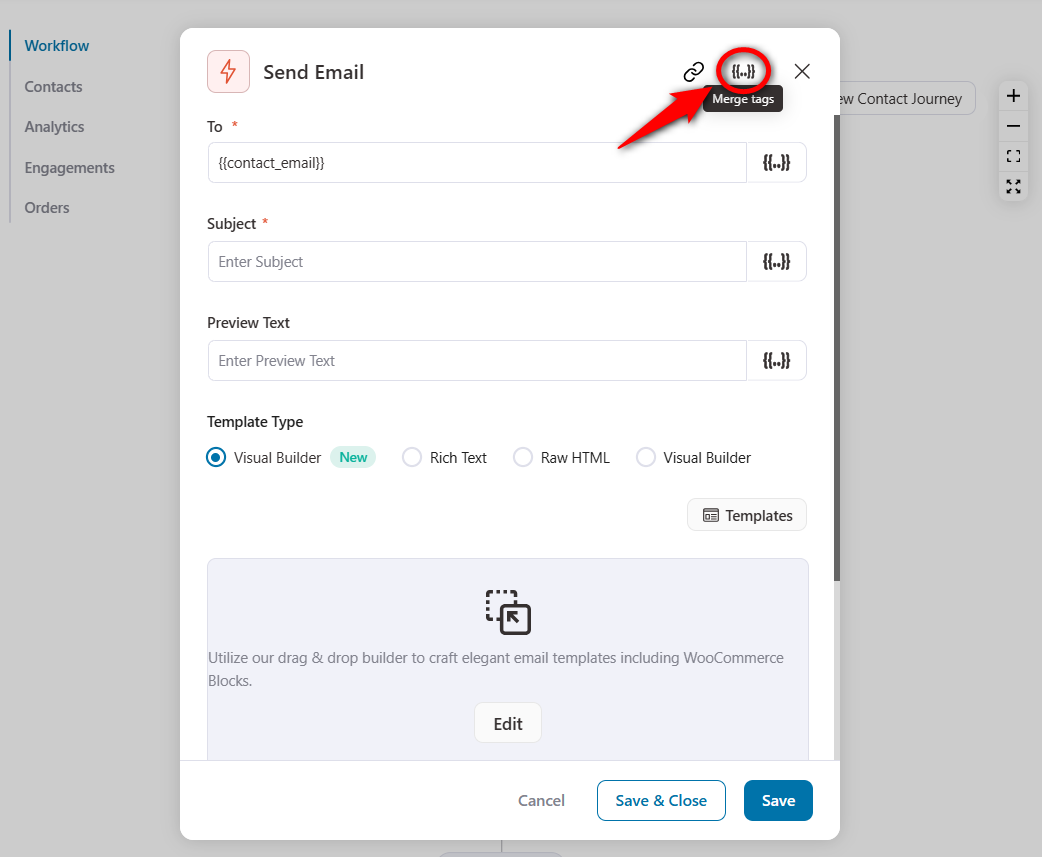
Copy the 'Cart Billing Email' merge tag.
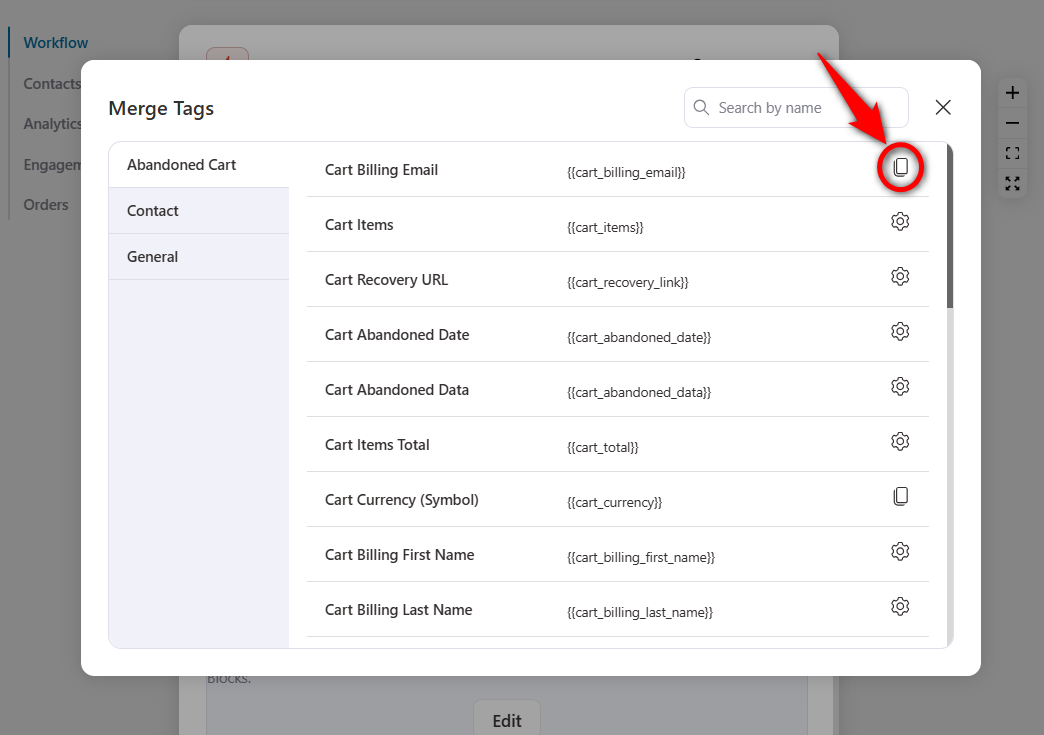
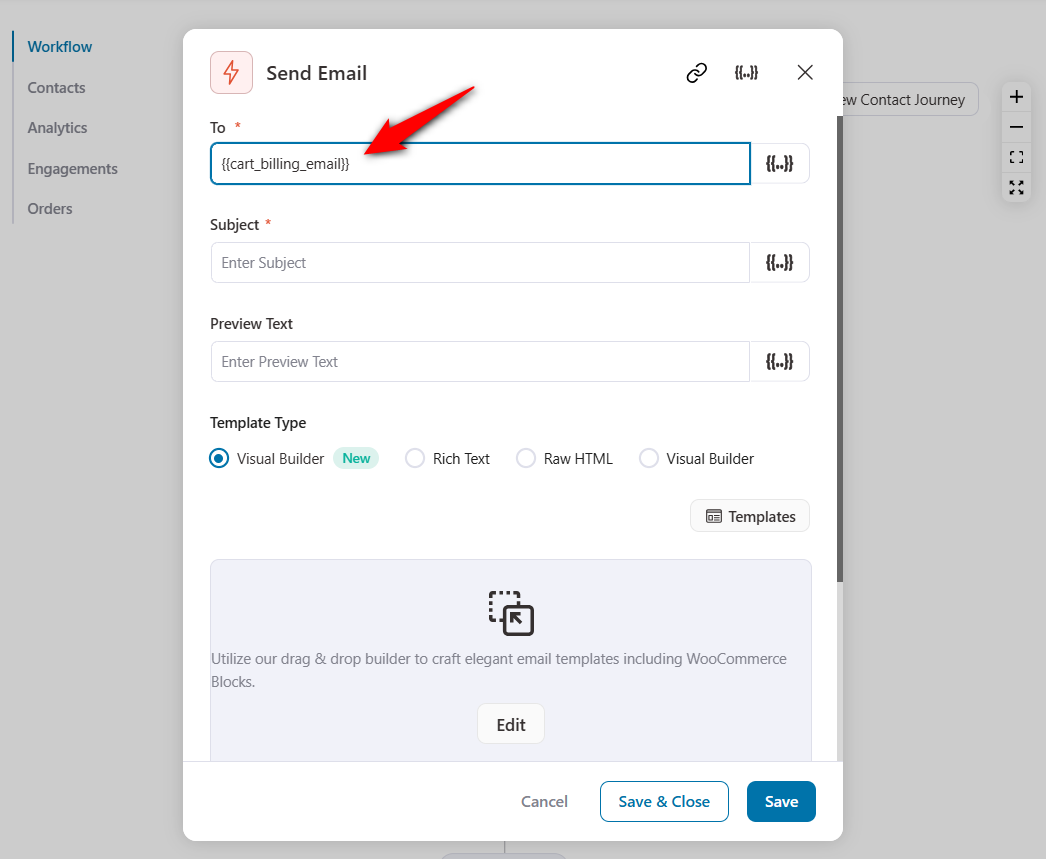
Paste the {{cart_billing_email}} merge tag into the email address field.
Subject line and preview text
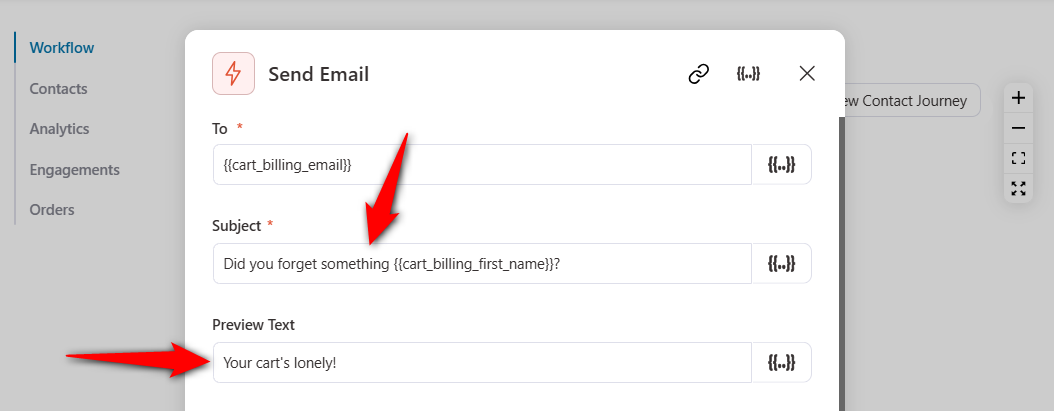
Enter an attractive subject line and preview text for your WooCommerce cart abandonment emails.
Refer to our post on abandoned cart subject lines and email preview text to get noticed quickly.
Email body content
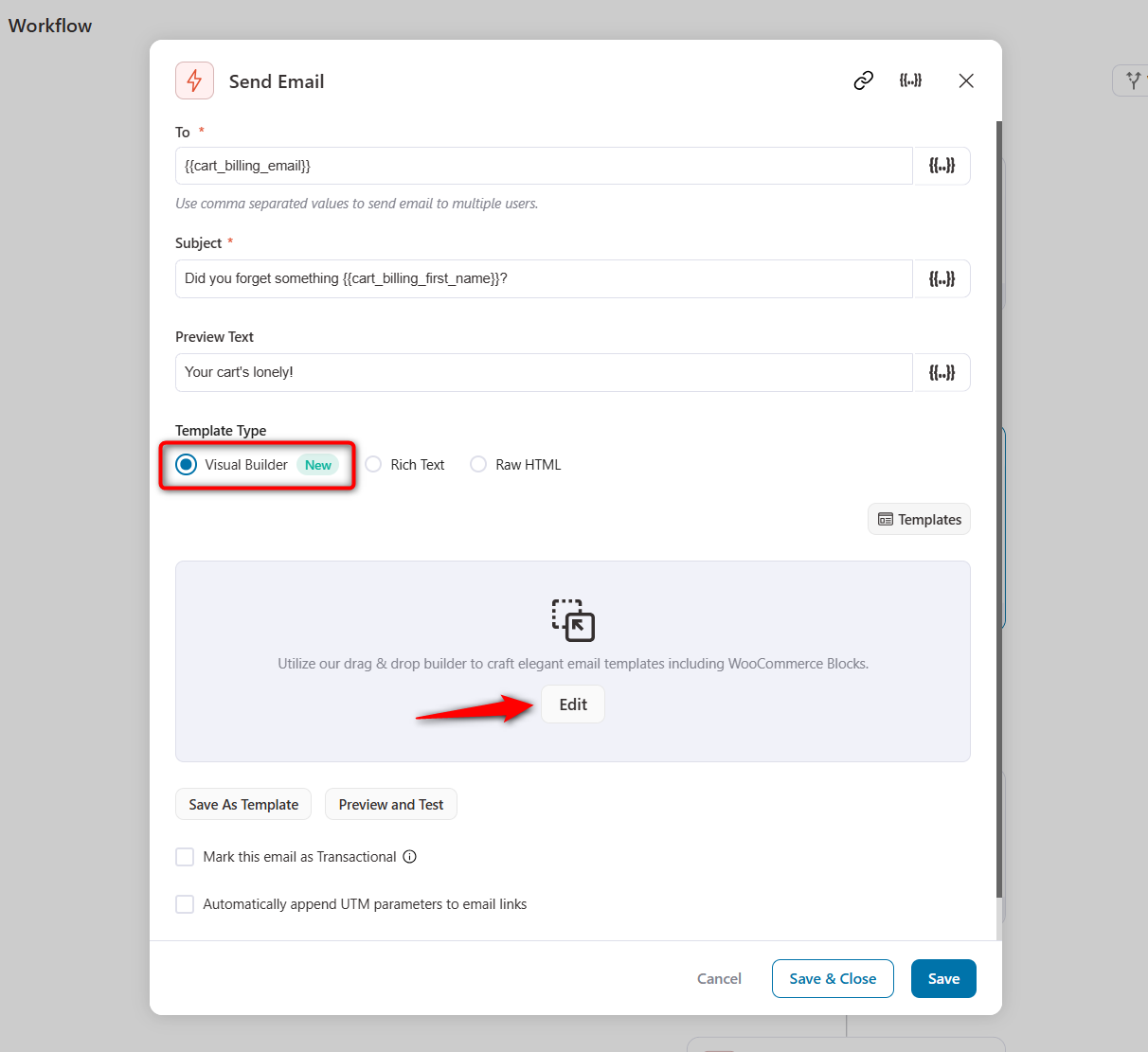
Select the template type for simple text-based emails, HTML, or the smart Visual Builder to design beautiful emails.
Let’s select the ‘Visual Builder’ to design an attractive email.
You’ll see many pre-designed email templates ready to import and customize to your requirements.
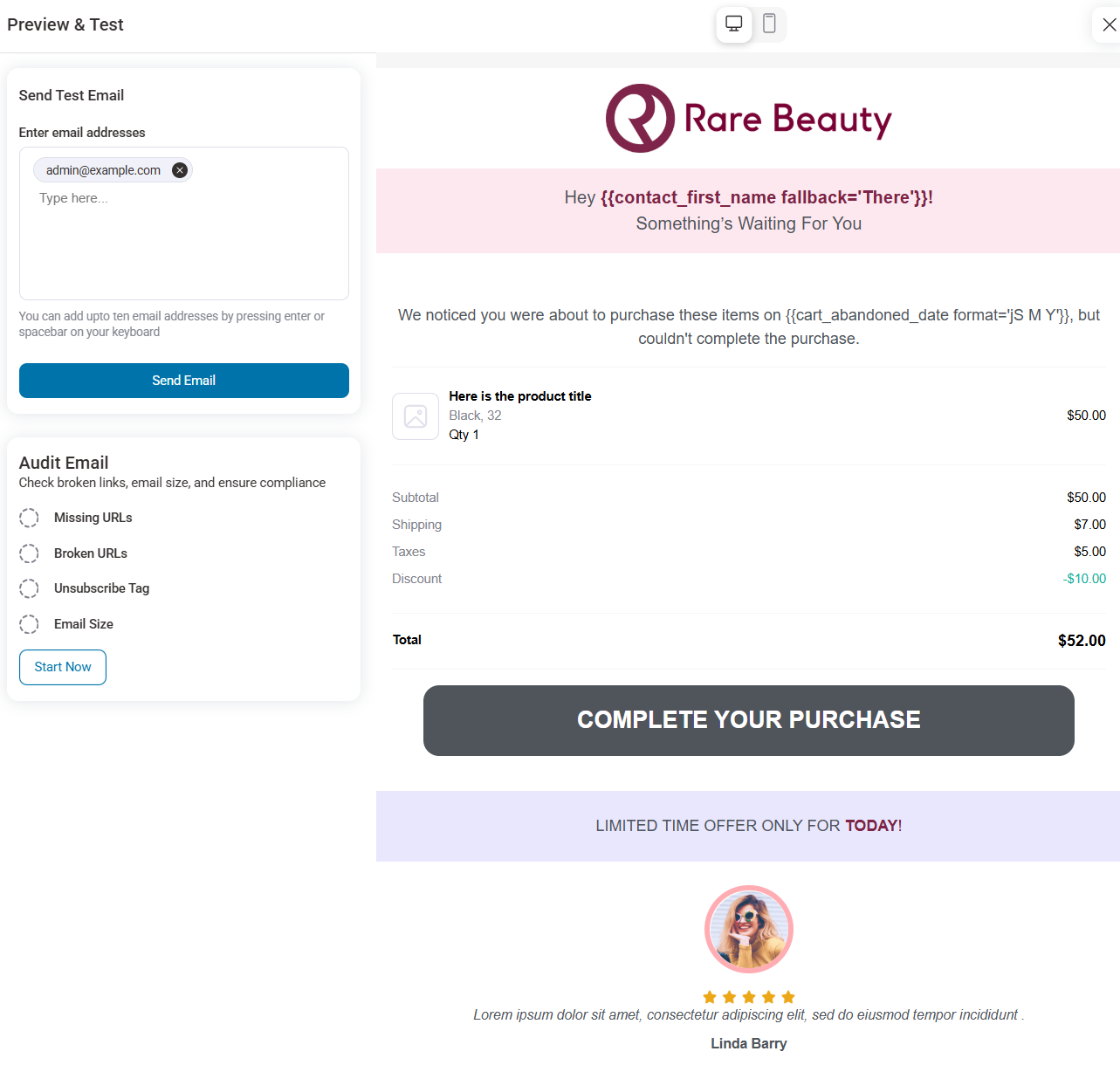
Import a WooCommerce cart abandonment email template. We’ve imported the ‘Abandoned Cart 1’ template here.
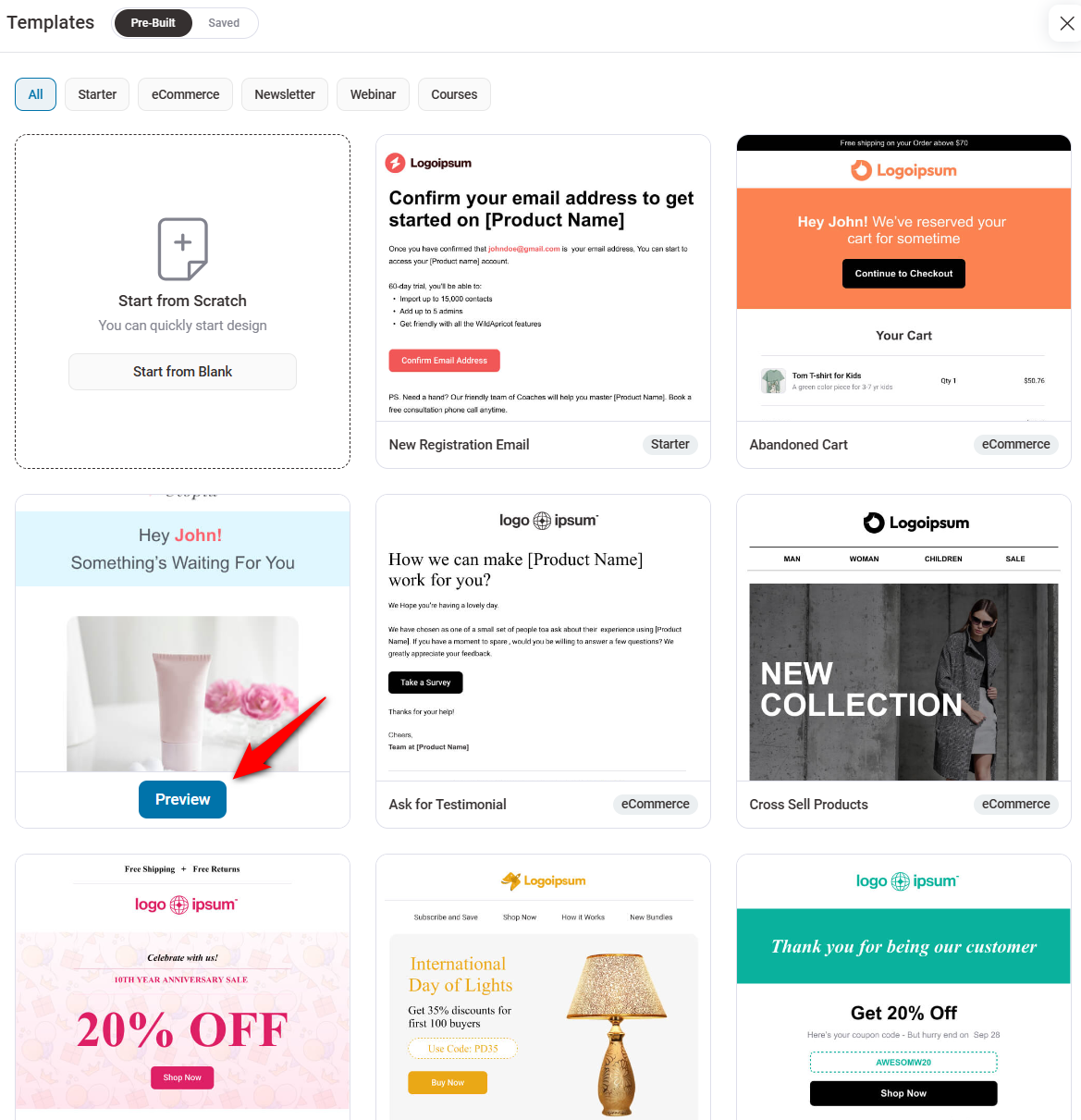
You’ll see content blocks, including general and WooCommerce, on the left. And the workspace on the right.
Begin by uploading your business logo.
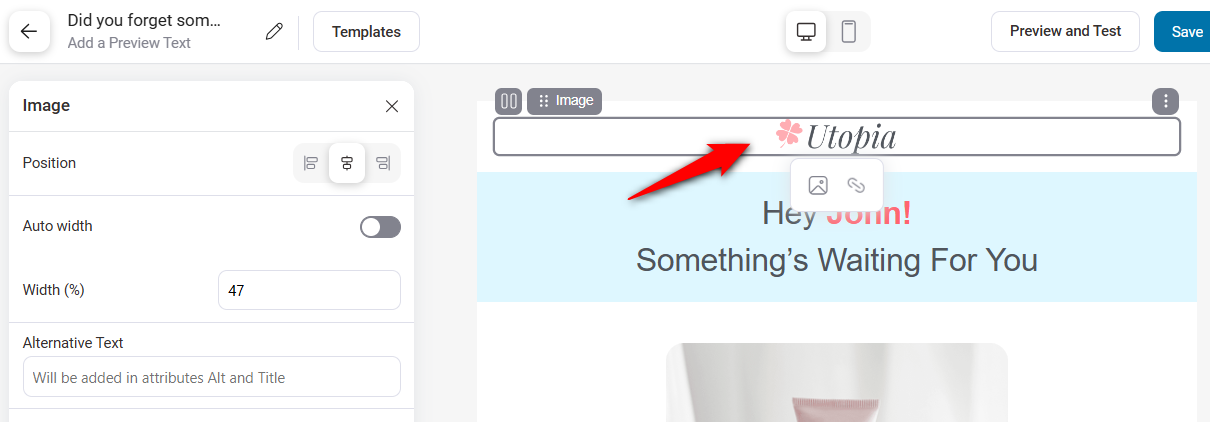
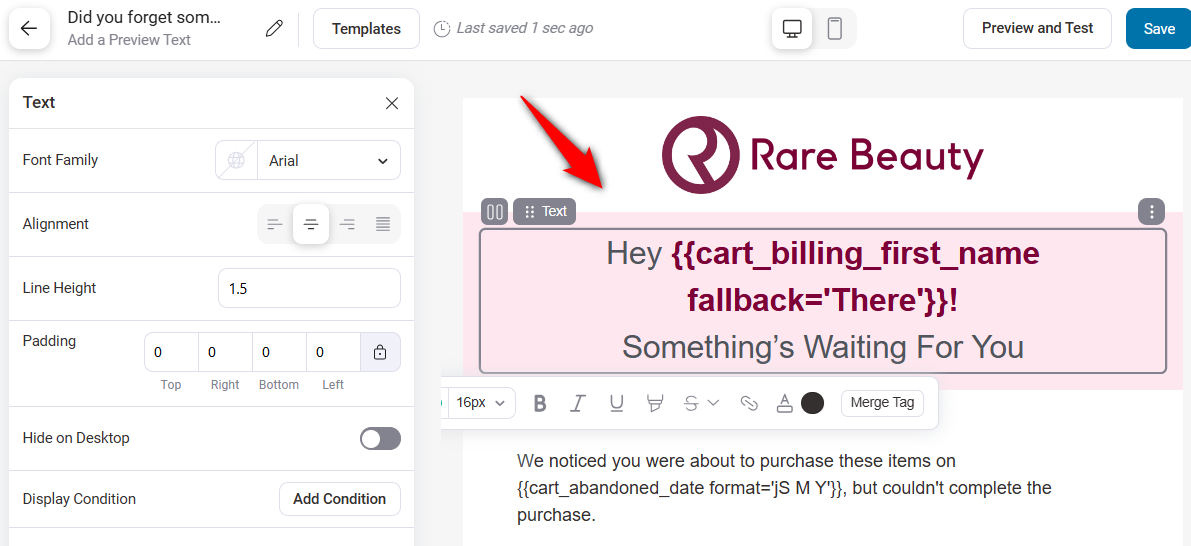
We’ll use the shopper’s first name merge tag here.
Here, we have used multiple merge tags to show dynamic values in our email, such as the user’s first name {{cart_billing_first_name}}, abandoned date {{cart_abandoned_date}}, and more.
We've also changed the background color here.
This template already includes a cart items list that lists all the products in the shopper’s cart.
It also includes the cart link in your WooCommerce cart abandonment email, which contains the {{cart_recovery_link}} merge tag.
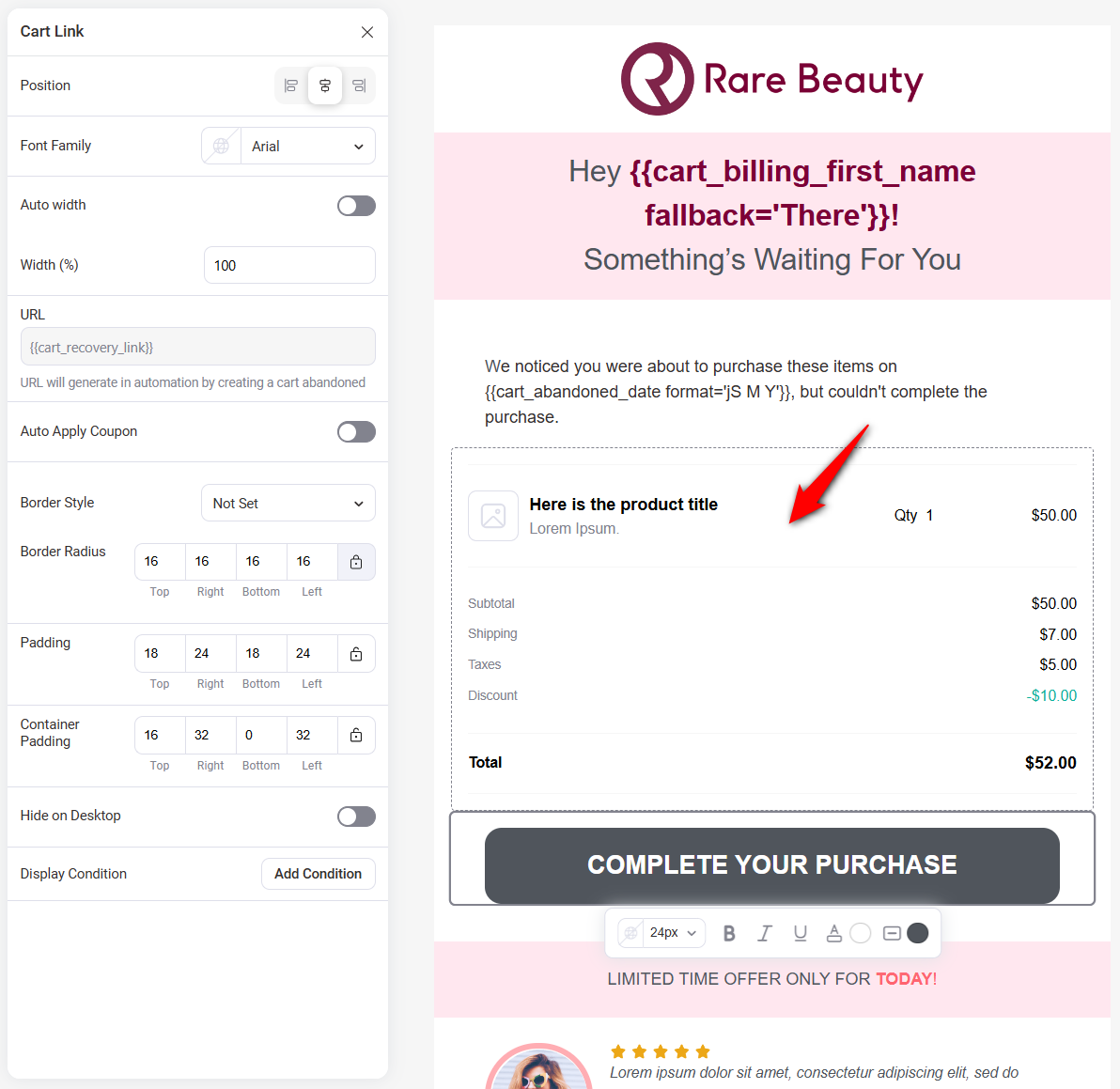
You can even add coupons, user testimonials, social icons, etc., to help shoppers trust your brand.
Next, preview your beautiful cart abandonment email with FunnelKit Automations' visual email builder.
You can even send a test email from here to see how it looks in your email.
Step 5: Activate and test the sequence
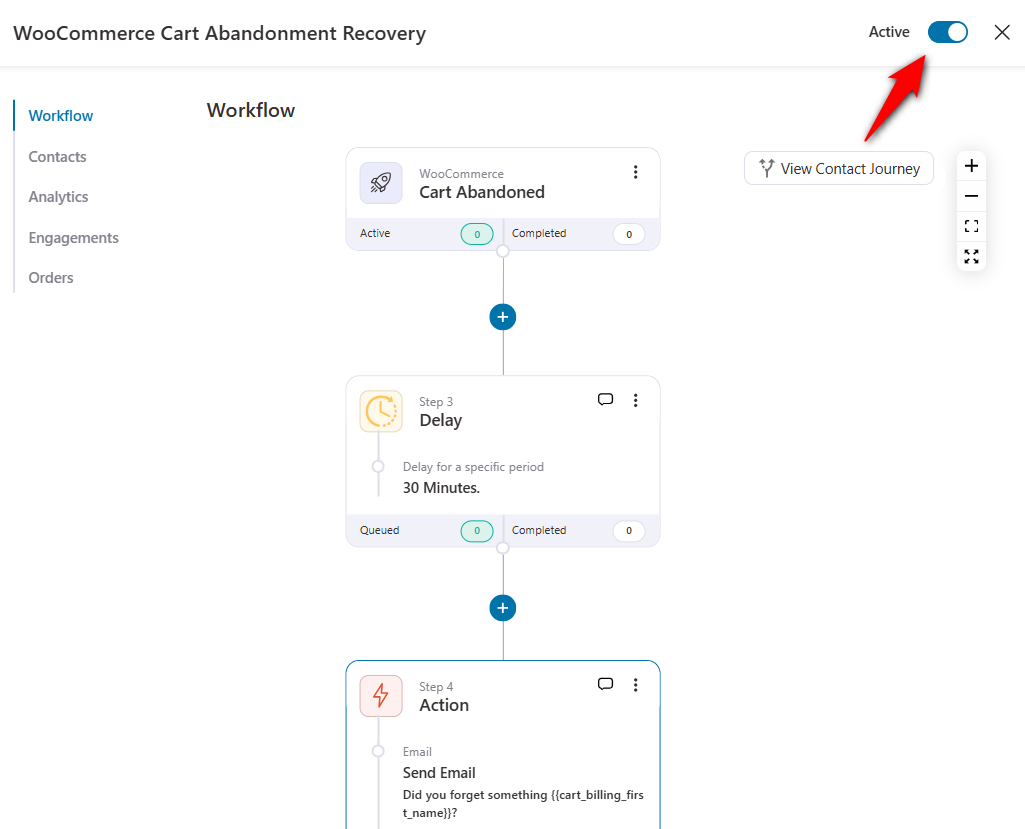
Activate your automation by turning the toggle to ‘Active’.
Temporarily drop the abandonment threshold in your cart settings to two minutes, so you are not waiting an hour for a result.
Open your store in a private window, add the makeup value set to the cart, go to checkout, enter a test email, and close the tab.
Within a few minutes, the cart should appear in your recoverable carts list, and the email should arrive. Click the recovery link and confirm it restores the bag at the right price.
Run the same test on a phone. Mobile carts abandon at roughly 80% against about 68% on desktop (Dynamic Yield benchmarks), so a recovery email that breaks on a small screen is failing exactly where the volume is.
Once both pass, set the threshold back to 15 or 30 minutes.
Which Abandoned Cart Plugin Fits Your WooCommerce Store?
There is no single right answer to this question.
The answer depends on whether you want cart recovery alone or a broader automation setup.
| If you want… | Start with | Why |
|---|---|---|
| Free, email-only recovery with minimal setup | FunnelKit Automations (free version) or Abandoned Cart Lite | Purpose-built and self-hosted, with scheduled reminders and one-click cart restore links |
| Phone capture, SMS, WhatsApp, or pre-checkout popups | Abandoned Cart Pro, Retainful, or FunnelKit Automations Pro | Collects contact details earlier and sends reminders on more than one channel |
| You already pay for Klaviyo, Omnisend or Mailchimp | Your ESP’s abandoned cart flow | One list, one unsubscribe, and no double-sends from two tools |
| Recovery plus post-purchase, win-back, and broadcasts inside WordPress | FunnelKit Automations (free; Pro adds SMS and rules) | One contact record for the whole customer lifecycle, licensed per site rather than per contact |
| Official Woo extensions only | AutomateWoo | Built by Woo, premium only |
If you’d rather review high-value carts by hand before contacting anyone, YITH WooCommerce Recover Abandoned Cart supports manual follow-ups.
For longer reviews of each tool, see our full abandoned cart plugin comparison.
FunnelKit Automations isn’t the simplest choice if you only want three reminder emails.
It makes more sense when cart recovery is one of several automations you plan to run, because the same contact record also gets your post-purchase, review request, and win-back emails.
For logged-in shoppers, it saves the cart the moment they add a product.
You can also branch a sequence by cart value, product category, or user role, as shown in FunnelKit’s cart recovery features.
Components to Include in Your Smart Revenue Recovery System
By now, you’ve seen how to set up a basic WooCommerce cart abandonment recovery system.
But to maximize recovered revenue, you need more than an email reminder. You need a smart, automated system that adapts to your shoppers and their carts.
That’s where the Smart Revenue Recovery System comes in.
It’s built on four powerful components that work together to recover more lost sales without over-discounting or spamming your customers.
1. Multi-channel recovery (email and SMS)
Text messages are opened on average within 90 seconds, compared to 90 minutes for email.
Also, SMS has an open rate of 98%+, and 90% of messages are opened within 3 minutes.
Therefore, adding SMS to your campaign can increase its effectiveness, especially when paired with great email templates for your WooCommerce cart abandonment recovery emails.
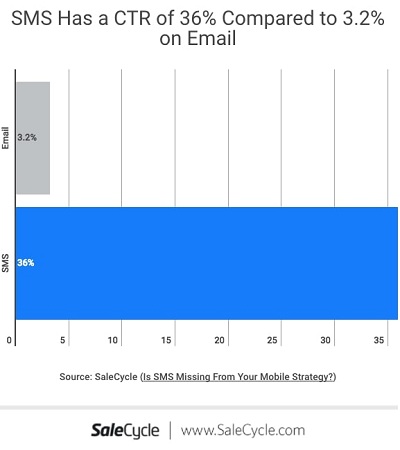
SMS has a way higher click-through rate of 36%, as compared to 3.2% of emails:
Send the SMS within 2-4 hours of sending your first email for the best results.
Use emojis to make your WooCommerce cart abandonment SMS stand out in their cluttered inboxes.

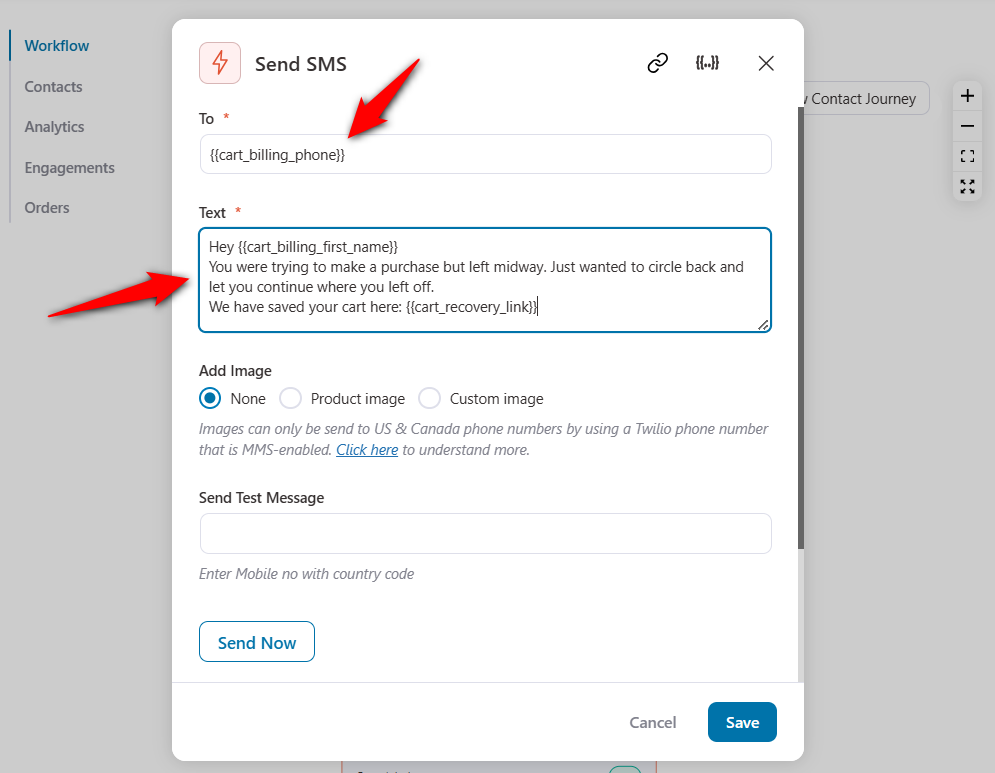
All you need to do is select the ‘Send SMS’ action from the workflow.
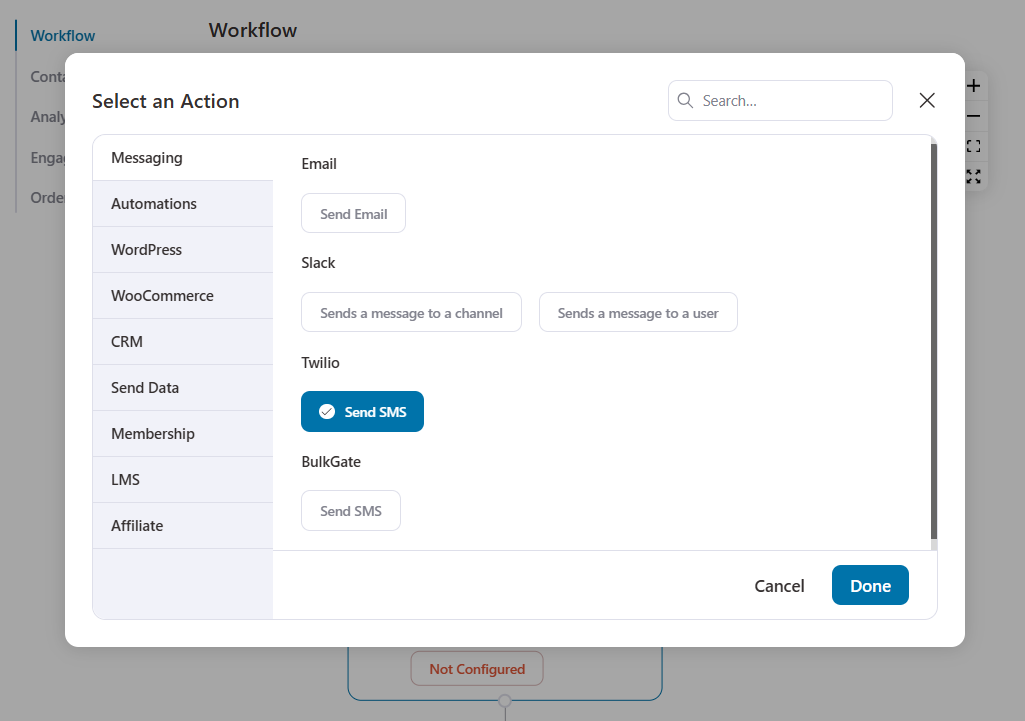
Create the SMS content to send to your users.
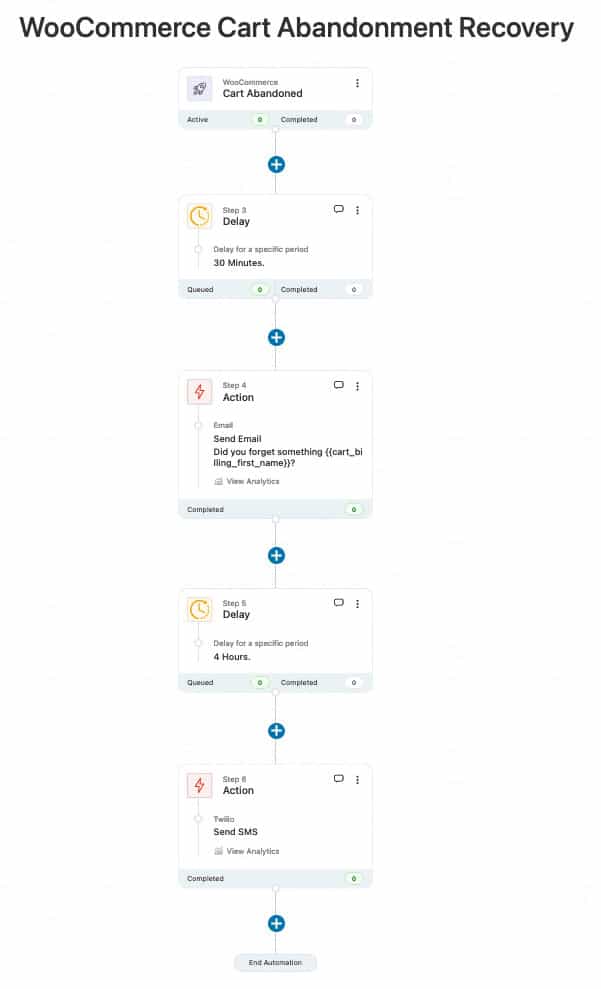
Well done! Here, we have created our automation that sends an SMS 4 hours after your first cart recovery email.
You can use Twilio credits and the premium version of FunnelKit Automations to access the Twilio connector.
You can also send images via SMS if you live in the US or Canada.
2. Perfect timing
Timing your recovery emails is the key to getting lost sales back.
Send your first email within an hour for optimal conversions.
According to Barilliance statistics, a cart recovery campaign saw a 20.3% increase in conversions when it sent its first email just 30 minutes after cart abandonment.
Best practice is to send three abandoned cart recovery emails with set delays.
Here’s an example with the stats:
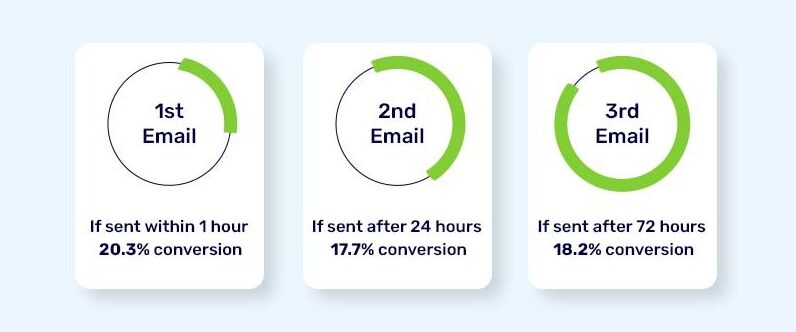
Follow this simple strategy:
- Send your first WooCommerce cart abandonment email within 30 minutes, while the purchase is still fresh in their minds, so store owners can help remind them. Use the first email to ask them if they need any help.
- Send the second email within the next 24 hours. Use this email to offer a discount with a single-click button or simply nudge.
- Send the final email within 72 hours, reminding them that their coupon expires in a few hours.
3. Smart incentives
Everybody loves discounts! So, offering limited-time discounts is a great way to create urgency and boost conversions.
You can easily do that in FunnelKit Automations and even further!
Click the (+) icon and select Action. Add the ‘Create Coupon’ action to your workflow.
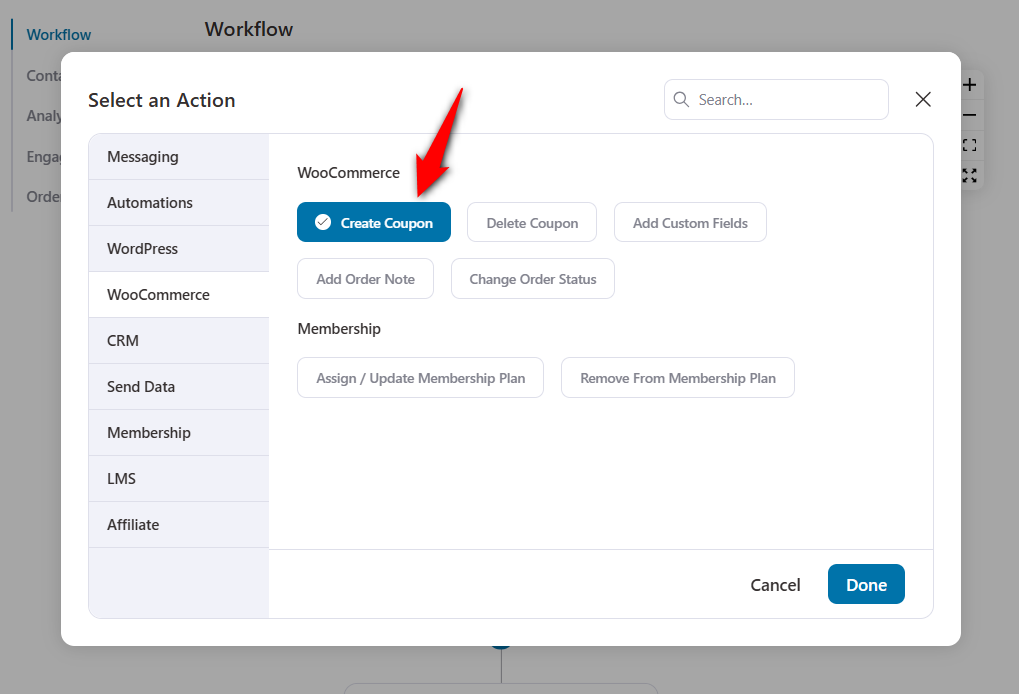
Create your dynamic coupon here:
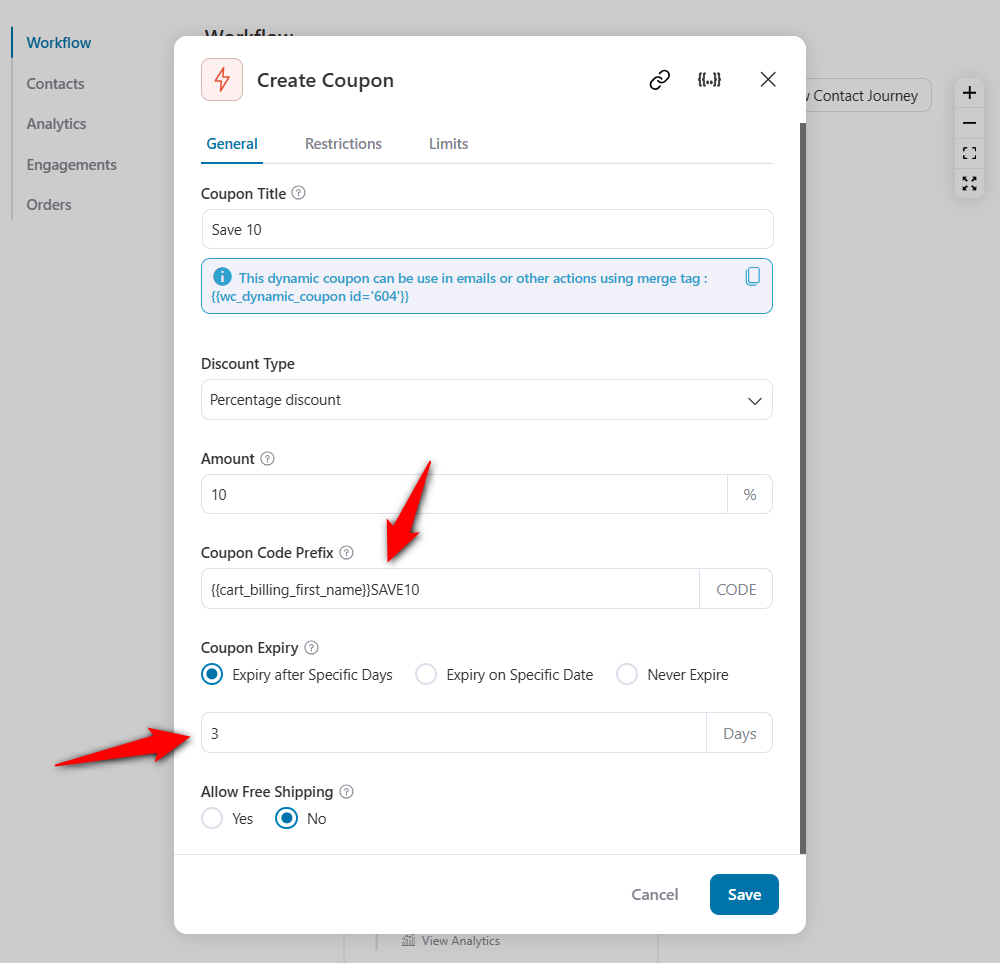
- Discount Type: Enter the type of discount you want to offer, such as a percentage discount, a fixed cart discount, a signup fee discount, a recurring product discount, etc.
- Coupon Code Prefix: Add a personalized prefix to the discount code.
- Coupon Expiry: Set the coupon expiry to after a specific number of days, on a specific date, or never expire.
- Free Shipping: Use this coupon code to get free shipping.
- Spending Limit: Define the spending limit with this coupon code.
- Limitations for Product/Categories: Limit this code to some specific products or categories.
- Coupon Restrictions: Restrict this code to specific email addresses and more.
It’s a complete package!
4. Conditional automation
What if you want to send discounted coupon codes to shoppers who abandoned their carts or to new users in your ecommerce store?
Rule-based offers are discount coupons offered when users meet a certain condition.
It’s a smart strategy to avoid training users to become price-sensitive or unwilling to buy without a discount.
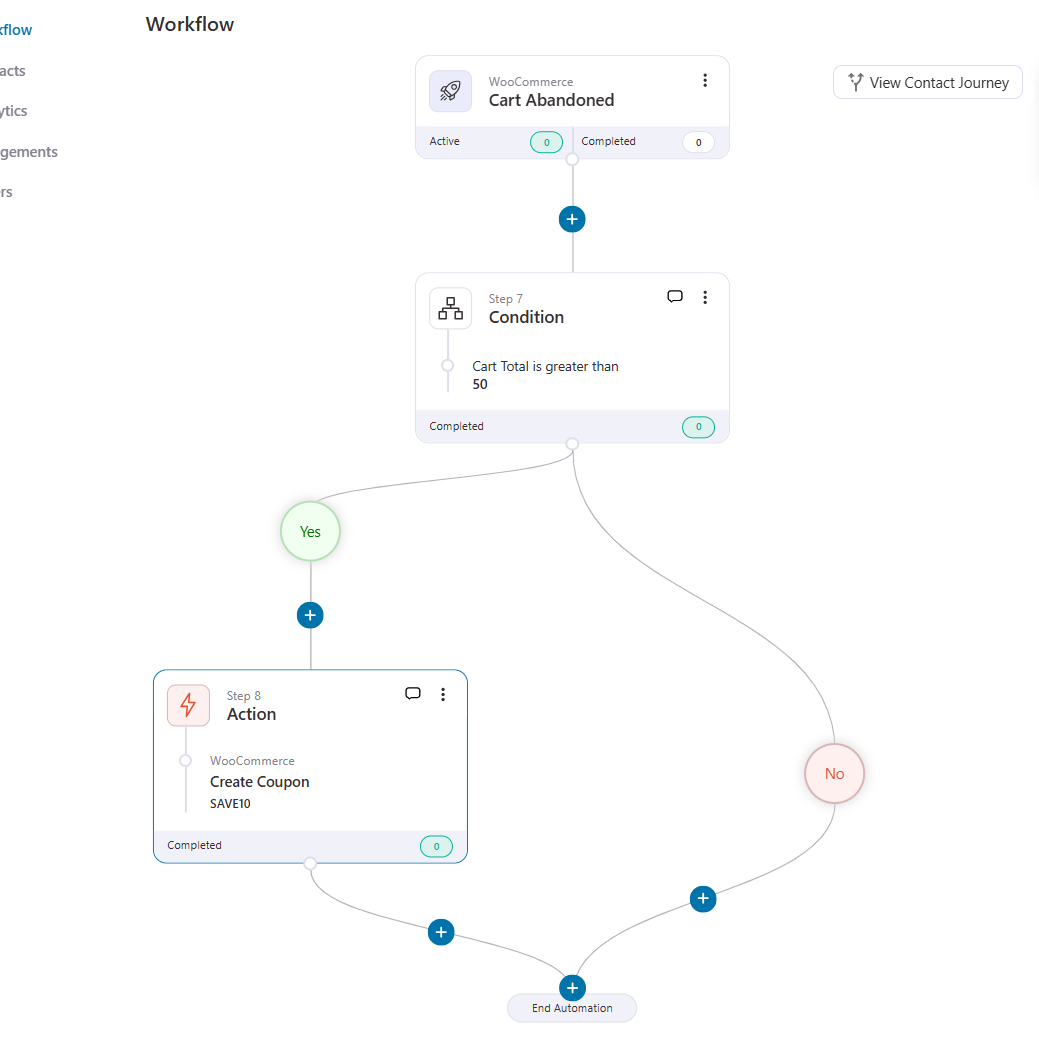
All you have to do is select ‘Condition’.
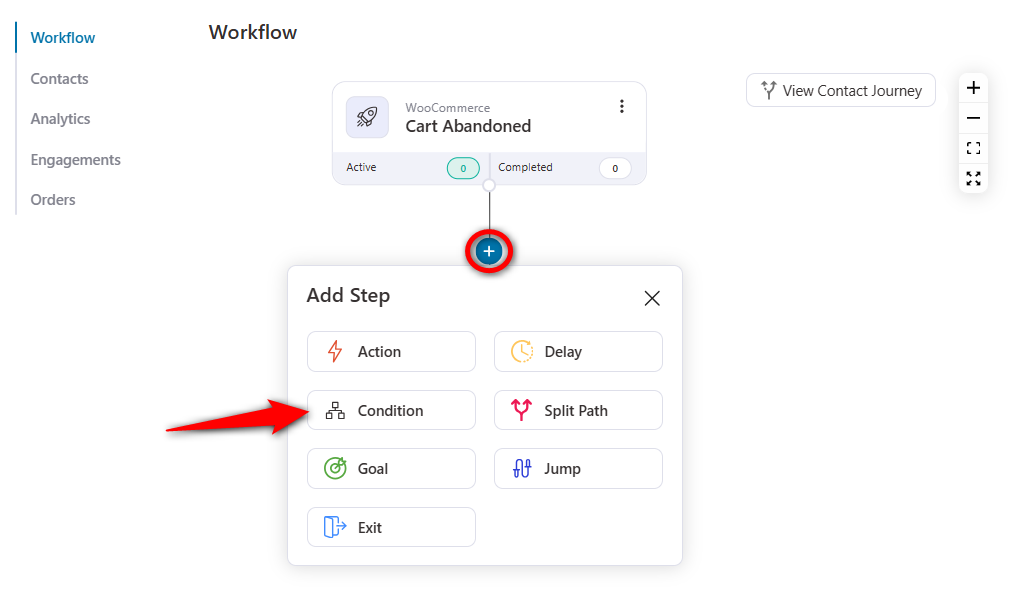
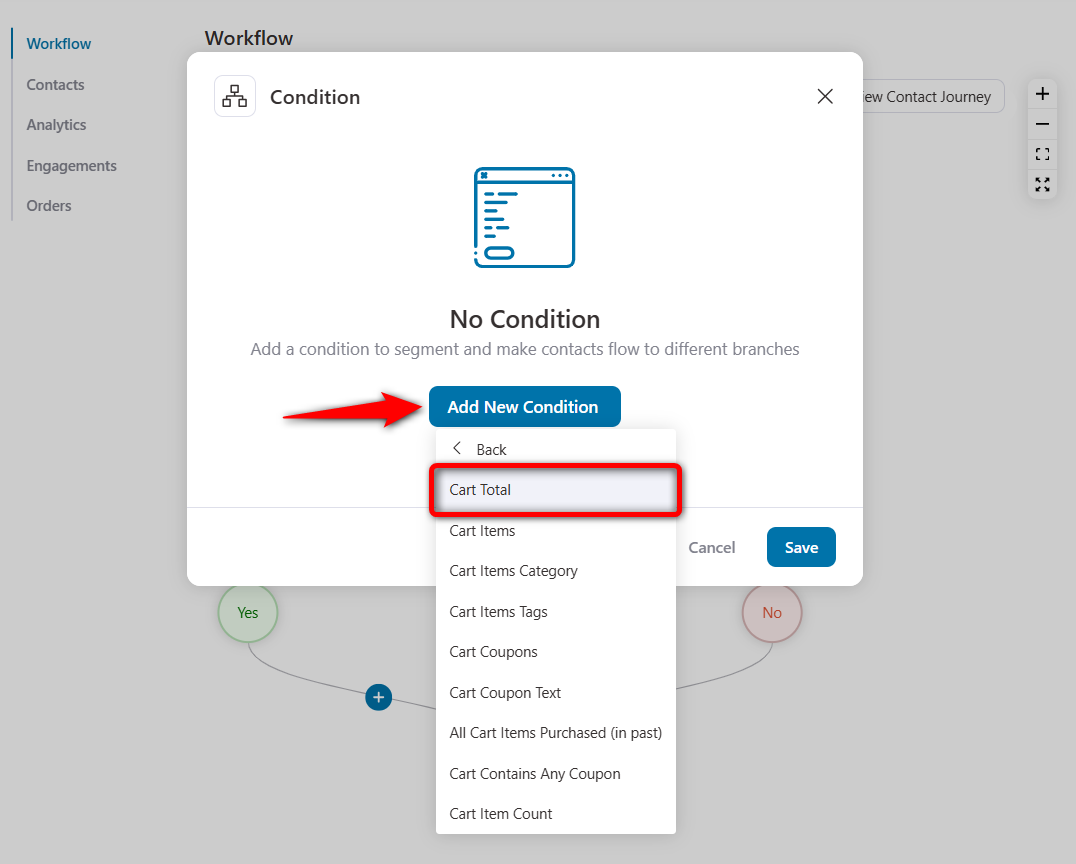
Click on the 'Cart Total' rule under Carts.
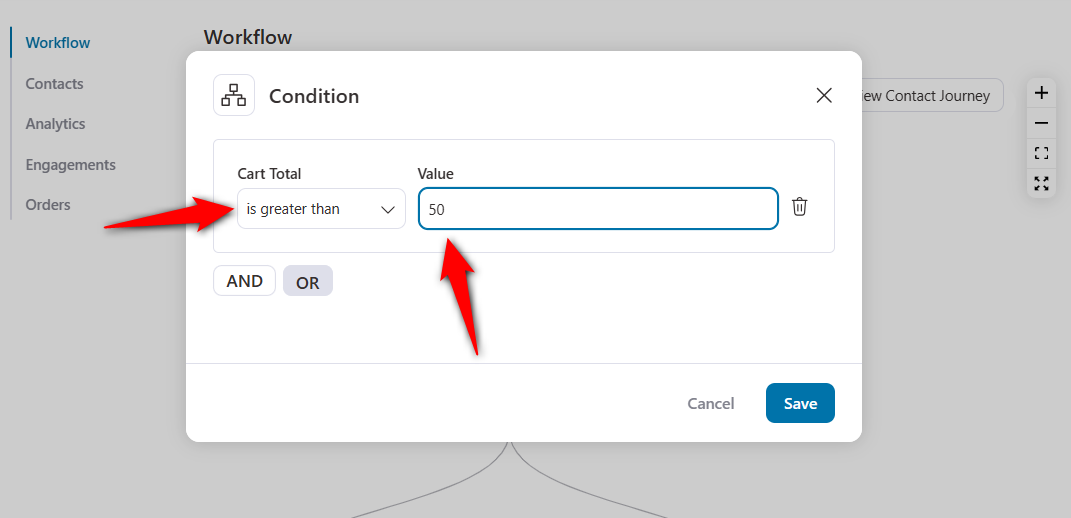
Now, select the drop-down and choose ‘is greater than’, then enter 50.
Next, under ‘Yes’, add the ‘Create Coupon’ action and create a coupon value of 10%.
Once done, add the ‘Send Email’ action next to the coupon code.
Then, include that coupon code in your email.
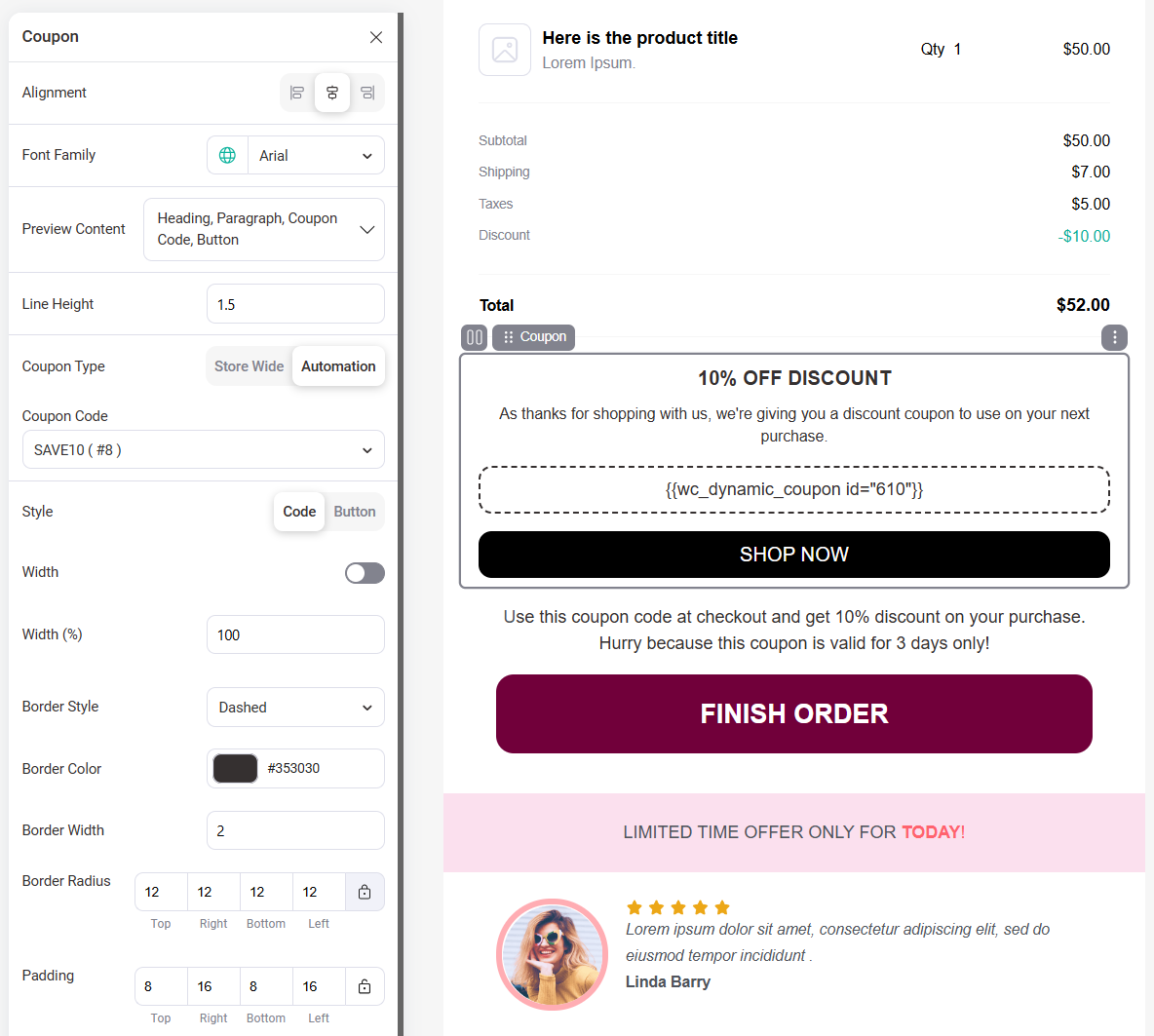
You can even add conditional rules to display the right incentivized offers to the right users.
How to Track and Measure Abandoned Carts and Recovery in WooCommerce?
Tracking your abandoned carts is crucial because what you can measure is what you can improve.
By keeping an eye on your numbers, you’ll know:
- How many carts are being abandoned
- How many of those are successfully recovered
- Which recovery emails or incentives drive the most conversions
This insight helps you fine-tune your WooCommerce cart recovery strategy.
For example, you may discover that offering a slightly higher discount boosts recoveries or that product-aware abandoned cart emails perform better than generic ones.
With FunnelKit Automations, you can view all these analytics right inside your dashboard:
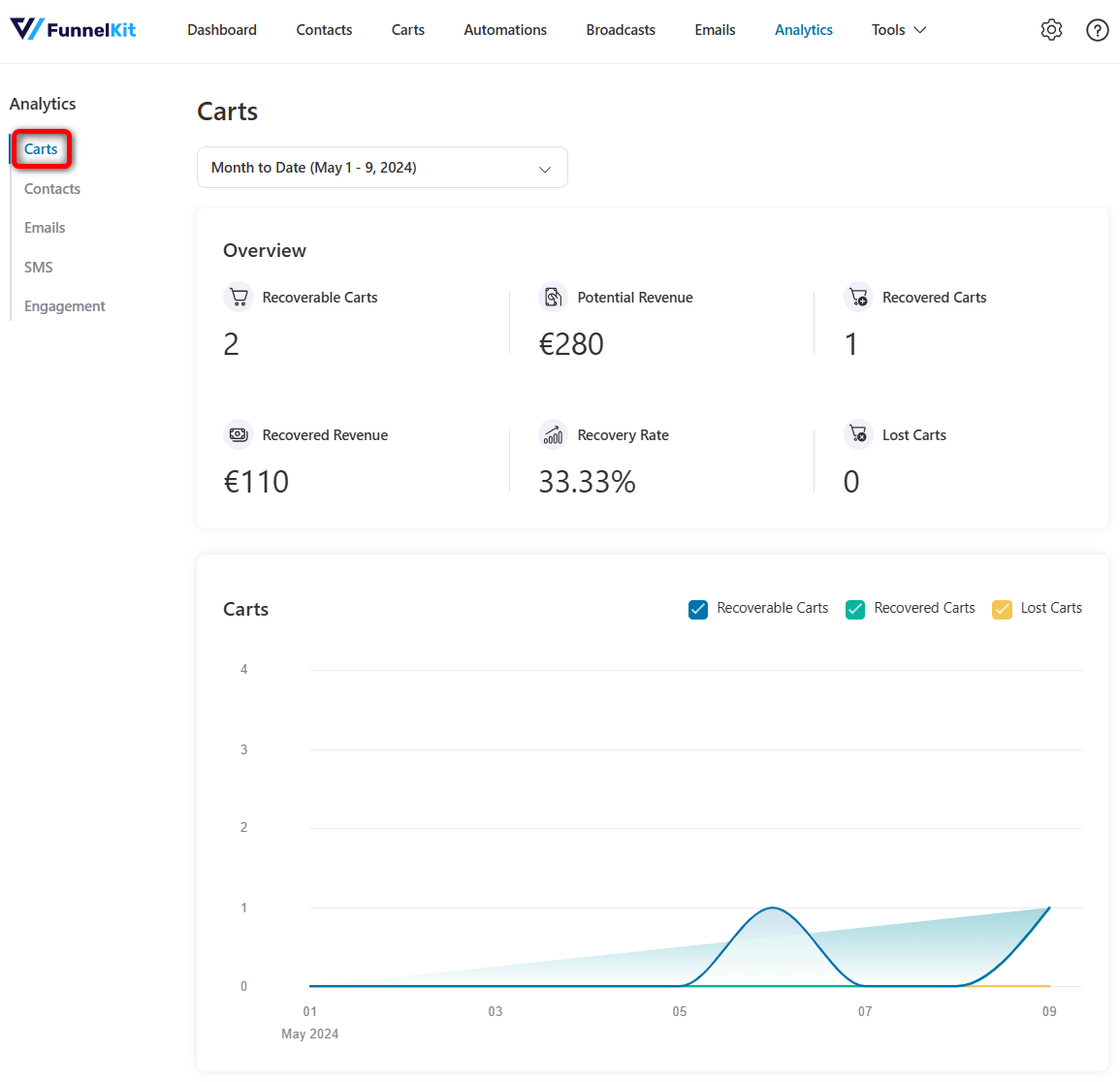
You get cart stats such as recoverable carts, potential revenue, recovered carts, recovered revenue, recovery rate, and lost carts.
These stats eliminate guesswork and help you continuously optimize your cart abandonment campaigns so every abandoned cart becomes an opportunity to bring customers back.
How to Capture More Emails Before Shoppers Leave
Store owners on Reddit had more than 50 add-to-carts but no sales and no emails to follow up with because those shoppers never made it to checkout.
The goal isn’t to throw a popup at every visitor. It’s to give shoppers a few simple ways to share their email before they leave.
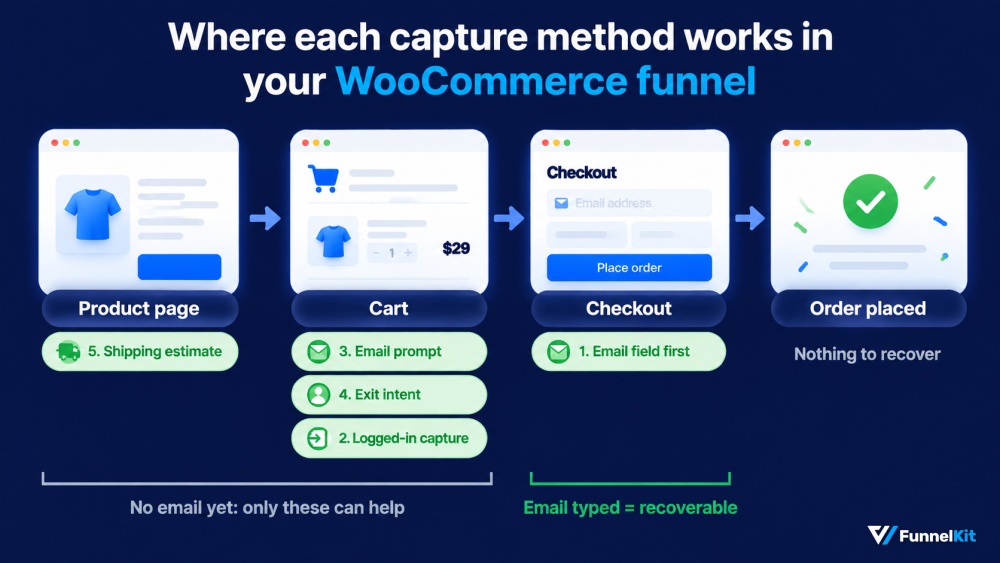
1. Move the email field to the top of checkout
In the classic WooCommerce checkout, the email field sits fairly low in the billing form. The block checkout puts it near the top, so first check which checkout your store uses.
Always remember an email-first checkout layout lets you capture the address before shoppers fill out the rest of the form.
2. Capture logged-in customers when they add something to their cart
Recovery tools such as FunnelKit Automations can identify returning customers when they add a product, so you can send a reminder even if they never reach checkout.
3. Ask for an email after Add to Cart
A small prompt that offers to save the cart can give shoppers a reason to share their email.
FunnelKit Automations, Abandoned Cart Pro includes this option, while OptinMonster can send popup signups into a recovery sequence.
4. Use exit intent sparingly
You don’t need to show it across the entire site.
Keep the prompt focused on the cart page, where someone is already showing buying intent.
5. Show shipping costs before checkout
Store owners in the same thread pointed out that some shoppers add products simply to see what shipping will cost.
Showing an estimate on the product or cart page answers that question earlier and can reduce carts created just to check the final price.
What Causes Cart Abandonment in WooCommerce? 7 Reasons and the Fix for Each
Recovery emails can bring some shoppers back, but they don’t fix the reason those shoppers left in the first place.
The changes below help reduce cart abandonment before it happens.
Baymard asked US shoppers why they abandoned their carts. Shoppers could choose more than one reason, so the percentages add up to more than 100%.
About 42% said they were just browsing, and there’s only so much you can do to convert someone who was never ready to buy.
For everyone else, these were the main reasons:
| Reason for abandoning | Share of shoppers | What to change in WooCommerce |
|---|---|---|
| Extra costs (shipping, tax, fees) too high | 40% | Show a shipping estimate on the product and cart pages, or set a free shipping threshold with a free shipping progress bar |
| Delivery was too slow | 20% | Put an estimated delivery date on the product page, not after the payment step |
| Didn’t trust the site with card details | 19% | Add payment logos, a visible returns policy, and support contact details near the pay button |
| The site wanted an account | 18% | Turn on guest checkout and offer account creation after the order is placed |
| Checkout was too long or complicated | 17% | Cut optional fields, add address autocomplete, and consider a one-page checkout |
| The site had errors or crashed | 17% | Test checkout after every plugin update, and keep third-party scripts off the cart and checkout pages |
| Returns policy wasn’t good enough | 13% | State the returns window in one line on the product page and again at checkout |
Extra costs are the biggest issue on the list, and that’s what stops shoppers.
Sending them a reminder an hour later doesn’t change the shipping charge they saw at checkout. The surprise is still there when the email arrives.
The number of checkout fields is another easy place to start.
Baymard’s benchmark puts the average US checkout at around 23 form elements, while a well-designed checkout can get that down to 12 to 14.
Removing a phone field costs nothing if you don’t need it for delivery updates.
For more ways to simplify the experience, see our guide to WooCommerce checkout optimization.
Find your own drop-off point first (Clarity or Hotjar)
Baymard’s numbers show what happens across a broad group of stores. Your own shoppers may be dropping off for a completely different reason.
Install Microsoft Clarity (free) or Hotjar and filter recordings to sessions where shoppers reached checkout but didn’t complete the purchase.
Watch 20 or so recordings. Patterns usually start to become obvious, such as shoppers looking for a coupon code, a shipping total that appears too late, or a payment button that sits below the fold on mobile.
If your GA4 integration sends add_shipping_info and add_payment_info, build a funnel exploration from begin_checkout to purchase.
Start with the step where you see the biggest drop-off. That’s usually a better place to focus your next fix than a generic cart abandonment checklist.
Recovery Emails Not Sending? 4 Fixes
This is the most common support issue in cart recovery, and it is almost never the plugin. If carts are being captured but nothing arrives, work through these four in order.
- WP-Cron has stalled
WordPress schedules recovery emails using WP-Cron, which only runs when someone visits your site. That is an awkward dependency for a feature whose entire job is handling the people who left.
On a low-traffic store, hours pass with no visitors and no emails.
Check Tools ⇒ Scheduled Actions for an overdue cart detection task, then disable WP-Cron and set up a real server cron job through your host.
- The emails are being sent to spam
WordPress sends mail through PHP by default, and that mail routinely fails SPF and DKIM checks. For this, pair your recovery plugin with an SMTP plugin so the emails land.
Connect a transactional service such as SendGrid, Postmark, Brevo, or Amazon SES, and authenticate your sending domain.
- You are on the Blocks checkout
If you have moved to the block-based WooCommerce checkout, older recovery plugins may capture nothing because they were built against the classic checkout markup.
Carts look empty, and no automation ever fires. Confirm your plugin supports Blocks checkout explicitly, then verify cart capture, prefilled fields, and recovery links after switching.
FunnelKit Automations has added full Blocks checkout support in version 3.8.2.
- The email was never captured
A cart is only recoverable if you can reach the shopper. Someone who leaves on the product page or cart page before checkout has given you nothing.
To widen the net, add an exit-intent capture on the cart page, or move the email field to the top of your checkout form so it is filled in before anything else.
Frequently Asked Questions
Cart abandonment is when a shopper adds products to the cart, or starts checkout, then leaves without clicking Place order.
WooCommerce creates no order record for these visits, so they don’t show up anywhere in your dashboard unless a recovery plugin saves them.
Most cart abandonment plugins consider a cart abandoned 15 to 30 minutes after the last activity (the last item added or the last field entered at checkout). Every major recovery plugin lets you configure this window.
Setting it too short triggers premature emails; setting it too long delays the first reminder past the moment of highest recovery probability.
Yes, when handled correctly. Cart abandonment emails generally qualify under legitimate interest as a basis for processing, since the shopper initiated a commercial transaction with the store.
You still need to provide a clear unsubscribe option, email only people who entered their email address at checkout, and document your basis for processing. Always consult your legal counsel for region-specific compliance.
Three emails is the consensus sweet spot. The first email recovers the highest percentage of carts, the second recovers a meaningful additional share, and the third captures price-sensitive shoppers with a discount.
Sending four or more emails consistently produces diminishing returns and elevated unsubscribe rates.
Default to no discount in the first two emails. The first email recovers shoppers who were genuinely distracted, and a discount there leaves money on the table.
Reserve the discount for the third email, and only for first-time abandoners. Repeat customers who abandon are statistically more likely to come back at full price and should not be trained to wait for a discount.
SMS has dramatically higher open rates (90-98% versus 20-30% for email) and faster response times, but it is more intrusive and requires explicit consent to receive phone numbers in most regions.
SMS works best as a single short reminder between the first and second emails, never as a promotional channel. Email handles the longer-form messaging, social proof, and final discount offer.
Yes, if the email or phone number was captured before the cart was abandoned. Most modern recovery plugins capture the email the moment it is entered into the checkout form, even if the shopper never clicks "Place order".
This means guest checkout abandonments are recoverable as long as the shopper started filling in the form. If they abandoned earlier (cart page, product page), there is no contact information to recover them with.
No. If cart recovery is the only automation you need, a free dedicated plugin does the job and stays out of your way.
A broader plugin earns its place when you also want post-purchase sequences, win-backs, and broadcasts, and you would otherwise be paying for a separate email tool on top.
Technically, yes, you can set up a cart recovery system using WooCommerce session data, a custom table, and a scheduled task to flag inactive carts.
In practice, you would also be rebuilding email capture, recovery link generation, unsubscribe handling, and consent logging, which is why almost nobody does this outside large custom builds.
The industry average is around 70%, so anything below 70% is performing better than most stores. A rate between 50% and 60% is strong, and below 50% is exceptional, typically achievable only with deeply optimized checkouts.
If you are above 75%, focus on prevention fixes (shipping transparency, guest checkout, mobile UX) before tuning your recovery sequence.
Final Thoughts: Turn WooCommerce Abandoned Carts into Recovered Revenue
None of these changes rescue a store on its own. A cleaner checkout might move abandonment two points. A three-email sequence might bring back 8% of what leaks through. Cutting the phone field might do less than either.
Run all of them and the same traffic starts producing meaningfully more orders, which is the only version of this that shows up in a revenue report.
If you are picking one place to start, start at the checkout. It is the narrowest point in the funnel; every other change flows through it, and the seven reasons above are almost entirely checkout problems.
The recovery sequence is worth building. So if you want one tool that handles cart recovery and broader marketing automation, and provides analytics to measure both, we recommend FunnelKit Automations.
The free version is enough to run a working three-email sequence today.
So don’t let potential customers slip away. Set up your smart WooCommerce cart abandonment recovery system and start turning missed opportunities into sales!
Editorial Team
October 6, 2026Abandoned cart subject lines decide whether a shopper opens your recovery email or scrolls right past it. Everything inside that email, from the product photos to the coupon and the...
Editorial Team
October 5, 2026WooCommerce email customizer plugins let you add your logo, brand colors, and preferred layout to order emails without touching code. The problem is that they don’t always cover every email...

Editorial Team
September 30, 2026Quick answer: A quiz funnel is a multi-step interactive path that replaces a static lead form where visitors answer 5-8 questions, opt in with their email, and receive a personalized...






