


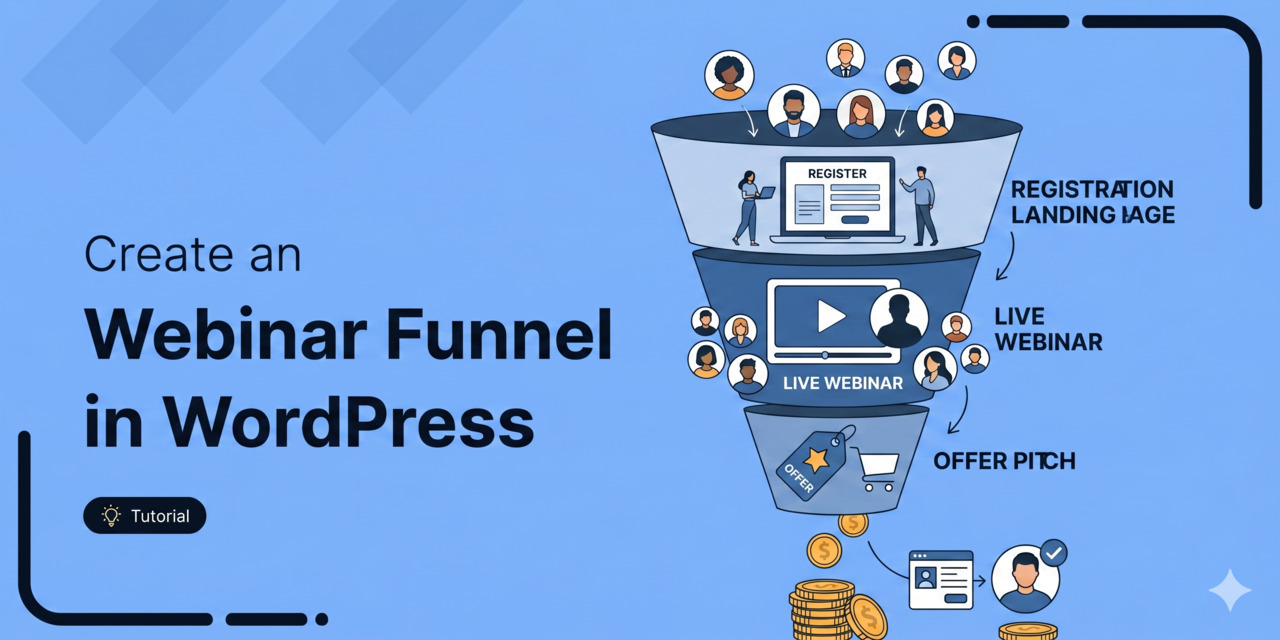
Quick summary: Do you want to create a webinar funnel to increase conversions and boost your sales? The article is a step-by-step no-code guide to building a webinar funnel, covering four core stages: traffic, registration page, confirmation page, and the live webinar.
It walks through setting up each funnel page, writing follow-up email sequences segmented by attendee behavior, and best practices for maximizing conversions.
Webinars are quite powerful when it comes to generating leads, building brand awareness and making sales.
According to On24 Webinar Benchmark Reports, 73% of marketers believe webinars help generate qualified leads. This, in turn, gives them an opportunity to turn them into paying customers.
How? With the help of automated or live webinar funnels.
The problem is that default WordPress does not include the pages, tracking, or automations needed to run a webinar funnel end-to-end. Most marketers stitch six different tools together, which slows down setup and breaks attribution.
In this guide, we will show you how to build a webinar funnel without using any code.
We will walk through every stage of the funnel and cover the best practices that distinguish a generic conversion funnel from a highly effective one.
Table of Contents
- 1 What is a Webinar Funnel?
- 2 4 Key Stages of Building a Successful Webinar Funnel
- 3 How to Create a Perfect Webinar Funnel that Converts?
- 3.1 Step 1: Create a new sales funnel
- 3.2 Step 2: Customize your webinar registration page
- 3.3 Step 3: Customize fields and send a welcome email to your leads
- 3.4 Step 4: Edit your opt-in thank you page
- 3.5 Step 5: Configure your webinar broadcast page
- 3.6 Step 6: Set up your sales/checkout page
- 3.7 Step 7: Build your post-webinar email sequences
- 4 Best Practices for Maximizing the Conversions of Your Webinar Funnel
- 5 Frequently Asked Questions
- 6 Get Ready to Earn Loyal Customers and Drive Massive Revenues with Webinar Funnels
What is a Webinar Funnel?
A webinar is a live or pre-recorded event that brings participants together in a virtual classroom to learn about a topic presented by the presenter.
It's used to build hype for a launch, share knowledge about a specific topic, share the benefits of joining a program, and more.
A webinar funnel is a structured marketing process that uses a live or pre-recorded online presentation to attract prospects, educate them, and convert them into customers.
It includes five key stages: a registration page, confirmation and reminder sequence, the webinar broadcast, a sales or checkout page, and a post-webinar follow-up email sequence.
Once your audience signs up, they’ll be directed to a thank-you page. They can then attend the live webinar or watch the recorded session.
Please note that the goal of your free webinar is to generate leads and get conversions.
Therefore, you can pitch your paid offer during the webinar and provide the relevant CTA once it ends.
Here is an overview of the webinar funnel:
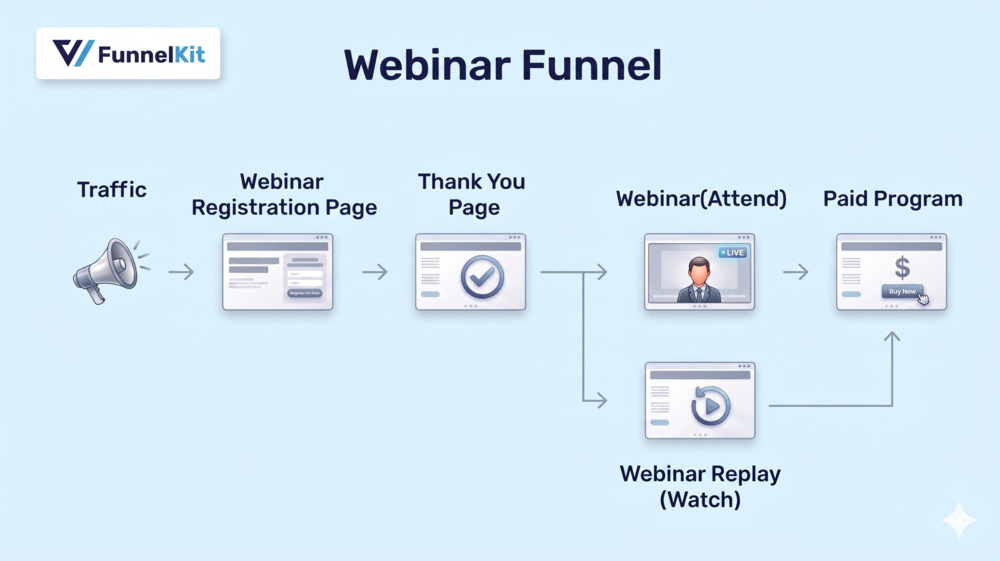
The webinar funnel process typically includes:
- A traffic source (paid ads, email list, social media)
- A registration page that captures leads
- A confirmation page and automated reminder sequence
- The broadcast/webinar page where the presentation happens
- A follow-up email sequence that closes sales after the event
Every step is intentional. Every page has one job. That's what makes a webinar sales funnel so powerful.
If we tell the success story of a webinar by numbers, here’s how it boils down to:
- On average, 40% of the audience turns into qualified webinar attendees
- Out of them, 5%-20% of webinar attendees convert into buyers
Many marketers have already implemented strategies and achieved success in their businesses. So let's get going.
Why Does a Webinar Funnel Work Better Than a Single Landing Page?
A webinar funnel works because it does five things a single sales page cannot:
- 74% of people prefer watching videos over reading articles. People connect more to a video or webinar because they understand graphical content 60000 times faster than plain text.
- Most webinars run 45 to 60 minutes, which gives you time to establish trust and demonstrate expertise before asking for the sale.
- The average viewing time of webinars is 56 minutes. These have high engagement because of the personalized interactions between the coach and attendees.
- It captures contact information. Even attendees who do not buy are now leads on your email list, giving you the opportunity to nurture them after the live event.
- When someone registers for a specific date and time, they are more invested than a casual page visitor and convert at higher rates.
- It handles objections in real time through a live Q&A session, allowing you to address hesitations directly.
- As the prospect spent an hour with you on the webinar, they are more comfortable with paid offers than they would be on a cold landing page.
4 Key Stages of Building a Successful Webinar Funnel
A typical webinar funnel comprises four key components:
1. Webinar promotion (traffic and awareness)
The foremost step of building your automated webinar funnel is to drive traffic to your registration page.
You will not have many audiences if you don’t drive enough traffic. This will eventually lead to fewer leads and much fewer conversions.
Therefore, driving quality traffic to your webinar registration page is important.
You can boost your webinar promotion in three ways:
- Paid advertisements: Paid advertisements deliver a 200% ROI and generate twice as many leads as any other marketing channel. So, use paid ads and create paid promotions for your webinar landing page. Due to a massive user base found online, you’ll be able to drive significant traffic to your webinar funnel.
- Your existing email list: This method is helpful if you already have subscribers. Since they've shown interest in your business, sending an email will make it more likely they'll check out your email and the landing page. Make sure to craft a good email newsletter about your webinar, along with a top-notch subject line.
- Pop-up on the website: If your website gets good traffic, you can use a pop-up to take visitors to the registration page. Since it’s a free webinar, most will surely say yes.
2. Registration page
A webinar registration page is where a visitor becomes a lead. It's an important step in your webinar funnel because the aim of this page is to get as many successful registrations as possible.
Your page should communicate the value proposition you'll offer in your webinar.
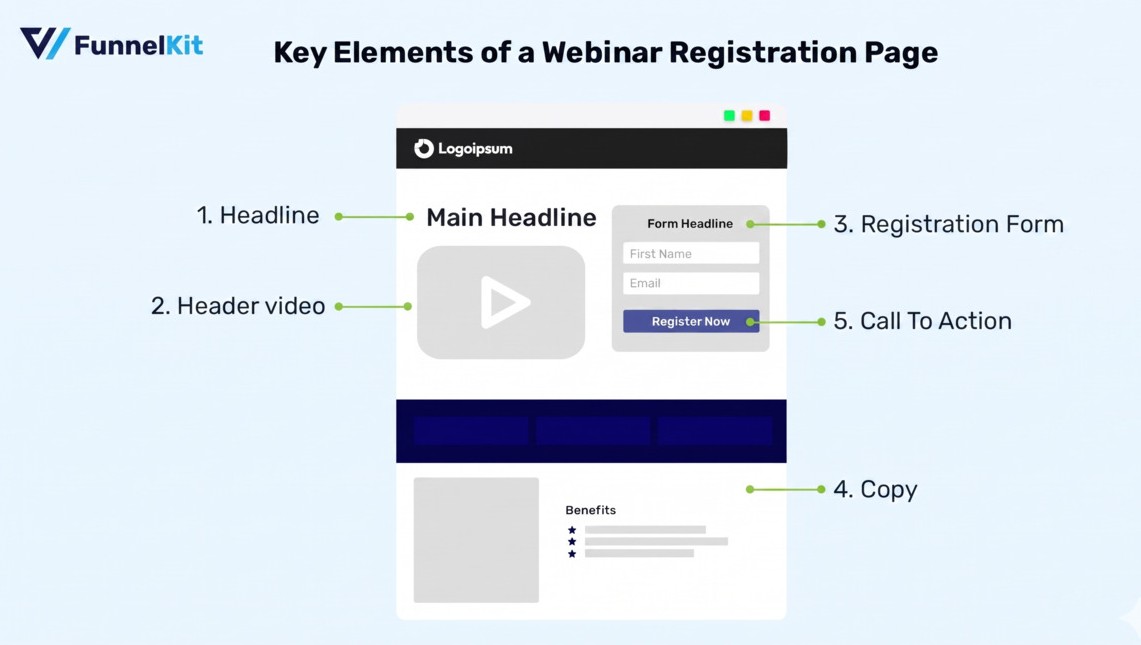
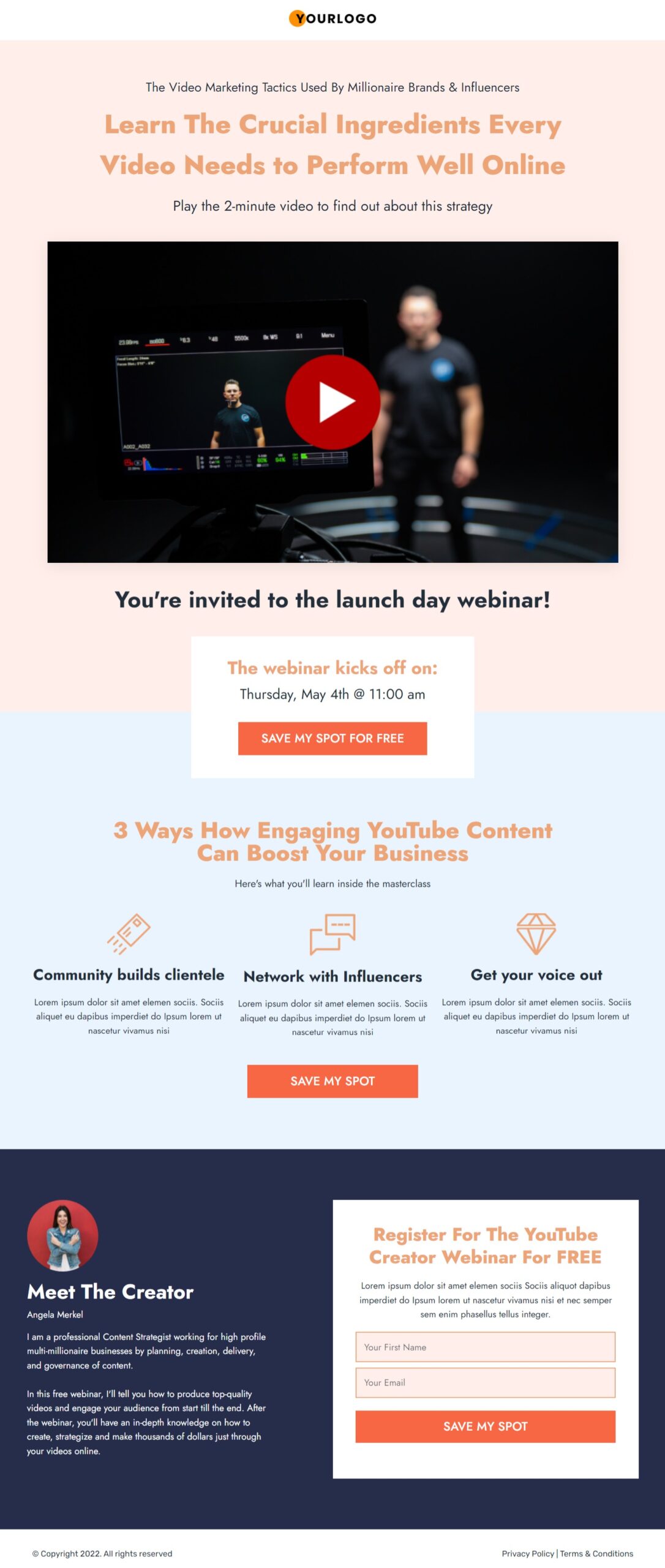
The secret five key elements to creating a winning webinar registration page:
- Headline: Make your headline stand out to your readers and spur them to go through the page. Your title needs to be to the point, bold and eye-catching.
- Engaging header video: Use the video to address users about the webinar, talk about the goal you’ll help users achieve in the webinar and additional bonuses.
- Minimal form fields: Make sure to keep your opt-in form fields to a minimum. You just need an email address to send emails and a basic first name to personalize them.
- Page copy: Highlight all the benefits they'll get when they attend your webinar. Make sure to emphasize how they can use those benefits to achieve their goals. Use the limited seat FOMO to save their spot.
- Compelling CTA button: Use personalized CTAs that prompt the action you want your visitors to take.
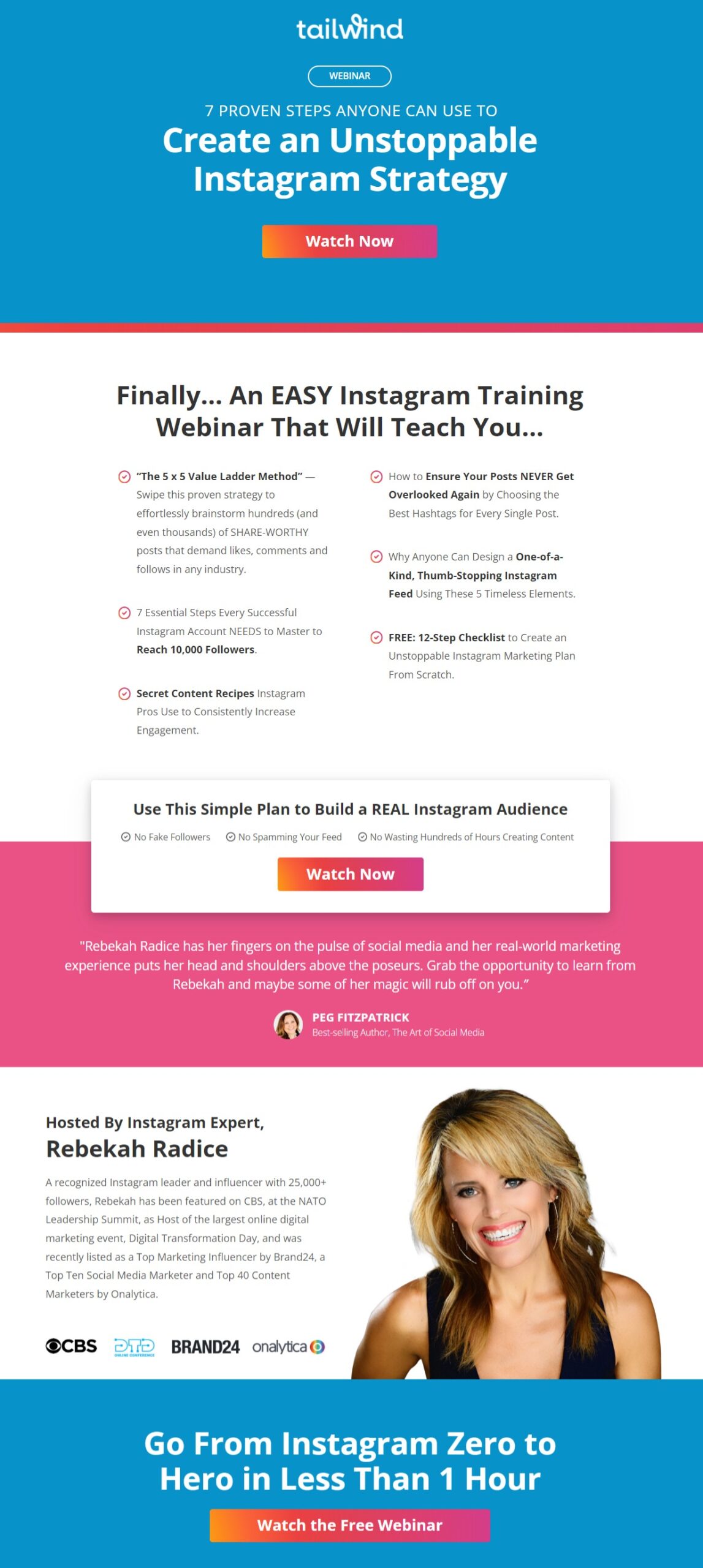
Here’s an amazing example of the webinar signup page from Tailwind that utilizes all the above elements:
3. Confirmation page
Even though you’ve generated leads for your webinar, it’s your responsibility to thank your users and inform them about the next steps.
Display a thank you page and make sure to direct them to the webinar (if it’s recorded - in case of an evergreen webinar) or give the date and time of the live webinar.
A thank you is the nicest thing you can say to your audience and it really hit off quite well as a first impression.
4. Actual webinar
The primary focus of your webinar is to keep your audience engaged and help them learn while pitching the right products and selling them.
Here are a few ways to make your webinar engaging:
a) Interactive sessions
Since the webinar has one of the highest watch times, make sure it's engaging. Here are a few things you can do:
- Empathize with your audience: Know your audience personas and understand their goals and frustrations. Thus, speaking to their desires and goals will keep them engaged.
- Be authentic to yourself: Instead of trying to be someone else, focus on being true to who you are. This way, you’ll be able to enjoy yourself and keep your audience on their feet.
b) Smooth transitions
It’s difficult to transition from your free training to your offer. Many webinar presenters feel awkward about pitching their main offer.
Here’s how you can eliminate the awkwardness and encourage people to keep watching at the same time:
- Pick at least one powerful takeaway from your webinar
- Introduce the story revolving around that takeaway
- Deliver the value to whet the appetite of your audience
- Pitch your offer to accomplish the goal
- Reinforce your takeaway and leave them satisfied
5. Post-webinar follow-up sequence
Ideally, some attendees will purchase your product after the webinar. But for others who don’t, you’ll be able to send them follow-up emails.
Send them your follow-up emails a couple of days after the webinar to encourage them to purchase your offer.
You can also create compelling offers or a sense of urgency with limited-time deals to boost your order conversions.
Around 93% of consumers prefer to use a discount coupon before making a purchase. Therefore, making the offer appealing with discounts should be your topmost priority.
Segment your follow-up immediately into the following.
- Attendees who didn't buy: Build a 4-day follow-up sequence that includes a case study from a past customer on the first day. The next day, address the objection directly. Next, give them the scarcity/bonus reminder.
- Registrants who didn't attend: 4-day follow-up sequence. Give them a summary of 3 key insights they missed on day 1, then send a case study email on day 2, followed by an objection-busting email. Send them a final call on what they'll lose on the last day.
Never send the same follow-up sequence to both groups.
How to Create a Perfect Webinar Funnel that Converts?
To create our webinar funnel, we'll use the FunnelKit Funnel Builder.
Funnel Builder by FunnelKit lets you build perfect sales funnels for WordPress. It lets you set up high-converting sales funnels, including opt-in pages, sales pages, WooCommerce checkouts, one-click upsells, downsell offers, and more.
Please note that Funnel Builder is available in both the free and the premium versions. Get it from the button below.
Make sure to install and activate the FunnelKit Funnel Builder on your website.
Step 1: Create a new sales funnel
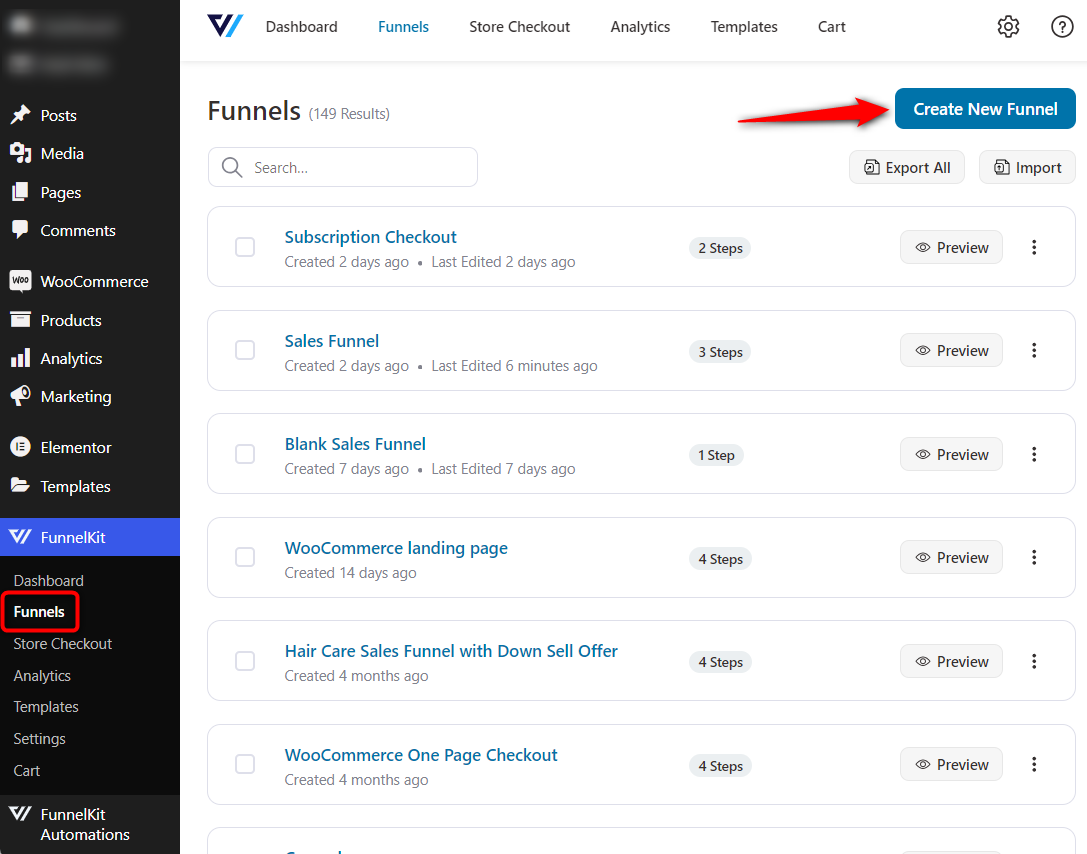
Go to FunnelKit ⇨ Funnels from the WordPress dashboard and hit the 'Create New Funnel' button.
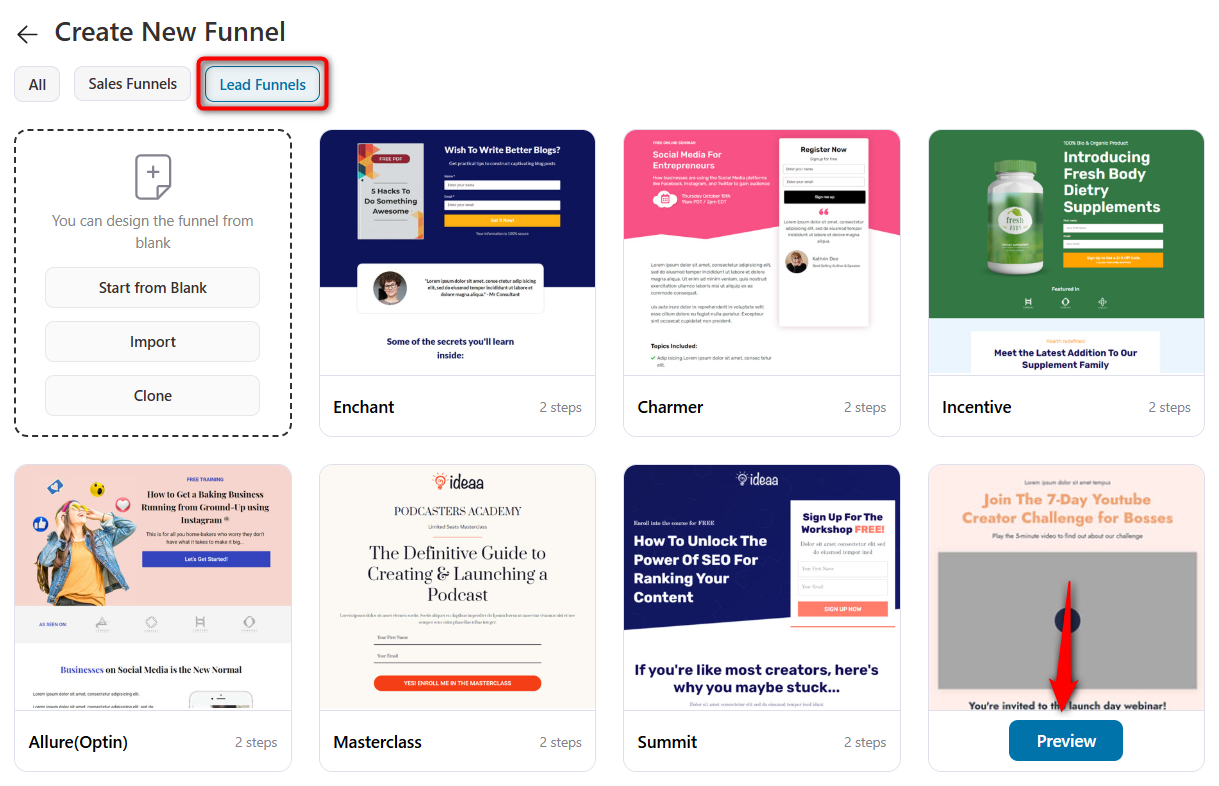
It’ll take you to the templates section. You can choose the template of your funnel.
Make sure to select ‘Lead Funnels’ and choose the template you like to import. Select your preferred page builder, such as Elementor, Divi, Bricks, Oxygen, Gutenberg, etc., from FunnelKit settings.
Here, we've selected Elementor and chosen the ‘Convention’ template.
Next, you'll be able to preview the full template, including the steps in that funnel. If you don't like your template, you can go back and select another template anytime.
Once you're satisfied, select the form type, click 'Import This Funnel' and enter the name of your webinar funnel.
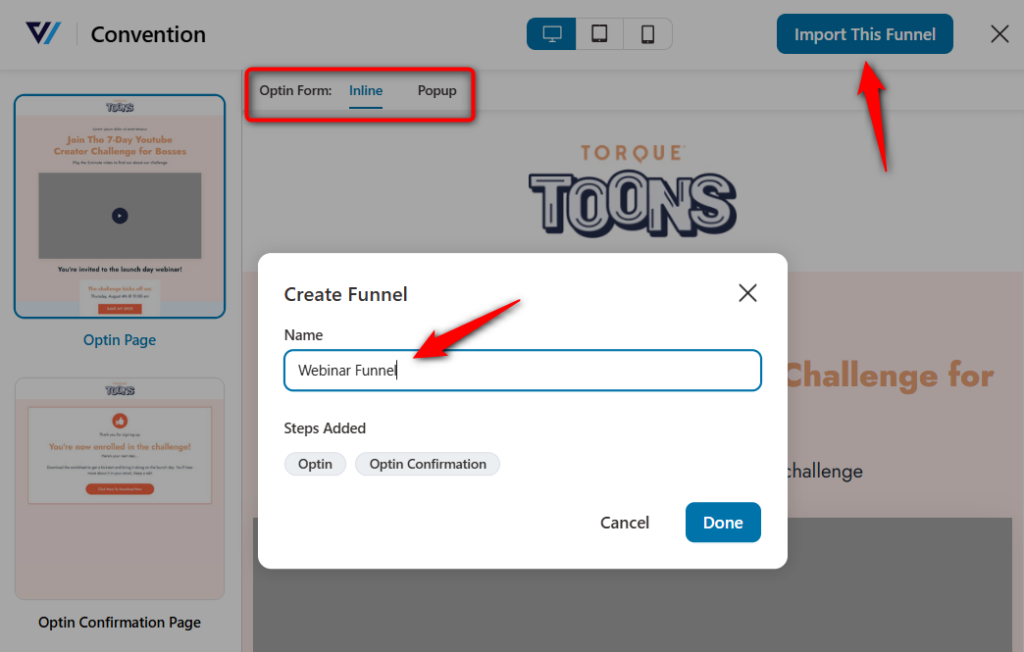
Clicking on 'Done' will import your funnel.
Step 2: Customize your webinar registration page
Click on your optin page to start customizing it.
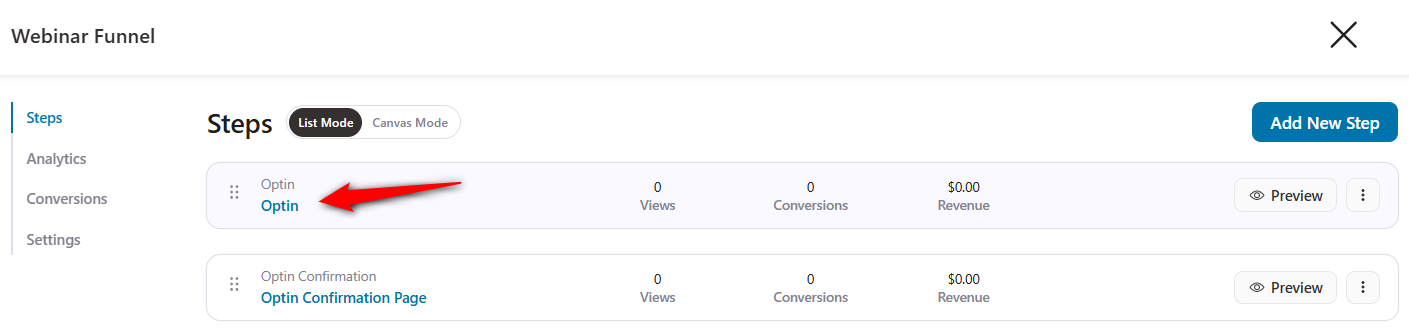
On the Design tab, click on the 'Edit Template' button to start customizing your registration page.
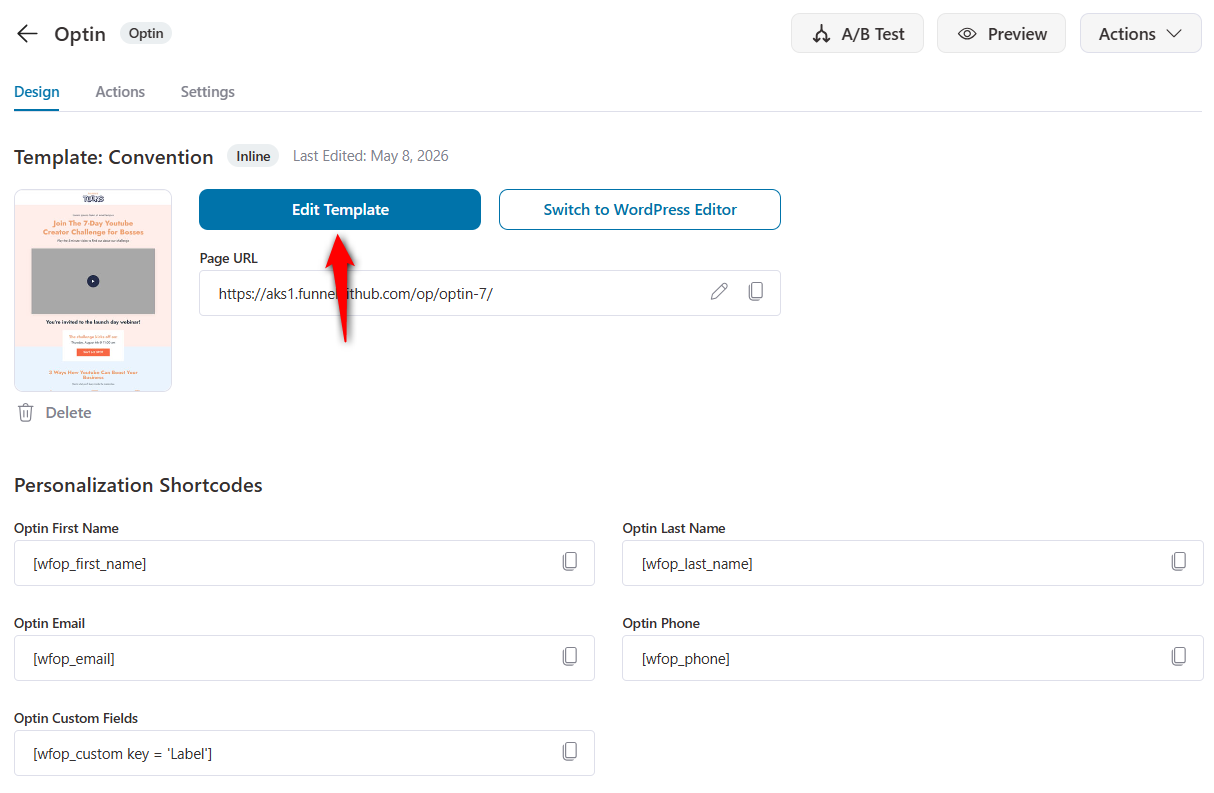
This page will load up in your chosen page builder. Let's start editing your webinar landing page.
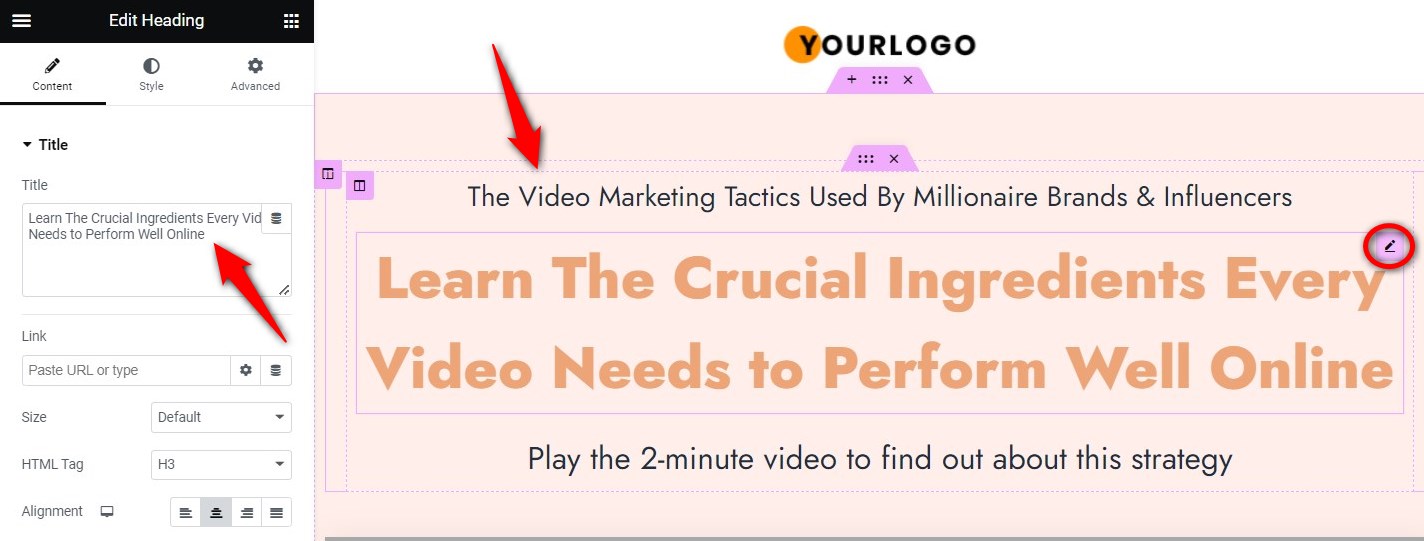
- Editing the headline
Add an attractive headline to your registration page. Click the pencil icon next to the title, then enter the heading you want for your page.
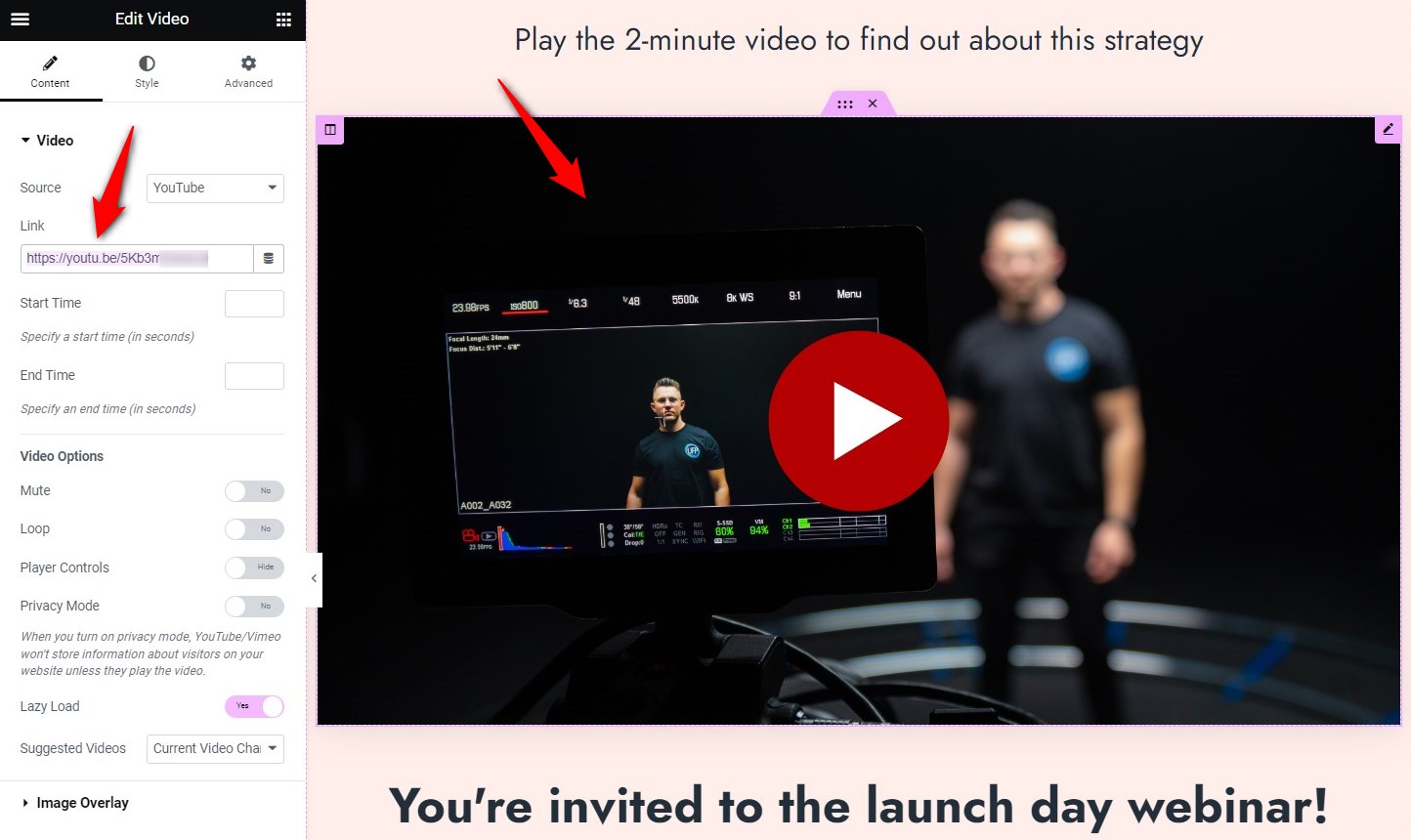
Adding a header video
Next, add the header video that briefly tells about the webinar. To do that, select the graphic and choose a video from the left sidebar menu.
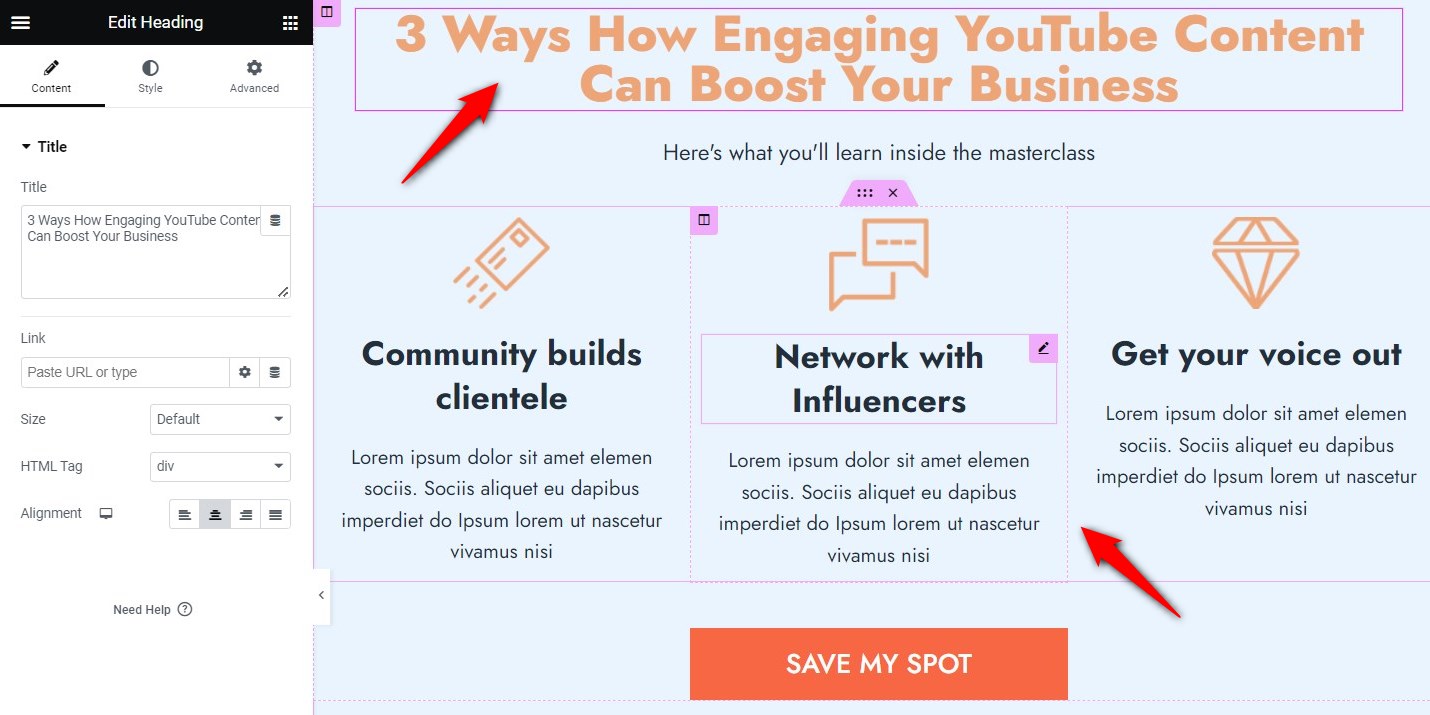
Customizing your page copy
Write the benefits that users find compelling to sign up for your webinar. You can use the pointers to write benefits on your registration page.
Furthermore, you can create a section on your webinar presenter and highlight their expertise.
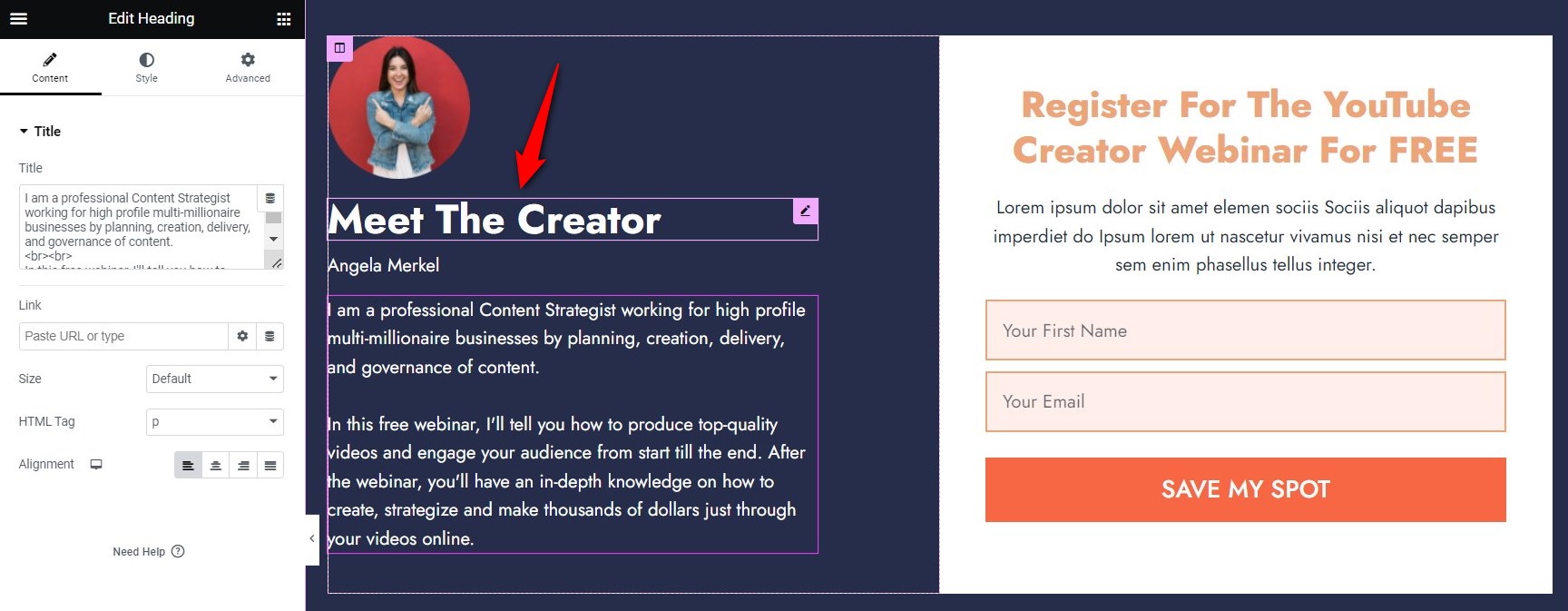
CTA button
The primary goal of the CTA button is to get users to sign up for your free webinar.
Thus, make sure to use bold colors and edit the text to make it actionable.
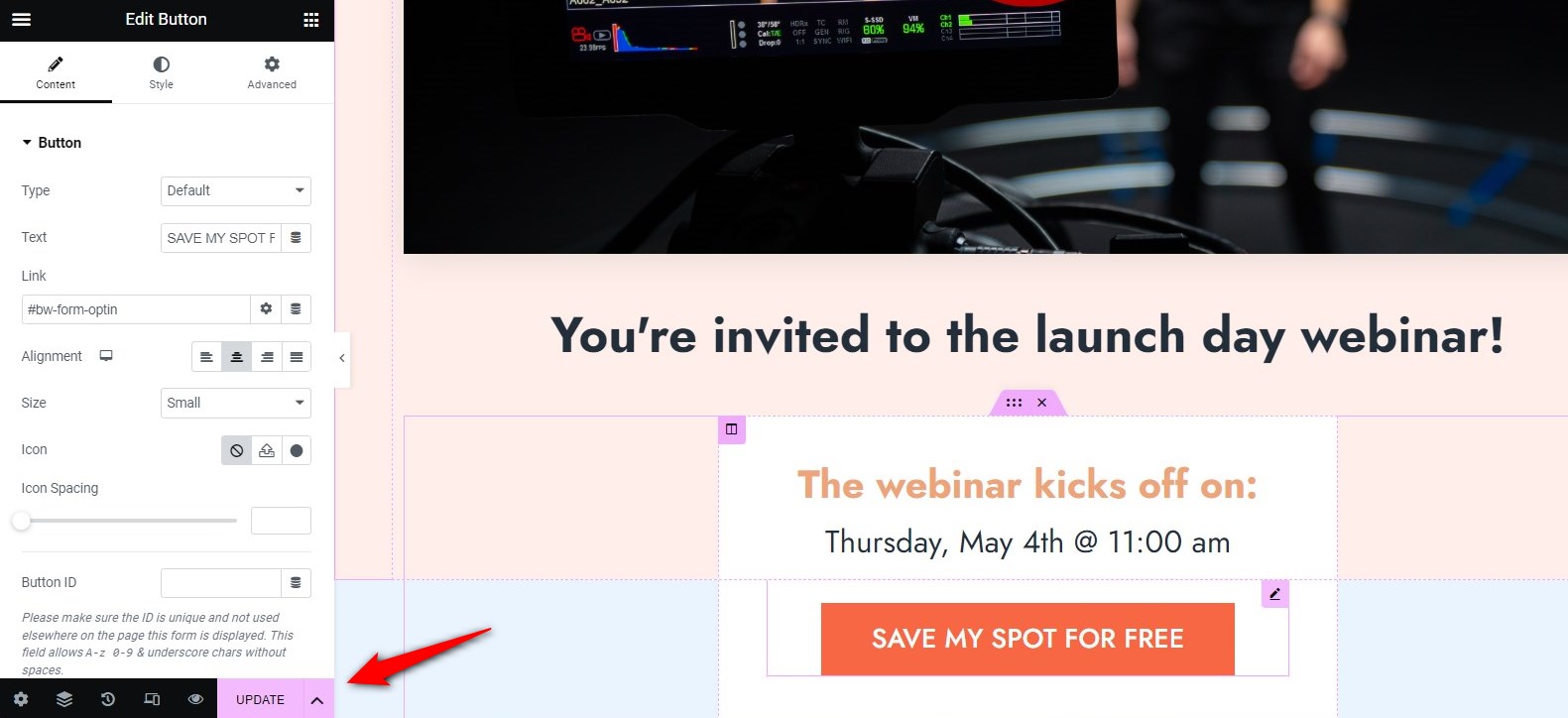
Once you’re done with everything, hit the ‘Update’ button to lock all the changes made to your webinar registration page.
This is how your webinar landing page will look:
Step 3: Customize fields and send a welcome email to your leads
Scroll down to the Optin Form Fields and make sure you have minimal fields on your registration form, such as email and name.
In case you want to add more fields or create custom fields, you can do that. Drag and drop them into the form.
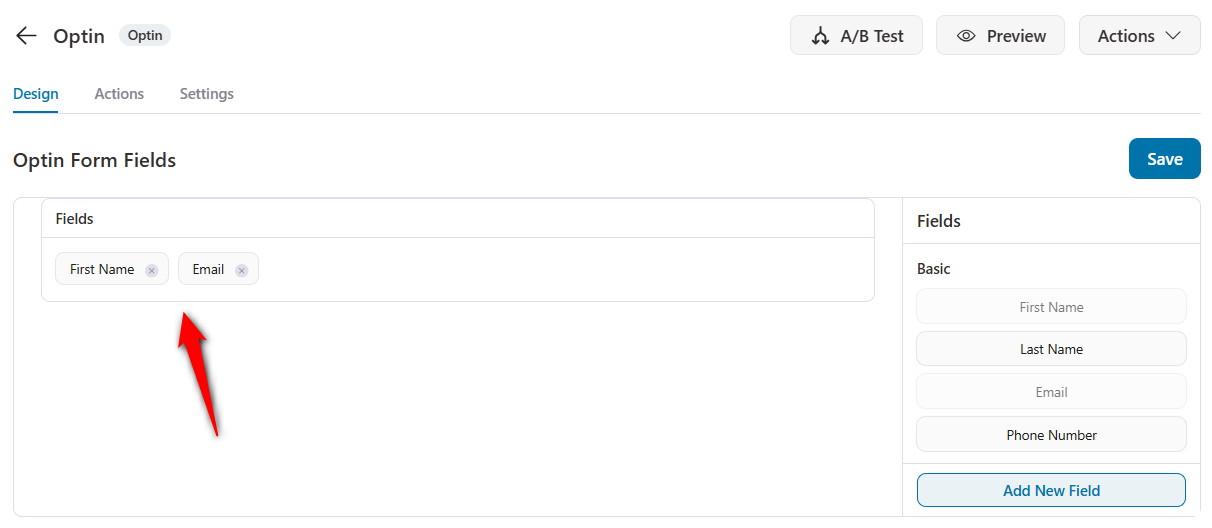
To send lead notifications, click the Actions tab and enable the lead notification.
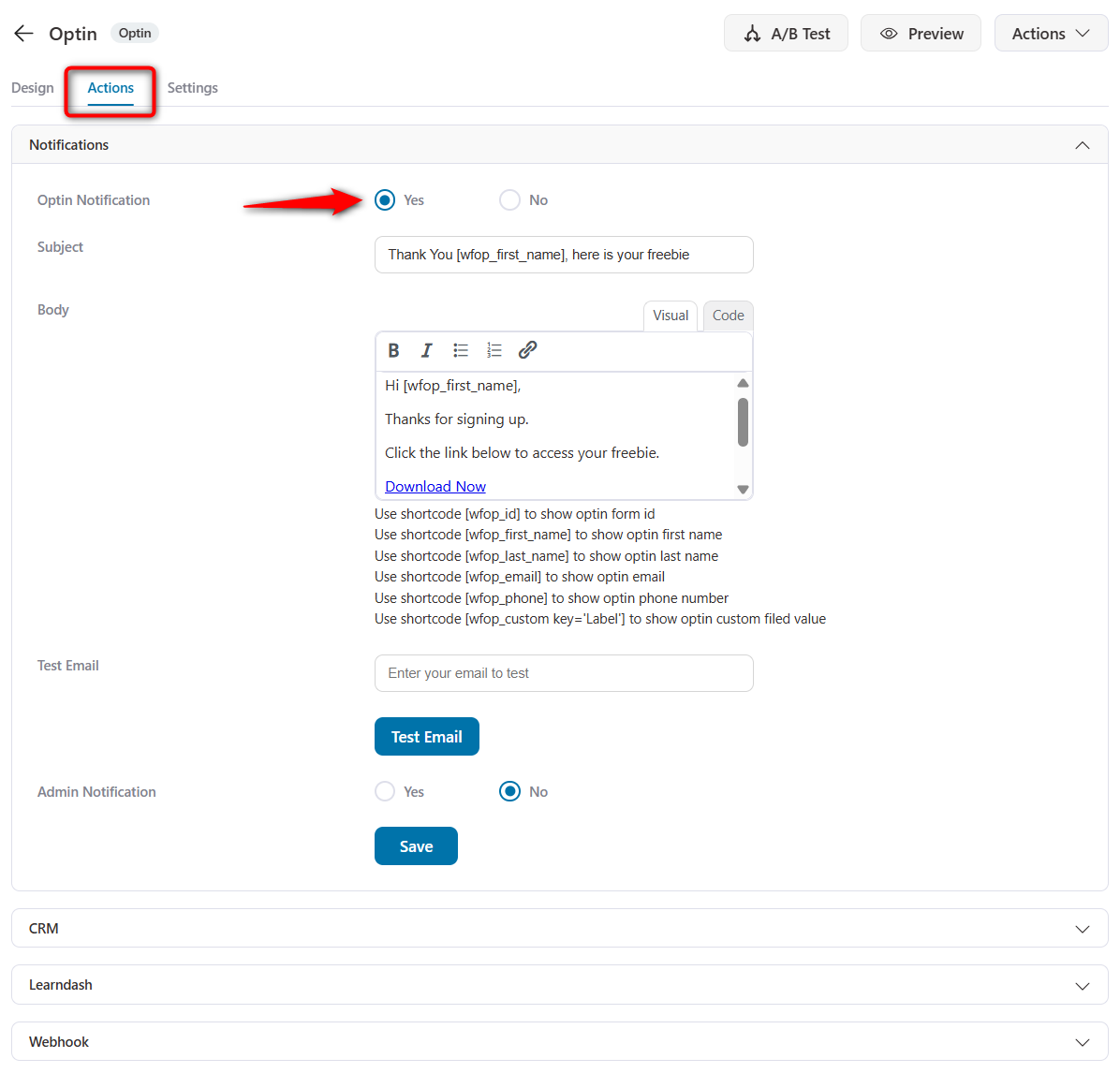
Here, you’ll be able to craft the welcome email that you will send to your subscribers.
Enter the subject line and write the content for your email.
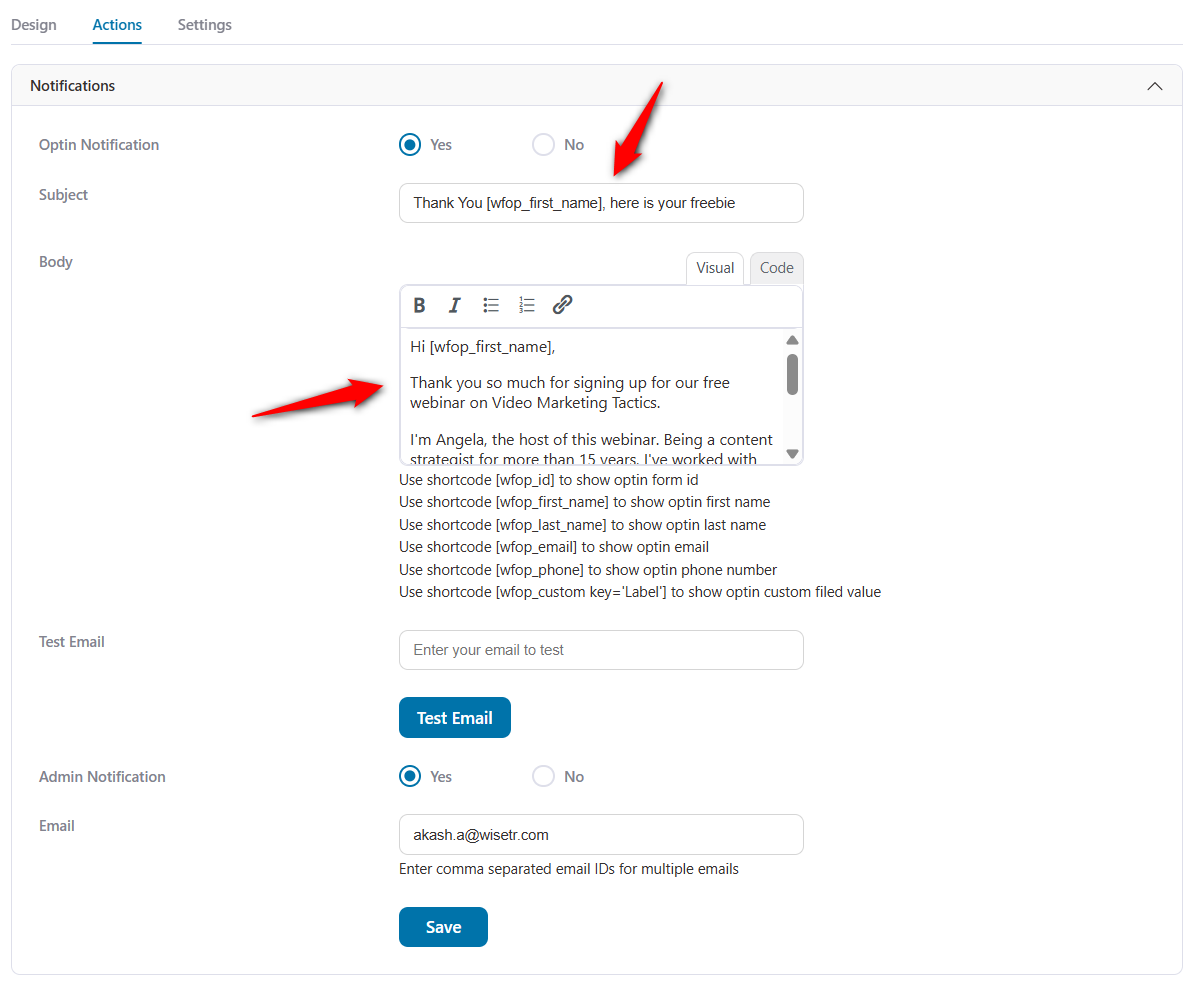
Once done, make sure to hit the 'Save' button.
As soon as any lead signs up on the registration page, they'll receive this email.
Step 4: Edit your opt-in thank you page
Go back to your webinar funnel and click on the optin confirmation page to start editing it. Here, you’ll be able to customize the heading, icons, text, and buttons on-brand.
Once done, make sure to link the CTA button to the platform where you’ll host your webinar.
To do that, click the button and enter the URL in the left side menu.
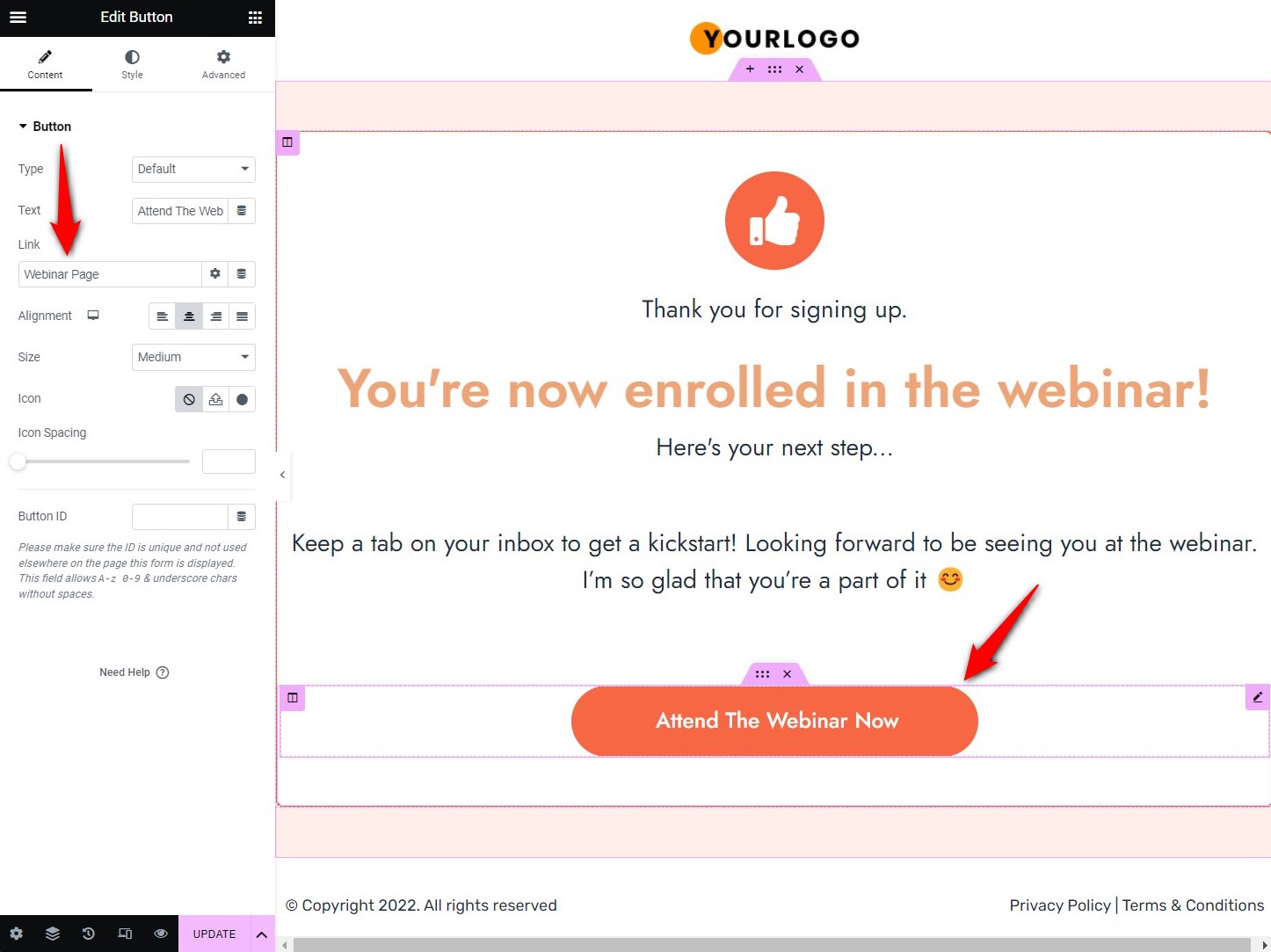
Hit ‘Update’ to save all the changes.
Step 5: Configure your webinar broadcast page
Make sure you've created your presentation and video. Use the 7-part framework and keep your slide deck simple.
Aim for 60-80 minutes total, such as 40-50 minutes of content, 10-15 minutes of offer presentation, and 5-10 minutes of Q&A.
Build a clean, distraction-free page. Embed your webinar stream or video. Connect your offer CTA button so it appears at the right moment.
If you’re going live, test your audio and video setup the day before.
Step 6: Set up your sales/checkout page
This is where the transaction happens. Keep your offer name, what’s included, the price, a clear CTA button, and a payment processor.
For high-ticket items, this might be a booking link for a sales call rather than a direct checkout.
You can use one-page checkouts here.
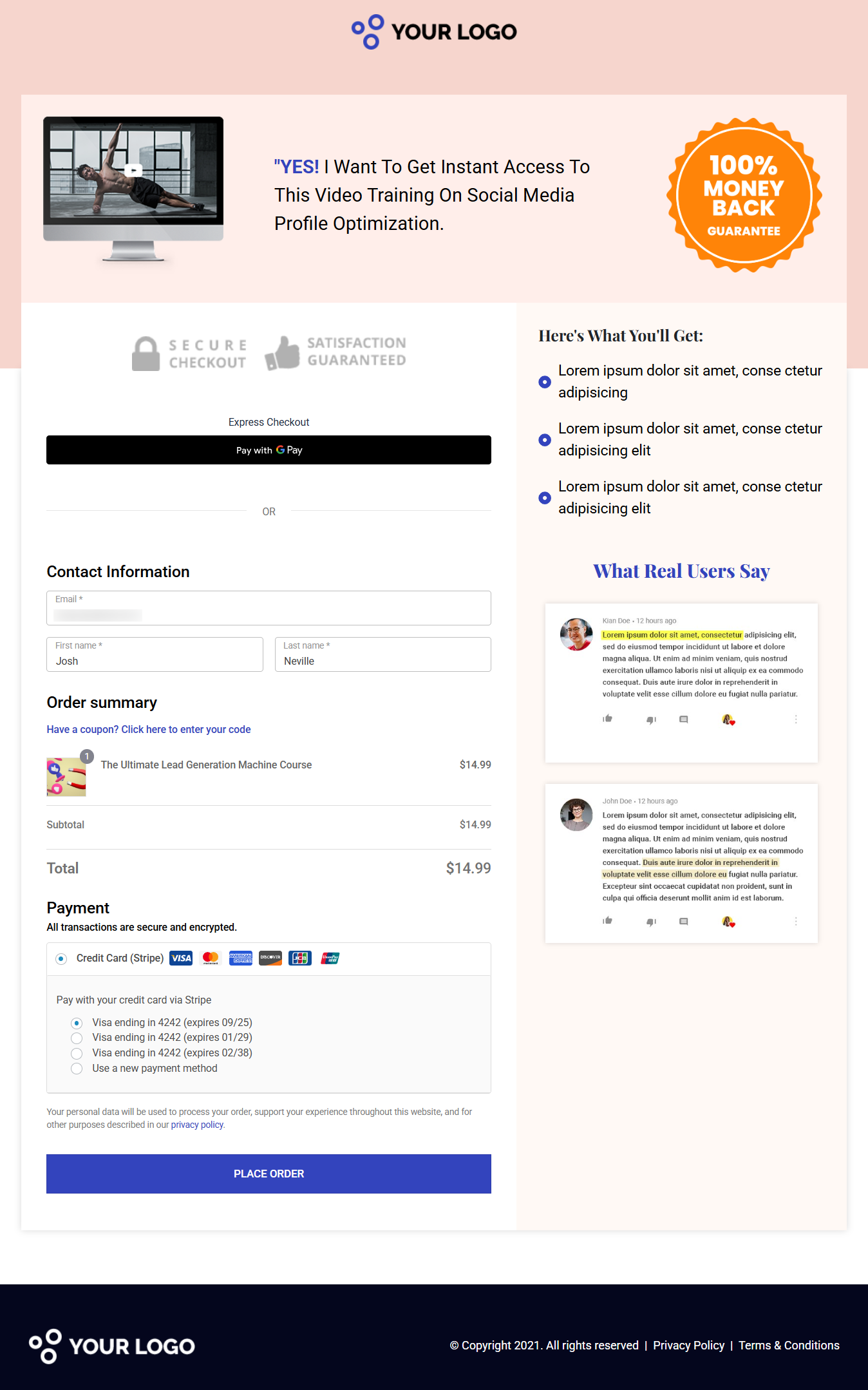
Or you can use direct checkout URLs to send your prospective buyers to the order page.
Step 7: Build your post-webinar email sequences
Write Track A (attendees who didn’t buy) and Track B (no-shows) before your webinar goes live.
Segment automatically based on attendance data from your webinar platform.
You can either use your existing CRM or FunnelKit Automations to create these email sequences.
After every webinar, pull your metrics. Find the single biggest gap between your benchmark and your actual result. Fix that one thing before the next run.
And that's that! Your webinar funnel is all set up successfully.
Best Practices for Maximizing the Conversions of Your Webinar Funnel
Now that you’ve understood about webinar funnels, it’s time to cover some best practices that you can follow for high conversions in your funnels:
- Choose the right platform for your webinar
Make sure to choose a trustworthy platform that helps you plan and execute your efforts and ensures your webinar runs smoothly.
Forbes recommends the best webinar platforms, such as Zoom Webinar, ClickMeeting, BigMarker, WebinarJam, EverWebinar, and more.
These platforms let you collect details about your attendees and the time they spent watching your webinar.
Additionally, some platforms provide engagement stats by measuring interactions with polls, live chat, survey questions, and Q&A sessions.
- Offer your paid program after the webinar
Once you’ve pitched your paid program during the webinar, it’s time to direct your users to the product after the webinar ends.
After the webinar, you can even give a CTA and drive your audience to the product’s landing page.
Your paid product should be in a different funnel consisting of a sales cum checkout page, a one-click upsell offer, and finally, an order confirmation page.
FunnelKit lets you create unlimited sales funnels for unlimited products in your store.
- Use automated follow-up emails to make more profits
Some attendees will purchase your product right after the webinar. For others, following up with automated emails is the safest bet.
The best time to follow up with your registrants is within 24 hours after your webinar. To get started, you can either say thank you for attending the webinar or let them know what they missed, if they missed it.
Make sure your emails are concise and to the point. You can even add a short, compelling copy that helps you create a hook for your webinar registrants.
Make sure to use well-timed delays, dynamic discounts, advanced conditions, etc., with FunnelKit Automations. This will surely help improve conversions in your store.
Frequently Asked Questions
There are two types of webinar funnel:
- Live webinar funnel
It runs in real time on a specific date and time. You’re on camera (or voice), attendees can ask questions, and there’s genuine energy from the shared experience.
It's usually best for high-ticket offers, coaching, consulting, agency services, B2B software, etc.
It shows real urgency, authentic Q&A, the highest conversion rates on expensive offers, and the fastest way to validate a new offer.
However, it requires your time on a schedule, is harder to scale, and has variable no-show rates.
- Automated (evergreen) webinar funnel
An automated webinar uses a pre-recorded presentation that runs on a schedule or on demand, 24/7, without your live involvement.
It's best for mid-ticket offers, online courses, digital products, SaaS, and coaches.
It offers passive sales, time-zone flexibility, infinitely scalable, and easy to A/B test different presentations.
However, it has low conversion rates on high-ticket items, requires upfront production investment, and can feel less authentic without a good platform.
Here's the framework you can use to create your webinar presentation script:
1. The hook (0-5 minutes)
Open with a bold statement with an achievable goal to make the attendee feel like they made the right decision by showing up.
2. Credibility and story (5-12 minutes)
Tell the story of your transformation. Where were you? What changed? Where are you now?
3. Content delivery (12-50 minutes)
Deliver 3-5 teaching points that give genuine value. Teach the what (what to do) and the why (why it matters), but reserve the how for your paid offer.
4. Epiphany bridge (50-55 minutes)
Transition from teaching to your offer. Acknowledge that they now know what to do. The gap is in the execution, the system, the community, or the accountability. Your offer closes that gap.
5. Offer stack (55-70 minutes)
Present your offer clearly. Show what’s included. Assign real dollar values to each component. Introduce bonuses with their own value. Reveal the total value, then the actual price. Include a guarantee.
6. Objection handling (70-80 minutes)
Address the top 5 reasons people hesitate. Answer each honestly, not defensively.
7. The close and urgency (80-85 minutes)
Create a real reason to act now, such as a bonus deadline, enrollment closing after the webinar, etc. Then ask for the sale.
Webinar funnels work best for:
- Coaches and consultants for high-ticket 1:1 or group programs
- Online course creators for mid-to-high-ticket courses
- Agency owners where the webinar positions you as an expert
- B2B SaaS companies to offer product demo webinars with an educational component
- Real estate professionals for educational webinars on market conditions, investment strategies, and related topics.
- Financial advisors who set up compliance-friendly educational webinars
Track registration rate, attendance rate, stick rate, live conversion rate, post-webinar email conversion rate, and Revenue Per Registrant (RPR).
RPR is the single most important metric because it tells you exactly how much you can afford to spend acquiring each registrant.
Yes, B2B webinar funnels work particularly well for SaaS companies, consultants, and service businesses selling annual contracts valued at more than $3,000.
The educational format positions your team as experts, attracts qualified leads who self-select based on the topic, and makes the sales conversation easier because the prospect is already educated on the problem and your approach.
Choosing between a webinar funnel and a VSL entirely depends on your offer, audience and pricing.
A Video Sales Letter (VSL) is a 15-45 minute recorded video on a sales page. There’s no registration. No waiting. The visitor lands on the page, and the video plays immediately.
Here's what to consider between the two:
| Factor | Webinar Funnel | VSL |
|---|---|---|
| Friction to consume | High (register, wait and attend) | Low (land and watch) |
| Trust built | Very high (60-90 min) | Medium (15-45 min) |
| Conversion rate per viewer | High (5-20%) | Low (1-5%) |
| Total reach | Smaller (drop-off at registration) | Larger (anyone who lands) |
| Urgency mechanism | Natural (live event ending) | Manufactured (countdown timers) |
| Setup complexity | High | Medium |
We've seen many experienced marketers run a VSL as the entry offer ($97-$497) and a webinar funnel for their premium offer ($2,000+). The VSL converts at volume. The webinar funnel converts at a higher dollar amount. Each serves its role.
Get Ready to Earn Loyal Customers and Drive Massive Revenues with Webinar Funnels
Webinar funnels are great for generating leads and driving sales for your business.
However, you have to stay on top of the critical process of setting up a perfect high-converting webinar funnel.
The last thing you want is to host a webinar that no one attends or bring leads that don’t convert at all.
Therefore, you have to be focused on promoting your webinar and driving traffic to your webinar registration page. Plus, you should think of how to guide your leads from attending your webinar to making a purchase.
While you do the thinking part, we went through this post on setting up the funnel with FunnelKit.
It’s one of the most powerful sales funnel builder plugins that help you efficiently create your sales funnels without using any coding knowledge.
Plus, we’ve covered exclusive tips and processes for delivering a webinar funnel that converts perfectly.
So what are you waiting for?
Editorial Team
October 9, 2026A downsell gives customers a cheaper option after they turn down your main offer. If you show it too soon, you might convince them to skip the original offer and...
Editorial Team
October 8, 2026WooCommerce guest checkout lets shoppers buy from your store without creating an account. They enter an email, their billing details, and payment, and the order goes through. It's a built-in...
Editorial Team
October 7, 2026WooCommerce upsells are products you recommend in place of the one a shopper is viewing, usually a better or higher-priced version of it. WooCommerce has a built-in upsell field for...






