Most WooCommerce hosting comparisons rank providers by homepage load time. But that's the least useful page to test.
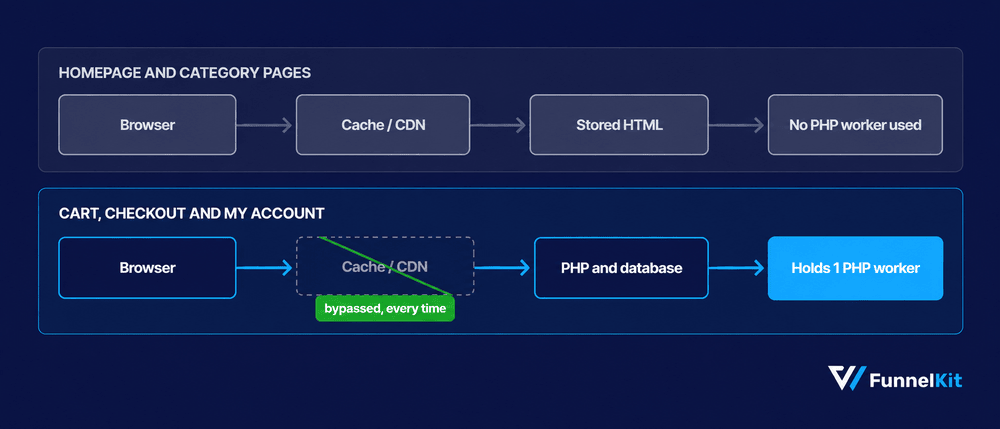
Almost every hosting provider in this guide aggressively caches the homepage, so the server has little work to do when someone visits.
The pages that actually matter are the cart, checkout, and My Account pages. These differ for every shopper, so they can't simply be served from cache.
Each request has to run PHP, query the database, and hold a PHP worker until the page is ready.
That matters because even small speed improvements can affect sales.
Deloitte analyzed 30 million mobile sessions and found that a 0.1-second improvement in load time increased retail conversions by 8.4% and average order value by 9.2%.
Those fractions of a second are largely won or lost on the uncached requests your store has to handle. This guide focuses on that.
We compare 9 of the best WooCommerce hosting providers based on renewal pricing, PHP worker allocation, object caching, and whether the host clearly documents which pages are excluded from caching.
We'll also show you how to figure out whether your server is really the problem.
Because if a slow plugin is holding your store back, moving to a faster host won't fix it. You'll just have the same problem on a more expensive server.
Table of Contents
- 1 Best WooCommerce Hosting At a Glance
- 2 How We Tested These Hosts
- 3 Checkout and Cart Performance: The Real Decision Factor
- 4 The 9 Best Hosting Providers For WooCommerce Stores
- 5 Which Host Should You Pick? (By Store Size and Traffic)
- 6 Is It Your Host or Your Store? A 6-Check Diagnostic
- 7 5 Things to Check Before You Buy Your Hosting Plans
- 8 Frequently Asked Questions
- 9 Give Your WooCommerce Store the Hosting It Deserves
Best WooCommerce Hosting At a Glance
WooCommerce hosting can cost anywhere from about $3 to $400 a month, depending on your traffic, catalog size, and how much server management you want to handle yourself.
Here’s where the nine providers in this guide land:
| Provider | Best for | Starting price | Unique feature |
|---|---|---|---|
| SiteGround | Small stores wanting managed basics cheaply | $2.99/mo | Shared resources, no published worker count |
| Hostinger | First stores on the tightest budget | $3.99/mo | LiteSpeed, object caching on Business tier and up |
| Kinsta | Performance-first stores on Google Cloud | $35/mo | 1 PHP worker on Starter |
| Levamo | Stores with heavy logged-in traffic | $29/mo | Object Cache Pro and Redis with Relay included |
| Cloudways | Stores that want to size their own server | $11/mo | Unlimited workers, Object Cache Pro free at 4GB+ |
| Pressable | Agencies inside the Automattic ecosystem | $20.83/mo | 30,000 visits on entry plan, hourly backups |
| WP Engine | Teams that need staging and phone support | $25/mo | Visit-based overages apply |
| Bluehost | Beginners who want store tools bundled | $14.99/mo | Up to 400,000 visits on ecommerce plans |
| GoDaddy | Owners consolidating domain and hosting | $5.99/mo | General WordPress tuning, not store-specific |
We've verified every price from the providers' official pricing pages on September 9, 2026.
Keep in mind that the introductory rates require 12 to 48 months paid up front.
How We Tested These Hosts
We ranked these hosts by the problems a WooCommerce store runs into, not marketing claims or star ratings.
- Renewal cost, not the intro price: Year two is your real hosting budget. The first year is usually a promotion.
- PHP worker allocation: Every cart, checkout, and account request uses a worker. When traffic spikes during a sale, worker limits can become a bottleneck long before bandwidth does.
- Object caching: Redis or Memcached can reduce repeated database queries on uncached WooCommerce requests.
- Store-aware cache rules: Exclude cart, checkout, and My Account from full-page caching. Otherwise, shoppers may see stale totals or run into broken sessions.
- Support scope: We looked at whether the host will actually help troubleshoot a WooCommerce issue, rather than stopping at the server level.
Checkout and Cart Performance: The Real Decision Factor
Judging a WooCommerce host by homepage speed is a bit like judging a restaurant by how quickly the ordered food comes to your table.
A cached page is basically a stored HTML file, so serving it takes very little server work. That’s why almost every host can post a good homepage speed score.
Your cart or checkout page doesn't get that advantage. It has to be generated for each shopper, using server resources for however long the request takes.
This is exactly where the hosting plans start to look quite different. And unlike vague performance claims, some of these limits are published.
For example, Kinsta’s Starter plan includes one PHP worker. Cloudways gives you unlimited workers on servers you provision yourself, while Cloudways Autonomous allocates 100 workers per server.
Those limits cap how many requests your store can process at once.
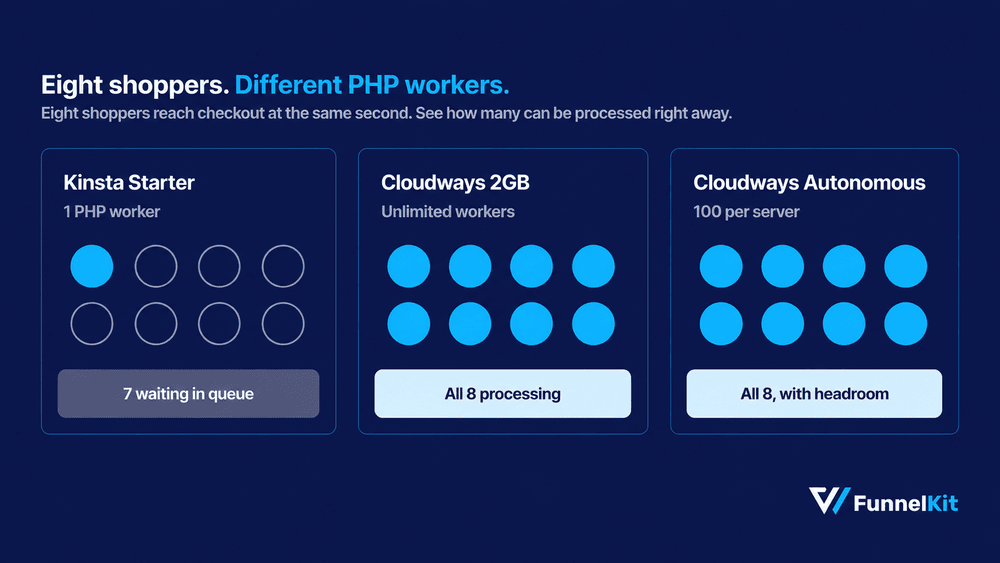
Placing an order is even more demanding. WooCommerce has to create the order, reduce stock, and often wait for a payment gateway API before it can show the confirmation page.
During a flash sale, that extra database and API work is where requests start piling up.
Akamai analyzed roughly 10 billion retail visits and found that a 100-millisecond delay in load time was associated with a 7% drop in conversion, while a two-second delay doubled the bounce rate.
On a WooCommerce store, much of the latency that matters happens on the pages most hosting benchmarks don't test.
So don't stop at the advertised load time. Look at the PHP worker count, object caching, and cache exclusion rules.
These details will tell you much more about how a host will handle a busy store.
The 9 Best Hosting Providers For WooCommerce Stores
1. SiteGround
| Best for | Small and mid-size stores that want managed features at a shared-hosting price |
| Starting price | $2.99/month (StartUp, 12 months prepaid) |
| Included | Free domain, daily backups, free CDN, WooCommerce auto-install |
SiteGround is the lowest-cost option on this list if you want a more managed WooCommerce setup without jumping straight to premium hosting.
Sign up for an eCommerce plan and WordPress, WooCommerce, the Storefront theme, SSL, and the CDN are all configured before you first log in.
Its SuperCacher applies multi-level caching while leaving cart and checkout dynamic, which is what a store needs and what a blog does not.
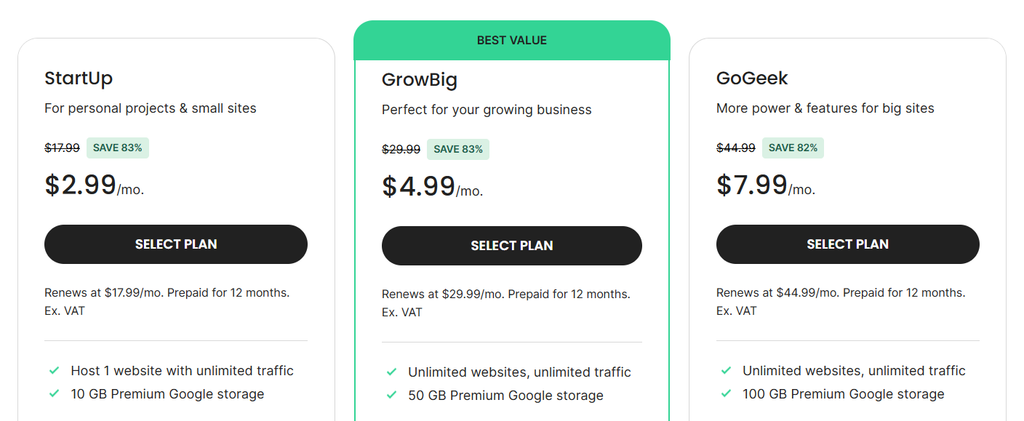
GrowBig at $4.99/month adds staging and roughly 30% faster PHP. GoGeek at $7.99/month adds Git and priority support.
What we found:
WP Beginner's independent testing measured a 592ms page load and a 92ms average response time on a SiteGround store.
The bigger advantage, especially for a new store owner, is how little setup work is required.

Strengths:
- WooCommerce, Storefront, and SSL arrive pre-installed, so a new store works on day one.
- Free domain and free daily backups on every tier, including the $2.99 plan.
- Managed auto-updates cover WordPress, WooCommerce, PHP, and MySQL together.
- 24/7 phone, chat, and ticket support, which is rare below $10 a month.
Limitations:
- StartUp goes from $2.99 to $17.99 at renewal. That is a 500% increase, and it lands at the end of your first term.
- SiteGround doesn't publish a PHP worker count, so you can't estimate checkout concurrency from the plan details alone.
- StartUp doesn't include staging, so you don't have a built-in test environment to check plugin or theme updates before pushing them live.
Pricing:
StartUp $2.99/month, renewing at $17.99/month. GrowBig $4.99/month, renewing at $29.99/month. GoGeek $7.99/month, renewing at $44.99/month.
All rates require 12 months prepaid. 30-day money-back guarantee.
2. Hostinger
| Best for | First stores launching on the tightest possible budget |
| Starting price | $3.99/month (Managed WooCommerce, 48 months) |
| Included | 200GB NVMe storage, free domain, unlimited SSL, free CDN |
Hostinger gives you 200GB of NVMe storage and a free domain for under $4 a month. That's hard to match at this price.
It's also one of three providers WordPress.org currently lists on its recommended hosting page, alongside Bluehost and Pressable.
The managed plans run on LiteSpeed web servers with the LiteSpeed Cache plugin.
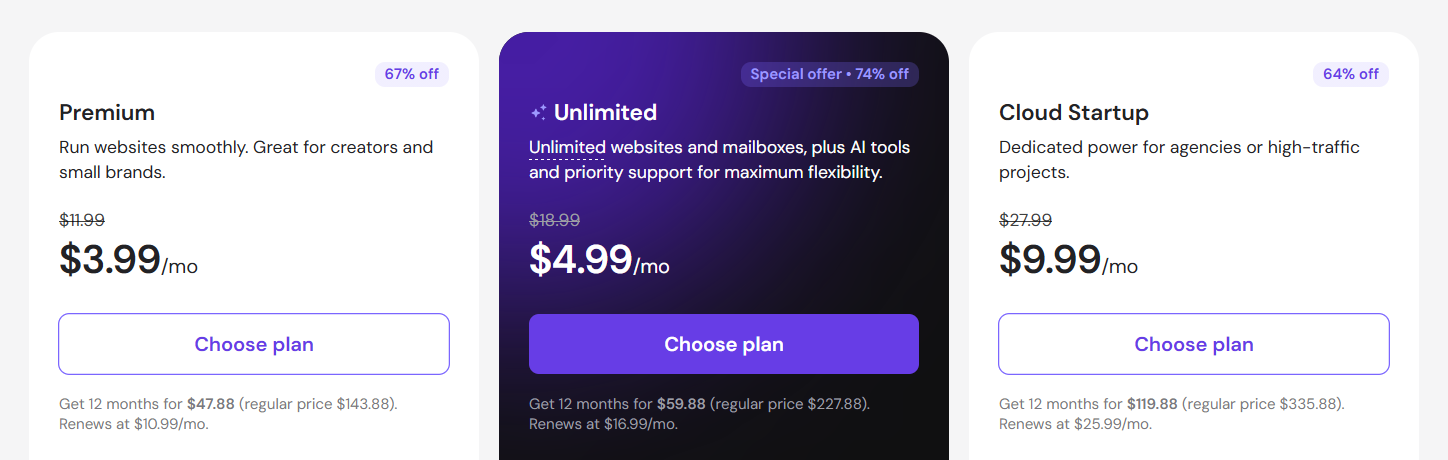
Object caching starts at the Business tier, and Hostinger's own guidance steers stores toward Business or Cloud Startup rather than its entry shared plans.
The cheapest plan is fine for getting started, but it isn't the one we'd pick for a store that's already handling regular orders.
What we found:
The value is real, but the $3.99 plan isn't the one we'd choose for an active store.
Cloud Startup starts at $7.99/month and includes dedicated resources and higher worker counts.
For a store taking orders every day, that's the more realistic starting point.
Strengths:
- LiteSpeed servers handle static assets noticeably better than standard Apache setups at the same price.
- 200GB NVMe storage on the store plans, far above anything else near $4.
- 100 free email addresses on your own domain, which most hosts sell separately.
- Free domain and unlimited SSL are bundled, not upsold.
Limitations:
- The $3.99 rate needs 48 months prepaid, so the actual commitment is $191.52 up front.
- Entry shared plans put your store on a shared CPU, which is why Hostinger prices stores higher up its own range.
- Chat-only support with no phone option, which slows things down during a live checkout outage.
Pricing:
Managed plans from $3.99/month on a 48-month term, renewing at $16.99/month.
Higher tiers renew at $25.99/month, and Cloud Startup starts at $7.99/month. All plans include a 30-day money-back guarantee.
3. Kinsta
| Best for | Performance-first stores that want Google Cloud infrastructure |
| Starting price | $35/month (Starter), or $29.17/month billed annually (free for the first month) |
| Included | 1 site, 25000 visits, 10GB SSD, 1 PHP worker |
Kinsta keeps the same price in year two, which is worth pointing out after the renewal jumps we've seen above.
Each site runs in its own isolated container on Google Cloud's premium tier, with Cloudflare Enterprise CDN and edge caching included across all plans.
The MyKinsta dashboard includes an APM tool that traces slow database queries and plugin calls without a separate New Relic subscription.
If your WooCommerce admin suddenly becomes sluggish, that's useful because it can help you find the actual bottleneck instead of guessing which plugin is responsible.
What we found:
The infrastructure is excellent, and Kinsta's support responds quickly.
The bigger issue is choosing the right plan.
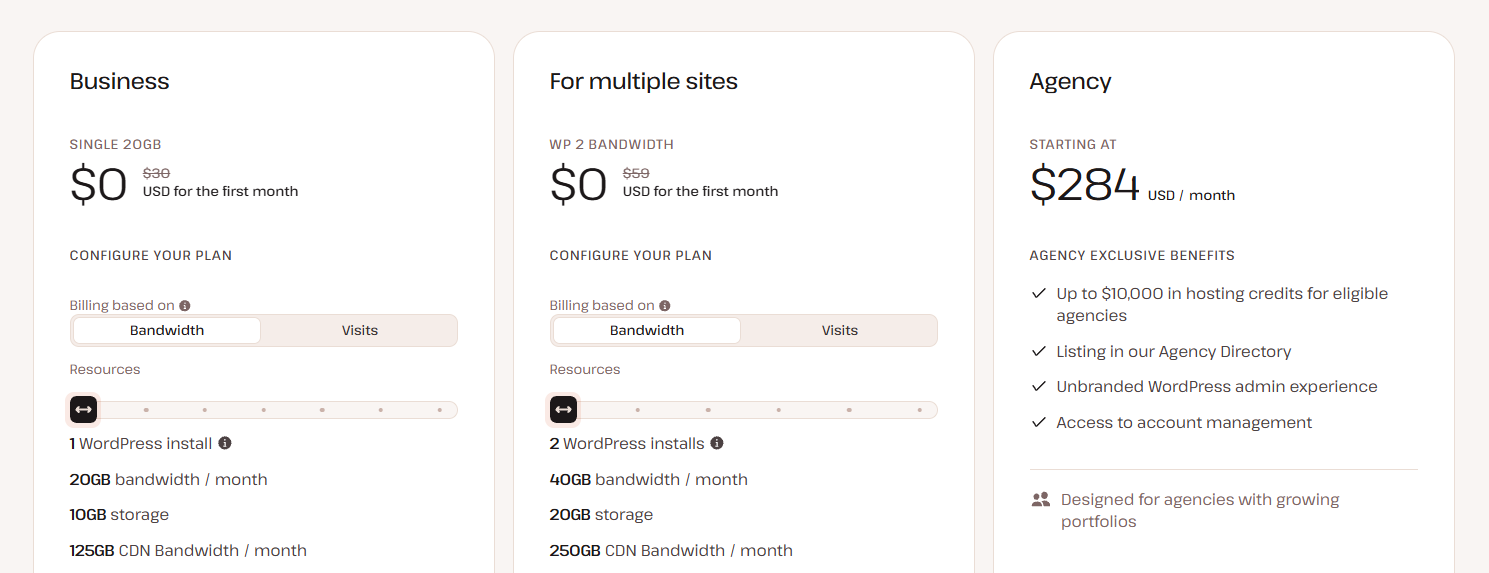
Starter includes only one PHP worker, so concurrent checkout requests can quickly end up in a queue.
For an active store, we'd look beyond Starter.
Strengths:
- Flat pricing with no renewal increase, so year two is predictable.
- Cloudflare Enterprise CDN and DDoS protection included at no extra cost on every plan.
- 24/7 support staffed by WordPress engineers, available in multiple languages.
- Daily automated backups and one-click staging on all tiers.
Limitations:
- One PHP worker on Starter is not enough for a store processing concurrent checkouts. Pro at $70/month is the honest entry point for an active store.
- Visit-based billing means bot traffic and crawlers can push you into overages.
- No email hosting at any tier, so budget separately for Google Workspace or similar.
Pricing:
Starter costs $35/month, or $29.17/month when billed annually.
Pro is $70/month, and Business 1 is $115/month.
Kinsta offers a 30-day money-back guarantee.
4. Levamo (formerly Rapyd Cloud)
| Best for | Stores with heavy logged-in traffic and concurrent sessions |
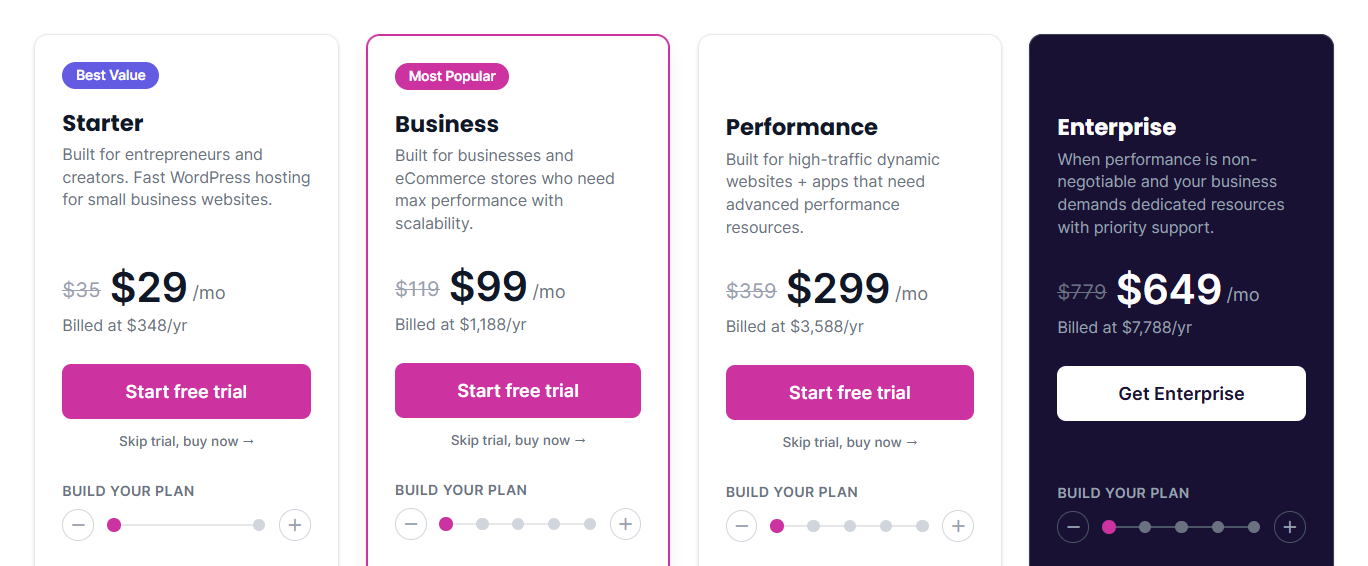
| Starting price | $29/month (Starter) |
| Included | LiteSpeed Enterprise, Object Cache Pro, Redis with Relay, Cloudflare Enterprise CDN |
Levamo includes Object Cache Pro on every plan. The plugin costs $95 a month if you buy it separately, so including it across the platform gives you a pretty good idea of what Levamo is designed to handle.
The company rebranded from Rapyd Cloud in 2026. It's the same team and infrastructure, with a brand-new name.
The platform grew out of the team behind BuddyBoss after they hit the limits of conventional managed hosting while running their own community platform.
That background shows in the architecture: it's built around logged-in users, dynamic cart updates, and other pages that can't simply be cached.
What we found:
Levamo's own plan guidance points stores to the Business tier rather than Starter, which is unusually straight for a pricing page.
Another key difference is how you're billed.
Levamo uses resource-based pricing rather than charging by visits, so a sudden spike in bot traffic doesn't automatically increase your hosting bill.
Strengths:
- Object Cache Pro and Redis with Relay come standard, which is the caching stack WooCommerce actually benefits from.
- Resource-based billing avoids the overage surprises that visit-metered plans create for stores with heavy bot traffic.
- Free white-glove migration handled by their engineers, with a 99.99% uptime SLA across all plans.
- Higher tiers include a private Slack channel straight to the engineering team.
Limitations:
- Brand recognition is low after the rebrand, and searching for reviews returns results under two different names.
- Pricing starts well above budget hosting, so it is poor value for a store taking a handful of orders a month.
- Trustpilot reviews across roughly 193 ratings are mostly strong but include documented complaints about escalation handling.
Pricing:
Starter plan costs $29/month. Business is Levamo's own recommendation for stores.
Plans scale to $649/month for Enterprise.
5. Cloudways
| Best for | Stores that want to size their own server without managing it |
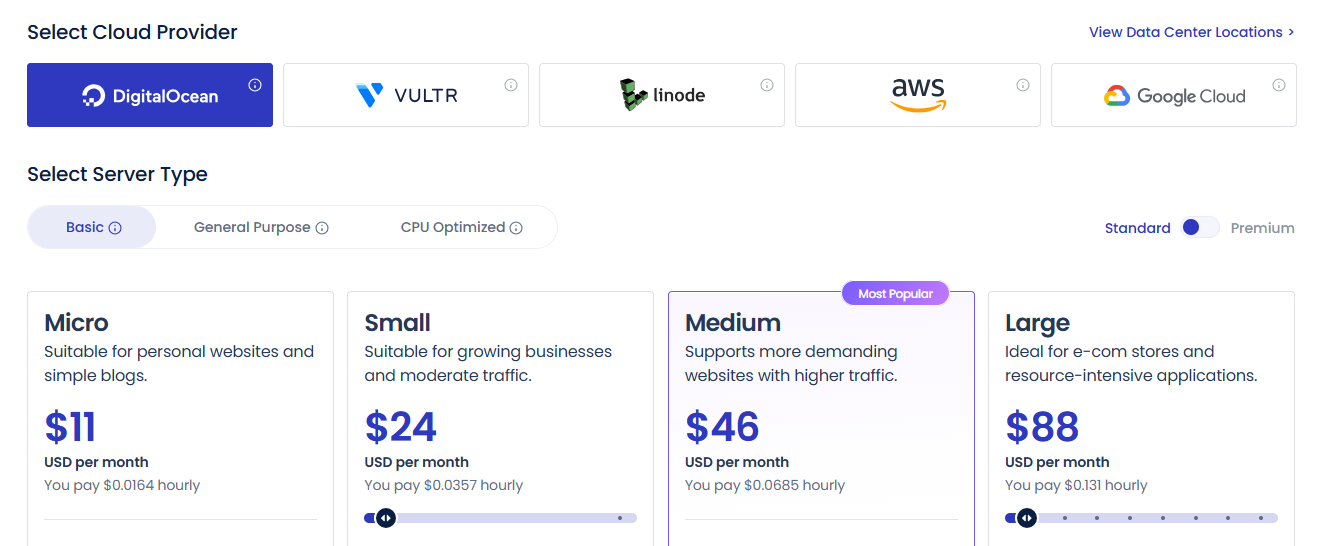
| Starting price | $11/month (DigitalOcean, 2GB RAM, 1 vCPU) |
| Included | Unlimited sites, unlimited visits, unlimited PHP workers |
Cloudways takes a different approach to concurrency. Instead of a fixed PHP worker limit, it gives you unlimited workers on the server you provision.
Your checkout capacity is therefore limited by the hardware you've chosen, not an arbitrary worker cap.
The platform runs on infrastructure from DigitalOcean, Vultr, Linode, AWS, and Google Cloud.
You choose the provider and server size, and Cloudways handles patching, backups, monitoring, and caching.
There's no long-term contract or renewal increase, and billing is hourly.
That makes it practical for seasonal stores: you can scale up before Black Friday and scale back down once the rush is over.
What we found:
Cloudways is the most flexible option in this group, but that flexibility comes with some responsibility.
The $11 entry server is enough for a small catalog and light traffic.
For a store processing orders every day, we'd start around 4GB, where Object Cache Pro is included at no extra cost.
Strengths:
- No renewal increase and no contract, with hourly billing that suits seasonal scaling.
- Vertical scaling takes minutes, so you add RAM and CPU ahead of a sale without migrating.
- SSH, SFTP, Git, and WP-CLI on every plan, which agencies and developers need.
- A 3-day free trial with no card, so you can benchmark your own store before committing.
Limitations:
- Cloudflare Enterprise CDN is a paid add-on starting at $4.99 per domain per month, rather than included.
- Email hosting is a separate Rackspace add-on at $1.50 per mailbox per month.
- The platform assumes you can size your own server and offers store owners no guided recommendation if you cannot.
Pricing:
Cloudways starts at $11/month on DigitalOcean and uses flexible, pay-as-you-go pricing.
Autonomous plans start at $99/month for Growth, $199/month for Scale, and $399/month for Plus.
You can migrate your first site for free.
6. Pressable
| Best for | Agencies and stores inside the Automattic ecosystem |
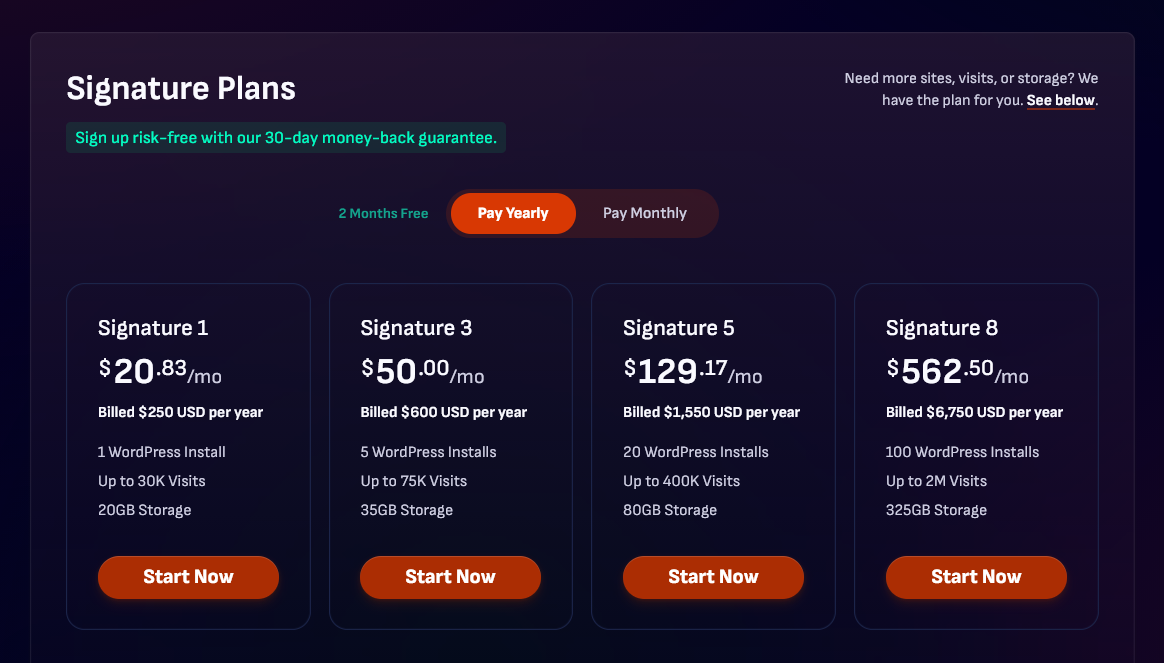
| Starting price | $20.83/month ($250 billed annually) |
| Included | 1 install, 20GB storage, 30,000 visits, hourly backups |
Pressable's hourly database backups are one of its biggest advantages for WooCommerce.
If your store is processing orders throughout the day, an hourly backup can mean losing an hour of order data instead of an entire day's worth if something goes wrong.
Automattic owns Pressable, which runs on WP Cloud, the same infrastructure WordPress.com uses.
What we found:
Pressable makes more financial sense once you're managing multiple sites, which is why we'd put it higher on an agency shortlist than a single-store owner's.
In WPBeginner's testing, a Pressable store recorded a 707ms page load and 141ms average response time.
Strengths:
- Hourly database backups protect order data in a way daily backups cannot.
- Built on the same WP Cloud infrastructure as WordPress.com, with failover included.
- Flat annual pricing, no renewal increase, no visit-based overage billing.
- Agency plans scale to 50 sites with genuinely competitive per-site costs at volume.
Limitations:
- No phone support at any tier, so live incidents run through chat and tickets only.
- Fewer data center locations than Kinsta or Cloudways, which shows in response times for shoppers in Asia and South America.
- The entry plan caps at 30,000 monthly visits, which a growing store passes quickly.
Pricing:
Signature 1 costs $250 per year, or $20.83/month when averaged monthly.
Agency plans are available for businesses managing multiple stores.
7. WP Engine
| Best for | Development teams that need staging, Git, and phone support |
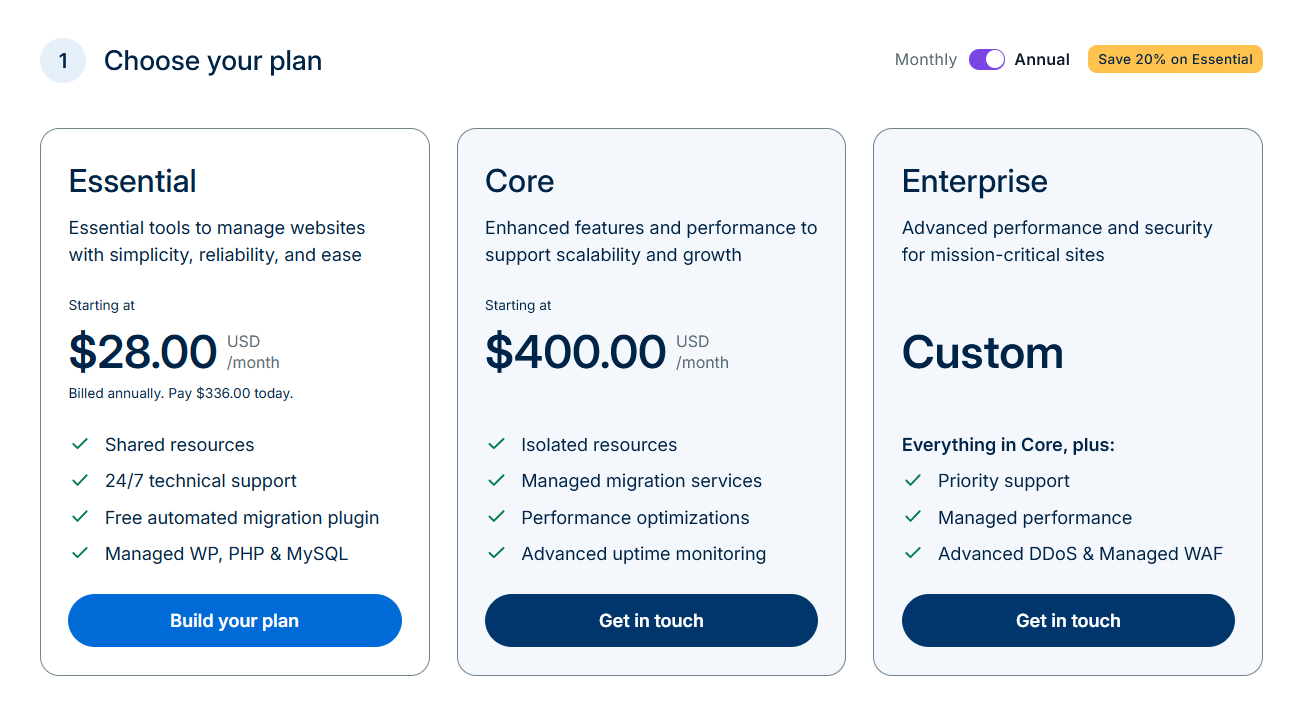
| Starting price | $25/month (Startup, annual) or around $30/month |
| Included | Dev, staging, and production environments on every plan |
WP Engine gives you 60 days to request a refund, twice the usual 30-day window.
That's a useful safety net when you're moving an established store and want enough time to see how it performs under real traffic.
The platform is built more around development workflows than basic hosting.
Every plan includes development, staging, and production environments, along with Git and SSH access.
Automated plugin updates can also run visual regression tests, so you can catch a broken layout before an update reaches your live store.
Live Cart reduces unnecessary AJAX requests during cart interactions, while Instant Store Search adds Elasticsearch on higher tiers for stores with larger catalogs.
What we found:
WP Engine has some of the strongest development tools in this group, particularly for teams managing multiple stores or frequent updates.
The catch is that some features you might expect are reserved for higher-tier plans.
Strengths:
- 60-day money-back guarantee, more than double the usual 30 days.
- Visual regression testing on automated updates catches layout breaks that plain auto-updates miss entirely.
- Per-site cost drops meaningfully at Growth and Scale, which suits agencies running client stores.
- Live Cart reduces AJAX overhead on cart interactions, a genuine store-specific optimization.
Limitations:
- Third-party caching plugins are not permitted, so you work inside WP Engine’s cache rules and configure your exclusions their way.
- Phone support starts at Professional ($55/month), not on the Startup plan most small stores buy.
- Visit-based overage billing makes monthly costs unpredictable during promotions and traffic spikes.
Pricing:
Startup is around $25/month when billed annually.
Professional costs $55/month, Growth is $109/month for 10 sites, and Scale is $276/month for 30 sites.
All plans include the 60-day money-back guarantee.
8. Bluehost
| Best for | Beginners who want ecommerce tools bundled with their hosting |
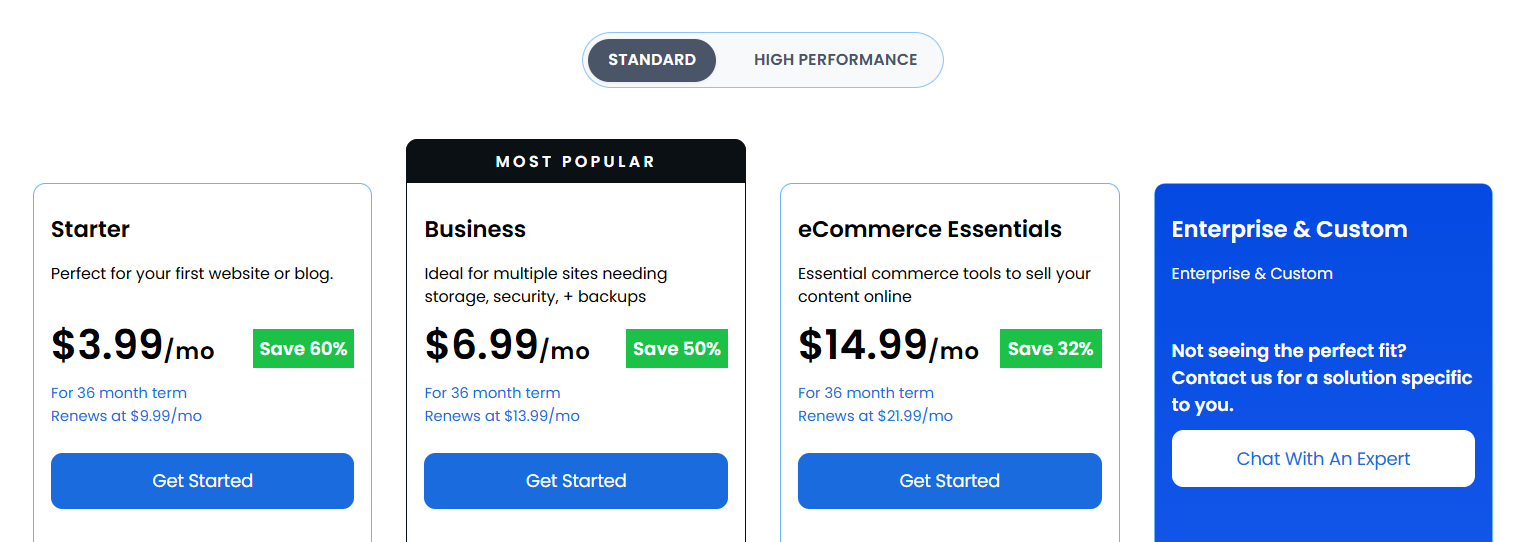
| Starting price | $14.99/month (eCommerce plan, 36-month term) |
| Included | Free domain for year one, free SSL, Cloudflare CDN |
Bluehost bundles several ecommerce features that you'd normally have to buy as separate plugins.
Gift cards, shipping labels, and inventory management are included, which can easily save a first-time store owner $100 or more a year and eliminate a few extra integrations to set up.
It's also the longest-running host on WordPress.org's recommended list.
Its ecommerce plans use NVMe storage and AMD EPYC processors, along with a free Cloudflare CDN, and support up to 400,000 monthly visits.
What we found:
Bluehost is one of the easiest ways for someone new to WooCommerce to get a store online.
The problem is that the advertised price doesn't tell the whole story.
Once you factor in renewal pricing and the add-ons you'll likely need, the cost can climb quickly.
Strengths:
- Commerce features worth $100 or more a year in plugins are included.
- Free domain for year one plus free SSL and Cloudflare CDN with Argo smart routing.
- Ecommerce plans support up to 400,000 monthly visits, which is generous at this price.
- Guided store setup makes it the lowest-friction option for a first-time owner.
Limitations:
- CodeGuard automated backups cost an extra $47.88 a year on the Basic tier, so daily backups aren't included.
- SiteLock malware protection starts at $95.88 a year per domain, pushing the real cost well past the advertised rate.
- WPBeginner’s testing recorded a 1.5-second page load and 557ms response time, the slowest measured figures among the managed hosts here.
Pricing:
Ecommerce plans range from $14.99/month to $21.99/month on a 36-month term.
Entry-level renewal prices can be up to 151% higher. Backups and malware protection are available as paid add-ons.
9. GoDaddy
| Best for | Owners who want their domain, email, and hosting under one account |
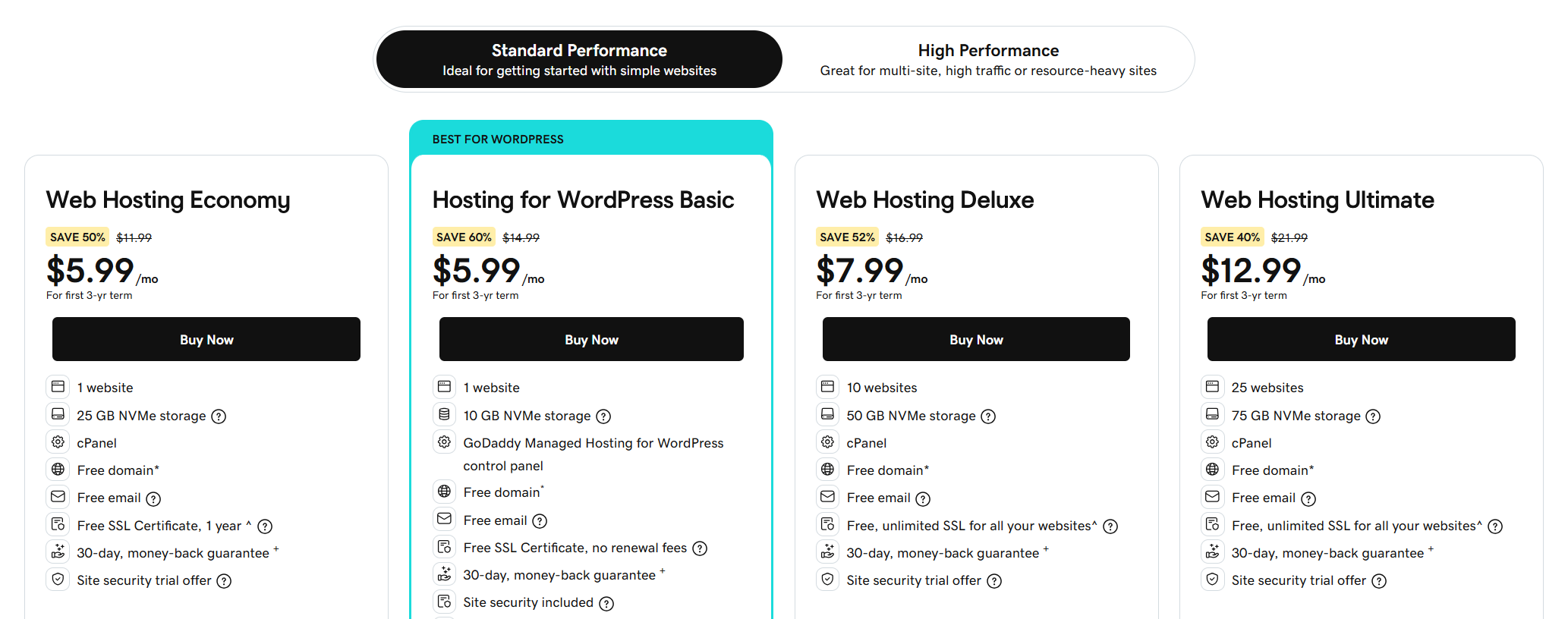
| Starting price | $5.99/month (36-month term) |
| Included | Free domain year one, free SSL, daily backups |
GoDaddy's biggest selling point is simplicity. Your domain, email, DNS, and hosting all live under one login, one invoice, and one renewal date.
If keeping everything in one place matters more to you than squeezing out every last bit of performance, it's hard to beat.
The trade-off is that GoDaddy isn't really tuned around WooCommerce.
Its WordPress plans support WooCommerce, and the Ultimate tier is the one GoDaddy recommends for stores, but the underlying optimization is still geared toward general WordPress sites rather than ecommerce workloads.
What we found:
GoDaddy is essentially a general-purpose WordPress host that happens to run WooCommerce.
That's not necessarily a dealbreaker for a small store, especially if you value having everything managed in one place.
Just don't expect the store-specific optimizations you'll find with hosts built around WooCommerce.
Strengths:
- Domain, email, DNS, and hosting managed from one account with one renewal date.
- Daily backups and malware scanning included rather than sold as add-ons.
- Broad phone support coverage, uncommon at this price.
- The Ultimate tier adds what a small store needs without moving providers.
Limitations:
- No Redis or Memcached object caching, so WooCommerce re-queries the database on every uncached page.
- No documented cache exclusion rules for cart and checkout, so you have to configure that yourself.
- Renewal pricing climbs significantly after the initial 36-month term.
Pricing:
Hosting starts at $5.99/month on a 36-month term. GoDaddy recommends the Ultimate tier for stores.
Renewal prices increase after the initial promotional term and vary by plan and billing period.
Which Host Should You Pick? (By Store Size and Traffic)
The right plan keeps checkout responsive at your actual traffic level.
That doesn't mean choosing the cheapest plan that can technically run WooCommerce, or paying for the most expensive option just because you expect growth.
- Under 1,000 monthly visitors
SiteGround GrowBig or Hostinger Cloud Startup are good starting points.
Both give you staging, object caching, and enough headroom for a growing catalog. Just budget for the renewal price from the start.
- 1,000 to 25,000 monthly visitors
Cloudways on a 4GB server or Pressable makes more sense here.
This is where limited server resources can start affecting checkout performance, and flat renewal pricing can make a meaningful difference over time.
Shared hosting becomes harder to justify as traffic and order volume grow.
- 25,000+ monthly visitors
Look at Kinsta Pro, Levamo Business, or Cloudways Autonomous.
At this level, handling multiple checkout requests at once matters more than shaving a few dollars off your hosting bill.
The cost of moving up a tier is small compared with the revenue you could lose when checkout starts queuing.
- Large catalogs and multi-vendor stores
Cloudways or WP Engine are better suited to stores with thousands of SKUs.
Server access, database resources, and search capabilities matter more as the catalog grows.
- Agencies running multiple stores
Pressable or WP Engine Growth are the stronger choices.
The per-site cost works out better at scale, and both provide the environment management tools agencies need to handle client stores efficiently.
Is It Your Host or Your Store? A 6-Check Diagnostic
| Symptom | Usually the server |
|---|---|
| 429 Too Many Requests | Resource limits on a shared plan |
| 500 errors only during spikes | PHP workers exhausted |
| Slow admin, fast front end | No object caching on database queries |
| Slow checkout, fast product pages | Check workers first |
| Timeouts at order placement | Sometimes |
| Cart totals showing stale prices | Checkout not excluded from page cache |
Take note of these two points.
Slow checkout on an otherwise fast site doesn't automatically mean you need better hosting.
Your theme might load a mega menu, slider, analytics tags, and other marketing scripts on a page that doesn't need them.
Baymard estimates that about 18% of checkout abandonment is related to a checkout process that's too long or complicated.
A bloated checkout creates friction whether the delay comes from the server or the browser.
Timeouts when placing an order can have a similar cause. WooCommerce may be waiting for confirmation emails to send before redirecting the customer.
If your SMTP server is slow, the customer ends up waiting on your mail server rather than your web server.
For the broader playbook, see our guide to WooCommerce checkout optimization.
5 Things to Check Before You Buy Your Hosting Plans
- Size the plan on PHP workers
Google considers a Time to First Byte (TTFB) under 800ms a good target.
On uncached checkout requests, though, available PHP workers can be the difference between a request being handled immediately and sitting in a queue.
Estimate how many checkout requests you might have at peak and make sure the plan has enough workers to handle them.
- Get the cache exclusions in writing
Exclude Cart, Checkout, and My Account from full-page caching.
Ask the host to confirm its rules, then place a test order while logged out in an incognito window and make sure prices, quantities, and totals update correctly.
- Calculate the real cost
SiteGround StartUp goes from $2.99 to $17.99 per month at renewal, while Bluehost entry plans can increase by up to 151%.
Calculate the total cost over three years before comparing providers.
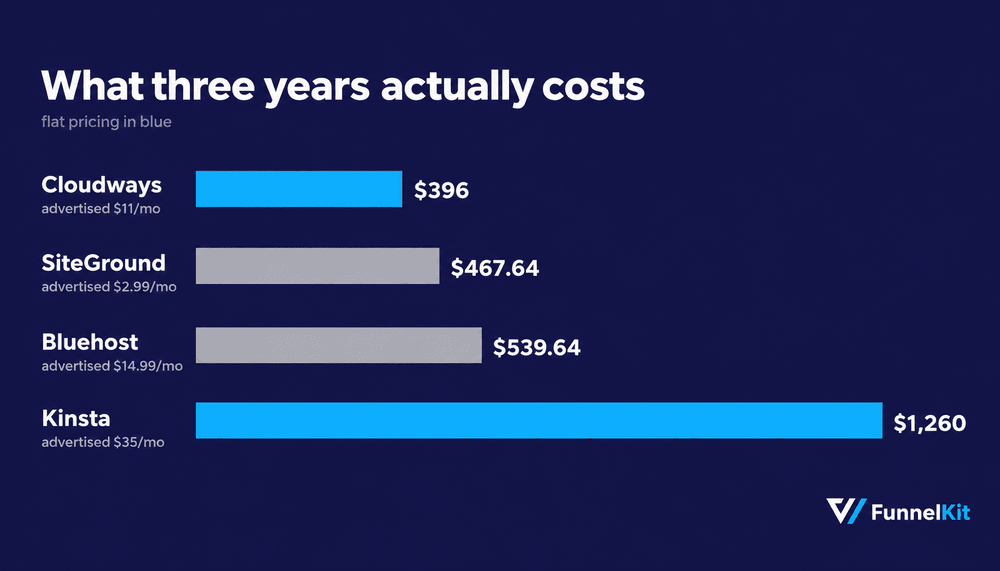
The ranking can look very different once you include renewal pricing.
- Test the migration on staging before you point DNS
Every provider here except Cloudways offers free migration on all plans.
Take advantage of it, then test payment gateways, webhooks, and scheduled actions on the migrated site before pointing your domain to the new server.
- Scale before the traffic peaks
Cloudways bills hourly, while Kinsta lets you change plans without downtime.
If you're expecting a Black Friday spike, add the capacity a week early and keep it through the expected return period.
It's better to pay for extra headroom than discover you need it while orders are already failing.
Frequently Asked Questions
It depends on concurrent checkout volume. Small stores do well on SiteGround GrowBig or Hostinger Cloud Startup.
Stores with steady daily orders are better served by Cloudways or Pressable.
High-concurrency stores should look at Kinsta Pro or Levamo Business.
Hostinger’s managed plan at $3.99 a month on a 48-month term is the lowest advertised rate here, with SiteGround StartUp at $2.99 close behind.
Both renew near $17 a month, so compare three-year totals rather than first-year rates.
Pressable, WP Engine, and Cloudways all support multiple installations on one account.
On Cloudways, the stores share a single server’s resources, so size for combined peak load rather than for each store separately.
Free hosting exists for development and testing, but it lacks the SSL, backups, and dedicated resources a store handling payments needs.
For a live store, roughly $3 a month is the realistic floor.
A 429 Too Many Requests response means your plan’s resource limits are being hit.
It is the most common failure on cheap shared hosting, and it comes up on r/woocommerce constantly.
The fix is more PHP workers and dedicated resources, which means a VPS or a managed plan.
As a rule of thumb, allow one worker per concurrent uncached request you expect at peak.
Kinsta's Starter includes one, which is why it suits a low-order store rather than an active one.
Cloudways provides unlimited workers on any server you provision.
Your store dashboard and your hosting account are separate logins. Store settings live at yourdomain.com/wp-admin.
Server settings, backups, and staging live in the provider’s own panel, such as MyKinsta, hPanel, or the Cloudways platform.
Give Your WooCommerce Store the Hosting It Deserves
No plan on this list will transform your store on its own. Moving from shared to managed hosting might shave 300ms off your checkout response. Object caching might save another 200ms.
Right-sizing your PHP workers might stop three checkout requests from sitting in the same queue.
None of that makes a great headline. Together, though, those small gains can be the difference between a store that holds up on Black Friday and one that doesn't.
The cheapest place to start is an audit you can run this afternoon.
Check what you'll pay at renewal. Check whether your cart and checkout are excluded from full-page caching. Then check how many PHP workers your plan actually gives you.
Most store owners have never looked at that last number. It's often the one that explains why everything else feels slow.
Then look at the checkout itself. Your server sets the floor for how fast the page can load, but the page determines how close you get.
A checkout dragging along a mega menu, slider, and three marketing scripts will feel slow on any host.
FunnelKit Funnel Builder replaces the default WooCommerce checkout with a lighter flow and documents the cache exclusion rules you need for the hosts covered in this guide.
Get the server right, then make sure your checkout isn't getting in its own way.
Related reading:
- WooCommerce Caching: How to Set Up Caching in Your Store
- WooCommerce Checkout Optimization: The Complete Guide
- How to Customize the WooCommerce Checkout Page
- 14 Best WooCommerce Checkout Plugins
Editorial Team
October 11, 2026You can customize the WooCommerce cart page with the Cart block, a page builder like Elementor, or CSS and PHP snippets. Which method works for you depends on the cart...
Editorial Team
October 9, 2026A WooCommerce discount lowers what a shopper pays, either through a reduced product price or a code entered at checkout. Out of the box, WooCommerce gives you two ways to...
Editorial Team
October 9, 2026A downsell gives customers a cheaper option after they turn down your main offer. If you show it too soon, you might convince them to skip the original offer and...