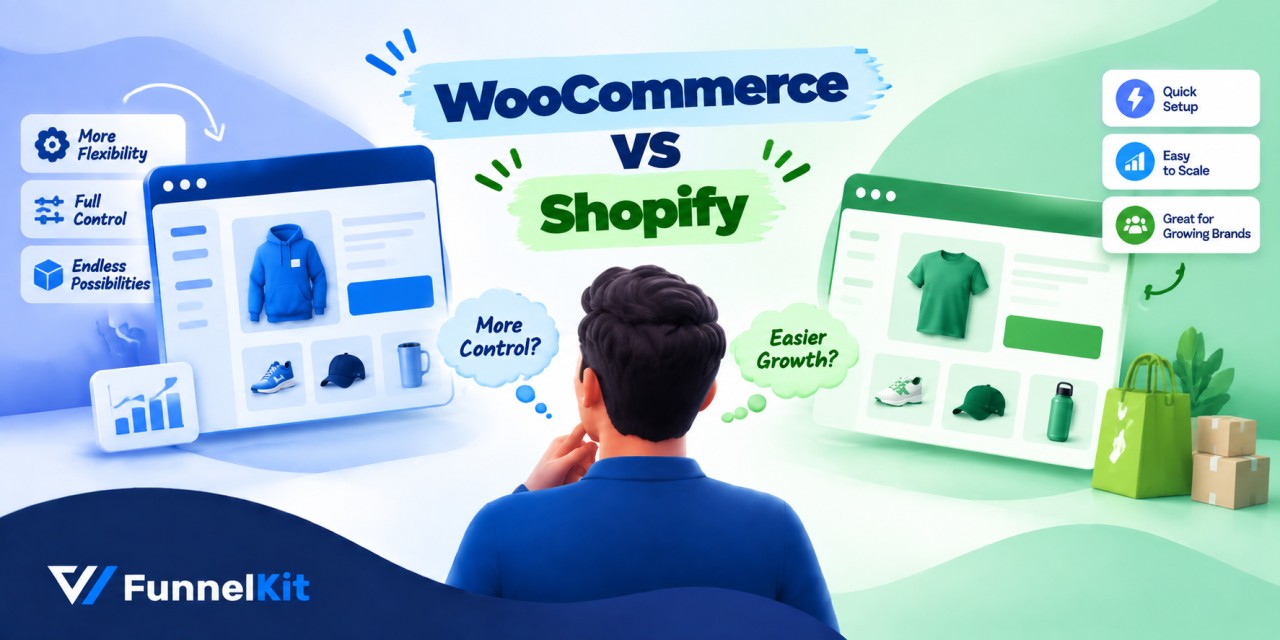
WooCommerce vs. Shopify usually comes down to two familiar arguments: WooCommerce costs less, while Shopify is easier to manage. Our numbers tell a slightly different story.
At $20,000 a month in sales, the two platforms cost almost exactly the same.
At $200,000 a month, Shopify can actually come out ahead on raw fees if you use Shopify Payments.
So yes, there's a real cost advantage to running an open-source platform, but it's not as simple as comparing the monthly plan price.
The bigger differences come from app subscriptions and payment gateway fees.
In this guide, we compare WooCommerce and Shopify across twelve categories that can directly affect your store and revenue.
We'll also break down the real monthly cost at three store sizes and what it takes to switch between platforms.
We've given Shopify the same fair treatment as WooCommerce, even though WooCommerce wins some categories and Shopify wins five of the twelve.
Two changes in 2026 can also shift this decision more than most comparisons account for. Those are where we'll start.
The 20-Second Answer:
Choose WooCommerce if you already run WordPress, content and organic search are part of your growth plan, and you need to change how checkout works.
Choose Shopify if you have never run a website, you want to be selling this week, you sell physical products from real inventory, or you would rather pay a subscription than think about hosting, updates, and PCI compliance again.
Choose either and move on if you are under $2,000 a month.
At that size, the platform is not what is limiting you, and both are cheap to leave.
Table of Contents
- 1 WooCommerce vs Shopify: Quick Comparison
- 2 What Changed For Shopify and WooCommerce in 2026
- 3 What WooCommerce and Shopify Actually Cost
- 4 Where WooCommerce Genuinely Beats Shopify
- 5 Where Shopify Genuinely Beats WooCommerce
- 6 What Merchants Say After One to Four Years
- 7 Switching Between WooCommerce and Shopify
- 8 Which Platform Fits Your Store Type
- 9 WooCommerce vs Shopify: Frequently Asked Questions
- 10 WooCommerce vs Shopify: Pick the Platform That Matches Your Business
WooCommerce vs Shopify: Quick Comparison
| Feature | WooCommerce | Shopify |
|---|---|---|
| Platform type | Open-source WordPress plugin, self-hosted | Hosted SaaS |
| Starting cost | Plugin is free. Hosting runs $10 to $50 per month | The Basic plan starts at $39/month or $348/year (comes to 29/month on yearly plans) |
| Platform transaction fee | None | None on Shopify Payments. 2% on Basic, 1% on Grow, 0.6% on Advanced for outside gateways |
| Card processing | Your gateway’s rate, typically 2.9% + 30¢ via Stripe or WooPayments | 2.9% + 30¢ Basic, 2.7% Grow, 2.5% Advanced |
| Checkout customization | Every field, step, and template is editable | Branding only below Plus; core-step UI extensions are Plus-only |
| SEO and content | Full control of URLs, schema, canonicals, and metadata | Solid basics, but /products/ and /collections/ are locked into every URL |
| Blogging | WordPress, built for content since 2003 | Functional, tag-only categorization |
| Hosting and security | Yours to choose and maintain | Managed, PCI DSS Level 1, included |
| Inventory and shipping | Core basics, plugins for anything beyond | Multi-location, carrier rates, POS, all built in |
| Support | AI assistant, email support, documentation, community and developer forums | 24/7 chat, email, and phone support on every plan |
| AI agent readiness | Native MCP support since 10.3, Stripe ACS available | Agentic Storefronts on by default since March 2026 |
| Data Ownership | You own the code, the data, and the ability to leave | Shopify hosts your store under its terms |
WooCommerce takes seven categories, while Shopify takes five. We'll explain the reasoning behind each one.
How we compared them:
We built a live store on each platform and tested it rigorously for 5 months with real test orders on both.
We also tested through the entire checkout flow as an actual buyer, clicking every button, filling every form, and seeing what the receipt email looked like.
We link any data from outside sources back to the original source.
What Changed For Shopify and WooCommerce in 2026
We'll discuss three major changes in 2026 that older comparisons simply don't account for.
1. Shopify's August checkout deadline affected every non-Plus store
Shopify retired checkout.liquid, Additional Scripts, and script tags on the Thank You and Order Status pages for non-Plus stores on August 26, 2026.
Stores that hadn't migrated were upgraded automatically, and any legacy code in those fields stopped running that day.

The biggest problem wasn't the checkout design. It was tracking conversions because Google Ads tags, Meta pixels, GTM containers, and affiliate scripts could stop firing without anything visibly breaking on the storefront.
This kind of change was easy to miss. Shopify Plus stores had already gone through the same migration a year earlier.
The replacement is Checkout Extensibility, but plan restrictions matter.
Checkout UI extensions work on the Thank You and Order Status pages on every plan.
The main Information, Shipping, and Payment steps, however, only support them on Shopify Plus. The branding API is Plus-only too.
Non-Plus merchants are limited to the checkout editor's built-in controls for things like colors, fonts, and logos.
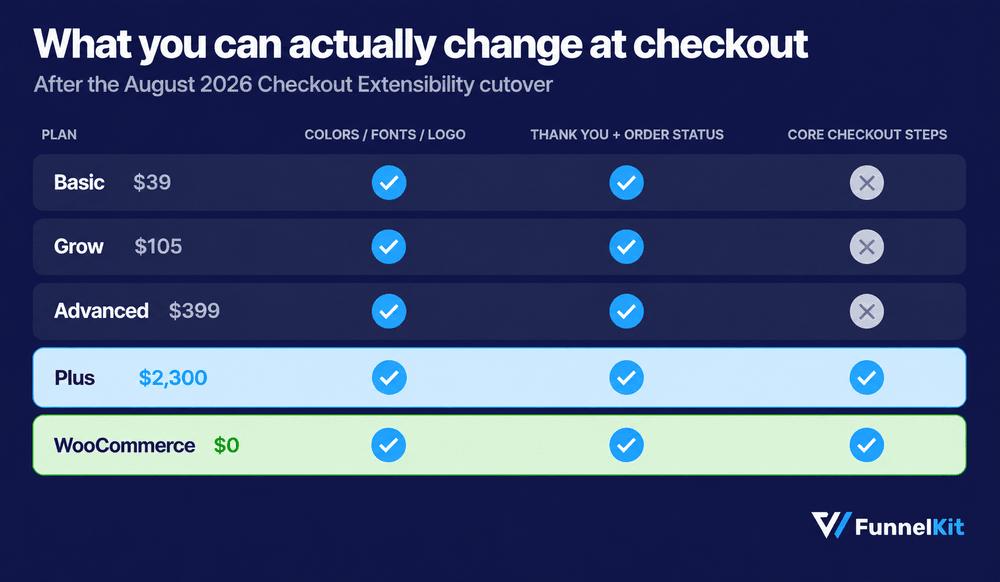
So if you're choosing between platforms because you need to control how checkout works, this difference should carry real weight.
2. AI agents became a real channel, and the platforms took different approaches
Shopify says AI-attributed orders grew 11x between January 2025 and January 2026.
It also began enabling Agentic Storefronts by default for stores in late March 2026.
With a single admin setting, products can be syndicated to ChatGPT, Copilot, Google AI Mode, and Gemini unless you opt out.
WooCommerce took a different route. Version 10.3 added native Model Context Protocol (MCP) support in October 2025, and 10.9 made stores natively addressable by AI agents in June 2026.
WooCommerce merchants can also use Stripe's Agentic Commerce Suite directly.
So the distinction is fairly simple. Shopify is further ahead on ready-made distribution, while WooCommerce gives you more control through open protocols.
If you want your products available in AI channels without building anything yourself, Shopify gets you there with a toggle.
If you want more control over what AI agents can access and do, WooCommerce gives you more room to build it your way.
3. WooCommerce shipped four releases and WordPress share slipped
WooCommerce 10.9, 11.0, and 11.1 arrived between June and September 2026, adding AI agent addressability, transactional email logging in core, experimental abandoned cart emails, block-based email editing, and a rebuilt settings interface.
Here is the number nobody in the WordPress ecosystem enjoys quoting.
WordPress powered 41.2% of all websites as of late July 2026, down from a 43.6% peak in mid-2025, its sixth consecutive quarterly decline per W3Techs tracking.
Store Leads still counts more active WooCommerce stores than Shopify stores, roughly 4.08 million against 3.06 million, but the gap is closing.
Among the top million sites by traffic, the order flips entirely, with Shopify at about 28.8% and WooCommerce at 18.2%.
WooCommerce runs more stores. Shopify runs bigger ones. Both are true, and which one matters depends on which you are trying to become.
What WooCommerce and Shopify Actually Cost
The prices you see advertised rarely match what merchants actually end up paying on either platform.
| Parameters | Shopify | WooCommerce |
|---|---|---|
| Plan | $39 Basic / $105 Grow / $399 Advanced / $2,300 Plus | $0 |
| Hosting | Included | $10-50/month managed |
| Card processing | 2.9% → 2.5% + 30¢ by tier | Gateway rate, typically 2.9% + 30¢ |
| Outside-gateway surcharge | 2% / 1% / 0.6% / 0.2% | None |
| Themes | $150-500 one-time | $44-59/year |
| Apps/extensions | $100-500/month typically | $49-299/year each |
How much does Shopify take from a $20 sale?
On Basic with Shopify Payments, a $20 order costs 58¢ in processing fees, leaving you with $19.42.
Use a third-party gateway and Shopify's additional 2% fee adds another 40¢, leaving $19.02.
On WooCommerce, Stripe charges the same 2.9% + 30¢, so you also keep $19.42. It doesn't take an additional cut, regardless of how much you sell.
The difference on one $20 order is barely noticeable. Multiply it across thousands of orders, though, and it becomes worth noticing.
That's why the examples below are more useful than comparing percentages alone.
| Monthly revenue | Shopify (Basic/Grow, Shopify Payments) | WooCommerce (hosting + Stripe) |
|---|---|---|
| $2000, 100 orders | $29 plan + $88 processing = $117 | $15 hosting + $88 processing = $103 |
| $20000, 700 orders | $79 plan + $750 processing = $829 | $40 hosting + $790 processing = $830 |
| $200,000, 6000 orders | $299 plan + $6800 processing = $7,099 | $150 hosting + $7,600 processing = $7,750 |
Read those numbers carefully. They don't support the usual "WooCommerce is always cheaper" argument.
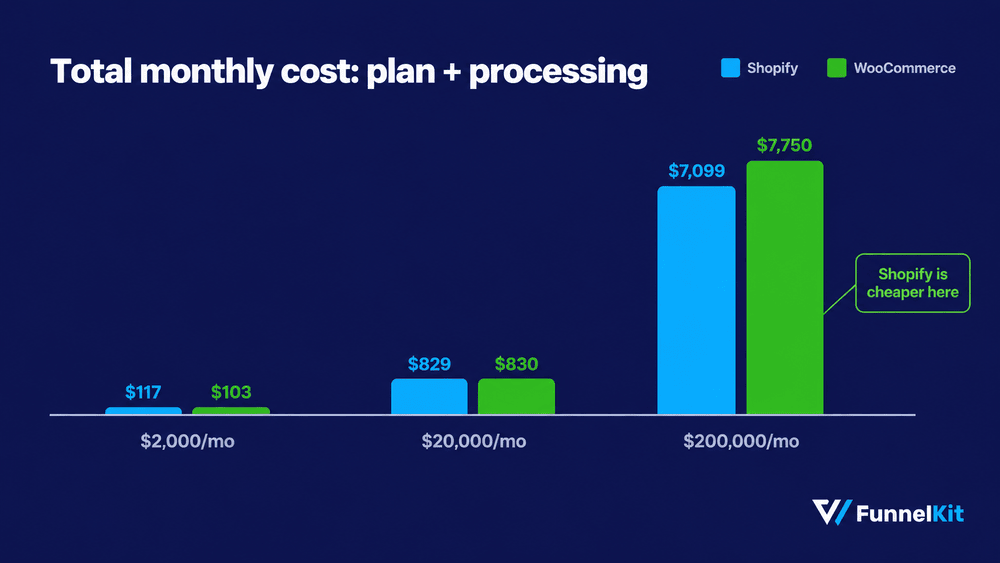
Once Shopify's higher tiers give you a lower processing rate, the difference can become almost nonexistent.
At higher volumes, Shopify Payments can actually make Shopify cheaper on raw transaction costs.
The bigger cost differences show up elsewhere.
Apps are the first. Shopify merchants can easily spend $100 to $500 a month on functionality that WordPress plugins may cover with a one-time purchase or annual license.
Geography is the other big one. If Shopify Payments isn't available in your country, the additional 1% to 2% transaction fee applies to every order.
Once you’ve chosen your platform, the next question is how much revenue you’re leaving on the table at checkout.
Our guide to WooCommerce checkout optimization covers the main ways to improve that.
Where WooCommerce Genuinely Beats Shopify
Change how checkout works
WooCommerce gives you the checkout template, fields, flow, and the code behind it all.
You can build a multi-step checkout, show fields conditionally, add order bumps, run post-purchase upsells, and A/B test different layouts.
On Shopify, getting that level of control over the core checkout steps requires Plus.
On WordPress, plugins in the $49-$99/year range can cover much of what you need.
For the actual setup options, see our guide to customizing the WooCommerce checkout page.
Own your URLs and content
Shopify puts /products/ in product URLs and /collections/ in collection URLs, and there's no plan that lets you remove them.
Its collection structure can also create duplicate URLs that you need to handle with canonicals.
WooCommerce sits on top of WordPress, so you have much more control over URLs, schema, canonicals, breadcrumbs, and Open Graph data at the page level.
Shopify's blog editor is also limited to tags, not categories. If organic search is your main acquisition channel, this is a category worth taking seriously.
Pay no platform fee at any volume
With WooCommerce, you pay your payment processor, not WooCommerce itself.
You can choose from more than 100 payment gateways and pick the one that works best for your region and business.
This matters most in countries where Shopify Payments isn’t available.
Merchants in India, Southeast Asia, and parts of Africa may have to choose between using a local gateway and paying Shopify's ongoing surcharge, or running WooCommerce without that extra platform fee.
Sell anything except physical boxes
Subscriptions, memberships, courses, bookings, and digital products with multiple files are all well-established use cases in the WordPress ecosystem.
Shopify is excellent for physical products, but things get more complicated as your business moves further away from the standard buy-a-product-and-ship-it model.
Portability
Your WooCommerce store is ultimately a collection of files and a database that you control.
You can back it up, move it to another host, pause the store, and bring it back later.
Shopify hosts the store for you under its terms of service, and it can terminate merchants.
That concern comes up surprisingly often in merchant discussions.
It may never affect you, but it's something worth understanding before you spend years building a business on one platform.
Design outside one curated catalog
WordPress.org lists more than 2,200 WooCommerce-compatible themes, with roughly another 1,500 on ThemeForest, plus plenty of independent developers. Most cost about $44-$59 a year.
Shopify's Theme Store has roughly 800 themes, including 24 free options, while premium themes generally cost $150-$500.
Shopify's curation means you're less likely to stumble across a badly coded theme.
The trade-off is that stores in the same niche can start to look remarkably similar.
Extend it without another monthly bill
WooCommerce has access to more than 68,000 free WordPress plugins, along with 900+ official extensions.
Shopify's App Store has around 8,000 apps, and the installation experience is generally cleaner.
The catch is that Shopify apps are more likely to add another recurring monthly charge to your stack.
What are the disadvantages of WooCommerce?
- Maintenance never ends: You need to run core, theme, and plugin updates weekly. It takes a few minutes, but it is permanent.
- Plugin conflicts are real: Two extensions can break checkout after an update, and diagnosing it is your job.
- Analytics are weaker: WooCommerce doesn't report store conversion rate natively, and add-to-cart and refund rates at the SKU level need extra tooling.
- Speed depends on decisions you make: Bad hosting produces a slow store and nothing warns you.
- No native POS and no phone support: In-person selling needs a third-party integration, and urgent problems have no phone number.
Where Shopify Genuinely Beats WooCommerce
Get selling faster
Create an account, choose a theme, add your products, connect payments, and you can take your first order the same afternoon.
WooCommerce takes a little more setup: hosting, WordPress, a theme, and the plugins you need to run the store.
One-click WordPress installs have made that process easier, but you still have more decisions to make in the first week.
Shopify simply makes many of those decisions for you.
Run real inventory without assembling it yourself
Multi-location inventory, low-stock alerts, barcode scanning, negotiated shipping rates, label printing, and a proper POS for in-person sales are all available without spending hours researching plugins.
On Advanced, Shopify also handles duties and import taxes for international shipments.
If you have 500 SKUs spread across three warehouses, you'll notice the difference almost immediately.
WooCommerce handles stock, backorders, and low-stock notifications in core, but most advanced inventory features require additional plugins that you have to choose, configure, and maintain.
Stop thinking about compliance
Shopify stores are PCI DSS Level 1 compliant, SSL is included, and Shopify handles patches, updates, and backups for you.
WooCommerce can be secured extremely well, but you're responsible for keeping it that way.
An outdated plugin can leave a WordPress site exposed, and nobody is going to update it for you.
With WooCommerce, PCI compliance is ultimately a shared responsibility among your host, payment gateway, and store setup, not something WooCommerce provides as a managed service.
24/7 support
Shopify provides 24/7 chat, email, and phone support on every plan.
WooCommerce gives you support tickets, documentation, and a huge developer community.
That community is excellent when you need to troubleshoot something.
It's less comforting when your checkout breaks the night before a major launch, and you need someone to pick up the phone.
Get speed without configuring anything
Shopify manages the hosting, CDN, and caching layer for you.
A typical Shopify store can deliver a fast storefront without you having to tune the server yourself.
A well-configured WooCommerce store on good hosting can be just as fast, or faster, but it takes more work to get there.
Put WooCommerce on cheap shared hosting, add a heavy theme and a dozen poorly optimized plugins, and performance can fall apart quickly.
The important distinction is that WooCommerce has a higher ceiling, but Shopify has a much higher floor.
Is Shopify still worth it in 2026?
Yes, Shopify is worth it for most first-time store owners selling physical products.
The $39-$105 monthly range gets you hosting, security, compliance, inventory tools, shipping features, support, and built-in access to newer sales channels without having to assemble all of that yourself.
It becomes harder to justify when Shopify Payments isn't available in your country, and you're paying the additional transaction surcharge on every order.
This way, your app subscriptions can climb past roughly $200 a month, or you may need checkout control that requires Shopify Plus at $2,300 a month.
That's where WooCommerce starts looking less like the harder option and more like the better fit.
What Merchants Say After One to Four Years
Feature tables don’t capture regret. Merchant threads do.
The most detailed migration story we found came from a merchant who had spent four years on Shopify.
After watching the costs climb, they rebuilt the store on WooCommerce themselves over roughly three months and paid about $200 to move their customer and order history.
Their hosting bill dropped from more than $100 a month to around $12. Their advice in the r/woocommerce thread was simple: choose the platform carefully at the start, because easier doesn't necessarily mean better.
The stories going the other way are just as useful. One subscription business owner described spending more than $40,000 on development trying to recreate Shopify’s subscription experience on WooCommerce.
They constantly dealt with plugin conflicts and planned to move back at the first opportunity.
Another merchant ran WooCommerce for three years after being banned from Shopify, only to return because the maintenance burden was too high and the conversion analytics weren't reliable enough.
Two themes come up repeatedly in both directions.
- Deplatforming
Merchants selling tactical gear, medicinal herbs, and other legal-but-flagged products describe having Shopify stores closed with little explanation.
For some, that risk alone is enough to rule Shopify out permanently.
- Payment math
One merchant calculated that a 1% difference in processing fees on $30,000 in monthly sales works out to $300 every month.
That kind of recurring cost tends to change a merchant's mind faster than another feature comparison ever will.
There's one important caveat, though. Shopify's cost structure naturally pushes some struggling stores off the platform, while WooCommerce’s low ongoing cost allows them to keep running almost indefinitely.
That means comparisons of average revenue between the two platforms may measure this selection effect as much as they measure the platforms themselves.
Switching Between WooCommerce and Shopify
Migration is more common than either platform's marketing would have you believe, and it happens in both directions.
Shopify to WooCommerce
Shopify to WooCommerce usually takes merchants about six to twelve weeks.
Products, customers, and order history can usually be moved with tools such as Cart2Cart, LitExtension, or WP All Import, typically for $100 to $400 depending on the size of the catalog.
What doesn't transfer cleanly is everything around the data: you'll need to rebuild the theme and design, replace app functionality with WordPress plugins, and recreate any Liquid customizations.
If you've never managed hosting before, expect that part to take the most time.
WooCommerce to Shopify
WooCommerce to Shopify is usually easier for basic data, but more complicated for functionality.
Physical product catalogs tend to transfer well.
Subscriptions, memberships, and digital products with multiple files are a different story.
During migration, you may discover that a workflow you depended on doesn't have a Shopify equivalent unless you move to a paid app.

Practical advice from merchants who've made the switch is pretty consistent: if you’re doing less than roughly $5,000 a month, focus on getting traffic and sales first.
You can switch later if the platform genuinely becomes the thing holding you back.
Migration takes time and money, but it's survivable.
Spending four years on the wrong platform because switching feels too painful is usually the more expensive mistake.
Which Platform Fits Your Store Type
| Store type | Better fit | Why |
|---|---|---|
| First store, physical products | Shopify | Fastest path to a first sale, no infrastructure decisions |
| Content-led brand with a blog | WooCommerce | WordPress publishing plus full URL and schema control |
| Subscriptions or memberships | Depends | Woo is more flexible and more fragile. Shopify is more reliable and more limited |
| Digital products with multiple files | WooCommerce | Shopify handles multi-file downloads and existing-customer access poorly |
| High-SKU inventory, multi-warehouse | Shopify | Native multi-location, barcode scanning, and carrier rates |
| Dropshipping | Either | Shopify for guided setup, WooCommerce for margin on thin-margin products |
| B2B and wholesale | WooCommerce | Shopify’s B2B sits on Plus at $2,300 a month |
| International, outside Shopify Payments | WooCommerce | Avoids a permanent 1% to 2% surcharge on every order |
| Legal-but-flagged category | WooCommerce | Removes deplatforming risk entirely |
| In-person and online combined | Shopify | WooCommerce has no native POS |
| Checkout is central to your model | WooCommerce | Core checkout control on Shopify requires Plus |
WooCommerce vs Shopify: Frequently Asked Questions
For technical control and content, yes.
WooCommerce gives you full control over URL structure, schema, and canonicals, while Shopify forces /products/ and /collections/ into every URL on every plan.
Shopify covers the basics competently, so the gap only matters if organic search is a primary channel.
Only partially. Non-Plus stores can change colors, fonts, and the logo in the checkout editor, and can add UI extensions to the Thank You and Order Status pages.
Extensions on the core Information, Shipping, and Payment steps require Plus.
Not inherently. Shopify is consistently fast because it controls the infrastructure, while Woo speed depends on hosting quality, theme weight, and plugin count.
A properly configured WooCommerce store can match or beat Shopify, while a poorly configured one can be much slower.
WooCommerce is still free, and there's no indication that this is changing. You can download the core plugin from the WordPress repository without paying a license fee, revenue share, or store limit.
The confusion comes from everything you need to run a store around WooCommerce. You'll still pay for hosting, a domain, and SSL, and many stores buy premium extensions for things like subscriptions, bookings, or advanced shipping.
Those costs are real. They just aren't WooCommerce charging you for the WooCommerce plugin itself.
Yes, with quality managed hosting and database optimization.
Hosts like Cloudways, Kinsta, and WP Engine routinely run high-SKU stores under heavy traffic.
The constraint is your server and configuration, not WooCommerce.
Wix and Squarespace are website builders with ecommerce attached, and both are easier to start with than either platform here.
Neither matches WooCommerce or Shopify on catalog size, payment options, or app depth, so they suit small catalogs rather than a growing store.
Shopify is easier, letting you syndicate products to ChatGPT, Copilot, and Google AI Mode with one toggle.
WooCommerce offers deeper control through native MCP support and Stripe's agentic suite, but you configure it yourself.
You own your products, brand, and customer data, and you can export it.
You do not own the storefront, which runs on Shopify’s infrastructure under its terms, and stores can be suspended.
Woo sites are files and a database you can back up and move.
No. WooCommerce is a WordPress plugin and only runs on WordPress.
You pick one, though you can migrate later, and some content-first brands run WordPress for content with Shopify buy buttons embedded.
WooCommerce vs Shopify: Pick the Platform That Matches Your Business
No single category on this page should decide which platform you choose.
Most store owners end up giving one factor 100% of the weight and everything else 0%.
Usually, that factor is setup speed, because it’s the only part of the decision you can actually experience before you have a store.
The real differences show up when those categories stack up.
A 1% payment surcharge is manageable. So is another $200 a month in apps, a checkout you can't fully customize, or a URL structure you can’t change.
Put all four together, though, and you can end up with a store that has a much harder time funding its own growth.
That's why the platform matters less when you're doing $2,000 a month than when you're doing $50,000.
You’re not really choosing a platform for your first week. You’re choosing one you’ll still be happy with in your fourth year.
Two questions will narrow this down faster than any feature table:
- Does your business depend on changing how checkout works?
- Is organic search going to be one of your main growth channels?
If the answer to both is no, Shopify is probably the easier choice. Get the store live and start selling.
If either answer is yes, WooCommerce will take more work upfront, but that extra flexibility can pay for itself as the store grows.
And if you do choose WooCommerce, start with the checkout. It's the one page every customer has to pass through.
It's where much of WooCommerce's flexibility can turn into additional revenue, and it's also where WooCommerce is at its most basic out of the box.
FunnelKit Funnel Builder adds one-page and multi-step checkout layouts, express payment buttons, order bumps, and post-purchase upsells.
A free version includes checkout templates, while Pro starts at $99.50 a year.
Related Resources:
- How to create a WooCommerce one page checkout
- WooCommerce checkout optimization tactics
- How to reduce cart abandonment in WooCommerce
- 14 best WooCommerce checkout plugins
Editorial Team
October 11, 2026You can customize the WooCommerce cart page with the Cart block, a page builder like Elementor, or CSS and PHP snippets. Which method works for you depends on the cart...

Editorial Team
October 9, 2026A WooCommerce discount lowers what a shopper pays, either through a reduced product price or a code entered at checkout. Out of the box, WooCommerce gives you two ways to...
Editorial Team
October 9, 2026A downsell gives customers a cheaper option after they turn down your main offer. If you show it too soon, you might convince them to skip the original offer and...