


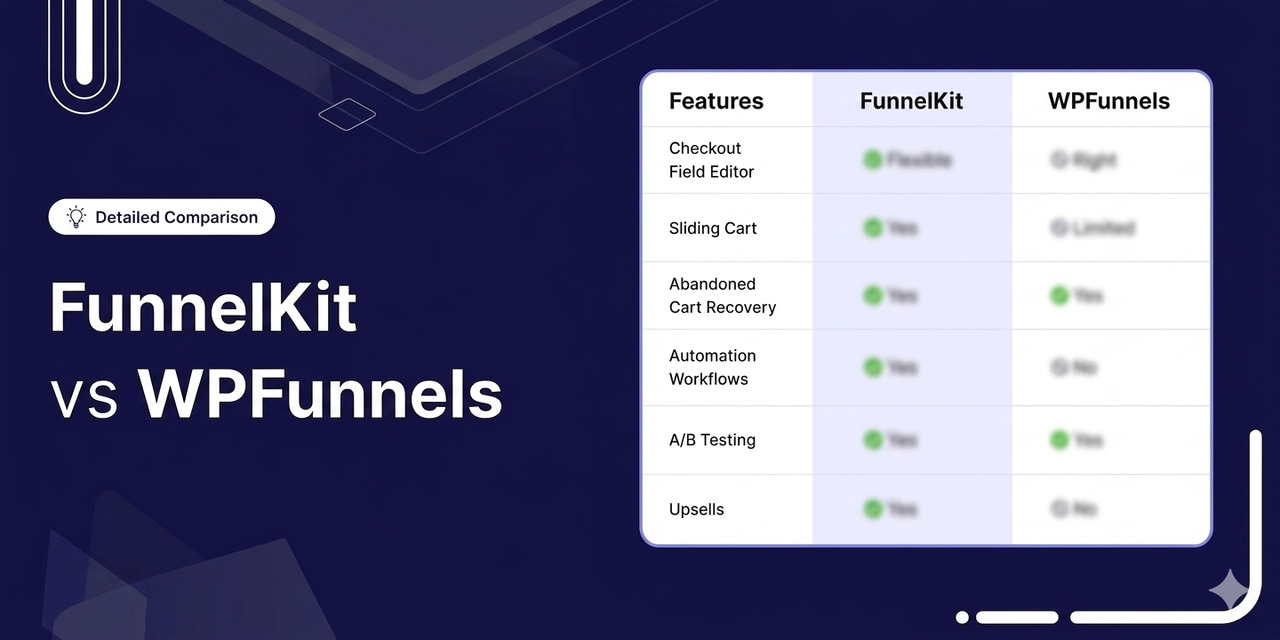
If you run a WooCommerce store, the difference between a good funnel builder and a great one shows up directly in your average order value.
Your checkout, your bumps, your upsells, and your follow-up emails decide whether a visitor buys once or buys again.
FunnelKit and WPFunnels are two of the most popular WordPress sales funnel builders, and they take noticeably different roads to the same destination.
FunnelKit is a modular, conversion-first system built around an optimized WooCommerce checkout, a native sliding cart, deep one-click upsells, and a full in-house CRM (FunnelKit Automations).
WPFunnels leads with a visual, canvas-first funnel planner, pairs with its own email tool (Mail Mint), and leans hard into course/LMS funnels for creators.
In this guide, we'll offer a feature-by-feature, head-to-head comparison of FunnelKit and WPFunnels, built from our hands-on testing.
Our goal is to help you match the right tool to your store.
Table of Contents
- 1 Quick Comparison: FunnelKit vs WPFunnels
- 2 Which Plugin Is Easier to Use and Set Up?
- 3 Which Plugin Has a Better Modular Architecture?
- 4 Which Plugin is Affordable and Offers Better Value for Money?
- 5 Which Plugin is Best for WooCommerce Checkout Customization?
- 6 Which Plugin Offers the Best WooCommerce Checkout Field Editor?
- 7 Which Plugin Offers the Best WooCommerce Side Cart?
- 8 Which Plugin is Best for Offering WooCommerce Order Bumps?
- 9 Which Plugin is Best for Offering WooCommerce One-Click Upsells?
- 10 Which Plugin is Best for WooCommerce Email Automations & CRM?
- 11 Which Plugin Offers Native Subscription Support?
- 12 Which Plugin is Better for Course Creators and LMS Funnels?
- 13 Which Plugin Offers the Best Funnel Templates and Library?
- 14 FunnelKit vs WPFunnels: Which Plugin is Best for A/B Testing?
- 15 Which Plugin Offers the Best Detailed Analytics and Reporting?
- 16 Which Plugin is Best for Opt-in Lead Generation?
- 17 Which Plugin Has Higher Active Installs and User Reviews?
- 18 FunnelKit vs WPFunnels: Which One Should You Choose?
Quick Comparison: FunnelKit vs WPFunnels
| Feature | FunnelKit | WPFunnels |
|---|---|---|
| Free Version | ✅ 40,000+ installs (checkout + sliding cart + cart recovery) | ✅ 6,000+ installs (funnel building + lead-gen funnels) |
| Visual Canvas Builder | Yes | Yes |
| Checkout Field Editor | Drag-and-drop, 14 custom field types, sections, and conditional fields | 7 checkout field types, drag-and-drop |
| Native Sliding Cart | ✅ Yes (free + Pro). Built-in rewards, in-cart upsells and cross-sells, special add-ons, express pay, and analytics) | ❌ No native side cart |
| Order Bump | 8 positions, 8 modern skins, 20+ rules, exclusive offer text, social proof on hover, one-click upgrade, and customizations | 7 positions, 14 styles, 12 rules, and fewer customization options |
| One-Click Upsell | Dedicated upsell pages, 15+ gateways, downsells, multi-product upsells and dynamic shipping/tax recalculation | Dedicated upsell pages, 11 gateways, and downsells. No multi-product upsells, no dynamic shipping calculation |
| Funnel Builder | Full visual funnel builder for opt-in, confirmation, landing pages, checkout, order bumps, one-click upsells, downsells, and order confirmation pages | Builder for opt-in, opt-in thank you, landing pages, checkout, order bumps, post-purchase upsells, downsells, and confirmation pages |
| Marketing Automations and CRM | FunnelKit Automations: contact profiles, visual workflow builder, transactional email design, abandoned cart recovery, post-purchase, and email/SMS/push notifications | Mail Mint: campaigns, sequences, 4 lead-form types, abandoned cart recovery, email and SMS broadcast, 360-degree contact profiles |
| A/B Testing | Split-test entire funnels and declare the winner, including additional stats such as revenue per visit and conversion rate | Split test entire funnels and declare the winner. Included in Pro ($299) |
| Analytics | Complete funnel, checkout, upsell, order, and revenue analytics with UTM and referrer tracking | Complete funnel, checkout, upsell, order, and revenue analytics |
| Page Builders | Elementor, Divi, Oxygen, Bricks, Gutenberg, and shortcodes for other builders | Gutenberg, Elementor, Bricks, Divi, Oxygen, and shortcodes |
| Native Subscriptions | ✅ Yes (via Sublium Subscriptions) | ❌ No |
| LMS / Course Funnels | ✅ Yes (via LearnDash/LifterLMS integration) | ✅ Yes (dedicated LMS funnels with LearnDash, TutorLMS and Creator LMS) |
| Modular Functionalities | 5/5 (979+ five-star reviews) on WordPress.org and 4.8/5 on Trustpilot | 4.9 (out of 171 reviews) on WordPress.org |
| Active Installs (WordPress.org) | 40,000+ | 6,000+ |
| Pricing (Annual) | • Basic $99.50 (1 site) • Plus $179.50 (2 sites) • Pro $249.50 (incl. Automations) for 3 sites • Elite $399.50 (30 sites) | • Starter $129.99 (1 site) • Pro $199.99 (1 site) • Business $399.99 (5 sites) • Agency $599.99 (50 sites) |
Let's go through the categories in detail.
Which Plugin Is Easier to Use and Set Up?
Let's quickly compare how easy each plugin is to use and set up.
| Onboarding Feature | FunnelKit | WPFunnels |
|---|---|---|
| Guided onboarding | ✅ Yes (3-step wizard) | ✅ Yes (3-step wizard) |
| Time to first working funnel | 10-15 minutes | 15 minutes |
| Visual funnel building canvas | ✅ Yes (canvas and step mode) | ✅ Yes (only canvas mode) |
| Bumps/upsells pre-built on template import | ✅ Yes | ⚠️ Configured per step |
| Drag-and-drop funnel steps | ✅ Yes | ✅ Yes (draw connections on canvas) |
FunnelKit
FunnelKit has a visual Canvas Mode, but it leads with a 3-step guided wizard and pre-assembles bumps and upsells when you import a template, so there’s less manual wiring afterward.
Canvas Mode unlocks on the Plus tier rather than being the default entry point.
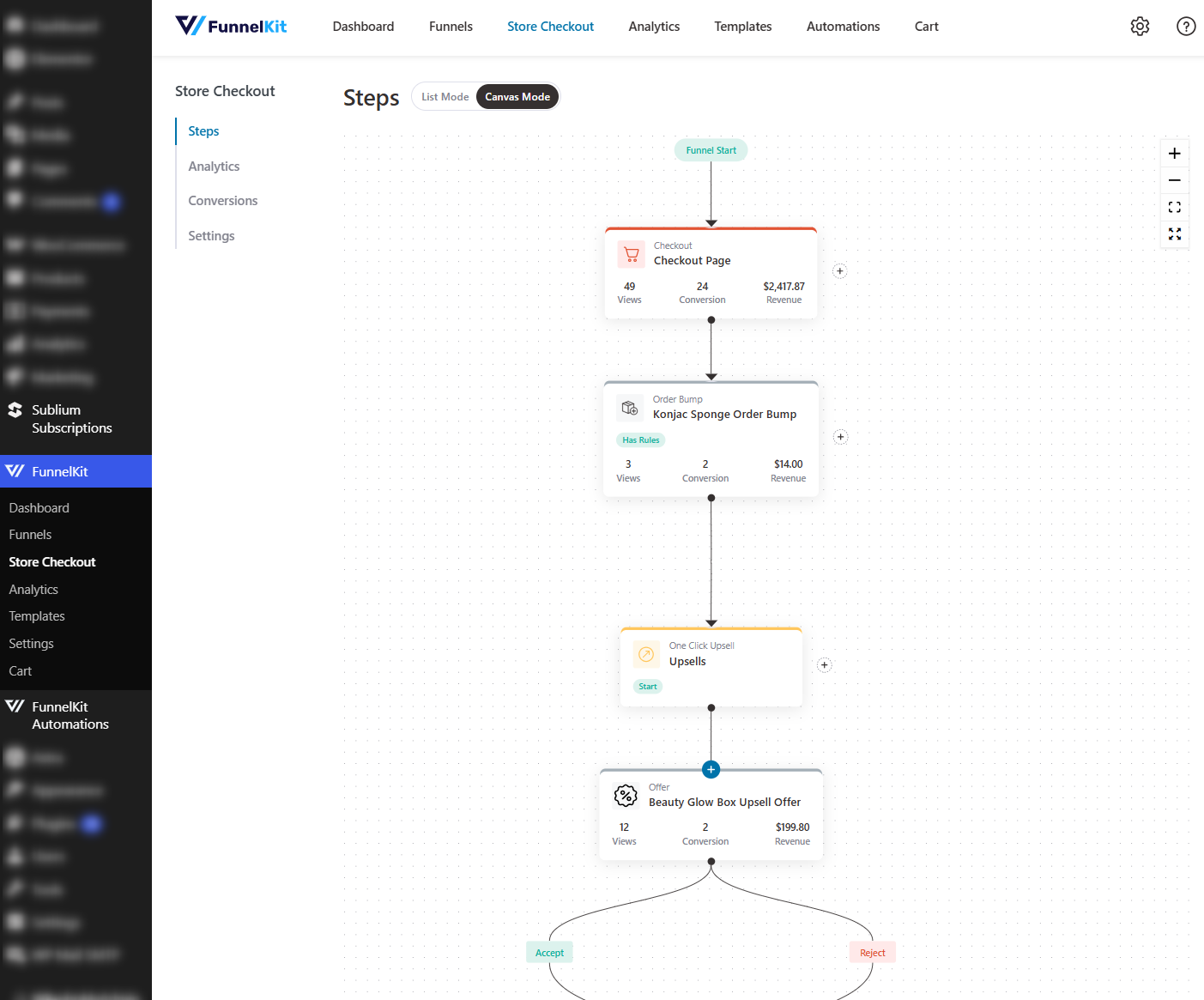
You get a variety of funnel templates. After importing the funnel, you get the entire flow with pre-built steps, including upsells and order bumps.
Its easy drag-and-drop interface lets you order any steps inside the funnels. Just add your products and go live.
If you want to view analytics, run an A/B test, or even add custom fields, you can do it within your steps inside your dashboard.
WPFunnels
WPFunnels is canvas-first by design.
The moment you create a funnel, you land on a drag-and-drop canvas where you map all step types, including landing, checkout, order bump, thank-you, upsell, downsell, etc., and draw the connections between them.
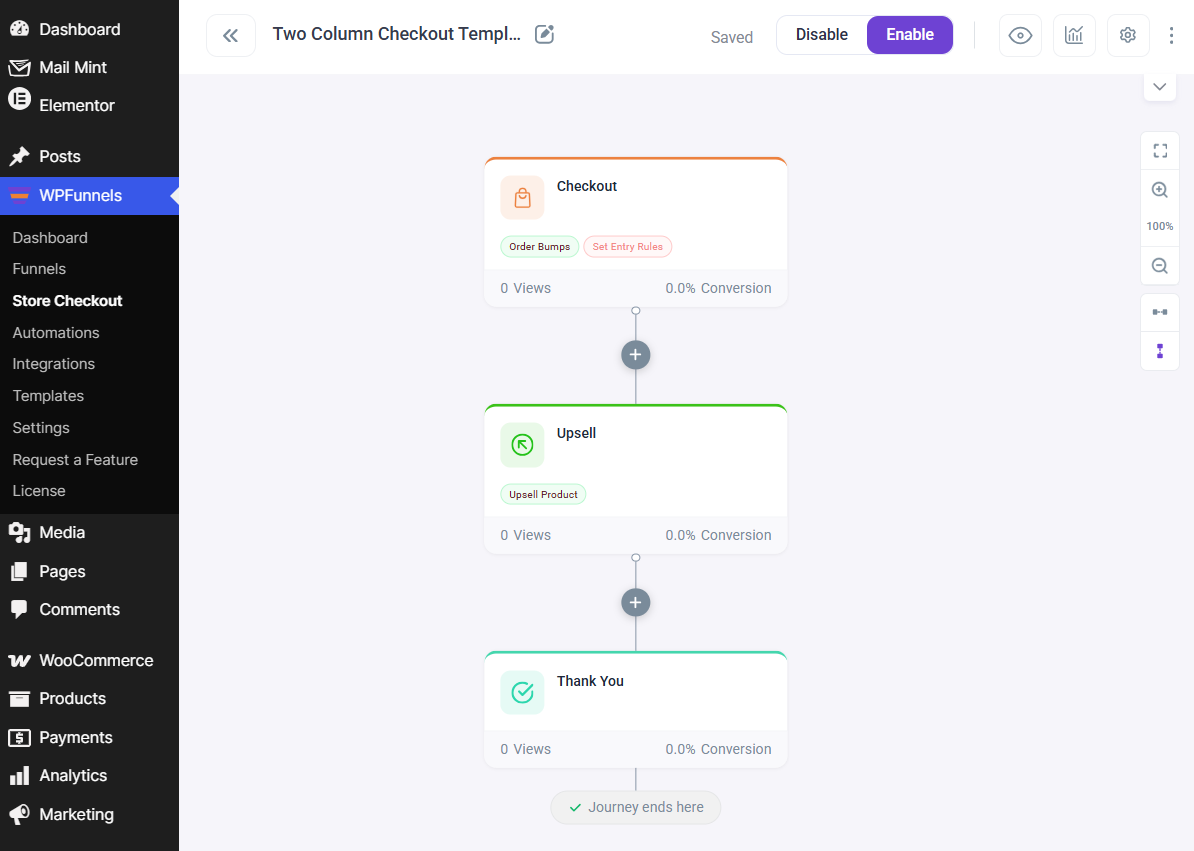
You see the whole flow at a glance, like a Funnelytics-style planner built into WordPress.
🏆 Winner: FunnelKit
FunnelKit offers both canvas and step modes, along with a guided import feature that helps you transact with fewer clicks. For beginners who just want a fast, working checkout, FunnelKit wins on time-to-first-sale.
WPFunnels' canvas gives a pure planning experience. For users mapping multi-step funnels with conditional logic, WPFunnels' canvas-first approach offers greater clarity.
Which Plugin Has a Better Modular Architecture?
| Question | FunnelKit | WPFunnels |
|---|---|---|
| Is the product modular? | ✅ Yes (4 separate plugins) | ⚠️ Add-ons gated to plan tiers |
| Can you buy pieces separately? | ✅ Yes (Funnel Builder, Automations, etc.) | ❌ No (add-ons only via plans) |
| Can you toggle features on/off? | ✅ Yes (granular per module) | ✅ Yes (feature toggles inside settings) |
| Does each module have a free version? | ✅ Yes (all four on WordPress.org) | ⚠️ Free WPFunnels and Mail Mint plugin on WordPress.org |
FunnelKit
FunnelKit, as the name suggests, is a kit of 4 independent products, including Funnel Builder, Automations (CRM), Sliding Cart, and Sublium Subscriptions.
- FunnelKit Funnel Builder - Sales funnels, optimized checkout, order bumps, one-click upsells, A/B testing, analytics
- FunnelKit Automations - Marketing automation, email + SMS broadcasts, CRM, abandoned cart recovery, segmentation
- FunnelKit Sliding Cart - Side cart with in-cart upsells, free-shipping bars, gamified rewards, express pay
- Sublium Subscriptions - Recurring billing, subscribe-and-save, payment recovery, cancellation flows
You can install only the modules you actually need, and unused modules don’t load assets on pages that don’t render their features.
These have a modular architecture, so you can buy just Automations ($99.50/year) if you already have a checkout, or Sublium Subscriptions (starts at $99.50/year) if you only need subscriptions.
Plus, all these plugins have free versions available on WordPress.org, with generous features that no other competitors offer.
WPFunnels
WPFunnels bundles its companion products (Mail Mint, Creator LMS) and four add-ons, such as Checkoutify, Global Funnels, LMS Funnels, and Integrations, into specific plan tiers.
But the catch is that WPFunnels confirms its add-ons are not sold individually. To unlock the Global Funnels or LMS add-on, you need to buy a plan that includes it.
That means if you only need the LMS Funnels add-on, you have to buy at least the Business plan ($239.99/year, 5 sites), which offers features you might not even need.
🏆 Winner: FunnelKit
Both are modular, but FunnelKit lets you buy pieces à la carte. WPFunnels gates add-ons behind its pricing tiers.
Which Plugin is Affordable and Offers Better Value for Money?
This is the most nuanced section in this comparison, and the one where the answer genuinely depends on your store’s setup. Let’s go through it with exact numbers.
FunnelKit
| Plan | Price (Site Usage) | Features |
|---|---|---|
| Basic | $99.50/year (1 site) | Optimized checkout, field editor, free basic FunnelKit Cart and Automations with abandoned cart recovery and post-purchase emails |
| Plus | $179.50/year (2 sites) | Adds full Funnel Builder, Sliding Cart Pro, order bumps, one-click upsells, A/B testing, and analytics |
| Professional | $249.50/year (3 sites) | Adds FunnelKit Automations Pro (CRM + email + SMS) |
| Elite | $399.50/year (30 sites) | For agencies |
| FunnelKit Automations standalone | $99.50/year (1 site) | Complete premium version of FunnelKit Automations |
WPFunnels
| Plan | Price (Site Usage) | Features |
|---|---|---|
| Starter | $129.99/year (1 site) | Funnel canvas, order bumps, one-click upsells, A/B testing, analytics, and Checkoutify |
| Pro | $199.99/year (1 site) | Sales funnels and checkout customization, email automation workflows, email campaigns, follow-up emails, etc. |
| Business | $399.99/year (5 sites) | Adds global funnels, LMS funnels, and integration add-ons |
| Agency | $599.99/year (30 sites) | For agencies |
| Mail Mint standalone | $149.99/year (1 site) | Complete premium version of Mail Mint |
The feature-equivalent comparison
| What a WooCommerce store needs | FunnelKit plan that includes it | WPFunnels plan that includes it |
|---|---|---|
| Optimized checkout + thank-you page | Basic - $99.50/year (1 site) | Starter - $129.99/year (1 site) |
| Funnels + order bumps + one-click upsells + A/B testing | Plus - $179.50/year (2 sites) | Starter - $129.99/year (1 site) |
| Side cart with rewards, in-cart upsells, express pay | Basic version free on WordPress.org. Premium version includes in Plus at $179.50/year (2 sites) | ❌ Not available (no native side cart) |
| Full CRM with visual automation builder + Email/SMS/WhatsApp/Push + transactional email design | FunnelKit Automations at $99.50/year | ⚠️ Mail Mint via Pro bundle at $199.99/year, but no multi-channel beyond email |
| Native subscriptions | Available via Sublium Subscriptions (starts $99.50/year) on a separate site | ❌ Not available natively |
| LMS funnels for course creators | Via LearnDash/LifterLMS integration | Business - $399.99/year (5 sites) |
| Agency multi-site license (30+ sites) | Elite - $399.50/year (30 sites) | Agency - $599.99/year (50 sites) |
Price vs value comparison
Before comparing numbers, it's worth being precise about what "value for money" actually means because it's easy to confuse it with "lowest sticker price", and they're not the same thing.
The sticker price is what you pay for a license. Value is what you get back for every dollar, the capability included, the features you'd otherwise buy separately, and ultimately the revenue the tool helps you generate.
On the narrow question of entry sticker price, WPFunnels is lower, and we'll say so plainly below.
But on the question this section actually asks on affordability and value for money, FunnelKit wins on four measurable axes: a free tier that replaces paid features, lower total cost of ownership for a complete stack, capabilities WPFunnels can't match at any price, and a far higher return per dollar.
1. FunnelKit's free tier replaces features WPFunnels charges for
FunnelKit's free WordPress.org plugin (40,000+ active installs) already ships an optimized one-step/multi-step checkout, a native sliding cart, and basic abandoned cart recovery through FunnelKit Automations Lite.
For a small store, that's a genuinely production-ready revenue setup, checkout, cart, and recovery at no cost.
WPFunnels' free version covers funnel building and lead-gen funnels, but it has no native side cart at any tier, and its free checkout doesn't match FunnelKit's free-tier breadth.
So the honest entry-price comparison isn't "$129.99 vs $99.50", it's "what does a working, revenue-generating setup cost on day one?" On FunnelKit, that answer can be $0.
That's the lowest possible entry price in the category, and it's the truest measure of affordability.
2. Total cost of ownership: pricing the complete stack
Sticker comparisons break down the moment you price a complete funnel, cart, and CRM stack, because the two products bundle very differently.
FunnelKit Professional ($249.50/year for 3 sites) is a single license that includes the full funnel builder, Sliding Cart Pro, multi-product one-click upsells, A/B testing, analytics, and the complete FunnelKit Automations CRM (Email + SMS + WhatsApp + Push, transactional email design, 30+ automations).
One purchase, one vendor, one support team.
To assemble the same capability around WPFunnels, you're buying multiple line items:
| Capability (No Limits) | FunnelKit (one license) | WPFunnels (assembled) |
|---|---|---|
| Funnel builder + upsells + A/B testing + analytics | ✅ Professional $249.50/yr (2 sites) | Starter $129.99/yr (1 site) |
| Full CRM + email automation | ✅ Included (Automations) | Need Mail Mint (via Pro bundle, $199.99/yr) |
| Native sliding cart with rewards | ✅ Included (Sliding Cart Pro) | Need third-party cart plugin (not available natively) |
| Native subscriptions | ✅ Available in Sublium Subscriptions (Free + $99.50 starting price) | Need WooCommerce Subscriptions ($279/yr) |
| Vendors/support teams | 1 | 3-4 |
Once you account for what you actually need to run a modern store, not just the funnel builder in isolation, FunnelKit delivers more capability per dollar with a single, integrated license.
More line items mean more renewals to track, more compatibility risk, and more support queues. That's a real cost, even when it doesn't show up on the first invoice.
3. The capability ceiling: things WPFunnels can't sell you at any price
This is the argument that sticker price can't answer. Two of the highest-leverage revenue features in this comparison simply do not exist in the WPFunnels ecosystem at any tier:
- A native sliding cart with free-shipping progress bars, gamified rewards, in-cart upsells, and express pay, which is a proven AOV lever. Included free in FunnelKit and enhanced in Plus.
- Native subscriptions that work across funnels, bumps, upsells, and automations. Sublium Subscriptions has no first-party equivalent in WPFunnels.
Add to that multi-product one-click upsells and dynamic shipping/tax recalculation, also FunnelKit-only.
When a competitor can't match a capability at any price, no discount closes the gap. You're not comparing $129.99 to $179.50; you're comparing a complete revenue toolkit to a partial one.
4. Cost per outcome: the metric that actually matters
In commerce tooling, the real denominator is the revenue the tool generates. A funnel builder that lifts average order value by 15-20% through bumps, multi-product upsells, and a gamified cart pays for its license cost many times over within the first month for most stores.
Consider the math FunnelKit users report. A 10% take rate on a $50 one-click upsell across 1,000 monthly orders is $5,000/month in new margin.
Against that, the difference between a $129.99 and a $179.50 license is a rounding error.
The cheaper tool, which lacks multi-product upsells, a rewards-driven cart, and multi-channel recovery, is the more expensive choice when measured by revenue rather than license cost.
Where WPFunnels has the lower entry sticker (the honest caveat)
To be fair and accurate, if you measure only the entry license for a single site, WPFunnels is cheaper.
WPFunnels Starter at $129.99/year (1 site) includes the canvas, order bumps, one-click upsells, A/B testing, analytics and Checkoutify.
FunnelKit's funnel-capable tier (Plus) lists at $179.50/year.
For a solo owner who wants funnels on one site and never intends to use a side cart, CRM, or subscriptions, WPFunnels' Starter is the smaller invoice, and at the 50-site Agency tier ($599.99) WPFunnels licenses more sites than FunnelKit Elite's 30 (at $399.50).
That's a real point in WPFunnels' favor on price.
It just isn't the same as winning on value, because the FunnelKit free tier provides a working setup at $0, and the paid tiers deliver capabilities and ROI that WPFunnels can't match at any price.
🏆 Winner: FunnelKit
WPFunnels has the lower entry sticker on a single paid site. But "value for money" measures what each dollar returns, and on every axis that defines value, FunnelKit wins because its free tier delivers a working checkout + sliding cart + cart recovery at $0 (the lowest real cost of entry in the category).
Its single-license bundles undercut the multi-vendor stack you'd assemble around WPFunnels; it offers revenue-driving capabilities, such as native sliding cart, multi-product upsells, and native subscriptions, that WPFunnels can't match at any price, and its per-dollar ROI (a 10% take rate on a $50 upsell across 1,000 orders is $5,000/month) dwarfs any license-price gap.
Cheaper to start, more capable to scale, and more revenue per dollar spent. That's what better value for money actually means, and it's FunnelKit.
Which Plugin is Best for WooCommerce Checkout Customization?
| Checkout Customization Feature | FunnelKit | WPFunnels |
|---|---|---|
| Custom checkout page | ✅ Yes | ✅ Yes |
| Single and multi-step checkout | ✅ Yes | ✅ Yes |
| Mini cart or order summary editing | ✅ Yes (quantity switcher, saving messages, images, discounts, etc.) | ⚠️ Limited (display product images and collapsible order summary) |
| Conditional checkout rules | ✅ Yes | ✅ Yes |
| Built-in checkout optimizations | ✅ Yes (express checkout, address autocomplete, advanced phone, auto-apply coupons, inline validation, and more) | ⚠️ Limited (express checkout, collapsible order summary, field validation and phone field) |
| Multilingual (WPML or Polylang) | ✅ Yes | ✅ Yes |
| Page builder native | ✅ Yes (Elementor, Divi, Bricks, Oxygen, and Gutenberg) | ✅ Yes (Elementor, Divi, Bricks, Oxygen, and Gutenberg) |
| Custom sections (testimonials, FAQ, trust badges) | ✅ Yes | ⚠️ Limited customization (4 default positions and 2 layouts) |
FunnelKit
FunnelKit gives you full visual control over the checkout. You get 9 built-in checkout optimizations.
This includes express checkout (Apple Pay, Google Pay, Stripe Link), Google Address Autocomplete, an advanced phone field with country detection, auto-apply coupons, inline field validation, multi-step field preview, and more.
Choose your favorite page builder during onboarding, select the number of checkout steps, and import one of 20+ professionally designed templates.
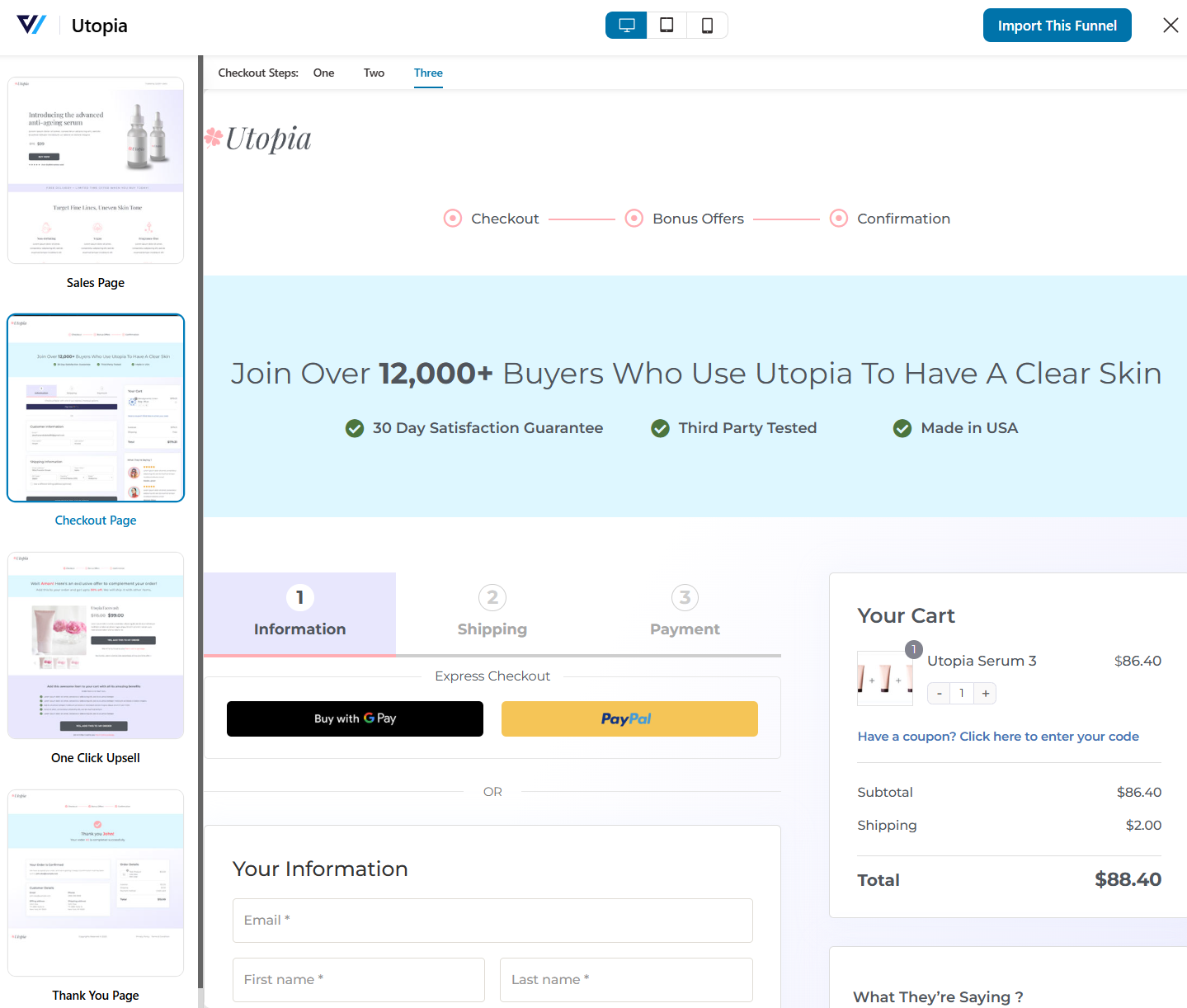
You can edit the mini cart to show quantity switchers, regular and discounted prices, total savings messaging, and product images.
You can drop custom sections such as testimonials, FAQs, trust badges, and money-back guarantees below the order summary on the checkout page using your page builder.
Conditional checkout fields let you show a field only when a specific rule is met.
For multilingual stores, FunnelKit supports WPML and Polylang for funnel imports, which is crucial for stores selling across regions.
WPFunnels
WPFunnels handles checkout customization primarily through Checkoutify, its visual drag-and-drop checkout customizer.
Checkoutify is free with every WPFunnels Pro tier and is genuinely capable. You can design multiple checkout forms, add or remove fields, and assign any form as the default WooCommerce checkout or to specific funnels.
WPFunnels supports the same five page builders (Gutenberg, Elementor, Divi, Oxygen, Bricks), and you can customize the checkout layout from inside your builder.
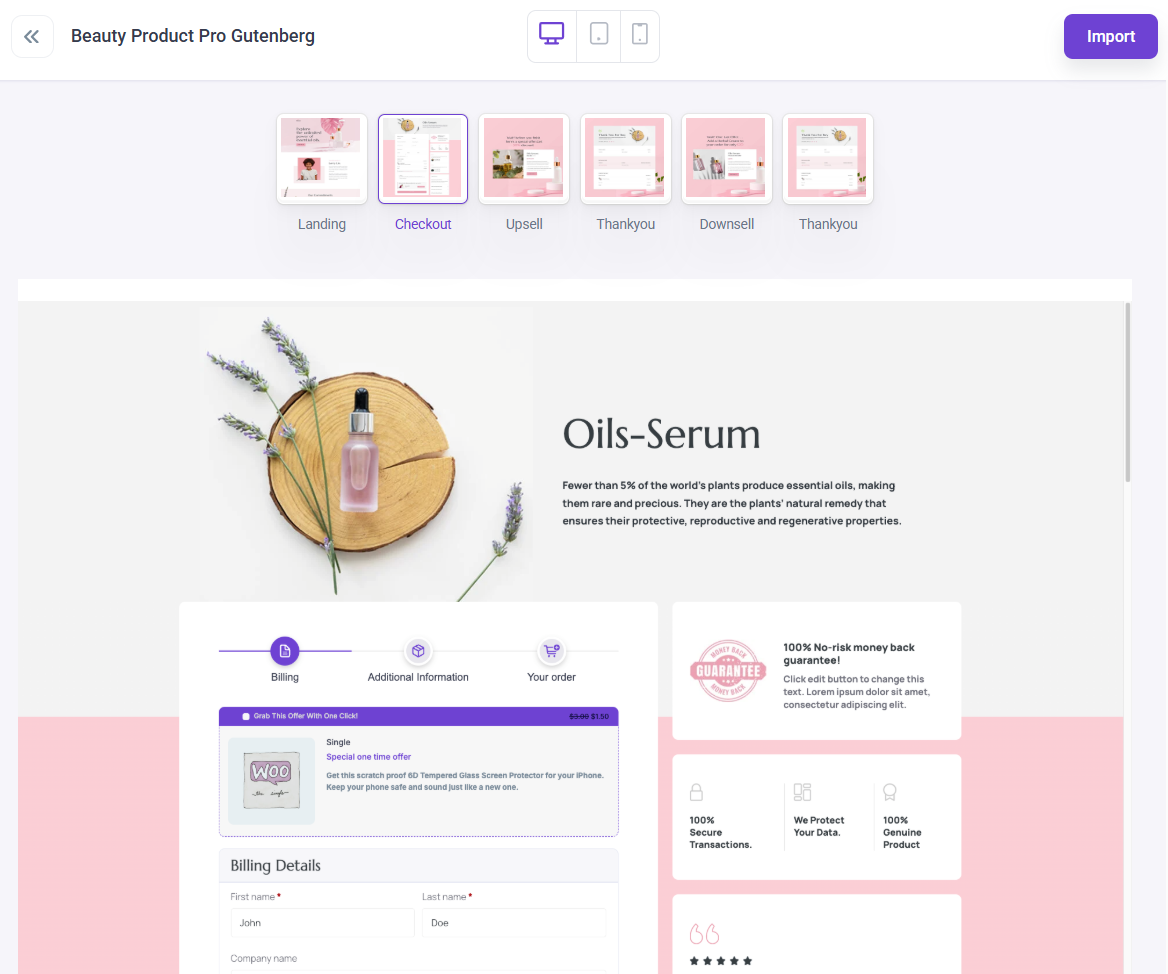
The constraint is that custom sections, such as testimonials, trust badges, and FAQs, are section-setting-dependent, with a basic 4 positions and 2 layouts on the checkout page.
There is no equivalent to FunnelKit's checkout optimization toggle list out of the box.
🏆 Winner: FunnelKit
FunnelKit's 10+ checkout optimizations, conditional fields, mini-cart editing, custom section support, and multilingual funnels give it greater out-of-the-box depth.
WPFunnels with Checkoutify is genuinely competitive on field-level customization, but FunnelKit’s breadth of conversion tooling on the checkout edges ahead.
Which Plugin Offers the Best WooCommerce Checkout Field Editor?
| Checkout Field Editing Feature | FunnelKit | WPFunnels |
|---|---|---|
| Drag-and-drop field placement | ✅ Yes | ✅ Yes |
| Built-in custom field types | ✅ Yes (14 types) | ✅ Yes (7 types) |
| Create custom sections | ✅ Yes | ❌ No |
| Conditional field display | ✅ Yes | ❌ No |
| Move shipping above billing | ✅ Yes | ✅ Yes |
| Choose fields per checkout step | ✅ Yes | ❌ No |
| Reusable forms across funnels | ✅ Yes | ✅ Yes |
FunnelKit
FunnelKit's drag-and-drop checkout field editor lets you rearrange every field on the form, such as billing, shipping, email-first layouts, and account fields and split them across multi-step checkout pages.
You get 14 built-in custom field types, including text, checkbox, radio, multi-select, hidden, password, date, file upload, and more.
Custom fields can be placed anywhere in the checkout form and marked as required, validated, or shown conditionally.
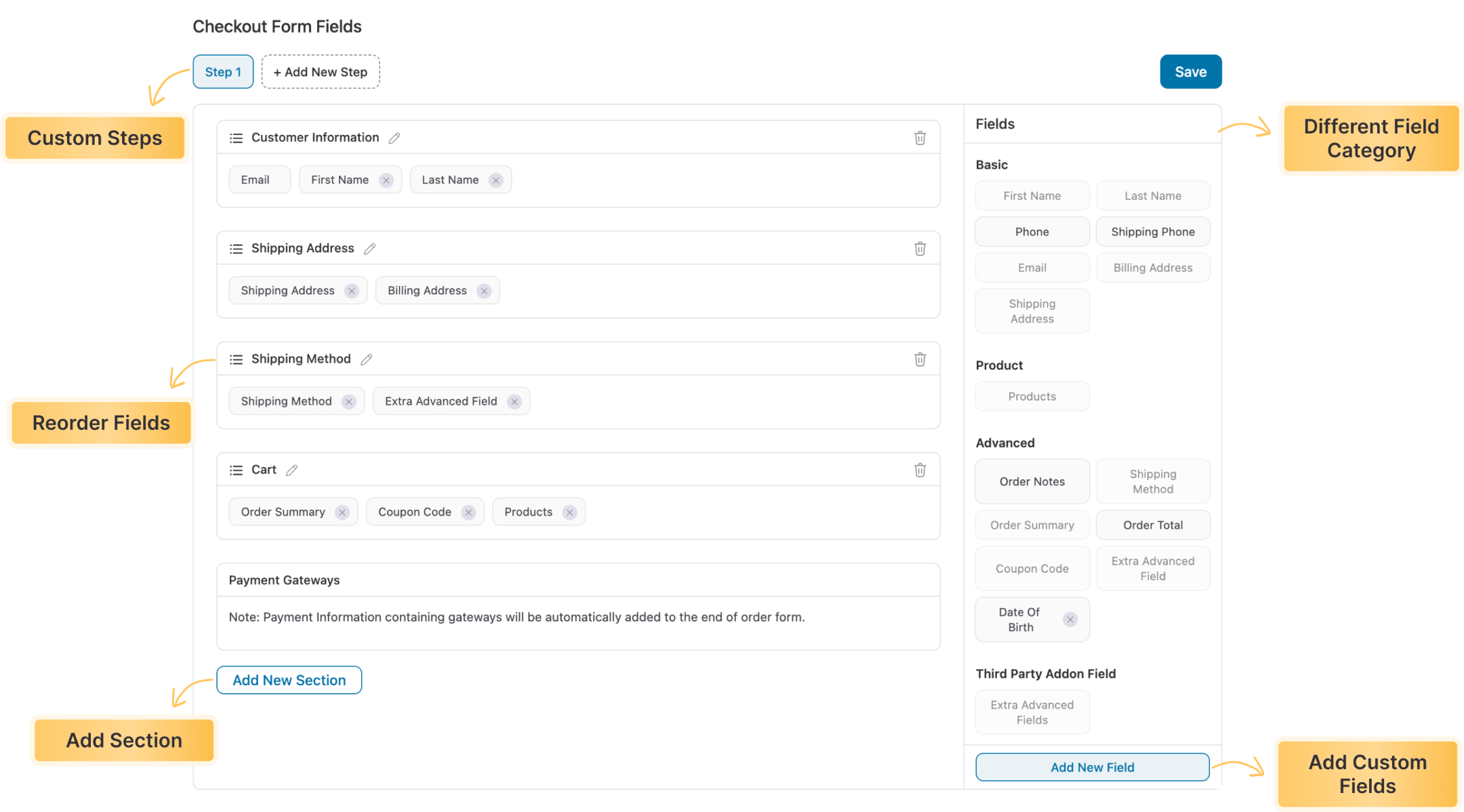
The conditional-fields feature is particularly useful for personalization. For example, show a “Gift Message” field only when “This is a gift” is checked, show “VAT ID” only for business customers, show a delivery-instructions field only for physical products.
WPFunnels
WPFunnels uses Checkoutify, which is included free with the WPFunnels Pro tiers. It’s a modern visual editor where you design as many checkout forms as you want and reuse them.
You can prepare a checkout form once and use it as the default WooCommerce checkout, attach it to any specific funnel, or place it on any page across the site via shortcode.
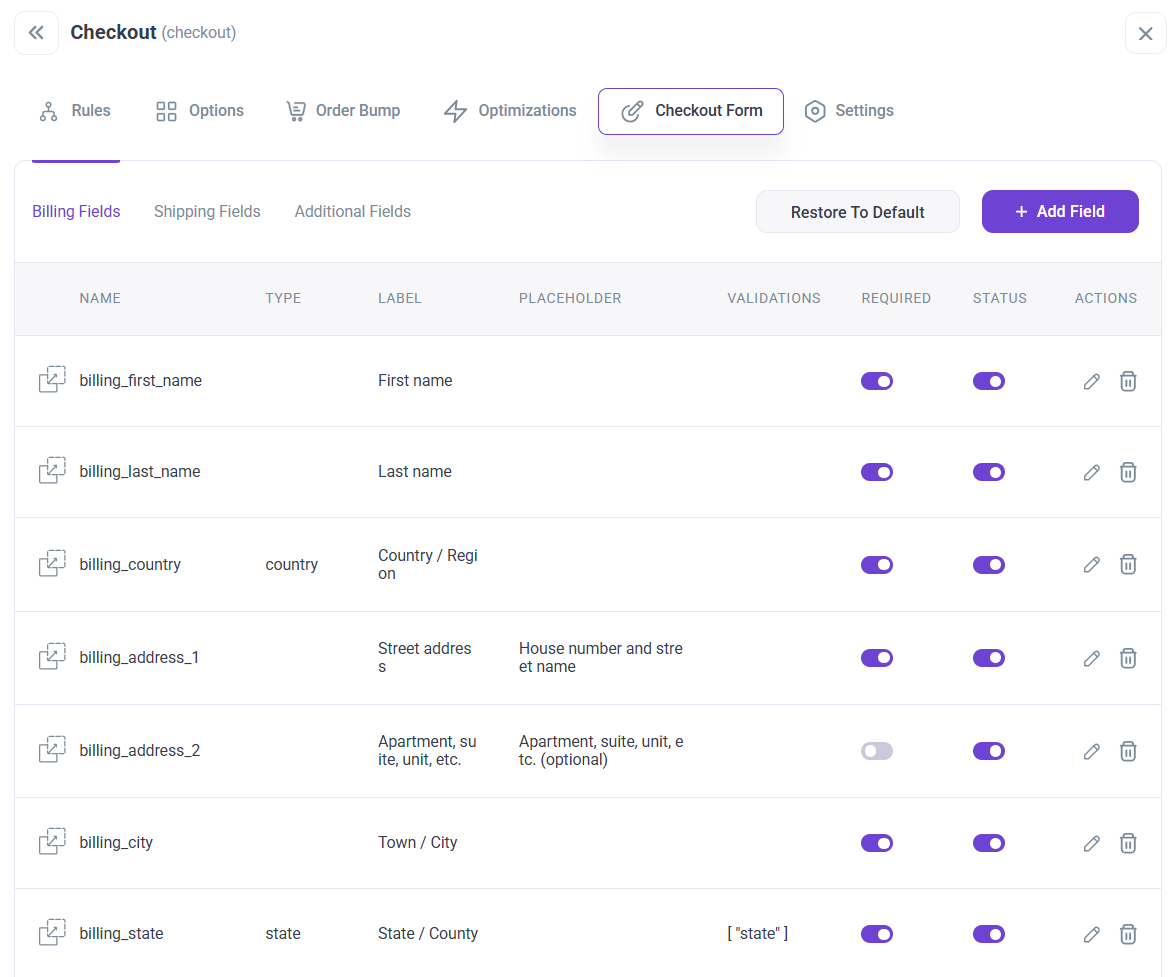
That reusability is also there inside FunnelKit. You can assign the checkout trigger to a product or a funnel.
Checkoutify’s library of built-in field types and conditional-display rules is less extensive than FunnelKit’s.
For most stores, it’ll cover the standard cases; for stores collecting B2B IDs, gift-message conditionals, or complex custom data, FunnelKit’s deeper field-type library is better suited.
🏆 Winner: FunnelKit
FunnelKit edges ahead on field-type variety (14 built-in types vs Checkoutify’s smaller library), conditional field display, and section creation.
Which Plugin Offers the Best WooCommerce Side Cart?
| Checkout Field Editing Feature | FunnelKit | WPFunnels |
|---|---|---|
| Native side cart | ✅ Yes | ❌ No |
| Free shipping progress bar | ✅ Yes | ❌ No |
| Threshold-based gamified rewards | ✅ Yes (discounts, free shipping and free gifts) | ❌ No |
| In-cart upsells, cross-sells and special add-ons | ✅ Yes | ❌ No |
| Express pay in cart (Apple Pay or Google Pay) | ✅ Yes | ❌ No |
| Cart analytics | ✅ Yes | ❌ No |
| Skip cart entirely | ✅ Yes | ✅ Yes |
FunnelKit
FunnelKit ships a native sliding cart, available for free on the WordPress.org plugin repository. The Pro version is included from the Plus tier and above. The Pro cart adds:
- Gamified rewards: Customers unlock free shipping, percentage or flat discounts, and free gifts as they add items
- Product recommendations: Upsells, cross-sells, or both inside the cart, with multiple layouts
- Express pay buttons: Apple Pay and Google Pay directly in the cart drawer
- Cart analytics: Performance reports for upsells, rewards, and add-ons
- Real-time previews: See changes live as you configure
- Language translation: WPML, TranslatePress and Polylang support
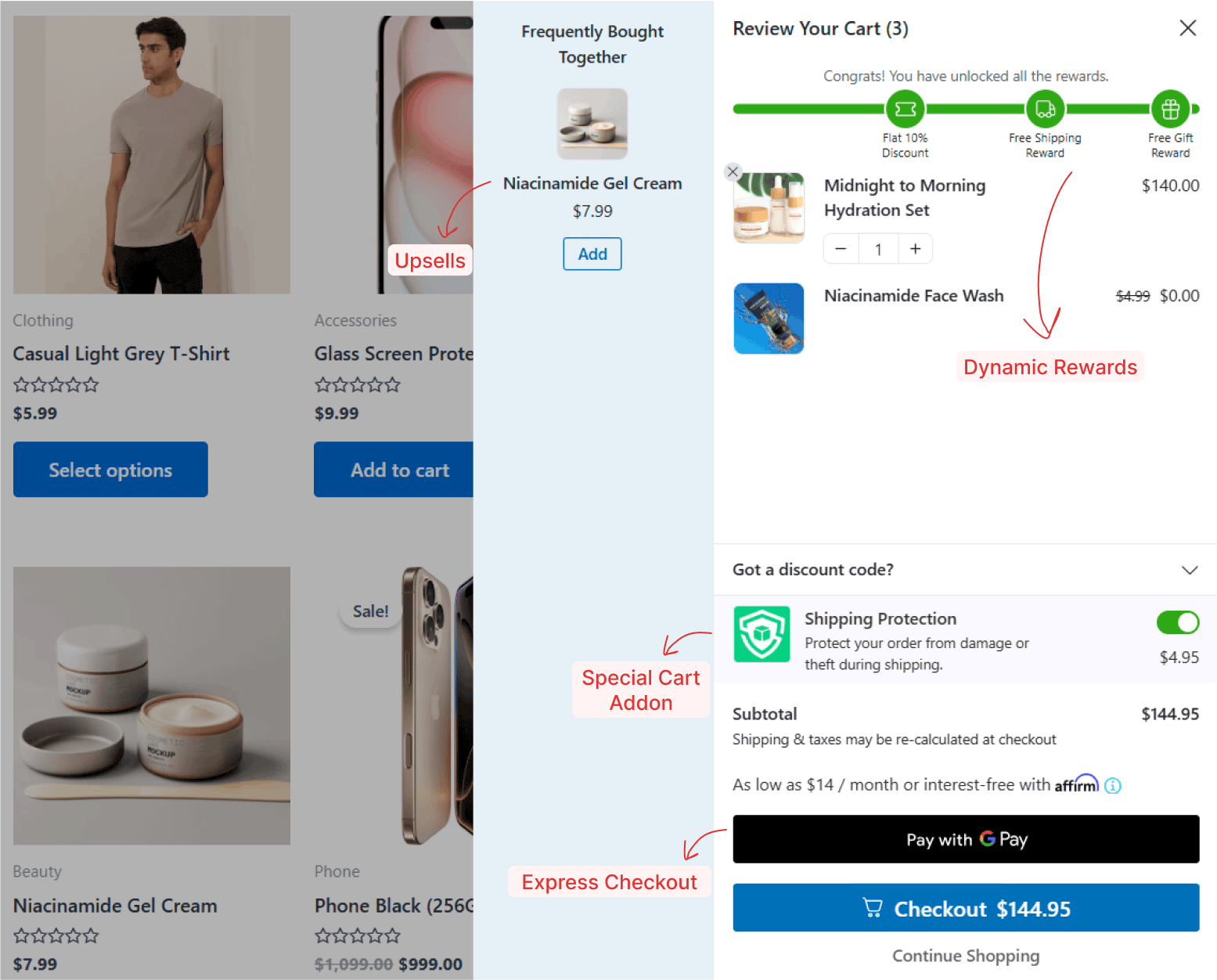
The free-shipping progress bar alone is a meaningful AOV lever. Set the threshold to roughly 1.5 times your current AOV and watch order totals shift upward.
WPFunnels
WPFunnels has no native side cart. Its model is canvas-step based on landing → checkout → upsell and it offers a "Skip Cart" feature that lets customers bypass the cart entirely.
That works for some funnels, but it isn’t equivalent to a modern Shopify-style sliding drawer with rewards, in-cart upsells, and express pay.
To add a side cart to a WPFunnels store, you’d need a separate plugin.
🏆 Winner: FunnelKit
If you want to use the cart as a conversion surface, such as unlocking gifts at $75, free shipping at $100, an in-cart upsell carousel, express pay buttons in the drawer, and analytics to prove what works, FunnelKit is the answer. WPFunnels doesn’t compete in this category.
Which Plugin is Best for Offering WooCommerce Order Bumps?
| Order Bump Feature | FunnelKit | WPFunnels |
|---|---|---|
| Placements on checkout | ✅ Yes (8 positions) | ✅ Yes (7 positions) |
| Skins/styles | ✅ Yes (8 modern skins) | ✅ Yes (14 styles) |
| Targeting/conditional rules | ✅ Yes (23 rules) | ✅ Yes (12 rules) |
| Multiple bumps per checkout | ✅ Yes (Plus tier and above) | ✅ Yes (Pro tier and above) |
| One-click product upgrade (replace product) | ✅ Yes | ✅ Yes |
| Social proof on hover | ✅ Yes | ❌ No |
| Variable products support | ✅ Yes | ✅ Yes |
| Built-in bump analytics | ✅ Yes | ⚠️ Funnel-level analytics |
FunnelKit
FunnelKit's order bump system gives you 8 placement positions on the checkout page, including above or below the order summary, under payment methods, inside the mini cart, and other high-converting positions for both desktop and mobile.
You get 8 conversion-focused skins with customizable headings, borders, buttons, and social proof on hover, which is a small detail that builds trust without visual clutter.
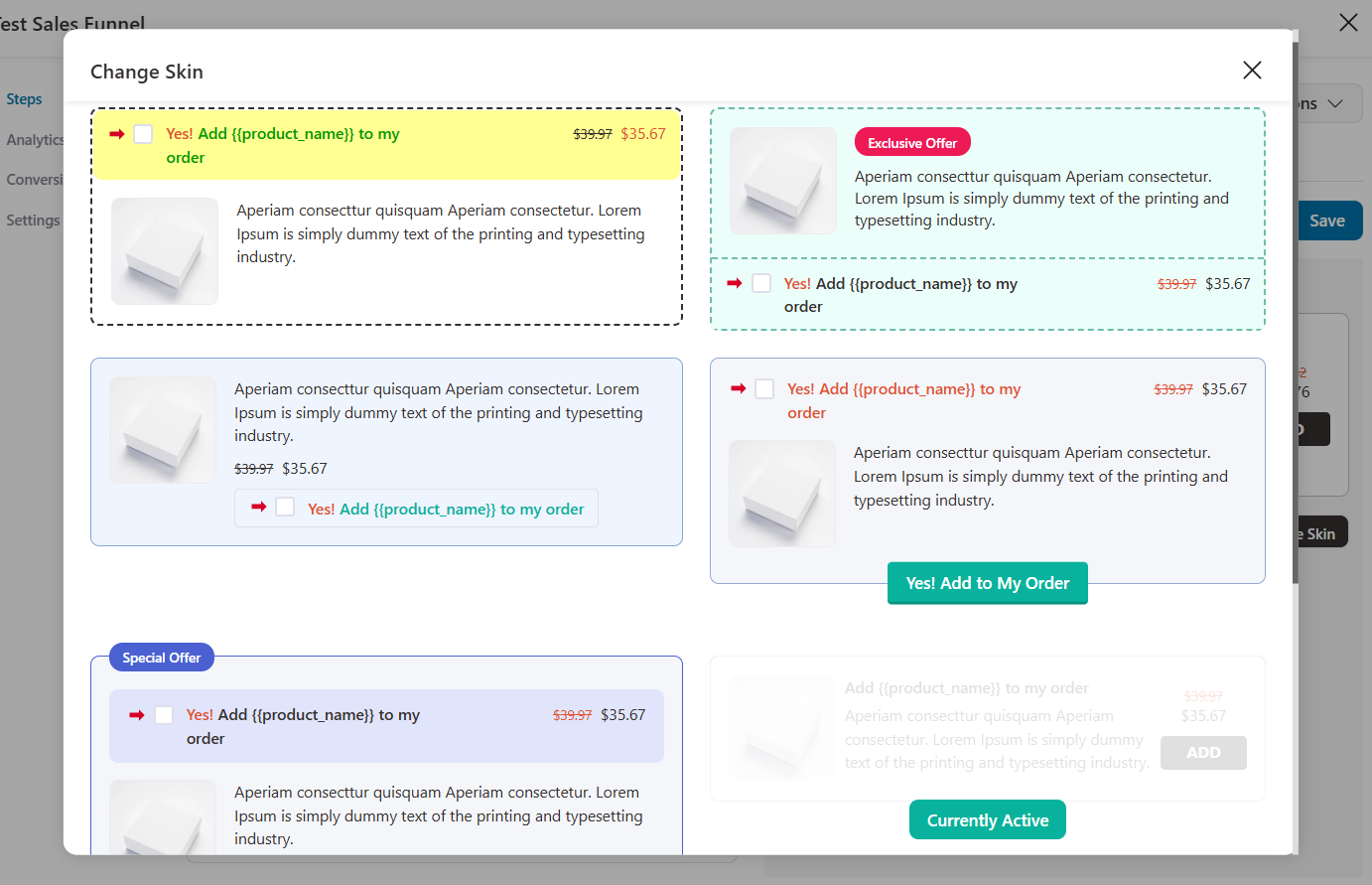
The one-click upgrade feature lets you replace a cart item with a higher-value bump offer. Perfect for premium versions, memberships, or product bundles.
If a customer added the Standard plan and your bump is the Pro plan, accepting the bump automatically swaps them.
The targeting engine has 20 conditional rules for displaying bumps based on cart total, specific products in the cart, user role, location, customer history, and more.
You get unlimited bumps per checkout from the Plus tier.
WPFunnels
WPFunnels offers 7 placement positions for order bumps on the checkout page and 14 order bump styles, but only a few are conversion-friendly.
You can place bumps above or below the order summary, under payment methods, and at several other key points on the checkout page.
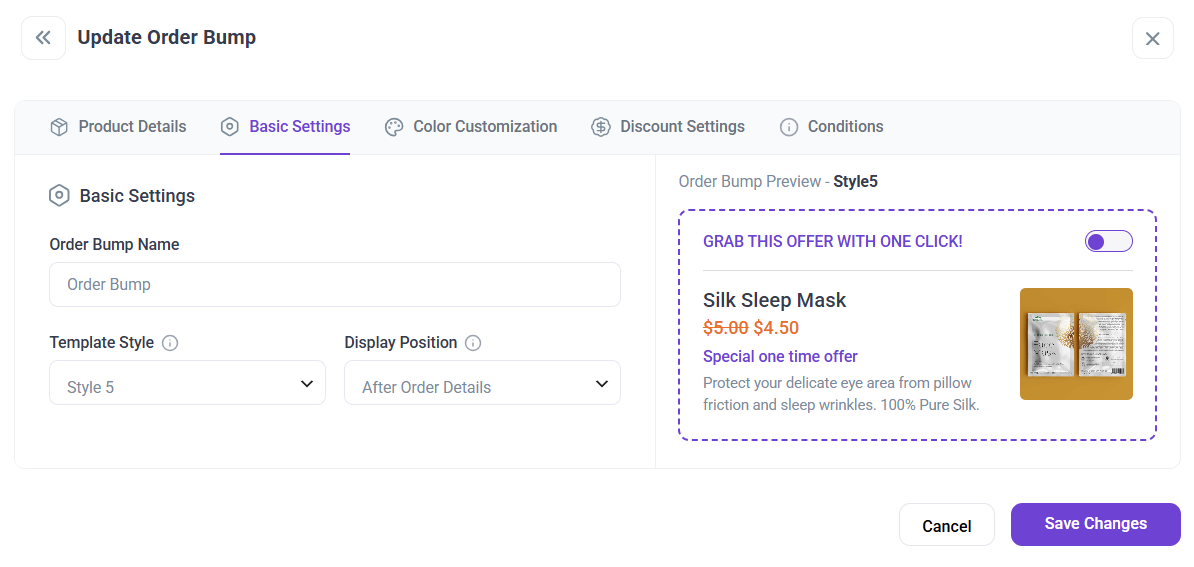
WPFunnels supports unlimited bumps in Pro, variable products, and a “Replace product” option that swaps the cart product for the bump offer (functionally equivalent to FunnelKit’s one-click upgrade).
Personalized and dynamic conditional bumps are available through WPFunnels' WooCommerce funnel features.
Where WPFunnels lags is on social proof on hover (no equivalent feature) and dedicated bump-level analytics (you’d analyze bump performance via funnel analytics rather than a bump-specific dashboard).
🏆 Winner: FunnelKit
FunnelKit edges ahead on placements (8 vs 7), targeting rules (20 explicit rule types), social proof on hover, and bump-specific analytics.
WPFunnels wins on raw style count (13 vs 8 skins) and matches FunnelKit on unlimited bumps and the replace-product upgrade.
For stores running serious A/B tests on bumps, FunnelKit’s deeper analytics matter. For stores prioritizing visual variety, WPFunnels' larger skin library is appealing.
Which Plugin is Best for Offering WooCommerce One-Click Upsells?
| One-Click Upsell Feature | FunnelKit | WPFunnels |
|---|---|---|
| Dedicated upsell pages | ✅ Yes (full pages with templates) | ✅ Yes (canvas steps) |
| Upsell templates | ✅ Yes (30 templates) | ✅ Yes (13 templates) |
| Payment gateways supported | ✅ Yes (15+) | ✅ Yes (11) |
| Multi-product upsells | ✅ Yes (bundles, tiered, multiple-choice) | ❌ No (single product per offer) |
| Downsells | ✅ Yes (sequence chains) | ✅ Yes |
| Dynamic shipping & tax recalculation | ✅ Yes | ❌ No |
| Targeting/conditional rules | ✅ Yes (27 rules) | ⚠️ Conditional steps |
| Page builder compatibility for upsell pages | ✅ Yes | ✅ Yes |
FunnelKit
FunnelKit's one-click upsell supports 15+ payment gateways, such as Stripe, PayPal, Braintree, Authorize.Net CIM, Mollie, SagePay, Square, WooCommerce Payments, and more.
You can create dedicated upsell pages between checkout and the thank-you page, customize them with any page builder, and offer multi-product upsells for bundles, tiered pricing, or multiple-choice products on a single upsell page.
The 27 conditional targeting rules let you show the right offer to the right customer based on cart contents, customer history, location, product variants, and more.
You can set up a dynamic offer path that automatically triggers a downsell offer when a customer declines an upsell, so you don't lose the post-purchase opportunity entirely.
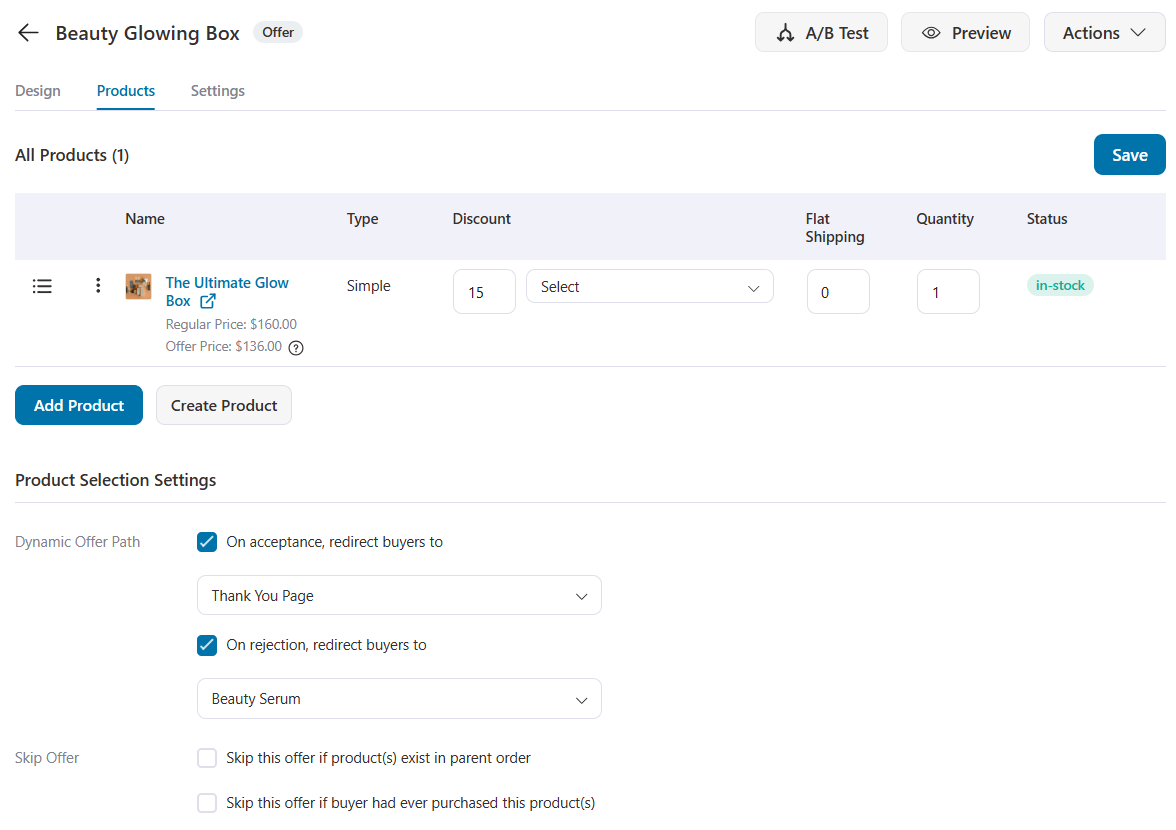
The standout feature is dynamic shipping and tax recalculation. After an upsell is accepted, FunnelKit uses a virtual cart that mirrors WooCommerce’s native checkout logic to recalculate shipping and taxes correctly.
This prevents compliance issues, including incorrect tax charges and undercharged shipping, that arise when upsells are added to existing orders without recalculation.
WPFunnels
WPFunnels supports one-click upsells and downsells through its canvas. The plugin lists 11 core payment gateways: Stripe, PayPal, Mollie, Authorize.net, Square, Sumit, Payfast, WooCommerce Payments, Direct Bank Transfer, Check Payments, and COD.
WPFunnels’ Pro tier claims broader gateway coverage (including Razorpay, MBWay, Mercado Pago, and more, as mentioned in the WordPress.org listing).
Its constraints are real:
- Single-product upsells only: Each upsell offers one product at a time. There are no multi-product bundles or tiered choice pages.
- No dynamic shipping/tax recalculation: Upsells add to the existing order at the original shipping/tax basis, which can create compliance issues in some regions.
- Targeting via conditional steps rather than a dedicated upsell-rule engine.
- WPFunnels’ canvas-based downsell flow is elegant: You draw the connection from a declined upsell to a downsell step, and the funnel just runs. For stores that don’t need multi-product upsells or dynamic shipping, this works well.
WPFunnels’ canvas-based downsell flow is elegant. You draw the connection from a declined upsell to a downsell step, and the funnel just runs.
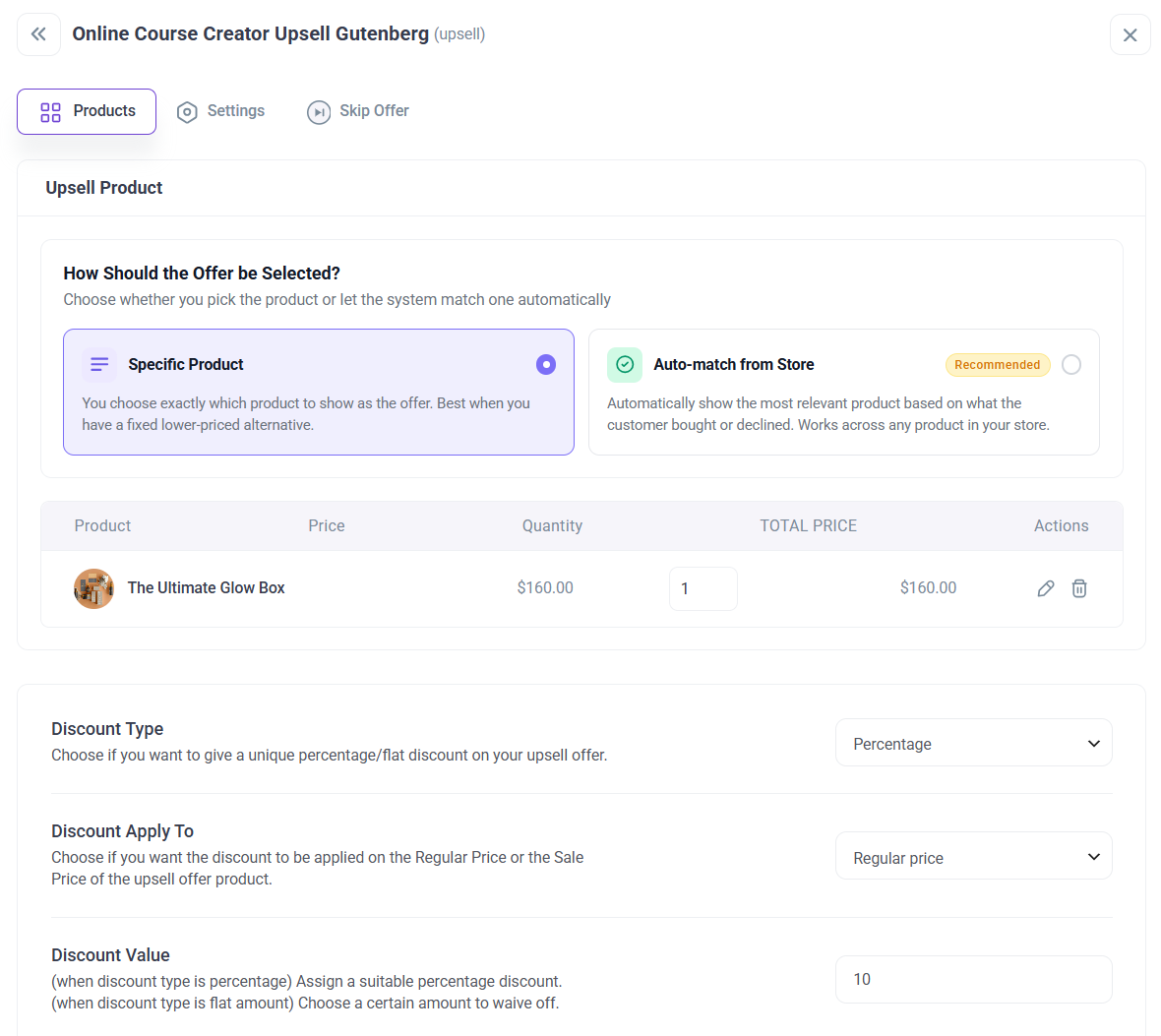
For stores that don’t need multi-product upsells or dynamic shipping, this works well.
🏆 Winner: FunnelKit
FunnelKit’s broader gateway coverage (15+ vs 11), multi-product upsells, 27 targeting rules, automatic downsells, and dynamic shipping/tax recalculation make it the stronger post-purchase engine.
WPFunnels covers the core single-product upsell/downsell use case competently, but stores running serious upsell programs such as bundles, multi-choice offers, and region-specific tax compliance need FunnelKit’s architecture.
Which Plugin is Best for WooCommerce Email Automations & CRM?
Both companies pair their funnel builder with an email/automation product: FunnelKit Automations and WPFunnels’ Mail Mint.
| Automation & CRM Feature | FunnelKit | WPFunnels |
|---|---|---|
| Free version with cart recovery | ✅ Yes | ⚠️ Abandoned cart is a paid feature |
| Visual automation builder | ✅ Yes (also includes 30+ automation recipes) | ✅ Yes (also includes 11 automation recipes) |
| Abandoned cart recovery | ✅ Yes (multi-step workflows + dynamic coupons) | ✅ Yes + auto-coupon generation |
| Multi-channel (Email + SMS + WhatsApp + Push) | ✅ Yes | ⚠️ Email + Twilio SMS only |
| Transactional email design | ✅ Yes | ✅ Yes |
| 360-degree contact profiles | ✅ Yes | ✅ Yes |
| Audience segmentation | ✅ Yes | ✅ Yes |
| Lead-form types | ✅ Yes (opt-in + popup) | ✅ Yes (embedded, pop-up, fly-in, and notification bar) |
| A/B testing for emails | ✅ Yes (broadcasts and split path automations) | ❌ No |
| External integrations | 500+ WordPress plugins, CRMs, Third-party apps, including Zapier and webhooks | 12 external CRMs, Zapier, and webhooks |
FunnelKit
FunnelKit Automations is a WooCommerce-native CRM available as a standalone plugin ($99.50/year, 1 site) or bundled with Funnel Builder on the Professional plan ($249.50/year, 3 sites).
The free FunnelKit Automations plugin already covers basic abandoned cart recovery and post-purchase email sequences.
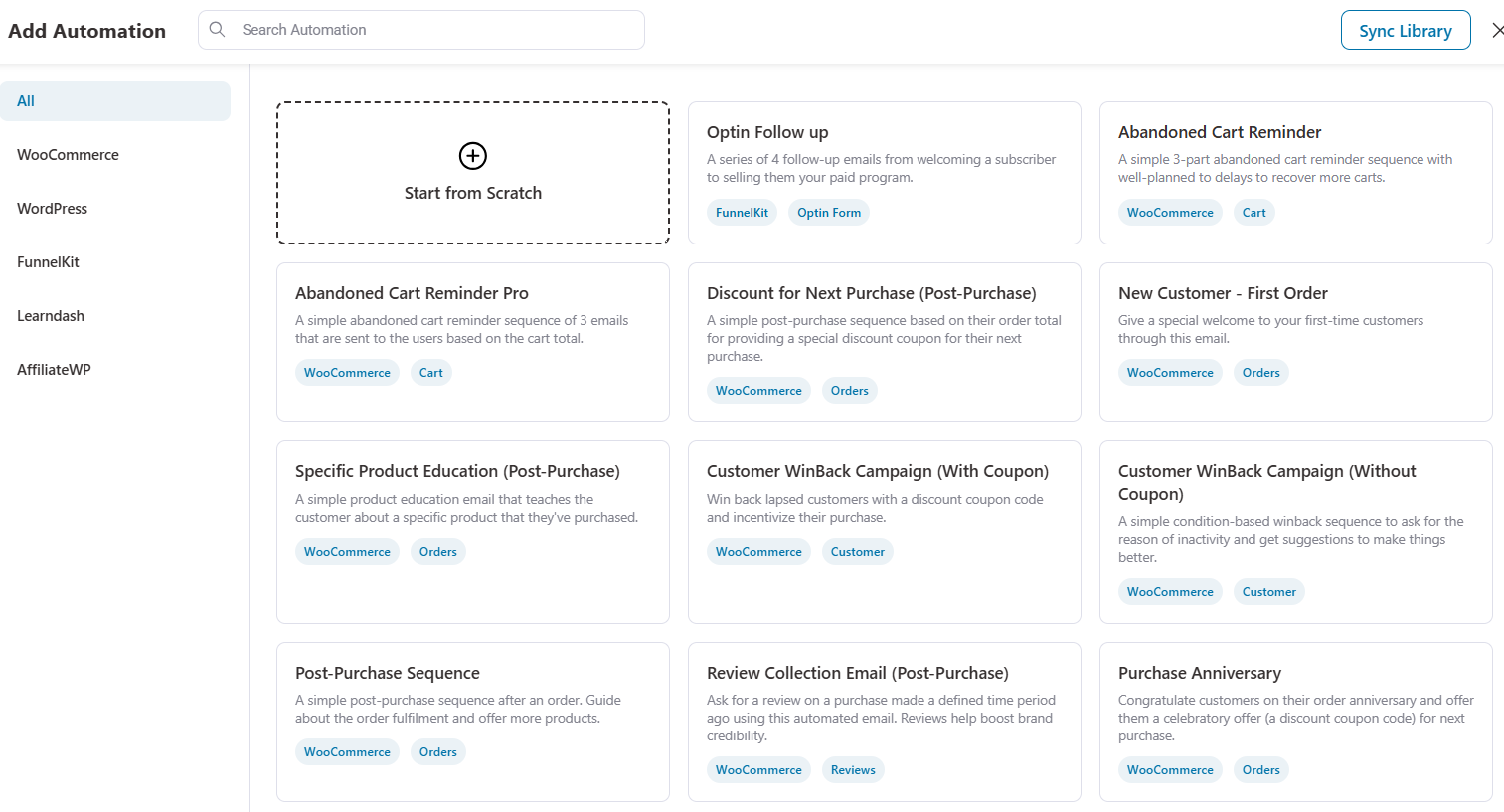
The paid version adds:
- Visual automation builder triggered off store events, including new orders, abandoned carts, subscription renewals, order status changes, refunds, course progress, tag changes, and custom webhooks
- 30+ prebuilt automation recipes importable with one click, such as abandoned cart recovery, post-purchase sequences, winback campaigns, birthday discounts, opt-in follow-ups, etc.
- In-depth contact profiles with purchase history, lifetime value, email engagement, tags, custom fields, and automation history
- Audience segmentation combining purchase history, engagement, tags, and any custom field with AND/OR logic
- Multi-channel campaigns across email, SMS, WhatsApp, Slack, and push notifications
- Transactional email design for order confirmations, shipping updates, refunds, and account notifications using drag-and-drop WooCommerce-specific content blocks
- 60+ external integrations, including ActiveCampaign, ConvertKit, Mailchimp, Drip, Klaviyo, HubSpot, MailerLite, GetResponse, Twilio, plus Zapier, Pabbly, and webhooks
- The drag-and-drop visual email builder uses blocks, columns, and layouts to let you design branded emails without writing CSS
WPFunnels
Mail Mint is WPFunnels’ companion email and automation tool, included in the WPFunnels Pro bundle ($199.99/year) or sold standalone ($149.99/year).
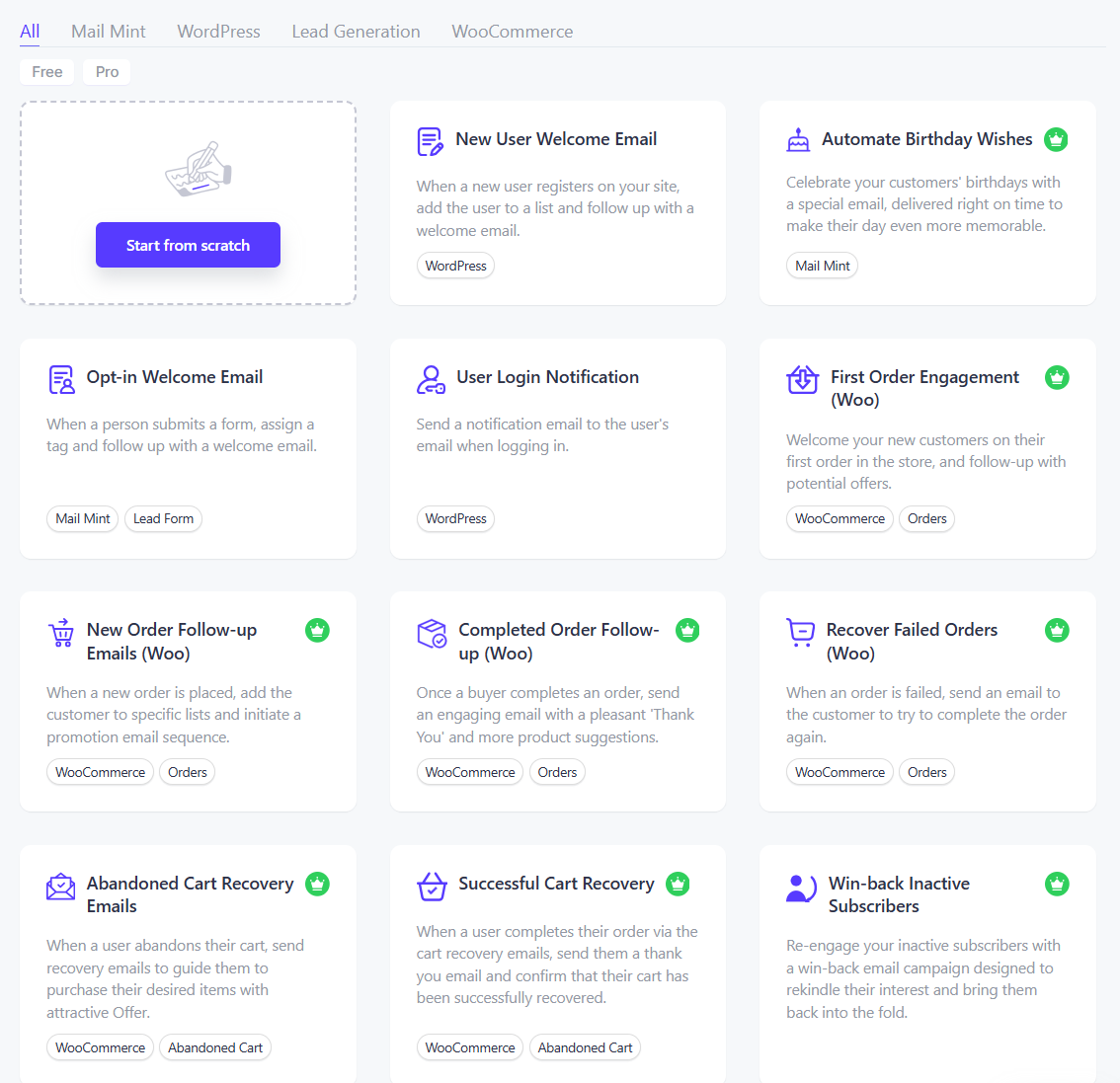
Mail Mint offers:
- Regular email campaigns and email sequences
- Visual drag-and-drop email designer with merge tags, post blocks, and product blocks
- Automation recipes triggered by form submission, WooCommerce order events, anniversaries, and WordPress triggers
- Abandoned cart recovery with auto-coupon generation, such as a nice automated touch for triggering discount codes inside recovery sequences
- 360-degree contact profiles, lists, tags, segmentation, custom fields, double opt-in
- 4 lead-form types, including embedded, pop-up, fly-in, and notification bar
- 12 external CRM integrations: MailChimp, ActiveCampaign, Constant Contact, AWeber, Sendinblue, MailerLite, GetResponse, Encharge, HubSpot, ConvertKit, Omnisend, Zoho CRM
- Twilio SMS integration, Zerobounce email validation, Zapier and webhooks
What Mail Mint doesn’t have is FunnelKit Automations’ multi-channel reach (no WhatsApp, no push notifications), dynamic coupon generation and its breadth of native WooCommerce-specific triggers and prebuilt recipes.
🏆 Winner: FunnelKit
FunnelKit Automations is well thought out and beginner-friendly, multi-channel (Email/SMS/Push/etc), transactional email design, 30+ prebuilt recipes, and 60+ integrations.
Mail Mint is a real, well-built email platform and offers strong value inside the $199.99 WPFunnels Pro bundle, especially with its 4 lead-form types and auto-coupon generation.
For stores that want to run real lifecycle marketing and not just abandoned cart emails, FunnelKit Automations is the winner any day.
Which Plugin Offers Native Subscription Support?
If recurring revenue is part of your business, including memberships, subscription boxes, course access, and retainer products, your funnel builder needs to handle subscriptions natively across the entire flow.
| Subscription Feature | FunnelKit | WPFunnels |
|---|---|---|
| Native subscription product | ✅ Yes (Sublium Subscriptions) | ❌ No |
| Subscriptions inside funnel flows | ✅ Yes | ❌ No first-party |
| Renewal, dunning and win-back flows | ✅ Yes | ❌ No |
| Customer-managed subscription portal | ✅ Yes | ❌ No |
| Subscription notifications | ✅ Yes | ❌ No |
FunnelKit
FunnelKit offers native subscription support through Sublium Subscriptions, its purpose-built WooCommerce subscriptions plugin.
Sublium plugs directly into the FunnelKit funnel builder and FunnelKit Automations, which means subscription products work natively across every funnel step:
- Sell subscriptions on the optimized checkout with the same conversion-tested layout as one-time products
- Offer subscription products as order bumps to lift customer lifetime value at the point of purchase
- Run one-click upsells where the upsell itself is a recurring product
- Trigger automated workflows on subscription events, such as abandoned cart recovery, win-back flows for cancellations, anniversary discounts, and more.
For stores already running on FunnelKit, recurring revenue doesn’t require a parallel tool stack. It's available on sublium.com, which has a free plugin and its premium version starts at $99.50/year.
WPFunnels
WPFunnels has no first-party subscription product. To sell subscriptions through WPFunnels, you’d need to install WooCommerce Subscriptions.
This is a separate paid plugin from WooCommerce (listing at $279/year) and wire it into WPFunnels funnels manually.
Subscription-event automations would run through Mail Mint and any third-party integrations you set up.
🏆 Winner: FunnelKit
For any store with subscription revenue in its model, FunnelKit is the only plugin in this comparison with a first-party subscription product. Sublium handles subscriptions natively across funnels, bumps, upsells, and automations.
WPFunnels doesn’t compete in this category.
Which Plugin is Better for Course Creators and LMS Funnels?
| LMS/Course Feature | FunnelKit | WPFunnels |
|---|---|---|
| Dedicated LMS funnel templates | ✅ Yes | ✅ Yes |
| LMS Funnels add-on | ❌ No | ✅ Yes (Business tier and above) |
| LMS integrations | LearnDash, LifterLMS | LearnDash, TutorLMS, LifterLMS, MemberPress |
| Course-specific checkout templates | ✅ Yes (via funnel templates) | ✅ Yes, in LMS template library |
| Exclusive discounts for courses | ✅ Yes (via funnel pricing) | ✅ Yes (built-in) |
FunnelKit
FunnelKit integrates with LearnDash and LifterLMS through its funnel builder and automations.
You can absolutely sell courses through a FunnelKit funnel with optimized checkout, order bumps for course add-ons, post-purchase upsells for advanced modules, and email automation for student onboarding, all of which work.
What FunnelKit doesn’t have is a dedicated LMS template library or an LMS-specific add-on.
Course creators using FunnelKit build their funnels using general-purpose templates and wire the LMS integration themselves.
WPFunnels
WPFunnels ships a dedicated LMS Funnels add-on (included in the Business tier and above), plus a library of LMS funnel templates that can be imported directly onto the canvas.
The LMS Funnels add-on integrates with LearnDash, TutorLMS, LifterLMS, and MemberPress, with broader LMS coverage than FunnelKit.
On top of that, WPFunnels' parent company has launched Creator LMS, a full course-builder product within the same ecosystem, featuring AI course generation, memberships, cohorts, content protection, gamification, and built-in monetization.
For creators who want a single-vendor stack of course builder, funnel builder and email marketing, WPFunnels is purpose-built for this use case.
🏆 Winner: WPFunnels
For course creators, membership businesses, or anyone selling digital education products, WPFunnels’ dedicated LMS funnels and Creator LMS make it a more tailored choice.
FunnelKit can sell courses well, but WPFunnels is built for this category.
Which Plugin Offers the Best Funnel Templates and Library?
Both ship niche-specific templates compatible with major page builders. The libraries are structured differently.
FunnelKit
FunnelKit takes a quality-over-quantity approach with 20+ high-converting checkout and thank-you templates, plus landing, opt-in, and upsell pages.
Its templates span use cases, such as digital products, webinars, physical goods, subscriptions, and more.
Every template is fully responsive, customizable, and crafted with sales psychology in mind: security and payment badges, customer testimonials, benefits sections, and trust elements baked in.
Every template is compatible with all five supported page builders. The 'Shoppe' template (a Shopify-style checkout) is one of FunnelKit’s most-used designs and a consistent top performer.
WPFunnels
WPFunnels offers three distinct template categories: Lead Funnel Templates, Sales Funnel Templates, and LMS Funnel Templates.
The LMS category is something FunnelKit doesn’t match, which is purpose-built layouts for course enrollment, lesson-by-lesson flows, and student onboarding.
Templates import directly onto the canvas with all steps and connections pre-drawn.
Each template can be customized with the same five page builders FunnelKit supports.
🏆 Winner: Tie
FunnelKit emphasizes conversion-tested depth on checkout and post-purchase pages. WPFunnels emphasizes canvas-native variety with a dedicated LMS template category.
For checkout-focused stores, FunnelKit’s library is more refined. For course creators, WPFunnels’ LMS templates are unique. Both are strong.
FunnelKit vs WPFunnels: Which Plugin is Best for A/B Testing?
A/B testing is essential for refining funnels by tweaking headlines, layouts, offers, or button copy to meaningfully lift conversion rates.
Both products offer built-in split testing across funnel pages.
| A/B Testing Feature | FunnelKit | WPFunnels |
|---|---|---|
| A/B testing across funnel steps | ✅ Yes | ✅ Yes |
| Available from the entry tier | ✅ Yes (from Plus) | ✅ Yes (from Starter) |
| Visual reporting | ✅ Yes | ✅ Yes |
| Winner declaration | ✅ Yes | ✅ Yes |
| Revenue-per-visit metrics | ✅ Yes | ⚠️ Limited (funnel-level) |
| Conversion rate tracking | ✅ Yes | ✅ Yes |
FunnelKit
FunnelKit provides built-in A/B testing directly inside the Funnel Builder. You can test opt-in pages, landing pages, checkouts, order bumps, one-click upsells, and thank-you pages.
Tests are simple to set up. Create a duplicate variant or new version, split traffic (50/50 or custom percentages), and view results in real time.
When you’re ready, declare a winner with one click and funnel all traffic to that variant.
FunnelKit’s reporting includes confidence intervals, revenue per visit, and conversion rate, which are useful for stores optimizing for total revenue rather than just conversion percentage.
A/B testing is included from the Plus plan ($179.50/year intro, $299 list) and is not gated to higher tiers.
WPFunnels
WPFunnels offers built-in A/B testing across every funnel step, including landing pages, checkout pages, upsells, and more.
You enable split testing per step, duplicate the variant, set traffic distribution, go live, and monitor performance via the analytics dashboard. Once you’re satisfied, choose the winning variant with a single click.
The notable difference is price-to-access. WPFunnels includes A/B testing on its Starter plan at $129.99/year, so even single-site stores on the entry tier can run split tests.
🏆 Winner: Tie
Both products offer robust, easy-to-set-up A/B testing with similar coverage and one-click winner declaration.
WPFunnels wins on price-to-access (starting at $129.99 with the Starter plan). FunnelKit wins on reporting depth (revenue-per-visit metrics). The right pick depends on which matters more to you.
Which Plugin Offers the Best Detailed Analytics and Reporting?
| Analytics Feature | FunnelKit | WPFunnels |
|---|---|---|
| Step-by-step funnel tracking | ✅ Yes | ✅ Yes |
| Revenue attribution | ✅ Yes (from Plus) | ⚠️ Limited (funnel revenue) |
| UTM and referral source reports | ✅ Yes | ❌ No |
| Pixel integration (Meta, Google, TikTok, Pinterest, Snapchat) | ✅ Yes (built-in, no separate plugin) | ⚠️ Limited (Facebook and Google only) |
| GTM integration | ✅ Yes | ✅ Yes |
| Cart and upsell-specific analytics | ✅ Yes | ⚠️ Limited (funnel-level) |
| In-depth conversion data | ✅ Yes | ⚠️ Limited (step-level) |
FunnelKit
FunnelKit's analytics layer gives you a full 360-degree view of store performance.
You get UTM reports, referral source reports, cart and upsell performance reports, funnel reports, and a conversion profile showing exactly where your buyers come from.
Track checkout drop-offs step by step, attribute revenue to specific campaigns, and filter by traffic source.
Conversion pixel tracking is built in for Google Ads, GA4, Meta Pixel, TikTok, Pinterest, and Snapchat. No separate tracking plugin required.
Cart analytics specifically tracks in-cart upsell performance, gamified-reward acceptance rates, and add-on attach rates.
This level of granularity is hard to find elsewhere in the WooCommerce funnel-builder market.
WPFunnels
WPFunnels provides detailed funnel analytics with Pixel integration, GTM integration, and UTM tracking as first-class features available across all paid plans.
This includes the entry-tier Starter. That’s a meaningful detail because you don’t have to upgrade to unlock pixel-level marketing attribution.
The trade-off is that WPFunnels’ analytics are at the funnel level rather than the feature level.
You see how a funnel converts step by step, but you don’t get the same depth of side-cart-specific or upsell-bump-specific analytics that FunnelKit ships.
🏆 Winner: FunnelKit
FunnelKit’s revenue attribution and cart and upsell-specific analytics provide better insights and deeper reporting. For data-driven stores running serious attribution work, FunnelKit’s depth matters more.
Which Plugin is Best for Opt-in Lead Generation?
| Lead Generation Feature | FunnelKit | WPFunnels |
|---|---|---|
| Opt-in page templates | ✅ Yes | ✅ Yes |
| Lead funnels without WooCommerce | ✅ Yes (works without WooCommerce on free version) | ✅ Yes (works without WooCommerce on free version) |
| Lead-form types | Opt-in + popup | 4 types: embedded, pop-up, fly-in, notification bar |
| Drag-and-drop opt-in form editor | ✅ Yes | ✅ Yes (via Mail Mint) |
| CRM-connected follow-up | ✅ Yes (includes built-in lead notification) and support for FunnelKit Automations | ✅ Yes (via Mail Mint) |
| A/B testing for opt-ins | ✅ Yes | ✅ Yes |
| Send leads to external CRMs | ✅ Yes | ✅ Yes |
FunnelKit
FunnelKit lets you create opt-in pages with embedded and pop-up forms, drag-and-drop opt-in field editing, and lead/admin email notifications when new leads come in.
Forms connect directly into FunnelKit Automations or into 60+ external CRMs and email tools.
You can A/B test opt-in pages, track UTM-sourced leads, and trigger personalized follow-up sequences when someone subscribes.
WPFunnels
WPFunnels supports lead-generation funnels on its free version.
Connect Mail Mint (also has a free tier) and you can capture and nurture leads with 4 lead-form types, such as embedded forms, pop-ups, fly-ins, and notification bars at no cost.
That makes WPFunnels particularly attractive for content marketers, info-product sellers, and service businesses that want to run lead funnels without setting up an e-commerce platform.
🏆 Winner: WPFunnels (for different form types), FunnelKit (for CRM depth)
WPFunnels wins on accessibility with 4 lead-form types, no upfront cost. FunnelKit wins on the depth of follow-up automation once leads are captured (60+ integrations, multi-channel follow-up, contact profiles).
The right pick depends on whether you’re optimizing for cost of acquisition (WPFunnels) or depth of nurture (FunnelKit).
Which Plugin Has Higher Active Installs and User Reviews?
| Metric | FunnelKit | WPFunnels |
|---|---|---|
| Active installs (WordPress.org) | 40,000+ | 6,000+ |
| WordPress.org rating | 5 out of 5 | 4.9 out of 5 |
| Five-star reviews | 980+ | 164+ |
| Five-star ratio | 98.1% | 95.9% |
| Trustpilot rating | 4.8 out of 5 (154 reviews) | Not available |
FunnelKit
FunnelKit began as WooFunnels in 2018, a suite of premium WooCommerce plugins (checkout, funnels, one-click upsells) sold individually.
In 2021, FunnelKit launched its free funnel builder plugin on WordPress.org, and the brand rebranded to FunnelKit in 2022.
Today, FunnelKit reports 40,000+ active WooCommerce stores running its plugins.
On WordPress.org, the Funnel Builder Lite plugin has 980+ five-star reviews and a 5.0 rating, one of the highest five-star ratios among WooCommerce funnel builders.
On Trustpilot, FunnelKit holds a 4.8/5 rating from 154 reviews, with consistent praise for the support team.
WPFunnels
WPFunnels is built by RexTheme (operating under Coderex, a WordPress development company active since 2012). WPFunnels launched on WordPress.org in 2021 as a visual canvas-first funnel builder.
WPFunnels currently has approximately 6,000 active users and a 4.9/5 rating from 164 reviews on WordPress.org.
The company also markets Mail Mint (email/automation), Checkoutify (checkout customizer; installs as a standalone plugin), and Creator LMS (course builder), as well as other plugins such as Cart Lift, WP VR, and Product Feed Manager.
🏆 Winner: FunnelKit
FunnelKit has a significantly larger install base on WordPress.org (40,000+ vs 6,000+) and roughly 10 times the review volume (979+ vs 100+).
Both products maintain excellent ratings, but the depth of FunnelKit’s review base and its Trustpilot presence give it the stronger social-proof signal.
FunnelKit vs WPFunnels: Which One Should You Choose?
Both FunnelKit and WPFunnels are strong, actively developed WordPress funnel builders. They suit different stores.
Choose FunnelKit if you want:
- High-converting checkout pages with smart optimizations
- A native, gamified sliding cart with in-cart upsells, free-shipping bars, and express pay
- The deepest one-click upsells with 15+ gateways, multi-product offers, 27 targeting rules, and dynamic shipping/tax recalculation
- A full in-house CRM with multi-channel marketing (Email/SMS/WhatsApp/Push) and transactional email design
- Native subscriptions via Sublium that work natively across funnels, bumps, upsells, and automations
- A more capable free version that already ships an optimized checkout, a sliding cart, and abandoned cart recovery
- 40,000+ store deployments and 979+ five-star reviews behind the product
- Modular pricing, where you can buy Automations standalone for $99.50/year
- Brilliant features at a lower price (value for money)
Choose WPFunnels if you want:
- The best visual, canvas-first funnel-planning experience in WordPress
- Dedicated LMS / course funnels (LearnDash, TutorLMS, LifterLMS, MemberPress) and a connected Creator LMS product
- Free, WooCommerce-optional lead-generation funnels with 4 lead-form types
- More sites per dollar at the agency tier (50-site Agency at $599.99 vs FunnelKit’s 30-site Elite at $599)
FunnelKit is the more complete revenue platform, with checkout, cart, upsells, CRM, and subscriptions in a single ecosystem, and the safer pick for stores that want depth and room to scale without switching tools.
WPFunnels is the smarter pick for course creators, content-led businesses running lead funnels, and agencies that need many site licenses without a heavy CRM.
Both build high-converting WooCommerce funnels. The winner is the one whose strengths line up with how you actually sell.
If you want the highest-rated WooCommerce funnel builder with the deepest feature set, Get FunnelKit Now, starting at $99.50/year with a 14-day money-back guarantee.

Editorial Team
September 11, 2026WooCommerce gift wrap might be the easiest extra money your store can make, yet most stores never offer it. Think about a department store in December. You buy a candle,...
Editorial Team
September 10, 2026A WooCommerce landing page revolutionizes how you captivate and convert your audience. While attracting traffic through various marketing campaigns, such as email marketing and social media, is a step forward,...
Editorial Team
September 10, 2026WooCommerce dynamic pricing works much like how a coffee wholesaler prices a pallet of beans. A café buying 40 bags gets a better price per bag than someone walking in...






