



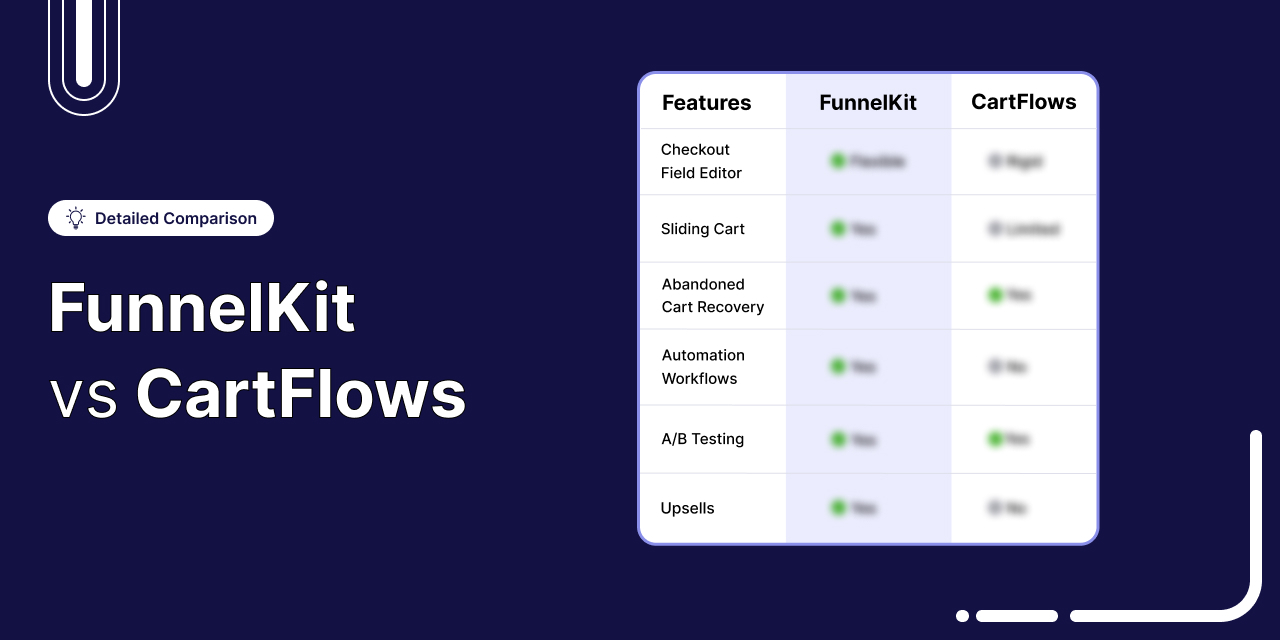
FunnelKit vs CartFlows often comes down to a feature-by-feature comparison. But there’s a more important question: Does your funnel end at the thank-you page?
Both plugins are built to improve the standard WooCommerce buying experience.
The default WooCommerce checkout has around 23 fields. A well-optimized checkout can reduce that to 12-14 fields while adding features like order bumps, post-purchase upsells, and A/B testing.
And there’s a good reason to optimize it. Baymard Institute found that 18% of shoppers abandon checkout because the process is too long or complicated.
So the question isn’t whether you should improve your checkout. It’s which tool makes the most sense for your store.
That’s exactly what we set out to answer in this comparison.
We built the same funnel twice, once with each plugin, on identical WooCommerce installs.
We placed real orders through Stripe, tested performance with WebPageTest, and checked the pricing against both vendors’ live pricing pages on August 19, 2026.
After putting both tools through the same tests, here’s where we landed.
Pick FunnelKit if
- Your checkout needs custom sections, conditional fields, or more than eight field types.
- You run multi-product upsells, or you sell where shipping and tax have to recalculate after a post-purchase offer.
- Your funnel doesn't stop at the thank-you page. Abandoned carts, post-purchase sequences, and win-backs run on the same order data as the checkout, with no third tool in the middle.
- You sell subscriptions and want them working inside funnels, bumps, and upsells.
- You build on Divi or Oxygen, or you run funnels in more than one language.
Pick CartFlows if
- You already run email and CRM in a platform you're happy with, and you want a funnel builder that stays out of that.
- You build on Beaver Builder.
- You want a basic setup, with huge feature and functionality limitations.
- Your funnel genuinely ends at the thank-you page, and you'd rather not pay for what happens after it.
- You need workflow automation that connects WooCommerce to other apps, not just a CRM.
There’s more to the comparison, though. Features, pricing, performance, ease of use, upsells, checkout flexibility, and real-world limitations all matter.
Let’s break down how FunnelKit and CartFlows compare, feature by feature.
Table of Contents
- 1 Quick Comparison: FunnelKit vs CartFlows
- 2 How We Tested Both Plugins?
- 3 Which Plugin is Best for Ease of Use and Setup?
- 4 Which Plugin Has a Modular Approach?
- 5 Which Plugin is Affordable and Offers the Best Value for Money?
- 6 Which Plugin Has Better Performance?
- 7 Which Plugin is Best for WooCommerce Checkout Customization?
- 8 Which Plugin Offers the Best WooCommerce Checkout Field Editor?
- 9 Which Plugin Offers the Best WooCommerce Side Cart?
- 10 Which Plugin is Best for Offering WooCommerce Order Bumps?
- 11 Which Plugin is Best for Offering WooCommerce One-Click Upsells?
- 12 Which Plugin is Best for WooCommerce Email Automations & CRM?
- 13 Which Plugin Offers Native Subscription Support?
- 14 Which Plugin Offers the Best Funnel Templates and Library?
- 15 FunnelKit vs CartFlows: Which Plugin is Best for A/B Testing?
- 16 Which Plugin Offers the Best Detailed Analytics and Reporting?
- 17 Which Plugin is Best for Opt-in Lead Generation?
- 18 Which Plugin Offers the Best Integration with Various Page Builders?
- 19 Which Plugin Has Higher Active Installs and User Reviews?
- 20 FunnelKit vs CartFlows: Which One Should You Choose?
Quick Comparison: FunnelKit vs CartFlows
At first glance, FunnelKit and CartFlows seem evenly matched. Both promise high-converting funnels, checkout customization, and user-friendly tools.
But three things separate them in head-to-head testing: ease of use, performance, and pricing.
FunnelKit starts at an introductory price of $99.50/year and offers higher tiers only if you need more features. It includes 15+ conversion-driving features (provided in the table) that CartFlows doesn't offer at any price tier.
Both products are modular. FunnelKit bundles its modules into plans that save you money. CartFlows recently restructured its pricing into a full suite as well, but at a higher price, with fewer features.
Here’s the side-by-side breakdown:
| Feature | FunnelKit | CartFlows |
|---|---|---|
| Ease of Use | Beginner-friendly canvas mode, 3-step guided onboarding that gets you started in minutes | No canvas mode; requires more manual setup with 6 steps, which can take beginners longer time |
| Modular Features | Yes, install and use them if you need. Separate modules (Cart, Automations, Funnel Builder), each with granular toggles | Yes, install and use them if you need. Separate modules (Modern Cart, Funnel Builder, etc.) |
| Performance | Faster checkout LCP (1.39s vs 1.57s) and 22% faster server response (TTFB). Wins Google's Core Web Vitals on every rankable page tested. | Slower checkout LCP (1.57s) and TTFB (1.17s). Adds 1% fewer assets but loads slower across all measured pages. |
| Checkout Customization | Flexible mini cart editing, multilingual funnel importing, and position elements on checkout | Limited mini cart editing, no multilingual funnels, and cannot position checkout elements |
| Checkout Field Editor | Drag-and-drop field editor, 13 fields, section creation, and any field rearrangement is possible | Basic editor, 8 fields, no section creation, and limited field rearrangement |
| Side Cart | Dynamic side cart with upsells, rewards, and special add-ons. Included in Plus ($179.50). Also has a free version on WordPress.org | Side cart with upsells. No gamified rewards. No cart addons. Available as a separate Modern Cart Pro add-on ($79/year) or bundled in Suite plans. |
| Order Bumps | 8 positions, 20 rules, and 8 skins | 4 positions, 8 rules, and 5 skins |
| One-Click Upsells | 15+ supported gateways, dynamic shipping & taxes, multi-product upsells | 9 gateways, no dynamic shipping & taxes, no multi-product upsells |
| Analytics | Complete funnel, order, and revenue analytics with UTM & referrer tracking. Included in Plus ($179.50) | Basic funnel metrics, such as revenues, views, and orders. Included in Pro ($299/year) or bundled in Suite plans |
| A/B Testing | Split test entire funnels and declare the winner, with additional stats, such as revenue per visit and conversion rate. Included in Plus ($179.50) | Split test entire funnels and declare the winner. Included in Pro ($299) |
| Marketing Automations | WooCommerce-native CRM for cart recovery, post-purchase, etc. | Requires OttoKit integration or a separate CRM (no native automation) |
| Page Builders | Deep integration with Elementor, Divi, Oxygen, Bricks, and Block Editor | Deep integration with Elementor, Bricks, Beaver, Gutenberg (no Divi and Oxygen) |
| Pricing | • Basic: $99.50/year (1 site) • Plus: $179.50/year (2 sites) • Pro: $249.50/year, includes Funnel Builder and Automations (3 sites) • Elite: $399.50/year (30 sites) | • Grow: $199/year (1 site) • Scale: $299/year (3 sites) • Agency: $449/year (30 sites) |
FunnelKit is the more beginner-friendly choice, with native integrations, a modular architecture, and a lower total cost of ownership.
Continue reading to learn more.
How We Tested Both Plugins?
We tested FunnelKit and CartFlows on new WooCommerce stores, spending over 84 hours evaluating and documenting their ease of use, checkout customizations, side cart, upsells, and overall performance.
All our findings are based on hands-on experience and real store data to ensure accuracy and reliability.
To make this comparison useful, every claim below is verifiable, every test is reproducible, and we link directly to CartFlows' own pricing and documentation pages wherever a feature claim could be disputed.
Test environment (identical for both plugins)
| Component | Version |
|---|---|
| WordPress | 6.9.4 |
| WooCommerce | 10.7 |
| Theme | Storefront |
| Page builders tested | Gutenberg, Elementor, Divi 5, Bricks |
| Payment gateways tested | Stripe, WooCommerce Payments |
| Other plugins active | None beyond the funnel plugin under test and its required dependencies |
| Hosting | SiteGround managed WordPress and Kinsta |
| Caching/optimization | None active during testing |
| Plugin versions | FunnelKit 3.15 / CartFlows 3.0 |
| Tested in | May, 2026 |
Every funnel was built from scratch using only the native templates and configuration available within that plugin's plan tier. No pre-configured imports, no agency boilerplate, no carryover between tests.
What we built (the same funnel in both tools)
To make results comparable, we built an identical funnel in both plugins:
- Opt-in landing page
- Two-step checkout
- Order bump on the checkout page
- Post-purchase one-click upsell
- Thank-you page with next steps
- Side cart experience (FunnelKit native vs CartFlows + Modern Cart)
- Abandoned cart recovery sequence
- Post-purchase workflows
We then placed test orders end-to-end on Stripe and WooCommerce Payments, with shipping rules and tax calculations enabled, to verify that bumps, upsells, downsells, and refunds processed correctly without breaking order totals.
What we measured
For every category in this article, we evaluated:
- Time to working setup: Minutes from plugin activation to a published, transactable funnel
- Feature inclusion at each plan tier: Verified against each company's published pricing page
- Configuration depth: How many rules, placements, gateways, and customization options are available
- Real-world correctness: Whether shipping, tax, and gateway tokenization behave correctly after bumps and upsells
- Documentation quality: How often did we need to leave the plugin to find an answer
- Edge cases: Multi-product upsells, conditional checkout fields, multilingual setup, dynamic coupon rules
Where the data comes from
This comparison combines four data sources, not just our own testing:
- Hands-on testing of both plugins in the environment above
- Each company's official pricing and documentation pages (linked inline wherever a feature claim is made)
- Public user reviews on WordPress.org for both plugins (data pulled)
- Community discussions on WordPress, Facebook, and Reddit communities, where store owners discuss their experiences
How we declared winners
For each category, the winner is the plugin that handled more real-world scenarios correctly, included more features at the plan tier being compared, or required less setup time to reach the same outcome.
We declared ties where both plugins met our test criteria at parity. See the Checkout Optimizations, Funnel Templates, A/B Testing, Order Bumps, and other sections for examples.
Which Plugin is Best for Ease of Use and Setup?
FunnelKit is beginner-friendly. New users launch their first funnel in under 30 minutes through a 3-step guided onboarding and a visual canvas builder designed for non-technical store owners.
CartFlows requires a 6-step setup and lacks a canvas mode.
Here’s a quick comparison between the two:
| Onboarding and Usage Features | FunnelKit | CartFlows |
|---|---|---|
| Guided Onboarding Experience | ✅ Yes | ✅ Yes (but longer and more steps) |
| Order Bumps Included During Funnel Import | ✅ Yes | ❌ No (must be created manually) |
| Option to Skip Onboarding | ✅ Yes | ✅ Yes |
| Visual Funnel Building Experience (Canvas Mode) | ✅ Yes | ❌ No |
| Drag-and-Drop Funnel Steps | ✅ Yes | ⚠️ Limited (cannot drag-and-drop order bump inside funnels) |
FunnelKit
FunnelKit offers seamless onboarding and an intuitive interface, which is good for beginners.
From the moment you install the plugin, FunnelKit walks you through a guided setup that helps you launch your first funnel or an optimized WooCommerce checkout in minutes, with no technical experience required.
It offers ready-to-import templates that save hours of design and configuration.
After you import the funnel, you get the full flow with pre-built steps, including upsells and order bumps. Its easy drag-and-drop interface lets you order any steps inside the funnel.
Just add your products and go live.
Do you want to view analytics, run an A/B test, or even add custom fields inside the checkout form? It’s all right there, clean, fast, and frictionless.
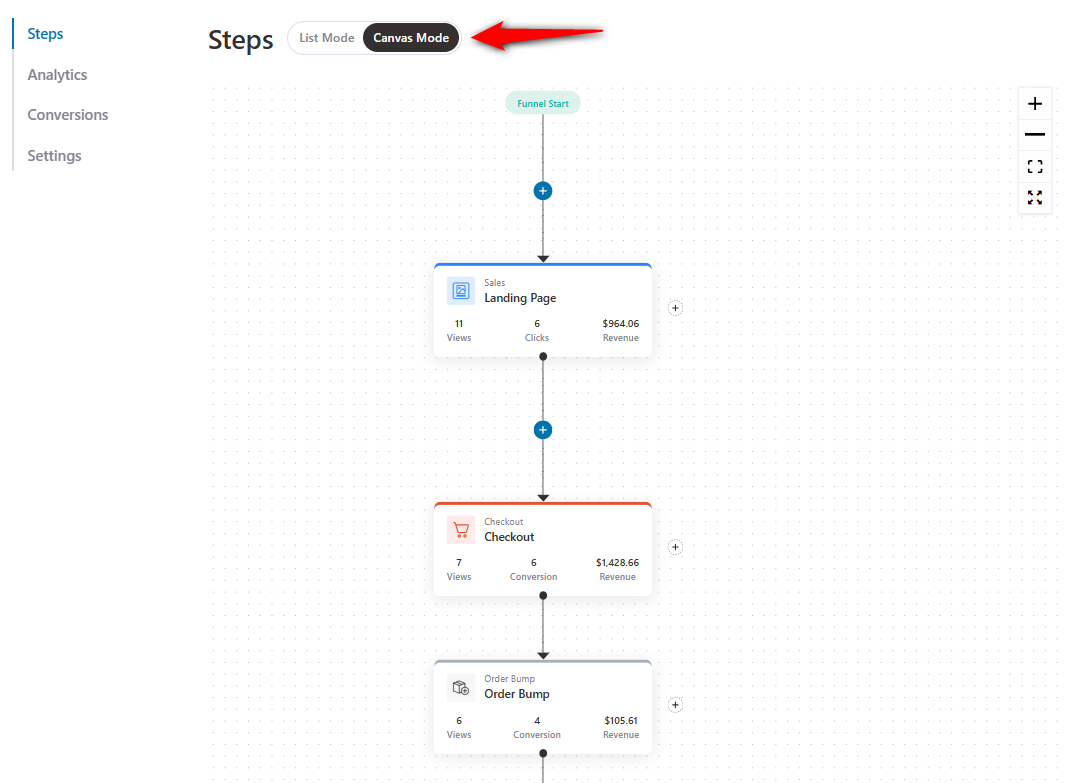
FunnelKit's canvas mode allows users to build sales funnels with simple drag-and-drop.
Just click on Canvas Mode and set up your funnels the way you want.
FunnelKit is completely modular, meaning its Cart, Automations, and Funnel Builder modules can be purchased and used independently.
CartFlows
On the other hand, CartFlows, while also providing a visual builder experience, feels a bit complex and requires a learning curve.
CartFlows offers an onboarding wizard with a “skip step” option, but the process still feels a bit forced, stretching across six steps that may not be necessary.
When you import a funnel, order bumps aren’t built in. You need to add them separately.
The checkout templates shown during onboarding are limited to 5 upfront.
Plus, CartFlows doesn't have canvas mode, which can be difficult for beginners.
🏆 Winner: FunnelKit
FunnelKit offers a quick and seamless setup, especially for beginners. We really like its canvas mode for a seamless funnel-building experience.
For CartFlows, although it remains user-friendly, newcomers may take a bit longer to get started due to its extra setup steps.
Which Plugin Has a Modular Approach?
FunnelKit is modular. It's split into three independent modules, Funnel Builder, Cart, and Automations, each with granular feature toggles.
You install and activate only what you need, so your site loads only the features you use.
Furthermore, CartFlows is also modular.
In fact, both FunnelKit and CartFlows let you activate only what you need. The difference is how the plans are structured:
| Question | FunnelKit | CartFlows |
|---|---|---|
| Is the product modular? | ✅ Yes (separate modules, toggleable features) | ✅ Yes (separate plugins inside a suite) |
| Can you buy pieces separately? | ✅ Yes (Automations and Funnel Builder are sold individually) | ✅ Yes (individual plugins available separately) |
| Can you toggle features on/off? | ✅ Yes (granular control inside each module) | ✅ Yes (toggle features at the plugin level) |
The interesting part is that CartFlows recently restructured its entire pricing into full-suite bundles.
But yes, bundling is the right approach. FunnelKit has been doing it since day one to benefit users.
🏆 Winner: Both products are modular
Both FunnelKit and CartFlows follow a modular approach. This means add-ons like Cart, Funnel Builder, and Automations can be used and installed separately, based on your needs.
Which Plugin is Affordable and Offers the Best Value for Money?
FunnelKit Basic at $99.50/year already comes with all checkout customizations and optimizations. You can also enable side cart and abandoned cart recovery for free.
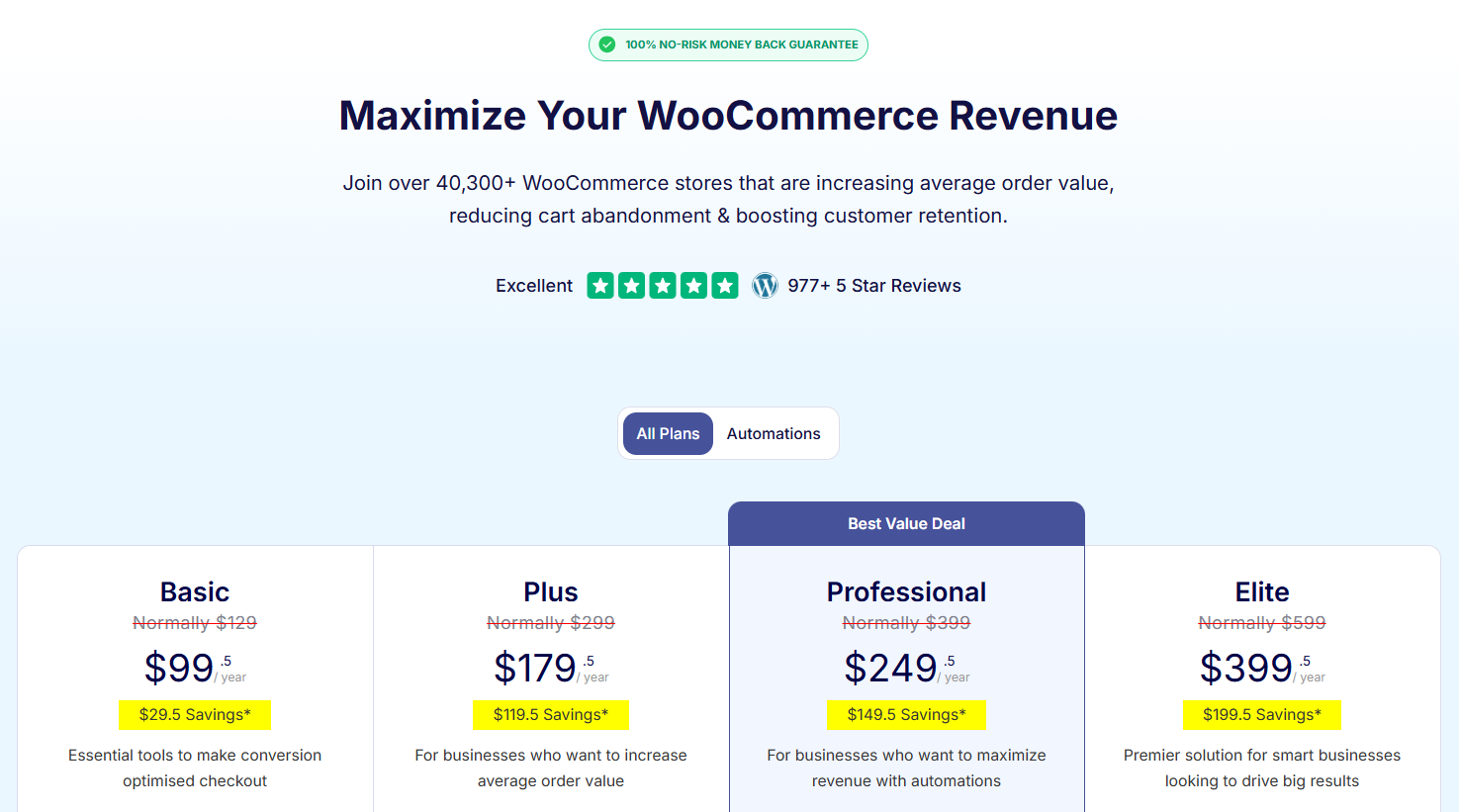
The same money on FunnelKit gets you a more complete starting stack.
The real apples-to-apples comparison is FunnelKit vs CartFlows Suite, because Suite is the bundle that actually competes with FunnelKit’s feature set.
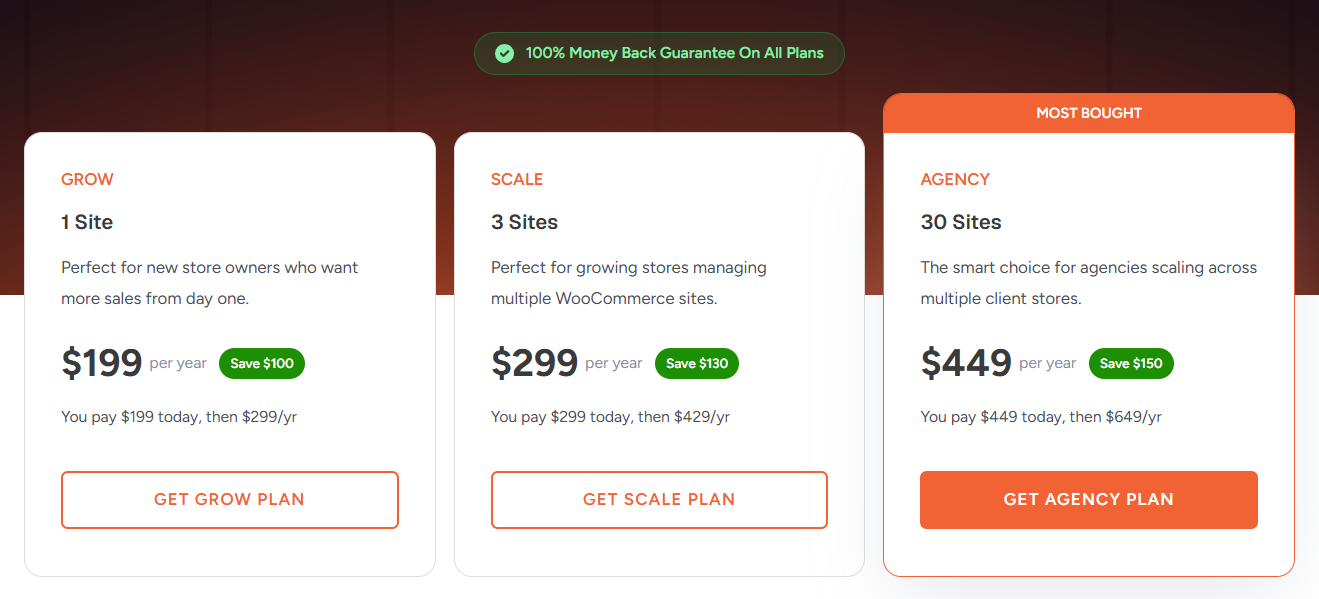
Here's the feature-equivalent pricing:
| What a growing WooCommerce store needs | FunnelKit plan that includes it | CartFlows Suite plan that includes it |
|---|---|---|
| Optimized Checkout + Thank-You Page | Basic - $99.50/year (1 site) | Suite Grow - $199/year (1 site) |
| Side cart with rewards, upsells, addons | Free on WordPress.org, or Plus $179.50/year | Suite Grow - $199/year |
| Funnel analytics + A/B testing | Plus - $179.50/year (2 sites) | Suite Grow - $199/year (1 site) |
| Abandoned cart recovery sequences | Free, or Pro - $249.50/year for the full visual builder | Suite Grow - $199/year |
| Multi-product one-click upsells | Plus - $179.50/year | ❌ Not available at any Suite tier |
| Built-in CRM with contact profiles + visual email builder | Pro - $249.50/year | ❌ Not available (Suite includes OttoKit, which is workflow automation, not a CRM) |
| Transactional email customization | Pro - $249.50/year | ❌ Not available |
| Subscription support | Included via Sublium Subscriptions (starts at $99.50/year) | Requires WooCommerce Subscriptions ($279/year) |
| 3-site license with full CRM and automations | Pro - $249.50/year | Suite Scale - $299/year (no CRM) |
| 30-site license with full feature set | Elite - $399.50/year | Suite Agency - $449/year (no CRM) |
Here's the headline number that matters. $179.50 buys more on FunnelKit than $199 buys on CartFlows, and that gap widens at every higher tier.
Side-by-side, tier for tier:
| Need | FunnelKit | CartFlows Suite | FunnelKit is cheaper by |
|---|---|---|---|
| 1 site with side cart, analytics, A/B testing | Basic + free Cart - $99.50/year | Suite Grow - $199/year | $99.50/year (2x) |
| 2 sites with everything except CRM | Plus - $179.50/year | Suite Scale - $299/year (3 sites) | $119.50/year |
| 3 sites with full CRM and automations | Pro - $249.50/year | Suite Scale - $299/year (no WooCommerce-based CRM) | $49.50/year (and FunnelKit includes CRM, CartFlows doesn’t) |
| 30 sites with full CRM and automations | Elite - $399.50/year | Suite Agency - $449/year (no native CRM) | $49.50/year (and FunnelKit includes CRM, Suite doesn’t) |
At every comparable tier, FunnelKit is cheaper.
And at the Pro / Elite tiers, FunnelKit isn't just cheaper. It includes a full blown CRM and marketing automation engine that CartFlows Suite doesn't offer at any price point.
The OttoKit catch:
CartFlows Suite bundles OttoKit Pro for 1-year access at every Suite tier. OttoKit is a workflow automation tool that connects WooCommerce events to other apps. It can be useful, but it isn't a CRM.
There's no contact profile system, no visual email builder, no transactional email customization, no segmented broadcast capability.
Buying CartFlows Suite for automation means buying:
- Year 1 OttoKit access (bundled)
- A separate email marketing platform (Mailchimp, ActiveCampaign, etc.) because OttoKit doesn’t send branded marketing emails on its own
- Whatever happens with OttoKit access in year 2 and beyond
FunnelKit Automations is part of FunnelKit’s own product line. The Pro plan at $249.50/year includes the full visual automation builder, contact profiles, visual email builder, transactional email customization, and multi-channel marketing (Email/SMS/WhatsApp/Push) in one tool.
FunnelKit Automations also comes standalone at $99.50 for users who only needs a CRM for their WordPress and WooCommerce stores.
Persona-by-persona breakdown:
Beginners getting started with WooCommerce
- FunnelKit Basic - $99.50/year (1 site), paired with the free FunnelKit Funnel Builder and side cart on WordPress.org
- CartFlows Suite Grow - $199/year (1 site), 2x the price for the smallest store
Growth-focused merchants scaling with checkouts, upsells, and analytics
- FunnelKit Plus - $179.50/year (2 sites), includes Funnel Builder, Cart with rewards, multi-product upsells, A/B testing, and full analytics
- CartFlows Suite Grow at $199/year (1 site) or Suite Scale at $299/year (3 sites). None of its plans include multi-product upsells, conditional checkout fields, or gamified cart rewards.
Automation-driven sellers who want checkout funnels and a native CRM
- FunnelKit Pro - $249.50/year (3 sites), includes everything in Plus plus the full CRM, visual email builder, transactional email customization, contact profiles, multi-channel marketing
- CartFlows Suite Scale - $299/year (3 sites). Includes OttoKit for year 1 but no native CRM, no contact profiles, no visual email builder, no transactional email design
Agencies managing client stores
- FunnelKit Elite - $399.50/year (30 sites), with the full CRM and automation suite included
- CartFlows Suite Agency - $449/year (30 sites). No native CRM at any tier
🏆 Winner: FunnelKit
The real comparison isn’t $99 vs $99.50 entry tier. That comparison hides what the $99 CartFlows tier actually leaves out. The real comparison is FunnelKit vs CartFlows Suite, because Suite is the feature-equivalent product.
On that comparison, FunnelKit wins on every dimension that matters:
- Cheaper at every tier, by $50-$120 per year
- Includes a native CRM at $249.50/year, a feature CartFlows doesn’t sell at any price
- Includes native subscriptions via Sublium, another CartFlows gap
- Modular, so you only pay for the modules you use, instead of buying a 4-plugin bundle regardless
Value isn’t the lowest sticker price. It’s getting more for what you spend. On that measure, FunnelKit is the better deal at every realistic level of usage.
Which Plugin Has Better Performance?
FunnelKit loads faster than CartFlows on every rankable page.
In testing on identical WordPress + WooCommerce environments, FunnelKit beat CartFlows on Largest Contentful Paint (LCP), Google’s Core Web Vitals ranking signal across homepages, product pages, and checkout pages alike.
| Page | Metric | Baseline (WordPress + WooCommerce) | FunnelKit | CartFlows |
|---|---|---|---|---|
| Homepage | Page size (KB) | 239 | 242 | 239 |
| Homepage | HTTP requests | 19 | 20 | 19 |
| Homepage | LCP(s) | 0.881 | 1.068 | 1.195 |
| Homepage | FCP(s) | 0.77 | 0.928 | 1.06 |
| Single product | Page size (KB) | 239 | 242 | 239 |
| Single product | HTTP requests | 19 | 20 | 19 |
| Single product | LCP(s) | 0.869 | 1.014 | 1.051 |
| Single product | FCP(s) | 0.728 | 0.89 | 0.913 |
| Cart | Page size (KB) | 285 | 288 | 285 |
| Checkout | Page size (KB) | 285 | 288 | 285 |
| Checkout | HTTP requests | 25 | 26 | 25 |
| Checkout | LCP(s) | 1.075 | 1.392 | 1.568 |
| Checkout | FCP(s) | 0.953 | 1.277 | 1.472 |
| Checkout | TBT(ms) | 0 | 0 | 0 |
| Checkout | TTFB(s) | 0.571 | 0.915 | 1.167 |
Both plugins were tested with optimized checkout enabled and the production configuration. Bold values indicate the winning result between FunnelKit and CartFlows.
Here is the testing methodology:
| Variable | Value |
|---|---|
| WordPress version | 6.9.4 |
| WooCommerce version | 10.7.0 |
| FunnelKit version | 3.15 |
| CartFlows version | 3.0 |
| Theme | Storefront (default, no customization) |
| Test tool | WebPageTest (webpagetest.org) |
| Location | Dulles, Virginia, USA |
| Connection | Cable (5/1 Mbps, 28ms RTT) |
| Test date | May 18, 2026 |
| Funnel parity | Both plugins were tested with an equivalent optimized store checkout, active with a matching step count and form fields |
Raw WebPageTest reports are archived and available on request. Each result represents the median of multiple runs to control for network variance.
Why FunnelKit is faster on rankable pages
FunnelKit Funnel Builder, Cart, and Automations are separate WordPress plugins. Each has its own activation toggle. Cart and Automations don’t load their assets on the homepage or product pages because those pages don’t render their features.
This is structurally different from a suite that ships a single plugin and uses feature flags to disable unused functionality.
With feature flags, the code still loads on every page, but doesn’t execute. With separate plugins, the code isn’t on your site at all unless you activate that specific module.
The performance impact is most evident in Time to First Byte (TTFB), which measures how long your server takes to respond. CartFlows adds 596ms of server response time to the checkout page compared to the baseline. FunnelKit adds 344ms over baseline for the same operation.
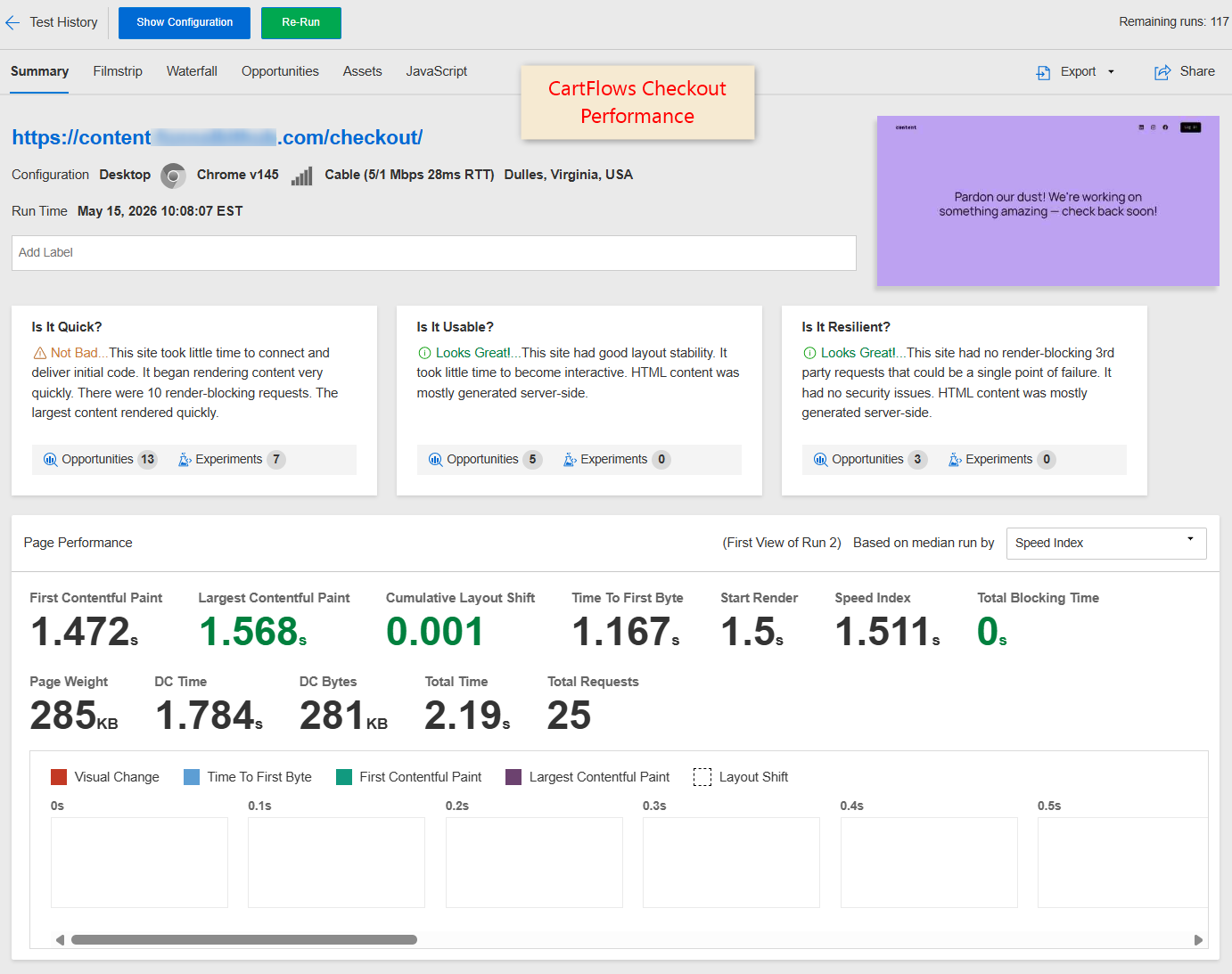
FunnelKit’s server-side overhead is 42% lower than CartFlows at the checkout step.
The conversion bonus: faster checkout
Even though checkout pages aren’t directly indexed by Google search, checkout speed directly affects conversion rates.
In our test, FunnelKit’s checkout completed Largest Contentful Paint at 1.392 seconds (176 milliseconds faster than CartFlows’ 1.568 seconds).
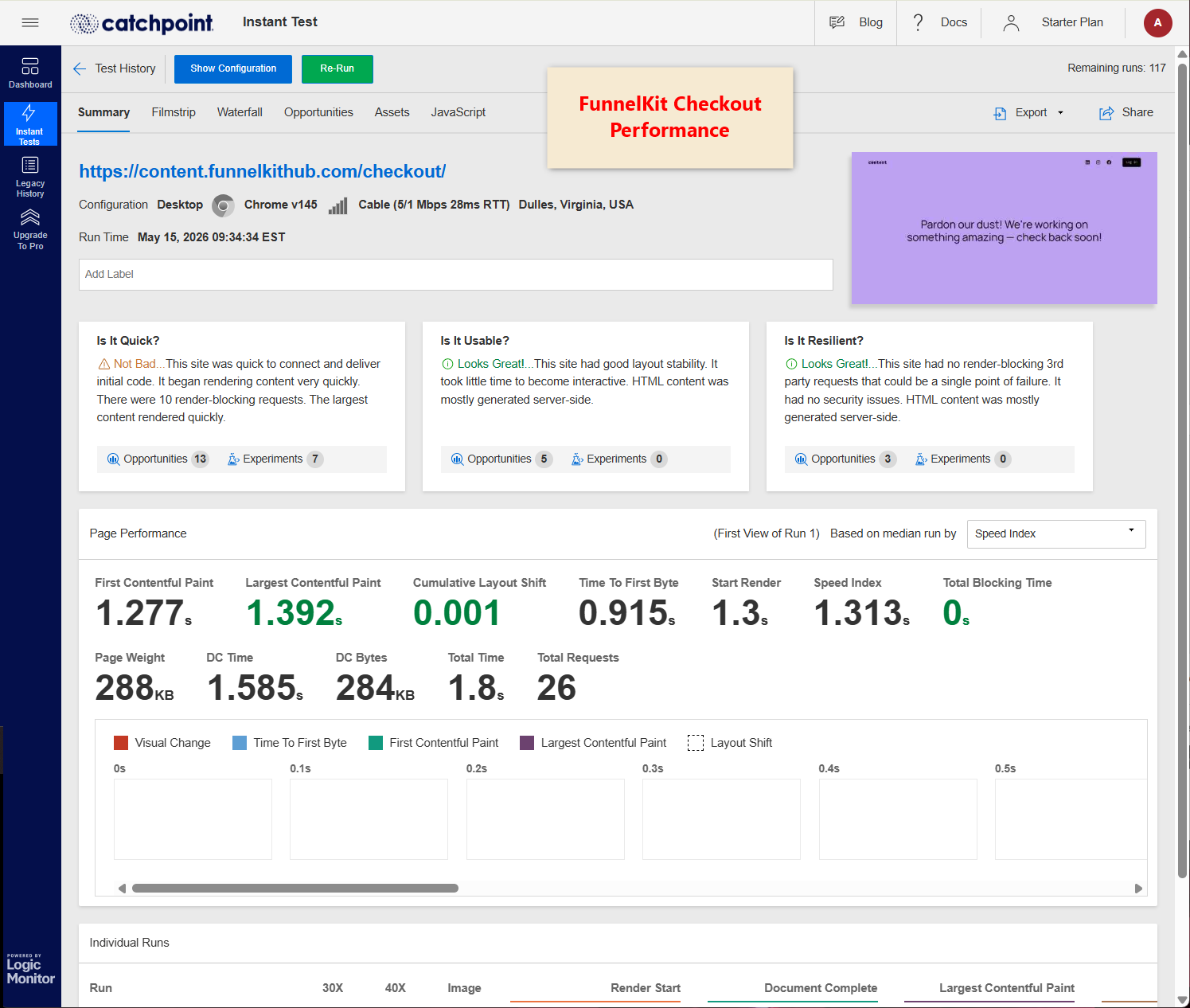
Across a year of checkouts, even small per-transaction improvements compound.
For a store processing 100 checkouts per month, a faster checkout funnel can translate to meaningful additional revenue.
Core Web Vitals headroom
Both FunnelKit and CartFlows currently score "Good" on Google’s Core Web Vitals thresholds (LCP under 2.5 seconds). But CartFlows operates with less headroom:
- FunnelKit checkout LCP: 1.392s (1.108 seconds of headroom) before crossing into "Needs Improvement".
- CartFlows checkout LCP: 1.568s (0.932 seconds of headroom) before crossing into "Needs Improvement".
Real-world stores add weight through product images, custom fonts, tracking pixels, third-party scripts, marketing pixels, chat widgets, and additional plugins. That headroom shrinks fast.
FunnelKit gives your store an 18.9% buffer before it crosses into Google’s “Needs Improvement” tier, the threshold at which rankings get demoted.
Overall verdict
| Dimension | Winner |
|---|---|
| Core Web Vitals (LCP) - all pages | FunnelKit |
| First Contentful Paint - all pages | FunnelKit |
| Server response time (TTFB) | FunnelKit |
| Checkout speed | FunnelKit |
| Core Web Vitals headroom | FunnelKit |
| Total Blocking Time | Tie |
| Raw asset count | CartFlows |
| HTTP request count | CartFlows |
🏆 Winner: FunnelKit
For WooCommerce stores where Core Web Vitals directly affect both Google rankings (LCP is a documented ranking signal in Google’s Page Experience update) and mobile conversion rates, FunnelKit’s faster server response and faster content paint deliver measurably better real-world performance, despite shipping 1% more asset weight than CartFlows.
Smaller payload doesn’t equal faster pages. FunnelKit proves it.
Which Plugin is Best for WooCommerce Checkout Customization?
FunnelKit offers comprehensive control over every aspect of your checkout page, whereas CartFlows restricts customization options, particularly for fields and design.
Here’s a quick comparison between FunnelKit vs CartFlows checkout:
| Checkout Customization Feature | FunnelKit | CartFlows |
|---|---|---|
| Select Checkout Steps During Template Import | ✅ Yes | ❌ No |
| Mini Cart Editing | ✅ Yes | ⚠️ Limited (no quantity incrementor) |
| Flexible Checkout Form and Place Order Button Customization | ✅ Yes | ⚠️ Limited (basic customizations for heading, buttons, fields, etc.) |
| Multilingual Funnels with WPML and Polylang | ✅ Yes | ❌ No |
| Position Elements on Checkout | ✅ Yes | ❌ No |
| Google Address Autocomplete | ✅ Yes | ✅ Yes |
| Multi-Step Field Preview | ✅ Yes | ❌ No |
| Mobile Optimization | ✅ Yes | ✅ Yes |
Let’s look at each one of them.
FunnelKit
FunnelKit gives you full control over every part of the checkout experience, from layouts and fields to trust badges, custom sections, and even the place order button.
Its seamless integration with page builders like Elementor, Divi, Bricks, Gutenberg, Oxygen, and more allows you to fully customize your funnels and checkout pages to stay perfectly on-brand.
Choose your favorite page builder, select the number of checkout steps, and import a professionally designed template you love: it’s that simple.
You’ll find extensive design controls right on the front end, including:
- Checkout step formats (tabs or breadcrumbs)
- Field widths
- Checkout button icons and colors
- Collapsible order summary, and more.
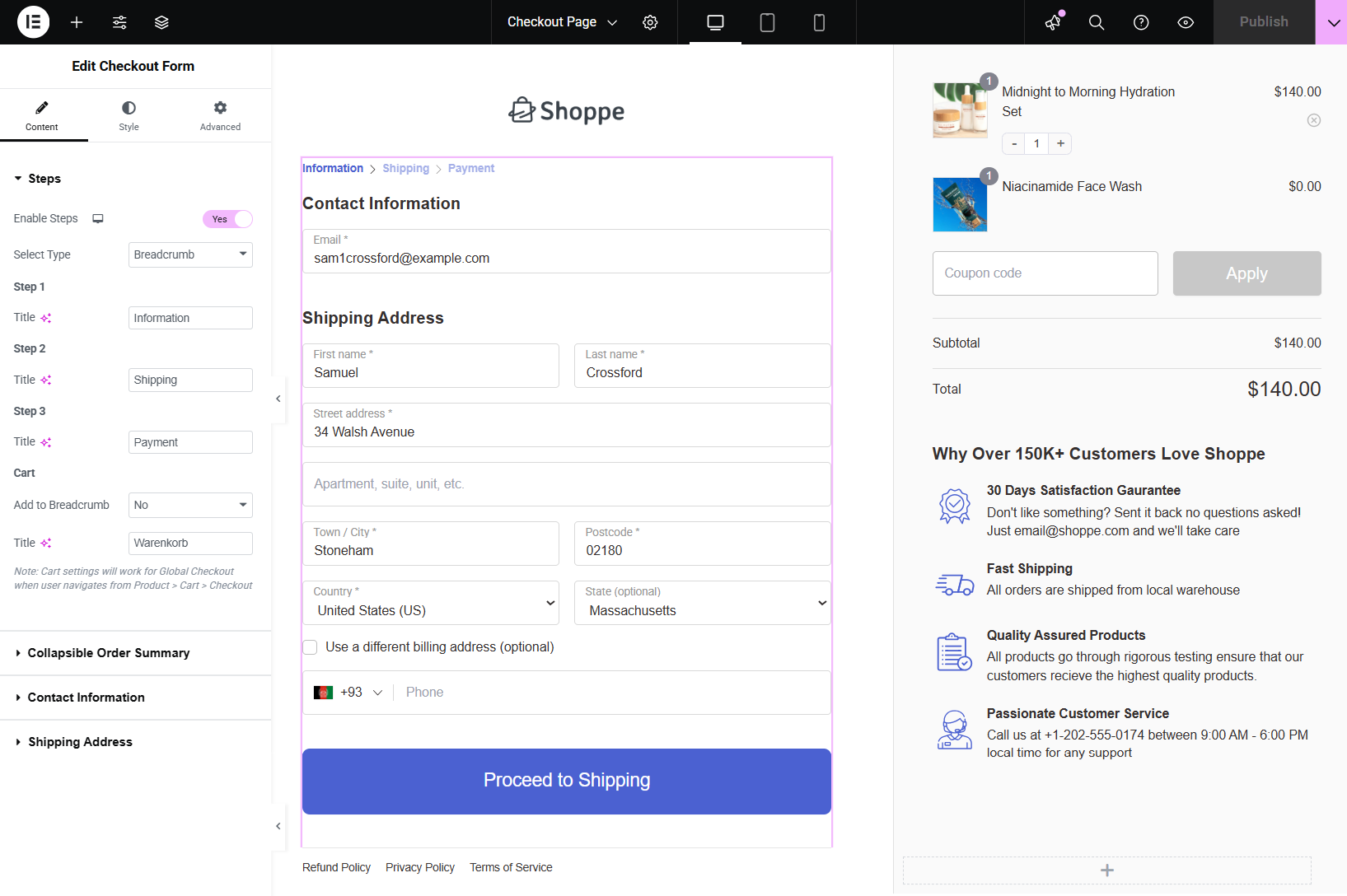
Edit the mini cart or order summary section by enabling product images, quantity switcher, regular and discounted prices, total saving message, and more.
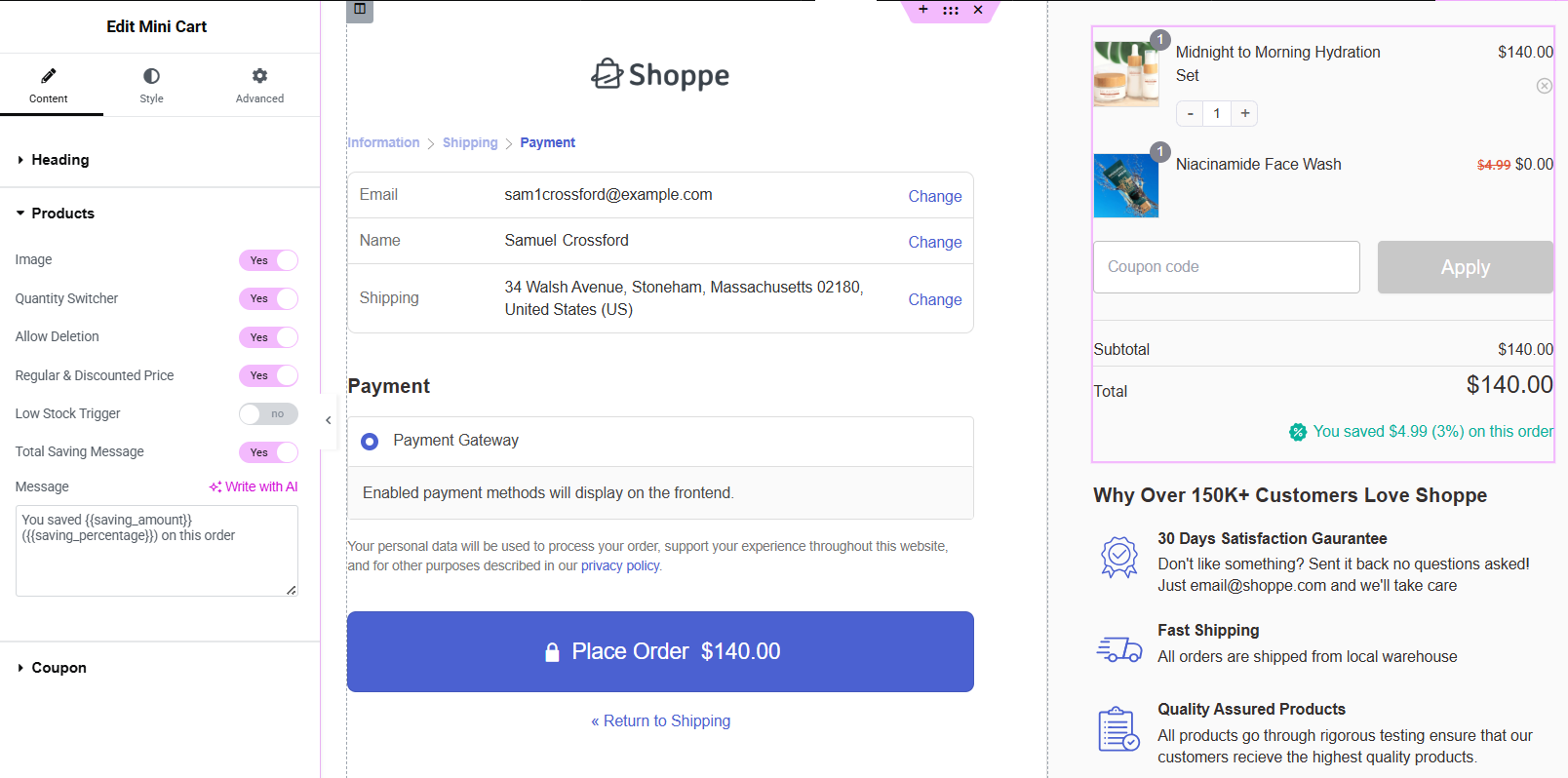
Want to offer product-specific checkouts? You can add multiple products, apply discounts, and create irresistible offers tailored to each funnel.
Plus, you get 14 checkout optimizations, such as express checkout, auto-fill address, multi-step field previews, auto-apply coupons, and inline validation, to speed up checkout and eliminate errors.
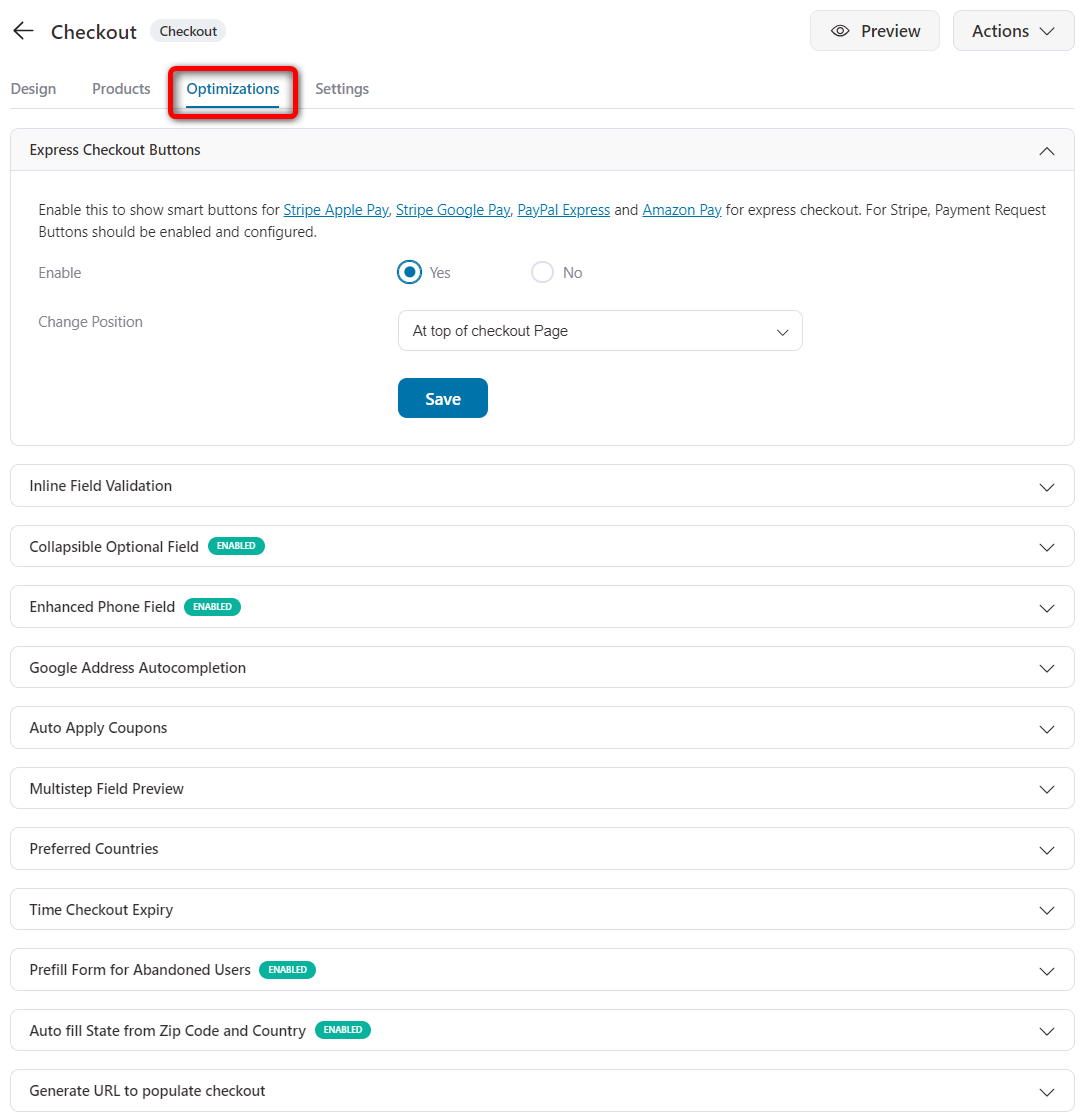
With one click, you can activate FunnelKit’s optimized checkout and instantly replace the default, outdated WooCommerce checkout page with a high-converting, modern alternative.
CartFlows
CartFlows may look flexible at first glance, but you quickly hit roadblocks once you start customizing your checkout.
First, select your preferred page builder in the settings.
Only then will the corresponding templates be available for import and customization with that page builder.
Once the template is imported, it offers basic customizations, such as selecting layouts and configuring the styling of headings, input fields, buttons, payment sections, and other elements.
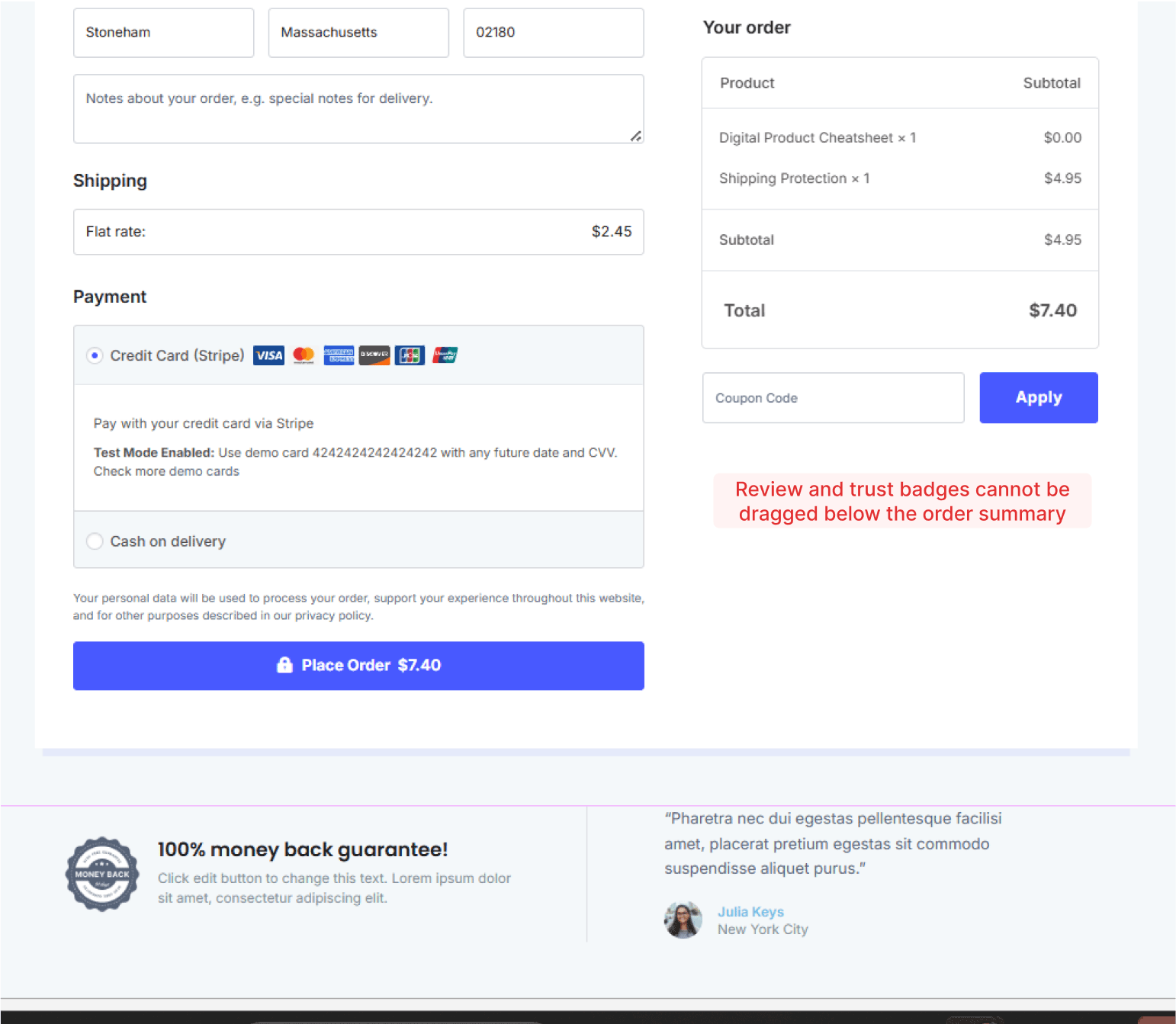
There are no collapsible order summary sections and product quantities cannot be changed on checkout.
This lack of control hinders your ability to test, optimize, and build checkouts that align with your brand or UX goals.
🏆 Winner: FunnelKit
If you’re a beginner or an expert building high-converting WooCommerce checkouts and want complete visual control, FunnelKit is your go-to plugin.
During testing, we were unable to place testimonials or terms and conditions below the order summary in CartFlows. It doesn't offer the flexibility that FunnelKit does.
What really makes FunnelKit a beginner-friendly tool is the ability to choose your checkout steps right when importing a funnel, streamlining setup and eliminating extra configuration work.
Which Plugin Offers the Best WooCommerce Checkout Field Editor?
FunnelKit is superior to CartFlows in terms of checkout field flexibility, allowing you to modify or add fields and sections.
Here’s why:
| Checkout Field Editing Feature | FunnelKit | CartFlows |
|---|---|---|
| Drag-and-Drop Field Placement | ✅ Yes (no limitations, place any fields or sections anywhere on the checkout form) | ⚠️ Limited (cannot place shipping above billing, move fields on different checkout step, etc.) |
| Add Custom Fields | ✅ Yes (13 built-in fields) | ⚠️ Limited (8 built-in fields) |
| Create Custom Sections | ✅ Yes | ❌ No |
| Conditional checkout fields | ✅ Yes | ❌ No |
| Move Shipping Above Billing Fields | ✅ Yes | ❌ No |
| Choose Fields Per Checkout Step | ✅ Yes | ❌ No |
FunnelKit
FunnelKit's drag-and-drop checkout field editor allows you to rearrange any fields, such as billing or shipping, place an email field at the top, and add new steps to create a multi-step checkout page.
You get 13 built-in custom fields to choose from, such as text, checkbox, radio, multi-select, hidden, password, and more.
Once your custom field is ready, you can place it anywhere inside the checkout form.
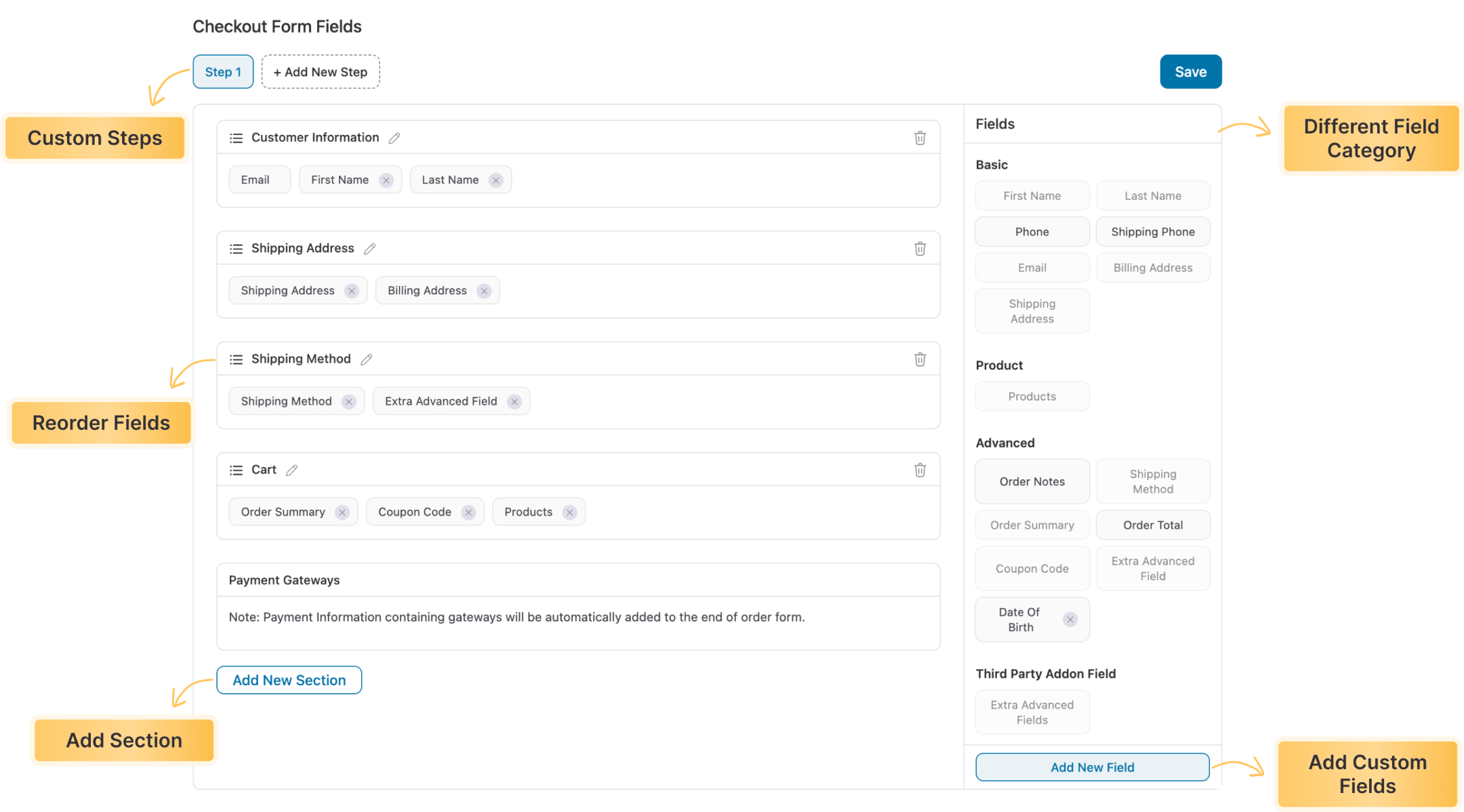
You can edit and remove unnecessary fields or sections inside the checkout form.
Furthermore, with conditional fields, you can display specific checkout fields only when certain conditions are met. For example, you can show the "Gift Message" field only if the customer selects a gift option.
It's an easy way to personalize the checkout process and only show relevant information to your customers.
CartFlows
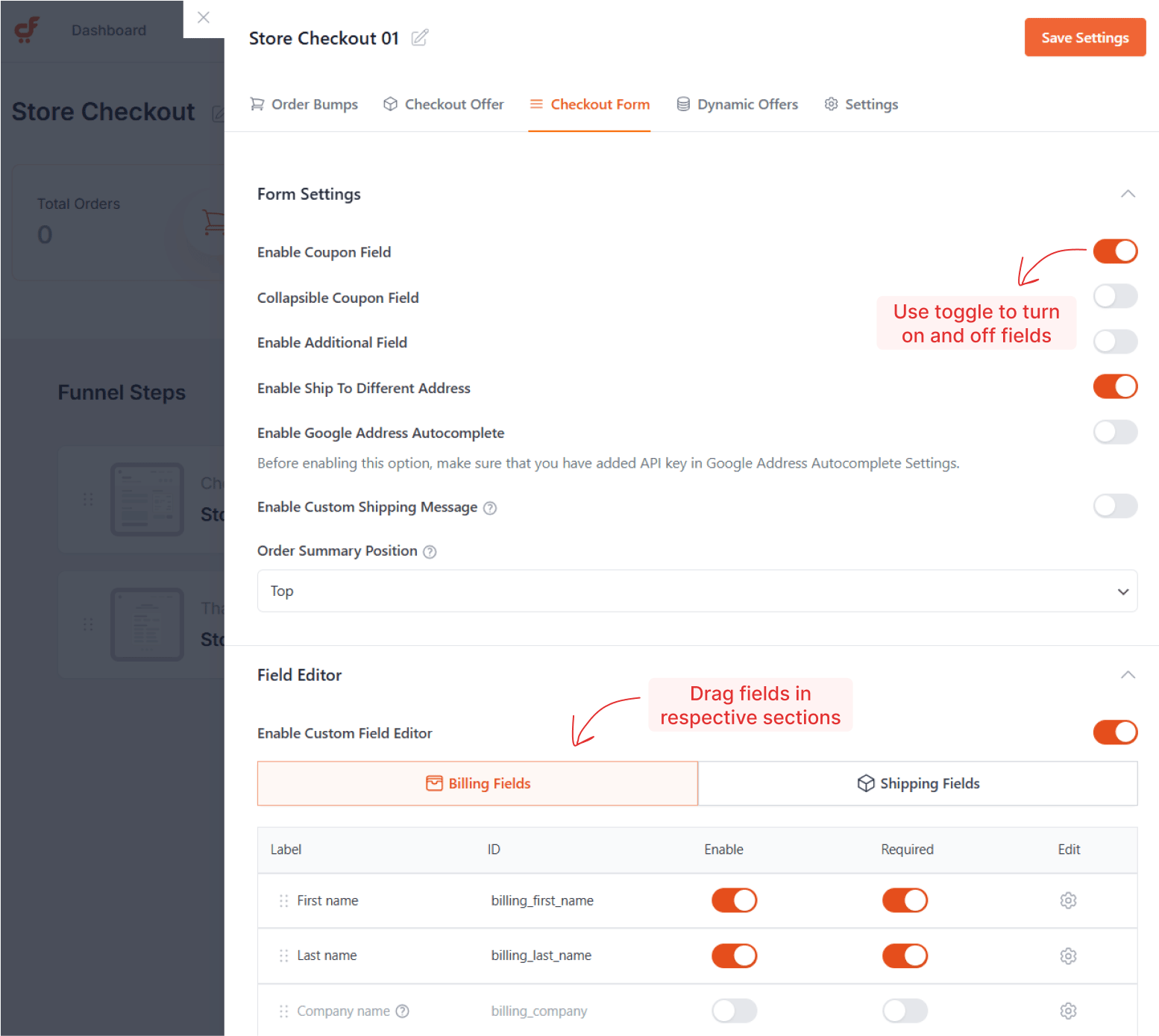
CartFlows has a rigid checkout form layout with a fixed step that doesn’t let you choose which fields appear on each step.
Additionally, you cannot move shipping above the billing field, create new sections, or freely position the fields as you wish.
🏆 Winner: FunnelKit
For complete control over your WooCommerce checkout fields, FunnelKit offers far more customization options and flexibility with its drag-and-drop checkout manager than CartFlows.
For example, we attempted to add a custom field to an additional checkout section. FunnelKit let me set this up easily with no limitations, whereas CartFlows couldn’t accommodate it.
Furthermore, you can't place the shipping field above the billing field in CartFlows. Whereas FunnelKit lets you add more custom fields, create sections, display conditional fields, reorder any fields and sections with ease.
Which Plugin Offers the Best WooCommerce Side Cart?
FunnelKit’s side cart offers more features, including gamified rewards, product recommendations, and built-in cart analytics, than CartFlows.
Here’s a side-by-side comparison of FunnelKit and CartFlows:
| Side Cart Feature | FunnelKit | CartFlows |
|---|---|---|
| Has a Free Version | ✅ Yes | ❌ No |
| Included in Main Plugin | ✅ Yes (in Plus plan) | ✅ Yes (in Suite plans) or separate addon at $79/year |
| Free Shipping Progress Bar | ✅ Yes | ✅ Yes |
| Gamified Cart Rewards | ✅ Yes (free shipping, discounts, and gifts) | ⚠️ Limited (only free shipping bar) |
| Product Recommendations | ✅ Yes (upsells, cross-sells, or both) | ⚠️ Limited (upsells or cross-sells - not both) |
| Special Cart Addon | ✅ Yes | ❌ No |
| Built-in Cart Analytics | ✅ Yes | ❌ No |
| Real-Time Previews | ✅ Yes | ❌ No |
| Language Translation Support | ✅ Yes | ❌ No |
| Express Pay Buttons Inside the Cart | ✅ Yes | ❌ No |
| Add Cart Icon to Menu | ✅ Yes | ❌ No |
FunnelKit
FunnelKit’s side cart is built for both speed and sales growth. It not only replaces the cart page but also actively boosts average order value with smart, built-in features.
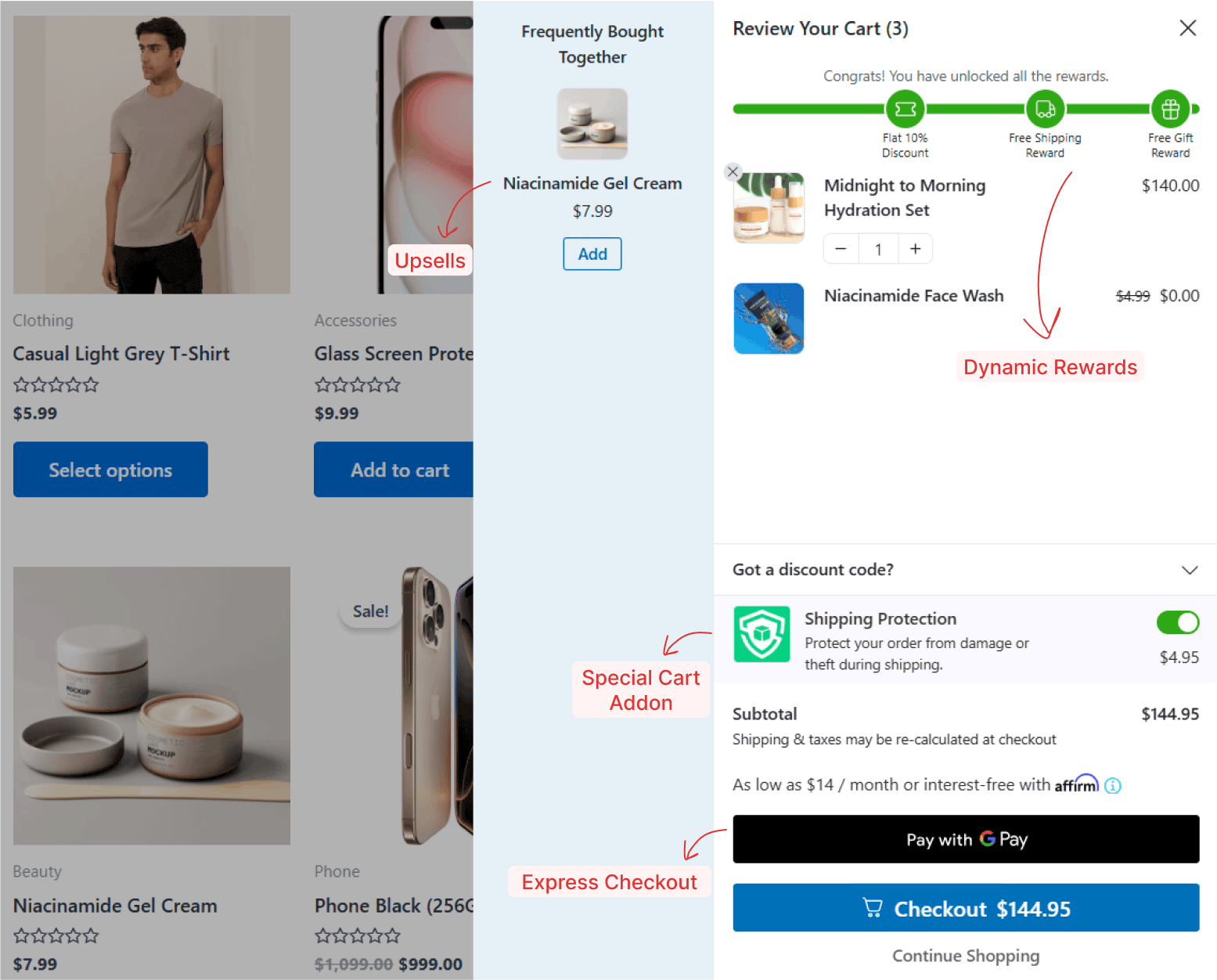
- Gamified rewards: Let shoppers unlock free shipping, discounts, or even free gifts as they add items to the cart.
- Product recommendations: Show upsells, cross-sells, or both inside the cart, with fully customizable layouts.
- One-click purchase: FunnelKit Cart supports express payment buttons, such as Apple Pay and Google Pay, in the cart for seamless checkout.
- Cart analytics: Get detailed insights into cart upsells to track the performance of your product recommendations, rewards, and add-ons.
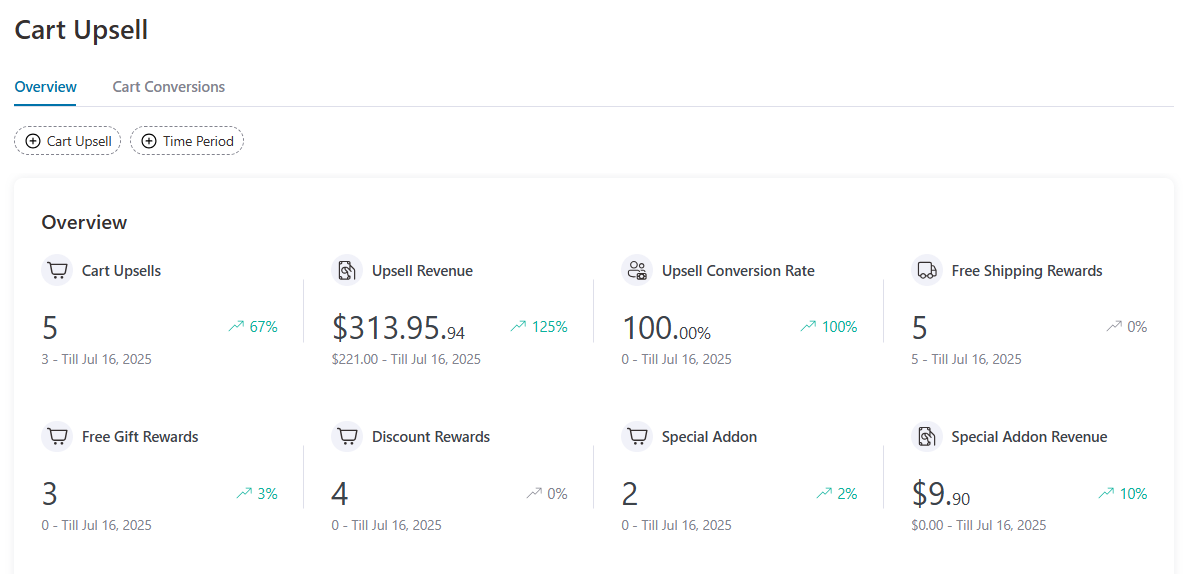
Every setting is configurable, and you can enable/disable features as needed.
Extra perks include language translation, a menu cart icon, flexible styling, and more.
The best part? All of this comes included in FunnelKit’s Plus plan; no separate purchase is needed.
CartFlows
CartFlows offers a basic side cart, and it's not even included in the core plugin. You'll need to buy the Modern Cart add-on for $79/year.
It supports a free shipping progress bar and product recommendations (either upsells or cross-sells, but not both).
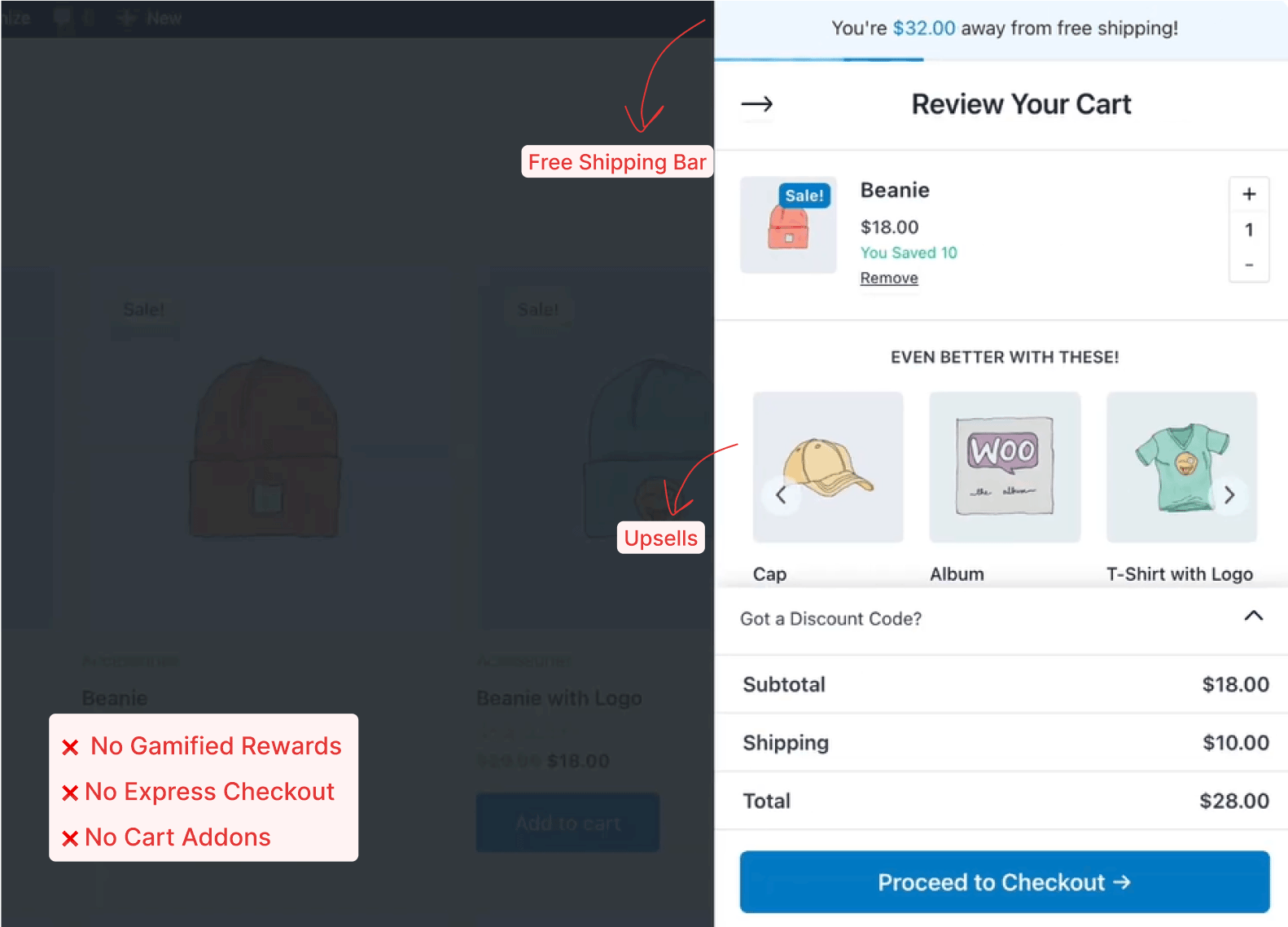
However, it misses several powerful features:
- No gamified rewards
- No express pay buttons
- No analytics or translation support
- No built-in cart menu icon
The built-in features are quite minimal and mostly focused on basic functionality.
🏆 Winner: FunnelKit
If you’re looking for a modern, feature-rich side cart for WooCommerce that boosts conversions, FunnelKit is the better choice.
It offers more value out of the box, supports gamified rewards and cart addons, and includes essential tools that CartFlows simply doesn’t provide.
In my experience, the lack of a real-time preview forces me to switch frequently between the dashboard and the live site to see the changes I configured.
Which Plugin is Best for Offering WooCommerce Order Bumps?
FunnelKit offers greater flexibility and customization for order bumps, enabling multiple bumps and targeted rules, compared to CartFlows.
Let’s look at the comparison between FunnelKit and CartFlows for order bump functionality:
| Order Bump Feature | FunnelKit | CartFlows |
|---|---|---|
| Multiple Order Bumps | ✅ Yes | ✅ Yes |
| Placements on Checkout | ✅ Yes (8 positions) | ⚠️ Limited (4 positions) |
| One-Click Product Upgrade | ✅ Yes | ❌ No |
| Display Conditional Logic | ✅ Yes (20 rules) | ⚠️ Limited (8 rules) |
| Skins & Design Variation | ✅ Yes (8 modern skins) | ⚠️ Limited (5 basic skins) |
| Social Proof on Hover | ✅ Yes | ❌ No |
| Built-in Analytics | ✅ Yes | ⚠️ Limited (Available only in Pro $299 plan) |
Let’s look in detail.
FunnelKit
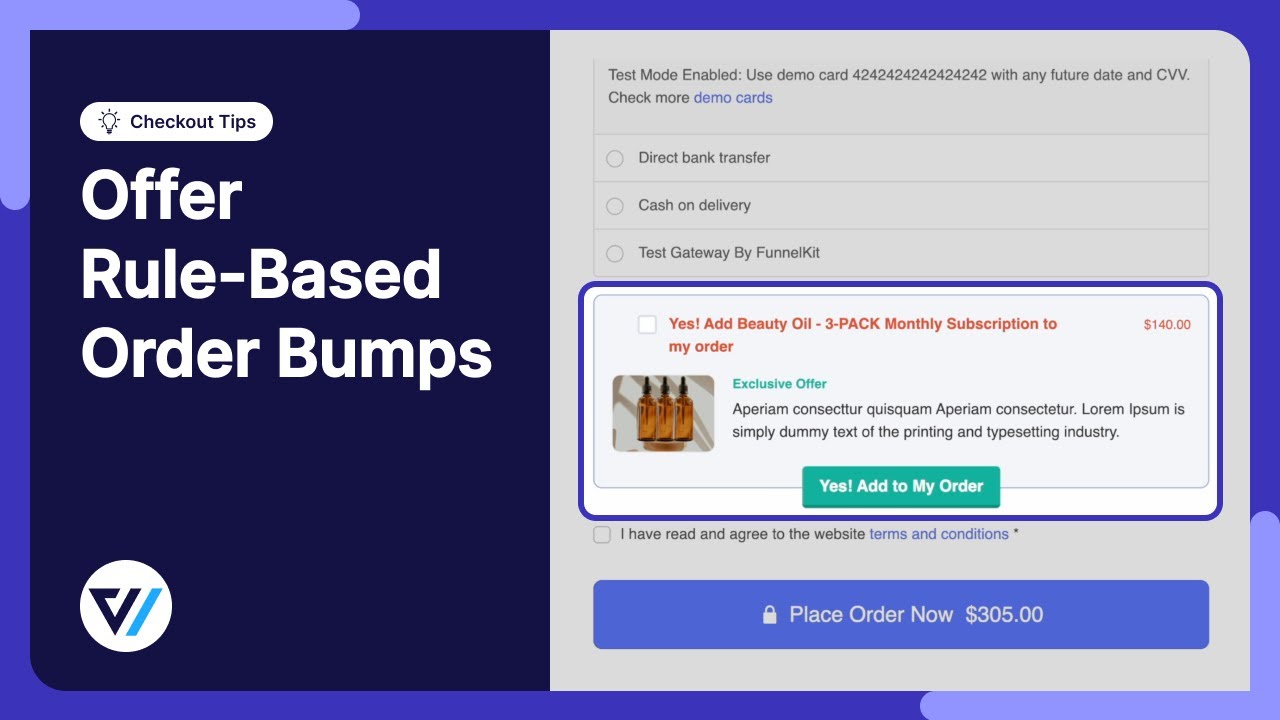
FunnelKit’s order bump system is designed to maximize conversions while giving you full creative control.
- More placement options: Place bumps above or below the order summary, under payment methods, inside the mini cart, and in the other 8 proven high-converting spots for desktop and mobile.
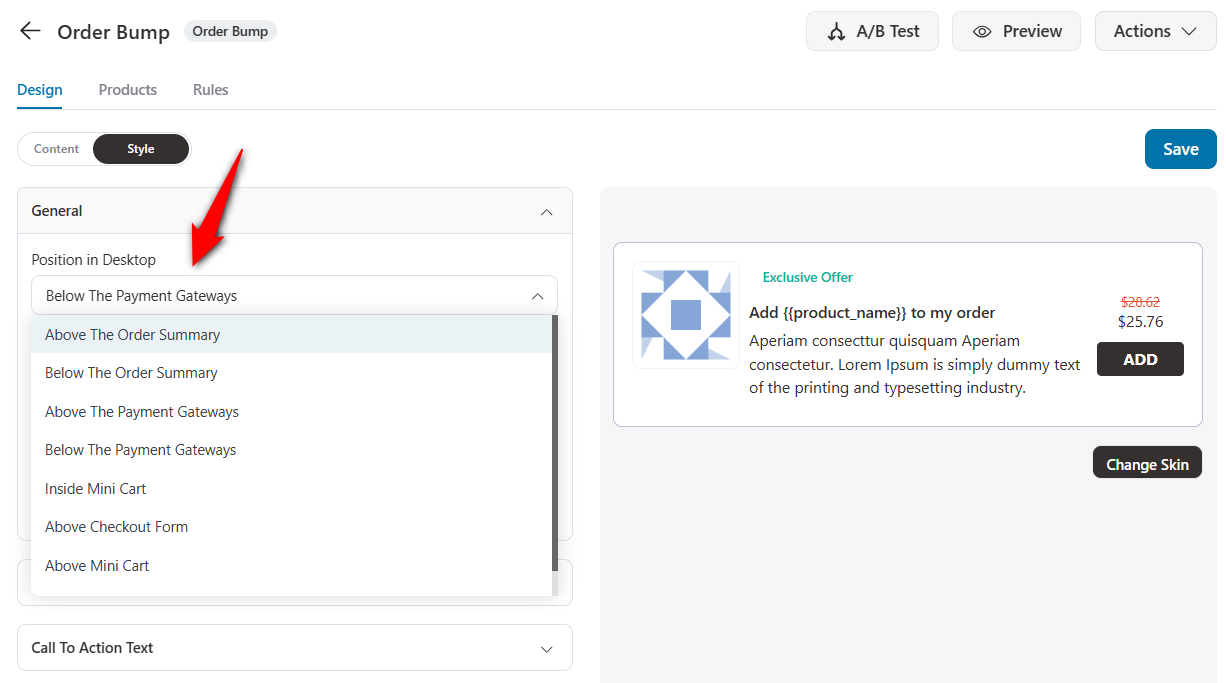
- Conversion-focused designs: Choose from 8 modern skins, including button-based layouts and proven templates. Add customizable social proof on hover to build trust without clutter.
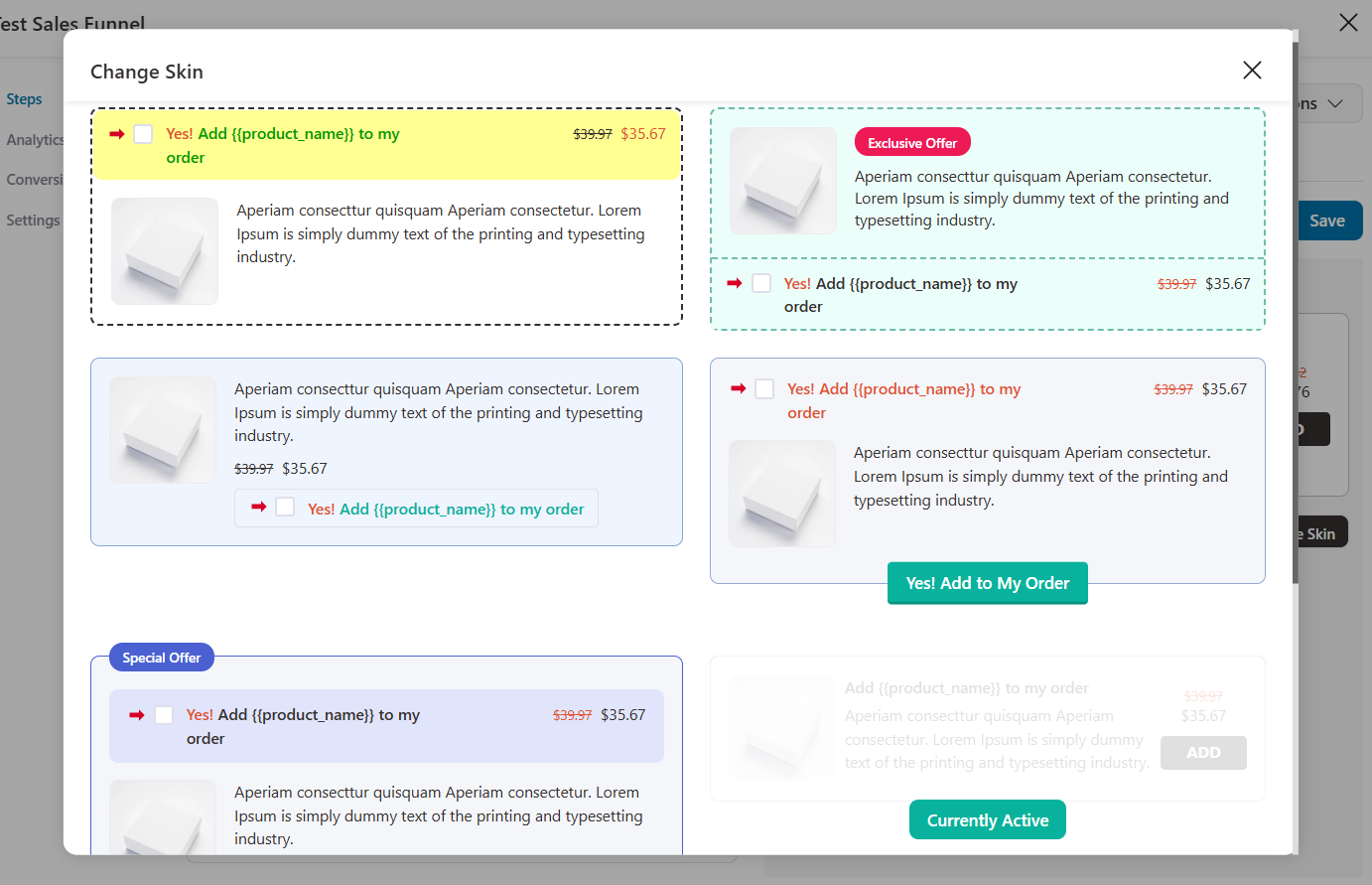
- One-click upgrades: Replace a product already in the cart with a higher-value bump offer. It’s perfect for premium versions, memberships, or bundles.
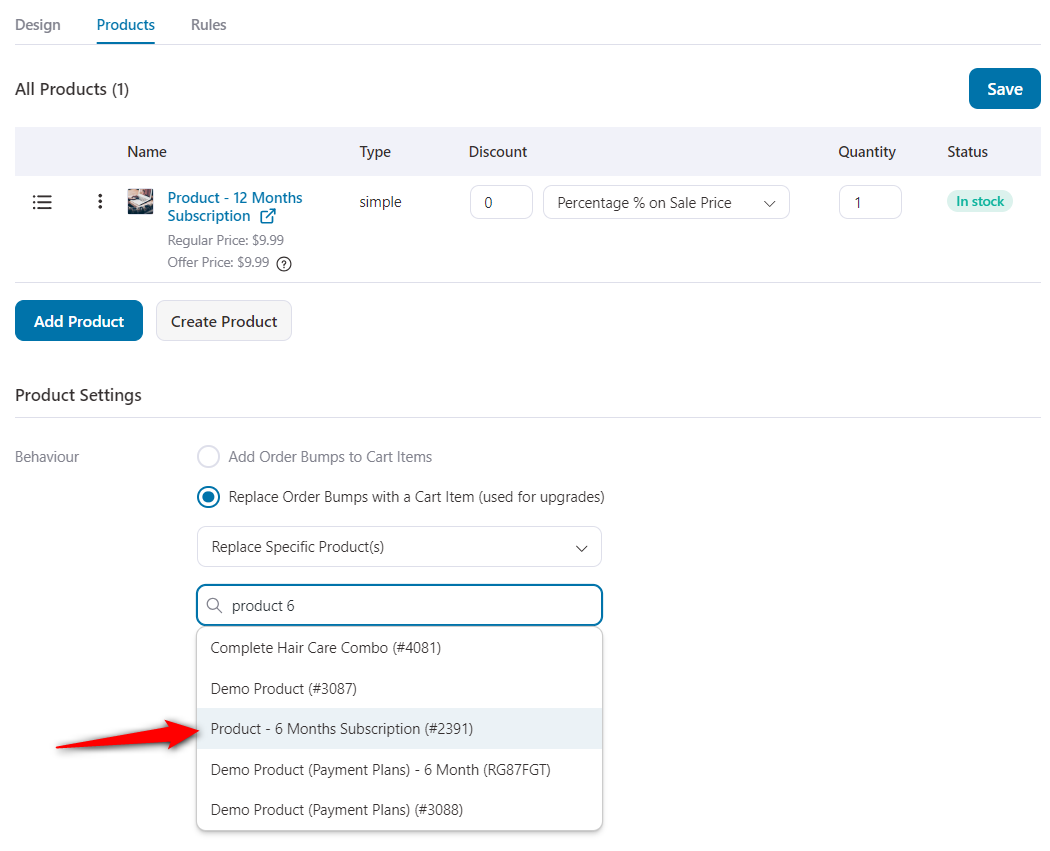
- Smart targeting: Show bumps based on cart total, specific products, user role, location, and 20 total targeting rules.
Add to that multiple bumps per checkout and built-in analytics, and you’ve got a conversion-focused order bump system built for serious results.
CartFlows
CartFlows supports order bumps for simple and variable products, but with notable limitations:
- Only 4 placement options
- No native one-click product upgrade
- No multiple bumps per checkout
- No social proof features
- Analytics is only available in the Pro plan ($299/year)
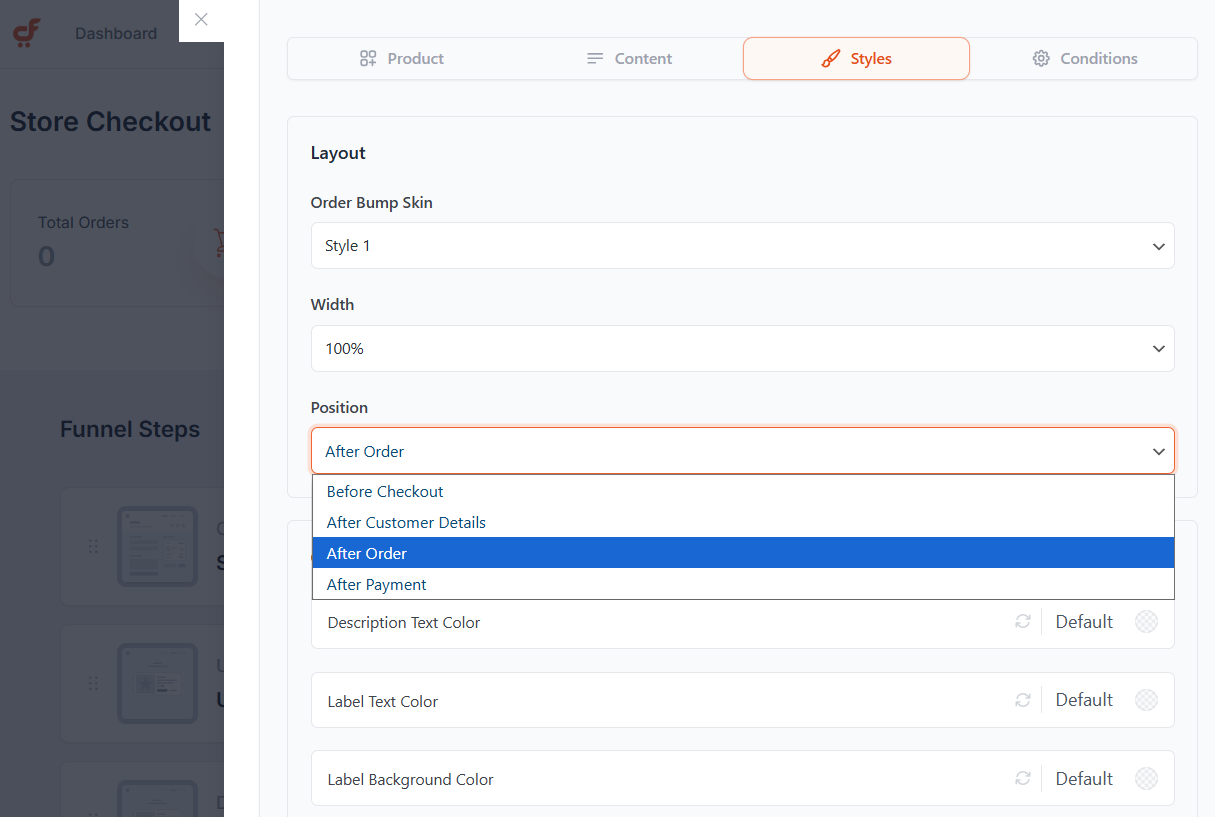
Its targeting is quite average, with fewer conditional logic options available (just 8 rules).
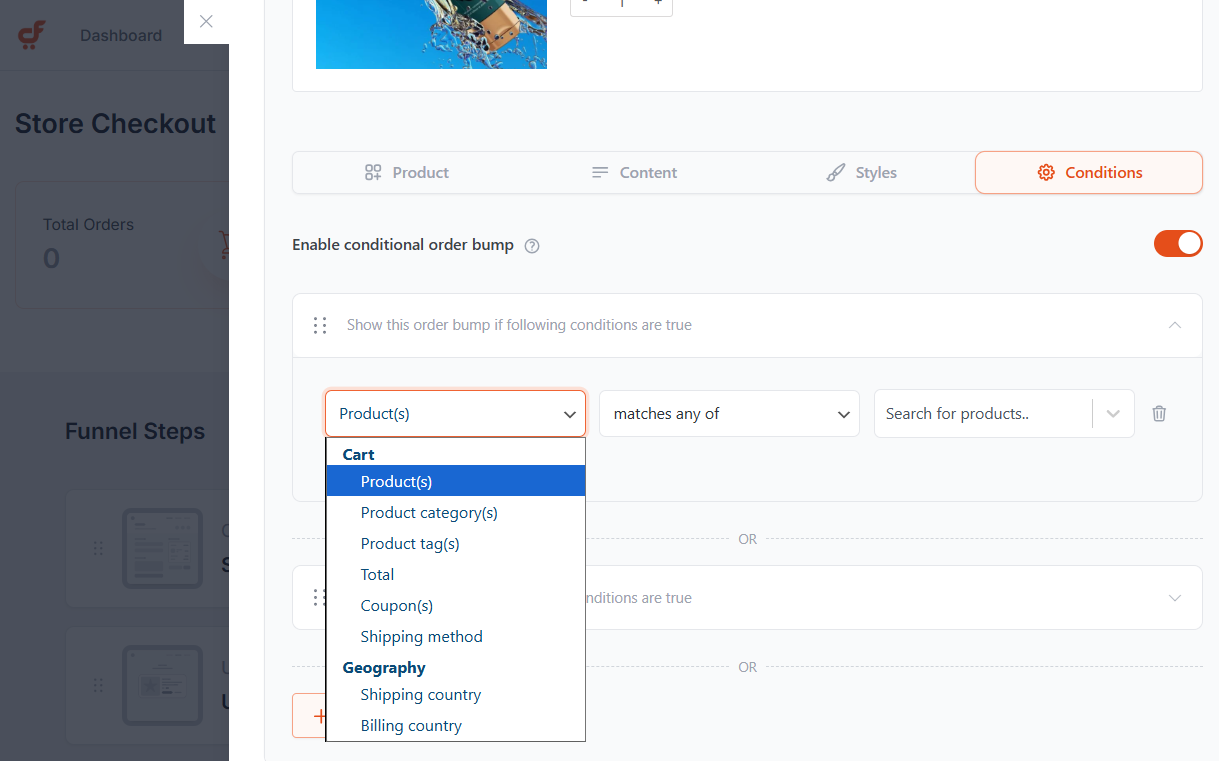
Overall, it lacks the flexibility and conversion tools that store owners often need.
🏆 Winner: FunnelKit
For merchants seeking maximum flexibility, highly targeted one-click upgrades, and proven designs backed by social proof, FunnelKit clearly outperforms CartFlows in the order-bump category.
Further, FunnelKit offers additional order bump placement options for both desktop and mobile, which makes sense given the limited space on phones.
What truly impressed us is FunnelKit’s smart one-click upgrade capability, which lets you seamlessly replace specific products within an order bump when multiple items are offered.
Which Plugin is Best for Offering WooCommerce One-Click Upsells?
FunnelKit offers a robust one-click upsell system with support for multi-product upsells and dynamic shipping, making it more versatile than CartFlows.
Let’s look at how FunnelKit and CartFlows stack up for one-click upsells:
| One-Click Upsell Feature | FunnelKit | CartFlows |
|---|---|---|
| Pre-Designed Templates | ✅ Yes | ✅ Yes |
| Customizable One-Click Upsell Offer Page | ✅ Yes (page builder compatibility) | ✅ Yes (page builder compatibility) |
| Payment Gateway Compatibility for One-Click Upsells | ✅ Yes (15+ supported gateways) | ⚠️ Limited (9 supported gateways) |
| Multi-product upsells | ✅ Yes | ❌ No |
| Dynamic shipping and taxes for a compliance-friendly setup | ✅ Yes | ❌ No |
| Display Conditions | ✅ Yes (27 rules) | ⚠️ Limited (10 rules) |
Let’s dig into it.
FunnelKit
FunnelKit offers the most gateway-compatible one-click upsell solution in WooCommerce, compatible with a broad range of payment providers, including Stripe, PayPal, Braintree, and more.
Plus, it supports many payment methods, including credit cards, Apple Pay, Google Pay, SEPA, Affirm, Afterpay, Klarna, P24, Alipay, Mobilepay, and more.
Let’s review their one-click upsell feature:
- Multiple templates and page builders: FunnelKit offers a beginner-friendly way to import pre-designed templates and deep compatibility with Elementor, Divi, Bricks, Gutenberg, and more for customizing your upsell designs.
- Multi-Product Upsells: Offer bundles, tiered pricing, or multiple-choice upsell products.
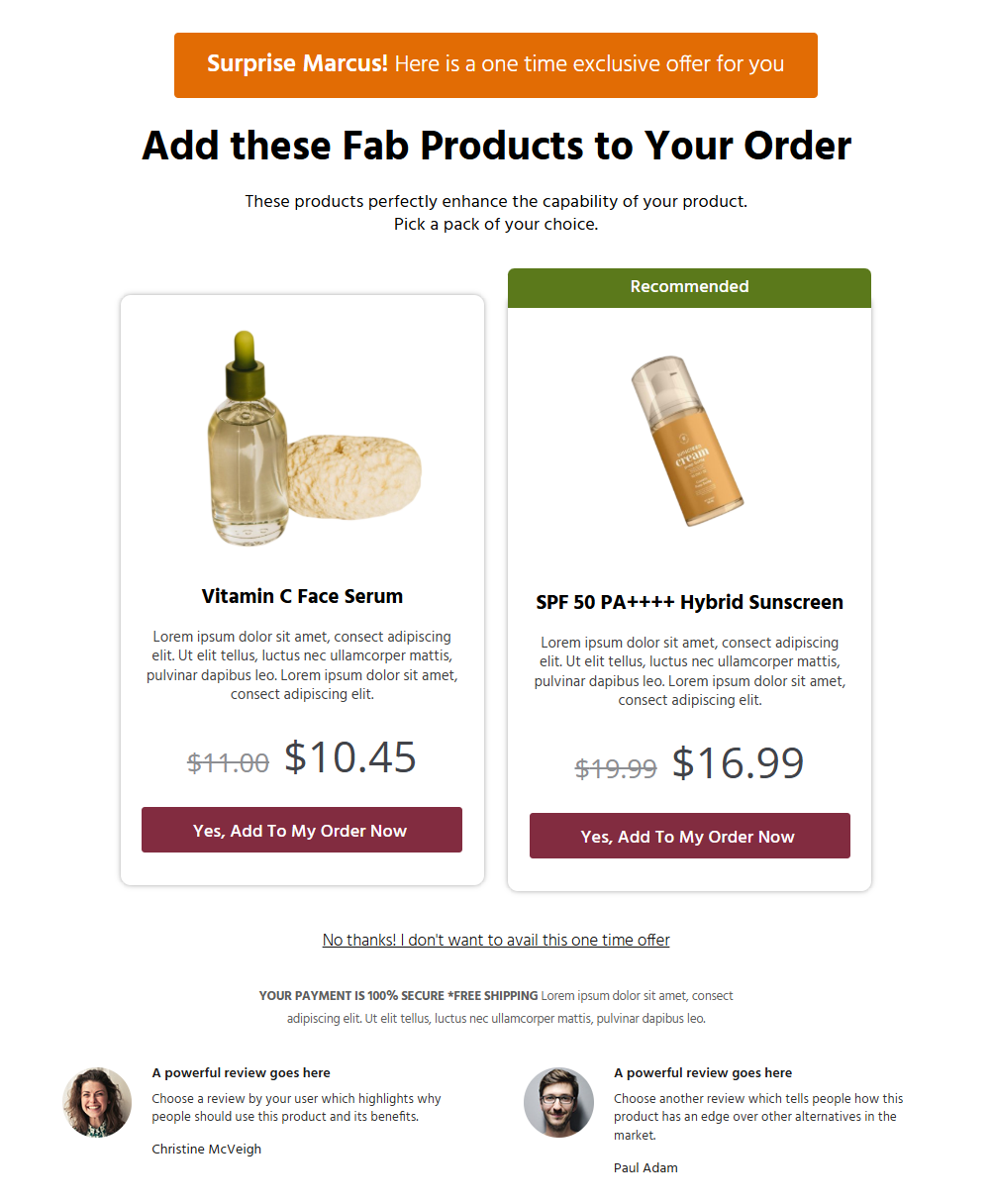
- Dynamic shipping and taxes: Automatically recalculates shipping costs after an upsell, ensuring compliance with correct order totals and avoiding inconsistencies.
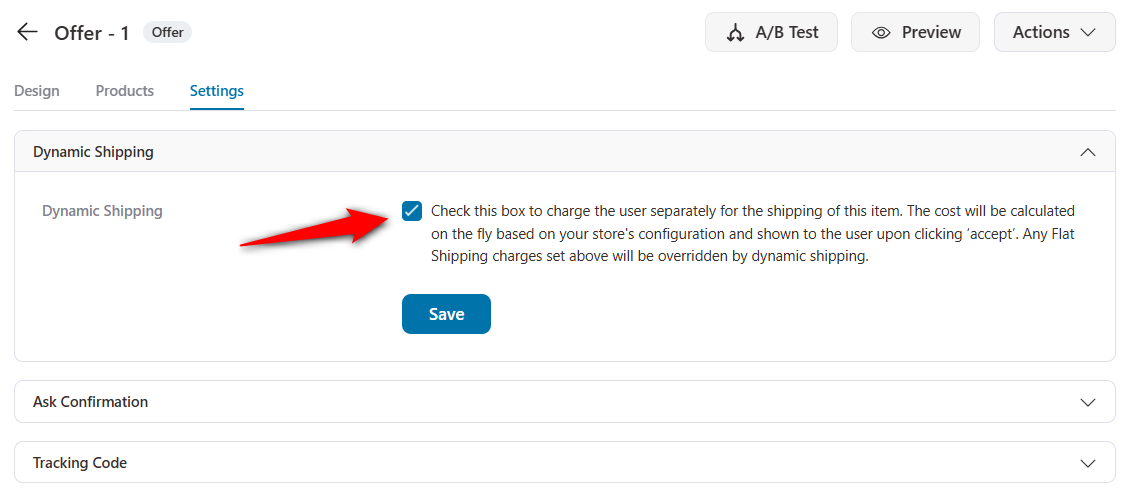
FunnelKit also has smart rules to show the right upselling and downselling offers to the right users at the right time.
The system is designed with real-world store rules in mind, using a virtual cart that mirrors WooCommerce’s native checkout logic.
This prevents issues like overcharging for shipping or applying incorrect taxes after upsells.
CartFlows
CartFlows offers one-click upsells with pre-designed templates that can be customized using compatible page builders.
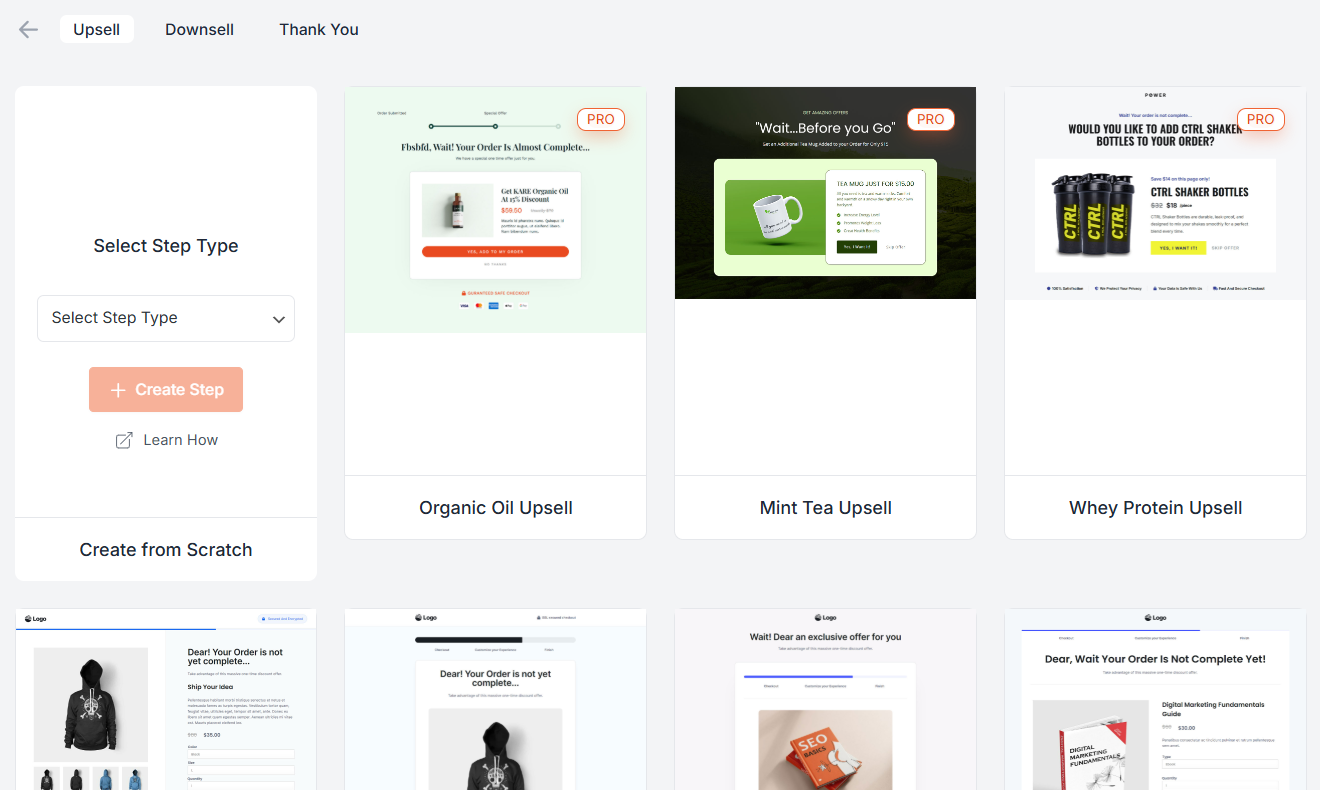
When compared with FunnelKit, here are a few limitations that we noticed:
- Few supported gateways: Works with popular payment gateways such as Stripe, PayPal, etc., but has fewer compatible gateways than FunnelKit.
- No multi-product upsells: Restricted to a single product per upsell or downsell.
- Static shipping rates: No dynamic recalculation after upsells, which can cause compliance issues in certain regions.
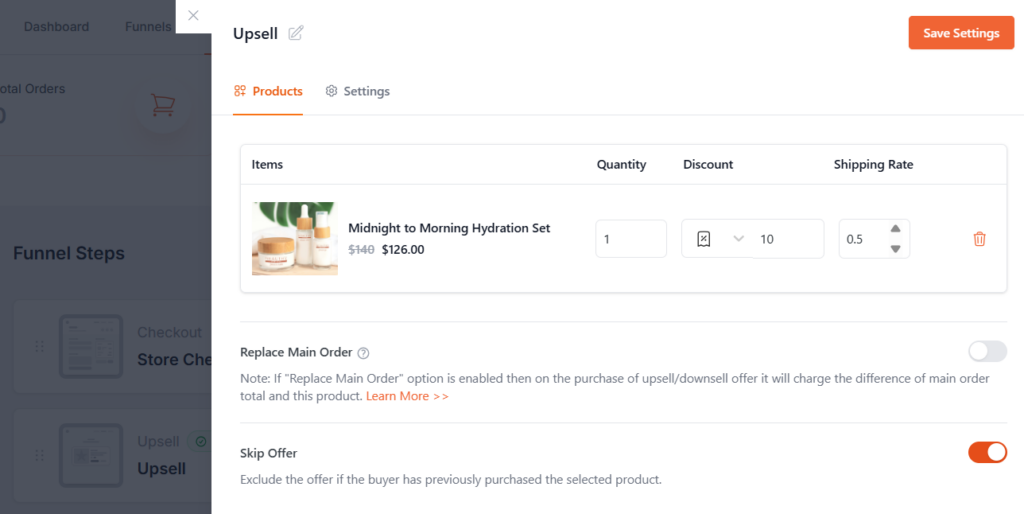
CartFlows lets you set up basic upsell/downsell pages, but it lacks multi-product choice selection, targeting flexibility, and payment options that support tokenized upsells.
🏆 Winner: FunnelKit
FunnelKit is the clear winner for WooCommerce one-click upsells.
It offers more templates, more customization, better gateway coverage, and multi-product flexibility, all of which help you convert more post-purchase without headaches.
FunnelKit supports dynamic shipping and tax calculations on upsells, ensuring compliance with country-specific regulations and accurate charges at every step, something that Cartflows surprisingly misses.
Which Plugin is Best for WooCommerce Email Automations & CRM?
FunnelKit leads in email automation and CRM integration, offering a visual automation builder, multi-channel marketing, and deep WooCommerce integration.
Let’s look at which plugin is best for automations and CRM with a quick summary:
| Automations CRM Feature | FunnelKit | CartFlows |
|---|---|---|
| Free Plugin | ✅ Yes (Abandoned cart reminders and post-purchase sequences) | ❌ No (Extra add-on: OttoKit is required) |
| Native Integration with WooCommerce | ✅ Yes | ❌ No |
| Built-in Abandoned Cart Recovery | ✅ Yes | ⚠️ Limited (No multi-step workflows, no dynamic coupons, conditional sequences, etc.) |
| Drag-and-Drop Visual Email Builder | ✅ Yes | ❌ No |
| Transactional Email Customization | ✅ Yes | ❌ No |
| Contact Profiles and CRM | ✅ Yes | ❌ No |
FunnelKit
You can set up basic cart-abandonment recovery and post-purchase emails for free with the FunnelKit Automations plugin.
However, if you want to take advantage of the full-fledged CRM and automation suite for WooCommerce, FunnelKit Automations is the tool to go for.
You get a visual automation builder to design complete customer journeys triggered by almost any store event, including cart abandonment, order status changes, first purchase, high-value orders, subscription renewals, and more.
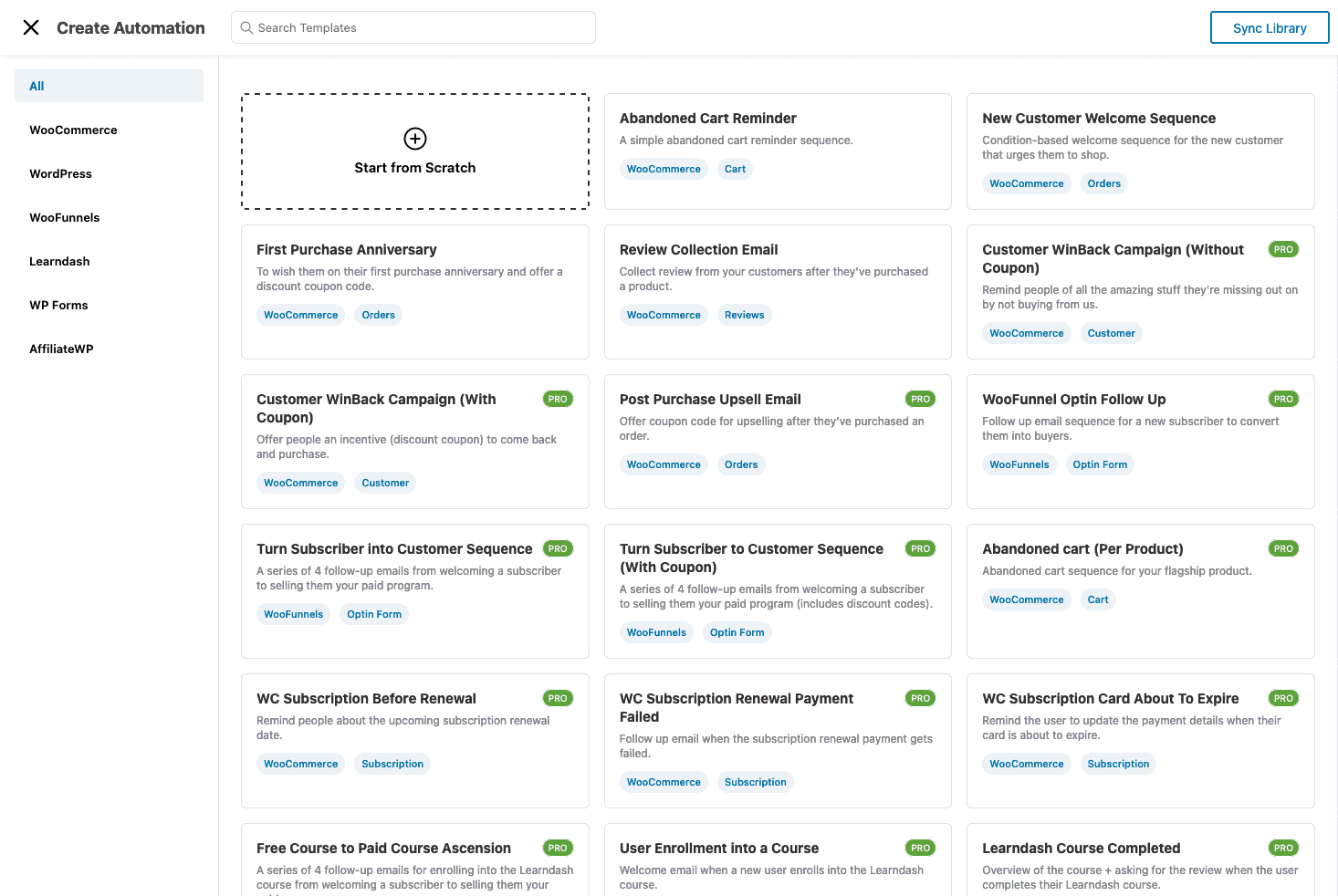
Every contact gets a full profile with purchase history, location, tags, and lists.
You can segment and personalize emails with dynamic merge tags, run A/B tests to optimize campaigns, and go beyond email with SMS, WhatsApp, and push notifications.
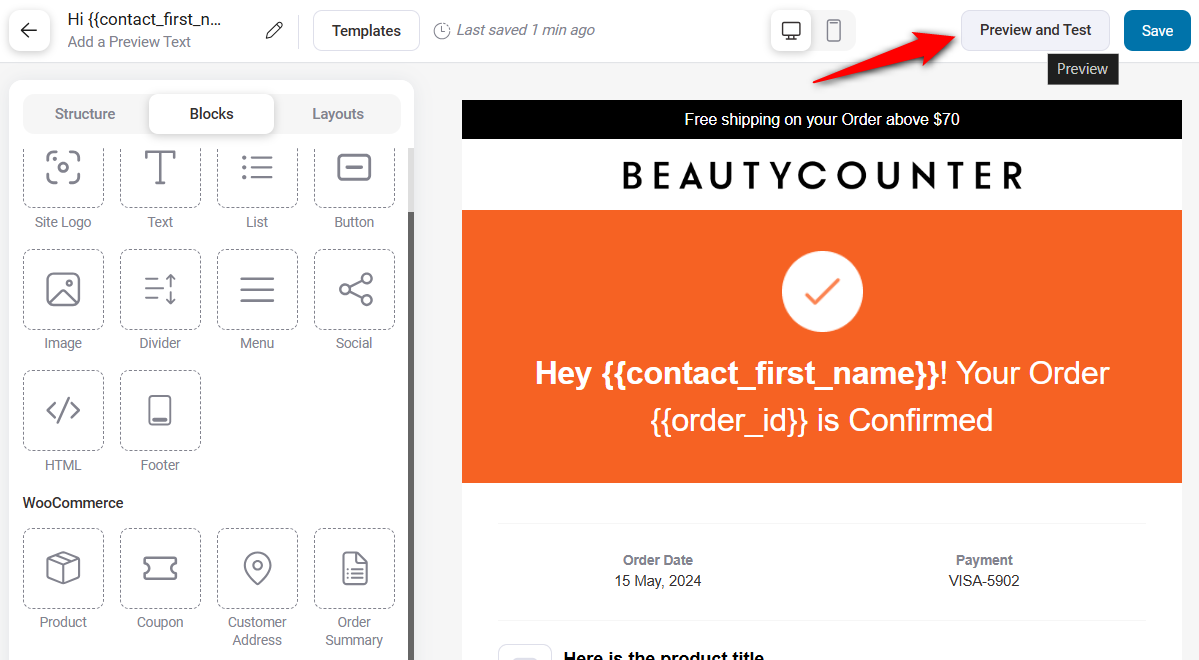
On top of that, FunnelKit lets you design beautiful transactional emails (order confirmations, shipping updates, refunds, and more) that turn routine notifications into branding opportunities.
The built-in visual email builder has no match in the market. You get blocks, columns, layouts, etc., to design a personalized, branded email without writing any CSS or custom code.
CartFlows
CartFlows doesn’t include its own automation or CRM system.
To enable even basic automations, you need to purchase and connect OttoKit. And even then, you won’t get features like contact profiles, multi-channel marketing, or smart workflows.
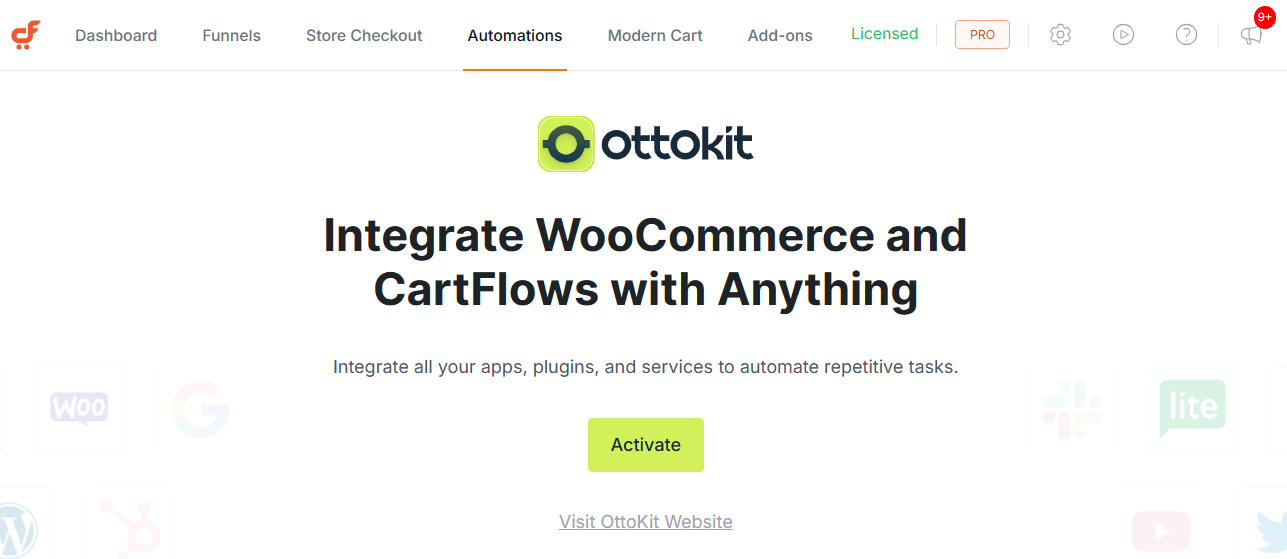
Here are the areas CartFlows lacks:
- No contact profiles
- No visual email builder
- Lacks transactional emails
- Limited WooCommerce events and actions
- No time-bound dynamic coupons
In short, even with OttoKit, you’re still limited to a few basic workflows. There’s really not much to compare here: FunnelKit is in a completely different category for WooCommerce email automations.
🏆 Winner: FunnelKit
Building sales funnels or checkouts is incomplete without the ability to bring shoppers back with automations.
That's why FunnelKit is the undisputed winner. It provides built-in CRM features, including detailed contact profiles, smart workflows, beautiful transactional emails, and multi-channel marketing tools.
It's a powerful marketing automations system that handles your marketing campaigns.
CartFlows relies on additional plugins or tools for integration, which increases setup time and complexity.
Which Plugin Offers Native Subscription Support?
If recurring revenue is part of your model, such as memberships, subscription boxes, retainer products, and course access, your funnel builder needs to handle subscriptions natively across funnels, order bumps, upsells, and automation triggers.
This is one of the clearest gaps between the two plugins.
| Subscription Feature | FunnelKit (via Sublium) | CartFlows |
|---|---|---|
| Native subscription product support | ✅ Yes (Sublium Subscriptions) | ❌ No (requires WooCommerce Subscriptions, sold separately) |
| Subscriptions inside funnel flows | ✅ Yes | ⚠️ Limited (no first-party support) |
| Subscription-aware automation triggers (renewal, failed payment, cancellation) | ✅ Yes | ❌ No |
| Trial periods, signup fees, and custom billing cycles | ✅ Yes | ❌ No |
| Customer-managed subscription portal | ✅ Yes | ❌ No |
FunnelKit
FunnelKit ships native subscription support through Sublium Subscriptions, its purpose-built WooCommerce subscriptions plugin.
Sublium plugs directly into the FunnelKit funnel builder and FunnelKit Automations, which means subscription products work natively inside every funnel step:
- Sell subscriptions on the optimized checkout page with the same conversion-tested layout as one-time products
- Offer subscription products as order bumps to lift customer lifetime value at the point of purchase
- Run one-click upsells where the upsell itself is a recurring product (e.g., “Add a monthly refill for $19”)
- Trigger automated workflows on subscription events, including renewal reminders, dunning sequences for failed payments, win-back flows for cancellations, and anniversary discounts
- For stores already running on FunnelKit, recurring revenue doesn't require a parallel tool stack. Funnels, automations, and subscriptions have different plugins but live within a single ecosystem.
CartFlows
CartFlows has no first-party subscriptions product. It supports WooCommerce Subscriptions, but that's a separate $279/year plugin sold by WooCommerce, not a CartFlows product.
Stores that want to sell subscriptions through CartFlows have to:
- Purchase and configure WooCommerce Subscriptions separately
- Wire it into CartFlows funnels manually
- Handle subscription event automation through OttoKit + a third-party email platform
- No strong recovery feature to retain your subscribers
This is the fragmented stack pattern. More plugins, more failure points, more billing relationships, more tickets when something breaks.
🏆 Winner: FunnelKit
For any store with subscription revenue in its model, FunnelKit is the only plugin in this comparison with a first-party subscription product. Sublium handles subscriptions natively across funnels, order bumps, upsells, and automations. CartFlows doesn't compete in this category. It can integrate with WooCommerce Subscriptions, but that’s a separate tool to maintain.
Recurring revenue is one of the highest-leverage levers a WooCommerce store has. The plugin you choose for your checkout flow shouldn’t make it harder.
Which Plugin Offers the Best Funnel Templates and Library?
FunnelKit offers high-converting, customizable templates, while CartFlows has a broader library of optimized designs. The result is a tie.
Here’s why:
FunnelKit
FunnelKit doesn’t try to overwhelm you with hundreds of filler templates. Instead, it focuses on a curated selection of 20+ high-converting designs, each one battle-tested and built using proven conversion principles.
You get templates for landing pages, opt-in pages, checkouts, one-click upsells, and thank-you pages for every use case, including digital products, webinars, physical goods, and more.
Every template is fully responsive, customizable, and crafted with sales psychology in mind, including trust elements like:
- Security and payment badges
- Customer testimonials
- Benefits section, and more
They’re compatible with all major page builders: Elementor, Divi, Bricks, Oxygen, and Gutenberg, so you can fine-tune every element without touching code.
Our strategy is simple: fewer templates, maximum impact.
Each design undergoes rigorous testing to ensure it functions across various industries and devices.
For example, our Shoppe template (Shopify-style checkout) is a consistent top performer, and thousands of stores are using it to gain impressive conversion lifts because it’s built for speed, clarity, and persuasion.
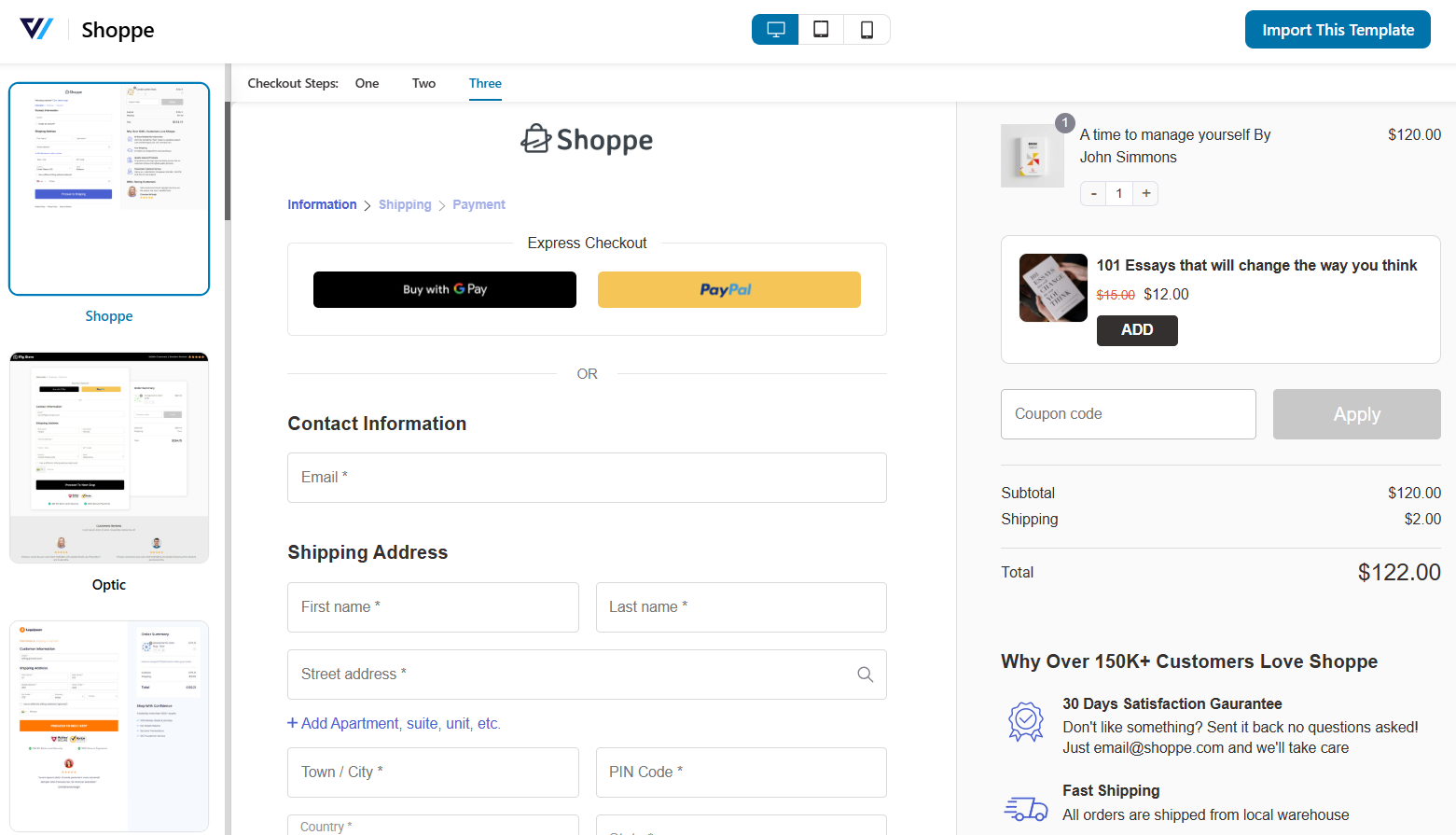
And because FunnelKit isn’t tied to rigid layouts, creating niche-specific funnels and checkout experiences becomes easy.
CartFlows
CartFlows offers 25+ customizable templates for all funnel pages. They’re clean and functional.
While they offer variety, many templates aren’t deeply optimized for conversions out of the box, and limited customization means creating unique, high-performing layouts like FunnelKit’s isn’t possible without heavy workarounds.
Template updates also come frequently, meaning you may find yourself working on new designs to stay with modern eCommerce trends.
🏆 Winner: Both FunnelKit and CartFlows (Tie)
It's a tie. FunnelKit’s quality-first approach ensures you’re working with designs that already follow eCommerce best practices.
While CartFlows offers more variety on paper, FunnelKit gives you templates that convert straight out of the box and the freedom to customize them the way you want.
FunnelKit vs CartFlows: Which Plugin is Best for A/B Testing?
A/B testing is essential for refining your funnels, like tweaking headlines, layouts, offers, or even button styles, which meaningfully uplift conversion rates.
Both FunnelKit and CartFlows offer built-in A/B testing across all funnel pages and are easier to set up. The result is a tie when comparing them for the split testing feature.
Let’s review each plugin:
| A/B Testing Feature | FunnelKit | CartFlows |
|---|---|---|
| Built-in A/B Testing | ✅ Yes | ✅ Yes |
| A/B Testing for All Funnel Pages (Landing, Checkout, Upsells, etc.) | ✅ Yes | ✅ Yes |
| Visual Reporting & Results | ✅ Yes | ✅ Yes |
| Winner Declaration | ✅ Yes | ✅ Yes |
FunnelKit
FunnelKit provides built-in A/B testing directly inside the Funnel Builder without any external tools.
You can test everything from opt-in pages, landing pages, checkouts, order bumps, one-click upsells, and thank-you pages.
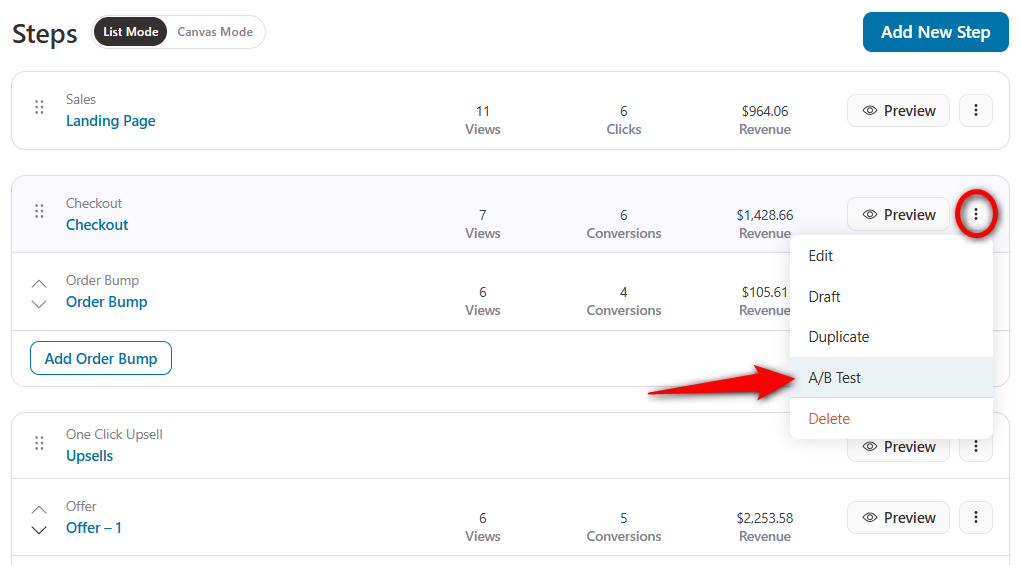
You can A/B test one-page checkout vs multi-step checkout, different upsell offers, CTA buttons, page designs, etc.
Tests are simple to set up: create a duplicate variant or new version, split traffic, and view results in real time.
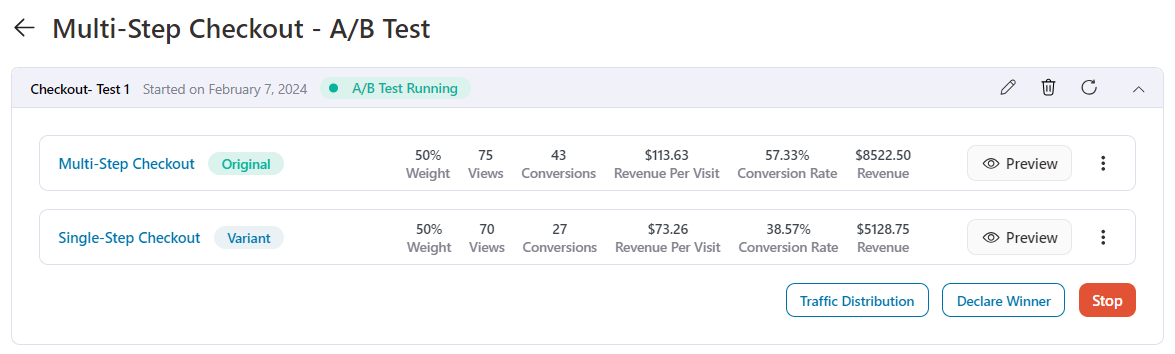
When you’re ready, declare a winner with one click and funnel all traffic to that variant.
CartFlows
CartFlows also offers robust built-in A/B split testing functionality for steps within your funnel, such as landing pages, checkout pages, upsells, and more.
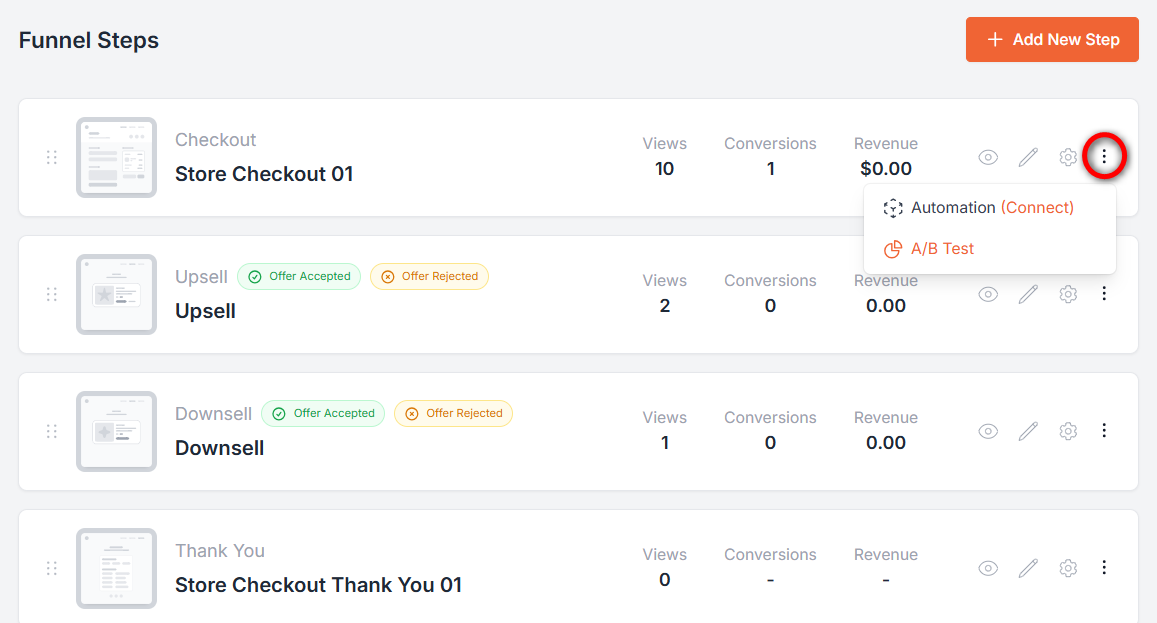
You can enable split testing per step, duplicate variants, set traffic distribution, go live, and monitor performance via an analytics dashboard.
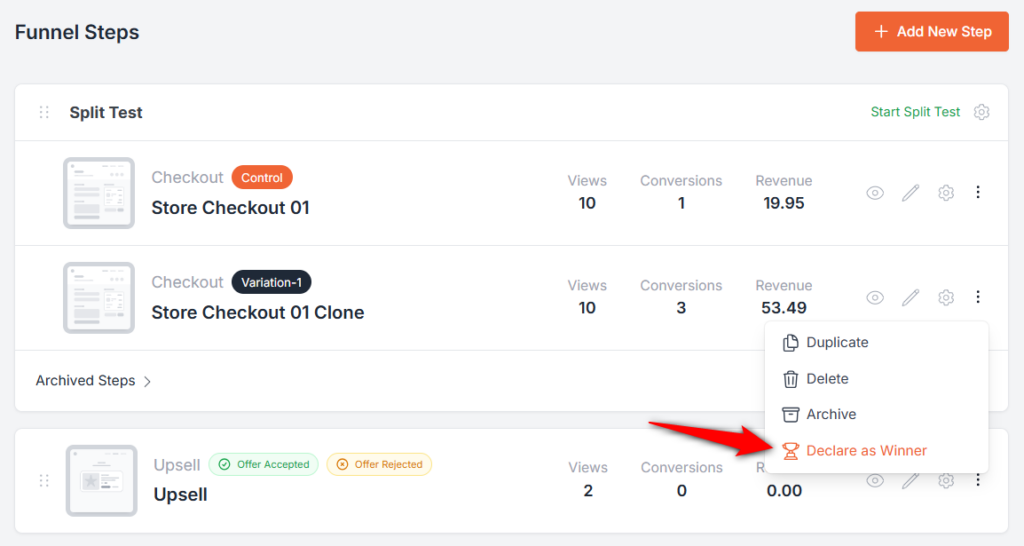
Once done, choose the winning variant with a single click.
🏆 Winner: Both FunnelKit and CartFlows (Tie)
Both FunnelKit and CartFlows offer robust, built-in A/B testing capabilities with similar ease of setup, coverage across funnel steps, and real-time winner selection.
Although FunnelKit offers more metrics, such as revenue per visit and conversion rates, than CartFlows, we conclude that this section ends in a close tie.
Which Plugin Offers the Best Detailed Analytics and Reporting?
FunnelKit provides detailed, actionable analytics, including revenue attribution, funnel performance, and cart analytics, which CartFlows lacks.
Here’s why:
| Built-in Analytics Feature | FunnelKit | CartFlows |
|---|---|---|
| Step-by-Step Behavior Tracking in Funnels | ✅ Yes | ✅ Yes |
| Revenue Attribution | ✅ Yes | ❌ No |
| UTM and Referral Reports | ✅ Yes | ❌ No |
| In-Depth Conversion Data | ✅ Yes | ❌ No |
| Cart and Upsell Analytics | ✅ Yes | ❌ No |
| Pricing | Available from Plus plan ($179.50/year) | Included only in Pro ($299/year) |
Let’s dive into it.
FunnelKit
With FunnelKit, analytics isn’t an afterthought. It’s built to give you a 360-degree view of your store’s performance.
You get UTM reports, referral source reports, cart & upsell performance reports, funnel reports, and even a conversion profile that shows exactly where your buyers are coming from.
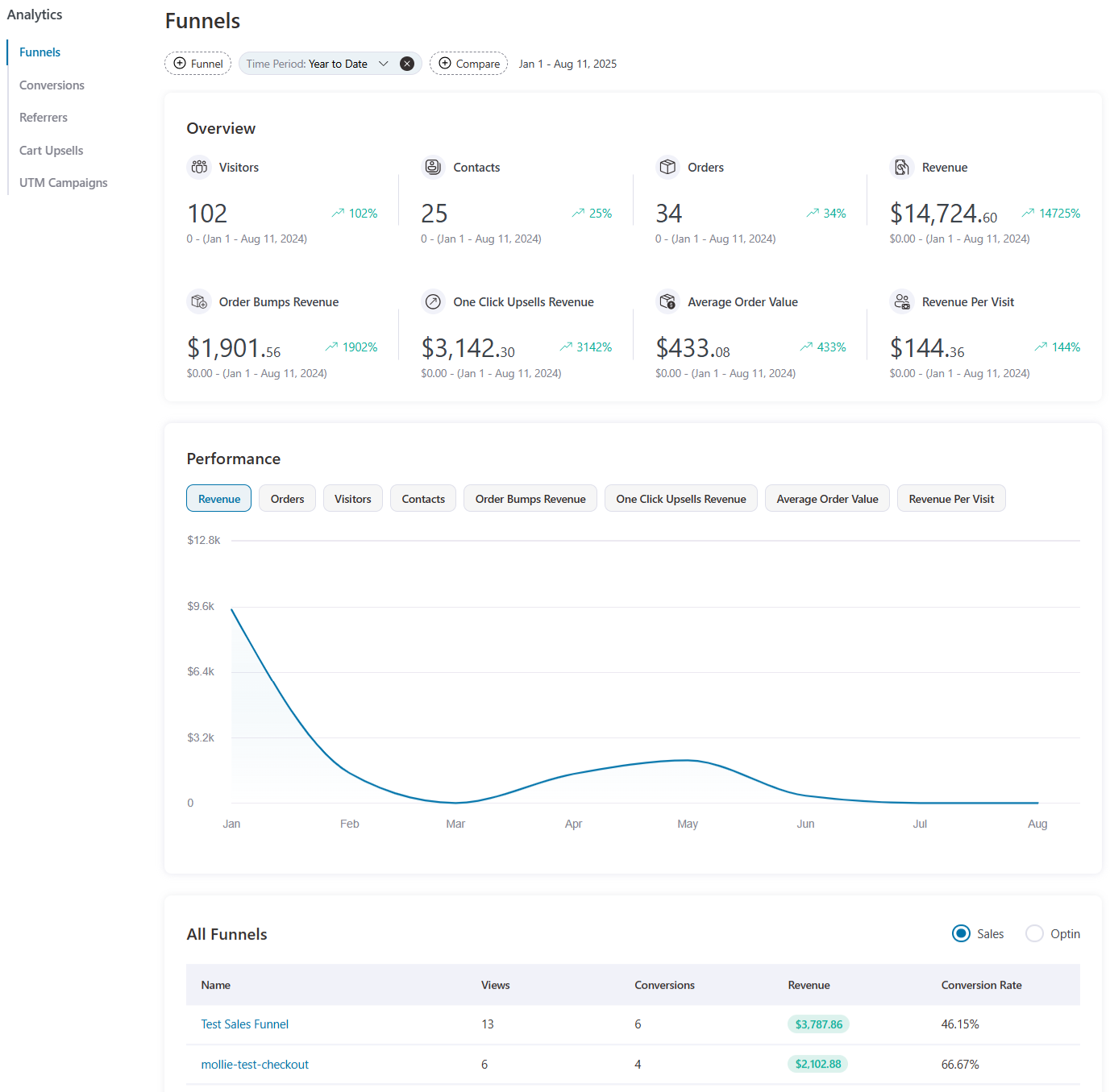
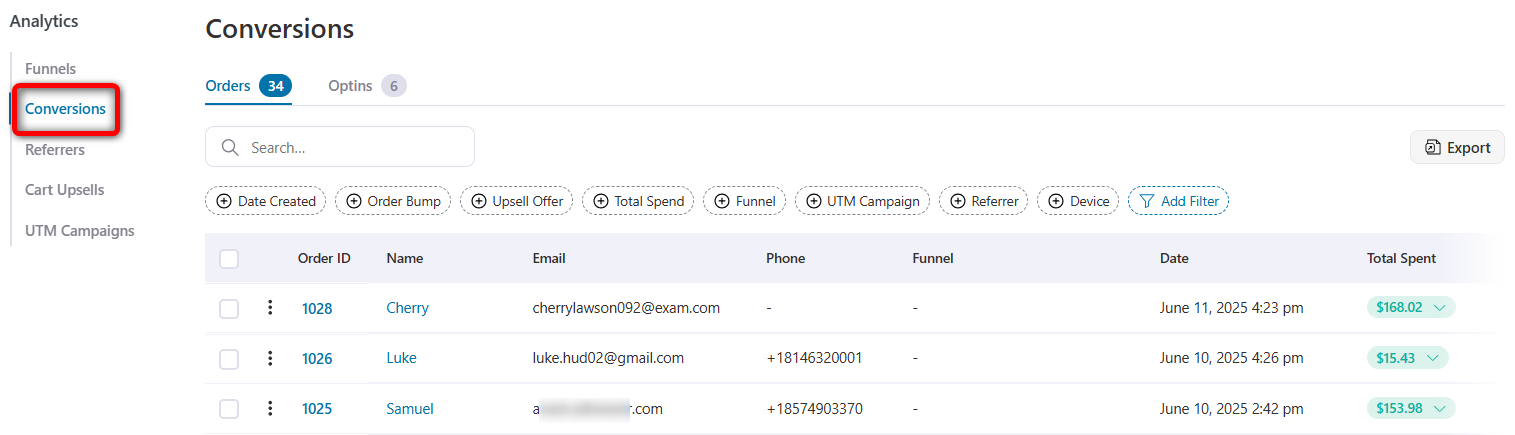
Track checkout drop-offs step by step, attribute revenue to specific campaigns, and filter by traffic sources to uncover which marketing channels are really working.
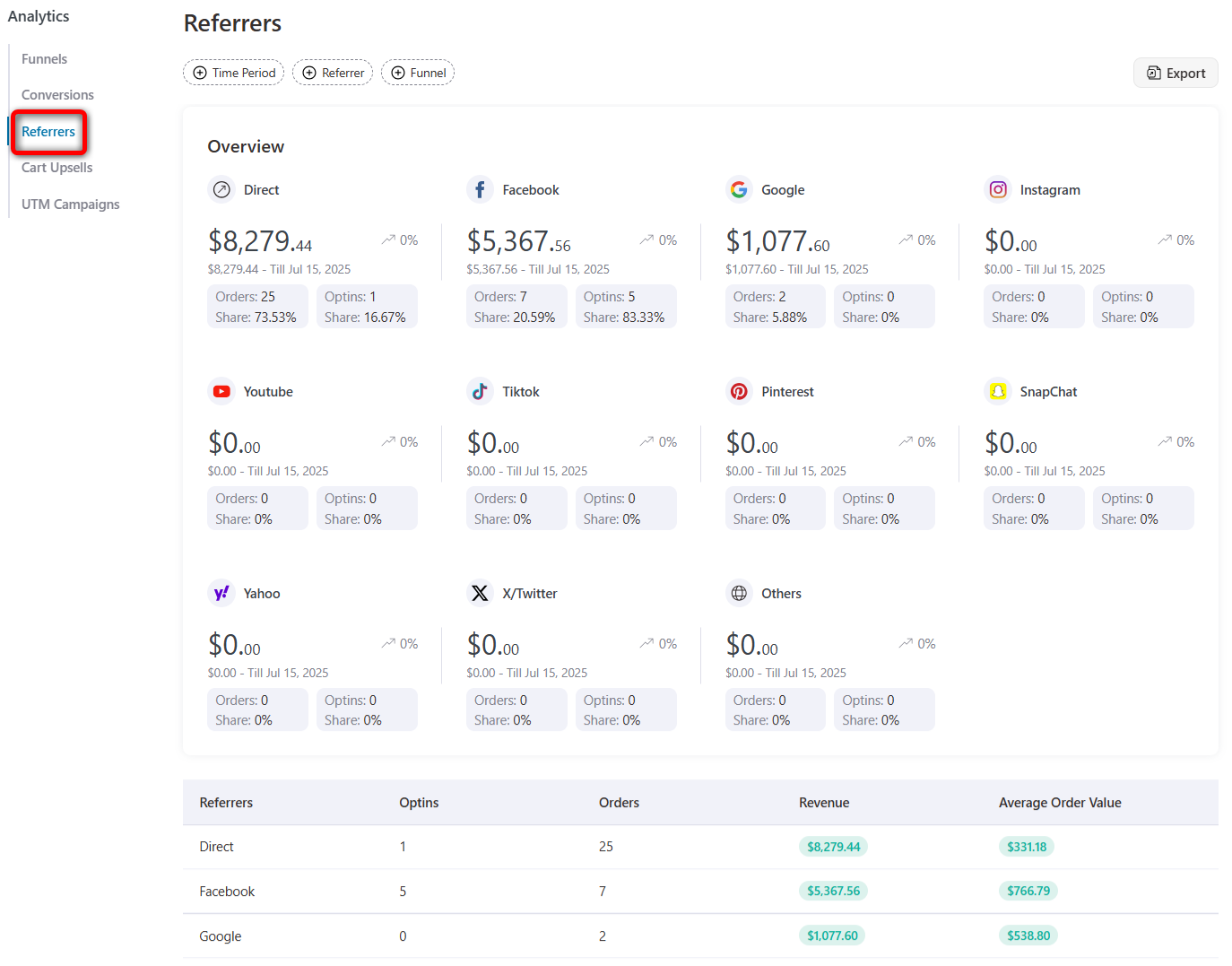
The built-in referrer analytics show where your customers are coming from. You can track revenues from Direct sources, Facebook, Google, and more.
UTM campaigns give insights on UTM campaigns, including orders, opt-ins, and revenues placed through them.
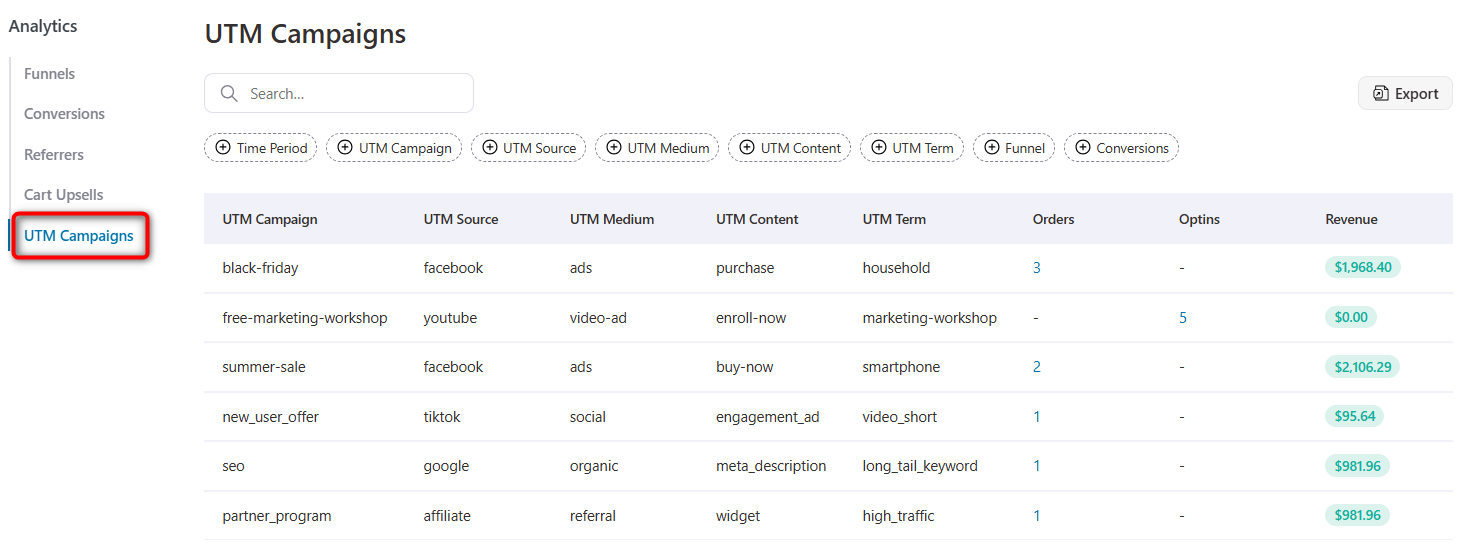
All of this is included in every plan, so even small store owners get enterprise-level analytics from day one.
CartFlows
CartFlows offers basic reporting. It includes funnel sales, orders, and conversion rates for each step in the funnel.
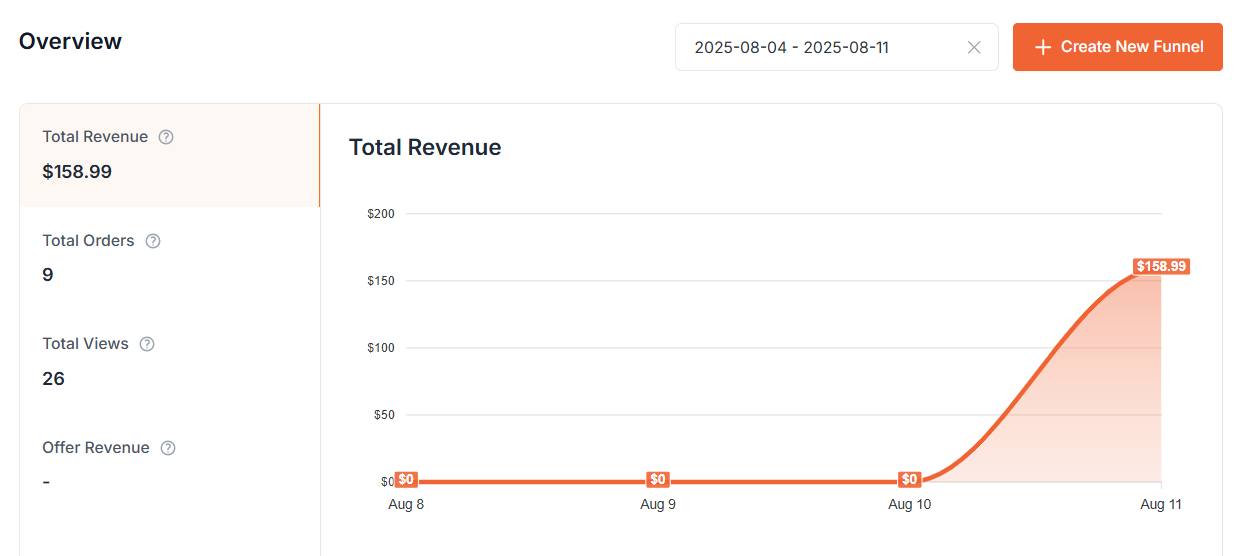
Detailed behavioral tracking, UTM breakdowns, and conversion-specific reports are missing.
What’s more, analytics is bundled only in their Pro plan, which costs $299/year for up to 30 sites.
If you’re running just 1-2 sites, you’re paying for extra licenses you don’t need and still not getting the depth of reporting FunnelKit offers.
🏆 Winner: FunnelKit
FunnelKit doesn’t just give you more reports. It gives you insights that actually move the needle, without locking them behind an expensive high-tier plan.
CartFlows bundles analytics only in their Pro plan ($299/year) or in their suite plans. FunnelKit includes the same analytics, along with revenue attribution, UTM reports, and cart/upsell tracking, starting with the Plus plan at $179.50/year. You get deeper reporting at a lower entry point.
Which Plugin is Best for Opt-in Lead Generation?
FunnelKit offers better value for money with its all-inclusive plans, providing brilliant and useful features at lower prices than CartFlows' more expensive tiers.
Let’s compare two plugins to see which one is best for lead generation.
| Lead Generation Feature | FunnelKit | CartFlows |
|---|---|---|
| Opt-in Page Templates | ✅ Yes | ✅ Yes |
| Opt-in Popup Forms | ✅ Yes | ❌ No |
| CRM & Automation Integration | ✅ Yes (Integration with LearnDash, LifterLMS, and CRMs like ActiveCampaign or via webhooks) | ✅ Yes (Integrates with email tools but requires manual setup) |
| A/B Testing for Opt-ins | ✅ Yes | ✅ Yes |
| Send Opt-in and Admin Notifications | ✅ Yes | ❌ No |
| Drag-and-Drop Opt-in Form Field Editor | ✅ Yes | ❌ No |
| Analytics & Reporting | ✅ Yes (Step-by-step funnel insights, referrers, and UTM reports) | ⚠️ Limited (Basic opt-in conversion stats) |
FunnelKit
FunnelKit gives you everything you need to capture and convert leads without extra add-ons.
Create opt-in landing pages with embedded or pop-up forms, all designed to convert visitors into leads. Just import a template, customize, and you’re ready to go!
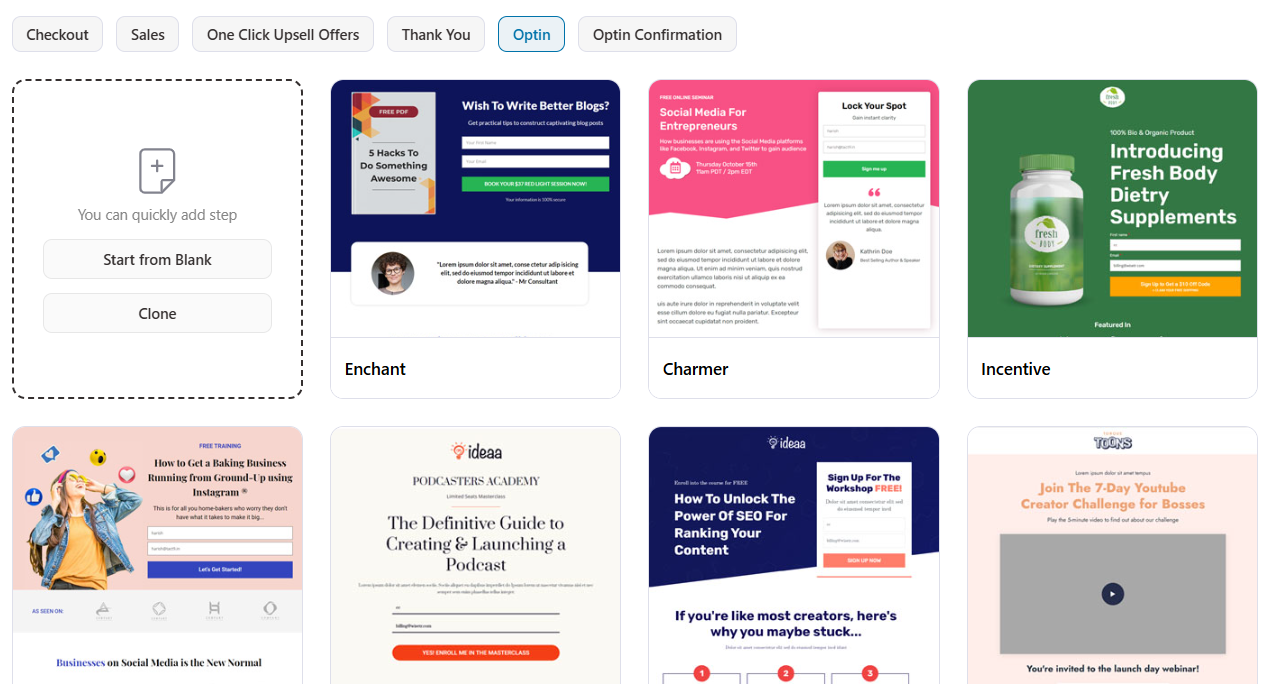
With precise targeting, you can show personalized offers to the right visitors at the right time.
You can also send basic lead notifications to users and administrators at the same time.
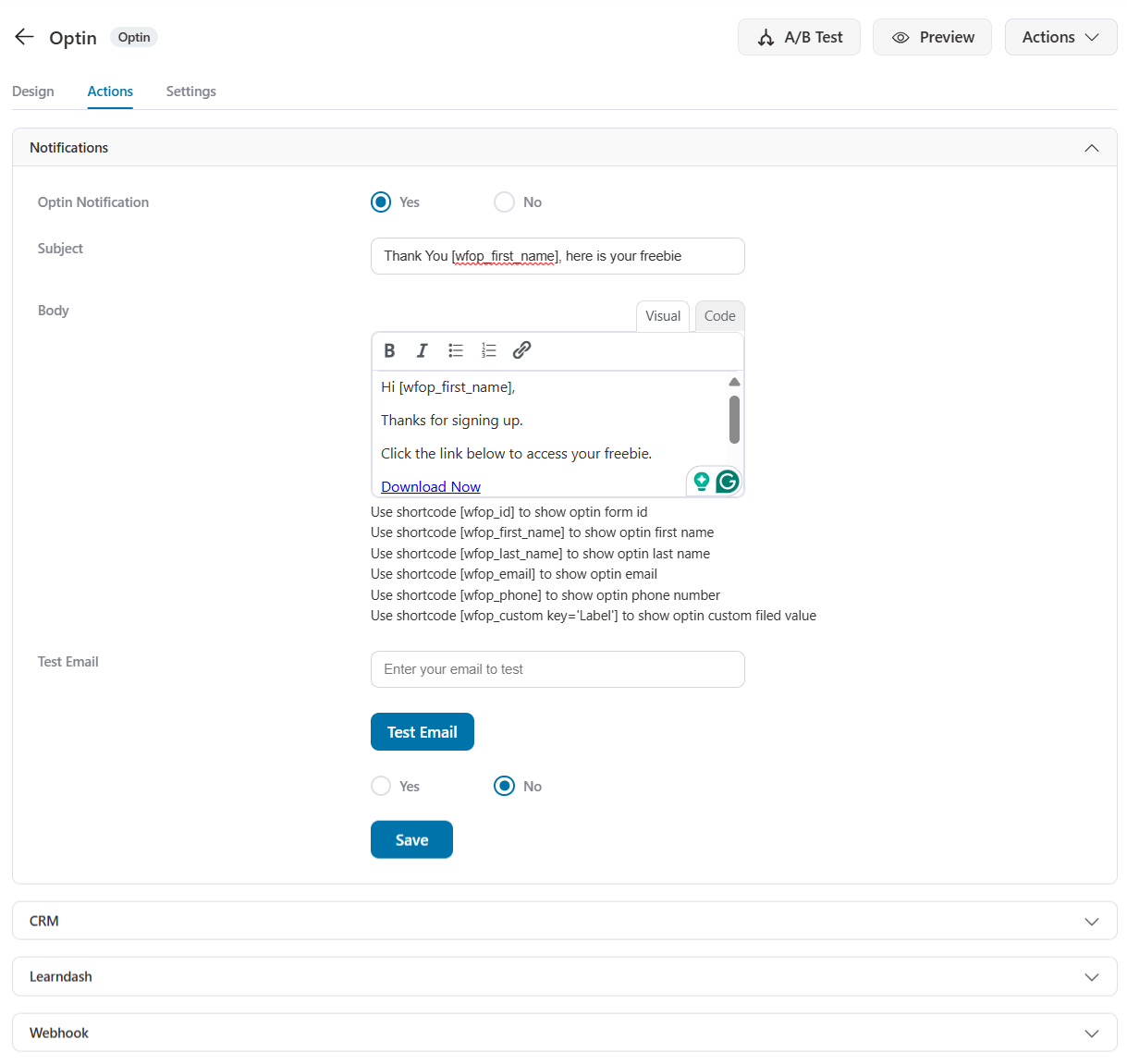
It’s also deeply connected to FunnelKit Automations and other CRMs, meaning you can trigger instant follow-up sequences, segment leads, and run A/B tests to see what works best.
And since tracking is built in, you’ll know exactly which lead sources and offers drive the most conversions.
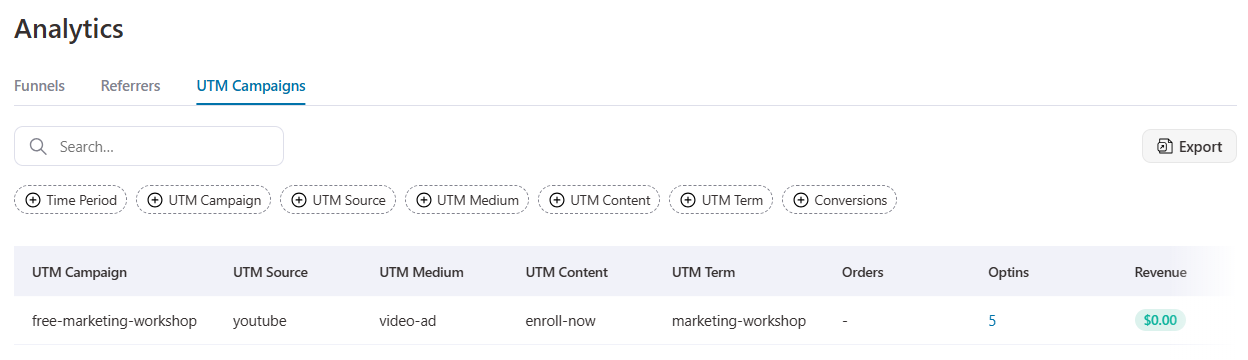
CartFlows
CartFlows focuses on building basic opt-in pages and integrates with popular email tools.
However, it lacks built-in opt-in popups, drag-and-drop form editing, and automated notifications.
Plus, it requires you to add products, which is useless if you want to generate leads.
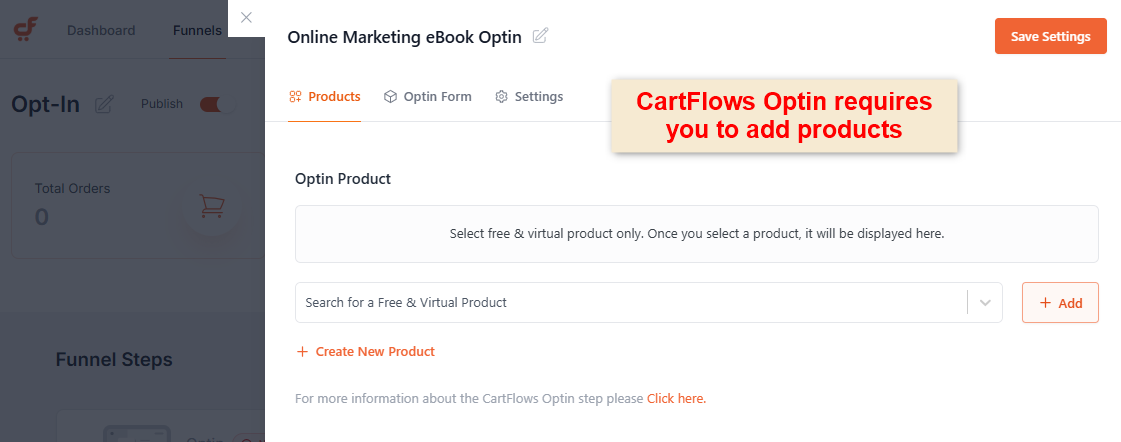
It has built-in A/B testing but misses referral data, conversion stats, and UTM tracking reports.
🏆 Winner: FunnelKit
FunnelKit takes the win here. It’s easier for beginners to set up, has more built-in lead capture tools, and eliminates the need for multiple add-ons, making it a stronger choice if building your email list is a priority.
In contrast, CartFlows requires you to add products even for opt-in pages, which can create unnecessary zero-dollar orders even for simple lead submissions.
Which Plugin Offers the Best Integration with Various Page Builders?
Both FunnelKit and CartFlows understand the importance of design freedom.
However, FunnelKit supports a wider variety of page builders, offering more flexibility in customizing WooCommerce checkout and funnel pages.
Here’s why (take a look at this comparison table):
| Page Builder | FunnelKit | CartFlows |
|---|---|---|
| Elementor | ✅ Yes | ✅ Yes |
| Divi | ✅ Yes | ❌ No |
| Oxygen | ✅ Yes | ❌ No |
| Bricks | ✅ Yes | ✅ Yes |
| Gutenberg | ✅ Yes | ✅ Yes |
| Beaver Builder | ❌ No | ✅ Yes |
| Other page builders | ✅ Yes (via shortcodes and visual customizer) | ❌ No |
Let’s dig deeper.
FunnelKit
FunnelKit provides native support for Elementor, Divi, Bricks, Oxygen, and Gutenberg, making it one of the most versatile plugins for builder compatibility.
Even if you’re using a less common builder, FunnelKit has you covered.
It offers a built-in visual customizer and supports shortcodes, allowing you to design pages easily, no matter the builder.
Just select your page builder and import a template.
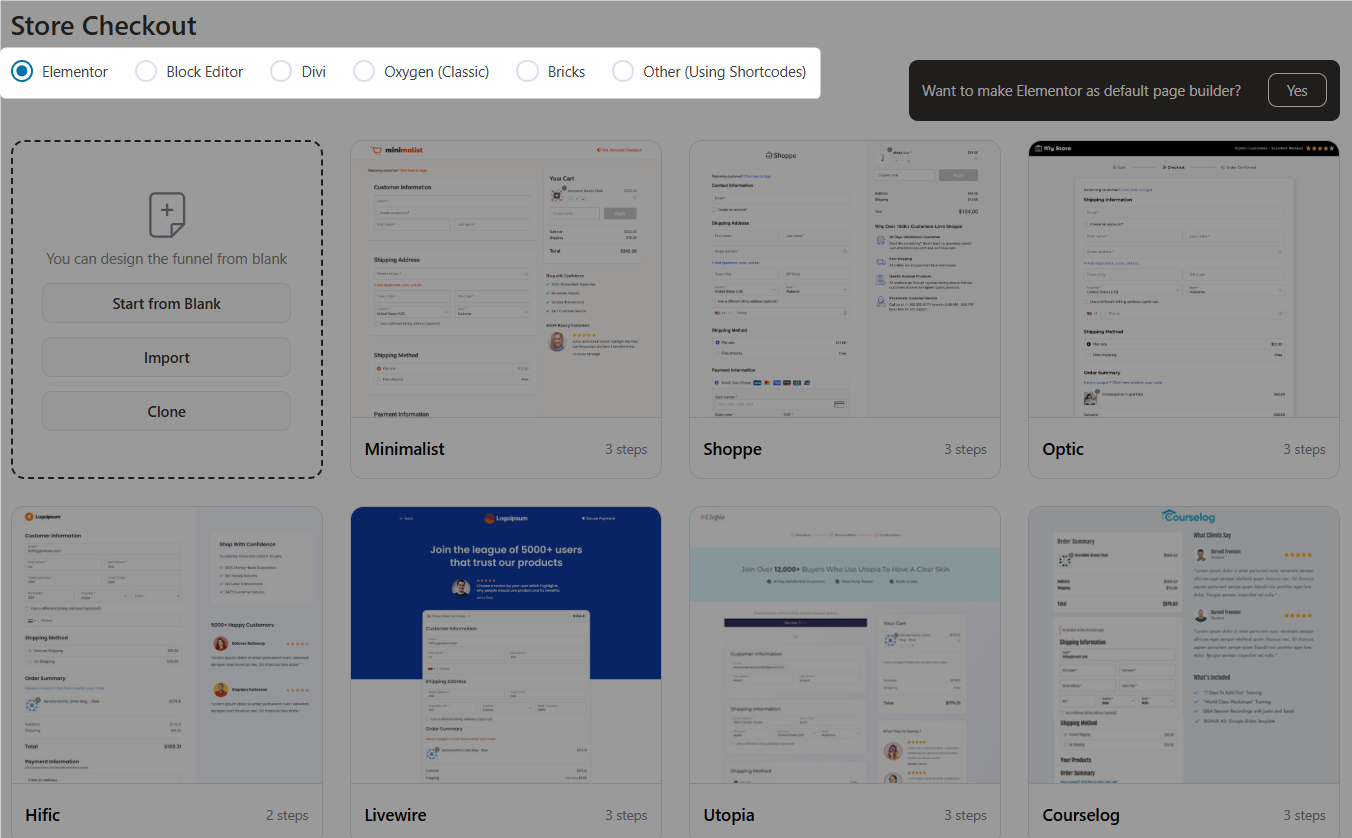
Easily edit your checkouts or funnels using the page builder you selected.
Click Edit, customize, and go live!
However, FunnelKit isn’t compatible with Beaver Builder.
CartFlows
CartFlows supports popular builders like Elementor, Gutenberg, and, more recently, Bricks, making it a great option for many.
However, it doesn’t offer built-in compatibility for Divi and Oxygen.
Additionally, you must manually set your preferred page builder in the settings. Only then will the corresponding templates appear, allowing you to customize them using that specific builder.
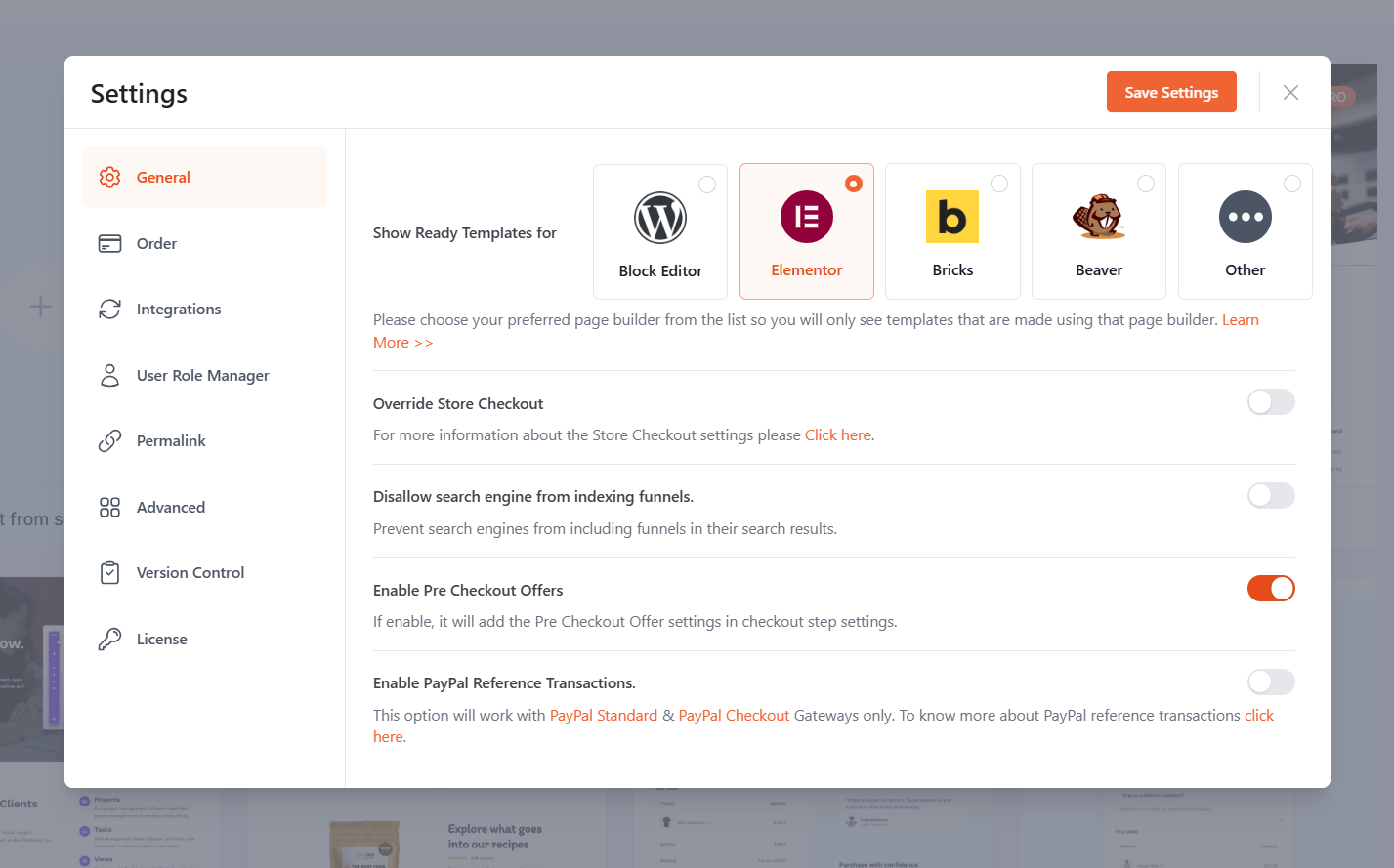
Unlike FunnelKit, other page builders in CartFlows don't offer templates or shortcodes. You need to design your pages from scratch.
This can make setup more restrictive, especially for stores using less common builders.
🏆 Winner: FunnelKit (for Divi, Oxygen, Elementor, Bricks, Gutenberg, Others) and CartFlows (for Beaver)
Both plugins provide strong support for popular page builders. So if Beaver is your priority, go with CartFlows.
But for other page builders like Divi, Oxygen, Elementor, etc., FunnelKit is the best pick.
FunnelKit offers broader compatibility, including native support for Divi and Oxygen, but lacks Beaver Builder.
Which Plugin Has Higher Active Installs and User Reviews?
FunnelKit has the highest five-star ratio of any WooCommerce funnel builder on WordPress.org: 98.2% (973 of 990 reviews). CartFlows' five-star ratio is 92% (453 of 472 reviews).
CartFlows has more total installs because it launched on WordPress.org in 2018, while FunnelKit's free version launched in 2021 after years as a premium-only product.
| Feature | FunnelKit | CartFlows |
|---|---|---|
| Active Installs | 40,000+ (since 2021 on WordPress.org, in addition to a premium-only version between 2018 and 2021) | 200,000+ (launched on WordPress.org in 2018) |
| User Reviews | 977 five-star reviews out of 994 total ratings | 455 five-star ratings out of 494 total reviews |
| Five-Star Ratios | 98.3% | 92% |
| Trustpilot Reviews | 4.8/5 out of 134 reviews (Check here) | 4.2/5 out of 62 reviews (Check here) |
FunnelKit
FunnelKit began its journey in 2018 as WooFunnels.
It started out as a suite of premium, individual products: checkout, funnels, one-click upsells, all sold separately.
In 2021, FunnelKit launched its free funnel builder plugin on WordPress.org and ever since, it’s been winning a loyal customer base that raves about its support, flexibility, beginner-friendly approach, and smart capabilities.
It has 40,000+ active installs currently. However, this number only counts the free version launched after 2021, not the thousands of premium customers from previous years.
CartFlows
CartFlows started as a funnel builder plugin on WordPress.org in 2018, targeting WordPress users at first and later focusing on WooCommerce store owners.
They have 200,000+ active installs, largely thanks to their availability on WordPress.org since launch and their early capture of a wide range of users.
🏆 Winner: CartFlows (for active installs) and FunnelKit (for user reviews and customer happiness)
CartFlows may have the early-mover advantage in installs, but FunnelKit is winning where it really counts: customer happiness, trust, and rapid adoption.
FunnelKit vs CartFlows: Which One Should You Choose?
Both FunnelKit and CartFlows are powerful tools for building sales funnels in WooCommerce, but they take slightly different approaches.
CartFlows has the advantage in sheer active installs, thanks to being on WordPress.org since 2018, while FunnelKit entered the free plugin space in 2021 after years as a premium-only solution.
However, once you look beyond numbers, FunnelKit shines brighter.
It’s the highest-rated funnel builder on WordPress, packed with features like conversion-optimized checkouts, order bumps, one-click upsells, smart A/B testing, detailed analytics, and built-in automations.
These features all make FunnelKit an all-in-one growth platform for WooCommerce stores.
If you're looking for a beginner-friendly solution with enhanced customer support, higher user satisfaction, and the flexibility to scale without switching tools, FunnelKit is the smarter choice.
Frequently Asked Questions
Yes, FunnelKit and CartFlows offer both free and pro versions.
FunnelKit's free version is basic, allowing you to create optimized checkouts and thank-you pages, along with simple cart recovery workflows and a side cart, right out of the box.
The Pro version unlocks features like unlimited funnels, order bumps, one-click upsells, A/B testing, CRM automations, performance analytics, and more.
Whereas CartFlows' free version offers basic pre-designed checkout and thank-you page layouts, it lacks a side cart and automations.
CartFlows’ headline $99 Starter is checkout-only. It excludes the side cart, abandoned cart recovery, automation, and analytics features that FunnelKit Basic at $99.50 pairs with for free via the FunnelKit WordPress.org plugin. To get those features on CartFlows, you need to step up to the CartFlows Suite at $199/year.
Compared like-for-like against CartFlows Suite:
- 1 site, full features: FunnelKit Basic $99.50/year vs CartFlows Suite Grow $199/year - FunnelKit is half the price.
- 3 sites with native CRM and automations: FunnelKit Pro $249.50/year vs CartFlows Suite Scale $299/year (no native CRM at any tier)
- 30 sites for agencies: FunnelKit Elite $399.50/year vs CartFlows Suite Agency $449/year (no native CRM at any tier)
FunnelKit is cheaper and includes features, including a full CRM, native subscriptions via Sublium, and multi-product upsells that CartFlows Suite doesn’t offer at any tier.
Not at all. FunnelKit has a 3-step guided onboarding, a visual canvas builder for drag-and-drop funnel creation, and auto-included order bumps on funnel import. CartFlows requires managing 4 separate plugins (if you're not on a Suite plan) and doesn't offer canvas mode. FunnelKit is designed for beginners and power users alike.
FunnelKit offers 15+ features not available in CartFlows at any price tier: visual automation builder, CRM with contact profiles, multi-product upsells, dynamic shipping and tax recalculation on upsells, gamified cart rewards, express pay in cart (Apple Pay, Google Pay), visual email builder, social proof on order bumps, one-click product upgrades, conditional checkout fields, UTM/referrer analytics, cart analytics, transactional email design, visual canvas funnel builder, and native subscription support via Sublium, their WooCommerce subscription plugin.
Absolutely! If you’re focused purely on building funnels and don’t need the CRM/automations right now, the $179.50/year plan gives you Funnel Builder without any limitations.
FunnelKit is completely modular, which means that its Cart, Automations, and Funnel Builder are separate modules. You can purchase each independently with granular feature toggles.
No, FunnelKit does not include built-in automations. It has a separate plugin, FunnelKit Automations, the native CRM and marketing automation engine.
You can also buy FunnelKit Automations separately if you only want the CRM/email automation side.
Yes! If you already have your preferred funnel builder or checkout setup, you can buy FunnelKit Automations separately and integrate it with your existing store.
Definitely! FunnelKit lets you create opt-in pages, webinar registration funnels, free resource download funnels, and more, all without requiring checkout.
CartFlows doesn't allow you to set up lead gen forms without adding products.
FunnelKit doesn't currently offer a one-click CartFlows importer, but rebuilding existing funnels is fast thanks to FunnelKit's drag-and-drop interface and pre-built templates. Most users can recreate their funnels in under an hour.
Editorial Team
October 9, 2026A downsell gives customers a cheaper option after they turn down your main offer. If you show it too soon, you might convince them to skip the original offer and...
Editorial Team
October 8, 2026WooCommerce guest checkout lets shoppers buy from your store without creating an account. They enter an email, their billing details, and payment, and the order goes through. It's a built-in...
Editorial Team
October 7, 2026WooCommerce upsells are products you recommend in place of the one a shopper is viewing, usually a better or higher-priced version of it. WooCommerce has a built-in upsell field for...






