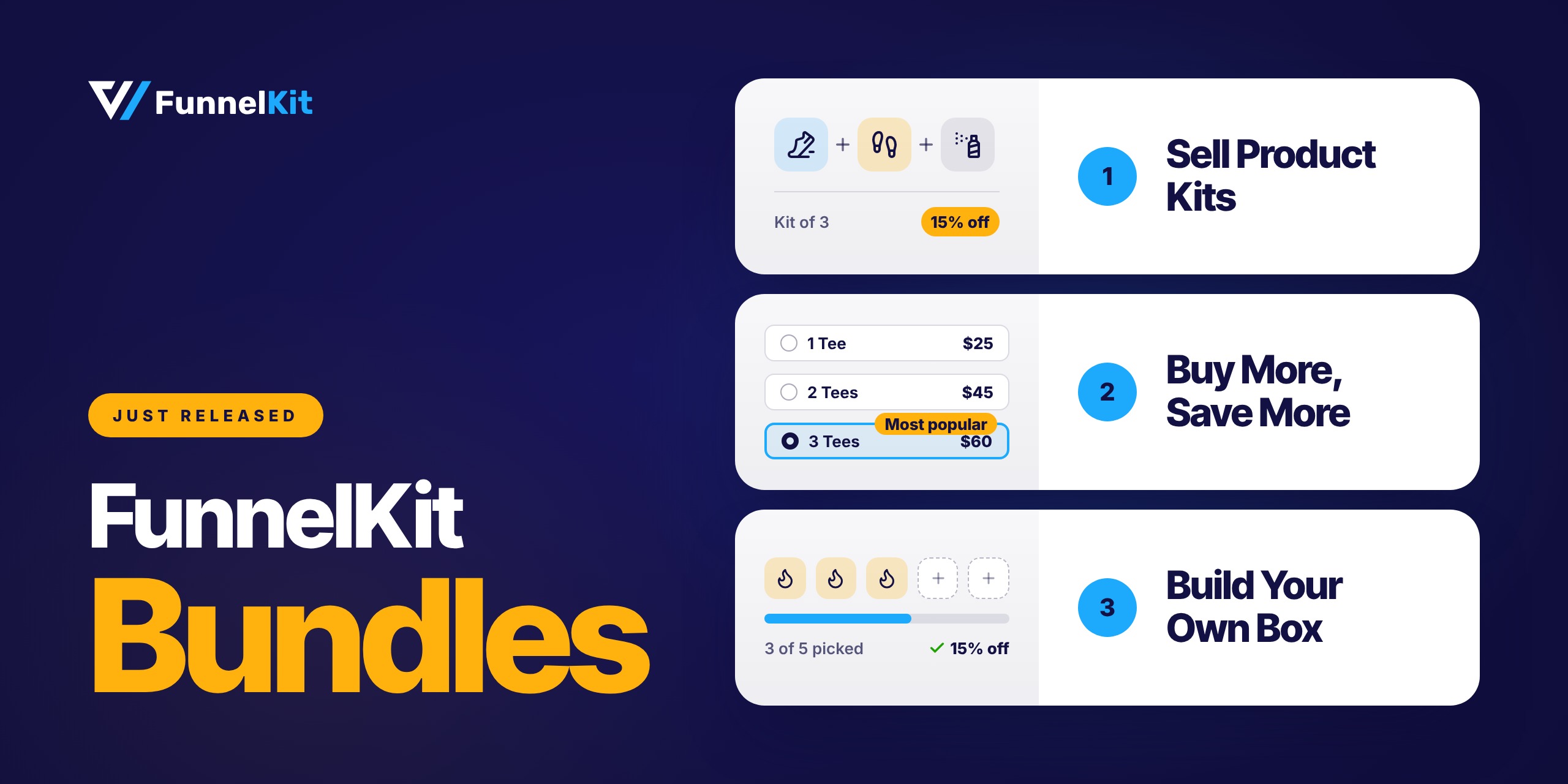
FunnelKit Bundles is here! You can now create and sell product bundles directly from Funnel Builder.
Choose from four bundle types, two of which are completely free.
Whether you want to sell product kits, offer discounts on bulk purchases, or let customers put together their own boxes, you can do it all from the same dashboard you use for checkout pages, order bumps, and one-click upsells.
You don't need to install another plugin or manage a separate set of discount rules.
Let's say a shopper adds a $25 T-shirt to their cart. That’s a $25 order.
Now imagine showing them an offer to get three T-shirts at 20% off, plus a free mug. They like the deal and take it. Suddenly, that $25 order is worth $60.
You haven't spent more on ads or brought in another visitor. You've simply given an existing customer a good reason to buy more.
That's what FunnelKit Bundles helps you do.
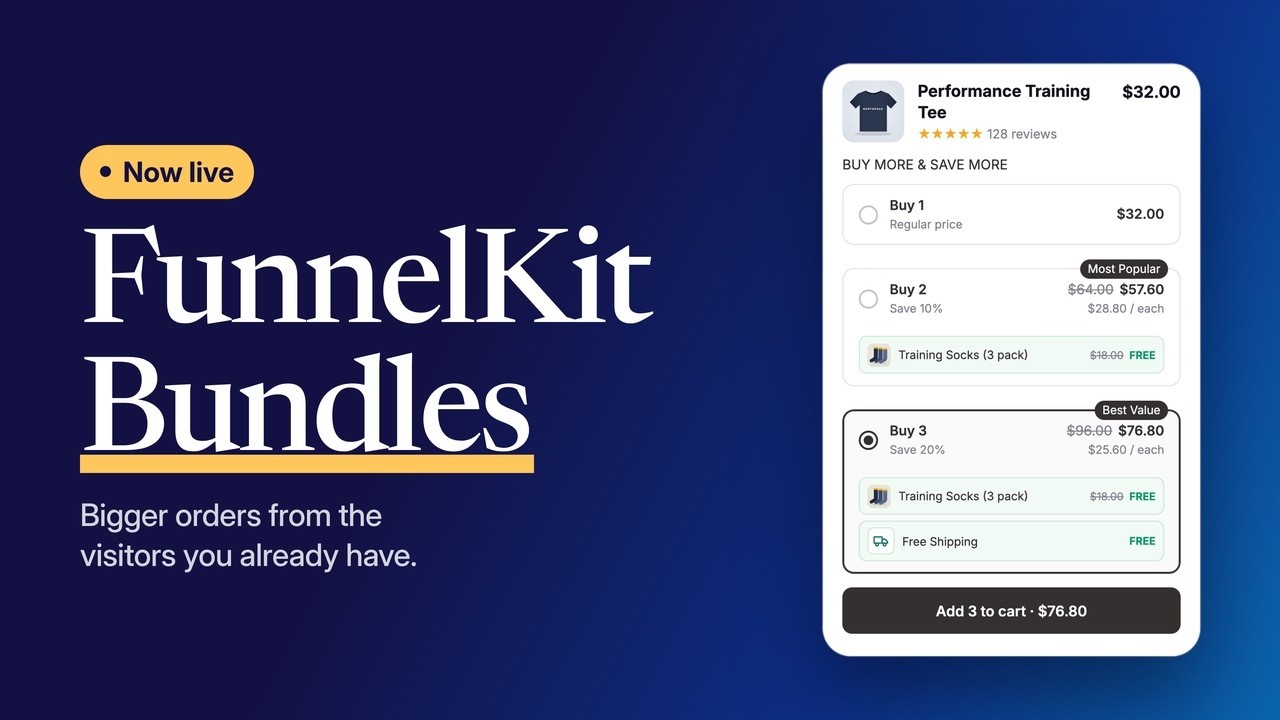
Table of Contents
- 1 Everything That’s New in FunnelKit Bundles
- 2 Why We Built Bundles Into Funnel Builder
- 3 The Four Bundle Types
- 4 Bundles, Order Bumps, and Upsells: One Connected Buying Journey
- 5 Get Even More With FunnelKit Bundles Pro
- 6 Build and Manage Bundles With FunnelKit AI & MCP
- 7 What’s Free and What’s Pro?
- 8 What’s Coming Next
- 9 Frequently Asked Questions
- 10 Turn Your Best-Selling Product Into Your First Bundle
Everything That’s New in FunnelKit Bundles
- Four ways to bundle products: Choose from Fixed Bundle, Frequently Bought Together, Quantity Breaks, and Mix and Match. Each one supports a different selling approach.
- Two free bundle types: Fixed Bundle and Frequently Bought Together are included in the free Funnel Builder plugin. No additional plugin needed.
- A connected buying experience: Show bundles on product pages, offer order bumps at checkout, and present one-click upsells after payment. Everything works together inside Funnel Builder.
- Gifts and add-ons (Pro): Reward bigger purchases with free gifts or free shipping. You can add these automatically or let shoppers choose their gifts. You can also offer discounted add-ons alongside bundles.
- Flexible targeting and scheduling (Pro): Show bundles to specific user roles, apply them across entire product categories, or schedule them around upcoming sales.
- Bundle analytics (Pro): Track the revenue, number of orders, and average order value generated by each bundle. You'll know which offers are actually driving sales.
- AI-powered bundle management: Create, edit, and organize bundles using simple prompts through FunnelKit MCP and your AI assistant.
- Easy design customization: Start with a theme preset, adjust the colors, and see your changes in the live preview. Pro also lets you generate a theme using your brand color and save custom presets for later.
- Organized orders: Bundle products stay grouped throughout the shopping experience, from the cart and checkout to order emails, My Account, and the WooCommerce order screen.
Why We Built Bundles Into Funnel Builder
WooCommerce’s grouped products are useful for putting related products together on one page. But that’s pretty much where they stop.
You can’t offer a bundle discount, require a specific product combination, or give shoppers a better deal when they add more items.
So, naturally, most stores end up installing another bundle plugin. That's where things can get messy.
You have another plugin to configure, another set of discount rules to manage, and another way bundle items appear in the cart.
Your funnel analytics may not know what happened either.
And when a customer returns one item from a discounted bundle, working out the actual value of each product can get complicated fast.
We wanted bundles to be a natural part of the buying journey, not something bolted onto your store.
So we built them directly into Funnel Builder, right alongside your checkout pages, order bumps, and one-click upsells.
Bundles have their own settings and analytics under the Funnel Builder menu, and every order tracks which bundle each item came from.
One thing to keep in mind before getting started: Bundles require FunnelKit Funnel Builder.
The free version is enough to create and sell Fixed Bundles and Frequently Bought Together offers.
The Four Bundle Types
When you create a new bundle, the first thing you’ll do is choose its type.
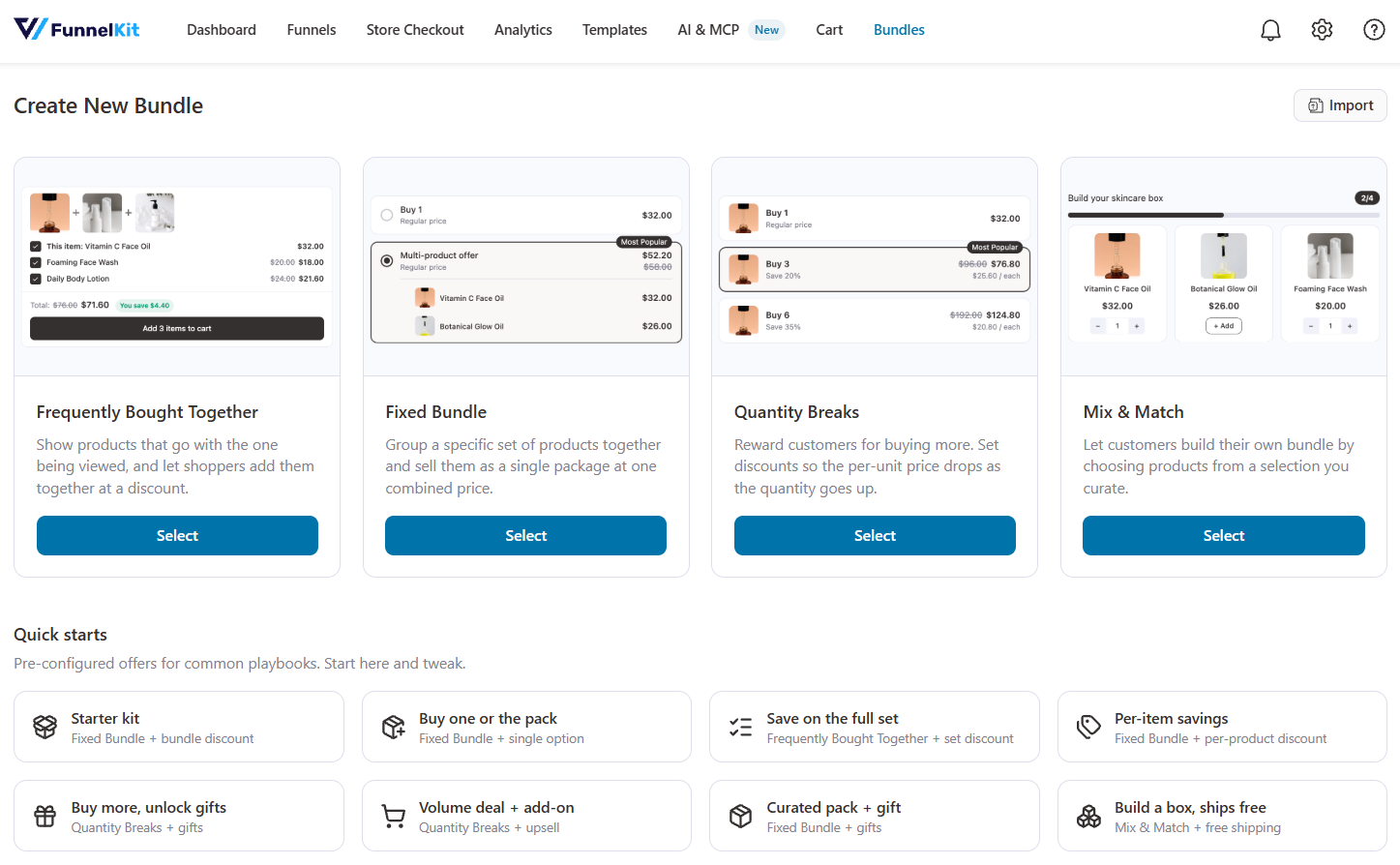
FunnelKit Bundles gives you four options: two are included free with Funnel Builder, while the other two require Bundles Pro.
Here’s how each one works, with examples from our demo store.
| Bundle type | Edition | What the shopper gets | Example from our demo store |
|---|---|---|---|
| Fixed Bundle | Free | A ready-made set at one discounted price | Trail running shoes, socks and a shoe care kit at 15% off |
| Frequently Bought Together | Free | A main product plus companions they can tick or untick | A tea tin with an infuser and a mug at 10% off |
| Quantity Breaks | Pro | Buy more, save more tiers on one product | A tee: 1 at full price, 2 at 10% off, 3 at 20% off |
| Mix and Match | Pro | A build-your-own box from a pool of products | Any 3 candle scents at 15% off or 5 at 25% off |
Fixed bundle
Want to sell a ready-made kit at one attractive price? That's what Fixed Bundle does.
Group related products together, set a discounted bundle price, and let customers grab the entire set in one go.
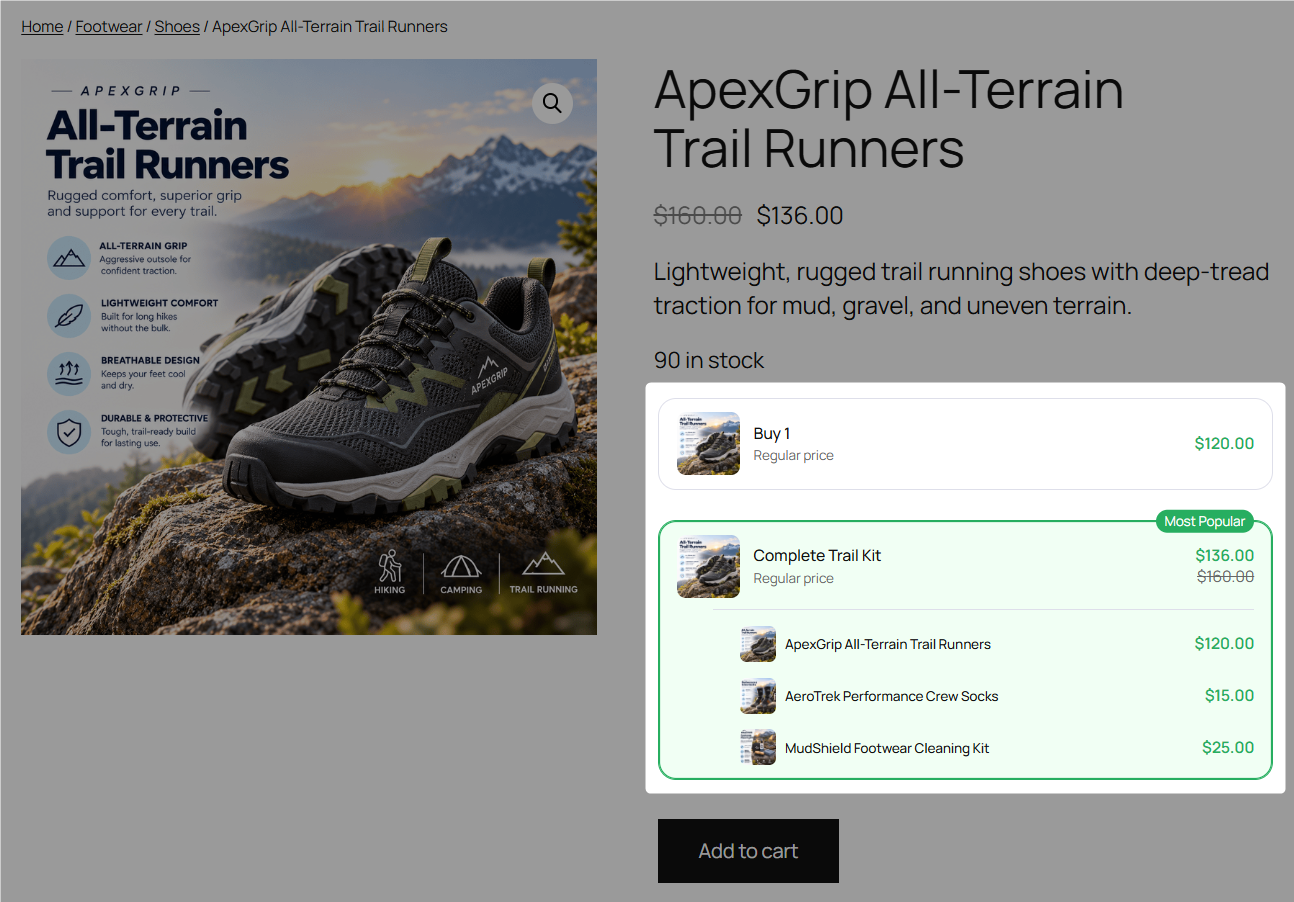
You can also keep the single-product purchase option enabled, so shoppers who only want the main product can still buy it on its own.
Frequently bought together
You know those product recommendations that say, "You might also need these"? That's exactly how Frequently Bought Together works.
Show complementary products alongside the main product and let shoppers select or skip individual items. The total price updates instantly as they make their choices.
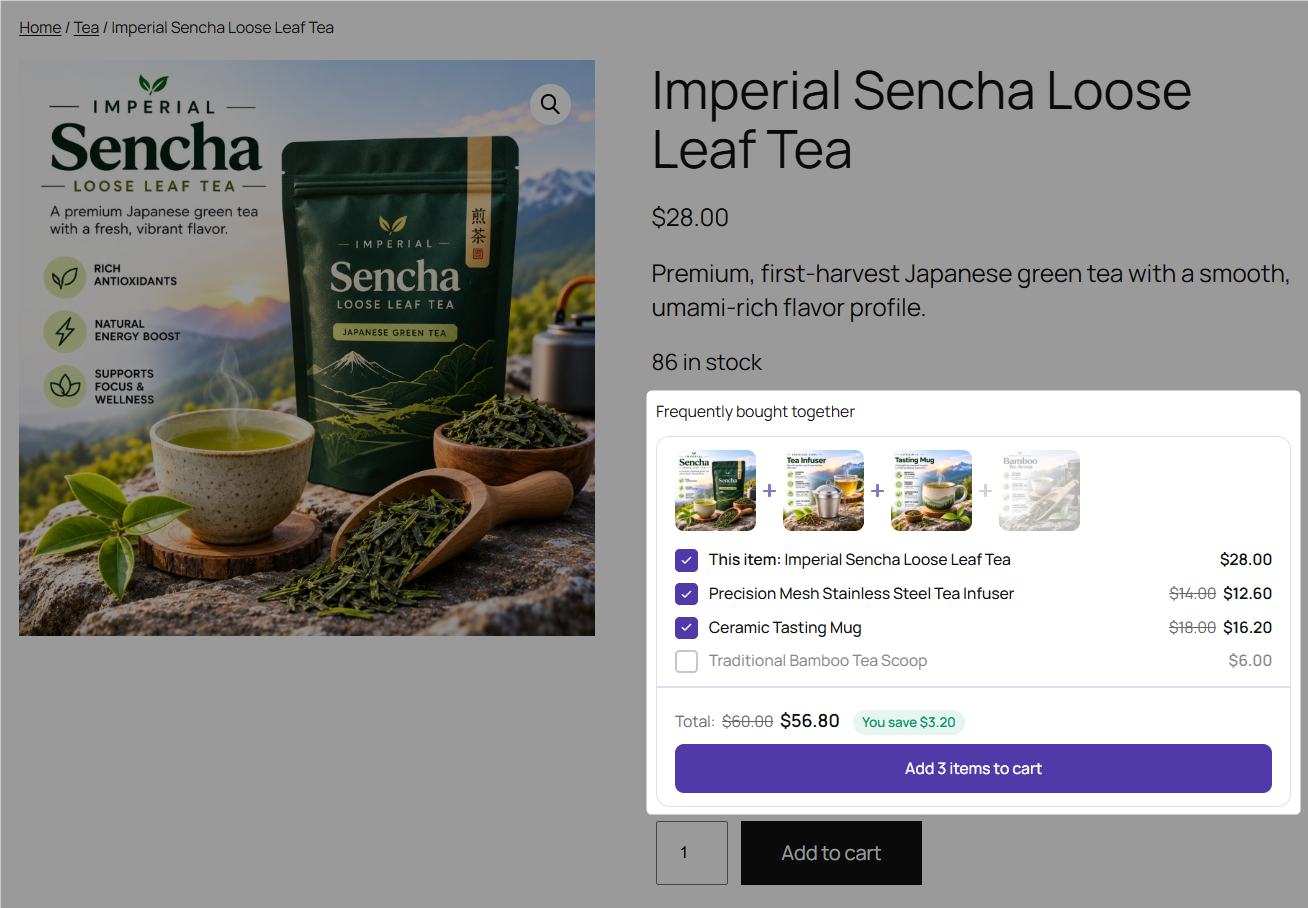
You can also require shoppers to add at least one extra product before the bundle discount applies. That way, the main product alone won't qualify for the discounted price.
Choose between a row or list layout to display the offer on your product page.
Quantity breaks
Encourage shoppers to buy two or three items instead of just one by offering tiered pricing.
Set your quantity tiers, highlight the one you want to promote with a Most Popular badge, and choose which option customers see selected by default.
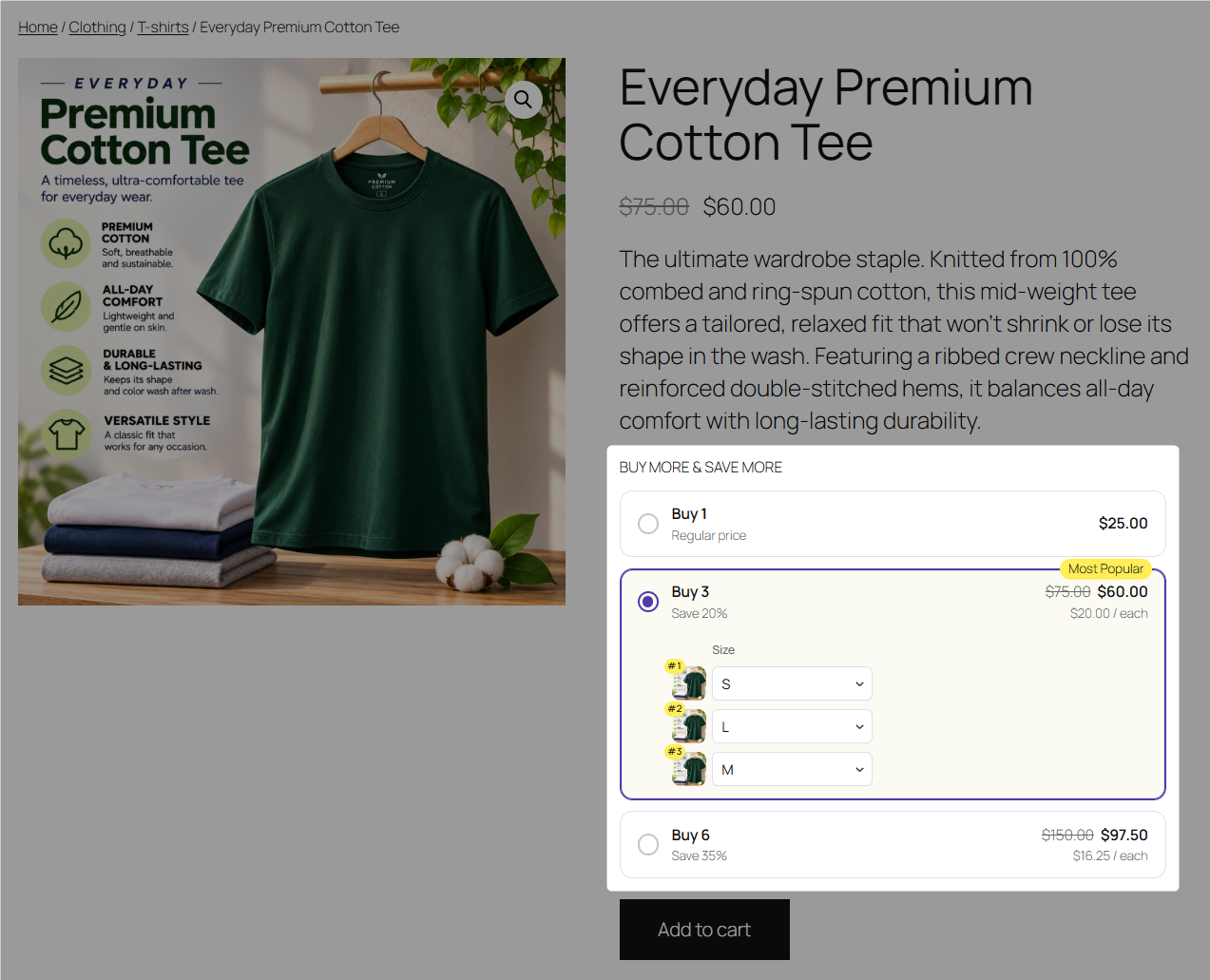
You can display the tiers in a stacked layout, columns, or a grid.
Here's a handy detail: each product in a quantity-based offer gets its own variation selector.
So, if someone picks the two-T-shirt deal, they can choose a medium for themselves and a large for their partner without placing separate orders.
Mix and match
Want customers to build their own product boxes? Mix and Match makes that possible.
Choose the products shoppers can pick from, set your box sizes, and decide the discount for each. You can also control how many items and units of each product customers can add.
As shoppers pick their favorites, they can see their box fill up in real time. Once they reach a qualifying quantity, the corresponding discount applies automatically.
You can display the products in a grid or list, depending on what works best for your catalog.
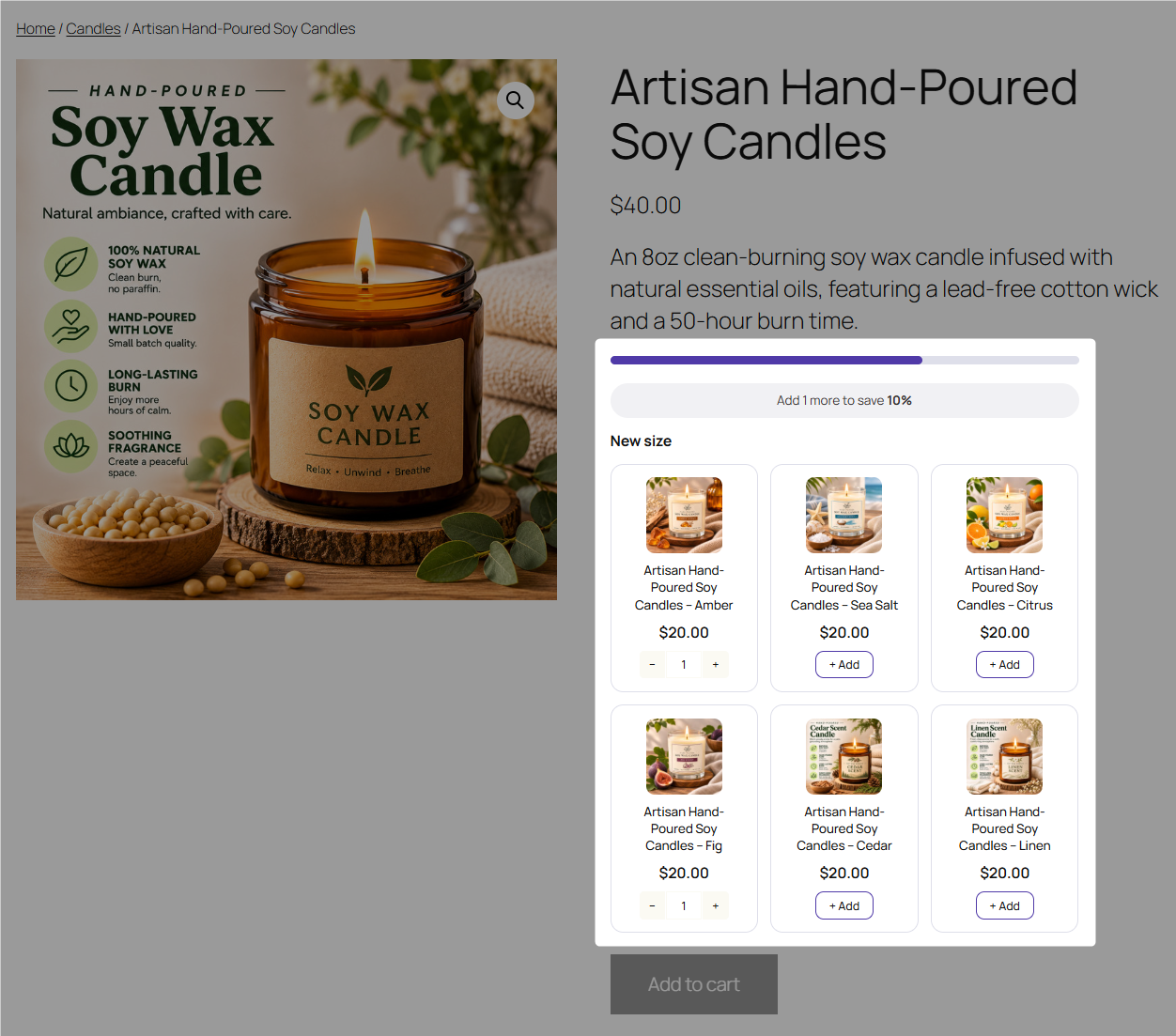
Selling gift sets that shouldn't be broken apart? Turn on Box Only to make customers purchase the complete box. If you also sell those products individually, simply leave this option disabled.
One more thing: FunnelKit Bundles isn't limited to physical products. You can use it for digital downloads, online courses, memberships, and more. You can also use different bundle types across your catalog.
If two bundles are assigned to the same product, FunnelKit displays the one that appears higher in your Bundles list.
Bundles, Order Bumps, and Upsells: One Connected Buying Journey
A product bundle is a great way to increase order value, but why stop there? With Funnel Builder, you can follow it up with an order bump at checkout and a one-click upsell after payment.
Add bundles to your sales funnels, and all three offers become part of the same buying journey. Customers can accept each offer without starting their purchase all over again.
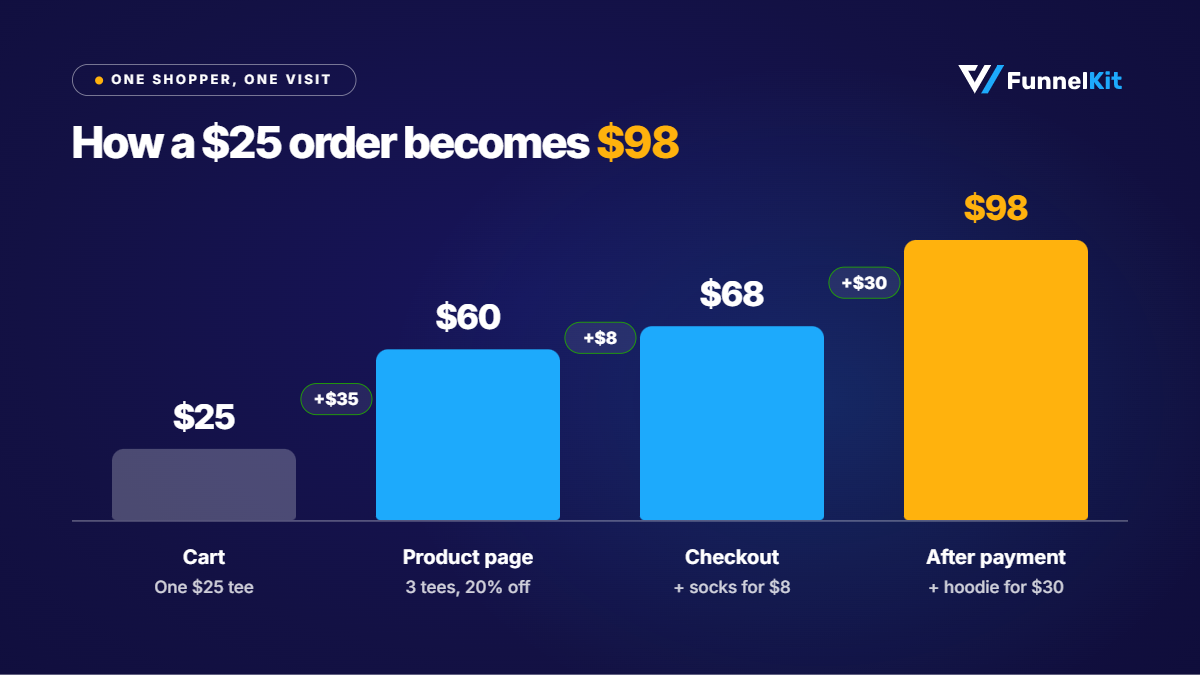
Here's how that could work for our T-shirt shopper:
| Step in the journey | Offer | Order value |
|---|---|---|
| Product page | Quantity Break: 3 tees at 20% off | $60 |
| Checkout | Order bump: matching socks for $8 | $68 |
| After payment | One-click upsell: a hoodie for $30 | $98 |
A shopper came to your store looking for a $25 T-shirt. By the time they’re done shopping, their order has grown to $98.
Of course, not every customer will accept every offer. And that’s perfectly fine. But even getting one additional purchase can increase your order value.
The trick is to make sure these offers complement each other rather than repeat the same pitch.
For example, if a customer has already seen an offer for three T-shirts and decided against it, showing them the same offer again at checkout probably won’t help.
Instead, give each offer a different purpose:
- Product page: Encourage customers to buy more of the same product through bundles.
- Checkout: Suggest a small add-on that goes well with their purchase.
- After payment: Offer a higher-value product that complements what they’ve already bought.
This way, each step gives customers another relevant reason to add something to their order.
Want to learn more? Check out our guides to WooCommerce order bumps and one-click upsells to see how these offers work.
Get Even More With FunnelKit Bundles Pro
Quantity Breaks and Mix and Match are only part of what Bundles Pro offers. You also get features that make your bundles more flexible, attractive, and profitable.
Here's what else you can do:
- Quick starts
Don't want to build a bundle from scratch? Start with a ready-made setup for a common bundle offer.
Just add your products, set the prices and discounts, and you're good to go.
- In-bundle upsells
Give shoppers the option to add related products at a discount, right alongside the bundle.
Each add-on gets its own discount and appears as a separate line in the cart.
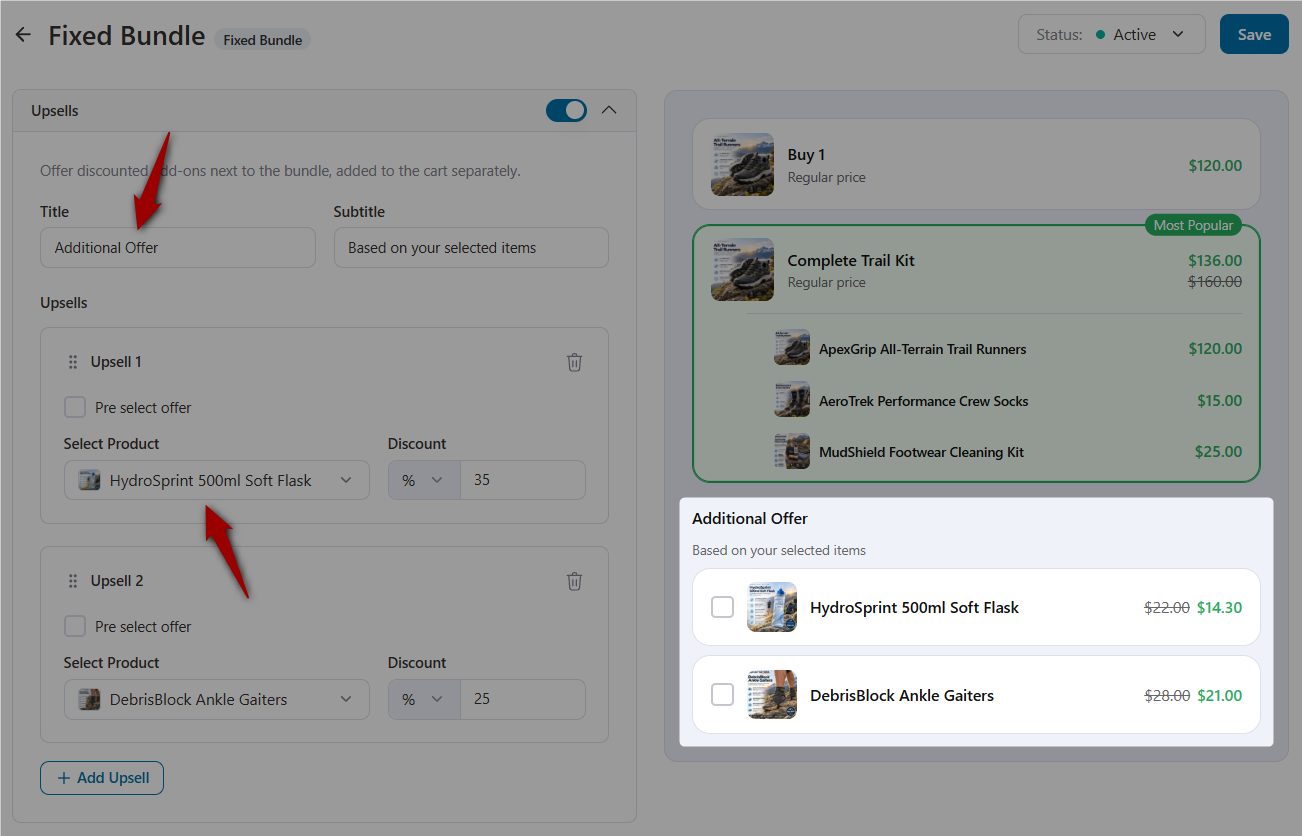
These are different from Funnel Builder's post-purchase upsells, so you can use both in the same buying journey.
- Progressive gifts
Give customers more reasons to spend by offering free products, letting them choose their own gifts, or unlocking free shipping at certain bundle quantities.
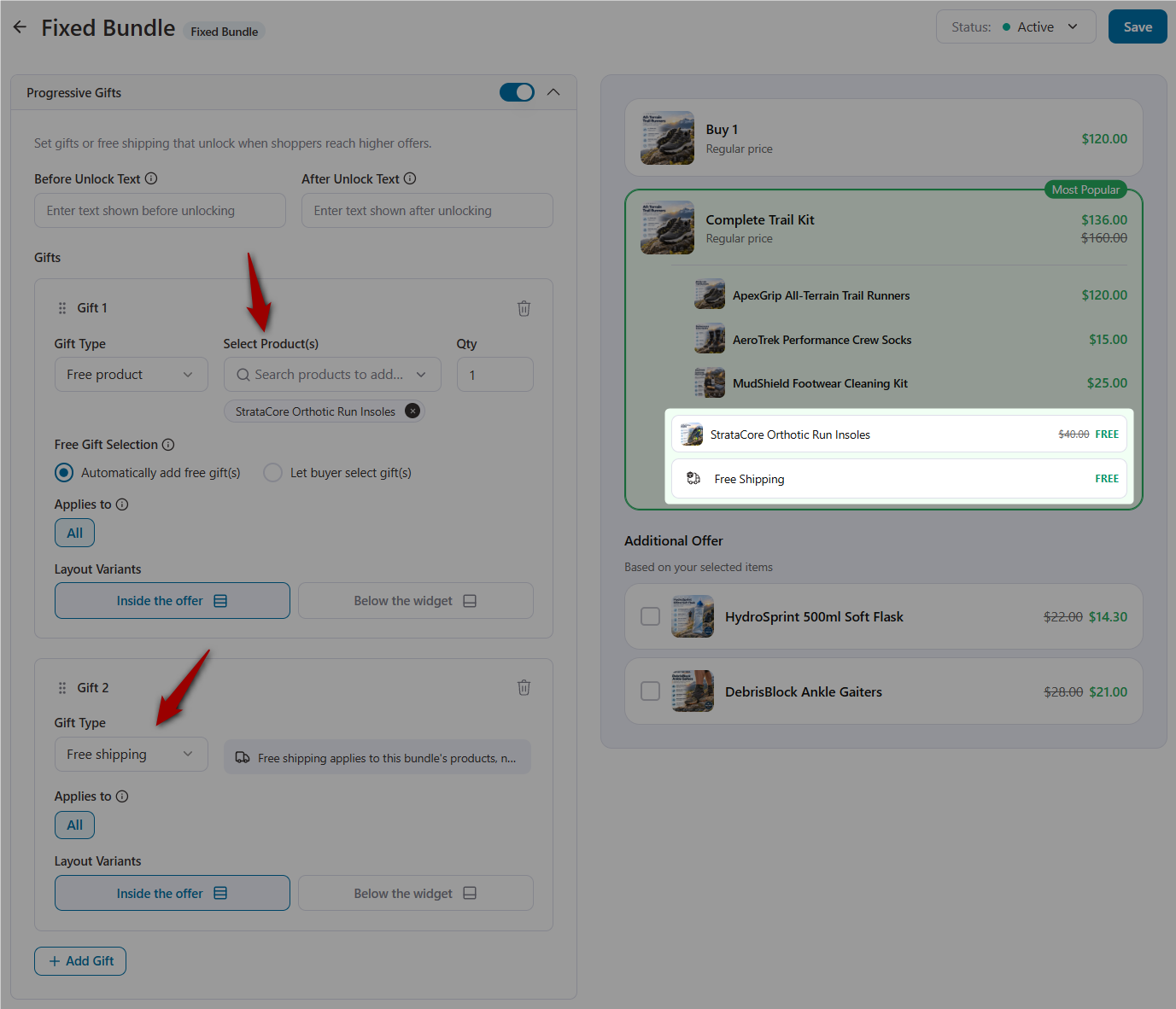
For example, in our demo store, buying three T-shirts unlocks a free mug and free shipping.
- Targeting and scheduling
Want to run a bundle across an entire product category? You can, with the option to exclude specific products.
You can also schedule bundles for weekend sales or show them only to members using the Show to User Roles option.
The free version also lets you choose which products display each bundle.
- Bundle analytics
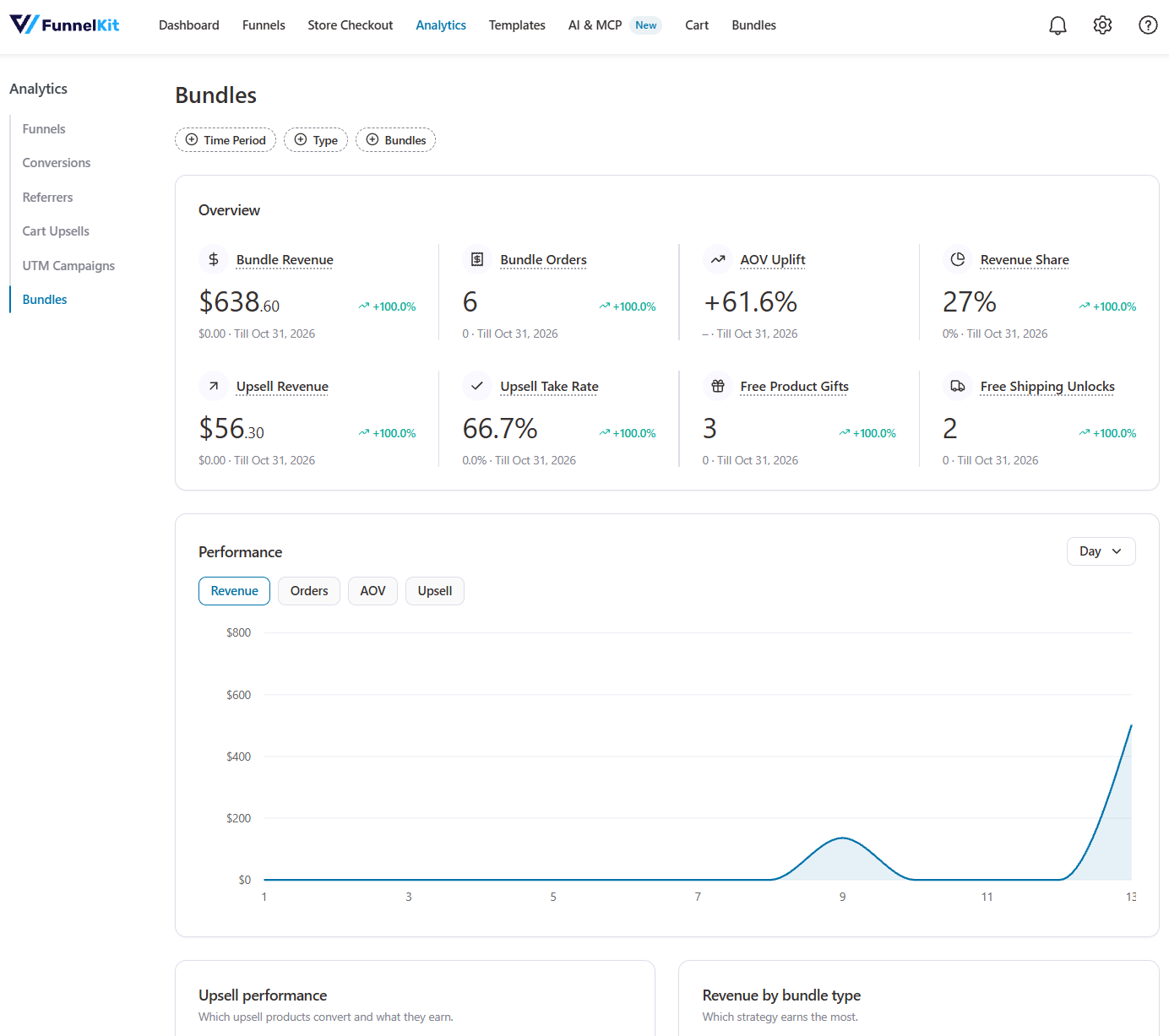
See how much revenue each bundle generates, how many orders it brings in, its average order value, and the revenue from in-bundle upsells.
You can also track trends over time and break down performance by bundle type or individual bundle.
Find these reports under Funnel Builder ⇨ Analytics under the Bundles tab.
- Offer images and brand presets
Choose an image for each offer, generate a bundle theme using your brand color, and save your favorite designs as presets. You can reuse them whenever you create another bundle.
A quick tip about free gifts: A free mug might sound like a great incentive, but it still costs you money. Before enabling gifts across your store, check whether the additional revenue from larger orders covers the cost of those gifts.
Build and Manage Bundles With FunnelKit AI & MCP
Here's something we think you'll love. FunnelKit Bundles works with FunnelKit MCP, which means you can create and manage bundles without digging through settings or clicking through multiple screens.
Just ask your AI assistant to do it. For example, you can give it instructions like:
- "Create a Fixed Bundle for the trail running shoes with socks and a shoe care kit at 15% off."
- "Which bundles include the Performance Tee? Move the weekend bundle to the top."
- "Change the discount on the shoe bundle to 20%."
- "Pause the weekend sale bundle and create a duplicate for next month."
- "Add the starter kit bundle to my main sales funnel."
And that's just the beginning.
With Bundles Pro, your AI assistant can also pull bundle analytics, check revenue trends, compare individual bundle performance, and look up the orders behind those numbers.
It can also apply or save design presets and browse ready-made quick starts.
Coming soon: Your AI assistant will also be able to look at your product catalog and suggest which products make good bundle combinations. So you won't have to come up with every bundle idea yourself.
What’s Free and What’s Pro?
You don't need to pay anything to get started with FunnelKit Bundles. Fixed Bundle and Frequently Bought Together are both included in the free Funnel Builder plugin.
Here’s a quick breakdown of what’s available in each version.
| Feature | Free (Funnel Builder) | Pro |
|---|---|---|
| Fixed bundle | Yes | Yes |
| Frequently bought together | Yes | Yes |
| Design tab: layouts, themes, colors, and live preview | Yes | Yes |
| Show a bundle on specific products | Yes | Yes |
| Bundles list, priority, bulk actions, import and export | Yes | Yes |
| Product bundles tab and bundle lines on orders | Yes | Yes |
| Quantity breaks | No | Yes |
| Mix and match | No | Yes |
| Quick starts | No | Yes |
| In-bundle upsells and progressive gifts | No | Yes |
| Category, schedule and customer role targeting | No | Yes |
| Offer images, brand color and design presets | No | Yes |
| Bundle analytics | No | Yes |
Want access to everything? Bundles Pro works alongside Funnel Builder Pro and is included in the FunnelKit Elite plan, priced at $299.50/year.
If you're on Elite, you can use all Bundles Pro features without entering a separate license key. On any other plan, you'll need to purchase a Bundles Pro license or upgrade to Elite.
Activating your license is simple. Head to FunnelKit ⇨ Settings ⇨ General and enter your license key in the field next to your Funnel Builder Pro license.
Need a hand? Check out our license activation guide for the steps.
What’s Coming Next
This is only the first release of FunnelKit Bundles. We're already working on more bundle types to give you even more ways to sell.
We're also bringing Bundles and Sublium subscriptions closer together.
Imagine running a coffee store where customers buy a starter kit with coffee beans, a grinder, and a brewing accessory.
Once they've tried it, you can turn that one-time purchase into a monthly coffee refill subscription.
And there's more coming to FunnelKit MCP. Soon, your AI assistant will be able to look at your product catalog and suggest products that make good bundles.
Have an idea for a bundle type or feature you'd like to see? We'd love to hear it. Tell us what you need, and let's build it together!
Frequently Asked Questions
Partly. Fixed Bundle and Frequently Bought Together are free with Funnel Builder. You also get the design controls, product targeting, and bundle management features.
To use Quantity Breaks, Mix and Match, progressive gifts, in-bundle upsells, advanced targeting, and bundle analytics, you'll need Bundles Pro.
Not for the free features. They're built right into Funnel Builder, so there's no additional plugin to install.
For Pro features, you'll need Funnel Builder Pro and the Bundles Pro add-on activated on your site.
Yes. You can use the Variation Selection Behavior setting to control how shoppers choose product variations, such as sizes and colors. Choose from Inline, Modal Popup, or Adaptive.
Quantity Breaks also lets shoppers select variations for each unit separately. For example, someone buying two T-shirts can choose a medium for one and a large for the other.
Yes. FunnelKit Bundles works with downloadable products and course products too.
You can create a bundle with multiple presets, combine different templates into one pack, or sell an online course with its workbook as a single offer.
They can if you don't price your bundles carefully. Remember, the discount also applies to the product a customer might have purchased at full price anyway.
Let's go back to our T-shirt example. Three T-shirts at 20% off cost $60, compared to $25 for a single T-shirt. That means the two additional shirts bring in $35, or $17.50 each.
If each T-shirt costs you more than $17.50 to make and ship, you're losing money on those additional units. And that's before accounting for any free gifts included in the offer.
The solution isn't necessarily to avoid discounts. Adjust the discount or gift so the bundle still leaves you with a healthy margin.
Yes. Since Bundles is built into Funnel Builder, you can use it alongside your existing order bumps and one-click upsells.
You can also add bundles directly to your funnels and use all three offers in the same buying journey.
Just make sure each offer serves a different purpose so customers aren't repeatedly shown the same product.
Subscription support is on our roadmap. We know many stores sell both subscriptions and product bundles, and we're working on ways to combine the two.
If you use Sublium, keep an eye on this blog for updates as we make progress.
Turn Your Best-Selling Product Into Your First Bundle
You don't have to turn your entire catalog into bundles to get started. Pick a product that's already selling well and create a Fixed Bundle or Frequently Bought Together offer. Both are free.
See how shoppers respond, and check your order data to see whether they prefer the bundle or still go for the single product.
Want to offer quantity-based discounts, let customers build their own boxes, or reward bigger orders with free gifts? That's when Bundles Pro comes in.
Need help setting things up? Follow our step-by-step guide to creating product bundles in WooCommerce to get started. You can also find more details in the FunnelKit Bundles documentation.
That $25 T-shirt order could be worth a whole lot more. We can't wait to see what you create with FunnelKit Bundles!
Damanjeet Singh
October 23, 2026FunnelKit Automations 3.8.6 is here, bringing a much-requested feature to automation builders: Branches. Say you run a pet store that sells subscription food boxes. A first-time puppy owner places an...
Damanjeet Singh
October 15, 2026FunnelKit Funnel Builder 3.17 is here, and it brings something every store owner wants, i.e., a clearer picture of where their revenue comes from. Imagine a $186 order lands in...
Damanjeet Singh
August 3, 2026Editing a live automation shouldn’t feel like a game of Jenga with your revenue, where pulling the wrong piece brings the whole thing down. That’s the problem we set out...