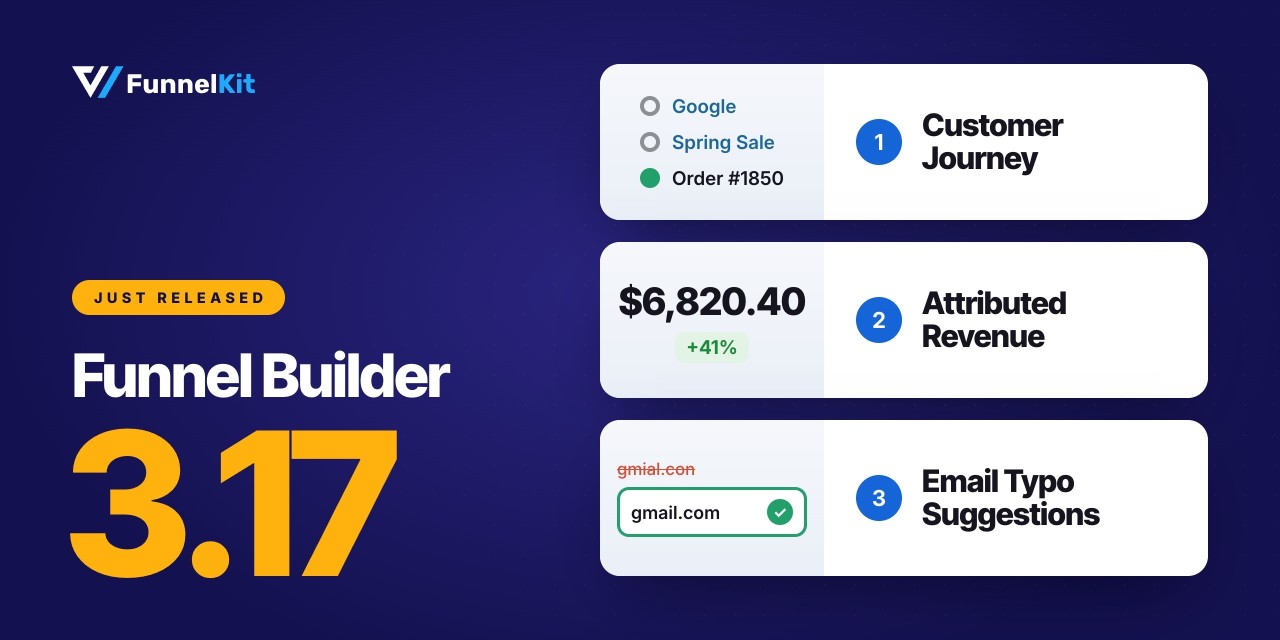
FunnelKit Funnel Builder 3.17 is here, and it brings something every store owner wants, i.e., a clearer picture of where their revenue comes from.
Imagine a $186 order lands in your dashboard. That's great, but what led to the sale?
Also, which landing page convinced the customer to buy? Which ad brought them in? Did they check your FAQ before placing the order, or head straight to checkout?
Until now, your reports could show you that a sale happened. With FunnelKit Funnel Builder 3.17, you can see what happened along the way.
Follow a customer's journey page by page, see how much revenue each landing page generates (including order bumps and upsells), and run A/B tests to identify the variant bringing in the most revenue.
We've also made checkout smarter. It now suggests corrections for mistyped email domains, helping you catch simple mistakes before they turn into missed orders.
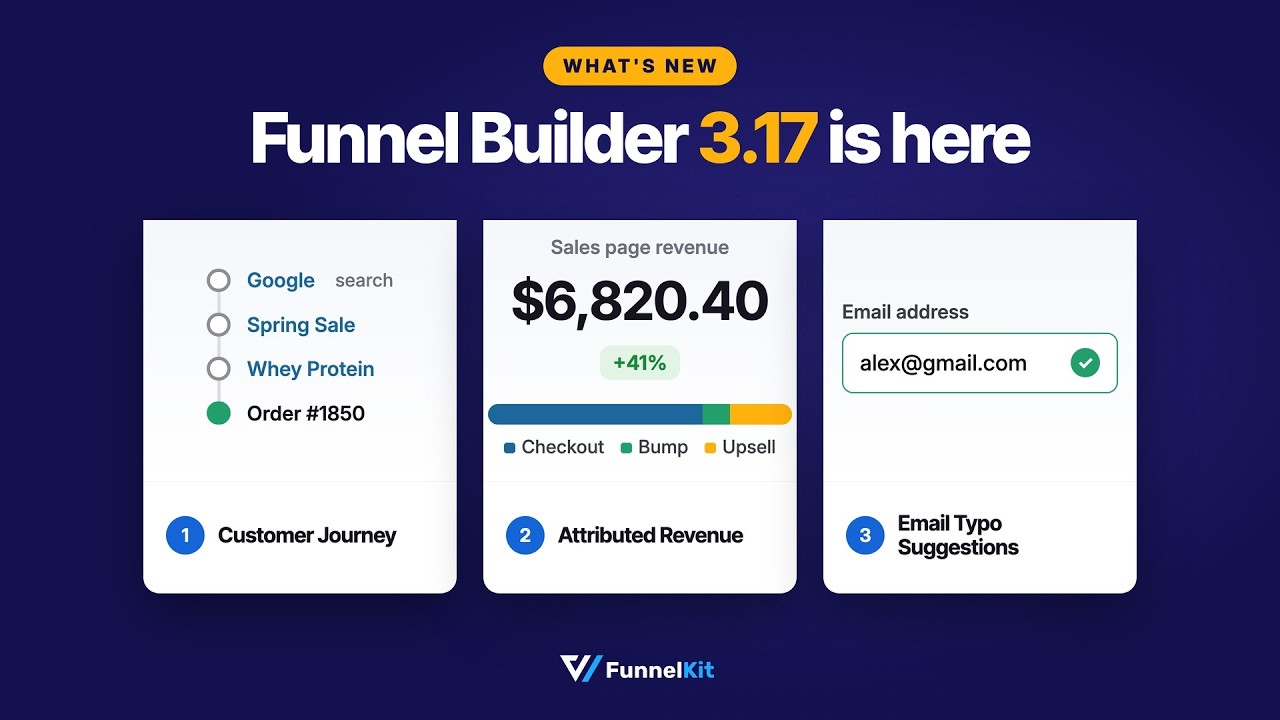
Here's what's new in FunnelKit Funnel Builder 3.17:
- Customer journey in conversion tracking: See every page a customer visited before converting. Filter journeys by page and export the data for further analysis.
- Attributed revenue for landing pages: Find out how much revenue each landing page generates, including sales from order bumps and upsells.
- Email typo suggestions at checkout: Catch common email domain typos before customers complete their orders.
- Cleaner meta tracking: Keep subscription renewals from inflating your ad results and get more accurate pixel data.
- Full-funnel revenue in sales page A/B tests: Compare variants based on the revenue they generate across your funnel, not just the initial conversion.
That's a lot of useful improvements in one release. Let's take a closer look at what's new!
Table of Contents
- 1 1. Customer Journey: See Every Step Before the Sale
- 2 2. Attributed Revenue: Find Out What Your Landing Pages Really Earn
- 3 3. Email Typo Suggestions: Save Orders From the Misspelled Trap
- 4 4. Cleaner Meta Tracking: Stop Renewals From Inflating Your ROAS
- 5 5. New Order Bump Display Rules: The Perfect Offer for Every Cart
- 6 6. Full-Funnel Revenue in Sales Page A/B Tests
- 7 7. Upsell Upgrades: Custom CSS and PayPlug Support
- 8 8. A Faster, Friendlier Checkout on Every Device
- 9 9. Compatibility Updates and Bug Fixes
- 10 Ready to See the Full Story Behind Every Sale?
1. Customer Journey: See Every Step Before the Sale
Every buyer follows a different path to purchase. Some see an ad, land on your sales page, and buy within minutes. Others visit multiple pages, compare products, and come back later before deciding.
Until now, it hasn't been easy to see that entire journey in your conversion reports.
Let's say, one shopper lands on the sales page and buys almost immediately. Another checks the guide, visits a comparison page, returns to the sales page, and finally places an order.
Both customers bought, but what convinced them was different.
In your old conversion report, though, those sales looked pretty much the same.
But FunnelKit Funnel Builder 3.17 changes that by adding customer journey to conversion tracking.
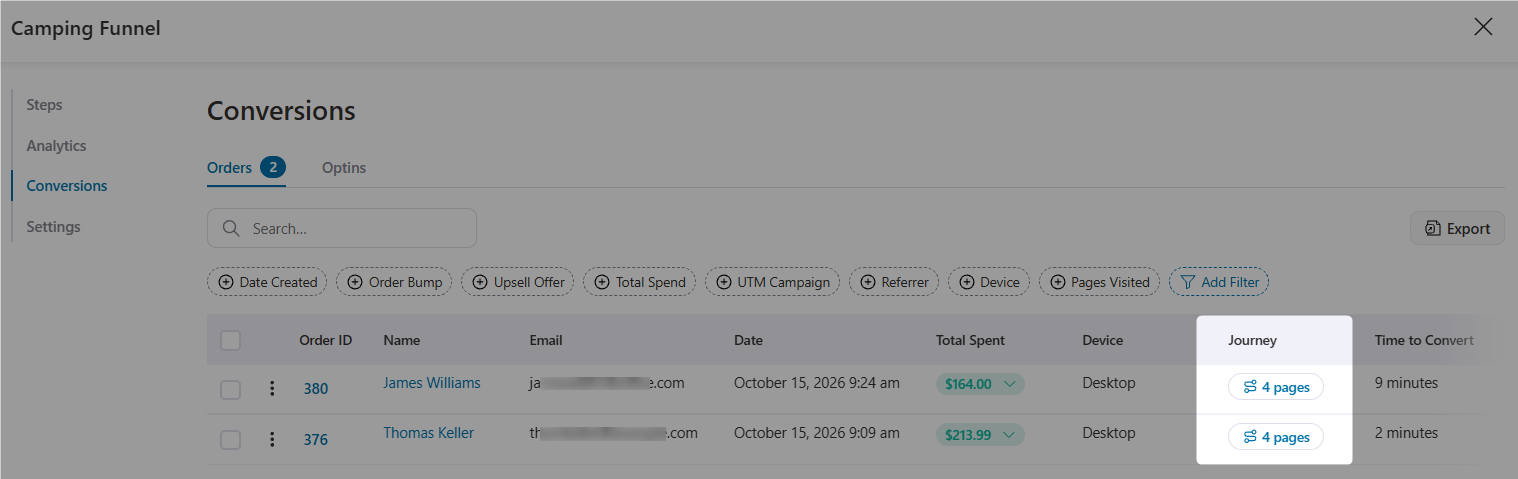
You can now see the pages a customer visited before converting, giving you a clearer picture of what led to the sale.
Here's what you get inside
- Journey details modal: Click any conversion to see the pages the customer visited before completing their purchase, in the order they visited them. No more guessing what happened between the first click and the final sale.
- Pages Visited filter: Filter conversions by a specific page to find out which customer journeys included it. Want to know how many buyers checked your shipping policy before ordering? You can do that now.
- Conversions column: Get a new column in the Conversion Tracking table to make conversion data easier to scan at a glance.
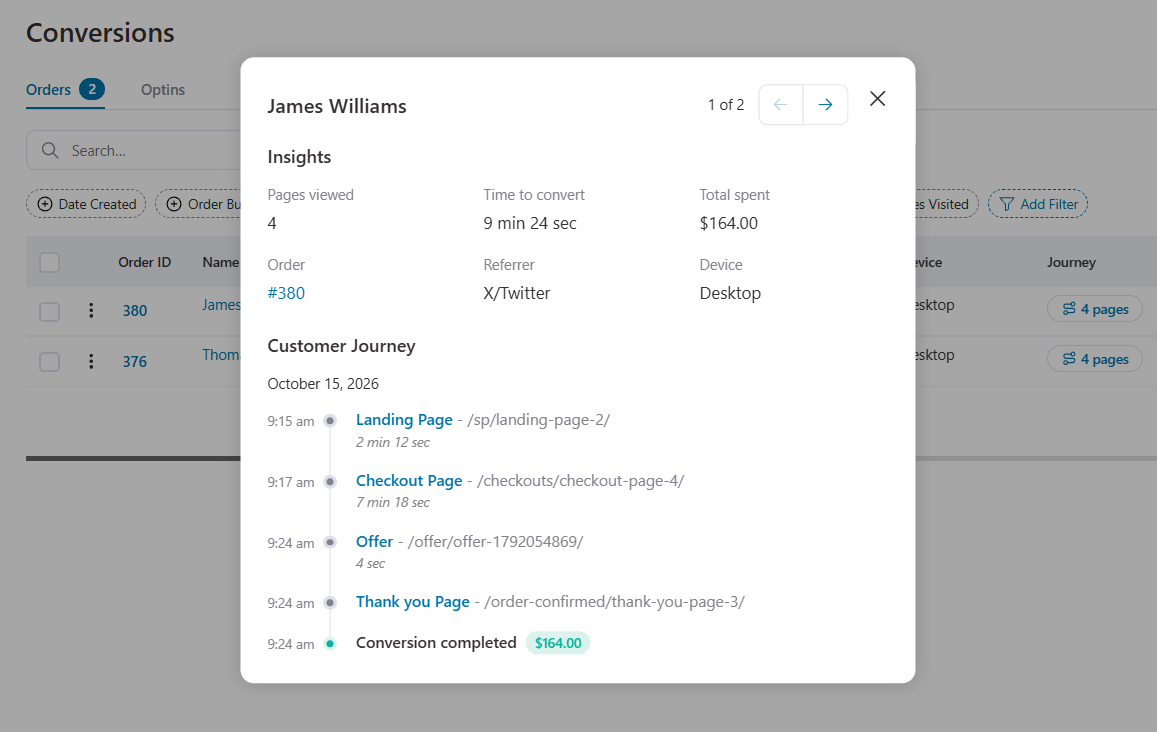
Another useful addition: conversion analytics now track UTM content.
Add the utm_content parameter to your ad URLs to identify which ad creative brought a customer to your store.
Use that data to compare creatives and see which ones drive conversions, rather than relying on clicks alone.
Put your journey data to work
- Find the pages that help close sales
Filter conversions by your FAQ, reviews, or comparison page.
If many buyers visit one of these pages before purchasing, it may be helping them make the final decision.
Try linking to it from your sales page and see whether conversions improve.
- Find out where buyers hesitate
When someone visits the same product page three times before buying, they may still have questions about the price, shipping, or whether the product is right for them.
These repeat visits can help you identify what your sales page needs to explain more clearly.
- Give your ad team useful insights
Instead of guessing what convinces buyers, share real customer journeys.
If people coming from a particular ad consistently visit your comparison page before purchasing, your team can use that insight to create more relevant ad creatives.
Keep in mind that customer journey tracks activity on your website.
It won't show what customers do elsewhere, such as watching a YouTube review before visiting your store.
Think of it as the on-site part of the buying journey, giving you a better understanding of what happens between the first visit and the final purchase.
2. Attributed Revenue: Find Out What Your Landing Pages Really Earn
Here's a question: how much revenue does your best landing page actually generate?
Most store owners can tell you their click-through rate and checkout conversion rate.
But how much money does each landing page bring in once you account for order bumps and upsells? That's been harder to answer.
FunnelKit Funnel Builder 3.17.0 solves this with attributed revenue reporting for landing page steps.
You can now see the revenue generated further down the funnel by customers who came through each landing page, including:
- Main order revenue: Revenue from the original purchases attributed to the landing page.
- Order bump revenue: Additional revenue from order bumps attached to those purchases.
- One-click upsell revenue: Extra revenue generated by upsells following those purchases.
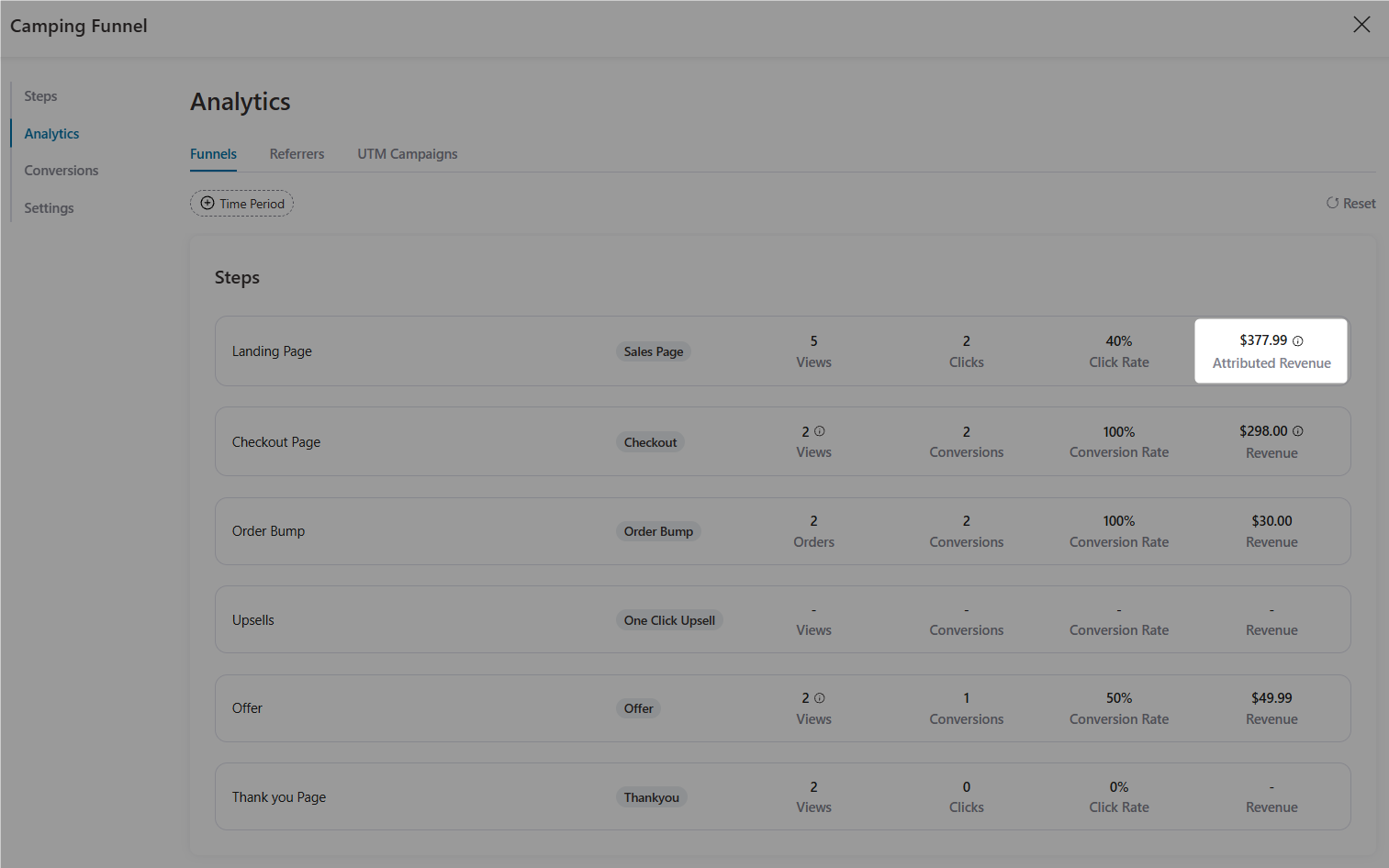
You can now compare landing pages based on the money they generate, not just how many visitors they send to checkout.
That makes it easier to see which pages contribute to your bottom line.
Make smarter decisions with attributed revenue
- Put your ad budget where it performs best
Running different landing pages for different audiences? Compare their attributed revenue to see which pages bring in more money.
This gives you another useful signal when deciding where to invest your ad budget.
- Measure copy changes beyond click-through rates
Maybe you've rewritten your sales page to highlight an upsell, with a line like, "Most hikers pair this with our cookware set".
If fewer visitors reach checkout but more of them buy the upsell, your revenue could still increase.
Attributed revenue helps you spot that difference.
- Give clients reports that show real business impact
Agencies, this one's especially useful for you. Instead of reporting only traffic and conversion rates, show clients how much revenue their landing pages generate, including order bumps and upsells.
It's a more meaningful way to show what your funnel contributes to the business.
Attributed revenue doesn't tell the whole story.
A landing page backed by a high-performing ad campaign may generate more revenue simply because it attracts better-qualified traffic.
When comparing pages, look at traffic sources, audience quality, and visitor volume alongside revenue before deciding which page wins.
3. Email Typo Suggestions: Save Orders From the Misspelled Trap
The ad worked. The customer reached checkout, placed an order, and paid. Everything went smoothly until they entered [email protected] instead of [email protected].
Now the order confirmation bounces plus the download link never arrives.
A couple of days later, your support inbox gets a frustrated “Where's my order?” message. And if that customer abandons another cart, your recovery emails might bounce too.
It's a small typo, but it can create a surprising amount of extra work.
FunnelKit Funnel Builder 3.17 helps catch these mistakes with email typo suggestions.
When a shopper enters an email address with a common domain typo, checkout suggests a possible correction right below the field.
The shopper can tap to accept the suggestion and continue with the correct address.
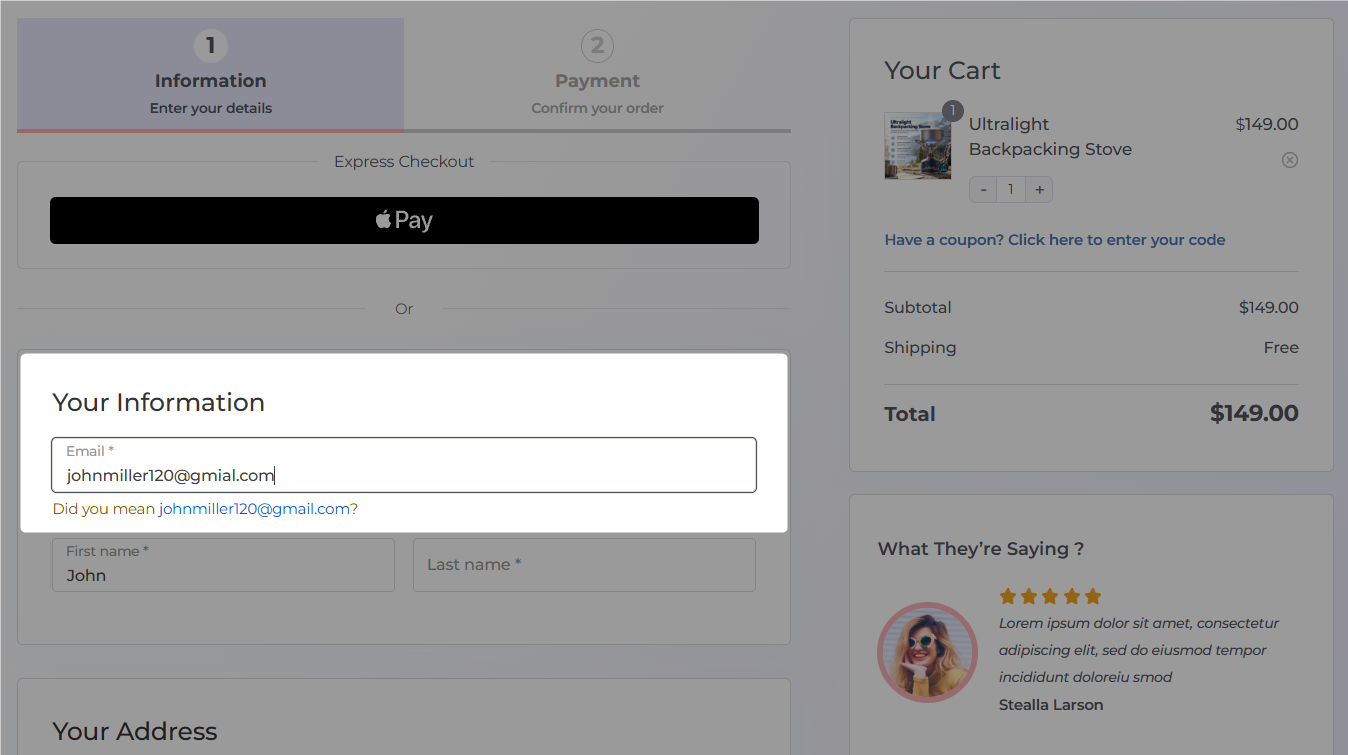
Enable email typo suggestions in seconds
- Go to FunnelKit ⇨ Store Checkout, or open a checkout step in any funnel.
- Open the Optimizations tab.
- Enable Email typo suggestions and save your changes.
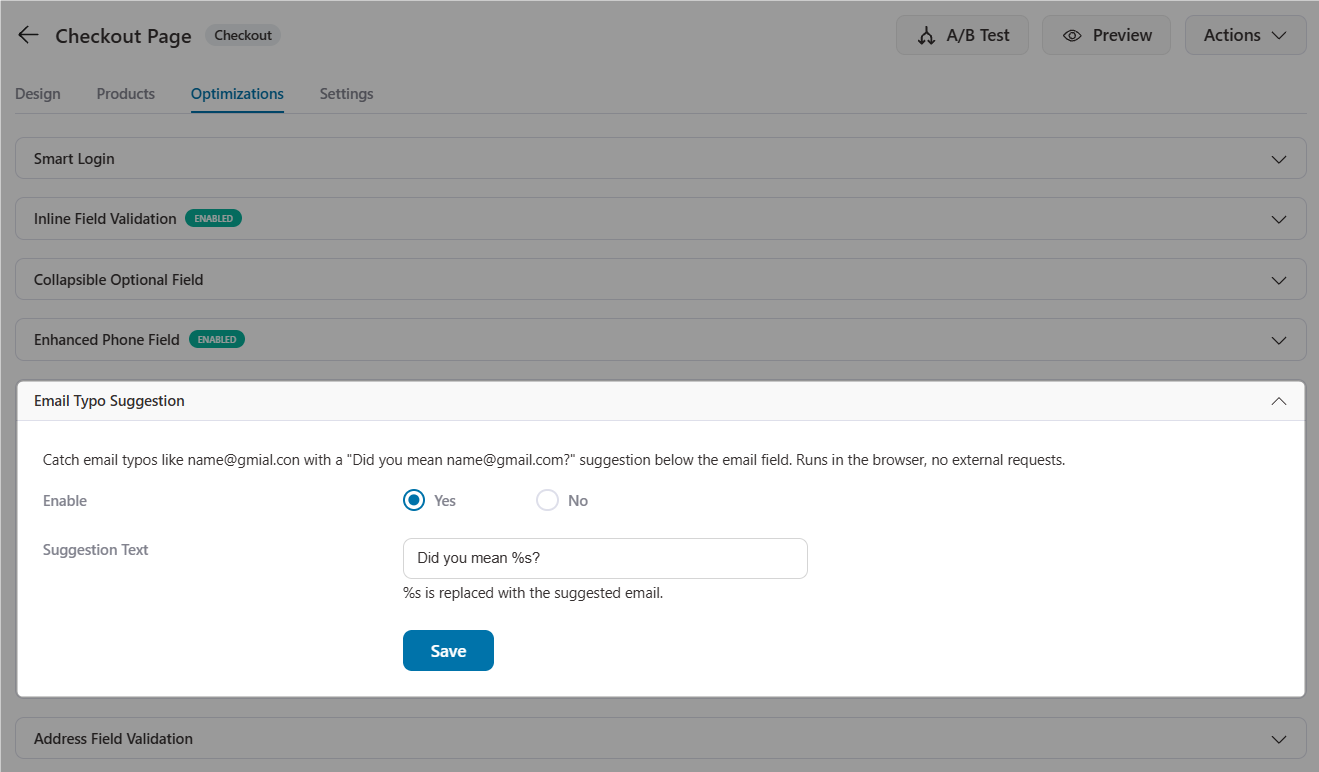
The customer always gets the final say. That's important because some legitimate email domains might look like misspellings of more familiar ones.
The suggestion should help shoppers correct mistakes, not force them to change a valid email address.
This feature also has limits. It can suggest corrections for common domain typos, such as gmial.com or yahooo.com, but it can't reliably tell when someone mistypes the part before the @.
For example, [email protected] looks valid, even if the customer meant to enter [email protected].
Why this small checkout improvement matters
- Fewer support tickets: Reduce the number of customers asking where their order confirmation went.
- More reliable order emails: Help receipts, invoices, and download links reach the email address the customer intended.
- Cleaner customer data: Keep contact records more accurate for FunnelKit Automations and abandoned cart recovery.
- Fewer avoidable email bounces: Catch common domain mistakes before they affect your email campaigns and deliverability.
It's a small change at checkout, but it can prevent problems long after the customer clicks Buy.
4. Cleaner Meta Tracking: Stop Renewals From Inflating Your ROAS
Selling subscriptions through WooCommerce and running Meta ads? Your ROAS might look better than it really is.
Here's why. Every subscription renewal creates a new WooCommerce order.
If that order triggers a Meta Purchase event, Meta may attribute the renewal to the ad that originally brought in the customer.
This keeps inflating your reported ad revenue month after month, even when the ad had nothing to do with the renewal.
Your ROAS looks great on paper, but it's harder to tell how effectively your ads are bringing in new customers.
FunnelKit Funnel Builder 3.17 adds an option to skip Meta purchase events for subscription renewal orders.
Enable it, and renewal orders won't send those Purchase events to Meta.
Your reporting can then focus on the initial purchases driven by your ads instead of counting recurring orders as new sales.
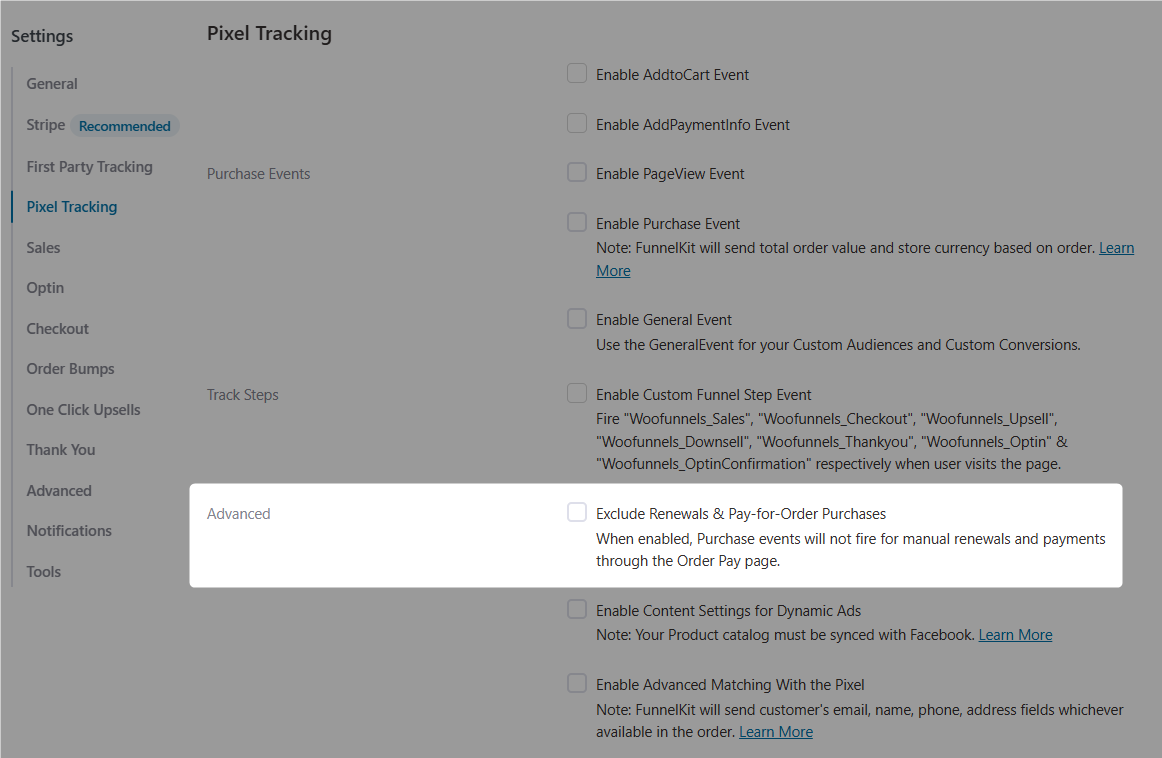
When should you leave this option disabled?
If you're running retention campaigns targeting existing subscribers and want Meta to optimize for renewal purchases, you may want to keep tracking those events.
But if your primary goal is acquiring new customers, excluding renewal events can give Meta a cleaner signal.
More accurate Meta Pixel and Conversions API data
FunnelKit Funnel Builder 3.17.0 also improves the tracking data sent to your ad and analytics platforms. Here's what's changed:
- Actual page URLs: Meta Pixel and Conversions API events now report the actual page URL where each event occurred, giving you more accurate page-level tracking data.
- Standard content type for ViewContent: ViewContent events now send the standard product content type, helping Meta match events with the right products in your catalog.
- Accurate product variation data: For variable products, view events use the variation selected in the URL, along with its price.
- Better AddToCart deduplication: Improved deduplication helps prevent a single add-to-cart action from being counted twice.
- GA4 purchase events for express wallets: In funnels with one-click upsells, orders placed through the WooCommerce Store API and express payment methods such as Apple Pay and Google Pay now trigger GA4 purchase events.
These updates don't add flashy new buttons to your dashboard.
They improve the data behind your reports, making it easier to understand what's happening across Meta Ads Manager and Google Analytics 4 (GA4).
5. New Order Bump Display Rules: The Perfect Offer for Every Cart
Order bumps are a simple way to increase your average order value, but only when the offer makes sense for what's in the cart.
Shipping insurance won't do much for someone buying an ebook, and a digital template pack won't help someone who just ordered a physical product.
With FunnelKit Funnel Builder Pro 3.17, you get three new order bump display rules to target offers more precisely and show shoppers products that make sense for their purchase.
Three new ways to target order bumps
- Cart product type
Show or hide an order bump based on whether the cart contains downloadable, virtual, or physical products.
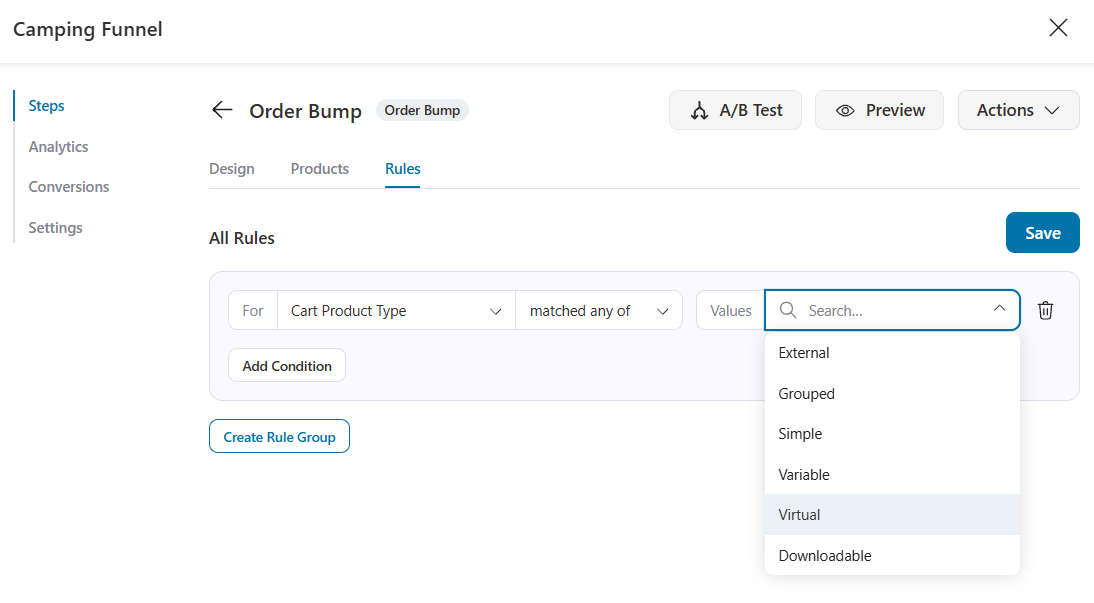
For example, offer gift wrapping or express shipping when the customer buys something that needs shipping.
If they're buying a digital product, show a relevant bonus template pack instead.
- Order item text match
Display an order bump when a cart item's name contains specific text.
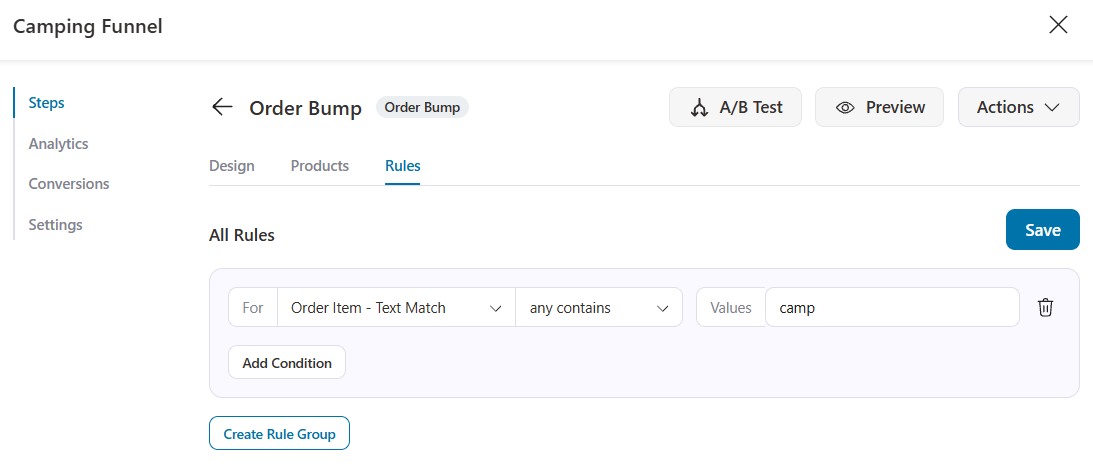
This is useful when related products share a naming pattern but don't belong to the same category.
For example, you could show a complementary offer whenever a cart contains a product with "Ultralight" in its name.
- SKU Text/Regex Match
Target order bumps using product SKUs, either through a text match or a regular expression (regex).
If your store has products that use SKUs like STV-001 and STV-002, a rule such as ^STV- can target products across that line, including new products that follow the same SKU pattern.
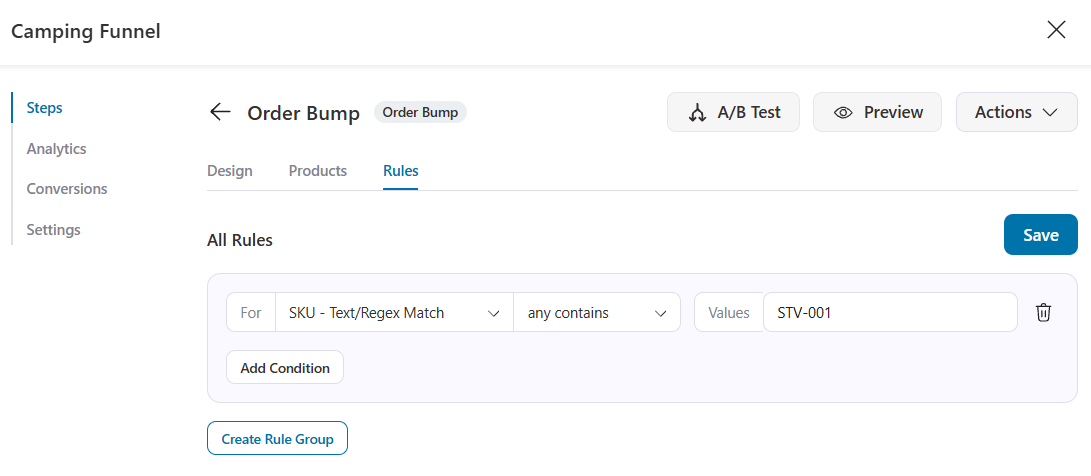
The whole point is to show each shopper an order bump that fits what they're already buying.
More relevant offers make for a better checkout experience and give you more opportunities to increase average order value.

For developers, FunnelKit Funnel Builder Pro 3.17 also introduces the wfob_swap_products filter.
Use it to control which cart product an order bump replaces at runtime, giving you more flexibility when implementing custom product-swap logic.
6. Full-Funnel Revenue in Sales Page A/B Tests
What if the winning page in your A/B test isn't actually making you the most money?
It's easy to pick a winner based on how many visitors reach checkout.
But more checkout visits don't always mean more revenue.
A page that sends fewer people to checkout could still come out ahead if those buyers purchase more order bumps and upsells.
FunnelKit Funnel Builder Pro 3.17 makes it easier to spot that difference by adding full-funnel revenue to sales page A/B test analytics.
You can now compare variants based on the revenue they generate from the main checkout, order bumps, and upsells.
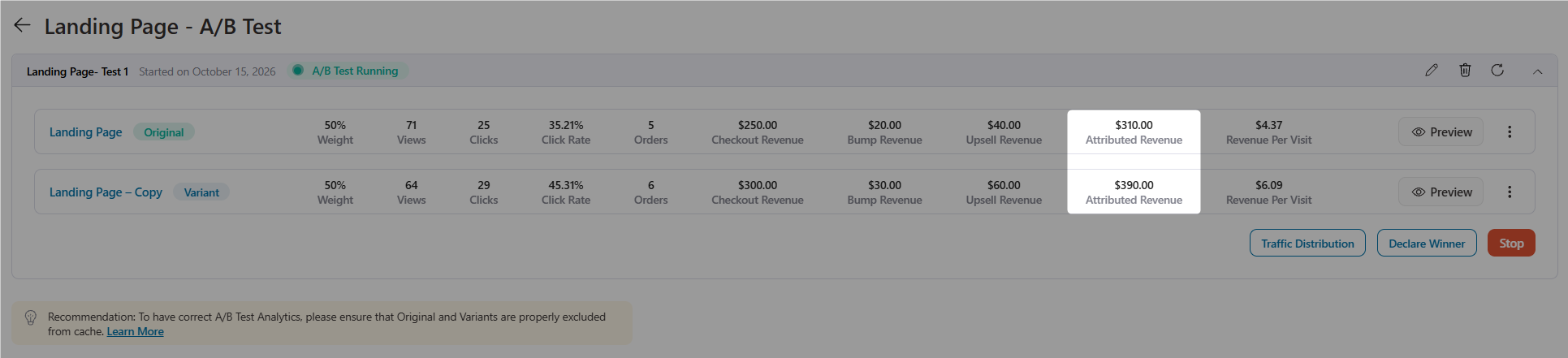
Let's say you're testing two sales pages. One leads with a camping equipment product (stove), while the other promotes it as part of a complete cook kit.
Instead of choosing the page that sends more visitors to checkout, the team can compare how much revenue each variant generates across the entire funnel.
That includes the original purchase and any additional sales from order bumps and upsells.
The result? A better way to judge which sales page contributes more to the store's revenue, not just which one gets more people to the next step.

There's also a useful fix for embedded scripts.
When you make a winning variant your live template, its embedded script content now stays intact.
Your tracking snippets and other embeds remain in place instead of disappearing during the switch.
7. Upsell Upgrades: Custom CSS and PayPlug Support
FunnelKit Funnel Builder Pro 3.17.0 makes it easier to customize your upsell pages and gives you another payment gateway option for post-purchase offers.
Style all your upsell pages from one place because the global upsell settings now include a Custom CSS field.
Add your brand fonts, button styles, spacing adjustments, or other design tweaks once, and apply them across your upsell pages.
You no longer need to edit individual templates to keep everything consistent.
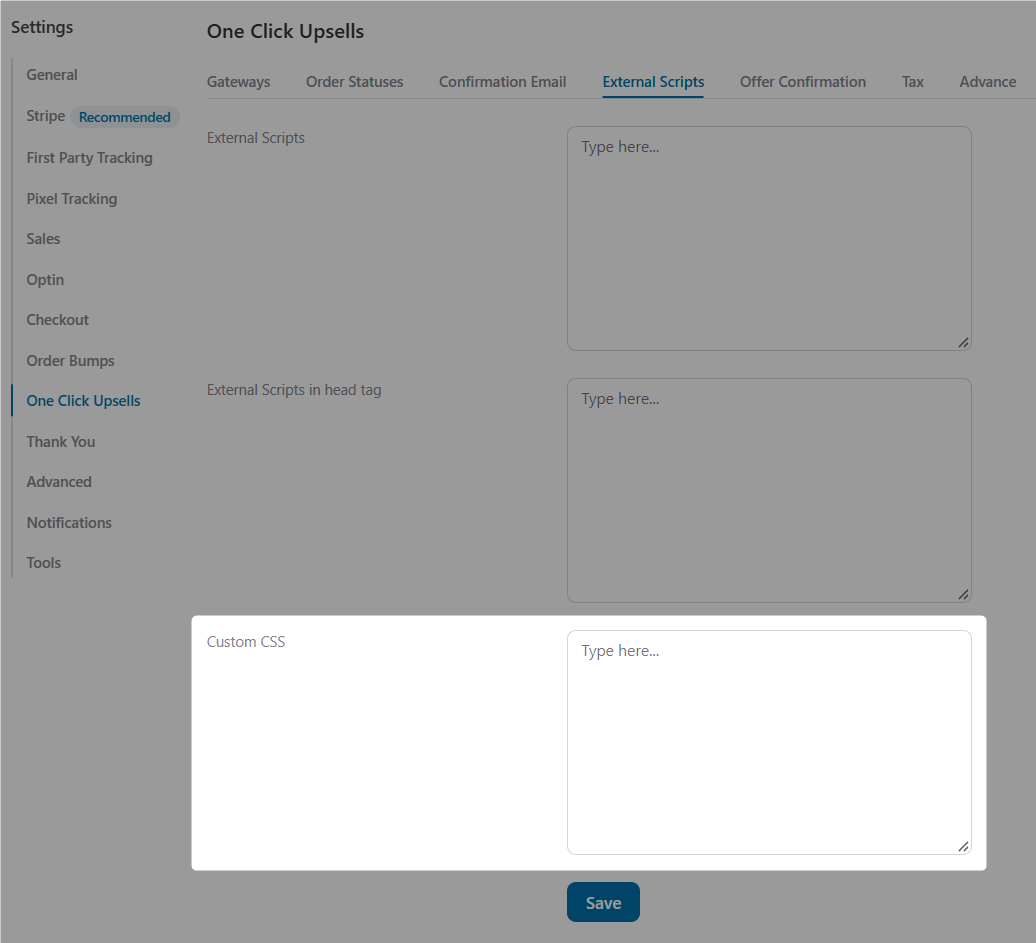
PayPlug now supports one-click upsells
If your store uses PayPlug, you can offer customers post-purchase upsells they can accept with a single click, without re-entering their card details.
It's a useful addition for stores that rely on PayPlug, particularly merchants serving customers in France.
This release also fixes two issues that could affect the post-purchase experience:
- No more repeated order confirmation emails: Customers won't keep receiving the same order confirmation email after accepting an upsell.
- Cleaner customer-facing emails: The internal “missed sale” note will no longer appear in emails sent to customers.
Finally, we hardened the upsell reporting and tracking script output for safer rendering, helping keep your reporting and tracking implementation more reliable.
8. A Faster, Friendlier Checkout on Every Device
A smooth checkout can make the difference between a completed order and an abandoned cart, especially on mobile.
FunnelKit Funnel Builder 3.17 brings several improvements to make checkout more accessible, responsive and reliable across devices.
- Better accessibility with WCAG 2.2 AA improvements
Mini-cart controls now have proper accessible names, and quantity inputs have labels.
Screen reader users can better understand what each control does, making checkout easier to navigate.
- A number pad that appears when you need it
Phone fields now use telephone input types with valid autocomplete attributes.
Mobile shoppers get a number keypad instead of the full keyboard, and browser autofill helps them enter their details faster.
- No more unexpected zoom on iPhones
We fixed an issue that caused unexpected zooming in iPhone Safari on block-supported themes.
Shoppers can navigate checkout without constantly pinching and scrolling to find the Place Order button.
- Lean, page-builder-specific CSS
Checkout styles now load based on the page builder you're using, so your pages load only the CSS they need.
- Coupon messages that actually appear
Success and error messages now display correctly when shoppers apply a coupon from the collapsed order summary on mobile.
They can see whether their discount worked without guessing.
- More font choices
The Unbounded Google Font is now available in the embed form font selector.
The block editor's Google Fonts list has also been updated with newer font families, including Lexend Deca.
- A faster dashboard for busy stores
Managing lots of offers? The upsell and order bump listings in your dashboard have been optimized to handle them more efficiently, making it easier to manage your offers as your store grows.
9. Compatibility Updates and Bug Fixes
New features are exciting, but the smaller improvements matter just as much.
FunnelKit Funnel Builder 3.17.0 improves compatibility with 14 plugins and fixes 16 bugs affecting checkout, tracking, upsells, and more.
Plugin compatibility updates
Here's a breakdown of the plugins covered in this release.
Shipping and localization
- Weight Based Shipping
- Envia Shipping
- SDEK and eDostavka
- Colombian Departments and Cities
Tax and compliance
- WooCommerce EU VAT Number
- Germanized for WooCommerce
- Zamp Tax (Pro, upsells)
Marketing and loyalty
- MailerLite for WooCommerce
- WPLoyalty
- CURCY WooCommerce Multi Currency (Pro, order bumps)
Page builders and store tools
- Spectra (checkout and upsells)
- FiboFilters
- Sublium Subscriptions (Pro, upsells)
Bug fixes
We've also addressed several issues that could affect the checkout experience and funnel tracking.
Checkout improvements
- Scheduled sale discounts: Checkout discounts now apply correctly to products with scheduled sales when using WooCommerce 11.1.0.
- Subscription order totals: The order summary now displays the correct line total for subscription products when the quantity is greater than one.
- Bricks checkout breadcrumbs: The checkout now respects the breadcrumb settings configured in Bricks.
- Repeated order review requests (Pro): Fixed an issue that caused repeated order review requests during idle checkout sessions.
Tracking and funnel improvements
- Canonical URLs for child pages: Child pages now redirect to their canonical URLs with the parent slug included.
- Kit (ConvertKit) opt-in redirects: Opt-in forms now redirect customers to the next funnel step correctly when the Kit integration is enabled.
- Meta, GA4 and Add to Cart tracking: Several tracking improvements address issues with event reporting and deduplication, as covered in Section 4.
For developers: New filters let you control order item thumbnails on checkout and Thank You pages, with access to cart item context for more flexible customization.
These updates help keep your checkout, integrations, and funnels working smoothly, whether you're running a simple store or managing a more complex WooCommerce setup.
Ready to See the Full Story Behind Every Sale?
For too long, store owners have had to make funnel decisions with only part of the picture.
Click-through rates tell you who clicked and conversion rates tell you who bought.
But what happened between those two moments, and which pages actually brought in the most revenue?
FunnelKit Funnel Builder 3.17 connects those dots.
Customer Journey shows you the pages buyers visit before purchasing.
Attributed revenue and full-funnel A/B test reporting help you identify the landing pages that generate the most revenue, including order bumps and upsells.
Cleaner Meta Pixel and GA4 tracking gives your ad and analytics platforms more reliable data.
Email typo suggestions help customers receive order confirmations without avoidable email address mistakes.
For your WooCommerce store, that means making a more confident decision about which sales page deserves the ad budget, based on the revenue it actually generates across the funnel.
Already using FunnelKit? Update to FunnelKit Funnel Builder 3.17 to explore the new features.
Enable email typo suggestions in your checkout's Optimizations tab, then open Conversion Tracking to see the customer journeys behind your sales.
New to FunnelKit? Now's a great time to see how better checkout experiences, smarter funnels, and more useful analytics can help you grow your WooCommerce store.
Damanjeet Singh
October 23, 2026FunnelKit Automations 3.8.6 is here, bringing a much-requested feature to automation builders: Branches. Say you run a pet store that sells subscription food boxes. A first-time puppy owner places an...
Damanjeet Singh
August 3, 2026Editing a live automation shouldn’t feel like a game of Jenga with your revenue, where pulling the wrong piece brings the whole thing down. That’s the problem we set out...
Damanjeet Singh
June 6, 2026For fifteen years, I’ve built and sold software in the WordPress and WooCommerce ecosystem. In that time, one category has remained broken longer than any other: subscriptions. The base WooCommerce...