Abandoned cart subject lines decide whether a shopper opens your recovery email or scrolls right past it. Everything inside that email, from the product photos to the coupon and the checkout button, only gets a chance once the subject line does its job.
There's a lot riding on that. Baymard Institute's average across 50 studies puts the cart abandonment rate at 70.22%.
Timing matters too. A shopper who left an hour ago only needs a light reminder, but someone who has skipped two of your emails usually needs a reason to come back, like free shipping or a straight answer to whatever stopped them at checkout.
In this blog, we'll share 80+ abandoned cart subject lines grouped by where they fit in a three-email sequence, along with funny and personalized options, preview text pairs, and a quick way to put them to work in WooCommerce.
Table of Contents
- 1 Best Abandoned Cart Subject Lines at a Glance
- 2 Email 1 Subject Lines: The Friendly Reminder
- 3 Email 2 Subject Lines: Help, Reviews, and Social Proof
- 4 Email 3 Subject Lines: Incentives and Real Urgency
- 5 Funny Abandoned Cart Subject Lines
- 6 Personalized Subject Lines With WooCommerce Merge Tags
- 7 Subject Line and Preview Text Pairs
- 8 How to Write Abandoned Cart Subject Lines That Get Opened
- 9 How to Send Abandoned Cart Emails from WordPress?
- 10 Frequently Asked Questions (FAQs) About Abandoned Cart Subject Lines
- 11 Put Your Abandoned Cart Subject Lines to Work
Best Abandoned Cart Subject Lines at a Glance
Short on time? Here's the three-email structure most recovery flows follow, with two subject lines you can borrow for each stage.
| When to send | Goal | Subject lines to try | |
|---|---|---|---|
| Email 1 | 1 to 4 hours after abandonment | A friendly reminder | Your picks are saved Still deciding on your cart? |
| Email 2 | Around 24 hours after abandonment | Answer doubts and show proof | What buyers say about your picks Anything stopping you? |
| Email 3 | 48 to 72 hours after abandonment | Give a reason to finish | Here's 10% off your cart Your saved cart closes soon |
Treat these timings as a starting point, then adjust them to how quickly your customers usually buy.
Email 1 Subject Lines: The Friendly Reminder
Best for: The first email, sent 1 to 4 hours after abandonment
No discount yet. No pressure either.
At this stage, most shoppers got distracted, ran out of time, or meant to come back later, so a light nudge that assumes good intent tends to land better than anything pushy.
Take a look at this email from Chubbies:
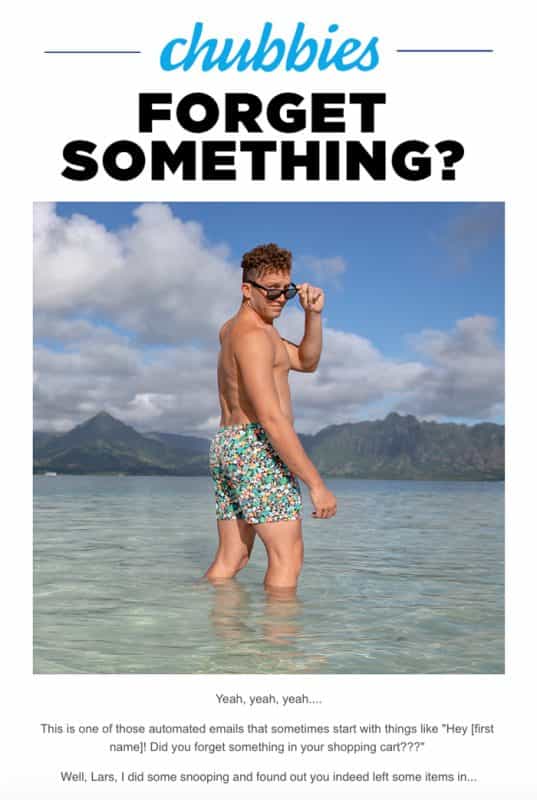
Subject line: Forget something?
Chubbies is known for humor in its marketing copy. This subject line doesn't mention the cart or a product at all, yet the casual tone still makes it read like a nudge from a friend.
Kate Spade keeps it even simpler:
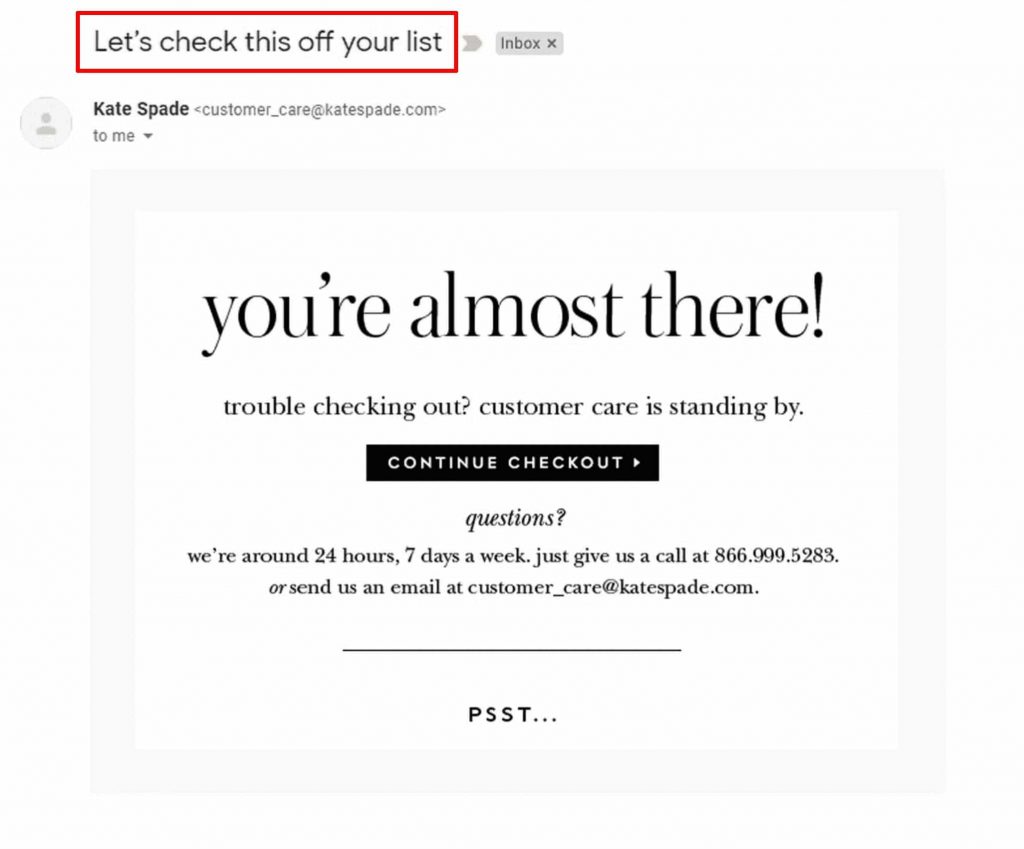
Subject line: Let's check this off your list
Instead of giving reasons, it simply suggests finishing the purchase. The email body then tells shoppers that customer care can help if anything goes wrong at checkout.
Here are more first-email subject lines to try:
- You left something behind
- Oops, you forgot something
- Did you forget something?
- Looks like you didn't finish checking out
- Your cart is ready when you are
- Your cart is right where you left it
- Saved your cart for you, [Name]
- Heads up: your items are waiting
- Is everything okay with your checkout?
- Technical issue at checkout?
- Ready to buy?
- You're nearly there
- Your new {product name} is just two clicks away
- Checkout will only take a few minutes
If a shopper ignores these, Email 2 is where you start answering their doubts.
Email 2 Subject Lines: Help, Reviews, and Social Proof
Best for: The second email, sent around 24 hours after abandonment
A day later, the shopper has seen your first reminder and still hasn't bought. Something is holding them back. Maybe it's a question about sizing, shipping, or returns, or maybe they just want proof that other people are happy with what they ordered.
Second-email subject lines work best when they speak to that hesitation directly, either by offering help or by pointing to what other customers think.
Look at this email from Vinomofo:
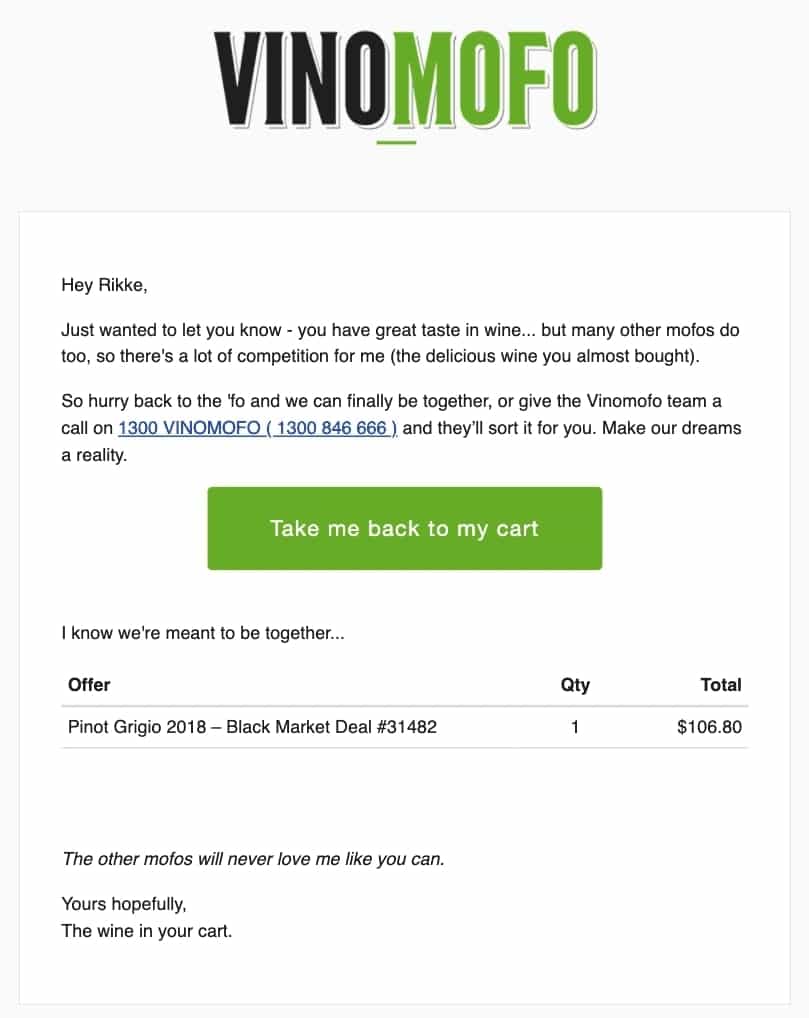
Subject line: We're meant to be together
It compliments the reader's taste and hints that other wine lovers are after the same bottles. That mix of flattery and demand gives the shopper a reason to look again, no discount needed.
A few more ideas for your second email:
- See what other customers love about {product name}
- Still deciding? Hear from other shoppers
- What {customer name} said about {product name}
- Other shoppers have their eye on your items
- Here's why people keep reordering {product name}
- Still thinking it over? Here's what helped others decide
- Can I help you finish this?
- Quick question about your order...
- Need a hand with your order?
- Not sure about sizing? We can help
- Questions about shipping or returns?
- Your cart, plus a few answers
Pair these with real reviews or a short FAQ inside the email, so the promise in the subject line holds up once it's opened.
Email 3 Subject Lines: Incentives and Real Urgency
Best for: The final email, sent 48 to 72 hours after abandonment
By now, a gentle reminder hasn't worked. This is the stage to give shoppers a concrete reason to finish, either a better deal or a real deadline.
Incentive subject lines
Cost is one of the biggest blockers. Among US shoppers who abandoned a cart for a reason other than just browsing, 40% pointed to extra costs like shipping, taxes, and fees, according to Baymard Institute's research.
A discount, free shipping, or a small price drop deals with that head-on. Here's a clean example from Alex Mill:
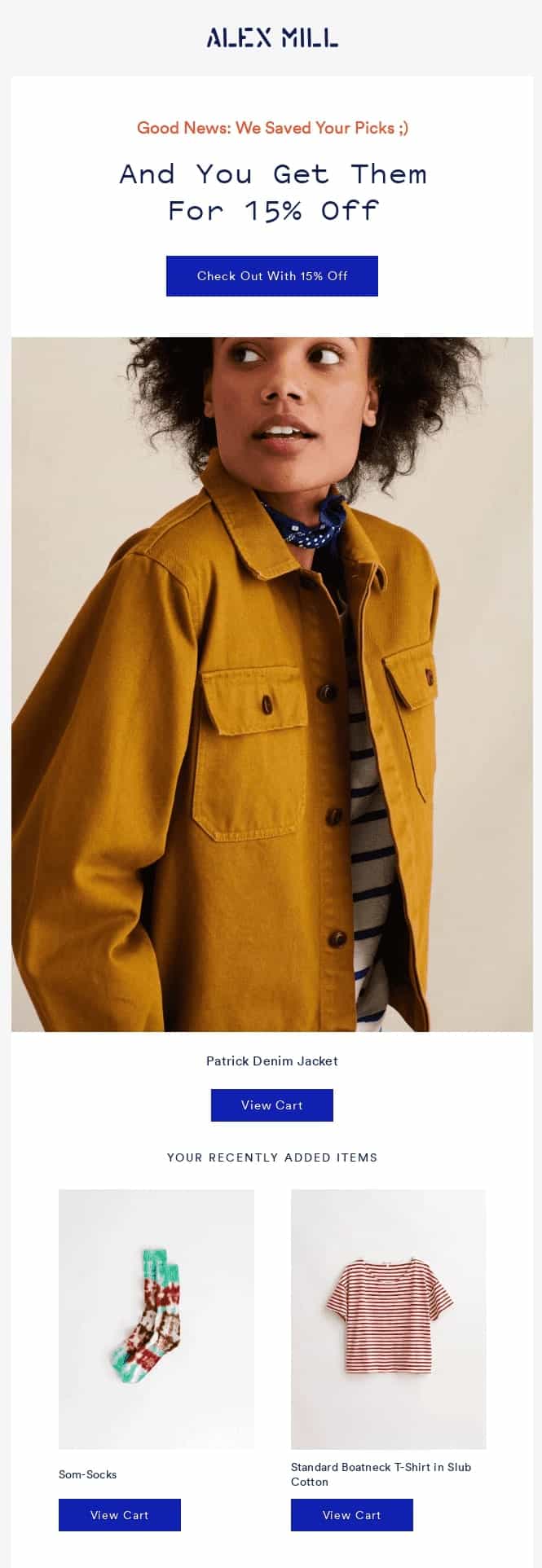
Subject line: Get Them for 15% Off!
Nothing clever, just the offer. When the incentive is the reason to open, putting it right in the subject line is usually the clearest choice.
Incentive subject lines to try:
- Empty your cart with 10% off
- Hey, forgot something? Here's 15% off
- Free shipping on your order
- Free shipping if you finish checkout today
- Price drop on your cart
- Cold feet? Here's something extra
- A little something to help you decide
- 10% off just for you (expires soon)
- Unwrap your exclusive discount
- You earned a discount
- Would 15% off help?
- Don't pay full price for your cart
Urgency subject lines
Urgency works when it's true. A sale that ends tonight, a coupon with a real expiry date, or stock that's actually running low all give shoppers a reason to act now.
Parachute ties its reminder to a sale that's ending:
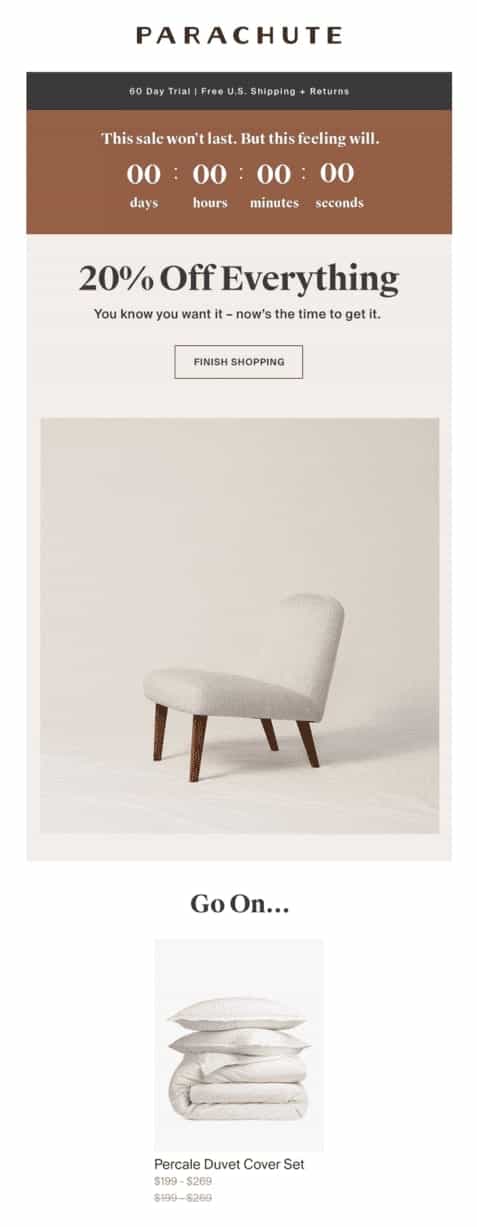
Subject line: Our Sale's Ending, Your Cart's Calling
The home goods brand links the cart to a deadline that already exists, so the urgency feels earned instead of manufactured.
Use these only when the claim matches what's really happening in your store:
- Your cart is about to expire
- Your cart expires soon, still interested?
- Get your {item name} before it sells out
- The items in your cart are selling fast
- High demand: your items are going fast
- Your item is almost sold out
- Stock alert: {product name} is running low
- Last chance to grab your items
- Final reminder for your cart
Fake countdowns wear thin fast. Phrases like "last chance" also start to look spammy when every email uses them, so save urgency for the final email.
Funny Abandoned Cart Subject Lines
Humor stands out in a crowded inbox, especially for brands that already have a playful voice. It fits best in Email 1 or Email 2, before any discount comes in.
Quick gut check before you use one: would this line sound natural in your brand's social posts? If not, skip it.
- Your basket is feeling lonely
- We kept your cart warm
- Is your Wi-Fi okay? You were so close
- Plot twist: your cart is still here
- This cart won't check itself out
- Your items keep asking about you
- Commitment issues? We get it
- No pressure. Okay, a little pressure
- Your cart is giving you puppy eyes
- Psst, you left the good stuff behind
- We'd hate to put these back on the shelf
- Your cart has been waiting by the door
Funny lines are worth A/B testing against a plain reminder. Some audiences love them, and others just want to know their cart is saved.
Personalized Subject Lines With WooCommerce Merge Tags
Personalized subject lines pull in details from the shopper's contact record or cart, like their first name or the products they left behind. In WooCommerce, your automation tool fills these in using merge tags.
Here's what that looks like in a real inbox:
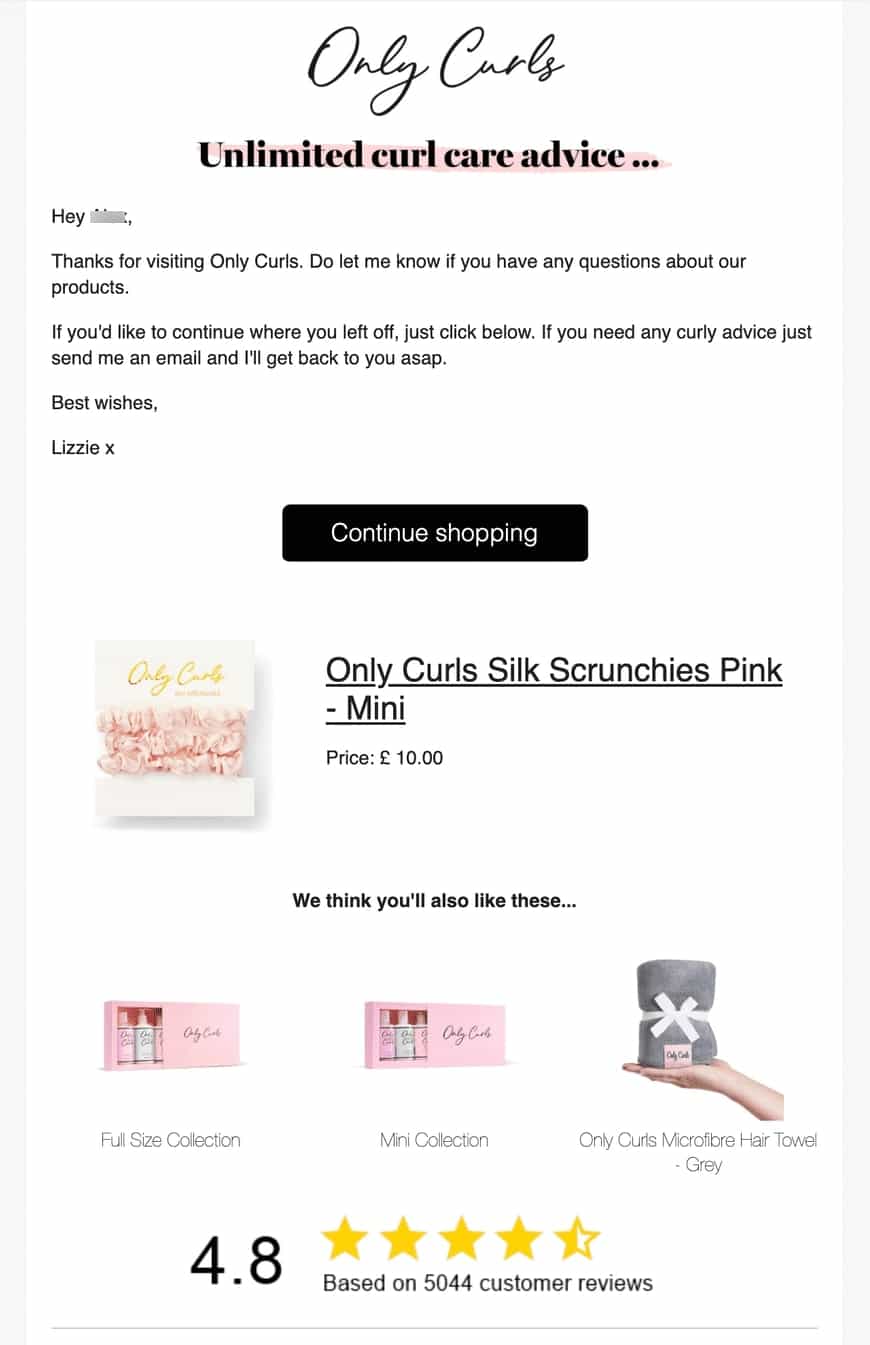
The lines below are written with FunnelKit Automations merge tags, so you can paste them straight into your subject line field. Using a different tool? The idea stays the same, only the tag syntax changes.
- {{contact_first_name fallback="there"}}, your cart is saved
- {{contact_first_name fallback="Hi"}}, your picks are still here
- Your {{store_name}} cart is waiting
- A quick note from {{store_name}}
- {{contact_first_name fallback="there"}}, still deciding?
- {{cart_items template='list' type='comma-separated'}} is still in your cart
- Questions about {{cart_items template='list' type='comma-separated'}}? Just reply
- {{contact_first_name fallback="Hey"}}, did checkout give you trouble?
- {{contact_first_name fallback="there"}}, want free shipping on this?
- {{contact_first_name fallback="Hi"}}, your code is waiting at checkout
Always add a fallback to name tags. Without one, contacts who never shared a first name get a subject line that opens with an awkward blank.
Save the cart items tag for stores where carts usually hold one or two products, since a long product list gets cut off on mobile. For the last two lines above, FunnelKit Automations can also create a personalized, time-bound coupon for each contact, which pairs well with your Email 3 offer.
Subject Line and Preview Text Pairs
Preview text is the short line that shows up beside or under your subject line in most inboxes. Treat the two as one message. The subject line hooks the reader, and the email preview text adds the detail that earns the click.
Here's how one brand pairs them:

And here are six pairs you can adapt, two for each email in the sequence:
| # | Subject | Preview |
|---|---|---|
| Email 1 | You left this behind | Everything's saved, right where you left it. |
| Email 1 | Checkout hiccup? | Your cart is safe. Pick up where you stopped. |
| Email 2 | On the fence about it? | Here's what other shoppers say after buying. |
| Email 2 | Got a question before you buy? | Reply to this email and our team will help. |
| Email 3 | A little extra for your cart | Use your code at checkout before it expires. |
| Email 3 | Free shipping is on us | Finish checkout today and we'll cover delivery. |
Avoid repeating the subject line in the preview text. Those few extra characters are better spent saying something new.
How to Write Abandoned Cart Subject Lines That Get Opened
Whichever stage you're writing for, these habits keep your subject lines readable and your recovery flow out of trouble.
Put the important words first
Mobile inboxes cut long subject lines short, so the part that matters should come first. "Your cart is saved" makes sense at a glance, while a line that saves its point for the end may never show it.
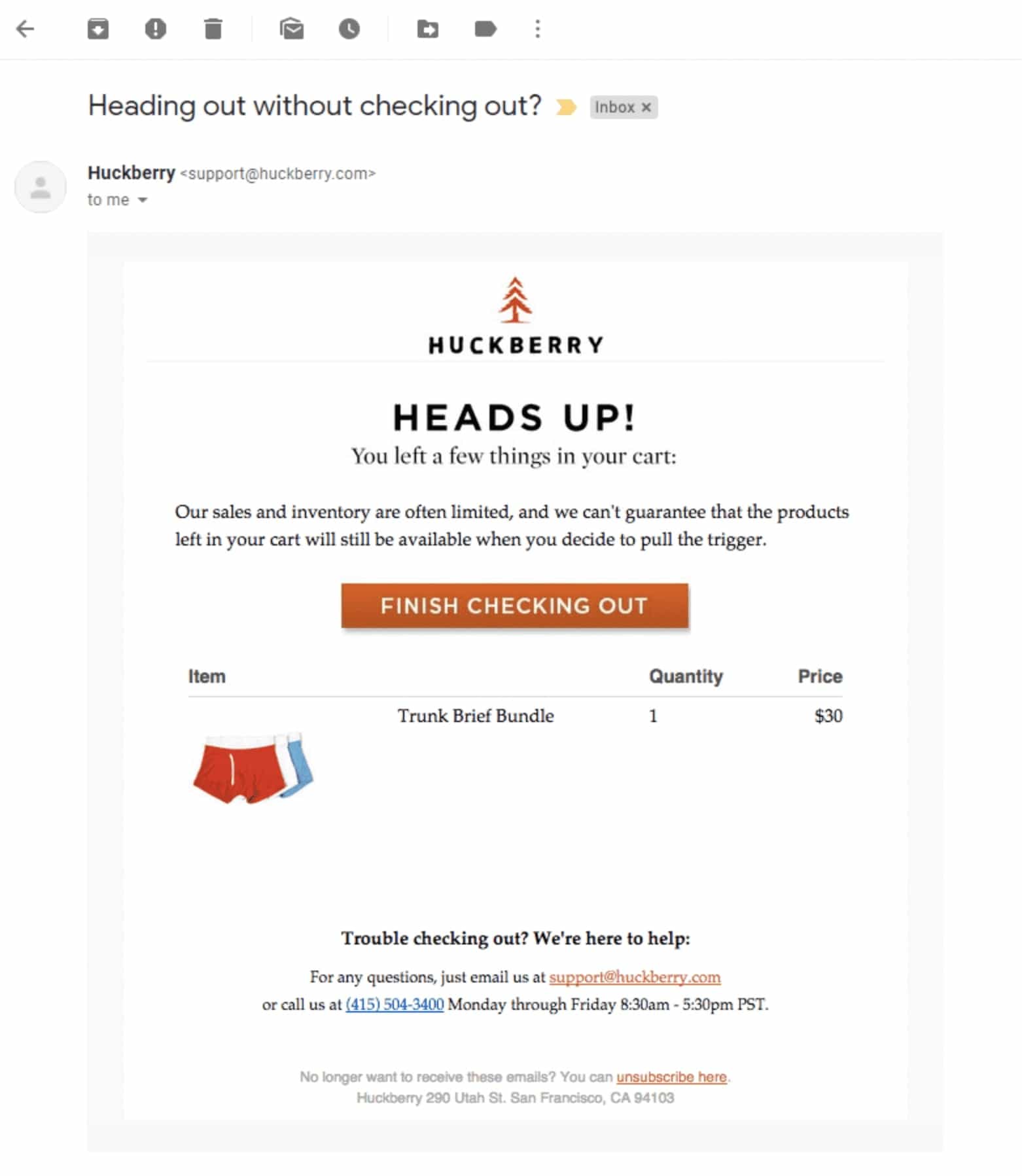
Simple often wins too. Rejoiner's study of direct-to-consumer brands found that simple, branded subject lines did better than traditional "abandoned cart" messaging.
Match the line to the stage
A discount in the first email misses the moment. So does a gentle "forgot something?" in the last one, when the shopper has already ignored two reminders. Keep the order: reminders first, help and proof second, incentives and urgency last.
Don't lead with discounts
Putting a coupon in the very first email might lift short-term recoveries, but shoppers catch on. Once they learn that leaving a cart triggers an offer, some will start doing it on purpose. Hold incentives back for the final email or for high-value carts.
Keep urgency honest
Words like "hurry" and "last chance" lose their pull when every email uses them, and heavy use can push your emails toward the spam folder. Only use urgency when the deadline or stock limit is real.
Segment instead of sending one flow to everyone
First-time visitors and loyal repeat customers shouldn't get identical messages. Split your automation by customer type or cart value so each group sees subject lines that fit them.
Test one change at a time
No list can tell you which line will win with your audience. Run A/B tests that change one thing per round (length, tone, an emoji, or a name tag), keep the winner, and then test the next idea. In FunnelKit Automations, split path testing handles this inside the automation itself.
How to Send Abandoned Cart Emails from WordPress?
Even the best subject line needs an automated sequence behind it. Here's the three-email setup we'll build, with a delay before each email:
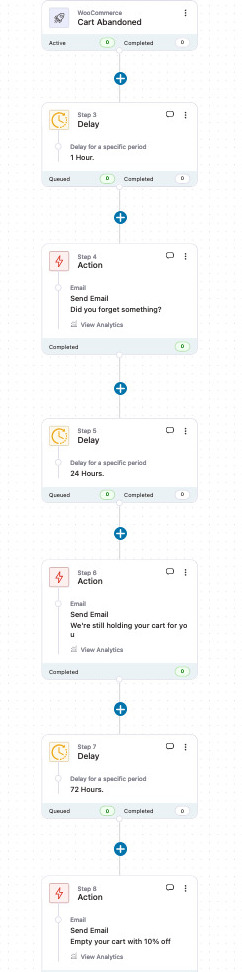
We'll set it up in FunnelKit Automations, a marketing automation plugin that runs email and SMS campaigns from inside your WordPress dashboard. Follow the steps below.
Step 1: Install FunnelKit Automations
FunnelKit Automations comes in a free Lite version and a Pro version. Some automation recipes are Pro-only, and this walkthrough uses Pro.
After purchase, download these three files from your FunnelKit account:
1. FunnelKit Automations (base plugin)
2. FunnelKit Automations Pro
3. FunnelKit Automations Connectors
Install and activate them in that order.
Next, copy your license key from your FunnelKit account, open Settings in FunnelKit Automations, and paste it in:
Click Activate, and the plugin is ready to use.
Step 2: Install an SMTP plugin
WordPress's default mail function isn't built for marketing email. An SMTP plugin sends your messages through a dedicated email service instead, which gives them a much better chance of reaching the inbox rather than the spam folder.
A few common options:
- WP Offload SES Lite for Amazon SES
- WP Mail SMTP for SendGrid, Mailgun, and Brevo (formerly Sendinblue)
- Postmark for WordPress for Postmark
This example uses the WP Mail SMTP plugin:
Its setup wizard walks you through connecting your email service:
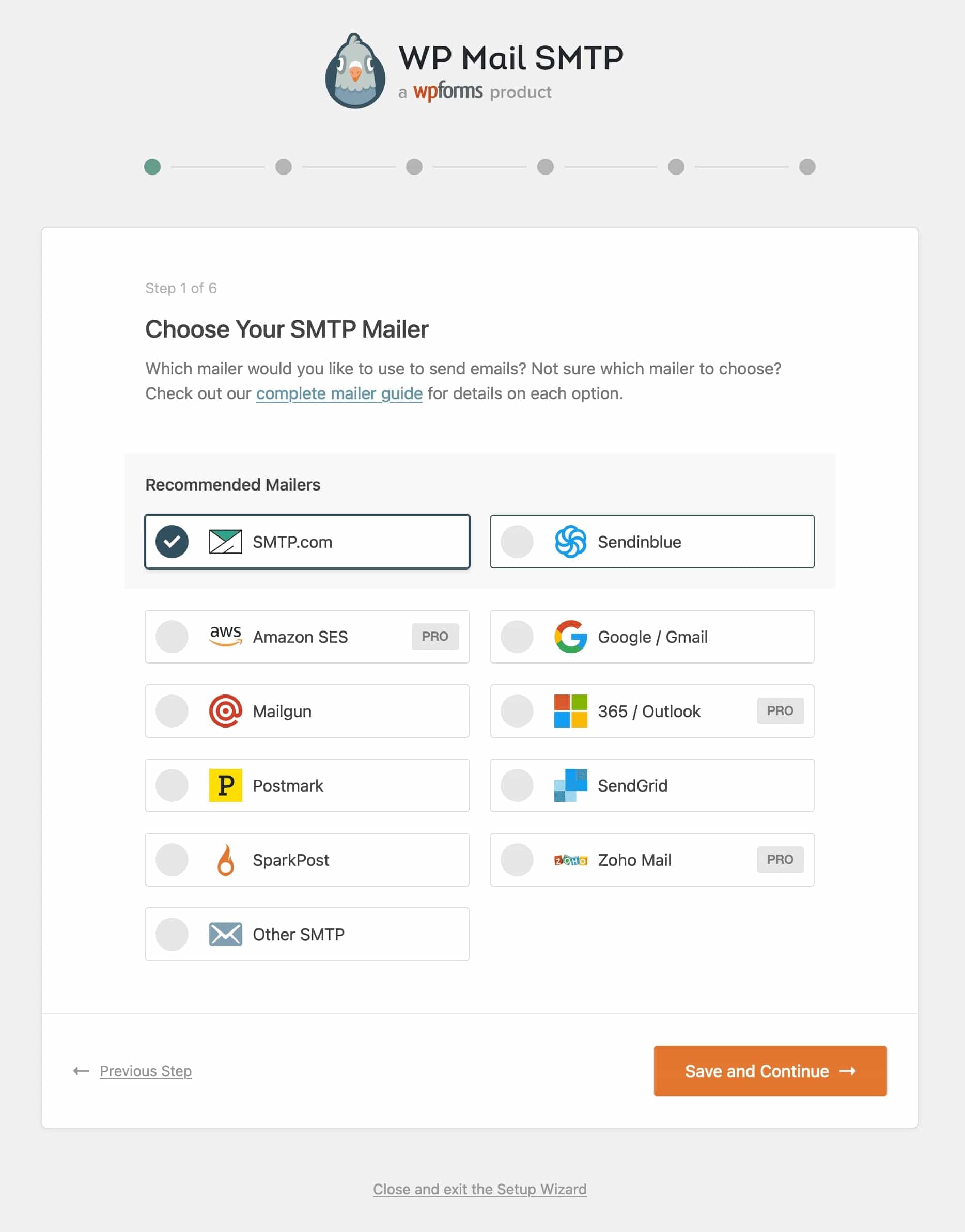
For more detail, see our guide to setting up an SMTP plugin.
Step 3: Import the abandoned cart recipe
In FunnelKit Automations, go to Automations and click Create Automation.
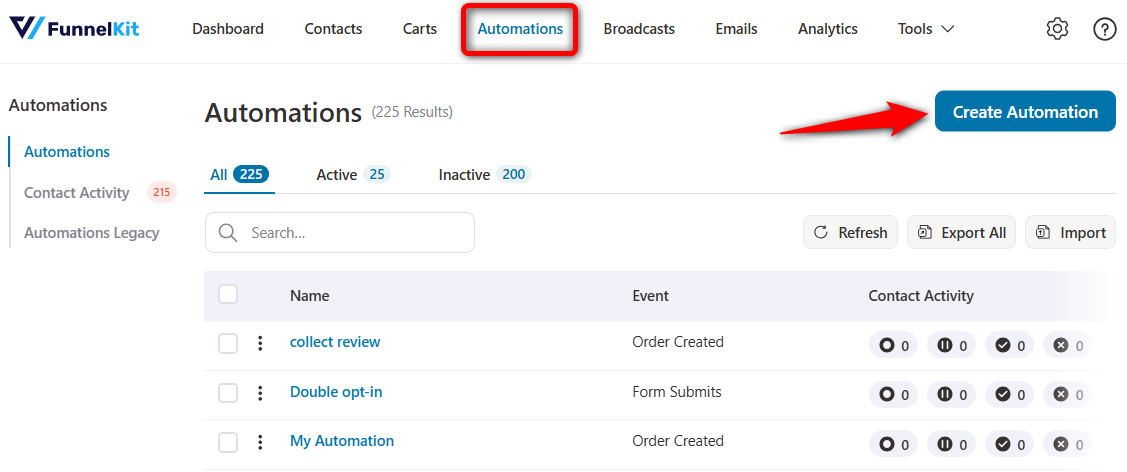
You'll see a library of pre-built recipes. Click Abandoned Cart Reminder to preview it:
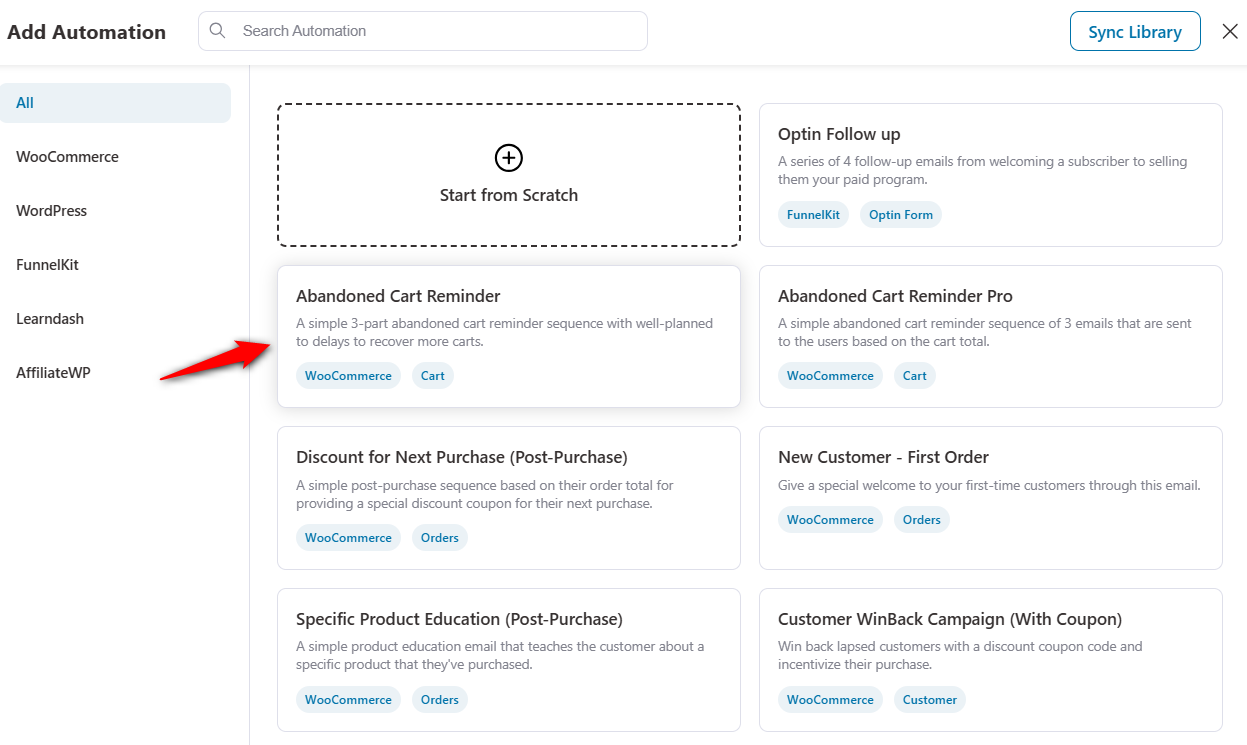
If it looks right, click Import at the top right. Then give the automation a name, such as WooCommerce Abandoned Cart Recovery:
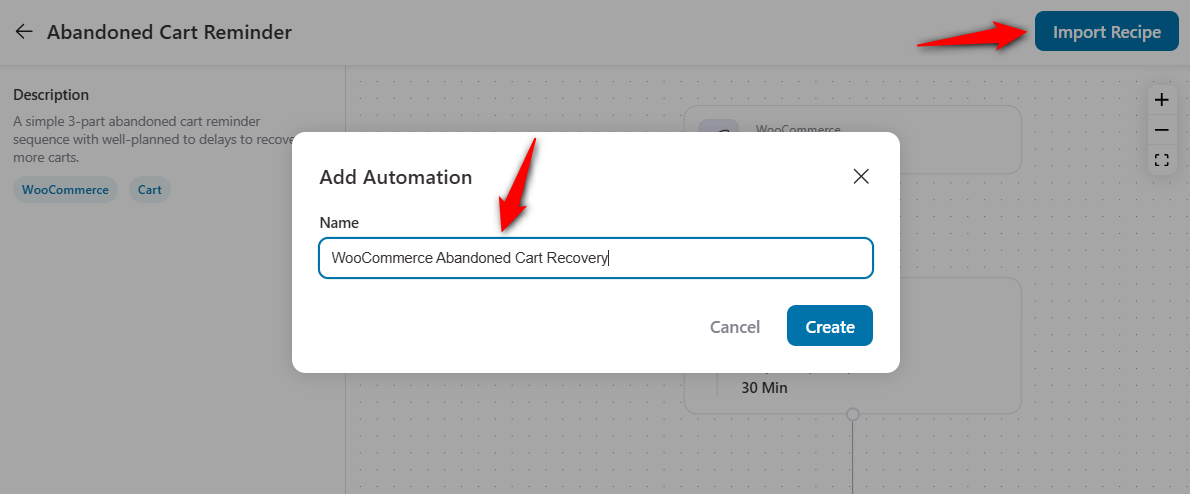
Click Create. The automation is added with its emails and delays already in place, ready for you to customize.
Step 4: Customize your first abandoned cart recovery email in WooCommerce
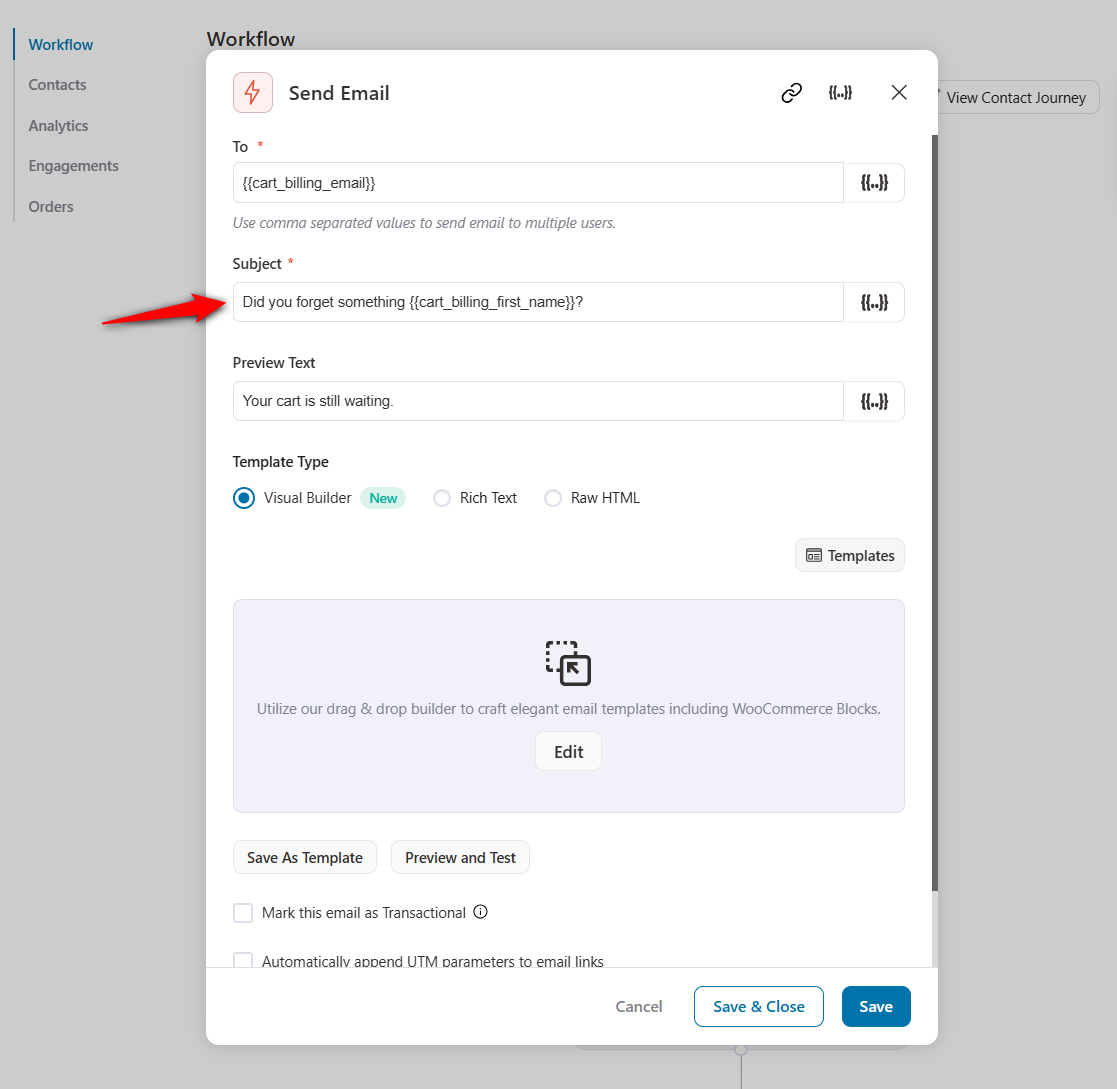
Open the first email in the flow. You can build it with rich text, raw HTML, or the visual drag-and-drop builder, and this example uses the visual builder.
Add your subject line and preview text at the top, then click Launch Editor:
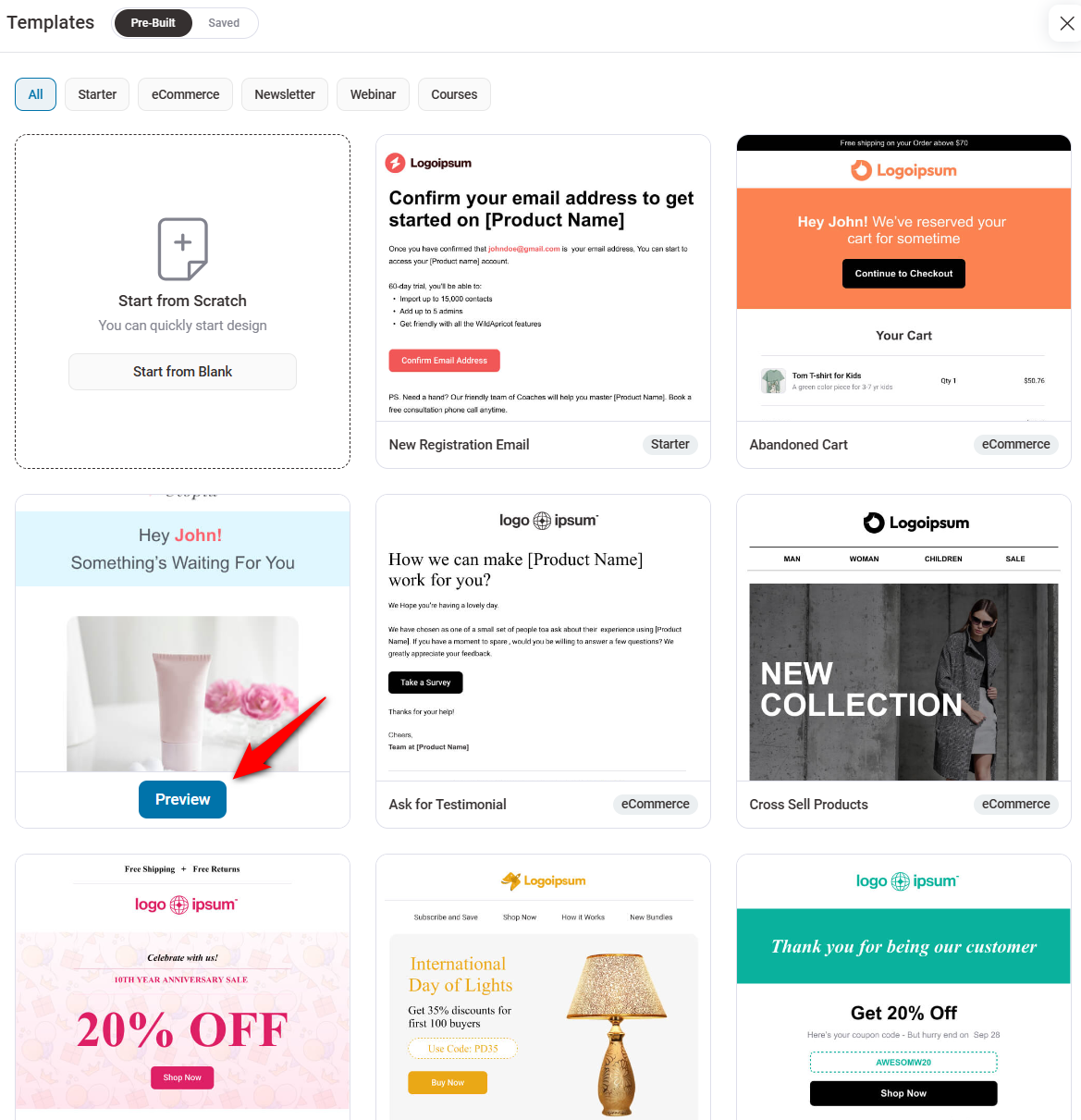
Import an abandoned cart email template and adjust it to fit your brand:
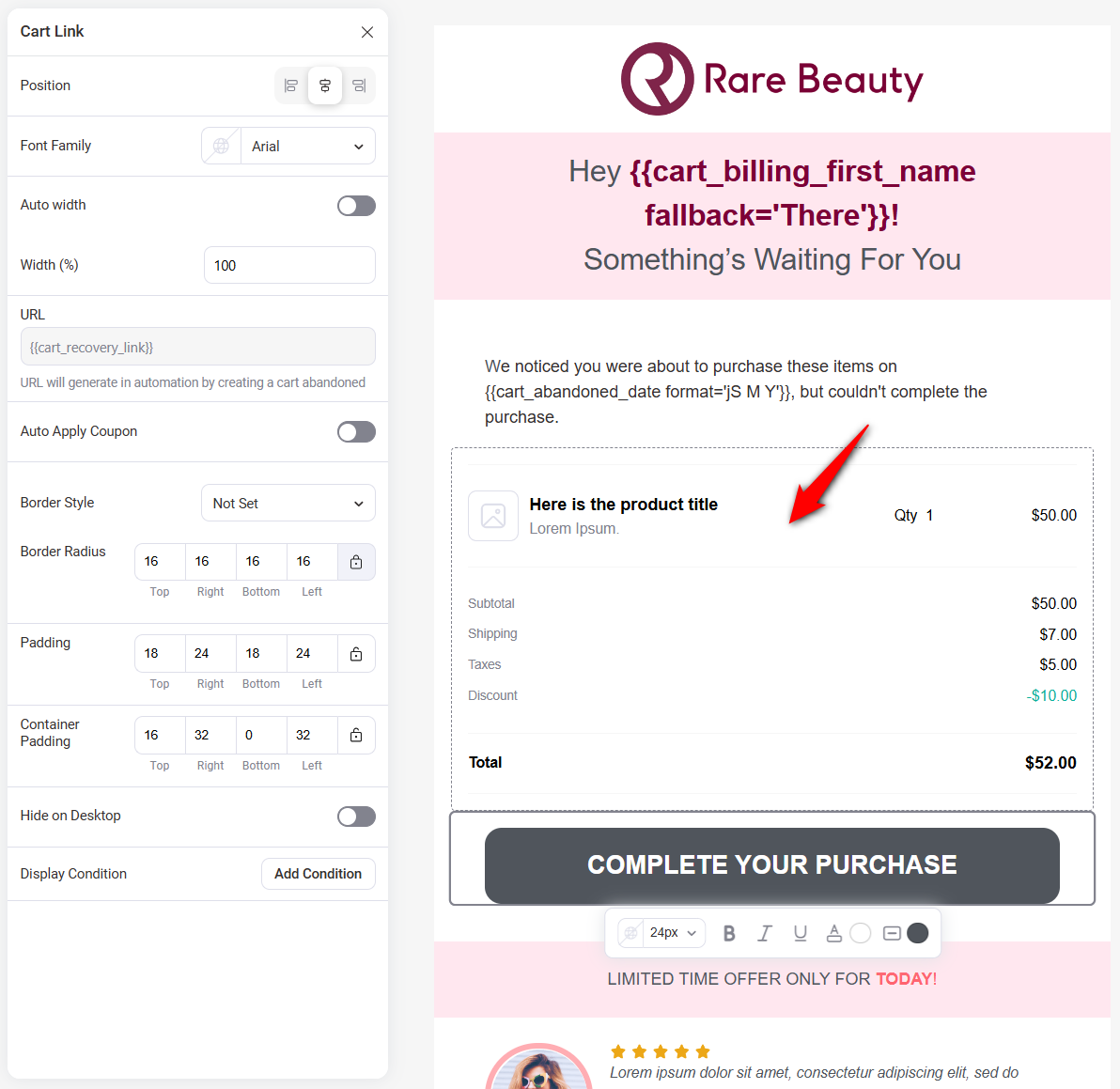
From here, drag in images, columns, text, headings, or buttons. The template already includes the cart recovery link, so shoppers can get back to their cart in one click.
Before moving on, send yourself a test email to check how it looks in a real inbox.

Repeat the process for the other two emails. Here's one way to set them up:
Email 2 (after 24 hours): Add value
- Subject: Still thinking about {{cart_items template='list' type='comma-separated'}}?
- Preview text: Here's why customers love it
- Body: Include reviews, social proof, or answers to common objections
Email 3 (after 48 to 72 hours): Final incentive
- Subject: 10% off expires tonight
- Preview text: Don't miss your discount
- Body: Add a personalized, time-bound coupon using FunnelKit's dynamic coupon feature
Read through every subject line and email once more before the flow goes live.
Step 5: Activate the automation
Switch the toggle to Active.
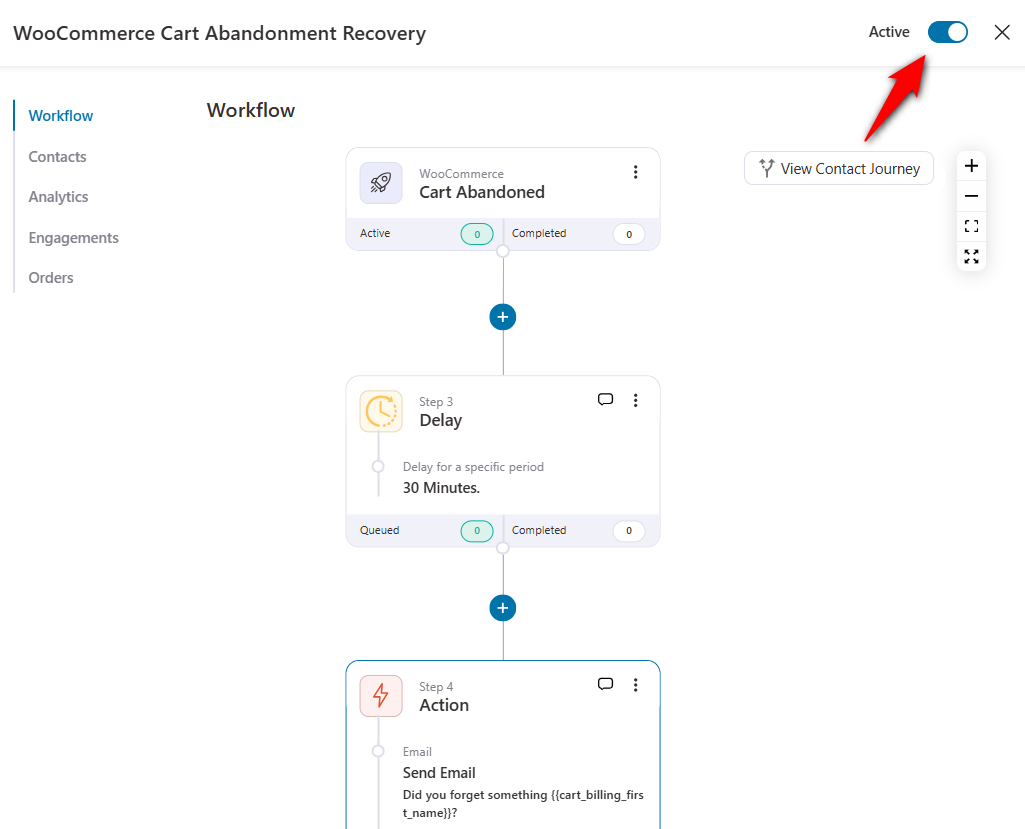
That's it. Your abandoned cart sequence is live and will start working the next time a shopper leaves a cart behind.
Frequently Asked Questions (FAQs) About Abandoned Cart Subject Lines
Send it within the first few hours, while the shopper still remembers what they wanted. Somewhere between 1 and 4 hours after abandonment is a common starting point. Wait much longer and many shoppers will have moved on, bought elsewhere, or simply forgotten. From there, test the delay against how quickly your own customers tend to buy.
No. Discounts in every email, especially the first one, can train customers to abandon carts on purpose just to get an offer. Keep incentives for your final email or for high-value carts. With conditions in FunnelKit Automations, you can offer different incentives based on cart value, for example 10% off for carts over £50 and 15% off for carts over £100.
They can work if they fit your brand and you use them sparingly. One emoji can help a subject line stand out, but several in a row can look unprofessional and may hurt deliverability. Test an emoji version against a plain one with a small segment before rolling it out to everyone.
Send through a reputable SMTP service, authenticate your domain with SPF, DKIM, and DMARC records, keep your list clean, and include a clear unsubscribe link. In the subject line itself, avoid typing words like free or urgent in all caps, and don't lean on phrases like last chance in every email.
Put Your Abandoned Cart Subject Lines to Work
Start small. Pick one line for each of the three emails, pair each with preview text, and let the sequence run for a few weeks before you judge it.
Then test. Try a funny version against a plain one, add a name tag, or move your incentive from Email 3 to Email 2 and watch what changes. Over time, your own results will tell you more than any list can, this one included.
If your store runs on WordPress, FunnelKit Automations lets you build the three-email flow, add merge tags and personalized coupons, and test subject lines in one place.
Editorial Team
October 5, 2026WooCommerce email customizer plugins let you add your logo, brand colors, and preferred layout to order emails without touching code. The problem is that they don’t always cover every email...
Editorial Team
September 30, 2026Quick answer: A quiz funnel is a multi-step interactive path that replaces a static lead form where visitors answer 5-8 questions, opt in with their email, and receive a personalized...

Editorial Team
September 30, 2026A WooCommerce HubSpot integration takes about 15 minutes to set up, but getting the sync right can take much longer. In April 2026, a store owner posted in the HubSpot...