


![13 Proven Strategies to Increase WooCommerce Sales in 2026 [Actionable Tips]](https://funnelkit.com/wp-content/uploads/2026/01/Proven-Strategies-to-Increase-WooCommerce-Sales.jpg)
You’ve built your WooCommerce store, polished your product pages, and invested in marketing, but sales aren’t coming.
Visitors browse, some add items to their cart, and most vanish before completing a purchase. Frustrating, right?
You’re not alone. In 2025, the global cart abandonment rate hit 75.38% (Baymard Institute).
That means for every 100 visitors showing buying intent, about 70 leave without purchasing.
The good news is that recovering just 10–20% of abandoned carts, optimizing checkout flows, improving mobile UX, and using strategies like cross-sells, discounts, reviews, SEO, paid ads, and live chat can drastically boost conversions.
In this guide, you will discover 13 actionable strategies to increase WooCommerce sales in 2026, following the buyer journey to convert casual browsers into loyal customers.
Table of Contents
- 1 Quick Overview of 13 Proven WooCommerce Sales Tactics
- 2 13 Proven Strategies to Increase WooCommerce Sales in 2026
- 2.1 Strategy 1: Optimizing the checkout and buyer flow for maximum conversion
- 2.2 Strategy 2: Implementing strategic cart recovery campaigns
- 2.3 Strategy 3: Prioritize UX with a mobile-friendly design
- 2.4 Strategy 4: Craft compelling product pages
- 2.5 Strategy 5: Reducing friction by replacing the cart page with a slide cart
- 2.6 Strategy 6: Boosting average order value with add-on offers
- 2.7 Strategy 7: Get better WooCommerce hosting
- 2.8 Strategy 8: Actively collect customer reviews and turn reviews into trust
- 2.9 Strategy 9: Running data-driven paid ads with proper tracking
- 2.10 Strategy 10: Winning back lost customers with automation
- 2.11 Strategy 11: Content marketing and local SEO for organic sales
- 2.12 Strategy 12: Implement Live Chat for Immediate Engagement
- 2.13 Strategy 13: Optimize WooCommerce store for international sales
- 3 WooCommerce Performance Benchmarks: Setting Realistic Goals
- 4 Frequently Asked Questions About Increasing WooCommerce Sales
- 5 What's a good conversion rate for a WooCommerce store?
- 6 How quickly can I expect to see results from these strategies?
- 7 Do I need technical skills to implement these strategies?
- 8 What is the most important strategy to start with?
- 9 How do I know which strategies are working?
- 10 Ready to Convert More Traffic Into Sales?
Quick Overview of 13 Proven WooCommerce Sales Tactics
| Strategy | Benefit | Quick Tip |
|---|---|---|
| Optimize Checkout & Buyer Flow | Reduce friction, cut drop-offs | Enable guest checkout, use multi-step forms, show costs upfront |
| Strategic Abandoned Cart Recovery | Recover lost revenue | Use a 3-email sequence and offer small incentives |
| Mobile-Friendly UX | Improve conversions on mobile | Simplify navigation, use large buttons, and optimize page speed |
| Compelling Product Pages | Increase buyer confidence | Use high-quality images and benefit-focused descriptions |
| Replace the Cart Page with a Slide Cart | Fewer drop-offs, no page reloads | Show the cart without making customers leave the page |
| Boost Average Order Value with Add-On Offers | Increase AOV without acquiring new customers | Use order bumps, upsells, milestone discounts, and free shipping thresholds |
| Better WooCommerce Hosting | Improve speed and reliability | Choose SSD storage, a CDN, and uptime monitoring |
| Turn Reviews into Trust | Build customer trust | Automate review collection and display reviews strategically |
| Data-Driven Paid Ads with Tracking | Drive targeted traffic and measure ROI | Run Facebook and Google Ads with GA4 conversion tracking |
| Win-Back Campaigns | Retain existing customers | Send segmented email campaigns with targeted incentives |
| Content Marketing & Local SEO | Increase organic traffic and conversions | Create SEO-friendly guides, optimize your Google Business Profile, and target local keywords |
| Live Chat | Engage customers instantly | Answer questions in real time and use behavior-triggered chat |
| Optimize for International Sales | Expand globally and increase revenue | Offer multi-currency support, automate taxes, and provide regional shipping options |
13 Proven Strategies to Increase WooCommerce Sales in 2026
Here is a list of 13 proven strategies that cover every step of the buyer journey, from checkout and cart recovery to product pages, mobile UX, and marketing.
Implementing them will help you capture more sales and grow your WooCommerce store in 2026.
Strategy 1: Optimizing the checkout and buyer flow for maximum conversion
Your checkout is where friction kills sales. Baymard Institute found that 19% of shoppers abandon carts because of forced registration, and another 18% leave over complicated checkout steps.
A few things fix most of this:
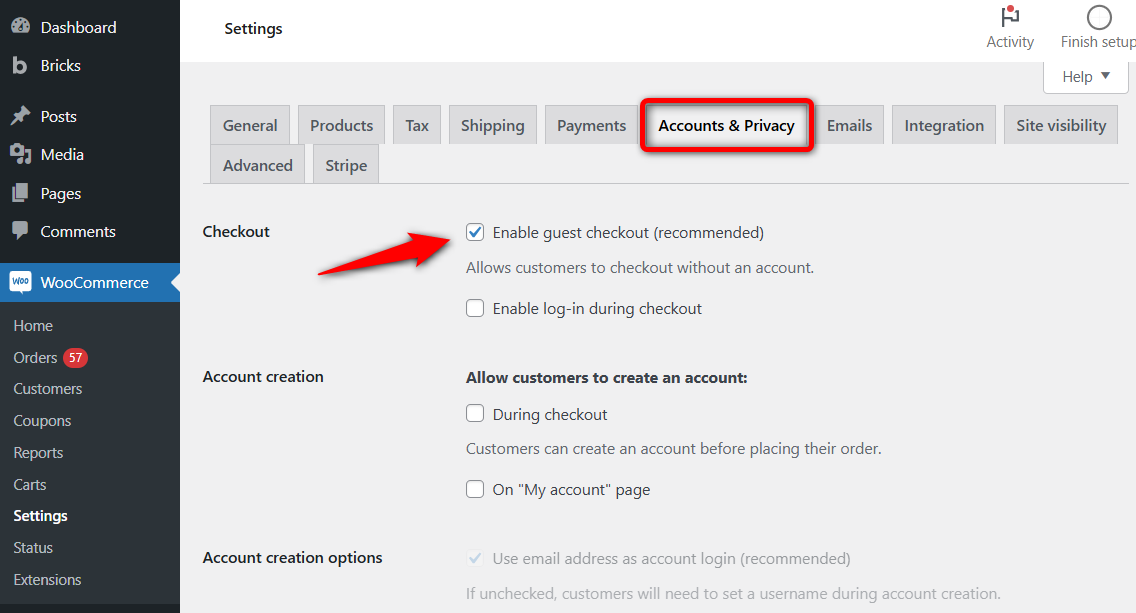
- Guest checkout: Let people buy without creating an account, then invite registration afterward.
- Multi-step checkout: Break long forms into stages with a progress indicator so it doesn't feel endless.
- Show costs upfront: Shipping, taxes, thresholds, all of it, before the surprise hits at the final screen.
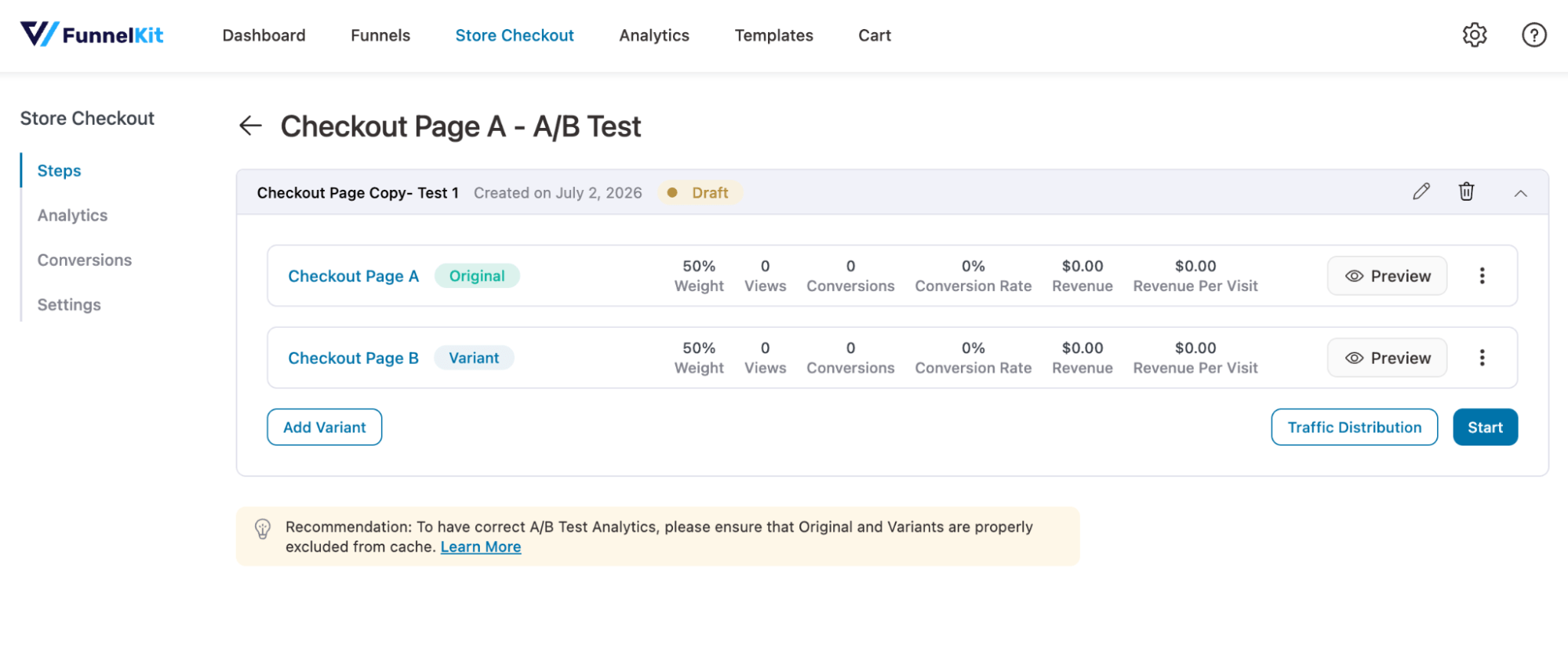
- A/B testing: Test one thing at a time- layout, button copy, whatever it is- so you can isolate the variable.
- More payment options: Cards, PayPal, Apple Pay, Google Pay. Every option you're missing is a reason to abandon.
- Speed: Fewer scripts and faster load times alone can lift conversions by around 7%.
Beyond checkout itself, look at the whole buyer flow, the entire path from landing page to completed purchase. Walk through it yourself as a customer would. Add something to your cart. Go through checkout. Where do you hesitate? That's your answer.
Make sure mobile checkout actually works, guest checkout is the default rather than buried in settings, express payments are visible, and your trust badges and return policy are easy to find.
Implementation tools:
WooCommerce alone handles guest checkout. You just need to enable this from settings.
For the rest, more than 40,000 WooCommerce stores rely on FunnelKit Funnel Builder to build a multi-step checkout in a few clicks.
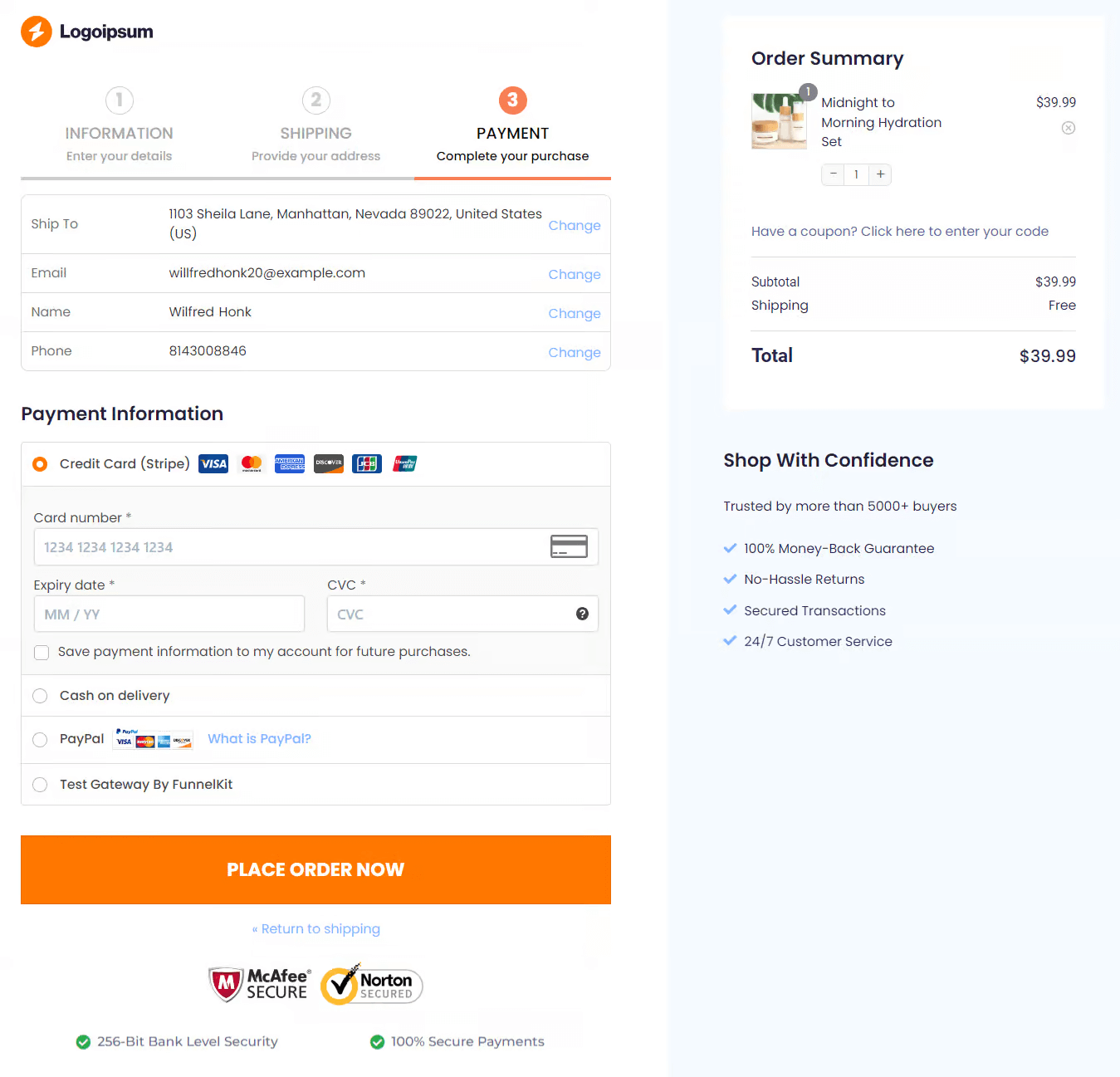
You can also strip it down to a single-step checkout with only the fields you actually need.
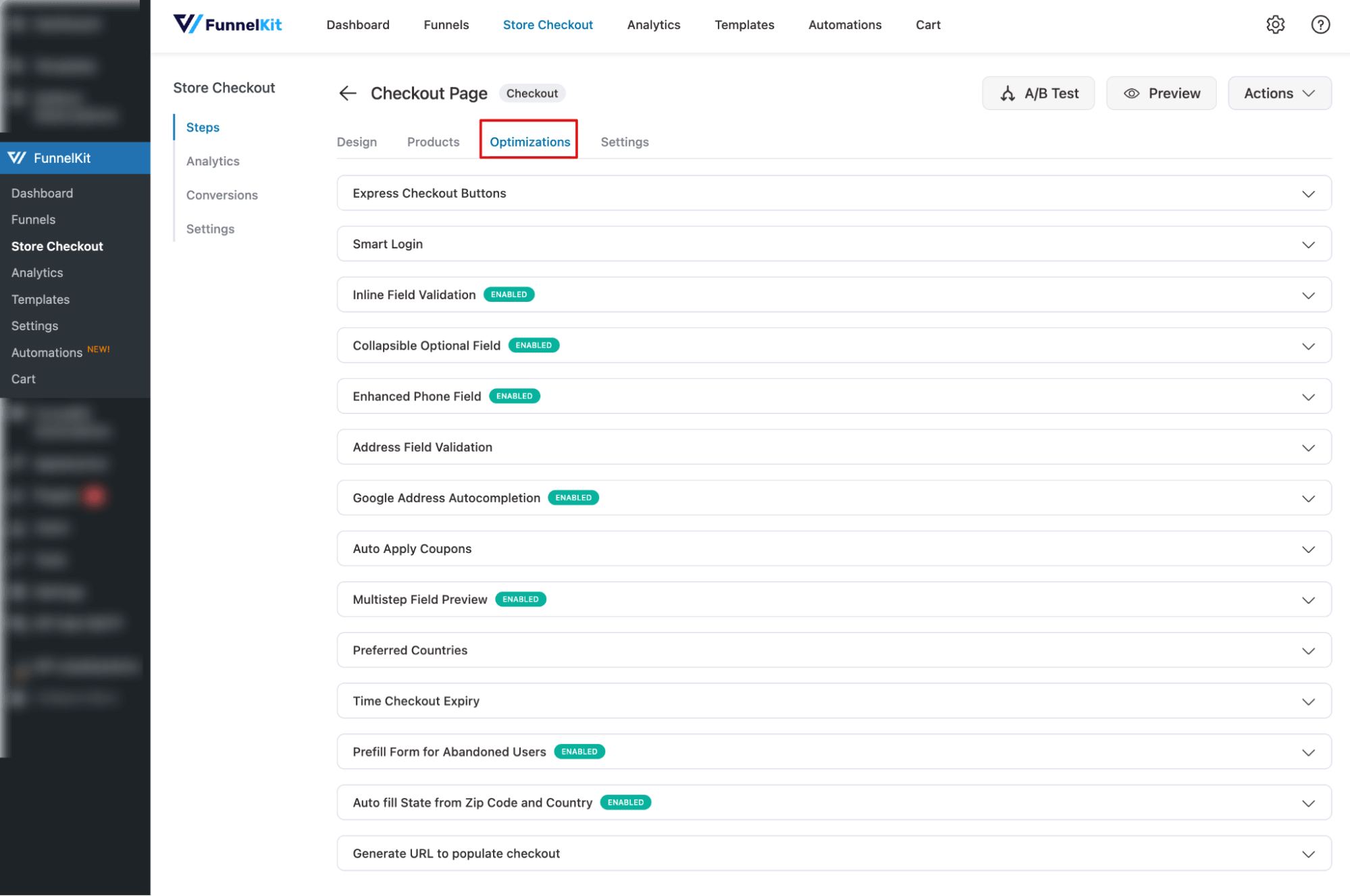
FunnelKit Funnel Builder also includes 13+ optimization options: Express Checkout Buttons, Smart Login, Address Field Validation, Google Address Autocomplete, Auto-Apply Coupons, and more.
For testing your broader buyer flow, tools like Nelio A/B Testing, FunnelKit Funnel Builder etc let you A/B test layout, button placement, checkout design, and trust badges. Using A/B testing you can find what really works for your customers.
Strategy 2: Implementing strategic cart recovery campaigns
Cart abandonment represents a huge revenue opportunity. With £2.96 trillion in abandoned merchandise annually and £192.4 billion recoverable globally (Source: Kanuka Digital), the potential for recovery is staggering.
You can use a three-email recovery sequence. The timing of your recovery emails is crucial. Sending the first email within 1 hour of abandonment can boost recovery rates by up to 20% compared to emails sent 24 hours later.
Here’s the sequence that works:
- Email 1 (1 hour after abandonment): A simple reminder with cart contents. Use a subject like "You left something behind" with clear product images and a direct checkout link.
- Email 2 (24 hours later): Add social proof, like customer reviews, or show how many people have bought the product recently.
- Email 3 (48-72 hours later): Offer a small incentive (e.g., 10% off or free shipping) to push hesitant buyers to complete their purchase.
Implementation Tool:
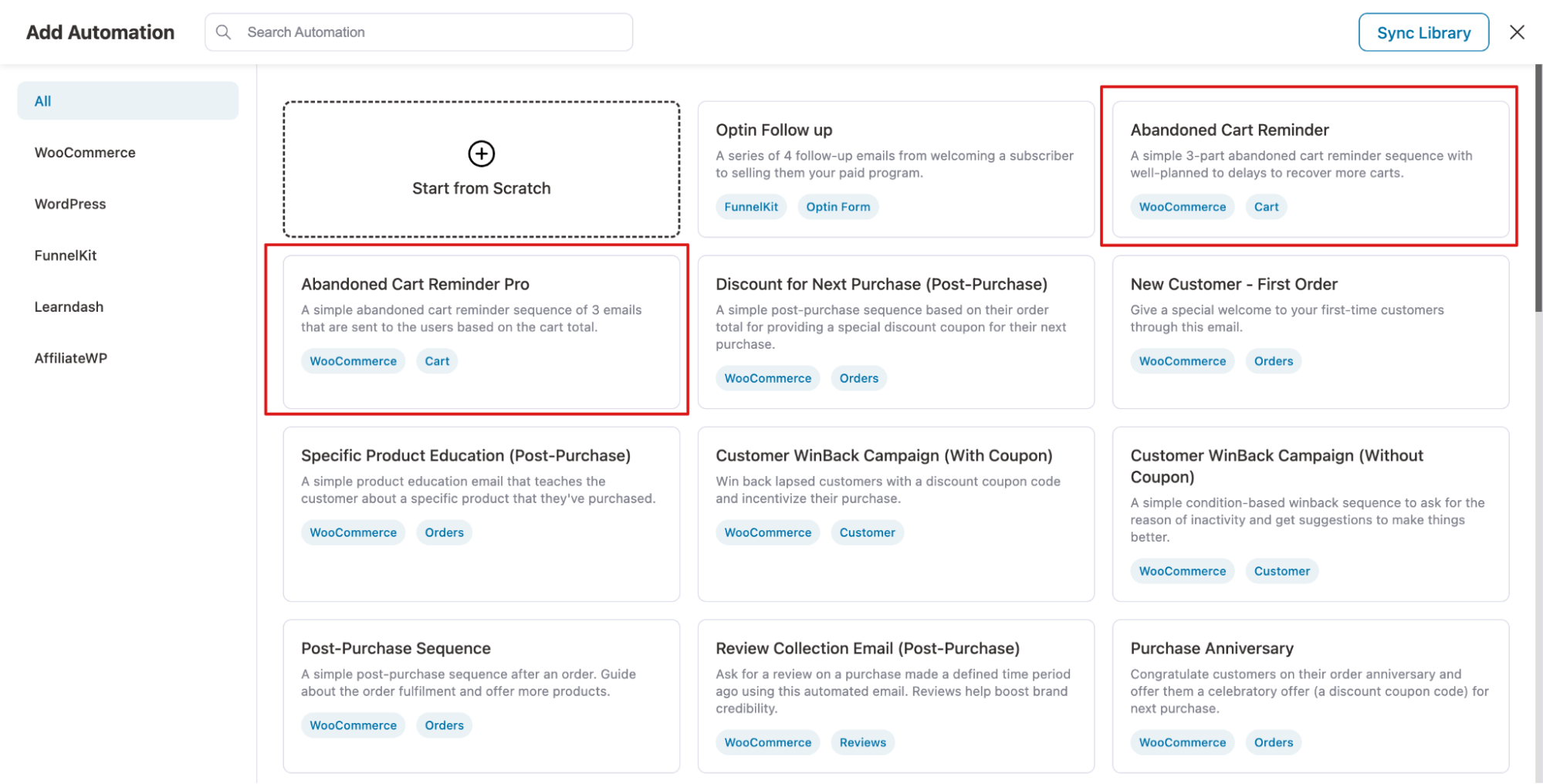
Use FunnelKit Automations to set up automated campaigns that target customers who abandoned their cart with timely email and SMS sequences. You can also add dynamic discount coupons based on cart total, user purchase history, and more
It includes a visual builder for creating automation. Plus two prebuilt automations for abandoned cart recovery.
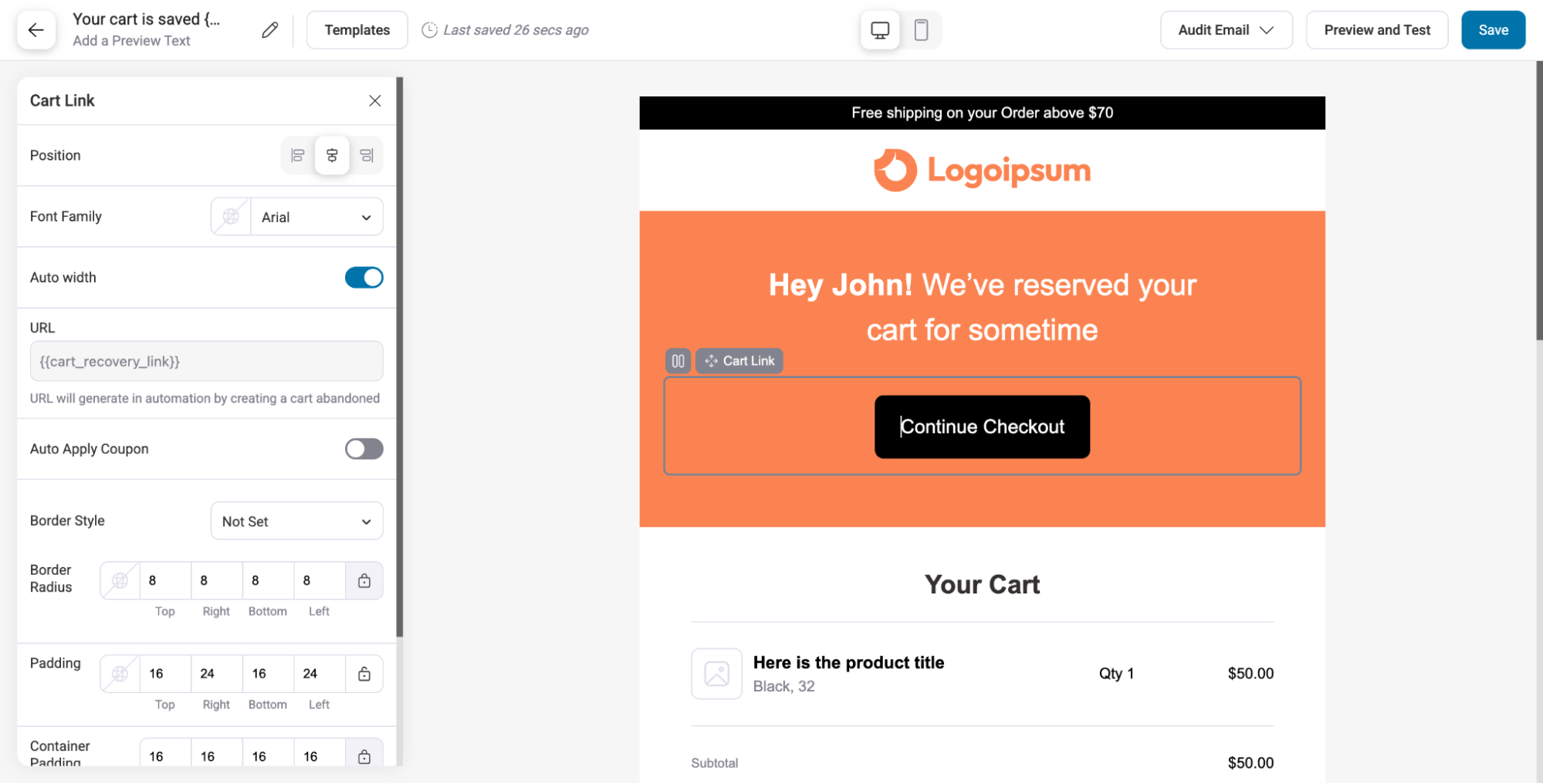
With emails, you get prebuilt templates and a visual email builder, letting you add engaging CTAs with Cart Recovery Link that take users straight to checkout with pre-filled values, making purchases quick and easy.
Track your recovery rate meticulously. Start with the baseline, implement your sequence, and measure weekly improvements.
Strategy 3: Prioritize UX with a mobile-friendly design
Mobile shopping is crucial, as much of WooCommerce traffic comes from mobile devices. Customers expect fast, intuitive, and seamless experiences.
Ensure quick load times, simple navigation, and a streamlined checkout. Reduce form fields, enable autofill, and use clear, tap-friendly CTAs and menus.
Even small inconveniences can drive users away, so prioritizing mobile UX helps retain sales from your largest traffic source.
Implementation Tool:
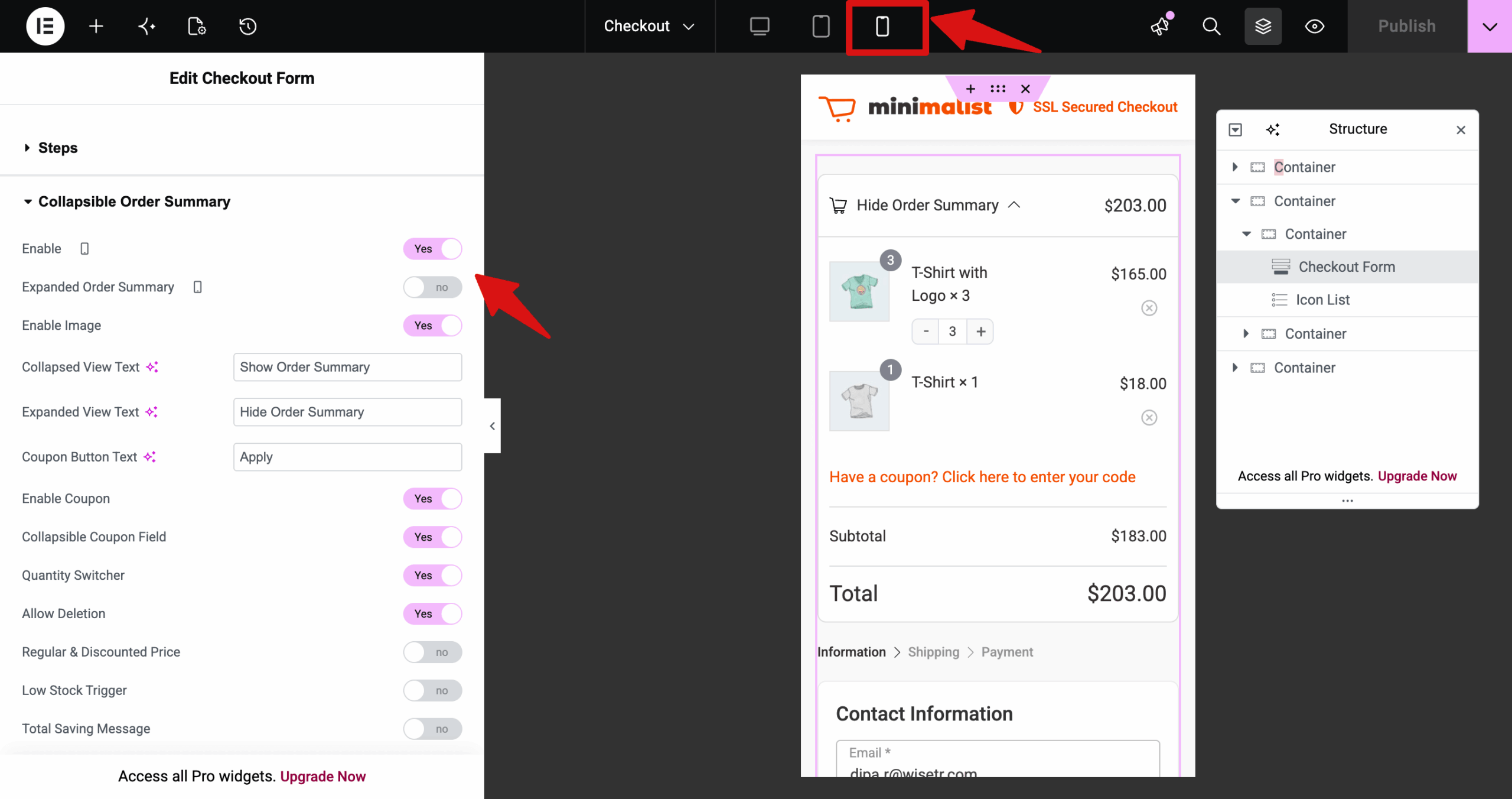
You can use any popular theme or page builder, such as Elementor or Divi, to make your WooCommerce pages mobile-friendly. Plus, make sure all the images and CTAs are prominent enough.
Strategy 4: Craft compelling product pages
Use high-quality images, multiple angles, and videos to build trust. Highlight benefits over features, showing how the product solves problems. Optimize SEO with proper titles, meta descriptions, alt text, and structured data. Build trust with reviews, guarantees, clear pricing, and security badges.
Industry-specific optimization includes:
- Fashion needs lifestyle images and size guides.
- Electronics need specs and warranties
- Digital products need social proof
- B2B products need case studies and ROI calculators.
Implementation Tool:
Use WooCommerce-ready themes for layout design. Leverage AI tools like ChatGPT or Claude for benefit-focused copy. Add high-quality images and videos, and implement Product Schema Markup using All in One SEO or Rank Math to improve search visibility.
Strategy 5: Reducing friction by replacing the cart page with a slide cart
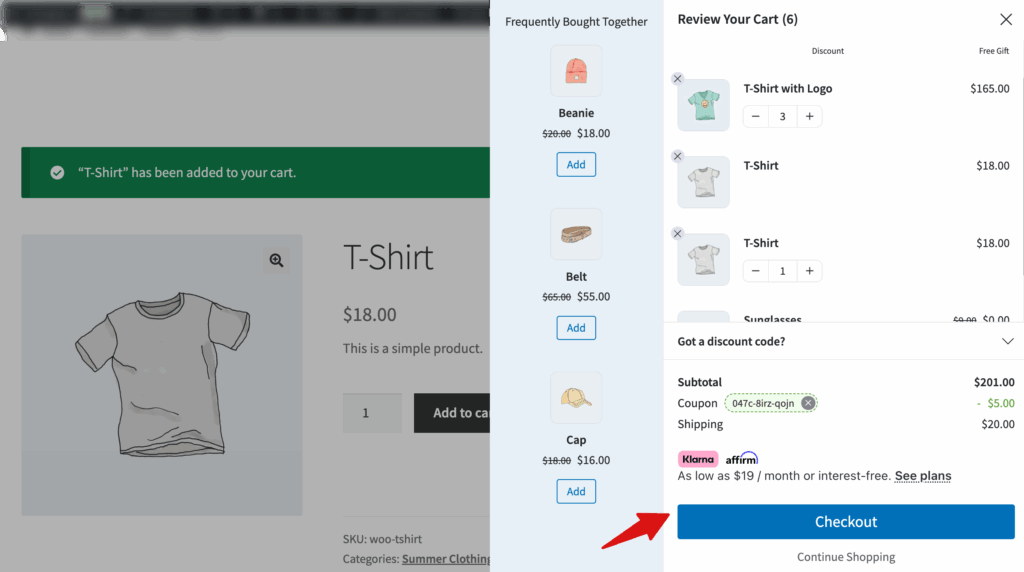
A traditional cart means multiple page reloads, and that's friction you don't need. A slide cart lets customers see what's in their cart and check out without ever leaving the page, all without a single page reload.
Implementation tool:
FunnelKit Cart adds a customizable side cart that matches your store's look and feel. Customers view their cart and check out fast, without ever landing on a separate cart page
Strategy 6: Boosting average order value with add-on offers
Four tactics, one goal: get customers to add more to their order before they check out. Order bumps. One-click upsells. Milestone discounts. Free shipping thresholds. None of them require a new customer. They just make the most of the one already in your cart.
- Order bumps (pre-purchase): A relevant add-on at checkout, a camera bag next to a camera, for a small extra fee.
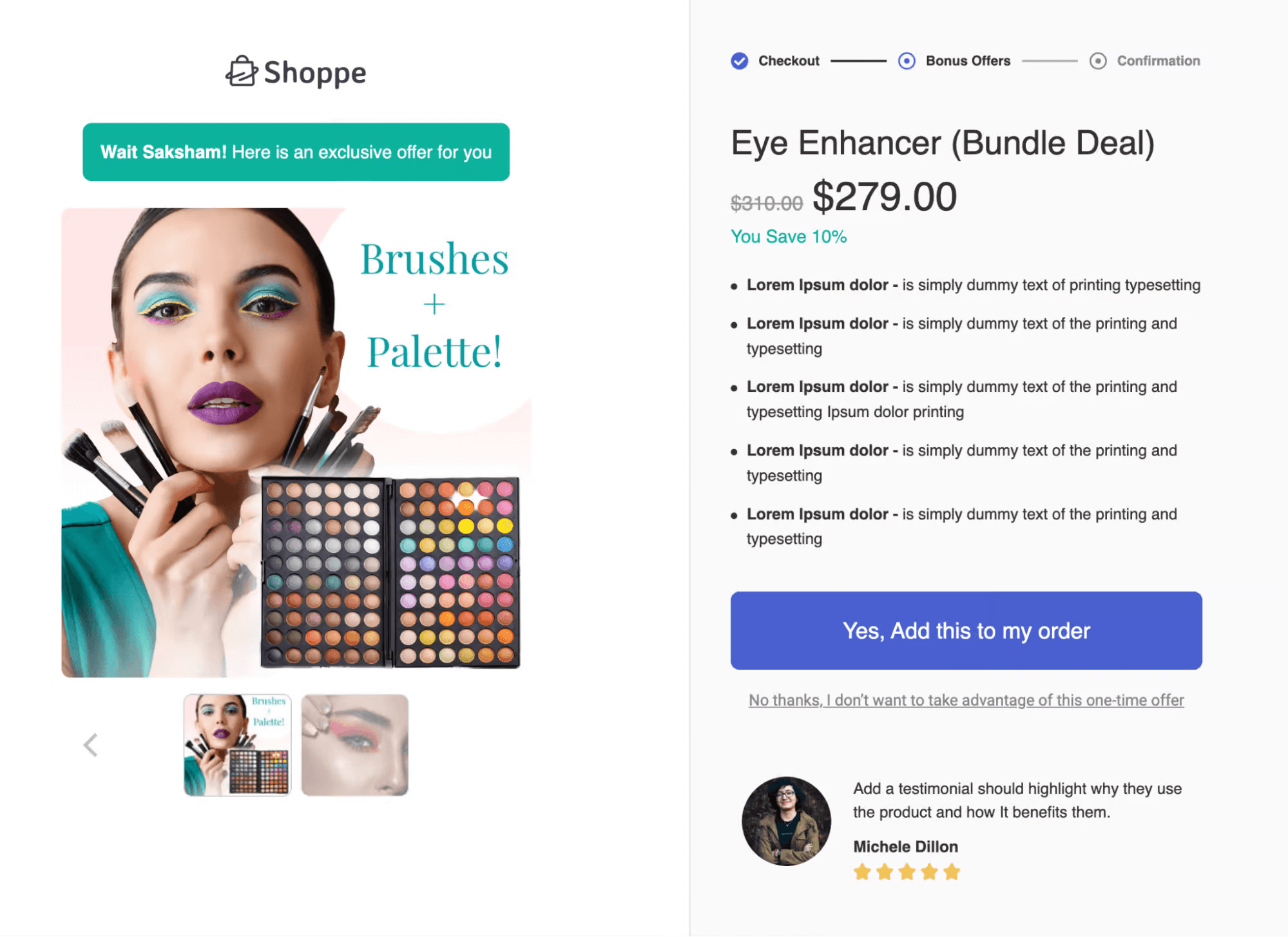
- Post-purchase upsells: Shown right after the purchase confirms. That's the moment the psychological barrier to buying again is lowest. Plus, users don't have to provide cart details the second time.
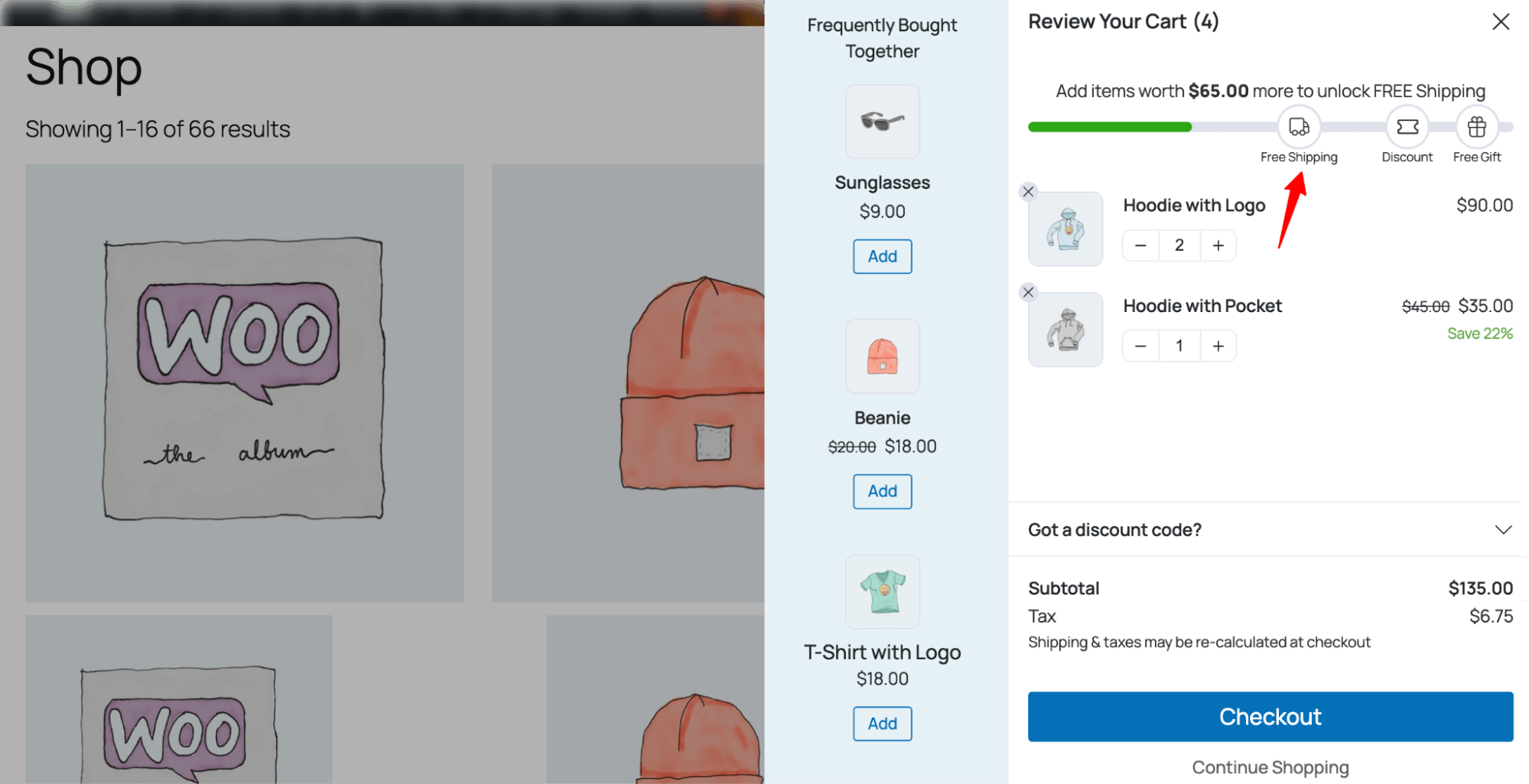
- Milestone discounts: "10% off orders over $75" gives customers a concrete reason to toss in one more item.
- Free shipping thresholds: Still one of the simplest, most reliable ways to push order value up. "Free shipping over $50" works because everyone hates paying for shipping.
Add a limited-time window to any of these and hesitant buyers tend to act faster. Done well, the whole approach lifts sales and customer satisfaction at once, not just one at the other's expense.
Implementation tools:
FunnelKit Funnel Builder handles the order bumps. Place multiple bumps at different spots on the checkout page, auto-select them, or make them conditional so only the right customers see them.
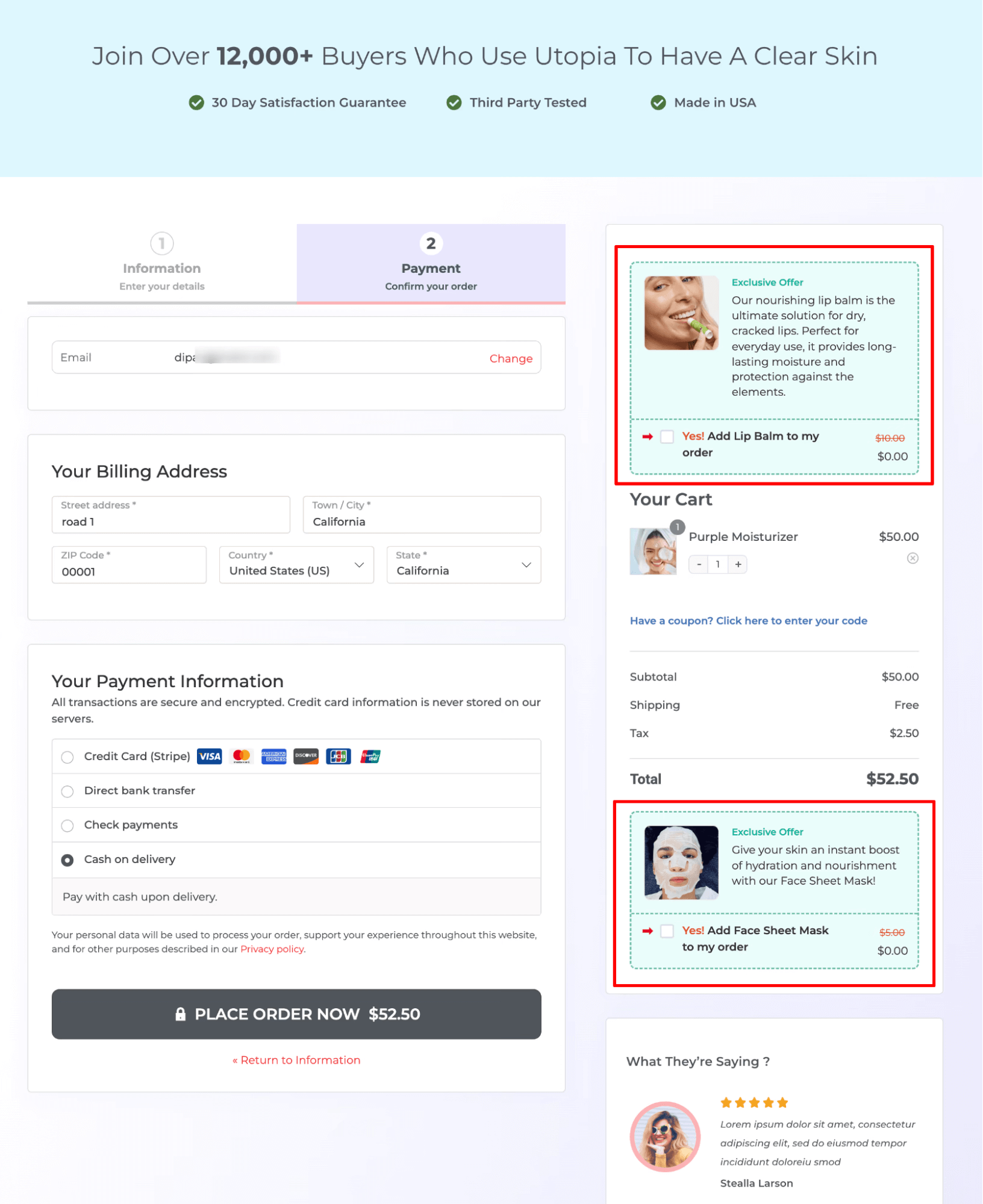
One-click upsells work the same way after checkout. Stack multiple bumps, add conditional logic, whatever gets more customers to say yes. FunnelKit Cart pitches in too, surfacing in-cart product recommendations while people are still shopping, a quieter but steady lever for order value.
You can use the FunnelKit Cart reward system to offer both milestone-based discounts and free shipping. Plus, you can offer a free gift if you want. Plus, on the cart you can show a progress bar that tells users how much more they need to add to their cart to avail the offer.
Strategy 7: Get better WooCommerce hosting
Hosting directly impacts your store’s speed, stability, and sales. Slow loading times, downtime, and server errors can quickly drive customers away.
Choose hosting with SSD storage and a CDN for faster performance, easy scalability as traffic grows, and strong security features like SSL, firewalls, daily backups, and uptime monitoring. WooCommerce-optimized hosting with built-in caching and automatic updates also helps maintain performance.
Slow pages increase cart abandonment and reduce conversions. Heavy plugins, poor database optimization, and shared server limitations can further slow your store. Reliable, optimized hosting ensures faster checkout, smoother user experience, and better overall sales performance.
Implementation Tool
- Recommended Hosting Providers: SiteGround, Bluehost, WP Engine, Kinsta. Choose based on speed, support, and WooCommerce optimization.
- Monitor Performance: Use Google PageSpeed Insights, GTmetrix, or Pingdom to check load times and uptime.
- Scaling & Optimization: Regularly review server resources and upgrade if needed. Ensure caching, CDN, and security features are active.
Strategy 8: Actively collect customer reviews and turn reviews into trust
Reviews move the needle more than most product copy ever will. Spiegel Research Center found conversion rates increase by 68% once a product has 11–30 reviews, with the uplift peaking at 70% for products with 11–50 reviews.
Make it easy. Send a request three to seven days after delivery, offer a small incentive, let people leave a quick star rating or a full comment, whatever they've got time for. Then respond to everything, thank the happy customers, handle criticism with care, and show reviews everywhere it counts: product pages, homepage, even checkout.
Reviews aren't the whole story, though. Social mentions, user-generated photos, a testimonial on your landing page, an influencer partnership, these all stack the same trust. Even something small, like moving reviews below the description or showing star ratings right in search results, shifts conversions more than you'd think.
Implementation Tool
You can use FunnelKit Automations to set up automated review collection campaigns via email and SMS. Trigger review requests via emails 3 to 7 days after order completion, and dynamically offer incentives based on cart total, purchase history, or loyalty points to encourage submissions.
The visual automation builder makes it easy to design flows, and you can personalize messages with product names and customer details.
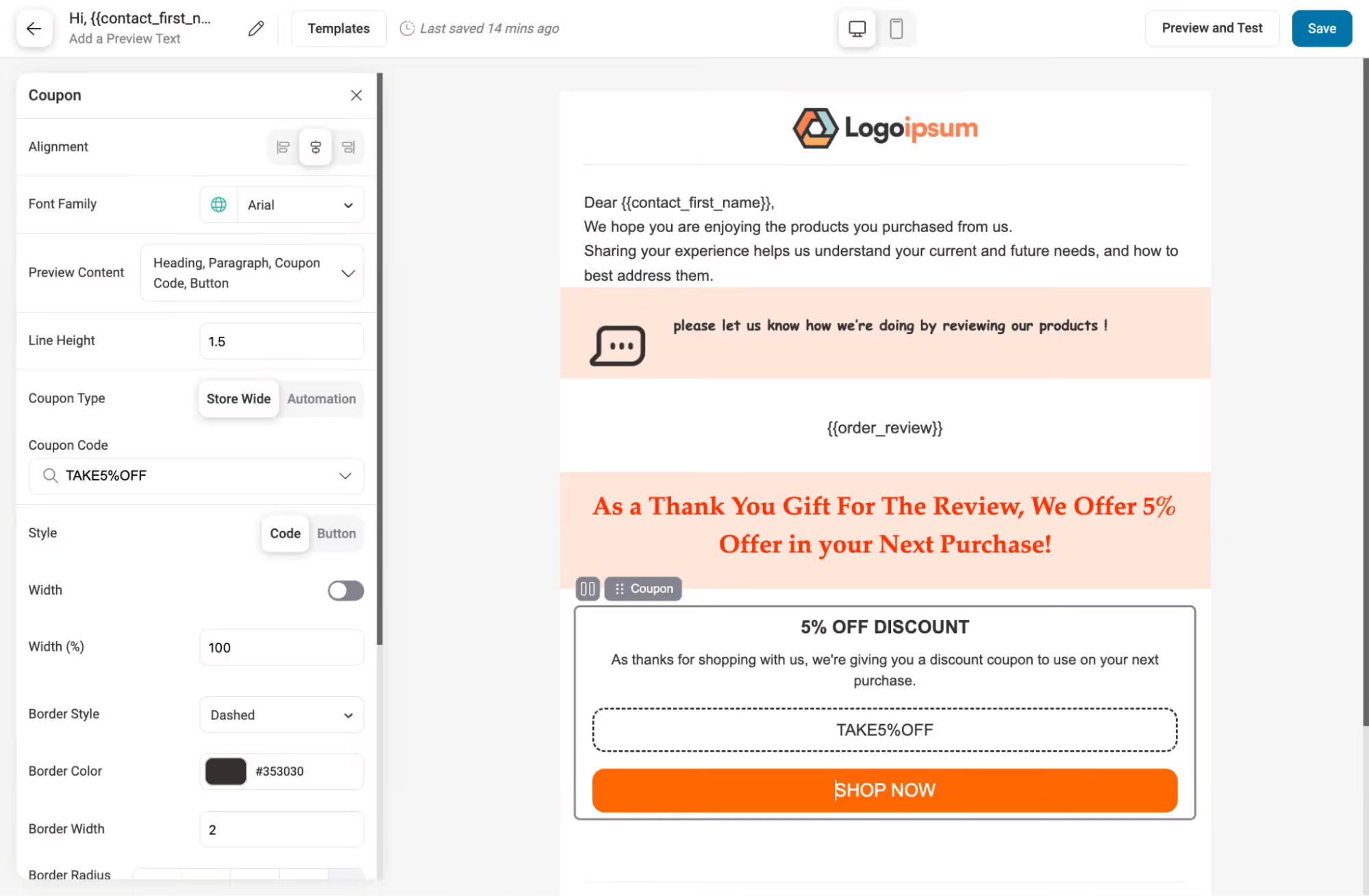
Furthermore, use review management plugins like Yotpo, Loox, or Judge.me to collect and display feedback. Share reviews on social media to amplify trust.
Integrate user-generated content from Instagram, Facebook, or Twitter. Use platforms like AspireIQ or Upfluence for influencer marketing to connect with credible promoters. These tools turn social proof into a sales-driving feature.
Strategy 9: Running data-driven paid ads with proper tracking
Paid ads can grow WooCommerce sales when properly tracked and optimized. Set up Facebook Pixel with events like View Content, Add to Cart, Initiate Checkout, and Purchase, and create custom conversions for key products.
For Google Ads, connect conversion tracking with Google Analytics, enable auto-tagging, use UTMs, and track purchase values accurately.
Run Dynamic Product Ads to retarget product viewers and cart abandoners. Optimize Google Shopping with high-quality images, detailed product data, and focused budgets on best sellers. Retarget past visitors, test creatives and audiences, monitor ROAS, and scale what performs best.
Implementation Tools
The primary tools for executing this strategy are Meta Ads (Facebook and Instagram) and Google Ads. All campaigns, including tracking, targeting, and retargeting, should be set up directly within these platforms to ensure accurate measurement and maximum ROI.
Strategy 10: Winning back lost customers with automation
Acquiring new customers costs 5–25x more than retaining existing ones (Harvard Business Review). Past buyers are your easiest revenue opportunity, especially with personalized campaigns.
Win-Back Strategy:
- 30–90 Days (Recently Lapsed): Offer 10–15% off, free shipping, or highlight new arrivals.
- 90–180 Days: Use stronger incentives (20%+) and promote bestsellers.
- 180+ Days: Send a short re-engagement series with your best offer and ask what would bring them back.
Send browse abandonment emails for viewed products, promote categories customers showed interest in, and use seasonal reminders based on past purchases.
Implementation Tool
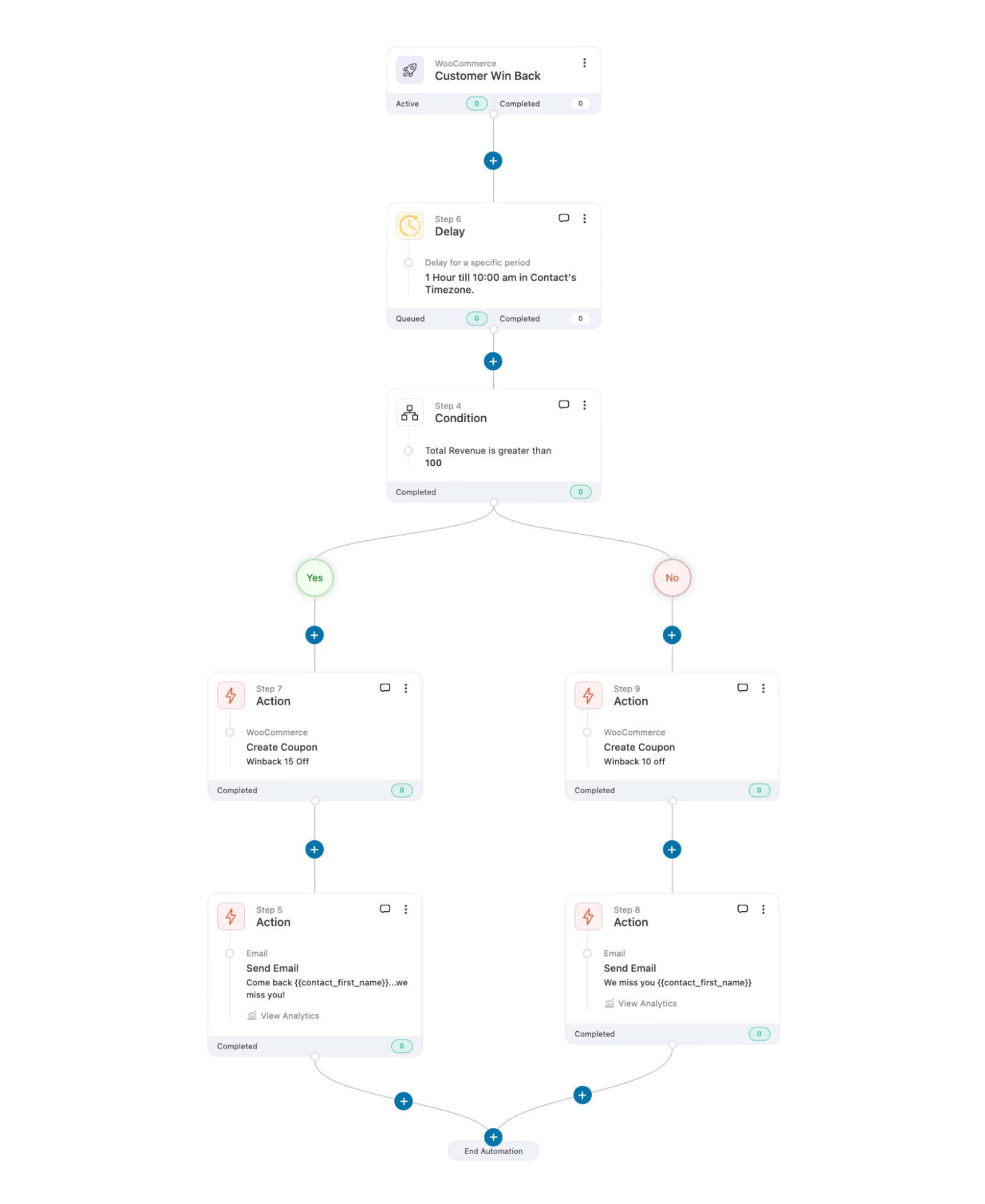
Use FunnelKit Automations to run personalized win-back campaigns via email and SMS based on customer inactivity periods.
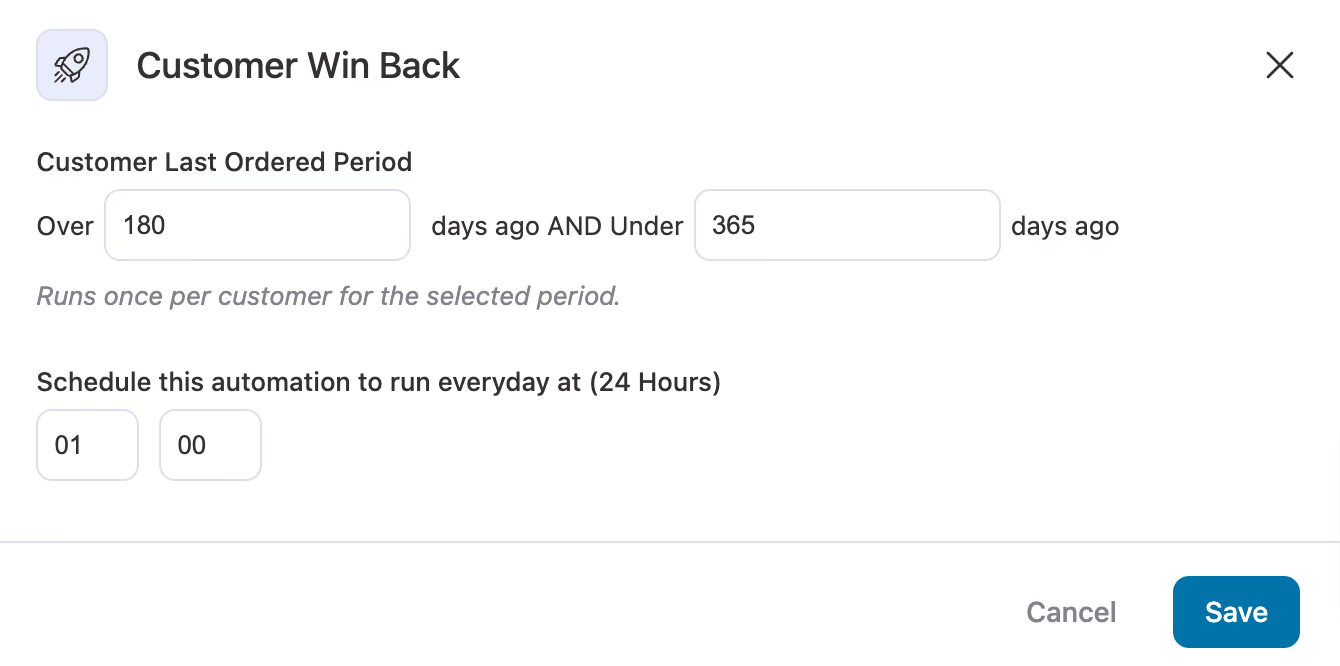
You can apply multiple conditions, such as last purchase date, previous emails received, or engagement status, before sending each message, ensuring customers aren’t over-emailed.
The visual automation builder lets you create lapsed-customer sequences with dynamic offers, coupons, or seasonal nudges, no coding required.
Strategy 11: Content marketing and local SEO for organic sales
Content marketing keeps traffic coming without a growing ad budget chasing it. WordStream puts organic search conversion around 4%, versus 2 to 3% for paid. That gap is worth paying attention to.
Google Search Console, Ahrefs, Semrush- these surface the opportunities actually worth chasing. Buyer's guides. How-tos. Problem-solution content built around real search intent. That's what converts, not filler. Internal linking, clear headers, meta descriptions that pull toward a purchase- all of it helps. Share it. Turn it into video. Refresh it yearly or it goes stale.
Local search needs its own attention too. Someone typing "near me" is usually ready to buy right now. Rank locally, even if you ship nationwide, and trust builds fast.
Keep your Google Business Profile accurate, photos and reviews attached. Location-based keywords on product pages and metadata. Locally relevant content wherever it fits. Stay consistent across directory citations. Get this right, and the traffic converts higher than broad organic ever will.
Implementation tools:
For the content side, AIOSEO pairs well with your research stack. It drafts SEO-friendly copy, suggests keyword placement, and flags internal linking opportunities, saving time while keeping everything aligned with strategy.
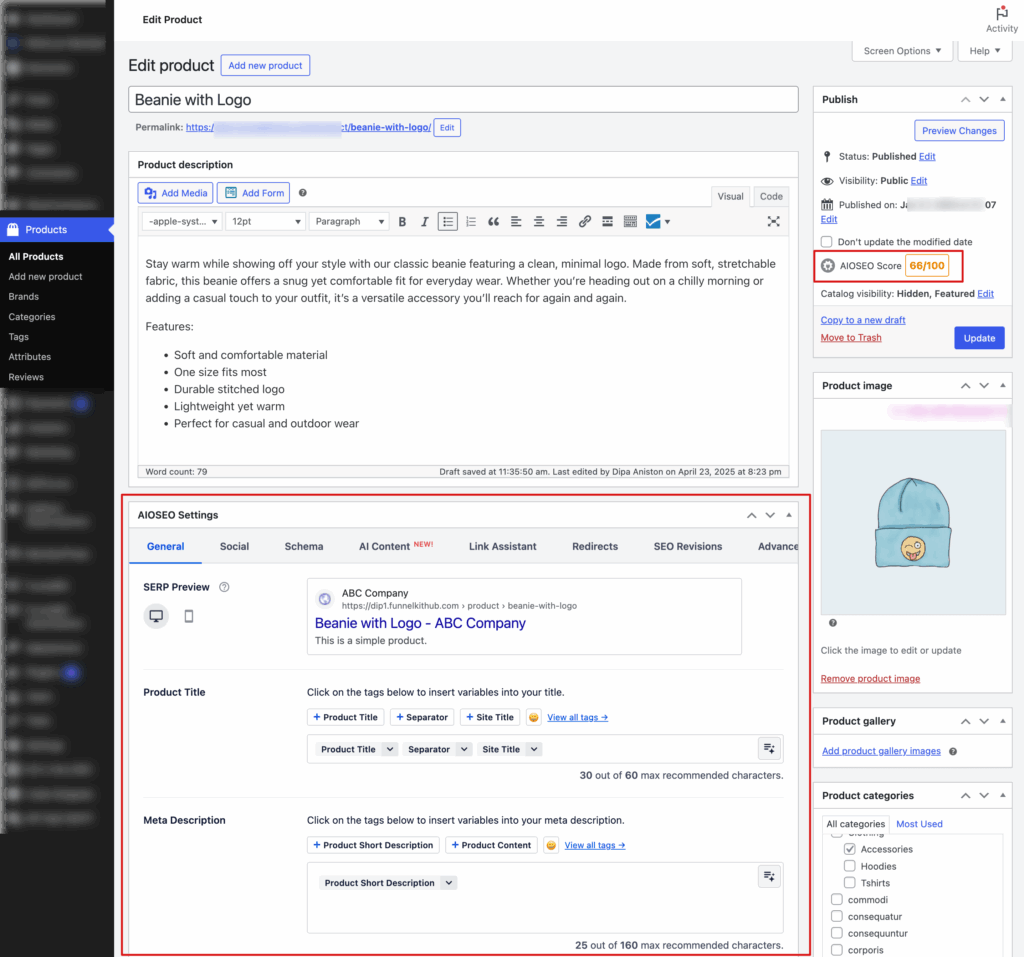
Pair it with Ahrefs, Semrush, and Search Console, and your posts end up both optimized for search and built to convert.
Local SEO runs on a different set of tools, but the same logic applies. Your Google Business Profile is the anchor here, kept current with updates, photos, and reviews.
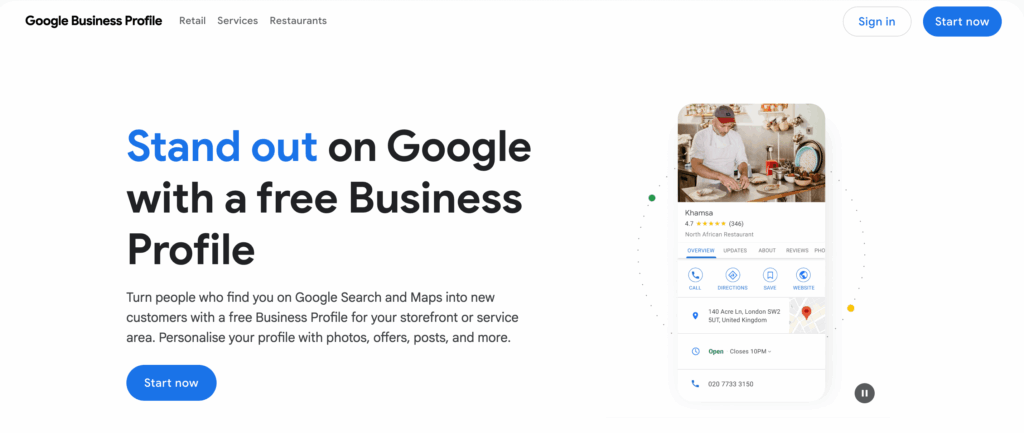
From there, WooCommerce SEO plugins like AIOSEO or Rank Math handle location-based keywords across product pages and structured data, while Whitespark or Moz Local manage citations and track how you're ranking locally
Strategy 12: Implement Live Chat for Immediate Engagement
Live chat is essential for reducing uncertainty and boosting conversions. Customers expect instant answers, especially for questions on sizing, shipping, or product details.
Set up automated responses for common questions, display expected response times, and trigger chat windows based on behavior, such as after 30 seconds on a product page.
Train your team to offer helpful support and make chat availability clear on product pages to build trust and capture high-intent buyers.
Implementation Tools
WPChat connects your store to WhatsApp, Messenger, Instagram, and Telegram, engaging mobile shoppers easily, while LiveChat offers a full-featured on-site widget with WooCommerce integration, AI responses, analytics, and multi-channel support for advanced stores.
Strategy 13: Optimize WooCommerce store for international sales
Expanding your WooCommerce store internationally can boost revenue, but global sales need careful optimization:
- Display Local Prices: Offer multi-currency support for a seamless experience.
- Automate Taxes: Calculate taxes based on each customer’s location.
- Accurate Shipping Rates: Set shipping zones to reduce cart abandonment.
- Localize Content: Translate pages and offer region-specific promotions to build trust and improve conversions.
Implementation Tools
To implement WooCommerce International Sales Optimization, use the following tools:
- WooCommerce Multi-Currency Plugin: Display prices in local currencies and improve customer experience.
- WooCommerce Shipping & Tax Plugin: Automatically calculate taxes and duties based on customer location.
- WPML / Polylang: Translate your store and create region-specific experiences.
- WooCommerce Shipping Zones: Set accurate shipping rates and methods based on customer location.
WooCommerce Performance Benchmarks: Setting Realistic Goals
To set effective goals for your WooCommerce store, assess your performance against industry standards. Benchmarks for metrics like conversion rates, average order value, and device-specific performance help optimize and grow your store.
Below are some WooCommerce-specific benchmarks to evaluate your store’s performance and identify areas for improvement.
| Metric | Benchmark |
|---|---|
| Conversion Rates by Store Maturity | |
| New/WP WooCommerce stores | ~0.5–1% |
| Growing WooCommerce stores | ~1–2% |
| Established WooCommerce stores | ~2–4%+ |
| General ecommerce norm | ~2.5–3.6% |
| Average WooCommerce Order/Transaction Value | |
| Average WooCommerce transaction value | ~$79 |
| Device‑Based Conversion Differences | |
| Desktop conversion (ecommerce) | ~3–4% |
| Mobile conversion (ecommerce) | ~1.5–2.5% |
| Performance & Technical Impact on Conversions | |
| Fast load (under ~2s) | ~2× better conversion |
| Every extra 1s load time | −7–14% conversion |
| Shared vs Managed Hosting | 2–5× faster load times on managed |
Sources for the references above:
- Insights from Convesio’s WooCommerce Conversion Rate Benchmarks
- Performance studies from SaleCycle’s eCommerce Report
- WooCommerce ecosystem insights from Marketing LTB
Frequently Asked Questions About Increasing WooCommerce Sales
Here, find the commonly asked questions with answers:
What's a good conversion rate for a WooCommerce store?
Conversion rates vary by industry and product type. Instead of focusing on a specific number, aim to improve your store’s performance compared to your past results. Optimize checkout, cart recovery, and product pages to increase the percentage of visitors who complete purchases gradually.
How quickly can I expect to see results from these strategies?
Some strategies, like cart recovery emails, checkout optimization, and live chat, show quick results in days or weeks. Others, like SEO content and local search optimization, take longer to build momentum. Start with quick wins to boost conversions while long-term strategies take effect.
Do I need technical skills to implement these strategies?
Many strategies are plugin-friendly and require minimal technical skills. Tools like FunnelKit, WPChat, WPForms, and MonsterInsights handle checkout optimization, cart recovery, live chat, and analytics. For advanced setups like complex automation or custom tracking, consider a WooCommerce developer for initial configuration.
What is the most important strategy to start with?
If you have traffic but low conversions, prioritize checkout optimization and cart recovery. For low traffic, focus on paid ads and SEO content to attract visitors. Adding live chat and social proof can improve conversion rates for incoming traffic.
How do I know which strategies are working?
Track baseline metrics with tools like Google Analytics 4 or MonsterInsights. Monitor actions like add-to-cart, checkout initiation, and purchases. Implement changes one at a time and measure weekly improvements to identify the most effective strategies.
Ready to Convert More Traffic Into Sales?
Increasing WooCommerce sales is not about luck. It is about reducing friction, guiding buyers, and creating an experience that converts.
Start with strategies that deliver the fastest impact, such as checkout improvements, cart recovery, and live chat, while building long-term growth through SEO, content marketing, and data-driven advertising.
Track results, test changes, and refine your approach to steadily grow your store’s performance.
FunnelKit products help you create optimized checkout flows, recover abandoned carts, implement upsells, collect reviews, and run automated marketing campaigns all from a single platform.
Whether you run a small boutique or a growing eCommerce brand, applying these strategies with the right tools will help you increase conversions, maximize sales, and make your next sale closer than you think.
Editorial Team
September 3, 2026The right WooCommerce subscription plugin turns one-time buyers into predictable recurring revenue. On the other hand, a wrong one breaks renewals, loses customers, and costs more than the license fee....
Editorial Team
August 28, 2026WooCommerce order attribution tells you where your orders come from. Out of the box, no extra plugin needed. But the built-in report only tells half the story, crediting whichever click...
Editorial Team
August 27, 2026Have you ever noticed the cart icon at the top of many online stores? It’s more than just a design choice. It can greatly improve your customers' experience. A cart...






