Quick answer: A quiz funnel is a multi-step interactive path that replaces a static lead form where visitors answer 5-8 questions, opt in with their email, and receive a personalized result.
In WooCommerce, the best landing page spot is a checkout already loaded with the products those answers point to.
You need a form plugin that scores answers, a WordPress funnel builder for the pages, and a CRM plugin for follow-up emails.
If you walk into a good optician, nobody hands you a catalog of 400 frames.
They ask what you do for work, whether you drive at night, how you feel about heavy frames on your nose.
Four questions later, they hand you three pairs, and one of them is right.
Now look at your store. A shopper lands, sees 200 products, and gets a pop-up asking for their email in exchange for 10% off without any questions or conversation.
Just a demand for data before you’ve earned it.
That gap is what an interactive assessment closes. Their answers become segmentation data that shapes every message you send afterward.
This guide covers the five stages, the questions that actually get answered, step-by-step instructions for setting up a quiz funnel in WooCommerce, and the mistakes we see quietly killing completion rates.
Table of Contents
- 1 What is a Quiz Funnel?
- 2 The 5 Stages: From First Click to Segmented Buyer
- 3 How to Create a High-Converting Quiz Sales Funnel in WooCommerce
- 3.1 Step 1: Segment by concern
- 3.2 Step 2: Build the quiz in your form plugin
- 3.3 Step 3: Map score ranges to redirect URLs
- 3.4 Step 4: Build the landing page and embed the quiz
- 3.5 Step 5: Use checkout as the personalized results page
- 3.6 Step 6: Tag on the way out, then branch the emails
- 3.7 Step 7: Test all three paths before you send traffic
- 4 5 Quiz Formats That Consistently Earn Their Place
- 5 7 Best Practices to Lift Your Quiz Conversion Rate
- 6 Frequently Asked Questions
- 7 Launch Your First Quiz Funnel This Week
What is a Quiz Funnel?
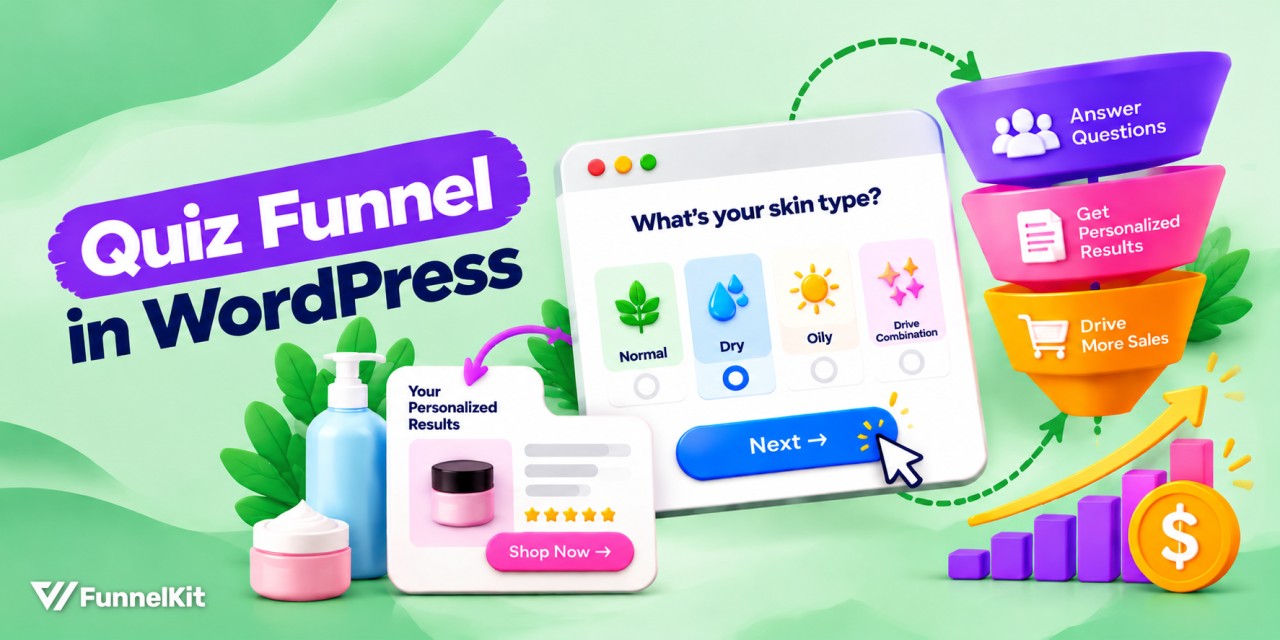
A quiz funnel swaps the static opt-in form for a short interactive quiz, then trades a personalized result, such as a product recommendation or a score, for the visitor’s email address and a rich set of preference data.
The mechanics are simple. It has questions, an opt-in, and a personalized outcome. The important part is what you know when the quiz ends.
| Parameter | Pop-up opt-in | Quiz funnel |
|---|---|---|
| You collect | An email address | Email, result, budget range, experience level, and the problem they’re solving |
| Why they opt in | 10% off | To learn something about themselves |
| Your next email | A generic blast | Written for their result |
You can email one of those lists intelligently. And the other gets a generic blast with a 0.2% click rate.
The psychology is simple. People will not fill out a form to get something generic, but they’ll answer eight questions to learn something about themselves.
Each answer is a small commitment, and by question six, handing over an email to see the result feels like the natural next step rather than a toll booth.
The 5 Stages: From First Click to Segmented Buyer
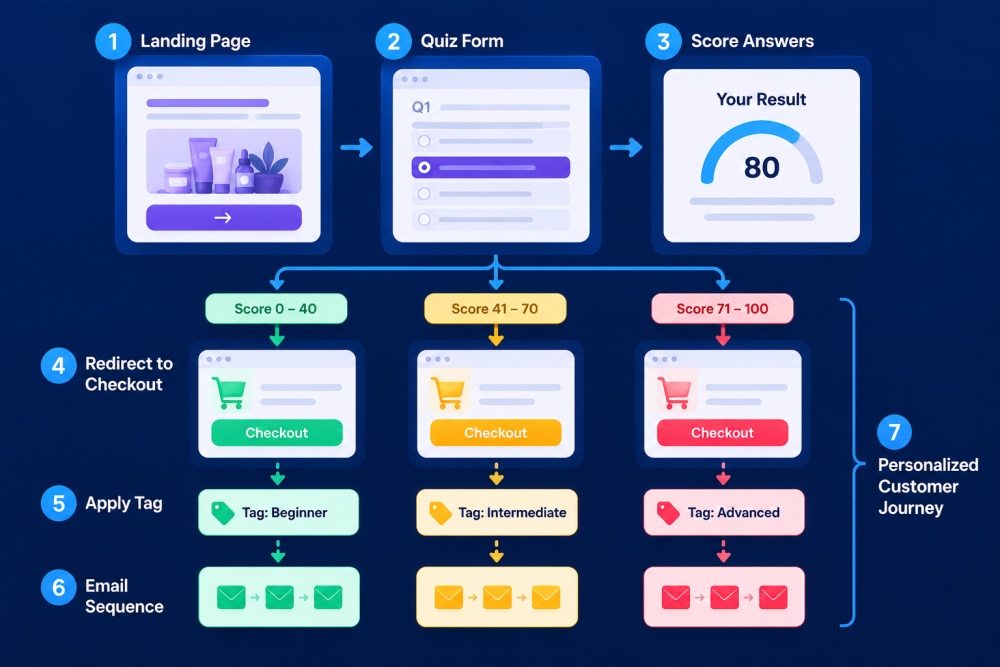
A quiz-based funnel adapts to each visitor instead of pushing everyone through the same page, form, and follow-up sequence.
That difference plays out across five stages.
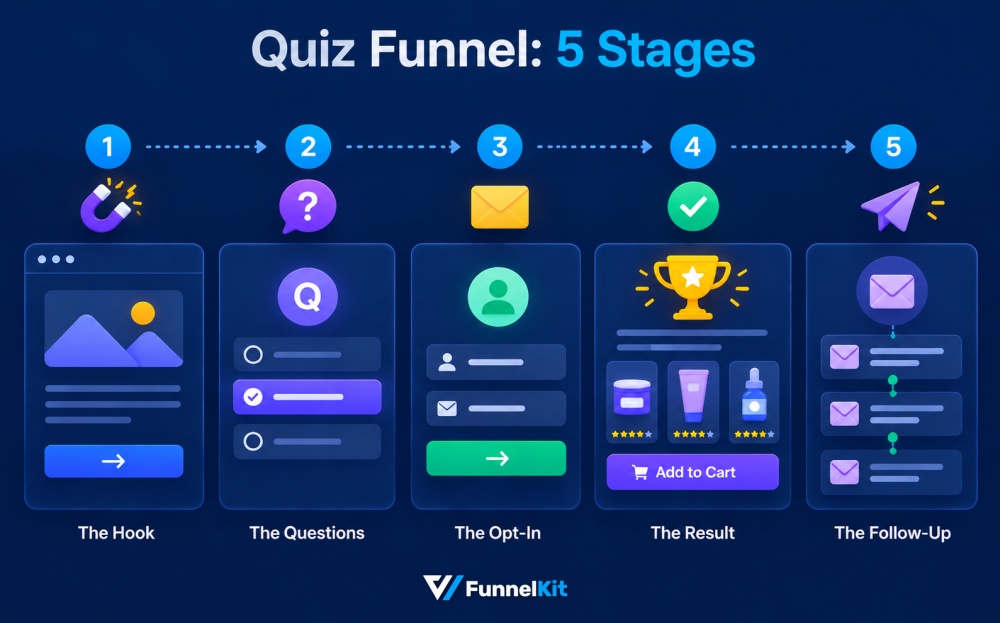
1. The hook
A landing page or entry point that promises a specific, fast outcome. For example, “Find your skin type in 60 seconds” beats “Take our quiz”.
Name the result and name the time cost.
2. The questions
Aim for 5 to 8 questions, each one earning its place.
Branching logic sends people down different paths based on their answers, so the experience feels like it’s listening.
3. The opt-in
A short lead form that just includes name and email, nothing more. Place it between the last question and the result.
4. The result
A personalized landing page or a sales cum checkout page with a matched product, a score, a category, and a recommended routine.
This page should sell, not just inform.
5. The follow-up
Automated email sequences that branch by outcome. This is where most revenue lands, and it's the stage most people skip.

How to Create a High-Converting Quiz Sales Funnel in WooCommerce
We’ll build one running example from start to finish for a skincare and beauty store with a five-question quiz that ends in one of three routines.
It's a product finder, because that’s the format most WooCommerce stores should start with.
Two pieces of software do the work. A form plugin collects the answers and scores them; Gravity Forms, Fluent Forms, and Thrive all handle this, and you may already own one.
Then FunnelKit handles everything after submission: the landing page holds the quiz, the checkout doubles as the results page, and the follow-up branches.
Step 1: Segment by concern
The obvious way to segment a skincare quiz is by skin type, like oily, dry, or combination. Customers expect it, and every competitor does it.
It’s also usually wrong, because it only works if you stock separate products for each type.
If you don’t have a dry-skin serum and an oily-skin serum, all three paths recommend the same things with different labels, and shoppers notice immediately.
Segment by concern instead. For our store, the three outcomes are:
| Result | Who it's for | What they want |
|---|---|---|
| The Reset | Dull, tired, and uneven skin | Radiance back |
| The Shield | Sun exposure, early aging, and pigmentation | Protection from what’s coming |
| The Wakeup | Late nights and puffy eyes | To look rested |
Each maps to a genuinely different bundle from the same catalog. So, if two results would recommend the same products, they’re not two results.
Before writing a single question, open your product list and work backward. What are the three or four distinct problems your catalog actually solves? Those are your outcomes.
Step 2: Build the quiz in your form plugin
You don’t need dedicated quiz software. A form plugin, such as Gravity Forms, Fluent Forms, or Thrive, can handle scored quizzes through calculation fields or quiz add-ons (Gravity Forms has one).
Build each question as a radio field with one option per answer, and assign a point value to each option.
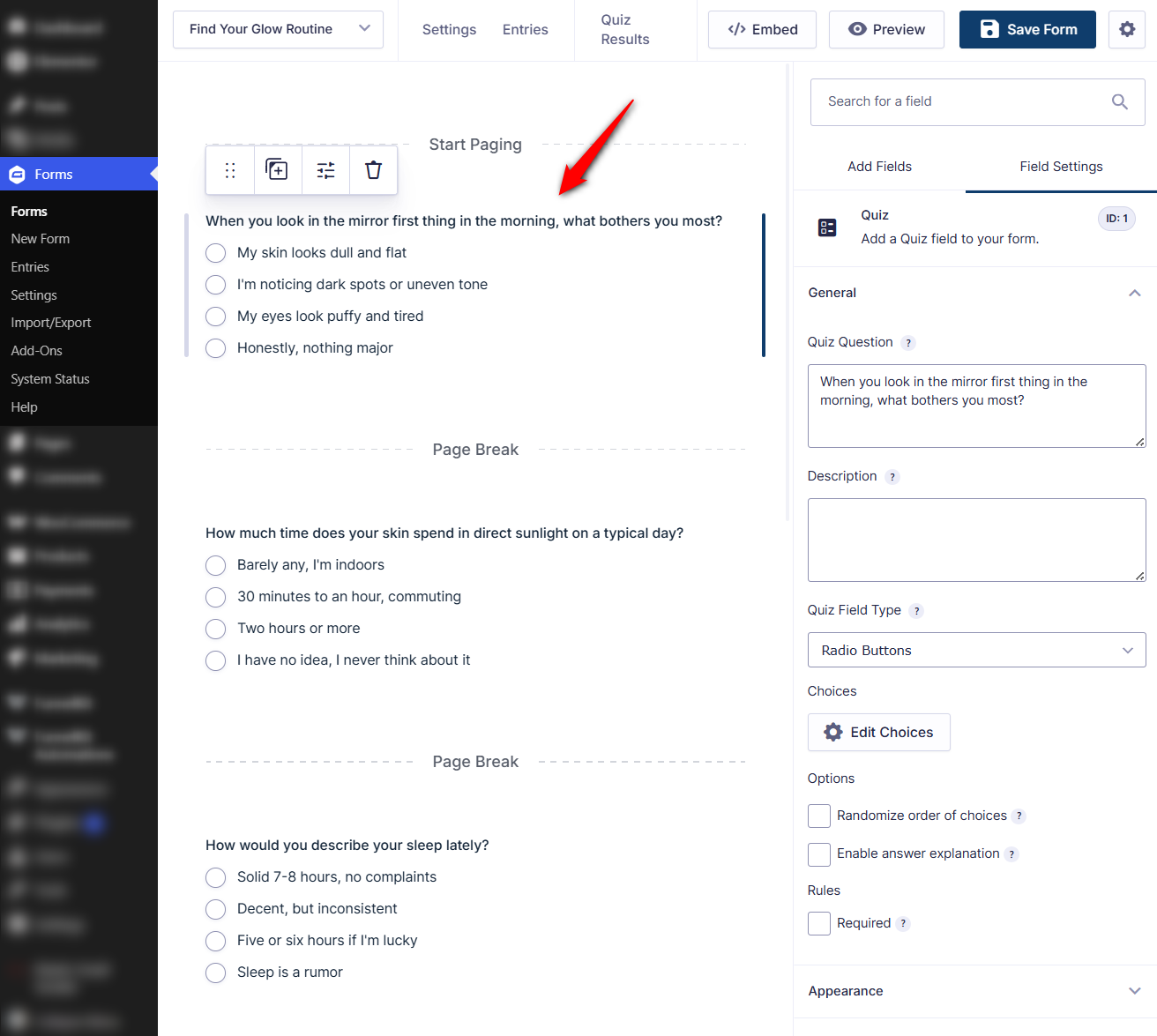
Score rather than hard-branch. Each answer adds points to one or more outcomes, and the highest total wins.
Real people aren’t clean categories; someone can have dull skin and bad sleep, and a scoring model handles that without you building a decision tree with fifteen dead ends.
| Question | Answer | Points |
|---|---|---|
| Mirror question (Q1) | My skin looks dull and flat | 3 |
| Dark spots or uneven tone | 2 | |
| My eyes look puffy and tired | 1 | |
| Honestly, nothing major | 3 | |
| Sleep question (Q3) | Solid 7–8 hours, no complaints | 3 |
| Decent, but inconsistent | 2 | |
| Five or six hours if I’m lucky | 1 | |
| Sleep is a rumor | 1 | |
| Every other question | Give each one a 3, 2, and a 1-point answer so every result stays reachable | 3 / 2 / 1 |
Set a tiebreak rule too; ours defaults to the Reset, since it’s the broadest entry point.
Every question should earn its place. If an answer doesn’t change the result or the email sequence, it costs you completions and gives you nothing.
Keep it to five to eight. Roughly 69% of shoppers who start finish, with 31% dropping off before the results page, and every question past eight widens that gap.
Note: Use images for answer options where the choice is visual. Picking a photo is faster than reading four text options, and speed keeps people moving.
Step 3: Map score ranges to redirect URLs
In your form’s confirmation settings, create one confirmation per outcome and set each to redirect rather than display a message.
Then handle each with conditional logic on the score:
| Score range | Result | Redirects to |
|---|---|---|
| 10+ | The Reset | Reset checkout URL |
| 7-9 | The Shield | Reset checkout URL |
| Below 7 | The Wakeup | Reset checkout URL |
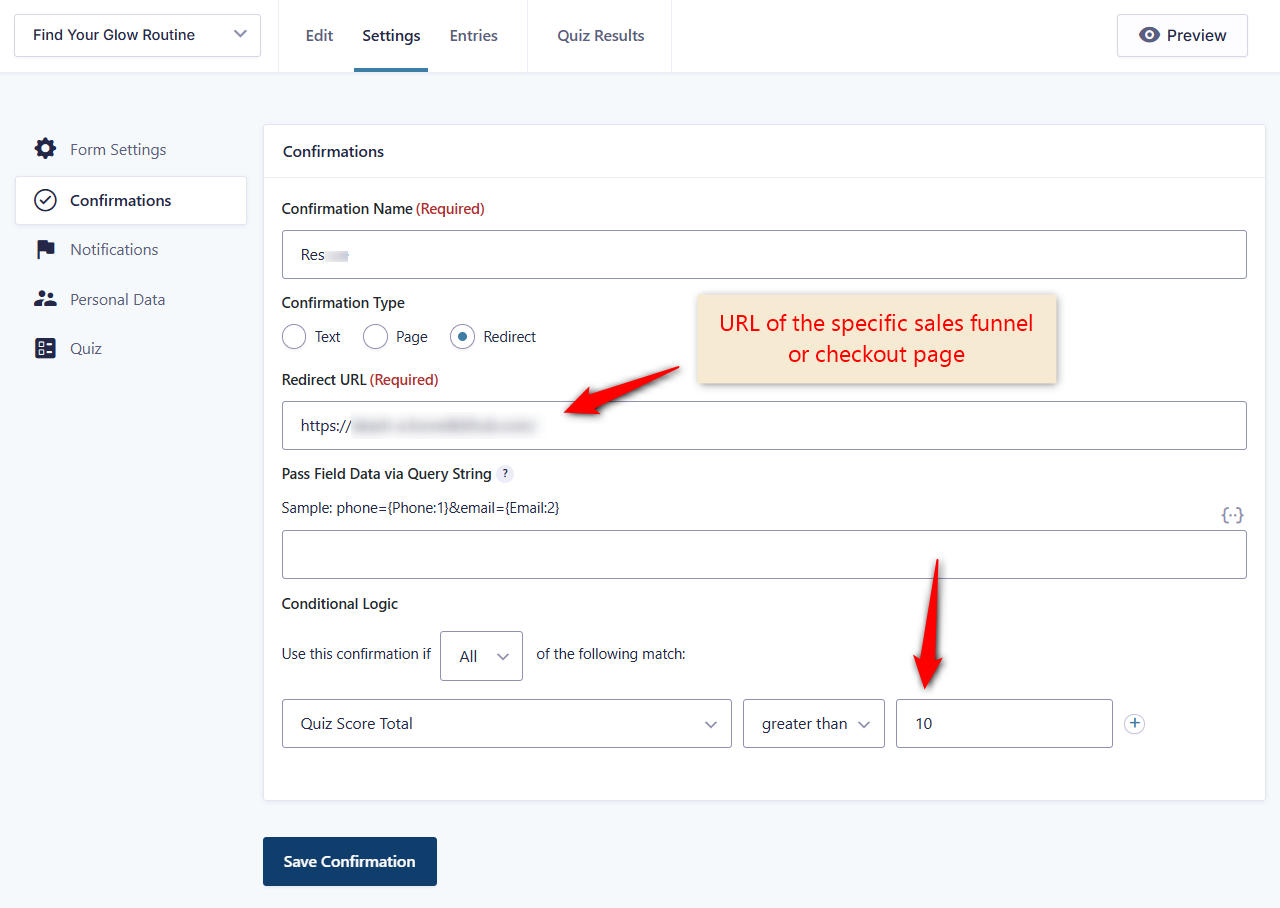
Gravity Forms’ Quiz Add-On has supported score, percentage, and grade in confirmation conditional logic, so this is a settings screen, not a code problem.
Put the email field on the last step of the form, just before submit.
Ours asks: “Your routine is ready. Where should we send it?” with email, optional first name, and nothing else.
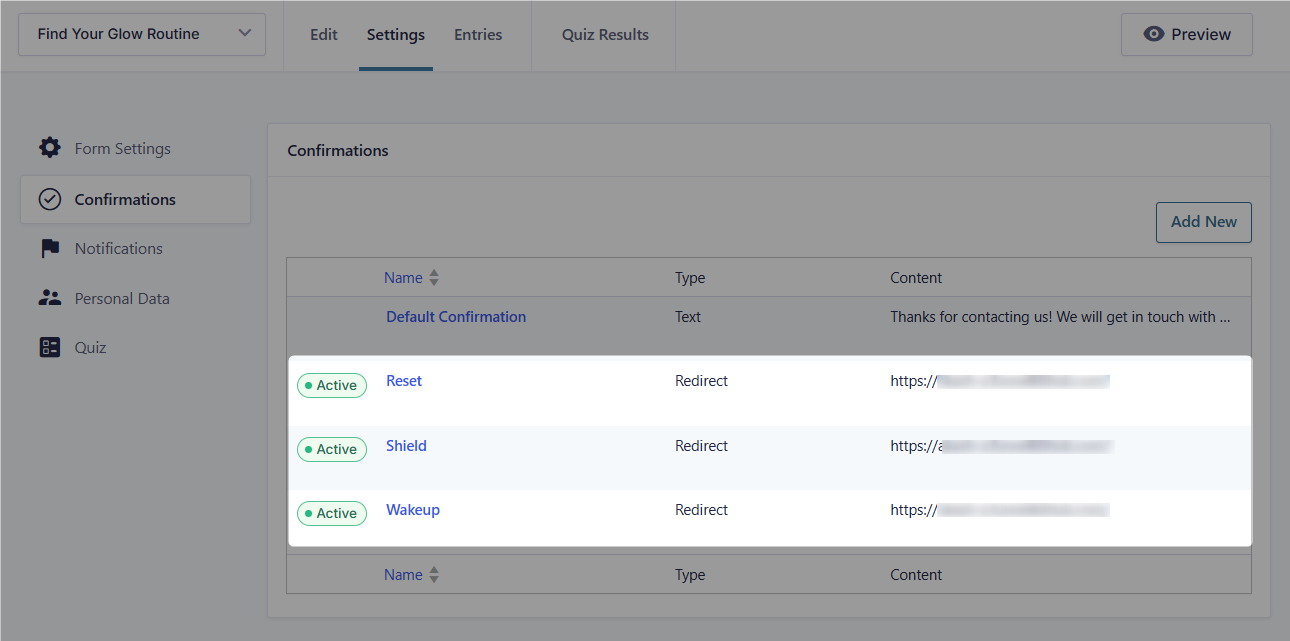
We’ve set up redirects for all three here.
Step 4: Build the landing page and embed the quiz
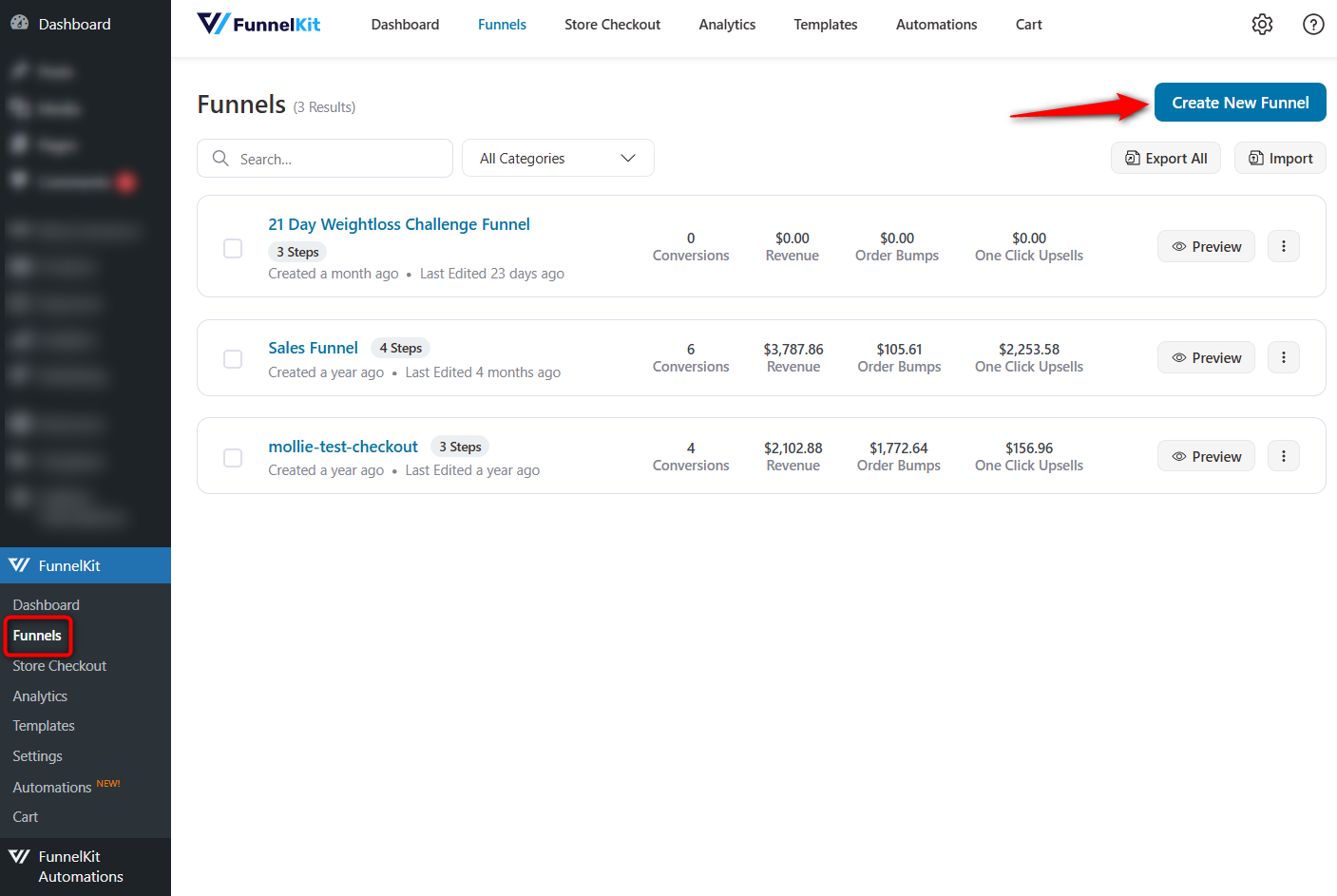
In your WordPress dashboard, go to FunnelKit ⇨ Funnels and click on ‘Create New Funnel’.
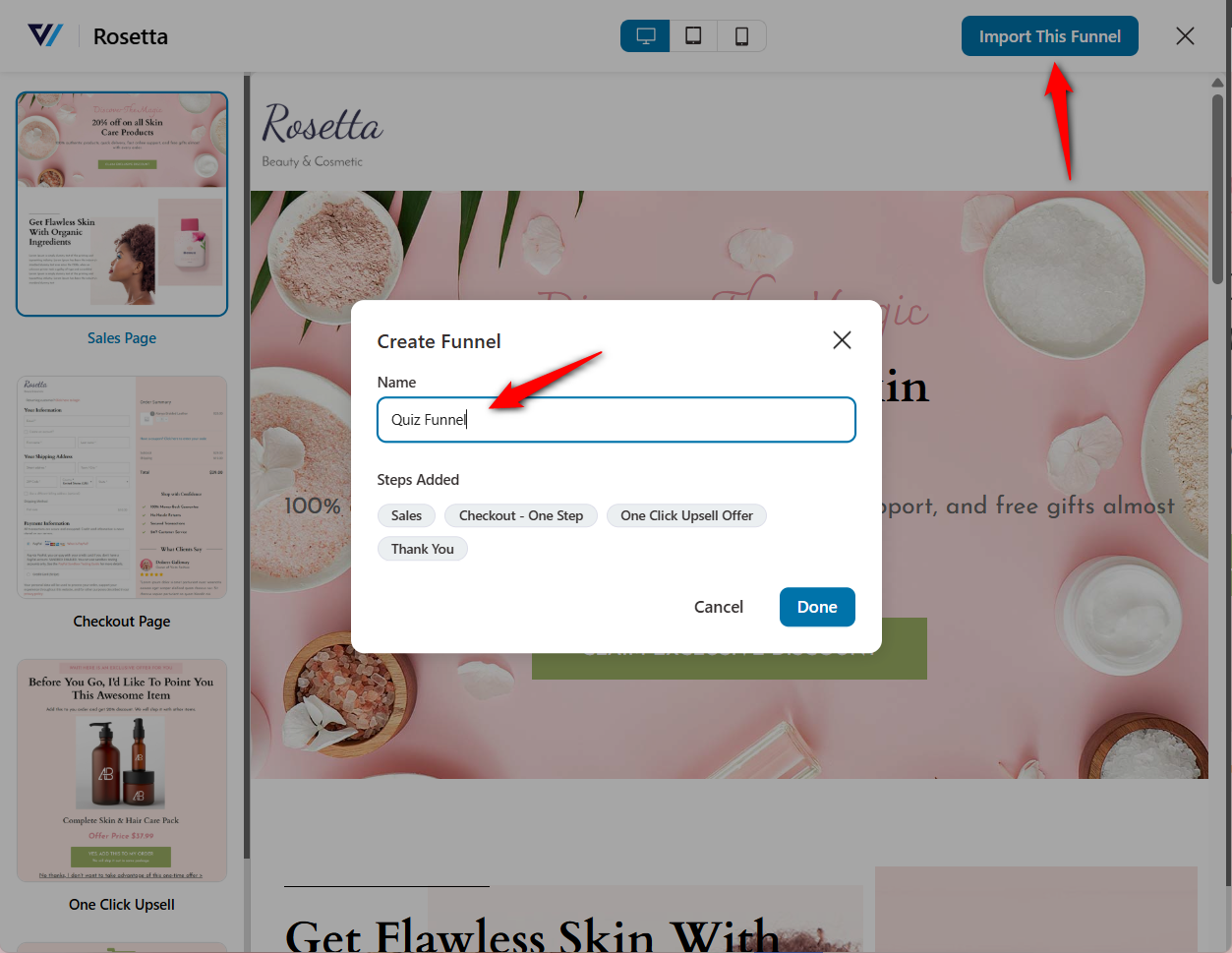
Import your template to customize with your page builder, including Elementor, Divi, the Gutenberg block editor, Oxygen, Bricks, and more.
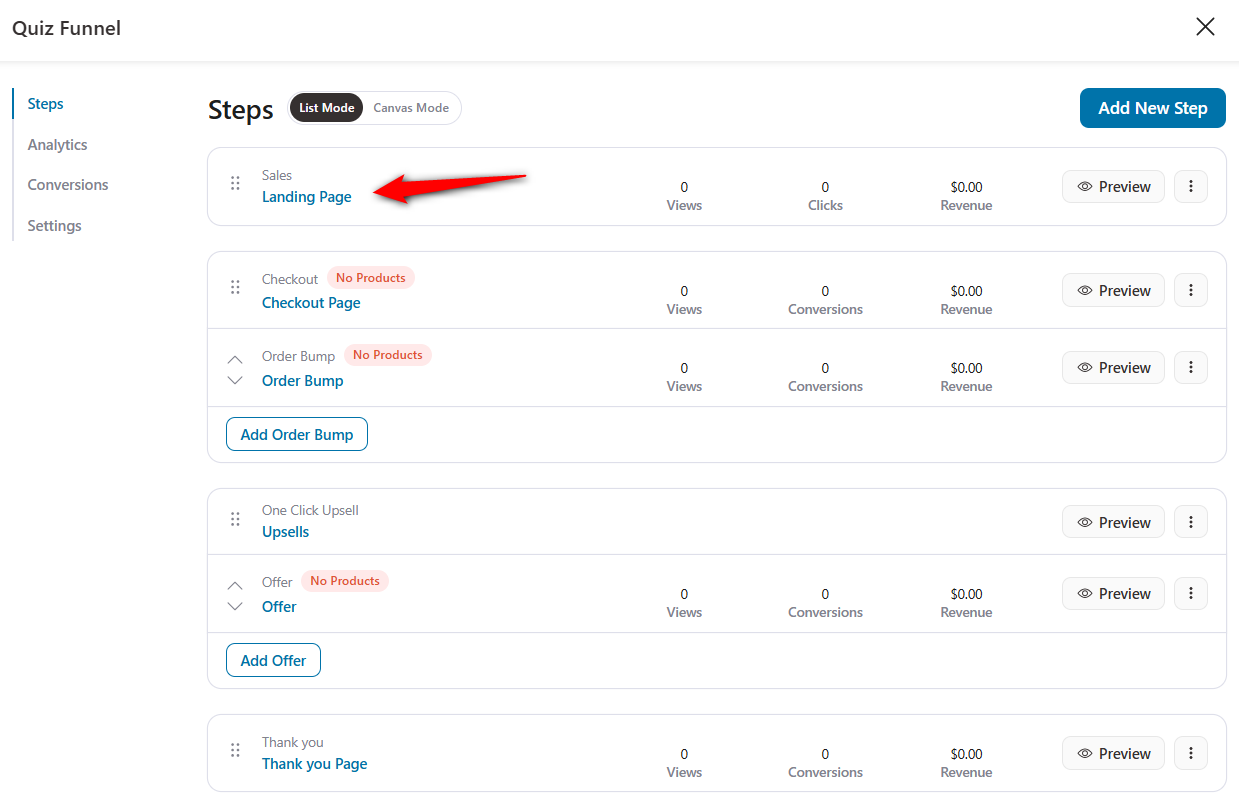
Click on the landing page to start customizing it.
Edit your landing page and embed the shortcode from your form plugin.
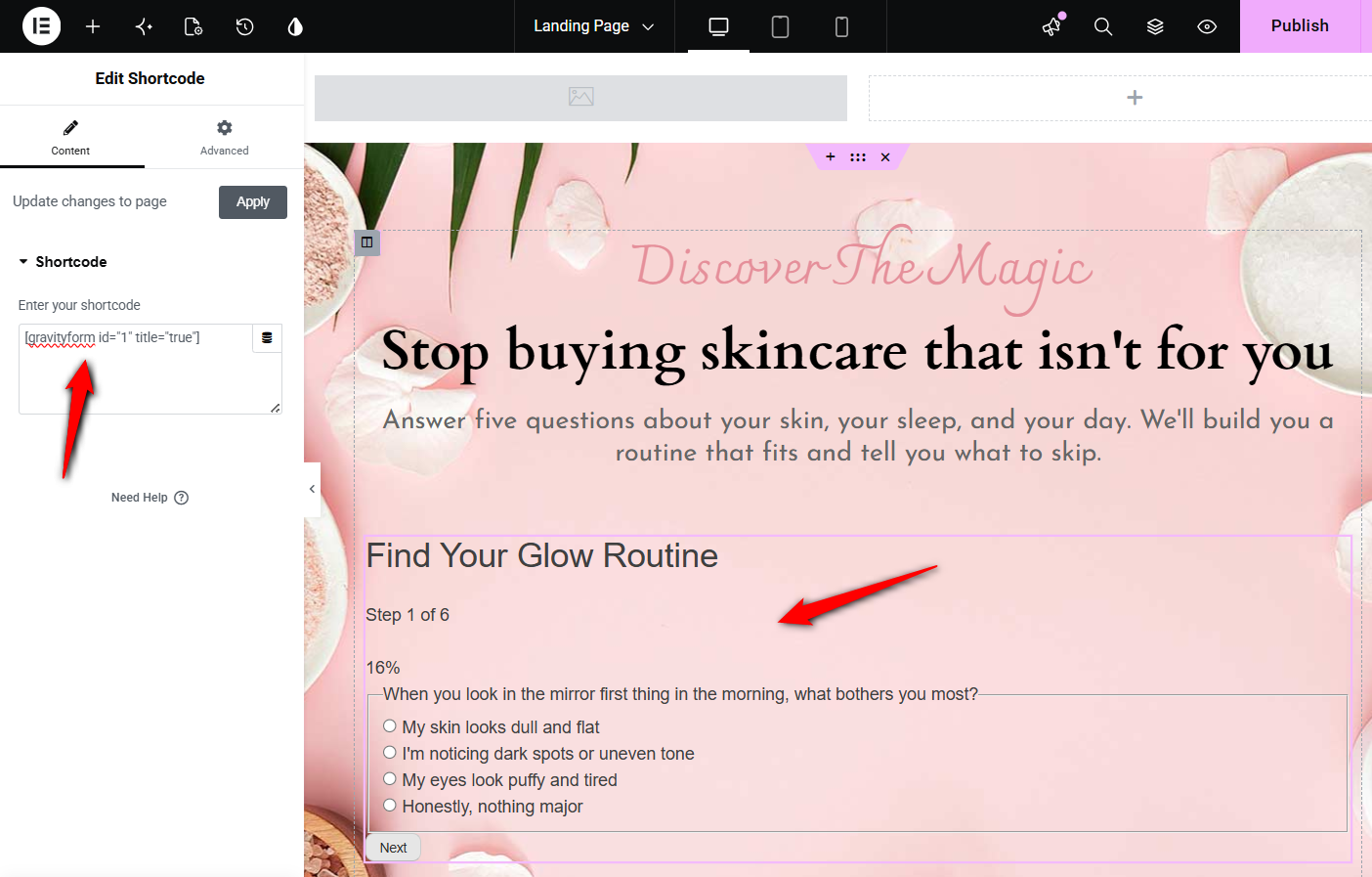
Keep this page short. A headline naming the outcome, a line on how long it takes, and the quiz. Everything else is friction between the visitor and the first question.
Note: for more on structuring the pages around a funnel, see our guide to building a WooCommerce sales funnel.
Step 5: Use checkout as the personalized results page
Most quiz guides tell you to build a results page, then link from it to a product page, then on to a cart. That’s three steps between the recommendation and the purchase, and you lose people at each one.
Skip it. Make the checkout the results page.
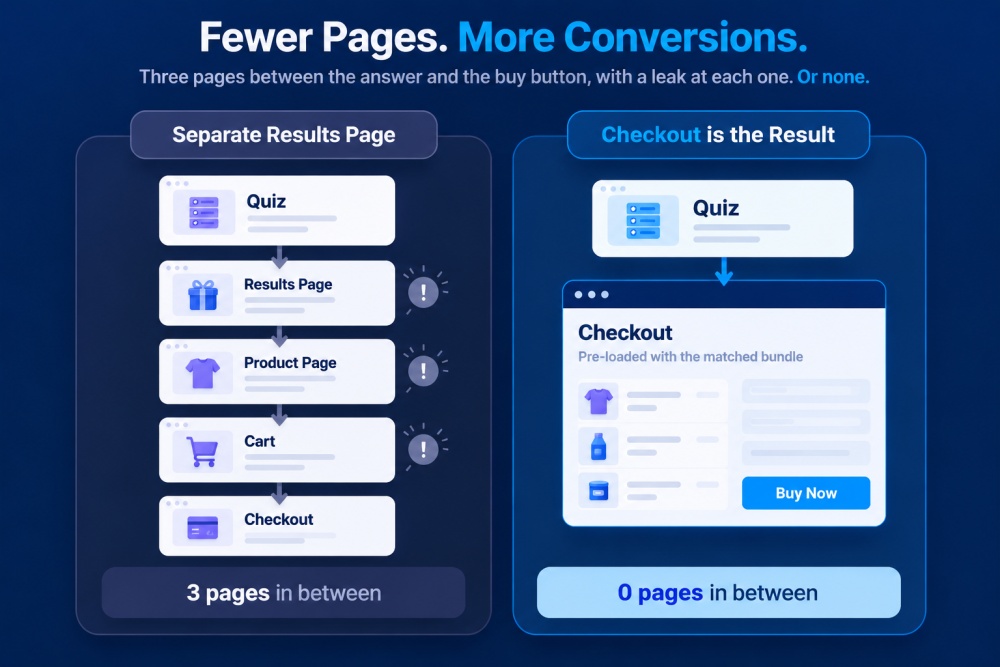
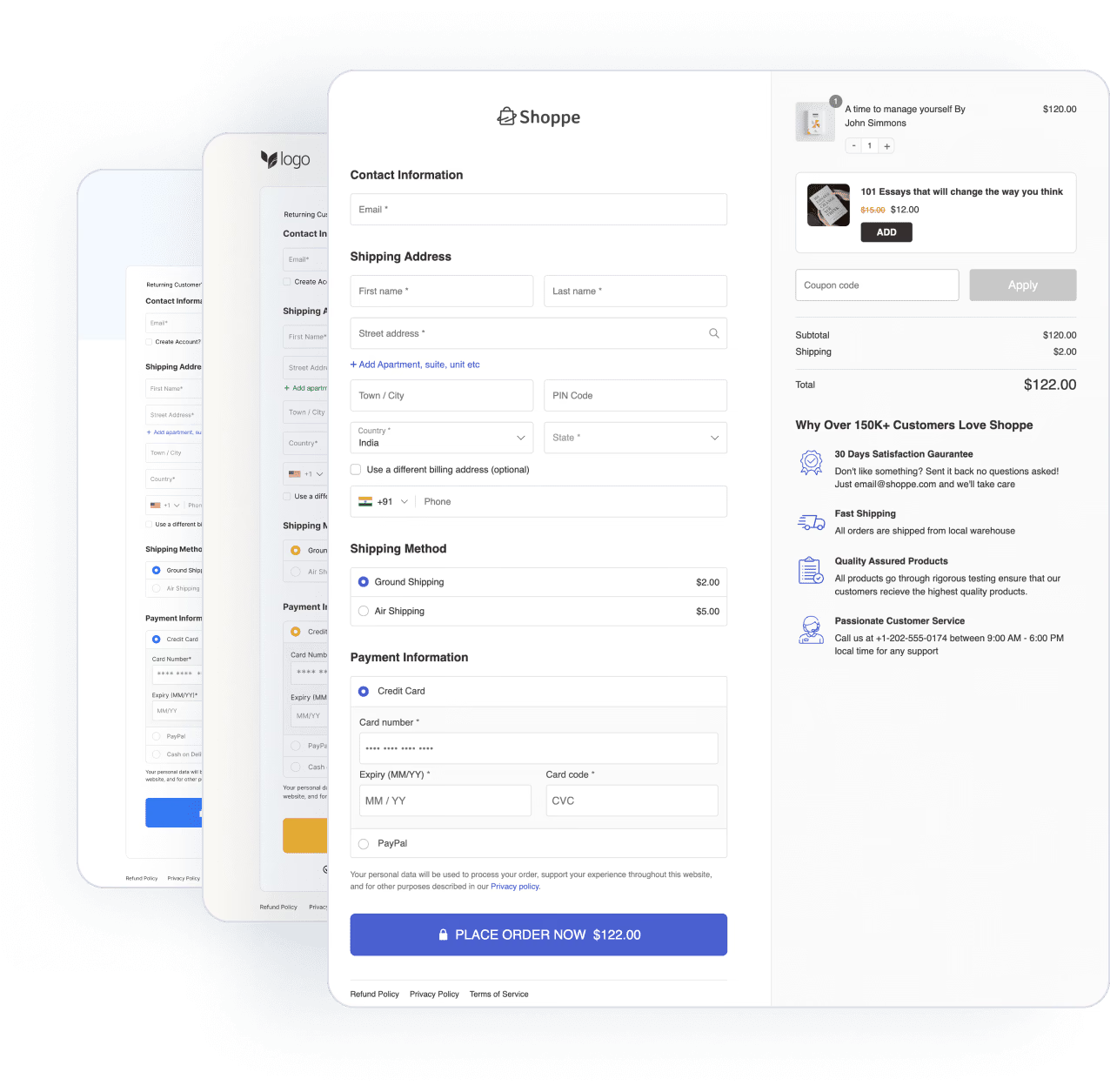
The shopper finishes the quiz and lands directly on a checkout pre-loaded with the products matched to their score. The recommendation and the buying moment become the same screen.
Build one checkout per outcome. For scores of 10 or more, our Reset checkout loads the facial set, face serum, and daily moisturizer as a bundle.
The Shield and Wake-Up checkouts load their own product sets, each at its own URL. Those are the URLs you mapped back in Step 3.
To set the products, go to Products under your checkout and add them there.
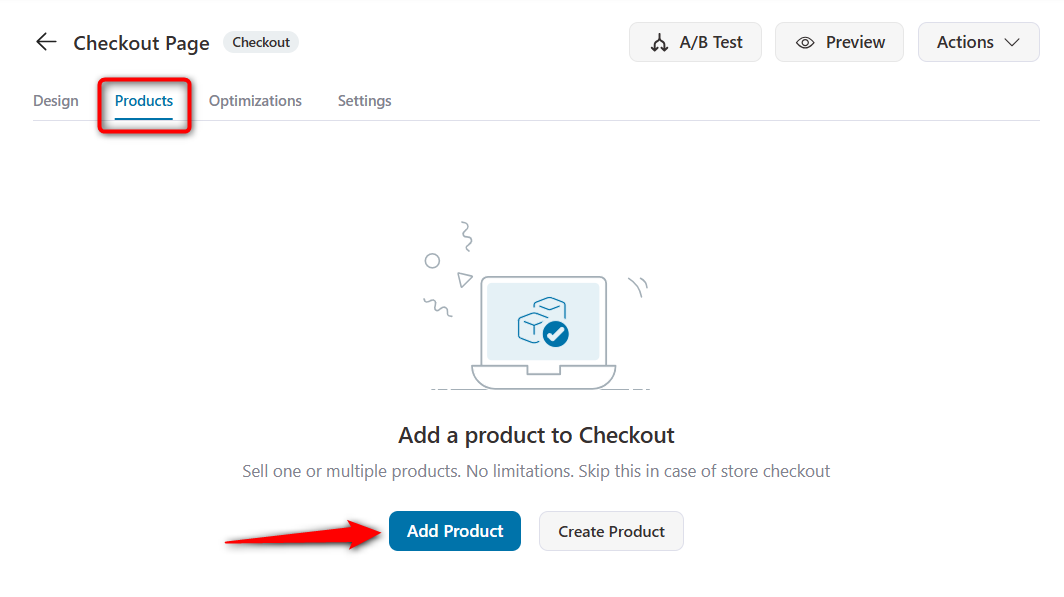
Lead with a headline that reframes the problem. Each takes the concern the shopper just described and tells them something slightly surprising.
Offer a bundle discount so the matched set is visibly cheaper than buying the pieces separately.
The quiz has already justified why these three products belong together; the discount removes the last reason to hesitate.
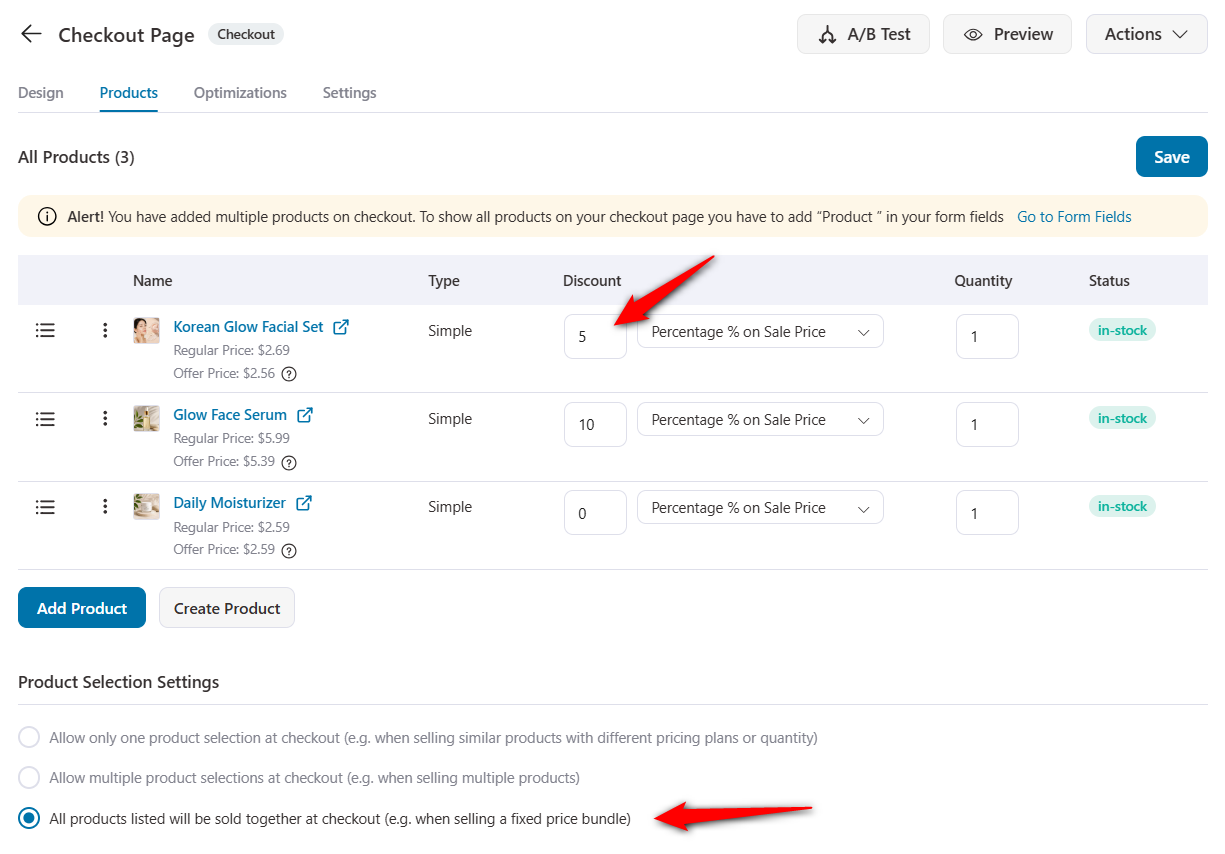
While you’re here, turn on express pay buttons, address autocomplete, and auto-applied coupons to optimize your checkout.
The shopper has answered five questions to reach this page, and making them type a full address now is the wrong place to introduce friction.
Once done, save your changes.

Step 6: Tag on the way out, then branch the emails
Apply a tag at the redirect, such as quiz-reset, quiz-shield, quiz-wakeup. Next, build one automation per tag inside FunnelKit Automations.
| Tag | Day 1 email | Day 5 email |
|---|---|---|
| quiz-reset | Why dullness happens | Bundle reminder + social proof |
| quiz-shield | SPF myths, debunked | Last-chance bundle |
| quiz-wakeup | The five-minute morning routine | Bundle reminder |
Each opens with the result restated in writing, because people forget which one they got.
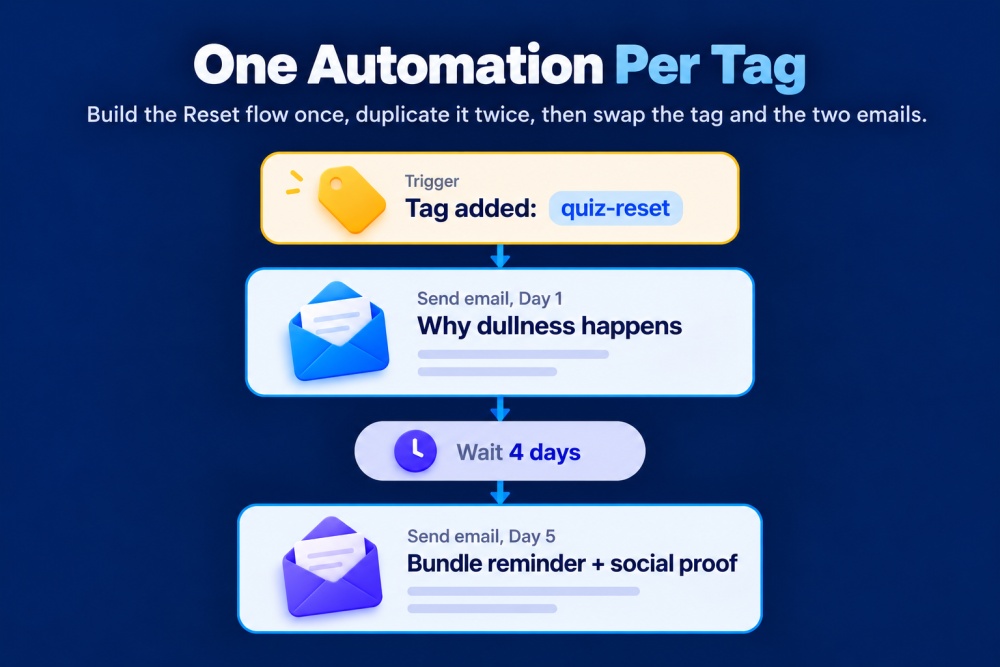
Then add two tags nobody thinks of until later:
- Quiz-completed on every finisher, regardless of outcome. This is your monthly broadcast segment because people who told you something about themselves are worth more than the rest of your list.
- Quiz-abandoned for anyone who gave an email but didn’t place the order. One recovery email with a link back to where they stopped. They already opted in; they just got interrupted.
Step 7: Test all three paths before you send traffic
Answer the questions three times, deliberately steering to a different result each time.
This is how the quiz page looks:
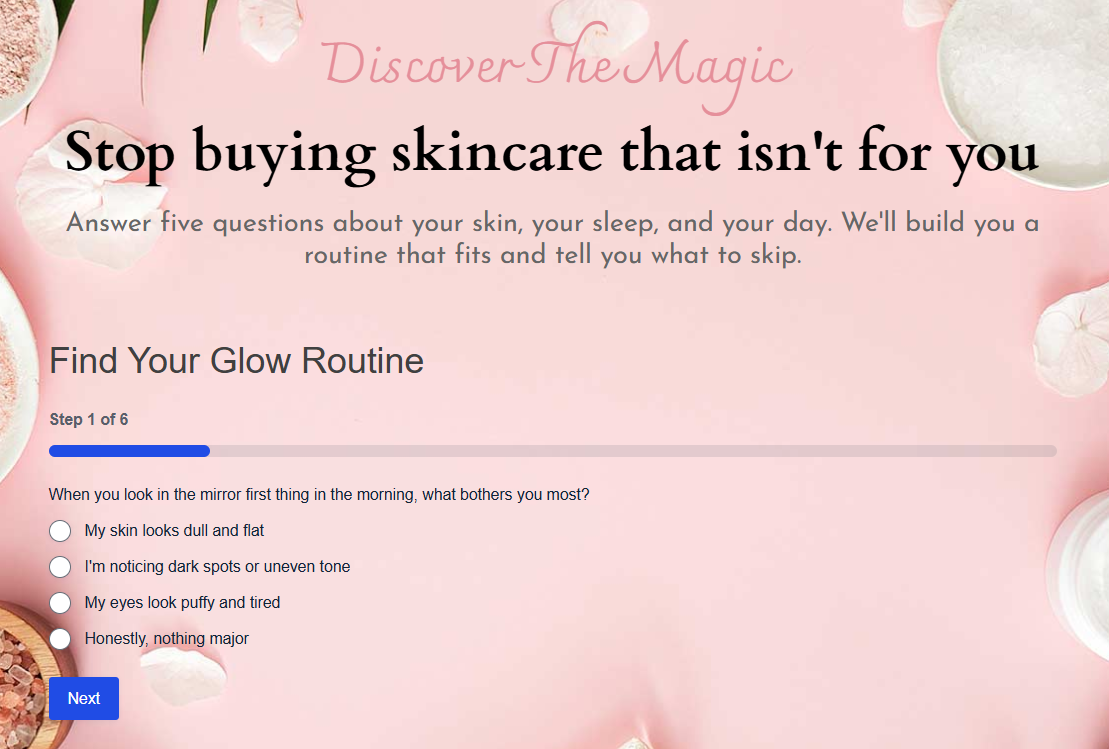
For each pass, confirm the score lands in the expected range, the right checkout loads, the right products are pre-loaded, the right tag applies, and the right automation fires.
Then place a test order through one path, including bump and upsell.
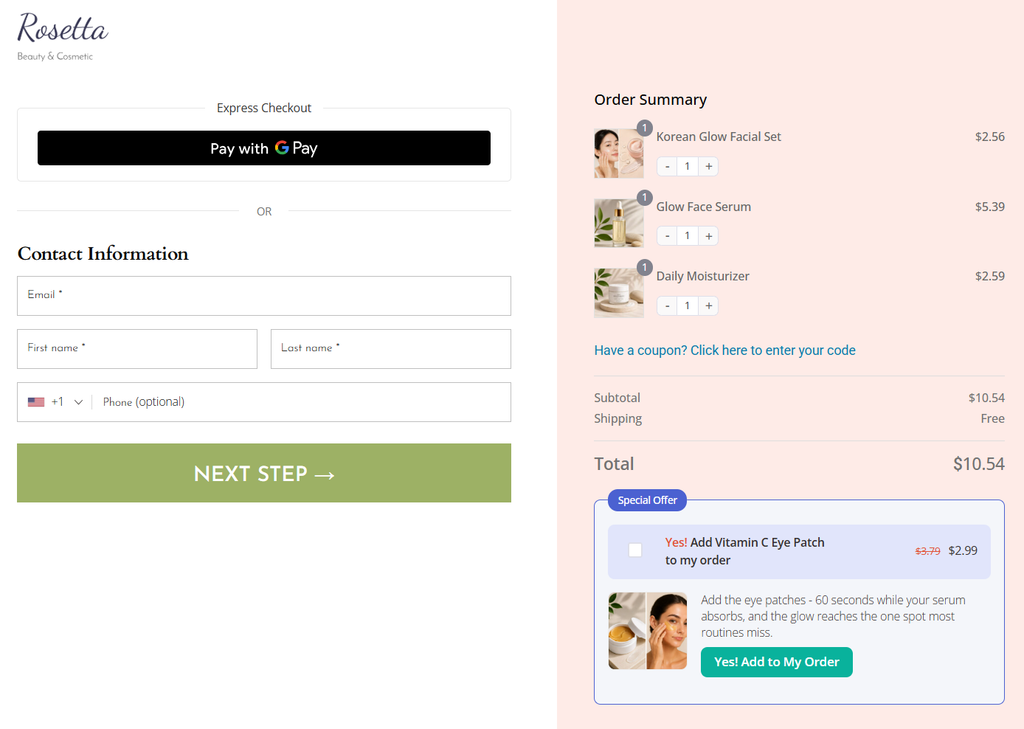
Test your funnel all the way through to make sure it works properly.
Well done! This is how you can create a high-converting quiz funnel in WooCommerce.
5 Quiz Formats That Consistently Earn Their Place
The quiz format decides what you ask, what the result page shows, and how the follow-up branches. If you get it wrong, you rebuild everything.
1. Product finder
This format is usually used for skincare, coffee, supplements, and pet food. Keep 4-6 questions, each ending with two or three matched products.
This is the highest-converting format in eCommerce. Consumable, replenishable categories top the table because purchases repeat.
It means that you’re not winning one sale; you’re winning a replenishment cycle.
2. Scored assessment
“How healthy is your checkout?” The visitor gets a score out of 100 and a breakdown of what’s dragging it down.
A number is inherently interesting in a way a category isn’t, and it hands your sales team a lead that has already diagnosed its own problem.
This format is best fit for services, B2B, and anything with a consultative sale.
3. Style or personality match
“What’s your interior style?” Completion rates run higher than scored assessments because there is no wrong answer and nothing at stake, as nobody worries about failing a personality quiz.
This quiz format works well for fashion, home, and beauty, where taste drives the purchase.
4. Fit and sizing finder
This format suits apparel, footwear, and equipment best. This one pays twice: it drives sales like the others and cuts returns, making it one of the few marketing tools with a cost-side payoff.
If returns are eating your margin, start here rather than with a product finder.
5. Plan or routine builder
Best for fitness, nutrition, and education. The quiz ends in a personalized plan rather than a single product, which maps naturally onto a subscription.
For stores turning that plan into recurring billing, Sublium Subscriptions handles the recurring side.
The trick with all five is matching the format to how your customers actually decide.
If they’re paralyzed by choice, build a finder. If they don’t know they have a problem yet, build an assessment.
7 Best Practices to Lift Your Quiz Conversion Rate
- Open with an easy, fun question
Momentum matters, so save sensitive questions like budget for the middle, never the start. Never ask too many (or more than 8) questions.
- Use images as answer options
Picture-based answers are faster to tap and lift completion, especially for style, decor, and beauty quizzes.
- Show a progress bar
A visible progress bar reassures people the quiz is short and reduces mid-quiz abandonment.
- Keep completion under 3 minutes
If testers take longer, cut the questions that change neither the outcome nor the segmentation.
- Deliver results instantly, then email them too
Show the result on screen right away, and email a copy to ensure a high-open first message.
- Retarget people who started but did not finish
A simple "your results are waiting" retargeting ad recovers takers who got interrupted.
- Review drop-off by question and test your hook
Analytics show exactly which question leaks takers. Fix that first, then split-test the landing page headline, because the hook decides whether anyone starts at all.
Frequently Asked Questions
For eCommerce, yes, the results page should really be the checkout.
A separate results page adds two clicks between the recommendation and the purchase, and you lose people at each one.
The exception is high-consideration or high-ticket products, where shoppers need more explanation before deciding to buy. A results page that educates first is the better call there.
The email opt-in converts best after the questions and right before the results because takers have already invested effort and want their outcome.
Asking up front produces fewer leads, so if you test it, watch whether lead quality improves enough to justify the drop.
Yes, the quiz funnel works for high-ticket products, but you need to measure it differently. High-ticket, high-consideration purchases convert at an order-of-magnitude lower rate on the results page.
The questions drive discovery, and the sale lands later, off-session. Judge it on qualified leads and 30-to-90-day revenue.
Usually yes, but frame it as a reward for finishing rather than a sitewide sale.
It gives the result a reason to act today without training people to wait for discounts.
The three main paths are recommending products directly on the results page, sending segmented email offers based on quiz answers, and booking calls for high-ticket services.
Stores usually see the fastest return by pairing recommendations with a streamlined checkout.
A quiz gives the taker a personalized result, while a survey collects feedback that mainly benefits you.
Quizzes convert better for lead generation because the value exchange favors the visitor.
Launch Your First Quiz Funnel This Week
One quiz will not transform your store on its own. The lift comes from results pages that sell, emails that reference real answers, and a list where every contact is segmented from day one.
Those are small edges, which compound effortlessly.
Start with four questions and three outcomes, ship it, watch where people drop off, and tighten from there.
In our experience, the version you launch in a week beats the perfect one you’re still planning in a month, and the segmented list it builds keeps paying long after you’ve stopped thinking about it.
FunnelKit Funnel Builder keeps the whole flow on your own site, from the visitor landing page to your page to the follow-up email.
Editorial Team
October 1, 2026A WooCommerce Google Analytics integration can make your store’s revenue look twice as high as it actually is if the tracking is set up incorrectly and GA4 won’t even necessarily...
Editorial Team
September 29, 2026A WooCommerce checkout template controls how your checkout page looks and works, and it's the last screen a shopper sees before paying. The default WooCommerce checkout does the job, but...
Editorial Team
September 28, 2026A free plus shipping plugin lets you offer a $0 product while charging customers for shipping and handling. At 2026 US postage rates, that fee may only cover the product,...