


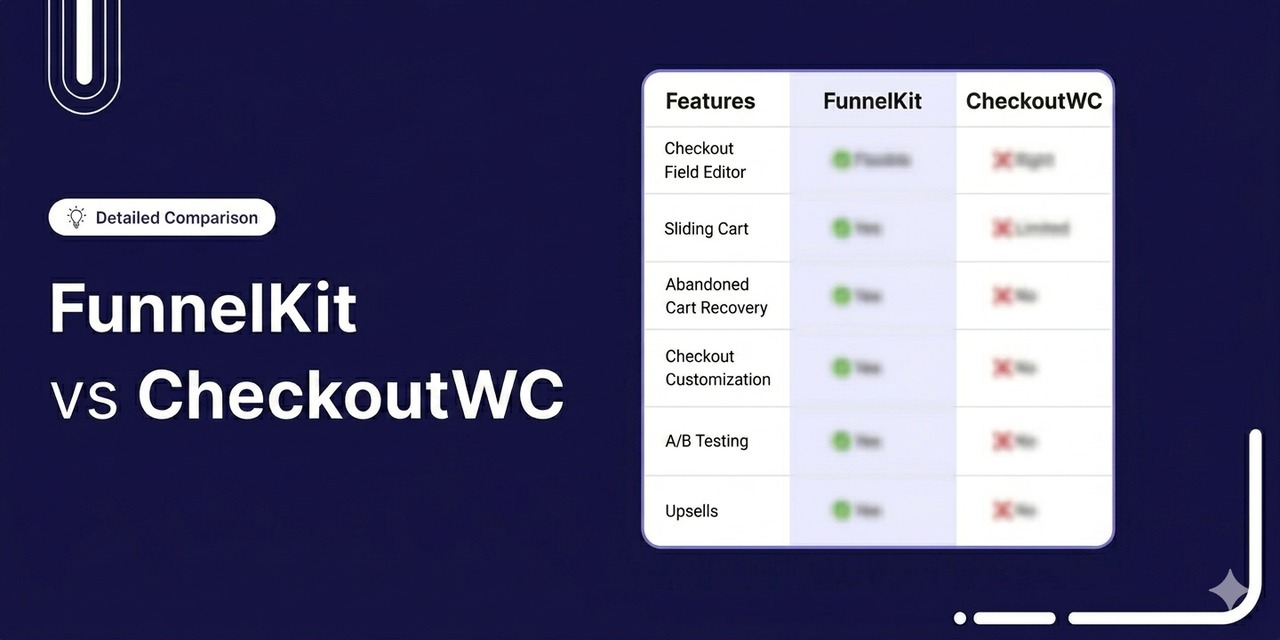
If you sell on WooCommerce, the checkout page is what makes or breaks conversions in your store.
A clunky checkout leaks revenue. A clean one keeps customers moving from cart to confirmation, and from a one-time buyer to a returning one.
Two plugins keep coming up: FunnelKit and CheckoutWC.
Both promise faster checkouts, higher conversions, and better mobile experiences. But once you look under the hood, they're built for very different jobs.
FunnelKit is a full-stack growth platform with checkout, funnels, side cart, order bumps, one-click upsells, CRM and marketing automations, all modular and available separately based on your business needs.
CheckoutWC is a focused checkout replacement with different templates, order bumps and abandoned cart email feature, available on higher plans.
As CheckoutWC's own team puts it on their FunnelKit comparison page: "If you're managing 40 different sales funnels with separate upsells and downsells, let's be honest: CheckoutWC won't be a good fit."
So which one is right for your store?
This in-depth guide gives you a feature-by-feature comparison of FunnelKit and CheckoutWC, so you can pick the plugin that actually matches what you're trying to build.
Table of Contents
- 1 Quick Comparison: FunnelKit vs CheckoutWC
- 2 Which Plugin is Best for WooCommerce Checkout Customization?
- 3 Which Plugin Offers Better Checkout Optimizations?
- 4 Which Plugin Offers the Best WooCommerce Checkout Field Editor?
- 5 Which Plugin Offers the Best WooCommerce Side Cart?
- 6 Which Plugin is Best for Offering WooCommerce Order Bumps?
- 7 Which Plugin is Best for Offering WooCommerce One-Click Upsells?
- 8 Which Plugin is Best for Abandoned Cart Recovery, Automations, and CRM?
- 9 Which Plugin Offers the Best Funnel Templates and Library?
- 10 FunnelKit vs CheckoutWC: Which Plugin is Best for A/B Testing?
- 11 Which Plugin Offers the Best Detailed Analytics and Reporting?
- 12 Which Plugin Has a Modular Approach?
- 13 Which Plugin is Best for Ease of Use and Setup?
- 14 Which Plugin Has Higher Active Installs and User Reviews?
- 15 Which Plugin Offers the Best Value for Money?
- 16 FunnelKit vs CheckoutWC: Which One Should You Choose?
- 17 Frequently Asked Questions on FunnelKit vs CheckoutWC Comparison
Quick Comparison: FunnelKit vs CheckoutWC
At a glance, FunnelKit and CheckoutWC both claim to upgrade your WooCommerce checkout. They sit in the same search results and the same shortlists.
FunnelKit is a complete sales platform that includes checkout, funnels, order bumps, one-click upsells, a side cart, lead-generation pages, A/B testing, analytics, and a full CRM with marketing automation.
CheckoutWC is a checkout-only plugin. Its premium tiers add order bumps, a side cart, and a simple abandoned cart email tool, but they do not include a funnel builder, lead-generation pages, a CRM, or visual page builder integration.
Here's the side-by-side breakdown:
| Feature | FunnelKit | CheckoutWC |
|---|---|---|
| Free Version | ✅ Yes (FunnelKit Funnel Builder Lite with 40,000+ installs) | ✅ Yes (CheckoutWC Lite with 3,000+ installs) |
| Checkout Customization | Flexible mini cart editing, multilingual checkout importing, position elements anywhere on checkout, and page-builder native | Fixed React templates (5 designs), limited element positioning, no page-builder design |
| Checkout Field Editor | Drag-and-drop field editor, 14+ fields, section creation, full rearrangement | No drag-and-drop field editor (relies on third-party plugins like Checkout Field Editor) |
| Side Cart | Dynamic side cart with upsells, cross-sells, rewards, special add-ons, and analytics. Included in Plus ($179.50) | Side cart with shipping bar and Suggested Products Carousel. Included in Plus ($249) |
| Checkout Optimizations | Express Checkout (Amazon, Apple, Google Pay, PayPal Express), Google Address Autocomplete, Auto-Apply Coupons, Inline Validation, Multi-Step Field Preview, Smart Login, Time Checkout Expiry, Prefill for Abandoned Users, Country Autofill, 14+ optimizations | Express Checkout (Apple, Google Pay, PayPal, Amazon Pay), Google/Fetchify Address Autocomplete, Smarty Address Validation, International Phone, Email Validation, ZIP Autofill, Order Review Step, Cart Variation Editing |
| Order Bumps | Unlimited from Plus tier, 8 positions, 20 rules, 8 skins, one-click upgrade, social proof on hover | Up to 2 on Plus, unlimited on Pro ($349). 7 positions, including the After Checkout Submit Modal. Rules engine. A/B testing on Pro |
| One-Click Upsells | Dedicated upsell funnel pages, 15+ gateways, multi-product upsells, downsells, dynamic shipping and tax recalculation | Thank-you page one-click bumps (uses saved payment methods). Currently supports Payment Plugins for Stripe and PayPal. Single product per bump. No downsells |
| Funnel Builder | Full visual funnel builder for landing pages, opt-ins, sales funnels, webinar funnels | Not a funnel builder. Checkout-focused product |
| Marketing Automations & CRM | FunnelKit Automations CRM with a visual workflow builder, abandoned cart recovery, multi-channel (email, SMS, WhatsApp), 500+ recipes, transactional email design | Built-in abandoned cart recovery emails (max 2 on Plus, unlimited on Pro). No CRM, no SMS, no contact profiles |
| Lead Generation | Opt-in pages, popups, drag-and-drop field editor, connect to your favorite CRMs | Not supported |
| A/B Testing | Full A/B testing for landing pages, checkouts, upsells, and thank-you pages | Order bump A/B testing only (Pro plan) |
| Page Builders | Elementor, Divi/Divi5, Bricks, Oxygen, Gutenberg, and other builders using shortcode | None (React templates styled via admin settings) |
| Modular Pricing | Yes (Funnel Builder, Automations, Sliding Cart sold separately or bundled) | No (Single product with tier-gated features) |
| Active Installs (WordPress.org) | 40,000+ (Lite version since 2021; premium since 2018) | 3,000+ (Lite version on WordPress.org; premium since 2019) |
| Pricing (Annual) | • Basic $99.50 • Plus $179.50 (2 sites) • Pro $249.50 (incl. Automations) • Elite $399.50 (30 sites) | • Basic $149 (1 site) • Plus $249 (5 sites) • Pro $349 (10 sites) • Agency $1,499 (50 sites) |
Read on for the full breakdown.
Which Plugin is Best for WooCommerce Checkout Customization?
FunnelKit gives you full creative control over every part of your checkout via page builders. CheckoutWC offers polished pre-made templates with strong defaults, but limited layout flexibility beyond what its settings allow.
Here's a quick comparison:
| Checkout Customization Feature | FunnelKit | CheckoutWC |
|---|---|---|
| Select Checkout Steps During Template Import | ✅ Yes | ⚠️ Limited (one-page or multi-step toggle) |
| Mini Cart or Order Summary Editing | ✅ Yes (quantity switcher, savings message, images, discounts) | ⚠️ Limited (basic order review styling) |
| Flexible Checkout Form and Button Customization | ✅ Yes (free positioning, custom sections, trust badges anywhere) | ⚠️ Limited (theme colors, logo, fonts via settings) |
| Multilingual Funnels with WPML and Polylang | ✅ Yes | ✅ Yes (translation-ready, 20+ languages) |
| Position Elements Anywhere on Checkout | ✅ Yes (page builder + visual customizer) | ❌ No (fixed React templates) |
| Custom Sections (testimonials, FAQs, guarantees) | ✅ Yes | ❌ No |
| Mobile Optimization | ✅ Yes | ✅ Yes |
FunnelKit
FunnelKit gives you full control over every part of the checkout experience, from 20+ templates, layouts and fields to trust badges, custom sections, testimonials, and the place order button.
Its native integration with page builders like Elementor, Divi, Bricks, Oxygen, and Gutenberg means you can match your checkout to your brand exactly without writing code.
Choose your favorite page builder, select the number of checkout steps, and import a professionally designed template. It’s that simple.
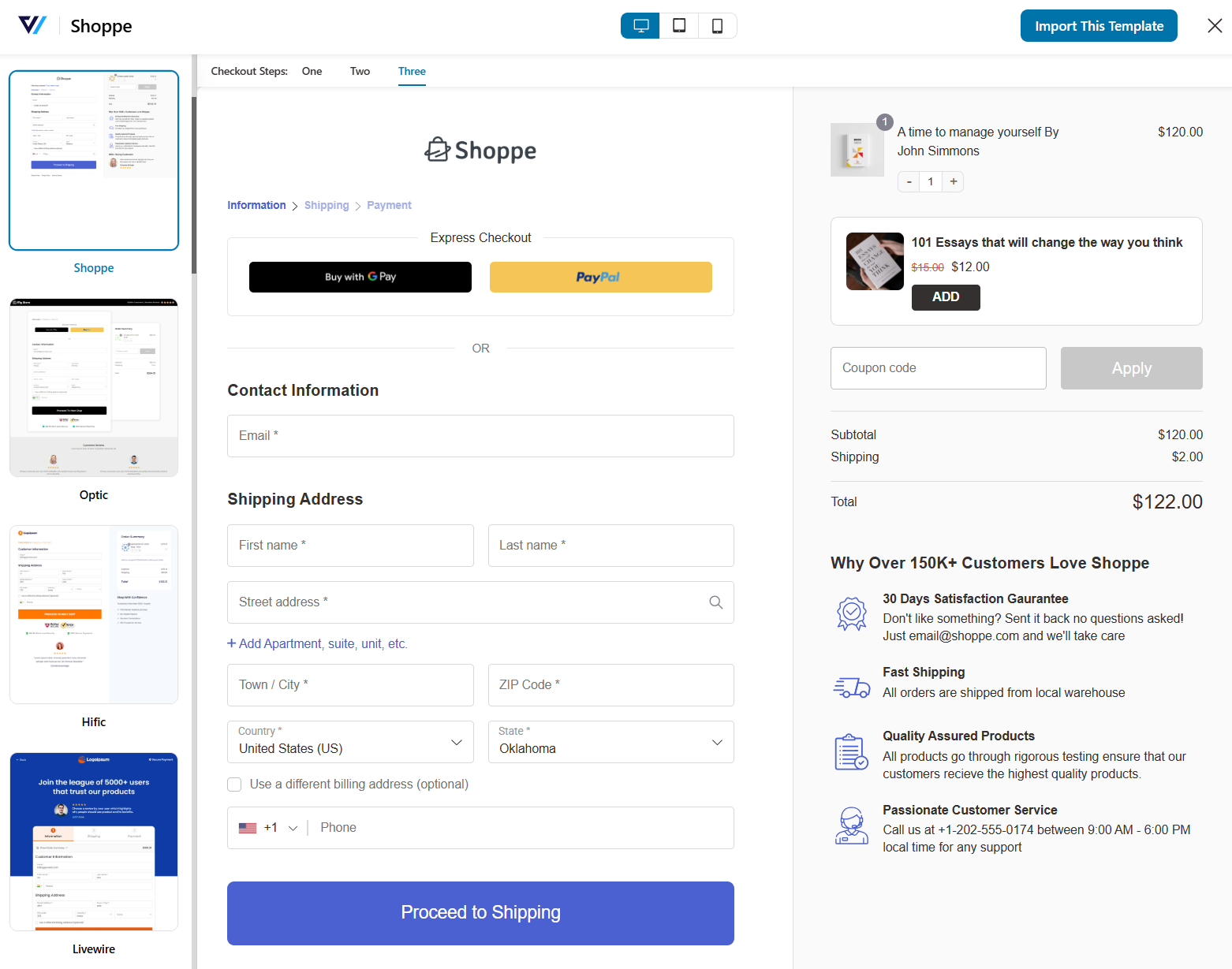
You get extensive design controls right on the front end, including checkout step formats (tabs or breadcrumbs), field widths, custom button icons and colors.
Additionally, you can also customize the collapsible order summary, custom sections below the order summary (testimonials, trust badges, FAQs), and a fully editable mini cart with quantity switcher, discounted prices, and “you save” messaging.
CheckoutWC
CheckoutWC takes the opposite philosophy with rigid defaults and limited configuration.
It ships with just 5 React-based templates (Copify, Futurist, Midas, Glass, and Galleria), each locked to a preset layout you style through admin settings rather than build visually.
You can customize logos, fonts, colors, header and footer designs, and a long list of granular settings, including the order review step, address autocomplete, international phone field, store policies modal, trust badges, and more.
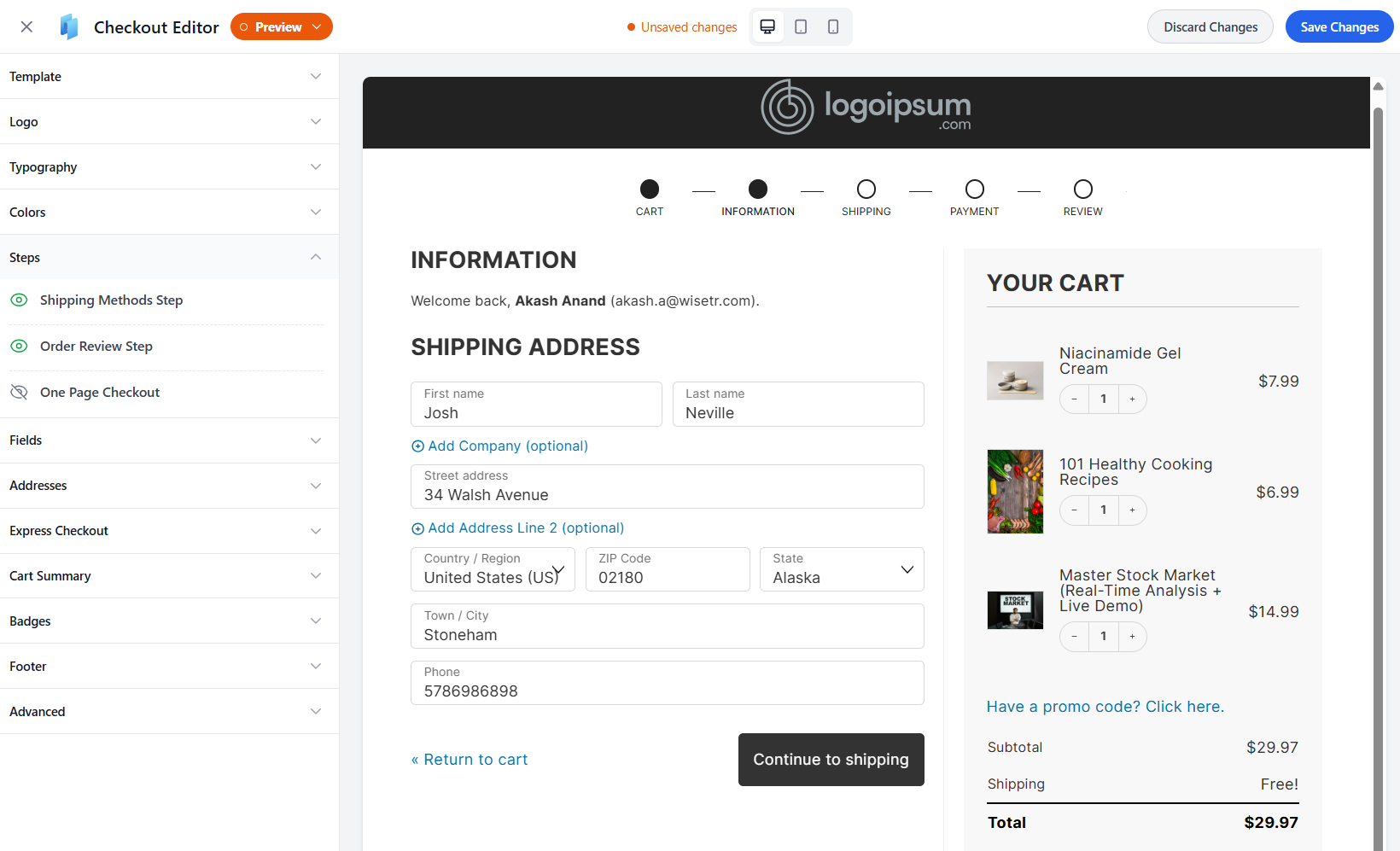
What you cannot do is restructure the template layout itself. The templates are React-rendered, so you cannot drop testimonials below the order summary, add a custom comparison section between fields, or rearrange the visual order of the steps.
If your brand fits inside one of those five templates, CheckoutWC will look great with minimal work.
If you need a money-back guarantee section, customer testimonial for social proof, or an inline FAQ above payment, you will quickly hit a wall.
🏆 Winner: FunnelKit
For pure speed-to-launch with a Shopify-style checkout, one-page checkout, or order forms, FunnelKit Funnel Builder is genuinely fast and beginner-friendly.
For other merchants who want visual control, adding trust badges below the order summary, building a niche-specific checkout, or matching brand guidelines exactly, FunnelKit’s page-builder integration and custom-section support put it well ahead.
Which Plugin Offers Better Checkout Optimizations?
This is a much closer comparison than people assume. Both plugins ship a solid set of conversion-focused checkout optimizations.
FunnelKit edges ahead with more total optimizations and deeper express checkout integration via its own Stripe gateway plugin.
See the comparison below:
| Checkout Optimization | FunnelKit | CheckoutWC |
|---|---|---|
| Express Checkout (Apple Pay, Google Pay, etc.) | ✅ Yes | ✅ Yes |
| Address Autocomplete | ✅ Yes (Google) | ✅ Yes (Google and Fetchify) |
| Address Validation | ✅ Yes | ✅ Yes |
| Auto-Apply Coupons | ✅ Yes | ⚠️ Limited (manual entry) |
| Inline Field Validation | ✅ Yes | ✅ Yes |
| ZIP → City/State Autofill | ✅ Yes | ✅ Yes |
| International Phone Field | ✅ Yes (enhanced) | ✅ Yes |
| Multi-Step Checkout Field Preview | ✅ Yes | ❌ No |
| Smart Login (Detect Existing Users) | ✅ Yes | ✅ Yes (user matching) |
| Time Checkout Expiry / Cart Hold | ✅ Yes | ❌ No |
| Prefill Form for Abandoned Users | ✅ Yes | ⚠️ Limited |
| Generate URL to Populate Checkout | ✅ Yes | ❌ No |
| One-Page Checkout | ✅ Yes | ✅ Yes |
| Collapsible Order Summary | ✅ Yes | ✅ Yes |
| Order Review Step | ⚠️ Multi-step previews | ✅ Yes |
| Trust Badges | ✅ Yes | ✅ Yes |
| Store Policies Modal | ⚠️ Manual via Blocks | ✅ Yes (native) |
FunnelKit
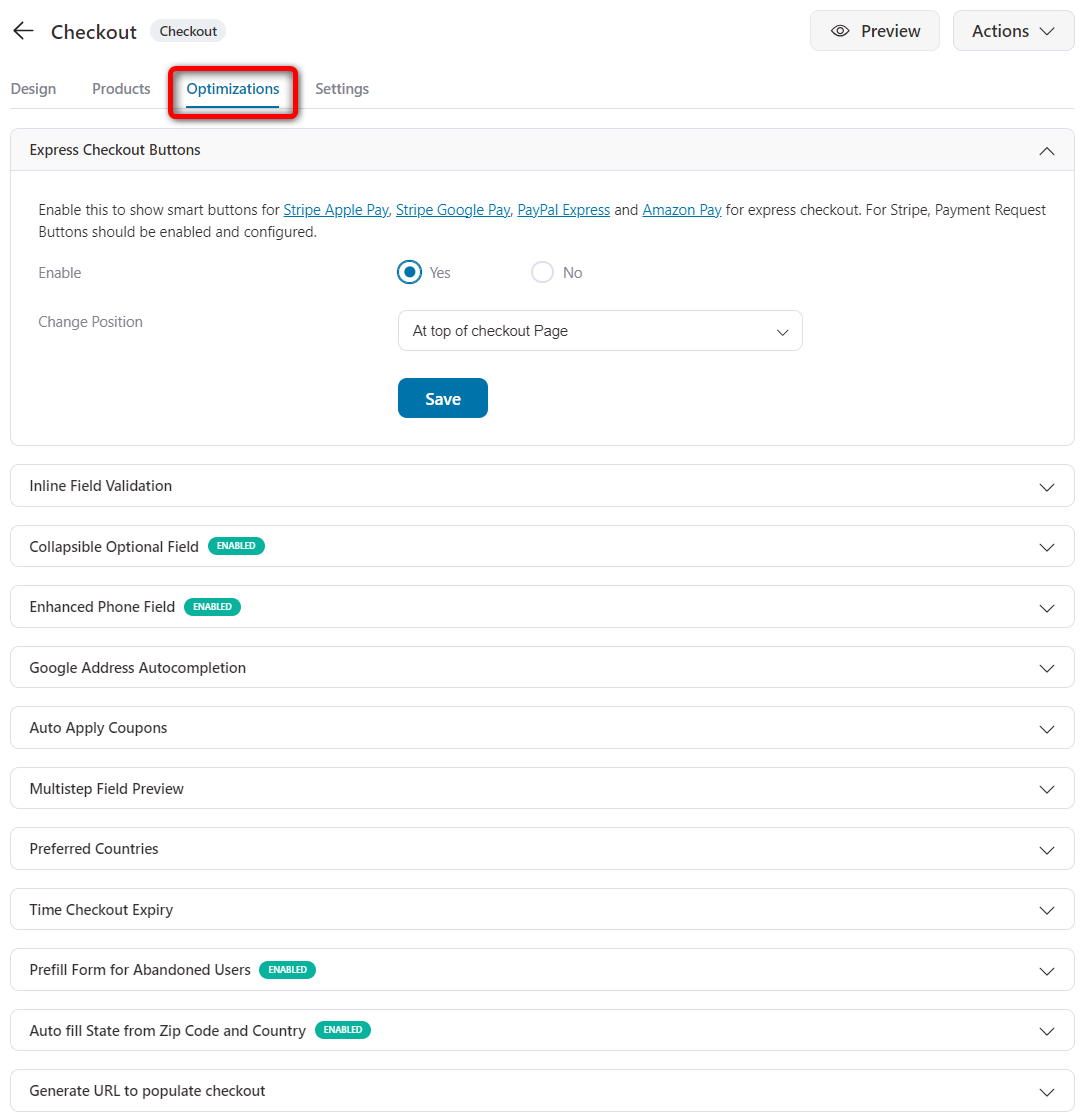
FunnelKit's Optimizations tab is loaded. You get Google address autocomplete, inline field validation, collapsible optional fields, auto-apply coupons, and express checkout buttons.
Additionally, you can optimize for enhanced phone field, multi-step field preview, preferred countries, checkout expiry time, prefilling the form for abandoned users, autofilling state from ZIP and country, and so much more.
Express checkout is supported via FunnelKit's own free Stripe gateway plugin, which handles Apple Pay, Google Pay, Amazon Pay, and PayPal Express.
The integration is tight because the gateway plugin is built by the same team. For example, it detects upsells after checkout and can charge cards even when the order total is zero (useful for lead magnets that convert into paid offers).
It's also compatible with all payment gateways that WooCommerce supports.
CheckoutWC
CheckoutWC's optimization set is also strong and includes a few things FunnelKit doesn't offer natively.
You get express checkout (Apple Pay, Google Pay, PayPal, Amazon Pay), compatible with only a few payment gateways.
Along with this, you can optimize the checkout for Google or Fetchify address autocomplete, native Smarty address validation (verifies and suggests corrections to addresses), international phone field validation, etc.
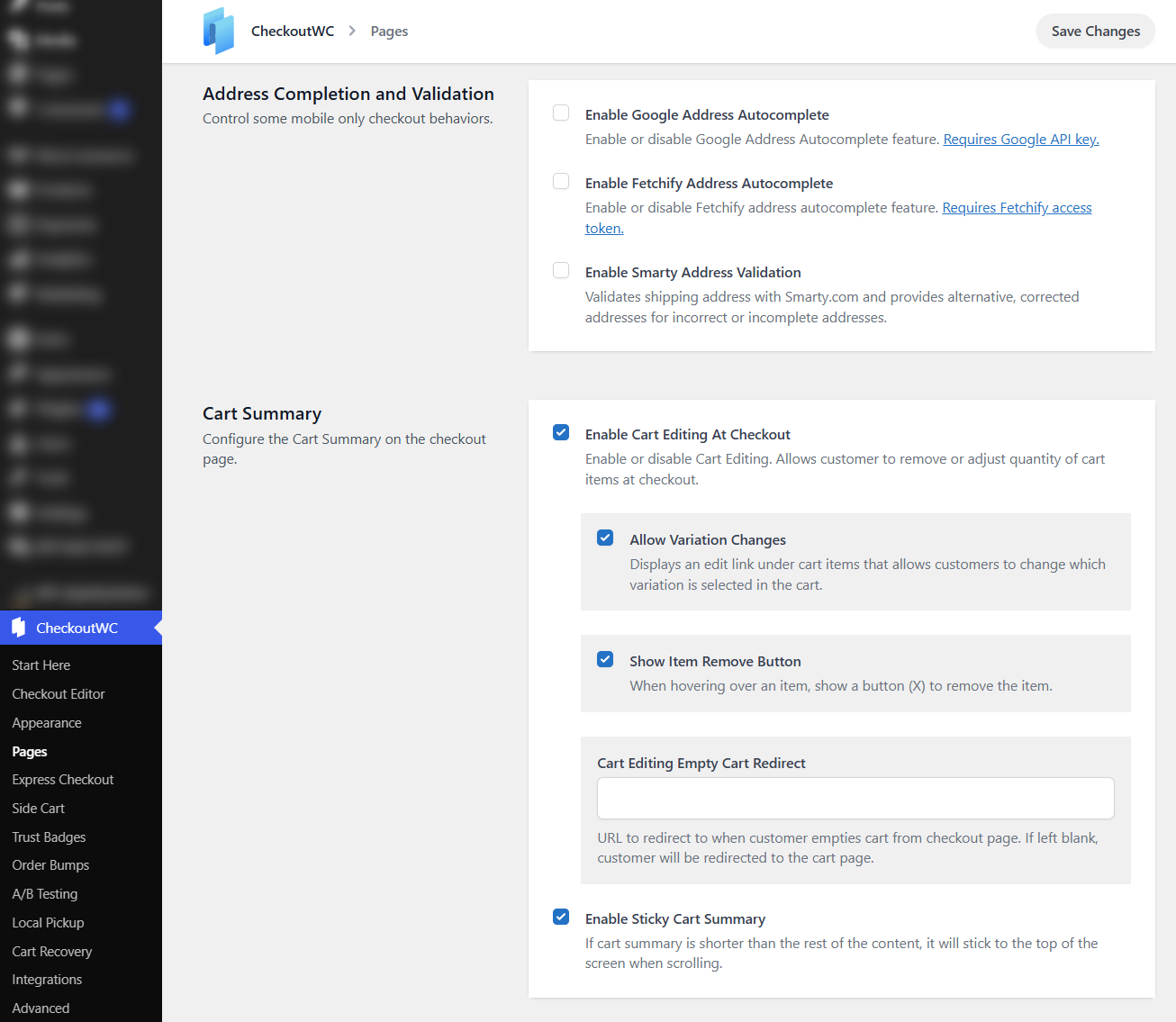
It has email domain suggestions, ZIP-to-City/State autofill, an order review step (a final confirmation screen before payment), a store policies modal (pops up your policy pages without leaving checkout), and more.
The Fetchify option is a useful alternative to Google for stores that need EU-region address autocomplete. Smarty integration is genuinely valuable for stores with high address-error rates.
🏆 Winner: FunnelKit
FunnelKit edges ahead with more total optimizations (auto-apply coupons, multi-step field preview, time checkout expiry, URL-populated checkout) and deeper express-payment integration through its own gateway plugin.
CheckoutWC offers counter-offers with native Smarty validation, Fetchify support, and a dedicated Order Review Step, which are well implemented.
For most stores, both deliver real conversion lifts on checkout. The differentiator is what comes after checkout, and that's where FunnelKit pulls significantly ahead.
Which Plugin Offers the Best WooCommerce Checkout Field Editor?
FunnelKit ships with a true drag-and-drop checkout field editor. CheckoutWC does not include a field editor. It relies on third-party plugins, such as WooCommerce Checkout Field Editor, for advanced needs.
| Checkout Field Editing Feature | FunnelKit | CheckoutWC |
|---|---|---|
| Drag-and-Drop Field Placement | ✅ Yes (any field, any position) | ❌ No (relies on third-party plugins) |
| Add Custom Fields | ✅ Yes (14 built-in field types) | ❌ No native custom field builder |
| Create Custom Sections | ✅ Yes | ❌ No |
| Move Shipping Above Billing Fields | ✅ Yes | ❌ No |
| Choose Fields Per Checkout Step | ✅ Yes | ❌ No |
| Conditional Field Display | ✅ Yes | ⚠️ Via filters and code only |
FunnelKit
FunnelKit's drag-and-drop checkout field editor lets you rearrange every field on the form, such as billing, shipping, email-first layouts, account fields and split them across multi-step checkout pages.
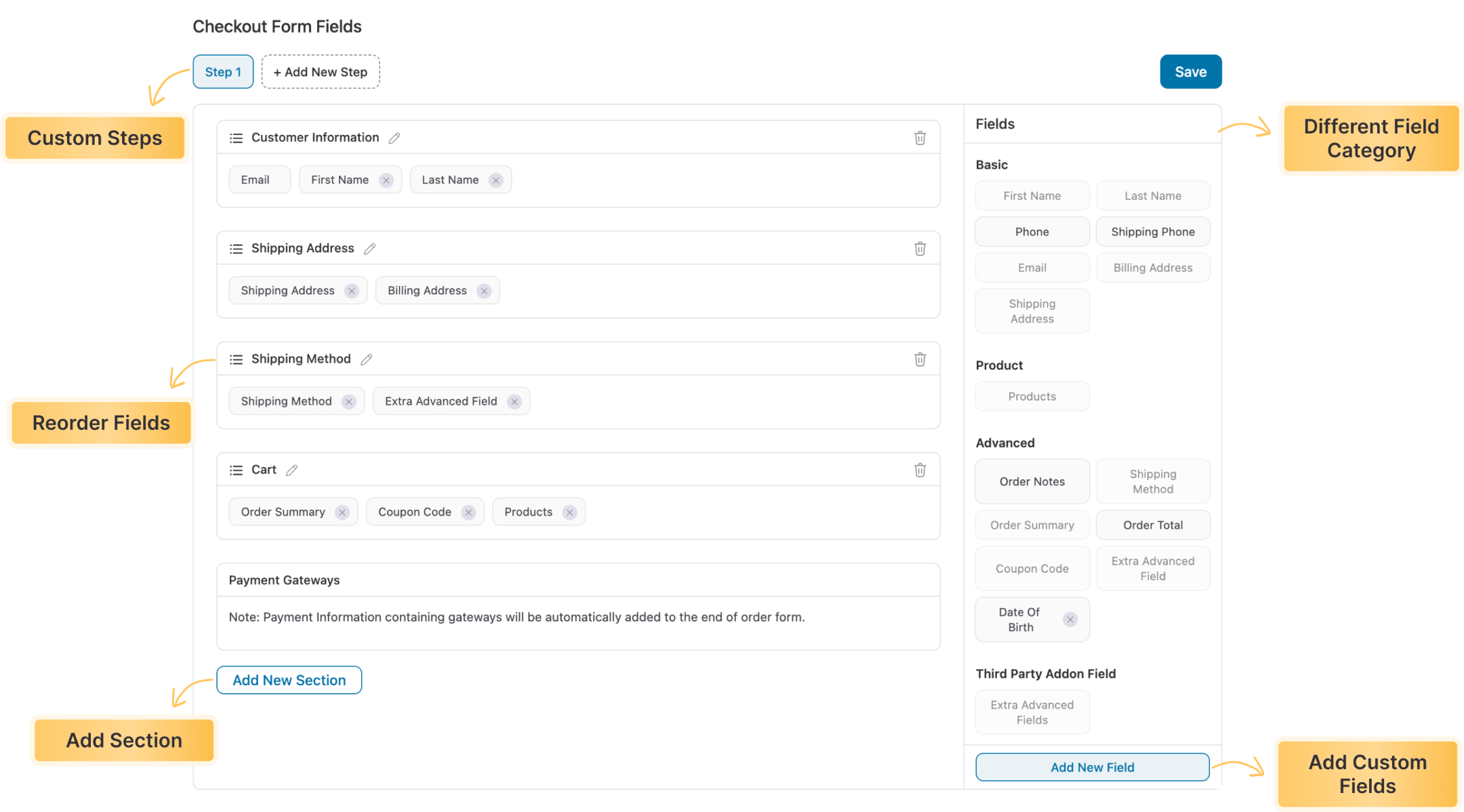
You can add 14+ built-in custom fields, such as text, checkbox, radio, multi-select, hidden, password, date, file upload, and more.
Custom fields can be placed anywhere inside the checkout form, validated, marked required, or shown conditionally.
CheckoutWC
CheckoutWC doesn't include a dedicated field editor. The plugin assumes WooCommerce's default fields are what you need and styles them inside the template.
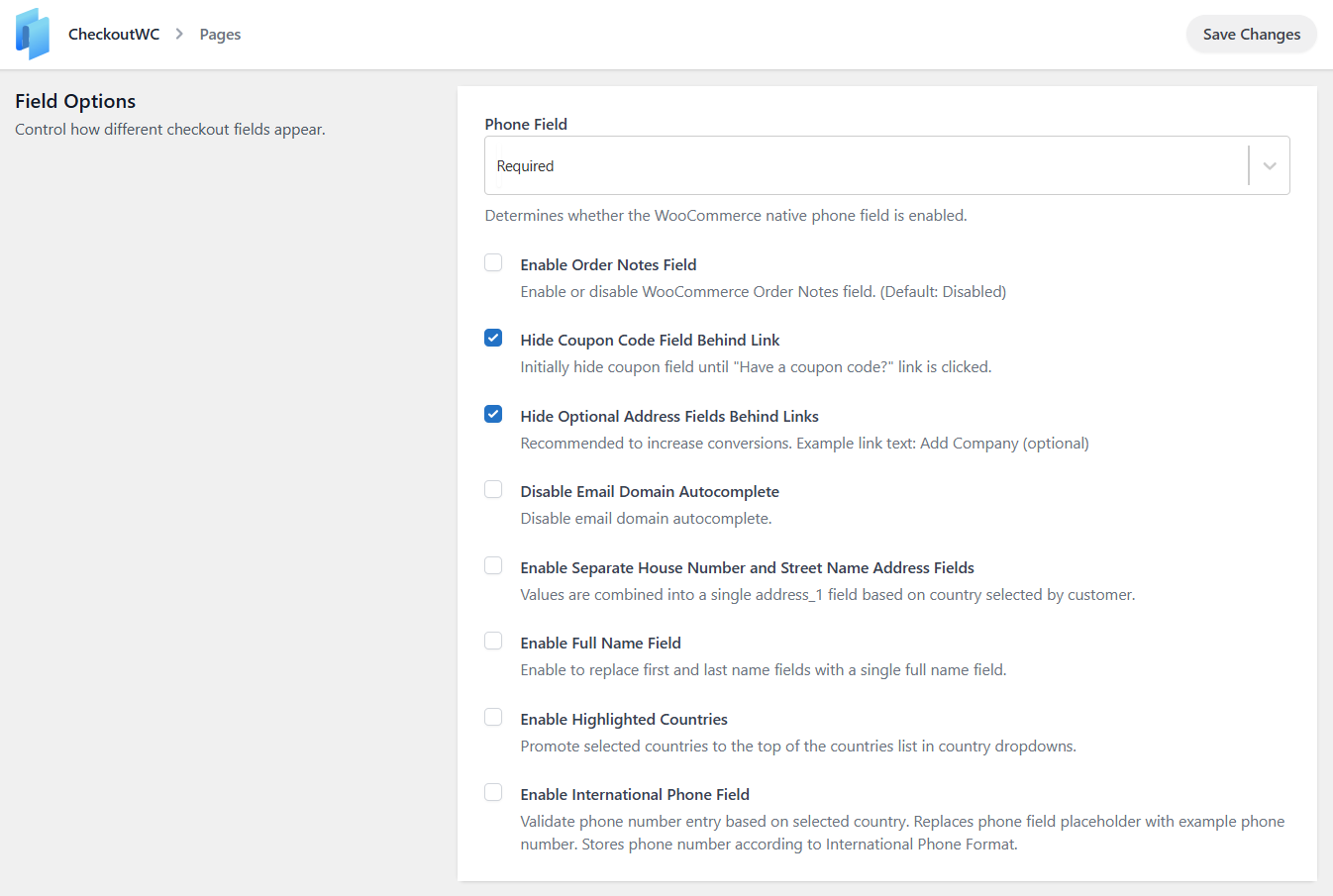
If you want to add a custom field, hide a billing field, or rearrange the form, you have two options:
- Use WordPress filters and PHP snippets (CheckoutWC ships a visual hook guide for developers), or
- Pair CheckoutWC with a separate field-editing plugin like WooCommerce Checkout Field Editor
There is no in-admin drag-and-drop interface for editing field order or building custom sections.
🏆 Winner: FunnelKit
For any store that needs custom checkout fields, such as gift messages, business names, VAT IDs, project briefs, and custom radios, FunnelKit handles it in the admin UI without extra plugins or developer time.
CheckoutWC's design philosophy is good defaults out of the box, which works for stores that don’t collect anything beyond standard fields. The moment you do, you'll either install a second plugin or write PHP.
Which Plugin Offers the Best WooCommerce Side Cart?
Both plugins offer a side cart on their Plus tier and above. FunnelKit includes more conversion features (gamified rewards, gifts, express pay buttons, analytics). CheckoutWC is basic and quite limited.
| Side Cart Feature | FunnelKit | CheckoutWC |
|---|---|---|
| Free Version Available | ✅ Yes (FunnelKit Cart Lite on WordPress.org) | ❌ No (side cart is Plus tier and above) |
| Included in Main Plugin | ✅ Yes (Plus, $179.50) | ✅ Yes (Plus, $249) |
| Free Shipping Progress Bar | ✅ Yes | ✅ Yes |
| Gamified Cart Rewards (Free Shipping + Discounts + Gifts) | ✅ Yes (upsells, cross-sells, or both) | ⚠️ Free shipping bar only |
| Product Recommendations | ✅ Yes | ✅ Yes (suggested products carousel) |
| Special Cart Addon | ✅ Yes | ❌ No |
| Built-in Cart Analytics | ✅ Yes | ❌ No |
| Real-Time Previews | ✅ Yes | ❌ No |
| Express Pay Buttons Inside the Cart | ✅ Yes | ❌ No |
| Apply Coupons Inside Cart | ✅ Yes | ✅ Yes |
| Add Cart Icon to Menu | ✅ Yes | ✅ Yes (floating side cart button) |
| Cart Variation Editing | ✅ Yes | ✅ Yes |
FunnelKit
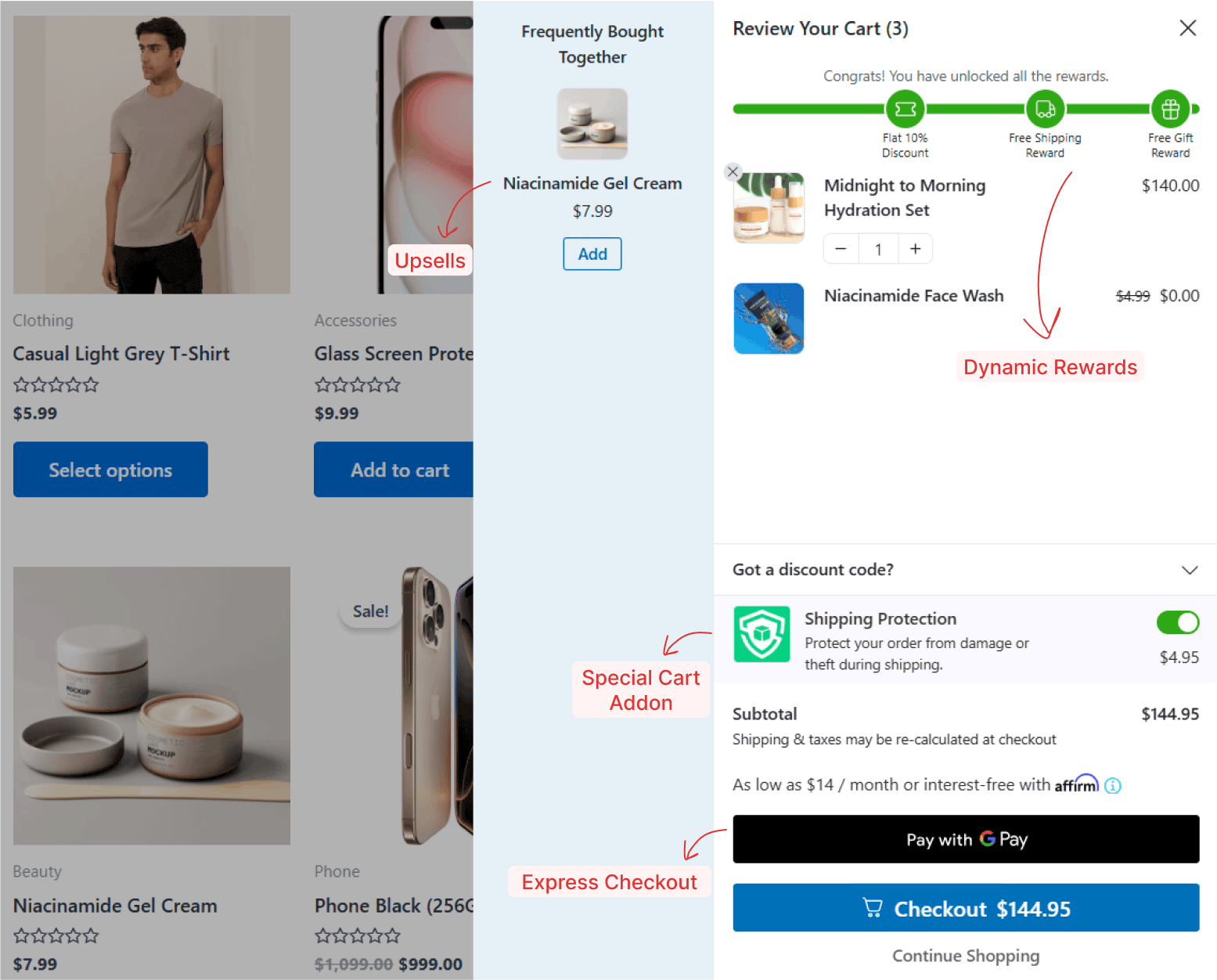
FunnelKit’s side cart is engineered for both speed and AOV growth. It replaces the WooCommerce cart page entirely and actively increases order value.
- Gamified rewards: Shoppers unlock free shipping, percentage or flat-rate discounts, and free gifts as they add items to their cart. You can stack multiple tiers.
- Product recommendations: Show upsells, cross-sells, or both inside the cart with multiple layouts.
- One-click purchase: Express buttons (Apple Pay, Google Pay) in the cart for shoppers who want to skip checkout.
- Cart analytics: Performance reports for cart upsells, rewards, and addons.
It's also available as a separate plugin (FunnelKit Sliding Cart) for stores that only need the cart feature.
CheckoutWC
CheckoutWC's side cart includes a free shipping progress bar, a Suggested Products Carousel for cross-sells, inline quantity edits, cart variation editing, and optional coupon entry.
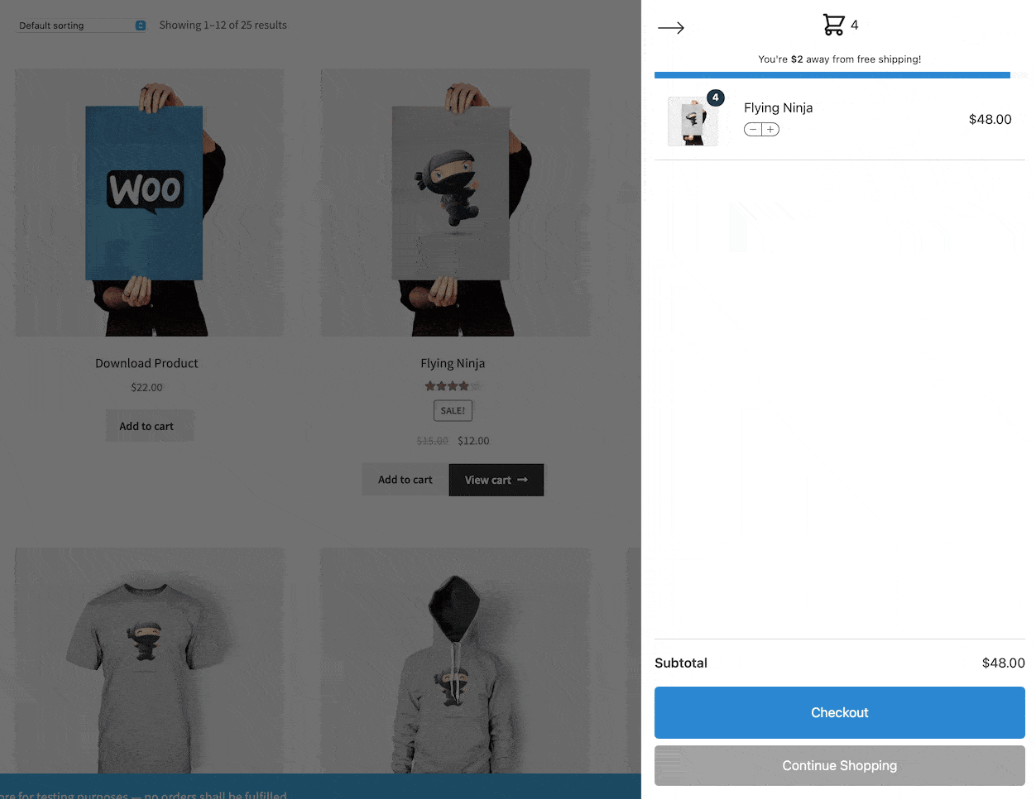
What it doesn't include is the gamification layer. No tiered rewards system, no free-gift unlocks, no express pay buttons inside the cart, no native cart analytics.
It's a polished cart-page replacement, but not a conversion engine like FunnelKit Cart.
🏆 Winner: FunnelKit
If the side cart is purely a faster path to checkout, both CheckoutWC and FunnelKit handle it well.
Further, if you want to use the cart as a conversion tool, such as unlocking gifts at $75, free shipping at $100, an upsell carousel that drives a measurable AOV lift, and analytics to prove it worked, FunnelKit Cart is your answer.
Which Plugin is Best for Offering WooCommerce Order Bumps?
FunnelKit's order bump system gives you unlimited bumps from the Plus tier with deeper rule-based targeting, more skins, and built-in social proof.
CheckoutWC's bumps are well-designed but capped at 2 on the Plus plan with simpler styling.
| Order Bump Feature | FunnelKit | CheckoutWC |
|---|---|---|
| Multiple Order Bumps | ✅ Yes (unlimited from Plus tier) | ⚠️ Up to 2 on Plus. Unlimited on Pro ($349) |
| Placements on Checkout | ✅ Yes (8 positions, including inside the mini cart) | ✅ Yes (7 positions, including After Checkout Submit Modal) |
| One-Click Product Upgrade | ✅ Yes | ✅ Yes (Use order bump as upsell mode) |
| Display Conditional Logic | ✅ Yes (20 rules) | ✅ Yes (5 rule categories) |
| Skins and Design Variation | ✅ Yes (8 modern skins with content, social proof and button customization) | ⚠️ Single bump block with theme styling |
| Social Proof on Hover | ✅ Yes | ❌ No |
| Variable Products Support | ✅ Yes | ✅ Yes |
| Built-in A/B Testing | ✅ Yes (Plus tier) | ✅ Yes (Pro Tier) |
| Order Bump Analytics | ✅ Yes | ✅ Yes |
FunnelKit
FunnelKit's order bumps appear above or below the order summary, under payment methods, in the mini cart, and in 8 proven high-converting spots for desktop and mobile.
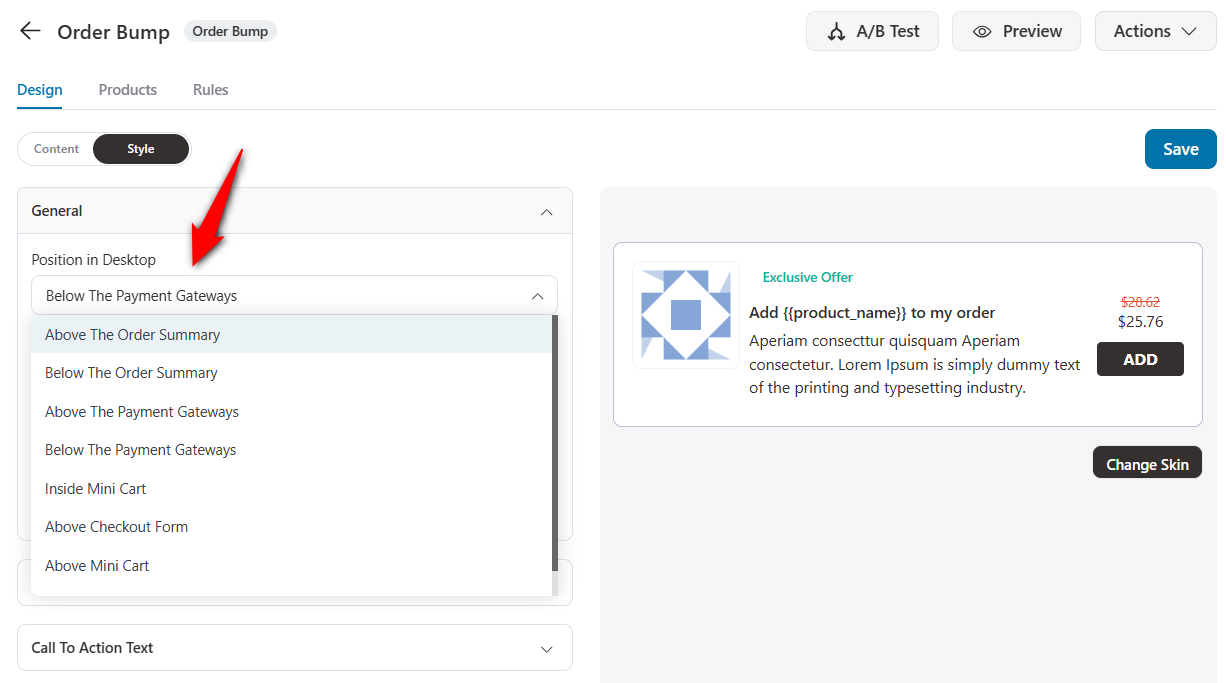
You get 8 conversion-focused skins with customizable headings, borders, buttons, and social proof on hover, all designed to build trust without visual clutter.
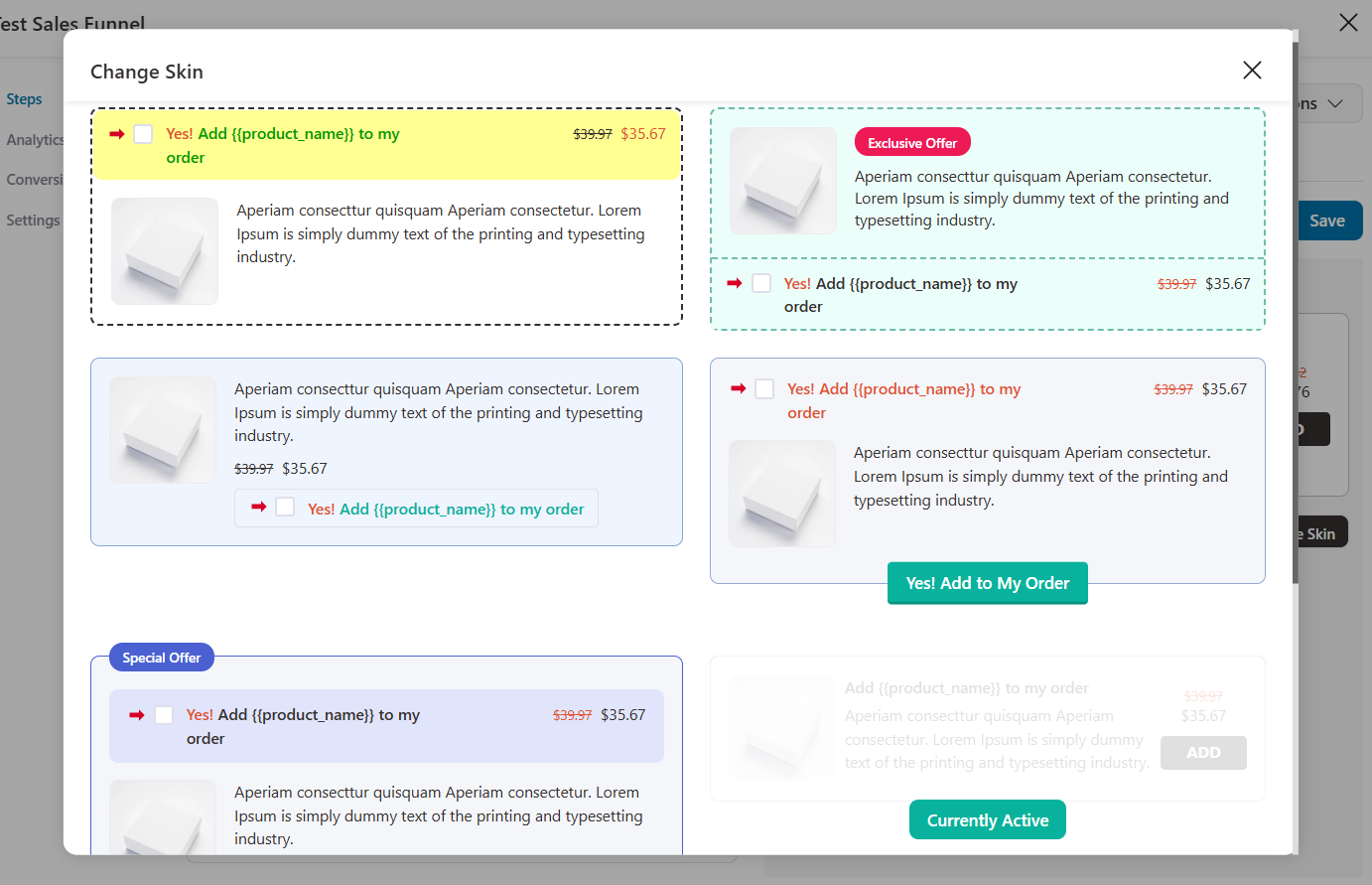
With one-click upgrades, you can replace a cart item with a higher-value bump offer. Perfect for premium versions, memberships, or bundles.
You've 20+ conditional rules that display your bump offers based on cart total, products, user role, location, and more.
Additionally, unlimited bumps per checkout on the Plus tier and above.
CheckoutWC
CheckoutWC has 7 placement options, with the standout being the After Checkout Submit Modal, a bump that appears as a confirmation pop-up after the customer clicks Place Order, which is genuinely a smart placement. (FunnelKit has this as a one-click upsell feature).
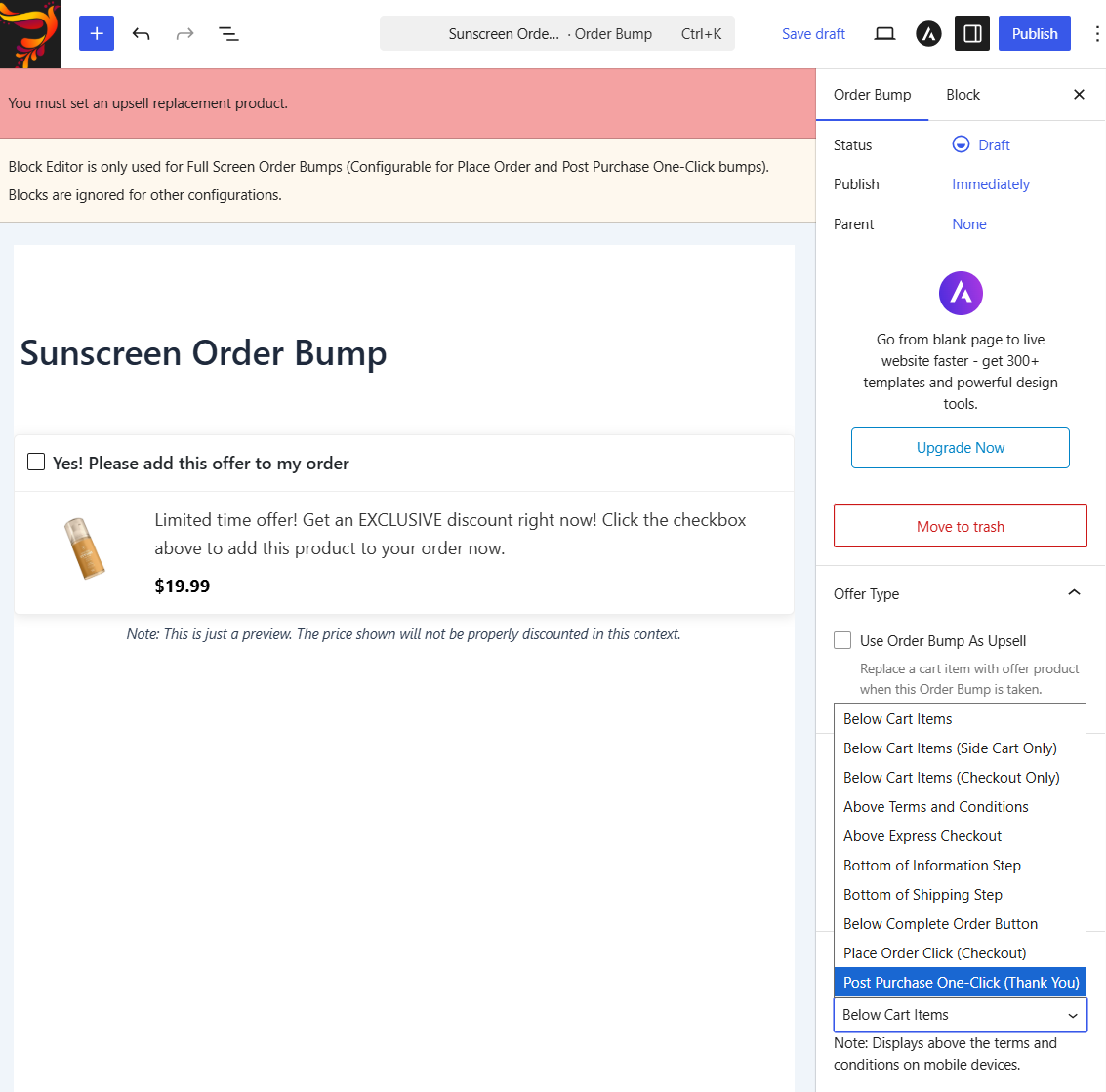
The rules engine covers products, categories, cart state, customer segments, and purchase history. Variable products are supported.
The “Use Order Bump As Upsell” mode replaces the triggering product with an upgrade.
The constraint is the Plus tier limit. CheckoutWC Plus ($249/year) caps you at 2 order bumps.
To get unlimited bumps and A/B testing, you need to upgrade to CheckoutWC Pro at $349/year. FunnelKit Plus at $179.50/year gives you unlimited bumps and A/B testing in the same tier.
🏆 Winner: FunnelKit
FunnelKit gives you more skins, social proof on hover, more placements and unlimited bumps at a lower price tier.
CheckoutWC's order bumps are well-designed and the After Checkout Submit Modal is a clever placement, but the 2-bump cap on Plus is a real constraint for stores running multiple offers across categories.
Which Plugin is Best for Offering WooCommerce One-Click Upsells?
Both plugins offer post-purchase one-click upsells. They take very different architectural approaches.
FunnelKit builds dedicated upsell offer pages between checkout and the thank-you page, with multi-product offers, automatic downsells, and support for 15+ payment gateways.
With tokenized payments, customers can accept this offer in one click without re-entering their information.
CheckoutWC, on the other hand, displays one-click upsells on the thank-you page (and inside an After Checkout Submit Modal) using saved payment methods. It currently supports Payment Plugins for Stripe and PayPal, as well as single-product offers.
Here's the comparison:
| One-Click Upsell Feature | FunnelKit | CheckoutWC |
|---|---|---|
| Has Post-Purchase One-Click Upsells | ✅ Yes (dedicated offer pages) | ✅ Yes (thank-you page bumps + Submit Modal) |
| Dedicated Upsell Funnel Pages | ✅ Yes (full pages with templates) | ❌ No (offers display on thank-you page) |
| Pre-Designed Upsell Templates | ✅ Yes | ⚠️ Bump-style display only |
| Page Builder Compatibility for Upsell Pages | ✅ Yes (Elementor, Divi, Oxygen, Bricks, Gutenberg) | ❌ No |
| Payment Gateway Compatibility | ✅ 15+ gateways (Stripe, PayPal, Braintree, Authorize.Net CIM, Mollie, SagePay, WooCommerce Payments, Square, and more) | ⚠️ Currently 2 gateways (Payment Plugins for Stripe, Payment Plugins for PayPal) |
| Multi-Product Upsells | ✅ Yes (bundles, tiered pricing, multiple-choice) | ❌ No (one offer at a time) |
| Automatic Downsells After Declined Upsell | ✅ Yes (sequence chains) | ❌ No |
| Dynamic Shipping & Tax Recalculation | ✅ Yes | ❌ No (offer adds to existing order) |
| Display Conditions / Targeting | ✅ Yes (27 rules) | ✅ Yes |
FunnelKit
FunnelKit’s one-click upsell system supports 15+ gateways, including Stripe, PayPal, Braintree, Authorize.Net CIM, Mollie, SagePay, Square, and WooCommerce Payments.
It works with payment methods like Apple Pay, Google Pay, SEPA, and more.
You can create dedicated upsell pages between checkout and the thank-you page, and customize them in Elementor, Divi, Bricks, Oxygen, or Gutenberg.
You can offer multi-product upsells, including bundles, tiered pricing, or multiple-choice products on a single page.
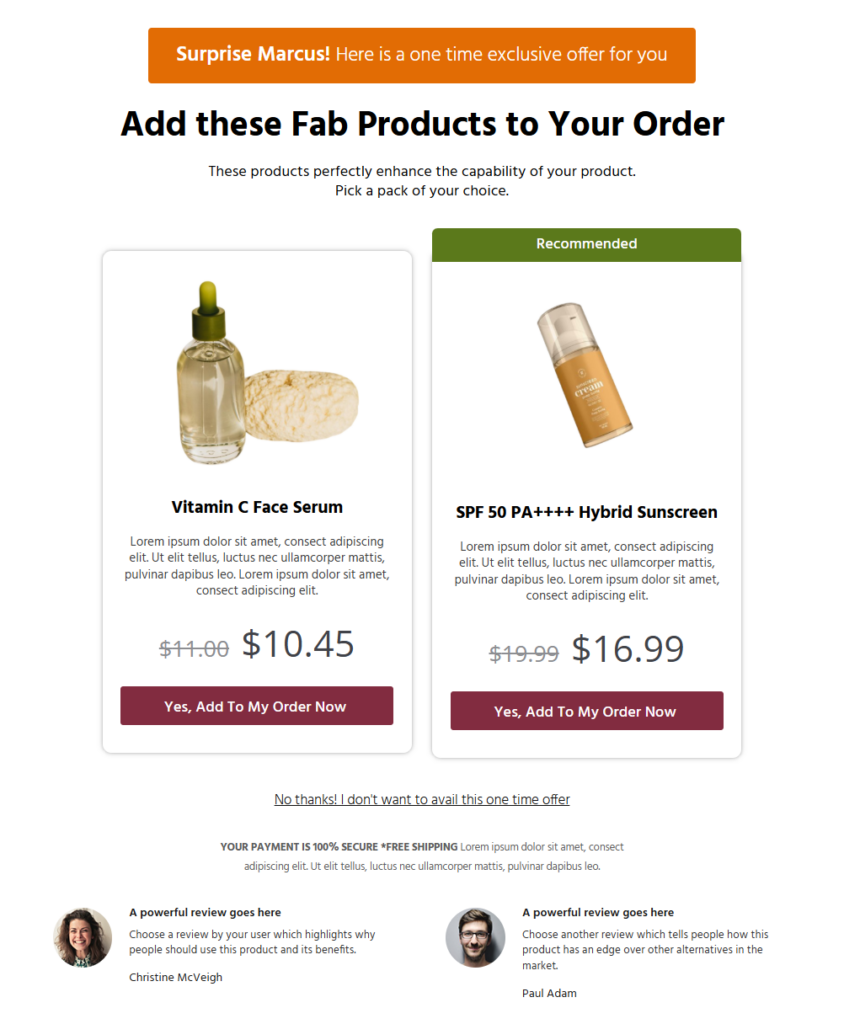
It has 27 conditional rules to show the right upsell or downsell to the right customer.
With the dynamic offer path, you can show downsell offers with a lower-priced alternative when the customer declines your upsell.
The system uses a virtual cart that mirrors WooCommerce's native checkout logic, preventing issues like overcharging for shipping or misapplied taxes after upsells.
CheckoutWC
CheckoutWC offers one-click post-purchase upsells through its order bump system.
After the customer completes checkout, an offer appears on the thank-you page. A one-click accept charges their saved payment method and adds the product to their existing order.
You can also set up offers after the Checkout Submit Modal, when the customer clicks Place Order, allowing one final addition before the order is finalized.
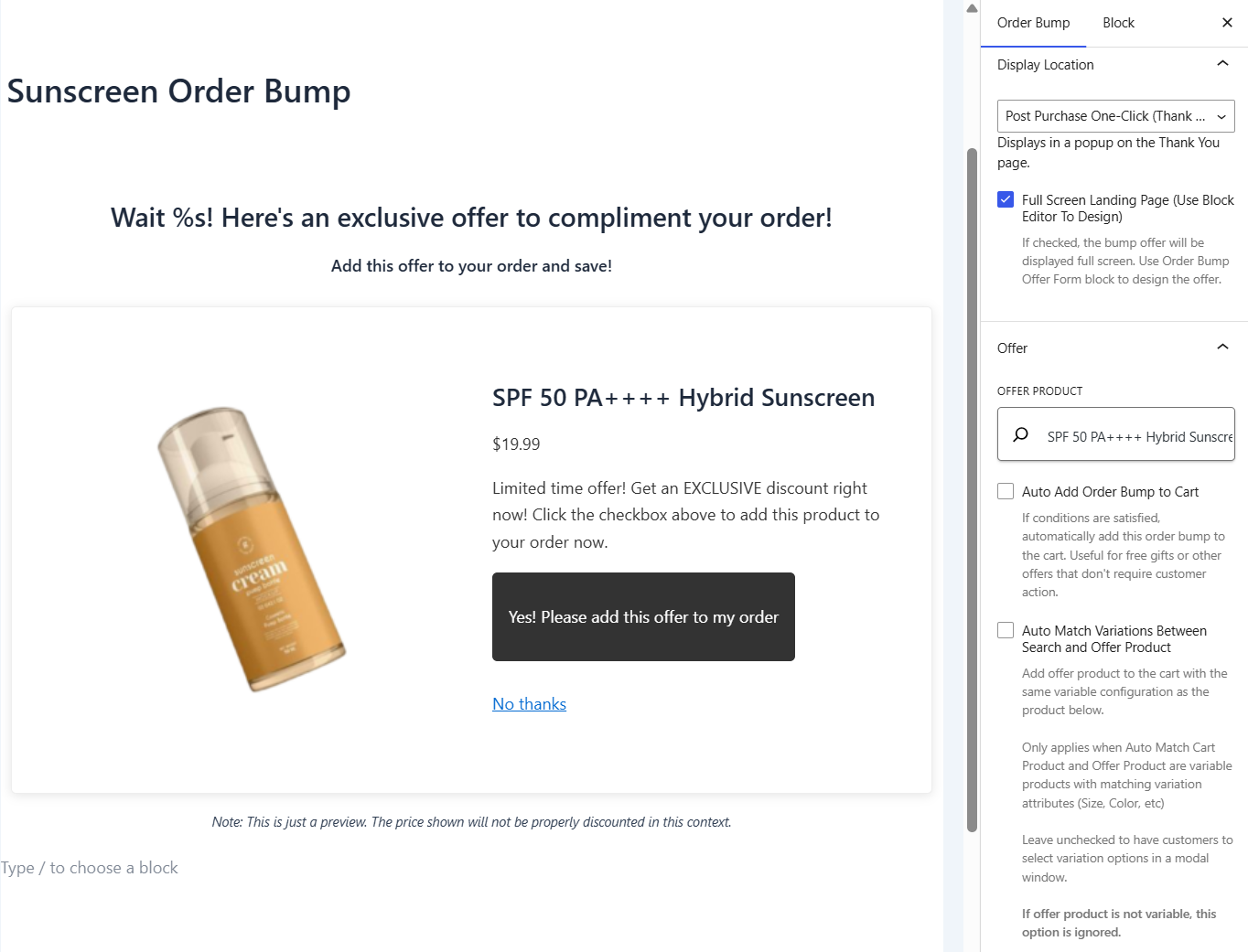
These are real one-click upsells (no re-entering payment details, instant order addition).
🏆 Winner: FunnelKit
If your upsell strategy is "offer one complementary product after the customer buys, one click to accept", and you’re using Payment Plugins for Stripe or PayPal, CheckoutWC’s thank-you page one-click bumps are clean, simple, and effective.
If your upsell strategy involves dedicated offer pages, multi-product selectors, downsells, broader gateway support, or compliance-critical shipping/tax recalculation, FunnelKit is the only one of the two that can handle it.
For most stores running a real upsell program with multiple offers and gateways, FunnelKit’s architecture wins. For simpler “add one thing after checkout” use cases, CheckoutWC’s approach is genuinely faster to set up.
Which Plugin is Best for Abandoned Cart Recovery, Automations, and CRM?
FunnelKit has a separate module, FunnelKit Automations, a complete CRM known for its cart abandonment sequences and effective automation workflows.
CheckoutWC ships a simple abandoned cart email tool.
| Automations & CRM Feature | FunnelKit | CheckoutWC |
|---|---|---|
| Free Plugin | ✅ Yes (FunnelKit Automations Lite for cart recovery + post-purchase sequences) | ❌ No native CRM (Lite has no automation) |
| Built-in Abandoned Cart Recovery | ✅ Yes (multi-step workflows, dynamic coupons, conditional logic) | ✅ Yes (up to 2 emails on Plus, unlimited on Pro) |
| Drag-and-Drop Visual Email Builder | ✅ Yes | ❌ No (basic email editor) |
| Multi-Channel Marketing (SMS, WhatsApp, Push) | ✅ Yes | ❌ No |
| Transactional Email Customization | ✅ Yes (order confirmations, shipping notifications, refunds) | ❌ No |
| Pre-Built Automation Recipes | ✅ Yes | ❌ No |
| A/B Testing for Emails | ✅ Yes (broadcasts and split path testing for automations) | ❌ No |
| Audience Segmentation & Lists | ✅ Yes | ❌ No |
FunnelKit
FunnelKit Automations is its own product in the FunnelKit suite, available as a bundle with the Funnel Builder on the Pro plan and sold separately for stores that just want the automation engine.
The free FunnelKit Automations plugin already covers basic abandoned cart recovery and post-purchase sequences out of the box.
The paid version is a full CRM and automation suite for WooCommerce:
- Visual automation builder triggered off store events, such as cart abandonment, order status changes, first purchase, high-value orders, subscription renewals, refunds, and more
- Contact profiles with purchase history, tags, lists, location, and engagement data
- Segmentation and personalization with dynamic merge tags
- A/B testing to optimize subject lines, content, and timing
- Multi-channel campaigns across email, SMS, WhatsApp, and push notifications
- Transactional email design, including order confirmations, shipping updates, and refunds, becomes branded touchpoints
- The visual email builder uses blocks, columns, and layouts to design branded emails without CSS or custom code.
CheckoutWC
CheckoutWC includes built-in abandoned cart recovery. It captures customer emails early in checkout, sends automated follow-up reminders on a schedule, offers coupon codes or other incentives, and tracks recovery performance via an analytics dashboard.
The constraint is that its Plus plan caps you at 2 abandoned-cart emails in total. The Pro plan ($349/year) unlocks unlimited emails.
But, there is no SMS, no WhatsApp, no contact profiles, no segmentation, no transactional email design, no automation triggers beyond cart abandonment, and no visual email builder.
To send a discount 24 hours after they abandon, this is enough. For anything more sophisticated, you'd need to pair CheckoutWC with a separate ESP or CRM.
🏆 Winner: FunnelKit
Building optimized checkouts is only half the conversion story. The other half is bringing shoppers back when they don't complete the purchase, and selling to them again after they do.
FunnelKit handles both natively with a full CRM, multi-channel campaigns, automation workflows, and a visual email builder. And because Automations is sold modularly, stores can buy just that piece if they already have a checkout solution.
CheckoutWC handles abandoned cart emails competently, but stops there.
Which Plugin Offers the Best Funnel Templates and Library?
FunnelKit ships a full library of funnel page templates, including landing pages, opt-ins, checkouts, upsells, and thank-you pages.
Among these, FunnelKit offers 20+ checkout templates and thank-you pages. While CheckoutWC ships 5 checkout templates and a styled thank-you page.
FunnelKit
FunnelKit takes a quality-over-quantity approach. You get a curated library of 20+ high-converting designs, each battle-tested around proven conversion principles.
Templates cover every step of the funnel, including landing pages, opt-in pages, checkouts, one-click upsells, and thank-you pages, across use cases such as digital products, webinars, physical goods, and subscriptions.
Every template is fully responsive, customizable, and crafted with sales psychology in mind, featuring security and payment badges, customer testimonials, benefits sections, and trust elements baked in.
Each of these templates can be customized with Elementor, Divi, Bricks, Oxygen, and Gutenberg. For other page builders, use shortcodes.
The Shoppe template, a Shopify-style checkout, is a consistent top performer with thousands of stores using it for clean, fast conversions.
CheckoutWC
CheckoutWC's library is intentionally narrow with 5 checkout templates, including Copify, Futurist, Midas, Glass, and Galleria, each tuned to a different visual mood.
Templates are React-rendered and customized through admin settings (logos, colors, fonts, header/footer styles). There's also a Thank You page template that matches the checkout design.
These templates are polished, mobile-first WooCommerce checkout that looks professional out of the box with minimal configuration.
What you don't get is templates for landing pages, opt-in pages, upsell offer pages, webinar registration pages, or any other funnel step.
🏆 Winner: FunnelKit
For checkout templates alone, FunnelKit has 20+ designs, which are well-crafted as compared to CheckoutWC's 5 designs. FunnelKit is already a reasonable choice if checkout is the only page you need.
But its template library also addresses broader funnel needs, like the entire funnel, every major page builder, and every common use case.
FunnelKit vs CheckoutWC: Which Plugin is Best for A/B Testing?
FunnelKit offers built-in A/B testing across every funnel page. CheckoutWC offers A/B testing for order bumps only on its Pro plan.
| A/B Testing Feature | FunnelKit | CheckoutWC |
|---|---|---|
| A/B Testing for Checkout Pages | ✅ Yes | ❌ No |
| A/B Testing for Landing & Opt-In Pages | ✅ Yes | ❌ No |
| A/B Testing for Upsell Pages | ✅ Yes | ❌ No |
| A/B Testing for Order Bumps | ✅ Yes (Plus tier) | ✅ Yes (Pro tier) |
| Visual Reporting and Results | ✅ Yes | ✅ Yes |
| Winner Declaration | ✅ Yes | ✅ Yes |
| Revenue Per Visitor and AOV Tracking | ✅ Yes | ✅ Yes (for A/B order bump tests) |
FunnelKit
FunnelKit provides built-in A/B testing directly inside the Funnel Builder. You can test opt-in pages, landing pages, checkouts, order bumps, one-click upsells, and thank-you pages.
A/B test one-page vs multi-step checkouts, different upsell offers, CTA button copy, page designs, and anything.
It lets you create duplicate variants, split traffic, view real-time results, and declare a winner based on performance with one click.
A/B testing is available in the FunnelKit Plus plan ($179.50/year).
CheckoutWC
CheckoutWC added A/B testing in version 11.0, scoped specifically to order bumps.
You can create multiple bump variations, split traffic automatically (default 50/50 or custom percentages), track acceptance rate and revenue per visitor, and view results with statistical confidence indicators.
A/B testing is a Pro-tier feature ($349/year). It doesn't extend to checkout layout, thank-you page bumps, or any other element.
🏆 Winner: FunnelKit
FunnelKit offers A/B testing across the entire funnel and checkout with the Plus plan at $179.50/year. CheckoutWC's order-bump A/B testing is well-built but narrowly scoped.
Which Plugin Offers the Best Detailed Analytics and Reporting?
FunnelKit provides full funnel, order, and revenue analytics with UTM and referrer tracking. CheckoutWC provides basic checkout stats and a cart recovery dashboard.
| Built-in Analytics Feature | FunnelKit | CheckoutWC |
|---|---|---|
| Step-by-Step Behavior Tracking | ✅ Yes | ❌ No |
| Revenue Attribution | ✅ Yes | ❌ No |
| UTM and Referral Source Reports | ✅ Yes | ❌ No |
| In-Depth Conversion Data | ✅ Yes | ⚠️ Checkout-level only |
| Cart and Upsell Analytics | ✅ Yes | ⚠️ Order bump performance, side cart upsells |
| Abandoned Cart Recovery Tracking | ✅ Yes | ✅ Yes |
| Pricing for Full Analytics | Plus plan ($179.50/year) | Pro plan ($349/year for unlimited) |
FunnelKit
FunnelKit's analytics layer gives you a full 360-degree view of your store's performance.
This includes UTM reports, referral source reports, cart and upsell performance reports, funnel reports, and a conversion profile that shows exactly where your buyers come from.
Track checkout drop-offs step by step, attribute revenue to specific campaigns, and filter by traffic source.
CheckoutWC
CheckoutWC's analytics scope includes its specific features, such as order bump performance, abandoned cart recovery rates, and side cart upsell performance.
There's no funnel-level analytics (no funnel to track), no UTM/referrer reports, and no traffic source attribution.
For deeper attribution, you'd layer Google Analytics 4 or another tool on top.
🏆 Winner: FunnelKit
FunnelKit's UTM and referrer analytics are included in the Plus plan and let you attribute revenue to campaigns and sources. CheckoutWC's dashboards are competent within their narrower scope.
Which Plugin Has a Modular Approach?
FunnelKit is built modularly. Funnel Builder, Automations, and Sliding Cart are separate products you can buy independently. CheckoutWC is a single plugin with tier-gated features.
| Question | FunnelKit | CheckoutWC |
|---|---|---|
| Is the product modular? | ✅ Yes (Funnel Builder, Automations, Sliding Cart) | ❌ No (single plugin, tier-gated features) |
| Can you buy pieces separately? | ✅ Yes (each module sold independently) | ❌ No (one product, four pricing tiers) |
| Can you toggle features on/off? | ✅ Yes (granular control inside each module) | ✅ Yes (feature toggles inside settings) |
| How are plans structured? | Sold separately or bundled for savings | Tiered feature unlocks (Basic → Plus → Pro → Agency) |
| Support channels | One team, one dashboard per module | One team, one dashboard |
FunnelKit
FunnelKit is built as three connected but independent products:
- FunnelKit Funnel Builder: Checkout, funnels, order bumps, one-click upsells, A/B testing, analytics
- FunnelKit Automations: CRM, email marketing, abandoned cart recovery, transactional emails
- FunnelKit Sliding Cart: Dynamic side cart with rewards, upsells, and analytics
- Sublium Subscriptions: A separate website and pricing plans for your subscription business, with selling plans, management and retention features
You can buy them separately, in pairs, or as a bundle (the Pro plan includes Funnel Builder + Automations). Each module ships with granular feature toggles, so you can disable what you don't need.
This matters for stores that already have a checkout solution and just want automation, or stores that only want a side cart, or stores that want to grow their stack over time without buying everything at once.
CheckoutWC
CheckoutWC is a single plugin. Features unlock as you move up the four pricing tiers: Basic, Plus, Pro, and Agency.
You can toggle individual features inside settings, such as order bumps, abandoned cart emails, side cart, trust badges, and address autocomplete.
But you can't buy just the side cart or just the cart recovery feature. You pay for the tier that includes what you need.
So if you only need one specific feature, you may end up paying for a whole tier to unlock it.
🏆 Winner: Tie (depends on your preference)
Both approaches are valid. FunnelKit's modular approach is better for stores that want to buy only what they need, mix solutions from different vendors, or add capabilities over time. It's also helpful when one team owns checkout and another owns email marketing.
CheckoutWC's single-plugin approach is simpler, with a single license, settings panel, and update workflow.
Which Plugin is Best for Ease of Use and Setup?
CheckoutWC wins on raw setup speed for the checkout page alone. FunnelKit wins in guided onboarding for full funnels and offers a canvas mode that CheckoutWC doesn't.
| Onboarding and Usage Feature | FunnelKit | CheckoutWC |
|---|---|---|
| Guided Onboarding Experience | ✅ Yes (3-step wizard) | ✅ Yes (Start Here wizard, but rigid defaults and less flexibility) |
| Time to First Working Checkout | ~10 minutes | ~10 minutes |
| Order Bumps Included During Funnel Import | ✅ Yes | ⚠️ Configured separately |
| Visual Funnel Building Experience (Canvas Mode) | ✅ Yes | ❌ No (no funnel concept) |
| Drag-and-Drop Funnel Steps | ✅ Yes | ❌ No |
| Smart Defaults Out of the Box | ✅ Yes | ✅ Yes (their strongest point) |
FunnelKit
FunnelKit's onboarding is built for funnels, not just checkout. A guided setup walks you through your first funnel or optimized checkout in minutes.
Ready-to-import templates come with pre-built steps, including upsells and order bumps.
Canvas mode shows your entire funnel as a visual flowchart, including landing page, checkout, upsell, downsell, and thank-you, and lets you drag steps around to restructure the flow.
For a pure checkout setup (no funnel), expect about 10 minutes from install to going live.
CheckoutWC
CheckoutWC's onboarding wizard walks you through three quick steps: choose a template, customize colors/logo, and activate.
There are no flexible settings to set the page as you desire. No canvas, no flow editor, no drag-and-drop of steps, because there are no separate steps to drag.
Everything happens on one settings dashboard scoped to the checkout, side cart, thank-you page, and order bumps.
🏆 Winner: Both (different strengths)
If you want a beautiful store checkout in 10 minutes and you don't need anything else, both FunnelKit and CheckoutWC win on raw speed.
If you want to build a funnel, landing page, checkout, upsell, and thank-you page, FunnelKit's easy onboarding and beginner-friendly guided setup are a better fit.
This isn’t a "which is easier" question. It's a "which is easier for what you're trying to build" question.
Which Plugin Has Higher Active Installs and User Reviews?
FunnelKit has significantly more active installs than CheckoutWC on WordPress.org. Both maintain high user-satisfaction ratings.
| Metric | FunnelKit | CheckoutWC |
|---|---|---|
| Active Installs (WordPress.org) | 40,000+ (free version since 2021) | 3,000+ (CheckoutWC Lite) |
| WordPress.org Rating | 5 out of 5 | 4.7 out of 5 |
| Five-Star Ratios (WordPress.org) | 979 five-star reviews out of 996 total ratings (98.3%) | 23 five-star reviews out of 25 total ratings (92%) |
| TrustPilot Ratings | 4.8 out of 5 (140 total reviews) | 4.0 out of 5 (3 total reviews) |
FunnelKit
FunnelKit started in 2018 as WooFunnels, a suite of premium products sold individually.
In 2021, FunnelKit launched its free funnel builder plugin on WordPress.org and has since been building a loyal customer base.
It currently has 40,000+ active installs on the free WordPress.org version. The 5-star rating reflects high customer satisfaction with the product and support team.
It has a 4.8 out of 5 rating on Trustpilot, with 140 total reviews.
CheckoutWC
CheckoutWC began as a premium-only plugin around 2019, built inside a WooCommerce agency frustrated by the default checkout.
The WordPress.org Lite version is a more recent addition with 3,000+ active installs and a 4.7-star rating from 25 reviews (23 five-star).
According to CheckoutWC's own pricing page, more than 7,800 WooCommerce stores use the plugin.
It has a 4.0 out of 5 rating on TrustPilot with 3 total reviews.
🏆 Winner: FunnelKit
FunnelKit’s install base is significantly larger on WordPress.org. Both plugins maintain high satisfaction ratings with FunnelKit at 5 stars across 979+ reviews and CheckoutWC at 4.7 stars across only 24 reviews.
Which Plugin Offers the Best Value for Money?
FunnelKit delivers more features per dollar across most tiers. CheckoutWC's pricing escalates when you add the features most growing stores need.
| Persona | FunnelKit | CheckoutWC |
|---|---|---|
| Beginners starting with WooCommerce | ✅ Basic, $99.50/year (full checkout with basic side cart and cart recovery functionalities) | ⚠️ Basic, $149/year (checkout only, no order bumps, no side cart, no cart recovery) |
| Growth merchants wanting checkouts and upsells | ✅ Plus, $179.50/year (Funnel Builder, Cart, Bumps, Upsells, Analytics, and A/B testing) | ⚠️ Plus, $249/year (5 sites, max 2 order bumps, max 2 cart emails, side cart, thank-you bumps) |
| Automation-driven sellers | ✅ Pro, $249.50/year (funnels + full CRM + automations) | ❌ Not available natively (no CRM) |
| Agencies managing many sites | ✅ Elite, $399.50/year (30 sites, full CRM + automations) | ⚠️ Agency, $1,499/year (50 sites, no CRM, no funnel builder) |
FunnelKit
FunnelKit's pricing is built around feature breadth at every tier:
- Beginners: Basic at $99.50/year unlocks the full checkout optimization toolkit, the same one used by top WooCommerce stores.
- Growth merchants: Plus at $179.50/year for two sites adds the full Funnel Builder, side cart, unlimited order bumps, one-click upsell funnels, A/B testing, and analytics.
- Automation-driven sellers: Pro at $249.50/year bundles both Funnel Builder and Automations (the full CRM and email marketing platform). It covers 3 sites.
- Agencies: Elite at $399.50/year covers 30 sites with the full Pro feature set.
You can also buy modules independently. If you only want Automations or only Sliding Cart, those are sold separately.
CheckoutWC
CheckoutWC's pricing focuses on tier-gating individual features:
- Basic at $149/year for 1 site: Checkout templates only. No order bumps, no abandoned cart recovery, no side cart, no thank-you page upsells.
- Plus, at $249/year for 5 sites: Adds 2 order bumps, 2 abandoned cart emails, side cart, thank-you page bumps, and local pickup improvements.
- Pro at $349/year for 10 sites: Unlimited order bumps, A/B testing, unlimited cart recovery emails, Cloudflare Turnstile, Order Delivery for WooCommerce ($149 value).
- Agency at $1,499/year for 50 sites: Priority support, onboarding call, early access.
🏆 Winner: FunnelKit
If we compare pure checkout builders with revenue-boosting features and insights:
- FunnelKit Plus ($179.50) gives you unlimited order bumps, full upsell funnel pages, A/B testing, and analytics.
- CheckoutWC Plus ($249) gives you 2 order bumps, 2 cart emails, thank-you page upsells (with 2 supported gateways), and a side cart.
Additionally, to get unlimited order bumps and A/B testing in CheckoutWC, you need Pro at $349/year. To get a CRM or marketing automation, you can't get there with CheckoutWC at all. You’d need to add a separate tool.
FunnelKit vs CheckoutWC: Which One Should You Choose?
Both plugins are well-built and well-supported. They're not competing for exactly the same job.
For most WooCommerce store owners who plan to grow, FunnelKit is the smarter long-term investment.
It costs less across most tiers, includes more out of the box, and scales in a modular way, so you only buy what you need.
CheckoutWC remains an excellent choice for stores that want a focused, friction-free checkout redesign and don’t plan to expand into funnels, CRM, or lead generation.
Get FunnelKit and start building a full conversion stack today.
Frequently Asked Questions on FunnelKit vs CheckoutWC Comparison
Yes, both offer free versions on WordPress.org.
FunnelKit is quite generous with its free version. FunnelKit Funnel Builder Lite lets you create optimized checkouts and thank-you pages, plus a free side cart, with 40,000+ active installs.
FunnelKit Automations Lite also offers basic abandoned cart recovery and post-purchase sequences for free.
CheckoutWC Lite offers a multi-step checkout layout, ZIP/postal autocomplete, express payment support, and mobile-optimized templates with 3,000+ active installs.
Premium features like order bumps, side cart upsells, abandoned cart emails, full template library, and thank-you page one-click bumps require a paid plan.
Yes, FunnelKit is cheaper than CheckoutWC across all tiers. FunnelKit Plus is $179.50/year for 2 sites and includes unlimited order bumps, side cart, one-click upsell funnels, A/B testing, and analytics.
CheckoutWC Plus is $249/year for 5 sites, but caps you at 2 order bumps and 2 abandoned cart emails.
To match FunnelKit Plus feature set in CheckoutWC, you'd need to upgrade to CheckoutWC Pro at $349/year. And still you wouldn’t get FunnelKit’s CRM, lead generation, or dedicated upsell funnel pages.
Yes. FunnelKit's drag-and-drop interface and pre-built templates make rebuilding a CheckoutWC-style checkout straightforward, usually under an hour for a single-site store.
Any custom fields or settings you had in CheckoutWC can be replicated using FunnelKit's checkout field editor.
Yes. FunnelKit's Shoppe template is a Shopify-style three-step checkout used by thousands of stores. The visual flow is similar to CheckoutWC’s templates, but FunnelKit gives you full page builder customization on top of it.
No. FunnelKit's onboarding is built for beginners with a 3-step guided setup, pre-built funnel templates with order bumps already included, and a visual canvas mode for drag-and-drop funnel building.
FunnelKit is fast with smart and well-thought-out features to boost conversions in your WooCommerce store.
Editorial Team
October 7, 2026WooCommerce upsells are products you recommend in place of the one a shopper is viewing, usually a better or higher-priced version of it. WooCommerce has a built-in upsell field for...
Editorial Team
October 6, 2026WooCommerce taxes start with a rate table you set up yourself. If you leave a state out of that table, orders going there can pass through with no tax. Say...
Editorial Team
October 5, 2026A WooCommerce Shopify checkout recreates the parts of Shopify’s checkout that shoppers already know. It includes a logo-only header, email first, express payment options at the top, address autocomplete, a...






