


Running a WooCommerce store without an email newsletter means you are missing out on repeat business every single day.
Email remains one of the most profitable marketing channels for eCommerce. It lets you reach buyers directly, promote new products, and recover lost sales without relying on social media algorithms.
However, the setup requires much more than hitting install on a random plugin.
You have to configure the right sending infrastructure, set up proper email authentication so you don't land in spam, build signup forms, and create a content strategy to keep people engaged.
In this guide, we will cover the best plugins to use, how to handle SMTP and deliverability, which types of emails to send, and automated workflows that can generate revenue in the background.
Why Send Newsletters from Your WooCommerce Store
Most store owners confuse newsletters with transactional receipts. They are not the same.
Transactional emails happen automatically after a purchase. A newsletter is a marketing broadcast campaign you schedule to pull buyers back to your store.
Email marketing has a massive return on investment. While Litmus reports an average $45 return for every $1 spent on ecommerce email marketing, WooCommerce store owners still allocate their entire budget to social media and paid ads.
Those platforms rent you an audience, but a newsletter gives you the actual asset.
- With a newsletter, you can promote new or lesser-known products instead of just relying on automated emails that highlight bestsellers.
- You can also drive repeat purchases because acquiring a new customer costs much more than retaining an old one.
- More importantly, you actually own your subscriber list. If a social media platform changes its algorithm or shuts down your account, you lose your audience. But you own your email list forever.
- You can also segment your audience to send personalized campaigns based on purchase history, and recover lost revenue by re-engaging inactive customers.
With ecommerce email open rates recently hitting 30.7%, setting up a newsletter is one of the best investments you can make for your store's growth.
Table of Contents
- 1 How to Set Up a WooCommerce Newsletter (Step by Step)
- 2 What Content to Include in Your WooCommerce Newsletter
- 3 Best Newsletter Plugins for WooCommerce and WordPress
- 4 7 Best Practices to Get More Sales From Your WooCommerce Newsletter
- 5 Frequently Asked Questions about WooCommerce Newsletter
- 6 Start Sending WooCommerce Newsletters That Drive Revenue!
How to Set Up a WooCommerce Newsletter (Step by Step)
To set up a newsletter in WooCommerce without code, we will use FunnelKit Automations.
FunnelKit Automations is a complete email marketing, CRM, and marketing automation platform built directly into WordPress.
It lets you create email campaigns, build subscriber lists, segment your audience, automate workflows, and send branded newsletters, all from your WordPress dashboard.
Follow the step-by-step instructions below to set up your WooCommerce newsletter:
Step 1: Connect your email sending service
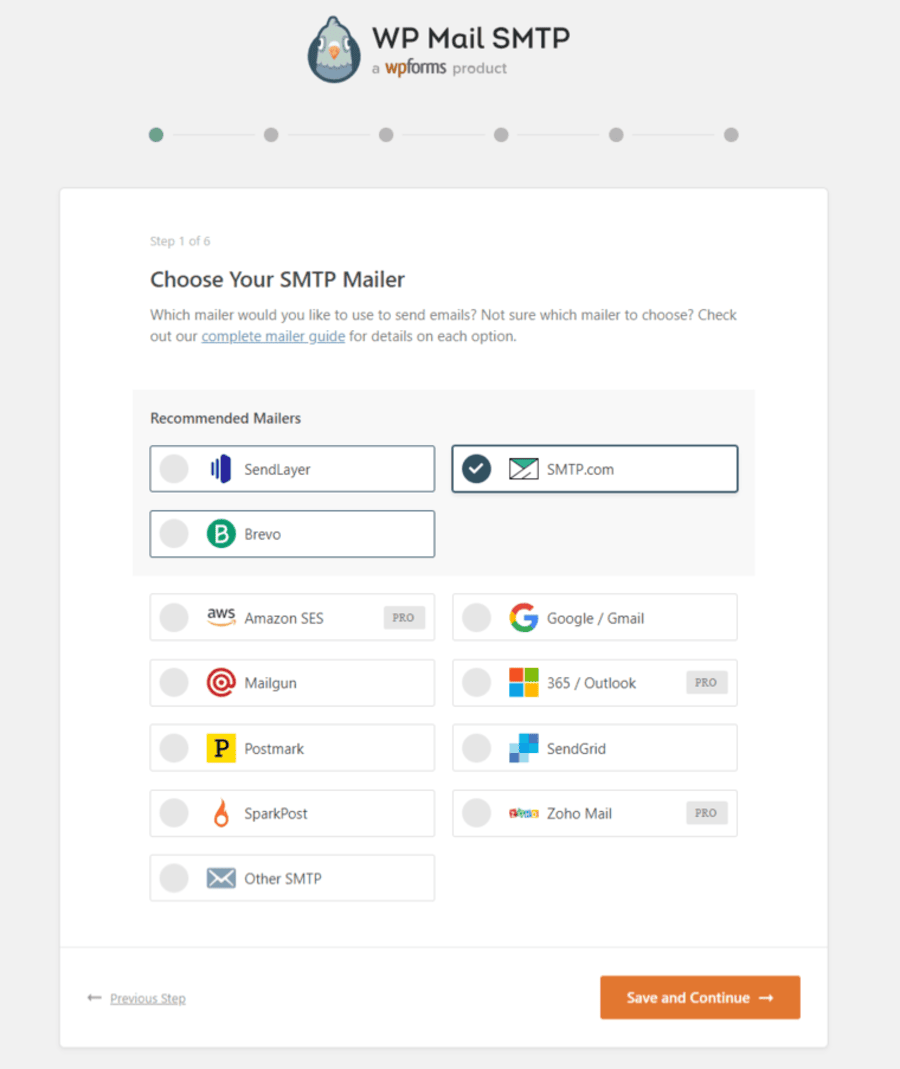
Connecting a dedicated sending service is essential for email deliverability because WordPress's default PHP mail function lacks proper authentication. Without SMTP, your newsletters are far more likely to land in spam folders.
For that, we recommend installing the WP Mail SMTP plugin, which supports SMTP providers such as Amazon SES, SendGrid, Postmark, and others.
The setup wizard walks you through the connection process, so you do not need any technical knowledge to complete this step.
Step 2: Build your subscriber list and add a signup form
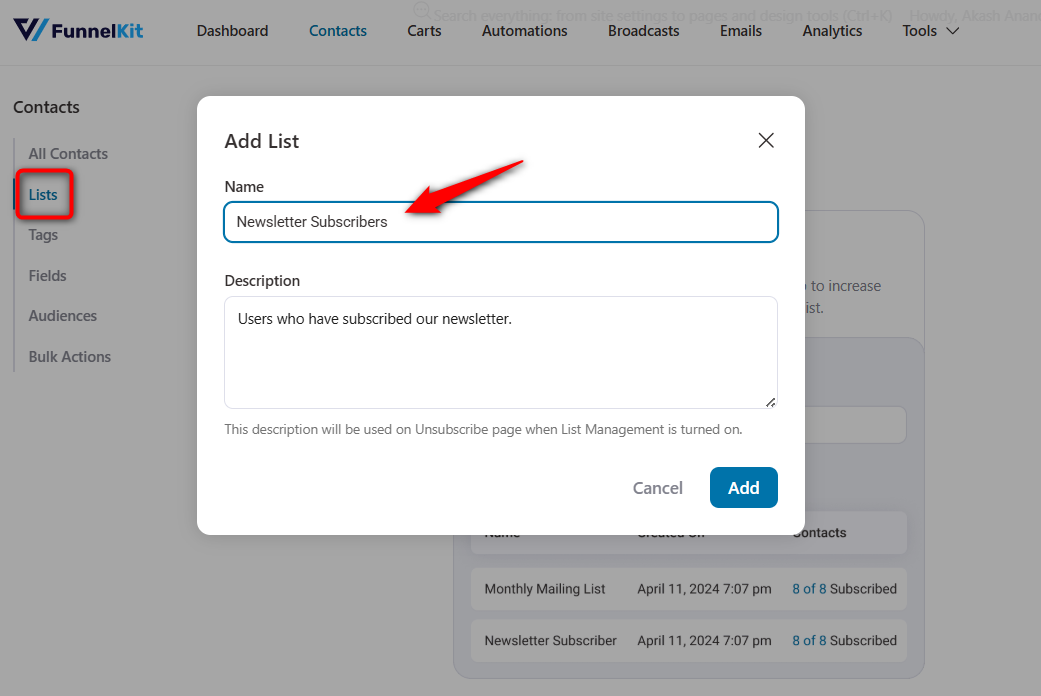
Go to the Contacts ⇨ Lists section in FunnelKit Automations and create your first mailing list. Give it a descriptive name, such as "Newsletter Subscribers" or "Store Updates".
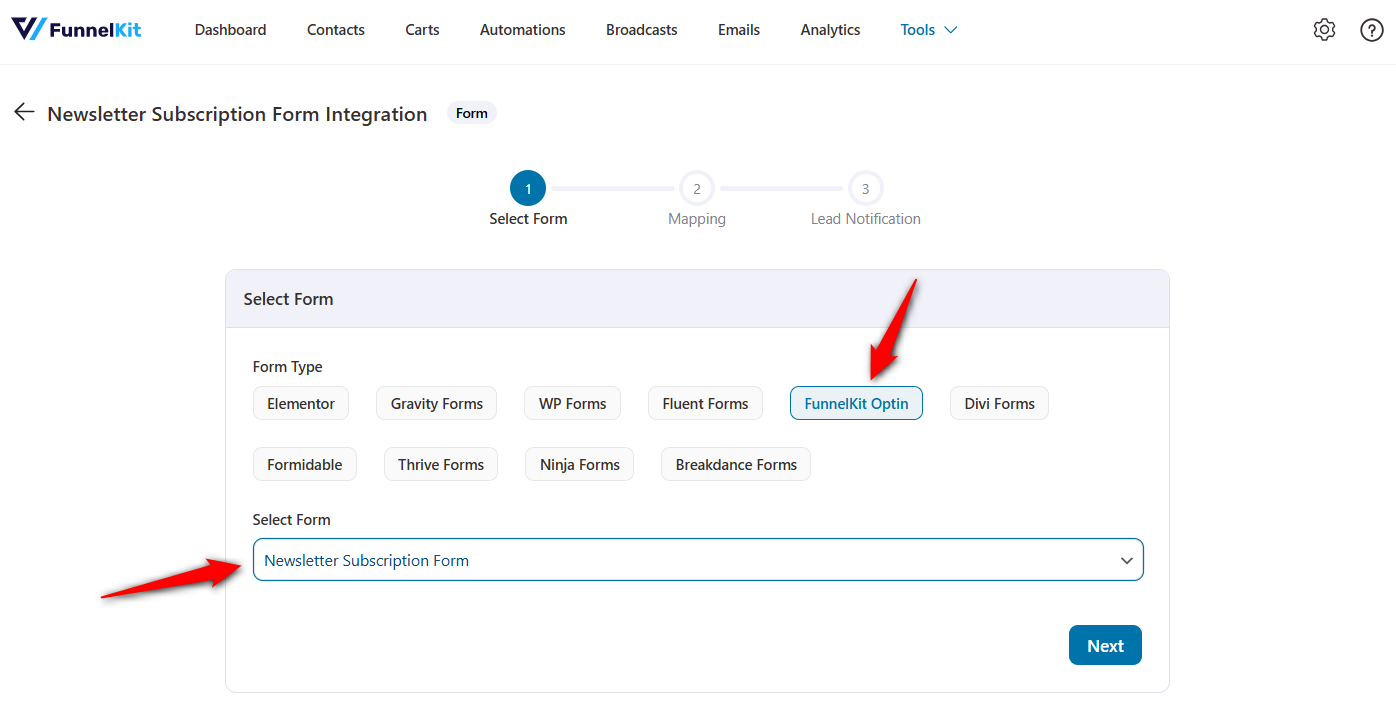
Next, create a signup form that you can embed on your site.
FunnelKit Automations lets you integrate with various opt-in forms, including Contact Form 7, Gravity Forms, FunnelKit Opt-in, and more.
You can also add a newsletter checkbox directly on the WooCommerce checkout page so that customers can subscribe while placing an order.
This is one of the fastest ways to grow your WooCommerce email list because buyers are already engaged during the purchase process.
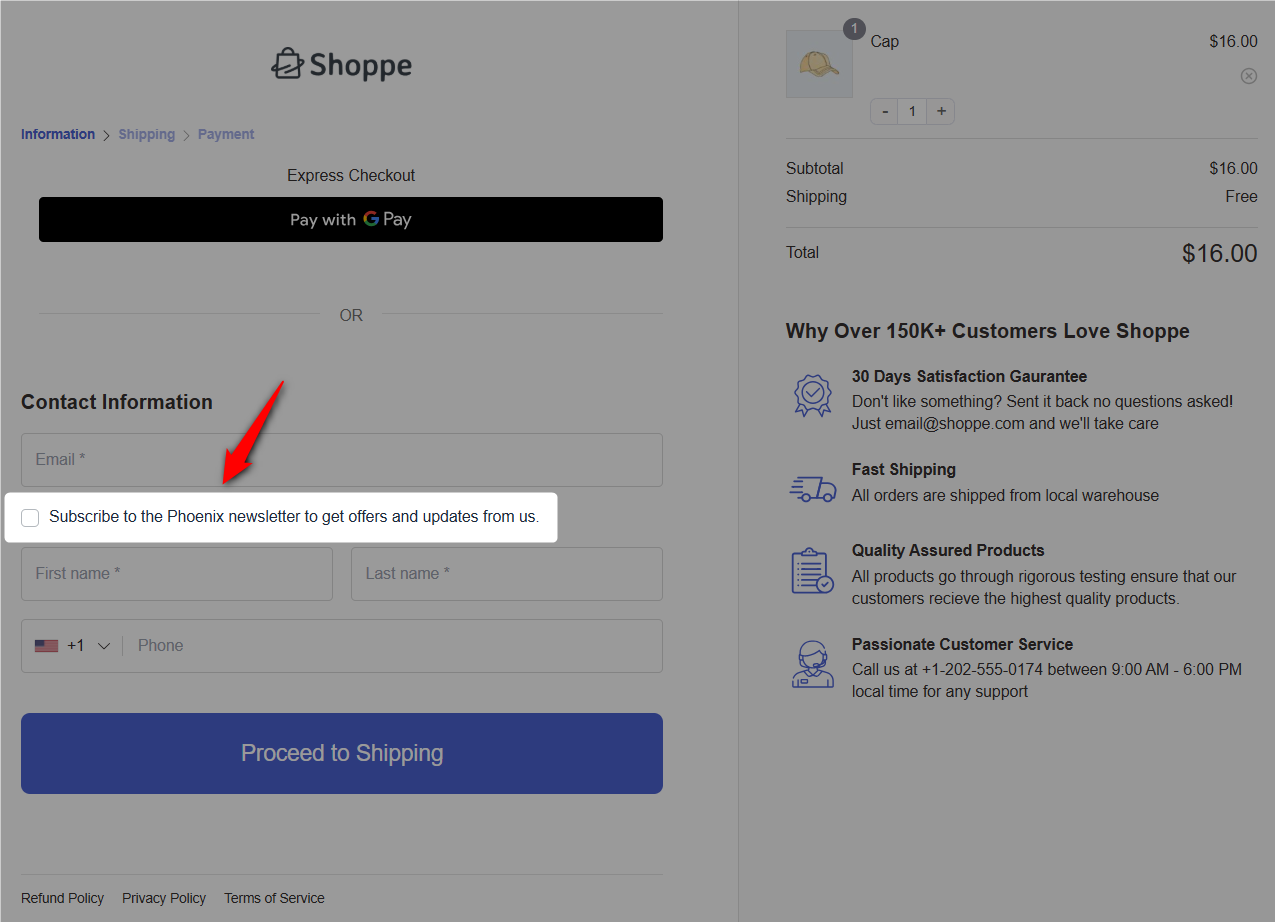
Make sure you use a clear consent checkbox and comply with GDPR requirements if you serve customers in the EU.
Step 3: Create your first newsletter campaign
Go to the Broadcasts section and click on the 'Create Email Broadcast' button.
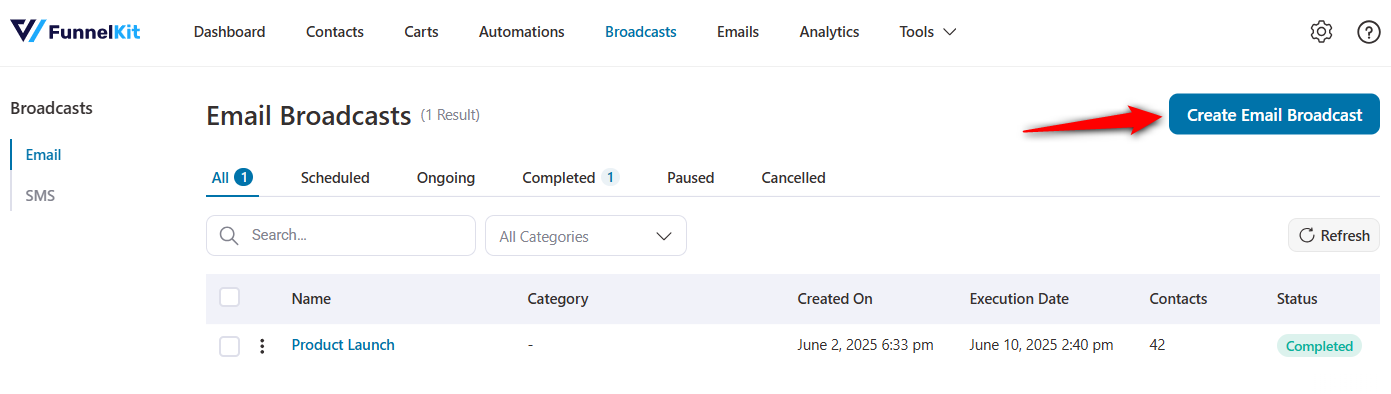
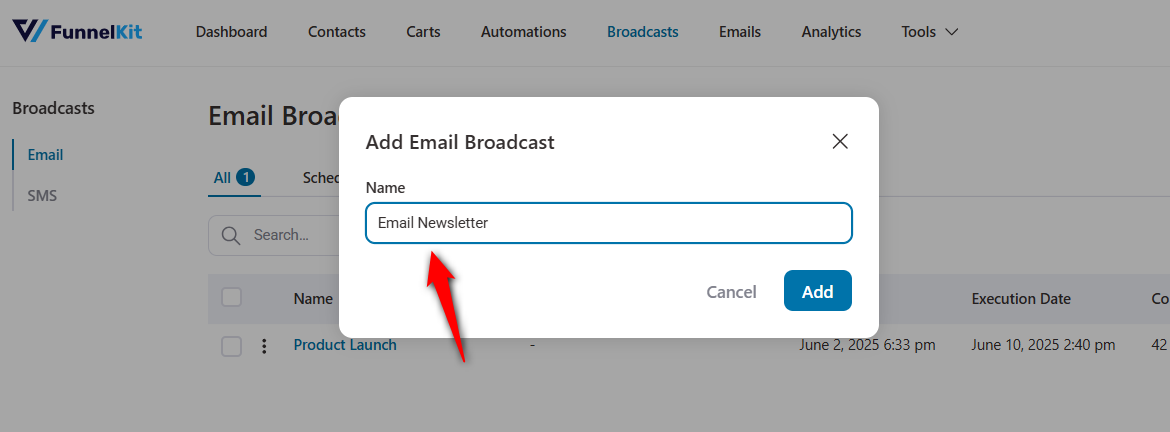
Enter the name of your WooCommerce email newsletter broadcast.
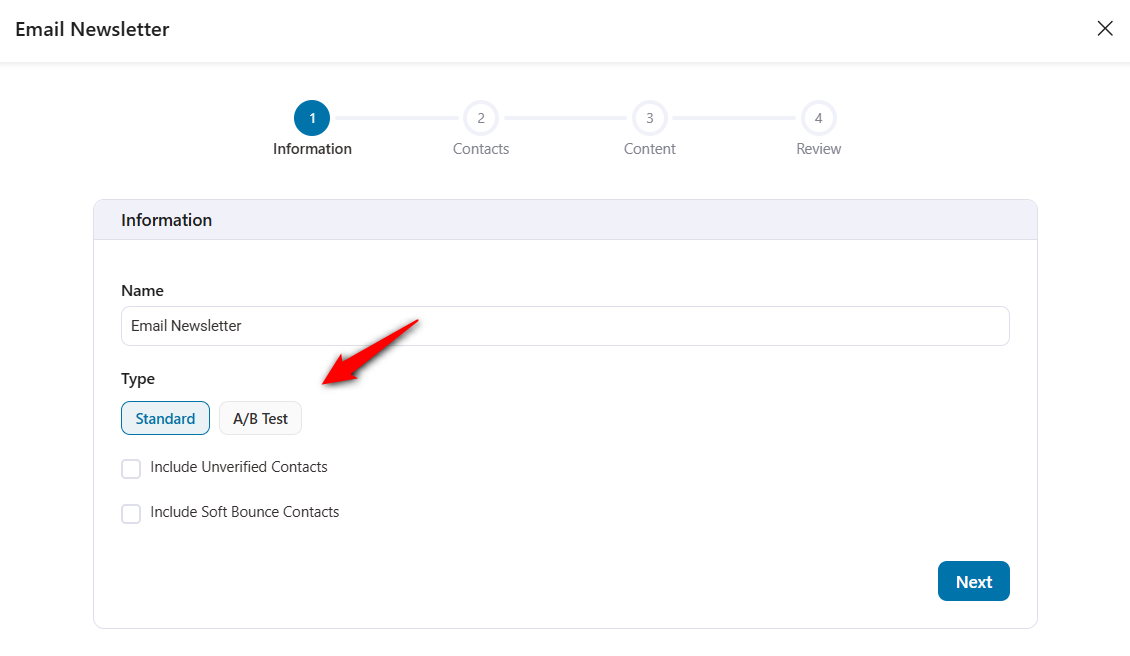
Choose the type of broadcast campaign you want to send:
- Standard: A single email sent to your entire list (or a specific segment) all at once
- A/B Test: Create two (or more) versions of the same email with different subject lines, preview text, send time, or email content.
You also have the option to include your unverified and soft-bounce contacts. To ensure GDPR compliance, do not enable these options.
Hit 'Next' when done.
Next, choose the audience segment you want to reach, such as your full newsletter list or a filtered group based on purchase history, tags, or engagement level.
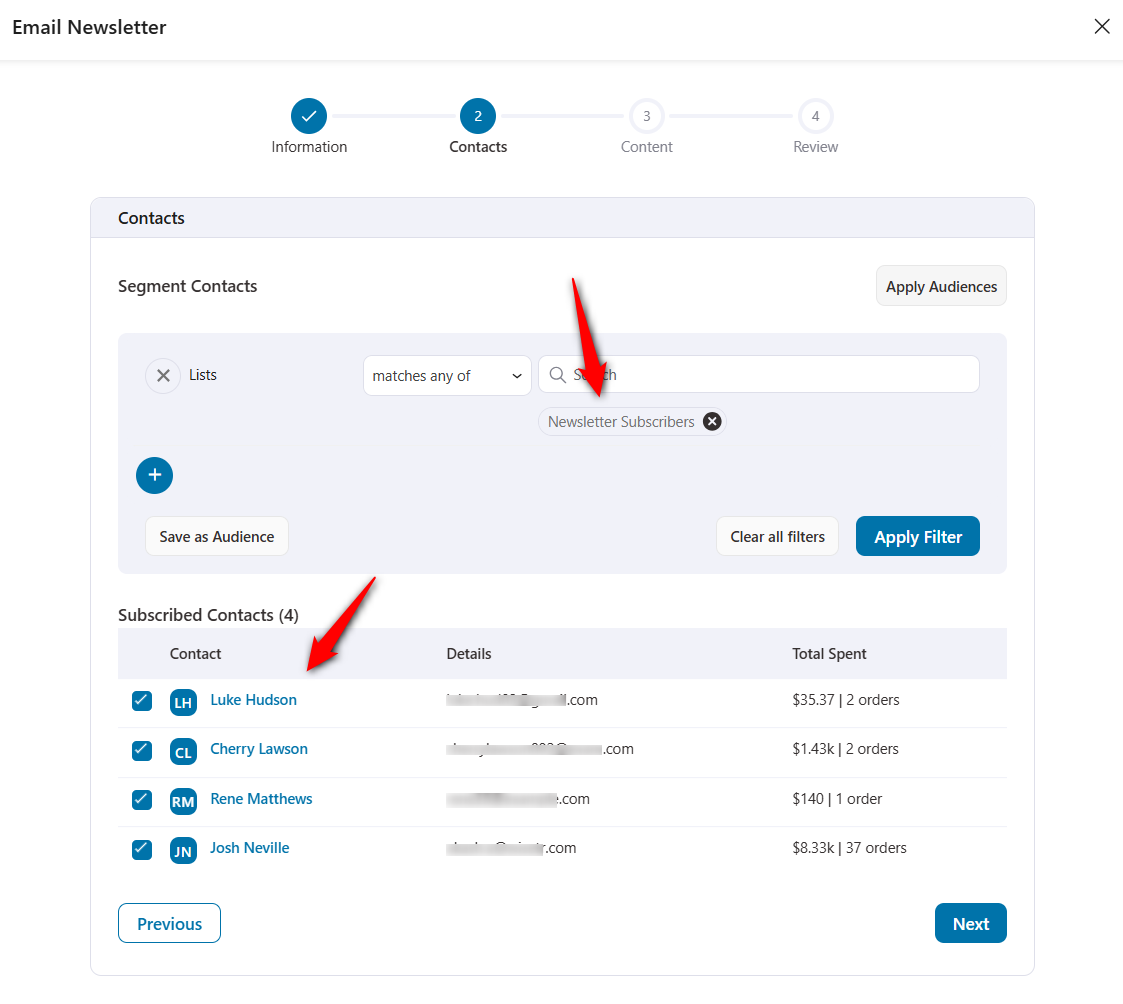
FunnelKit Automations lets you combine multiple smart filters using AND/OR logic to target very specific groups.
For example, you could send a campaign only to customers who bought a specific product category but have not purchased in the last 60 days, or target high-value customers with an average order value above a certain threshold.
Click on the 'Next' button once done.
Step 4: Design and personalize your email newsletter
Write a clear subject line and preview text.
Select 'Visual Builder' to use the drag-and-drop email builder to design your newsletter.
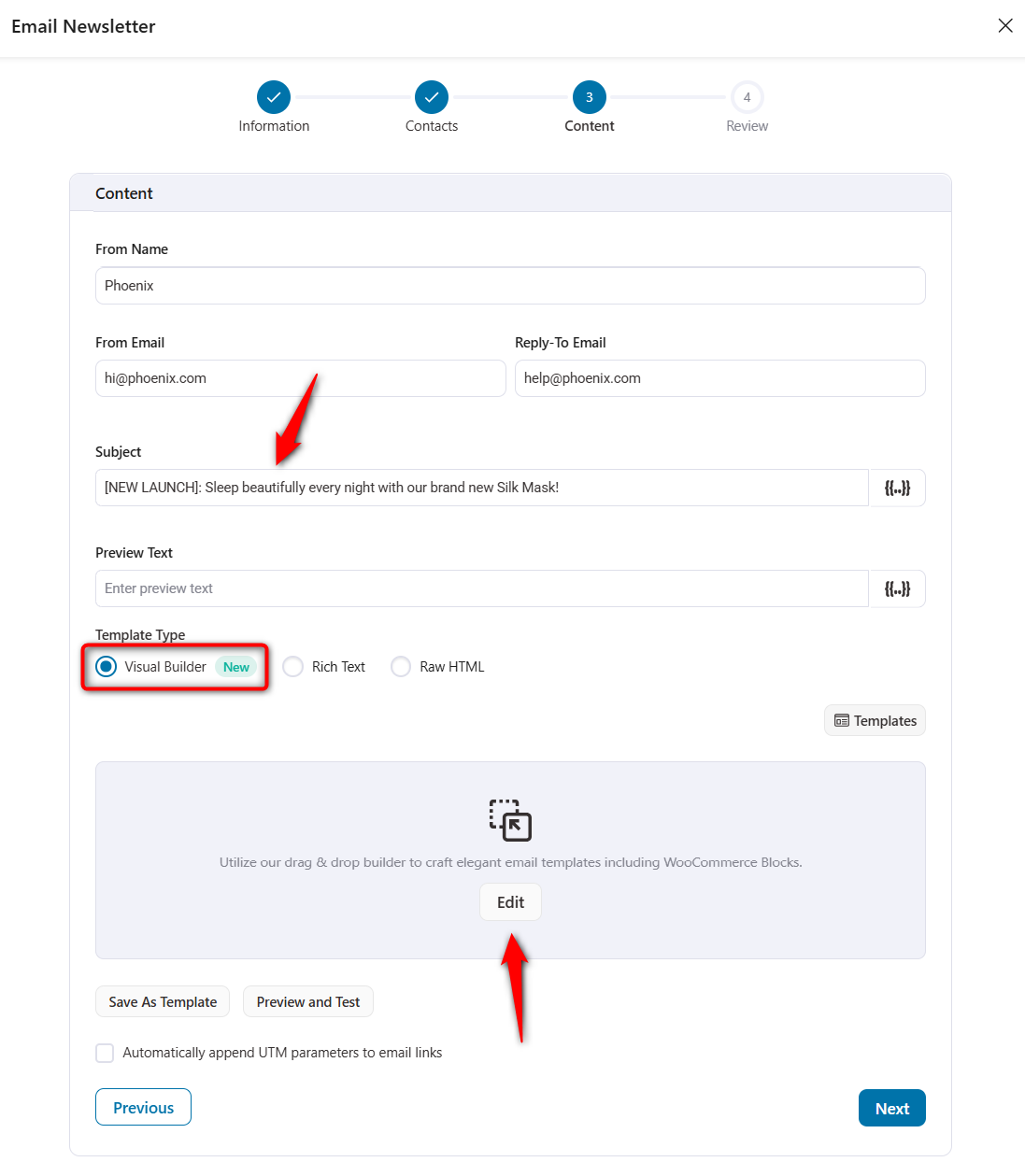
FunnelKit Automations provides pre-built content blocks for text, images, buttons, product listings, and social media links.
This lets you edit your business logo, edit headings/text, add products, menus, buttons, and more.
You can pull products directly from your WooCommerce catalog into your email using the product block, saving time when creating product-recommendation newsletters.
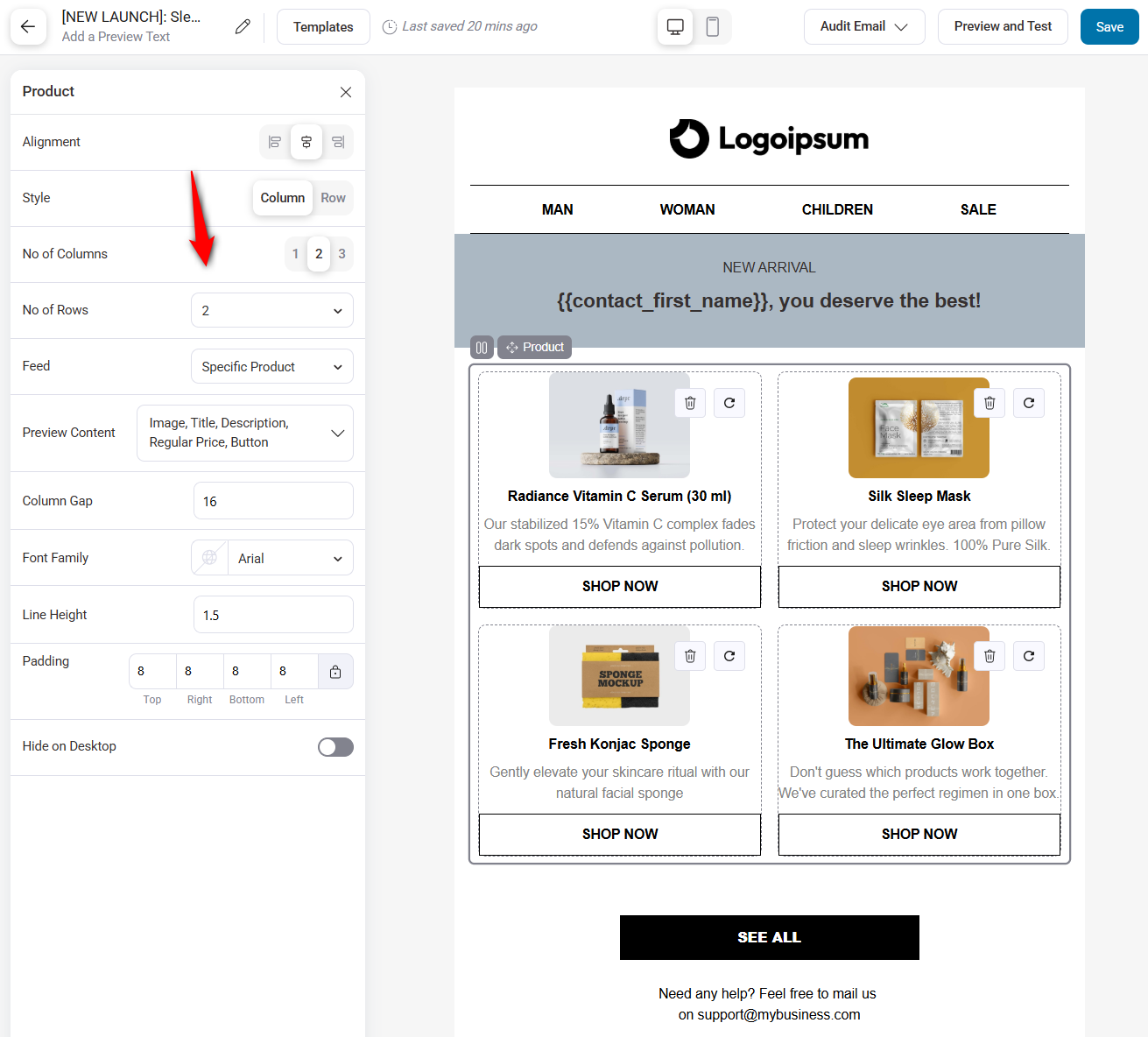
Personalize the email with dynamic merge tags like the subscriber's first name, last purchase, or cart contents.
Before sending, audit and test your emails to ensure they are perfect on all devices.
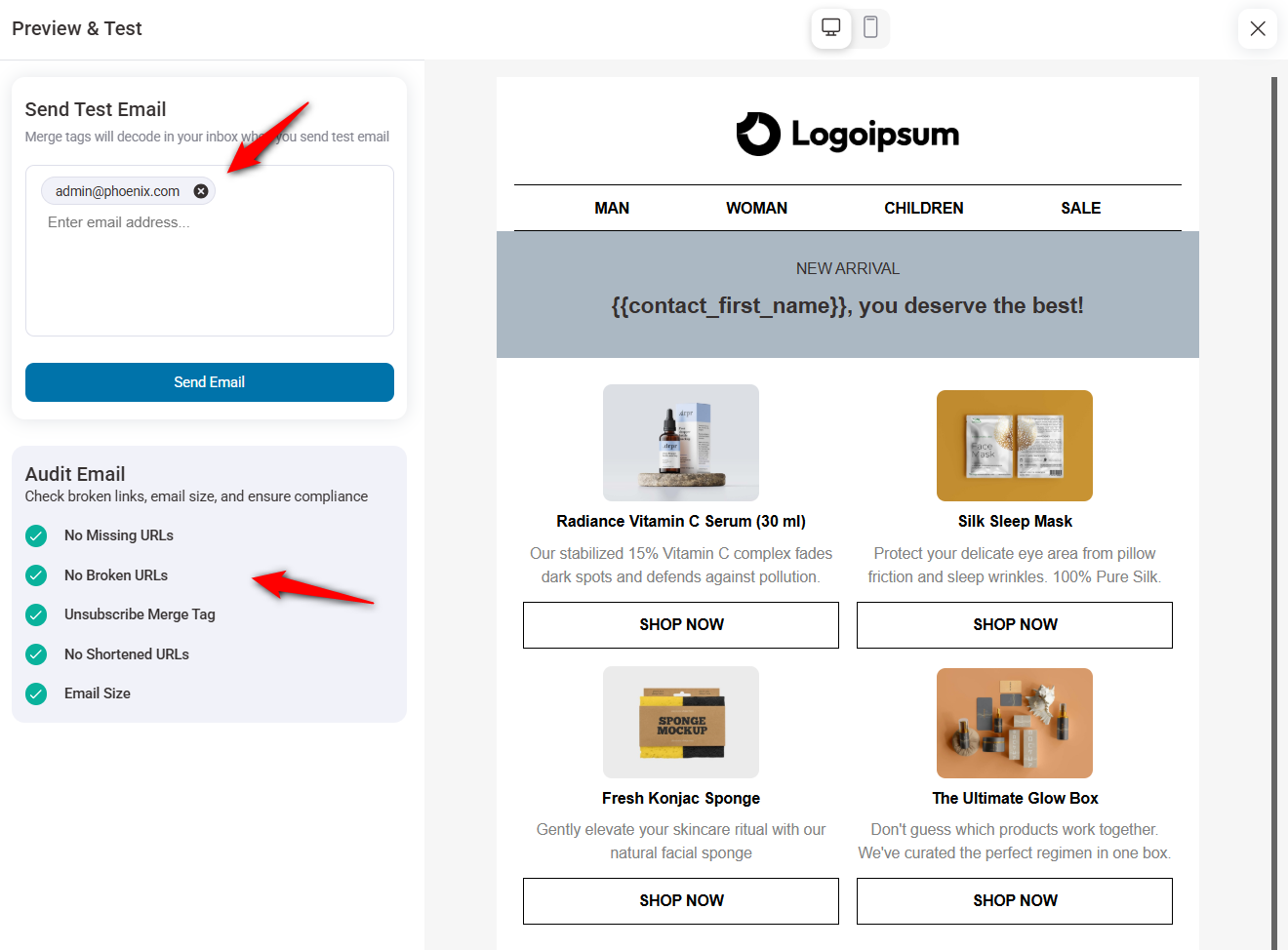
Step 5: Send, track and optimize your newsletter
Preview the final email and send a test message to yourself to check the design on desktop and mobile.
Once everything looks right, schedule the campaign or send it immediately.
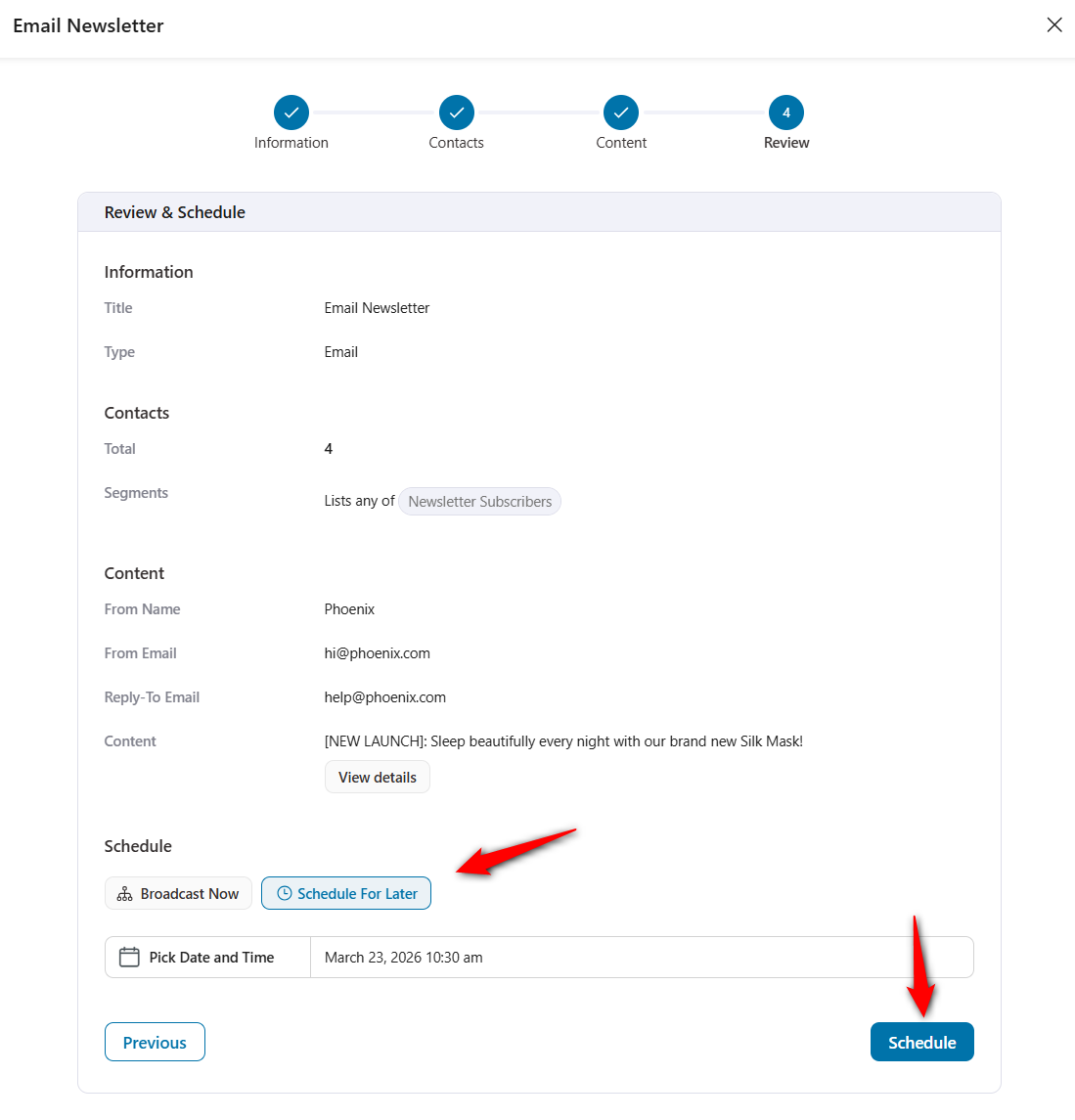
After sending, check the analytics dashboard to review open rates, click-through rates, and campaign-generated revenue.
FunnelKit tracks revenue attribution so you can see exactly how much each newsletter earns in actual WooCommerce orders. Use this data to refine your next campaign.
Track which product links got the most clicks, which subject lines earned the best open rates, and which customer segments generated the most revenue.
Test on both desktop and mobile devices to make sure images render correctly and buttons are easy to tap on smaller screens.
What Content to Include in Your WooCommerce Newsletter
Most WooCommerce newsletters fail because they function like a digital catalog and nobody wants that.
In our years of analyzing marketing automations at FunnelKit, the stores with the highest consistent open rates treat their broadcast list like a private VIP club rather than a cheap digital billboard for their entire inventory.
Every single send needs a specific, undeniable purpose.
- New product announcements
Do not post your new arrivals on Instagram first. Give your email subscribers 24-hour early access before anyone else sees the product.
This trains your audience to actually open your broadcasts because they know the stock might sell out before the general public even gets a link.
Include one large product image, a two-sentence story about why you built it, and a direct checkout link.
- Exclusive discount codes and flash sales
Discounts work but generic 10% off coupons train buyers to wait for the next email.
Instead, run hyper-specific, 48-hour flash sales for your subscribers on a single product category. This strategy drives immediate revenue without destroying your baseline pricing model.
- Product guides and how-to content
Education converts better than pitching. Sell skincare? Send a morning routine guide showing exactly how much of the serum to apply. Sell fitness gear? Distribute a 15-minute kettlebell workout.
You are answering the exact questions your customers have right after they unbox the item. This builds trust and positions your store as an authority.
- Customer reviews and social proof
Feature actual customer testimonials, product ratings and user-generated photos.
Undecided shoppers ignore polished brand assets but will immediately trust a blurry smartphone photo from a real customer who solved the exact problem they are facing.
- Back-in-stock and low-stock alerts
Notify subscribers when popular items are back in stock or running low. These scarcity-based emails create urgency and drive fast conversions.
- Seasonal and holiday content
Plan campaigns around holidays, seasonal shifts, and shopping events such as Black Friday, Valentine's Day, and back-to-school season.
Match the product recommendations perfectly to the calendar date to justify the pitch.
- Store news and behind-the-scenes updates
Share your brand story, introduce team members, or give a behind-the-scenes look at new product development. This humanizes your brand and strengthens the emotional connection with your audience.
When designing your newsletter, keep the actual layout brutally simple. Use a single-column design. Large text. One undeniable call to action.
Most WooCommerce newsletter plugins, such as FunnelKit Automations, include mobile-responsive templates right out of the box. You will quickly find that the highest-converting promotional emails often look exactly like plain text messages sent directly from a friend.
Best Newsletter Plugins for WooCommerce and WordPress
Here's a quick look at the most popular options for sending newsletters from your WooCommerce store.
| Plugin | Best For | Key Feature | Starting Price |
|---|---|---|---|
| FunnelKit Automations | All-in-one newsletter solution | WooCommerce stores wanting a full CRM and marketing automation suite inside WordPress | Free version available Pro starts at $99.50/year |
| WPForms | Newsletter subscription forms | Drag-and-drop form builder with built-in integrations for Mailchimp, Constant Contact, AWeber, etc. | Free plan. Premium version starts at $49.50/year |
| Jetpack CRM | Turn blog posts into Newsletters | Built-in CRM with customer tracking, transaction logging, and the ability to send newsletters directly from WordPress | Free version available. Premium starts at $11/month billed yearly |
| Newsletter | Newsletter creation & list Management | Visual email composer with drag-and-drop editor, subscriber segmentation and WooCommerce product blocks | Free plan available. Pro starts at $69/year |
| Email Subscribers & Newsletters | Newsletter and post update notification | Auto-sends new blog posts and product updates to subscribers, with built-in list management and basic analytics | Free version. Premium starts at $129.00/year |
For store owners who want a free starting point, FunnelKit Automations, MailPoet and The Newsletter Plugin are solid choices with generous free tiers.
MailerLite offers a polished free plan with modern design tools.
Brevo and Omnisend are strong choices if you need multichannel capabilities beyond email.

7 Best Practices to Get More Sales From Your WooCommerce Newsletter
Here are some effective best practices to follow when sending your WooCommerce newsletter to your audience.
1. Ensure a consistent frequency
Consistency stabilizes your sender reputation. If you send randomly, ISPs notice.
GetResponse data shows weekly sends hit a 48.31% open rate, compared to just 43.2% if you push it to twice a week.
Train your buyers to look for your name in their inbox every Tuesday morning.
2. Segment your list before every send
Segment ruthlessly before you hit send. Group your buyers by past purchases or engagement. Did they buy a coffee grinder last month? Send them beans, not another grinder.
Targeted campaigns always beat generic email or SMS blasts.
3. Write clear, curiosity-driven subject lines
Your subject line determines whether the email gets opened. Keep it under 50 characters, use the subscriber's name where possible, and lead with a benefit or question.
Avoid all-caps, excessive punctuation, or misleading claims that trigger spam filters.
4. Set up at least one automated email sequence
Manual broadcasts are great. Automations are better. Every WooCommerce store needs three basic flows:
- A welcome series
- Abandoned cart recovery
- Post-purchase follow-up.
Why? Because they trigger at the exact moment of highest intent.
5. Include a single, focused call to action
Every newsletter should have one primary goal. Want users to read a post, buy a product, or use a discount? Pick one.
Multiple competing CTAs destroy your click-through rate. If you must feature several products, make sure each has a distinct, impossible-to-miss button.
6. Track revenue per campaign, not just opens
Open rates tell you who looked. Revenue attribution tells you what that look was actually worth.
Use your WooCommerce newsletter plugin's analytics to link each campaign to actual orders, so you can identify which content, offers, and segments drive the most sales.
FunnelKit Automations tracks this direct revenue attribution natively for every single broadcast.
7. Optimize every email for mobile devices
HubSpot reports that over 41% of emails are opened on phones. If your multi-column layout breaks on an iPhone, they won't squint to read it. They will delete it.
Make sure your product images resize properly on smaller screens. Always send a test email and preview it on a phone before broadcasting.
Frequently Asked Questions about WooCommerce Newsletter
To ensure your WooCommerce newsletters reach users' inboxes, follow these steps.
- Route your infrastructure through a dedicated SMTP service. Amazon SES, SendGrid, Postmark, or Mailgun.
- Set up SPF, DKIM, and DMARC records to verify that your domain is authorized to send email. SPF lists your approved sending servers. DKIM signs the emails cryptographically. DMARC tells Google exactly what to do if an email fails the first two checks. Google and Yahoo now strictly enforce these records if you send over 5,000 emails a day. Set them up regardless of your list size.
- Pick one "From" name and stick to it. Constantly swapping sender addresses makes you look like a spammer to the algorithms.
- Sending to bounced or permanently unengaged addresses actively destroys your sender reputation. It's important to clean your email list.
- Include an unsubscribe link in every email, as required by GDPR, to help maintain a healthy sender reputation.
WooCommerce handles transactional emails, such as order confirmations and shipping updates, out of the box. However, it does not include any tools for creating or sending marketing newsletters.
You need a dedicated email marketing or newsletter plugin to build and manage subscriber lists, design campaigns, segment audiences, and track performance.
You can place your newsletter signup forms in WooCommerce:
- A subscription checkbox alongside your billing fields on the checkout page
- Homepage or site-wide pop-up when a visitor is about to leave
- A blog post sidebar or an inline form will capture visitors who are engaged with your content
- Account registration page when customers create their accounts
- Product pages with a "Get notified about deals" or "Be the first to know" form
- Footer across all pages with a simple email field to give every visitor a chance to subscribe
This text typically comes from a newsletter plugin that adds a signup checkbox or form to your checkout or footer. To remove it, go to the plugin's settings and disable the checkout consent integration or form placement. If the text is hard-coded by your theme, check your theme's WooCommerce customization options or use a child theme to override the template.
Yes. Most major email marketing platforms offer a WooCommerce integration plugin or API connection. Popular options that support WooCommerce include Mailchimp, Brevo, Omnisend, MailerLite, Klaviyo, ActiveCampaign, ConvertKit, and Drip.
These sync your customer data, purchase history, and subscriber lists between WooCommerce and the external platform. WordPress-native tools like FunnelKit Automations eliminate this step entirely because they run inside your WordPress installation.
Start Sending WooCommerce Newsletters That Drive Revenue!
An email newsletter is one of the most effective tools in your WooCommerce marketing arsenal. It puts you in direct contact with people who’ve already expressed interest in your products.
The setup doesn’t have to be overwhelming. You need a plugin that fits your needs, an authenticated SMTP connection, a way to build your list through smart opt-in placements, design templates that match your brand, and the ability to start sending consistent, value-driven content.
Place one primary call to action in every email. Track your results and let data guide your optimization. Clean your list regularly to maintain deliverability.
Whether you run a native engine inside WordPress like FunnelKit Automations to keep data costs at zero, or string together external SaaS tools like Klaviyo and Mailchimp, the underlying math remains identical.
An engaged subscriber list prints money on demand. A neglected one rots.
Editorial Team
April 6, 2026Almost every store owner needs to export WooCOmmerce orders sooner or later. Maybe you need to send order data to your accountant, move records to a new site, or pull...
Editorial Team
April 6, 2026Want to turn one-time buyers into customers who keep coming back using WooCommerce? Then you need to find a WooCommerce subscription plugin. These plugins will help you automate billing, manage...
Editorial Team
March 30, 2026Discover how to boost sales and customer loyalty with three smart ways to offer free gifts in your WooCommerce store. Want to boost WooCommerce sales and delight your customers? Offer...






