


![18 Proven Strategies to Increase WooCommerce Sales in 2026 [Actionable Tips]](https://funnelkit.com/wp-content/uploads/2026/01/Proven-Strategies-to-Increase-WooCommerce-Sales.jpg)
You’ve built your WooCommerce store, polished your product pages, and invested in marketing, but sales aren’t coming.
Visitors browse, some add items to their cart, and most vanish before completing a purchase. Frustrating, right?
You’re not alone. In 2025, the global cart abandonment rate hit 75.38% (Baymard Institute), with eCommerce stores averaging 70–75%.
That means for every 100 visitors showing buying intent, about 70 leave without purchasing.
The good news is that recovering just 10–20% of abandoned carts, optimizing checkout flows, improving mobile UX, and using strategies like cross-sells, discounts, reviews, SEO, paid ads, and live chat can drastically boost conversions.
In this guide, you will discover 18 actionable strategies to increase WooCommerce sales in 2026, following the buyer journey to convert casual browsers into loyal customers.
WooCommerce Performance Benchmarks: Setting Realistic Goals
To set effective goals for your WooCommerce store, understand your performance compared to industry standards. Benchmarks for metrics like conversion rates, average order value, and device-specific performance help optimize and grow your store.
Below are some WooCommerce-specific benchmarks to evaluate your store’s performance and identify areas for improvement.
| Metric | Benchmark |
|---|---|
| Conversion Rates by Store Maturity | |
| New/WP WooCommerce stores | ~0.5–1% |
| Growing WooCommerce stores | ~1–2% |
| Established WooCommerce stores | ~2–4%+ |
| General ecommerce norm | ~2.5–3.6% |
| Average WooCommerce Order/Transaction Value | |
| Average WooCommerce transaction value | ~$79 |
| Device‑Based Conversion Differences | |
| Desktop conversion (ecommerce) | ~3–4% |
| Mobile conversion (ecommerce) | ~1.5–2.5% |
| Performance & Technical Impact on Conversions | |
| Fast load (under ~2s) | ~2× better conversion |
| Every extra 1s load time | −7–14% conversion |
| Shared vs Managed Hosting | 2–5× faster load times on managed |
Sources for the references above:
- Insights from Convesio’s WooCommerce Conversion Rate Benchmarks
- Performance studies from SaleCycle’s E-Commerce Report
- WooCommerce ecosystem insights from Marketing LTB
Table of Contents
- 1 Quick Overview of 18 Proven WooCommerce Sales Tactics
- 2 18 Proven Strategies to Increase WooCommerce Sales in 2026
- 2.1 Strategy 1: Optimizing Your Checkout for Maximum Conversion
- 2.2 Strategy 2: Implementing Strategic Cart Recovery Campaigns
- 2.3 Strategy 3: Prioritize UX with a Mobile-Friendly Design
- 2.4 Strategy 4: Craft Compelling Product Pages
- 2.5 Strategy 5: Reducing Friction Slide Cart & In-Cart Recommendations
- 2.6 Strategy 6: Offer Related Products as Pre- and Post-Checkout Cross-Sells and Upsells
- 2.7 Strategy 7: Offer Discounts and Free Shipping to Increase Conversions
- 2.8 Strategy 8: Get Better WooCommerce Hosting
- 2.9 Strategy 9: Actively Seeking and Leveraging Customer Reviews
- 2.10 Strategy 10: Running Data-Driven Paid Ads
- 2.11 Strategy 11: Setting Up Google Analytics with Proper E-commerce Tracking
- 2.12 Strategy 12: Auditing and Optimizing Your Buyer Flow
- 2.13 Strategy 13: Winning Back Lost Customers
- 2.14 Strategy 14: Content Marketing for Organic Sales
- 2.15 Strategy 15: Set Up WooCommerce SEO for Local Search Results
- 2.16 Strategy 16: Use Social Persuasion to Increase Sales
- 2.17 Strategy 17: Implement Live Chat for Immediate Engagement
- 2.18 Strategy 18: Optimize Your WooCommerce Store for International Sales
- 3 Frequently Asked Questions About Increasing WooCommerce Sales
- 4 What's a good conversion rate for a WooCommerce store?
- 5 How quickly can I expect to see results from these strategies?
- 6 Do I need technical skills to implement these strategies?
- 7 What is the most important strategy to start with?
- 8 How do I know which strategies are working?
- 9 Ready to Convert More Traffic Into Sales?
Quick Overview of 18 Proven WooCommerce Sales Tactics
| # | Strategy | Benefit | Quick Tip |
|---|---|---|---|
| 1 | Optimize Checkout | Reduce friction at checkout | Enable guest checkout, multi-step forms, and show costs upfront |
| 2 | Strategic Abandoned Cart Recovery | Recover lost revenue | Use a 3-email sequence, offer small incentives |
| 3 | Mobile-Friendly UX | Improve conversions on mobile | Simplify navigation, large buttons, fast load |
| 4 | Compelling Product Pages | Increase buyer confidence | Use high-quality images, benefit-focused descriptions |
| 5 | Slide Cart & In-Cart Recommendations | Reduce drop-offs | Show cart without leaving the page, suggest related items |
| 6 | Cross-Sells & Upsells | Increase average order value | Use order bumps & post-purchase upsells |
| 7 | Offer Discounts & Free Shipping | Encourage purchase | Milestone-based discounts, limited-time offers |
| 8 | Better WooCommerce Hosting | Speed & reliability | SSD storage, CDN, uptime monitoring |
| 9 | Customer Reviews | Build trust | Automate review collection, display strategically |
| 10 | Run Paid Ads | Drive targeted traffic | Facebook & Google campaigns with tracking |
| 11 | Google Analytics Setup | Data-driven decisions | Enhanced e-commerce tracking, funnel visualization |
| 12 | Buyer Flow Optimization | Reduce friction & increase conversions | Test checkout, add express checkout, progress indicators etc. |
| 13 | Win-Back Campaigns | Retain customers | Segmented emails with targeted incentives |
| 14 | Content Marketing | Organic traffic & conversions | SEO-friendly guides, how-tos, buyer-centric posts |
| 15 | Local SEO | Capture high-intent local buyers | Optimize Google Business Profile & location-based keywords |
| 16 | Social Persuasion | Build trust & boost conversions | Reviews, testimonials, social media mentions |
| 17 | Live Chat | Immediate customer engagement | Answer queries instantly, behavior-triggered chat |
| 18 | Optimize for International Sales | Expand globally and increase revenue | Use multi-currency, tax automation, regional shipping, and localization tools |
18 Proven Strategies to Increase WooCommerce Sales in 2026
Here is a list of 18 proven strategies that cover every step of the buyer journey, from checkout and cart recovery to product pages, mobile UX, and marketing.
Implementing them will help you capture more sales and grow your WooCommerce store in 2026.
Strategy 1: Optimizing Your Checkout for Maximum Conversion
Your checkout process is where friction kills sales. 19% of shoppers abandon carts due to forced registration, while 18% leave because of complicated checkouts (Source: Baymard Institute).
- Guest Checkout: Let customers check out as guests, prompting registration after purchase to reduce abandonment.
- Multi-Step Checkout: Break long forms into steps with progress indicators for faster checkout.
- Display Costs Upfront: Show shipping, taxes, and free-shipping thresholds early to prevent surprise fees and abandonment.
- A/B Testing: Test one change at a time (e.g., layout, button copy) and optimize based on purchases.
- Mobile Optimization: Design a mobile-friendly checkout with large buttons and autofill to minimize typing and drop-offs.
- Multiple Payment Options: Offer credit cards, PayPal, Apple Pay, and Google Pay to reduce payment friction.
- Technical Performance: Speed up checkout to improve conversions by 7% with fewer scripts and optimized performance.
Implementation Tools:
You can enable guest checkout using WooCommerce settings.
For the rest, you can blindly rely on FunnelKit Funnel Builder, like more than 40,000 WooCommerce stores are already doing.
With this, you can create a multi-step checkout in a few steps.
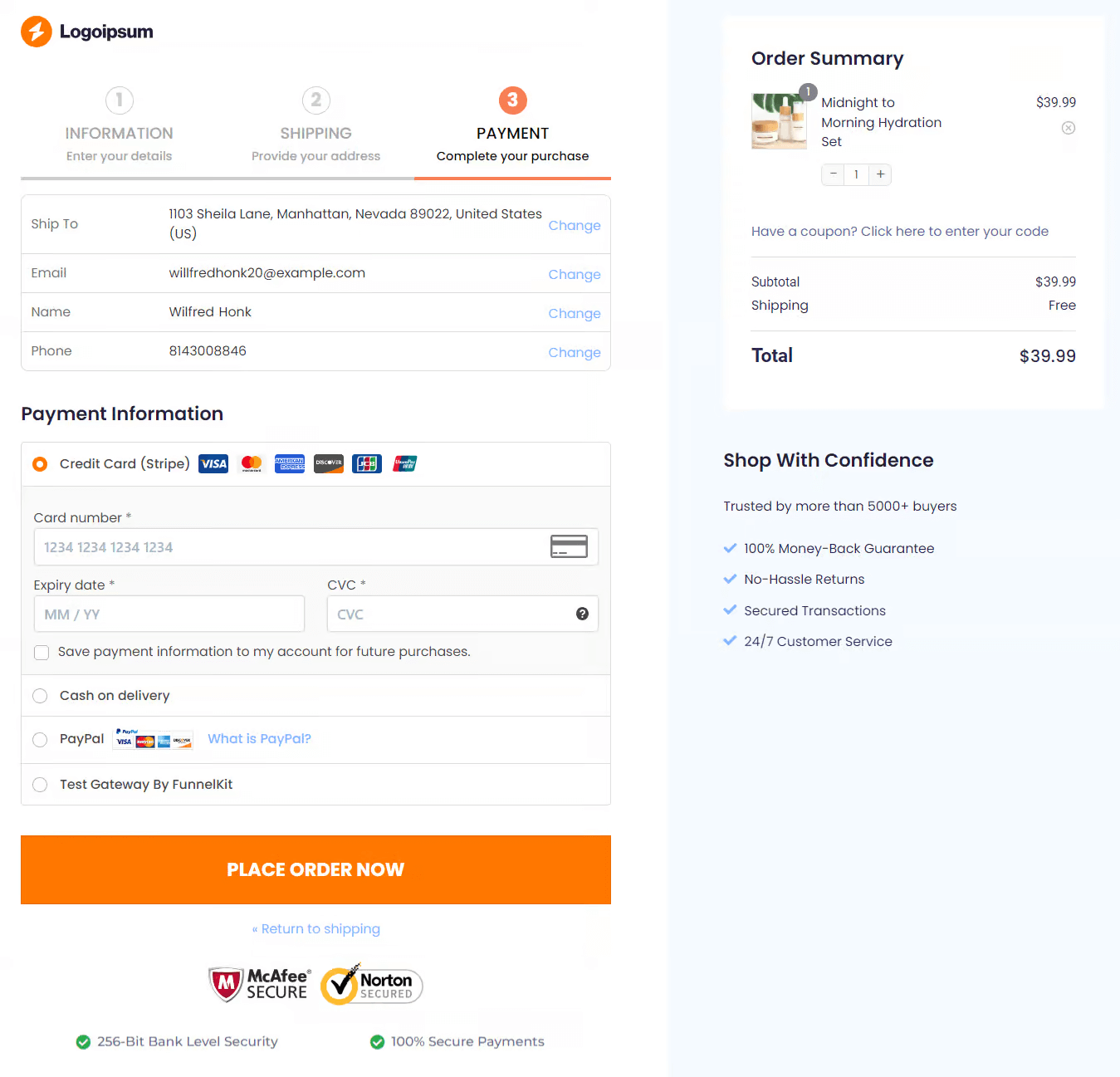
You can also create a single-step checkout with minimal fields by removing the unnecessary steps.
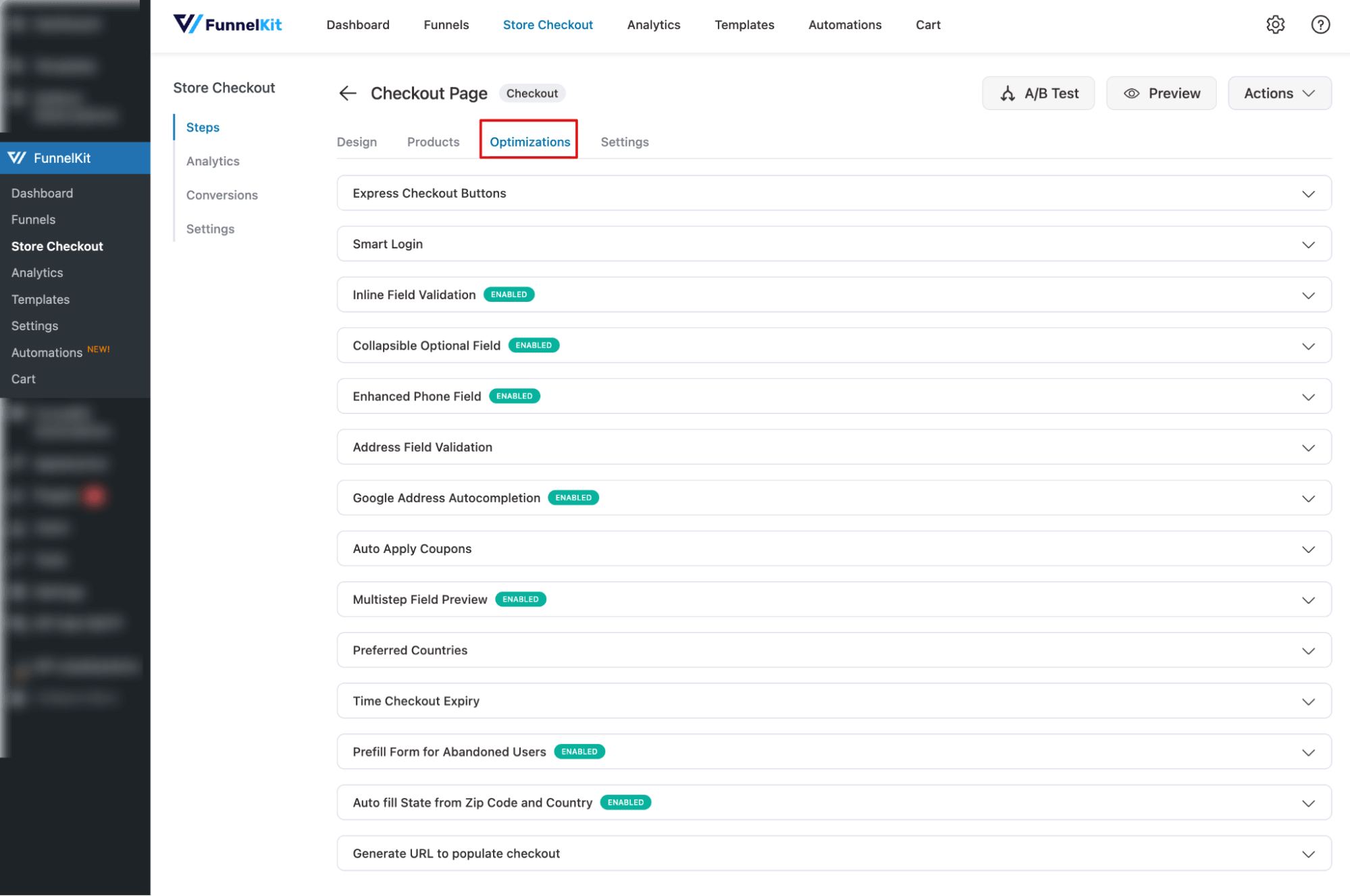
Plus, you get 8+ checkout optimization options, including Express Checkout Buttons, Smart Login, Address Field Validation, Google Address Autocompletion, Auto Apply Coupons, etc.
Strategy 2: Implementing Strategic Cart Recovery Campaigns
Cart abandonment represents a huge revenue opportunity. With £2.96 trillion in abandoned merchandise annually and £192.4 billion recoverable globally (Source: Kanuka Digital), the potential for recovery is staggering.
You can use a three-email recovery sequence. The timing of your recovery emails is crucial. Sending the first email within 1 hour of abandonment can boost recovery rates by up to 20% compared to emails sent 24 hours later.
Here’s the sequence that works:
- Email 1 (1 hour after abandonment): A simple reminder with cart contents. Use a subject like "You left something behind" with clear product images and a direct checkout link.
- Email 2 (24 hours later): Add social proof, like customer reviews, or show how many people have bought the product recently.
- Email 3 (48-72 hours later): Offer a small incentive (e.g., 10% off or free shipping) to push hesitant buyers to complete their purchase.
Implementation Tool:
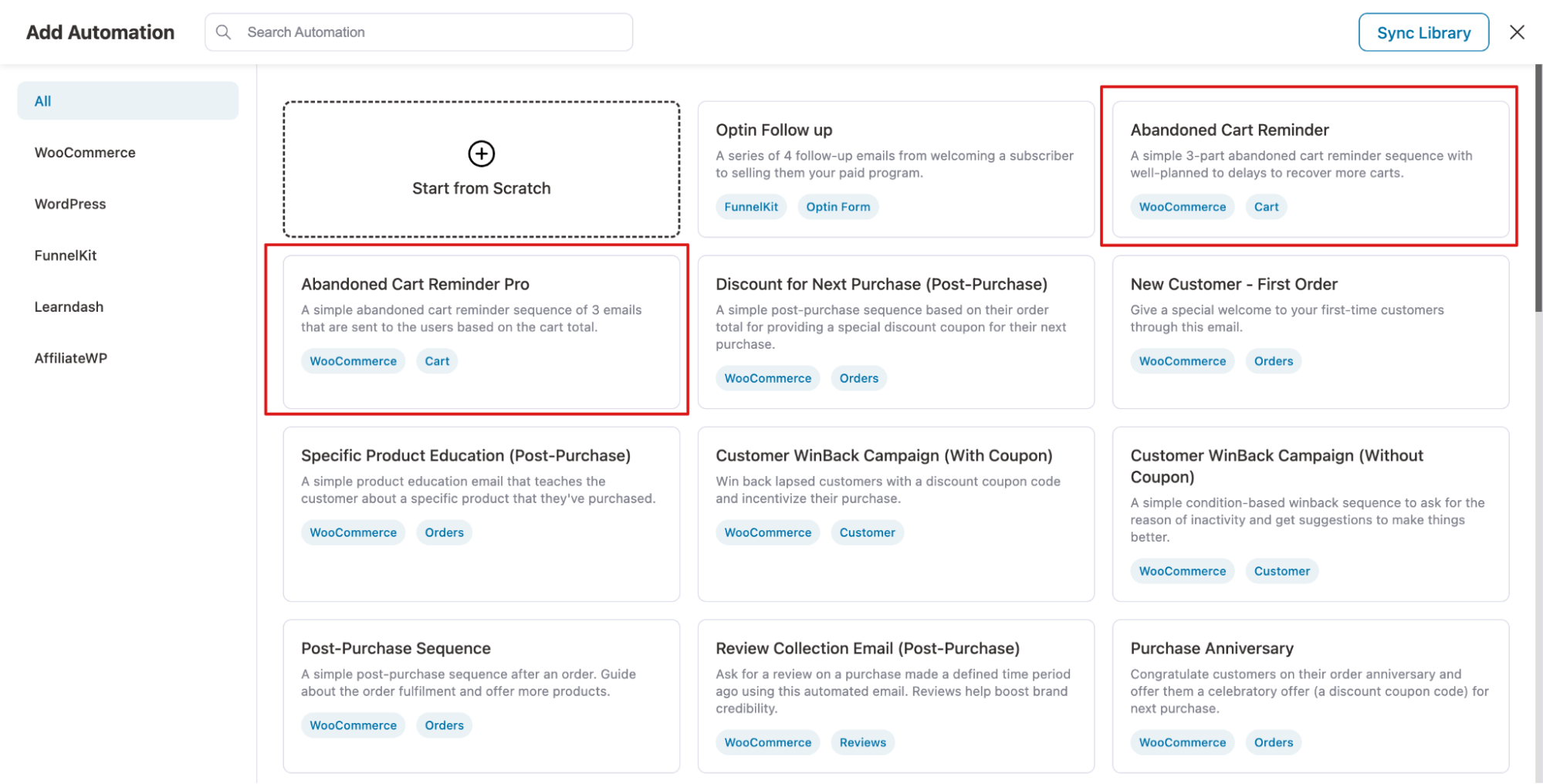
Use FunnelKit Automations to set up automated campaigns that target customers who abandoned their cart with timely email and SMS sequences. You can also add dynamic discount coupons based on cart total, user purchase history, and more
It includes a visual builder for creating automation. Plus two prebuilt automations for abandoned cart recovery.
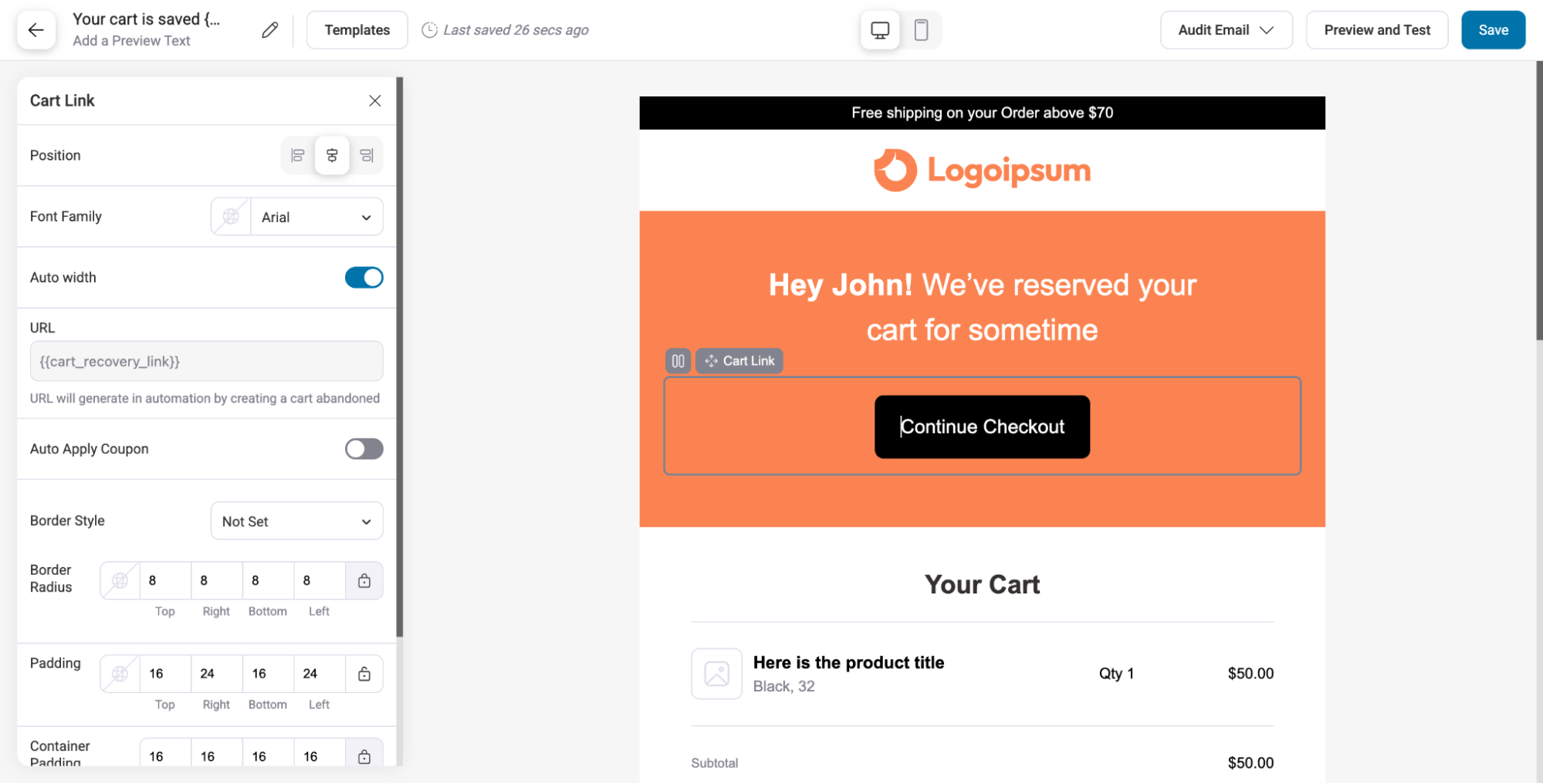
With emails, you get prebuilt templates and a visual email builder, letting you add engaging CTAs with Cart Recovery Link that take users straight to checkout with pre-filled values, making purchases quick and easy.
Track your recovery rate meticulously. Start with the baseline, implement your sequence, and measure weekly improvements.
Strategy 3: Prioritize UX with a Mobile-Friendly Design
Mobile shopping is crucial, as much of WooCommerce traffic comes from mobile devices. Customers expect fast, intuitive, and seamless experiences.
Ensure quick load times, simple navigation, and a streamlined checkout. Reduce form fields, enable autofill, and use clear, tap-friendly CTAs and menus.
Even small inconveniences can drive users away, so prioritizing mobile UX helps retain sales from your largest traffic source.
Implementation Tool:
You can use any popular theme or page builders like Elementor, Divi, etc., to make your WooCommerce pages mobile-friendly. Plus, make sure all the images and CTAs are prominent enough.
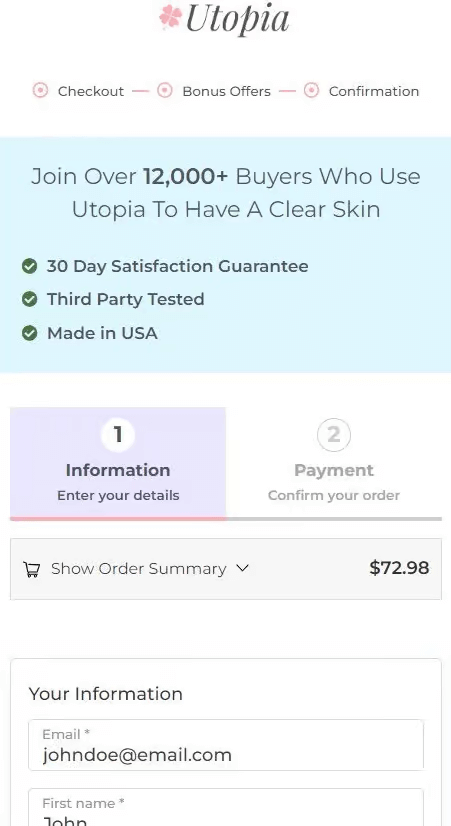
You don’t have to worry about UX or mobile friendliness when it comes to FunnelKit Funnel Builder mobile checkout. For instance, it includes a collapsible order summary and a sticky place-order button.
Strategy 4: Craft Compelling Product Pages
Use high-quality images, multiple angles, and videos to build trust. Highlight benefits over features, showing how the product solves problems. Optimize SEO with proper titles, meta descriptions, alt text, and structured data. Build trust with reviews, guarantees, clear pricing, and security badges.
Industry-specific optimization includes:
- Fashion needs lifestyle images and size guides.
- Electronics need specs and warranties
- Digital products need social proof
- B2B products need case studies and ROI calculators.
Implementation Tool:
Use WooCommerce-ready themes for layout design. Leverage AI tools like ChatGPT or Claude for benefit-focused copy. Add high-quality images and videos, and implement Product Schema Markup using All in One SEO or Rank Math to improve search visibility.
Strategy 5: Reducing Friction Slide Cart & In-Cart Recommendations
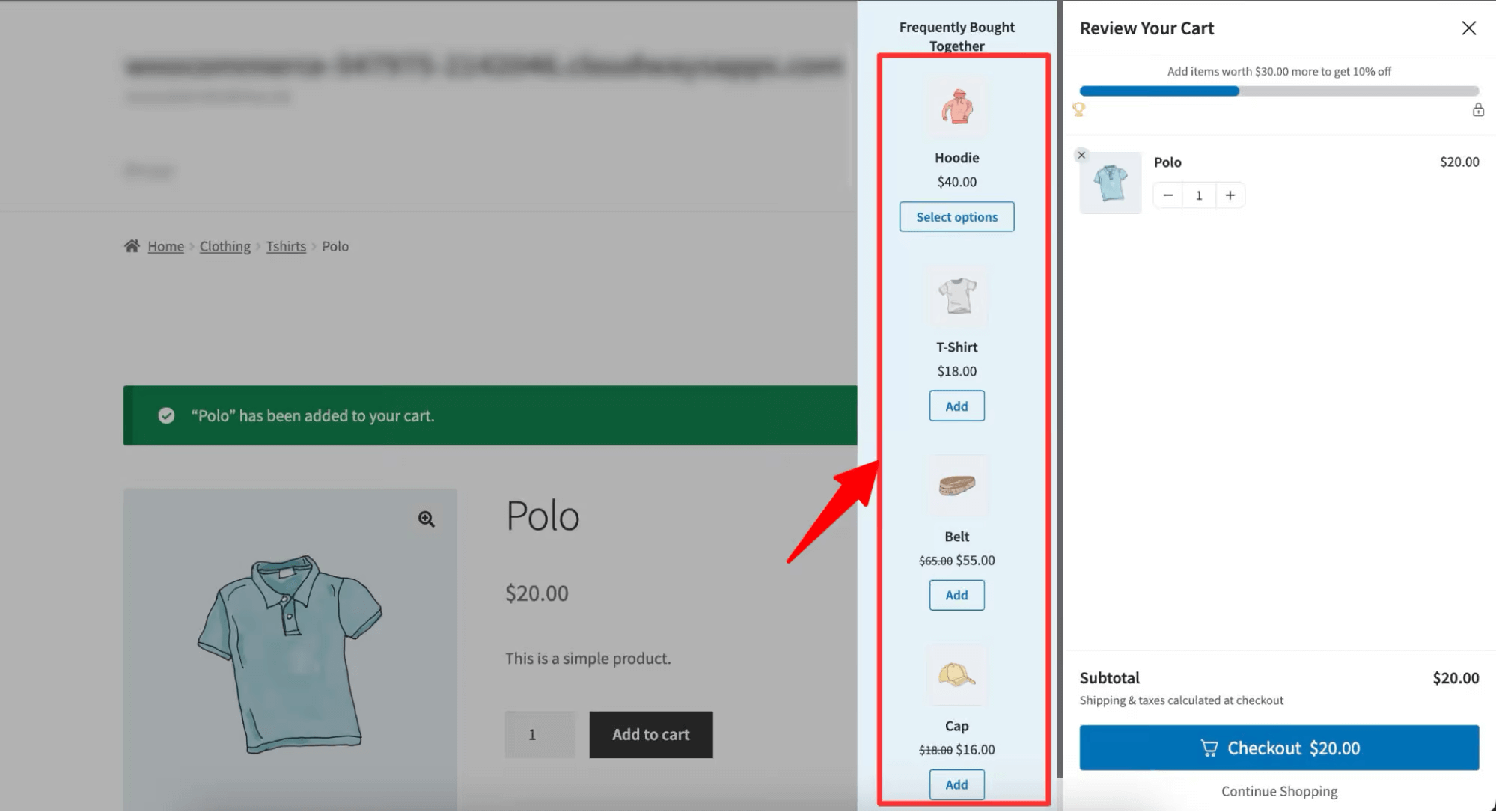
Traditional carts create friction with multiple page loads. Slide carts let customers view cart details and checkout without leaving the page, while showing cross-sells for one-click additions.
Implementation Tool:
You can use a tool like FunnelKit Cart to add a customizable side cart that blends seamlessly with your store’s appearance and theme, creating a smoother shopping experience. Customers can view their cart, check out quickly, and see in-cart product recommendations to boost order value seamlessly.
Strategy 6: Offer Related Products as Pre- and Post-Checkout Cross-Sells and Upsells
Order bumps and one-click upsells help customers find useful products while boosting average order value, without being pushy.
- Order Bumps (Pre-Purchase): Offer relevant add-ons like accessories during checkout (e.g., camera bags with cameras) for a small fee.
- Post-Purchase Upsells: Present complementary offers after purchase confirmation but before payment is processed, leveraging the reduced psychological barrier to buying.
Implementation Tools:
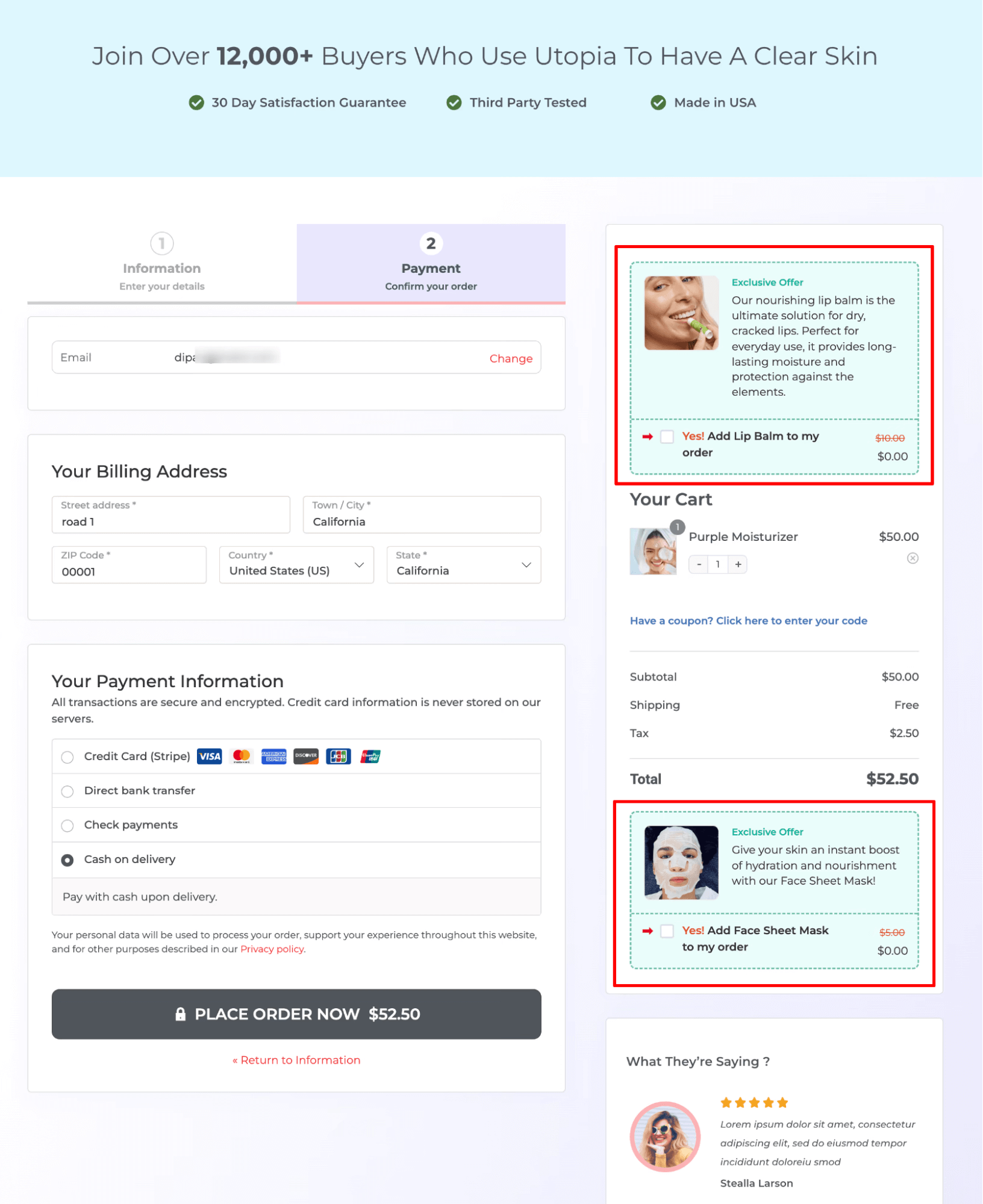
You can use FunnelKit Funnel Builder to offer multiple order bumps at different positions on the checkout page. You can auto-select the order bump if you want, and also provide a dynamic, conditional offer to make it more targeted.
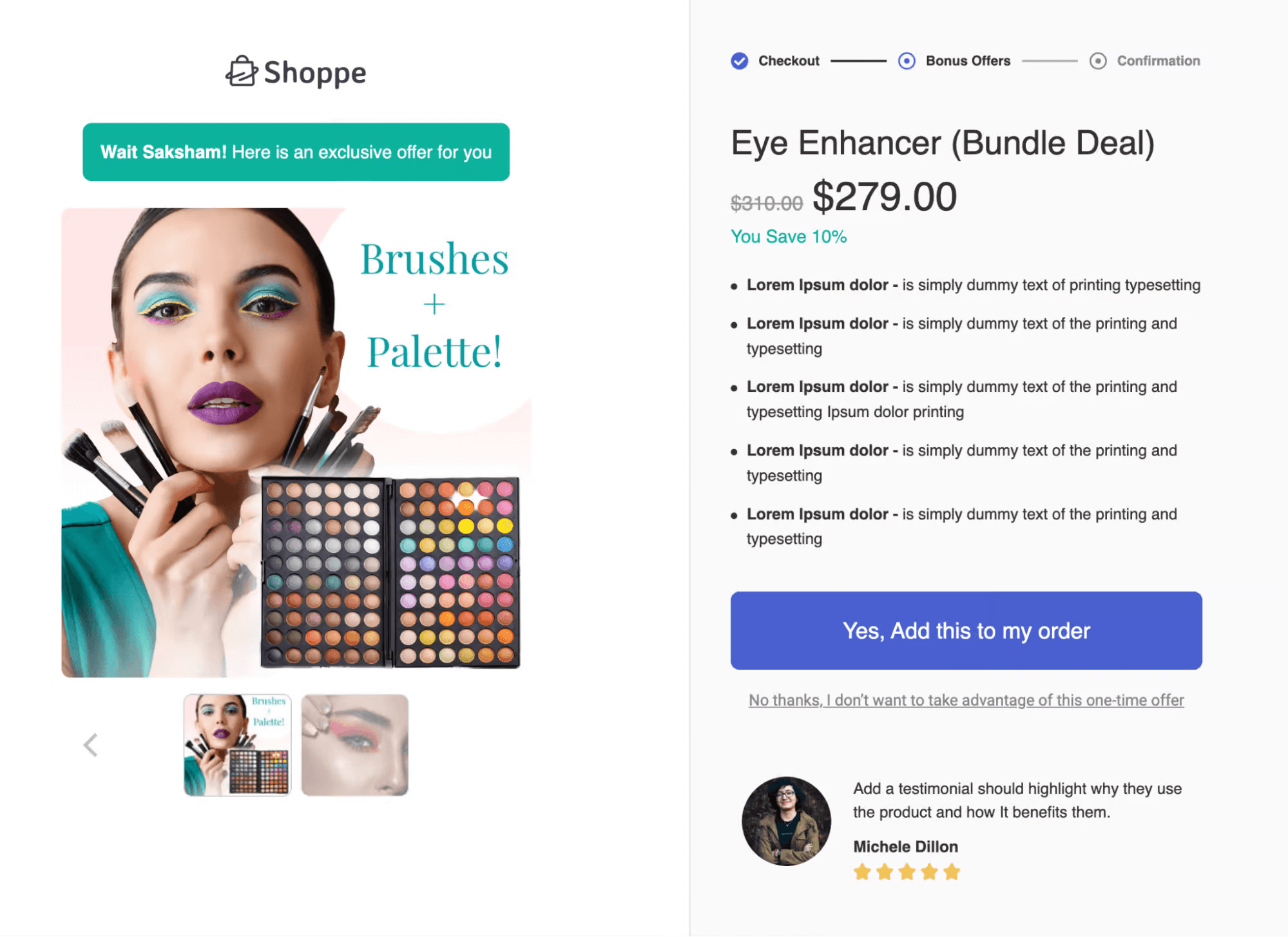
Similarly, after a successful checkout, you can offer a one-click upsell. If needed, you can offer multiple order bumps and a conditional order bump to encourage customers to accept them.
Strategy 7: Offer Discounts and Free Shipping to Increase Conversions
Discounts and free shipping drive conversions by reducing cart abandonment and increasing average order value.
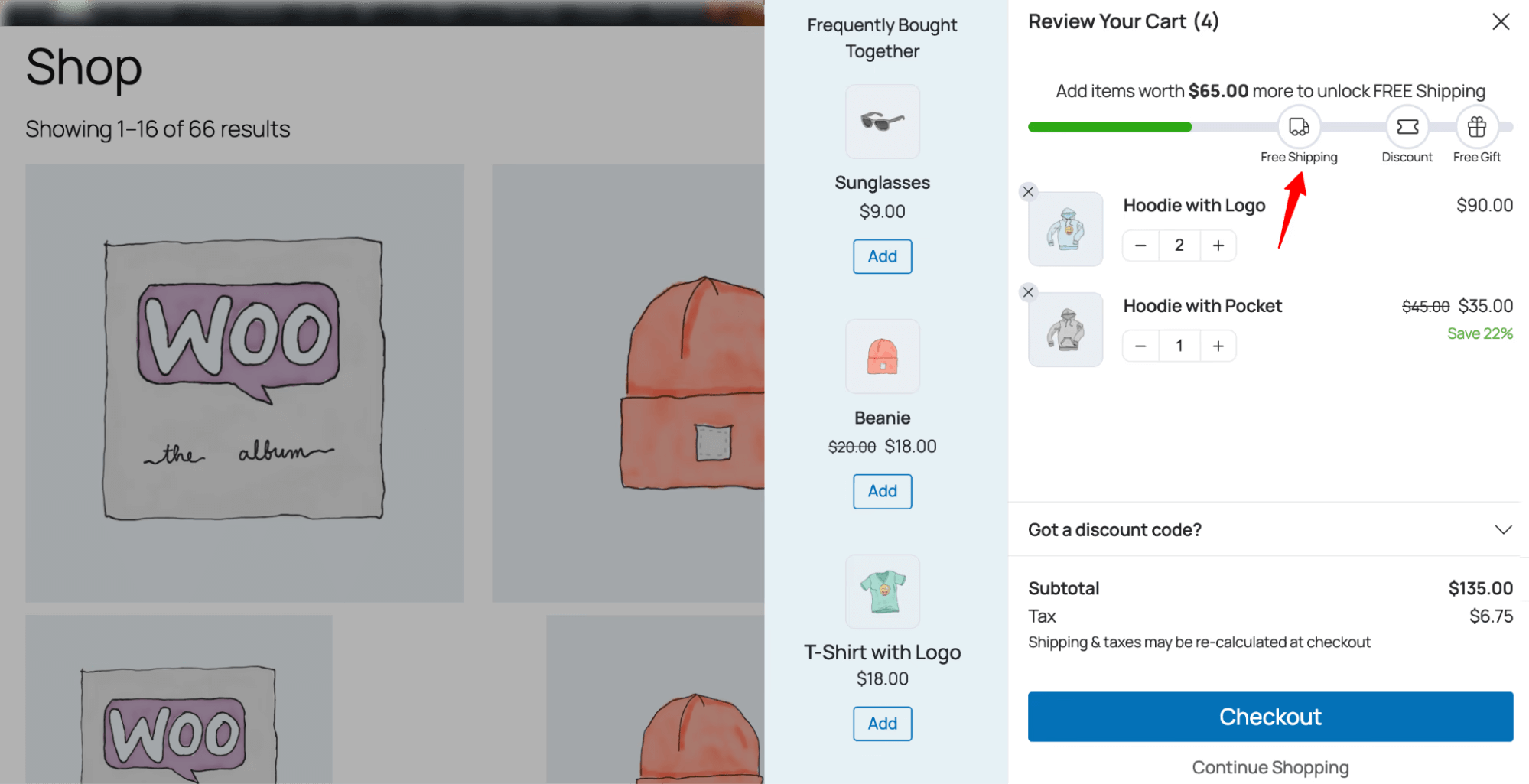
Set clear milestones like "Free shipping on orders over $50" or "10% off orders over $75". This creates urgency and FOMO, especially with limited-time offers, encouraging customers to buy now.
When used effectively, this strategy boosts sales and improves customer satisfaction.
Implementation Tool
You can use FunnelKit Cart reward system to offer both milestone-based discounts and free shipping. Plus, you can offer a free gift if you want. Plus, on the cart you can show a progress bar that tells users how much more they need to add to their cart to avail the offer.
Strategy 8: Get Better WooCommerce Hosting
Hosting directly impacts your store’s speed, stability, and sales. Slow loading times, downtime, and server errors can quickly drive customers away.
Choose hosting with SSD storage and a CDN for faster performance, easy scalability as traffic grows, and strong security features like SSL, firewalls, daily backups, and uptime monitoring. WooCommerce-optimized hosting with built-in caching and automatic updates also helps maintain performance.
Slow pages increase cart abandonment and reduce conversions. Heavy plugins, poor database optimization, and shared server limitations can further slow your store. Reliable, optimized hosting ensures faster checkout, smoother user experience, and better overall sales performance.
Implementation Tool
- Recommended Hosting Providers: SiteGround, Bluehost, WP Engine, Kinsta. Choose based on speed, support, and WooCommerce optimization.
- Monitor Performance: Use Google PageSpeed Insights, GTmetrix, or Pingdom to check load times and uptime.
- Scaling & Optimization: Regularly review server resources and upgrade if needed. Ensure caching, CDN, and security features are active.
Strategy 9: Actively Seeking and Leveraging Customer Reviews
Social proof strongly influences buying decisions. Products with 11–30 reviews see 68% higher conversion rates (Spiegel Research Center).
Collect reviews across channels and make feedback simple. Send automated requests 3–7 days after delivery, offer small incentives, and allow quick star ratings, photos, or detailed comments.
Respond to all reviews to build trust. Thank happy customers and handle negative feedback professionally. Show reviews on product, category, homepage, and checkout pages to increase confidence and conversions.
Implementation Tool
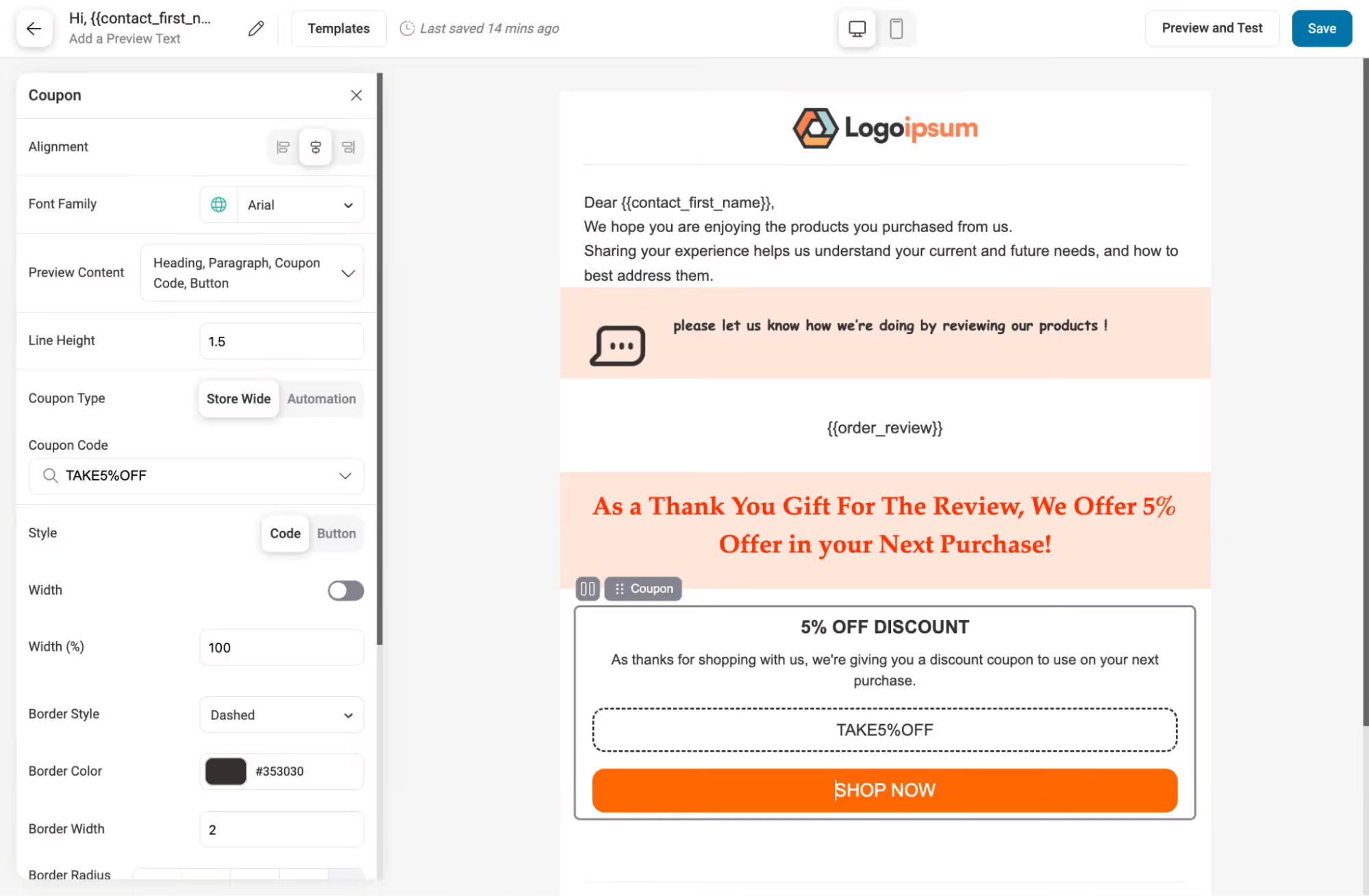
You can use FunnelKit Automations to set up automated review collection campaigns via email and SMS. Trigger review requests via emails 3 to 7 days after order completion, and dynamically offer incentives based on cart total, purchase history, or loyalty points to encourage submissions.
The visual automation builder makes it easy to design flows, and you can personalize messages with product names and customer details.
Strategy 10: Running Data-Driven Paid Ads
Paid ads can grow WooCommerce sales when properly tracked and optimized. Set up Facebook Pixel with events like View Content, Add to Cart, Initiate Checkout, and Purchase, and create custom conversions for key products.
For Google Ads, connect conversion tracking with Google Analytics, enable auto-tagging, use UTMs, and track purchase values accurately.
Run Dynamic Product Ads to retarget product viewers and cart abandoners. Optimize Google Shopping with high-quality images, detailed product data, and focused budgets on best sellers. Retarget past visitors, test creatives and audiences, monitor ROAS, and scale what performs best.
Implementation Tools
The primary tools for executing this strategy are Meta Ads (Facebook and Instagram) and Google Ads. All campaigns, including tracking, targeting, and retargeting, should be set up directly within these platforms to ensure accurate measurement and maximum ROI.
Strategy 11: Setting Up Google Analytics with Proper E-commerce Tracking
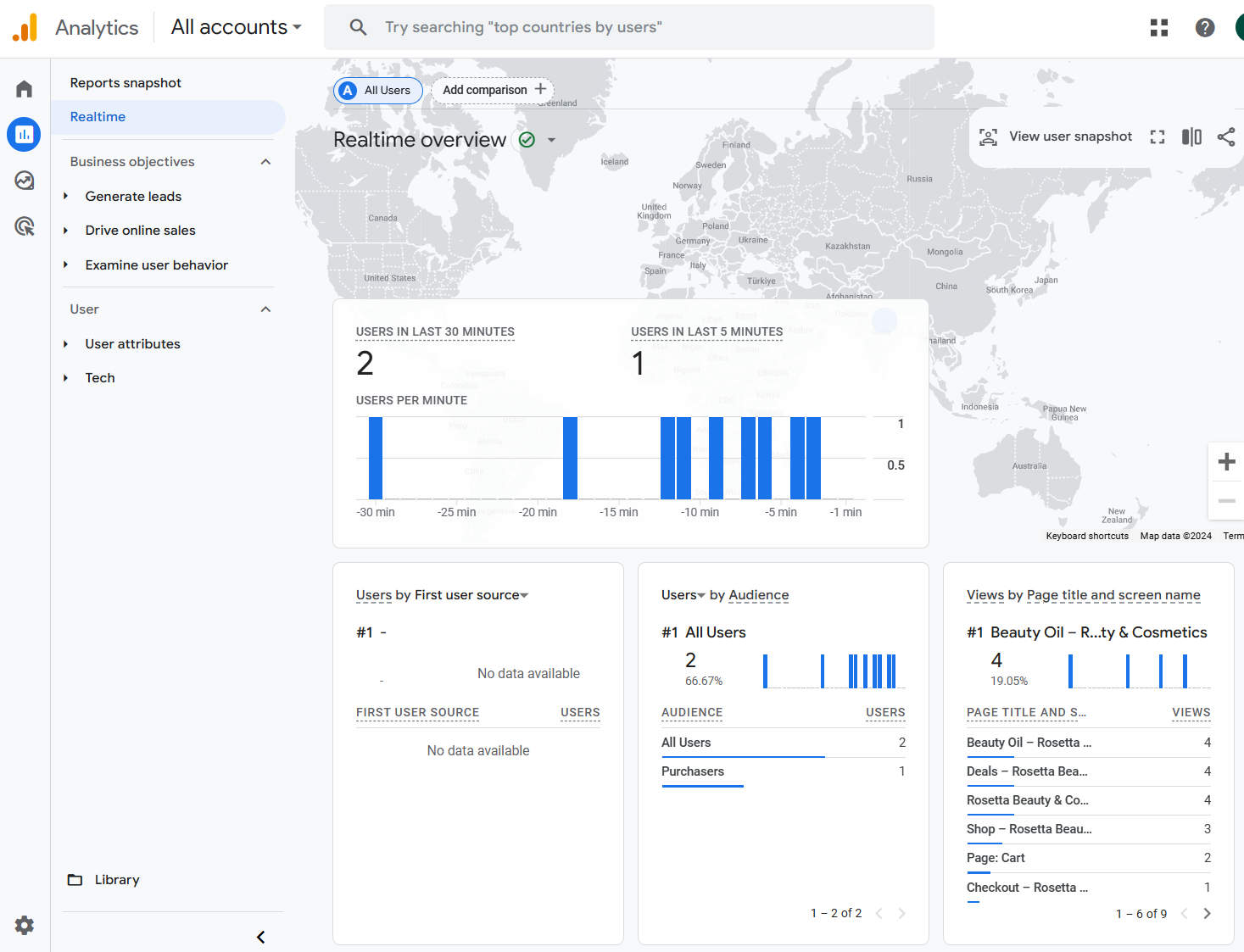
You can’t improve what you don’t measure. Set up Enhanced E-commerce tracking in GA4 to monitor product views, add-to-cart actions, checkout steps, and purchases.
Track key metrics like cart abandonment, add-to-cart vs. checkout rate, average order value, and purchase frequency. Identify drop-offs from the product page to the cart and the cart to checkout.
Use these insights to optimize weak points. High cart exits mean cart improvements are needed. Checkout drop-offs signal friction in the checkout process
Implementation Tools
The primary tool for this strategy is Google Analytics 4, configured with Enhanced E-commerce Tracking. For WordPress users, MonsterInsights provides a no-code solution to connect WooCommerce and view actionable analytics dashboards.
You can integrate FunnelKit Funnel Builder with GA4 and track your store data in Google Analytics.
Strategy 12: Auditing and Optimizing Your Buyer Flow
Your buyer flow is the path from landing on your site to completing a purchase. Any friction can cost sales. Browse your site as a customer, adding items and going through checkout to find pain points.
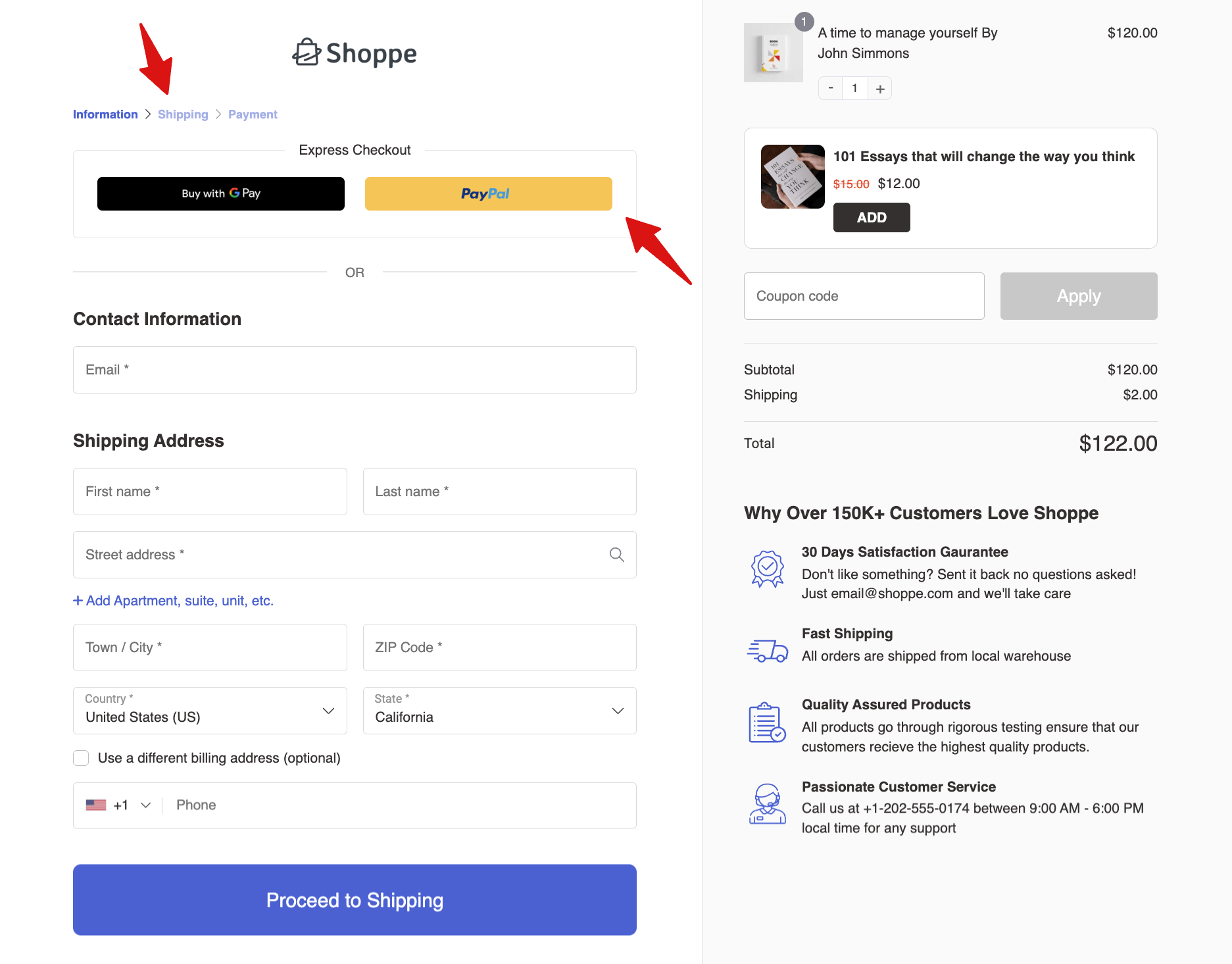
Enable express checkout (PayPal, Apple Pay, Google Pay), use address autocomplete, and A/B test key elements like layout, add-to-cart buttons, checkout design, and trust badges.
Small changes make a big impact. Ensure mobile checkout works, guest checkout is the default, express payments are available, and trust badges and returns policies are clear. Use tools like Google Optimize, Convert, and VWO for A/B testing.
Implementation Tools
Key tools for optimizing your buyer flow include Google Optimize, Convert, and VWO for A/B testing. For checkout improvements, add a progress bar in case of multi-step checkout, enable PayPal Express, Apple Pay, Google Pay, and Google Address Autocomplete to reduce friction and increase conversions, as shared in strategy 1.
Strategy 13: Winning Back Lost Customers
Acquiring new customers costs 5–25x more than retaining existing ones (Harvard Business Review). Past buyers are your easiest revenue opportunity, especially with personalized campaigns.
Win-Back Strategy:
- 30–90 Days (Recently Lapsed): Offer 10–15% off, free shipping, or highlight new arrivals.
- 90–180 Days: Use stronger incentives (20%+) and promote bestsellers.
- 180+ Days: Send a short re-engagement series with your best offer and ask what would bring them back.
Send browse abandonment emails for viewed products, promote categories customers showed interest in, and use seasonal reminders based on past purchases.
Implementation Tool
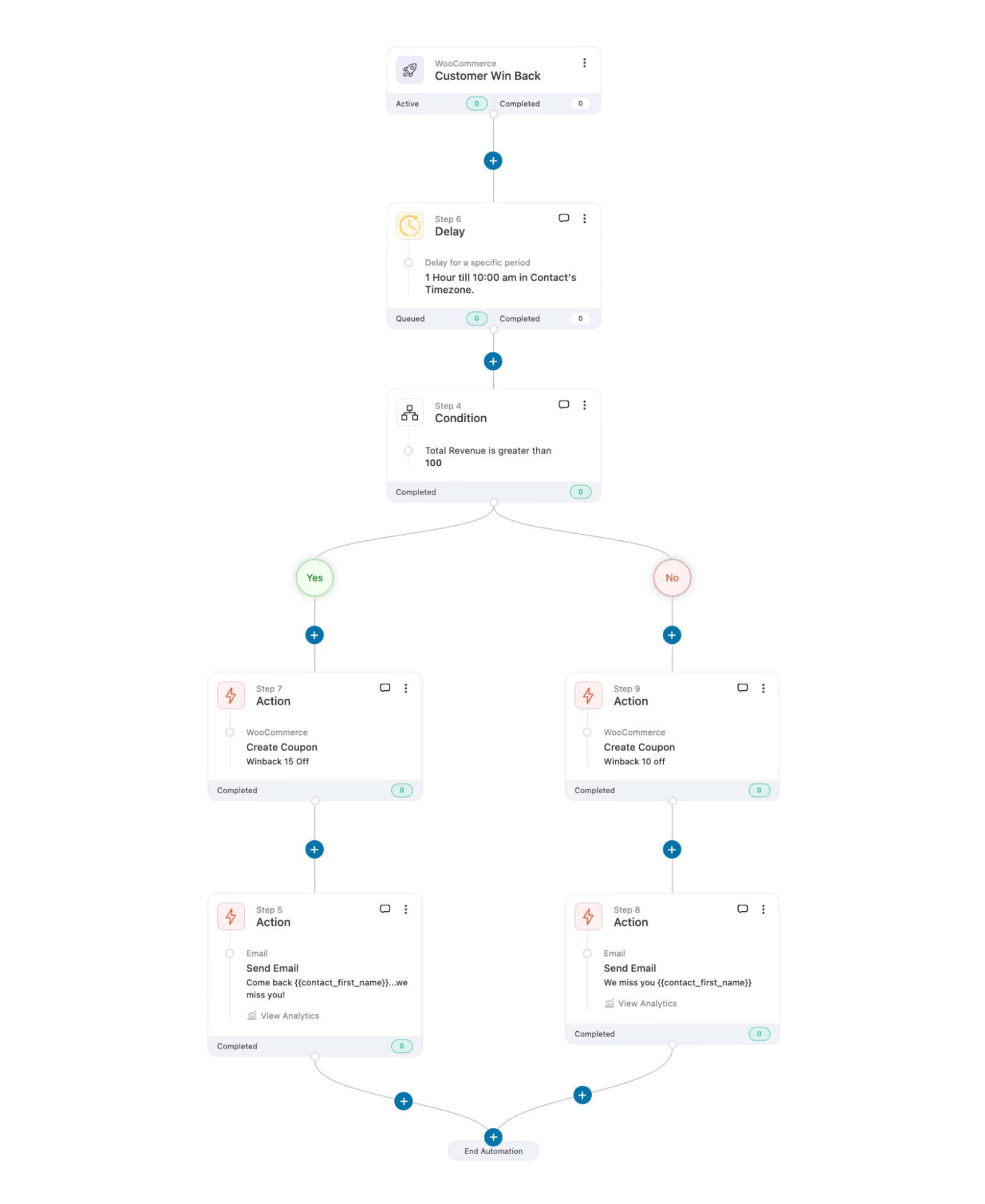
Use FunnelKit Automations to run personalized win-back campaigns via email and SMS based on customer inactivity periods.
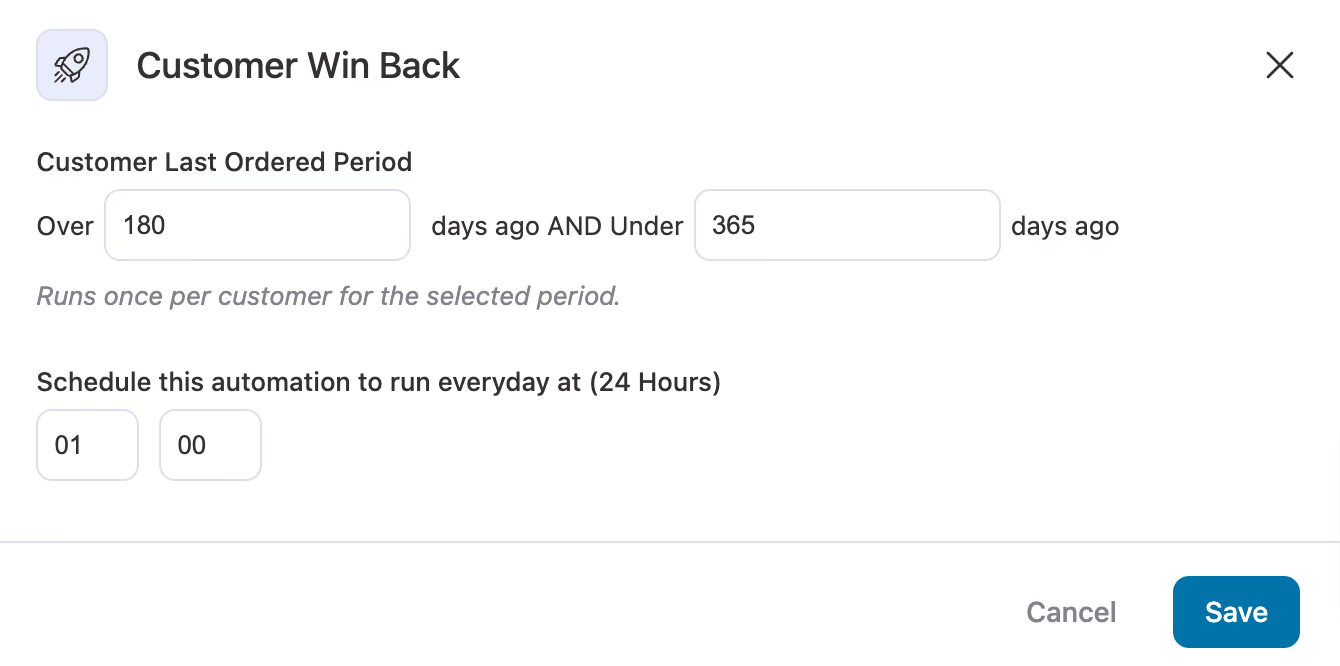
You can apply multiple conditions, such as last purchase date, previous emails received, or engagement status, before sending each message, ensuring customers aren’t over-emailed.
The visual automation builder lets you create lapsed-customer sequences with dynamic offers, coupons, or seasonal nudges, no coding required.
Strategy 14: Content Marketing for Organic Sales
Content marketing drives steady organic traffic without ongoing ad spend. Organic search converts around 4%, compared to 2–3% for paid ads (WordStream).
Use Google Search Console and keyword tools like Ahrefs or Semrush to find opportunities. Create buyer’s guides, how-tos, and problem-solution content that targets search intent.
Optimize with relevant keywords, strong internal linking, clear headers, and compelling meta descriptions that guide readers toward purchase. Promote on social media, repurpose into videos or infographics, and refresh content yearly to maintain traffic and sales growth.
Implementation Tools
To support your content strategy, use AIOSEO alongside your research tools. AISEO can help generate SEO-friendly drafts, suggest keyword placement, and identify relevant internal links, saving time while keeping your content aligned with your strategic plan.
When paired with tools like Ahrefs, Semrush, and Google Search Console, it ensures your posts are both optimized for search and designed to convert.
Strategy 15: Set Up WooCommerce SEO for Local Search Results
Local SEO attracts high-intent buyers. Customers searching for products "near me" are often ready to purchase. Ranking for local searches, even when shipping nationally, builds trust and increases visibility.
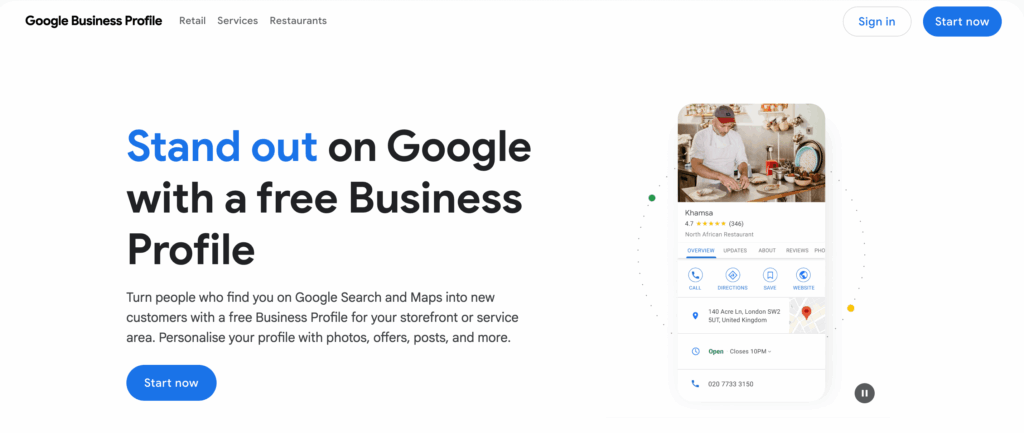
Optimize your Google Business Profile with accurate business info and regular updates. Add product photos and customer reviews to boost your presence.
Use location-based keywords on product pages, category pages, and in meta descriptions. Create locally relevant content like blog posts or landing pages. Ensure consistent citations across local directories and social platforms to improve legitimacy. Done right, local SEO drives more relevant, higher-converting traffic.
Implementation Tools
To implement local SEO, focus on your Google Business Profile for updates, photos, and reviews.
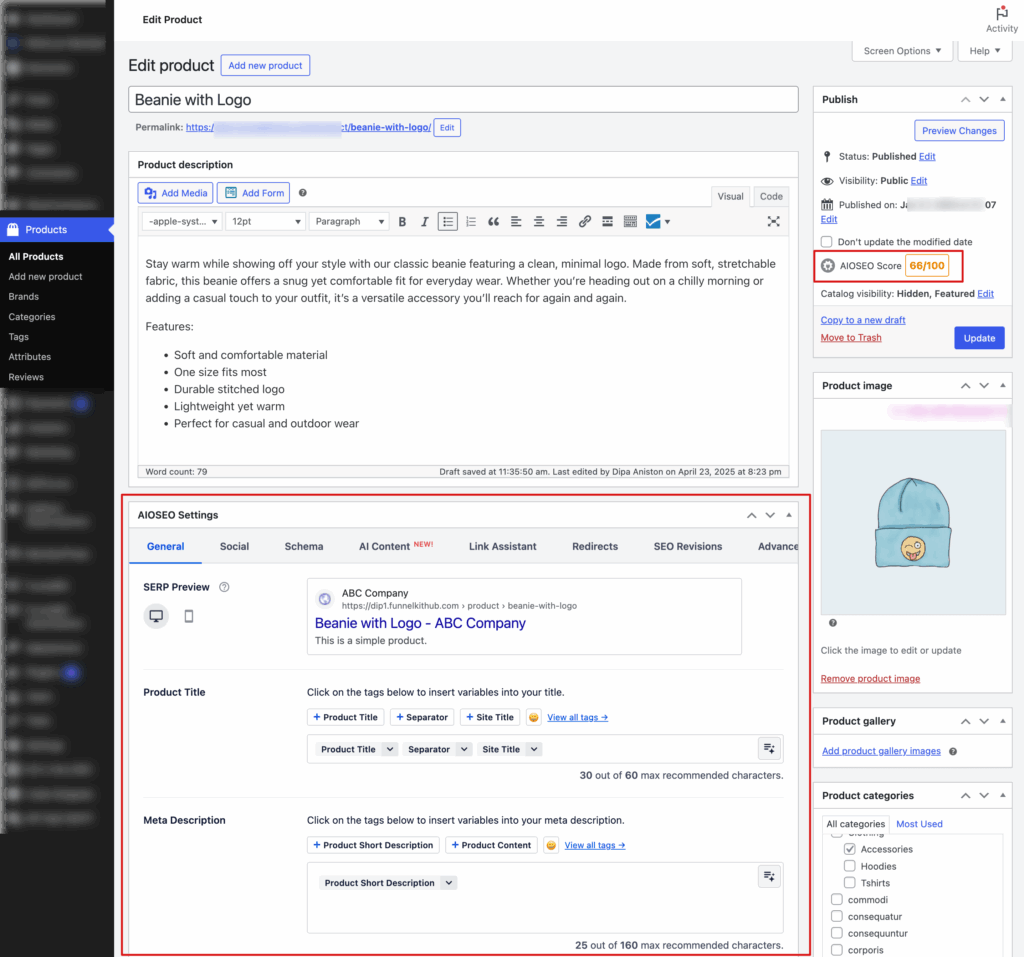
Use WooCommerce SEO plugins such as AIOSEO, Rank Math, etc., to add location-based keywords to product pages, meta descriptions, and structured data. Tools like Whitespark or Moz Local can help manage local citations and track local search rankings.
Strategy 16: Use Social Persuasion to Increase Sales
Social proof boosts WooCommerce sales by building trust. Highlight customer reviews and ratings prominently, as products with 11–50 reviews can see up to 70% higher conversions.
Feature social media mentions, user-generated content, and customer photos to reinforce credibility. Display testimonials on homepages or landing pages and partner with influencers to extend reach and authority.
Small changes like placing reviews below product descriptions or showing star ratings in search results can significantly impact conversions.
Implementation Tools
To implement social persuasion, use review management plugins like Yotpo, Loox, or Judge.me to collect and display feedback. Share reviews on social media to amplify trust.
Integrate user-generated content from Instagram, Facebook, or Twitter. Use platforms like AspireIQ or Upfluence for influencer marketing to connect with credible promoters. These tools turn social proof into a sales-driving feature.
Strategy 17: Implement Live Chat for Immediate Engagement
Live chat is essential for reducing uncertainty and boosting conversions. Customers expect instant answers, especially for questions on sizing, shipping, or product details.
Set up automated responses for common questions, display expected response times, and trigger chat windows based on behavior, such as after 30 seconds on a product page.
Train your team to offer helpful support and make chat availability clear on product pages to build trust and capture high-intent buyers.
Implementation Tools
WPChat connects your store to WhatsApp, Messenger, Instagram, and Telegram, engaging mobile shoppers easily, while LiveChat offers a full-featured on-site widget with WooCommerce integration, AI responses, analytics, and multi-channel support for advanced stores.
Strategy 18: Optimize Your WooCommerce Store for International Sales
Expanding your WooCommerce store internationally can boost revenue, but global sales need careful optimization:
- Display Local Prices: Offer multi-currency support for a seamless experience.
- Automate Taxes: Calculate taxes based on each customer’s location.
- Accurate Shipping Rates: Set shipping zones to reduce cart abandonment.
- Localize Content: Translate pages and offer region-specific promotions to build trust and improve conversions.
Implementation Tools
To implement WooCommerce International Sales Optimization, use the following tools:
- WooCommerce Multi-Currency Plugin: Display prices in local currencies and improve customer experience.
- WooCommerce Shipping & Tax Plugin: Automatically calculate taxes and duties based on customer location.
- WPML / Polylang: Translate your store and create region-specific experiences.
- WooCommerce Shipping Zones: Set accurate shipping rates and methods based on customer location.
Frequently Asked Questions About Increasing WooCommerce Sales
Here, find the commonly asked questions with answers:
What's a good conversion rate for a WooCommerce store?
Conversion rates vary by industry and product type. Instead of focusing on a specific number, aim to improve your store’s performance compared to your past results. Optimize checkout, cart recovery, and product pages to increase the percentage of visitors who complete purchases gradually.
How quickly can I expect to see results from these strategies?
Some strategies, like cart recovery emails, checkout optimization, and live chat, show quick results in days or weeks. Others, like SEO content and local search optimization, take longer to build momentum. Start with quick wins to boost conversions while long-term strategies take effect.
Do I need technical skills to implement these strategies?
Many strategies are plugin-friendly and require minimal technical skills. Tools like FunnelKit, WPChat, WPForms, and MonsterInsights handle checkout optimization, cart recovery, live chat, and analytics. For advanced setups like complex automation or custom tracking, consider a WooCommerce developer for initial configuration.
What is the most important strategy to start with?
If you have traffic but low conversions, prioritize checkout optimization and cart recovery. For low traffic, focus on paid ads and SEO content to attract visitors. Adding live chat and social proof can improve conversion rates for incoming traffic.
How do I know which strategies are working?
Track baseline metrics with tools like Google Analytics 4 or MonsterInsights. Monitor actions like add-to-cart, checkout initiation, and purchases. Implement changes one at a time and measure weekly improvements to identify the most effective strategies.
Ready to Convert More Traffic Into Sales?
Increasing WooCommerce sales is not about luck. It is about reducing friction, guiding buyers, and creating an experience that converts.
Start with strategies that deliver the fastest impact, such as checkout improvements, cart recovery, and live chat, while building long-term growth through SEO, content marketing, and data-driven advertising.
Track results, test changes, and refine your approach to steadily grow your store’s performance.
FunnelKit products help you create optimized checkout flows, recover abandoned carts, implement upsells, collect reviews, and run automated marketing campaigns all from a single platform.
Whether you run a small boutique or a growing e-commerce brand, applying these strategies with the right tools will help you increase conversions, maximize sales, and make your next sale closer than you think.
Editorial Team
March 30, 2026Discover how to boost sales and customer loyalty with three smart ways to offer free gifts in your WooCommerce store. Want to boost WooCommerce sales and delight your customers? Offer...
Editorial Team
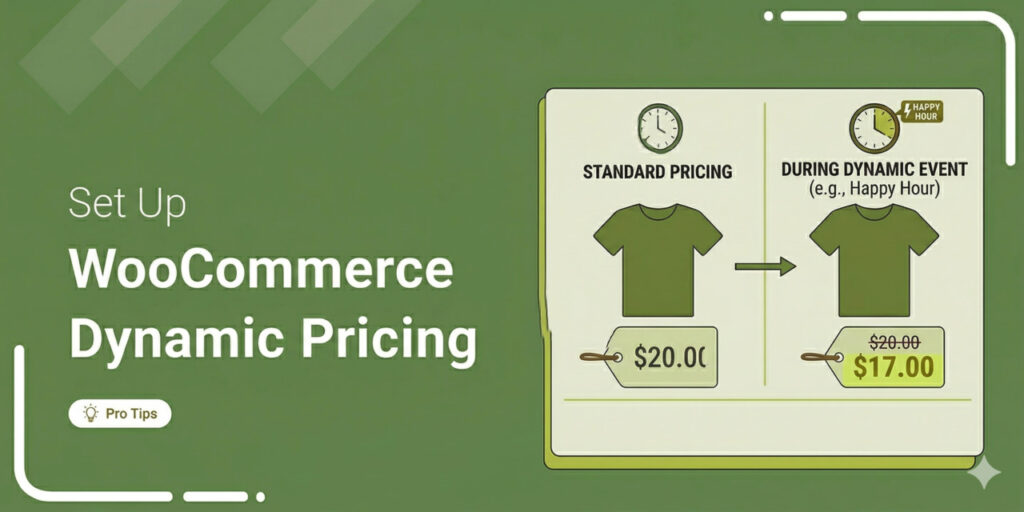
March 30, 2026If you're running a WooCommerce store, you already know that a single, static price tag doesn't always cut it. A first-time browser needs a different nudge than a wholesale buyer...
Editorial Team
March 27, 2026Want to turn one-time buyers into customers who keep coming back using WooCommerce? Then you need to find a WooCommerce subscription plugin. These plugins will help you automate billing, manage...






