


WooCommerce post-purchase emails are automated messages sent to customers after they complete an order.
They cover everything from order confirmations and shipping updates to review requests, product tips, and next-purchase offers.
There are three ways to send post-purchase emails in WooCommerce: using the free built-in settings, a free basic plugin, or a full marketing automation tool.
In this guide, we'll cover all three, then show you how to build eight ready-to-use sequences, including welcome, cross-sell by category, review requests, win-back, and more, with copy-paste templates you can use today.
Whether you want a quick thank-you note or a behavior-based automation that fires by product, category, or order status, you'll have it running in minutes.
Table of Contents
- 1 What Are WooCommerce Post-Purchase Emails?
- 2 3 Ways to Send Post-Purchase Emails in WooCommerce (Free, Plugin & Pro)
- 3 Method 1: Send After-Purchase Emails With Native WooCommerce Settings (Free)
- 4 Method 2: Send Automated Post-Purchase Emails With a Plugin
- 4.1 Add a new automation and select the event trigger
- 4.2 1. Welcome email sequence for first-time buyers
- 4.3 2. Next-purchase discount email sequence
- 4.4 3. First-purchase anniversary
- 4.5 4. Cross-sell by product or category
- 4.6 5. Review-request workflow
- 4.7 6. Win-back or re-engagement
- 4.8 7. Replenishment or reorder reminder
- 4.9 8. VIP or loyalty tier email
- 5 Send Different Emails by Product or Category
- 6 7 Best Practices to Follow and Inspiring WooCommerce Post-Purchase Email Examples
- 6.1 1. Be grateful and offer assurance
- 6.2 2. Schedule your emails correctly
- 6.3 3. Create attention-grabbing email subject lines
- 6.4 4. Educate your customers about the purchased product
- 6.5 5. Design beautiful emails to attract users
- 6.6 6. Offer relevant product recommendations
- 6.7 7. Request product reviews or feedback about the customer’s shopping experience
- 7 For Developers: Send a Custom Email With Code
- 8 Post-Purchase Email Templates (Copy and Paste)
- 9 Frequently Asked Questions (FAQs)
- 10 Send Your WooCommerce Post-Purchase Emails on Autopilot!
What Are WooCommerce Post-Purchase Emails?
WooCommerce post-purchase emails are automated or manual messages sent to a customer after they complete an order, covering everything from order confirmations and shipping notifications to thank-you notes, cross-sell offers, review requests, and win-back campaigns.
They run on a trigger (an order reaching a status such as Processing or Completed) and are designed to convert a one-time buyer into a repeat customer.
According to Klaviyo's benchmark research, post-purchase messaging has a 217% higher open rate, a 500%+ higher click rate, and 90% higher revenue per recipient than the average email campaign.
The reason is simply that a buyer who just paid you trusts you more in that moment than at any other point in the relationship.
The after-sale window is the lowest-profit period you'll ever earn, and most stores go silent the second the order is complete.
This guide will help you fix that silence.
3 Ways to Send Post-Purchase Emails in WooCommerce (Free, Plugin & Pro)
Before you build anything, pick the method that matches what you're trying to send. Here's an honest side-by-side.
| Parameters | Native WooCommerce | Basic plugins | FunnelKit Automations |
|---|---|---|---|
| Cost | Free (built-in) | Free and paid | Free and paid |
| Best for | Transactional confirmations | Simple automated + manual sends | Multi-step, behavior-based sequences with transactional and marketing emails |
| Automated sequences | ❌ No | ⚠️ Limited (basic flows) | ✅ Yes (full visual builder) |
| Send by product or category | ❌ No | ⚠️ Limited | ✅ Yes |
| Send by order status | ✅ Yes (default statuses) | ✅ Yes | ✅ Yes (including custom statuses) |
| Manual one-off sends | ✅ Yes (order details email) | ✅ Yes (manual actions) | ✅ Yes (broadcast to segment) |
| Delays and conditional logic | ❌ No | ⚠️ Limited (basic delays) | ✅ Yes (delays and if/else, goals) |
| Dynamic coupons | ❌ No | ❌ No | ✅ Yes |
| Built-in open and click analytics | ❌ No | ⚠️ Limited | ✅ Yes |
| Setup effort | Low | Low-medium | Low-medium |
If you only need confirmation emails, native is fine.
If you want a few automated follow-ups without paying, a basic free plugin works.
If after-sale emails are a revenue channel, including cross-sells, review nudges, win-backs, coupons that expire, you want a dedicated automation tool.
We'll walk through all three below, starting with the free native route.
Method 1: Send After-Purchase Emails With Native WooCommerce Settings (Free)
WooCommerce ships with built-in customer notifications that are sent automatically based on order status, without requiring any plugin.
Here's how to set one up:
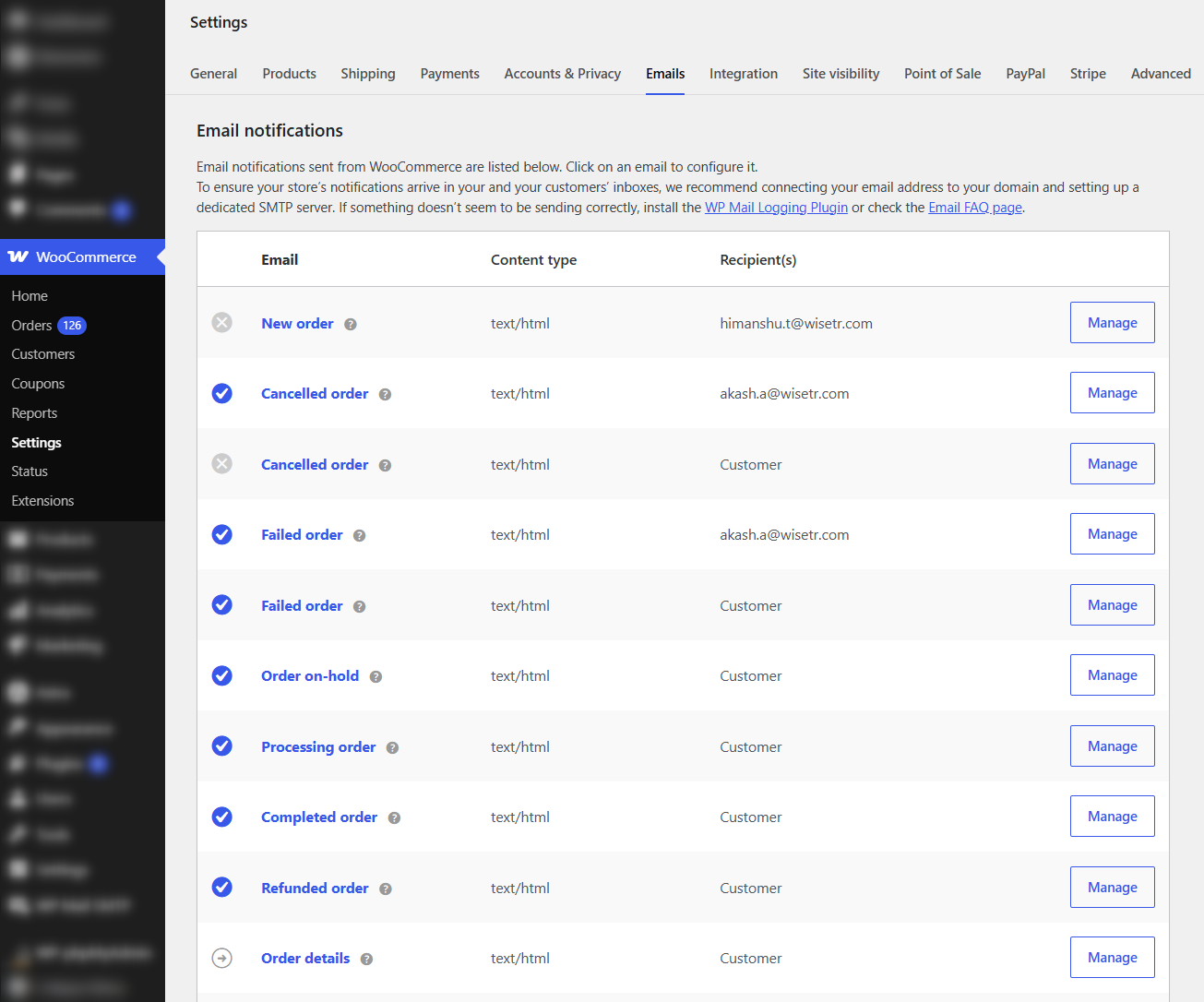
From your WordPress dashboard, go to WooCommerce ⇨ Settings ⇨ Emails.
You’ll see the full list of notifications WooCommerce can send: New Order, Cancelled Order, Failed Order, Order On-hold, Processing Order, Completed Order, Refunded Order, and Customer Invoice / Order Details.
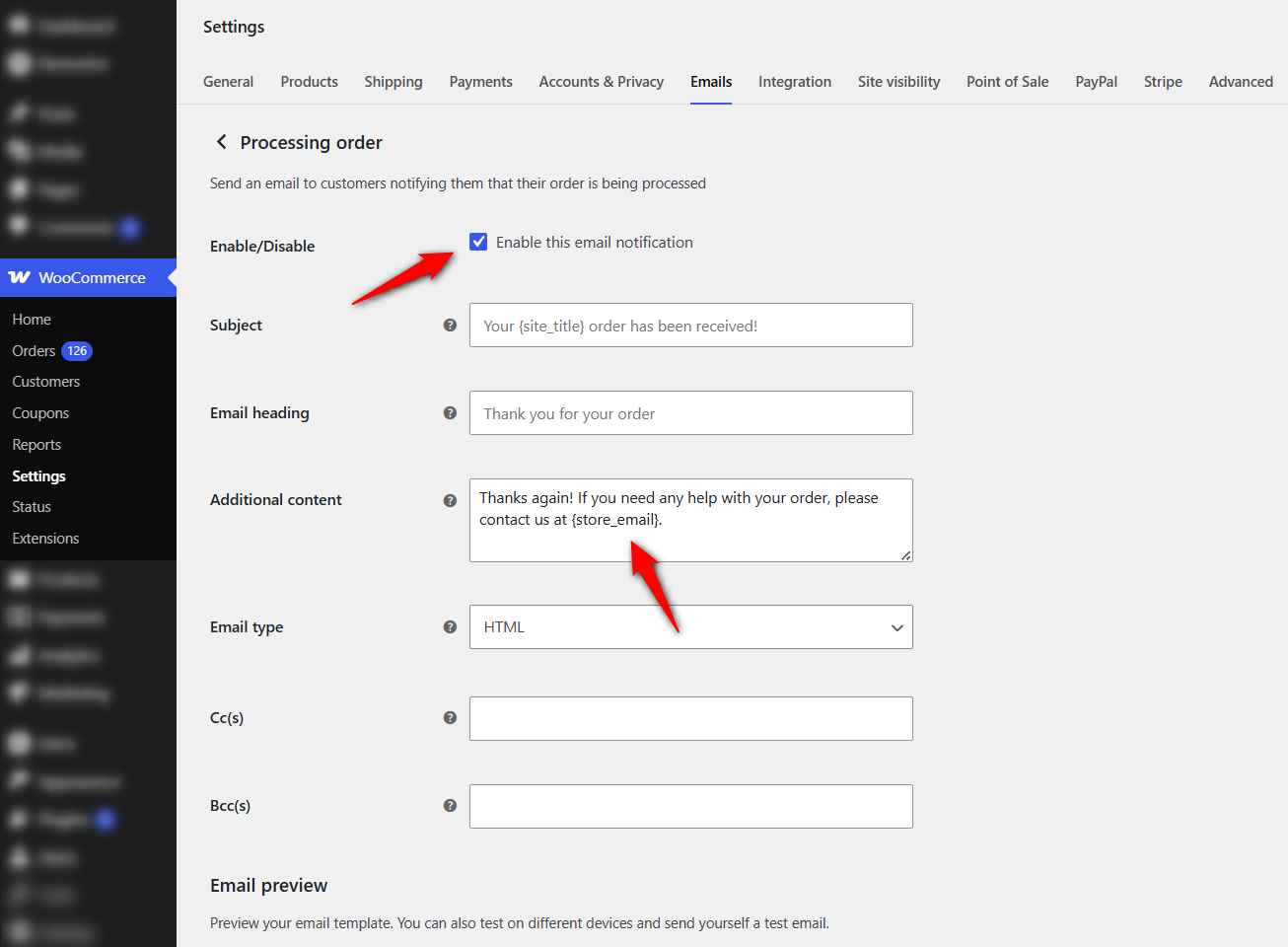
Find Processing order (this doubles as the order-confirmation email, sent the moment payment clears) or Completed order (sent when you mark the order complete, effectively your shipping confirmation) and click Manage.
Edit the Subject, Email heading, and Additional content.
The Additional content box is where you add a thank-you note, a return-policy link, warranty info, or a small discount line.
Scroll below the list to set a global header image, accent color, and footer text so every email matches your brand.
Save your changes and place a test order to confirm the message lands correctly.
The native email settings provide a free, reliable way to send a single email per order status, with limited branding control.
But you cannot set up delays, multi-step sequences, conditional sending by product or category, dynamic coupons, or open/click tracking.
The moment you want "send email A to category X buyers, then a review request five days later", you've outgrown native, which is exactly what the next method solves.
Method 2: Send Automated Post-Purchase Emails With a Plugin
This is where after-sales emails become a revenue engine rather than a notification.
FunnelKit Automations offers a visual builder to create a multi-step sequence in which an order event triggers delays, conditions, and dynamic coupons.
Plus, it automatically disables the conflicting default WooCommerce email to prevent duplicates.
It also has a free version that lets you send abandoned cart recovery and many post-purchase emails. The premium Pro version unlocks conditions, smart coupons, broadcasts, and a visual email builder.
So first, you need to install and activate FunnelKit Automations on your website.
Follow the instructions to install and activate FunnelKit Automations on your WordPress website.
Follow these steps:
Add a new automation and select the event trigger
Head to the Automations section and click on the ‘Create Automation’ button.
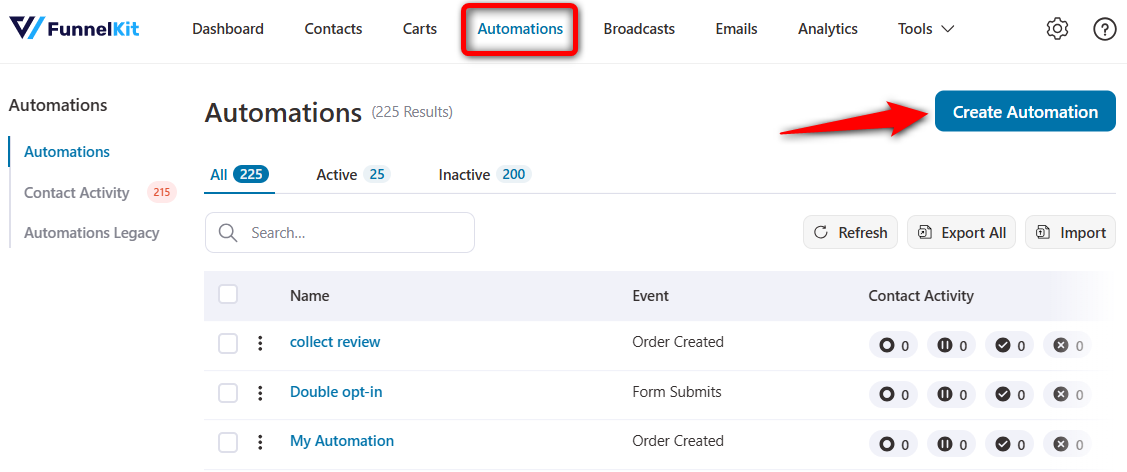
You’ll see a pool of pre-built automations that you can import with just one click to kickstart your email marketing immediately.
However, we are going to build ours from scratch. To do so, click ‘Start from Scratch’ and assign a proper name to your new automation.
Here we’ll go for the WooCommerce post purchase email sequence.
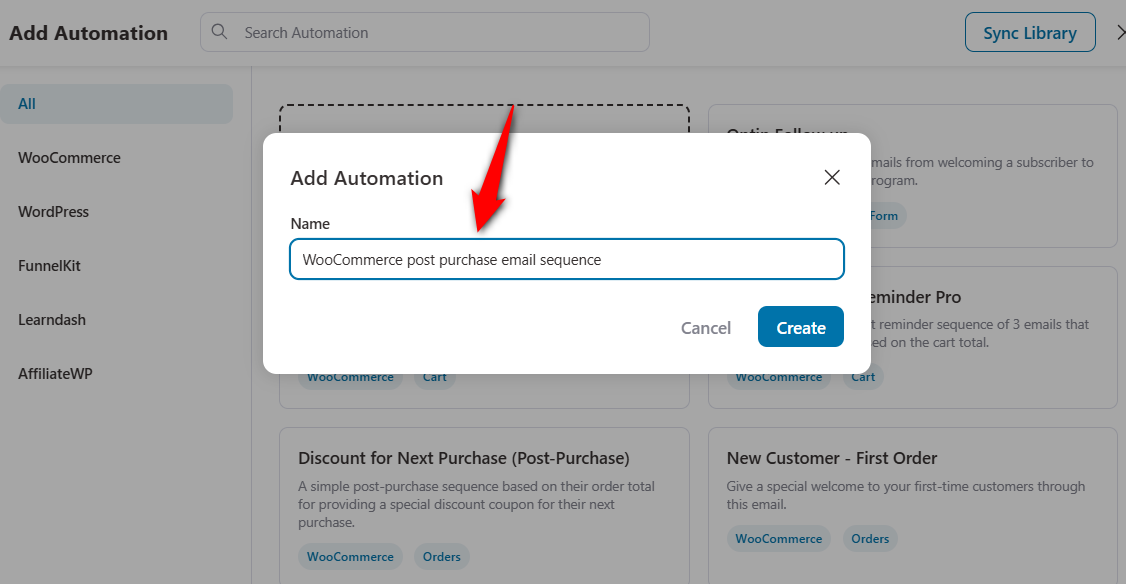
Clicking on ‘Create’ will add the new automation to your workspace.
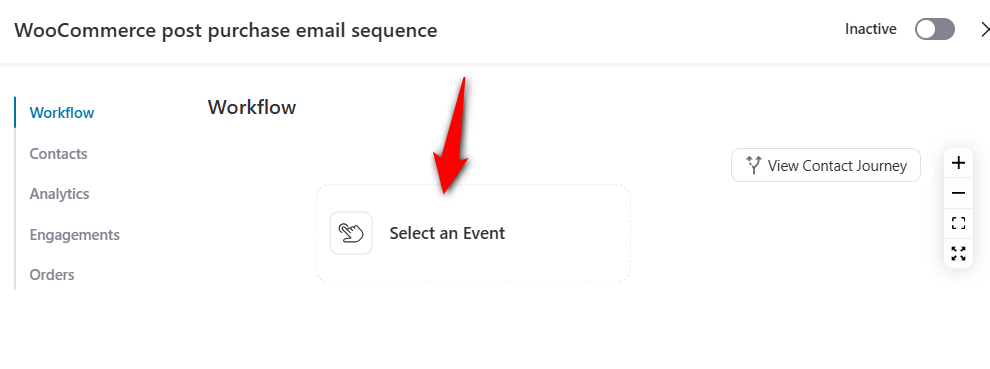
Hit ‘Select an Event’ and a pop-up window illustrating various triggers for your automation will appear.
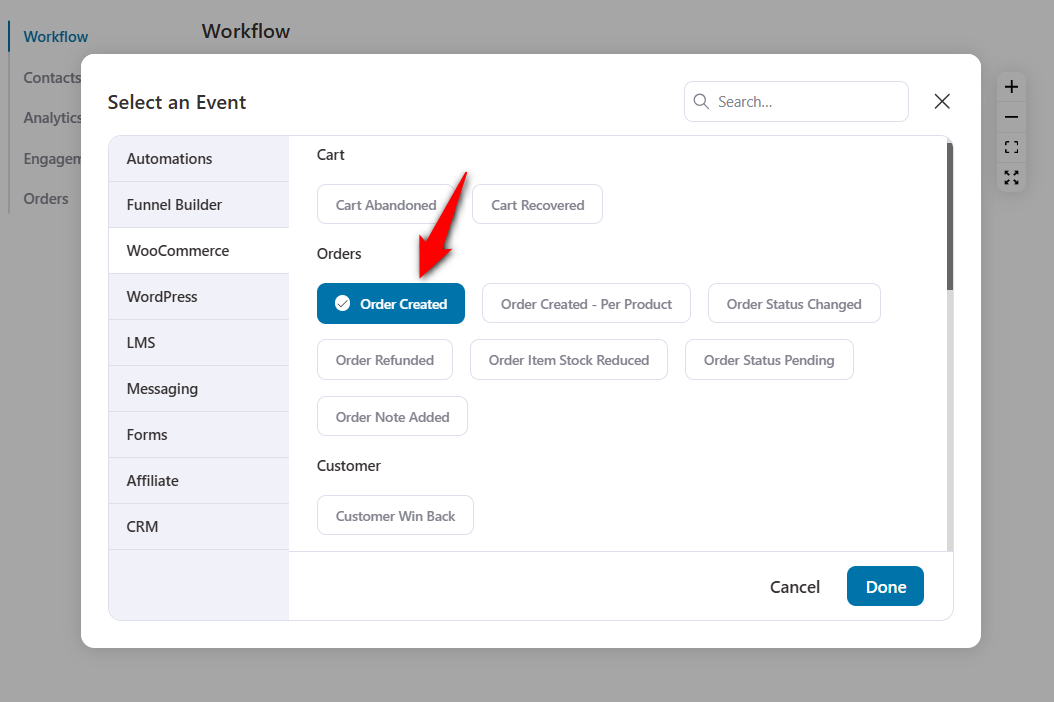
An event triggers your automation. In our case, we will select WooCommerce ⇨ Order Created.
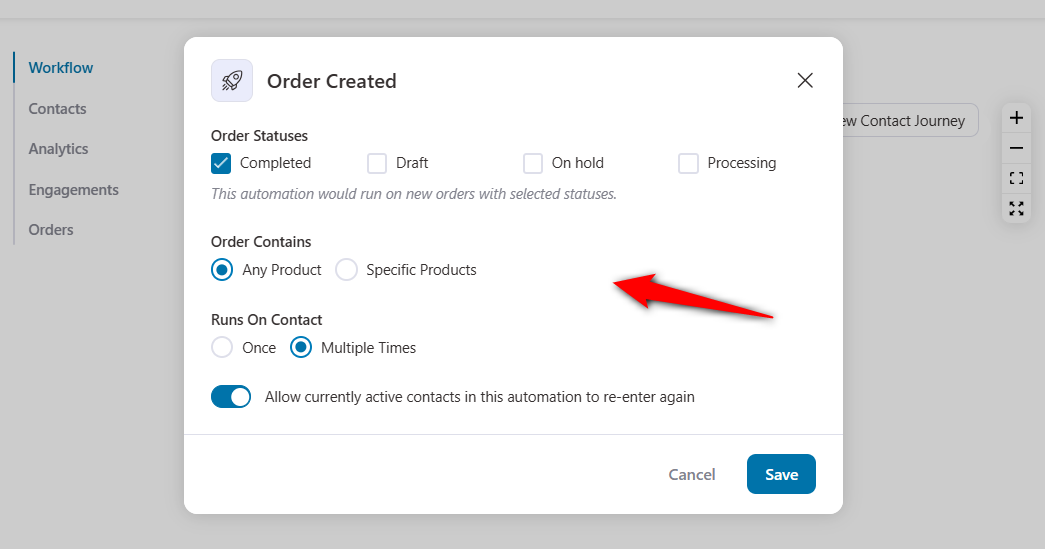
Now, configure the order statuses. This will depend on when you want to run the automation.
- Completed - The order has been processed and shipped. No further action is required.
- On hold - Payment is awaited
- Draft - The draft order gets created when shoppers initiate the checkout
- Processing - When the order has been placed and is in the processing stage of the fulfillment process
We are going to keep our WooCommerce order status as ‘Completed’.
We have illustrated three unique WooCommerce post-purchase email sequences for you.
You can use any of the three as needed, or combine them to create a single, cohesive post-purchase experience for your first-time customers.
Now, let's move on to building our first automation.
1. Welcome email sequence for first-time buyers
According to Omnisend’s eCommerce Statistics Report, welcome emails are opened the most (31%), clicked 5X more than other emails, and have one of the highest conversion rates (52%).
Welcome emails are a great way to greet your customers and pave the path for their next purchase.
If you need to welcome your new subscribers, follow this article.
Let’s build an effective WooCommerce post-purchase email sequence to welcome your first-time customers.
After implementing the common step above, add a condition.
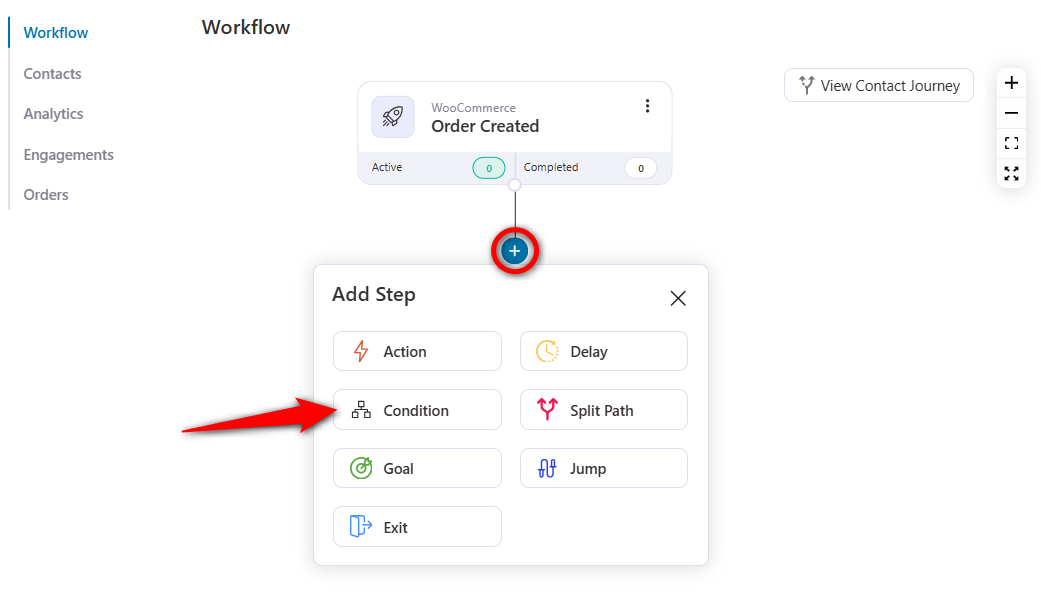
Click on Add New Condition.
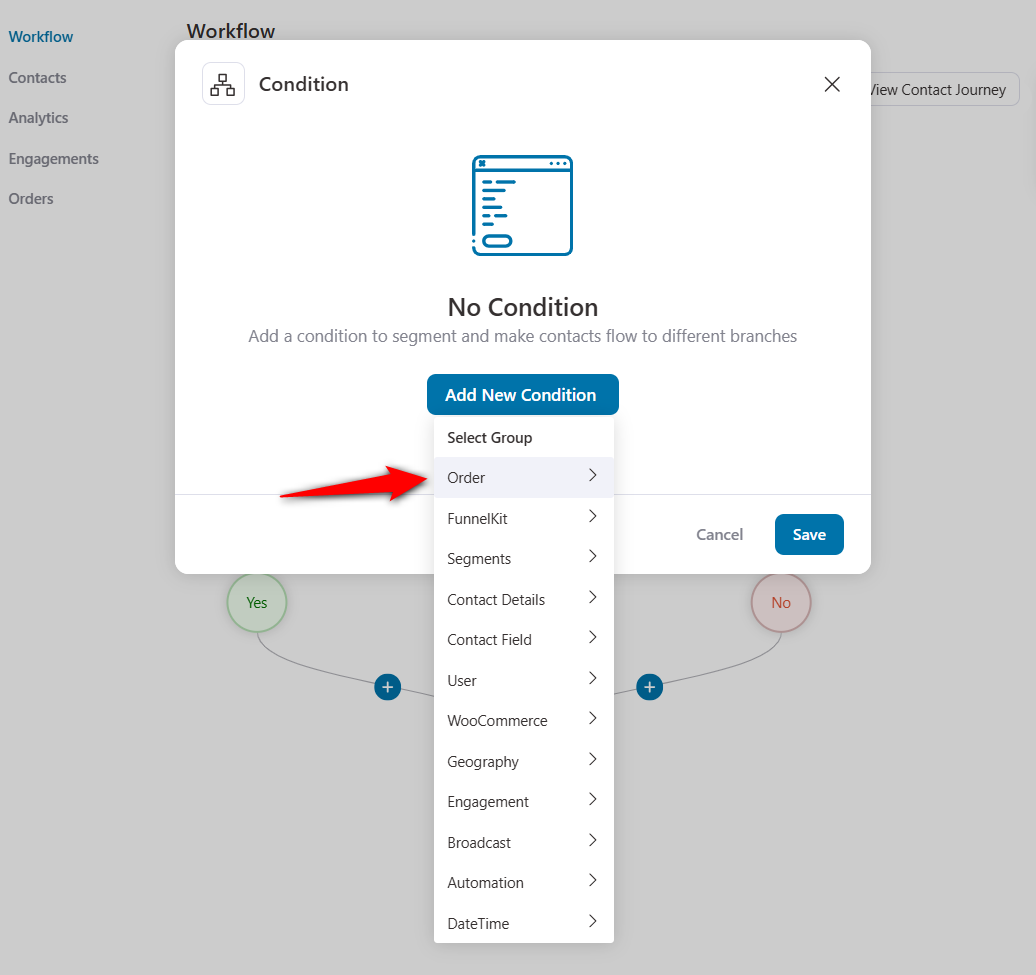
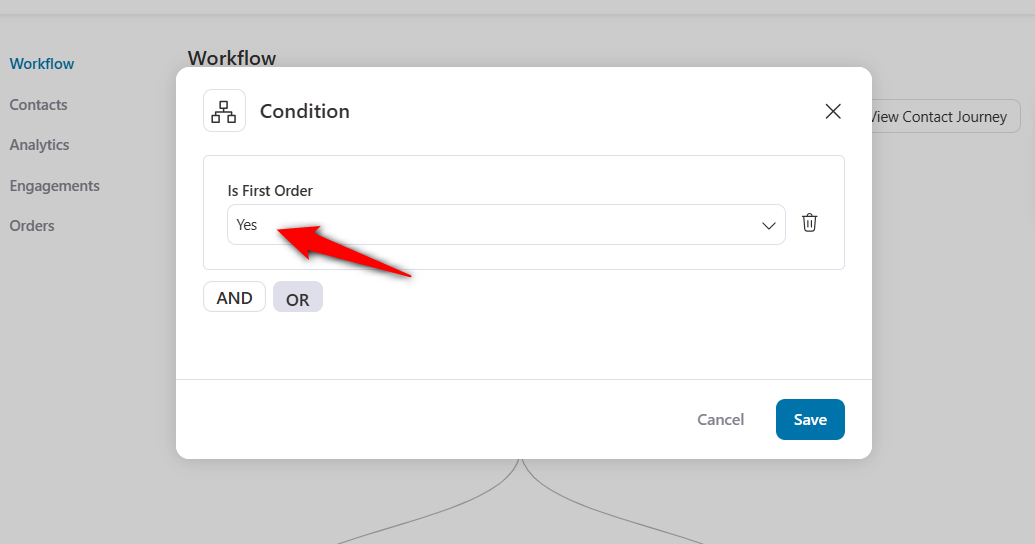
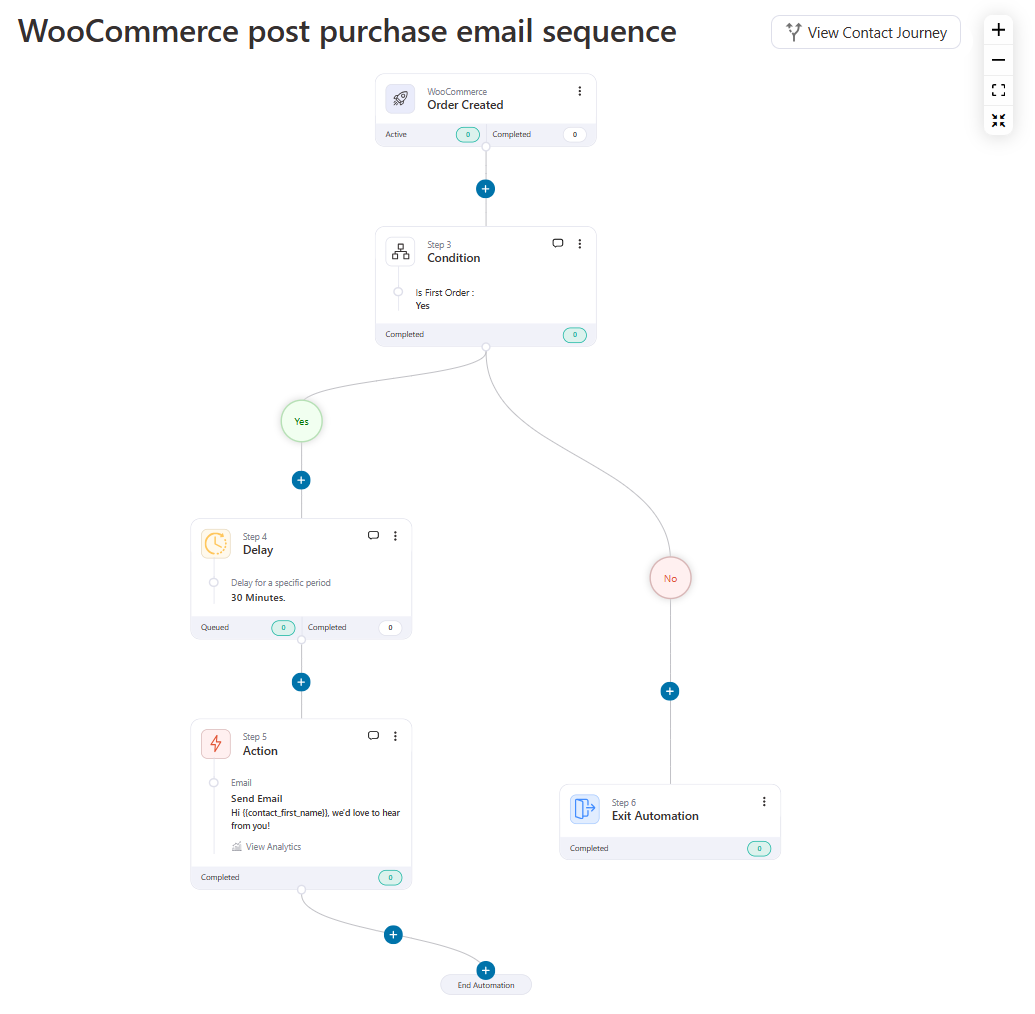
Now, you have to set the conditions for the first-time buyer. If their order is ‘First Order’, the subsequent automation will run on them. If it is not their first order, they won’t be a part of this automation.
Click on Order, and select ‘Is First Order?’
Configure the condition and set it to ‘Yes’. Then, save your conditional workflow.
If the condition is true, you send an email welcoming the first-time buyer and showing them around your store. You can add your best sellers and encourage new buyers to try them.
If the condition is false, you can email them to thank them for buying from you again and exit the false condition.
After you add the condition, do add a delay. You can add delays in minutes, hours, days, weeks, or even months.
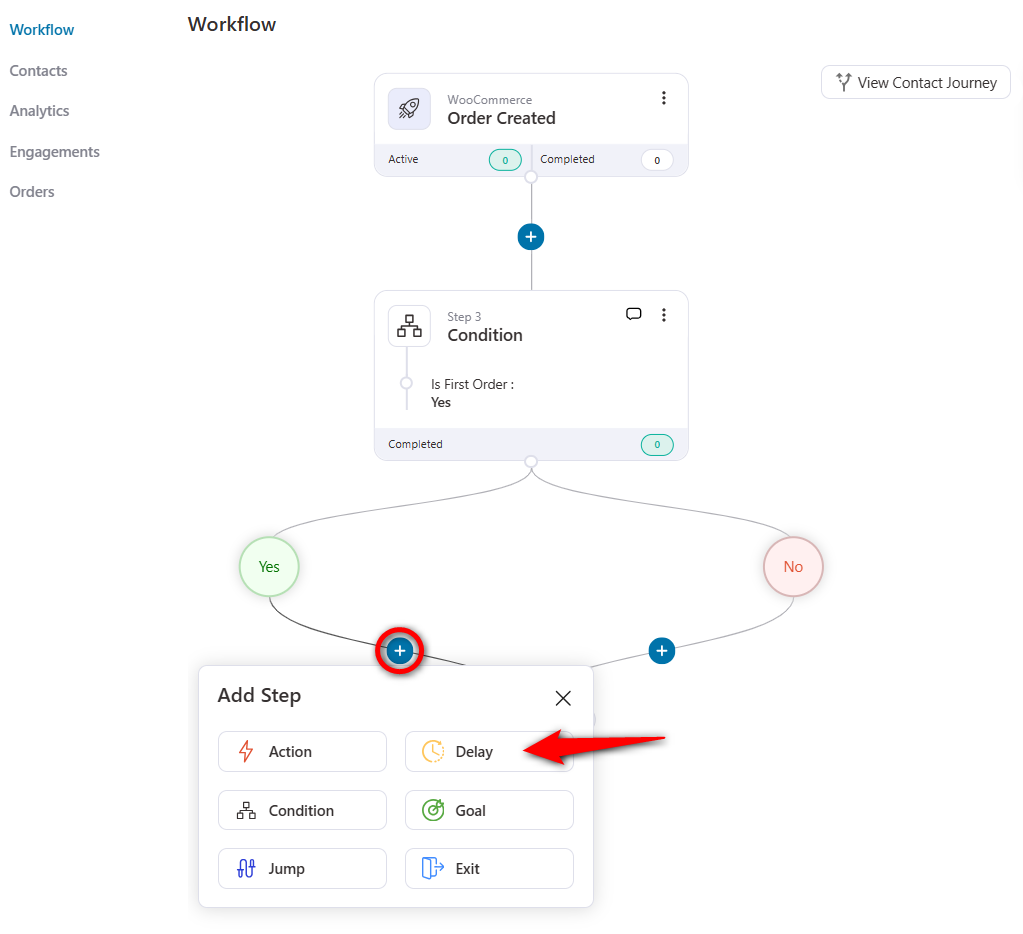
Let's set a 30-minute delay.
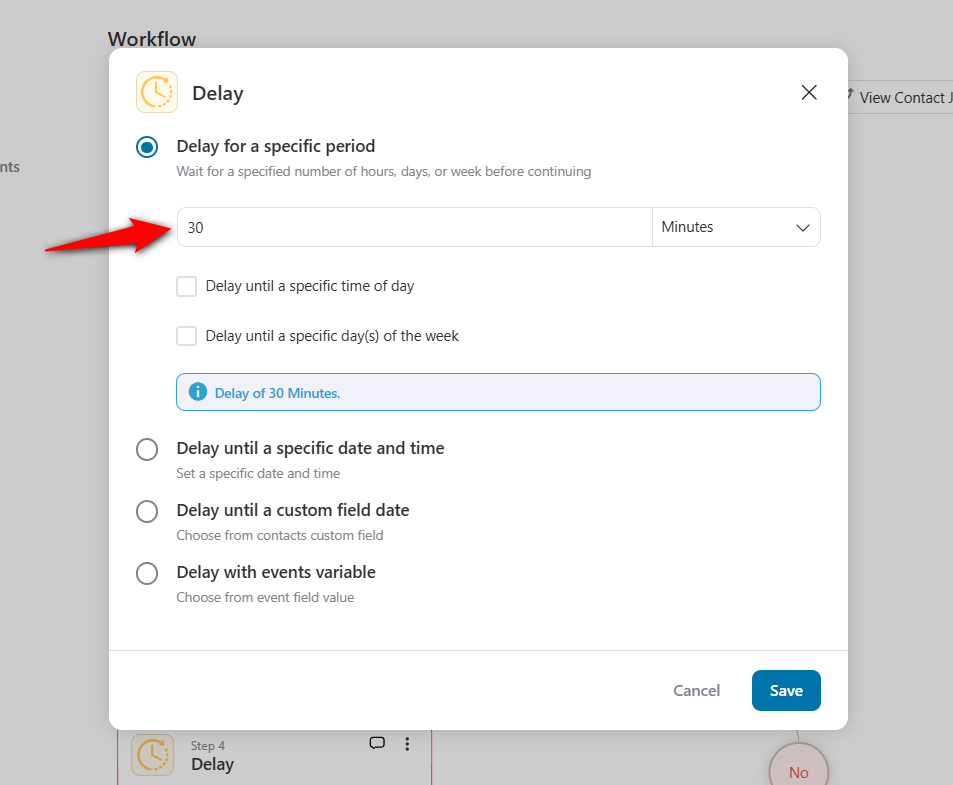
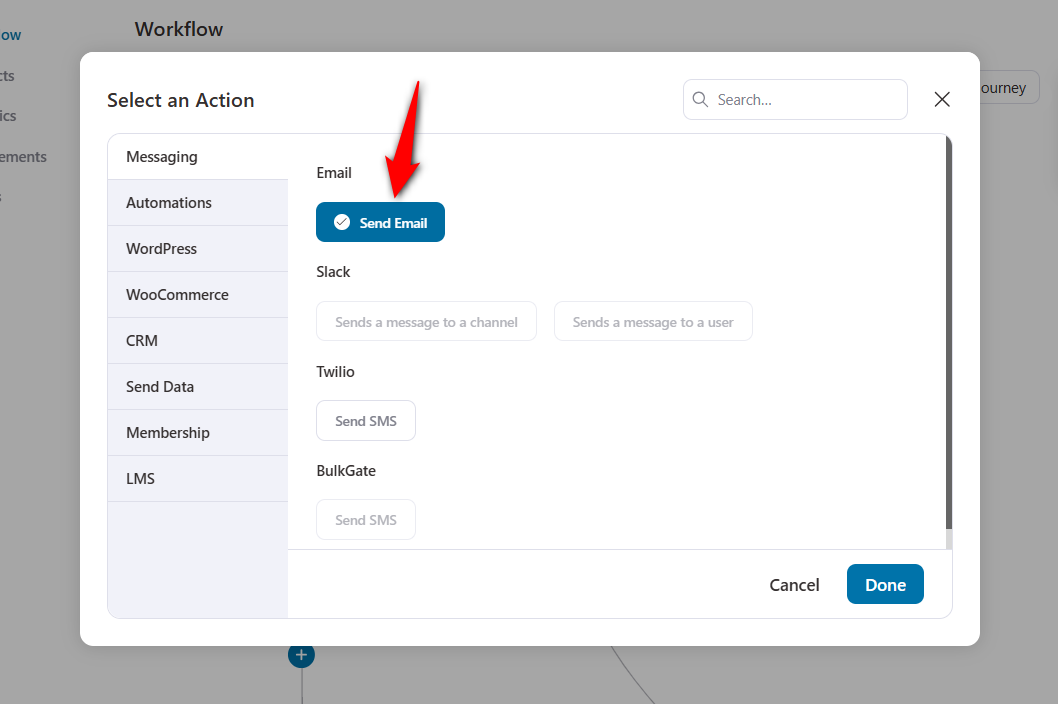
Click on the ‘+’ icon to add an Action.
Then, add the ‘Send Email’ action under the Messaging section.
Now, test your copywriting skills and craft a welcoming email for your new customers.
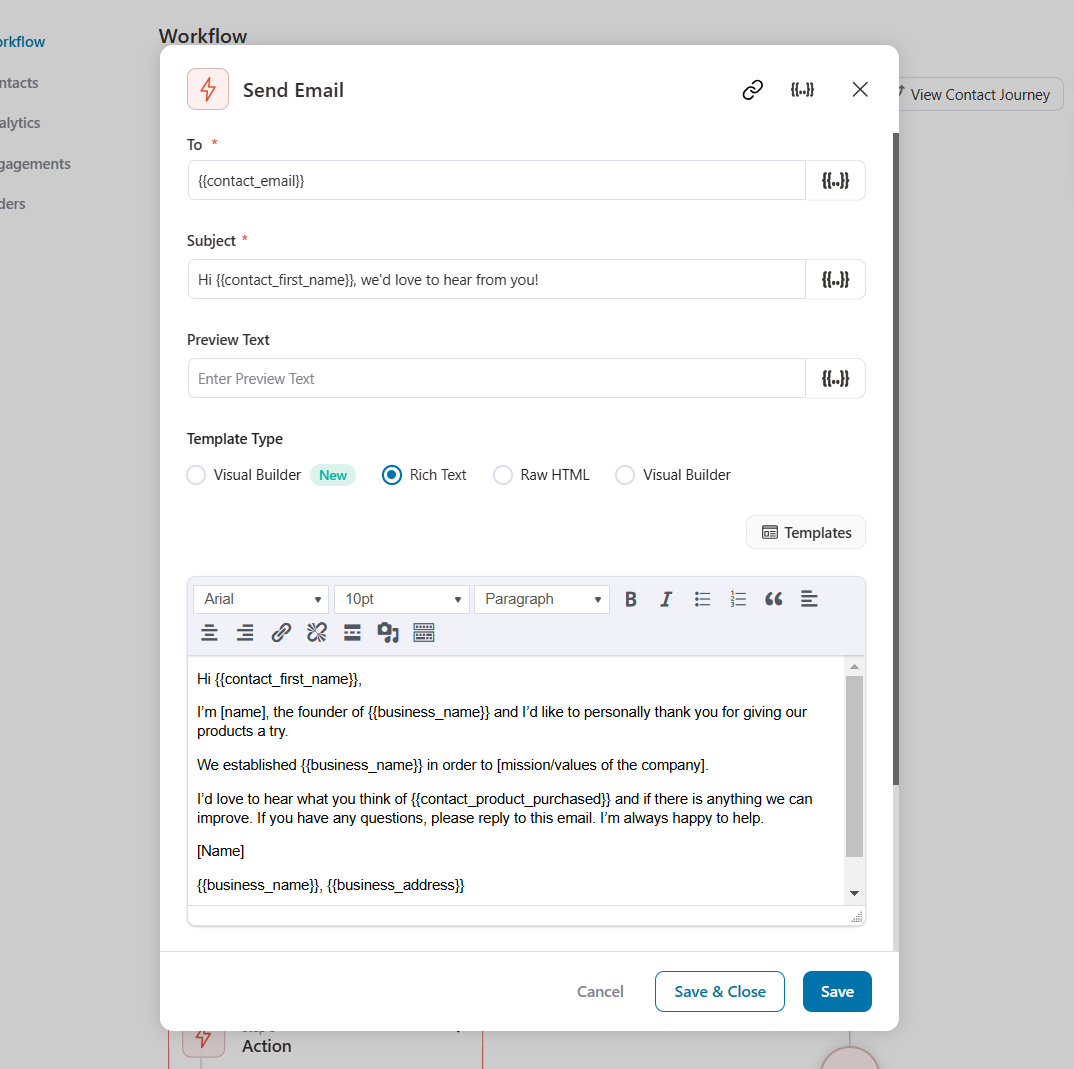
You can also use FunnelKit Automations’ built-in visual email builder to design attractive emails and send them to your customers.
Your emails are an extension of your website’s authority. If your emails look spammy or contain errors, it damages the trust you built on your site.
- Authentication: Ensure your sending domain is authenticated (DKIM/SPF) to land in the inbox rather than the spam folder.
- Consistency: The tone of your email should match the tone of your blog and product pages.
- Helpfulness First: Always ask, “Is this email helpful to the user?” If the answer is no, don’t send it.
This is what the final email sequence would look like:
Looking for ideas to design your welcome emails? Check out our post on 15 welcome email examples.
2. Next-purchase discount email sequence
92% of US shoppers used discount coupons when making a purchase last year.
Most marketers use discount coupons to attract customers. Instead, you can use this strategy as a reward as well.
Let’s design a discount email sequence to incentivize your new customers with a discount coupon.
Add new automation and select your trigger - Order Created - as discussed in the common step.
As we did above, we will add a Condition and configure it for first-time buyers in this WooCommerce post purchase email sequence.
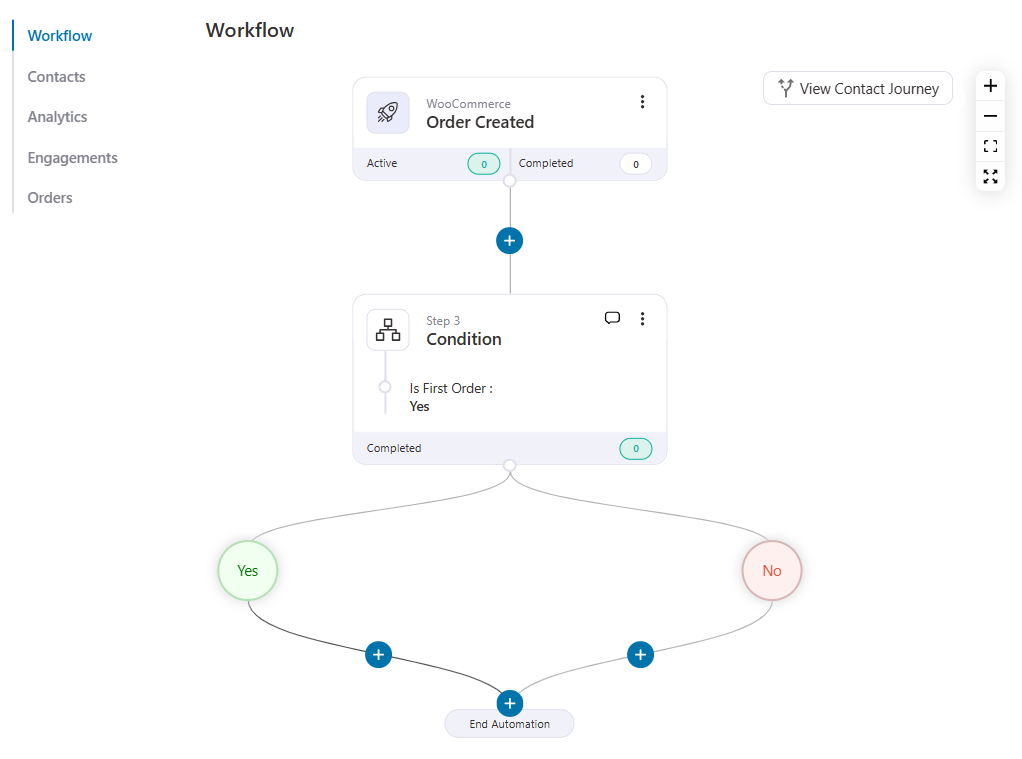
If it’s the buyer’s first order, we will offer them a discount coupon; otherwise, a simple email with a thank-you note would do.
You can send the subsequent emails immediately or delay them by, say, 24 hours.
To add a delay, click on the '+' icon and hit ‘Delay’.
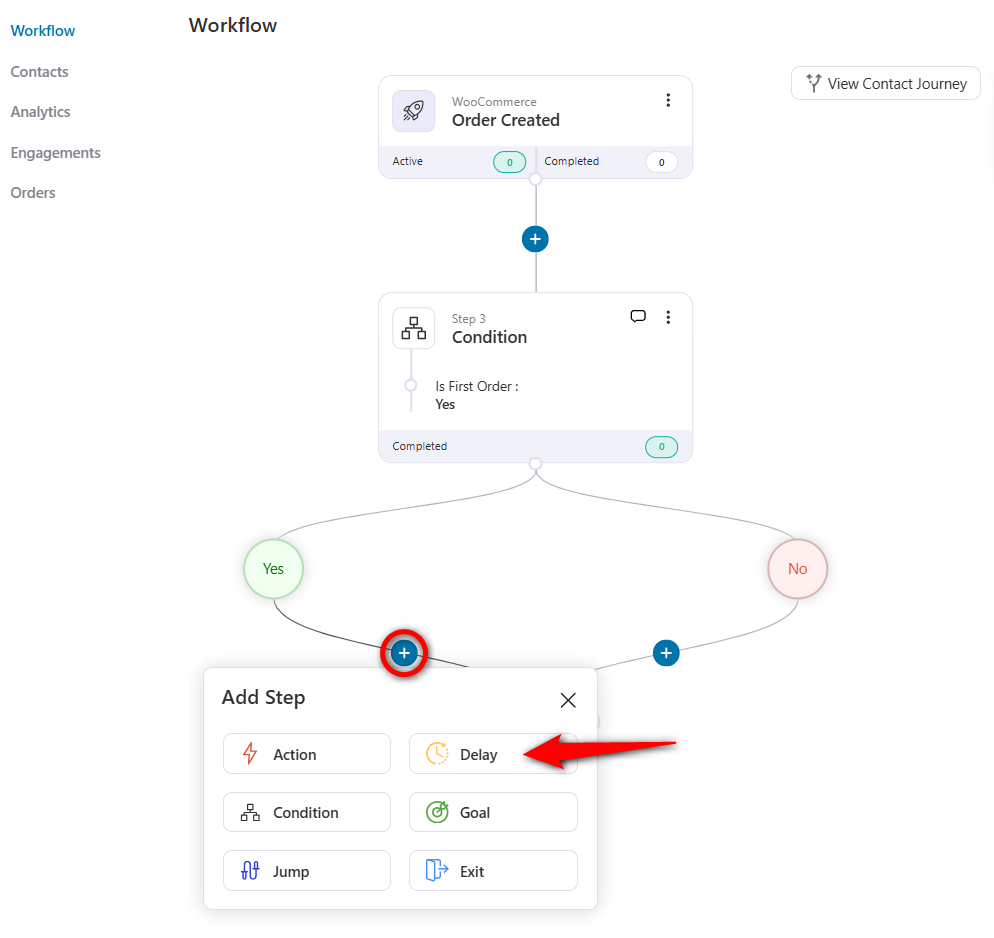
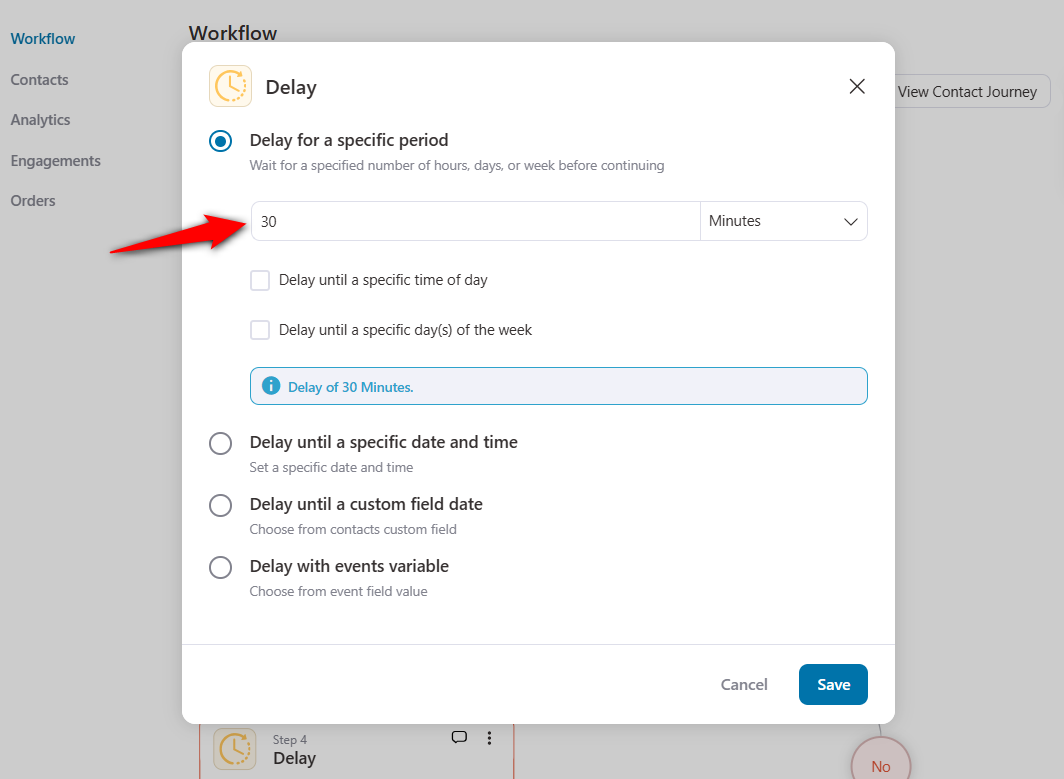
Set the delay to 24 hours.
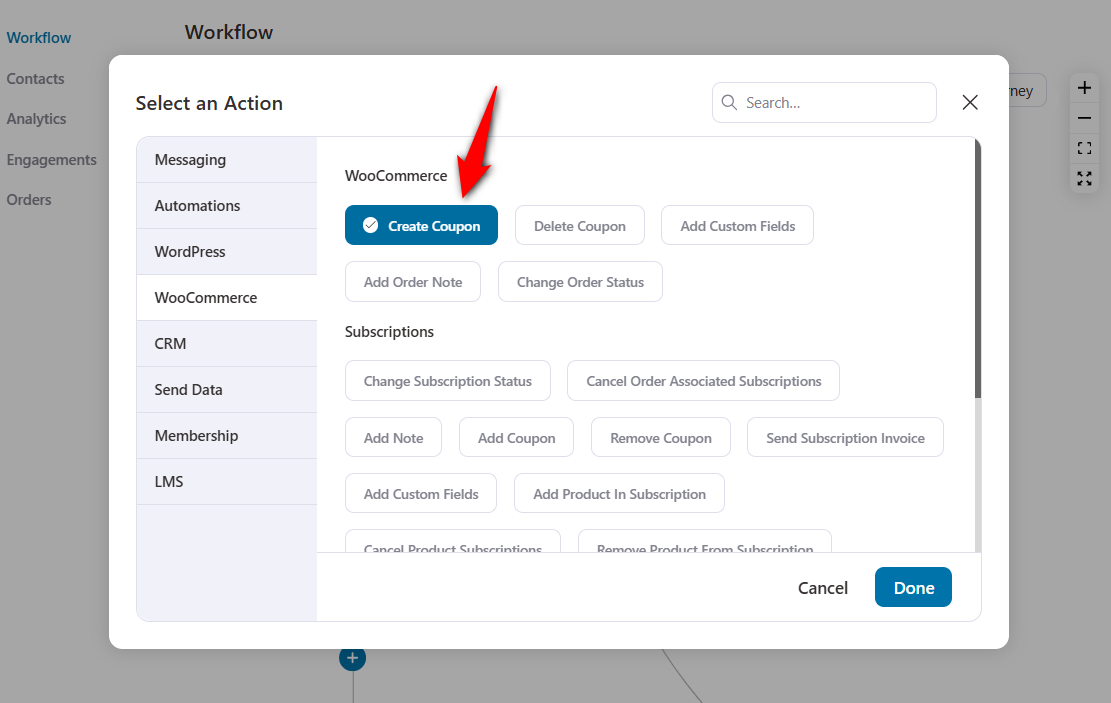
To create a discount coupon, add a ‘Create Coupon’ action under WooCommerce.
Now, configure the coupon settings:
- Coupon Title: Assign a suitable name to your coupon for internal use only.
- Discount Type: The type of discount you want to give - percentage discount, a fixed cart discount (e.g. $10), fixed product discount (e.g. $10 off on product x, $20 off on product Y, etc.).
- Amount: The amount of discount you want to give. We’ll allow a 10% discount irrespective of the customer’s cart total.
- Coupon Code Prefix: Add a custom prefix that a 6-digit auto-generated code will follow.
- Coupon Expiry: Create urgency with time-bound coupons.
- Allow Free Shipping: You can give free shipping and your coupon code.
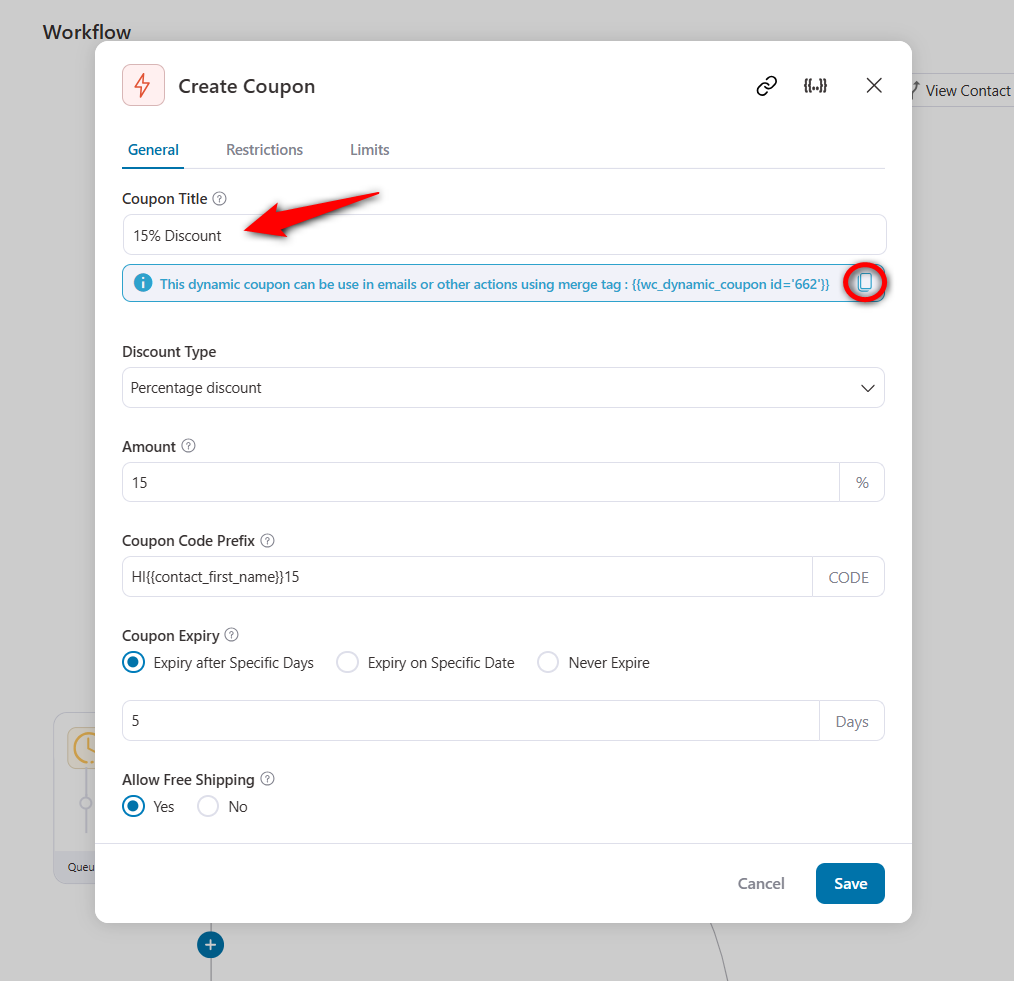
Once you have saved your coupon settings, copy the code highlighted in blue.
Next, add the ‘Send Email’ action in Messaging and paste the coupon code into the email body.
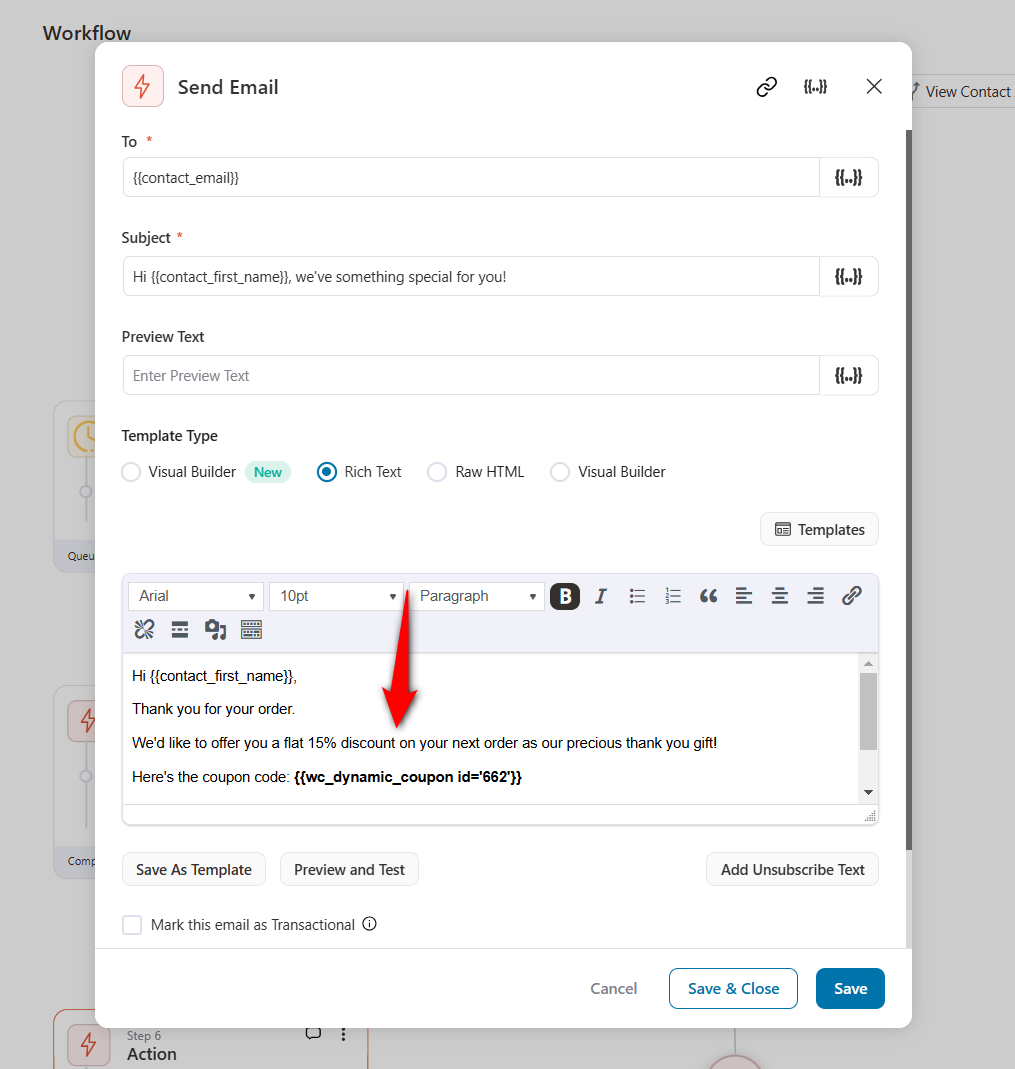
If the condition is false, you can set up another email similarly.
This is what your WooCommerce post purchase email sequence looks like:
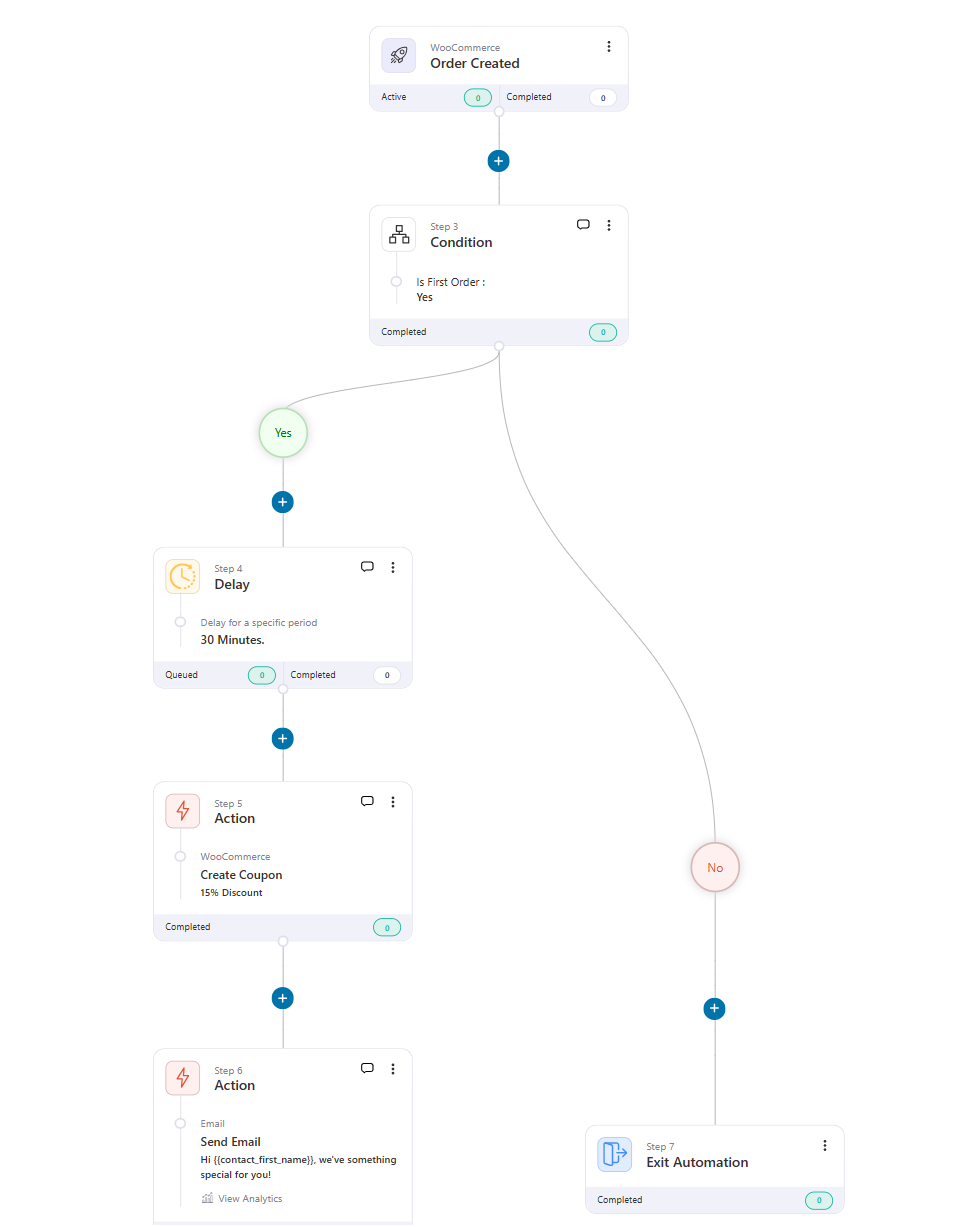
👉 Read our detailed guide on how to create and send dynamic coupon codes and generate repeat sales.
3. First-purchase anniversary
A first-purchase anniversary email shows your customers that you don’t see them as just buyers but as actual human beings who like to be greeted. You can take it a notch up by offering them special discounts.
This email sequence can be imported with one click. However, if you want to build your own, follow the steps below.
So, let’s build a WooCommerce post-purchase email sequence to greet your customers on their first-purchase anniversary.
Add the ‘First Order’ condition after following the abovementioned common step.
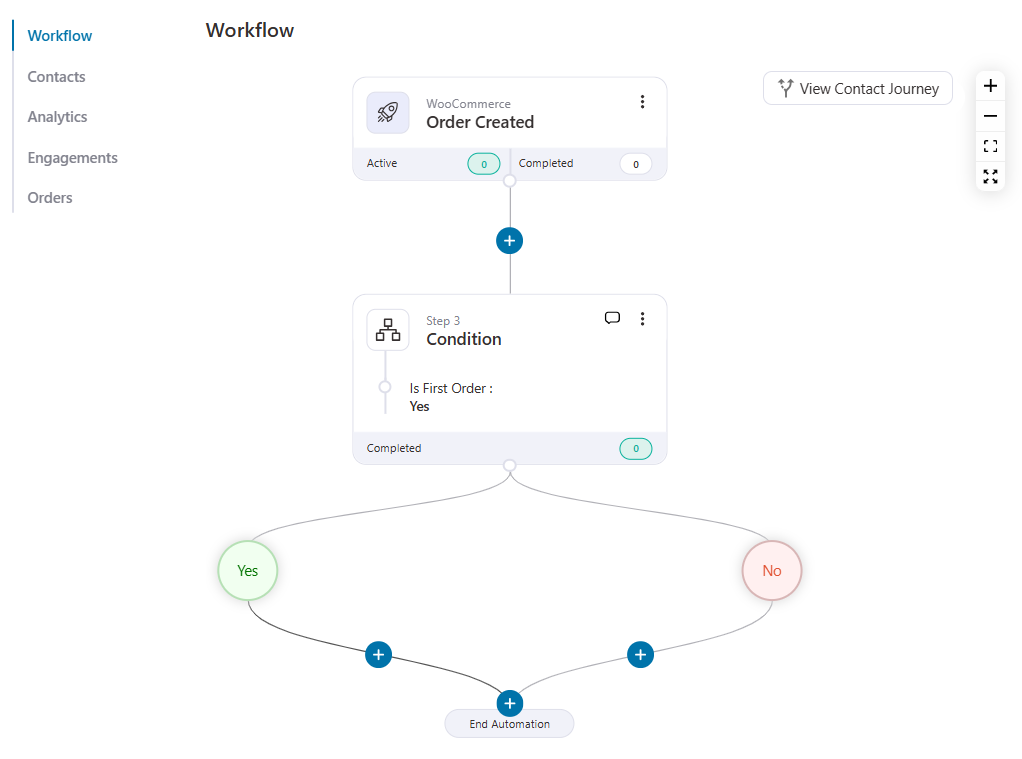
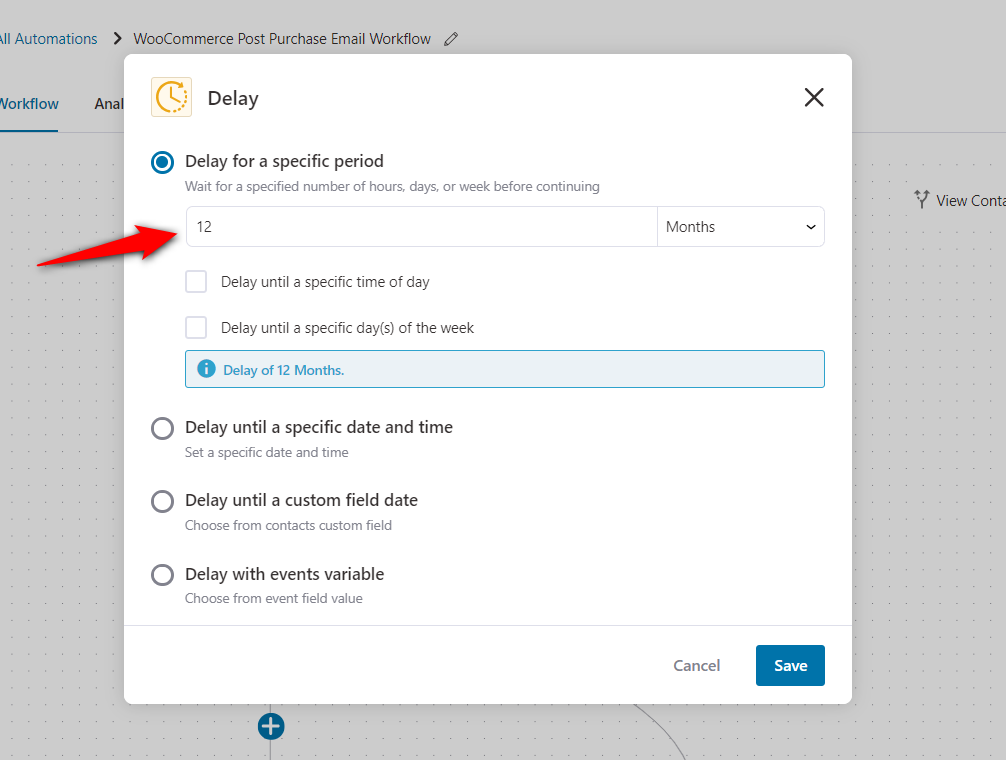
Now, you have to set a delay. To do that, click the ‘+’ icon and add a Delay.
Configure the delay to 365 days or 12 months.
After you set the delay, you need to draft an email congratulating the buyer on their first purchase anniversary.
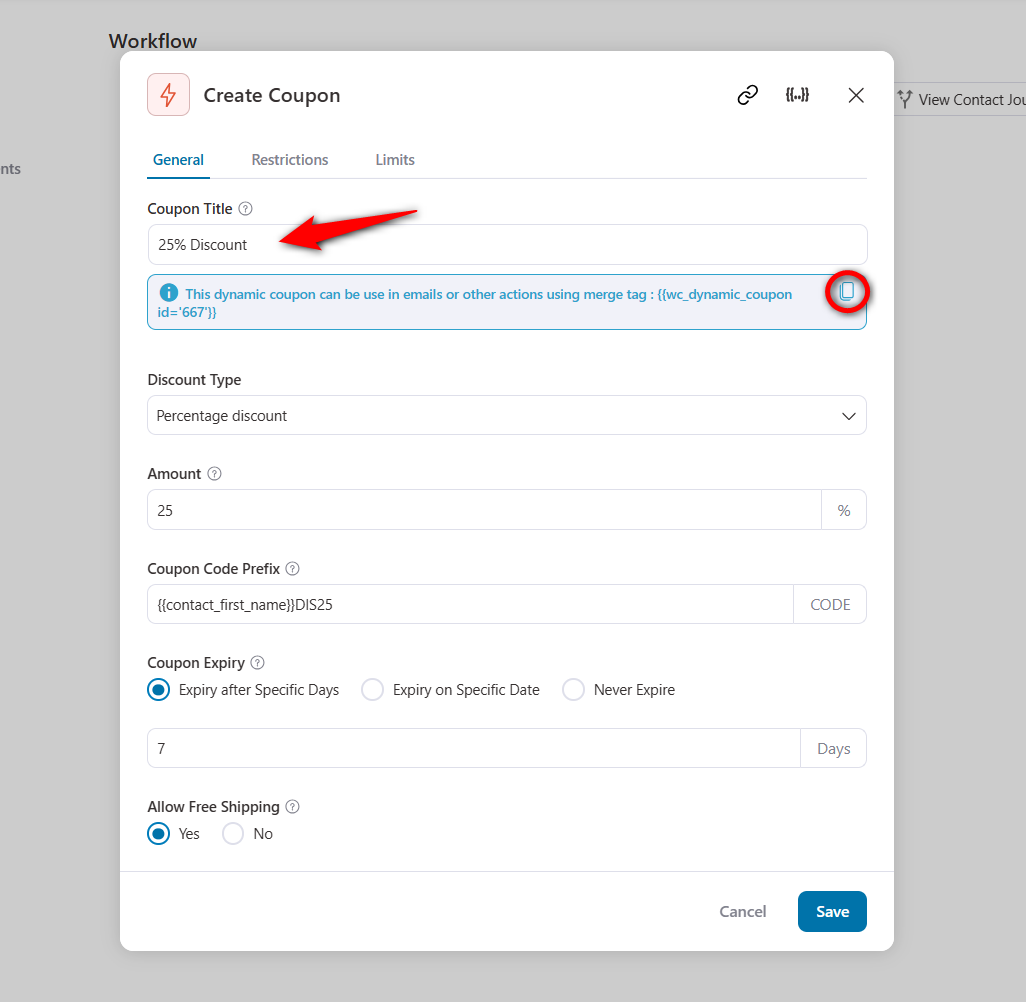
You can also create a coupon code to encourage them to shop at your store.
Add the ‘Create Coupon’ action and configure the coupon settings as discussed above. You can give them an exclusive 25% discount coupon code on this special occasion.
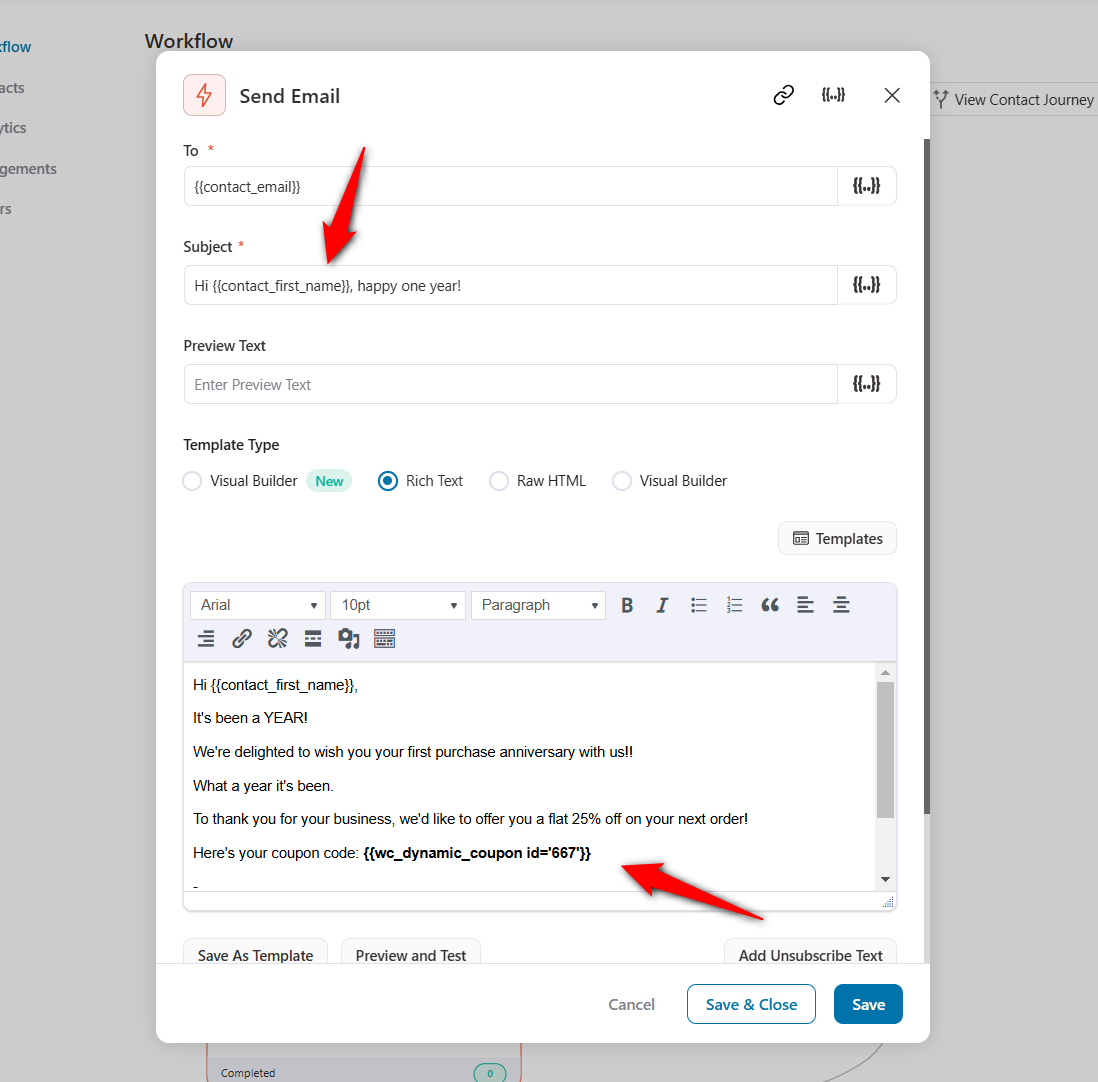
Next, add the ‘Send Email’ action to your WooCommerce post purchase email sequence.
Write a kick-ass email copy and insert your coupon code. Incentivize your audience to use the coupon code and make a purchase to celebrate their first purchase anniversary.
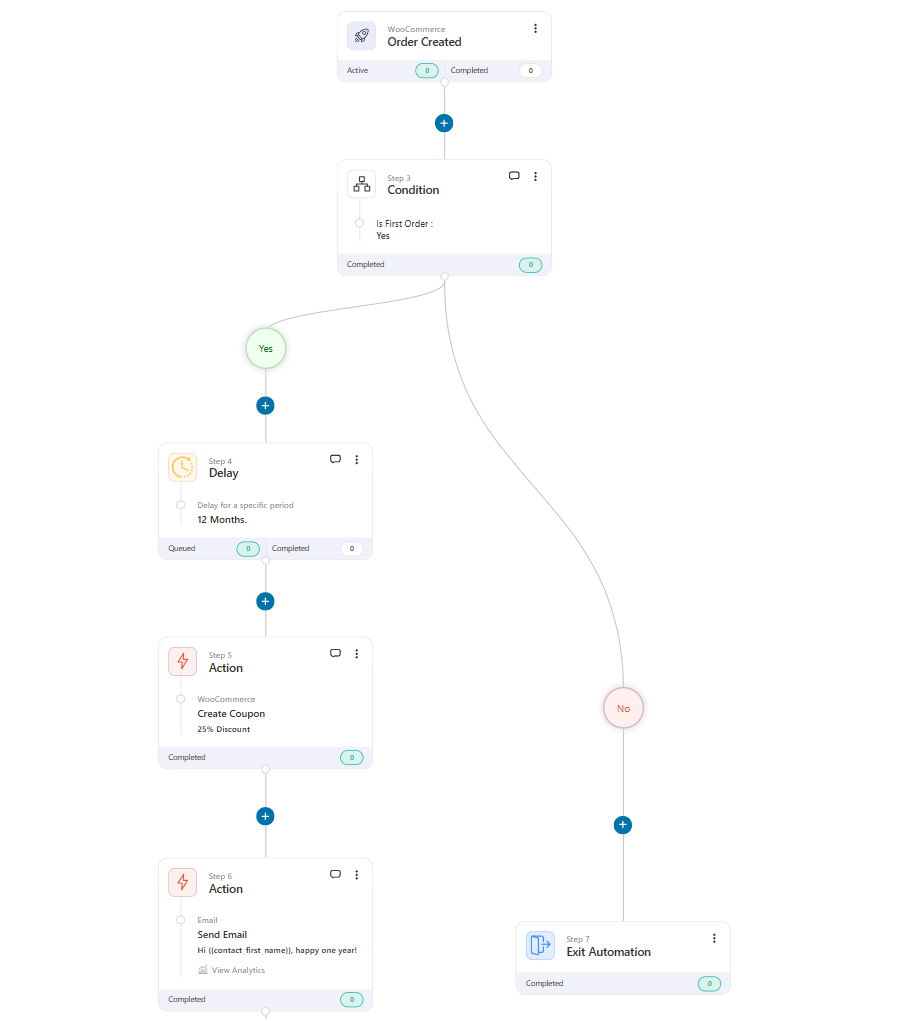
You can simply end the automation for those who do not fit your condition.
This is what the final workflow would look like:
Well done! This is how you can create WooCommerce post purchase email workflows in your store and send them to your customers.
Here are some post-purchase automations you can build:
4. Cross-sell by product or category
Trigger on Order Created, branch on the product or category purchased, and recommend the natural companion item.
Bought a coffee grinder? Send beans and filters. This is the most under-used, highest-ROI sequence most stores skip.
5. Review-request workflow
Time this one to land after the product has arrived, typically the Completed/shipped status + a delay of 5 to 10 days, depending on your fulfillment speed.
Ask for a review while the experience is fresh. Keep it to one clear ask and one button. Reviews compound, and they lift conversion on the product page for every future visitor.
6. Win-back or re-engagement
Trigger when a customer hasn’t purchased in 60, 90, or 120 days. Lead with "We miss you", show what’s new or back in stock, and include a re-activation offer on the final email.
This is the sequence that recovers revenue you've already paid to acquire.
7. Replenishment or reorder reminder
For consumable products (supplements, skincare, pet food, coffee), calculate the typical run-out window and send a reorder nudge a few days before the customer runs out.
Here, the timing does the selling for you.
8. VIP or loyalty tier email
When a customer crosses a spend or order-count threshold, send a VIP welcome with perks.
Trigger it on a cumulative condition rather than a single order, and design it around lifetime value rather than a one-off discount.
Every sequence above needs delays, branching logic, and tracking and FunnelKit Automations ships open, click, and revenue analytics per email plus an activity log showing whether each message was sent, opened, or clicked, so you can resend to opens-but-no-clicks.
Send Different Emails by Product or Category
This is the facet most after-sales guides ignore, and it’s where conditional automation earns its keep.
Instead of blasting every buyer the same message, you send a relevant follow-up based on what they actually bought.
Here's the workflow logic:
- Trigger: Order Created (or Completed).
- Condition (If/Else): Check the product category of the items in the order.
- Branch A: If the order contains a priority category (say, "Coffee Machines"), send the matching cross-sell (beans, descaler, filters).
- Branch B: If it's a different category, route to that category’s companion offer instead.
- Goal: A repeat order. If the customer buys again, they exit the sequence so they don’t get nagged.
The same pattern applies at the product level to hero SKUs, specific bundles, high-margin items, or products with an obvious accessory.
A category-matched recommendation converts far better than a generic bestsellers blast, because you’re suggesting something the buyer is demonstrably in the market for.
If you’d rather branch on richer rules (spend thresholds, tags, first-vs-repeat), layer those conditions on top; see our WooCommerce custom emails per product guide for the full guide.
7 Best Practices to Follow and Inspiring WooCommerce Post-Purchase Email Examples
Here are the seven most effective tips to keep in mind when designing your own.
1. Be grateful and offer assurance
Do you know when humans part with their hard-earned money, their stress level rises?
It might be due to second thoughts about their purchase, doubts about the product’s quality, or something else.
So, it’s important to thank your customers for their purchases and assure them that they have spent their money wisely.
Here’s the WooCommerce post purchase email example from Beauty & Tailor:
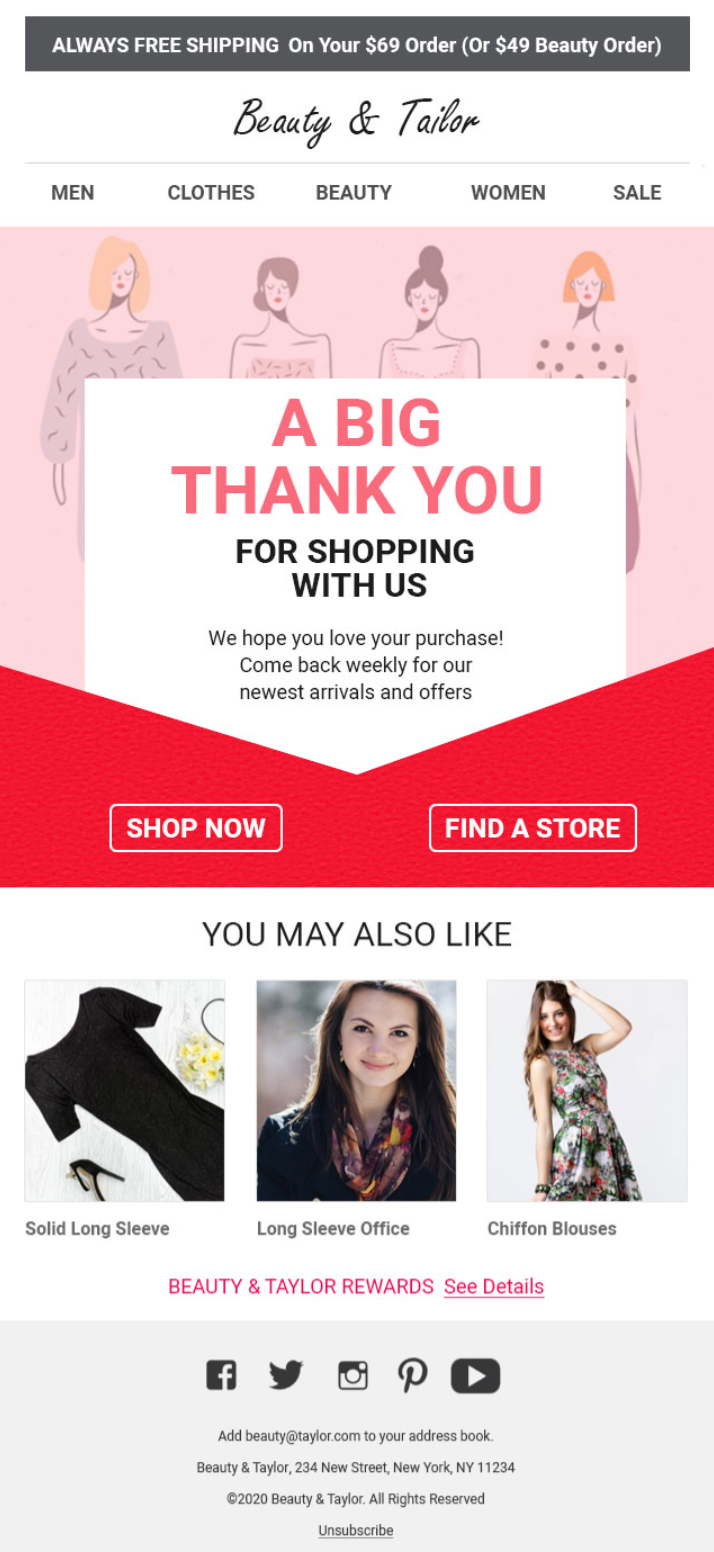
This email reassures them of the value and invites them to check back for exciting offers on their next purchase.
2. Schedule your emails correctly
WooCommerce post-purchase emails deliver the best results when you nail the timing.
You must create appropriate delays between your emails so that the right emails go out at the right time.
3. Create attention-grabbing email subject lines
47% of recipients open emails based on the subject line, while 69% report emails as spam based solely on the subject line.
Therefore, creating attention-grabbing email subject lines is crucial for maintaining customer engagement and ensuring a positive post-purchase experience.
Subject lines with 6-10 words have a much higher email open rate of 21% than those with fewer words.
4. Educate your customers about the purchased product
Welcome emails boast some of the highest open rates and conversions, so it’s good practice to recommend your other products in these emails.
You can send them follow-up emails with tips and tricks to help them get the most out of the product. For example, if someone buys hair gel from your store, recommend the best hairstyles that they can do with it.
Here’s a post purchase example from Google Home Mini:
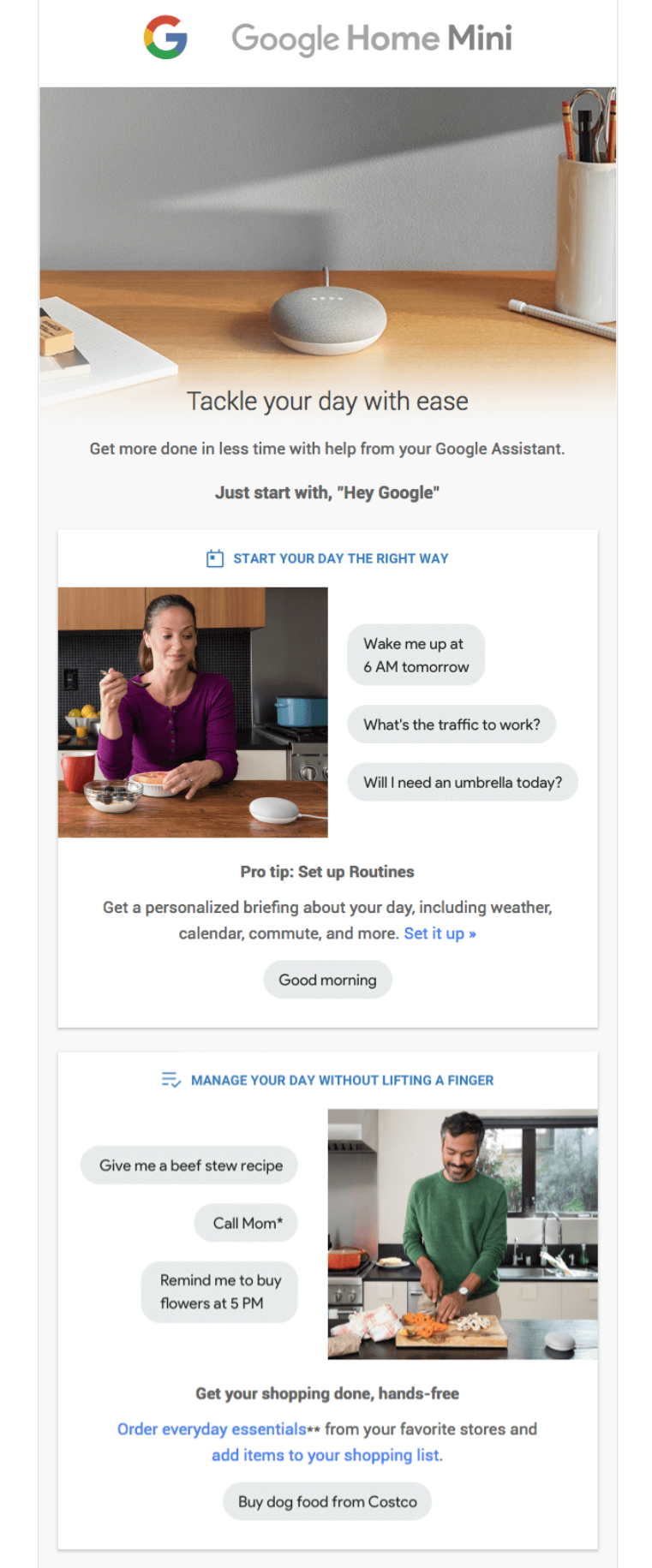
This email explores all the ways you can use your newly purchased Google Home Mini.
5. Design beautiful emails to attract users
Designing beautiful and engaging WooCommerce post-purchase emails is essential to creating a positive customer experience.
A well-designed email communicates necessary information, reinforces your brand’s identity, and encourages future interactions with your store.
To make your emails stand out, include high-quality images, personalize them, and add clear call-to-action (CTA) buttons.
Ensure your WooCommerce post purchase email design is responsive and looks great on all devices.
6. Offer relevant product recommendations
Offering product recommendations relevant to your customers’ purchases enhances customer engagement, increases repeat purchases, and boosts sales.
For example, recommend trousers or a tie if someone has bought a shirt from your store.
By leveraging personalized suggestions, you can provide customers with a tailored shopping experience that meets their needs and preferences.
7. Request product reviews or feedback about the customer’s shopping experience
A review lets you know what your customers like about your product and what they don’t.
Asking for a review makes your customer feel valued. It assures them that you care about their opinions and are open to suggestions.
Here’s a wonderful review request email example from Asos:
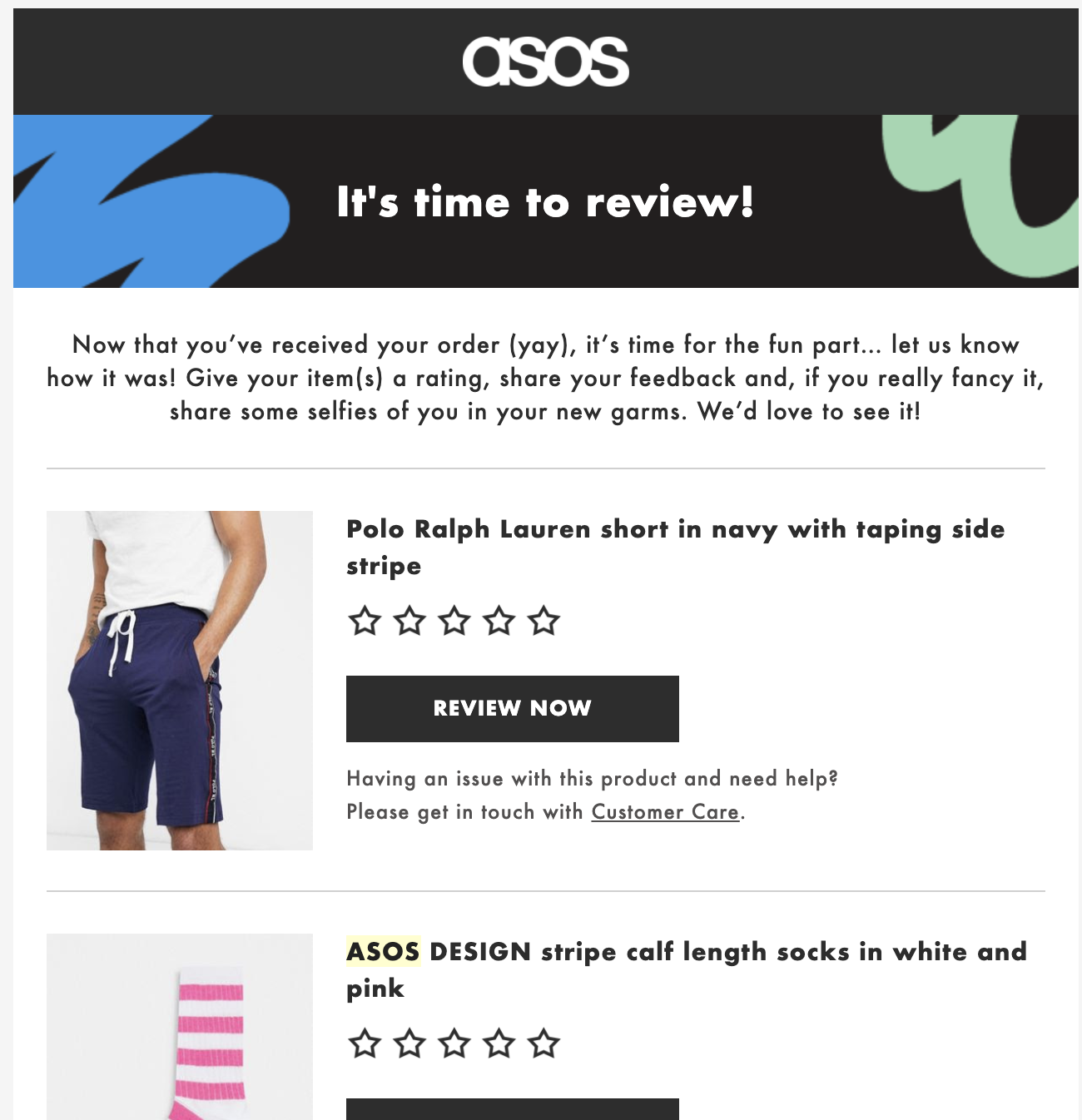
A review email can be crucial to your WooCommerce post-purchase email sequence.
👉 Head to this post to see more WooCommerce automated follow-up emails that you can automate.
For Developers: Send a Custom Email With Code
If you'd rather not add a plugin and you’re comfortable in functions.php (or a small custom plugin), you can fire a custom message off any order-status hook.
The cleanest entry point is woocommerce_order_status_completed.
/**
 * Send a custom email when an order is marked "Completed".
 * Add to your child theme's functions.php or a custom plugin.
 */
add_action( 'woocommerce_order_status_completed', 'fk_send_post_purchase_email', 20, 1 );

function fk_send_post_purchase_email( $order_id ) {

    $order = wc_get_order( $order_id );
    if ( ! $order ) {
        return;
    }

    $to      = $order->get_billing_email();
    $name    = $order->get_billing_first_name();
    $subject = 'Thanks for your order — here\'s what\'s next';

    $body  = "Hi {$name},\n\n";
    $body .= "Your order #{$order->get_order_number()} is on its way. ";
    $body .= "Here's a 10% code for your next order: THANKYOU10 (valid 7 days).\n\n";
    $body .= "Reply to this email if you need anything.\n\n";
    $body .= "— The Team";

    $headers = array( 'Content-Type: text/plain; charset=UTF-8' );

    wp_mail( $to, $subject, $body, $headers );
}
Two things to know:
- To re-use WooCommerce’s own branded template instead of a plain wp_mail, trigger a built-in email class. For example, WC()->mailer()->get_emails()['WC_Email_Customer_Completed_Order']->trigger( $order_id ), which inherits your store’s email styling.
- For custom statuses, swap the hook to woocommerce_order_status_{your_status} (for example woocommerce_order_status_in-production).
Code is the most flexible route and adds zero plugin overhead, but it offers no delays, no branching, and no analytics, so it suits single transactional messages rather than multi-step revenue sequences.
Post-Purchase Email Templates (Copy and Paste)
Swipe these, change the brackets, and ship. Six messages covering the full journey.
1. Thank-You / Welcome (send immediately)
Subject: Thank you, [First Name]! Your order is confirmed 🎉
Hi [First Name],
Thanks for your order! We're already getting [Order #] ready. You’ll get a shipping note the moment it’s on the way.
While you wait, here’s how to get the most out of [Product]: [link].
Questions? Just reply! A real person reads every email.
2. Product Education (2-3 days after delivery)
Subject: Getting started with your [Product]
Hi [First Name],
Your [Product] should have arrived. Here are three quick tips to get the best results from day one: [tip 1], [tip 2], [tip 3].
Want the full walkthrough? [Watch the 3-minute video →]
3. Cross-Sell by Category (4-7 days after purchase)
Subject: Goes perfectly with your [Product]
Hi [First Name],
Customers who bought [Product] love pairing it with [Companion Product]. Here’s why: [one-line benefit].
[Add to your order - 10% off for 48 hours →]
4. Review Request (5-10 days after delivery)
Subject: How's your [Product] treating you?
Hi [First Name],
Quick favor - Would you share a 30-second review of your [Product]? It genuinely helps other shoppers (and us).
[Leave a review →]
Thank you!
5. Win-Back (60-90 days of no purchase)
Subject: We saved your spot, [First Name]
Hi [First Name],
It’s been a while! Here’s what’s new since your last visit: [highlight]. And here’s 15% off to welcome you back - code [CODE], good for 7 days.
[Shop what’s new →]
6. First-Purchase Anniversary (365 days later)
Subject: One year ago today 🎂
Hi [First Name],
A year ago you placed your first order with us. Thank you for sticking around. As a small thank-you, here’s [perk/coupon].
Here’s to many more. 💛
Want these as ready-to-import sequences with delays and dynamic coupons already wired up? Get the FunnelKit post-purchase pack →
Frequently Asked Questions (FAQs)
To ensure your emails are delivered to your customers’ inboxes, we recommend you perform the following steps:
1. Set up proper email authentication, such as SPF, DKIM and DMARC records
2. Use a reputable SMTP plugin like WP Mail SMTP and email service providers to send your emails
3. Maintain a clean list that allows you to send emails to engaged and valid recipients
4. Create engaging and non-spammy email content
Yes, WooCommerce sends order confirmation emails to customers after the purchase. However, you can override these basic WooCommerce emails in the settings and send a well-designed custom email instead.
👉 Learn how to design and send order confirmation emails to your customers.
Both run conditional WooCommerce sequences. FunnelKit Automations is a standalone marketing automations and broadcasts CRM with dynamic coupons, contact management and revenue analytics in one place.
While AutomateWoo lacks dynamic coupons and visual builders, it is a great marketing tool overall.
Pick based on whether you want an all-in-one funnel suite or a dedicated workflow plugin.
Immediately. The order confirmation/thank-you should send minutes after payment. Subsequent emails (education, cross-sell, review) follow a multi-day cadence.
It depends on the timeframe. Sending three emails in 24 hours is spam. Sending 3 emails over 2 weeks (e.g., Confirmation, Education, and Review Request) helps with engagement. Monitor your unsubscribe rates to find the balance.
Not necessarily. With FunnelKit Automations, you can run these workflows directly inside WordPress, which saves costs and keeps your data unified.
However, you should use an SMTP service (such as Amazon SES or SendGrid) to ensure reliable email delivery.
The Analytics section allows you to track the performance of your post-purchase emails. This helps you analyze your open rate, click rate, orders, and revenue generated.
Furthermore, you can go to the Engagement section to track the journey from sent emails to converted emails.
If you go to the Orders section, you can track the Order ID, purchased item, revenue, and more purchased via email.
- Builds customer satisfaction and trust by reducing anxiety about their purchases.
- Enhance brand engagement with personalized, well-designed emails.
- Encourage repeat purchases by providing discounts and special offers.
- Request reviews or collect customer feedback via surveys to improve their experience and meet their expectations.
- Informing customers about loyalty programs or offering early access to sales or new products can foster loyalty.
- Leverage WooCommerce post-purchase emails to segment audiences for effective targeted and future marketing campaigns.
1. Transactional emails
Transactional emails are sent to customers when they take a specific action or make a certain transaction. These emails are often time-sensitive and provide essential information or updates to the recipients.
Common types of WooCommerce transactional emails:
- Order confirmation emails: Customers receive a thank you or order confirmation email when they complete a purchase. This email contains the order details, including the order number, list of items purchased, shipping information, payment method, and more.
- Shipment notifications: Customers receive a shipment tracking email with information when their order ships. The email includes a tracking number, URL, and estimated delivery date.
- Delivery confirmation emails: When a customer receives their order, a delivery confirmation email is sent to acknowledge receipt of the order.
- New user registration emails: These emails are sent to new users who register on the website. This email usually includes a verification step or a link to set up their password on the website.
Other examples include password reset emails, membership notifications, subscription emails, and more.
2. Promotional emails
WooCommerce post-purchase promotional emails are designed to encourage additional purchases and drive engagement.
Examples of promotional emails:
- Upsell and cross-sell emails: These emails suggest complementary or relevant products based on the customer's purchased item. This personalized product recommendation email encourages customers to make another purchase, which is a common practice in eCommerce.
- Discount and offer emails: Offer special discounts and exclusive deals to customers who have recently purchased from your store. These discount emails encourage repeat business and brand loyalty.
- Product review emails: Ask customers to write reviews for purchased products. This is an important process because new shoppers always look for social proof before buying any item. You can offer incentives such as discounts or loyalty points for writing reviews.
Other promotional emails include product education, loyalty program invitations, survey request emails, event announcements, and more.
3. Retention emails
Retention emails aim to build long-term customer relationships and prevent churn, ensuring your customers continue to purchase from your business.
- Anniversary emails: Send purchase anniversary emails to celebrate your customer’s initial purchase. This will remind them of their history with your business and potentially offer a special deal to encourage another purchase.
- Educational content: Providing helpful and informative content related to customers’ past purchases. Include how-to guides, tips, and tutorials to enhance your customers’ experience with your products.
- Re-engagement emails: Send re-engagement or winback emails to customers who have not yet purchased or have been inactive for an extended period in your WooCommerce store. You can offer incentives, such as discount coupons, or remind them of the value of your products and services.
Some other retention emails include birthday reminders, product updates, new arrivals, exclusive VIP offers, and more.
Send Your WooCommerce Post-Purchase Emails on Autopilot!
Native WooCommerce settings cover your free, transactional baseline. A free plugin extends that to simple automated and manual sends.
And a dedicated automation tool turns the after-sale window, which is the highest-trust, highest-return moment you get, into a system that runs welcome, cross-sell, review, win-back, and anniversary flows on autopilot, branching by product, category, and order status.
You do not need to build everything at once. Start with a thank-you sequence, watch the numbers, then expand into cross-sells, review requests, and win-back campaigns.
For the fastest path from setup to repeat sales, we recommend building these workflows with FunnelKit Automations, which handles your triggers, delays, coupons, and reporting in one place.
Get, set, and automate with FunnelKit Automations - the most powerful WordPress marketing automation engine that can handle all your CRM needs.
Editorial Team
October 6, 2026Abandoned cart subject lines decide whether a shopper opens your recovery email or scrolls right past it. Everything inside that email, from the product photos to the coupon and the...
Editorial Team
October 5, 2026WooCommerce email customizer plugins let you add your logo, brand colors, and preferred layout to order emails without touching code. The problem is that they don’t always cover every email...
Editorial Team
September 30, 2026Quick answer: A quiz funnel is a multi-step interactive path that replaces a static lead form where visitors answer 5-8 questions, opt in with their email, and receive a personalized...






