


Sublium Subscriptions is a complete subscription plugin for WooCommerce. Integration with FunnelKit Automations brings full subscription lifecycle automation to WooCommerce stores.
With this integration, you can automate workflows based on subscription events, perform actions, personalize messages with merge tags, and apply conditional rules to manage subscribers effectively.
Pre-requisites
- Sublium Subscriptions installed and active on your WordPress site.
- FunnelKit Automations are ready to configure triggers, actions, and conditions.
Events (Triggers)
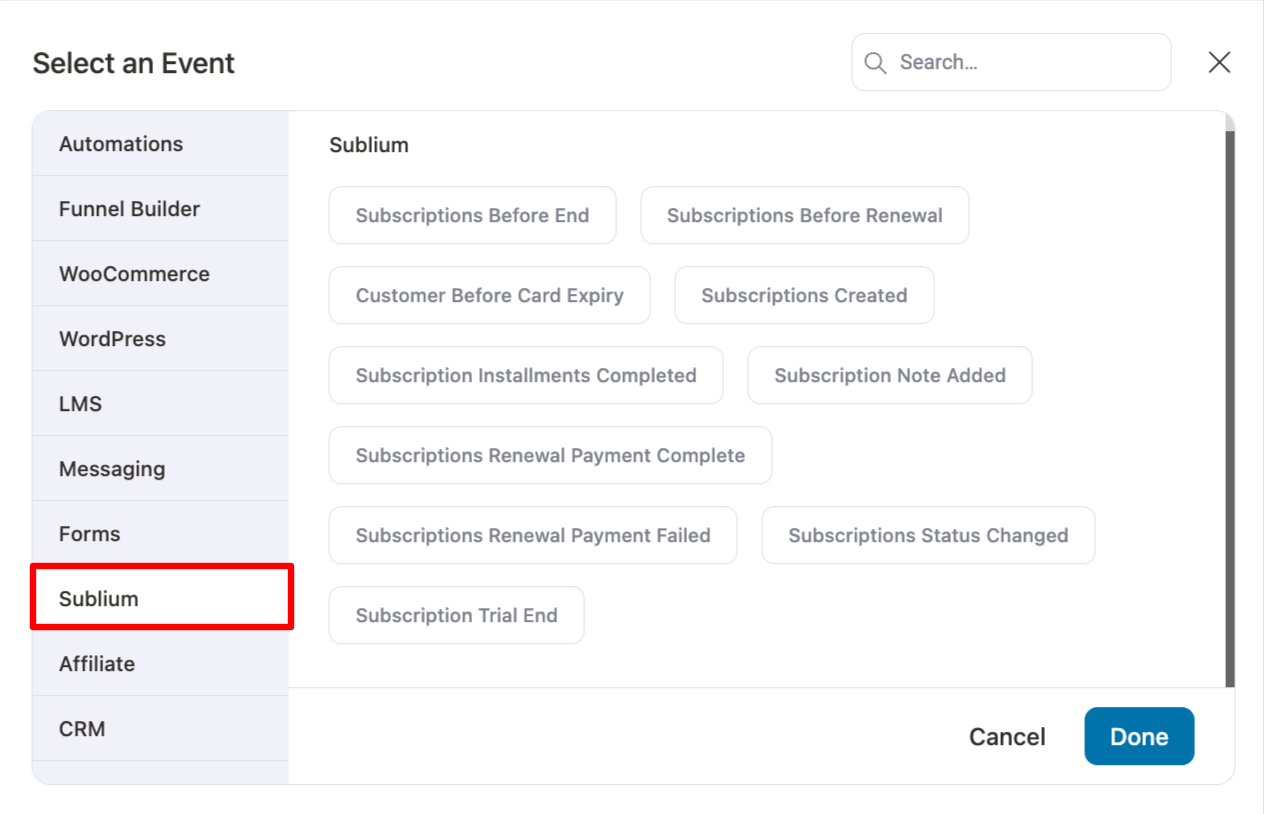
Sublium offers instant events that fire immediately and scheduled events that run on a daily schedule.
Instant Events
| Event | Description | Configuration |
| Subscription Created | Fires when a new subscription is created | Filter by any or specific products |
| Subscription Status Changed | Fires when subscription status changes or after a renewal payment | Configurable From/To Status, Product filter |
| Renewal Payment Complete | Fires after a successful renewal payment | No additional configuration |
| Renewal Payment Failed | Fires when a renewal payment fails | No additional configuration |
| Subscription Trial End | Fires when a trial period expires | No additional configuration |
| Subscription Note Added | Fires when an internal note is added to a subscription | No additional configuration |
| Installments Completed | Fires when all installments of a subscription are completed | No additional configuration |
Scheduled Events
| Event | Description | Configuration |
| Before Renewal | Checks daily for subscriptions about to renew | Configurable “Days Before Renewal” |
| Before Card Expiry | Checks daily for saved payment cards about to expire | Configurable “Days Before Card Expiry” |
| Before End | Checks daily for subscriptions about to expire/end | Configurable “Days Before Subscription Ends” |
Use Cases for Scheduled Events:
- Send reminder emails X days before the next payment.
- Notify customers to update their payment method before card expiry.
- Trigger win-back or upsell campaigns before a subscription ends.
Actions
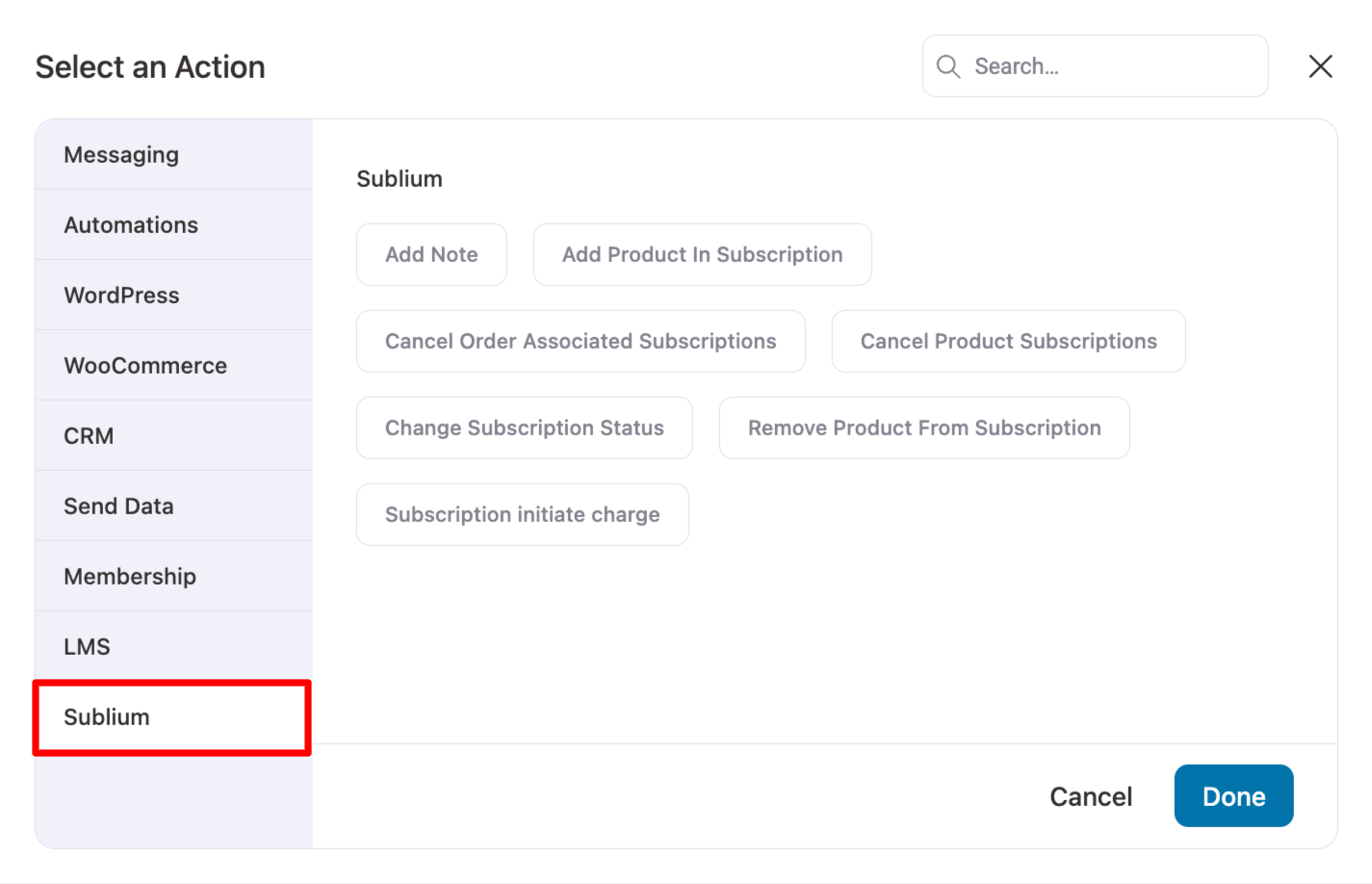
Sublium supports the following actions in FunnelKit Automations:
| Action | Description |
| Change Subscription Status | Update subscription status (active, paused, cancelled, etc.) |
| Add Product in Subscription | Add a product to an active subscription (supports quantity, price, name override; skips if product exists) |
| Remove Product from Subscription | Remove a specific product from a subscription |
| Cancel Product Subscription | Cancel subscriptions containing specific products (supports “Recent only” or “All matching”) |
| Cancel All Order Subscriptions | Cancel every subscription tied to a specific order |
| Add Coupon to Subscription | Apply a coupon/discount code to a subscription |
| Remove Coupon from Subscription | Remove a previously applied coupon |
| Add Note to Subscription | Add an internal note to a subscription |
| Initiate Subscription Charge | Trigger an immediate payment attempt outside the normal renewal cycle |
Merge Tags / Personalization Tokens
Subscription Identifiers & Status
| Merge Tag | Description |
| {{sublium_subscription_id}} | Subscription ID |
| {{sublium_subscription_status}} | Current status (Active, Paused, Cancelled) |
| {{sublium_subscription_items}} | List of subscription product line items |
| {{sublium_subscription_view_order_url}} | Link to view/manage subscription |
Financial & Billing merge tags
| Merge Tag | Description |
| {{sublium_subscription_total}} | Total subscription amount (with currency) |
| {{sublium_subscription_payment_method}} | Payment method description |
| {{sublium_subscription_billing_address}} | Full billing address |
| {{sublium_subscription_billing_company}} | Billing company name |
| {{sublium_subscription_shipping_address}} | Full shipping address |
Payment Card Information merge tags
| Merge Tag | Description |
| {{sublium_subscription_card_type}} | Card type (Visa, MasterCard, etc.) |
| {{sublium_subscription_card_last4}} | Last 4 digits of card |
| {{sublium_subscription_card_email}} | Email associated with card |
| {{sublium_subscription_card_user_id}} | User ID for card |
| {{sublium_subscription_expiry_month}} | Card expiry month |
| {{sublium_subscription_expiry_year}} | Card expiry year |
| {{sublium_subscription_expiry_remaining_days}} | Days until card expires |
Other merge tag
| {{sublium_subscription_note}} | Subscription notes |
| {{sublium_subscription_data key="your_meta_key"}} | Access any custom meta data |
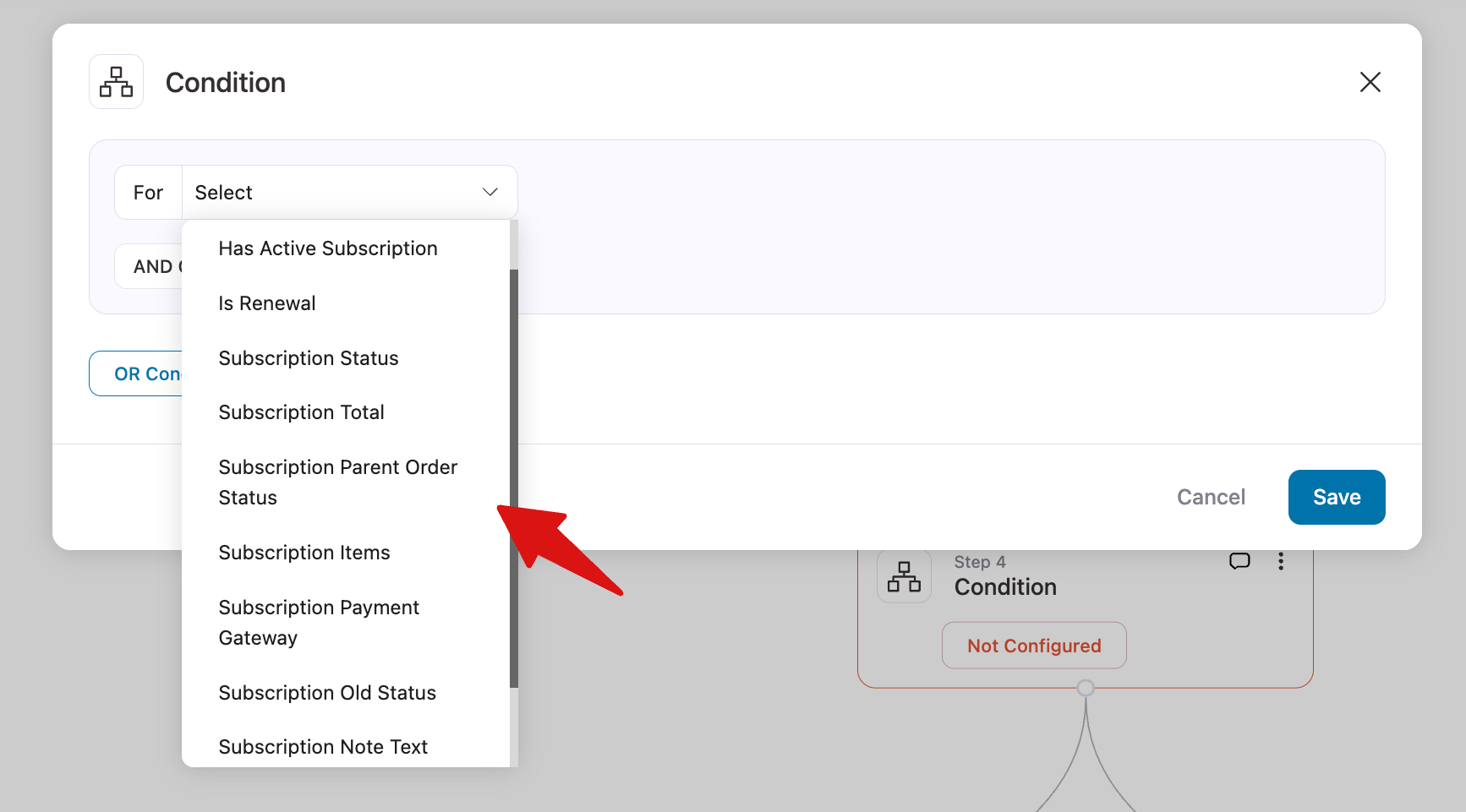
Conditions / Rules
| Rule Type | Operators | Description |
| Has Active Subscription | Boolean | Yes / No |
| Is Order Renewal | Boolean | Yes / No |
| Subscription Status | Multiselect | is / is not |
| Subscription Total | Numeric | =, !=, >, <, >=, <= |
| Active Subscription Products | Search | matches any of / matches all of / matches none of |
| Active Subscription Count | Numeric | CRM filter with comparison operators |
Detailed subscription contact profile
When you open a contact's profile in FunnelKit Automations, a dedicated Sublium section now appears in the sidebar.
It displays the current subscription count, total renewals, renewal revenue, tax on renewals, next renewal amount, and a full list of the contact’s subscriptions in the Purchase section.
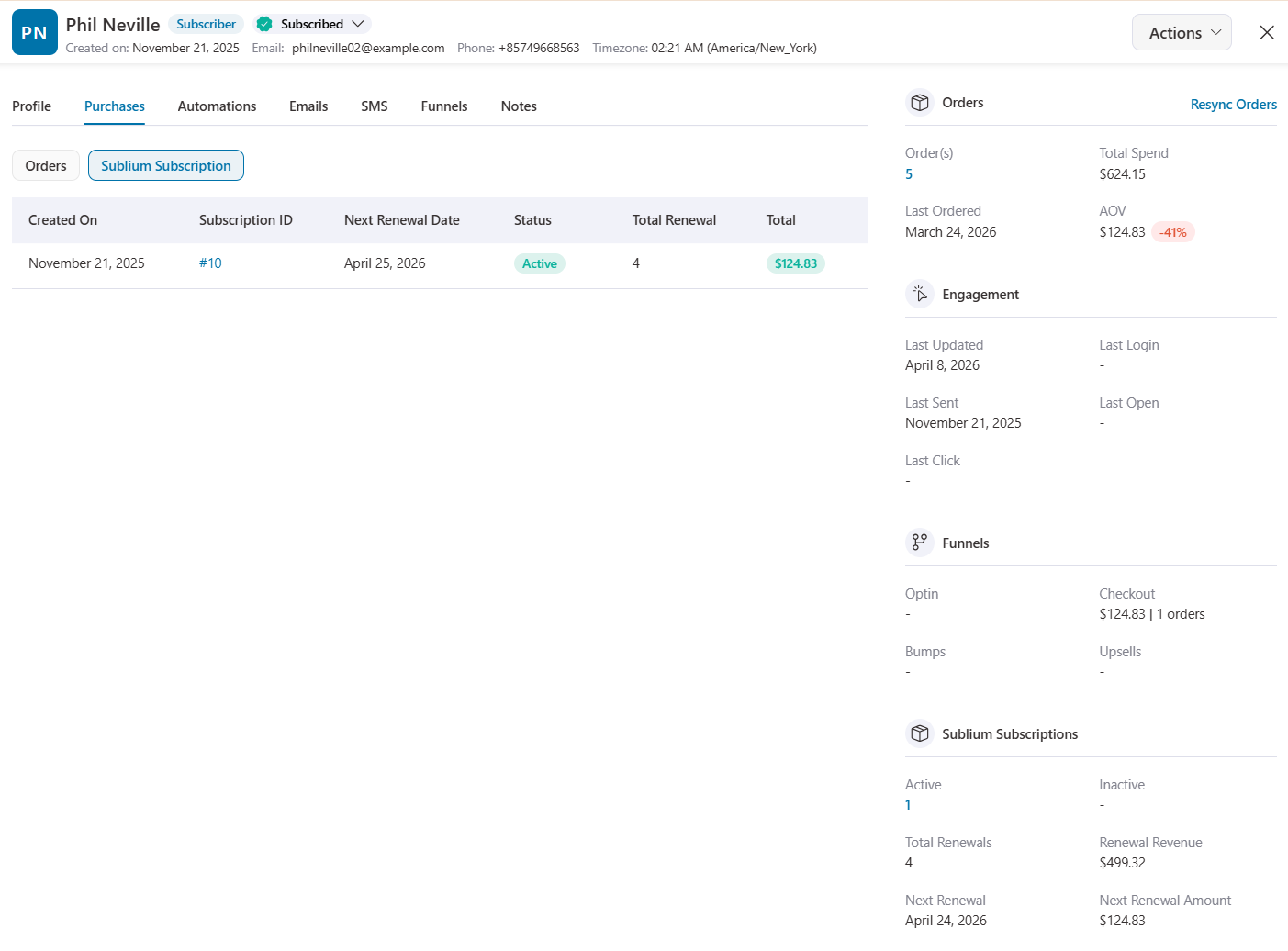
This gives your support and marketing teams instant visibility into each customer’s subscription status without leaving the CRM.


